Key Takeaways
- Check when your profile goes live. Find out when your profile becomes discoverable, who can see it, and whether you can control its audience before entering discovery.
- Understand exactly how location privacy works. Check device permissions, how location affects matching, and what other members can actually see.
- Know what profile verification actually proves. Phone, selfie, and ID checks can verify different things, but none should be treated as proof of someone’s behavior or intentions.
- Check every way another member can contact you. Review messaging, photo comments, introductions, audio calls, and video calls rather than assuming that matching is the only communication route.
- Test blocking, unmatching, and reporting separately. Confirm whether you can still report someone after an unmatch or disappearing conversation and whether the platform provides an alternative support route.
- Look for a safety support route outside the chat. A documented reporting form or support channel is especially important when the original profile or conversation is no longer accessible.
- Check what date-sharing and safety tools actually do. Understand who receives shared information, what details are included, whether links expire, and whether alerts involve another person or only your own device.
- Compare free and paid safety controls. A feature may exist but still be unavailable on the plan you intend to use. Treat essential controls differently from optional convenience features.
- Know how account deletion works before joining. Check profile removal, retained records, subscription cancellation, and whether safety support remains available after closing the account.
- For dating app teams, test the complete safety journey before launch. Test onboarding, visibility defaults, permissions, disappearing chats, reporting, moderation, and post-deletion support using realistic test accounts.
A new dating app can ask for a profile photo, phone number, and location before it tells you who will see any of that information. That’s the point to check its safety controls – not after your profile is already in discovery. Start with three questions: Who can see me? Who can contact me? Can I still get help if someone blocks or unmatches me?
There’s no single set of priorities shared by all women who date online. A teacher might want to keep her profile out of general discovery. Someone who has dealt with harassment may care more about blocking and reporting after an unmatch. A person dating in a small town might want to hide their distance without having to choose a different city. Identify which controls matter to you and find out whether they work the way you expect.
This guide separates what you can check without an account from what you’ll need to confirm in the app. It also explains how to compare two platforms when one lists more features but the other gives clearer answers.
Dating App Safety Checklist: What to Confirm Before You Sign Up
Use this as a quick screen. Each point is covered in more detail below.
- Visibility timing: when your profile enters discovery and whether you can limit the audience first.
- Location display: whether the app shows a distance, a city or nothing, separately from what it collects.
- Verification meaning: whether a badge comes from a photo check, a video liveness check or a government ID.
- Contact routes: who can message you, comment on your photos or call you before a mutual match.
- Image protection: whether explicit images are blurred before you see them.
- Reporting after an unmatch: a public form or support route that works without the original chat.
- Date sharing: what a trusted contact receives and whether the link expires.
- Plan differences: which of these controls are free and which sit behind a paid plan.
- Exit: how to delete the account and cancel billing.
What These Features Look Like on Major Apps
Feature names change and availability varies by country, device and plan, so read the table as examples of what to look for rather than a ranking. Each entry links to the company’s own page or to reporting on it, checked in November 2026.
| App | Feature | What it does |
|---|---|---|
| Tinder | Photo Verification | A short video selfie with a liveness check; passing it adds a “Photo Verified” badge (Tinder Help) |
| Tinder | Face Check | Facial verification required for new users in a growing list of countries; it became mandatory for new users in California in June 2025 (Axios) and across the US from October 2025 (TechCrunch) |
| Tinder | Share My Date | Lets you send a friend who you are meeting, where and when (Tinder safety tips) |
| Bumble | Private Detector | AI that blurs a possible nude image in a chat, so you choose whether to view, block or report it (Bumble Support) |
| Hinge | Selfie Verification | A video selfie that confirms you look like your profile photos; Hinge says it keeps three screenshots for the life of the account (Hinge Help) |
| Hinge | Comment Filter | Moves incoming likes with comments that contain words, phrases or emojis you choose into a separate hidden list; it replaced Hidden Words in March 2025 and adds an automatic filter (Hinge Help) |
Where to Check Dating App Safety Features Without Signing Up
Start with the public help center, privacy policy, and community guidelines. These pages do different jobs. The help center should explain how to use a control. The privacy policy should explain what the company collects and what it says about sharing, retention, and deletion. Community guidelines tell you what behavior the platform prohibits, but they don’t tell you whether a report will be reviewed overnight or how you can follow up.
Use the store listing to see what the app advertises, then look for instructions that back it up. Instead of searching for “safety,” search for the action you would take: “hide my profile,” “decline a call,” “report after unmatching,” or “delete my account.” The more specific the question, the easier it is to distinguish a documented workflow from a marketing claim.
| Where to look | What it can tell you | What it can’t establish on its own |
|---|---|---|
| App store listing | Which tools the app advertises and what the interface may look like | Whether a feature is on your plan or enabled by default |
| Public help center | How to find a setting, submit a report, or close an account | Whether the instructions match every version of the app |
| Privacy policy | What the company says it collects, processes, shares, and retains | Exactly what another member sees in discovery or chat |
| Community guidelines | What behavior is prohibited and how the platform describes enforcement | How a specific report will be resolved or how long it will take |
| Public support route | Whether you can ask a specific question or contact support without a login | That urgent reports will be answered immediately |
If you find conflicting instructions, check which one applies to your device, market, and account type. A help article might describe a premium setting without saying so in the headline. If you still can’t tell, ask a narrow question: “Can I set my profile to private before it’s shown to anyone on the free plan?” That is easier to answer – and easier to verify – than “Is your app private?”
Three points to check before your profile goes live
- 01 · Before signup Find the public instructions for visibility, permissions, and account deletion.
- 02 · During setup Check which details are required and whether you can choose an audience before continuing.
- 03 · Before discovery Look for a profile preview or publish step. Don’t assume the app gives you either.
If you cannot tell when a profile first becomes visible, ask support before uploading anything you wouldn’t want shown.
Profile Visibility: Check What Happens Before You Enter Discovery
Find out when a profile first becomes visible
“Private mode available” doesn’t tell you when you can switch it on. One app might let you choose an audience during onboarding. Another might put the setting behind a menu you can only reach after completing your profile. If you don’t want to appear in general discovery at all, the timing matters as much as the setting.
Look for an explanation of what makes a profile live. Is it finishing your bio, uploading the required photo, tapping a separate publish button, or simply creating an account? If the documentation doesn’t say, don’t assume you’ll get a preview before other people can see you.
Read the exceptions to private and hidden modes
Hiding from new recommendations may leave your profile visible to people you’ve already liked or matched with. An incognito mode may still show you to people you choose to interact with. Neither is necessarily a problem; what matters is whether that audience matches your expectations. Check whether the setting applies to existing matches, whether it lasts until you switch it off, and what happens if a paid plan ends.
In a smaller community, visibility also depends on what’s in the profile. A gym logo, work badge, or recognizable view from a window can be identifying without a surname or address. For teams building dating communities for a specific audience, a preview of what other members see can be more useful than another privacy label.
Location Privacy: Separate Collection, Matching, and Display
Location privacy isn’t one setting. First, there’s what your phone allows the app to access. Second, there’s how the app uses that information to suggest people. Third, there’s what other members see. Turning off a distance label might change only the third part. It doesn’t, by itself, tell you whether the app still collects location or uses it to recommend nearby profiles.
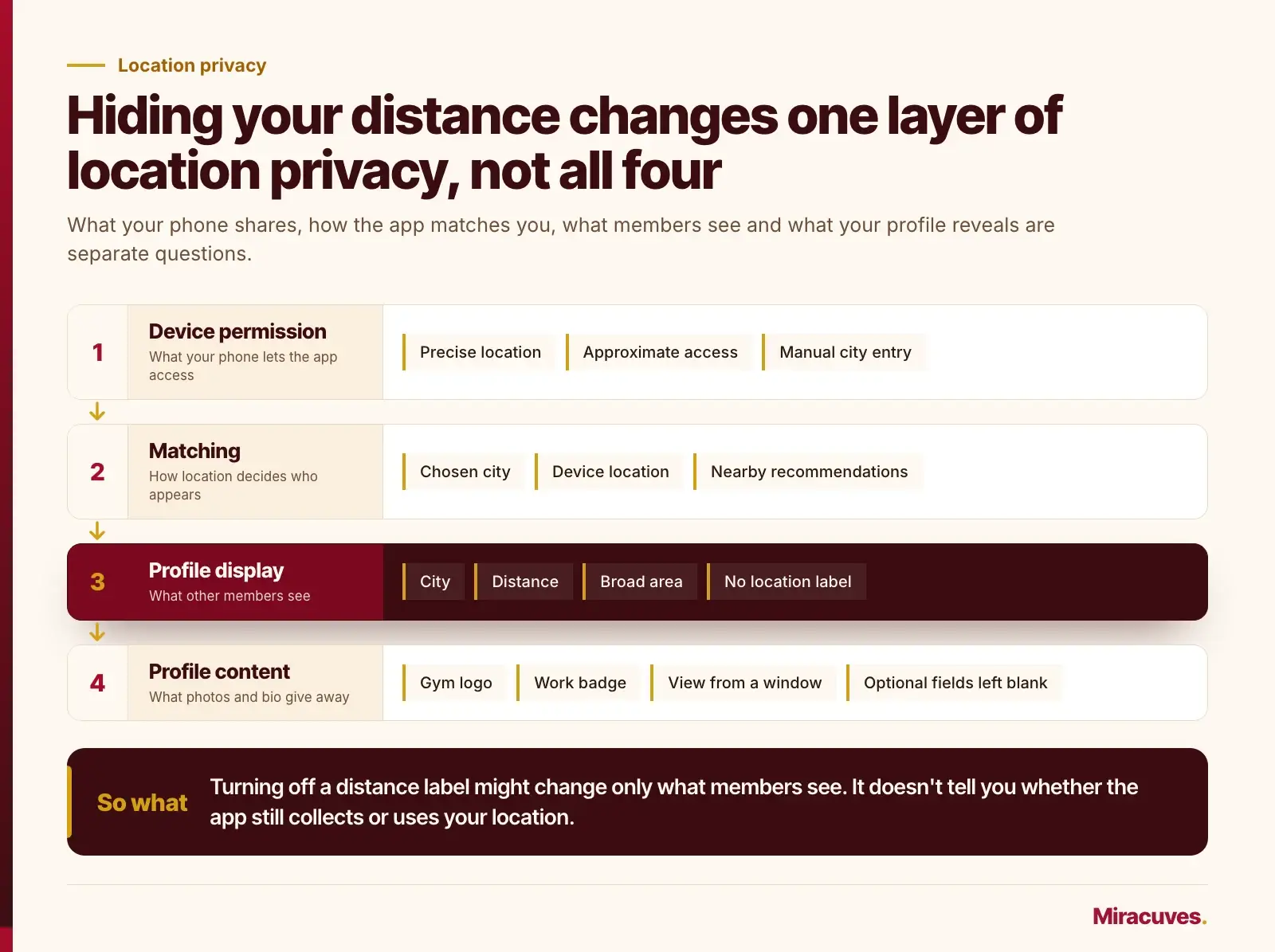
| Layer | Question to ask | Example of an answer worth looking for |
|---|---|---|
| Device permission | Does signup require precise location? | The instructions explain whether approximate access or manual city entry is supported. |
| Matching | How does location affect who appears? | The help center explains whether a chosen city or device location drives discovery. |
| Profile display | What location information do other members see? | The app specifies whether it shows a city, distance, broad area, or no location label. |
| Profile content | Could my photos or bio disclose more than the app does? | You can leave optional fields blank and review what appears on your profile. |
Suppose you’re comfortable appearing in citywide recommendations but don’t want someone to know how close you are to their current location. Your question isn’t “Can I turn location off?” It’s “Can I use discovery without displaying my distance, and what location permission does that still require?” That distinction helps you compare apps without assuming that two controls with similar names do the same thing.
Profile Verification: Understand What the Badge Checks
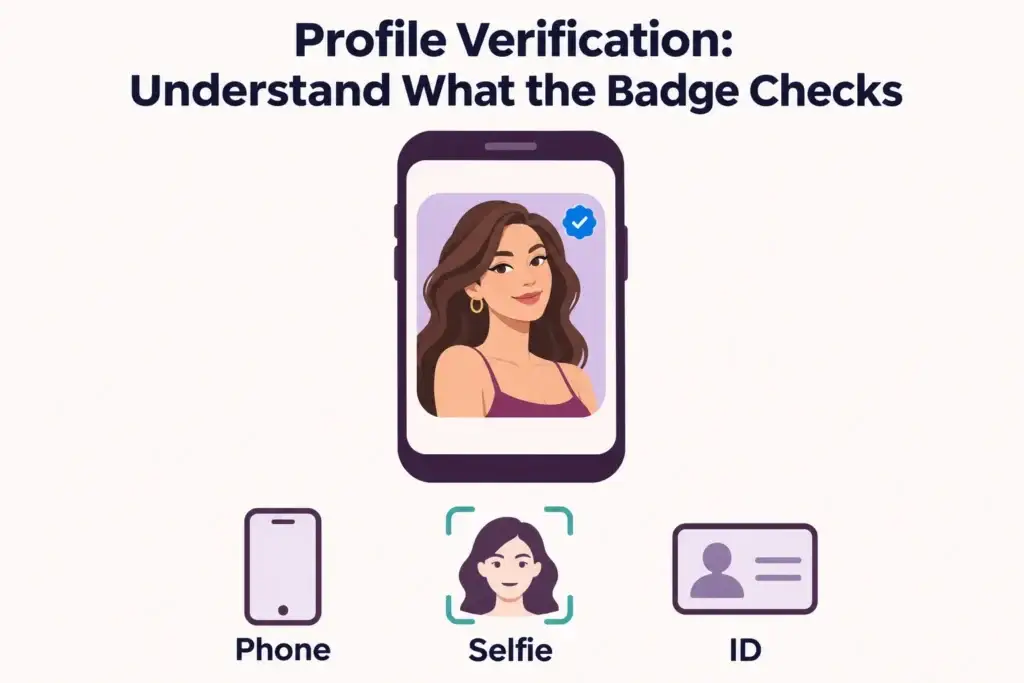
A phone check, a selfie check, and an ID check answer different questions. A phone check can show that the person had access to a number. A selfie check may compare a live image with profile photos. A document check can confirm specific details, depending on how it’s run. None tells you how someone will behave, and photo verification isn’t the same as a background check.
Check what verification changes for other members
Find out whether unverified profiles can still appear in recommendations, send requests, or start conversations. A platform can offer verification without requiring it. If it offers a filter for verified profiles, check whether that filter affects only who you see or also who can see and contact you. Those are different forms of control.
Read what happens to the information you submit
If the app asks for a selfie or document, check whether it’s required, who processes it, and what the privacy policy says about retention. Look for distinctions between the uploaded file, any information derived from it, and the verification status shown on the account. If the documentation only says “your information is secure,” it hasn’t answered how long the company keeps it or what happens if you close your account.
Messaging, Photos, and Calls: Check Every Way Someone Can Reach You
“Chat only after matching” may describe the main inbox while leaving out photo comments, introductions, or message requests. Check whether those routes also require a mutual match, whether paid features change who can contact you, and whether you can decline a request without opening a conversation.
Look beyond text messages
This is not a rare edge case. In a 2023 Pew Research Center survey, 56% of women under 50 who had used dating sites or apps said someone had sent them sexually explicit messages or images they did not ask for. Bumble’s Private Detector, which blurs a possible nude image until you choose to open it, is one example of a control built for that situation.
If an app allows photo attachments, find out who can send them and whether sensitive media can be blurred before you see it. A warning is more useful if you can dismiss or report the attachment without revealing it. If the app supports audio or video calls, check whether calls are optional, whether you can decline them, and whether the other member can see your number.
Keeping a conversation in the app can let you choose when to share direct contact details. It also means the interaction takes place where the app’s reporting tools are available, although what the platform can review varies. If someone wants to move the conversation elsewhere, you can decline. An in-app call is an option, not a step you owe anyone.
Blocking, Unmatching, and Reporting: Check What Happens When a Chat Disappears
Unmatching, blocking, and reporting solve different problems. Unmatching ends a match. Blocking is intended to restrict contact or visibility, but the effect depends on the app. Reporting sends a concern to the platform for review. Some apps offer these actions together; others separate them. It’s worth knowing what each does before you need to use it.
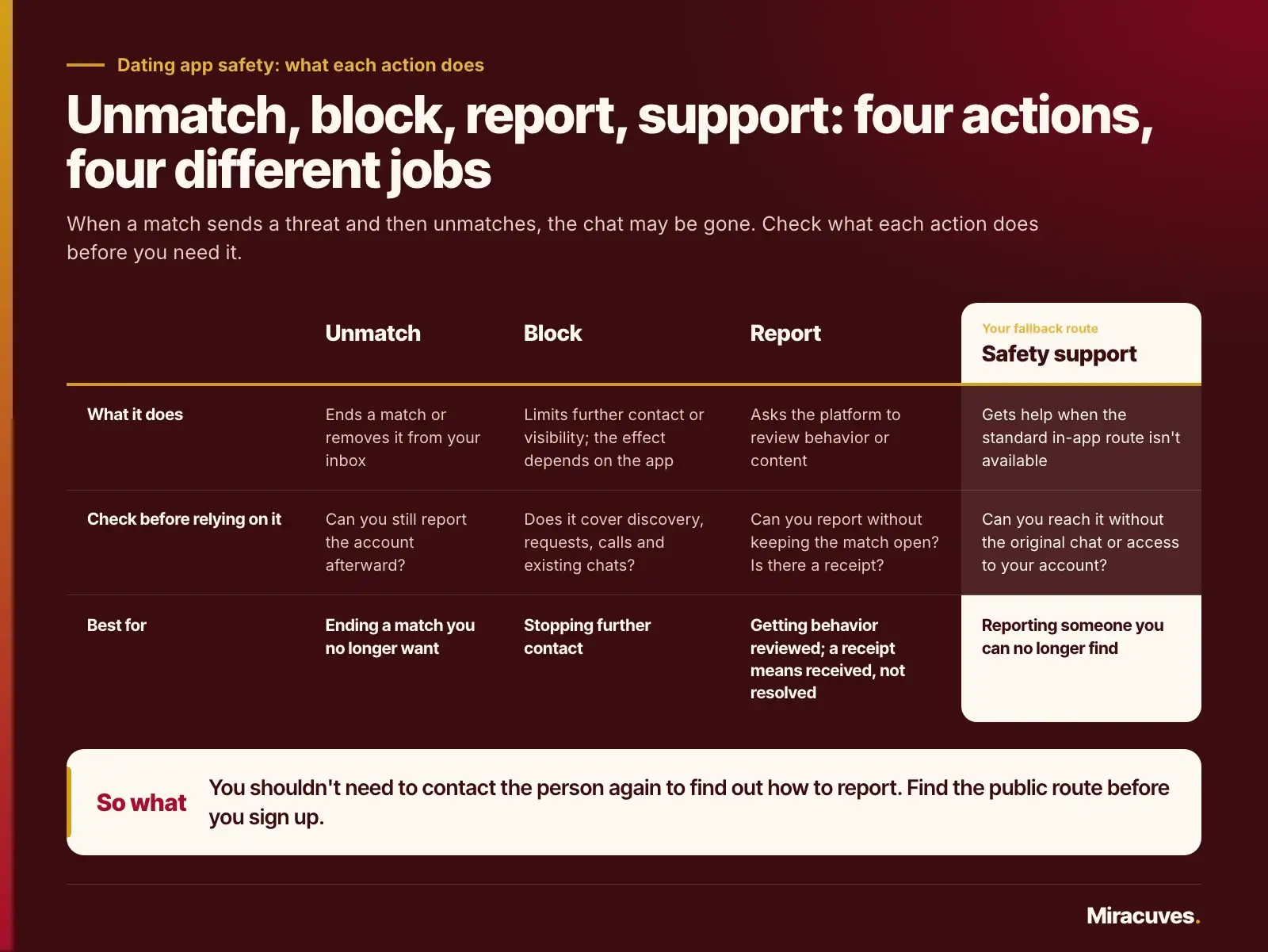
| Action | What you’re trying to do | What to check before relying on it |
|---|---|---|
| Unmatch | End a match or remove it from your inbox | Can you still report the account afterward? |
| Block | Limit further contact or visibility | Does it apply to discovery, requests, calls, and existing chats? |
| Report | Ask the platform to review behavior or content | Can you report without keeping the match open? Will you receive a receipt? |
| Contact safety support | Get help when the standard in-app route isn’t available | Can you reach it without the original conversation or access to your account? |
Use the disappearing-chat test
Imagine a match sends a threatening message and then unmatches. A help article that only says “tap Report inside the chat” doesn’t answer what to do next. Look for a public form, a safety support route, or explicit instructions for reporting a person you can no longer find. Check what identifying information it asks for and whether it explains what to do when you no longer have all of it. You shouldn’t need to contact the person again to find out how to report.
Also look for a receipt or a way to follow up. A receipt confirms that the platform received the report; it doesn’t mean a reviewer has finished the case. The platform may not disclose what it did with another account. If you’re in immediate danger, contact local emergency services rather than waiting for a moderation response.
What a reporting route can look like after an unmatch
- 01 · Chat is unavailable The person or conversation no longer appears in your inbox.
- 02 · Find the alternate route Use the platform’s documented safety form or support channel and share relevant details you still have.
- 03 · Check for acknowledgment A receipt can confirm submission. It doesn’t mean a reviewer has finished the case.
This is an illustrative workflow. Check the instructions for the platform you’re considering.
Safety Centers and Date Sharing: Know Who Gets Notified
A public safety center is most useful when you can get to it without logging in. Look for separate instructions for impersonation, unwanted contact, scams, and account access problems. A searchable FAQ is helpful, but it’s not a substitute for a way to contact the platform when the documented steps don’t fit your situation.
If the app offers date sharing, check what a trusted contact actually receives. A venue and time are different from a profile link or live location. Find out whether you choose which details are included, whether the link expires or can be revoked, and whether a forwarded link can be opened by someone else. You can also arrange a check-in directly with someone you trust without using the app’s tool.
Read missed check-in instructions literally. An alert on your own phone is different from a message to a trusted contact. Neither necessarily means a person is monitoring the situation or that emergency help will be dispatched. If the app doesn’t explain who gets notified and when, don’t depend on it for that purpose.
Warning Signs No Safety Feature Will Catch for You
Most safety tools act on content or accounts, while romance scams work through conversation. The Federal Trade Commission describes the usual pattern: a match who pushes to move off the app quickly, declares strong feelings early, always has a reason not to meet in person, such as work overseas or military service, and then asks for money for medical bills, a plane ticket or visa, or fees to get out of trouble, or offers to help you start investing in cryptocurrency. A request for a wire transfer, gift cards, a payment-app transfer or crypto is the clearest signal to stop and report.
A short in-app video call before meeting is a reasonable test. It shows that the person can appear live and resembles their photos, and on apps with in-app calling it keeps your phone number private. It doesn’t prove intentions, so keep the first meeting in a public place, arrange your own transport, and tell someone you trust where you’ll be, either through a feature such as Share My Date or directly.
Account Deletion: Find the Exit Before You Join
Uninstalling the app removes it from your device. Pausing discovery affects how other people may find you. Deleting the account is a separate action. Before signing up, look for the official deletion steps and read what the company says about when your visible profile is removed and what records it may keep afterward.
Check subscription cancellation separately. A plan purchased through an app store or another billing provider may need to be canceled there. Also find out whether you can contact safety support after closing the account. That’s especially useful if you want to leave and still need to follow up on a report. Don’t assume that closing the account cancels billing, erases every record immediately, or preserves access to the in-app inbox.
Free Versus Paid Safety Controls: What’s Included in the Plan You’ll Use?
When an app says it offers a safety feature, check whether it means all members get it or that it exists somewhere in the product. A private browsing mode and the ability to block a person aren’t interchangeable. If you need both, check both. Likewise, if a plan says it includes extra visibility controls, read what changes when you downgrade or let the plan lapse.
Look for the difference between a convenience upgrade and a control that determines whether you’re comfortable joining at all. Someone who needs a restricted profile audience may decide that an app doesn’t meet their requirements on the free plan, even if its reporting tools are clearly documented. Someone else may be comfortable with general discovery but unwilling to use a service that doesn’t explain how to report after unmatching.
How to Compare Two Dating Apps Without Counting Checkboxes
Choose two or three deal-breakers before comparing apps. Mark each answer as confirmed, conditional, or unknown. A control is confirmed for your comparison when the platform describes how it works and you know the stated conditions apply to you. It’s conditional when it depends on something you can identify, such as a paid plan. It’s unknown when the documentation doesn’t answer the question. Don’t give an app credit for a feature you’re assuming it has.
| Your requirement | Example: Platform A | Example: Platform B |
|---|---|---|
| Limit discovery before publishing | Confirmed: available during setup | Unknown: help article shows only an account settings menu |
| Keep your number private during calls | Conditional: in-app calling is not available on every device | Confirmed: supported for the device in use |
| Report after an unmatch | Confirmed: public reporting route is documented | Unknown: only chat-menu instructions are published |
In this example, someone who needs restricted discovery and reporting after an unmatch has more reason to investigate Platform A. Someone whose only deal-breaker is private calling on their current device might make a different choice. The table doesn’t declare either app safe. It shows which platform has answered the questions that matter to a particular reader.
What to Check in the First Few Minutes After Joining
If you choose to join, do a short settings review before adding optional personal details. Confirm whether discovery is already on, check the audience for any details you entered during setup, and review the location permission the app actually requested. If the platform offers a profile preview, use it to see the profile from another member’s perspective.
Next, locate the instructions for blocking and reporting. You don’t need to report a real person to check where the controls are. If a setting is missing, check for a difference in device, plan, market, or app version. If a deal-breaker is still unresolved and you don’t want the profile visible in the meantime, check whether you can pause discovery or close the account.
For Product Teams: Test the Safety Journey Before Launch
A feature demo can show a working report button while missing the situation in which a member most needs it. Test the journey from the outside in: start with public documentation, move through real onboarding defaults, and finish with the moderation workflow. Miracuves’ dating app industry overview provides broader context for teams planning how discovery, messaging, and operations fit together.
| Test in staging | What to verify | What a failed test reveals |
|---|---|---|
| New account on the free plan | The tester can tell when the profile becomes discoverable and which audience settings apply. | The controls may exist but aren’t usable when the decision matters. |
| Permission denied or limited | The app explains what still works and respects the permission choice. | The permission prompt and real behavior don’t match. |
| Message followed by an unmatch | The documented route still accepts a report, and a reviewer receives the context permitted by policy. | The report flow depends on the chat remaining visible. |
| Report submitted outside normal staffing hours | The receipt sets accurate expectations, and escalation has a named owner. | The interface promises more than the operating team can deliver. |
| Account closed before follow-up | Support can explain the available follow-up route and how retained records are handled. | The exit flow and safety workflow were designed in isolation. |
Use test accounts, not real members, for these scenarios. For the disappearing-chat test, have one test account send a sample message and unmatch. Confirm that the other account can follow the public instructions, send a report, and receive acknowledgment. On the operations side, confirm that only authorized staff can access the case and that reviewers can do their jobs without collecting more information than they need.
Repeat the test on each supported device and on the plan a new member actually starts with. Assign ownership for triage, escalation, evidence retention, and member communication before launch. Useful measures include whether testers can find the right reporting route without help and whether submitted reports reach the correct queue. A lower number of reports alone doesn’t show better safety; it may also mean the reporting route is harder to find.
Final Thoughts: Choose a Platform That Explains What Happens Next
Before joining, look for clear answers about visibility, contact, and reporting. The strongest reason to trust a control isn’t that the app gives it a reassuring name. It’s that you can tell when it takes effect, who it applies to, and what to do if it doesn’t cover your situation. If an app can’t answer a question that affects whether you’re comfortable joining, that uncertainty is part of the decision.
If you’re launching a service, use the same questions as acceptance criteria when evaluating a white-label dating app or a ready-made Tinder-style app. Ask to see the full journey: the first permission request, the moment a profile becomes visible, and a report reaching a reviewer after a conversation disappears. That tells you more than a tour of individual settings screens.
Frequently Asked Questions
What dating app safety features should I check before signing up?
Check who can see a new profile, who can contact you, what verification means, and whether you can block or report someone after a chat disappears. Look for image blurring, date sharing and a public reporting route, and confirm that the controls you need are available on your plan and device.
Which dating apps have the best safety features for women?
No app is best for everyone, because priorities differ. Major apps now offer comparable tools: Tinder has Photo Verification, Face Check in some regions and Share My Date; Bumble blurs possible nude images with Private Detector; Hinge offers Selfie Verification and a Comment Filter for unwanted words. Compare apps on the controls that matter to you and on how clearly each documents them.
Can I check a dating app’s safety settings without an account?
You can research many controls in the public help center, privacy policy, and community guidelines. You may need to join to confirm the exact interface, defaults, and permissions. If a control is essential and you can’t verify it, treat it as unknown.
Does a verified dating profile mean the person is safe?
No. A verified badge reflects a particular check, such as confirming a phone number or comparing a video selfie with profile photos. It doesn’t establish someone’s intentions or mean they passed a background check. Treat it as one piece of information, not a reason to share personal details sooner.
Should I video chat before meeting a match?
It is a sensible step. A short in-app video call shows that the person can appear live and looks like their photos, and in-app calling can keep your number private. It does not prove intentions, so still meet in a public place, arrange your own transport, and tell someone you trust where you will be.
Can I report someone after they unmatch me?
It depends on the app. Check for a public safety form or instructions that don’t require the original conversation. Look for guidance on what information to provide if you can no longer open the profile, and keep screenshots of anything threatening in case you need them later.
Does hiding my distance stop a dating app from collecting my location?
Not necessarily. Hiding distance can change what other members see without changing what the app collects or uses for matching. Check device permissions and the privacy policy separately from the profile display setting, and look for an option to set a city manually.
Can I use in-app video calls without sharing my phone number?
Some apps offer in-app calling without revealing your number to the other member. Check who can initiate a call, whether you can decline or disable it, and whether it works on your device and plan before relying on it for a first conversation.
Does deleting a dating app remove my profile and cancel my subscription?
Uninstalling generally doesn’t delete your account. Follow the platform’s account deletion instructions and check whether you need to cancel your subscription separately through your billing provider, such as the app store where you paid. Read what records the company keeps after deletion.
Miracuves is an independent software development company. We are not affiliated with, connected to, sponsored by, or endorsed by any company or product named in this article.
Terms such as “X Clone” are used descriptively. It is how the software industry refers to building a platform with functionality comparable to a known service, and how clients search for it.
The entire design and codebase of our products is built by our own team. Our products contain no code, design, graphics, or content originating from any third-party website or applications.
All third-party names and marks referenced in this article are the property of their respective owners, referenced solely to identify the services discussed.