
Key Takeaways
- Measure the queue outside the fence Split each visit into queue, gate processing and in-terminal time, because published turn times usually cover only the last part.
- Keep appointments and moves separate One trucking move can use two or three terminal appointments, so the data model needs a many-to-one link.
- Set slot capacity per yard block Yard equipment, not gate lanes, is usually the real bottleneck, so capacity should follow container locations.
- Trust the check digit over OCR confidence A container reading that fails its ISO 6346 check digit should never be accepted, however confident the camera is.
- Waiting burns legal driving hours Time waiting at a terminal counts as on-duty time under federal hours of service rules, which limits second turns.
- Invoice rules double as a spec The FMC list of required demurrage and detention invoice fields tells you which timestamps your platform must keep.
- Plate images are personal data Gate images and location trails need retention periods, deletion and strict tenant separation between competing carriers.
- Rent small, own when the process is the edge Small fleets do fine with subscriptions, while multi-terminal carriers, terminals and marketplaces gain from owning the platform.
A drayage truck can spend more time idling outside a container terminal than it spends on the highway between the port and the warehouse, and drayage software development is mostly about shrinking that idle time. The appointment was booked, the container was released, the chassis was found, and still the driver sits in a line of trucks that has not moved for forty minutes. Port drayage software exists to line up what the paperwork says with what happens at the gate.
This guide is written for founders and operators who are planning a platform for this corner of logistics: a trucking company that wants its own dispatch and gate tooling, a terminal group modernizing its appointment flow, or a startup selling to both. It walks through the records, the workflows, the gate hardware and the rules that shape the build, then gives an honest view of when owning the platform pays and when renting a tool is the smarter move. In short, drayage software books terminal appointments, tracks holds and free time, dispatches drivers, records gate transactions and keeps the evidence that settles demurrage and detention disputes.
The examples lean on United States rules because that is where most drayage searches come from, but the mechanics of slots, gates and container identity work the same way at ports in Europe, the Gulf and Asia.
Where the Hours Go Between the Outer Gate and the Stack
A single import pickup touches at least four parties: the ocean carrier that owns or leases the box, the terminal operator that stores it, the motor carrier that moves it, and the beneficial cargo owner or broker who wants it delivered. Each of them keeps its own version of the truth. The terminal knows the yard location and any holds. The carrier knows the free time and the release. The trucker knows which driver and which chassis are available today.
Delays pile up at the seams between those versions. A customs or freight hold that clears at 2 p.m. is useless if the dispatcher only checks the terminal portal at 9 a.m. An appointment booked for a container that is buried under five others can turn a planned twenty-minute visit into a two-hour wait while the yard crane digs it out. A chassis pool that runs dry at noon strands drivers who already passed the in-gate.
Practitioners usually split the visit into three segments, and each one needs its own timestamp if you want to fix anything:
- Queue time: from the truck joining the approach lane to the moment it reaches a gate pedestal or kiosk.
- Gate processing time: from arrival at the pedestal to the in-gate decision, including any trip to the trouble window.
- In-terminal time: from in-gate to out-gate, covering the drive to the yard block, the wait for equipment and the out-gate inspection.
Most terminals publish a turn time that covers only the last segment. Truckers care about all three, because the driver is paid and the clock is running from the moment the truck stops moving on the access road. A platform that measures only what happens inside the fence will look healthy while the queue outside grows. A geofence on the access road can stamp the queue start from the driver app, the same technique behind GPS tracking and geofencing in a digital freight marketplace.
The Records a Drayage Platform Has to Get Right
Before any screen is designed, the data model has to reflect how containers, trucks and appointments actually relate to each other. Getting this wrong early is the most expensive mistake in the build, because every report, invoice and dispute later depends on it.
Container, booking and release
The container is the anchor record. Its identity follows the ISO 6346 scheme, which the registration authority for container owner codes describes as a three-letter owner code, a one-letter equipment category, a six-digit serial number and a single check digit. Store those parts separately as well as the full string, because you will validate them separately at the gate.
Around the container sit the bill of lading, the import release or export booking, the size and type code, weight, hazardous flags, reefer settings and any holds. Holds deserve their own table with a source, a reason and a cleared timestamp, since a container can carry a customs hold, a freight hold and a terminal hold at once and only clears for pickup when all three are gone.
Truck, chassis and driver
The tractor needs its license plate, state or country of registration, an RFID tag ID if the port uses tags, and the motor carrier that operates it. The chassis is separate equipment with its own ID, often from a pool, and it changes hands between moves. The driver record holds the commercial license, the port access credential and a link to the carrier. Keeping these three apart lets you handle owner operators, leased equipment and drivers who switch tractors mid-shift. The same credential checks apply when outside carriers join your network, as our guide to carrier verification in a digital freight marketplace explains.
Appointment and move
An appointment is a reservation of terminal capacity: a time window, a transaction type (import pickup, export drop, empty return, empty pickup) and, usually, a container number or booking. A move is the trucker’s job: pick up here, deliver there, return the empty somewhere else. One move can consume two or three appointments across different terminals and days, so model them as distinct records with a many-to-one link rather than folding them together.
Every record that changes state should write an event row with who changed it, from which system and when. When a demurrage bill arrives three weeks later, that event trail is what lets the dispatcher prove the container was not available on the day the clock started.
Integrations: Where Drayage Data Comes From
A drayage platform owns very little of the data it shows. Container status, holds, free time and equipment records all live in other parties’ systems, so the integration layer decides how fresh and how complete the dispatcher’s picture is. Plan each source with its interface, its refresh rate and a fallback for when it goes quiet.
| Source | Typical interface | What it supplies |
|---|---|---|
| Terminal operating system or terminal portal | REST APIs where offered, otherwise portal exports or screen-level automation agreed with the terminal | Yard availability, holds, last free day, appointment slots, gate transactions |
| Port community systems | Web portals and data-sharing APIs run by ports or their technology partners | Cross-terminal container visibility, vessel schedules and status in one place |
| Ocean carriers | X12 315 Status Details (Ocean) messages and carrier APIs | Discharge, release, free time and empty return instructions per container |
| Terminals and intermodal ramps | X12 322 Terminal Operations and Intermodal Ramp Activity messages | In-gate and out-gate events, loaded or unloaded at the ramp |
| Chassis pools and equipment providers | Pool portals, APIs or EDI, plus interchange records | Chassis availability, interchange receipts, per diem and repair charges |
| Shippers and brokers | X12 204 load tenders, 214 status updates and 210 invoices, or APIs | Orders in, status and proof of delivery out, freight invoices |
| Electronic logging devices and telematics | Provider APIs, with the carrier’s consent | Remaining hours of service, location and geofence events |
Port community systems are a good example of why a source registry matters. The Port of Los Angeles runs Port Optimizer, a cloud portal built with Wabtec that shares shipping data with cargo owners and other supply chain partners through controlled access. Where a port offers something similar, use it as one more source behind the same internal container record rather than letting its screens become the dispatcher’s workflow.
Appointment Windows: How Slot Booking Behaves in Practice
The appointment engine is the heart of any marine terminal appointment system development project, and its design choices decide whether the terminal smooths its peaks or simply moves the queue from the gate to the booking screen.
Capacity is set per block, not per gate
Gate lanes are rarely the true bottleneck. Yard equipment is. A sound engine sets slot capacity per time window and per yard block or transaction type, so that fifty import pickups are not all booked against the same stack in the same hour. That means the appointment service needs a read feed of container locations from the terminal operating system, refreshed often enough that a container moved overnight does not get booked against its old block.
Dual transactions and linked bookings
The most efficient visit is a dual: the truck drops an export or an empty and leaves with an import, so it never drives inside the terminal without a box. The engine should let a trucker link two appointments into one visit and reward it, for example by holding a slot for the second leg as long as the first leg is confirmed. Without that link, carriers book two separate visits and the terminal sees twice the traffic for the same work.
No shows, swaps and grace periods
Slots attract hoarding. Carriers book more than they need and release the rest late, so the terminal sees empty lanes in a window that looked full. Common counters include a release cutoff before the window opens, a no-show score per carrier that limits future bookings, and the ability to swap the container on an appointment without losing the slot. A grace period of a set number of minutes on either side of the window keeps a driver who hit traffic from being turned away.
Each of these rules is a policy the terminal will want to tune by season and by vessel schedule. Put them in configuration tables an operations manager can edit, with an audit log, rather than in code that needs a release to change.
Pre-checks before the booking is accepted
An appointment for a container that is still on hold, not yet discharged, or past its last free day should be flagged at booking time, not at the gate. Run the same validation the gate would run, and return a clear reason the dispatcher can act on: hold type, expected availability, or the fact that the box is already assigned to another carrier.
OCR and RFID at the Gate: What the Cameras Read and Where They Misread
Automated gates combine optical character recognition on the container, the chassis and the license plate with RFID tags on the tractor. Each technology fails in its own way, and the software around them matters more than the hardware brochure.
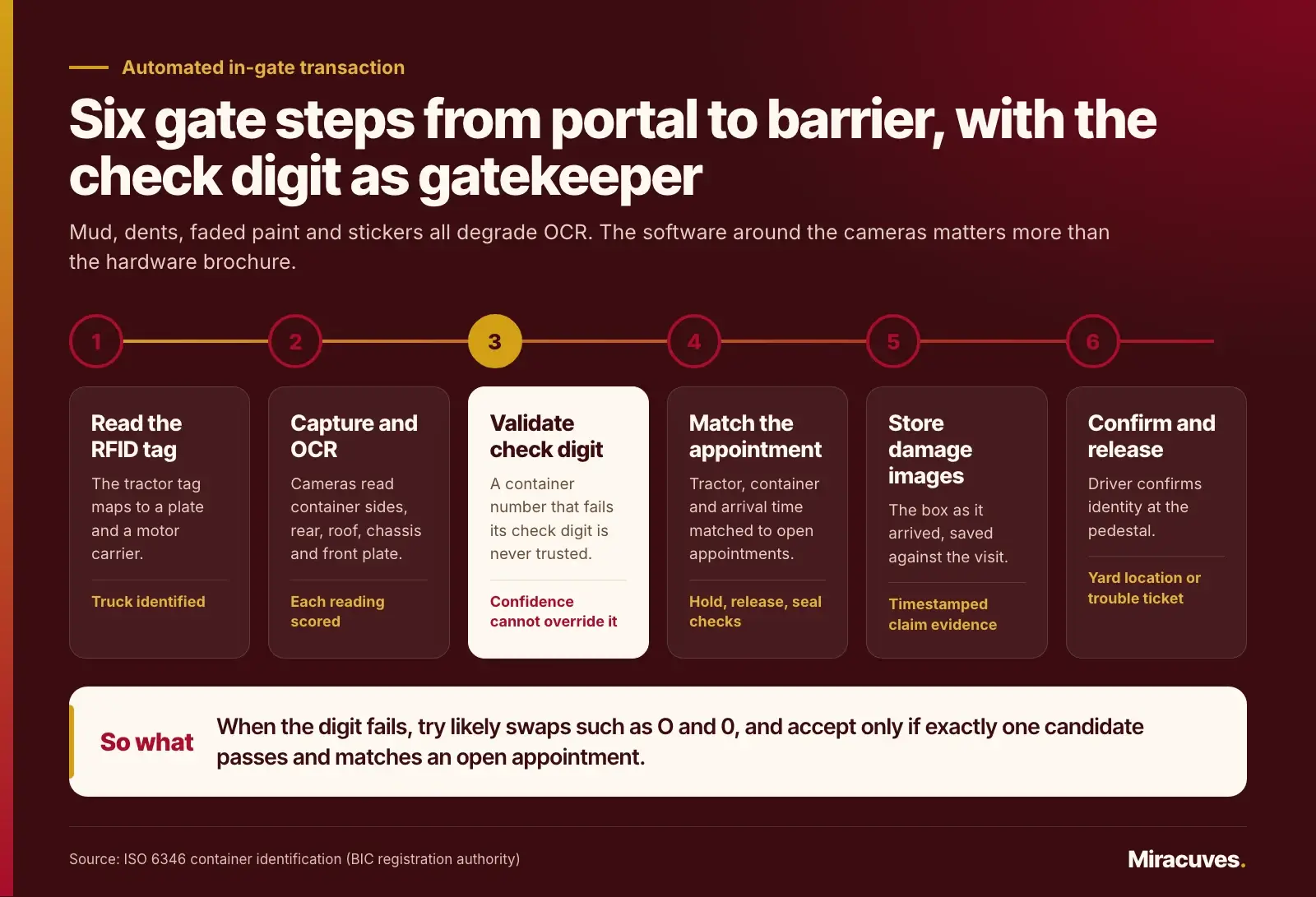
A typical automated in-gate transaction runs in this order:
- The truck enters the portal and an RFID reader picks up the tractor tag, which the system maps to a plate and a motor carrier.
- Portal cameras capture the container sides, rear and roof, plus the chassis and the front plate, and the OCR engine returns each reading with a confidence score.
- The container number is validated against its check digit. A reading that fails the check is never trusted, however high its confidence.
- The system matches tractor, container and the time of arrival against open appointments, and runs hold, release and seal checks.
- Damage images are stored against the visit so that any later damage claim has a timestamped record of the box as it arrived.
- The driver confirms identity at the pedestal, receives a yard location or a trouble ticket, and the barrier opens or the truck is directed to the exception lane.
Why the check digit matters so much
Mud, dents, faded paint and stickers placed over the marking all degrade OCR. The usual confusions are between O and 0, I and 1, B and 8. The check digit catches most single-character errors, and when the digit fails, the software can try the likely substitutions, recalculate, and accept a reading only if exactly one candidate passes and also matches an open appointment. That one rule removes a large share of manual corrections.
License plates are harder than containers
Plates have no check digit, follow different formats by state or country, and are often dirty or partly hidden by a bumper. Treat plate OCR as a supporting signal rather than the primary key. Combine it with the RFID tag and the appointment, and only send the truck to a clerk when the signals disagree.
RFID tags drift out of date
A tag is only as good as the registry behind it. Tractors are sold, re-leased and moved between carriers, and the tag record lags behind. Build a self-service screen where a carrier admin can reassign a tag, and flag tags that have not been seen for months or that suddenly appear with an unfamiliar plate.
The exception lane is a product, not an afterthought
Some share of trucks will always need a human. The clerk screen should show every image, every reading with its confidence, the candidate appointments and the reason the automation stopped, with one-click fixes for the common cases. Track each exception by cause. After a month, that list tells you whether to retrain the OCR model, move a camera, or fix a booking rule upstream.
Hours of Service, Free Time and the Cost of a Long Wait
Waiting is not free for anyone, and two sets of federal rules make that concrete for US drayage.
The driver’s clock
Under the federal hours of service rules, a property-carrying driver may not drive after 14 consecutive hours after coming on duty following ten hours off, and may drive at most 11 hours within that window. Time spent waiting at a terminal to be dispatched, or loading and unloading, counts as on-duty time unless the carrier has relieved the driver.
For a dispatcher this turns queue time into lost capacity. A driver who waits three hours at the gate in the morning may not have the hours left to complete a second turn in the afternoon. The dispatch module should read the driver’s remaining hours from the electronic logging device data where the carrier allows it, and refuse to plan a second move that cannot be finished legally.
The container’s clock
Demurrage runs while a container sits in the terminal past its free time, and detention runs while equipment is outside the terminal past the agreed period. The Federal Maritime Commission’s billing rule lists what a demurrage or detention invoice must contain, including the container number, the allowed free time, and the specific dates charged, along with a contact for disputes. In September 2025 a federal appeals court set aside a separate section of that rule, on who may be billed, but the invoice content requirements in section 541.6 were not affected.
Drayage carriers also face a third clock that is easy to miss in the design: per diem. It is the daily charge an equipment provider bills a motor carrier when a container or chassis is not returned by the end of its free time. The FMC treats it as part of the same family, since its rule defines demurrage or detention as any charges, including per diem charges, assessed by ocean carriers, terminal operators or NVOCCs for the use of terminal space or containers. Between the equipment provider and the trucker, the terms usually come from the Uniform Intermodal Interchange and Facilities Access Agreement (UIIA), the industry interchange contract administered by the Intermodal Association of North America, which also offers binding arbitration for per diem disputes.
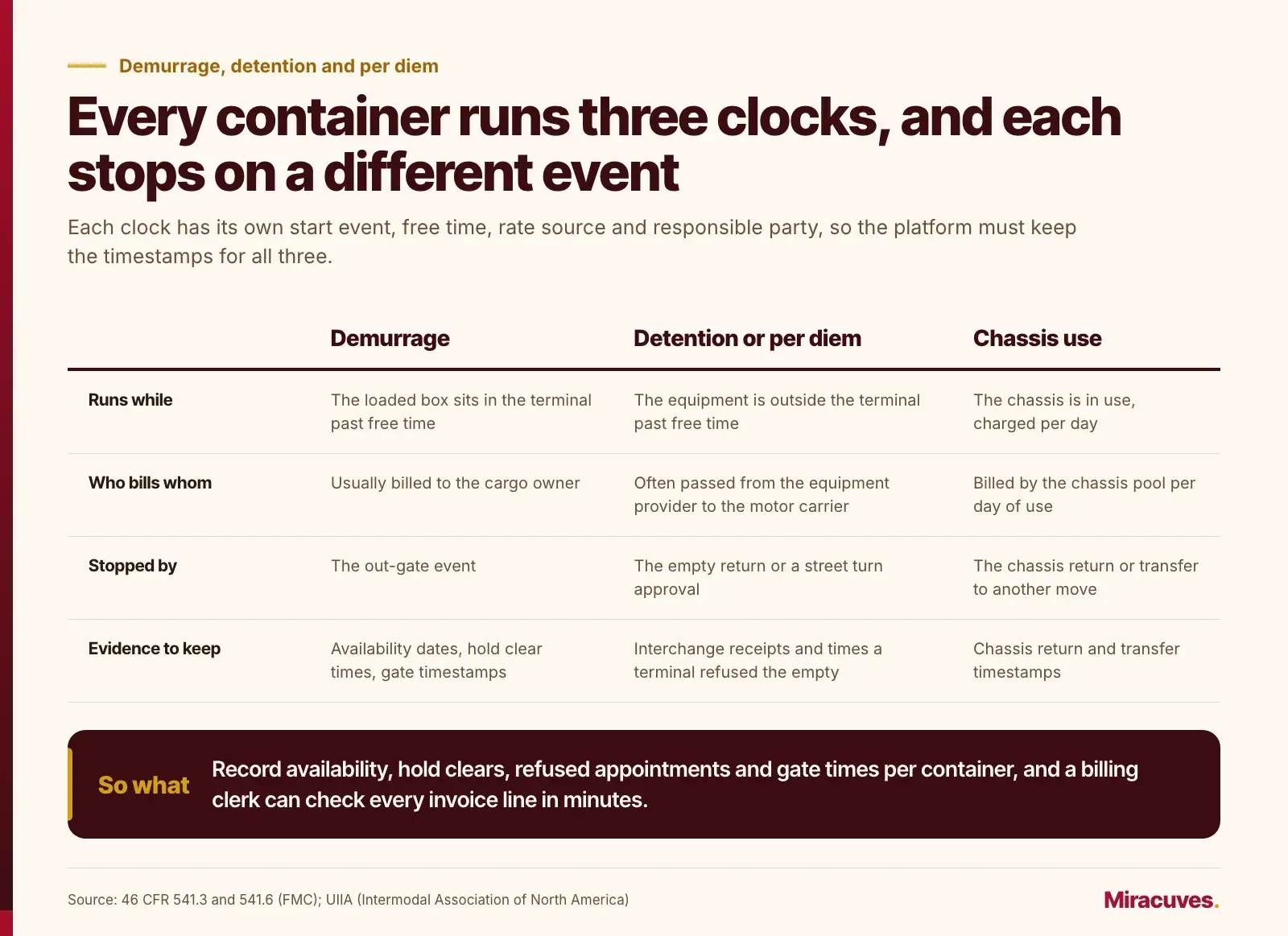
For the software this means three separate clocks per container, each with its own start event, free time, rate source and responsible party:
- Demurrage: runs while the loaded box sits in the terminal past free time, usually billed to the cargo owner, and stopped by the out-gate event.
- Detention or per diem: runs while the equipment is outside the terminal past free time, often passed from the equipment provider to the motor carrier, and stopped by the empty return or a street turn approval.
- Chassis use: billed by the chassis pool per day of use, and stopped by the chassis return or transfer to another move.
Store the interchange receipts and the times a terminal refused an empty return, because a terminal that could not take the empty back is a frequent ground for disputing per diem, and the evidence has to come from your own event log.
That list doubles as a requirements spec. If your platform records availability dates, hold clear times, appointment attempts that the terminal could not honor, and actual gate timestamps against each container, a billing clerk can check every invoice line in minutes. If it does not, disputes become a matter of memory and email threads.
A practical feature here is a last free day board: every open import sorted by days remaining, with hold status and the next available slot. It is the screen dispatchers open first in the morning, and it often covers a large share of the build cost on its own.
Dispatch, Street Turns and the Driver App
On the trucker’s side, port drayage software is a dispatch system with unusual constraints. Jobs are short, the same driver may run four or five a day, and each one depends on a terminal slot, a chassis and an empty return location that can all change at short notice.
Planning the day
The planner view should show moves on a timeline grouped by driver, with slot windows drawn as hard boundaries. Dragging a move to a different driver should immediately recheck hours, equipment and whether the slot can be transferred. Good planners also show which moves pair into duals and which empties could be street turned.
What a drayage TMS adds over a generic TMS
A general trucking TMS plans loads between shippers and consignees. Drayage TMS development has to add the port-specific objects and rules that a generic system treats as notes in a free-text field:
- Chassis as its own equipment, with pool, owner, interchange receipt and daily charge, separate from the tractor.
- Terminal appointments attached to each leg, with the slot window as a hard constraint in the planner.
- Holds, availability and last free day per container, feeding job priority automatically.
- Prepulls: moving an import out of the terminal before its last free day to the carrier’s yard, with yard storage billed as an accessorial and the later delivery planned as a second leg.
- Empty return rules per steamship line and terminal, which change daily and decide where the last leg goes.
- Accessorial charges common in port work, such as waiting time, chassis split, prepull, yard storage and overweight, each tied to the timestamps that prove them.
If your product cannot model these, dispatchers keep a spreadsheet beside it, and the spreadsheet becomes the real system.
Street turns
A street turn reuses an import empty for a nearby export load instead of returning it to the terminal. It saves two trips through the gate. It also needs approval from the equipment owner and a match on size, type and condition. Build it as a request workflow with states such as proposed, approved, rejected and executed, and keep the approval reference on the move so the detention clock stops on the right date.
What the driver actually needs on the phone
Drivers use the app with gloves on, in the cab, often with weak signal near the terminal. Keep the main screen to the current move: pickup location, appointment window, container and chassis numbers, and a single button for the next status. Photo capture for seals, damage and proof of delivery should queue offline and upload when the signal returns. A digital gate pass, shown as a code the pedestal can scan, removes a lot of typing at the kiosk.
Location sharing should be explicit and limited to working hours. Drivers, especially owner operators, are rightly wary of being tracked off shift, and a clear toggle with a visible indicator builds more trust than any privacy policy.
Identity, Access Control and Personal Data at the Terminal
Marine terminals are security zones, and the gate system is part of that perimeter. In the United States, the Transportation Security Administration describes the TWIC card as the credential the Maritime Transportation Security Act requires for workers who need access to secure areas of maritime facilities and vessels. The gate software should store a reference to the credential, check it at the pedestal through the terminal’s reader, and record the result with the visit, without copying more personal data than the check needs.
License plate images, driver faces caught by portal cameras and location trails are personal data in most jurisdictions. Article 5 of the EU General Data Protection Regulation requires that personal data be kept in identifiable form no longer than is necessary for the purpose it was collected for. For a European terminal or a carrier serving one, that means a written retention period per image type, automatic deletion or blurring after it, and a way to answer a driver’s access request.
Role design matters as much as encryption. A practical set of roles looks like this:
- Terminal gate clerk: sees images and readings for trucks currently at the gate, resolves exceptions, cannot edit slot rules.
- Terminal operations manager: sets capacity, cutoffs and grace periods, and views carrier performance.
- Carrier admin: manages drivers, tractors and RFID tags for one company only.
- Dispatcher: books and swaps appointments and plans moves for the carrier’s own fleet.
- Driver: sees today’s moves and their own history, nothing else.
- Cargo owner or broker: sees status for their own containers without driver identities.
Multi-tenant separation is the subtle part. A terminal platform hosts dozens of competing trucking firms, and none of them should be able to infer another’s volumes from slot availability or an exposed API. Test that boundary deliberately, including through exports and search.
Renting a Tool or Owning Port Drayage Software
Many drayage carriers want a product they can subscribe to tomorrow, and for many of them that is the right answer. A small carrier running a dozen trucks into one or two terminals rarely needs its own platform. The terminals already provide booking portals, and a general trucking dispatch subscription covers the rest.
The picture changes as the operation gets more specific. Owning the system starts to make sense when your process is the advantage you sell, when you must join data that no single subscription sees, or when per-truck and per-transaction fees grow faster than the business. The table below sets out the trade-offs plainly.
| Situation | Subscription tool | Platform you own | Usual verdict |
|---|---|---|---|
| Small fleet, one or two terminals | Fast start, terminal portals cover booking | Build cost hard to recover | Rent |
| Carrier serving many terminals with different booking rules | Several logins, manual copying between systems | One booking layer over every terminal integration | Own once volume is steady |
| Terminal operator modernizing its gate | Locked to the vendor’s rule set and camera support | Slot rules, exception screens and data stay yours | Own, often beside an existing terminal operating system |
| Startup selling a drayage marketplace | Cannot resell or white label a rented tool | The product itself is the asset | Own |
| Heavy demurrage and detention disputes | Reports rarely join gate, slot and invoice data | Full event trail per container | Own, or build the evidence module first |
| No in-house product owner | Vendor carries the roadmap | Nobody to make rule decisions | Rent until a product owner is hired |
There is also a middle path. Many teams keep a commercial terminal operating system or a rented telematics service and build their own layer on top: the appointment logic, the dispatcher’s planner, the dispute evidence. That hybrid often delivers most of the value at a fraction of the scope, and it avoids rebuilding yard management, which is a deep product in its own right. Brokers that already run a digital freight brokerage platform with dispatch, GPS tracking and proof of delivery can add the terminal layer to it the same way.
Be honest about the running cost too. A custom platform needs someone to own it after launch: monitoring the gate integrations, retraining OCR when a new camera is installed, and updating rules when a terminal changes its policies. If that role does not exist in your company, budget for a support agreement or stay with a subscription.
A Phased Plan for Port Drayage Software Development
The safest way to build in this space is to deliver something useful to dispatchers or gate clerks early, then widen the scope as integrations prove themselves. A sequence that works for most projects looks like this:
- Discovery at the gate and the dispatch desk. Spend real shifts watching trucks, clerks and dispatchers. Collect sample EDI files, terminal portal exports, camera images and a month of invoices.
- Data model and event log. Containers, holds, appointments, moves, tractors, chassis and drivers, with an append-only event table from day one.
- Read-only visibility. Pull container status, holds and availability from terminals through APIs or EDI messages such as X12 terminal operation events, and show the last free day board. This alone often justifies phase two.
- Booking and dispatch. Appointment requests, dual linking, swaps, the planner timeline and the driver app with offline photos.
- Gate automation. OCR and RFID integration, check digit validation, appointment matching and the exception lane, rolled out to one lane before the rest.
- Billing evidence and analytics. Invoice line matching against the event log, queue and turn time reports by segment, and carrier performance scores.
For the technology, proven open components carry most of the weight. PostgreSQL handles the transactional records and the event log well, a message queue decouples camera events from the booking engine, and containers orchestrated with Kubernetes let the gate service scale at peak hours without touching dispatch. Open-source OCR models can be fine-tuned on your own gate images, which tends to matter more than the starting model.
Test with real conditions. Night images, rain, glare from a low sun and a container stacked with a damaged door all look different from the demo set. Keep a labeled library of the hard cases and rerun it after every model or camera change.
Typical timeline and cost drivers
Durations depend mostly on how many terminals you connect and whether they offer APIs or only portals. The ranges below are typical for the phased plan above, not a commitment.
| Phase | Scope | Typical duration |
|---|---|---|
| Discovery | Gate and dispatch observation, sample EDI and invoices, integration inventory | 2 to 4 weeks |
| Visibility | Data model, event log, terminal and carrier feeds, last free day board | 8 to 12 weeks |
| Booking and dispatch | Appointments with dual linking, planner, driver apps with offline photos and gate pass | 10 to 14 weeks |
| Gate automation | OCR and RFID integration, check digit logic, exception lane, one-lane pilot | 8 to 12 weeks |
| Billing evidence and analytics | Demurrage, detention and per diem invoice matching, turn time reports | 6 to 8 weeks |
Cost is team size multiplied by weeks multiplied by a rate. As an illustrative estimate for a US in-house team, the US Bureau of Labor Statistics reports a median software developer wage of $135,980 a year (May 2025), about $65 an hour over 2,080 hours. Wages make up about 70 percent of employer compensation cost in private industry (BLS, June 2026), which gives a loaded rate of about $93 an hour, or $3,720 per person-week, applied to every role for simplicity.
| Phase | Assumed team | Illustrative cost range |
|---|---|---|
| Visibility | 3 people (2 backend, 1 web) for 8 to 12 weeks | about $89,280 to $133,920 |
| Booking and dispatch | 5 people (2 backend, 1 web, 1 mobile, 1 QA) for 10 to 14 weeks | about $186,000 to $260,400 |
| Gate automation | 4 people, including one computer vision engineer, for 8 to 12 weeks | about $119,040 to $178,560 |
| Billing evidence and analytics | 3 people for 6 to 8 weeks | about $66,960 to $89,280 |
The estimate excludes gate hardware (cameras, RFID readers, pedestals), EDI network fees, terminal data access charges and hosting. Offshore or blended teams change the rate but not the drivers, and starting with visibility alone is the cheapest way to prove the integrations before committing to the rest.
Signals that the build is working
Pick a small number of measures before launch and baseline them. Average queue time by hour, share of trucks that pass the gate without a clerk, share of appointments that end in a no-show, and number of demurrage disputes won with system evidence are all concrete and hard to game. Avoid vanity counts like total bookings, which can rise simply because carriers are hoarding slots.
How Miracuves Would Approach a Drayage and Gate Platform
For a drayage operator or terminal group, the custom route at Miracuves usually opens with visibility, because no two ports, carrier mixes or gate setups behave alike. Our team, which also delivers ready-made platforms such as white label load board software with a carrier TMS and GPS tracking, would start with the container and hold model, the terminal data feeds and the last free day board, so dispatchers see value before the harder gate work begins.
Next would come the slot engine with dual linking and configurable cutoffs, the dispatcher planner, and driver apps for both Android and iOS with offline photo capture and a scannable gate pass. Terminal managers and carrier admins get a browser-based admin panel split by the roles described earlier, while gate clerks get an exception screen fed by the OCR and RFID integrations. The complete source code is handed over, so the platform stays yours to extend.
Terminals and larger carriers often ask for formal assurance over gate images and driver records. For those projects, Miracuves engineers the platform against ISO 27001 and SOC 2 controls and against GDPR requirements for plate and driver data. Independent audit partners run the audit together with your team, any resulting certificate or attestation is granted in your company’s name rather than ours, and the extent of audit support is agreed per project; the details sit in our compliance record.
Pricing for a drayage build depends on how many terminals you connect, the gate hardware already installed and the integrations you need, so each engagement gets its own scope and quote. If the gate and dispatch work is one piece of a wider fleet, warehouse or freight product, our logistics software team can map out a first phase that fits the way your yard and your drivers actually run.
Frequently Asked Questions
What does port drayage software do?
It coordinates the short container moves between a port terminal and nearby warehouses or rail yards. Typical functions include terminal appointment booking, hold and availability tracking, driver dispatch, gate transactions and evidence for demurrage, detention and per diem disputes, all tied to one event history per container so every charge can be checked against what actually happened.
What does drayage software development usually include?
A typical build covers a container and hold data model, terminal and carrier data feeds, a last free day board, appointment booking with dual linking, a dispatcher planner, a driver app with offline photos and a gate pass, OCR and RFID gate integration with an exception lane, and invoice matching for demurrage, detention and per diem disputes.
What is the difference between demurrage and per diem in drayage?
Demurrage is charged while a loaded container stays in the terminal past its free time. Per diem is charged by the equipment provider when a container or chassis outside the terminal is not returned by the end of its free time, usually under the UIIA interchange agreement. The FMC definition of demurrage or detention expressly includes per diem charges.
How accurate is OCR for reading container numbers at the gate?
Accuracy depends on cameras, lighting and the condition of the marking, so it varies by site. The ISO 6346 check digit lets the software reject most misreads automatically, and any reading that still fails should go to a clerk rather than being accepted. Keeping a labeled library of hard images helps measure accuracy after every camera or model change.
Does time waiting at a terminal count against a truck driver’s hours?
Under US federal hours of service rules, time waiting at a terminal to be dispatched counts as on-duty time unless the carrier relieves the driver. That waiting shortens the 14-hour window and can prevent a second move in the same shift, which is why a dispatch module should read remaining hours before planning another turn.
What must a demurrage or detention invoice include under FMC rules?
Under 46 CFR 541.6, an invoice must carry identifying details such as the container number, the allowed free time, the specific dates for which charges apply and a contact for disputes, among other items. Missing required information removes the billed party’s obligation to pay that charge, so a drayage platform should store every timestamp needed to check each line.
How much does it cost to build drayage software?
It depends on the number of terminals, gate automation and integrations. As an illustrative US in-house estimate at a BLS-based loaded rate of about $93 an hour, a visibility phase with three people over 8 to 12 weeks costs roughly $89,000 to $134,000, and a full platform with booking, gate automation and billing evidence runs several times that. Hardware and data fees are extra.
Should a small trucking company build its own drayage platform?
Usually not. A fleet of a dozen trucks serving one or two terminals is normally well served by terminal booking portals and a dispatch subscription. Owning a platform makes more sense for multi-terminal carriers, terminal operators and marketplace startups whose process is the advantage they sell, or for teams losing heavily on disputed charges.
What should be built first in a custom drayage project?
Start with the container and hold data model, terminal data feeds and a last free day board for dispatchers. That visibility layer delivers value quickly and proves the integrations, and booking, dispatch and gate automation can be added in later phases once the data is trusted. It typically takes 8 to 12 weeks after discovery.
Can Miracuves build a drayage platform with mobile apps and source code?
Yes. Miracuves delivers custom drayage platforms with iOS and Android driver apps, an admin panel in the browser for terminal and carrier staff, and the complete source code. The quote follows a scoping exercise that looks at your terminals, gate hardware and integrations.
Miracuves is an independent software development company. We are not affiliated with, connected to, sponsored by, or endorsed by any company or product named in this article.
Terms such as “X Clone” are used descriptively. It is how the software industry refers to building a platform with functionality comparable to a known service, and how clients search for it.
The entire design and codebase of our products is built by our own team. Our products contain no code, design, graphics, or content originating from any third-party website or applications.
All third-party names and marks referenced in this article are the property of their respective owners, referenced solely to identify the services discussed.