
Key Takeaways
- Count by component Bulk items are tracked by quantity per location, while hoists, shoring towers and load-tested gear carry their own serial records.
- Movements, not edits Stock balances should be derived from signed movement transactions so every shortage can be traced back to a document.
- Transfers drive disputes Unrecorded site-to-site moves cause more billing arguments than any rate card, so the transfer note must take under a minute.
- Formwork needs reuse history Panels wear with every pour, so reuse counts, face condition and cast-in sale lines belong in the same contract.
- Inspections link to stock A failed component found during a shift check should move straight into a quarantine location in the inventory ledger.
- Clock rules are contract settings Whether rental stops at the off-rent call, at collection or at check-in should be configurable per customer.
- Own the core only when it pays Small single-depot firms on standard terms are usually better served by a subscription tool for now.
- Fix the data before features A clean item master and agreed opening balances decide whether the rollout succeeds.
Scaffolding inventory management software development usually starts because a contractor is losing money in two places at the same time. In the yard, nobody can say with confidence how many 7-foot ledgers are really sitting on the racks. On site, a missed shift inspection turns a working platform into a liability. Scaffolding inventory management software exists to close both gaps with a single record of every component, every movement and every check made on the structures that component ends up in.
This guide is for founders and operations heads at scaffold rental firms, formwork rental companies and contractors who own their own kit. It covers how a component ledger works, how yard and site workflows connect, which OSHA rules shape the inspection data you keep, where rental billing tends to break, and when owning a platform beats paying for a subscription.
Treat it as a working document. Read it with your yard manager and one site supervisor beside you, mark which workflows you already run well, and you will finish with either a scope a development team can price or a confident decision that a packaged tool is enough at your current size.
Why Scaffold Stock Is Counted by Component, Not by Job
An erected scaffold is not one asset. A system scaffold is made of standards, ledgers, transoms, diagonal braces, base jacks, sole boards, steel decks or timber boards, toe boards, ladder access units and ties. A tube-and-clamp structure adds tubes in several lengths and a pile of couplers. Even a modest commercial job can pull thousands of individual pieces out of the yard.
Most of those pieces are interchangeable within their type. One 7-foot ledger of a given system is as good as the next, so nobody tracks them by serial number. What matters is the quantity of each item at each location. A software design that ignores this and tries to barcode every coupler will be abandoned by the yard within a month.
Bulk items, serialized assets and kits
A workable item master separates three kinds of record. Bulk items are counted by quantity: couplers, boards, ledgers, standards, base jacks. Serialized assets carry their own identity because they are expensive, inspected individually or both: hoists, shoring towers, climbing units, aluminum beams on some fleets, and anything with a load test certificate attached.
Kits sit on top of both. A kit is a bill of materials, for example a standard access tower of a set height or a typical bay of system scaffold. When the estimator orders three tower kits, the system explodes them into component lines so the pick list and the stock movement stay accurate. Kits save typing; they should never become a separate stock bucket of their own.
Locations are the backbone of the ledger
Every piece of kit is always somewhere: a yard bay, a stillage, a truck, a customer site, a subcontractor, the damage bay, the scrap pile or the lost column. Treat each of these as a location. Stock on hand is then a simple question: what is the sum of all movements into and out of this location for this item.
That leads to the single most important design rule. Stock balances are derived from movement transactions and are never typed in directly. Each movement records the item, quantity, source, destination, the document behind it and the user who confirmed it. When a count goes wrong, you can replay the history and find the exact delivery note or transfer where the numbers split. The same movement-ledger pattern sits under any well-built inventory database for B2B apps.
A sample component ledger
The table shows what the derived balances look like for five items in one depot. The quantities are illustrative. Every number in it is a sum of movements, which is why the owned total always reconciles with the locations that hold the stock.
| Item | Count method | In yard, available | On hire | Damage bay | Lost, under replacement charge | Owned total |
|---|---|---|---|---|---|---|
| 7-foot ledger | Line count by bundle | 1,240 | 3,860 | 85 | 15 | 5,200 |
| 10-foot standard | Line count by bundle | 610 | 2,270 | 40 | 0 | 2,920 |
| 7-foot steel deck | Line count | 430 | 1,520 | 62 | 8 | 2,020 |
| Swivel coupler | Weighed by stillage | 6,800 | 17,450 | 310 | 140 | 24,700 |
| Hoist, serial HST-014 | Serialized scan | 0 | 1 | 0 | 0 | 1 |
Two details matter. The on-hire column is itself the sum of many site locations, so drilling into it lists each customer job and its quantity. And a row changes only when a document moves stock: a delivery note, a return, a transfer, a grading result or a write-off approved by the yard manager.
Yard Workflows From Pick List to Damage Bay
The yard is where the ledger is won or lost. A clean loop from request to return looks roughly like this, and each step needs its own screen and its own document.
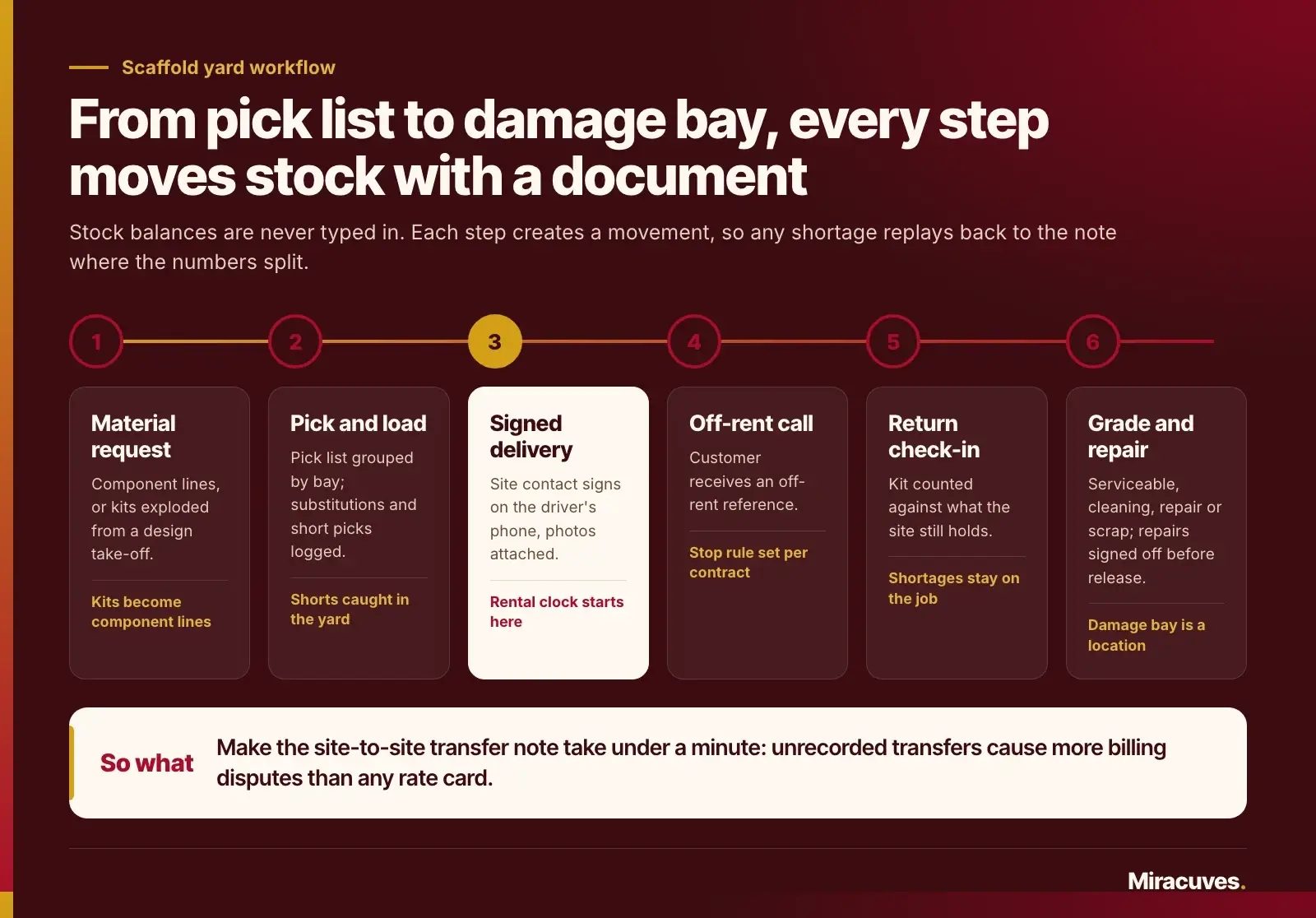
- Material request. The site or the estimator requests kit against a job, either as component lines or as kits taken from a scaffold design take-off.
- Pick and load. The yard receives a pick list grouped by bay, picks it, records any substitutions and loads the truck. Short picks are logged at this point, not discovered on site.
- Delivery. The driver hands over against a delivery note on a phone or tablet, the site contact signs, and photos of the drop are attached. Only now does stock move from the truck to the site location and the rental clock start.
- Off-rent call. The customer asks for collection and receives an off-rent reference. The contract decides whether charging stops at the call, at collection or at check-in.
- Return check-in. Returned kit is counted against what the site still holds. Shortages and surpluses are flagged on the job, never quietly absorbed into yard stock.
- Condition grading. Each returned line is graded as serviceable, needs cleaning, needs repair or scrap. Anything not serviceable moves to the damage bay as its own location.
- Repair and release. Repair work orders record parts and labor, feed any recharge to the customer, and release items back to available stock only after sign-off.
Site-to-site transfers are where balances drift
Returns rarely match deliveries line by line. Supervisors move spare boards from one job to the next to save a truck run, and the paperwork never follows. The fix is a transfer note the supervisor can raise on the field app in under a minute, moving quantities between two site locations and between two contracts if the customer differs.
If transfers are hard to record, people will not record them. The result is a customer billed for kit they handed on weeks ago and another customer billed for nothing while using it. That single gap causes more billing disputes than any pricing rule.
Rebalancing stock between depots
Firms with more than one depot face a second movement problem. One yard runs short of base jacks while another has racks of them idle. Model each depot as its own location tree and treat an inter-depot truck as a transfer with a dispatch and a receipt, so stock in transit is visible and never counted twice. A simple report of available quantity by item and depot, set against open requests for the next fortnight, tells the transport planner which loads to move before a shortage turns into a cross-hire from a competitor.
Counting methods the yard will actually use
Scanning every fitting is unrealistic. Yards count in bundles and stillages, and many confirm small fittings by weight. The software should accept all three: a line count, a stillage count multiplied by a standard fill, and a weighed quantity divided by a unit weight held on the item master. Barcodes or RFID tags belong on stillages and serialized assets, where a scan saves real time.
Weight-based counting needs a tolerance band, because mud, concrete and wet timber add mass. Record the method used on every count so a supervisor can see whether a shortage came from a precise line count or an estimate.
Load weights for dispatch
The unit weights that support weighed counts also answer a question every transport planner asks: will this pick list fit on the truck? Multiply each picked line by its unit weight, add the stillages, bundles and pallets, and the system has a payload figure before anything is loaded. The weights below are illustrative; use the published weights for your own system and refresh them when a supplier changes a design.
| Picked line | Quantity | Unit weight (illustrative) | Line weight |
|---|---|---|---|
| 7-foot ledger | 400 | 17 lb | 6,800 lb |
| 10-foot standard | 220 | 30 lb | 6,600 lb |
| 7-foot steel deck | 180 | 42 lb | 7,560 lb |
| Stillages of couplers and fittings | 2 | 1,100 lb | 2,200 lb |
| Payload for the run | 23,160 lb |
Compare that total with the rated payload of the truck assigned to the run, not only with the legal maximum. On the US Interstate system, 23 CFR 658.17 caps gross vehicle weight at 80,000 pounds, a single axle at 20,000 pounds and a tandem axle at 34,000 pounds, with lower limits wherever the bridge formula applies, and many delivery trucks are rated well below those figures. When a pick list exceeds the assigned truck, the planner should see it at the pick stage and split the load rather than learn it at a weigh station. Securing the load stays with the driver under the FMCSA cargo securement rules, but a manifest with weights and bundle counts gives the driver what they need to plan it.
What Changes When the Stock Is Formwork
Formwork shares the yard but behaves differently. Wall panels, slab tables, props, timber and aluminum beams, wall ties, clamps, climbing brackets and edge protection are higher in unit value and wear faster, because every pour leaves concrete on them. Formwork rental software development therefore has to track condition and reuse, not just presence.
Reuse counts and face condition
A plywood-faced panel can only take so many pours before the finish degrades. Serialize the panels that matter, log each pour cycle against them on site, and record face condition at check-in. That history tells you when to re-face a panel, when to sell it off as a lower grade and how much wear to price into the rental rate.
Sale lines inside a rental contract
Some formwork items are consumed rather than rented. Tie rods cast into the wall, cones, spacers and release agent leave the ledger as a sale. A single contract therefore needs rental lines with a clock and sale lines without one, plus a rule for items the site claims were cast in or buried, which are often charged at replacement value after an agreed period.
Drawings belong to the job record
Formwork is erected to a design. The OSHA concrete construction rule at 29 CFR 1926.703(a)(2) requires drawings or plans, including all revisions, for the jack layout, formwork including shoring equipment, working decks and scaffolds to be available at the jobsite. In software terms, attach every drawing revision to the job, mark which one is current and let the field app open it offline.
Linking the drawing to the delivered kit also catches a common error early. If the plan calls for a prop type or spacing the yard did not send, the gap shows up when the delivery is compared with the design, not when the crew is standing at the deck edge.
Inspection Records Shaped by OSHA Subpart L and Concrete Rules
Scaffolding inventory management software tells you where the kit is. Inspection records tell you whether the structures built from it are fit to use. In the United States the scaffold rules sit in 29 CFR Part 1926, Subpart L, and a few clauses translate directly into data your app should capture. Software does not make a scaffold safe; the competent person does. The record simply proves the check happened and preserves what was found.
Shift inspections and damaged parts
Under 29 CFR 1926.451, scaffolds and scaffold components must be inspected for visible defects by a competent person before each work shift and after any occurrence that could affect a scaffold’s structural integrity. The same section requires each scaffold and component to support its own weight and at least 4 times the maximum intended load applied or transmitted to it, and it says any part damaged or weakened below that strength must be repaired or replaced, braced, or removed from service until repaired.
Three data decisions follow. Each erected scaffold needs its own record with an ID, location on site, design reference and duty or load class shown on its tag. The inspection form needs a timestamp that is captured by the device rather than typed. And a failed component on site should create a defect that, once the part is swapped, moves the damaged item into a quarantine location in the inventory ledger. That last link is what joins site safety to yard stock.
Training records for erectors and users
The training rule at 29 CFR 1926.454 separates two groups. Employees who work while on a scaffold must be trained by a qualified person, while employees involved in erecting, disassembling, moving, operating, repairing, maintaining or inspecting a scaffold must be trained by a competent person. It also lists retraining triggers, such as changes at the worksite or in scaffold types that present a hazard the employee was not trained on.
Your people records should store who was trained, by whom, on which scaffold types and when. The app cannot judge competence, but it can make sure only people the employer has designated as competent for that scaffold type can sign an inspection, and it can flag a crew member whose training does not cover a new system arriving on site.
Shoring checks around a concrete pour
For formwork, section 1926.703(b) requires shoring equipment to be inspected before erection to confirm it matches the formwork drawings, and erected shoring to be inspected immediately prior to, during and immediately after concrete placement. Damaged shoring that falls below the required strength must not be used. Section 1926.703(e) adds that forms and shores, except for slabs on grade and slip forms, may not be removed until the employer determines the concrete has gained enough strength.
That gives a formwork job four inspection events tied to one pour, plus a strip approval that records who decided and on what basis, such as test results from the concrete lab. Model the pour as an object with those events attached rather than as loose forms, so a supervisor can see at a glance which pours are waiting on a check.
What a good inspection form captures
- A checklist chosen by scaffold or formwork type, not one long generic list.
- Pass, fail or not applicable on each line, with a mandatory note and photo on any fail.
- Device time, GPS position where available and the inspector’s signature.
- The resulting tag status, usable or not usable, pushed to the scaffold record and the customer portal.
- Automatic defects and work orders, with stock movements when parts are swapped.
Rental Billing Rules That Start Disputes
Billing in this trade is less about price lists and more about dates and quantities. The rate card is usually simple: a weekly rate per item, a minimum rental period and pro rata charging after it. The arguments come from when the clock started, when it stopped and how many pieces were really out.
Clock start and stop
Start the clock on the signed delivery, never on the pick. Stop it according to the contract: many firms stop on the off-rent call so the customer is not charged for a slow collection, while others stop on collection. Whatever you choose, store it as a contract setting rather than hard-coding it, because large customers will negotiate it.
Partial returns, shortages and recharges
Partial returns reduce the quantity on rent from the return date, line by line. Shortages found at final check-in stay on rent for a grace period, then convert to a replacement charge. Damage recharges come from the grading step and the repair work order, so the customer sees photos and a cost, not just a number on an invoice.
Dry rental versus supply and erect
Rental runs deserve their own screen. Most firms invoice weekly or every four weeks, and the run should show every line that changed since the previous invoice: new deliveries, partial returns, transfers in and out and recharges waiting for approval. Accounts staff can then approve the run with confidence instead of rebuilding it by hand. Credit notes should reference the original line and the reason, for example a disputed off-rent date, so repeat disputes with the same customer are easy to spot.
Dry rental sends kit and leaves erection to the customer. Supply and erect contracting prices the finished structure, usually on area or length plus erection labor, adaptations and an extended rental charge once the initial period runs out. Many firms do both, so the data model needs contracts that carry structures and labor as well as plain rental lines. Keep the accounting ledger itself in your accounting package and push approved invoices to it, rather than rebuilding general ledger features inside the platform.
Scaffolding Inventory Management Software Development: Roles, Data and Field App
A platform for this trade serves people who rarely sit at a desk. Mapping the roles first prevents the classic mistake of building a rich office system that the yard and site crews ignore.
- Yard manager: stock levels, pick queues, damage bay, transfers between depots.
- Yard checker: counts, condition grading and repair sign-off on a rugged handheld.
- Driver: run sheet, delivery and collection notes, signatures and photos.
- Estimator or contracts manager: quotes, kit lists from designs, contract terms.
- Scaffold supervisor or competent person: handovers, shift inspections, defects, transfers.
- Customer site contact: what is on rent, off-rent requests, tag status, documents.
- Accounts: rental runs, recharges, credit notes and the push to the accounting system.
The core entities
The data model is smaller than it looks. Item, Asset, Kit, Location and Movement cover inventory. Customer, Job, Contract and Rental Line cover the commercial side. Structure, Pour, Inspection, Defect and Work Order cover the field. Person, Training Record and Document tie them together. Keep Movement as the only way stock changes and almost every report becomes a query over it.
Offline first, because sites have no signal
Basements, plant rooms and rural sites routinely lose signal. In scaffolding inventory management software development, the hard engineering problem is usually sync, not screens. The field app must store forms, photos and signatures locally, sync when it can and resolve conflicts with a clear rule, for example that a completed inspection is never overwritten by an older draft from another device.
Device features matter more than visual polish here: a fast camera flow, QR or barcode scanning for stillages and tags, large tap targets for gloved hands and a signature pad that works in sunlight. These are the details a well-scoped custom mobile build can get right from day one.
Personal data on the job site
Inspection photos catch faces, training records name individuals and GPS stamps reveal where people were. If you serve customers or employ staff in the European Union, GDPR applies to that data. For a rental platform that translates into capturing only the fields each step genuinely uses, deleting old site photos and location stamps on a fixed schedule, limiting training records to the people who sign off inspections, and answering access or erasure requests from a worker without manual digging.
Subscribe to a Tool or Own the Platform
Many scaffold rental firms want a tool they can sign up to this week, and for plenty of them renting is correct. Ownership starts to pay when the way you run rentals, inspections or billing is part of how you win work, and a rented tool forces you to bend it.
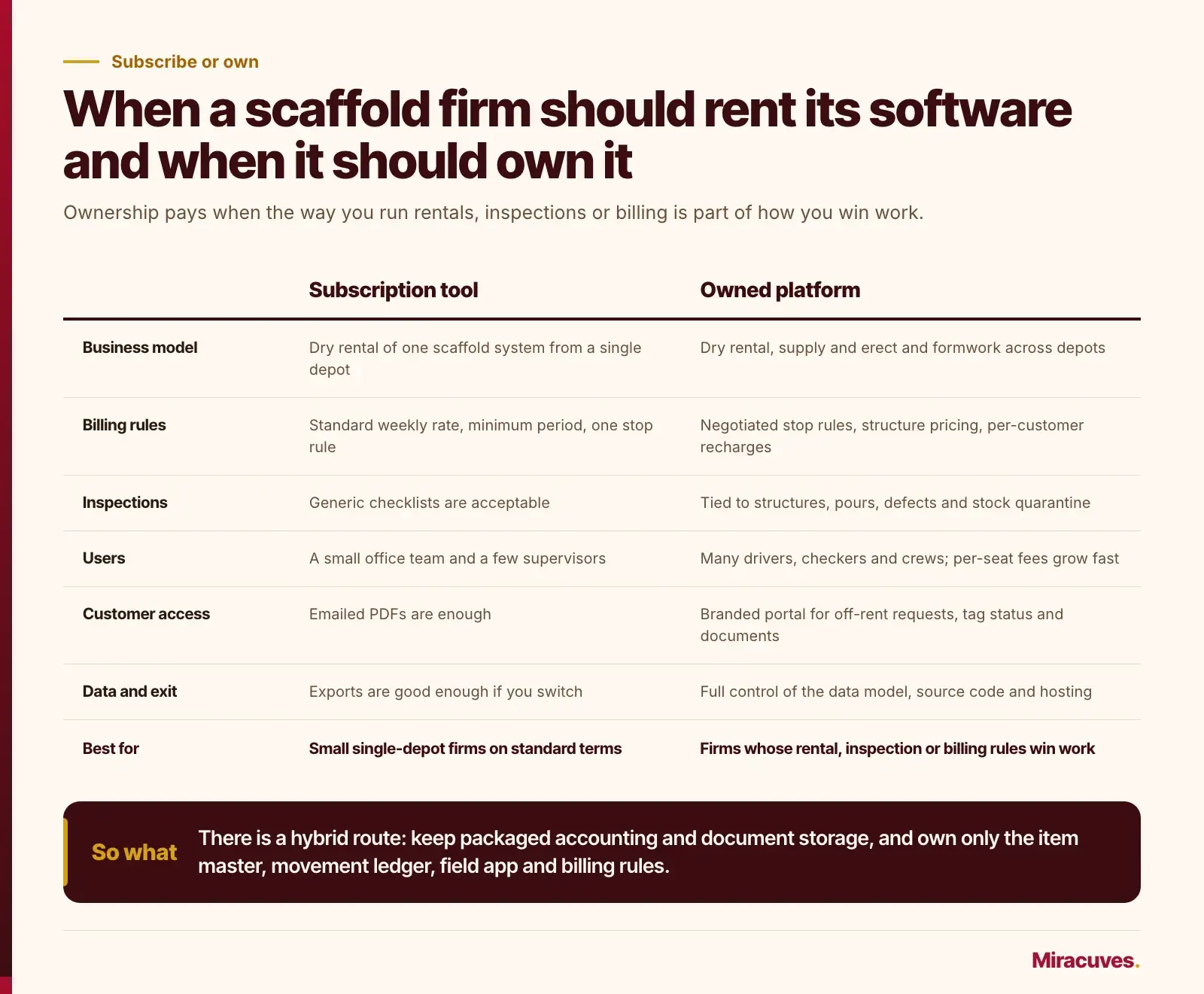
| Decision factor | A subscription tool usually fits | An owned platform usually fits |
|---|---|---|
| Business model | Dry rental of one scaffold system from a single depot | Mix of dry rental, supply and erect contracting and formwork, across several depots |
| Billing rules | Standard weekly rate, minimum period and one clock stop rule | Negotiated stop rules, structure pricing, extended rental and recharge terms per customer |
| Inspection workflow | Generic checklists are acceptable to your customers | Inspections must tie to structures, pours, defects and stock quarantine in one record |
| Users | A small office team and a few supervisors | Many drivers, checkers and site crews where per-seat fees grow quickly |
| Customer access | Emailed PDFs are enough | A branded portal for off-rent requests, tag status and documents |
| Integrations | The vendor’s built-in connectors cover your accounting package | You need links to your own estimating outputs, ERP, label printers or telematics |
| Data and exit | Exports are good enough if you ever switch | You want full control of the data model, the source code and the hosting |
Be honest about the trade-off. A custom platform costs more up front, needs an owner on your side to make product decisions and needs a maintenance budget after launch. If your fleet is small, your terms are standard and your inspections are simple, subscribe, note every workaround your team invents and look at the decision again once those workarounds start costing real hours.
There is a hybrid route too. Keep a packaged accounting system, keep standard document storage, and own only the operational core: the item master, the movement ledger, the field app and the billing rules. That is where the competitive detail lives and where off-the-shelf tools most often fall short.
Rollout Order and the Failure Modes to Expect
Even the right software fails if the starting data is wrong. The sequence below puts the riskiest data work first and the visible features last, which is the opposite of how most projects are tempted to run.
- Clean the item master. One code per item, consistent names, unit weights and replacement values. Merge the duplicates every yard accumulates.
- Set opening balances. Do a full yard count and agree what each live site holds with the supervisors before go-live, not after.
- Go live on yard and transport. Picks, deliveries, returns and grading. This is the ledger’s heartbeat.
- Add site inspections and transfers. Structures, handovers, shift checks, defects and site-to-site moves.
- Switch billing over. Run the old and new rental calculations side by side for at least one cycle and explain every difference.
- Open the customer portal. Only once the data behind it is trusted, because customers will spot errors fast.
Where these projects usually go wrong
- Opening balances are guessed, so every later shortage report is argued away.
- Drivers skip signatures when the site is empty, leaving deliveries nobody can prove.
- Inspectors fill in a day’s forms at once in the van; device timestamps will show it, so deal with the habit early.
- Offline drafts collide after sync because no conflict rule was agreed.
- Weight-based counts drift because unit weights were never checked against clean, dry stock.
Numbers worth watching once it runs
Utilization by item, meaning quantity on rent divided by quantity owned, shows which kit earns and which just occupies racking. Shortage rate per closed job shows which customers or supervisors leak kit. Damage cost per job feeds your pricing. The share of structures inspected before shift start is the field metric most worth putting on a wall screen.
Cost and Timeline for a Scaffold Rental Platform
The rollout order above also sets the budget. The drivers are the number of depots and scaffold systems, whether formwork and supply and erect contracts are in scope, how many customer billing variations need encoding and how clean the item master is on day one. The figures below are planning ranges, not quotes.
Typical phases
| Phase | Typical duration | What it covers |
|---|---|---|
| Discovery and item master clean-up | 3 to 4 weeks | One code per item, unit weights, replacement values, contract clock rules, sample delivery notes and inspection forms |
| Release one: yard and transport | 10 to 12 weeks | Movement ledger, picks, delivery and collection notes, returns, grading, load weights, agreed opening balances |
| Release two: site | 8 to 10 weeks | Structures, handover tags, shift inspections, defects and quarantine, transfers, pours and strip approvals |
| Release three: billing and portal | 8 to 10 weeks | Rental runs with contract clock rules, recharges, the accounting push, one parallel billing cycle, the customer portal |
That is typically 29 to 36 weeks, about seven to eight months, with the yard running on the new ledger after roughly three to four months.
An illustrative cost estimate
The estimate below multiplies typical effort by the US median pay for software developers, quality assurance analysts and testers, $64.44 an hour in May 2025 according to the Bureau of Labor Statistics. It counts wages only, before benefits, overhead, hosting, devices and any partner margin, so treat it as a floor for comparing options and swap in your own team’s or partner’s rate.
| Module | Hours (illustrative) | Wages at $64.44 an hour |
|---|---|---|
| Discovery and item master clean-up tooling | 120 to 200 | $7,700 to $12,900 |
| Item, asset, kit, location and movement ledger with admin panel | 400 to 560 | $25,800 to $36,100 |
| Yard app: picks, check-in, grading and counts by line, stillage or weight | 400 to 560 | $25,800 to $36,100 |
| Driver app: run sheets, signed notes, photos and load weights | 240 to 360 | $15,500 to $23,200 |
| Supervisor app: structures, inspections, defects, transfers and pours | 480 to 680 | $30,900 to $43,800 |
| Rental billing engine and accounting push | 400 to 560 | $25,800 to $36,100 |
| Customer portal | 200 to 320 | $12,900 to $20,600 |
| QA, offline sync testing and pilot | 320 to 480 | $20,600 to $30,900 |
| Total | 2,560 to 3,720 | $165,000 to $239,700 |
The assumptions: up to two depots, one or two scaffold systems plus a formwork range, a core team of two to three full-time people with part-time design and QA, and an accounting push rather than a full ERP integration. Hosting, rugged handhelds, label printers and tags sit outside it. If formwork or the portal can wait a year, take those lines out.
How Miracuves Builds a Scaffold and Formwork Rental Platform
Miracuves works in two modes, ready-made platforms and custom software, and a yard with negotiated rental terms and its own inspection routines normally lands on the custom side. The first release we would scope is the operational core: the item master with bulk, serialized and kit records, the movement ledger, the yard app for picks, returns and condition grading, and the driver app for signed delivery and collection notes.
The second release adds the supervisor app: structure records, handover tags, shift inspections tied to the 1926.451 and 1926.703 checkpoints you choose to enforce, defect capture that moves damaged parts into quarantine, transfers between sites and pour records with strip approvals for formwork. The third brings the rental billing engine with contract-level clock rules, the push to your accounting package and the customer portal.
You receive Android and iOS apps for yard, driver and site roles, a web admin panel for contracts, stock, pricing and reporting, and the full source code. Integrations are chosen per firm, typically accounting, label and tag printing, document storage and messaging for delivery and off-rent notices. Miracuves prices each engagement individually once we have walked through your delivery notes, check-in sheets and inspection forms, a conversation you can open with our logistics and driver app development team.
Because the platform will hold customer contracts, crew training files and site photos, security sits inside the scope from the first sprint. Access rules, logging and backups for the yard and site apps follow the control sets of SOC 2 for service organizations and ISO 27001 for information security management, and GDPR requirements shape how crew or customer data from the EU is stored. For the audit itself, your firm hires independent audit partners. The attestation report or certificate they produce goes to your firm as the audited business, never to the software or to us, and the amount of audit preparation help is agreed scaffold firm by scaffold firm. The details are in our compliance record.
If you already know where your counts leak or which inspection records you struggle to produce, bring that list to the first call. It is the fastest way for Miracuves to show you what the first release should contain and what can safely wait.
Frequently Asked Questions
What does scaffolding inventory management software track?
It tracks every component by quantity and location, plus serialized assets such as hoists and shoring towers. It records each delivery, transfer, return and repair as a movement, and it usually links those movements to rental contracts, site inspections and the damage bay, so every shortage traces back to a document.
What are the main steps in scaffolding inventory management software development?
Clean the item master first, then set agreed opening balances with a full yard count. Go live on yard and transport workflows, add site inspections and transfers, switch billing over after one cycle run in parallel, and open the customer portal last. Build the field app offline-first, because sync is usually the hardest engineering problem.
Should every scaffold fitting have a barcode or RFID tag?
Usually not. Couplers, boards and ledgers are counted by line, stillage or weight because scanning each piece is too slow. Tags pay off on stillages, serialized assets and erected structures, where one scan replaces real paperwork, and weight counts need a tolerance band for mud and wet timber.
How should scaffold rental software calculate truck loads?
Multiply each picked line by the unit weight on the item master, add stillages and pallets, and compare the total with the assigned truck’s rated payload before loading. On US Interstate highways the federal limits are 80,000 pounds gross, 20,000 on a single axle and 34,000 on a tandem, so a manifest that knows its weight lets the planner split a load before a driver is turned away.
How often must a scaffold be inspected under OSHA rules?
29 CFR 1926.451 requires scaffolds and their components to be inspected for visible defects by a competent person before each work shift and after any occurrence that could affect structural integrity. Your app should capture the inspector, device time, findings and the resulting tag status for each structure.
What extra records does formwork need compared with scaffolding?
Formwork jobs need the current drawing revision on site, shoring checks before erection and immediately before, during and after each concrete pour, and a record of who approved stripping. Panels also benefit from reuse counts and face condition so you know when to refurbish them or sell them off.
When does rental billing usually stop?
It depends on the contract. Many firms stop charging on the off-rent call, others on collection or check-in. A good platform stores this as a per-contract setting so negotiated terms do not need code changes, and starts the clock on the signed delivery rather than the pick.
Is scaffolding rental software from a subscription enough for a small firm?
Often it is. If you run one depot, one scaffold system and standard weekly terms, a subscription tool is cheaper to start. A custom platform makes more sense once you mix dry rental, supply and erect contracting and formwork across several depots with negotiated terms per customer.
How much does it cost to build scaffolding inventory software?
It depends on depots, scaffold systems, formwork and billing rules. As an illustrative estimate, a platform with the movement ledger, yard, driver and supervisor apps, rental billing and a customer portal needs about 2,560 to 3,720 hours over seven to eight months. At the US median pay of $64.44 an hour for software developers and testers, that is roughly $165,000 to $239,700 in wages alone.
What does a custom scaffold rental platform from Miracuves include?
You get Android and iOS apps for yard, driver and site roles, a web admin panel covering contracts, stock and billing, and the complete source code. Access rules, logs and backups follow SOC 2 and ISO 27001 control sets, integrations such as accounting and tag printing are picked for each firm, and pricing follows a scoping session.
Miracuves is an independent software development company. We are not affiliated with, connected to, sponsored by, or endorsed by any company or product named in this article.
Terms such as “X Clone” are used descriptively. It is how the software industry refers to building a platform with functionality comparable to a known service, and how clients search for it.
The entire design and codebase of our products is built by our own team. Our products contain no code, design, graphics, or content originating from any third-party website or applications.
All third-party names and marks referenced in this article are the property of their respective owners, referenced solely to identify the services discussed.