Order-Ahead Delivery App · Production Ready

Foodpanda Clone App - White-Label City-by-City Food Ordering App

Built by Miracuves, this ready-made, white-label Foodpanda clone grows a food marketplace one city at a time with apps for customers, stores and delivery partners, a browser storefront, admin and store panels and source code you own, all launched in six working days.

Customers order now or set a later time with a delivery instruction, stores prepare the food and partners carry it, while flash sales and coupons fill the quiet hours. The Flutter apps run on Android and iOS; their store review sits with Apple and Google, outside our build. A city-specific promotion rule is one example: we scope it in writing, and it is usually done in 2-8 weeks.

Launch in 6 Days with

  • Full Source Code
  • Customer App
  • Store App
  • Rider App
  • Store Panel
  • Browser Storefront

StackFlutter · PHP · Bootstrap · Node.js · MySQL · Firebase

MXiggy console · PromotionsIllustrative
Orders today124
Scheduled for later23
Stores live46

Order activity

Foodpanda Clone customer app home screen with a promotional banner, Grocery, Food, Liquor and Parcel tiles, a Deliver To address and an order confirmed message with its number.
Order now or laterone record, three apps
  • 2Times on Every Orderwhen it was placed and when it is scheduled for
  • 6Promotion Toolscampaigns, banners, coupons, cashback, flash sales and push notices
  • 0%Revenue Share With Miracuvesstore commission and delivery charges are kept by you
  • 3Reasons to Order Againa Wanna Try Again card, reorder from past orders and referral credit
  • 6Days to Launchand if the delay is ours, we keep going free
  • $3,399Paid Once, Not Rentedsource code yours, no per-seat fee, no monthly rental

Live in six working days, or we keep working free until you launch. Every build carries 60 days guidance, 6 months bug fixes and 12 months updates.Verify every figure

One Zone at a Time

A zone selector narrows every dashboard figure to one area, with This Year, This Month and This Week views beside the commission chart.

No Client Name Claimed

Nobody has published a deployment of this product under their own name, so none is claimed; the open MXiggy demo, with logins for all three apps, is the evidence.

Card Entry Happens at the Gateway

Your payment gateway is where card details are entered, plugged in through third-party APIs, and cash on delivery sits behind an admin switch.

Opening a food marketplace in a growing city? Talk it through with a product specialist.Speak to a Product Expert

A client base of 6,000+ spread across the globe

Miracuves is listed by Expertise.com as a managed IT service provider.Miracuves is an official member of the Forbes Business Council.Miracuves is a verified agency on DesignRush, listed among top design agencies in India.Miracuves is reviewed on Trustpilot as a software development company.Miracuves is listed by The Manifest among top managed software development companies.Miracuves is listed by DesignRush as a top software development company.Miracuves is recognized by GoodFirms as a top software development company.Miracuves is ranked among the top 1000 companies globally by Clutch.Miracuves is a top managed service provider in the United States on Clutch.

01Hands-on demo

Test the Product

Foodpanda Clone App Demo - Three Role Apps, a Browser Storefront & Panel Access

Miracuves lets you try its Foodpanda clone from four positions. Demo logins put you in the shoes of a shopper, a kitchen or a rider, the storefront needs only a browser, and both panels open during a guided call. Begin as the shopper, find the scheduled time and the offers, then handle the same order from the kitchen side.

Foodpanda Clone customer app home screen with a promotional banner, Grocery, Food, Liquor and Parcel tiles, a Deliver To address and an order confirmed message with its number.Foodpanda Clone store page with a banner, rating, delivery time, product category chips, items with prices and a View Cart bar showing the total.
Customer app

Customer App - Browse, Order Ahead, Come Back

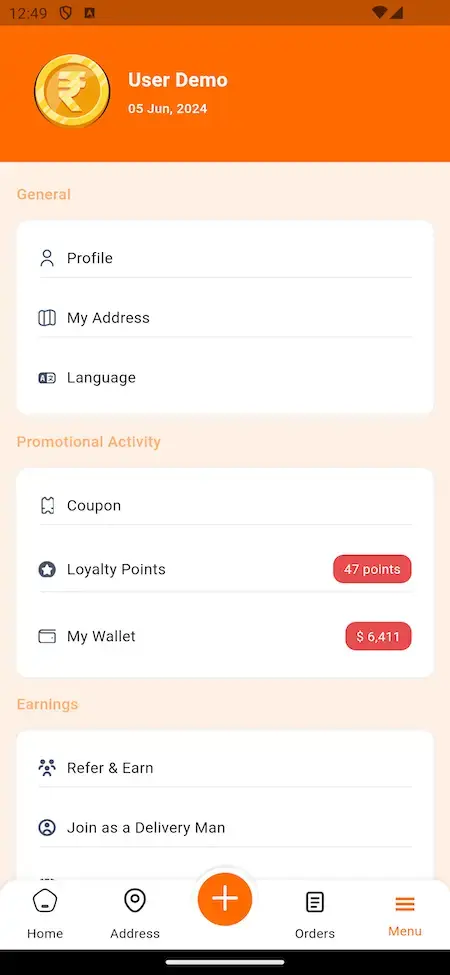
Scan the Special Offer row and the reorder card on the home screen, open a store, then check an order page for its scheduled-at time and delivery instruction. The account menu lists the coupon entry, loyalty points and wallet.

  1. 1Pick Android or iOS at the portal
  2. 2Log in using the credentials listed here
  3. 3Look through Home, a store page, Order details and the account menu
Demo login:+91 9876543210 | User_321
Foodpanda Clone order details screen with order ID, order date, a scheduled-at time, a delivery verification code, a delivery instruction, item info, pickup store, drop address and a Track Order button.Foodpanda Clone account menu with profile, address, language, a coupon entry, loyalty points, a wallet balance, refer and earn and a join-as-delivery-partner link.
Store + delivery side

Store App and Delivery Partner App

The kitchen and the road. A store signs into its own app to deal with the orders it receives, and a delivery partner signs into a separate app to take them to the address. Each has its own portal page and login.

  1. 1Start at the portal page of the app you need
  2. 2Log in as the store or as the delivery partner
  3. 3Watch incoming orders and the handover steps
Logins:Store: food@demo.com | Store_321. Delivery: +91 9876543211 | Driver_321
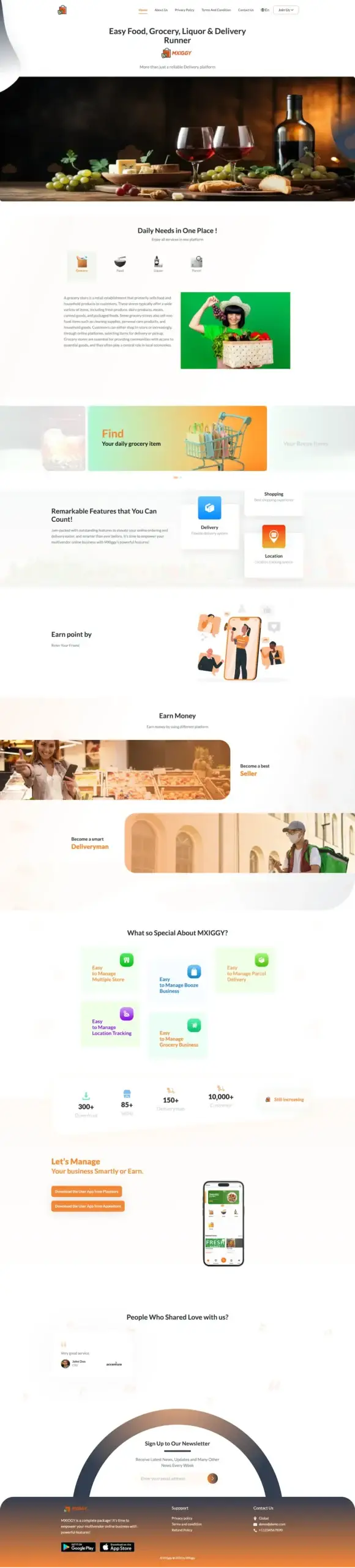
Foodpanda Clone web storefront landing page with service modules, a features block and sections for becoming a seller or a delivery partner.
In the browser

Web Storefront & Customer Panel

The customer side on a larger screen: a landing page with the service modules, a features block and invitations to become a seller or a delivery partner. Nothing to install.

  1. 1Go to the storefront in a browser
  2. 2Scroll the service modules and landing sections
  3. 3Log in as a customer to place an order
Web demo:mxiggy.mimeld.com
Foodpanda Clone admin dashboard with a promotion management menu, order counters from unassigned to delivered, a gross sale chart, user statistics and top stores, items and delivery partners.
Operator consoles

Admin & Store Panels - Promotions, Orders, Commission

Where you run it: the promotion menu with campaigns, banners, coupons and cashback, flash sales, order tiles and the commission chart. The store panel is the restaurant panel, the kitchen-side view. Both panels open on a guided call, where we share the logins.

  1. 1Book a guided call and ask for the panel logins
  2. 2We open both panels together with you
  3. 3Look at Promotions, Orders, the Dashboard and Reports
Panel logins:available on request
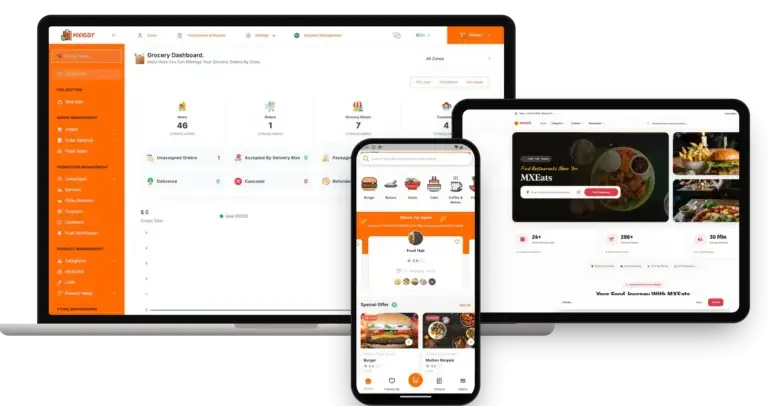
Foodpanda Clone shown across a laptop, tablet and phone: the admin dashboard with orders and users by zone, the public web storefront with restaurant search and delivery stats and the customer app home with food categories and special offers

See a Day of Orders

Guided Tour of a Food Ordering App Like Foodpanda: Book an Order for Later, Run a Promotion, Then Watch the Counters Move

A growing food marketplace is best judged by walking through it. On a call we book a later-time order as a customer, turn on a coupon or banner in the admin panel, then read the status tiles and the commission chart to see what that order and that promotion did, measured against your own city and launch date.

Book a walkthrough call

The Real Screens

Screenshots of a Foodpanda-Like Food App: Customer App, Admin Dashboard and Web Storefront

These screens come from the live MXiggy demo of the Foodpanda clone Miracuves delivers. The customer app comes first, in the order a customer meets it, followed by the dashboard an operator watches and the storefront the public opens.

Foodpanda Clone customer app home screen with a promotional banner, Grocery, Food, Liquor and Parcel tiles, a Deliver To address and an order confirmed message with its number.
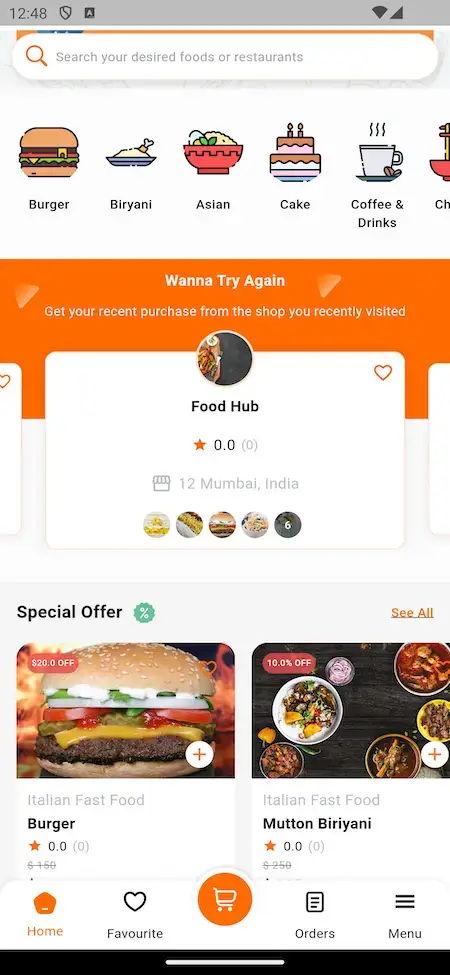
Foodpanda Clone customer app with a search bar, cuisine icons, a Wanna Try Again reorder card for a recently visited shop and a Special Offer row with discount badges.
Foodpanda Clone customer app list of best stores nearby, most popular items and best reviewed items with ratings and prices.
Foodpanda Clone store page with a banner, rating, delivery time, product category chips, items with prices and a View Cart bar showing the total.
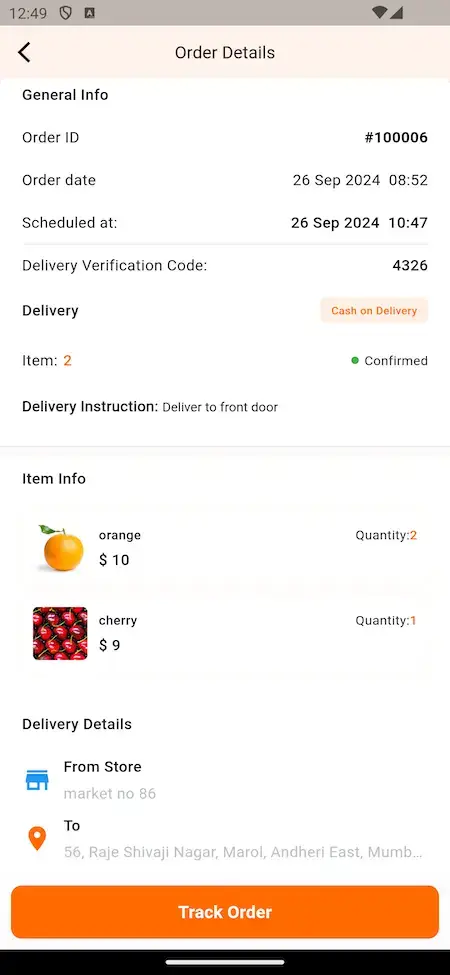
Foodpanda Clone order details screen with order ID, order date, a scheduled-at time, a delivery verification code, a delivery instruction, item info, pickup store, drop address and a Track Order button.
Foodpanda Clone account menu with profile, address, language, a coupon entry, loyalty points, a wallet balance, refer and earn and a join-as-delivery-partner link.
6 screens · scroll →
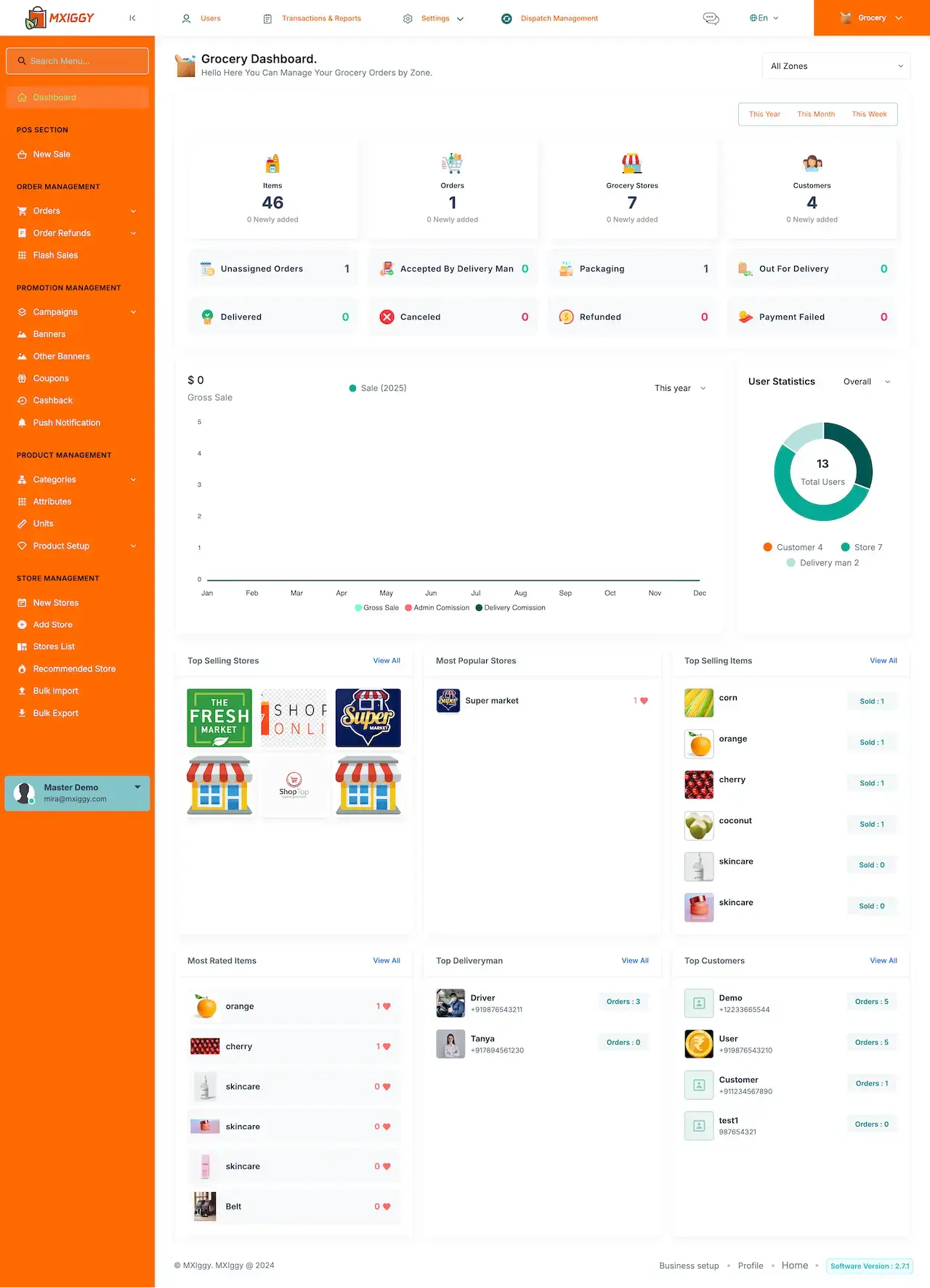
Foodpanda Clone admin dashboard with a promotion management menu, order counters from unassigned to delivered, a gross sale chart, user statistics and top stores, items and delivery partners.
1 screen
Foodpanda Clone web storefront landing page with service modules, a features block and sections for becoming a seller or a delivery partner.
1 screen

Trace an order from the first screen to the dashboard: the offers shelf, a store with its cart bar, an order page with a scheduled time, the customer menu with coupon and wallet, and finally the admin dashboard, where the order is counted in a status tile.

See All Solutions

02What clients say

Clients Speak

Foodpanda Clone Client Reviews - Builders of Delivery Platforms in Their Own Words

Eight operators sit in this set: YOpido, Bharat Eat Mods and Mega Chicken take food orders, Talokitoko adds grocery for the African diaspora in Europe, Speedyven moves packages, food and essentials, Bmore On Demands runs a courier platform, and XtremeJek and Woojek run multi-service apps.

MMega Chicken TeamFounding team, Mega Chicken
“Menus, order routing and dispatch were solved. Our work was the store-level menu control and the packaging and prep rules our brand needs. Live in weeks and the stores adopted it without a training programme.”
YYOpido TeamFounding team, YOpido
“Menus, ordering, dispatch and the merchant console came ready. Our work was the restaurant mix, the delivery zones and the payment methods our customers use. Live inside a month.”
BBharat Eat Mods TeamFounding team, Bharat Eat Mods
“Menus, order routing and courier dispatch were solved. Our work was the local ordering habits, the payment mix and the restaurant onboarding flow. Live in weeks and the kitchens picked it up without training.”
CCharles EveillardManaging Partner, Izi Technologies
“Talokitoko is grocery and food delivery for the African diaspora market in Europe. The rider app, dispatch and the merchant console were already built, so we spent the engagement on our own local payment mix, the vendor onboarding flow and the regions we actually operate in. The platform was live inside a month, which was months faster than our internal estimate.”
MMarsha WilliamsFounder, Bmore On Demands LLC
“The team was running it on a dispatcher and a Google Sheet, and we needed a real platform quickly, because we were about to onboard a major retail client. Miracuves’s Delivery Genie base gave us the rider app, the dispatch console, and live tracking. We launched in 6 weeks and cleared 4x the previous order volume in the first month.”
MMustafa H.CTO, Speedyven Networks
“Speedyven is a hyperlocal courier network — packages, food, and same-day essentials across a few metros. The dispatch and rider app were the parts where we needed to move fastest, because riders have low tolerance for clunky tools. Miracuves's Delivery Genie base gave us the rider app, the dispatch console, and live tracking. We added our custom surge-pricing engine, our multi-merchant order router, and a custom rider-incentives module. We launched in 7 weeks. Rider activation is high and the platform's been stable through weekend peaks.”
XXtremeJek TeamFounding team, XtremeJek
“Customer, driver and merchant apps plus dispatch were ready. We configured our verticals, our payments and our branding. Delivered inside a month and it has scaled since without a rebuild.”
WWoojek TeamFounding team, Woojek
“Multi-city was the requirement from day one, and the dispatch and merchant console handled it natively - which is exactly the part we did not want to build. Rides, food and courier across several cities, live inside a month.”
Read More Client TestimonialsFounders and operators in their own words

Evidence on Hand

Test the Foodpanda Clone First - What the Demo Lets You Verify

No operator of this model has agreed to be named. What follows is what you can check yourself, in place of what we could merely state.

Open Demo
What You Can Check Yourself

Nobody has published a client deployment of this product under their own name, so none is claimed here. The public MXiggy demo is the evidence, open to anybody.

Public demoType
Apps, web and panelsCovers
Food marketplaceModel
3Apps to log into
8Status tiles
6Promotion tools
Foodpanda Clone admin dashboard with a promotion management menu, order counters from unassigned to delivered, a gross sale chart, user statistics and top stores, items and delivery partners.
Check It Yourself
  • Enter all three apps with the logins listed on this page
  • Open an order and locate its scheduled-at time and delivery instruction
  • Look in the account menu for coupon, points and wallet
Request a Look At
  • Ask on a call for both panel logins
  • Walk through the promotion block and the flash sales entry
  • Read the commission chart beside the order status tiles
Our Limits
  • Nothing the demo or release log cannot show gets claimed
  • Extras are labeled add-ons and not passed off as base features
  • Custom changes get a written quote before work begins

We will not lend a client's name, figures or screenshots to a deployment that nobody has published, and the demo is not presented as a client outcome. A named deployment will replace this note once one exists.Miracuves product team · about this section

See it firstBook a tour and we load the apps and panels with stores and promotion rules from your plan.

03Inside the product

First Look

What the Foodpanda Clone App Offers a Food Marketplace in a Growing City

A Foodpanda clone is a ready-made online food ordering platform for many restaurants, and Miracuves shapes it for growing a marketplace one city at a time. Customers browse stores and order now or later, come back through offers, stores prepare the food, delivery partners carry it, and you choose which stores join and which promotions run.

Foodpanda Clone shown across a laptop, tablet and phone: the admin dashboard with orders and users by zone, the public web storefront with restaurant search and delivery stats and the customer app home with food categories and special offers

Order Now or Order Ahead

An order shows the date it was placed and the time it is scheduled for, with a delivery instruction and a verification code for the handover next to them.

Promotions Built In

Offers are managed from the admin panel, with flash sales under orders. A customer sees them as a Special Offer shelf on the home screen, plus a coupon entry in the customer menu.

Add-Ons Stay Add-Ons

Four extras carry their own price: eco-friendly packaging, mystery meal boxes, a farm-fresh section and virtual chef sessions. Wherever this page mentions them, they remain add-ons, not base features.

Apps & Browser

Inside a Foodpanda Clone Script

Growing a city app means doing three jobs together: signing stores, keeping customers ordering and getting the food moved. This food delivery script comes with ordering screens, promotion tools and a dispatch console already wired up, which lets your first weeks go to local supply instead of software.

Foodpanda Clone admin dashboard with a promotion management menu, order counters from unassigned to delivered, a gross sale chart, user statistics and top stores, items and delivery partners.
  1. 01A customer app, a store app and a delivery app
  2. 02Orders that can be scheduled for later
  3. 03Promotion management with coupons and cashback
  4. 04Points, a wallet and referral credit for repeat customers
  5. 05Order tiles and a commission chart on the dashboard

In the package: apps for customers, stores and delivery partners, written in Flutter for Android and iOS, a browser storefront, admin and store panels, and every line of source.

The Full Feature List

Foodpanda Clone Features: Scheduled Orders, Order Customization, Promotions, Reorder Tools & Admin Control

Every item Miracuves names here traces back to the demo, the admin dashboard or the release log. Anything that calls for an extra module is covered in the add-ons section lower on the page.

Feature 01 / 12

Home Screen, Stores & Cart

The home screen opens with a deliver-to address, a banner strip and service tiles, then featured stores. Search covers foods and restaurants, cuisine icons open lists and a store page ends in a View Cart bar with the running total.

  • One search bar for foods, restaurants and items
  • Cuisine icons for burgers, biryani, Asian food, cakes and coffee
  • Best Stores Nearby, Most Popular Items and Best Reviewed Items shelves
  • Store page with rating, location, delivery time and category chips
  • Heart icon to keep a favorite
  • The demo home screen also shows Grocery, Liquor and Parcel tiles beside Food
  • Bottom bar with Home, Favorite, Cart, Orders and Menu
Feature 02 / 12

Scheduled Orders

An order page lists the order date and, under it, a scheduled-at time, so an order can be set for a later moment. Next to them sit a delivery verification code and the item list, with a Track Order button at the foot.

  • Scheduled-at time printed under the order date
  • Order ID and a Confirmed status on the order page
  • Delivery verification code for the handover
  • Track Order button at the foot of the page
  • Order delivery verification by image and one-time code since release 14.0
  • The admin panel keeps all orders in one list
Feature 03 / 12

Order Customization

A customer can leave a delivery instruction, such as leaving the order at the front door, and it stays on the order page. The order summary has an add-ons line next to the discount, additional charge and tax lines.

  • Delivery instruction shown on the order page
  • Special instructions and extras are a step in the order flow
  • Add-ons appear on a priced line of the order summary
  • Delivery and billing addresses can be edited, from release 14.0
  • Guest checkout without registering first
  • Buy-now checkout leaves the rest of the cart alone since release 14.6
Feature 04 / 12

Promotions Menu

One block of the admin panel holds the campaign, banner, coupon, cashback and push notification tools, with Flash Sales listed under orders. Customers see the result as discount badges on the home screen Special Offer row.

  • Campaigns and two banner types managed in the admin panel
  • Coupon codes and cashback in the same block
  • Flash sales listed under order management
  • Several products can join a flash deal or feature deal at once, from release 14.7
  • A stock-clearance discount section on store pages and the home screen, from release 15.0
  • Notifications that lead to a page you choose when tapped
Feature 05 / 12

Repeat-Order Tools

A Wanna Try Again card on the home screen suggests a shop the customer used lately. The account menu then adds points, a wallet and a referral link, and past orders can be reordered, which gives people several reasons to order a second time.

  • A reorder card that suggests a recently visited shop
  • Past orders can be reordered, since release 14.0
  • A points balance listed beside the coupon entry
  • A wallet with a top-up bonus, from release 14.0
  • Referral credit, paid after the friend's first delivered order
  • A minimum order amount set by the admin and by each store
  • Free delivery above an order value that you choose
Feature 06 / 12

Checkout & Payments

Every order records how it was paid, and the demo order is marked Cash on Delivery. Cash on delivery sits behind an admin switch, while online payment runs through the gateway you connect.

  • Cash on delivery switched on or off by the admin, since release 15.0
  • Payment gateways plug in as third-party APIs
  • Each order carries its payment method
  • Wallet balance used at checkout
  • A create-account checkbox for guests at checkout
  • Paid amount and change shown on the point-of-sale screen
Feature 07 / 12

Tracking & Notices

The Track Order button leads to an order's progress, and push notifications report status changes and offers. Google Maps supplies the location views and Firebase sends the notices.

  • Track Order button on the order page
  • GPS and Google Maps drive the location view
  • Firebase push messages, on its HTTP v1 interface since release 14.6
  • A tap on a notification can land on a specific page, from release 14.8
  • From and To blocks that lay out the route of each order
  • Order status tiles on the dashboard
Feature 08 / 12

Chat, Ratings & Reviews

Customers can write to the admin from the app and the website, and star ratings appear on items and stores. Stores may answer reviews, and the order review section has been reworked.

  • Chat with the admin from the user website and app, from release 14.4
  • Chat improvements in the admin and store panels
  • Star ratings on stores and items
  • Review replies by stores, from release 14.7
  • Improved order review section
  • A Best Reviewed Items shelf near the top of the app
Feature 09 / 12

Restaurant Onboarding & Panel

Stores run their own listings. Applications queue up in a New Stores menu, you can add a store by hand, and a Recommended Store list brings forward the ones you trust.

  • A New Stores menu for applications awaiting approval
  • Add Store and Stores List entries
  • A Recommended Store list for featured placement
  • Bulk import and export of stores
  • A point-of-sale section in the store panel and app
  • A minimum order amount that each store can set
Feature 10 / 12

Riders, Dispatch & Handover

Delivery partners work in an app with its own login. Their sign-up begins from the customer menu, and the admin manages them from a Dispatch Management area.

  • A delivery app for Android and iOS
  • Sign-up starts from the customer menu entry for delivery partners
  • Dispatch Management entry in the admin header
  • An Accepted By Delivery Man counter on the dashboard
  • Top Deliveryman list ranked by orders
  • Verification code checked at the door
Feature 11 / 12

Dashboard, Commission & Reports

The dashboard has a zone selector, This Year, This Month and This Week views, counters for items, orders, stores and customers, and a sales chart plotting gross sale against both commission series.

  • Zone selector at the top of the dashboard
  • Eight order status tiles from unassigned to payment failed
  • Gross sale chart carrying admin commission and delivery commission lines
  • Ranked lists of stores, items, deliverymen and customers
  • Filtered customer and subscriber exports, from release 14.9
  • Orders, refunds and transaction reports in the header menu
Feature 12 / 12

Logins, Translation & Site Controls

Customers can log in manually, with a one-time code or through a social account, whichever the admin has enabled, and the customer menu has a language choice backed by translation features.

  • Manual, one-time code and social media login, each switched by the admin
  • Apple login in the user app, from release 14.0
  • Language choice under the customer menu
  • SEO section control, from release 14.7
  • Google Tag Manager, Analytics and six social pixels, from release 15.0
  • Maintenance mode that can target single modules

Before you start: the platform reaches you finished and wearing your brand. Your side covers hosting and a domain, app store developer accounts, brand assets and company details, a payment gateway with KYC completed and keys for third-party services. Apple and Google review apps on their own timetable, outside our 6-day build.

Start Your Food Marketplace With Us

How the Money Flows

How a Foodpanda Clone Makes Money - Store Commission, Delivery Charges, Paid Promotions, Placement & Reward Budgets

A city marketplace running on Miracuves' Foodpanda clone earns in layers: commission first, then charges and promotions stacked on each order. Each line below is a separate setting, which means enabling one does not disturb the others.

Rewards are the only line that spends your money first, which is why the table closes on what limits them.

  1. 01

    Commission on Orders

    A slice of every order stays with you and the rest goes to the store. You pick the rate in the admin panel, and the dashboard charts both commission series against gross sale so a change shows at once.

  2. 02

    Delivery Charges & Order Minimums

    A free-delivery threshold and a minimum order amount can be set by the admin and by each store. The pair steers basket size, and delivery charges still cover part of the trip.

  3. 03

    Paid Promotions & Flash Sales

    A store hoping for more orders on a slow evening can take a campaign, a flash sale or a stock-clearance slot. You configure it in the promotion tools and decide what, if anything, to charge for it.

  4. 04

    Banner & Home-Screen Placement

    Banners, the Special Offer shelf and the Recommended Store list decide which stores customers see first. Sold a week at a time, that attention turns into a recurring line.

  5. 05

    Repeat-Order Rewards

    Points, wallet bonuses, coupons, cashback and referral credit all cost margin first. They pay off when the customer comes back to your app for the next meal and not to a rival's.

  6. 06

    Optional Add-On Revenue

    Chef sessions, a farm-fresh section, mystery meal boxes and eco-friendly packaging can each open another line. Every one is scoped and priced before it is built.

Five income and cost lines of a promotion-led food marketplace, each placed next to what other platforms publish, what a city caps and what customers are offered elsewhere.
StreamBillingRatePublished figureCeiling
Commission on OrdersA percentage of order value, deducted before the store is paid, at the rate you set in the admin panel.Delivery plans: DoorDash lists 15% Basic, 25% Plus and 30% Premier, with 6% for pickup. Uber Eats lists 20% Lite, 25% Plus and 30% Premium, plus 15% for self-delivery and 7% or 10% for pickup.The level at which a store walks away. Under New York City rules an app may take at most 3% for transactions, 5% for basic service, 15% for delivery and 20% for enhanced service from a restaurant.
Delivery Charges & Order MinimumsA delivery charge on the order, waived above a value you choose, plus a minimum order amount set by you and by each store.No standard rate. Uber Eats says the delivery fee a customer sees varies with delivery availability and demand, and that stores on higher plans are shown with a lower fee.The price at which a customer stops ordering. DoorDash notes that member delivery benefits begin only after an order reaches a store's minimum.
Paid Promotions & Flash SalesA fee, or a cut of sales, that a store pays for a campaign, a flash sale or a featured deal that you configure.DoorDash names Promotions and Sponsored Listings as optional extras that cost more, with no public price. In Q2 2026 Instacart booked advertising and other revenue equal to 2.9% of GTV.What a store can pay from its own margin after commission. A promotion that costs more than the orders it generates stops selling.
Banner & Home-Screen PlacementA fee for a banner, a Special Offer slot or a Recommended Store position, negotiated one store at a time.Uber Eats sells ads on every plan, which may lift a store on the home screen and in search results without a guarantee, and its Premium plan matches ad spend up to $100 monthly. DoorDash gives Premier stores a free Sponsored Listing, subject to eligibility.How many slots fit on screen. Each extra paid position pushes out stores customers came looking for.
Repeat-Order RewardsPoints, cashback, wallet top-up bonuses and referral credit, funded from your own margin to win a customer back.Uber One: $9.99 a month, $0 delivery fee on qualifying orders above a minimum subtotal (standard delivery within at least 3 miles) and up to 10% off. DoorDash DashPass: $0 delivery fees and reduced service fees.Your margin once commission is taken. A reward that costs more than the orders it brings in lowers profit.

How to read this. Commission tiers and delivery-fee notes are taken from the pricing pages that DoorDash and Uber Eats publish for merchants, and the limits on app fees charged to restaurants from the New York City consumer and worker protection agency. The advertising share is from the Instacart second-quarter 2026 results, the membership terms from Uber One and the DoorDash DashPass help page. They are numbers other companies have published and can feed your own model; none is a quote, and none predicts what a Foodpanda Clone platform will earn.

Revenue Model

Foodpanda Clone Revenue Model, Stage by Stage

The Foodpanda clone Miracuves delivers keeps each income line as a separate admin setting, so a city marketplace turns one on only when its store count can carry it.

First district

With a handful of approved stores and one launch coupon, commission on each paid order carries the early weeks, and every kitchen can set its own order floor so first baskets arrive larger.

Whole city

Once stores across the city compete for attention, banners, the Special Offer shelf, flash sales and Recommended Store slots turn into paid placement on top of commission.

Several cities

With many delivery zones live, placement fees and delivery charges join commission, points and cashback bring regulars back, and the zone selector reads each district's figures on its own.

Store commission and delivery charges stay with you, because Miracuves charges nothing per order.

Want the commission and promotion mix worked out for your city?Map My Revenue Mix

The Operator Desk

White-Label Foodpanda App Control Room - Promotions, Orders, Stores, Dispatch & Reports

In the admin panel Miracuves ships, an operator's busy day fits on one screen: orders waiting, stores live, promotions running and the way commission divides.

Foodpanda Clone admin dashboard with a promotion management menu, order counters from unassigned to delivered, a gross sale chart, user statistics and top stores, items and delivery partners.
Foodpanda Clone web storefront landing page with service modules, a features block and sections for becoming a seller or a delivery partner.

Admin Panel Sections

  • 01

    Dashboard & Zones

    The first page counts items, orders, stores and customers, shows a sales chart and offers This Year, This Month and This Week views. A zone selector narrows everything to one area.

  • 02

    Order Status Tiles

    Eight tiles trace an order: unassigned, accepted by a delivery man, packaging, out for delivery and delivered, with canceled, refunded and payment-failed orders counted on their own tiles.

  • 03

    Promotion Management

    A dedicated block of the left menu carries the campaign, banner, coupon, cashback and push notification tools, so a quiet weekday can be answered without leaving the panel.

  • 04

    Flash Sales & Orders

    Order Management holds Orders, Order Refunds and Flash Sales side by side, so money in, money back and time-boxed offers sit within one reach.

  • 05

    Store Management

    The store block offers New Stores awaiting approval, Add Store, the Stores List, a Recommended Store list and bulk import and export for fast-growing networks.

  • 06

    Dispatch & Delivery Partners

    Dispatch Management has its own place in the top bar, and the dashboard counts orders accepted by a delivery man and ranks the busiest, so assignment is not guesswork.

  • 07

    Ranked Lists

    Six ranked panels, covering stores, popular stores, items, best-rated items, deliverymen and customers, each with a View All link, show who your marketplace relies on.

  • 08

    Point of Sale & Reports

    New Sale records counter orders. Transactions and Reports have an entry in the top bar, beside Users, Settings and a language switch.

Promotions at a Glance

Everything that brings a customer back, from a first coupon to a push message about a flash sale.

  • Campaigns and two kinds of banner
  • Coupon codes and cashback
  • Flash sales beside the orders
  • Push notices that open a page you pick

Settings & Tools

Housekeeping for the daily routine.

  • Business setup, profile and home links at the bottom
  • A language switch at the top right
  • A search box for menu items
  • Maintenance mode that targets chosen modules

Need more from the console? Extra reports, alternative payout rules, additional languages or a custom approval step are quoted one by one. Tell us what your team requires and we send a written price.

Start Your Food Marketplace With Us

04Cost and package

Package Contents

What the Package for a Foodpanda-Style App Contains: Three Apps, Panels, Source Code & Deployment

Miracuves hands the Foodpanda clone script over as one running city food marketplace: three apps, a browser storefront with its panels, and every line of source beneath them. The code is yours outright, with no per-user fee and no license payments. $3,399 is the same in every country you launch in; hosting, your domain, store developer accounts, the gateway and Firebase, Twilio and Google Maps usage are billed by those providers instead.

01

Full Source Code

All the code of the web platform and the mobile apps, handed over unencrypted so developers can reshape it as the business grows.

  • Readable source code of the web platform
  • Flutter code for the mobile apps
  • Open to your own changes, extensions and redeploys
  • Project code included
02

Project Files & Data Layer

The project files that connect web platform, apps and database, on the stack named further down this page.

  • MySQL holds the data
  • A set of project files per panel and per app
  • Deployed on servers you own
  • Branded to you before go-live
03

Chat & Notifications

Chat between customers and the admin, along with push notices that say where an order stands and what is on offer.

  • Chat from the user app and website to the admin
  • Notices about order status and promotions
  • Notices can link to a page you pick
  • Firebase carries the messages
Foodpanda Clone web storefront landing page with service modules, a features block and sections for becoming a seller or a delivery partner.
04

Browser Storefront & Panels

A responsive storefront in the browser, with the admin panel and the store panel beside it.

  • A storefront anyone can load in a browser
  • An admin panel where you operate
  • A store panel for each store
  • Customer login on the web
05

Customer, Store & Delivery Apps

Three Flutter apps, one per party to an order, on Android and iOS, every one with a login of its own.

  • The customer app covers browsing, orders, coupons and wallet
  • The store app receives orders as they come in
  • The delivery app covers pickups and drop-offs
  • Store listings are published from your developer accounts
Foodpanda Clone customer app with a search bar, cuisine icons, a Wanna Try Again reorder card for a recently visited shop and a Special Offer row with discount badges.
Foodpanda Clone admin dashboard with a promotion management menu, order counters from unassigned to delivered, a gross sale chart, user statistics and top stores, items and delivery partners.
06

Admin Panel

Your control room for the marketplace: status tiles, a commission chart, promotion management, stores, dispatch and ranked lists.

  • Order tiles from unassigned to delivered
  • Campaign, banner, coupon and cashback tools
  • Store approval plus a Recommended Store list
  • Leaders among stores, items, deliverymen and customers
07

Access & Security Layer

Admin, store, customer and delivery partner each receive a login of their own, and the admin picks which login methods are open.

  • A separate login per role
  • Manual, phone-code and social login
  • Cash on delivery can be turned off by the admin
  • Your payment gateway is where card details are entered
08

Handover & Aftercare

Your logo and colors go on, the platform is deployed and the three support periods start counting on launch day.

  • Your logo, icon set and palette throughout
  • Installation on hosting you choose
  • Assistance publishing both store listings
  • 60 days guidance, 6 months bug fixes, 12 months updates

Would you rather look first? Try the demo in the role of shopper, kitchen or rider, or book a guided tour where we trace one order, and one promotion, from home screen to dashboard with your launch plan in mind.

Start Your Food Marketplace With Us

One Fixed Price

What Does a Foodpanda-Style Food Marketplace Cost?

The ready-to-launch, white-label Foodpanda Clone has a single fixed price of $3,399. Anything extra, whether an add-on, another integration or a custom flow, is outside it and gets a written scope and quote before work.

Best Value

Standard Launch

Ready-made, one fixed price
$3,399single payment
Live within 6 days

Best for: City food startups, restaurant networks, regional operators adding a second district

The platform arrives as the demo shows it, in your logo, icon set and colors, deployed on hosting of your choice.

Get Started

Enterprise

Custom work beyond the base
Customquote
Timeline depends on agreed scope

Best for: Multi-city networks, franchise brands, hospitality groups

A flow the base lacks is built against your brief; scope and price wait for your approval.

Request a Quote
Development Cost

Foodpanda Clone Development Cost in 2026

Whichever city or country your first stores open in, Miracuves charges a single $3,399 for the Foodpanda clone. That one payment buys the Flutter apps your customers, kitchens and delivery partners carry on Android and iOS, plus the browser storefront, the admin and store panels, deployment and unencrypted source, and no per-user fee or license renewal follows.

$3,399 Paid once
6 working days Branded and deployed
0% Revenue share

What moves your total sits outside the software invoice

  • Hosting and your domain
  • App store developer accounts
  • A payment gateway account with KYC completed
  • Firebase, Twilio and Google Maps usage
  • Eco packaging, chef sessions or another priced add-on

Need a city-specific promotion rule, or offers that stores launch themselves? Miracuves prices that custom work in writing first, and it usually ships in 2-8 weeks.

Compare Your Options

Ready-Made Foodpanda Clone vs Custom Development vs SaaS

Launching a city food marketplace like Foodpanda? Compare buying the Miracuves ready-made food delivery app build, commissioning a custom one and renting a SaaS tool on the points that decide cost and control.

CriteriaMiracuvesReady-Made Foodpanda CloneCustom DevelopmentSaaS
Launch timeRunning in 6 working days2-8 weeks after a written quoteImmediate, on shared infrastructure
Upfront cost$3,399 once, fixedDepends on the agreed scopeModest setup, recurring billing
Source code ownershipFull source delivered unencryptedOnly if negotiatedKept by the provider
CustomizationOpen to any quoted changeFully bespokeRestricted to built-in options
Ongoing feesZero per-order charges to MiracuvesPaid support and upkeepPlan fees that grow with volume
Branding & app-store listingApps listed under your accountsYour own branded appsShared or vendor-branded apps
Best forPromotion-led city launchesOne-off requirementsShort trials

Ways to Apply It

Putting Foodpanda-Style Software to Work for City Launches, Pre-Orders, Promotion Calendars & Repeat-Order Programs

On one Foodpanda clone codebase from Miracuves, a first-city launch leans on offers and store approvals, a lunch service on scheduled orders, a mature district on rewards. The base is constant; only the settings and the emphasis shift.

CityLaunchFirst-City Launch With Offers

Open with a dozen stores, a banner, a coupon and a Special Offer row, so that a new customer has a reason to place the first order and a second one.

01
Foodpanda Clone customer app with a search bar, cuisine icons, a Wanna Try Again reorder card for a recently visited shop and a Special Offer row with discount badges.
ScheduledOrdersPre-Order Lunch & Dinner

Let customers set an order for later, with the scheduled-at time on the order page and the delivery instruction beside it, a good fit for offices, campuses and planned evenings.

02
Foodpanda Clone order details screen with order ID, order date, a scheduled-at time, a delivery verification code, a delivery instruction, item info, pickup store, drop address and a Track Order button.
FlashSalesFlash Sales for Quiet Hours

Set a flash sale for a slow slot, push a notification that opens the right page and watch the order tiles on the dashboard respond.

03
Foodpanda Clone admin dashboard with a promotion management menu, order counters from unassigned to delivered, a gross sale chart, user statistics and top stores, items and delivery partners.
RewardsRetentionLoyalty & Referral Program

Combine points, a wallet top-up bonus, cashback and refer-and-earn so that a customer who ordered once has several reasons to order again.

04
Foodpanda Clone account menu with profile, address, language, a coupon entry, loyalty points, a wallet balance, refer and earn and a join-as-delivery-partner link.
StoresNetworkStore Network Growth

Approve new stores from the New Stores menu, pin trusted ones in the Recommended Store list and import a batch when a district opens.

05
Foodpanda Clone admin dashboard with a promotion management menu, order counters from unassigned to delivered, a gross sale chart, user statistics and top stores, items and delivery partners.
ZonesExpansionDistrict-by-District Expansion

Read one zone on the dashboard, learn what works there, then open the next zone on the same apps and the same admin panel.

06
Foodpanda Clone customer app home screen with a promotional banner, Grocery, Food, Liquor and Parcel tiles, a Deliver To address and an order confirmed message with its number.
Business Model

Foodpanda Clone Business Model: Three Ways to Run It

On the Foodpanda clone, store commission pays the bills while coupons, cashback and flash sales win the next order, whether a city brand, a restaurant group or a courier fleet runs the console.

City marketplace

A new brand in a second-tier city signs local stores through the New Stores menu, earns commission on each order and uses coupons and flash sales to win the first and second order.

Restaurant network

A regional group of restaurants puts every outlet in one ordering app and plans coupons and cashback centrally, so no outlet has to run its discounts alone.

Courier-led

A courier fleet that already employs riders adds a food storefront, attaches stores to it and runs dispatch from the same console.

In each model you set the commission rate, the delivery charges and the promotion calendar, and every customer account sits in your own database.

Six plans, one codebase. Every use case runs on identical apps, storefront and admin console. The difference lies in the stores you approve, the promotions you enable, how far ahead customers may order and how you brand it all, so there is only one codebase to look after.

Start Your Food Marketplace With Us

Reasons to Move

Why Launch Your Own Food Marketplace in 2026?

Bigger apps already shape the food-ordering habit in large cities, so Miracuves built this Foodpanda clone for the districts they serve less well. Under your own name, the store list, the customer relationship and the promotion calendar all remain with you.

01

Gaps in Local Coverage

In a city or district with few food apps, a local brand that knows its stores can still win the first order, and the second.

02

Customers Plan Ahead

People book lunch for the office, a cake for Saturday, dinner for guests. An order page with a scheduled-at time answers that habit directly.

03

Promotions Decide Who Gets the Second Order

The first order is cheap to win with a coupon; keeping the customer needs points, a wallet and a reason to open your app tomorrow.

04

Stores Want Visibility

Banners, a Special Offer row and a Recommended Store list give you something to offer a store that wants to be seen, and a place to put stores you trust.

05

Your Data Compounds

Order history, saved addresses and reorder prompts stay in your own database and make each month easier than the one before.

06

Building Takes Too Long

Three apps, a web storefront, two panels and a promotion engine would take a team months. A ready-made base is running on your hosting after six days.

Quick Numbers

3

Apps From One Codebase

6

Promotion Tools

8

Order Status Tiles

6

Build Days

The hard part of a food app is its middle, where order, schedule, promotion and commission have to agree. That middle is built and running already.

Sectors

Food Businesses a Foodpanda-Like Marketplace Suits

Anyone who sells prepared food from a set of kitchens and wants it carried to the door can run it on the Foodpanda clone Miracuves builds. Restaurant networks open a shared channel, bakeries take cake orders for a fixed date, office caterers sell tomorrow's lunch, food halls pool many kitchens, and local courier firms add a food storefront to the riders they already employ.

  1. 01Restaurant Networks
  2. 02Bakeries
  3. 03Office Caterers
  4. 04Campus Dining
  5. 05Food Halls
  6. 06Cafes
  7. 07Dessert Shops
  8. 08Catering Kitchens
  9. 09Fast Casual Chains
  10. 10Hotel Kitchens
  11. 11Courier Fleets
  12. 12Local Food Brands

A wide range of food and grocery delivery services and businesses can run on the Miracuves Foodpanda Clone, where scheduling, promotion tools and the admin console carry your brand from the opening screen.

06How it works

Tap to Doorstep

How a Foodpanda Clone App Works - Browse, Customize, Schedule, Deliver & Reorder

A customer sees an order in Miracuves' Foodpanda clone as a handful of taps. Behind it, three apps and an admin console share a single record. Five steps follow, from the first screen to the next order, then the architecture underneath.

How the Foodpanda Clone App Works, Screen by Screen

  1. Foodpanda Clone customer app home screen with a promotional banner, Grocery, Food, Liquor and Parcel tiles, a Deliver To address and an order confirmed message with its number.
    1Set the Address & Explore

    The home screen greets the customer with a deliver-to address, a banner strip, service tiles and featured stores. A reorder card appears when a recently used shop is available.

    • Banner strip on the home screen
    • Wanna Try Again card for a recent shop
    • Discount badges on the Special Offer shelf
  2. Foodpanda Clone customer app with a search bar, cuisine icons, a Wanna Try Again reorder card for a recently visited shop and a Special Offer row with discount badges.
    2Search Dishes & Compare Restaurants

    Type a dish or restaurant name, or tap a cuisine icon, then compare the best stores nearby, popular items and best reviewed items before choosing.

    • Search for foods and restaurants
    • Cuisine icons open category lists
    • Ratings and prices on every card
  3. Foodpanda Clone store page with a banner, rating, delivery time, product category chips, items with prices and a View Cart bar showing the total.
    3Order From a Restaurant

    On the store page the customer sees rating, location and delivery time, browses the menu by category chips and taps food items into the cart while the bottom bar keeps the running total.

    • Category chips above the products
    • Heart icon for favorites
    • View Cart bar with item count and total
  4. Foodpanda Clone order details screen with order ID, order date, a scheduled-at time, a delivery verification code, a delivery instruction, item info, pickup store, drop address and a Track Order button.
    4Schedule Delivery & Pay

    Orders can be booked for later: the order page saves the date, a scheduled-at time and a delivery instruction with the items, route and payment method, then offers a Track Order button.

    • Scheduled-at time and delivery instruction
    • A verification code for the handover
    • Payment method such as Cash on Delivery
  5. Foodpanda Clone account menu with profile, address, language, a coupon entry, loyalty points, a wallet balance, refer and earn and a join-as-delivery-partner link.
    5Use Rewards & Order Again

    Coupons, a points total, the wallet balance and a referral link sit in the customer menu, and any earlier order can be placed again in a tap.

    • Coupon, points and wallet in the customer menu
    • A referral link
    • Reorder from previous orders
Visual Flow DiagramBrowseCustomizeScheduleDeliverReorder

Beneath the Screens

System Design of a City Food App Like Foodpanda: Architecture and Order Flow

Start Your Food Marketplace With Us
  1. Step 01

    Six Surfaces, Separate Logins

    Three apps, the web storefront, the admin panel and the store panel each have their own login and screens, so a store never ends up in the operator console.

  2. Step 02

    The Order Status Chain

    An order begins unassigned, is accepted by a delivery man, packaged, sent out for delivery and delivered; canceled, refunded and payment-failed orders keep separate tiles.

  3. Step 03

    Scheduled-At Time on the Record

    The scheduled-at time is stored on the order beside the order date, so the app, the store and the admin all read the same moment.

  4. Step 04

    Promotions Layered on Orders

    Coupons, cashback, flash sales and banners are set up in the admin panel and show up to customers on the home screen and in the order summary.

  5. Step 05

    Money Lines & Commission

    The sales chart separates gross sale from admin commission and delivery commission, and payment goes through your gateway or cash on delivery when the admin allows it.

  6. Step 06

    Zones & Approvals

    The dashboard narrows to a zone, and a store is shown to customers only once it has been approved, so you steer where the network grows.

Made With

Foodpanda Clone Script Tech Stack: Server, Database, Mobile Apps & Integrations

What sits beneath a food marketplace? A dependable web tier, a database that keeps orders consistent and apps that feel native on a phone. The layers that follow name what Miracuves runs this Foodpanda clone on, as its product pages list it.

WEB TIER

Server Layer

Bootstrap PHP Node.js
  • Serves the storefront, the admin panel and the store panel
  • Bootstrap fits each page to the screen
  • Release 14.9.1 added caches on the server side and in the browser
  • Marketing pixels and SEO controls are available
DATABASE

Database Layer

MySQL
  • MySQL is the database on the stack list
  • Queries were tuned and cached in release 14.9
  • Customer and subscriber exports accept filters
  • All of it runs on hosting you control
MOBILE

Mobile Layer

Flutter Android iOS
  • Flutter apps on current dependencies
  • One app each for customer, store and delivery
  • The customer app bottom bar reads Home, Favorite, Cart, Orders, Menu
  • Apps go live under developer accounts that belong to you
PAYMENTS

Money Layer

Gateways Cash on Delivery Wallet
  • Payment gateways plug in as third-party APIs
  • The admin can toggle cash on delivery
  • Each order records how it was paid
  • KYC has to be finished on the gateway account
SERVICES

External Services

Google Maps Firebase Twilio
  • Google Maps drives the location and tracking screens
  • The integrations list includes Twilio
  • One-time codes and push notices both go through Firebase
  • Translation supports the language choice
RELEASES

Releases & Handover

Flutter SDK Source Project files
  • Every release states which Flutter SDK the apps match
  • The source and project files come to you
  • Your branding is applied before go-live
  • Updates keep arriving for 12 months after launch
For technical buyers:

The web and admin side runs on PHP with Bootstrap plus Node.js, MySQL stores the data and Flutter builds the apps. Maps, texting, push, payments and translation are supplied by outside providers, so you open accounts with them and hand over the keys. Developers who know this toolset are not hard to hire.

Start Your Food Marketplace With Us

Room to Grow

Made to Scale: Zones, Caching, Bulk Tools & Capacity for More Orders

Every app and panel in the Foodpanda clone from Miracuves reads one shared body of data. Taking on more stores, delivery partners and orders therefore means more capacity and new settings, not a rebuild.

One Order Record, Six Surfaces. The three apps and three web surfaces open the same order, so a status set by the store is the one customer and admin read.

Zones Keep Numbers Readable. Pick a zone on the dashboard and a spreading marketplace sees one district at a time rather than one swollen total.

Caching at Two Ends. Caches arrived on the server side and in the browser with release 14.9.1, and release 14.9 tuned and cached database queries, which keeps repeat visits light as the store list lengthens.

Bulk Tools for New Districts. Stores move in and out in bulk, and customer lists export through filters, which saves hours whenever a district opens.

01

Shared Order Record

Apps and panels open the same order, so store, delivery partner and admin agree on its status.

02
ZonesTilesCharts

Zone-Based Dashboard

Choose a zone on the dashboard and the counters, chart and lists narrow to that area.

  • Zone selector at the top
  • Eight order status tiles
  • Lists of leading stores and items
  • Customer, store and delivery counts
03

Two Caching Layers

Caching reached the server and the browser in release 14.9.1 and the database queries in release 14.9.

  • Server caching
  • Browser caching
  • Queries optimized in 14.9
  • Faster repeat visits
04
StoresItemsExports

Bulk Import & Export

Stores can be imported and exported in bulk, with filtered exports of customers and subscribers.

  • Bulk import of stores
  • Bulk export of stores
  • Filtered customer exports
  • Filtered subscriber exports
05

Commission on the Record

One chart sets gross sale beside both commission lines, so growth shows up in your own revenue.

  • A chart with three series
  • Rate set by the admin
  • Order refunds in a menu of their own
  • Transactions and reports in the header
06

Source in Your Hands

All source and project code is handed over, so another team could carry the platform on without us.

Reshape What You Outgrow. Every food business eventually needs a rule that suits its own city. The full source is yours on a common stack, so a new screen, promotion rule or integration is ordinary development for your team or for ours.

Only starting? Open with the stores and delivery partners you can sign today and grow on the same deployment. When orders climb, extra capacity mostly means hosting and configuration; work beyond the base gets its own scope and price.

Start Your Food Marketplace With Us

07Safety and readiness

Security Without Spin

Security in an App Like Foodpanda: Separate Logins, Login Control, Gateway Payments & Stated Limits

Several kinds of user leave addresses, phone numbers and order histories in a food marketplace, with payment references beside them. Three questions count: which role sees which screens, where card data is handled and what still needs doing ahead of launch. What the platform covers and what you cover are kept apart below.

  1. 01 · Roles
    Separate Roles

    Admin, store, customer and delivery partner each log in separately and see only their own screens, so a store cannot wander into the operator console.

    • Approval Gate: A new store sits in the New Stores menu and becomes visible to customers only once the admin accepts it, so every listing is one you have reviewed.
    • Order Status Trail: Each order keeps a status, and the dashboard tallies canceled, refunded and payment-failed ones, so any dispute begins with a record.
    • Handover Code: The order page shows a delivery verification code, and release 14.0 added verification by image and one-time code.
  2. 02 · Sign-in
    Login Options

    Customers can log in by hand, with a code sent to their phone or via a social account, and the admin chooses which of those routes stay open. The user app also offers Apple login.

  3. 03 · Payments
    Payments at the Gateway

    Online payment goes through the gateway you connect, with card entry on the gateway's own side. The platform keeps the order along with its payment status.

    • Cash Control: Accepting cash on delivery, or not, is a single switch in the admin panel and stays your decision.
  4. 04 · Push
    Push & Messaging

    Firebase delivers push notifications over HTTP v1, the interface now in force, and each can lead to a page you selected.

  5. 05 · Releases
    Releases & Maintenance

    Every release states the Flutter SDK it matches, and a single module can be put into maintenance mode, so a change is contained while the rest keeps running.

    • Maintenance Mode: Selected modules can be placed in maintenance mode under finer controls while the remaining platform stays online.
  6. 06 · Launch
    Before You Launch

    The controls above ship in the base. Checks tied to your own hosting, keys and gateway are scheduled with you and closed before orders begin.

    • Launch Checklist: The pre-launch tasks are written down: a penetration test, rotating keys, restoring a backup as a drill and reviewing gateway settings, so nothing is assumed finished.

Customer verification by image and one-time code, selectable login routes and gateway-side card entry come in the base. Restore testing, key rotation and penetration testing join the rollout plan we build together. Customer verification and gateway-side card entry are coded to the controls that ISO 27001, SOC 2 and GDPR lay down. Audit work belongs to independent audit partners who carry it out alongside you; the attestation goes in your company's name (published audit record).

Go Over Security With Us First

Before You Operate

Getting a Foodpanda-Style Platform Ready - What the Software Provides and What You Must Supply

Shoppers, kitchens and couriers rely on one another and never meet. Miracuves supplies the ordering, scheduling, promotion and payment tooling. As the operator you stay responsible for which stores may list, how food is handled and handed over, how couriers are engaged and what the law requires where you trade.

Marketplace tooling, ready to operate.

In this section, ready means visible in a working demo or the admin dashboard. Operating licenses and local approvals belong to you, and nothing here is legal advice.

Built Into the Software

Store listings with ratings, orders that carry a scheduled-at time and a delivery instruction, coupons, cashback, flash sales and banners, a wallet and loyalty points, map tracking, a handover verification code, separate logins for each side and an admin console that approves stores.

Left to the Operator

Drafting your terms and privacy policy, choosing which stores and couriers to accept, deciding which documents to request, dealing with complaints and refunds, and publishing cancellation and promotion rules beyond the configured defaults.

Promotions & Consumer Rules

Discount wording, price claims, referral rewards, stored wallet value and marketing messages can all be regulated, and the rules vary by country. The platform runs the coupon or the cashback but cannot decide what you may lawfully offer.

Where You Operate

Food hygiene, store licences, allergen information, courier status, consumer protection and data privacy differ by country and often by city. Have qualified local advisers check each market before you accept orders.

08Add more

The base platformMXiggy
  • Apps and web panels by role
  • Orders, scheduling and tracking
  • Promotions, wallet and points
  • Admin console and reports

From request to source

  1. 1
    Pick a module

    Chef classes, farm fresh, mystery box or eco packaging, now or after launch.

  2. 2
    Settle the price

    A written scope and quote come first, and work starts only once you approve them.

  3. 3
    Get it as source

    After the build, the module becomes part of the code you already hold.

Ask About a Custom Module

Extend It

Add-On Modules for a Food Delivery App Like Foodpanda: Chef Classes, Farm-Fresh Produce, Mystery Boxes & Eco Packaging

The base platform carries an order from the home screen to the door, and the demo lets you test that. Clients ask about these four modules most; each is priced separately because the work depends on your store network.

  • Range

    Virtual Chef Experience

    Customers reserve live cooking sessions with professional chefs, to pick up techniques or make custom dishes, sold next to the meals they already order.

    Chef · Classes
  • Range

    Local Farm Fresh

    A section for locally sourced, organic produce and ingredients bought directly from nearby farms or markets.

    Farm · Fresh
  • Experience

    Mystery Meal Box

    Customers choose a surprise meal that the restaurant curates, which adds a little excitement to an order.

    Surprise · Box
  • Experience

    Eco-Friendly Packaging

    At checkout a customer can opt for sustainable packaging, a fit for kitchens that already supply it.

    Green · Packaging

Other Food Platforms

Weighing Other Food Models? Four Platforms Worth Seeing.

The Foodpanda Clone suits a city marketplace built on scheduled orders and promotions. If your plan tilts toward discovery, direct ordering or several countries, one of these may fit better.

Zomato Clone web home page with a restaurant search, a hero image of burgers and pizza and delivery statistics.01
Pick it if: Finding a restaurant matters more than the checkoutZomato Clone

Restaurant discovery first: rich listings and search, then ordering and delivery from the places people already browse.

View This Platform
ChowNow Clone restaurant page with a banner, delivery time, minimum order and menu sections with dish photos.02
Pick it if: Restaurants should hold the customer relationshipChowNow Clone

Direct online ordering in which each restaurant sells under its own name and keeps its own customers.

View This Platform
Talabat Clone restaurant page with a dish pop-up showing options and an add to cart button.03
Pick it if: You are entering more than one countryTalabat Clone

Food delivery for operators entering several countries at once, each with its own restaurant listings and ordering flow.

View This Platform
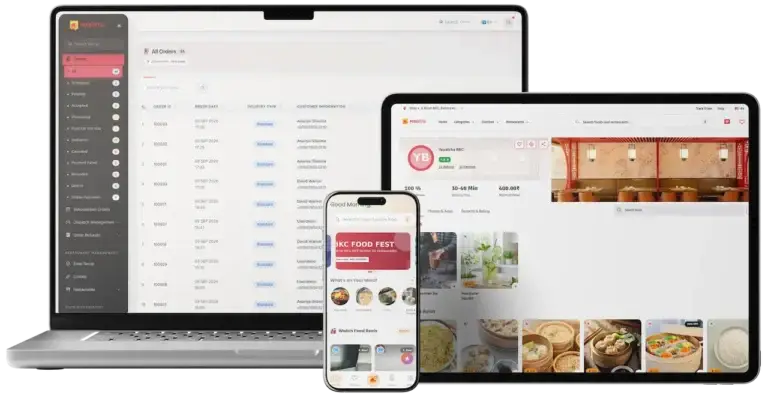
UberEats Clone shown on a laptop, a tablet and a phone with an order table and a food-ordering screen.04
Pick it if: You want to weigh it against this oneUberEats Clone

A restaurant marketplace joining a customer app to restaurant and delivery sides under one operator console.

View This Platform
The full rangeSee all 90+ ready-made solutions

09Revenue and market

Market Benchmarks

Food Delivery Market Benchmarks - Independent 2025-2026 Data

The revenue models above are ours. The figures below are not. They come from the DoorDash and Uber annual reports on Form 10-K, Eternal's Q4FY26 results and talabat's Q4 2025 results, reproduced as published. Together they show what delivery platforms at scale keep from each order in the US, India and the Middle East, so you can test your own business case against numbers you can check.

DoorDash 10-K01

13.4% Net Revenue Margin at DoorDash in 2025

DoorDash reports Marketplace GOV of $102.0 billion in 2025, up 27 percent, and 3.2 billion Total Orders, up 23 percent, in its annual report on Form 10-K. Revenue was $13.7 billion. DoorDash defines Net Revenue Margin as revenue expressed as a percentage of Marketplace GOV, and reports 13.4 percent for 2025, consistent with 2024.

Uber 10-K02

$17.2bn in Uber Delivery Revenue in 2025

Uber's 2025 annual report on Form 10-K shows Delivery segment revenue of $17.2 billion, up 25 percent from $13.8 billion in 2024, on Delivery Gross Bookings growth of 22 percent. Uber attributes part of the rise to a $568 million increase in advertising revenue, and reports Delivery Adjusted EBITDA of $3.6 billion, up $1.1 billion.

Eternal Ltd.03

5.5% Adjusted EBITDA Margin in Zomato Food Delivery

Eternal, the parent of Zomato, reports that food delivery net order value grew 18.8 percent year on year and gross order value 22.5 percent in the quarter ended 31 March 2026. Adjusted EBITDA margin, as a percentage of net order value, was 5.5 percent, an absolute INR 532 crore, up 24 percent year on year.

talabat04

$9.5bn in talabat GMV Across MENA in 2025

talabat reports 2025 GMV up 28 percent to US$9.5 billion and revenue up 33 percent to US$3.9 billion, both at constant currency, with Adjusted EBITDA of US$615 million, or 6.5 percent of GMV. In the fourth quarter its GMV-to-revenue conversion ratio was 42 percent, as grocery and subscription revenue outweighed lower commission rates.

Where each figure comes from.

DoorDash, Inc., Annual Report on Form 10-K for the year ended 31 December 2025, filed 18 February 2026 - sec.gov

Uber Technologies, Inc., Annual Report on Form 10-K for the year ended 31 December 2025, filed 13 February 2026 - sec.gov

Eternal Limited, Q4FY26 shareholders' letter and results, 28 April 2026 - eternal.com

Talabat Holding plc, talabat reports resilient results for Q4 2025, press release, 13 February 2026 - ir.talabat.com

All figures are the publishers’ own, reproduced as published from annual filings and results releases. Metric definitions differ by company and are as each publisher states them. They describe the companies named, not any platform Miracuves builds, and nothing here is a revenue projection for your business.

Commercial Logic

Market Appeal, Revenue Potential & Where a Foodpanda-Style Business Can Go

Stores list, customers return and couriers ride for a city marketplace only once they trust it, so these four points tackle that while each relationship remains in your hands. Revenue then runs on lines you configure: store commission, delivery charges, promotions and better placement that stores buy, and coupons, points and wallet credit capped by a reward budget. A membership tier can be built as custom work, and Miracuves charges nothing per order.

  1. 01

    Commission on Every Order

    Each order leaves a slice with you, so revenue tracks the number of stores and orders, not headcount.

  2. 02

    Promotions That Pay Back

    Coupons, cashback, flash sales and banners can be aimed at slow hours and new districts, and the dashboard shows whether orders followed.

  3. 03

    Customers and Stores Stay Yours

    Accounts, points, wallet balances, store menus and order history sit in your own database, so the value they accumulate is yours.

  4. 04

    Freedom to Move

    With the full source in hand you can switch hosting, team or direction without asking permission.

Main Revenue Levers
  • Commission on Orders
  • Delivery Charges & Order Minimums
  • Paid Promotions & Flash Sales
  • Banner & Home-Screen Placement
  • Repeat-Order Rewards
  • Optional Add-On Revenue
Long-Term Value

What a newcomer cannot copy quickly is the habit, not the feature list.

  1. 01Points, a wallet and a reorder card bring customers back
  2. 02Stores with menus and hours in place rarely move
  3. 03Signed delivery partners must be recruited all over again
  4. 04Vetting who joins is a second moat
Example Revenue Scenarios

The cases differ only in store count, and each names the lever that matters at that size. Take them as planning prompts, not as predictions of any marketplace's earnings.

One District10Stores Listed

Commission pays for the early weeks.

One district, a handful of stores and a single launch coupon. Commission on each paid order is the entire income, sized to cover the running cost of the platform. The store count is an example, not a forecast.

Whole City100Stores Listed

Commission, banners and flash sales.

Stores across a city compete for attention. Banners and flash sales begin to add to commission, and reward programs bring back customers who first came for a discount. The store count is an example, not a forecast.

Several Cities1,000Stores Listed

Zones, placement fees and rewards working together.

Many zones running at once. Placement fees and delivery charges join commission, and the dashboard shows where each promotion earned its cost. The store count is an example, not a forecast.

10Why Miracuves

Side by Side

Foodpanda Clone App Developer Comparison: Miracuves vs Others

Foodpanda-style apps come from four kinds of supplier: off-the-shelf script sellers, freelancers, agencies, and teams like Miracuves with a ready-made base already shipped. Judge any of them on three proofs: a store panel and rider app you can open today, a stack your own developers can take over, and a plain account of the security work still left for launch.

What Founders Value Here

  • 01

    Promotions Are in the Box

    Campaign, banner, coupon, cashback and flash sale tools arrive inside the admin panel, not as a plugin to hunt for later.

  • 02

    Orders That Can Wait

    The order page has a scheduled-at time and a delivery instruction built in. Many scripts stop at order-now.

  • 03

    Commission You Can See

    The dashboard charts admin and delivery commission against gross sale instead of leaving you a blank page.

  • 04

    The Source Code Is Yours

    You get unencrypted code, so no vendor can raise its price or rewrite the terms afterwards.

  • 05

    A Demo Open Today

    Log into three apps with demo credentials and browse the web storefront before any money moves.

  • 06

    Scope Kept Honest

    This page keeps base features, add-ons and your own responsibilities, such as hosting, gateway accounts and store developer accounts, clearly apart.

Development Company

How to Choose a Foodpanda Clone Development Company

Before you pay, a food ordering app development company ought to open its store panel and rider app for you.

What to look for Miracuves

  • Role apps you can open today Demo logins for all three role apps, both panels on a guided call
  • Promotions in the base Coupons, cashback, banners and flash sales in the admin panel
  • Ordering for later A scheduled-at time and delivery instruction on each order
  • Source ownership Readable source for the storefront, panels and Flutter apps
  • Time to launch Six working days, or the work continues free
  • Support after launch Three cover periods starting on launch day

Walk away from any vendor who

  • Ships a customer app without store and delivery apps
  • Calls one coupon field a promotion engine
  • Hides commission in reports you cannot chart
  • Withholds the Flutter app code or bills a yearly license
  • Has no working demo before the invoice

Four Routes Weighed Script, Agency or Miracuves

CriterionMiracuvesMiracuves Foodpanda CloneOff-the-Shelf ScriptAgency Build
Speed to launchSix working days from usOften unstated, or left to youSet per project, commonly months
Who owns the codeYou do, whole and unencryptedFrequently restrictedUsually you
PromotionsCampaign, banner, coupon, cashback and flash sale toolsA coupon field at bestCustom work, billed on top
Ordering for laterScheduled-at time on the order pageSeldom includedDepends on the brief
Apps beyond the customer oneStore and delivery apps come with itOften missingMade to order
Commission visibilityChart of admin and delivery commissionVaries by scriptDepends on what is written
Reporting and adminOrder tiles, ranked lists, zone selectorThin or absentCustom work, billed on top
Security stanceOne login per role, cards handled at your gateway, limits disclosedBare minimumVaries widely
After-launch help60 days guidance, 6 months bug fixes, 12 months updatesSeldom on offerLimited to the contract terms

A food marketplace is tested on its first big promotion night, and the rows above show which route holds up.

Start Your Food Marketplace With Us

Changelog

What Changed Across Releases of the Foodpanda-Like App

Base platform changes, newest release at the top. No dates are given, and lines on digital goods, vendor-app fixes or anything else the demo does not display have been omitted.

ReleaseSummaryDetails
V15.06 changes, 3 fixesNew or modified
Store pages and the home screen gain a section for stock-clearance discounts
Product pages now have a call-to-action block
Support for tracking pixels from six social networks, along with Google Tag Manager and Google Analytics
The admin panel can switch cash on delivery on or off
Redesign of the page showing refund details
The apps are built with Flutter SDK 3.27.1
Resolved
Incorrect order totals showing at point of sale
How the login page behaved
Miscellaneous reliability defects
V14.9.14 changes, 1 fixAdded or changed
Caching now works on the server side and in the browser
Asset files were slimmed down
Clearer wording in system messages and labels
Apps now build on Flutter SDK 3.24.5
Fixed
Assorted stability faults
V14.95 changes, 1 fixAdded or changed
A better point of sale in the admin panel, store panel and store app, now showing paid and change amounts
A fresh look for the admin login and its neighboring pages
Caching for database queries
The admin panel exports customers and subscribers through filters
Apps now build on Flutter SDK 3.24.4
Fixed
Assorted stability faults
V14.85 changes, 2 fixesNew or modified
Tapping a push notification can open a chosen page
Maintenance mode may be applied to selected modules only
One login screen presents manual, one-time code and social media options, and the admin enables each one separately
Mobile one-time codes work with Firebase Authentication
The apps compile against Flutter SDK 3.24.3
Resolved
Small bugs
Some queries run quicker
V14.78 changes, 1 fixNew or modified
Storage can be hooked up to Amazon S3
Controls for the SEO section
Improved translations in a number of languages
Stores are able to reply to reviews
Chat runs more smoothly
A flash deal or feature deal can take in multiple products at once
Invoices ready to print can be emailed
Flutter 3.22.2 is now the build base for the apps
Resolved
Some defects in the admin panel and on the website
V14.67 changes, 1 fixNew or modified
Every list in the admin panel can be sorted your own way
Each type of email has an editable template
Buying only chosen items keeps the remaining cart contents
Buy-now checkout that leaves the cart untouched
Guests see a checkbox to create an account while checking out
Firebase's HTTP v1 interface now sends push notifications, replacing legacy FCM
Flutter SDK 3.19.6 now underpins the apps
Resolved
UI polish across the web panels and apps
V14.45 changes, 1 fixAdded or changed
Users can chat with the admin through the website and the app
An improved order review section
Additional mail and push notifications covering more cases
Support for an SMS gateway
The apps are now built with Flutter SDK 3.16.9
Fixed
Corrections across the web panels, websites and apps
V14.011 changes, 2 fixesAdded or changed
A redesigned user app
Wallet top-ups from the website and the app, with a bonus on each top-up
Guest checkout
Delivery and billing addresses can be edited
A minimum order amount that admin and store can both set
Free delivery once an order passes a set value
Reordering from previous orders
Referral credit, paid after the referred customer's first delivered order
Order delivery verification by image and one-time code
Apple login added to the user app
Apps now build on Flutter 3.13.6
Fixed
Translation issues
Some small faults

Talk to us

Ready to bring your city's stores, customers and riders onto an app you own?

Book a free consultation and leave with a firm timeline and candid answers. Winning your trust matters more to us than a quick sale.

  • First reply in under 2 hours
  • The consultation is free
  • No long-term contract
  • Full source code handed to you

11Read on

Fresh Reading

Foodpanda Clone Guides, Articles & Insights

Further reading on building a food delivery app, on a ready-made base versus a custom build, and on the code underneath it.
About the product6 questions

01What does a Foodpanda Clone consist of?

It is a food ordering marketplace that arrives built, so you launch it under your own brand and skip the design phase. Customers, stores and delivery partners each use an app of their own, a web storefront runs next to them, and admin and store panels deal with approvals, orders and promotions. Miracuves hands it over white-label, source code included, at a fixed $3,399.

02Can I rebrand it and change it after launch?

Yes. Ahead of deployment your logo, icons and colors go onto the web platform and all three apps. With the source unencrypted, you or our team can rework flows, screens and integrations afterwards; work past the base starts from a written scope and quote.

03Does the Foodpanda Clone run on both Android and iOS?

Yes. Customers, stores and delivery partners each get a Flutter app for Android and iOS, and the storefront runs in any browser. We publish from your developer accounts, while Apple and Google review the apps on timetables of their own that fall outside the 6-day build.

04Which technologies is the Foodpanda Clone built on?

According to the product pages, the web and admin side uses PHP with Bootstrap and Node.js, MySQL stores the data and Flutter builds the apps. Maps, texting, push messages, payments and translation are bought in: Google Maps, Twilio, Firebase, a gateway you choose and a translation service. You open the accounts and pass us the keys at deployment.

05Will it keep up as I add more stores and orders?

Apps and panels draw on one shared set of data. A zone selector keeps the dashboard readable as you spread out, caching reached the server and the browser with release 14.9.1, and stores can be imported in bulk. We publish no load figures for the demo, so test capacity on a call against your own order volumes.

06What help do I get once the platform is live?

Three cover periods start together on launch day: 60 days of dedicated platform guidance, 6 months of priority bug resolution and 12 months of continuous product evolution, all at no extra cost.

Customers & orders7 questions

07How does a customer place an order?

A customer looks up a dish or a restaurant, opens a store page, puts products in the cart and checks the order. Payment runs through the gateway you connect, or as cash on delivery if the admin has left it on. The order page afterwards shows a status and a Track Order button.

08Can customers order for a later time?

Yes. A user can schedule an order for a later time or date, and the order page records a scheduled-at time under the order date. The quickest check is the demo: log in as the customer and open an order.

09Can a customer add a note or extras to an order?

One step of the order flow is for special instructions and extras, and the order page keeps a delivery instruction, such as leaving the order at the front door. The product's order summary also has an add-ons line. Menu options beyond that would be custom work.

10How can customers follow a delivery?

The order page ends in a Track Order button, GPS and Google Maps power the location view, and push notifications announce status changes and offers. A delivery verification code is checked at the door.

11Which payment methods does the app support?

Payment gateways plug in as third-party APIs, and you need an account of your own with KYC completed. Cash on delivery sits behind an admin switch, and customers can top up a wallet balance in the app. A gateway that is not on the list becomes a custom job.

12How do coupons, points and the wallet bring customers back?

The customer menu lists coupon, loyalty points and wallet, and referral credit is paid once the friend's first order is delivered. A Wanna Try Again card on the home screen suggests a shop used recently, and past orders can be reordered. Campaigns, banners, coupons and cashback are run from the admin panel.

13What can a customer do if an order goes wrong?

Customers can message the admin from the app and the website, and refunds are handled in an Order Refunds menu. The support and refund policies that go with those tools are for you to write and publish.

Stores5 questions

14How do stores get onto the marketplace?

Applications from new stores wait in the New Stores menu of the admin panel until you accept them. You may also add a store yourself or import several in bulk, and a Recommended Store list brings trusted ones forward. Which documents you demand before approval is your own rule.

15How does a store manage its menu and orders?

Every store has a panel and a mobile app of its own for incoming orders, and both include a point-of-sale section showing paid and change amounts. A store can also set its own minimum order amount.

16Can stores run their own promotions?

Promotion tools live in the admin panel, where you set up campaigns, banners, coupons, cashback and flash sales. If your plan needs stores to start their own offers, that flow can be built as scoped custom work.

17What commission does the platform charge stores?

That is your call. You set the commission rate in the admin panel, and the dashboard chart puts gross sale beside the admin and delivery commission lines. The base fixes no percentage.

18How are stores paid for their orders?

Transactions and reports have an entry in the admin header, and the console keeps the figures that decide what each store is owed. How often you pay stores is a business arrangement between you and them, because the base imposes no daily, weekly or monthly rhythm.

Delivery partners4 questions

19How does someone become a delivery partner?

Sign-up begins from the delivery partner entry in the customer menu, or inside the delivery app, which comes with a demo login. You review each applicant before any deliveries reach them.

20How are deliveries given to delivery partners?

The admin panel has a Dispatch Management area, and the dashboard counts orders accepted by a delivery man and ranks the busiest ones. Automatic assignment by distance or rating is available as scoped custom work.

21How do delivery partners earn?

The sales chart has a delivery commission series beside the admin commission, and the console records delivery partner payments next to store payments. Peak-hour bonuses, withdrawal rhythms and comparable pay rules fall beyond the base and would be custom work.

22How is the handover checked at the door?

An order shows a delivery verification code, and release 14.0 added verification by image and one-time code. Maps for location and tracking are Google Maps content.

Operator, payments & launch16 questions

23What does the admin panel contain?

A dashboard with order status tiles and a sales chart, menus for orders and refunds, flash sales, a promotion block for campaigns, banners, coupons, cashback and push notifications, store management, dispatch, a point of sale, rankings of stores, items, deliverymen and customers, and reports. Extra reports or a bespoke approval step are quoted separately.

24Can I run several areas from one admin panel?

Choose a zone and the counters, chart and lists narrow to that area, which helps when you cover several districts. Operating across cities or countries goes beyond what the demo shows and would be quoted as separate work.

25What analytics does the dashboard give me?

The dashboard has This Year, This Month and This Week views, counters for items, orders, stores and customers, a sales chart showing both commission lines, user statistics by role and ranked lists. Customer and subscriber lists export through filters, and Google Tag Manager, Analytics and several social pixels are supported.

26Can I connect another payment gateway?

Gateways connect through third-party APIs. Any other one, including a regional gateway, is custom work that we scope and price in writing before starting.

27How does a promotion-led food marketplace reach its first revenue?

Commission is the plainest start because nothing extra needs selling: it accrues on the first paid order. Delivery charges travel on the same order, and when stores begin to compete for the same customers you can offer them banners, flash sales and featured positions. Points, cashback and wallet bonuses spend margin first, so they work best after early orders prove demand. A subscription tier or any other feature missing from the base is separate work that we scope and quote beforehand.

28What makes a city food marketplace hard for a rival to copy?

What a newcomer cannot copy quickly is the habit, not the feature list. A customer holding points, a wallet balance and a reorder card for a favorite shop has a reason to open your app first. Stores with menus and hours already in place seldom move, and delivery partners who have joined must be recruited again by whoever follows you. Vetting stores and couriers is the second moat, since a trusted network is slow to rebuild.

29How long does it take to launch my food marketplace?

A ready-made launch takes 6 working days of our time. In them we rebrand the platform, deploy it on your hosting and publish the apps from your developer accounts. Apple and Google review the apps, and your payment provider onboards your gateway, on schedules of their own that sit outside the 6 days. Custom changes are priced separately.

30Do I receive the full source code?

Yes, every line. Both the web platform and the mobile apps come with readable, unencrypted code. No per-user or per-run fee applies, and your developers are free to modify and redeploy it.

31What do I need to provide before launch?

Our part is the platform and its deployment. You bring hosting and a domain, developer accounts at the app stores that are already verified, your logo and company details, a payment gateway with KYC cleared, plus the keys for Firebase, Twilio and Google Maps. Gateway accounts are opened in your name, and your privacy policy and terms are yours to publish.

32Why build my Foodpanda clone with Miracuves?

Three role apps, scheduled orders, promotion tools and an admin panel arrive in working order, with a public demo for testing every side first. The team has shipped 9,000+ projects for 6,000+ clients and keeps 90+ ready-made solutions in its catalog. For one fixed $3,399 the Foodpanda Clone goes live within six working days, backed by 60 days of guidance, 6 months of priority bug fixes and 12 months of product updates. A person answers within two hours on working days, Monday to Saturday from 10:00 until 19:00 IST.

33How much does a Foodpanda clone cost?

The Foodpanda clone sells for $3,399, once, and Miracuves takes nothing from later orders. That payment brings customer, store and rider apps, the browser storefront, an admin panel with scheduled orders and promotion tools, deployment and the unencrypted source. Chef classes, farm-fresh produce, mystery boxes and eco packaging are add-on modules with their own written prices.

34Is a ready-made Foodpanda clone better than custom development?

When your plan is a city food marketplace with pre-orders and promotions, the ready-made Foodpanda clone gets you there faster: one fixed price and a launch in 6 working days, after trying each role app in the demo. A custom build makes sense for requirements the demo does not cover, and it is quoted in writing, typically over 2-8 weeks. Because you own the source, custom features can be added later too.

35What is the business model of an app like Foodpanda?

An app like Foodpanda grows city by city on promotions: discounts and pre-orders win the first customers in a new area, and rewards turn them into regulars. Stores accept a commission because the marketplace brings them demand they could not reach alone, and couriers follow the order volume. Once a city fills in, the same playbook repeats in the next zone from the same admin panel.

36What is the step-by-step process to launch my Foodpanda clone?

Open the demo apps and the storefront first. Next, send branding, business details, hosting, a KYC-cleared gateway and your Firebase, Twilio and Google Maps keys. Over the following 6 working days the three apps and panels take on your brand, go onto your server and are filed for store review under your developer accounts. Review time at Apple and Google is theirs and is not part of those days.

37Who can run a Foodpanda clone besides a restaurant marketplace?

Anyone who sells prepared food from a set of kitchens and wants it carried to the door. Restaurant networks open a shared channel, bakeries take cake orders for a fixed date, office caterers sell tomorrow's lunch, and food halls pool many kitchens. Local courier firms can also add a food storefront to the riders they already employ.

38Do I keep the store list and customer relationship on a Foodpanda clone?

Yes. The platform runs under your own name on your hosting, so the store list, the customer relationship and the promotion calendar all stay with you. You decide which stores join and which offers run, and no per-user fee or license payment is charged on the source code you receive.

Disclaimer

Miracuves is an independent software development company. We are not affiliated with, connected to, sponsored by, or endorsed by Foodpanda.

Read our full Legal Notice & Disclaimer →
Why this name

“Foodpanda Clone” is used descriptively. It is how the software industry refers to building a platform with functionality similar to Foodpanda, and how clients search for it.

Who built this

The entire design and codebase is built by our own team. The product contains no code, design, graphics, or content originating from the Foodpanda website or applications.

Trademarks

Foodpanda and all other third-party names and marks are the property of their respective owners, referenced here solely to describe the category of software offered.