

A realistic AI talking avatar does more than move its lips to a recorded voice. Behind every convincing digital presenter is a sequence of technologies that generate speech, interpret its timing, animate facial movements, preserve visual identity, and render the final video.
When these systems work together, a synthetic presenter can deliver scripted messages with natural pronunciation, coordinated mouth movements, and consistent facial expressions. When they do not, viewers notice delayed lips, unnatural pauses, distorted faces, or expressions that do not match the speaker’s tone.
Understanding how AI talking avatars work is particularly important for founders and product teams exploring automated training videos, digital presenters, multilingual content, and interactive experiences. The challenge is not simply producing one convincing clip. It is maintaining quality while controlling the computing resources required to generate hundreds or thousands of videos.
For businesses evaluating this technology, understanding the underlying systems also helps clarify how avatar-video production workflows and rendering infrastructure operate within a commercial platform.
This guide explains the technology behind voice cloning, audio-driven facial animation, lip synchronization, and video rendering, along with the infrastructure costs that shape the economics of AI-generated content.
Key Takeaways
- Multiple AI systems work together: Realistic talking avatars combine speech generation, facial animation, and video rendering rather than relying on a single AI model.
- Voice and lip-sync serve different purposes: Voice cloning reproduces characteristics of an authorized speaker’s voice, while lip-sync models match the generated speech to facial movements.
- Realism requires consistency: Natural output depends on expression, identity consistency, timing, and motion between frames.
- Rendering has measurable operating costs: GPU processing time, resolution, model complexity, storage, and failed generation attempts influence the final expense.
- Usable output is the real metric: Founders should measure the cost per approved video minute, not just the cost of a single generation attempt.
How Does an AI Talking Avatar Actually Work?
An AI talking avatar is a digitally generated or animated representation of a person or character that appears to speak. Depending on the technology, the avatar may be created from a still image, a reference video, a trained digital identity, or a three-dimensional character.
Most production systems combine several stages. A script is converted into speech, the speech is analyzed for timing and sound patterns, and an animation model generates facial movements that correspond to those patterns. Finally, a rendering system combines the animated face, audio, background, and other visual elements into a usable video.
The Core AI Avatar Generation Pipeline
From written script to a synchronized, playable avatar video
-
01
Script Input
Receive the text, language selection, avatar reference, and generation settings.
-
02
Speech Synthesis or Authorized Voice Cloning
Generate a natural-sounding voice track based on the script and permitted voice identity.
-
03
Audio and Phoneme Analysis
Analyze pronunciation, timing, pauses, and acoustic characteristics.
-
04
Lip-Sync and Facial Motion Generation
Predict coordinated mouth movements, expressions, and facial motion.
-
05
Frame Rendering and Video Encoding
Generate visual frames and combine them with audio into a video file or stream.
-
06
Quality Review and Video Delivery
Evaluate the output, manage any necessary revisions, and deliver the finished video.
This is a simplified audio-first workflow. Some newer systems generate speech and video jointly or condition the video directly on audio features. The underlying principle remains similar: the visual output must preserve the avatar’s identity while matching the rhythm and content of speech.
For example, consider a training company producing the same two-minute lesson in several languages. The platform must create or import the correct speech for each language, align the face with its pronunciation, and render each version without introducing visual inconsistencies.
The practical complexity comes from combining these separate operations reliably, rather than treating avatar generation as a single request.
How Voice Cloning Generates Natural-Sounding Avatar Speech
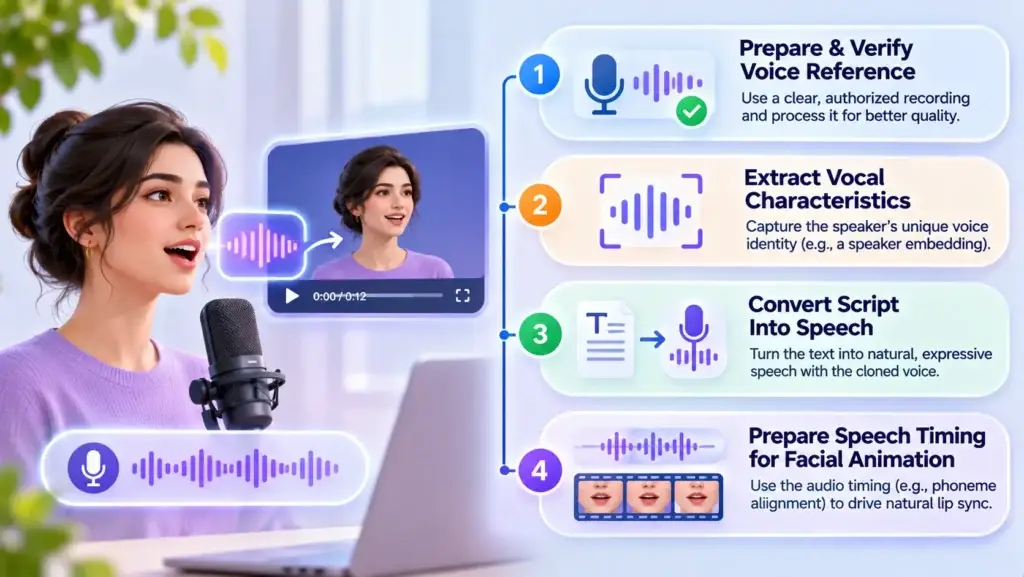
Voice cloning uses machine learning to reproduce identifiable characteristics of a speaker’s voice, such as vocal tone, timbre, accent, and speaking style. It typically begins with an authorized recording from which the system extracts information about the speaker’s vocal identity.
Unlike conventional text-to-speech, where a user selects a predefined synthetic voice, voice cloning aims to make newly generated speech resemble a particular speaker.
Step 1: Prepare and Verify the Voice Reference
The system receives an audio recording and processes it to improve clarity. Depending on the model, this can include removing background noise, detecting speech segments, adjusting loudness, and identifying usable samples.
For a responsible production workflow, the platform should also establish that the person has authorized the use of their voice. Voice permission is not merely a legal document; it is part of controlling who can create synthetic content associated with a specific identity.
Step 2: Extract the Speaker’s Vocal Characteristics
A speaker encoder may convert the reference recording into a numerical representation known as a speaker embedding. This embedding captures voice characteristics that help a synthesis model maintain a recognizable vocal identity.
Not every voice-cloning system uses the same architecture. Some models use embeddings, others use reference-audio conditioning, and some adapt through additional training.
Step 3: Convert the Script Into Speech
The text-processing system interprets the script, including punctuation, pronunciation, pauses, and sometimes emotional or stylistic instructions.
A neural text-to-speech model then generates speech conditioned on the text and the selected voice identity. A neural vocoder or integrated audio decoder produces the final waveform.
Realistic output requires more than correct words. The system needs appropriate prosody: the rhythm, stress, intonation, and pacing that make speech sound natural.
Step 4: Prepare Speech Timing for Facial Animation
The completed audio becomes an important input for synchronization. It provides information about the timing of spoken sounds, pauses, and transitions.
In systems that use phoneme alignment, speech sounds can be assigned approximate timestamps. Other systems learn directly from acoustic features without requiring a separate explicit phoneme timeline.
Both approaches aim to answer the same question: what should the face be doing at each moment of the audio?
How Lip-Sync AI Matches Mouth Movements With Speech
Lip-sync technology predicts how the mouth and surrounding facial regions should move while a person is speaking.
A useful distinction is the difference between phonemes and visemes.
- Phonemes are units of speech sound that distinguish words in a language.
- Visemes are visually recognizable mouth configurations associated with speech sounds.
These concepts are related, but they are not identical. Multiple phonemes can appear visually similar, and the appearance of a sound often depends on the sounds before and after it.
For example, closing the lips for an /m/ sound looks different from opening the mouth for a broad vowel. However, a natural speaker begins moving toward the next sound before the previous one has completely finished.
This overlapping articulation is called coarticulation, and it is one reason that simple mouth-shape switching often looks robotic.
Why Timing Matters More Than Matching Individual Words
A convincing lip-sync system must account for when sounds begin, how long they last, and how the mouth transitions between them.
If a face opens its mouth several frames after the voice begins, the result can appear dubbed. If the mouth closes too soon, the avatar may look as though it has stopped speaking while the audio continues.
In addition to mouth timing, realistic models may generate:
- Jaw movement and lip compression
- Cheek and chin deformation
- Subtle head movement
- Eye blinks and gaze changes
- Facial expressions associated with speech
- Smooth transitions between consecutive frames
These details matter because viewers evaluate the entire face, not just the mouth.
Why Facial Consistency Is a Separate Technical Challenge
A lip-sync model can generate correctly timed mouth movements while still producing an unrealistic video.
Problems may include changing facial proportions, unstable teeth, inconsistent lighting, altered skin texture, or slight identity changes between frames.
Modern generation approaches may use landmarks, learned motion representations, reference-frame conditioning, or diffusion-based synthesis to coordinate facial movement while preserving appearance.
The correct approach depends on the output requirements. A simple animated character does not need the same rendering architecture as a highly realistic human presenter.
What Makes a Talking Avatar Look Human Rather Than Artificial?
Realism emerges from several interacting qualities. It is not determined by image resolution alone.
| Realism Factor | What It Controls | What Goes Wrong |
|---|---|---|
| Speech naturalness | Pronunciation, pacing, intonation | Mechanical or awkward speech |
| Lip synchronization | Speech-to-mouth alignment | Visible audio and video mismatch |
| Expression coherence | Facial reactions and emotion | Unnatural smiles or blank expressions |
| Identity preservation | Stable facial appearance | Facial details change during a clip |
| Temporal consistency | Movement across frames | Flickering or sudden motion changes |
| Visual composition | Lighting, background, framing | Unconvincing scene integration |
One common mistake is assuming that higher-resolution output automatically produces higher perceived quality. A sharp video with poor speech synchronization can feel less believable than a lower-resolution clip with stable facial motion.
For product teams, this suggests evaluating realism across multiple dimensions rather than using a single subjective quality score.
How AI Video Rendering Infrastructure Processes Avatar Requests
Creating one short video and operating a service that processes many requests simultaneously are fundamentally different engineering problems.
During generation, several components may compete for computational resources. Text-to-speech, facial animation, frame synthesis, and video encoding can run as separate services, or some stages may be combined within one model.
1. CPU Resources Handle Coordination and General Processing
CPU-based services commonly manage incoming requests, authentication, metadata, text preparation, job scheduling, and parts of media processing.
These operations are usually less computationally intensive than neural video inference, but they still require reliable infrastructure.
2. GPUs Perform Computationally Intensive Model Inference
GPUs accelerate the mathematical operations used by deep learning models. Their parallel-processing capabilities make them valuable for generating speech, synthesizing facial motion, and producing video frames.
Video-generation workloads can be particularly demanding because each output contains a sequence of images that must remain visually consistent.
Model architecture, resolution, frame rate, inference precision, and GPU memory requirements influence how long rendering takes.
3. Job Queues Prevent Heavy Rendering From Blocking the Application
In an asynchronous system, the application creates a generation job and places it in a queue. Available workers then process the request.
This architecture allows the user-facing interface to remain responsive while computationally expensive rendering runs separately.
Queues also make it possible to apply priorities, monitor failures, retry recoverable jobs, and allocate additional GPU workers when demand increases.
For more context on the role of asynchronous processing in media-heavy applications, see this guide to background processing for creator platforms.
4. Storage and Delivery Systems Manage Completed Videos
Once generation finishes, the system encodes the output into a suitable format, such as an MP4 file using a supported video codec.
The rendered file is then stored and made available for viewing, sharing, or downloading.
Object storage manages media files, while a content delivery network can reduce the distance between stored content and viewers. This becomes relevant when the same completed video is accessed repeatedly across geographic regions.
For a broader explanation of media delivery architecture, review video streaming infrastructure for short video applications.
What Determines the Infrastructure Cost of AI Talking Avatar Generation?
Infrastructure cost is driven by the resources used to generate, process, store, and deliver each video.
It is important to separate the cost of operating an avatar-generation pipeline from the one-time cost of developing an application. They answer different business questions.
Where AI Avatar Generation Costs Come From
Every successful video can consume resources across several independent processing stages.
| Cost Component | Primary Driver | Operational Impact |
|---|---|---|
| Speech inference | Audio duration and voice model | Compute or usage fees |
| Avatar inference | Model complexity, resolution, duration | GPU processing expense |
| Video encoding | Resolution, codec, number of outputs | CPU/GPU processing and time |
| Storage | File size and retention period | Recurring media storage charges |
| Content delivery | Downloads and transferred data | Network and CDN fees |
| Retries and revisions | Failed or rejected renders | Additional inference consumption |
| Operational capacity | Worker utilization and idle resources | Cost of available GPU capacity |
How to Estimate GPU Cost Per Generated Video
A basic utilization-based estimate for one render is:
For a hypothetical illustration, suppose a GPU worker costs $2 per hour and spends three minutes processing one video.
The estimated GPU expense is:
This is a hypothetical arithmetic example, not an actual cloud quotation or an observed AI avatar generation benchmark.
This estimate excludes speech processing, storage, networking, idle capacity, orchestration overhead, retries, and any provider fees.
For a dedicated GPU, hourly utilization must also be considered. A worker that remains provisioned between jobs continues to incur costs even when it is not generating output.
Why Cost Per Approved Video Is the Better Business Metric
Not every generation attempt produces a video that a customer accepts.
For a simple batch estimate, assume each submitted render has the same all-in attempt cost and that 80% are approved. The expected processing cost per approved output is:
Cost Per Approved Output
The example assumes a stable approval rate, independent attempts, and no separate manual review expense. It is illustrative rather than a measured operating result.
Actual costs can be higher when retries require more expensive settings or additional editing.
For founders, the implication is significant: improving generation reliability can protect margins without changing the customer-facing price.
Real-Time vs Batch Avatar Generation: Different Infrastructure Requirements
Not every application needs to generate avatar video instantly.
A scripted training-video tool can process jobs asynchronously. A conversational digital assistant, however, must respond quickly enough to maintain a natural interaction.
Batch Rendering vs. Real-Time Generation
| Requirement | Batch Video Generation | Real-Time Avatar Generation |
|---|---|---|
| Typical use | Recorded videos and lessons | Interactive digital presenters |
| Latency expectation | Completion can take longer | Low response latency matters |
| Processing | Queued jobs | Continuous or chunked inference |
| Infrastructure priority | Throughput and efficient utilization | Fast startup and stable frame delivery |
| Delivery method | Stored file or standard playback | Live audio/video streaming |
| Cost tradeoff | Can prioritize inexpensive processing windows | May require continuously available capacity |
Batch processing is usually more flexible about when GPU resources are consumed. Jobs can be scheduled, grouped, or assigned to available workers.
Real-time systems have a stricter timing constraint. Speech generation, avatar animation, and transmission must work together without creating long pauses or unstable playback.
Real-time streaming may use technologies such as WebRTC, while recorded outputs can use conventional file delivery or adaptive streaming where appropriate.
For many first releases, the sensible decision is to define the user experience before committing to the more demanding real-time infrastructure model.
How to Reduce AI Avatar Rendering Costs Without Sacrificing Quality
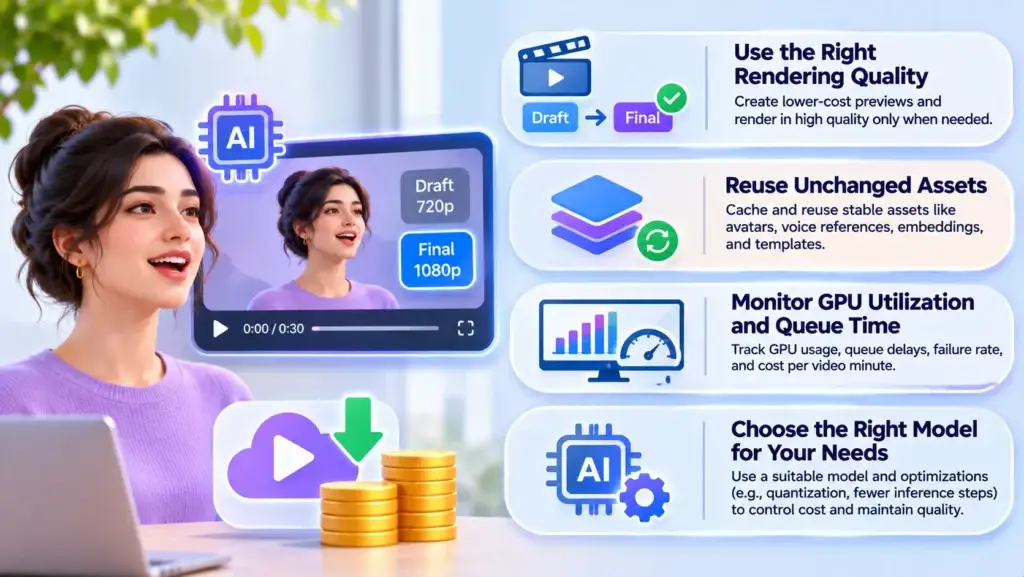
Cost optimization does not necessarily mean choosing the smallest model or lowering the output resolution for every user.
A more effective approach is to identify where the system consumes unnecessary resources.
Use the Right Rendering Quality for Each Workflow
A preview clip does not always require final export resolution. Lower-cost draft rendering can allow users to confirm scripts, pronunciation, and framing before requesting the final video.
However, this is beneficial only when the cost of generating previews is lower than the expensive re-renders it prevents.
Reuse Assets That Have Not Changed
If the avatar identity, voice reference, or background remains the same, some reusable assets can potentially be cached.
For example, a system may store authorization records, normalized reference materials, embeddings, templates, or unchanged media assets. Whether intermediate model outputs can be reused depends on the actual architecture.
Monitor GPU Utilization and Queue Waiting Time
High GPU usage is not always a sign of efficient operation if jobs are repeatedly failing or waiting too long to start.
Useful operational metrics include:
- GPU seconds consumed per output minute
- GPU memory usage and utilization
- Average rendering queue delay
- Generation failure and retry rate
- Accepted output percentage
- Cost per completed and approved video minute
Choose the Right Model for the Output Quality Needed
A lightweight facial animation model may be suitable for a stylized presenter, while photorealistic human video may require more demanding inference.
Model quantization, reduced inference steps, and optimized execution can lower resource requirements, but every change should be evaluated for visual consistency, synchronization quality, and output stability.
The objective is not simply faster rendering. It is producing acceptable output at a predictable cost.
Why Voice and Facial Identity Protection Must Be Built Into the Pipeline
Voice cloning and realistic facial animation introduce risks that ordinary video-editing tools may not create at the same level.
A synthetic video can resemble an identifiable person even when that person never recorded the words being spoken.
Responsible applications should therefore include consent verification, access restrictions, and controls over how voice and face references are used.
Important safeguards include:
- Documenting permission to use a person’s voice and likeness
- Restricting who can access or reuse stored identity references
- Protecting reference recordings and generated media
- Maintaining audit logs for sensitive generation actions
- Supporting requests to revoke permissions where applicable
- Applying appropriate disclosure or provenance information to synthetic media
- Reviewing jurisdiction-specific requirements before deployment
These safeguards support user trust and reduce misuse risk, but they do not automatically establish legal compliance. Applicable consent, privacy, biometric-data, publicity, and synthetic-media rules depend on the jurisdiction and use case.
What Founders Should Validate Before Scaling Avatar Video Production
The central operational question is not whether a model can generate one impressive demonstration. It is whether the complete pipeline can produce consistent, acceptable videos under realistic workloads.
Four Decision Signals Before Scaling
Evaluate the complete production experience, not just an individual AI model.
Quality
Can the system maintain believable speech alignment and visual identity across different scripts and languages?
Capacity
What happens when many users submit jobs at the same time?
Unit Economics
How much does each approved video minute cost after retries, rendering, storage, and delivery?
Control
Can the operator monitor usage, enforce permissions, troubleshoot failures, and change infrastructure without disrupting customers?
A useful evaluation should include short and long scripts, varied speaking speeds, multiple language samples, and situations involving difficult phonemes or emotional expression.
Teams should also test repeated requests from the same avatar identity. A platform that produces one high-quality sample but inconsistent subsequent videos may create more support work than anticipated.
Once these questions are understood, founders can explore how a production system manages avatar-video generation, rendering jobs, and administrative controls.
When the product requires specialized models, new inference services, or deeper workflow customization, specialist AI engineering support can help assess the technical requirements and integration options.
Common Mistakes That Make AI Avatar Systems Expensive or Unreliable
Optimizing for a Single Demonstration Video
A short polished sample may hide problems that appear during longer videos, different languages, or concurrent generation requests. Test scenarios should reflect actual customer usage.
Ignoring Failed Renders in Cost Forecasts
A platform’s theoretical cost per successful first attempt can be misleading. Regenerations, rejected clips, and partial failures all consume resources.
Using Real-Time Infrastructure for Every Use Case
Low-latency systems are valuable when users need live interactions. For prerecorded videos, asynchronous rendering can be operationally simpler and provide more scheduling flexibility.
Focusing Only on GPU Pricing
GPU inference is important, but storage, encoding, data transfer, monitoring, and utilization can materially affect the final operating expense.
Treating Identity Consent as an Afterthought
A platform should not allow users to create arbitrary replicas of people without appropriate authorization. Permission, verification, and misuse handling should be designed into the workflow rather than added after launch.
Turning Avatar Generation Technology Into a Reliable Product
For founders, understanding the underlying pipeline helps reveal which parts of an AI video product need the most attention: audio quality, facial consistency, rendering reliability, permission controls, or operational efficiency.
Not every team needs to train its own speech and video models. In some cases, established inference services can supply the generation capability while the application focuses on workflow coordination, quality checks, administration, and customer experience.
Miracuves offers a ready-made foundation for avatar-video production that can be branded and deployed in six working days for the defined standard scope. That deployment timeline does not imply that training new generative models, adding complex custom integrations, or completing external approvals can also be achieved in six days.
For teams considering that route, the important next step is to verify which generation providers, model integrations, rendering controls, and infrastructure responsibilities are included in the proposed configuration.
Final Thoughts: Realism Depends on More Than Generating a Face and Voice
Realistic talking avatars are the result of coordinated speech synthesis, timing analysis, facial animation, and video rendering. Each stage influences the final viewing experience, and each introduces technical and operational considerations.
For product operators, the strongest measure of a generation pipeline is not the realism of one carefully selected output. It is the ability to produce consistent videos, protect user identities, maintain predictable processing times, and manage the actual cost of delivering usable content.
Understanding these systems makes it easier to evaluate technical tradeoffs, avoid unnecessary infrastructure complexity, and decide which capabilities deserve investment as demand grows.
Frequently Asked Questions
How do AI video generators create realistic talking avatars?
AI video generators combine speech synthesis, audio analysis, facial animation, and video rendering. The system uses a voice track and an avatar reference to produce facial movements that correspond to spoken sounds while attempting to preserve the avatar’s identity and natural expressions.
What is the difference between voice cloning and text-to-speech?
Text-to-speech converts written text into synthetic audio, often using a predefined voice. Voice cloning adds the ability to condition speech on the vocal characteristics of a specific speaker, using an authorized reference recording or voice model.
How does AI lip-sync technology match speech with mouth movements?
Lip-sync technology analyzes speech timing and acoustic information, sometimes including phoneme alignment, to predict the mouth shapes and facial movements appropriate for each moment. Advanced models also account for transitions between sounds and surrounding facial motion.
Why do some AI talking avatars look unnatural?
Common causes include speech timing errors, weak facial-expression modeling, unstable identity preservation, inconsistent frames, and poor coordination between audio and video. Higher resolution alone does not resolve these problems.
What determines GPU infrastructure costs for AI avatar videos?
Important factors include model complexity, processing duration, output resolution, frame rate, hardware selection, GPU utilization, and the number of rendering attempts. Storage, encoding, delivery, and speech processing add further operating costs.
Can AI talking avatars generate videos in multiple languages?
Yes, when the selected speech and avatar models support the target language. Each language may require new speech generation and updated facial synchronization. Pronunciation, timing, accent, and visual quality should be tested separately rather than assuming identical performance across languages.
Is real-time talking avatar generation more expensive than batch rendering?
Real-time generation can be more demanding because it prioritizes low latency and may require continuously available processing capacity. Batch generation allows more flexible scheduling. The actual cost comparison depends on the models, utilization, throughput, and hosting arrangement.
How can a business reduce the cost of generating talking avatar videos?
Businesses can reduce unnecessary rendering by using preview workflows, caching reusable assets where supported, monitoring GPU utilization, minimizing failed generations, and choosing models that match required quality levels. Measuring cost per approved video minute provides a more reliable picture than tracking generation attempts alone.
Miracuves is an independent software development company. We are not affiliated with, connected to, sponsored by, or endorsed by any company or product named in this article.
Terms such as “X Clone” are used descriptively. It is how the software industry refers to building a platform with functionality comparable to a known service, and how clients search for it.
The entire design and codebase of our products is built by our own team. Our products contain no code, design, graphics, or content originating from any third-party website or applications.
All third-party names and marks referenced in this article are the property of their respective owners, referenced solely to identify the services discussed.