

A viewer opens a video, presses play, and expects it to run without interruptions. But what happens when their internet connection suddenly slows down?
The video may begin in high definition, then start buffering as the viewer moves between network coverage areas or shares bandwidth with other devices. A streaming service that cannot respond to these changes risks frustrating viewers before they finish watching.
This is where adaptive bitrate streaming (ABR) becomes important.
Adaptive bitrate streaming allows a video player to adjust video quality according to the viewer’s available network conditions. Instead of repeatedly stopping to load a high-quality stream, the player can select a lower-bitrate version that requires less data.
When connection conditions improve, the player can move back toward a higher-quality version.
For founders building subscription entertainment services, educational video libraries, regional content platforms, or other video-based businesses, understanding adaptive bitrate streaming is about more than video resolution. It is about delivering a viewing experience that remains usable under real-world network conditions. Founders evaluating a ready-made video streaming platform should consider these playback requirements alongside their broader product goals.
This guide explains how adaptive bitrate streaming works, why videos buffer, which technologies support quality switching, and what founders should evaluate before launching a video streaming service.
Why Do Videos Buffer When Internet Speed Becomes Slow?
Video buffering happens when the player cannot obtain enough playable video data to continue uninterrupted playback.
A streaming player typically downloads video data ahead of the current playback position. This downloaded content forms a buffer, which provides a small reserve if the network becomes temporarily slower.
If the player consumes the available buffered video faster than new data arrives, playback may pause.
Consider a viewer watching a video encoded at a bitrate of 5 megabits per second (Mbps). If the connection can consistently deliver only 2 Mbps, the player cannot maintain that stream indefinitely without drawing down its existing buffer.
The viewer may experience repeated loading pauses unless the application reduces the amount of data required for playback.
Common Reasons for Video Buffering
- Insufficient bandwidth: The network cannot consistently transfer video data at the bitrate required.
- Network instability: Available throughput changes when users move between cellular networks, Wi-Fi access points, or congested areas.
- High network latency: Requests for video segments take longer to complete, potentially affecting startup and recovery.
- Unoptimized video encoding: Video files require more bandwidth than necessary for their visual quality.
- Content delivery problems: Distant servers, cache misses, or delivery congestion increase segment retrieval times.
- Device limitations: Older devices may struggle with certain codecs, resolutions, or decoding workloads.
Not every playback interruption is caused by slow internet. Founders should distinguish connection problems from player errors, device incompatibility, encoding issues, and server-side failures.
What Is Adaptive Bitrate Streaming?
Adaptive bitrate streaming is a video delivery technique that lets a compatible player select between multiple encoded versions of the same video.
Each version offers a different combination of bitrate, resolution, and visual quality.
A higher-bitrate version normally carries more data and can preserve more visual detail. A lower-bitrate version requires less data, making it more suitable for constrained connections.
The player evaluates conditions such as download throughput and available buffered content, then chooses an appropriate version for upcoming video segments.
The goal is not to deliver the highest resolution at all times. It is to balance viewing quality against the risk of playback interruptions.
Adaptive Bitrate Streaming Example
Imagine a video platform offers the following illustrative encoding ladder.
| Video Quality | Example Video Bitrate | Typical Purpose |
|---|---|---|
| 240p | 300 Kbps | Very restricted connections |
| 360p | 600 Kbps | Low-bandwidth mobile viewing |
| 480p | 1.2 Mbps | Moderate bandwidth availability |
| 720p | 2.5 Mbps | Higher-quality mobile playback |
| 1080p | 5 Mbps | High-quality playback on stronger connections |
If the viewer’s available bandwidth decreases, the player can request a lower-bitrate representation of the next segment.
This reduces the amount of data required and can help preserve playback continuity.
The player may increase quality again when network conditions become sufficiently stable.
How Adaptive Bitrate Streaming Works Step by Step
Adaptive bitrate streaming is not a single application feature. It involves media processing, delivery infrastructure, and intelligent playback decisions.
Adaptive Streaming Workflow
Source media enters the processing pipeline.
Different bitrates and resolutions are encoded.
The player discovers available representations.
Network and buffer measurements guide selection.
Upcoming segments reflect changing conditions.
The process repeats throughout playback, allowing the player to select suitable media segments without requiring the viewer to manually change quality.
Step 1: The Original Video Is Encoded Into Multiple Quality Levels
When a video is uploaded, the media processing system can generate different encoded versions of that file.
For example, a single high-quality source might be prepared as 240p, 360p, 480p, 720p, and 1080p representations.
Each representation is designed to serve a different range of viewing conditions.
The collection of available encoded versions is commonly called a bitrate ladder.
Creating a useful ladder involves more than resizing a video. Engineers must consider encoding efficiency, frame rate, codec compatibility, motion complexity, and how the video looks at each bitrate.
A fast-moving sports recording may require more bits to maintain visual quality than a relatively static instructional video at the same resolution.
Step 2: Each Quality Version Is Divided Into Smaller Segments
Instead of requiring the player to download an entire video before playback, adaptive streaming workflows divide the encoded content into smaller media segments.
These segments represent successive portions of the video timeline.
For a compatible encoding ladder, segment boundaries and playback timelines are coordinated so the player can move between quality levels without restarting the content.
This segmentation is fundamental to adaptive delivery because the player can request upcoming segments at a different bitrate.
Step 3: A Manifest Describes the Available Video Versions
A manifest is a file that tells the player which media representations are available and where their segments can be retrieved.
Depending on the streaming protocol, the manifest may use a playlist or a media presentation description.
It can contain information about available bitrates, resolutions, codecs, and segment locations.
The player uses this information to decide which representation to request.
Step 4: The Player Evaluates Network and Buffer Conditions
The player considers factors such as recently observed segment download speeds, buffered playback duration, and the rate at which its buffer is being consumed.
Different adaptive bitrate algorithms use different decision strategies.
Some place greater weight on estimated network throughput. Others pay closer attention to buffer occupancy or combine multiple measurements.
An important distinction for founders is that advertised internet speed is not the same as the bandwidth consistently available to the video player.
Network conditions can change during an individual viewing session.
Step 5: The Player Changes Quality When Necessary
If the connection deteriorates, the player may select a lower-bitrate representation for an upcoming segment.
If sufficient bandwidth returns and the buffer becomes healthy, the player can increase quality again.
This process repeats throughout playback.
The result is a viewing experience that can respond to changing connectivity without requiring the user to adjust resolution manually.
For a deeper technical explanation of HTTP adaptive streaming, the IETF streaming media operational guidance explains bitrate selection, bandwidth estimation, and segmented delivery.
Why a Lower Video Resolution Can Deliver a Better Viewing Experience
Founders sometimes assume that the highest available video resolution automatically creates the best viewing experience.
That is not always the case.
A viewer may prefer a slightly softer picture that plays continuously over a sharper picture that stops every few seconds.
For a premium entertainment service, uninterrupted storytelling can be more valuable than displaying maximum resolution under every condition.
Consider two hypothetical playback experiences.
| Playback Experience | Fixed High Bitrate | Adaptive Bitrate |
|---|---|---|
| Strong internet connection | High-quality playback | High-quality playback |
| Network speed drops | Greater risk of buffering | Can switch to a lower bitrate |
| Connection improves | Remains at fixed quality | Can increase quality |
| Bandwidth requirement | Less flexible | Adjusts among available options |
| User experience | Dependent on sufficient stable bandwidth | Better equipped to handle network changes |
Adaptive bitrate streaming does not eliminate buffering completely. Extremely poor connectivity, missing low-bitrate variants, delivery failures, or unsuitable player settings can still cause playback interruptions.
Its value lies in giving the player more ways to respond to network changes.
For founders, this changes the playback objective from always display the highest quality to deliver the best sustainable quality for the current conditions.
HLS and MPEG-DASH: Two Important Technologies Behind Adaptive Playback
Adaptive bitrate streaming commonly uses HTTP-based media delivery protocols.
Two important technologies are HTTP Live Streaming (HLS) and MPEG-DASH.
Both support the delivery of segmented media and multiple quality representations, but they use different manifest formats and playback ecosystems.
| Technical Consideration | HLS | MPEG-DASH |
|---|---|---|
| Full name | HTTP Live Streaming | Dynamic Adaptive Streaming over HTTP |
| Manifest format | M3U8 playlist | MPD |
| Adaptive quality | Supported | Supported |
| Delivery approach | HTTP-based media segments | HTTP-based media segments |
| Typical consideration | Native support in Apple playback ecosystems | Widely used with compatible web and device players |
| Founder decision | Check target device and player support | Check target device and player support |
The most suitable approach depends on device compatibility, media player selection, encoding format, DRM requirements, and infrastructure design.
A founder generally does not need to select one protocol based on a technical label alone.
The stronger approach is to define the intended devices and viewing conditions first, then assess which playback technologies support those requirements.
For additional background, the MDN adaptive streaming media guide explains how HLS and MPEG-DASH use manifests and media segments.
Why Adaptive Bitrate Streaming Alone Cannot Prevent Every Buffering Problem
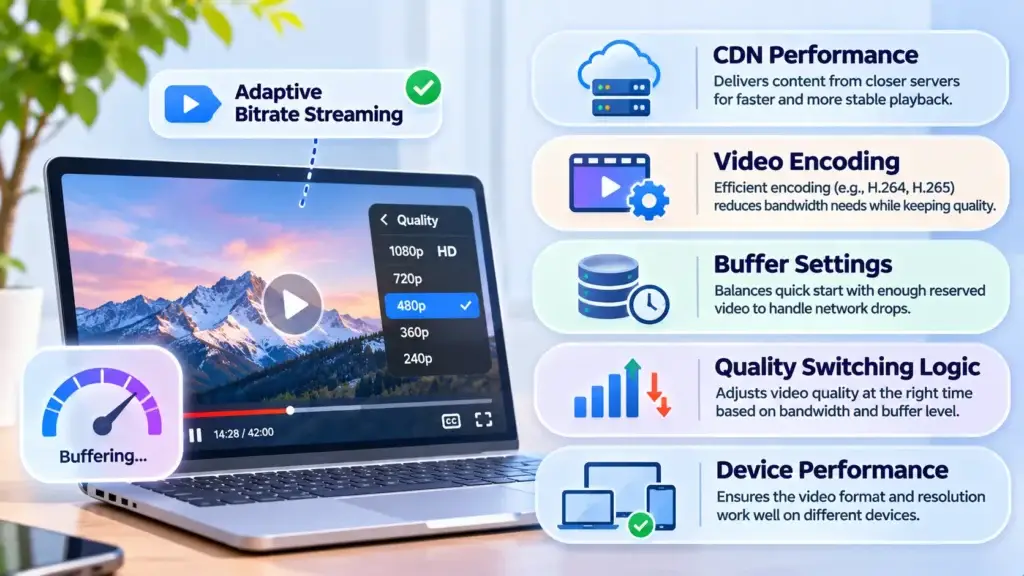
A platform can support multiple video quality levels and still deliver a poor playback experience.
That happens because adaptive bitrate selection is only one part of the wider streaming delivery system.
1. Content Delivery Network Performance
A content delivery network (CDN) helps distribute video content through servers located closer to viewers or better positioned to serve requests.
A well-configured CDN can reduce repeated long-distance requests, improve segment availability, and support traffic distribution.
However, a CDN cannot compensate for every weak last-mile internet connection.
The player still needs suitable bitrate options and effective adaptation logic.
Founders evaluating infrastructure should understand how caching, content placement, and delivery architecture influence video availability. The related Miracuves guide on cloud infrastructure for video platforms explores broader infrastructure planning considerations.
2. Inefficient Video Encoding
Poor encoding choices can cause videos to require unnecessarily high bitrates for their perceived visual quality.
Better encoding efficiency may deliver comparable picture quality using less bandwidth, although the result depends on content and device compatibility.
Codecs such as H.264 and H.265/HEVC involve different tradeoffs in compression efficiency, encoding requirements, and playback support.
Founders should evaluate encoding choices alongside their audience’s actual devices rather than selecting a codec solely because it compresses more efficiently.
3. Incorrect Buffer Settings
The playback buffer helps absorb short-term fluctuations in download speed.
A larger buffer can provide more protection against temporary network interruptions, but waiting to accumulate more video may increase startup delay.
A very small buffer may allow playback to begin quickly while leaving less reserve when download speed suddenly falls.
There is no universal buffer configuration that produces the best result for every product.
The appropriate balance depends on whether viewers are watching on-demand videos, live events, or low-latency streams.
4. Aggressive Quality Switching
A player that switches to high quality too quickly can exhaust its buffer when bandwidth drops again.
Likewise, a player that remains at low quality for too long may unnecessarily reduce visual quality despite improved connectivity.
Well-designed adaptation logic considers how quickly to increase quality, when to reduce it, and how much buffered content is available.
5. Device Performance and Compatibility
Not every device can decode every video format efficiently.
A lower-end phone may encounter playback problems even when sufficient bandwidth is available, particularly if the selected codec or resolution is demanding.
Testing should therefore include hardware capabilities, not just internet speed.
How Adaptive Bitrate Streaming Affects Viewer Retention
Playback performance influences whether a viewer can comfortably continue watching.
When videos take too long to start or repeatedly pause, viewers may abandon a session, change devices, try another connection, or stop watching altogether.
This is especially relevant for businesses where the viewing experience is the primary value delivered to customers.
For subscription services, unreliable playback can weaken the perceived value of paid access. For educational products, interruptions may disrupt lessons. For live events, stalls may cause viewers to miss important moments.
However, adaptive bitrate streaming alone does not guarantee improved retention. Content relevance, pricing, product usability, and audience expectations also influence user behavior.
Founders should treat playback reliability as one measurable contributor to product performance rather than a guaranteed growth mechanism.
The Business Case for Reliable Playback
Viewing Continuity
Fewer avoidable interruptions can make longer viewing sessions more comfortable.
Wider Device and Network Reach
Lower-bitrate versions support viewers with restricted mobile connectivity.
Quality Visibility
Playback analytics reveal issues that content and subscription metrics alone cannot explain.
Delivery Efficiency
Appropriate bitrate selection helps avoid transferring unnecessarily large media segments.
The relationship between video delivery and operational scalability is explored further in Miracuves’ guide to video streaming infrastructure.
Which Video Playback Metrics Should Founders Monitor?
A streaming service should not evaluate performance solely by counting how many users pressed the play button.
It also needs measurements that explain what happened during playback.
| Metric | What It Measures | Why Founders Should Monitor It |
|---|---|---|
| Video startup time | Time between playback request and first rendered content | Reveals delays before viewing begins |
| Rebuffering ratio | Time spent stalled relative to the measurement’s defined playback interval | Helps quantify interruptions |
| Rebuffering events | Number of playback stalls | Shows how frequently viewing is disrupted |
| Average delivered bitrate | Bitrate of selected media over a session | Helps assess delivered quality |
| Quality switch frequency | How often the player changes rendition | Helps identify unstable adaptation |
| Video start failure rate | Share of playback attempts that fail to start | Highlights serious technical problems |
| Playback error rate | Frequency of recorded player or delivery failures | Supports troubleshooting |
| Completion rate | Share of content consumed under a consistent definition | Provides a viewing behavior signal |
These are commonly called quality-of-experience, or QoE, measurements.
A useful monitoring system connects playback metrics with device category, geography, network type, application version, and content type where privacy requirements permit.
For example, if buffering is concentrated among viewers using particular mobile networks, the issue may require different action than a platform-wide encoding failure.
Similarly, if videos start quickly but repeatedly stall after several minutes, engineers may need to investigate adaptation decisions, buffer behavior, or segment delivery rather than just initial load performance.
How Adaptive Bitrate Decisions Influence Streaming Infrastructure Costs
Streaming costs do not depend only on the number of videos stored on a server.
They can also depend on how many representations are encoded, how much video data is stored, the volume of data delivered, and the services used for transcoding and distribution.
Adaptive bitrate streaming introduces additional processing and storage requirements because a video may exist in several encoded versions.
At the same time, selecting lower-bitrate renditions when appropriate can reduce the volume of data transferred during those viewing periods.
Cost-Related Considerations
- Transcoding: Producing multiple quality versions uses compute resources.
- Storage: Keeping several renditions requires additional storage capacity.
- CDN delivery: Outbound transfer and request volumes may affect operational costs.
- Encoding efficiency: More efficient encoding can reduce delivery bandwidth for a given visual-quality target.
- Playback patterns: Viewing duration, device distribution, and selected renditions affect actual delivery consumption.
The objective is not always to create the largest possible bitrate ladder.
A smaller, carefully selected ladder may be appropriate for a mobile-first educational library, whereas a premium entertainment platform serving large screens may need additional higher-quality options.
Founders should ask how the proposed encoding strategy balances playback quality, device support, and ongoing infrastructure expenditure.
A Practical Scenario: Streaming Video in a Low-Bandwidth Market
Imagine a startup operating a regional video library.
Many viewers watch on affordable Android phones using mobile data. Some have stable connectivity, while others experience frequent speed fluctuations during commuting or evening congestion.
The startup publishes its video library using only high-bitrate files.
Viewers with weaker connections encounter repeated pauses, even when they are willing to watch at lower quality.
The startup introduces a properly configured adaptive streaming workflow with multiple encoded representations.
Now, the player has lower-bitrate options when network throughput decreases.
On stronger connections, it can still request higher-quality segments.
This does not automatically solve every technical problem, but it gives the platform a more flexible delivery strategy.
For founders targeting varied network environments, this insight should influence infrastructure planning from the beginning.
How to Evaluate Playback Readiness Before Launching a Video Platform
A streaming product should be tested under realistic conditions before it is made available to a wider audience.
The evaluation should combine technical testing with actual viewing scenarios.
Test 1: Start Playback on a Slow but Stable Connection
Simulate a constrained network and determine whether the player selects a suitable representation.
Measure startup delay and identify whether video can continue without repeated stalls.
Test 2: Reduce Bandwidth During Playback
Begin under good network conditions, then deliberately lower available throughput.
Observe how quickly the player responds and whether its existing buffer is sufficient to avoid interruptions.
Test 3: Restore Connection Speed
After reducing bandwidth, restore a stronger network connection.
Check whether quality improves without excessive switching between renditions.
Test 4: Evaluate Lower-End Devices
Test supported codecs, decoding performance, memory usage, and battery impact on devices representative of the intended audience.
Test 5: Check Long-Form Viewing Sessions
A short successful playback test does not prove that a platform will perform well during a full-length movie, recorded lecture, or event.
Monitor longer sessions for stalls, memory problems, and persistent player errors.
Test 6: Review Infrastructure Under Concurrent Demand
Evaluate whether content delivery, authentication, and playback services remain reliable when many users request content.
Concurrency testing is separate from ABR testing, but both contribute to a reliable streaming experience.
Common Adaptive Streaming Mistakes Founders Should Avoid
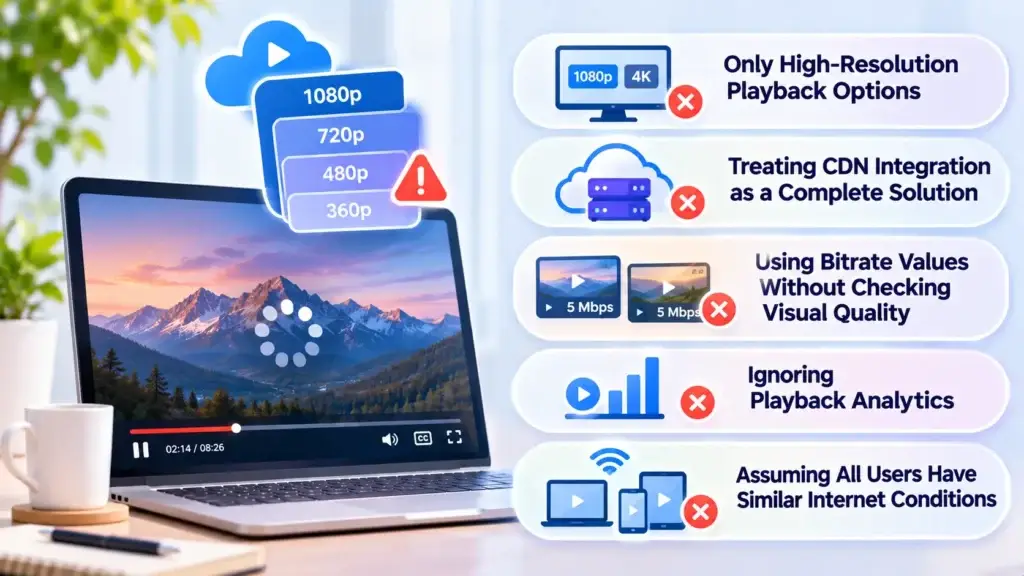
Offering Only High-Resolution Playback Options
High-quality streams are valuable, but a platform that lacks low-bitrate alternatives may be inaccessible to viewers with constrained internet connections.
Treating CDN Integration as a Complete Buffering Solution
A CDN helps deliver content efficiently, but it cannot replace suitable encodings, effective player decisions, or realistic device testing.
Using Bitrate Values Without Evaluating Visual Quality
Two videos at the same bitrate may look noticeably different because of motion, detail, and encoding settings.
A practical ladder should be evaluated for visual quality rather than relying on resolution labels alone.
Ignoring Playback Analytics
Without session-level playback measurements, teams may struggle to determine whether viewers are experiencing buffering, decoding errors, unavailable media, or application failures.
Assuming All Users Have Similar Internet Conditions
Audiences differ by geography, device capability, data usage habits, and network reliability.
An encoding strategy developed only for high-speed office Wi-Fi may not perform well for mobile viewers in the target market.
How Miracuves Helps Founders Plan More Reliable Video Experiences
Smooth playback requires a coordinated technical foundation. Media encoding, compatible playback formats, server configuration, delivery networks, and player behavior should support the audience’s needs.
Miracuves helps founders launch branded streaming products using ready-made, white-label foundations with source-code ownership and configurable platform workflows.
For eligible ready-made deployments, Miracuves offers a 6-working-day launch timeline. However, advanced media configurations, specialized integrations, and performance customization require individual scope assessment.
Founders evaluating delivery performance should discuss their intended audience, playback devices, video quality requirements, and infrastructure before selecting the final configuration.
For specialized infrastructure requirements, the Miracuves cloud engineering services offering provides another relevant starting point for technical discussions.
Final Thoughts: Reliable Playback Matters More Than Maximum Resolution
A successful streaming experience is not defined by delivering the highest possible video resolution in every situation.
It is defined by whether viewers can access and watch content comfortably under the conditions they actually experience.
Adaptive bitrate streaming supports this goal by giving the player multiple quality options and enabling it to respond when bandwidth changes.
But reliable playback also depends on efficient encoding, compatible devices, appropriate buffering, content delivery infrastructure, and continuous monitoring.
For founders, the practical decision is to design around the audience first.
Understand where people watch, which devices they use, how stable their connections are, and how playback performance affects their overall experience.
A streaming platform that handles these realities thoughtfully has a stronger technical foundation for sustainable viewing experiences.
Frequently Asked Questions
What Is Adaptive Bitrate Streaming?
Adaptive bitrate streaming is a technique that allows a video player to select different encoded quality levels according to current network and playback conditions. It helps maintain smoother playback when available bandwidth changes by choosing suitable video segments.
How Does Adaptive Bitrate Streaming Reduce Buffering on Slow Internet?
When a connection slows down, the player can request lower-bitrate video segments that require less data to download. This can help preserve the playback buffer and reduce interruptions. However, extremely poor connectivity can still cause buffering.
Does Adaptive Bitrate Streaming Automatically Change Video Resolution?
It can. If available representations use different resolutions, the player may switch between them. Adaptive streaming can also select representations with different bitrates at the same resolution, depending on how the content was encoded.
What Is the Difference Between Video Bitrate and Internet Speed?
Video bitrate describes how much encoded media data is required per second of video playback. Internet speed describes the rate at which data can be transferred over a network connection. Actual video segment download throughput must be sufficient to sustain the selected bitrate, with additional margin for network variability and delivery overhead.
What Is a Bitrate Ladder in Video Streaming?
A bitrate ladder is a collection of encoded representations of the same video, each with an associated bitrate and potentially a different resolution. The player uses these representations to choose an appropriate quality level as network conditions change.
Is Adaptive Bitrate Streaming Useful for Mobile Viewers?
Yes. Mobile connections may fluctuate due to changing network coverage, congestion, and movement. Adaptive streaming gives compatible players lower-bitrate alternatives when available throughput declines and higher-quality options when conditions improve.
Can a CDN Completely Eliminate Video Buffering?
No. A CDN can improve media delivery and reduce some network-related delays, but buffering can still result from limited last-mile bandwidth, encoding problems, device performance, player settings, or delivery failures. Reliable streaming requires several technical components to work together.
What Should Founders Prioritize When Planning Adaptive Video Streaming?
Founders should prioritize realistic device testing, a suitable bitrate ladder, efficient encoding, compatible streaming protocols, effective buffer management, and playback analytics. These decisions should reflect the audience’s actual connectivity and device usage rather than relying only on maximum resolution or advertised internet speeds.
Miracuves is an independent software development company. We are not affiliated with, connected to, sponsored by, or endorsed by any company or product named in this article.
Terms such as “X Clone” are used descriptively. It is how the software industry refers to building a platform with functionality comparable to a known service, and how clients search for it.
The entire design and codebase of our products is built by our own team. Our products contain no code, design, graphics, or content originating from any third-party website or applications.
All third-party names and marks referenced in this article are the property of their respective owners, referenced solely to identify the services discussed.