Key Takeaways
- A feature list is not a product. Retention comes from a loop: set a budget, log food, learn a little, hear from a coach, see the trend, get nudged back. Features that do not feed that loop are decoration.
- Three roles, three jobs. Members need speed and encouragement, coaches need a caseload that tells them who to message today, and admins need runtime control over plans, content and pay.
- Color bands beat calorie counting alone. Showing a green, yellow or orange density band before a meal is logged turns every entry into a small decision, not a chore.
- Lessons are the habit engine. Short lessons with one quiz question each keep members coming back even on days with no meal to record.
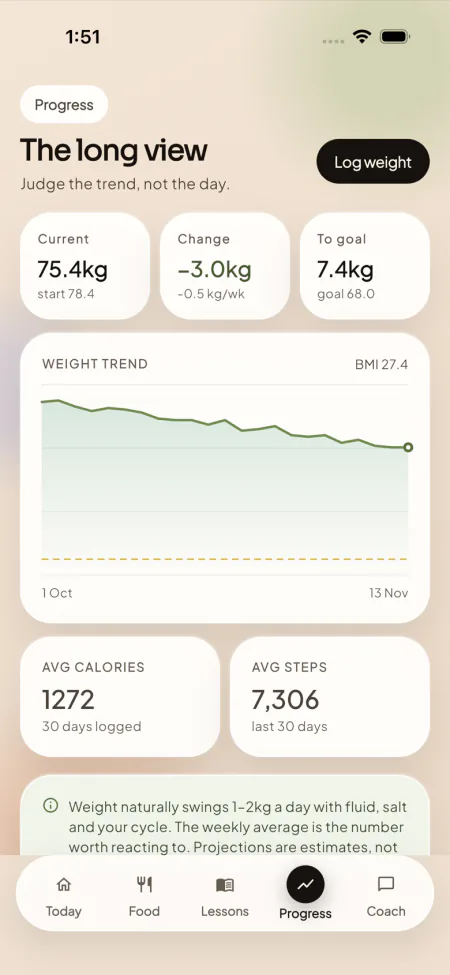
- Trend beats scale. A smoothed weekly weight line that projects toward the goal stops one noisy morning from ending a member’s motivation.
- Nudges help, but only briefly. A randomized trial found notifications lift near-term engagement without changing long-term dropout, so they must sit on top of real value.
- Ship must-haves first. Assessment, logging, lessons, coach thread, trend and a coach desk go live first; video, device sync and employer plans are add-ons for later.
Search for a weight-loss coaching app and you will find endless feature lists: calorie counters, barcode scanners, recipe libraries, water trackers. Most of them describe screens. Very few describe why a member would still be opening the app in week twelve, which is the only question a coaching business really lives or dies on.
This guide organizes the features of a Noom-style app by who uses them (the member, the coach and the admin) and by the behavior-change loop that ties them together. For each feature we explain what it is, why it matters for retention, and whether it belongs in version one or can wait. Where a feature is part of our ready-made weight-loss coaching app, we say so; where it is better left for later, we say that too.
It is written for founders, clinic owners and coaching businesses deciding what to demand from a vendor or put in a build brief. It is deliberately not a pricing comparison and not a developer architecture note: our separate guides cover how to evaluate coaching app scripts and what they cost and how a build like this is put together step by step.
What Makes a Weight-Loss Coaching App Different From a Calorie Counter?
A calorie counter answers one question: how much did I eat? A coaching app tries to answer a harder one: what will make this person keep going for six months? That difference changes the feature list completely. A counter needs a big food database and a fast search box. A coaching app needs everything a counter has, plus a way to teach, a way to talk to a human, a way to show progress honestly and a way to bring people back after a bad week.
It helps to think of the product as a loop that repeats every day and again every week. The daily loop is: see today’s budget, log a meal, read a short lesson, check in with the coach if something is off. The weekly loop is: weigh in, look at the trend, review the week, adjust the target. Each feature in the app exists to make one step of that loop easier or more rewarding. If a feature does not belong to a step, it is a candidate for the later list.
The three roles behind one product
The second thing that separates a coaching app from a tracker is that it has more than one kind of user. In a platform like ours, each account carries a single role, which is member, coach or admin. Members see their own data only. Coaches see the members on their caseload and nothing else. Admins run the business: plans, prices, trial lengths, coupons, content, coach pay and which features are switched on.
Writing the feature list by role keeps you honest. It is easy to build a beautiful member app and discover at launch that your coaches have no way to see who has gone quiet, or that changing a plan price needs a developer. The tables below give you a role-by-role checklist you can hand to any vendor.
| Role | What they are trying to do | Features that serve it | Why it matters for retention |
|---|---|---|---|
| Member | Hit a daily budget and build a habit | Assessment, budget, color-band logging, lessons, trend, streaks | Daily value in under two minutes |
| Coach | Spot who needs help and reply well | Caseload, at-risk queue, member detail, notes, earnings view | A reply that lands before the member quits |
| Admin | Run plans, content, pay and risk | Console areas for members, finance, store, content, AI and feature switches | Fast iteration on the offer without a release |
Member Features, Step One: The Assessment and the Daily Budget
A member’s first experience decides whether the rest of the app matters. The strongest pattern in this category is an assessment that feels like a conversation and ends with something concrete. In our product the assessment asks twelve questions: sex, age, height, current weight, goal weight, activity level, eating style, restrictions, motivation, weekly pace, target date, plus sleep and stress. The answers produce four daily targets: a calorie budget, a protein, carbohydrate and fat split, a daily water goal and a daily step goal.
Two details make this more than a form. First, the diet and restriction answers are used again later, to filter recipes and plan suggestions, so the member sees the benefit of answering honestly. Second, the dashboard stays locked until onboarding is finished, so nobody lands on an empty first screen. A blank home screen is one of the quietest causes of day-one abandonment.
Must-have or later?
Must-have. The assessment and budget are the foundation for every other feature: the food diary measures against the budget, the coach reads the budget, and the progress screen projects toward the goal weight. If you must cut scope, cut a question or two from the assessment, but never the targets it produces.
One practical note for founders: draft your own wording for the assessment. The questions are standard, but the tone (encouraging, specific, free of shame) is a brand decision, and it is the first thing a member judges you on.
Member Features, Step Two: Food Logging and the Color Bands
Logging is the heart of the daily loop, and it is also the step members hate most. Every second of friction costs you entries. A good coaching app gives members several ways to log so they can pick the one that suits the moment. Ours offers four: look a food up by name, brand or category, scan its barcode, photograph the plate, or type a sentence describing it. Members can also create custom foods with full macros, and member-contributed foods are moderated in the console. The photo and sentence options depend on an AI provider key that the operator supplies, so they come alive once it is connected.
The feature that gives this category its character is the color band. Noom’s public help center explains that foods are labeled green, yellow or orange according to calorie density, meaning calories per gram, so that green foods are the least calorie-dense and are eaten most often, while orange foods are more concentrated and are eaten less often and in smaller amounts. You can read the full explanation in the official description of the food color system.
Why does a Noom-style band matter for retention and not only for nutrition? Because it changes what a log entry feels like. Without bands, a food diary is an accounting exercise: numbers go in, a total comes out, and the member either passed or failed. With bands, the member sees a small signal before committing the entry, so logging becomes a series of tiny choices. Our implementation shows the band before the member commits, stores the band with each entry, and shows a color split for the whole day on the Today screen. Each entry snapshots its nutrients and band, so history never rewrites itself if the catalog changes later.
Serving sizes, shortcuts and the diary
The details around the log decide how fast it feels. Serving multipliers in quarter steps, shortcuts to frequently eaten foods, day navigation and an add-from-plan action all shave seconds. Barcode scanning is available on mobile and on the web app, matched against the catalog’s own barcodes. Nutrition label scanning and voice logging are available as switchable features that also need the AI provider key.
Food that fits the market you serve
A food catalog is only as good as its fit with what your members actually eat. Indian dishes sit alongside the general foods in our catalog, and members can use the app in Hindi as well as English, which matters if your audience cooks dal and roti rather than oatmeal. If you are thinking about the regional food question in depth, our guide to building an Indian food database for a nutrition app goes through how local logging works in practice.
Must-have or later? Search, custom foods, bands and the diary are must-haves. Barcode scanning is close to a must-have on mobile. Photo and plain-language logging are valuable but depend on an AI provider, so many operators launch them in the first month rather than on day one.
Member Features, Step Three: Lessons That Build the Habit
Logging tells a member what happened. Lessons tell them why it keeps happening. This is the second signature of the category: short, readable lessons about eating cues, motivation and routine, delivered daily or near daily, so that there is a reason to open the app even when the member has nothing to log yet.
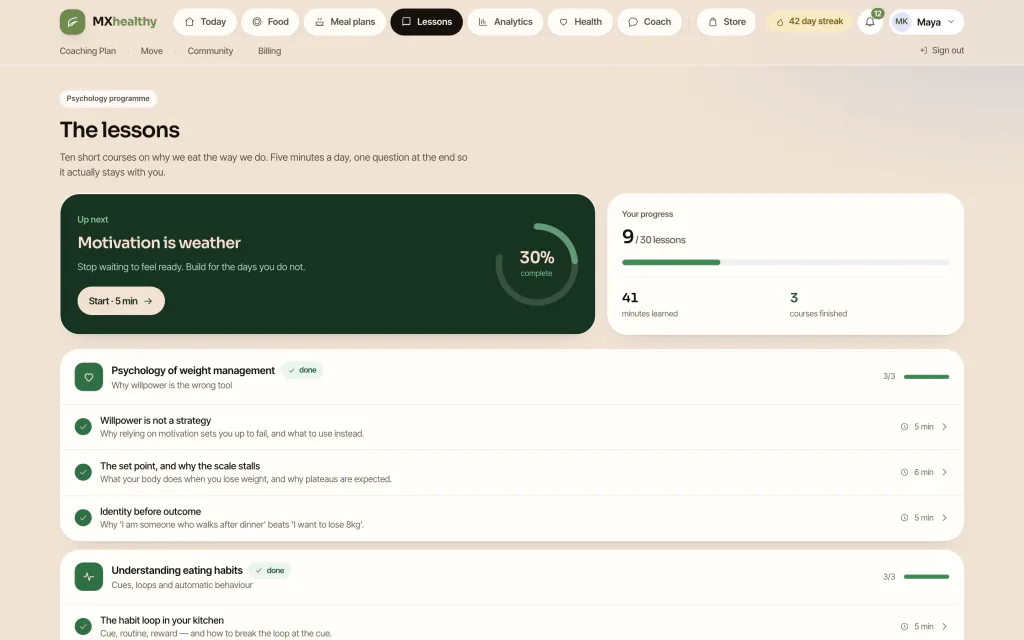
A Noom-style program lives or dies on its curriculum. In our product the curriculum is ten courses and thirty lessons. Every lesson runs about five minutes and carries a short summary, the reading itself and one quiz question that explains its answer. Completing lessons feeds streaks and course progress, and the Today screen always offers the next lesson. The operator manages everything from the console: courses, lessons, quizzes, order and publication state. You are not locked to the starter curriculum, and you should not be, because lesson content is where your brand’s point of view lives.
Why a quiz question at the end?
Because a single question turns reading into a small win. It takes seconds, it confirms the idea landed, and it gives the app something to reward. Members who finish a lesson have also touched the app for a reason that has nothing to do with willpower about food, which is exactly the kind of low-pressure habit that survives a rough week.
Must-have or later? A thin lesson set is a must-have at launch; a deep one can grow. Lessons ship as text with a closing quiz, and video lessons arrive with the video lesson studio add-on, a sensible second-quarter project rather than a launch blocker.
Member Features, Step Four: Coach Chat and General AI Guidance
Members stay when they feel noticed. That is the job of coaching in this category, and the feature that delivers it is the thread. In our app a member has one conversation. In that thread, AI replies and human coach replies sit side by side, so nobody has to remember which channel to open.
The AI side draws on the member’s current day: what has been eaten, what is left, protein progress, water and the weight trend. A small transparency panel spells out which data the coach is looking at, a quiet trust feature worth keeping. Ready-made prompt chips (a question about late-afternoon hunger, for example) remove the blank-page problem. A per-day allowance of AI calls and tokens for every member holds spending steady, and a polite message appears when the limit is reached. The AI coach gives general guidance and is not medical advice, and the app says so on screen.
On the coaching tier, a human coach checks the diary, the targets and the earlier conversation first, so the reply can be specific. Appointments store the session type, the time, the status and a link to join, so a call can run on whichever tool you already use. In-app video calls and scheduled group classes come with the live video coaching and group classes add-on.
Must-have or later?
The thread is a must-have. Human coaching and the coaching tier are the core of your upper pricing tier, so they are must-haves too if you intend to charge for them. Appointments are useful from day one; in-app video is a later add-on.
Member Features, Step Five: Weigh-Ins, Trends and Honest Progress
The scale is the most emotional object in this whole category. A product that shows raw daily weight with a red or green arrow will punish members for water retention, sleep and salt. The better pattern, and the one we built, is a smoothed weekly line that projects toward the goal date.
Our progress screen shows the weight trend, change since start, weekly rate, distance to goal and BMI, plus measurements such as waist, hip and body fat with the source noted, and a thirty-day view of average calories and steps. The screen is also careful about tone: the projection is described as an estimate, not a promise, and BMI as a rough screen, not a diagnosis. That honesty is a feature. It protects members and it protects you from the promises that get coaching businesses into trouble.
There is research behind the idea that tracking itself matters. A systematic review of 22 studies, published in the Journal of the American Dietetic Association, found a consistent link between self-monitoring (food diaries, weighing, exercise logs) and weight loss, although the authors rated the evidence weak because of methodological limits. You can read the abstract in the self-monitoring review on PubMed. We read it as support for building tracking features that are easy and kind, not as a promise about outcomes, and you should avoid turning it into one in your marketing.
Health record, screening and the limits of the product
Beyond weight, the app stores sleep, stress and biomarkers a member chooses to record, and a short screening questionnaire assigns a risk band, with higher bands routed to a human review queue in the console. Reviews are attributable, with reviewer, timestamp and note. The platform is built for habit change and stays out of clinical care: it does not diagnose or treat, and the framing in the app is deliberately non-alarming. A clinic or coaching business using it remains responsible for how its clinicians handle escalations.
Must-have or later? The weekly trend, goal distance and weekly review are must-haves. Biomarker logging and the screening workflow matter most for clinics and can be configured or hidden for pure coaching brands. Device sync for scales and glucose monitors is a later add-on.
Member Features, Step Six: Nudges, Streaks and Community
Everything above creates value. This last group of features is about getting the member back to it. Nudges, streaks, challenges and community are the engagement layer, and they are the most over-promised features in the category, so it is worth being precise about what they can do.
Nudges and reminders
Our app has a notification inbox, reminder settings and engagement nudges generated from adherence signals: a week without a weigh-in, water behind target, nothing logged today. A weekly job also raises alerts for coaches, with a dry-run mode so an operator can see what would be sent before it goes out. Email and push delivery run on the operator’s own provider credentials.
Be realistic about what notifications achieve. A micro-randomized trial of a behavior-change app tracked 350 new users for their first 30 days and found that notifications raised engagement in the short term, but did not change how long people stayed overall; the authors concluded that more optimization was needed for long-term engagement. The full paper is a randomized trial of notifications in a behavior-change app. A separate literature review of engagement in health apps cites an estimate that roughly 71 percent of app users disengage within 90 days. The lesson for a coaching business is that nudges are a supplement. They work when there is something valuable waiting on the other side of the tap.
Streaks, habits and challenges
A habit checklist, streaks driven by lesson completion and activity, and challenges with per-member progress and an append-only coin ledger give members a visible record of consistency. Rewards and an opt-in leaderboard add a social edge without forcing it on anyone. The Move area adds workouts that can be filtered by style, difficulty and length, plus workout and step entry.
Community
Circles, posts, comments and likes give members a place to talk, and the admin console includes moderation so you control what is posted. Community runs on posts and comments rather than live chat, which keeps it calm and easy to moderate.
Must-have or later? Nudges and streaks are cheap and belong in version one. Challenges and community are best launched once you have enough members to make them feel alive; an empty community is worse than none.
What Coaches Need: A Desk That Tells Them Who to Message
Coaches are the most overlooked users in this category. Founders spend months on the member experience and then hand coaches a shared inbox. The result is slow replies, uneven quality and coach burnout, all of which show up as churn later.
A coach desk should answer three questions the moment it opens: who is on my caseload, who has gone quiet, and what do I owe people today. Our coach portal has four areas: the desk, the caseload, member detail and earnings. The caseload is defined by a coach-to-member assignment, so a coach sees only their own members. Member detail shows the diary, targets, trend and message history, so replies can be specific. An at-risk queue is computed from behavior: new members in their first two weeks, members who have not logged for a week and those who have canceled.
Coaches can also record notes and set follow-up tasks that name an owner and a due date, which turns coaching from improvisation into a process. The earnings view shows what the coach is owed. The operator picks one of four pay models for each coach: a fixed retainer, an amount per member, an amount per session or a commission. Each month’s settlement is itemized, moves through draft, approved and paid, and records a reference, and coach payouts can go out through Stripe Connect from the same console.
| Coach need | Feature | Retention effect |
|---|---|---|
| Know who to message first | At-risk queue from engagement signals | Replies reach members before they quit |
| Reply with context | Member detail with diary, targets and trend | Specific advice instead of generic cheer |
| Not lose follow-ups | Notes and tasks with owner and due date | Consistent care across weeks |
| Trust the money | Earnings and itemized settlements | Coaches stay and take on more members |
Must-have or later? The desk, caseload and at-risk queue are must-haves the day you have a second coach. If you start as a solo coach, you can run the desk lightly, but do not skip it: it is the proof that your business can scale beyond you.
What Admins Need: Running the Business Without a Developer
The admin side is where a coaching app becomes a business. The question to ask any vendor is simple: if I want to change a price, extend a trial, add a lesson or switch off a feature, do I need a release? In our platform you do not. The operator console has fourteen areas, and it changes prices, annual plans, trial days, coupons, coach pay, AI settings and feature switches at runtime, with an audit trail of who changed what.
The practical areas, in the order most operators use them, look like this:
- Members and CRM. Plan, weight and coach assignment per member, plus a stage view that flags new, at-risk and canceled members based on behavior.
- Content and foods. Courses, lessons and quizzes with publication state; the food catalog, with curated and member-contributed items kept apart for moderation.
- Finance. Monthly net and gross revenue, refunds, payouts and recurring revenue, split by plan, with a close step that locks the period.
- Store and orders. A built-in health store with pricing, stock levels, shipping rules, coupons and an order tracker, with sales attributed to the referring coach.
- Coaches. Rate cards and monthly settlements.
- AI and platform. Routing for the three AI tasks (coach chat, vision and plan generation), per-member guardrails, telemetry and feature switches.
- Community and screening. Moderation tools and the queue where escalated screenings are reviewed by a person.
Plans themselves are simple: a free tier, a premium tier and a coaching tier, each priced monthly and yearly with its own trial period. Card billing runs through Stripe on your own account, and rupee checkout is available alongside it for Indian members. The platform keeps provider references, never card numbers.
Privacy features live here as well. A member can download their data and ask for the account to be deleted, with a grace period during which the request can be canceled, and the operator keeps an audit trail of administrative changes. These are workflows that support privacy requests, and they are the kind of boring feature that matters a great deal when a customer asks.
Must-have or later? Members, content, plans and finance are must-haves. The store and coach-attributed commission are strong revenue features, but a new business can open the store a month or two after launch, once the core loop is proven.
Must-Have vs Later: How to Sequence Your Feature Roadmap
The temptation with a feature guide is to try to launch everything. Resist it. A narrower launch with a tight loop will teach you more in six weeks than a broad launch with thin features. The table below groups features by launch priority, using the logic of the loop: anything the daily or weekly loop cannot work without is a must-have.
| Feature | Launch priority | Reason |
|---|---|---|
| Assessment and daily targets | Must-have | Every other feature measures against them |
| Search, custom foods and color bands | Must-have | The core daily action and the signature decision cue |
| Barcode scan | Must-have on mobile | Cuts logging time sharply |
| Lessons with quizzes | Must-have | Gives members a reason to open the app on empty days |
| Coach thread and desk | Must-have for a coaching tier | Your upper tier is built on it |
| Weekly trend and goal projection | Must-have | Keeps one bad morning from becoming a quit decision |
| Nudges and streaks | Must-have, light | Cheap to build and a good supplement |
| Photo and plain-language logging | First month | Needs your AI provider key and tuning |
| Store and coach-attributed sales | First quarter | Strong revenue but not needed to prove the loop |
| Challenges and community | When you have members | Empty communities hurt |
| Device sync, video lessons, live classes, employer plans, extra languages | Later, as add-ons | Each is a separate project with its own value |
The last row deserves a clear statement. Each of the six later items is sold as a paid add-on to the core product: wearable adapters, connected scale and glucose readings, live video sessions and group classes, the video lesson studio, a corporate wellness portal for employer plans, and regional language packs beyond English and Hindi. None is required to launch, and each can be added when your members ask for it.
Founder Decision Signals: Is Your Feature Scope Ready?
Loop Is Defined
Can you name the daily and weekly steps a member repeats, and which feature serves each one?
Coaches Have a Desk
Will every coach see an at-risk queue and member context on day one, not a shared inbox?
Admin Needs No Release
Can you change a price, a trial length or a lesson without asking a developer?
Claims Stay Honest
Is every on-screen projection, score and AI reply framed as an estimate or general guidance?
Later List Is Written
Do video, device sync, employer plans and extra languages sit on a dated later list instead of the launch scope?
Food Fits Your Market
Does the catalog and app language match what your members actually eat and speak?
How Miracuves Helps You Launch These Features
Miracuves has built the loop described above into one product. Our ready-made weight-loss coaching platform runs on MXHealthy, the platform behind the screens in this guide, and it comes as a fixed one-time price of $3,399 with full source code. You receive Android and iOS apps, a browser version for members, coach tools and a 14-area operator console, built on Next.js, TypeScript, PostgreSQL and Flutter, with Stripe billing plus rupee checkout, Hindi next to English, and Indian dishes already loaded.
The ready-made build goes live in 6 working days of Miracuves work after you hand over branding, hosting and store accounts, and app review by Apple and Google follows on its own timeline. If you need custom changes, such as a new lesson track, a different tier structure or a new integration, custom work typically runs 15 to 30 days, and up to 45 to 60 days for larger scope. We cost it in writing before it starts.
Support is built into every delivery: 60 days of dedicated platform guidance, 6 months of priority bug resolution and 12 months of continuous product evolution. Security is described by what the product does: roles checked on every page and action, sessions held in HTTP-only cookies, parameterized SQL, signed payment webhooks, upload checks and an operator audit trail.
When you are ready to grow, six paid add-ons can be scoped: wearable adapters, smart scale and CGM sync, live video coaching and group classes, a video lesson studio, a corporate wellness portal and regional language packs, each one an add-on priced on its own. The healthcare category on our site, on-demand healthcare solutions, shows the other products built the same way.
Before you decide, open the demo with the three logins on the solution page and walk the loop yourself: log a meal as a member, reply as a coach, then change a plan price in the console. Ten minutes of that tells you more than any feature list.
Final Thoughts
A weight-loss coaching app is not a pile of features. It is a loop, and every feature earns its place by making a step of the loop easier, kinder or more rewarding. Members need a clear budget, fast and encouraging logging, lessons worth five minutes, a human who notices them and a trend that tells the truth. Coaches need a desk that points them at the right person. Admins need to run the business without waiting on a release.
Start with the must-haves, measure how many members complete the loop in their first two weeks, and add the rest as the numbers and your members ask for it. Miracuves gives you the loop built, tested and yours to own, so the time you save goes into coaching content and growth instead of rebuilding the basics.
Frequently Asked Questions
What features does a Noom-style weight-loss app need at launch?
Six things form the core: an assessment that turns answers into calorie, macro, water and step goals; food logging with calorie-density color bands; short behavior-change lessons; a coach thread; a weekly weight trend; and light nudges and streaks. For the business side you also need a coach desk and an admin console that can change plans and content without a release. Everything else can follow.
What is the difference between member, coach and admin features?
Members use the budget, food diary, lessons, coach thread, progress screen and challenges. Coaches use a desk with a caseload, an at-risk queue, member detail, notes and an earnings view. Admins use a console to manage members, plans, prices, content, foods, finance, the store, coach pay, AI settings and feature switches.
Why do color-coded food bands help members stick with logging?
They add a small decision to every entry. Instead of only adding numbers, the member sees whether a food is low, moderate or high in calorie density before committing it. That makes logging feel like guidance rather than bookkeeping, and the band is stored with each entry so history stays consistent.
Do nudges and push notifications actually improve retention?
They help in the short term but are not enough alone. A randomized trial of a behavior-change app found notifications raised near-term engagement without changing how long people stayed overall. Use them as a supplement to lessons, coach replies and a meaningful progress view.
Is the AI coach a substitute for human coaches?
No. The AI coach reads the member’s logged day and trend and gives general guidance, not medical advice. A human coach on the coaching tier reads the same data and replies in the same thread, which is what makes an upper pricing tier worth paying for.
Which features should I leave for later?
Leave video lessons, live group classes, wearable and device sync, a corporate wellness portal and extra regional languages for after launch. They are available as paid add-ons, each with its own scope. Launching without them lets you measure whether members complete the core loop first.
Does the app handle Indian meals and a Hindi interface?
Yes. Indian dishes sit in the food catalog, the app is available in English and Hindi, and rupee checkout is available alongside Stripe card billing. The operator curates the catalog, so you can extend it to your own regional dishes.
Are both Android and iOS apps included?
Yes. The Android and iOS apps are built together on one Flutter codebase and delivered together, next to a browser app for members, coach tools and the operator console, all with full source code.
Miracuves is an independent software development company. We are not affiliated with, connected to, sponsored by, or endorsed by any company or product named in this article.
Terms such as “X Clone” are used descriptively. It is how the software industry refers to building a platform with functionality comparable to a known service, and how clients search for it.
The entire design and codebase of our products is built by our own team. Our products contain no code, design, graphics, or content originating from any third-party website or applications.
All third-party names and marks referenced in this article are the property of their respective owners, referenced solely to identify the services discussed.