
A fan pays for a video in a private message. The receipt arrives, but the attachment still shows a lock. The fan taps Buy again, the creator asks why the sale isn’t in their available balance, and support has to work out what happened before anyone can safely refund or retry the purchase.
Start with the original order. Verify the payment, check whether the fan was granted access, and test whether the video can play. If those checks pass, look at the creator’s earnings separately. A fan can have valid access to a video while the creator’s share is still pending.
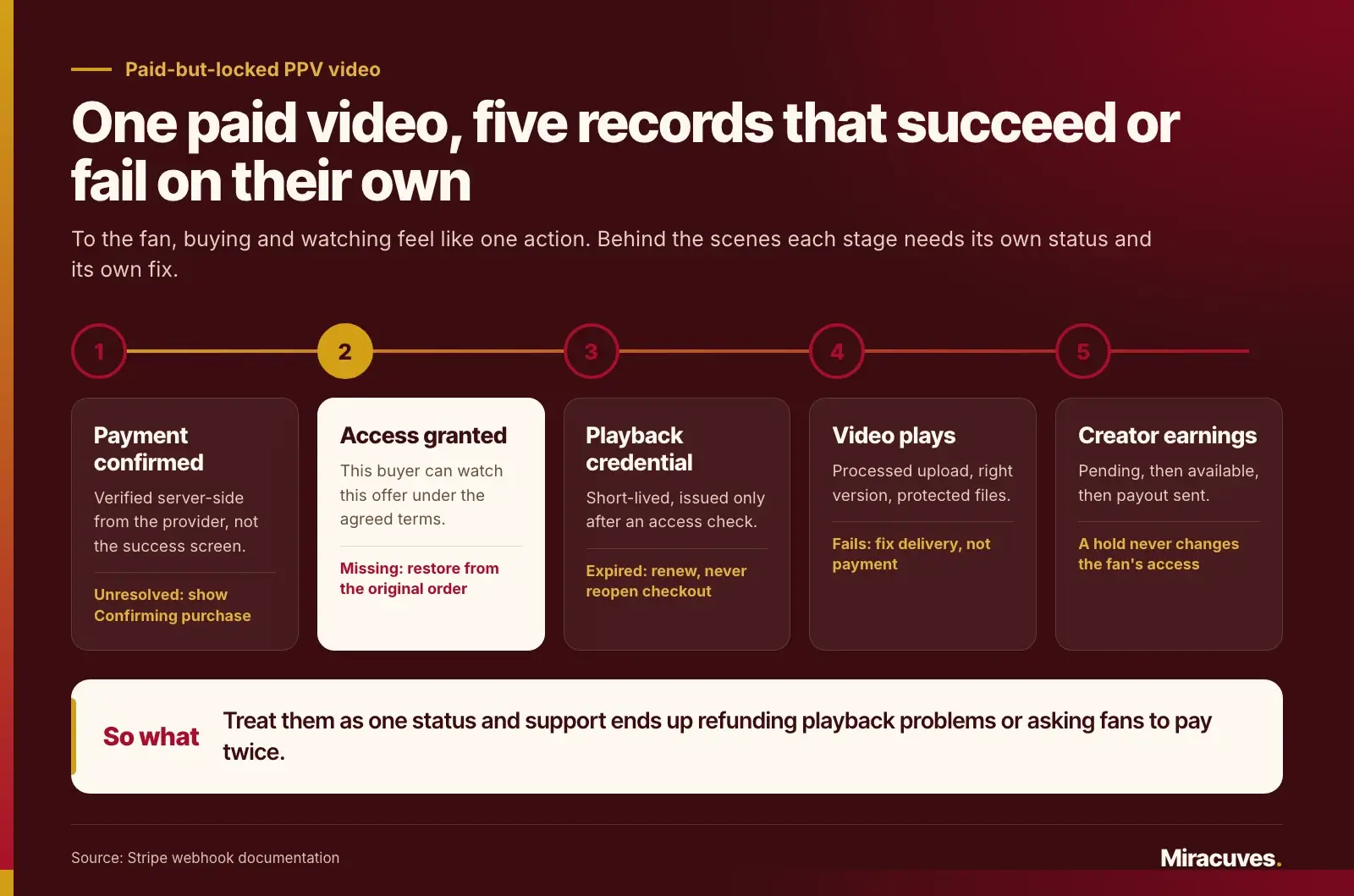
That distinction matters when designing a private messaging paywall. From the fan’s perspective, buying and watching should feel like one action. Behind the scenes, payment confirmation, permission to watch, media delivery, and creator payout can each succeed or fail independently. If the app treats them as a single status, support can end up issuing refunds for playback problems or asking buyers to pay again for content they already own.
This guide follows one paid video purchase from checkout to playback, then shows what should happen if it’s refunded, disputed, or held for payout.
Key Takeaways
- A payment receipt and a video unlock are different records. Verify both before asking the buyer to take any action.
- A locked attachment and an unlocked video that won’t play need different fixes. Repair missing access from the original purchase; troubleshoot playback separately.
- A payout hold is not the same as escrow. Define who controls the funds and what makes the creator eligible to withdraw.
- Test the recovery path before launch. Duplicate taps, delayed confirmations, and refunds tell you more about the purchase flow than a demo where everything works.
Paid but Still Locked? A Quick Checklist for Fans
If you are the fan and simply want to watch what you paid for, work through these steps before paying again or calling your bank. Each one rules out a common cause.
- Wait a few minutes, then reopen the conversation. Some payments are confirmed after the checkout screen closes, so the lock can lag behind the receipt.
- Don’t tap Buy again. A second tap can start a second charge while the first one is still being confirmed.
- Sign out and back in, or try the website instead of the app. This refreshes the access status the app has stored.
- Check the account and the purchase history. Make sure you are signed in to the account you paid from, and look for the item under purchases or receipts.
- Check how your membership is billed. On some platforms, members billed through an app store can’t unlock paid messages at all. Fourthwall’s help center, for example, says members billed through the App Store, Google Play or Roku can’t unlock locked messages yet.
- Contact the platform’s support before your bank. Send the receipt or transaction ID, the date and the creator’s name. Fanvue’s refund page asks fans to contact support first and warns that a chargeback can lead to a banned account.
The rest of this guide is for the team that runs the platform: what each of those symptoms means behind the scenes, and how to fix it without charging the fan twice.
Define What the Private Messaging Paywall Actually Sells
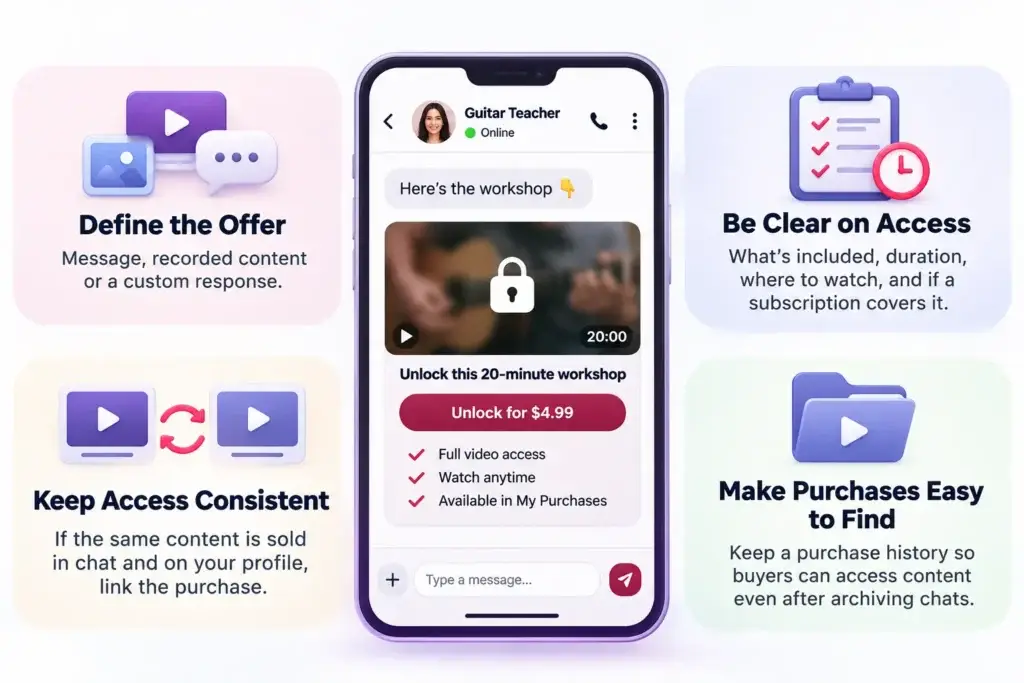
A paywall in a private conversation can sell the right to send a message, access to a prerecorded attachment, or a custom response the creator will deliver later. Those offers may look similar in chat, but they create different obligations. A recorded workshop should be available after payment and access confirmation. A commissioned video needs a delivery deadline and a rule for what happens if the creator doesn’t deliver.
For a pay-per-view (PPV) video, show the buyer what the payment includes before checkout. Is it one clip or a bundle? Is access time-limited? Can the buyer watch from a purchase library, or only from the original conversation? Does an active subscription already include it? A label like “Unlock this 20-minute workshop” sets a clearer expectation than “Unlock exclusive content.”
Decide whether the purchase follows the video or the offer
Suppose a guitar teacher lists the same lesson on their profile and sends it as a locked attachment in a private message. A fan who buys it in chat may reasonably expect to watch it from the profile too. If both listings sell the same access, the second listing should recognize the purchase. If one listing is a bundle or offers a different access period, make that difference clear before either purchase.
Save the terms with the order: the offer, content version, access scope, and any expiration. Don’t infer them later from a filename or the creator’s current price. When the creator edits the listing, support still needs to know what the original buyer was promised.
Also decide how buyers will find their purchases when a conversation is archived. A purchase history can prevent a routine change to the inbox from looking like lost access. If a block or safety action restricts playback, show a policy-appropriate message rather than sending the buyer back to checkout.
Diagnose a Paid-but-Locked PPV Video
Start by asking what the fan can see, not whether the feature is “working.” A buyer who sees a lock has a different problem from someone who can open the player but gets a black screen. The same support reply won’t help both.
| What the fan sees | What to verify | What to do next |
|---|---|---|
| Checkout closed, but there’s no purchase confirmation | Check whether the original attempt is pending, failed, or confirmed. For wallet payments, distinguish a top-up from a completed debit for this offer. | While the result is unknown, show Confirming purchase and don’t prompt the fan to pay again. |
| There’s a receipt, but the video is still locked | Match the confirmed payment to the buyer, order, and offer. Check whether the access grant is missing, expired, or restricted. | Restore access from the original order if the buyer is still eligible. Don’t create another charge or earnings entry. |
| The attachment is unlocked, but playback fails | Check media readiness, playback credential expiry, and whether the video player can fetch the protected files. | Renew the credential after checking access, or fix the delivery problem. Don’t reopen checkout. |
| The video plays in chat but looks locked in the feed | Check whether the original offer granted access across both places. | Correct the access rule if the buyer already owns it. If the offers differ, explain what each purchase includes. |
| The fan can watch, but the creator can’t withdraw | Check the earnings entry, payout eligibility, verification status, and any hold reason. | Explain the payout status to the creator. Don’t change the fan’s access unless a separate policy requires it. |
Confirm the original payment before restoring access
A checkout success screen is useful feedback, but it shouldn’t be the system’s only evidence of payment. Verify the payment server-side using the provider’s confirmed status or a verified event. If the buyer paid with a wallet, look for the debit associated with that specific purchase. Adding funds to a wallet doesn’t buy the video.
Consider a fan who closes the checkout window just as payment completes. The app doesn’t get to show the success screen, but confirmation arrives later. If the fan reopens the conversation in the meantime, show the status of the original purchase attempt. Offering a new Buy button while the first attempt is unresolved makes an ambiguous checkout look like an invitation to pay twice.
Once payment is confirmed, check the entitlement: the record that says this buyer can watch this offer under the agreed terms. If it’s missing and the buyer is still eligible, restore it against the original order. If access already exists, refresh the app’s display or investigate playback rather than issuing another grant.
Make the recovery safe to repeat
A delayed payment notification and a support agent can both try to restore the same purchase. The result should be one valid access grant and one creator earnings entry, not two. Use the original order as the reference, deduplicate repeated notifications, and make each recovery step safe to run again. If the first attempt created access but failed before recording earnings, a retry should complete the missing step without repeating the one that succeeded.
Payment providers make this a requirement, not a nicety. Stripe’s webhook documentation states that an endpoint may receive the same event more than once, that events are not guaranteed to arrive in the order they were generated, and that live-mode deliveries are retried for up to three days. Record the event IDs you have already processed, and when an event looks out of sequence, fetch the current payment status from the provider instead of trusting the order of arrival.
Give support a way to restore an eligible purchase without giving every agent the ability to change balances or override safety restrictions. Log what changed, who or what changed it, and why. That record matters when a buyer later disputes the charge or a creator asks how a balance was calculated.
Fix Playback Without Weakening the Paywall
If the buyer has access but the video won’t play, check the delivery path. Was the upload processed successfully? Is the correct video version attached to the offer? Did the player receive a valid playback credential? A creator may see the upload in their dashboard before it is ready for buyers. For prerecorded content, preventing sales until the video is ready is usually simpler than resolving a queue of paid-but-unplayable orders.
The server should check access before issuing a short-lived playback credential. With segmented streaming, protect both the playlist and the video segments. If a direct storage link bypasses those checks, the locked attachment is only hiding the player, not protecting the content. Keep previews separate so a thumbnail, notification, or shared link can’t expose the full file.
Test what happens when access changes mid-session
An eligible fan should be able to refresh an expired playback credential or move to a second device without buying again, subject to the product’s device rules. A buyer whose access has ended should not receive a new credential. What happens to a credential already issued depends on how the media system handles expiration and revocation.
Test that difference before promising immediate removal. If a refund or safety action ends access, opening a new playback session should fail. An existing session may continue until its credential expires unless the platform can invalidate it sooner. Product, support, and engineering should agree on the behavior so they can describe it accurately.
Keep Creator Payout Holds Separate From Escrow
Imagine a fan pays $15 for a recorded guitar workshop sent in a private message. The purchase is confirmed and the fan can watch. The creator’s share appears as pending, not available to withdraw. The sale isn’t missing; the money has reached a different stage from the video unlock.
Use distinct labels for pending earnings, available balance, and payout sent. If a verification check or provider review delays payout, explain the reason where you can and tell the creator what they need to do next. Don’t show Paid out when the creator has earned the money but no payout has been sent.
How a refund changes the same purchase
Suppose the buyer receives a full refund before the creator’s share is paid out. Record the refund against the original order, adjust the creator’s pending earnings, and end access if the disclosed policy and applicable requirements call for it. The purchase, refund, and earnings adjustment should remain visible in the history. Deleting the original sale makes later reconciliation harder.
A partial refund needs its own rule. If support refunds part of the price to correct a billing error, the fan may still be entitled to watch. If a chargeback arrives after a creator has already been paid, preserve the payout record and add a separate dispute adjustment. Whether the platform can recover funds from the creator depends on the payment provider’s rules, the payment arrangement, and the creator agreement.
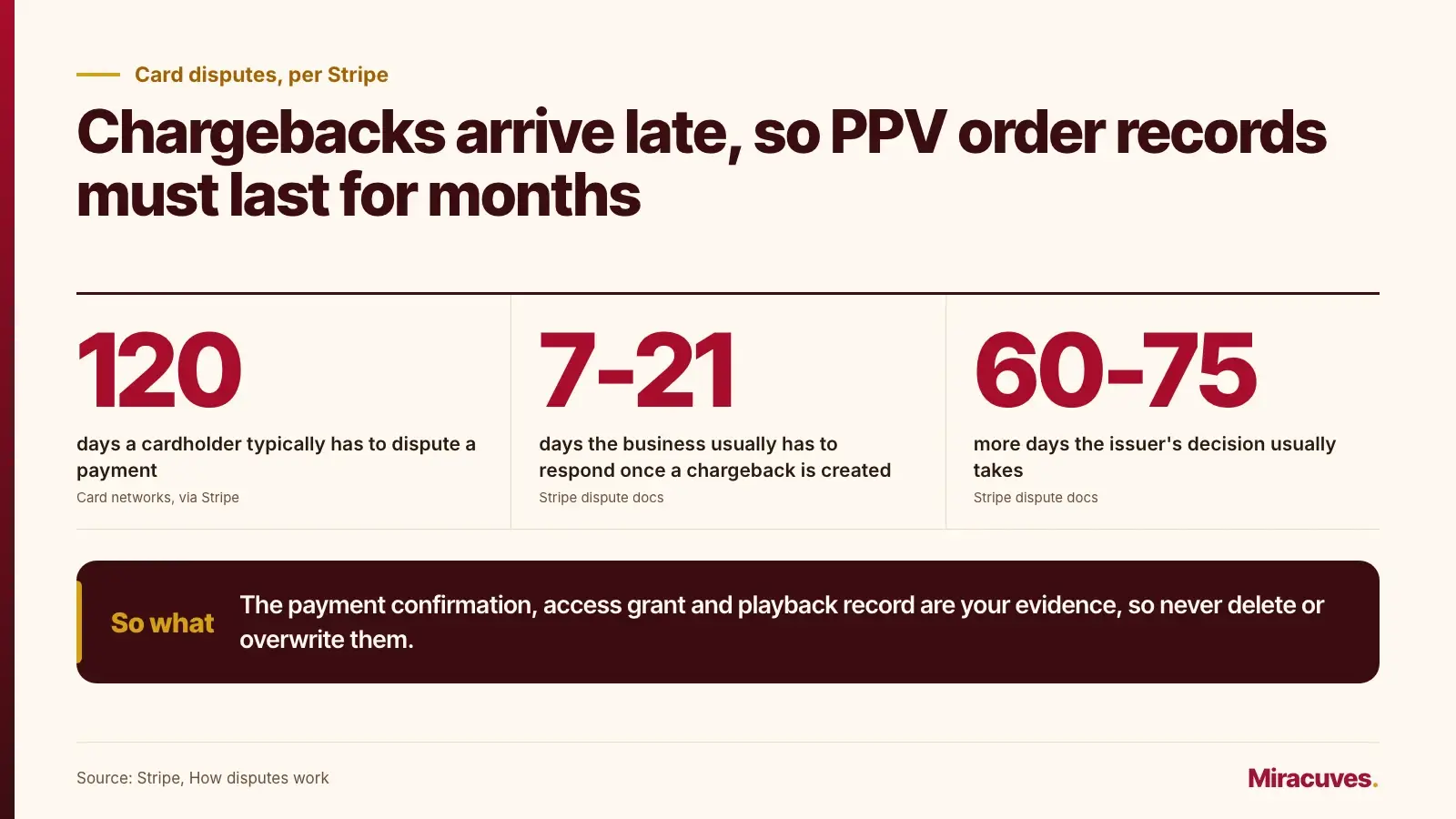
Chargebacks also arrive late. Stripe’s dispute documentation notes that card networks typically let cardholders dispute a payment within 120 days, that the business usually has 7 to 21 days to respond once a chargeback is created, and that the issuer’s decision usually takes another 60 to 75 days. The disputed amount and a dispute fee are debited when the dispute opens. Keep the order history intact for months, not days: the payment confirmation, access grant and playback record are the evidence you will need.
When a custom order needs conditional release
A payout hold is not automatically escrow. Marking earnings as pending does not, by itself, create an escrow arrangement. If you plan to take orders for custom videos that don’t exist yet, settle who holds the funds, what counts as delivery and who resolves disputes with your payment provider and qualified counsel first. The guide to managing payment gateways on a creator membership platform covers chargebacks, rolling reserves and payout timing, and the guide to split payouts and creator balances covers how money moves between accounts.
How Real Creator Platforms Handle Locked PPV, Refunds and Disputes
Published help-center policies show how much of this behavior is a product decision rather than a technical one. The rules below come from platforms that sell paid messages and from the card dispute process that sits behind them.
| Source | Published rule | What it tells a builder |
|---|---|---|
| Fanvue | Pay-per-view and message purchases the fan has accessed are listed as non-refundable; other refunds are at Fanvue’s discretion. | Decide whether opening a video ends refund eligibility, and record when the buyer first played it. |
| Fanvue | Fans are asked to contact support before filing a chargeback, with a reply within 5 business days. | Give fans a support route that is faster and clearer than calling their bank. |
| Fourthwall | Locked messages carry a creator-set price of up to $500 and a required teaser, with a blurred preview of attached media. | Show exactly what the payment buys before checkout. |
| Fourthwall | Members billed through the App Store, Google Play or Roku can’t unlock locked messages yet. | Explain why an unlock is unavailable instead of showing a Buy button that fails. |
| Fourthwall | Deleting a sent locked message does not trigger an automatic refund. | Write down what buyers keep, or get back, when a creator removes content. |
| Card networks (via Stripe) | Cardholders can typically dispute within 120 days; the business usually has 7 to 21 days to respond. | Keep purchase, access and playback records long enough to answer a dispute. |
Neither platform’s policy is the only right answer. What they share is that the rule is written down and visible before a problem occurs. If your platform can’t state its rule for opened, unopened and removed content in one sentence each, support will improvise a different answer every time, and fans will take the question to their bank instead.
Give Support One Purchase History to Work From
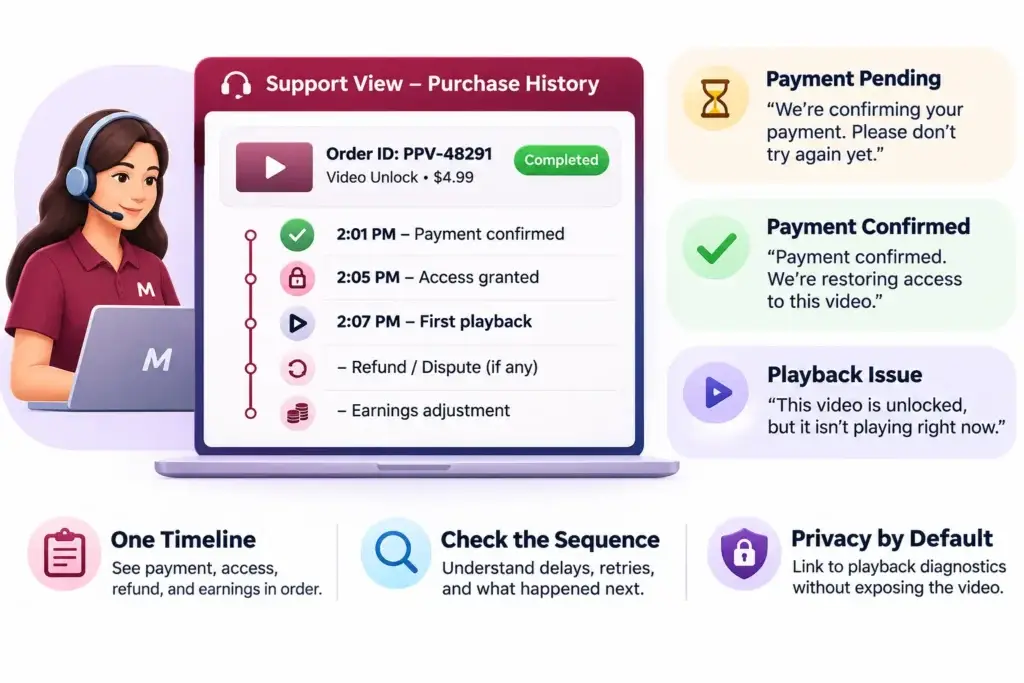
Support shouldn’t need a fan’s card screenshot or the creator’s private chat history to decide whether an unlock is missing. Give authorized staff a timeline keyed to the order ID. It should show the payment attempt and confirmation, access grant, any refund or dispute, and the related earnings adjustment. Link to playback diagnostics without making the private video itself available to staff by default.
The timeline is especially useful when events arrive out of order. A payment may be confirmed at 2:01, with the buyer’s access restored at 2:05. That’s a four-minute delay between payment and access. If the fan tried again at 2:03, the agent can see why and check whether the second tap started another payment attempt. A dashboard that shows only Completed hides the sequence that explains the complaint.
Match the buyer-facing message to the evidence. “We’re confirming your payment. Please don’t try again yet.” fits an unresolved attempt. “Payment confirmed. We’re restoring access to this video.” fits a verified purchase with a missing grant. “This video is unlocked, but it isn’t playing right now.” tells the buyer the problem is delivery, not payment. Clear messages reduce uncertainty without asking the fan to diagnose the system.
Run These PPV Release Tests Before Accepting Real Payments
Use the same offer to test checkout, playback, and payout from the fan, creator, and support views. Keep a record of what each person should see. A test isn’t complete because the buyer eventually gets access; the financial records and creator-facing status also need to be correct.
| Release test | What a pass looks like |
|---|---|
| Tap Buy twice or retry after a timeout. | The same purchase attempt creates at most one charge or wallet debit, one access grant, and one earnings entry. |
| Delay or replay payment confirmation. | The buyer sees a pending status until confirmation. Replaying confirmation completes missing work without duplicating records. |
| Buy in chat and reopen the video from the feed or purchase history. | Access matches the offer shown at checkout. The app doesn’t resell access the fan already owns. |
| Expire a playback credential during normal viewing. | An eligible buyer can resume without paying. A buyer whose access ended cannot obtain a new credential. |
| Replace or remove the sold video. | Support can identify the original offer and apply the stated replacement, removal, or refund policy. |
| Refund a sale before payout, then test a separate chargeback after payout. | Access and earnings change according to policy. The original payment and payout records remain traceable. |
| Hold the creator’s payout while the purchase remains valid. | The creator sees a meaningful hold status. The buyer can still watch unless a separate access restriction applies. |
Include blocked accounts and content removed for safety reasons in the test plan. A payment repair must not override a valid restriction. Before taking real payments, confirm that your provider accepts the content category and markets you intend to serve. Check the billing and user-generated-content rules that apply to each distribution channel. A working test checkout doesn’t establish production approval.
Once a single purchase behaves correctly, use the PPV load-testing guide to check whether those same protections hold during a creator drop.
Measure What Happens Between Payment and Playback
Sales volume can look healthy even when fans wait too long to watch or support has to repair too many orders. Track the points where a confirmed sale can still turn into a complaint.
| Metric | What to measure | What it helps you investigate |
|---|---|---|
| Time from payment confirmation to access | Time from verified payment to an active entitlement. Look at slower purchases as well as the median. | Delayed events, stuck processing jobs, or slow recovery. |
| Paid-but-locked rate | Share of confirmed purchases still missing valid access after a defined window, excluding known policy restrictions. | Whether successful payments reliably turn into usable purchases. |
| Playback start failure rate | Share of authorized playback attempts that don’t reach the first frame. | Media readiness, expired credentials, or delivery issues rather than missing payments. |
| Age of unresolved payout holds | How long earnings stay pending beyond the expected review or availability window. | Verification bottlenecks, unclear hold reasons, or issues that require escalation. |
Choose thresholds from your actual transaction data and the promises you make to fans and creators. Separate direct payments from wallet purchases when investigating a spike; the two flows can fail at different points. If access is being granted promptly but playback failures rise after a new upload, look at the video pipeline before changing the payment flow.
Decide Which Paid-Message Workflows Are Ready to Launch
A platform selling finished videos has a different launch decision from one taking orders for videos that don’t exist yet. If the first creators are selling prerecorded lessons or tutorials, validate the instant unlock before introducing custom requests. That gives you one clear promise to test: once the purchase is confirmed, an eligible buyer can watch the video they paid for.
Founder Decision Signals
The offer is clear before checkout
A buyer can tell whether the price covers a single video, a bundle, or future work. If the creator needs to explain what is included in a follow-up message, clarify the offer before adding more ways to buy it.
Support can repair an order without engineering
An authorized operator can identify the purchase, see why the unlock failed, and restore eligible access. If the fix requires someone to edit production records by hand, the workflow isn’t ready for an unattended creator drop.
Creators can explain their own balance
The earnings view shows which sales are pending and which are available. If a creator needs to ask support about every completed sale, fix the balance labels and hold explanations before increasing volume.
Custom orders have a defined remedy
The platform knows who decides whether delivery was accepted, what happens when the deadline is missed, and what the payment provider supports. If those decisions are still open, don’t sell a conditional-release workflow yet.
Use these signals to narrow the first release, not to delay it indefinitely. A single attachment type, one clear access rule, and a tested refund path can be enough to learn whether buyers value paid video messages. Bundles, custom delivery, and more complex payout arrangements can follow when there is a reason to add them.
Common Mistakes When Launching Paid Video Messages
Reusing the purchase button as a recovery button
When checkout times out, a fresh purchase button looks like the quickest way forward. It is also ambiguous: the buyer cannot tell whether it checks the previous attempt or starts another one. Give those actions distinct labels. A status check should look up the existing order; a new payment should be offered only when retrying is safe.
Letting offer edits silently change old purchases
Changing the price, replacing the file, and removing a video for safety are different events. If they all overwrite the same record, an agent may not be able to tell whether a buyer received what they paid for. Keep the purchase terms separate from the current listing, and give support a clear remedy for each type of change.
Treating every complaint as a refund request
“I paid and can’t watch” doesn’t tell you whether the buyer wants their money back or simply wants the video to play. If the purchase is valid and the issue is fixable, explain what happened and offer the appropriate recovery. If the video is no longer available or the buyer is entitled to a refund, follow the applicable policy rather than repeatedly attempting to restore access.
Giving routine support actions too much authority
Restoring an access grant for a confirmed purchase doesn’t require authority to release a payout or reverse a moderation decision. Keep those actions separate. For example, support can diagnose an unlock, finance can review a disputed earnings adjustment, and the safety team can decide whether removed content may be restored. The order history should show the handoff without exposing private material unnecessarily.
How Miracuves Can Support Your Paid-Message Launch
Miracuves offers a ready-made creator subscription platform foundation for founders who want to evaluate paid messaging and video unlocks without starting with a blank build. Use the scenarios in this guide to review the foundation against your own rules. A platform that works for standalone workshop sales may still need changes if your product ties access to membership or sells videos commissioned through a private conversation.
Before the scope is agreed, bring one example offer and write down what should happen at checkout, after a refund, and when a creator’s payout is held. Ask which behaviors can be configured, which require integration work, and which require customization through creator platform development. If you already have a payment provider, confirm that it supports your business and payout model before treating that integration as part of the launch plan.
The useful output of that conversation is a written scope that separates the base deployment from the work that has to happen around it. Keep provider onboarding, launch testing, and any third-party approvals visible in the plan. That makes it easier to understand what will be delivered and what must still be ready before fans can pay.
Use One Paid Message to Evaluate a Platform
In a demo, ask the team to sell a locked video, delay payment confirmation, restore the purchase, and issue a refund. Have them show what the fan sees in chat, what the creator sees in earnings, and what support sees in the order history. Then ask which of those behaviors ship with the standard product and which require customization. The difference matters more than whether a feature list says paid messaging.
Final Thoughts: Prove the Purchase Can Be Recovered Before You Scale It
A private messaging paywall makes a specific promise: the fan pays once and gets the access described at checkout. To keep that promise, the platform needs to distinguish a confirmed payment from permission to watch, and permission to watch from a video that can actually play. The creator’s payout follows its own rules and should be explained independently.
Start with one prerecorded video. Run the purchase on two devices, interrupt the confirmation, restore access from the same order, and apply a refund. Then check the creator’s earnings and the support timeline. If anyone has to guess what happened, fix that handoff before adding custom orders or opening paid messaging to more creators.
The launch decision comes down to one question: Can your team explain and resolve a failed unlock without charging the fan twice or losing track of the creator’s earnings? If it can do that on one purchase, you have a much better basis for taking the flow live.
Frequently Asked Questions
I paid for a PPV message but it is still locked. What should I do?
Wait a few minutes, then reopen the conversation or sign out and back in, because some payments are confirmed after checkout closes. Check that you are on the account you paid from and look for the item in your purchase history. Do not tap Buy again. If it is still locked, contact the platform’s support with your receipt or transaction ID before contacting your bank.
Why is a PPV video still locked after payment?
The payment may still be awaiting confirmation, the buyer’s access grant may be missing, or the app may be showing an outdated status. Check the original order before retrying. If the video already shows as unlocked but will not play, the problem is delivery rather than payment, so investigate playback separately.
How long should a PPV unlock take after payment?
Access should normally follow within seconds of the payment provider confirming the payment. Delays usually come from confirmations that arrive late, out of order or more than once. Stripe, for example, retries undelivered webhook events for up to three days in live mode, so a platform should also check the payment status directly instead of waiting only for the notification.
Can support restore a paid message without charging the fan again?
Yes, if the original purchase is confirmed and the buyer remains eligible. Restore access against that purchase ID rather than creating a new order. The repair should not create a second creator earnings entry, and the order history should record who restored access and why.
Can I get a refund for a PPV message I already watched?
It depends on the platform’s published policy. Some creator platforms treat pay-per-view and message purchases as non-refundable once the content has been accessed, while unopened or removed content may be handled differently. A platform should state its rule before checkout and record when the buyer first opened the video, so support can apply the rule consistently.
Does buying a video in a private message unlock it in the feed?
Only if the purchase includes access in both places. Show the scope before checkout and apply it consistently. If both listings sell access to the same video on the same terms, do not ask the buyer to purchase it twice; recognize the earlier purchase instead.
Should a refund immediately revoke video access?
Follow the disclosed policy and applicable requirements. If the refund ends access, stop issuing new playback credentials. Existing sessions may continue until their credentials expire unless the delivery system supports earlier invalidation, so test this behavior before promising fans immediate removal.
Does a wallet top-up count as payment for a PPV video?
No. A top-up adds funds to the wallet. The video purchase happens when the correct amount is debited for that specific offer. Support should be able to find the top-up and the debit separately, so a fan who topped up but was never debited is not treated as a buyer.
Is a creator payout hold the same as escrow?
No. A hold delays availability or withdrawal under a platform or provider rule. Escrow involves a distinct custody and release arrangement. Confirm who holds the funds and under what terms, with your payment provider and qualified counsel, before describing the feature as escrow.
What happens if a chargeback arrives after the creator was paid?
Keep the original payout record and add a separate dispute adjustment. Card networks typically allow disputes within 120 days of payment, so this can happen long after payout. Whether the amount can be recovered from the creator depends on the payment setup, provider rules and the creator agreement.
Miracuves is an independent software development company. We are not affiliated with, connected to, sponsored by, or endorsed by any company or product named in this article.
Terms such as “X Clone” are used descriptively. It is how the software industry refers to building a platform with functionality comparable to a known service, and how clients search for it.
The entire design and codebase of our products is built by our own team. Our products contain no code, design, graphics, or content originating from any third-party website or applications.
All third-party names and marks referenced in this article are the property of their respective owners, referenced solely to identify the services discussed.