
Key Takeaways
- A multi-vendor inventory management database helps B2B Apps manage products, vendors, warehouses, stock movement, pricing, orders, and availability accurately.
- The database should not store inventory as one simple product quantity; it needs separate tables for vendors, listings, variants, warehouses, stock ledger, reservations, and orders.
- For B2B marketplaces, inventory logic becomes more complex because multiple vendors may sell similar products across different locations, prices, quantities, and fulfillment rules.
- A strong schema supports real-time stock checks, bulk imports, vendor-level control, warehouse tracking, purchase orders, returns, and reporting.
- Long-term scalability depends on clean database relationships, stock transaction history, indexing, access control, audit logs, and reliable inventory sync.
Database Design Signals
- Vendor tables help separate supplier profiles, business verification, product ownership, pricing rules, commissions, and account-level permissions.
- Product and variant tables allow B2B Apps to manage SKUs, categories, attributes, units, packaging, bulk pricing, and product specifications.
- Warehouse inventory tables track available stock, reserved stock, damaged stock, returned stock, location-wise quantity, and reorder levels.
- Inventory ledger tables record every stock movement, including purchase entries, sales deductions, reservations, cancellations, transfers, returns, and manual adjustments.
- Performance depends on proper indexing for vendor ID, product ID, variant ID, warehouse ID, listing status, order status, and inventory movement records.
Real Insights
- A B2B inventory database is not just a backend table structure; it directly affects checkout accuracy, vendor trust, order fulfillment, and marketplace growth.
- Founders should plan inventory reservations carefully because poor stock locking can create overselling, failed orders, and vendor disputes.
- Shared database architecture can work for early-stage B2B Apps, but strong vendor-level access control and clean reporting logic are essential.
- As order volume grows, background jobs, caching, search indexing, audit logs, and reporting tables become important for performance and reliability.
- The strongest B2B inventory systems combine vendor control, warehouse visibility, stock ledger accuracy, secure permissions, scalable architecture, and clean admin reporting.
A B2B multi-vendor app is not just a product listing platform. It must manage vendor accounts, product catalogs, warehouses, bulk pricing, purchase orders, stock reservations, returns, damaged goods, order allocation, and real-time product availability across different sellers. This is where a multi vendor inventory management database becomes the backbone of the entire platform. For founders planning to build B2B Apps or evaluate an Alibaba clone script, the database structure is not a backend detail that can be fixed later. It directly affects stock accuracy, vendor trust, order fulfillment, reporting speed, and long-term scalability.
A weak inventory schema can quickly create serious business problems. Vendors may oversell products they do not have, buyers may see incorrect stock availability, admin teams may struggle to trace stock changes, and multiple vendors selling the same product may create duplicate SKU conflicts. Warehouse-level inventory can become difficult to manage, while returns, damages, and manual corrections may break reporting accuracy. A strong B2B Multi-Vendor Inventory App should treat inventory as a stock movement system, not as a simple quantity field inside the products table.
Miracuves helps founders build B2B marketplace and inventory-driven platforms with vendor management, product catalogs, order workflows, payment integration, admin dashboards, and scalable backend architecture. The goal is not just to launch a marketplace, but to build a system that can support real operational complexity.
Why B2B Multi-Vendor Inventory Databases Are More Complex Than Regular eCommerce
A regular eCommerce store usually has one seller, one product catalog, one stock owner, and one fulfillment model. A B2B multi-vendor marketplace is different.
In a B2B app, multiple vendors may sell similar or identical products. Each vendor may have separate pricing, warehouses, stock levels, minimum order quantities, lead times, and fulfillment rules.
That means the database must answer questions such as:
- Which vendor owns this stock?
- Which warehouse is holding the inventory?
- Is this product available for bulk purchase?
- What is the minimum order quantity?
- Is the stock available, reserved, damaged, incoming, or already sold?
- Which buyer company is placing the order?
- Does this buyer have contract pricing?
- Can the order be split between multiple vendors?
- Can the admin trace every stock adjustment?
This is why a B2B inventory system should not store inventory as:
product_id + quantity
That approach may work for a simple store, but it breaks quickly in a B2B marketplace.
A stronger structure treats inventory as:
vendor + product variant + warehouse + balance + ledger movement + order reference
This gives the platform better control over stock accuracy, reporting, vendor accountability, and order fulfillment.
Read More: Breaking Down the Development Cost of a Multi-Vendor Fashion Marketplace Platform
Core Database Modules Every B2B Multi-Vendor Inventory App Should Include
Before designing tables, founders should understand the core modules. Each module solves a specific business problem.
| Module | Purpose | Founder Impact |
|---|---|---|
| Vendor Management | Stores vendor profiles, approval status, business details, commissions, and payout settings | Helps the platform onboard and control multiple sellers |
| Product Catalog | Stores global product data, categories, brands, descriptions, and attributes | Prevents duplicate product records across vendors |
| Product Variants | Handles SKU-level differences such as size, color, packaging, model, unit, or capacity | Makes inventory accurate at sellable-unit level |
| Vendor Product Listings | Connects vendors with products they sell, including pricing, MOQ, and lead time | Allows multiple vendors to sell the same product differently |
| Warehouse Management | Maps inventory to vendor warehouses or fulfillment locations | Supports multi-location stock visibility |
| Inventory Balance | Stores current available, reserved, damaged, and incoming quantity | Enables fast stock checks during browsing and checkout |
| Inventory Ledger | Records every stock movement with reference and balance history | Creates traceability and prevents unexplained stock changes |
| Purchase Orders | Handles procurement and replenishment workflows | Helps vendors and admins manage incoming stock |
| Sales Orders | Captures buyer orders and vendor-wise order splitting | Supports real B2B fulfillment logic |
| Stock Reservations | Temporarily holds stock during checkout | Prevents overselling during high-volume orders |
| Returns and Adjustments | Tracks returned, damaged, lost, or manually corrected stock | Keeps inventory accurate after fulfillment |
| Audit Logs | Tracks who changed what and when | Improves accountability and operational control |
For a marketplace founder, this modular thinking is important because the database is not only a technical layer. It decides how smoothly the business can operate after launch.
Essential Tables in a Multi-Vendor Inventory Management Database
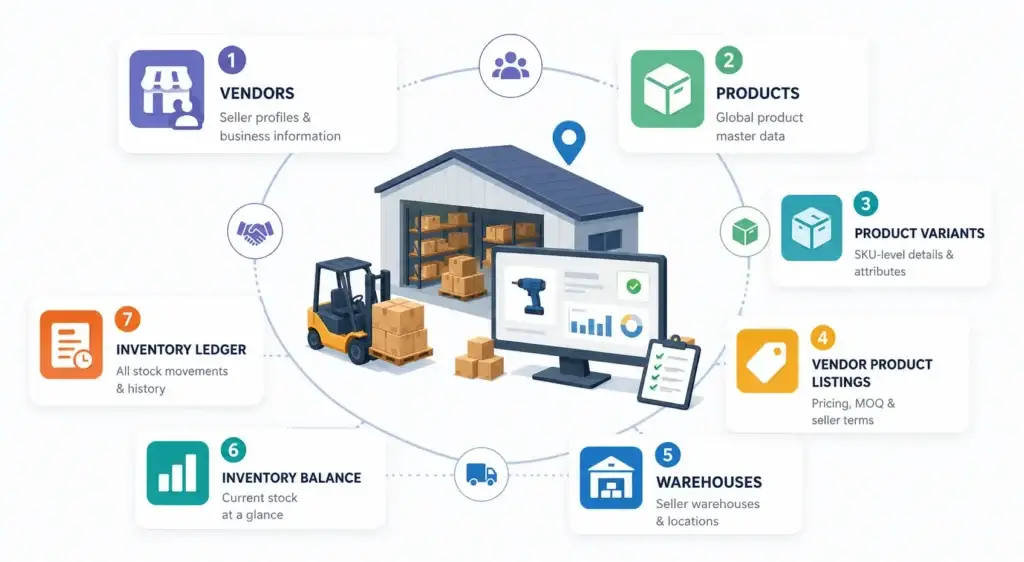
A scalable B2B Multi-Vendor Inventory App should not store inventory as a single quantity inside the product table. That structure may work for a small store, but it quickly breaks when multiple vendors, warehouses, product variants, bulk orders, and returns enter the system.
A stronger database separates four layers:
- Product data — what the item is
- Vendor listing data — who sells it and under what terms
- Warehouse inventory data — where the stock is stored
- Inventory movement data — why stock increased, decreased, moved, or was reserved
This structure helps the platform answer the questions that matter most in B2B operations: who owns the stock, where it is stored, how much is available, and why the quantity changed.
Below are the essential tables every serious B2B inventory database should include.
1. Vendors Table: The Root of Seller Ownership
The vendors table stores the business profile of each seller on the platform. In a B2B marketplace, vendors are usually wholesalers, distributors, manufacturers, suppliers, or verified business sellers.
This table is important because every product listing, warehouse, order item, payout, and inventory movement should connect back to a specific vendor.
Suggested fields:
vendor_id, company_name, contact_person, email, phone, tax_id / GST / VAT, verification_status, commission_rate, payout_status, created_at, updated_at.
Why this table matters:
Vendor ownership must be clear from the database level. If it is not, the platform may struggle to identify which seller owns the stock, which vendor should fulfill the order, and which business should receive the payout.
2. Products Table: The Global Product Master
The products table stores the platform-level product information. It defines what the product is, not who is selling it.
For example, if five vendors sell the same industrial drill, the platform should not create five separate master product records. It should create one product record and connect multiple vendor listings to it.
Suggested fields:
product_id, product_name, category_id, brand_id, description, product_type, status, created_at, updated_at.
Why this table matters:
A clean product master prevents duplicate catalog records. It also improves search, filtering, comparison, reporting, and admin catalog control.
3. Product Variants Table: SKU-Level Inventory Accuracy
The product variants table tracks each sellable version of a product. In B2B commerce, one product may be sold in different units, pack sizes, colors, models, weights, or capacities.
A chemical supplier, for example, may sell the same liquid product in 1L, 5L, and 20L containers. Each container size should be treated as a separate variant because inventory, pricing, shipping cost, and buyer demand may differ.
Suggested fields:
variant_id, product_id, sku, barcode, unit, attributes_json, weight, dimensions, created_at, updated_at.
Why this table matters:
Variant-level tracking prevents stock confusion when one product has multiple sellable formats. It also helps the platform show accurate SKU-level availability during browsing, checkout, and order fulfillment.
4. Vendor Product Listings Table: Pricing, MOQ, and Seller Terms
The vendor product listings table connects vendors with the products and variants they sell. This is one of the most important tables in a multi vendor marketplace database schema because the same product variant can be sold by different vendors under different commercial terms.
One vendor may sell a product at a lower price but require a higher minimum order quantity. Another vendor may offer faster delivery but charge more. The database should support these differences clearly.
Suggested fields:
listing_id, vendor_id, product_id, variant_id, vendor_sku, price, wholesale_price, minimum_order_quantity, lead_time_days, listing_status, created_at, updated_at.
Why this table matters:
The product table explains what the item is. The vendor listing table explains who sells it, at what price, and under what conditions. This separation is critical for B2B Marketplace Apps, where vendor pricing, MOQ, stock terms, and fulfillment timelines often vary.
5. Warehouses Table: Multi-Location Stock Control
The warehouses table stores the fulfillment locations connected to each vendor. A B2B seller may operate from one central warehouse, multiple regional warehouses, or separate storage locations for different product categories.
Inventory should always be connected to a warehouse or fulfillment location. Without this, the platform may know that stock exists but not where it is available from.
Suggested fields:
warehouse_id, vendor_id, warehouse_name, address, city, country, contact_number, active_status, created_at, updated_at.
Why this table matters:
Warehouse-level tracking helps support regional fulfillment, stock transfers, delivery estimates, shipping cost logic, and location-based availability. For B2B buyers, this directly affects order planning and delivery reliability.
6. Inventory Balance Table: Fast Availability Checks
The inventory balance table stores the latest quantity values for quick stock checks. This helps the app show whether a product variant is available, reserved, damaged, or incoming without scanning the full inventory history every time.
This table is mainly built for speed. Buyers need quick stock visibility during browsing and checkout, while vendors and admins need an updated view of current stock status.
Suggested fields:
inventory_id, vendor_id, warehouse_id, variant_id, available_quantity, reserved_quantity, damaged_quantity, incoming_quantity, reorder_level, updated_at.
A good system uses this table alongside the inventory ledger:
- Inventory balance shows the current stock position.
- Inventory ledger explains the history behind that stock position.
Why this table matters:
Fast stock visibility improves buyer experience and checkout confidence. But because this table only shows the current state, it should be supported by ledger records for deeper traceability.
7. Inventory Ledger Table: The Source of Stock Truth
The inventory ledger table records every inventory movement. It explains why stock changed, what triggered the change, who created it, and what the balance became after the update.
This is the table that protects inventory accuracy. It should record stock coming in, stock going out, reservations, returns, damages, manual adjustments, warehouse transfers, purchase order receipts, and order cancellations.
Suggested fields:
ledger_id, vendor_id, warehouse_id, variant_id, movement_type, reference_type, reference_id, quantity_change, balance_after, created_by, created_at.
Common movement types include:
- stock_in
- stock_out
- order_reserved
- reservation_released
- return_received
- damage_adjustment
- manual_adjustment
- warehouse_transfer
- purchase_order_received
- order_cancelled
Why this table matters:
Without an inventory ledger, the platform may know the current quantity but not the reason behind it. This can create disputes between vendors, buyers, warehouse teams, and marketplace admins. In a B2B app, the ledger protects operational trust because every stock update has a reason, reference, and history.
Quick View: Essential Inventory Tables and Their Business Role
| Table | What It Controls | Why It Matters |
|---|---|---|
| Vendors | Seller identity and ownership | Connects inventory, listings, payouts, and orders to the right business |
| Products | Global product master | Prevents duplicate catalog records |
| Product Variants | SKU-level sellable units | Keeps stock accurate across sizes, units, models, and packs |
| Vendor Product Listings | Vendor pricing, MOQ, and listing terms | Allows different vendors to sell the same product differently |
| Warehouses | Stock locations | Supports regional fulfillment and warehouse-level availability |
| Inventory Balance | Current stock position | Enables fast availability checks |
| Inventory Ledger | Stock movement history | Protects traceability, auditability, and operational trust |
Read More: B2B Marketplaces Explained: How They Work and the Top Examples You Need to Know
How the Database Relationships Should Work in a B2B Inventory System
A practical relationship flow for a B2B multi-vendor inventory database looks like this:
Vendor → Vendor Product Listing → Product Variant → Warehouse Inventory → Inventory Ledger → Order Item
Here is the flow in plain language:
A vendor creates a listing for a product variant. That listing is connected to one or more warehouses. Each warehouse maintains stock balance for that vendor’s variant. Every stock change creates a ledger entry. When a buyer places an order, the system reserves stock first, then deducts stock after confirmation or fulfillment.
This structure helps the platform avoid three common problems:
- Selling stock that belongs to the wrong vendor.
- Showing quantity without knowing the warehouse location.
- Updating inventory without knowing the reason for the change.
For founders evaluating an Alibaba clone script, this is one of the most important checks. The app should not only display products and vendors. It should support vendor-wise stock ownership and traceable inventory movement.
Multi-Vendor Stock Reservation Logic for Preventing Overselling
Stock reservation is a major gap in many generic marketplace systems.
When a B2B buyer adds 500 units to cart, the system should not instantly deduct stock from available inventory. At the same time, it should not leave the full stock available for other buyers if checkout is in progress.
The better approach is to reserve stock for a limited time.
Recommended stock reservation flow:
- Buyer adds a product variant to cart.
- System checks available quantity for the selected vendor and warehouse.
- Inventory moves from available_quantity to reserved_quantity.
- The reservation gets an expiry time.
- If the order is confirmed, reserved stock becomes sold stock.
- If checkout expires, reserved quantity returns to available stock.
- The inventory ledger records each movement.
Example:
A vendor has 1,000 units available. A buyer starts checkout for 500 units. The system updates inventory as:
| Quantity Type | Before Checkout | During Reservation | After Order Confirmation |
|---|---|---|---|
| Available Quantity | 1,000 | 500 | 500 |
| Reserved Quantity | 0 | 500 | 0 |
| Sold Quantity | 0 | 0 | 500 |
This logic prevents overselling during bulk orders, especially when multiple B2B buyers are purchasing from the same vendor at the same time.
Sample SQL Schema for a Multi-Vendor Inventory Management Database
Below is a simplified SQL schema for a B2B multi-vendor inventory database. This is not a full production schema, but it gives founders and technical teams a strong starting structure.
CREATE TABLE vendors (
  vendor_id BIGINT PRIMARY KEY,
  company_name VARCHAR(255),
  contact_person VARCHAR(255),
  email VARCHAR(255),
  phone VARCHAR(50),
  tax_id VARCHAR(100),
  verification_status VARCHAR(50),
  commission_rate DECIMAL(5,2),
  payout_status VARCHAR(50),
  created_at TIMESTAMP,
  updated_at TIMESTAMP
);

CREATE TABLE products (
  product_id BIGINT PRIMARY KEY,
  product_name VARCHAR(255),
  category_id BIGINT,
  brand_id BIGINT,
  description TEXT,
  product_type VARCHAR(50),
  status VARCHAR(50),
  created_at TIMESTAMP,
  updated_at TIMESTAMP
);

CREATE TABLE product_variants (
  variant_id BIGINT PRIMARY KEY,
  product_id BIGINT,
  sku VARCHAR(100),
  barcode VARCHAR(100),
  unit VARCHAR(50),
  attributes_json JSON,
  weight DECIMAL(10,2),
  dimensions VARCHAR(100),
  created_at TIMESTAMP,
  updated_at TIMESTAMP,
  FOREIGN KEY (product_id) REFERENCES products(product_id)
);

CREATE TABLE vendor_product_listings (
  listing_id BIGINT PRIMARY KEY,
  vendor_id BIGINT,
  product_id BIGINT,
  variant_id BIGINT,
  vendor_sku VARCHAR(100),
  price DECIMAL(12,2),
  wholesale_price DECIMAL(12,2),
  minimum_order_quantity INT,
  lead_time_days INT,
  listing_status VARCHAR(50),
  created_at TIMESTAMP,
  updated_at TIMESTAMP,
  FOREIGN KEY (vendor_id) REFERENCES vendors(vendor_id),
  FOREIGN KEY (product_id) REFERENCES products(product_id),
  FOREIGN KEY (variant_id) REFERENCES product_variants(variant_id)
);

CREATE TABLE warehouses (
  warehouse_id BIGINT PRIMARY KEY,
  vendor_id BIGINT,
  warehouse_name VARCHAR(255),
  address TEXT,
  city VARCHAR(100),
  country VARCHAR(100),
  contact_number VARCHAR(50),
  active_status BOOLEAN,
  created_at TIMESTAMP,
  updated_at TIMESTAMP,
  FOREIGN KEY (vendor_id) REFERENCES vendors(vendor_id)
);

CREATE TABLE inventory_balance (
  inventory_id BIGINT PRIMARY KEY,
  vendor_id BIGINT,
  warehouse_id BIGINT,
  variant_id BIGINT,
  available_quantity INT DEFAULT 0,
  reserved_quantity INT DEFAULT 0,
  damaged_quantity INT DEFAULT 0,
  incoming_quantity INT DEFAULT 0,
  reorder_level INT DEFAULT 0,
  updated_at TIMESTAMP,
  FOREIGN KEY (vendor_id) REFERENCES vendors(vendor_id),
  FOREIGN KEY (warehouse_id) REFERENCES warehouses(warehouse_id),
  FOREIGN KEY (variant_id) REFERENCES product_variants(variant_id)
);

CREATE TABLE inventory_ledger (
  ledger_id BIGINT PRIMARY KEY,
  vendor_id BIGINT,
  warehouse_id BIGINT,
  variant_id BIGINT,
  movement_type VARCHAR(50),
  reference_type VARCHAR(50),
  reference_id BIGINT,
  quantity_change INT,
  balance_after INT,
  created_by BIGINT,
  created_at TIMESTAMP,
  FOREIGN KEY (vendor_id) REFERENCES vendors(vendor_id),
  FOREIGN KEY (warehouse_id) REFERENCES warehouses(warehouse_id),
  FOREIGN KEY (variant_id) REFERENCES product_variants(variant_id)
);
B2B-Specific Tables That Make the Inventory System Stronger
A normal ecommerce schema may stop at products, orders, and inventory. A B2B app needs more depth because companies buy differently from individual consumers.
| Table | Why It Matters |
|---|---|
| buyer_companies | B2B buyers are usually companies, not individual customers |
| buyer_users | Multiple employees may order under one company account |
| price_tiers | B2B pricing may change by quantity, buyer group, or contract |
| purchase_orders | Helps manage procurement and replenishment |
| quote_requests | Supports RFQ-based buying before final order placement |
| vendor_contracts | Stores vendor-specific commercial terms |
| inventory_reservations | Prevents overselling during checkout |
| stock_transfers | Handles warehouse-to-warehouse movement |
| return_requests | Tracks B2B returns, damages, and disputes |
| audit_logs | Maintains traceability and accountability |
These tables are especially important for wholesale marketplaces, distributor networks, procurement platforms, and Alibaba-style B2B apps.
Read More: How to Build a Marketplace App Like Amazon or Alibaba in 2026
Shared vs Isolated Database Architecture for B2B Inventory Apps
Database architecture is not only a technical decision in a B2B inventory app. It affects how easily the platform can manage vendor data, protect business records, generate reports, and scale as more sellers, buyers, warehouses, and orders are added.
For founders, the key question is: should all vendors and business accounts use one shared database structure, or should some data be separated more deeply?
Here are the common architecture options:
Shared Database With Shared Schema
This works well for early-stage B2B marketplaces that need a faster and simpler launch.
- Best for: Early-stage B2B marketplaces
- Pros: Easier to build, manage, and report across vendors
- Cons: Requires strong vendor-level access control
This model allows the marketplace operator to manage products, vendors, inventory, and reports from one admin layer. However, permission rules must be carefully designed so one vendor cannot access another vendor’s data.
Shared Database With Account-Level Isolation
This is usually the most practical option for growing B2B Marketplace Apps.
- Best for: SaaS-style B2B platforms and growing marketplaces
- Pros: Cost-efficient, scalable, and easier to maintain
- Cons: Queries must be designed carefully to avoid data leakage or reporting errors
In this model, the platform still uses one main database structure, but every vendor, buyer company, or business account is separated using clear ownership fields and permission rules.
Separate Database for Large Clients or Vendor Groups
This model is useful when enterprise-grade separation is required.
- Best for: Enterprise deployments or large business accounts
- Pros: Stronger data separation
- Cons: Higher maintenance, DevOps complexity, backup planning, and infrastructure cost
This approach can support stricter operational needs, but it is usually heavier and more expensive to manage.
Hybrid Database Architecture
A hybrid architecture combines shared infrastructure with deeper separation for selected high-volume clients or business groups.
- Best for: Growing B2B platforms with mixed customer needs
- Pros: Balances flexibility, control, and scalability
- Cons: Needs better planning from the beginning
For most early and growth-stage B2B Marketplace Apps, a shared database with account-level isolation is usually the best starting point. It allows the marketplace operator to manage vendors, products, orders, inventory, and reporting from one admin layer while still keeping each vendor’s data properly separated.
Best Database Choices for Multi-Vendor Inventory Management
The database stack should match the platform’s operational needs. Inventory is highly transactional, so accuracy matters more than trend-driven technology choices.
| Database / Tool | Best Use Case | Recommendation |
|---|---|---|
| PostgreSQL | Structured B2B inventory, transactions, reporting, relational integrity, JSON attributes | Strong choice for complex inventory platforms |
| MySQL | Cost-efficient marketplace builds with structured data | Good option for many B2B apps |
| MongoDB | Flexible product attributes and catalog data | Useful as a supporting database, but not ideal alone for stock accuracy |
| Redis | Cart sessions, temporary stock reservations, caching | Helpful for fast reservation and availability workflows |
| Elasticsearch / OpenSearch | Product search, filtering, and discovery | Best used alongside the transactional database |
| Data warehouse | Reporting, forecasting, and vendor analytics | Useful when the platform grows |
A practical architecture may use PostgreSQL or MySQL for core transactions, Redis for short-term reservations, and OpenSearch for fast catalog discovery.
The key rule is simple: do not compromise stock accuracy for flexibility.
Common Mistakes That Break Multi-Vendor Inventory Database Accuracy
Many B2B marketplace builds fail because inventory is treated as a small backend feature instead of a core operating system. In a multi-vendor environment, even a small database mistake can create stock mismatches, vendor disputes, failed orders, and poor buyer trust.
Here are the mistakes founders and technical teams should avoid.
1. Storing Inventory as One Quantity Field in the Products Table
This is one of the most common database mistakes. A single quantity field may look simple, but it cannot handle multiple vendors, product variants, warehouses, reserved stock, damaged stock, or incoming inventory.
For example, if three vendors sell the same product from different warehouses, one shared quantity field cannot show who owns the stock or where it is stored.
Better approach: Track inventory by vendor_id + variant_id + warehouse_id, and use a separate inventory balance table for current stock visibility.
2. Mixing Vendor SKU and Platform SKU
A platform SKU and a vendor SKU may not always be the same. The platform SKU helps standardize the catalog, while the vendor SKU may come from the seller’s own ERP, warehouse system, or internal inventory process.
Mixing both can create catalog confusion, duplicate listings, and fulfillment errors.
Better approach: Keep platform SKU in the product or variant table and vendor_sku in the vendor product listings table.
3. Not Separating Product Master From Vendor Listings
The product master should define what the item is. The vendor listing should define who sells it, at what price, with what MOQ, and under what fulfillment conditions.
When both are mixed into one table, the marketplace becomes harder to manage as more vendors join.
Better approach: Use a clean separation between products, product variants, and vendor product listings.
4. Skipping the Inventory Ledger
Without an inventory ledger, the system may show the current quantity but cannot explain why that quantity changed. This creates problems during returns, stock corrections, warehouse transfers, and vendor disputes.
In B2B apps, stock history is just as important as stock availability.
Better approach: Create an inventory ledger that records movement type, reference type, reference ID, quantity change, balance after movement, user action, and timestamp.
5. Ignoring Stock Reservation Logic
If the system deducts stock too early, inventory may become inaccurate. If it does not reserve stock during checkout, another buyer may purchase the same quantity. This is especially risky in B2B orders where buyers may add hundreds or thousands of units to cart.
Better approach: Use a reservation flow where stock temporarily moves from available_quantity to reserved_quantity during checkout, then becomes sold stock only after confirmation.
6. Missing Warehouse-Level Inventory
Vendor-level stock is not enough when fulfillment happens from multiple locations. A vendor may have 1,000 units in total, but only 100 units may be available in the warehouse closest to the buyer.
Without warehouse-level tracking, delivery estimates, shipping costs, and fulfillment routing may become unreliable.
Better approach: Connect inventory to both vendor and warehouse records so the platform can support location-based availability and stock transfers.
7. Allowing Direct Quantity Edits Without Ledger Entries
Manual quantity edits may seem convenient for admins, but they can destroy inventory traceability if they do not create adjustment records.
When stock changes without a reason, the team cannot identify whether the change came from a sale, return, damage, transfer, correction, or error.
Better approach: Every manual change should create a ledger entry with adjustment type, reason, user ID, timestamp, and balance after adjustment.
8. Poor Indexing for Vendor, Variant, and Warehouse Queries
As the marketplace grows, inventory queries become heavier. Poor indexing can slow down product pages, checkout, admin dashboards, stock reports, and vendor panels.
Large B2B apps should index high-use fields such as:
- vendor_id
- product_id
- variant_id
- warehouse_id
- listing_status
- movement_type
- created_at
Better approach: Design indexes around the most common workflows: product availability checks, vendor inventory views, warehouse stock reports, order reservation, and ledger history.
Performance and Scalability Best Practices for B2B Inventory Databases
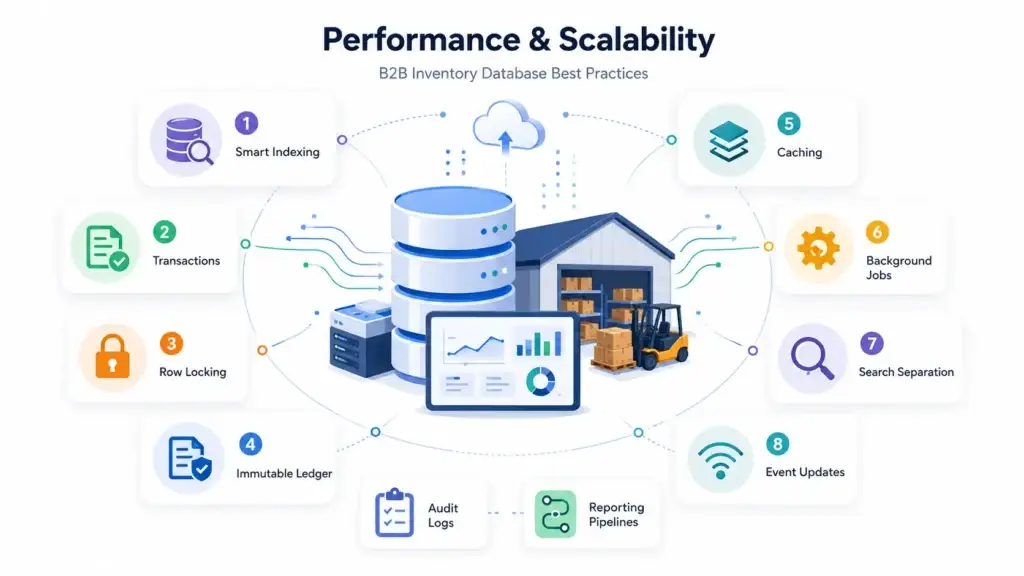
A B2B inventory database must support fast product browsing and accurate checkout at the same time.
Use these best practices:
- Index vendor_id, product_id, variant_id, warehouse_id, and listing_status.
- Use database transactions for stock reservation and stock deduction.
- Use row-level locking when updating inventory during checkout.
- Keep the inventory ledger immutable wherever possible.
- Cache read-heavy product availability carefully.
- Use background jobs for bulk imports, price updates, and stock syncs.
- Separate product search from the transactional database.
- Use event-driven updates for orders, inventory, warehouse transfers, and returns.
- Create audit logs for admin and vendor actions.
- Build reporting tables or data pipelines as order volume grows.
For founders, these choices reduce the risk of slow checkout, stock mismatch, failed bulk imports, and unreliable vendor reporting.
Security and Admin Control for B2B Multi-Vendor Inventory Apps
A B2B inventory platform contains sensitive commercial and operational data. Vendor prices, buyer contracts, stock positions, order volumes, and payment information should be protected through clear security controls.
Important security layers include:
- Role-based access control.
- Vendor-level dashboard permissions.
- Admin approval controls.
- Secure payment gateway integration.
- Encrypted data transfer.
- Audit logs for inventory changes.
- Activity logs for admin and vendor actions.
- Vendor verification workflows.
- Buyer company verification.
- Dispute and return tracking.
- Permission-based reporting dashboards.
Security should not be treated as a marketing add-on. It should be part of the product foundation because trust directly affects vendor adoption and buyer retention.
How Miracuves Helps Build B2B Multi-Vendor Inventory Apps
Miracuves helps founders and businesses build B2B multi-vendor inventory apps that go beyond basic product listing and order management. For a B2B platform to work smoothly, the system needs clear vendor ownership, accurate stock visibility, product catalog control, warehouse-level inventory, order workflows, payment integration, and a strong admin dashboard.
Instead of treating inventory as a simple quantity field, Miracuves helps structure the platform around the operational layers that matter most:
- Vendor-wise stock ownership so each seller’s inventory stays clearly mapped.
- Product and variant separation to avoid duplicate catalog records and SKU confusion.
- Warehouse-level inventory visibility for regional fulfillment and stock planning.
- Stock reservation workflows to reduce overselling during checkout.
- Inventory ledger tracking so every stock movement has a clear reason and history.
- Vendor dashboards for sellers to manage listings, stock, orders, and updates.
- Admin reporting for marketplace-wide visibility across vendors, orders, and inventory.
- Buyer company workflows for B2B accounts, bulk orders, and procurement use cases.
- Order and return management to support fulfillment, cancellations, disputes, and adjustments.
- Secure role-based access so vendors, admins, and business users only access the right data.
For founders building procurement platforms, wholesale marketplaces, distributor apps, supplier networks, or Alibaba-style B2B Marketplace Apps, this approach makes the system easier to scale, customize, and operate. The goal is not only to launch faster, but to build a marketplace foundation that can handle real B2B inventory complexity from the start.
You can explore Miracuves’ broader solutions hub for marketplace and app development options. For businesses planning a custom B2B product, Miracuves also supports custom app development and marketplace platform planning.
Final Thoughts: Build Inventory Around Stock Movement, Not Just Quantity
A B2B multi-vendor inventory database is not only about storing products and numbers. It is about managing stock ownership, movement, location, reservation, fulfillment, and accountability across vendors, warehouses, buyers, and admin teams. The strongest database structure separates products from vendor listings, listings from inventory balances, inventory balances from ledger entries, vendor stock from marketplace catalog data, buyer orders from stock reservations, and warehouse inventory from vendor-level reporting.
For founders, this matters because database decisions shape how the platform will operate as it grows. A weak schema may look faster in the beginning, but it can create serious problems once more vendors, warehouses, bulk buyers, returns, and order volume enter the system. The better decision is to build a B2B inventory system around stock movement, vendor ownership, warehouse logic, and order reservation from the start.
Miracuves helps founders move from idea to launch faster with scalable, white-label, and source-code-owned app solutions built for real marketplace operations. To plan the right database structure, inventory workflow, and B2B marketplace foundation for your business, you can schedule a consultation with Miracuves and discuss the best launch approach for your platform.
FAQs
What is a multi vendor inventory management database?
A multi vendor inventory management database is a structured backend system that tracks products, vendors, warehouses, stock quantities, reservations, stock movements, orders, returns, and adjustments across multiple sellers. In B2B apps, it should support vendor-wise inventory ownership and warehouse-level stock tracking.
Why does a B2B app need a separate vendor product listings table?
A vendor product listings table is important because the same product can be sold by multiple vendors at different prices, minimum order quantities, lead times, and availability levels. The product table stores what the item is, while the vendor listing table stores how a specific vendor sells it.
Is an Alibaba clone script enough for a B2B inventory app?
An Alibaba clone script can provide a faster starting point if it includes vendor management, product catalogs, order workflows, admin control, and inventory features. However, founders should check whether it supports stock ledger, warehouse-level inventory, product variants, reservations, and B2B pricing before choosing it.
What is the most important table in a B2B inventory database?
The inventory ledger is one of the most important tables because it records every stock movement. It helps admins and vendors understand why stock increased, decreased, moved, returned, or was adjusted.
How does stock reservation prevent overselling?
Stock reservation temporarily moves quantity from available stock to reserved stock during checkout. If the order is confirmed, the stock is deducted. If checkout expires or payment fails, the reserved stock returns to available inventory.
Which database is best for a B2B Multi-Vendor Inventory App?
PostgreSQL is a strong choice for complex B2B inventory systems because it supports relational integrity, transactions, reporting, and flexible JSON attributes. MySQL can also work well for cost-efficient marketplace builds. Redis is useful for temporary reservations and caching, while OpenSearch can support product search.
Should inventory quantity be stored directly in the products table?
No. Storing one quantity field in the products table is usually a mistake for B2B multi-vendor apps. Inventory should be connected to vendor, product variant, and warehouse records so the platform can track stock accurately.
How can Miracuves help build B2B Marketplace Apps?
Miracuves helps founders build B2B Marketplace Apps with vendor management, product catalogs, inventory workflows, order management, admin dashboards, payment integration, and scalable backend architecture. This can help businesses launch faster while keeping room for customization and operational growth.
Miracuves is an independent software development company. We are not affiliated with, connected to, sponsored by, or endorsed by any company or product named in this article.
Terms such as “X Clone” are used descriptively. It is how the software industry refers to building a platform with functionality comparable to a known service, and how clients search for it.
The entire design and codebase of our products is built by our own team. Our products contain no code, design, graphics, or content originating from any third-party website or applications.
All third-party names and marks referenced in this article are the property of their respective owners, referenced solely to identify the services discussed.