

Key Takeaways
- Short-form video apps need a full creator workflow, not just uploads.
- Recording, editing, effects, and drafts must work as one system.
- Publishing requires processing, moderation, metadata, and feed distribution.
- Creator analytics help users improve content and publishing frequency.
- Monetization works best when connected directly to creator workflows.
Creation Workflow Signals
- Support camera recording, uploads, timers, sound sync, and drafts.
- Add trimming, captions, filters, transitions, and audio editing.
- Process videos through compression, transcoding, and thumbnail generation.
- Use clear moderation states before and after publishing.
- Track watch time, completion, engagement, discovery, and creator revenue.
Real Insights
- Creator friction directly reduces publishing frequency.
- Publishing a video is not the same as getting it discovered.
- Draft loss can quickly damage creator trust.
- Effects must improve creativity without hurting app performance.
- Miracuves builds short-video platforms with creator, publishing, and monetization workflows.
Short-form video platforms look simple from the outside.
A user opens the camera, records a clip, adds music, applies an effect, writes a caption, and publishes. But behind that smooth experience is a complete product system that manages camera access, uploads, editing timelines, audio sync, effects, drafts, moderation, compression, publishing states, feed distribution, and analytics.
For founders, this matters because a short-form video platform is not just a video feed. It is a video creation platform where creators need fast tools, users expect frictionless publishing, and the business needs scalable media infrastructure.
A TikTok-style app became popular because content creation feels quick, playful, and repeatable. TikTok’s own creation flow includes camera tools, effects, sounds, editing, posting, Duets, Stitch, accessibility features, Effect Creator tools, playlists, and TikTok Studio. That is the real benchmark founders should study: not one feature, but a full creator workflow.
Miracuves helps founders build ready-made and white-label short-video platforms with source-code ownership, branded design, admin control, creator workflows, and monetization-ready modules. For a founder planning a creator platform, influencer platform, or influencer video platform, the goal is not simply to copy TikTok. The goal is to build a video creation ecosystem where creators can produce, publish, grow, and monetize with less friction.
Why Creation Tools Decide the Success of a Short-Form Video Platform
A short-form video app succeeds when users can create more often with less effort.
If recording feels slow, editing feels confusing, effects are limited, uploads fail, or publishing takes too long, creators will move to another platform. This is especially true for influencers, musicians, educators, coaches, beauty creators, fitness creators, comedians, and brand creators who publish frequently.
A strong video creation platform should help users do four things quickly:
- Capture or upload content.
- Edit it into a short, engaging format.
- Enhance it with sound, text, captions, filters, and effects.
- Publish it safely and distribute it through the feed.
TikTok has publicly described enhanced editing tools that allow creators to adjust clips, sounds, images, and text inside the creation flow. These tools include trimming, splitting, text positioning, overlays, speed adjustment, frame rotation, zooming, and sound effects.
For founders, the lesson is direct: creation tools are not decorative. They reduce creator effort, increase publishing frequency, and improve the quality of user-generated content.
TikTok-Style Recording: How the Capture Layer Works
A TikTok-style short-form video platform usually starts with the recording screen. This is where the creator decides whether to record inside the app or upload from the phone gallery.
The recording layer should support:
- In-app camera recording
- Front and rear camera switching
- Gallery upload
- Pause and resume recording
- Multiple clip capture
- Speed control
- Timer and countdown
- Flash control
- Beauty mode or enhancement tools where relevant
- Sound selection before or after recording
- Draft saving
- Permission handling for camera, microphone, and media files
The founder mistake is treating recording as a basic camera feature. In reality, the recording layer must connect with audio, editing, effects, drafts, and publishing. If the creator records multiple clips, the editor must understand clip order. If the creator selects music first, the recording screen must support timing against that audio track. If a creator saves a draft, the system must preserve video clips, effects, text layers, captions, selected audio, and metadata.
Editing Tools: Turning Raw Clips Into Watchable Short Videos
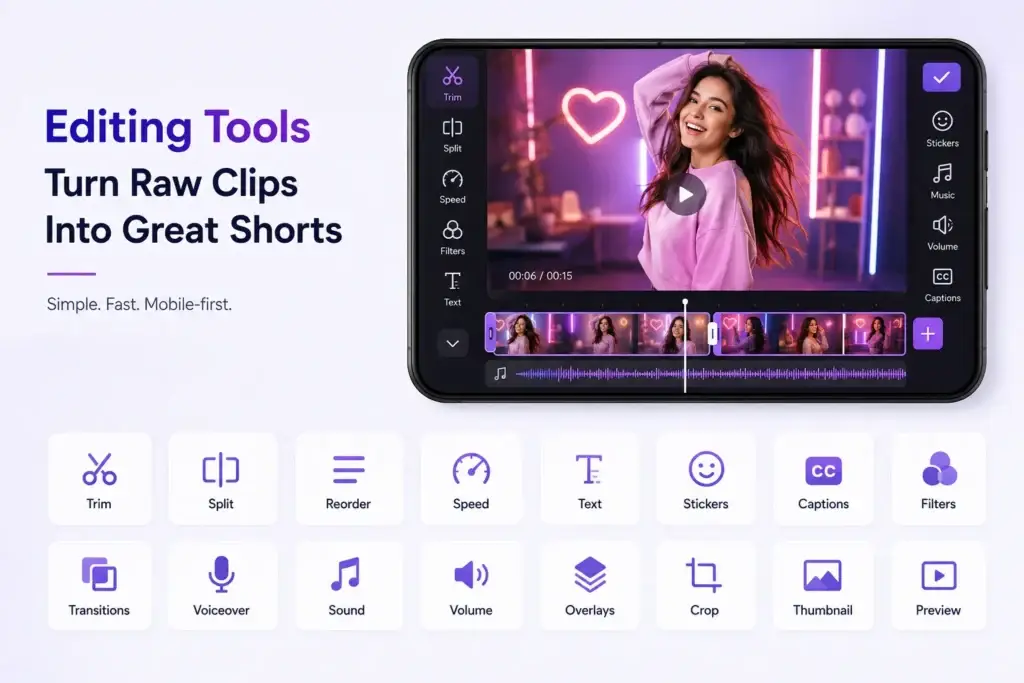
Recording creates raw material. Editing turns it into content.
For short-form platforms, editing tools must be fast, visual, and mobile-first. Most creators do not want a professional desktop editing interface inside a social app. They want simple tools that help them polish content quickly.
A strong editor should support:
- Clip trimming
- Clip splitting
- Clip reordering
- Merging multiple clips
- Speed adjustment
- Crop and frame adjustment
- Text overlays
- Text timing
- Stickers
- Captions
- Voiceover
- Sound trimming
- Volume balancing
- Filters
- Transitions
- Photo/video overlays
- Thumbnail selection
- Draft preview
TikTok’s enhanced editing tools include clip stacking, trimming, splitting, sound editing, text timing, photo and video overlays, speed changes, rotation, zoom, and sound effects. TikTok Studio also provides tools for creators to upload, film, edit, post, manage, and analyze content, including auto caption, photo editor, and autocut features.
For founders, the product decision is not whether editing tools are needed. The decision is how deep the editing layer should be at launch. A beginner-focused platform may need simple trims, captions, and filters. A professional influencer video platform may need templates, advanced cuts, brand presets, auto captions, AI clipping, batch drafts, and scheduled publishing.
Effects and Filters: Why Creative Enhancement Matters
Effects are what make short-form video feel native to the platform.
A basic upload platform may allow users to post videos. A creator-first short-form platform gives users tools to make videos feel fun, expressive, and trend-ready.
Effects and filters can include:
- Beauty filters
- Color filters
- AR effects
- Green screen
- Background replacement
- Stickers
- Face effects
- Voice effects
- Sound effects
- Slow motion
- Reverse
- Zoom effects
- Meme templates
- AI background tools
- One-tap visual enhancement
TikTok has described Green Screen as one of its widely used effects, and its newer tools include GIPHY Green Screen, one-tap visual enhancement for exposure and color correction, voice effects, and HD upload options.
For founders, effects are not only creative tools. They can become retention and monetization tools.
A platform may offer:
- Free standard filters
- Premium creator effects
- Brand-sponsored effects
- Seasonal templates
- Creator-made effect libraries
- Paid filter packs
- Campaign-specific effects
- AR try-on tools for beauty or fashion creators
- Sticker packs for fan communities
This is where an influencer platform or creator monetization platform can differentiate. Instead of offering generic filters, the platform can build effects around niche communities such as fitness, beauty, education, music, comedy, gaming, fashion, devotional content, local language creators, or celebrity fan communities.
Audio, Captions, and Sound Libraries: The Hidden Growth Layer
Short-form video is not only visual. Sound plays a major role in trends, humor, emotion, pacing, and repeat viewing.
A strong audio layer should include:
- Licensed music library
- Trending sounds
- Creator-uploaded audio
- Voiceover recording
- Audio trimming
- Volume control
- Sound effects
- Voice effects
- Auto captions
- Manual caption editing
- Subtitle styling
- Muted-video viewing support
Auto captions and subtitles matter because many users watch videos without sound, while accessibility features make content easier to consume across different audiences. TikTok’s creation support area includes accessibility for videos and posting-related tools as part of its creator workflow.
For founders, the audio layer requires more than a button to add music. It needs licensing decisions, copyright rules, audio matching, reporting workflows, takedown logic, and region-specific availability.
Drafts and Autosave: Preventing Creator Drop-Off
Creators may not finish every video in one session. They may record today, edit tomorrow, publish after a trend peaks, or wait for approval from a brand partner.
That is why drafts matter.
A draft system should preserve:
- Original clips
- Edited clip order
- Text overlays
- Captions
- Stickers
- Filters
- Effects
- Audio selection
- Sound trimming
- Thumbnail options
- Hashtags
- Description
- Privacy settings
- Scheduled publish time
Drafts can be stored locally, in the cloud, or through a hybrid model. Local drafts are faster and cheaper but may be lost if the user changes devices. Cloud drafts improve continuity but require more storage, syncing, and security planning.
For an influencer video platform, cloud drafts can be valuable because creators often work with teams, editors, agencies, or brand managers. For a simple consumer app, local drafts may be enough for the first release.
Publishing Workflow: What Happens After the User Taps “Post”
Publishing is where many founders underestimate complexity.
From the user’s perspective, publishing is one tap. From the backend’s perspective, it can involve upload handling, compression, transcoding, moderation, metadata storage, thumbnail generation, feed indexing, notification triggers, and analytics setup.
A mature publishing workflow should include:
- User taps publish.
- App validates video length, format, size, and required metadata.
- Upload begins through a stable upload service.
- Backend creates a video record with a pending status.
- Media processing starts.
- Video is compressed and transcoded into supported playback formats.
- Thumbnail and preview assets are generated.
- Content enters automated or manual moderation checks.
- Metadata is indexed for search, hashtags, sounds, and recommendations.
- Video becomes visible based on privacy, scheduling, and moderation rules.
- Feed distribution and analytics begin.
TikTok’s newer AI-powered tools show how publishing is becoming more integrated with creator planning and workflow. Smart Split can automatically clip, reframe, caption, and transcribe long content into shorter videos, while AI Outline helps creators generate titles, hashtags, hooks, and outlines before recording. TikTok also states that videos posted from these AI tools go through moderation before being posted.
For founders, the key point is clear: publishing should not bypass moderation, processing, or metadata logic.
Content Moderation Before and After Publishing
Short-form video platforms depend on user-generated content. That creates growth potential, but also safety risk.
A responsible creator platform should include:
- Automated content scanning
- Manual review queue
- User reporting
- Comment moderation
- Copyright reporting workflows
- Duplicate or spam detection
- Restricted content controls
- Age-gating where relevant
- Creator verification where relevant
- Admin approval workflows
- Audit logs
- Policy violation records
- Appeal workflows
TikTok’s AI tool announcement states that content recommendations and posted videos from Smart Split and AI Outline go through safety checks or moderation, and viewers can report content that may violate community guidelines.
For founders, moderation should be built into publishing states. A video can be:
- Draft
- Uploading
- Processing
- Pending review
- Published
- Limited visibility
- Rejected
- Removed
- Under appeal
- Archived
This gives the admin team operational control without confusing creators.
Feed Distribution: Publishing Is Not the Same as Discovery
A video is not valuable just because it is published. It becomes valuable when the right audience sees it.
After publishing, the platform should decide how the video enters:
- Following feed
- Discovery feed
- Hashtag pages
- Sound pages
- Creator profile
- Search results
- Trending sections
- Challenge pages
- Location or language feeds
- Notification campaigns
This is where recommendation logic matters. A video creation platform must connect publishing metadata with feed delivery. The system may consider watch time, completion rate, likes, comments, shares, saves, reports, creator history, hashtags, audio trend, user interests, and freshness.
For founders, this means recording and editing are only the beginning. The platform must also help creators get discovered.
Creator Analytics: Helping Users Improve Their Next Video
Creators need feedback to improve.
A good creator dashboard should show:
- Video views
- Watch time
- Completion rate
- Likes
- Comments
- Shares
- Saves
- Follower growth
- Traffic source
- Audience demographics
- Best posting times
- Revenue from gifts or tips
- Subscriber growth where relevant
- Campaign performance
- Content moderation status
TikTok Studio provides reporting and analytics for account and content performance, audience behavior, and monetization, helping creators make more informed growth decisions.
For founders, analytics are important because they keep creators invested. When creators can see which videos perform well, they publish more strategically.
Where TikTok Fits in Short-Form Video Creation
TikTok is the clearest reference point for short-form video workflows because it combines recording, editing, effects, sounds, publishing, feed discovery, creator analytics, livestreaming, and monetization tools.
A TikTok-style platform is useful when the founder wants to build a broad video creation platform where users discover content through feeds and participate through trends, challenges, sounds, comments, shares, and live interaction.
Miracuves’ TikTok clone page describes its ready-made short-form video platform as including video creation, content discovery, engagement tools, live streaming, monetization, creator analytics, and admin control.
Where OnlyFans-Style Creator Monetization Fits
An OnlyFans-style creator platform is different from a broad short-form feed. It focuses more on premium creator access, fan subscriptions, paid content, private messaging, and gated media.
This becomes relevant when a founder wants to combine short-form discovery with paid fan engagement. For example, creators may publish short previews publicly and move loyal fans into premium content, paid messages, subscriptions, or exclusive video access.
Miracuves’ OnlyFans clone page positions the solution around creator profiles, premium content, PPV, tips, live streaming, calls, messaging, wallet, and admin control.
The founder lesson: a short-form video platform can become more commercially powerful when discovery and monetization are connected.
Where LoyalFans-Style Live Creator Workflows Fit
A LoyalFans-style platform is relevant when creator engagement depends on subscriptions, live interaction, clips, paid messages, gifting, and fan communities.
For a short-form video platform, this matters because creators may use short videos to attract fans and live sessions to deepen loyalty. A creator may publish short clips during the week and host a paid or subscriber-only live session at the end of the week.
This model is useful for:
- Fitness creators
- Coaches
- Musicians
- Lifestyle influencers
- Educators
- Beauty creators
- Community hosts
- Regional fan clubs
Here, recording and publishing tools help build reach, while live and paid access tools help build revenue.
Where Fansly-Style Tiered Access Fits
A Fansly-style creator platform is useful when fans need different levels of content access.
For a short-form video app, this can mean:
- Free short videos
- Subscriber-only clips
- Premium video libraries
- Tier-based creator content
- Pay-per-view unlocks
- Private video drops
- Early access content
- Fan-only livestream replays
This is especially useful for creators who want to use short-form videos as teasers while keeping higher-value content behind memberships or paid unlocks.
The founder decision is whether the platform should remain a public video feed or become a creator monetization platform with layered access.
Where IsMyGirl-Style Premium Fan Content Fits
An IsMyGirl-style platform is relevant when the business model depends on personal fan access, premium content, and creator-to-fan relationships.
In a short-form video workflow, this can appear as:
- Short preview clips
- Fan-specific videos
- Premium creator posts
- Personalized video replies
- Paid direct media
- Private content campaigns
- Creator profile subscriptions
This type of model needs stronger access control, content visibility rules, secure payment workflows, moderation, and admin reporting.
Backend Architecture Behind Recording, Editing, Effects, and Publishing
A founder does not need to know every line of code, but they should understand the major system layers.
A short-form video platform usually needs:
| System Layer | What It Does | Why It Matters |
|---|---|---|
| Mobile App Camera Layer | Records video, captures audio, accesses gallery, manages permissions. | Defines the creator’s first experience. |
| Editing Engine | Handles trim, split, merge, overlays, effects, filters, captions, and drafts. | Makes content creation easier and more repeatable. |
| Media Upload Service | Uploads files reliably, supports retry, and handles unstable networks. | Prevents creator frustration and failed posts. |
| Processing Pipeline | Compresses, transcodes, generates thumbnails, and prepares playback assets. | Ensures smooth viewing across devices and networks. |
| Storage Layer | Stores original videos, processed files, thumbnails, and draft assets. | Controls performance, cost, and reliability. |
| CDN Layer | Delivers videos quickly to users in different regions. | Reduces buffering and improves retention. |
| Moderation Layer | Reviews content before or after publishing. | Protects platform quality and trust. |
| Feed Engine | Distributes videos to users through recommendations, hashtags, and follows. | Drives discovery and engagement. |
| Analytics Layer | Tracks performance, engagement, retention, and monetization. | Helps creators and admins make better decisions. |
| Admin Dashboard | Controls users, creators, content, reports, payments, and settings. | Gives the platform operator control. |
Miracuves’ TikTok clone page positions its solution as a complete short-video platform stack with apps, admin, engagement, monetization, security, and infrastructure planning rather than only a single APK.
Founder Decision Signals
Speed
If you want to launch faster, start with a ready-made video creation platform that already includes recording, editing, feed, user profiles, admin controls, and publishing workflows.
Cost
The real cost is not just app design. Media processing, storage, CDN, editing tools, effects, moderation, analytics, and monetization workflows all affect development scope.
Scalability
If creators will upload frequently, the platform must handle video compression, transcoding, content delivery, moderation queues, and feed distribution from the beginning.
Market Fit
If your audience includes creators, influencers, celebrities, educators, or niche communities, the platform should match their publishing habits and monetization needs.
Monetization Opportunities Around Creation Tools
Creation tools can also support revenue.
A short-form video platform can monetize through:
| Monetization Model | How It Works | Best For |
| Ads | Brands pay for feed placements or sponsored videos. | Large consumer video platforms |
| Virtual Gifts | Fans send gifts during live sessions or creator interactions. | Creator-led communities |
| Premium Effects | Creators pay for advanced filters, templates, or AI effects. | Influencer video platforms |
| Creator Subscriptions | Fans pay for exclusive creator access or premium posts. | Creator monetization platforms |
| PPV Videos | Fans unlock specific premium clips. | Subscription based creator platforms |
| Brand Campaigns | Brands collaborate with influencers inside the platform. | Influencer platforms |
| Social Commerce | Creators sell products through videos or live sessions. | Beauty, fashion, fitness, and lifestyle niches |
| Platform Commission | Platform earns from subscriptions, gifts, PPV, or sales. | Creator economy businesses |
The stronger approach is to connect monetization to creator workflow. Creators should not need separate tools for content, community, payments, and analytics.
Security, Privacy, and Content Governance

Security should be treated as a product foundation, not a marketing add-on.
A short-form video platform should include:
- Encrypted data transfer
- Secure API integration
- Protected admin access
- Role-based access control
- Audit logs
- Content moderation
- Abuse reporting
- Creator verification where relevant
- User verification where relevant
- Copyright/reporting workflows
- Privacy-conscious data handling
- Secure payment gateway integration
- Payout monitoring where monetization is enabled
- Activity logs for sensitive admin actions
Miracuves’ TikTok clone page describes security-first practices such as protected admin access, secure APIs, role-based permissions, audit-friendly logging, privacy-aware handling for profiles, videos, comments, reports, creator activity, and platform usage.
Final compliance depends on jurisdiction, legal review, integrations, data policies, moderation model, payment providers, and platform rules. A responsible platform can support compliance-ready workflows, but it should not claim automatic compliance in every market.
Mistakes Founders Should Avoid
Treating Video Upload as the Whole Product
A successful short-form platform needs recording, editing, effects, drafts, publishing states, moderation, feed distribution, and analytics. Upload alone is not enough.
Ignoring Drafts and Autosave
Creators often edit in multiple sessions. If the platform loses drafts, clips, captions, or effects, creator trust drops quickly.
Adding Effects Without Performance Testing
Filters, AR effects, overlays, and AI tools can slow devices if not optimized. Creative tools should not damage recording or playback quality.
Publishing Without Moderation States
User-generated video platforms need clear states such as processing, pending review, published, limited, rejected, removed, and under appeal.
Ready-Made vs Custom Short-Form Video Platform Development
| Build Option | What It Means | Best For | Founder Tradeoff |
| Basic Video Upload App | Users upload and view short videos with simple profiles and engagement tools. | Early concept testing. | Easier to build, but weaker creator experience. |
| Ready-Made TikTok-Style Platform | Pre-built recording, editing, feed, engagement, admin, and monetization modules. | Founders who want faster launch and market validation. | Faster launch, but customization scope should be planned clearly. |
| Custom Video Creation Platform | Built from zero around unique workflows, creator tools, effects, monetization, and infrastructure. | Funded startups or highly differentiated platforms. | More flexible, but longer and more complex. |
| Hybrid Approach | Start with a ready-made foundation and customize effects, publishing, monetization, or creator tools. | Founders who need speed plus differentiation. | Balanced path for many creator economy businesses. |
Miracuves’ TikTok clone page states that its TikTok clone script provides source-code ownership, 6-day launch, and future customization flexibility.
How Miracuves Helps Founders Build Short-Form Video Platforms
A short-form video platform is not just a social feed. It is a creator ecosystem where recording, editing, effects, publishing, moderation, analytics, monetization, and admin controls work together.
Miracuves can help founders build:
- TikTok-style short-form video platforms
- Video creation platforms
- Influencer video platforms
- Creator platforms with monetization modules
- Influencer platforms with brand campaigns
- Creator monetization platforms with subscriptions, PPV, tips, and live sessions
- Celebrity platforms with short-video discovery and personalized fan engagement
A ready-made Miracuves solution can help founders launch faster with branded design, source-code ownership, admin control, and scalable creator workflows. From there, the platform can be customized around niche, region, creator category, monetization model, media infrastructure, moderation needs, and growth strategy.
Final Thoughts: Creation Workflow Is the Real Product
Short-form video platforms do not win only because they display videos well. They win because they make creation easy, fast, expressive, and repeatable.
Recording helps users capture ideas. Editing helps them shape those ideas. Effects make content expressive. Publishing turns content into discovery. Moderation protects the community. Analytics help creators improve. Monetization gives creators a reason to stay.
For founders, the stronger decision is not to build a basic video upload app and add features later without planning. The stronger decision is to build a creator-first platform where recording, editing, effects, publishing, distribution, safety, and monetization are designed together.
Miracuves helps founders move faster with ready-made and white-label platform solutions built for branding, source-code ownership, admin control, and scalable creator growth.
FAQs
How do short-form video platforms manage recording?
Short-form video platforms manage recording through in-app camera access, microphone permissions, gallery uploads, pause/resume recording, timers, camera switching, speed controls, sound sync, and draft saving.
What editing tools should a video creation platform include?
A video creation platform should include trimming, splitting, merging, text overlays, captions, stickers, filters, transitions, sound editing, voiceover, thumbnail selection, and draft preview.
Why are effects important in a short-form video platform?
Effects make content more expressive, trend-ready, and fun to create. Filters, AR effects, green screen, stickers, voice effects, and visual enhancement tools help creators produce more engaging videos without professional editing skills.
What happens after a creator taps publish?
After publishing, the platform usually validates the video, uploads it, compresses it, transcodes it, generates thumbnails, checks moderation rules, indexes metadata, and distributes the video through feeds, profiles, hashtags, and recommendations.
Is TikTok a video creation platform?
Yes. TikTok is a strong reference point for a video creation platform because it combines recording, editing, effects, sounds, publishing, discovery, livestreaming, creator analytics, and monetization tools.
How can a short-form video platform support creator monetization?
A short-form video platform can support creator monetization through ads, gifts, tips, live sessions, subscriptions, pay-per-view videos, premium effects, brand campaigns, and platform commissions.
What is the difference between a creator platform and an influencer video platform?
A creator platform may include subscriptions, premium content, DMs, live sessions, and fan monetization. An influencer video platform focuses more on video creation, audience growth, brand campaigns, analytics, and short-form content publishing.
Can Miracuves build a short-form video platform with recording, editing, effects, and publishing?
Yes. Miracuves can help founders build ready-made, white-label, or custom short-form video platforms with recording, editing, effects, publishing workflows, creator dashboards, monetization modules, admin controls, and source-code ownership. Final scope depends on selected features, integrations, and business model.
Miracuves is an independent software development company. We are not affiliated with, connected to, sponsored by, or endorsed by any company or product named in this article.
Terms such as “X Clone” are used descriptively. It is how the software industry refers to building a platform with functionality comparable to a known service, and how clients search for it.
The entire design and codebase of our products is built by our own team. Our products contain no code, design, graphics, or content originating from any third-party website or applications.
All third-party names and marks referenced in this article are the property of their respective owners, referenced solely to identify the services discussed.