
TransferNow Clone App - White-Label Secure File Sending Service
Built by Miracuves, this ready-made, white-label TransferNow clone lets firms that hand files to clients send password-locked, self-destructing transfers from their own website and Android and iOS apps, cap recipients from a back-office console and own the source, taking client hand-overs in six working days.
A sender locks each transfer with its own password, arms self-destruct and picks email or a link; the recipient lands on a download page, and the sender's history shows each wipe date. The demo carries no malware-scanning step, so adding one would be custom work. A download alert for senders or an extra staff role is quoted in writing first and generally built in 2-8 weeks.
Launch in 6 Days with
- Source Code
- Website
- Android + iOS
- Admin Console
- Rebranding
- App Publishing
StackFlutter · PHP · Bootstrap · Apache · MySQL
Delivery activity
- Password attached to a transferProtection
- Files received, link generatedUploads
- Recipient emailed a download linkDelivery
- Recipient opened the download pageDownloads
- Self-destruct armedExpiry
- Recipient ceiling enforcedLimits
- Transfer wiped on its dateExpiry
- Paid package chosenPackages
- Password attached to a transferProtection
- Files received, link generatedUploads
- Recipient emailed a download linkDelivery
- Recipient opened the download pageDownloads
- Self-destruct armedExpiry
- Recipient ceiling enforcedLimits
- Transfer wiped on its dateExpiry
- Paid package chosenPackages

- 3Operator Upload Capsa recipient ceiling, an email blocklist and a concurrent-upload cap
- 3Admin Home Countersuploads, downloads and destroyed uploads
- 0%Revenue Share With Miracuvesfees from delivery plans and firm seats stay with you
- 4Add-Ons, Scoped Apartfile organizing, cloud import, previews and team workspaces
- 6Days to Launchand if the delay is ours, we keep going free
- $2,499Paid Once, Not Rentedsource code yours, no per-seat fee, no monthly rental
Live in six working days, or we keep working free until you launch. Every build carries 60 days guidance, 6 months bug fixes and 12 months updates.Verify every figure
Made for Confidential Sends
Advisory firms, accountants and legal practices sending reports only the named recipient should open are the audience; confidentiality duties stay yours, and no encryption standard is claimed.
No Case Study Pretended
No named client running this product has been published, so that spot stays empty; one demo login lets you try a protected send on a phone or in a browser.
Subscriptions on Your Account
Paid delivery plans are collected through the subscription route you connect, and the demo account page displays a PayPal ID beside the date of the next payment.
01See it live
Try It Yourself
TransferNow Clone App Demo - Try a Protected Send on Phone, Web & Admin Console
Miracuves keeps its TransferNow clone app open for a protected test send before you commit. One demo login opens the sender side both on the phone and in the browser, and the admin login is passed on during a guided call. Add a few files, type a password, set self-destruct to Yes and send it to your own address.


TransferNow Clone on Android & iOS
What a sender does on a phone: choose files or folders, address the send or ask for a link, lock it with a password and self-destruct, then land on the success and download screens.
- 1Visit the app portal and choose your handset
- 2Log in using the details shown below
- 3Poke around: upload card, history, account, Go premium
user@demo.com | User_321
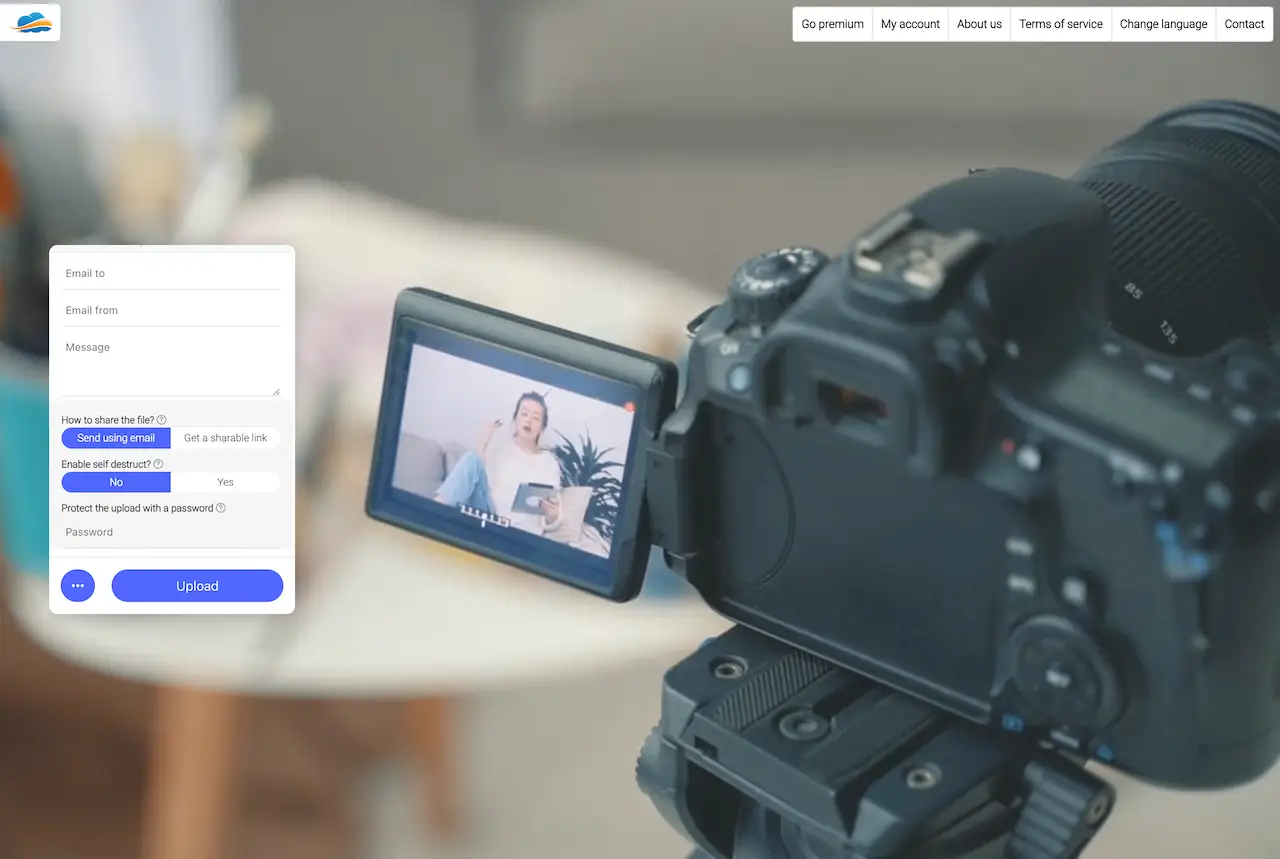
Browser Version: Upload Card & Account Pages
The same card in a browser, framed by a top bar of six entries that runs from Go premium through to Contact.
- 1Open the demo site in a new browser tab
- 2Log in with the very same details
- 3Poke around: password field, self-destruct switch, account
user@demo.com | User_321
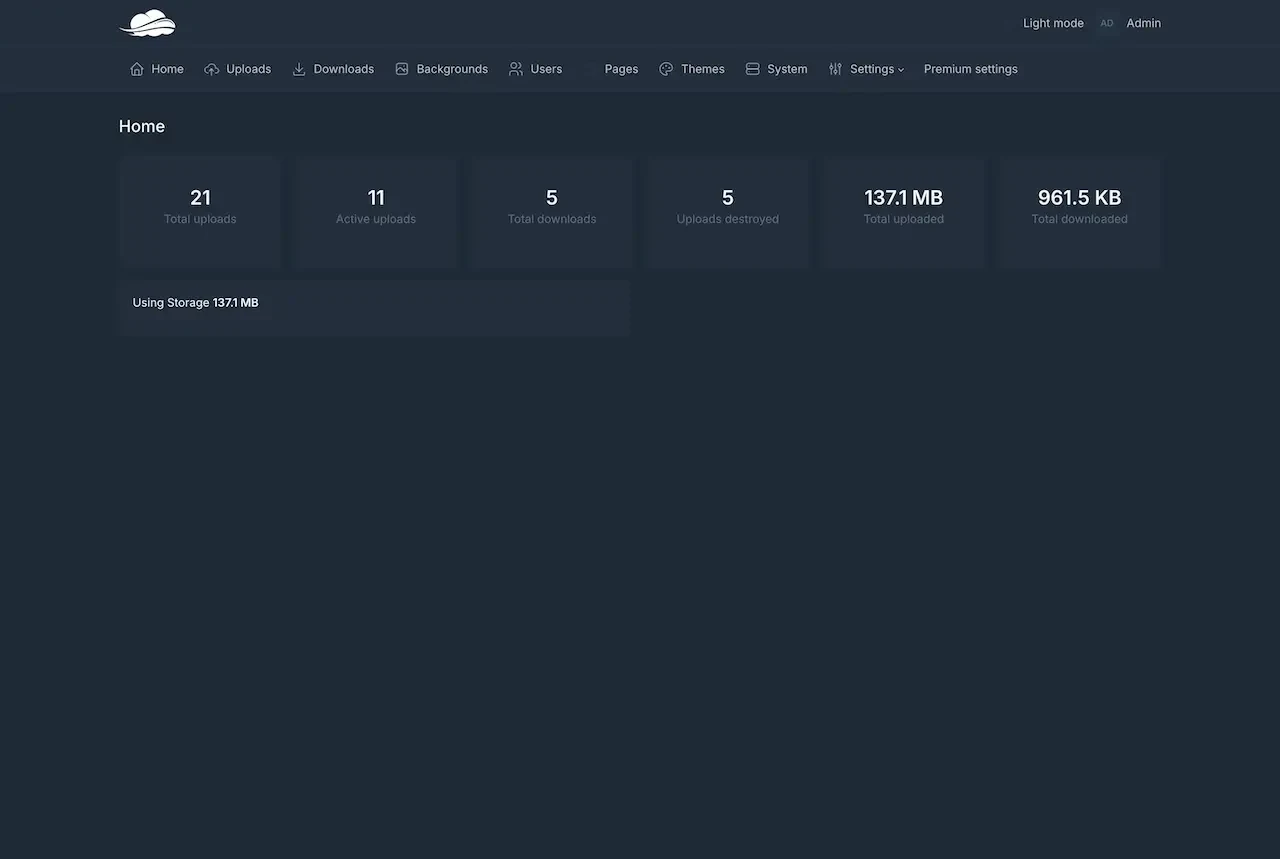
Console for Operators - Counters, Users & Upload Limits
The operator side: counters for uploads, downloads and destroyed uploads, and a menu that runs from Uploads and Downloads through Users and Themes to Settings and Premium settings.
- 1Open the console login on the demo host
- 2Obtain the admin login during a guided call
- 3Poke around: home counters, users, upload settings
provided on a guided call
Watch It Run
Secure File Transfer App Like TransferNow - Walkthrough of Protected Send, Self-Destruct & Admin Limits
The best test of a delivery tool is delivering something. Within a half-hour call we send a password-protected transfer from a handset and from a browser, arm self-destruct, open the download page as a client would, and end in the console where the recipient ceiling and the email blocklist live. Bring a real hand-over you do today and we lay each of its steps over the demo.
Book a guided delivery walkthrough.Screens in Order
Secure File Sending Screens - Phone App, Admin Console & Web Page
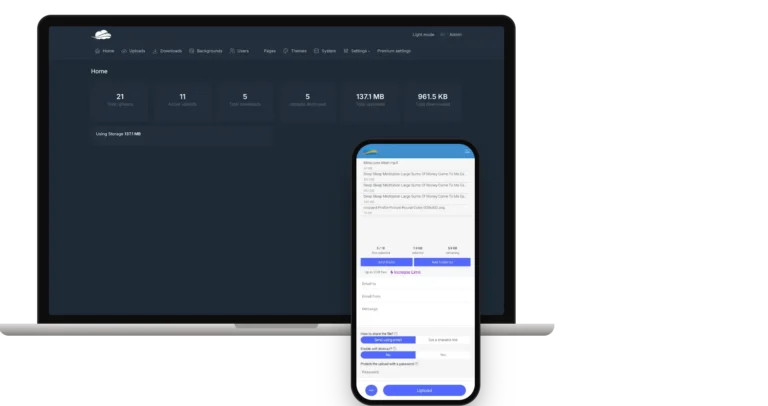
Here are the real screens of the TransferNow clone Miracuves delivers, from phone app to admin console to web page, laid out in the order a protected delivery travels.


Trace one delivery from the protected upload to the link, the recipient page and the My uploads history with its file expiry and destruct dates, then on to the account area and the Go premium page, and end in the console the operator works from.
02Proof
In Their Words
TransferNow Clone Client Reviews - Teams That Built on Miracuves
Quotes from clients who built on Miracuves bases. Two of them come from document-handling work, where who may open a file matters; the rest come from other industries. All are shown exactly as their authors wrote them.
“Once the register worked, we needed rights holders to be able to license and share what they had registered. The permissions model and the document handling were already there, so the new work was the licensing terms and the split logic. It shipped in weeks, not the quarter we had budgeted.”
“Copyright administration is mostly workflow: intake, examination, register, certificate. We had all of it on email and spreadsheets. Miracuves built the registry and the examiner workflow on a base that already handled documents and approvals, so we spent the time on the rules that are specific to how rights actually get registered. Live inside a month.”
“Every HMS I tried was built for general physicians, with no lesion mapping, no before/after tracking, and no procedure-based billing. Their MXHealth base gave us the patient app, doctor app, EMR and video consult out of the box. Front-desk time on scheduling and follow-ups is down ~70%, and we went fully digital in 9 months, where a fully custom job would have been 18.”
“Turo is the obvious reference, but the Caribbean specifics, from different insurance norms to different payment rails, meant we needed a real partner, not just a clone. Miracuves’s MXCar base covered the listing, the trip flow, and the host payouts. We launched in 6 working days and are live in three islands.”
“The team was running it on a dispatcher and a Google Sheet, and we needed a real platform quickly, because we were about to onboard a major retail client. Miracuves’s Delivery Genie base gave us the rider app, the dispatch console, and live tracking. We launched in 6 weeks and cleared 4x the previous order volume in the first month.”
“We were running it on phone calls and a paper calendar, and we were losing bookings to bigger OTAs. Miracuves’s GetmyBoat Clone base gave us the calendar, the booking flow, and the payment engine. Online bookings are up roughly 70% in the first six months, and the ops team finally has a live view of the fleet.”
“Building a compliant telehealth stack from scratch in three markets would have been a year-plus effort. Miracuves’s MXHealth base covered the patient and doctor apps, video consult, e-prescription and the pharmacy integrations. We launched in our first market in 9 weeks and rolled out to two more in the following six months.”
“We were juggling spreadsheets, a third-party GPS provider, and a phone. We needed a single operations console. Miracuves’s MXLogistics base covered the trip lifecycle, the driver app, and the customer tracking page. We’ve cut operations admin time by about 40%.”
Track Record
TransferNow Clone Case Study - Where the Named Client Would Be
A named client usually appears here. None is published for this model, so the cards stay with what the demo demonstrates and what we deliberately leave unclaimed.
No named client running this product has been published by Miracuves, so no case study occupies this spot. The cards name what you can check in the demo and what we decline to do in its place.

- Send yourself a locked transfer and open its download page
- Arm self-destruct, then find the wipe date in the history table
- Reach the admin sign-in page and ask for a console tour
- Skim the release notes for the upload settings that were added
- Present an anonymous client as if it were a reference
- Make up a testimonial, a head-count or earnings
- Pass another firm's delivery service off as ours
- Suggest that some client runs it right now
- The console, live, on a shared screen
- What branding swaps: logo, icons, colors, domain
- How the code handed to you is organized
- A priced proposal for whatever the base misses
A conversation beats a made-up reference
03The product
The Basics
What a Password-Protected Transfer Service Does for Senders and Operators
Think of Miracuves' TransferNow clone as a finished file transfer service for delivering large files with control attached to every send. The sender adds files, may lock the send with a password and a self-destruct switch, and picks an email or a link. The recipient lands on a download page, while the operator watches counters and sets limits from the console.

Controls on the Send
Each transfer can carry its own password and a self-destruct choice, set by the sender on the upload card before anything leaves.
Limits Held by the Operator
The admin settings hold a recipient ceiling, an email blocklist and a concurrency cap, so the house rules are yours to tune.
Honest About Extras
File organizing, cloud import, previews and team workspaces are sold as add-ons with their own scope. This page names each one as an add-on so the base list stays accurate.
Web, Android & iOS
What Is a TransferNow Clone Script?
Moving bytes is the easy half. Trust in a delivery service comes from the rules around it: who may open a transfer, how long it exists, how many people can receive it and what the operator can observe. Those rules belong to the product itself and are no afterthought.

- 01Upload card for files and folders, by email or link
- 02A password field and self-destruct switch on every transfer
- 03Download page showing file count and size
- 04Sender history listing each wipe date
- 05Console with counters, users, pages and upload settings
What you get is a site, a pair of phone apps and a ten-item admin console, with the full source code alongside.
What You Get
TransferNow Clone Features - Password, Self-Destruct, Recipient Limits, Download Page & Admin
Each item on this list ships in the Miracuves TransferNow clone and can be checked in a demo screen, the admin panel or the release notes. Anything that goes beyond the base appears further down as an add-on.
Files and Folders in One Send
A delivery can be built from several files or a whole folder. Every name shows its size, and a running tally tells the sender how much has been picked so far.
- Pick single files or entire folders
- Each file shown beside its own size
- Live tally of files chosen out of the permitted number
- Combined size and room left, under the list
- Upload button, with a second one for more options
Delivery by Email or by Link
One toggle settles whether the delivery leaves as an email to named people or as a link that the sender passes on personally.
- Toggle between emailing recipients and making a link
- Fields for the recipient, the sender address and a note
- Link plus a Copy URL button once the upload finishes
- Recipients get an email that points to the download page
- Each email template can be disabled on its own
- Placeholder that lists the uploaded files, comma-separated
A Password for Every Transfer
On the upload card sits a field that locks the transfer behind a password. It is completed delivery by delivery, never once for the whole account.
- Dedicated password field on the card
- Filled in before the Upload button is pressed
- Decided per delivery, not per account
- A redirect-URL weakness closed in release 2.6.4
Self-Destruct and End Date
A Yes / No switch on the card arms self-destruct. Later, every row of the sender's history states when that transfer will cease to exist.
- Switch labeled Enable self destruct, set to No or Yes
- Each history row carries its own Destruct at value
- Reads Never when no end date was chosen
- Admin home counts the uploads already destroyed
Recipient Cap and Email Blocklist
Two operator settings narrow the audience: a ceiling on how many people one transfer may reach, and a list of addresses that are turned away.
- Ceiling on recipients per transfer, found under Settings, Upload settings
- Blocklist of refused email addresses beside it
- Both settings arrived with release 2.6.4
- Release 2.6.3 added further checks on these settings
Download Page for Recipients
Whoever opens the link lands on a page that announces the download is ready, how many files it holds, their combined size and a single Download button.
- Headline announcing that the download is ready
- Number of files and their combined size
- Names listed with individual sizes
- One Download button
- Duplicate file names no longer collide inside the ZIP
- Imagick must be installed for big-image thumbnails
My Uploads History
Each sender, after signing in, has a table of what has been delivered: an identifier, the address used, the combined size and the date the transfer will be wiped.
- A row for every transfer
- Identifier of the transfer
- Address it was sent from
- Combined size
- Wipe date, or Never
- Tabs for uploads, backgrounds and account
Free Allowance, Stated Early
Before anyone reaches the ceiling, the card says what the free package covers, with an Increase Limit link nearby and a Go premium page behind it.
- The text Up to 2GB free sits under the buttons
- An Increase Limit link stands beside that figure
- Go premium begins with the Free package at zero monthly cost
- Each card finishes with a Select package button
- Premium settings have their own admin menu entry
Accounts and Subscription View
Signed-in senders see an account page with their subscription, and the operator keeps a Users menu listing everyone who has registered.
- Status of the account and its payment type
- A PayPal ID plus the date of the next payment
- A Cancel now option on the subscription
- Fields for e-mail, password and full name
- The operator sees everyone under Users
A Look of Your Own
The service wears your colors. Senders get a My backgrounds tab, while the operator restyles public pages from the Backgrounds and Themes sections.
- My backgrounds tab for each sender
- Backgrounds section in the admin menu
- Photograph behind the upload card on the website
- Themes section for restyling the site
Operator Home Counters
The first admin screen gathers the figures an operator checks daily, while the upload settings hold the limits you apply.
- Uploads in total, and those still active
- Downloads in total, and uploads destroyed
- Overall volume sent and fetched
- Storage in use, with a system info table
- A setting to limit concurrent uploads
Site Pages and Language Choice
Public pages are edited in the admin panel, visitors can change language, and the emails recipients receive can be disabled one template at a time.
- Pages section for the text pages
- About us, Terms and Contact reachable from the top bar
- A language switcher for visitors
- Social sharing tags added in 2.6.3
- Page editor switched to another library
Worth knowing before you buy: The platform arrives complete and in your branding. You bring hosting and a domain, developer accounts for the app stores, your logo and business details, a payment account for subscriptions (the demo shows a PayPal ID on the account page) plus the third-party keys your integrations use. Apple and Google review apps on their own schedule, so that step sits outside our 6-day build.
Where the Money Comes From
TransferNow Clone Revenue Models - Delivery Plans, Firm Seats, Size Upgrades & Pay-Per-Delivery
A secure delivery app like TransferNow can bill in several places, and Miracuves keeps those charges apart so that adjusting one leaves the others alone.
Among professional senders the two lines that tend to count most are a paid plan and the upgrade prompt that appears when a send outgrows the free allowance.
- 01
Paid Delivery Plans
Someone who sends client work each week outgrows the free allowance and moves onto a listed package. The demo offers a Go premium page with Select package buttons, and an account view with payment details, a renewal date and a way to cancel.
- 02
Firm and Team Seats
A studio or practice wants several people on one plan. Packages live in the Premium settings menu of the console, and shared workspaces for a team arrive as an add-on with its own scope.
- 03
Bigger Transfers
The free package prints Up to 2GB on the upload card with an Increase Limit link next to it, so the offer to pay for more room surfaces exactly when a sender needs it.
- 04
Renewing Firm Accounts
Accounts with past sends on record and a subscription running have a reason to stay. Retention is the quiet line that decides how much a delivery service is worth after launch.
- 05
Pay-Per-Delivery
A one-off fee for a single hand-over suits a client who will never subscribe. A single-payment flow for this line is built as custom work with a written scope.
- 06
Client-Branded Pages
Backgrounds and themes already dress the public pages. Reserving a custom look for paying accounts is a product decision we scope with you as custom work.
| Revenue stream | How it is charged | Take rateTypical take rate | What sets the ceiling |
|---|---|---|---|
| Paid Delivery Plans | A monthly fee per sender, collected through whichever subscription route you connect (the account page in the demo displays a PayPal ID). | Dropbox Plus costs $9.99 a month for 2 TB and allows transfers of up to 50 GB. | What a working professional already pays for storage plus sending. Collection takes a cut: PayPal lists 3.49% + $0.49 on US checkout, while Apple retains 15% to 30% of subscriptions sold inside an app. |
| Firm and Team Seats | A monthly fee per seat, usually with a minimum number of seats on the higher plan. | Dropbox charges $15 (Standard) or $24 (Advanced) per user each month, Advanced from 3 people upward; Box advertises business plans from $5 per user per month. | Whether a team values shared work areas, which here are an add-on, more than the cost of one more seat. |
| Bigger Transfers | The allowance is the product: the price steps up as the size or volume of a send grows. | WeTransfer publishes 3 GB for Free, 300 GB for Starter and 1 TB per transfer for Ultimate. | How heavy one delivery can get before a sender will pay. Its page counts the lower plans per 30-day window and Ultimate per transfer. |
| Renewing Firm Accounts | Revenue that recurs because accounts renew, not because new ones are signed. | Box put net retention at roughly 104% on 31 January 2026, and Dropbox posted an 80% gross margin for 2025. | Retention depends on habit and trust, and margin depends on how much free usage the paying accounts carry. |
| Pay-Per-Delivery | One payment for one hand-over or one storage window. | PayPal lists 3.49% + $0.49 per US checkout, plus 1.50% on international commercial payments. | The fixed part of a fee weighs most on small payments: on a $20 charge it comes to about 5.9% (our arithmetic). |
How to read this. Plan and seat prices come from vendor pages: Dropbox plans, Box pricing and the WeTransfer plan limits; retention and margin come from the Box annual report and the Dropbox annual report. Collection costs come from PayPal's business fees, Apple's subscription rules and Google's Play fee page, where, since 30 June 2026, subscriptions sold in the US, UK and EEA carry a 10% service fee plus a 5% billing fee. The $20 example is our own sum. Treat every number as a modeling input, never as a quote or a prediction of your earnings.
TransferNow Clone Revenue Model, Stage by Stage
Miracuves ships the TransferNow clone with paid delivery plans, a free allowance and a subscription view in place, so a firm-focused service can grow its billing one line at a time.
Launch
Start with the free 2 GB allowance and one paid delivery plan for professionals who send client work weekly, letting the Increase Limit link make the offer.
Traction
As practices and studios sign up, firm seats on the team workspace add-on put several people on one plan, and accounts with a send history on record turn renewals into the line that sets the service's value.
Scale
At scale, pay-per-delivery for clients who never subscribe and client-branded pages for paying accounts come in as scoped custom work, beside bigger packages for the heaviest sends.
Delivery-plan and firm-seat fees clear through the payment account you connect, and Miracuves takes no share.
Day-to-Day Control
Admin Panel for Secure File Delivery - Counters, Users, Upload Limits & Premium Settings
In the console Miracuves supplies, a TransferNow clone operator sees how much was sent and fetched, who the senders are, which limits apply and what the public pages look like.


Admin Panel Sections
- 01
Home Counters
Uploads, active uploads, downloads, destroyed uploads and the sizes moved in each direction, gathered on the first screen after sign-in.
- 02
Uploads and Downloads
One menu lists the uploads and another the downloads, so you can look back at what passed through the service.
- 03
Users
The Users section lists accounts of people who send files, along with what they have uploaded.
- 04
Premium Settings
The section that governs paid plans, kept apart from the free package every sender starts on.
- 05
Backgrounds and Themes
Two menus to restyle the pages that senders and recipients see, so deliveries carry your look.
- 06
Pages
A Pages menu for the text pages of the site, for example your terms and your about text.
- 07
Upload Settings
The recipient ceiling, the email blocklist and the concurrent-upload cap are grouped on the Upload settings page inside Settings.
- 08
System and Storage
The System section, plus a storage figure on the home screen, tells you how much room the service occupies.
Limits & Packages
The settings that decide who may send, to how many people and at what tier.
- Ceiling on recipients per transfer
- Cap on concurrent uploads
- Refused email addresses
- The Premium settings section
Look & Messages
What recipients read and see is governed from here.
- Backgrounds and Themes sections
- Single email templates can be disabled
- A language switcher for visitors
- Light-mode toggle at the top of the admin panel
Need more from the console? Revenue charts, further limits and extra staff roles are separate work. Describe what your team requires and we will quote it in writing.
04Package and price
The Full Package
TransferNow Clone Script Package: Code, Apps & Deployment
The TransferNow clone script arrives from Miracuves as a running service rather than a parts bin: the site, the apps, the console and the code behind each. You own all of it, which means no per-seat charge, no per-transfer charge and no license required to keep it running.
$ git clone your-delivery-service Full Source Code
The code behind the web platform and the phone apps, unencrypted and ready for your developers to reshape.
- Web platform source, unencrypted
- Android and iOS apps supplied as Flutter source
- Free for you to modify, expand and deploy again
- Passed to a repository you own
Protected Delivery Flow
A send from first tap to last click: recipients, the password and self-destruct choices, the link, a success screen and the page the recipient sees.
- Switch between email and sharable link
- Password field and self-destruct switch
- Success screen offering Copy URL
- Download page that ends in one Download button
Accounts & Packages
The account page with its three tabs and subscription view, plus the Go premium page where the packages are listed.
- Free tier priced at 0 USD monthly
- Every card ends in Select package
- PayPal ID and next payment date on the account
- A way to cancel the subscription

Branded Website
The site visitors see pairs the upload card with a six-entry top bar, running from Go premium and My account to language switching and Contact.
- Upload card, an Increase Limit link close by
- Top bar offering six entries
- A photograph behind the card
- Text pages and themes edited through the console
Android & iOS Apps
Flutter apps for both phone platforms repeat the upload, success and download screens and add the account tabs.
- Flutter apps built on fresh dependencies
- The three core delivery screens
- Account area in three tabs
- Listings in the stores go out from accounts you own


Operator Console
Home counters, then ten menu entries stretching from uploads and users to system, settings and premium settings.
- Counters and storage in use on the home screen
- Entries for uploads, downloads and users
- Entries for backgrounds, pages and themes
- Premium settings plus general Settings
Delivery Controls
Controls on both sides decide who can receive a transfer and how long it exists.
- Password chosen per transfer
- Self-destruct switch with an end date
- Recipient ceiling and email blocklist
- Admin sign-in kept apart from sender accounts
Handover & Support
We apply your branding and deploy for you. Three customer support periods then run alongside each other from launch.
- Your logo, icons and colors on web and apps
- Deployment onto your hosting
- Entire source code, no encryption
- 60 days guidance, 6 months bug fixes, 12 months updates
Prefer to try before buying? Use the demo as a sender yourself, or book a guided tour in which we send a protected transfer, open the download page and tour the console, holding each screen against your own hand-over routine.
Transparent Pricing
How Much Does It Cost to Build a Secure File Delivery Service Like TransferNow?
Our launch-ready, white-label TransferNow Clone costs one fixed $2,499. Work outside the base, such as add-ons, download alerts for senders, ad slots or other integrations, is scoped and quoted separately in writing.
Professional
Ready-Made Launch PackageSuited to: Agencies and studios, consultancies and practices, media production firms, niche delivery startups
You receive the platform as the demo shows it, wearing your logo, icons and colors and running on hosting you own.
Get StartedEnterprise
Custom Builds for Large DeploymentsSuited to: Firms with several offices, agency groups, delivery services spanning countries
Missing a delivery control your clients expect? Miracuves can add it, once a written scope and price are agreed.
Request a QuoteTransferNow Clone Development Cost in 2026
The TransferNow clone from Miracuves costs $2,499, charged once, for the sending website, Android and iOS apps, the console with upload limits and premium settings, and full unencrypted source, taking password-locked transfers on your hosting within six working days.
What your firm pays others, beside the Miracuves invoice
- Hosting, a domain and the storage your clients' files occupy
- A payment provider account and its fee on each plan
- Apple and Google developer accounts in your firm's name for the Flutter apps
- Your own keys for Google Maps, Twilio or Firebase
- Priced add-ons you choose: cloud import, previews, file organizing or team workspaces
Custom controls such as a malware-scanning step or a recipient-fetch alert are scoped and priced in writing first, most landing in 2-8 weeks; multi-office firms go Enterprise.
Compare Your Options
Ready-Made TransferNow Clone vs Custom Development vs SaaS
Password-protected, self-destructing file delivery, a large file transfer service, under your own brand can begin with Miracuves' ready-made TransferNow clone, a project built to spec or a hosted secure-transfer plan. The rows weigh time, cost, code and control.
| Criteria | MiracuvesReady-Made TransferNow Clone | Custom Development | SaaS |
|---|---|---|---|
| Launch time | Protected sends live in 6 working days | Written quote, 2-8 weeks typically | Quick start, vendor-set controls |
| Upfront cost | $2,499 for the delivery platform | Tied to the agreed specification | Entry plan, then monthly billing |
| Source code ownership | Full source, no encrypted modules | Assigned only if contracted | Never shared with customers |
| Customization | Password, expiry and recipient caps configurable | Controls designed to order | Limited to available toggles |
| Ongoing fees | No runtime license or seat fee | Maintenance by separate quote | Recurring user or transfer fees |
| Branding & app-store listing | Phone app and pages in your brand | Your branding at delivery | Download pages carry vendor marks |
| Best for | Agencies and studios sending client files | Compliance-heavy delivery workflows | Light internal sharing needs |
Same product, other editions: WeTransfer Clone · Browse all File-Sharing solutions
Go Deeper
Four Guides Worth Reading Before You Launch a Secure Transfer Service
Four Miracuves blog guides on what the script includes and costs, how the business model fits together, where revenue originates and how the service operates, each going further than this overview.
Putting It to Work
White-Label Secure File Sending Use Cases - Client Hand-Over, Expiring Drafts, Protected Documents, Production Delivery & Resale
One Miracuves codebase serves very different working styles. An agency leans on the branded page, a practice leans on passwords and a media firm leans on size and expiry. The emphasis is a matter of how you configure it.
Swipe · 6
Give clients one branded address for receiving finished work, with the download page showing how many files and how large before they click.

Send work in progress with self-destruct set to Yes, and read each transfer's destruct date back in My uploads.

Put a password on a transfer carrying reports, contracts or statements, and give the password to the recipient by another route.

Deliver large footage, audio and photo sets by link, within the free allowance or through a package you define on the Go premium page.

Cap the recipients per transfer and refuse chosen addresses from the admin settings, so a delivery stays inside the circle you intended.

Bundle a delivery service with software you resell, administered from a console that holds separate users and settings.

TransferNow Clone Business Model: Three Ways to Run It
Miracuves built this TransferNow clone to earn from controlled hand-overs, the password, wipe date and recipient cap, not raw storage, so one install can back three different operators.
Firm-run portal
An agency, consultancy or practice runs it on its own domain for client hand-overs, with a password and a wipe date on every send and its name on every download page.
Profession-focused startup
A niche delivery startup serves one profession, country or language, such as legal, accounting or architecture, and earns from paid delivery plans and firm seats.
Bundle reseller
A software reseller adds secure delivery to the packages it already sells, administering every customer from one console with separate users and settings.
Whichever model you run, you set the recipient ceiling, blocklist and packages, and plan and seat fees stay with you at 0% to Miracuves.
Six uses, one codebase. Every one runs on the same site, apps and console. The package list, page text, background and invitation list are all that vary, leaving a single codebase to maintain.
Talk to Our TeamMarket Timing
Why Build a Secure File Delivery Business in 2026?
Passing on big or sensitive files is everyday professional work, and a TransferNow clone from Miracuves keeps that client relationship with your firm, as a TransferNow alternative you own, instead of a large public service. Your own branded service wins you the senders, the upgrade prompts and the plan income.
01Clients Expect a Controlled Hand-Over
A finished deliverable is not meant for everyone with the link. A password and an end date answer the question every client quietly asks.
02Email Cannot Carry the Work
Finished video, design files and document sets outgrow attachment limits, so professionals hunt for a service that takes them.
03Your Name on Every Delivery
Each recipient sees the download page of whoever sent it. When that page is yours, every delivery doubles as an introduction.
04Weekly Senders Become Subscribers
Anyone delivering every week has cause to pay every month, and the account page already carries payment details, a renewal date and a way to cancel.
05Own the Relationship, Not a Slot on Someone Else's Site
Under your brand, the accounts, the upgrade prompts and the returning senders all stay with you.
06Build or Buy: A Fast Answer
The send flow, the controls, the accounts, the packages and a console make up the bulk of a delivery service. Six days of our build time later, a white-label copy runs on your own hosting.
Numbers at a Glance
Sender Choices per Send
Admin Upload Limits
Free Package, Per the Demo
Build Days
Most of the effort in a delivery service goes into the unseen middle: per-transfer controls, recipient limits, accounts, packages and a console that totals everything up. That middle layer is finished here.
Industries
Industries We Serve
Any business, including small businesses, whose work ends in a file handed to somebody else can put the TransferNow Clone to use. Creative agencies and design studios deliver finished work. Law and accounting practices send documents to named clients. Consultancies pass on reports. Production companies and photographers deliver heavy media. Architects and engineers share drawings. Software firms hand over builds. Education providers share course material. Niche startups serve one profession or country.
one codebaseMXTransfer
- 01CaCreative Agencies
- 02DsDesign Studios
- 03LpLegal Practices
- 04AfAccounting Firms
- 05CoConsultancies
- 06MpMedia & Production
- 07PhPhotography
- 08ArArchitecture
- 09EnEngineering
- 10SsSoftware & SaaS
- 11EdEducation
- 12NdNiche Delivery Startups
Miracuves’ TransferNow Clone is a secure delivery service that adapts to any business sending files to clients, with the password, the end date and the admin limits all carrying your name from the first screen.
06Under the hood
Start to Finish
How the TransferNow Clone Operates - Add, Protect, Deliver, Download & Review
Inside the TransferNow clone app Miracuves builds, a delivery looks like a handful of taps to the sender. Beneath them runs a chain of controls, delivery and records. This section follows that chain from first upload to wipe date, then shows the architecture carrying it.
How a Password-Protected Transfer Works, From Upload to Wipe Date
Swipe · 6
1Select Files & Enter the RecipientFiles or a whole folder go into the send, each listed with its size, and the sender adds the recipient address, a reply-to email and an optional note.
- Every file listed with a size
- Count, selected size and room left
- Recipient, return address and note
2Add a Password, Set Self-Destruct & SendBefore uploading, the sender can set a password and switch self-destruct on, then send by email or as a link; the confirmation screen holds the link and a Copy URL button.
- Password field
- Self-destruct switch
- Email or link, then Copy URL
3Recipient Downloads From a Secure PageThe recipient lands on a page confirming the download is ready, with the file count and total size and a single Download button.
- Download is ready message
- Files and total size
- One Download button
4Review Sent Transfers & Wipe DatesA history table keeps every transfer with its identifier, reply-to address, size and its scheduled wipe date.
- Identifier and return address
- Size
- Wipe date
5Manage the SubscriptionAccount status, payment type, a PayPal ID and the next billing date sit on the account page, above fields for email, password and name and a cancel option.
- Status and payment type
- Date of next payment
- Option to cancel
6Upgrade to a Premium PackageGo premium starts with the Free package at no monthly cost for up to 2 GB, and every package card ends in a Select package button.
- Free package first
- Send up to 2 GB, as the free card says
- Select package button
Inside the Build
Secure Delivery Platform Architecture & Delivery Flow
- 01Step 01
One Codebase Underneath
Website, apps and admin panel grow from the same code, which keeps their screens and their rules in step.
- 02Step 02
Controls Fixed First
The password and the self-destruct choice are entered on the upload card, so both are fixed before the transfer exists.
- 03Step 03
First Upload, Then Delivery
Upload happens first and delivery follows, whether as an email or a link, and a success screen confirms to the sender that it worked.
- 04Step 04
Operator Limits Applied
A recipient ceiling, an email blocklist and a cap on concurrent uploads are the operator's settings that bite while a transfer is being prepared.
- 05Step 05
Activity Kept on Record
Uploads and downloads are recorded for the totals on the admin home, alongside the wipe date in the history table.
- 06Step 06
Scheduled Self-Destruct
When its date arrives, a transfer armed with self-destruct is gone, and the admin home counts how many have vanished.
Under the Hood
Technology Behind a TransferNow-Style App - Web, Database, Phone App & Server Layers
Every password-locked send in the Miracuves TransferNow clone runs on PHP and MySQL for the site and console, while one Flutter codebase gives senders native-feeling Android and iOS apps. Here are the layers in the form the product pages give them.
Site and Console
- One web tier serves the site and the admin panel
- Bootstrap shapes the interface
- Light-mode toggle at the top of the admin panel
- Upload settings are edited inside the admin panel
Records Store
- MySQL stores the records
- Release 2.6.4 cured a connection problem on some servers
- Release 2.6.5 quickened the admin home for long tables
- Home counters draw on recorded uploads and downloads
Phone Apps
- Apps built in Flutter with current dependencies
- Upload, success and download screens mirror the website
- Account area split into three tabs
- Store publishing runs through accounts you own
Server Environment
- Release 2.6.5 repaired downloads on newer Apache releases
- Multiple files travel together in a ZIP
- Large-image thumbnails need Imagick installed
- A free disk space check sits on the system page
Outside Services
- Google Maps, Twilio and Firebase are mentioned in the stack list
- Payment APIs and translation share that list
- PayPal details appear on the account page
- Every service wants your own account and keys
Code Handover
- Entire source code without encryption
- Our logo, icons and colors give way to yours
- Deployed onto hosting of your choice
- Open to your developers or to ours
Built to Grow
Built to Scale - Recipient Caps, Concurrency Limits, Storage Visibility & Fixes Over Releases
A delivery service is tested when files are heavy and many people download at once. The product gives you limits you choose, storage you can watch and the repairs its release notes record, and a load test sized to your traffic is scheduled into launch planning.
Caps You Pick. The admin settings hold a ceiling on recipients and a ceiling on concurrent uploads, and the card states the free allowance, so the pressure on the service follows rules you choose.
Storage Out in the Open. The home screen of the admin panel shows storage in use together with the sizes uploaded and downloaded, while the system page looks at free disk space.
Downloads Hardened Over Time. Four updates, from 2.6.1 up to 2.6.5, either steadied downloads or repaired problems on particular servers.
Long Tables Coped With. With release 2.6.5 an admin home that had slowed down under a long uploads or downloads table became quick again.
Caps Set by You
The recipient ceiling, the concurrency ceiling and the email blocklist are all admin settings, and the card states the free allowance.
- Recipient ceiling
- Concurrency ceiling
- Email blocklist
- Free allowance on the card
Storage You Can Watch
Storage in use and the volumes moved each way appear on the admin home, and the system page looks at free disk space.
- Storage in use
- Volume uploaded
- Volume downloaded
- Disk-space check
Download Faults Repaired
Four updates steadied downloads or repaired faults found on some servers.
- Three releases steady downloads
- One release repaired corrupted downloads
- One release covers newer Apache versions
- One release repaired ZIP name collisions
Home Screen Made Quicker
Services with long uploads or downloads tables got a quicker admin home.
- Release 2.6.5
- Long uploads table
- Long downloads table
- Admin home screen
Thumbnails for Large Images
Thumbnails for large image uploads were repaired and rely on Imagick being installed on the server.
- The 2.6.1 release
- Needs Imagick installed
- Large image uploads
- A server prerequisite
Code Your Team Can Carry
Complete source code on a conventional stack means another team can operate and extend the platform.
Room to Change. Capacity follows the hosting and storage you choose. Holding the full source code on a conventional PHP and MySQL stack, you can have a new rule, screen or integration built by your own team or by ours as routine development.
Launching soon? Begin with the allowance and plans you plan to sell and grow on the deployment you already run. Features outside the base get their own scope and price.
07Trust and security
What the Demo Proves
Protected Transfer Security - Passwords, Self-Destruct, Recipient Limits, Admin Access & Known Gaps
Files handed to the TransferNow clone Miracuves builds are never the operator's to lose. What matters is therefore who may open a transfer, how long it survives and what you promise clients. This section sets out what the demo shows and what stays on your launch list.
- 01 · PasswordPassword per Transfer
Before anything is sent, the sender may lock the transfer behind a password typed into the upload card.
- Encryption Not Claimed: No product page names an encryption standard for stored files or files in motion, so none is claimed. Encrypting stored files and serving over TLS on your own domain are hosting choices to settle before you open.
- 02 · ExpirySelf-Destruct
A Yes / No switch arms self-destruct, and the sender's history table lists the date on which each transfer will be wiped.
- Retention Policy: How long files stay, when they go and what you tell users are yours to decide. The tools are self-destruct and the admin settings, while the policy itself is yours.
- 03 · AdminConsole Login
The console opens through a sign-in page of its own, separate from sender accounts.
- No Certification: Nothing here is certified: the platform has no security certification, and no compliance with ISO 27001, SOC 2 or comparable frameworks is claimed.
- 04 · LimitsRecipient and Upload Limits
A recipient ceiling, a concurrency ceiling and an email blocklist let the operator restrict who can use the service and how.
- Content and Abuse: Whatever people choose to upload passes through a delivery service. Your rules on unlawful or harmful material, your takedown route and an address for reports are for you to draft, and a reporting tool for users is available as scoped custom work.
- Malware Scanning: Whether to scan uploads for malware is your call before launch, and the scanning step is added as custom work.
- 05 · RecordsActivity Counters
The admin home tallies uploads, downloads and destroyed uploads, so you keep a running record of what passed through.
- 06 · FixesFixes in the Release Notes
One way of tampering with redirect URLs was shut in release 2.6.4, and release 2.6.3 added checks to the upload settings.
- Pre-Launch Tasks: Hardening the server, rehearsing a restore from backups and commissioning an independent penetration test are items to complete before launch, not things assumed to be done.
Each statement above rests on the demo or the release notes: password protection, self-destruct and a separate admin sign-in are all in the build, and the remaining go-live steps are planned together before launch.
Plan My Launch SecurityOperator Readiness
Readiness of a Secure File Sending Service: The Software's Part and the Operator's Part
Files that pass through a delivery service belong to other people, and many are confidential. Miracuves supplies the transfer, account and admin tooling. What may be sent, how long files are kept, how complaints are answered and what local law requires remain yours as the operator.
Throughout this section, ready stands for features a tester finds in the sender screens or the admin console. Permissions and licenses for each country you serve remain with the operator, and nothing here replaces legal counsel.
What the Software Contains
Selecting files and folders, delivery by email or link, a password and a self-destruct switch on every transfer, a download page, an openly stated free allowance, a package page, accounts that carry a history and a subscription view, and an admin panel whose counters and upload settings you control.
Yours as the Operator
Writing the terms of service, the privacy policy and the acceptable-use rules, choosing retention periods, and deciding how abuse reports and takedown requests are treated, copyright notices among them.
Client Confidentiality
Duties of professional confidence, like those of lawyers, accountants and health providers, remain yours to honor. A password and a wipe date help toward that without guaranteeing it, and no encryption standard is claimed.
Local Law Where You Operate
Privacy, record-keeping, copyright and consumer law vary from country to country and sometimes from region to region. Have qualified local advisers review each market you plan to serve before opening. Miracuves does not give legal advice.
08Extend the platform
- Password and self-destruct on every send
- Delivery by email or link
- Accounts, history and subscriptions
- Console with counters and upload limits
Adding a module
- 1Choose a module
Pick file handling or team features, now or after launch.
- 2Scope and quote first
A written scope and price come before any work starts.
- 3Merged into your code
The module joins the codebase you already hold.
Extend It
Add-Ons for Your TransferNow Alternative - Four Optional Modules for File Handling, Cloud Import, Previews & Teams
What Miracuves ships covers the send, the controls, the account and the admin panel visible in the demo. The four modules that follow go beyond it, which is why each carries its own price and a written scope shaped by how you run your service.
Drag to explore · hover to pause
- 01Tidy files
Advanced File Management
Lets senders tidy their history with folders, renaming and tags, so last year's delivery stays simple to find.
Tidy · Tag - 02Tidy files
Integrated Cloud Storage
Files kept in Google Drive, Dropbox or OneDrive can be chosen directly, without first being copied onto the sender's device.
Drive · Import
- 03Team work
File Preview and Editing
Before downloading, a recipient can open a file and make light edits or annotations in place, which suits drafts sent for review.
View · Annotate - 04Team work
Team Collaboration Tools
Workspaces that several people share, documents edited together and tasks handed out: a team works on files inside your service rather than passing copies around.
Teams · Shared
Next Door in the Range
Thinking Beyond a Single Product? Meet Four Siblings From the Same Range.
Many ready-made products can carry your name, and the TransferNow Clone is one of them. If your ambitions extend past delivering files, these four fit neatly alongside.
01A storage product organized around shared workspaces and quotas, for documents that remain in place instead of lapsing after a hand-over.
Explore Solution
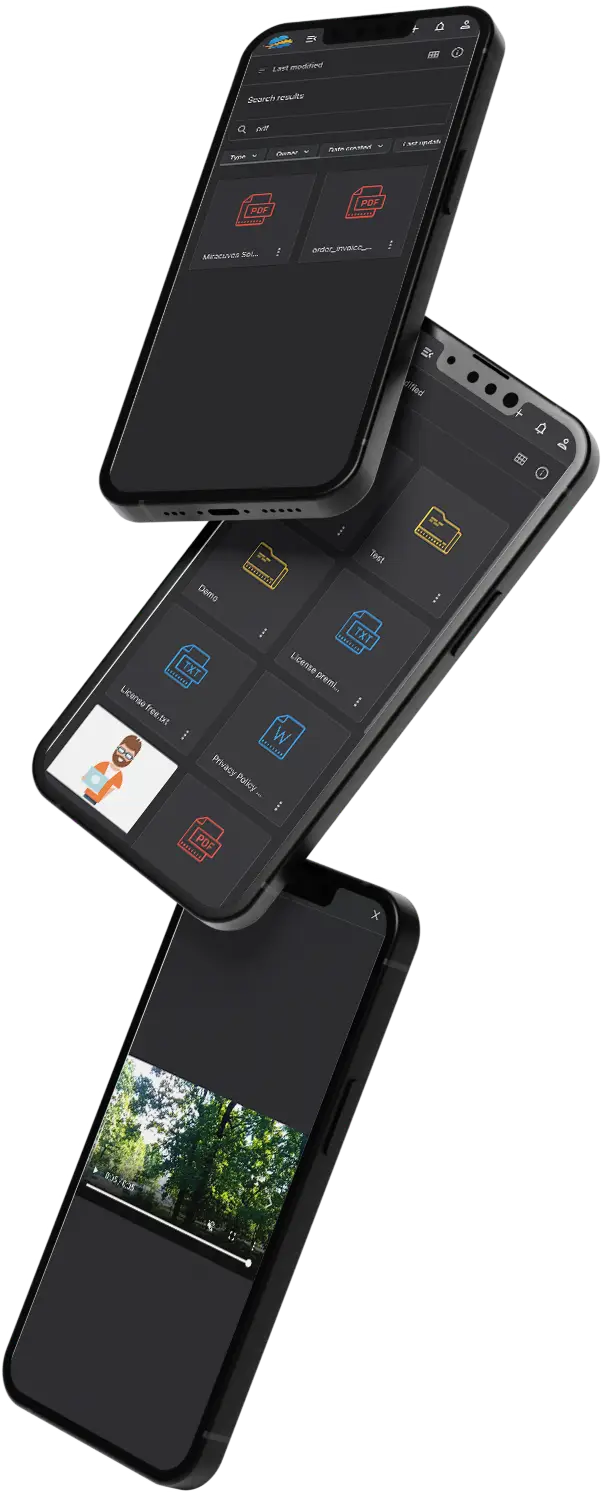
02Cloud storage for holding, organizing and sharing files from one account, under a name that many buyers type into search.
Explore Solution
03The same underlying platform, positioned for open public sending with free and premium packages and a public upload page.
Explore Solution
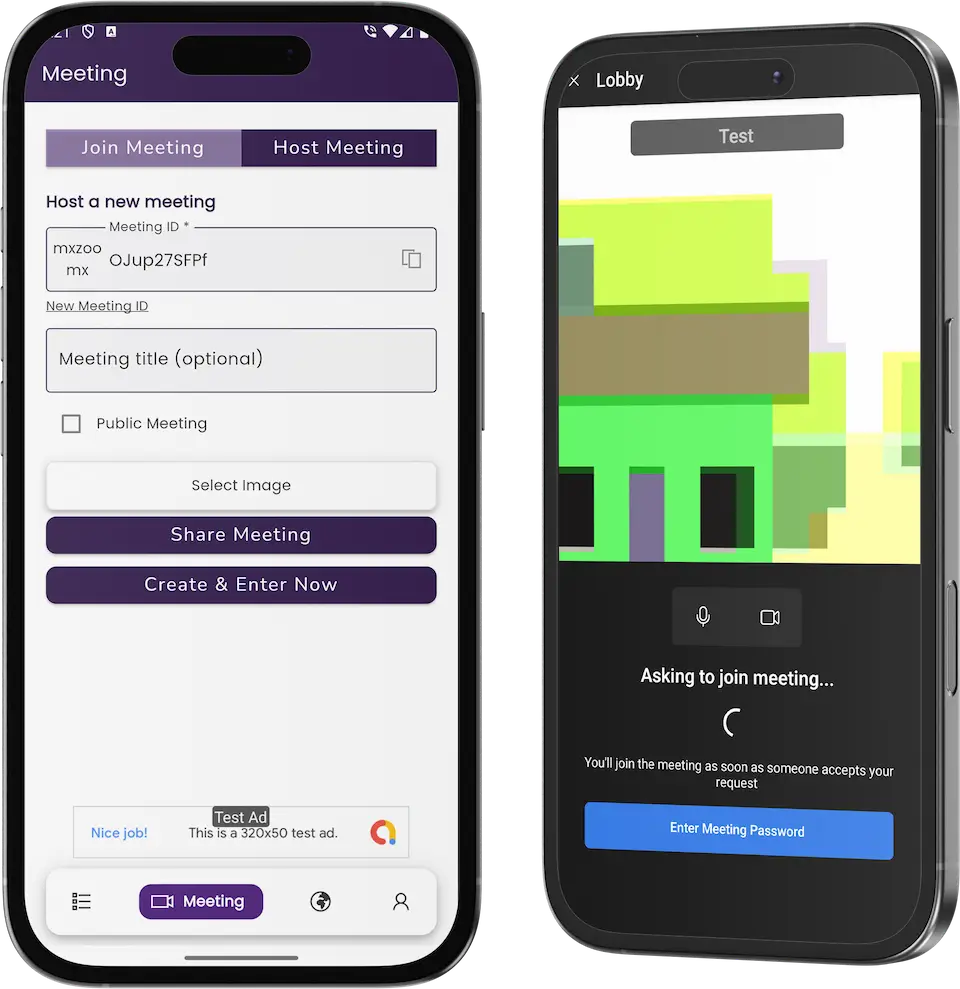
04A video meeting product where hosts open rooms and guests are let in from a waiting lobby, with phone apps for both sides.
Explore Solution09The business case
Market Benchmarks
Cloud Storage and File Transfer Market Benchmarks - Independent 2025-2026 Data
The revenue models above are ours. The figures below are not. They come from the Dropbox and Box annual reports on Form 10-K, Eurostat, and the published price lists of Dropbox and Apple, reproduced as published. They show what paid storage earns per user, how sticky business accounts are, and what buyers are charged for a terabyte.
$138.91 Annual Revenue per Paying User at Dropbox
Dropbox's annual report on Form 10-K reports 2025 revenue of $2,521.0 million, down 1.1 percent, and 18.08 million paying users at year end, against 18.22 million a year earlier. Average revenue per paying user was $138.91, down from $140.23, which Dropbox attributes partly to an increased mix of sales toward lower priced plans.
104% Net Retention Rate at Box in Fiscal 2026
Box's annual report on Form 10-K for the year ended 31 January 2026 reports revenue of $1.18 billion, up 8 percent from $1.09 billion, at a gross margin of 79.2 percent. Box had over 100,000 paying organizations, and its net retention rate was approximately 104 percent, against 102 percent a year earlier.
71.53% of Cloud-Buying EU Firms Pay for Storage
Eurostat reports that 52.74 percent of EU enterprises used paid cloud computing services in 2025, up 7.42 percentage points from 2023. Among enterprises buying cloud services, 71.53 percent used them for storing files, behind e-mail at 85.15 percent and office software at 71.69 percent.
$9.99 a Month for 2 TB at Dropbox and iCloud+
Dropbox lists its Plus plan at $9.99 a month for one person with 2 TB of storage and transfers up to 50 GB, and team plans at $15 and $24 per user per month. Apple lists iCloud+ in the United States at $0.99 for 50 GB, $2.99 for 200 GB and $9.99 for 2 TB a month.
Dropbox, Inc., Annual Report on Form 10-K for the year ended 31 December 2025, signed 20 February 2026 - sec.gov
Box, Inc., Annual Report on Form 10-K for the year ended 31 January 2026, signed 9 March 2026 - sec.gov
Eurostat, Cloud computing - statistics on the use by enterprises, data extracted January 2026 - ec.europa.eu
Dropbox, Plans and pricing, accessed October 2026 - dropbox.com
Apple, iCloud+ plans and pricing, support.apple.com, accessed October 2026 - support.apple.com
All figures are the publishers’ own filings, statistics and published prices, reproduced as published. They describe the market and two listed operators, not the performance of any platform Miracuves builds, and nothing here is a revenue projection for your business.
The Commercial Case
Marketability, Revenue Potential & Business Prospects
Income arrives when professionals trust a service enough to pass client files through it and value it enough to pay. This section is about making both decisions easier, and about holding on to the relationship afterwards.
- 01
Recurring Revenue From Plans
Plans renew monthly, so income climbs with the count of paying senders and firms instead of your own headcount.
- 02
Several Lines, One Admin Panel
One console manages packages and limits, so you can launch with the free package plus one paid plan and add lines afterwards.
- 03
Accounts and History You Own
Your database holds the accounts, the delivery history and the subscription records, so the value they build accrues to you.
- 04
A Way Out That Is Yours
With the whole source code in your hands, switching host, team or direction later takes nobody's permission.
- Paid Delivery Plans
- Firm and Team Seats
- Bigger Transfers
- Renewing Firm Accounts
- Pay-Per-Delivery
- Client-Branded Pages
Not through features alone; through habit and trust.
- 01A record of past sends gives senders a reason to come back
- 02A running subscription keeps firm accounts active
- 03Every client meets your name on the download page
- 04Careful abuse handling and a clear retention policy are the second protection
Only the number of paying accounts separates the three cases, and each also notes which line leads at that scale. Take them as planning illustrations, not forecasts of what a service will earn.
Fees from a small circle of regular senders cover running costs.
A compact service in which a few dozen studios and freelancers pay for a plan while the free allowance draws in new ones. A sizing example only.
Plans lead; firm seats are a separate decision.
A regional service where plans bring in the income and a language switcher with local pages helps it reach its market. A sizing example only.
Several markets, with plans and firm seats both running.
A service across many markets and languages, where plans, firm seats and size upgrades accumulate and the admin counters point to where effort belongs. A sizing example only.
10Why Miracuves
Why Miracuves
How Miracuves Compares With Other TransferNow Clone Builders
A secure delivery service can start from an off-the-shelf upload form, an independent developer, a development agency or the ready-made TransferNow clone base that Miracuves has written and refined over releases.
Why Founders Choose Miracuves
- 01
Delivery Controls Already Wired
The card has a password field and a self-destruct switch, the history table shows wipe dates and the admin settings cap recipients. Stock upload scripts often stop at the send itself.
- 02
Both Email and Link Delivery
A transfer can reach named recipients by email or travel as a download link, sparing you from settling on one style for clients.
- 03
Site, Apps and Console in One
The website, the phone apps and the admin panel come as a single codebase rather than three projects you must stitch together.
- 04
Full Source Code Ownership
The code arrives unencrypted in full, which leaves nobody able to reprice it or alter the terms later.
- 05
Settings Shaped by Real Operators
The release notes show operator settings added over time: a recipient ceiling, an email blocklist and a cap on concurrent uploads.
- 06
Base and Extras Kept Apart
On this page what ships, what is sold as an add-on and what you supply (hosting, store developer accounts, a payment account) are listed separately.
How to Choose a TransferNow Clone Development Company
Judge a TransferNow clone development company by whether it lets you lock, send and expire a real transfer before you pay.
What to look for Miracuves
- Controls you can test Password, self-destruct and wipe dates work in the demo
- Operator limits Recipient ceiling, email blocklist and concurrent-upload cap in Upload settings
- Full code in your hands Web and Flutter app source, unencrypted, with no seat fees
- A firm launch date Six working days; if Miracuves runs late, work continues free
- Support from day one Guidance for 60 days, priority fixes for 6 months, updates for 12 months
Walk away from any vendor who
- Cannot demonstrate a password-protected send live
- Gives operators no way to cap recipients
- Keeps part of the code encrypted or rented
- Blurs base features with paid extras
- Promises security certifications the platform does not hold
Weighing the TransferNow Clone Against the Alternatives
| Point of Comparison | MiracuvesMiracuves TransferNow Clone | Stock Upload Script | Custom Agency Build |
|---|---|---|---|
| Time Until Launch | Six days of building | Unpredictable, do it yourself | Fixed per project, often months |
| Source-Code Ownership | Complete, unencrypted | Often limited or locked | Usually yes |
| Delivery Controls | Password, self-destruct, recipient ceiling, email blocklist | Basic upload form | Whatever the budget stretches to |
| Free and Paid Plans | A free allowance, the Go premium page and a subscription view | Rarely present | Built to order |
| Admin & Reports | Counters, uploads, downloads, users, settings | Thin or missing | Built to order, billed extra |
| Payments | PayPal details on the account screen | Depends on the script | Custom integration |
| Security & Compliance | Password, self-destruct, plain statement of limits | Minimal | Varies a great deal |
| Cost vs Speed vs Quality | Fixed price, quick, proven base | Cheap but risky | Costly and slow |
| Ongoing Support & Updates | 60 days guidance, 6 months bug fixes, 12 months updates | Seldom offered | Whatever the contract says |
Feature lists make the routes look alike; daily use shows where they differ.
Talk to Our TeamChangelog
Version History of the Secure Transfer Platform - Releases & What Changed
Web platform changes listed from the latest release down, without dates attached.
| Version | Changes | Details |
|---|---|---|
| V2.6.5 | 3 improvements, 2 repairs | New or improved A switch to turn off individual email templates An admin home page that loads faster once the uploads or downloads table is long Minor gains in download steadiness Repaired The Upload button freezing when nobody had been preselected as a recipient A missing progress indicator during downloads on newer Apache releases |
| V2.6.4 | 4 improvements, 3 repairs | New or improved A recipient ceiling under Settings, Upload settings An email blocklist in the same spot A new email placeholder listing the uploaded files with commas Better download speed and steadiness Repaired Redirect URLs that could be altered Info and error messages absent from the iframe version MySQL connection trouble on some servers |
| V2.6.3 | 4 improvements | New or improved Social sharing tags so that shared links show richer details (existing site data is reused, so pages look unchanged) A different library behind the page editor Minor wording edits in the admin panel Extra checks on the upload settings |
| V2.6.2 | 2 repairs | Repaired Downloads arriving corrupted on some servers The system page crashing where the disk_free_space function could not be used |
| V2.6.1 | 1 improvement, 2 repairs | New or improved A minor gain in download steadiness on some server setups Repaired Files with equal names overwriting one another inside a ZIP Thumbnails for large image uploads (Imagick must be installed) |
| V2.6.0 | 1 improvement | New or improved A setting that caps concurrent uploads, for finer tuning |
Let's build together
Let's convert your hand-over routine into a delivery service clients trust.
Reserve a free call and walk away with a launch timetable and candid answers on every point. Earning your trust counts for more to us than a fast sale.
- Replies arrive within 2 hours, Mon-Sat
- Free introductory call
- No lock-in contract
- Source code stays with you
11Learn more
From Our Blog
TransferNow Clone Reading Picks: Guides for Founders of Secure Delivery Services
Guides on what a ready-made script contains, how a delivery service earns and how the app works from the first upload to the last download.





The product6 questions
01What exactly is a TransferNow Clone?
Think of it as a finished service for delivering large files with a degree of control. Someone adds files, may lock the send with a password, may arm self-destruct, and chooses an email or a link; the recipient fetches everything from a download page. Miracuves supplies the site, the phone apps for Android and iOS and the admin console, all under your brand.
02Is it lawful to launch a secure file delivery service modeled on TransferNow?
Building and selling software that transfers files is generally lawful. Ours is written from common patterns and borrows no code, artwork or text from TransferNow, and it launches under your own brand, terms and house rules. Keep the TransferNow name and logo out of your branding, and ask local counsel to review privacy, copyright and consumer rules for each market. Miracuves cannot give legal advice.
03Can I restyle the TransferNow Clone with my own brand?
Yes, branding is part of delivery: your logo, icons and color scheme replace ours across the web platform and the apps before we deploy. The source code also arrives unencrypted, so your developers or ours can reshape screens, rules and features afterwards. Work beyond the base is quoted in writing before it begins.
04Which technologies power the TransferNow Clone?
A MySQL database sits under a PHP and Bootstrap website and console, and the apps for Android and iOS are built in Flutter. The product stack also lists Google Maps, Twilio, Firebase, payment APIs and translation, and each of them needs an account and keys of your own when you deploy.
05Do the apps run on both iOS and Android?
They do, because Flutter serves both platforms and the screens mirror the website: upload, success, download and account. We help list the apps from developer accounts that belong to you, although Apple and Google review them on their own timetable, outside our 6-day build.
06Will it hold up for enterprise-sized use?
No throughput number is published for this product, so we avoid promising user counts. What is visible: limits you set, storage figures on the admin home and a run of download-stability fixes in the release notes. Real capacity follows your hosting and storage, and enterprise needs beyond the base are scoped on their own.
Sending & security8 questions
07How does a sender upload and deliver files?
Files or whole folders are added first, then the sender types a recipient, a return address and an optional note. A password and the self-destruct switch are optional extras. After picking email or link delivery, one tap on Upload does the work, and a success screen shows the link beside a Copy URL button while the recipient is taken to a download page.
08Can a transfer be protected with a password?
Yes. The upload card includes a password field for the upload, completed before sending and chosen afresh for each transfer. How the recipient learns the password is up to the sender, and passing it through a different channel from the delivery itself is the sensible habit.
09Can a transfer expire on its own?
It can. A Yes / No switch on the card arms self-destruct, and each row of the sender's history shows a Destruct at value, either a date or Never. The admin home also tallies destroyed uploads. Wider retention rules, such as default lifetimes for every account, belong to your policy, and extra work on them is scoped separately.
10Which file size limit applies?
The demo card reads Up to 2GB free, and the Go premium page repeats that figure for the free package. Other ceilings, namely recipients per transfer and concurrent uploads, are admin settings. You decide the ceiling of each larger package when you define your packages.
11Does a sender need an account before sending?
The card on the web page works as it stands, while accounts add the history, backgrounds and subscription view. Whether an account must come first is a configuration matter that we settle with you during a guided call.
12How safe are the files on the platform?
Each upload can carry a password and a self-destruct switch with a wipe date in the history, and the console sits behind a sign-in of its own. Encrypting stored files, serving over TLS on your own domain, backup routines and a penetration test are set up together on the launch checklist.
13Is the sender told when the recipient downloads the file?
The admin home totals downloads and the admin menu has a Downloads section, and an alert telling the sender that an individual transfer was fetched is available as a custom requirement, scoped and priced in writing.
14Can I cap how many times a file may be downloaded?
The admin settings offer a ceiling on recipients per transfer, an email blocklist and a cap on concurrent uploads. A per-file download limit can be built on request, with its scope and price set in writing.
Admin, plans & money8 questions
15What can an operator control from the admin panel?
The menu has ten entries, starting at Home and Uploads and finishing at Settings and Premium settings, with Downloads, Backgrounds, Users, Pages, Themes and System in between. Within Settings, the Upload settings page holds the recipient ceiling, the email blocklist and the concurrency cap, and individual email templates can be turned off.
16Can I sell premium plans on top of it?
You can. The demo already shows a Go premium page that opens on a Free package, a Premium settings section in the console and an account view with a payment type, a PayPal ID, a renewal date and a cancel option. Single fees per delivery and team seats are further options, though they take work beyond the base, scoped and quoted in writing.
17Can the free tier be funded by advertising?
Advertising is an operator choice added as custom work: where ads sit, which network serves them and how consent is handled in your markets. We scope it separately, in writing, if you want it.
18How do I set retention and storage rules?
The admin home displays storage in use and the volumes sent each way, senders can arm self-destruct, and the upload settings carry the caps. The wording of the retention policy itself, covering how long files stay and when they go, is for you to define before launch.
19What usage reporting does the admin panel give?
The admin home is a set of counters: total and active uploads, total downloads, destroyed uploads, the volumes uploaded and downloaded, and storage in use. Anything beyond the counters, such as revenue reports or charts, is built as scoped custom work.
20Can files live in AWS or Google Cloud storage instead of my server?
Files sit on the server you deploy to. Pointing the service at external object storage is available as custom work, scoped for your build. That differs from the Integrated Cloud Storage add-on, which merely lets a sender choose files kept in Google Drive, Dropbox or OneDrive.
21What is the realistic path to first revenue?
A paid plan for repeat senders is where most delivery services begin. The free allowance produces the moment of need: once a send outgrows it, the Go premium page and its Increase Limit link are a click away. Team seats, single charges per hand-over and sender alerts are further commercial choices that rest on shared workspaces, a payment flow or custom features, so they get scoped and agreed rather than assumed.
22How defensible is a secure file delivery service?
Not through features alone; through habit and trust. A professional with past sends on record and a subscription running has a reason to return, and every client who receives a delivery meets your name on the download page. The platform begins building that record at launch, in a database you own. Sound handling of abuse and a clear retention policy add a second layer of protection, since a service that people trust is difficult to imitate.
Launch & Miracuves9 questions
23What support comes after launch?
Three support periods begin together on launch day: 60 days of platform guidance, 6 months of priority bug fixes and 12 months of product updates. A first reply comes within 2 hours, Monday to Saturday, 10:00-19:00 IST.
24How long until the service goes live?
Ready-made delivery means 6 days of Miracuves build time, which covers rebranding, deployment onto your hosting and help with publishing the apps. Store review and payment onboarding rest with Apple, Google and your payment provider, so they sit outside that window. Custom changes are scoped apart.
25Is the source code mine?
It is. The complete source for the web platform and the Flutter apps is handed to you with no encryption, and no seat fee or runtime license applies afterwards.
26What do you need from my side before going live?
Hosting and a domain, a verified developer account for publishing the apps, your branding and business details, an account with a payment provider for subscriptions (the demo's account page shows a PayPal ID) and any third-party keys, such as Google Maps, Twilio or Firebase. Miracuves does not open payment accounts for you or draft your privacy policy and terms.
27What speaks for Miracuves as the team behind a TransferNow clone?
The upload flow, the delivery controls and the console all arrive in working order, and each can be tried in the demo before you buy. Miracuves has had 9,000+ projects delivered to 6,000+ clients and has built 90+ ready-made solutions. You pay one fixed $2,499 for the TransferNow Clone, which goes live in 6 working days and is backed by 60 days of guidance, 6 months of priority bug fixes and 12 months of product updates, with a first reply inside 2 hours, Monday to Saturday, 10:00-19:00 IST.
28How much does a TransferNow clone cost?
A TransferNow clone from Miracuves is $2,499, charged once. The price covers the web sending page, the phone app for Android and iOS, the admin console with upload limits, recipient caps and premium settings, and the full source code without encryption, branded and deployed on your hosting. Optional modules for file handling, cloud import, previews or teams, and any bespoke control, are quoted in writing up front.
29Is a ready-made TransferNow clone better than custom development?
Usually it is the faster way into secure file delivery. Password-protected sends, self-destruct dates, recipient limits, download pages and premium packages already work, so you can rehearse a protected transfer in the demo and go live after 6 working days. A custom build has to pay for those controls first. Anything extra your clients ask for is priced on paper and typically built within 2-8 weeks.
30What is the step-by-step process to launch my TransferNow clone?
Try a password-protected, self-destructing send in the demo and look over the admin limits. Collect your server, domain, store accounts, payment provider and integration keys, plus logo and business details. Miracuves applies your branding to the sending page, phone app and console, installs them on your hosting and assists with app publishing, which completes in 6 working days. App review and payment onboarding then run on the providers timelines.
31Can senders share a TransferNow clone transfer by link instead of email?
Yes. After adding files or folders, the sender chooses email delivery or link delivery for the transfer. With a link, the success screen displays it beside a Copy URL button, so it can be pasted into any message. The recipient opens a download page either way, and the optional password and self-destruct switch still apply.
Go Deeper on Secure File Delivery Services
The guides, the related platforms and the services around it, so you can see where the product sits.
SaaS development
Explore the service→GuideFeatures and pricing
What a ready-made file sharing script contains and what it costs, in one read.
Read it→Business model
How a secure file transfer business is organized and where its income originates.
Read it→Related platformDropbox Clone
A storage service shaped around shared workspaces and quotas, for files that should stay where they are.
Explore the platform→Disclaimer
Miracuves is an independent software development company. We are not affiliated with, connected to, sponsored by, or endorsed by TransferNow.
Read our full Legal Notice & Disclaimer →“TransferNow Clone” is used descriptively. It is how the software industry refers to building a platform with functionality similar to TransferNow, and how clients search for it.
The entire design and codebase is built by our own team. The product contains no code, design, graphics, or content originating from the TransferNow website or applications.
TransferNow and all other third-party names and marks are the property of their respective owners, referenced here solely to describe the category of software offered.