Key Takeaways
- AI-built MVPs can hit API rate limits when frontend logic repeatedly triggers the same external request.
- Infinite loops can increase OpenAI, Google Maps, payment, or cloud API usage before founders notice the problem.
- Server-side throttling, request validation, caching, queues, and usage alerts are core protection layers.
- Cost risk depends on API pricing, user traffic, retry logic, frontend state handling, and backend controls.
- A controlled API architecture helps protect founder margins, app stability, and launch confidence.
Architecture Signals
- Founders need visibility into API usage, failed requests, duplicate calls, cost spikes, and unusual traffic patterns.
- Users need fast responses, stable features, protected sessions, and reliable AI-powered workflows.
- Admins need control over rate limits, API quotas, user roles, billing alerts, logs, and emergency shutoff rules.
- Backend systems should proxy external API calls instead of letting frontend clients trigger expensive requests directly.
- Real-time alerts help detect infinite loops, repeated retries, quota exhaustion, failed responses, and unexpected API bills.
Real Insights
- A small frontend bug can become a real business cost when every loop calls a paid external API.
- Weak useEffect logic, uncontrolled retries, and direct browser-side API calls can quickly exhaust rate limits.
- Caching, debounce logic, idempotency, request queues, and server-side throttles help reduce duplicate API usage.
- Founders should test API behaviour under refreshes, retries, failed responses, and multiple active users before launch.
- Miracuves builds AI MVPs with backend API control, rate limiting, usage monitoring, caching, and admin-managed cost protection.
AI-built MVPs have changed how fast founders can move. A landing page, dashboard, search interface, booking flow, or AI assistant can now be generated in hours instead of weeks. That speed feels powerful during the demo stage.
Then real users arrive.
The app freezes. OpenAI responses fail. Google Maps stops loading. Search results keep spinning. The founder checks the API dashboard and sees thousands of requests they never expected. In some cases, the issue is not user demand. It is bad state management.
The most expensive bug in an AI-built MVP is often not a broken button. It is an invisible loop that keeps calling a paid external API again and again.
React documentation openly explains that an Effect can keep re-running in an infinite cycle when an Effect updates state, that state causes a re-render, and the dependencies change again. If that Effect is connected to a network request, the result can be a request storm instead of a clean user action.
For founders using OpenAI, Google Maps, payment gateways, logistics APIs, search APIs, or geocoding services, this is not just a frontend bug. It is a margin leak that needs cloud services and backend controls before real users expose the weakness.
The Cost of Bad State Management: Triggering API IP Bans
Most founders first notice the problem as a user experience issue.
The app loads slowly. The AI response hangs. The map flickers. The button is clicked once but the backend logs show dozens of requests. The problem often starts inside a frontend component that looks harmless.
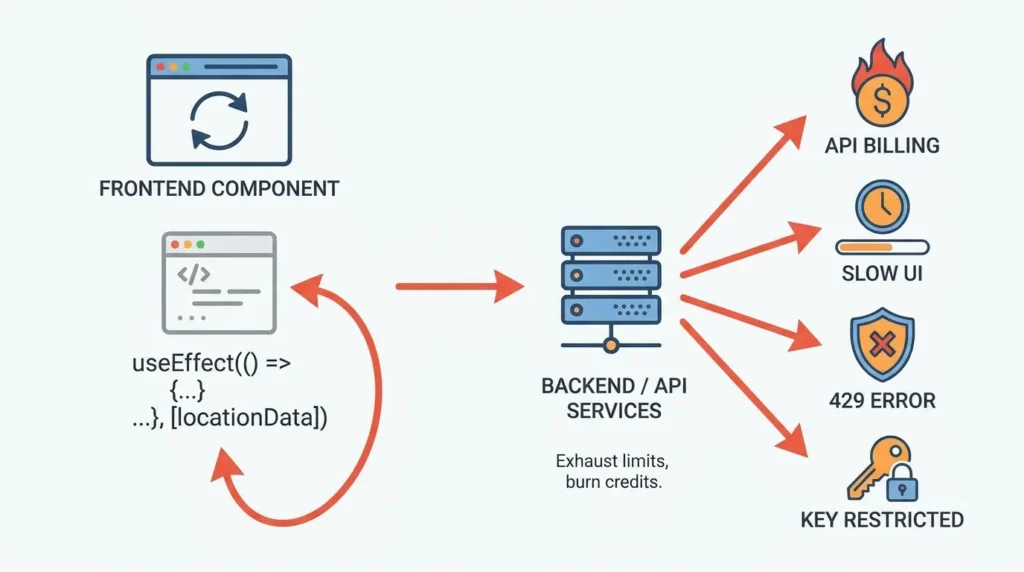
A typical pattern looks like this:
useEffect(() => {
  fetchLocationData(searchQuery).then((result) => {
    setLocationData(result);
  });
}, [locationData]);
The bug is subtle. The Effect fetches data, updates locationData, then locationData changes, which triggers the Effect again. If the API call is connected to Google Maps, OpenAI, search, weather, booking availability, or payments, the browser is now repeatedly calling a paid service.
React’s documentation warns that if an Effect updates state and that state leads to a re-render that changes dependencies, the Effect can continue in an infinite cycle. It also notes that missing dependency arrays cause Effects to re-run after every commit.
For a small demo, this may look like a temporary glitch. In production, it becomes a billing and reliability problem.
A single frontend loop can:
- Exhaust request-per-minute limits
- Consume token-per-minute limits
- Trigger HTTP 429 errors
- Create repeated retries that make the problem worse
- Delay UI rendering
- Burn paid API credits
- Get an IP, API key, or project temporarily restricted
- Hide real user behavior behind fake machine-generated traffic
OpenAI explains that rate limits are applied across metrics such as requests per minute, requests per day, tokens per minute, tokens per day, and other model-specific limits. It also warns that continuously resending unsuccessful requests will not work because unsuccessful requests still contribute to per-minute limits.
This is why frontend-generated API chaos is dangerous. The app does not simply fail. It fails while consuming paid quota.
Read More: Stripe Payments Not Reconciling? Fix the Webhook Desync Breaking Your AI App Revenue
Data Breakdown: Tracing the useEffect Loop Drain
Founders need a simple way to understand the economics of a bad API loop.
Here is a practical model.
| Variable | Meaning | Example |
|---|---|---|
| Loop interval | How often the bad component fires | Every 300 ms |
| Requests per second | Approximate API calls per browser tab | 3.3 calls/sec |
| Active affected users | Users with the looping screen open | 10 users |
| Session length | Time the page remains open | 20 minutes |
| Total requests | 3.3 × 10 × 60 × 20 | 39,600 requests |
That is almost 40,000 requests from only 10 users in 20 minutes.
Now imagine the request is not a free internal call. It is:
- An OpenAI completion request
- A Google Maps geocoding request
- A route optimization request
- A place autocomplete request
- A payment verification call
- A third-party search API call
- A cloud function that triggers downstream services
Google Maps documents that Geocoding API usage is pay-as-you-go, billed per request, and subject to quota restrictions. It also notes that quota limits define the maximum number of requests allowed within a timeframe, and when the quota is reached, the service stops responding to requests.
For OpenAI-based products, the risk is slightly different. The founder may not only be paying per request. They may also be consuming token budgets, project limits, and usage limits. OpenAI’s rate limit documentation explains that limits can be hit by requests or tokens, depending on what is exhausted first.
A bad loop turns usage-based pricing against the founder.
Read More: What 70%+ of AI-Built Apps Get Wrong About Security — And Why Users Can See Each Other’s Data
Why AI-Generated Frontends Commonly Create API Loops
AI-generated frontend code often optimizes for visible output. It tries to make the UI work quickly: fetch data, store it in state, render it, update the screen.
That is useful for prototyping, but dangerous for production.
The issue is not that AI-generated code is always bad. The issue is that generated code often lacks the operational context a production engineer would apply automatically:
- Which API calls should run only after a confirmed user action?
- Which calls should be debounced?
- Which calls should be cached?
- Which calls should be server-side only?
- Which calls need idempotency?
- Which calls need retry limits?
- Which calls should be blocked by user-level quotas?
- Which calls should never expose an API key in the browser?
- Which calls should be queued instead of triggered instantly?
A generated app may work perfectly with one tester. It may collapse when 50 users open the same page.
That is the difference between a demo and a product foundation.
Read More: How an AI-Built MVP Leaked PII and Why the White-Label Rescue Worked
The Real Problem Is Client-Side API Control
Founders often assume API rate limits are a third-party platform issue.
They are not.
Rate limits are a signal that your app architecture needs control. The problem is not only that OpenAI, Google Maps, or another provider has limits. The problem is that your app is allowing uncontrolled clients to spend your quota.
When every browser tab can directly trigger paid external services, the founder loses control over cost, throughput, and abuse prevention.
A safer architecture moves external API calls behind the backend.
Instead of:
Browser → OpenAI / Google Maps / Third-Party APIA production-ready flow should look more like:
Browser → Your Backend → Throttle → Cache → Queue → External APIThat backend layer becomes the financial control point.
It decides:
- Who can call the API
- How often they can call it
- Whether the response is already cached
- Whether the request is duplicate
- Whether the user has reached a usage cap
- Whether the request should be delayed
- Whether retries should stop
- Whether an admin should be alerted
This is where the cost protection actually happens.
Read More: The Authentication Loop: Analyzing Session Failures in AI-Generated MVPs
Enterprise API Throttling: How White-Label Engines Protect Margins
A professional app architecture does not trust the frontend to protect the business.
It uses server-side throttling and operational controls.
For API-heavy products, a white-label or clone architecture should include:
| Control Layer | What It Does | Founder Impact |
| Server-side throttling | Limits requests by user, role, IP, project, or workflow | Prevents one bad component from draining quota |
| Request deduplication | Blocks repeated identical calls within a short time window | Reduces duplicate spend |
| Caching | Reuses previous responses for stable data | Improves speed and lowers external API usage |
| Queueing | Delays non-urgent calls instead of firing all at once | Protects app stability during spikes |
| Retry limits | Stops repeated failed calls after a safe threshold | Prevents retry storms |
| Exponential backoff | Adds increasing delay between retries | Reduces rate-limit pressure |
| Usage caps | Sets daily, weekly, or monthly limits by user or account | Protects margins and supports monetization |
| Admin dashboard | Shows API usage, failed calls, and abnormal patterns | Gives founders operational visibility |
OpenAI recommends exponential backoff with random jitter for rate-limit handling and warns that continuously resending requests contributes to limits. Google Maps also recommends exponential backoff and warns against repeated looped requests and synchronized traffic spikes.
This is the layer many AI-built MVPs skip.
Miracuves helps founders avoid that gap by building ready-made and white-label app foundations with source-code ownership, branded design, admin control, and scalable backend workflows. For API-heavy products, that backend layer is where throttling, caching, role-based access, secure integration handling, and operational monitoring should live.
Speed
If your AI-built MVP launches quickly but external APIs are called directly from the browser, speed becomes fragile. Move fast, but do not skip the control layer.
Cost
Usage-based APIs can turn frontend bugs into real expenses. A backend throttle protects your gross margin before traffic scales.
Scalability
Scaling is not only about servers. It is about managing third-party dependencies, request timing, retries, queues, and quota pressure.
Market Fit
Do not confuse API crashes with weak demand. Sometimes the product idea is valid, but the implementation cannot survive real usage.
What Founders Should Audit Before Launch
Before you push an AI-generated MVP into real usage, audit every external API call.
Ask these questions:
- Is the API call triggered by a deliberate user action or by component rendering?
- Is the call inside
useEffect? - Does the Effect update state that appears in its own dependency array?
- Is there a debounce for search, maps, autocomplete, or AI prompt input?
- Is the API key exposed in frontend code?
- Is there a backend usage cap per user?
- Are failed requests retried with exponential backoff?
- Is there a maximum retry count?
- Are identical requests cached?
- Can the admin dashboard detect abnormal request spikes?
- Can the system disable a feature temporarily without taking down the whole app?
- Are external API costs connected to pricing plans or monetization rules?
If the answer to most of these is “no,” the MVP is not production-ready.
Read More: AI MVP Security Audit: The 14-Point Checklist for Founder Survival
The Bad Pattern: Frontend as the Billing Engine
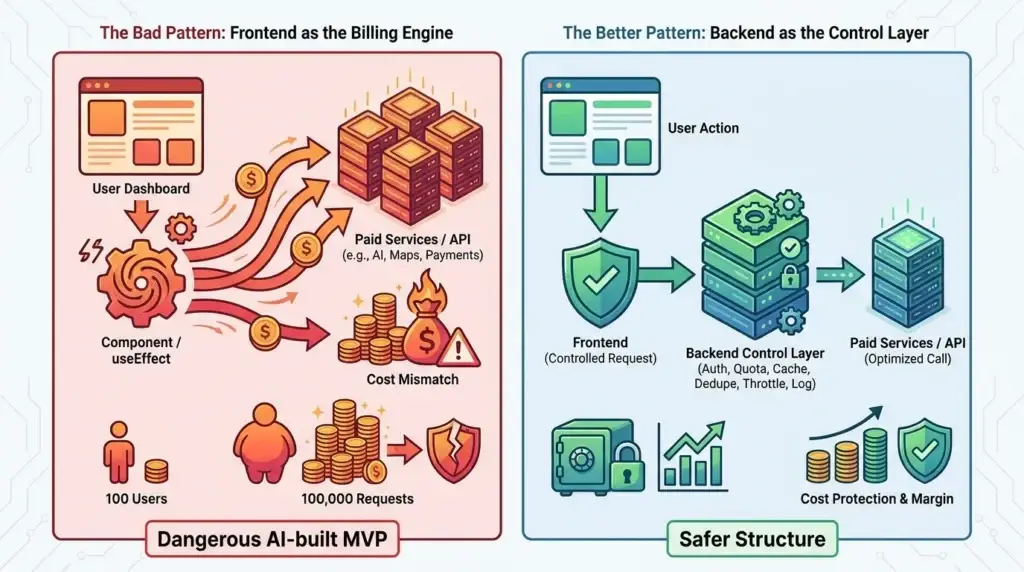
The most dangerous AI-built MVP pattern is when the browser becomes the billing engine.
This happens when a generated frontend directly calls paid services:
User opens dashboard
↓
Component renders
↓
useEffect runs
↓
External API is called
↓
State updates
↓
Component re-renders
↓
useEffect runs again
↓
External API is called again
Now multiply that by tabs, users, retries, and poor network conditions.
A founder may think the product has 100 users. The API provider may see 100,000 requests.
This is why backend architecture matters even for early products.
The Better Pattern: Backend as the Control Layer
A safer structure looks like this:
User action
↓
Frontend sends one controlled request
↓
Backend checks authentication
↓
Backend checks user quota
↓
Backend checks cache
↓
Backend deduplicates repeated requests
↓
Backend applies throttling
↓
Backend calls external API only when needed
↓
Backend logs usage
↓
Admin dashboard shows cost and failures
This is not overengineering. It is margin protection.
For AI apps, delivery apps, ride-hailing apps, fintech apps, marketplaces, creator platforms, and booking platforms, third-party services are part of the business model. Maps, AI models, payments, notifications, KYC, geocoding, routing, analytics, and search all create recurring operational cost.
A founder should not let unstable frontend state control those costs.
Where Miracuves Fits
Miracuves helps founders build ready-made, white-label, and source-code-owned app solutions where the product foundation is not limited to screens. A strong app foundation includes user flows, admin control, backend workflows, monetization logic, integration handling, and scalable architecture.
For founders relying on external APIs, Miracuves can help structure the backend so that OpenAI, Google Maps, payment gateways, logistics APIs, and other services are not exposed to uncontrolled browser behavior.
This matters especially for clone app development. A clone app is not valuable because it copies another product’s interface. It is valuable because it starts from a proven business pattern and adds the operational controls needed to launch faster without rebuilding every module from zero.
For API-heavy products, those controls include:
- Backend request throttling
- Secure API key handling
- User-level usage limits
- Admin-visible usage reports
- Retry and backoff logic
- Cache-aware responses
- Request queues
- Abuse monitoring
- Role-based access control
- Integration failover planning
If you are building an AI assistant, delivery marketplace, maps-heavy app, fintech workflow, creator platform, or booking app, this infrastructure layer protects more than uptime. It protects your margins.
Mistakes Founders Should Avoid
Letting the Frontend Call Paid APIs Directly
This exposes cost control to browser behavior, user refreshes, duplicate tabs, bad state management, and potential abuse.
Trusting AI-Generated useEffect Logic Without Review
A generated component can look correct while silently triggering repeated calls after every render or dependency change.
Adding Retries Without a Stop Condition
Retry logic without maximum attempts, exponential backoff, and jitter can make rate-limit errors worse instead of safer.
Ignoring Admin-Side API Visibility
If the founder cannot see request spikes, failed calls, and high-cost users, they cannot protect margins during growth.
API Rate Limits Are Not the Enemy. Uncontrolled Architecture Is.
Rate limits exist because API providers need to protect their infrastructure, prevent abuse, and allocate access fairly. OpenAI states that rate limits help prevent misuse, ensure fair access, and manage aggregate infrastructure load.
Founders should treat rate limits as design constraints, not surprises.
A product that depends on external APIs needs architecture that understands:
- Request volume
- User behavior
- Retry timing
- Duplicate calls
- Token consumption
- Quota ceilings
- Daily usage caps
- Monetization plans
- Abuse scenarios
- Failure recovery
The goal is not to avoid APIs. APIs are essential for modern app development. The goal is to stop uncontrolled frontend code from spending money without business logic.
Final Thoughts: Build Fast, But Do Not Let the Frontend Spend Your Budget
AI-generated MVPs are useful for speed. They help founders visualize ideas, test flows, and shorten the path from concept to first product version.
But speed without infrastructure control creates a new risk.
A founder can now launch a product before the product is ready to control cost.
The infinite API loop is a perfect example. It is small enough to hide inside a single component, but powerful enough to freeze the app, exhaust quota, trigger rate-limit errors, and damage user trust.
The better path is not to slow down. It is to launch with a stronger foundation.
Miracuves helps founders move faster with ready-made and white-label app architectures that support admin control, source-code ownership, scalable backend workflows, and safer third-party integrations. For API-heavy products, that means building cost control into the system before usage spikes expose the weakness.
FAQs
Why do AI-built MVPs hit API rate limits so quickly?
AI-built MVPs often place API calls directly inside frontend components. If state management is unstable, a component can re-render repeatedly and call the same API again and again. This can exhaust request-per-minute or token-per-minute limits much faster than real user demand would.
What is an infinite API loop?
An infinite API loop happens when an app repeatedly sends requests to an external API because a state change, render cycle, retry function, or dependency update keeps triggering the same call.
Can a bad useEffect loop increase OpenAI API costs?
Yes. If a React useEffect repeatedly calls an OpenAI endpoint, each request may consume request limits and token limits. OpenAI also warns that unsuccessful repeated requests still count toward per-minute limits.
Can Google Maps block or restrict an app because of repeated requests?
Google Maps documentation warns that poorly designed clients can place unnecessary load on Google’s servers and that repeated looped requests should be avoided. It also warns that large synchronized request spikes can look like abusive traffic.
How can founders prevent API billing spikes?
Move external API calls behind the backend, add server-side throttling, cache repeated responses, deduplicate identical requests, use retry limits, apply exponential backoff, and monitor usage through an admin dashboard.
Should AI-generated code be used for production apps?
AI-generated code can speed up prototyping, but it should be reviewed before production. Founders should especially audit API calls, authentication, key exposure, state management, retries, and backend controls.
How does Miracuves help with API-heavy apps?
Miracuves helps founders build ready-made, white-label, and source-code-owned app foundations with backend workflows, admin control, secure integration handling, scalable architecture, and faster deployment for API-heavy business models.
Miracuves is an independent software development company. We are not affiliated with, connected to, sponsored by, or endorsed by any company or product named in this article.
Terms such as “X Clone” are used descriptively. It is how the software industry refers to building a platform with functionality comparable to a known service, and how clients search for it.
The entire design and codebase of our products is built by our own team. Our products contain no code, design, graphics, or content originating from any third-party website or applications.
All third-party names and marks referenced in this article are the property of their respective owners, referenced solely to identify the services discussed.