Key Takeaways
- An AI MVP security audit helps founders find hidden risks before users, investors, or attackers do.
- Cursor, Lovable, and other AI-built apps can look polished while leaving backend logic exposed.
- API keys, database rules, authentication, payments, storage, and admin access need careful review.
- Security risk depends on backend architecture, environment setup, access control, and third-party integrations.
- A security-first MVP can reduce launch risk and protect user trust from day one.
Security Signals
- Founders need to check exposed API keys, hardcoded secrets, open databases, and weak environment variables.
- Users need protected login, secure sessions, safe payments, private data handling, and account-level access control.
- Admins need protected dashboards, role-based permissions, activity logs, backups, and moderation controls.
- Backend systems need secure APIs, validation rules, rate limits, encrypted data, and safe deployment settings.
- Real-time monitoring helps detect failed logins, suspicious requests, data leaks, payment abuse, and unusual app activity.
Real Insights
- An AI-generated MVP can prioritize frontend screens while missing serious backend protection.
- Weak authentication or open database rules can expose user profiles, payments, prompts, files, and admin records.
- Founders should test permissions, storage rules, API access, payment flows, and admin panels before public launch.
- Security checks, code reviews, penetration testing, and update planning help keep the MVP safer after launch.
- Miracuves builds AI MVPs with security-first architecture, protected APIs, database controls, authentication, and admin management.
AI tools have changed the way founders build. A non-technical founder can now use Cursor, Lovable, Replit, Bolt, or similar AI coding tools to create a working app interface, connect a database, add login, and publish a first version faster than ever.
That speed is powerful.
But speed can also create a dangerous illusion: the app looks complete because the frontend works. Users can click buttons. Forms submit. Dashboards load. Payments may even connect. But the real security question is not whether the UI works.
The real question is whether the backend is protected.
Recent AI-code security research shows why founders should be careful. One study evaluating LLM-generated web application code found vulnerabilities across authentication, session management, input validation, and HTTP security headers, with none of the tested models fully aligning with industry best practices. Another 2026 study on LLM API credential leakage in iOS apps found exploitable credential exposure patterns including JWT-based token leakage, unauthenticated backend proxy access, and plaintext API key transmission. For founders who have already validated demand with AI tools, this is exactly where Miracuves solutions can help shift the product from a fast prototype to a more controlled, white-label, source-code-owned app foundation.
For a founder, this means a working AI MVP is not automatically a secure business foundation.
This AI MVP security audit checklist is designed for founders who have already launched, or are close to launching, an AI-generated product and need to answer one uncomfortable question:
“Is my app safe enough for real users?”
The Illusion of AI Security: UI vs. Backend Reality
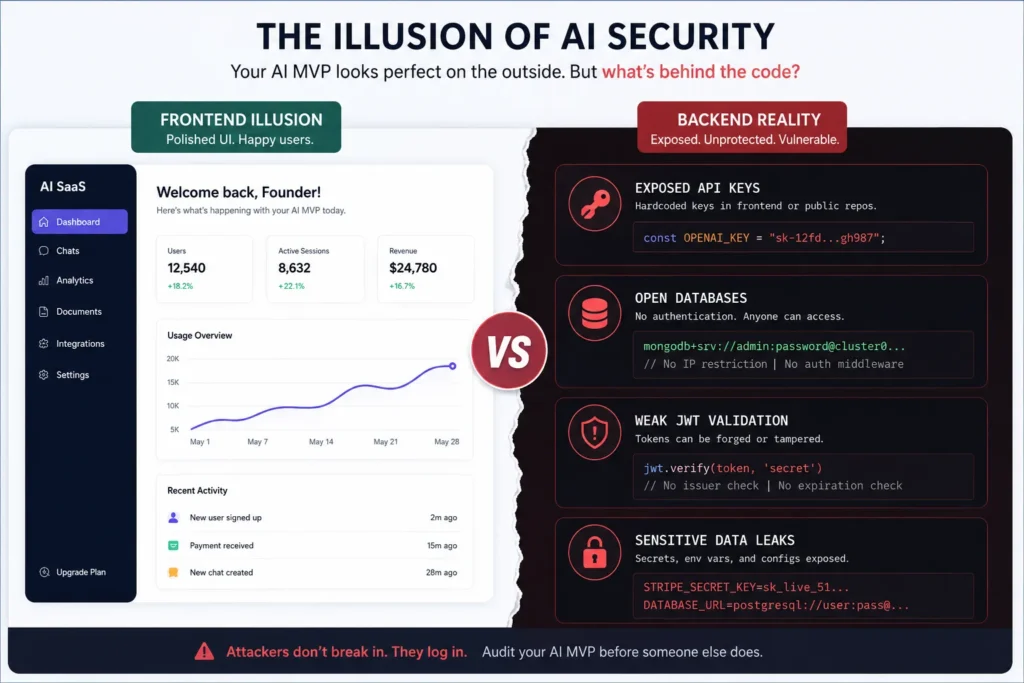
AI coding tools are excellent at producing visible progress.
They can generate landing pages, dashboards, login screens, forms, onboarding flows, payment screens, profile pages, and admin panels in hours. This creates the feeling that the product is almost complete.
But most security failures do not appear on the screen.
They sit behind the product:
- API keys accidentally pushed into frontend code
- Database tables readable by unauthenticated users
- Admin routes protected only by hidden buttons
- JWT tokens accepted without proper verification
- Webhooks that trust incoming requests without signature checks
- File uploads that accept dangerous file types
- Payment flows that can be manipulated from the client side
- Error messages that reveal internal stack traces
- Public storage buckets exposing user documents
OWASP’s API Security Project explains that APIs expose application logic and sensitive data such as PII, making them a direct target for attackers. It also highlights broken object-level authorization and broken authentication as major API risks.
That is why founders should not judge AI MVP security by how polished the interface looks.
A beautiful frontend can sit on top of an exposed backend.
Read More: How to Start App Development When You Are Not Technical
Why AI-Generated MVPs Fail Security Audits
AI-generated code is not automatically bad. It can accelerate prototyping, help founders visualize flows, and reduce early development friction.
The problem is that AI tools optimize heavily for “make it work.” Security often requires a different mindset: “make it safe when a malicious user tries to break it.”
Checkmarx notes that AI-generated code should be treated like untrusted external input: useful, but requiring validation, review, and testing before production use. It also highlights risks such as weak input validation, insecure dependencies, and poor handling of sensitive data such as credentials or tokens.
For non-technical founders, the risk is higher because the app may look finished before anyone has checked:
- where secrets are stored
- whether users can access other users’ data
- whether admin actions are server-protected
- whether payments are validated server-side
- whether database rules block unauthorized reads
- whether logs expose private data
- whether API abuse can create runaway costs
Axios reported in May 2026 that AI coding tools used by non-engineers contributed to public exposure of sensitive corporate and personal data, with researchers citing lack of cybersecurity oversight and basic access controls as key concerns.
The lesson is not “never use AI tools.”
The lesson is this:
Use AI tools for speed, but do not confuse generated functionality with verified security.
Read More: Offline Video Streaming App Development: Building Secure Download Capabilities for Video Apps
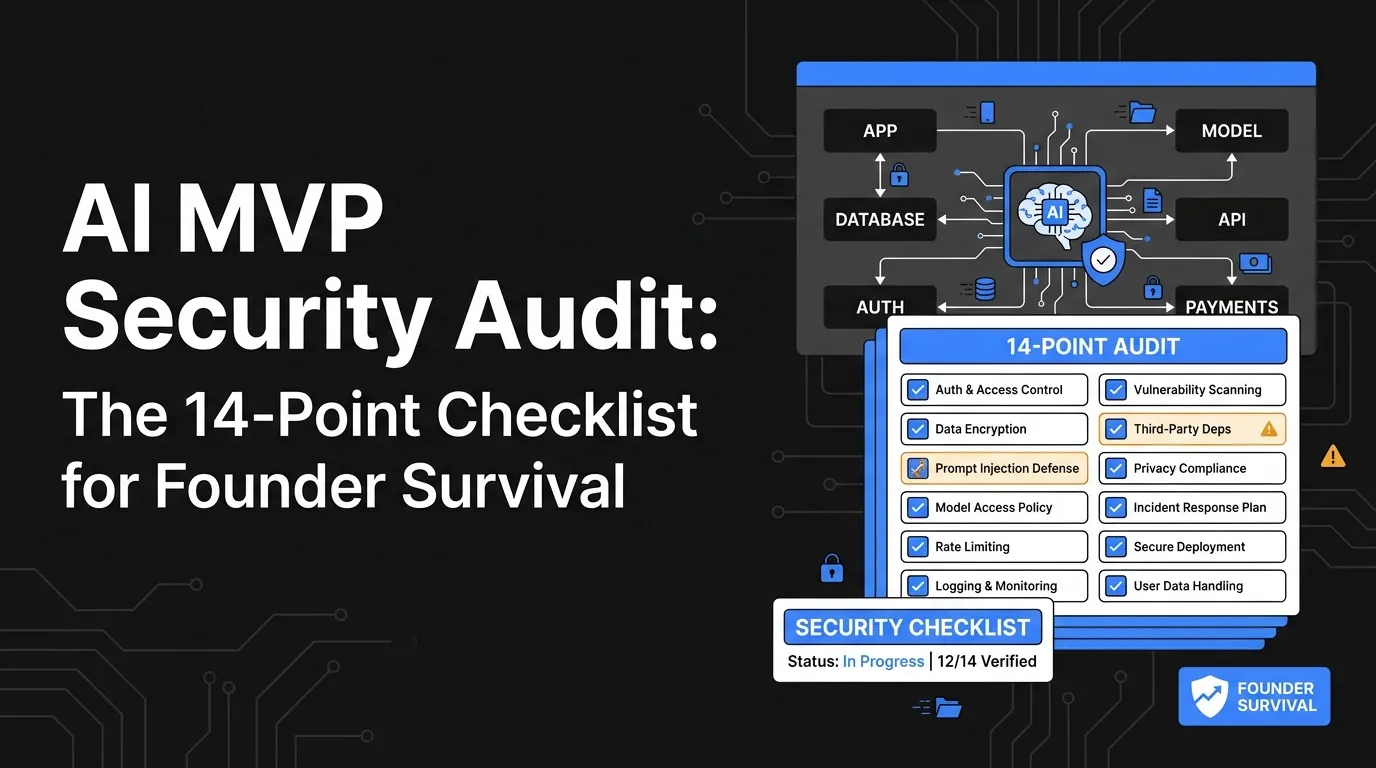
The 14-Point AI MVP Security Audit Checklist
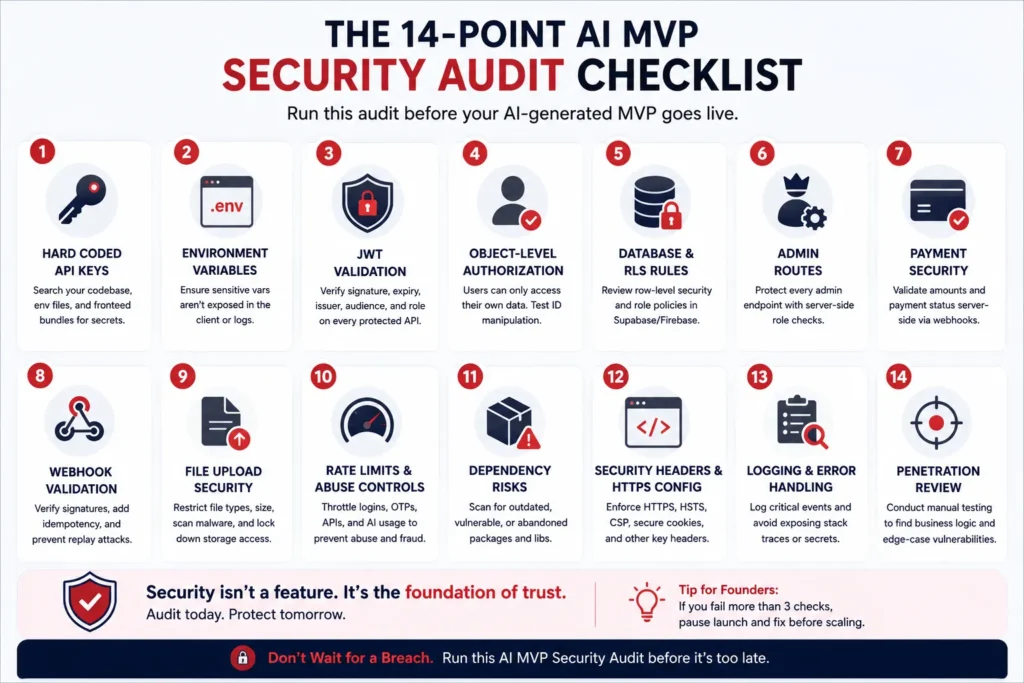
Use this checklist before inviting real users, handling payments, collecting documents, storing private messages, onboarding vendors, or pitching investors with a live product.
1. Check for Hardcoded API Keys in Frontend Code
The first audit point is simple: search your entire repository for secrets.
Look for:
- OpenAI API keys
- Stripe keys
- Firebase credentials
- Supabase service role keys
- AWS keys
- Google Maps keys
- Twilio keys
- SendGrid or Mailgun keys
- JWT secrets
- database URLs
- webhook secrets
In AI-generated projects, keys can accidentally appear in .env files, frontend JavaScript bundles, config files, demo snippets, Git history, logs, or pasted documentation.
A safe app should never expose sensitive service keys in frontend code. Public keys should be restricted by domain, app, IP, or usage policy where supported. Server-only secrets should remain server-side.
Founder test: Open your deployed site in the browser, inspect the network tab, and search built JavaScript files for words like key, secret, token, sk_live, service_role, apiKey, and Authorization.
If a real secret appears, treat it as compromised and rotate it.
2. Verify That Environment Variables Are Not Public
AI tools often create .env files correctly in development, but deployment settings may expose variables accidentally.
Check whether your environment variables are:
- committed to GitHub
- visible in frontend builds
- printed in logs
- copied into public documentation
- available to browser-side code
- leaked in error messages
Cursor-specific security guidance warns that sensitive data such as API keys, tokens, and internal code should not be freely exposed to AI tools, especially because Cursor can access environment variables, configuration files, and repository context.
Founder test: Ask your developer or security reviewer to confirm which variables are server-only and which are safe for the client. Anything with admin, secret, private, service role, or signing authority should not be available in the browser.
3. Confirm JWT Validation Is Actually Happening on the Server
A login screen does not prove secure authentication.
Many AI-generated MVPs create login logic but fail to validate tokens correctly on protected backend routes. In weak implementations, the UI hides pages from logged-out users, but the API still responds if someone calls it directly.
Check whether the server verifies:
- JWT signature
- token expiry
- token issuer
- token audience
- user role
- session revocation
- account status
- organization or workspace membership
The 2026 LLM credential leakage study found JWT-based token leakage and broken JWT implementations among recurring exposure patterns in LLM-integrated apps.
Founder test: Log out of the app, then call a protected API endpoint directly using Postman or curl. If the endpoint still returns private data, your app is not secure.
4. Test Object-Level Authorization
Object-level authorization means users should only access records they are allowed to see.
This matters in almost every app:
- A customer should not see another customer’s order.
- A creator should not see another creator’s payout.
- A driver should not see another driver’s trip history.
- A vendor should not edit another vendor’s menu.
- A patient should not access another patient’s appointment.
- A freelancer should not view another freelancer’s proposal.
AI-generated apps often protect the page but forget to protect the record.
Example of a dangerous pattern:
/api/orders/123
If changing 123 to 124 shows another user’s order, the app has a serious authorization flaw.
OWASP lists broken object-level authorization as a major API security risk because endpoints often expose object identifiers and require access checks for every function that accesses a data source using a user-controlled ID.
Founder test: Create two test accounts. Copy a private record URL from Account A. Try opening or fetching it from Account B. If Account B can see or edit it, stop launch activity and fix authorization.
5. Review Supabase, Firebase, or Database Row-Level Security
Many AI-built MVPs use Supabase or Firebase because they make backend setup fast.
That speed is useful, but database rules are often misunderstood.
Check whether:
- row-level security is enabled
- read/write policies are role-specific
- anonymous users are blocked from private tables
- service role keys are never used in frontend code
- storage buckets are private unless intentionally public
- admin actions require server-side authorization
- users cannot modify their own role field
- database rules match the business model
This is where many founders discover that the app has been relying on the frontend to “hide” data instead of the database to protect it.
Founder test: Ask your reviewer to query the database as an unauthenticated user, a normal user, a vendor/provider account, and an admin. Every role should see only what it should see.
6. Scan for Open Admin Routes
An admin panel is not secure because the button is hidden.
It is secure only when the backend checks whether the requester has admin permission.
Audit every admin action:
- user deletion
- refund approval
- payout release
- order cancellation
- content moderation
- vendor approval
- pricing changes
- commission updates
- role changes
- export downloads
AI-generated apps sometimes create admin dashboards quickly but protect them only at the page level. Attackers do not need the button if the API endpoint is open.
Founder test: Try calling admin endpoints from a non-admin account. If the endpoint works, your admin layer is exposed.
7. Check Payment Logic for Client-Side Trust
A payment screen can look polished while still being unsafe.
Common AI-generated payment mistakes include:
- accepting price from the browser
- trusting client-side order totals
- marking orders paid before webhook confirmation
- not verifying Stripe or payment gateway webhook signatures
- exposing secret payment keys
- allowing duplicate fulfillment
- failing to handle failed or disputed payments
- not logging payment state transitions
Payment status should be confirmed server-side, preferably through verified gateway webhooks.
Founder test: Change a product price in the browser request and submit it. If the server accepts the modified value, your payment logic is unsafe.
8. Verify Webhook Signature Validation
Webhooks power payments, notifications, shipping, KYC updates, AI callbacks, and automation workflows.
The problem: anyone can send an HTTP request to an exposed webhook URL.
Your app must verify that the request actually came from the trusted provider.
Check:
- Stripe webhook signature validation
- Razorpay webhook secret validation
- Twilio signature validation
- GitHub webhook secret validation
- AI tool callback validation
- idempotency for repeated events
- replay protection
- event logging
Founder test: Send a fake webhook request to your webhook URL. If it triggers a real business action, the app is vulnerable.
9. Test File Upload Security
File uploads are dangerous because users can send unexpected files.
Check whether your app controls:
- file type
- file size
- file extension
- MIME type
- malware scanning
- private storage rules
- signed URL expiry
- user ownership
- direct public access
- executable file blocking
This matters for marketplaces, healthcare apps, fintech onboarding, creator platforms, job portals, education platforms, and delivery apps with document verification.
Founder test: Upload a script file, oversized file, renamed executable, or private document from one account. Then test whether another account can access the file URL.
10. Check for Missing Rate Limits and Abuse Controls
An AI MVP can become expensive very quickly if endpoints are open.
Rate limits protect against:
- login brute force
- OTP abuse
- AI prompt spam
- scraping
- password reset abuse
- payment intent spam
- public search endpoint abuse
- email/SMS cost spikes
- API credit exhaustion
For AI apps, this is especially important because every prompt, embedding call, image generation request, or inference request can create direct cost.
OWASP includes “excessive agency” and overreliance among LLM application risks, warning that unchecked autonomy and failure to critically assess LLM outputs can harm reliability, privacy, trust, and security.
Founder test: Send 100 rapid requests to a login, OTP, AI prompt, or search endpoint. If there is no throttling, the app is easy to abuse.
11. Review Dependency and Package Risks
AI tools often install packages quickly to solve immediate coding problems.
That can create supply chain risk.
Check:
- outdated packages
- vulnerable packages
- abandoned packages
- suspicious package names
- unnecessary dependencies
- packages with excessive permissions
- lockfile integrity
- post-install scripts
- dependency licenses
Founder test: Run a dependency audit using your package manager and a security scanner. Then ask which packages are actually necessary.
12. Confirm Security Headers and HTTPS Configuration
Security headers help browsers protect users.
Check for:
- HTTPS everywhere
- HSTS
- Content Security Policy
- X-Frame-Options or frame-ancestors
- X-Content-Type-Options
- Referrer-Policy
- secure cookies
- HttpOnly cookies
- SameSite cookie settings
The LLM-generated web app security study found HTTP security headers among the areas where generated code failed to fully align with industry best practices.
Founder test: Run your deployed URL through a security headers scanner. Any missing high-impact browser protections should be fixed before launch.
13. Audit Logging, Error Messages, and Monitoring
A secure app should help the operator see what is happening.
Check whether the app logs:
- login attempts
- failed authentication
- admin actions
- payment events
- role changes
- data exports
- webhook failures
- suspicious API spikes
- file upload failures
- permission errors
Also check whether error messages expose:
- stack traces
- database names
- internal file paths
- API keys
- provider secrets
- SQL queries
- private user data
Founder test: Trigger errors intentionally. If the app reveals internal system details to the user, error handling needs work.
14. Run a Manual Penetration Review Before Real Users Scale
Automated scans help, but they do not replace human review.
A founder should request a practical penetration review focused on:
- authentication
- authorization
- API access
- database policies
- secrets handling
- admin controls
- payment logic
- webhooks
- file uploads
- logging
- privacy exposure
- business logic abuse
Security is not only about code syntax. It is about whether the app protects real business workflows when a user behaves maliciously.
For example, a food delivery app must protect restaurant payouts, driver assignment, order status, refunds, and admin commissions. A creator platform must protect content access, creator payouts, moderation, and abuse reporting. A fintech app must protect wallet actions, transaction history, user verification, and suspicious activity workflows.
A generic AI prompt may not understand those business-specific risks unless the architecture was designed with them from the beginning.
Read More: Clone App Development: The Fastest Way to Validate a Market Without Starting From Zero
AI MVP Security Audit Table: What to Check First
AI MVP Security Audit Checklist
| Audit Point | What Can Go Wrong | Founder Action |
|---|---|---|
| Hardcoded API keys | Attackers can use your paid APIs, payment tools, maps, SMS, or AI credits. | Search repo, frontend bundle, logs, and Git history. Rotate exposed keys. |
| JWT validation | Users may access private APIs with weak, expired, or manipulated tokens. | Verify token signature, expiry, issuer, audience, and role server-side. |
| Database rules | Private tables may be readable or writable by anonymous users. | Review row-level security and role-specific access rules. |
| Admin routes | Non-admin users may trigger refunds, approvals, deletions, or exports. | Protect every admin API with server-side role checks. |
| Payment logic | Users may manipulate price, payment status, or order fulfillment. | Validate totals and payment status on the server through trusted webhooks. |
| File uploads | Private files may become public or unsafe file types may be accepted. | Restrict type, size, access, signed URLs, and storage permissions. |
| Rate limits | Attackers can brute force login, spam OTPs, scrape data, or burn AI credits. | Add throttling, quotas, abuse detection, and alerting. |
Founder Decision Signals: Patch, Rebuild, or Migrate?
Not every AI MVP needs to be thrown away. Some need a focused security patch. Others need a deeper rebuild. Some should migrate to a more stable white-label foundation because the business model is already proven and the current codebase is too fragile.
Founder Decision Signals
Patch
Patch the app if the core architecture is sound and the problems are limited to exposed keys, missing headers, rate limits, or small permission gaps.
Rebuild
Rebuild if authentication, database design, payment state, admin roles, and API structure are unreliable across the product.
Migrate
Migrate to a white-label app foundation if your business model follows a proven pattern and your current AI MVP is blocking secure launch or investor confidence.
Pause Launch
Pause user growth if private data, payments, documents, messages, or admin actions are exposed. Security debt becomes harder to fix after users depend on the product.
Migrating From Fragile AI MVPs to Tested White-Label Engines
AI-generated MVPs are useful for proving that a user flow makes sense.
But when the product starts handling real users, payments, vendors, creators, drivers, bookings, chats, documents, or financial workflows, the founder needs more than a generated interface.
The founder needs a product foundation.
That foundation should include:
- role-based access control
- secure API structure
- admin dashboard logic
- payment gateway integration
- tested user flows
- provider/vendor/creator/driver panels where relevant
- audit logs
- notification workflows
- source-code ownership
- deployment documentation
- post-launch support
- scalable backend workflows
- security review before go-live
This is where a ready-made white-label app can be a stronger path than patching a fragile prototype.
Miracuves helps founders launch ready-made and white-label app solutions across proven business models, including marketplaces, delivery apps, fintech apps, creator platforms, social apps, service platforms, and more. The goal is not to copy another platform blindly. The goal is to start from tested product architecture, customize it for the market, and avoid rebuilding common security-sensitive modules from zero.
For founders still deciding between AI-generated MVPs, custom development, and white-label infrastructure, the next useful reads are:
When a Miracuves White-Label Foundation Makes More Sense
A white-label foundation makes sense when your AI MVP has validated the idea but exposed the limits of prompt-generated architecture.
For example:
- A delivery startup may not need to invent customer, merchant, driver, dispatch, payment, and admin workflows from scratch.
- A marketplace founder may not need to rebuild listings, booking, payments, reviews, vendor dashboards, and dispute workflows from zero.
- A creator platform founder may not need to hand-code feeds, upload flows, creator profiles, subscriptions, moderation, and payout workflows line by line.
- A fintech founder should be especially careful. Wallet logic, transaction history, KYC workflows, risk controls, and audit logs require careful architecture. A generated interface is not enough.
Miracuves’ white-label approach helps founders move faster with a source-code-owned, customizable product foundation that can be aligned with branding, monetization, integrations, and operating workflows. Final compliance still depends on jurisdiction, legal review, integrations, and operating model, but a stronger foundation can support the security and control layers founders need before scaling.
Read More: Why Fast App Development Beats Long Timelines
Mistakes Founders Should Avoid
Trusting the UI Instead of Testing the API
A polished interface does not prove the backend is secure. Always test APIs directly, especially admin, payment, database, and user-record endpoints.
Leaving Service Keys in the Browser
Any secret visible in frontend code should be treated as compromised. Rotate exposed keys and move server-only logic to protected backend routes.
Assuming Login Means Authorization
Authentication confirms who the user is. Authorization confirms what the user can access. Your app needs both on every sensitive action.
Scaling Before Security Review
The best time to fix security gaps is before users, vendors, creators, or payment flows depend on the product. After launch, every fix carries higher business risk.
Final Thoughts: Your AI MVP Is a Signal, Not the Final Foundation
AI MVPs are excellent for speed.
They help founders test workflows, explain product ideas, impress early users, and move from concept to clickable product faster than traditional development.
But once your app handles real data, money, documents, messages, vendor workflows, creator payouts, healthcare information, financial records, or admin controls, the product needs more than AI-generated functionality.
It needs security architecture.
The 14-point AI MVP security audit checklist gives founders a practical way to find the most dangerous issues before they become public failures. Start with exposed keys, JWT validation, database rules, admin routes, payment logic, webhooks, and file access. These are the places where “it works” can quickly become “it leaked.”
The strongest founder decision is not always to keep patching a fragile prototype.
Sometimes the better move is to use the AI MVP as proof of demand, then migrate to a stronger white-label or custom product foundation that gives the business source-code ownership, admin control, operational workflows, and a safer path to scale.
Miracuves helps founders make that transition faster without rebuilding every module from zero.
FAQs
What is an AI MVP security audit?
An AI MVP security audit is a structured review of an app built with AI coding tools to check whether its backend, APIs, database rules, authentication, secrets, payments, files, and admin controls are safe enough for real users.
Are Cursor and Lovable apps secure by default?
They can help founders build quickly, but security still depends on how the app is configured, deployed, reviewed, and tested. Founders should not assume an AI-generated app is secure simply because the interface works.
What is the biggest security risk in AI-generated MVPs?
The biggest risks are usually exposed API keys, weak authentication, missing authorization checks, open database rules, insecure payment logic, and public storage access. These risks can expose user data or create direct financial loss.
How do I know if my API keys are exposed?
Search your repository, frontend bundle, deployment logs, Git history, and network requests for keys, secrets, tokens, and database URLs. If a secret appears in browser-accessible code, rotate it and move it to the backend.
Why is JWT validation important for AI MVP security?
JWT validation ensures the server checks whether a user token is real, unexpired, correctly signed, and authorized for the requested action. Without server-side JWT validation, attackers may access protected data or actions.
Should I rebuild my AI MVP after a failed security audit?
Not always. If the issues are isolated, patching may be enough. If the app has weak authentication, open database access, unsafe payment logic, and unreliable admin controls across the architecture, a rebuild or migration may be safer.
Is a white-label app more secure than an AI-generated MVP?
A white-label app can be safer when it is based on tested architecture, proper backend workflows, admin control, source-code ownership, and deployment review. Security still depends on configuration, integrations, hosting, and ongoing maintenance.
How can Miracuves help founders with insecure AI MVPs?
Miracuves can help founders move from fragile AI-generated prototypes to ready-made, white-label, or custom app foundations with branding, admin control, source-code ownership, backend workflows, and faster deployment.
Miracuves is an independent software development company. We are not affiliated with, connected to, sponsored by, or endorsed by any company or product named in this article.
Terms such as “X Clone” are used descriptively. It is how the software industry refers to building a platform with functionality comparable to a known service, and how clients search for it.
The entire design and codebase of our products is built by our own team. Our products contain no code, design, graphics, or content originating from any third-party website or applications.
All third-party names and marks referenced in this article are the property of their respective owners, referenced solely to identify the services discussed.