Key Takeaways
- Users seeing each other’s data is usually a backend access-control issue, not only a frontend bug.
- Missing RLS, weak Firebase rules, and poor tenant isolation can expose private user records.
- Authentication, database permissions, API validation, storage rules, and admin access need careful review.
- AI-built apps can launch quickly but often miss deeper security controls behind the interface.
- A security-first app foundation helps protect users, founders, and business reputation before scale.
Security Signals
- Users need account-level privacy, protected records, secure sessions, and controlled access to their own data.
- Founders need to check RLS policies, Firebase security rules, API permissions, storage access, and admin roles.
- Admins need audit logs, role-based access, permission reviews, activity monitoring, and incident controls.
- Database rules must prevent one user, workspace, tenant, or role from reading another user’s data.
- Real-time monitoring helps detect unusual access, failed permission checks, exposed records, and suspicious API activity.
Real Insights
- A polished AI-generated frontend can hide serious backend security gaps.
- If row-level permissions are missing, users may access records that belong to other accounts or workspaces.
- Founders should test data isolation across users, roles, teams, files, payments, and admin dashboards before launch.
- Security audits, policy testing, code reviews, and access-control checks reduce the risk of live data leaks.
- Miracuves builds AI MVPs and clone apps with secure database rules, protected APIs, role-based access, and admin control.
When users can see each other’s data, your app is not dealing with a minor privacy bug.
It is dealing with a broken security boundary.
For founders, this is one of the most terrifying product failures possible. A customer opens the dashboard and sees someone else’s orders. A business account sees another company’s invoices. A creator sees another creator’s payout history. A patient, driver, host, student, or vendor sees data that should never have left its own account boundary.
That is not a UI mistake. That is not a “we will patch it later” issue. It is a database access-control failure.
The problem has become more visible because many founders now build first versions of apps with AI app builders, generated Supabase schemas, quick Firebase setups, and fast no-code or low-code workflows. These tools can move quickly, but speed becomes dangerous when database permissions are treated as generated boilerplate instead of core product architecture.
Independent spot checks of AI-generated Supabase apps have reported failure rates above 70% for missing or weak Row Level Security. One public small-sample review of 50 Lovable-connected apps reported that 89% lacked proper RLS coverage. That number should not be treated as a universal industry benchmark, but the direction is impossible to ignore: AI-generated backend prompts often produce working tables before they produce safe access boundaries.
Supabase’s own documentation is direct: Row Level Security should be enabled on exposed tables. Lovable’s own security guidance also warns that missing or overly broad RLS policies can expose Supabase database data. Firebase documentation similarly warns against broad production rules that allow open reads or writes.
The lesson for founders is simple: if your users can see each other’s data, your app does not need a cosmetic fix. It needs a serious access-control review.
Miracuves helps founders avoid this class of failure by building from ready-made, white-label, source-code-owned app foundations where account separation, admin controls, role logic, and operational workflows are treated as product architecture, not afterthoughts.
The RLS Disaster: Why Your Users Can See Everyone Else’s Data
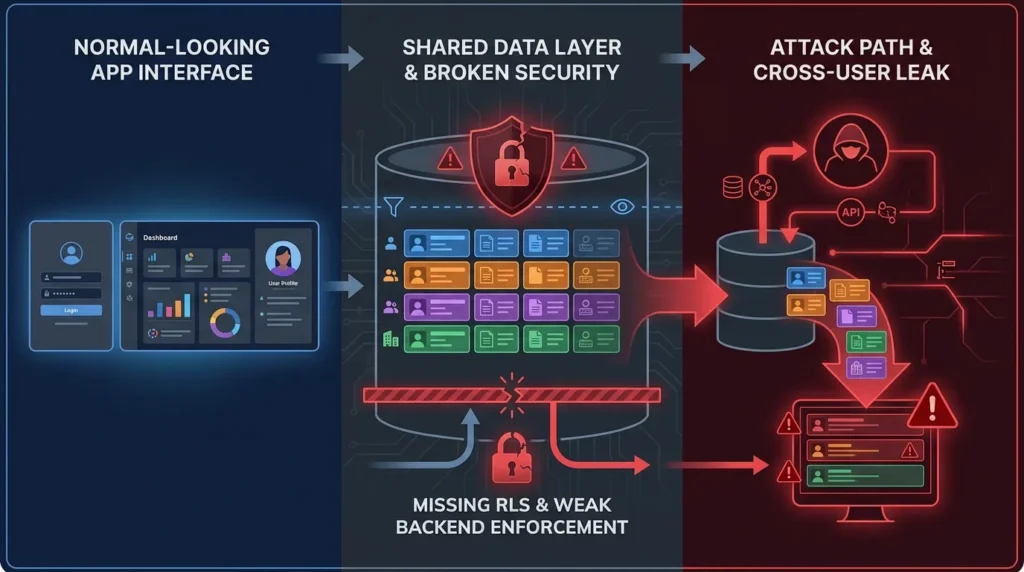
The most dangerous thing about this bug is that the app may look normal.
The login page works. The dashboard loads. The user profile appears. The app feels finished. But underneath the interface, the database may be answering requests without checking whether the person asking for a row is allowed to see that row.
That is how cross-user data leaks happen.
A common pattern looks like this:
- The app stores user-owned records in a shared table.
- Each row has a
user_id,organization_id,workspace_id,vendor_id,merchant_id, or similar ownership field. - The frontend filters the view so users only see their own records.
- The database itself does not enforce that rule.
- A user or attacker calls the backend directly and retrieves records that belong to other accounts.
This is why frontend filtering is not security. It is presentation logic.
If access control only exists inside the UI, the app is trusting the browser to behave. A real user, curious competitor, malicious actor, or automated scanner does not need to use your interface politely. They can inspect network calls, replay API requests, change object IDs, or query exposed endpoints directly.
In Supabase, Row Level Security is the database-level control that prevents this kind of exposure. In Firebase, Security Rules play a similar access-control role. In API-based apps, object-level authorization checks must validate every record access against the current user’s identity and role.
Without that layer, your app may not actually know the difference between:
- “Show me my invoice”
- “Show me another company’s invoice”
- “Show me all invoices”
- “Update someone else’s payout method”
- “Delete another user’s record”
That is why this issue belongs in the same family as broken access control and broken object-level authorization. OWASP identifies object-level authorization as a major API security risk because attackers can manipulate object identifiers and access data they should not reach.
For a founder, the business impact is immediate. Users do not care whether the root cause was RLS, Firebase rules, API logic, or an AI-generated schema. They only know the platform showed private data to the wrong person.
Read More: How to Start App Development When You Are Not Technical
Statistical Breakdown: The 70%+ Failure Rate of AI Database Prompts
The “70%+ failure rate” should be handled carefully.
There is no single global study proving that exactly 70% of all AI-generated apps fail Row Level Security. However, public spot checks and developer reports have shown failure rates above that threshold in narrow samples of AI-built Supabase apps. One independent review of 50 Lovable-connected apps reported 89% without proper RLS coverage.
The more important point is not the exact percentage. The important point is the failure pattern.
AI app builders are very good at producing a working database quickly. They can create tables, relationships, forms, dashboards, and CRUD flows from a plain-language prompt. But access control is not just a table-generation task. It requires product-specific business logic.
A generic prompt may say:
“Create a project management app with users, teams, tasks, comments, and file uploads.”
That prompt describes the objects. It does not fully define the permission model.
A senior database engineer would immediately ask:
- Can a user belong to multiple organizations?
- Can a manager view all team tasks?
- Can a contractor only view assigned tasks?
- Can admins access billing records?
- Can support staff impersonate users?
- Can deleted users retain audit history?
- Can invited users see historical files?
- Can records move between accounts?
- Can a vendor see customer data?
- Can a platform operator override access?
AI tools may generate a schema without answering those questions. The result is a working app with undefined trust boundaries.
That is where the failure begins.
Why AI Prompts Miss RLS
AI database prompts often fail because they optimize for visible functionality. They are judged by whether the app “works” in the browser, not whether the database rejects unauthorized access under adversarial testing.
A generated app may successfully create:
- Login flow
- User dashboard
- Database tables
- Forms
- Lists
- CRUD operations
- Basic admin view
But still fail to create:
- Deny-by-default policies
- Owner-scoped SELECT rules
- Owner-scoped INSERT checks
- Role-based UPDATE rules
- Delete restrictions
- Organization-level policies
- Admin exception handling
- Audit logging
- Storage bucket access rules
- Cross-account test cases
This is why AI-generated software can create a false sense of progress. The app works until a user steps outside the happy path.
Supabase RLS Failure Example
A risky table might look harmless:
CREATE TABLE public.projects (
  id uuid PRIMARY KEY DEFAULT gen_random_uuid(),
  user_id uuid REFERENCES auth.users(id),
  name text NOT NULL,
  data jsonb,
  created_at timestamptz DEFAULT now()
);
The table has a user_id, so a founder may assume it is safe.
It is not safe by default just because ownership metadata exists.
The database also needs policies such as:
ALTER TABLE public.projects ENABLE ROW LEVEL SECURITY;

CREATE POLICY "Users can view their own projects"
ON public.projects
FOR SELECT
USING (auth.uid() = user_id);

CREATE POLICY "Users can insert their own projects"
ON public.projects
FOR INSERT
WITH CHECK (auth.uid() = user_id);

CREATE POLICY "Users can update their own projects"
ON public.projects
FOR UPDATE
USING (auth.uid() = user_id)
WITH CHECK (auth.uid() = user_id);
Even this is only a simplified example. Real apps may need organization membership checks, team roles, admin overrides, vendor scopes, payment record restrictions, and storage object controls.
The point is clear: user_id is not security. RLS policy enforcement is security.
Firebase Has the Same Class of Problem
Firebase apps can fail in a different syntax but with the same business result.
A dangerous production rule looks like this:
allow read, write: if request.auth != null;That condition means the user is signed in. It does not mean the user owns the document.
A safer rule must connect the authenticated user to the document being accessed:
allow read, write: if request.auth != null
  && request.auth.uid == resource.data.userId;
Even then, real apps need stronger role logic, validation rules, query constraints, and emulator testing. Security rules are not decorations. They are the server-side gatekeepers of user data.
Read More: Offline Video Streaming App Development: Building Secure Download Capabilities for Video Apps
Why “Authenticated User” Is Not the Same as “Authorized User”
One of the most common founder mistakes is assuming login equals permission.
Authentication answers: “Who is this user?”
Authorization answers: “What is this user allowed to access?”
Those are not the same question.
A signed-in user should not automatically access every row in the database. A paying customer should not automatically see other customers. A vendor should not automatically access another vendor’s orders. A driver should not see every driver’s payout history. A doctor should not see every patient record. A creator should not see another creator’s subscription revenue.
When apps confuse authentication with authorization, private data becomes a shared pool.
That is why the phrase “users can see each other’s data” is so serious. It tells you the app is not enforcing ownership at the data layer.
Read More: Why Time to Market Matters More Than Ever in App Development
The Real Damage: What Happens When Users See Each Other’s Data
Founders often think about this issue as a technical patch. That is too small.
A cross-user data leak affects the entire business.
| Failure Area | What Breaks | Founder Impact |
|---|---|---|
| User trust | Customers lose confidence in the platform | Churn, complaints, refunds, reputation damage |
| Legal exposure | Private data may be exposed to unauthorized parties | Legal review, breach notifications, compliance pressure |
| Sales pipeline | Prospects question security maturity | Lost enterprise deals and delayed procurement |
| Product credibility | The app feels unsafe even if the UI is polished | Lower conversion and retention |
| Investor confidence | Technical diligence reveals weak architecture | Harder fundraising or lower valuation confidence |
| Team focus | Engineering shifts from growth to emergency repair | Roadmap delays and operational stress |
This is why mature software businesses treat access control as a product foundation.
Security is not something added after launch. It is the structure that decides whether the product can safely hold customer data at all.
Founder Decision Signals
Speed
If the app was generated quickly, audit database permissions before scaling user acquisition. Fast launch without access control creates hidden breach risk.
Cost
Fixing broken data isolation after users are live is more expensive than designing secure account boundaries before launch.
Scalability
Every new role, vendor, team, workspace, or admin permission increases the need for structured authorization logic.
Market Fit
Users will not validate your product if they cannot trust it with private records, payments, messages, files, or business data.
The Technical Root Cause: Missing Data Isolation
Most “users can see each other’s data” incidents come from one of five patterns.
1. Missing Row Level Security
In Supabase, exposed tables need RLS policies. If a table is accessible from the client and RLS is missing, the app may allow broader reads or writes than intended.
2. Overly Broad RLS Policies
Turning on RLS is not enough if the policy says:
USING (true)That policy does not isolate users. It allows broad access while creating a false sense of security.
3. Weak Firebase Rules
Rules like request.auth != null only confirm login. They do not prove ownership. Apps need rules that connect the authenticated user to the specific document, account, organization, role, or resource being accessed.
4. Broken Object-Level Authorization
APIs often expose object IDs. If the backend accepts any ID without checking ownership, users can access records by changing request parameters.
Example:
GET /api/invoices/inv_1001
GET /api/invoices/inv_1002
If the second invoice belongs to another company and the API still returns it, the app has broken object-level authorization.
5. Shared Storage Without Object Policies
Many apps secure database rows but forget files. Invoices, images, PDFs, medical documents, contracts, thumbnails, audio files, and exports may sit in shared storage buckets with weak access rules.
Data isolation must cover database rows, files, APIs, background jobs, analytics exports, admin dashboards, and support tools.
Read More: Clone App Development: The Fastest Way to Validate a Market Without Starting From Zero
Why AI-Built Apps Are Especially Vulnerable
AI app builders are not the enemy. Used properly, they can accelerate prototyping. The risk is relying on generated output as if it has passed production-grade security review.
AI-generated apps are especially vulnerable because they often compress decisions that normally require senior engineering judgment.
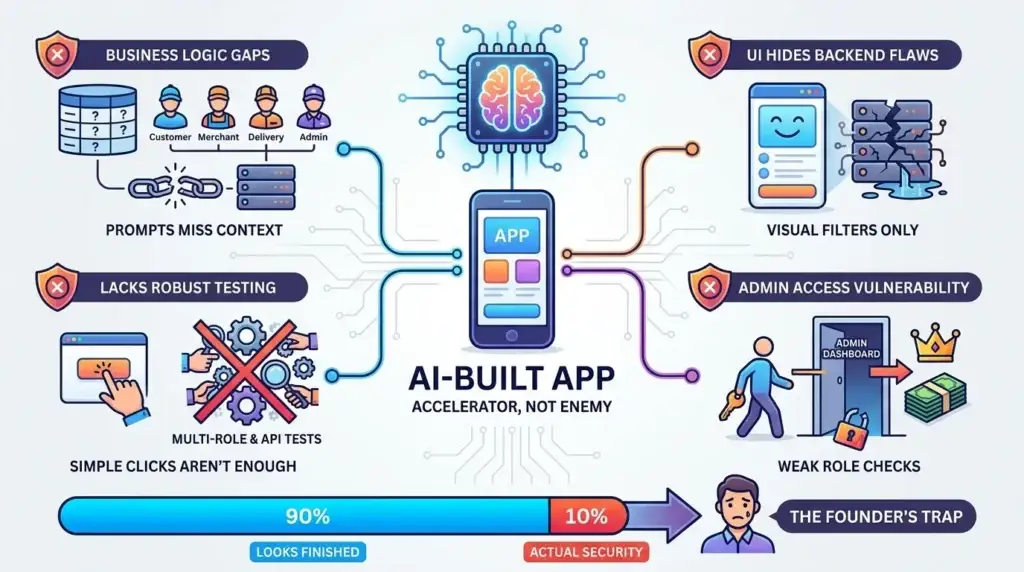
The Prompt Does Not Know Your Business Rules
A prompt can create a table called orders. It cannot automatically understand whether:
- Customers can see only their own orders
- Merchants can see orders for their own store
- Delivery partners can see assigned orders only
- Support agents can see limited order metadata
- Finance admins can export payouts
- Platform operators can override disputes
These rules are not generic. They come from the business model.
The UI Can Hide a Broken Backend
Generated frontends often filter data visually. That makes demos look clean. But a secure app must enforce the same boundary at the backend and database level.
Security Tests Are Often Missing
Most AI-generated prototypes are tested by clicking around the app as one user. Real access-control testing requires multiple accounts, multiple roles, direct API calls, permission abuse cases, and negative tests.
Admin Features Make the Problem Worse
Admin dashboards are powerful. If role checks are weak, a normal user may reach admin-level data. If admin routes are protected only in the frontend, the backend may still leak privileged records.
For a founder, the danger is simple: the app may look 90% finished while the security model is 10% complete.
Read More: Why Fast App Development Beats Long Timelines
Implementing Multi-Account Architecture via Miracuves Clones
A safer app foundation starts with account boundaries.
For Miracuves, clone app development is not about copying another company’s brand. It is about starting from a proven product pattern and adapting it to your market with the right control layers already considered.
A mature clone engine should separate users, roles, panels, workflows, and data ownership from the beginning.
For example:
| App Type | Required Data Boundary |
| Food delivery app | Customer, restaurant, delivery partner, and platform admin records |
| Marketplace app | Buyer, seller, listing, order, payout, and dispute scopes |
| Ride-hailing app | Rider, driver, trip, fare, wallet, and support visibility |
| Creator platform | Viewer, creator, subscription, content, payout, and moderation scopes |
| Fintech app | User wallet, transaction ledger, KYC workflow, admin risk controls |
| Property rental app | Host, guest, property, booking, payment, and document access |
| SaaS platform | Workspace, user role, billing, seat access, and organization-level records |
This is where a ready-made Miracuves foundation can reduce avoidable risk. Instead of prompting an AI tool to invent your entire backend from zero, founders can start from a launch-ready structure that already considers user panels, admin controls, monetization workflows, and source-code ownership.
For founders evaluating a safer build path, explore Miracuves’clone app development services and SaaS development services. These pages are useful next steps for understanding how ready-made app foundations can support faster launch while still giving founders technical ownership.
What a Secure Clone App Foundation Should Include
A secure app foundation is not just a login page plus tables.
It should include structural controls that reduce the chance of cross-user data exposure.
Secure App Foundation Checklist
| Security Layer | Business Value | Founder Impact |
|---|---|---|
| Row-level or document-level access rules | Restricts users to records they are permitted to access. | Reduces risk of cross-user data leaks. |
| Role-based access control | Separates customer, vendor, admin, provider, creator, and support permissions. | Allows the platform to grow without permission chaos. |
| Account-scoped queries | Ensures every sensitive query includes ownership context. | Prevents accidental exposure through APIs and dashboards. |
| Admin access controls | Limits who can view, export, edit, refund, approve, or suspend records. | Protects sensitive operational workflows. |
| Audit logs | Tracks who accessed or changed important records. | Improves investigation and accountability. |
| Storage access rules | Protects images, PDFs, documents, videos, and exports. | Closes file-level leakage gaps. |
| Secure payment gateway integration | Protects transaction workflows and payout records. | Builds trust in monetization-heavy apps. |
| Negative permission testing | Tests what users should not be able to access. | Finds data leaks before customers do. |
How to Fix the Problem If Users Can Already See Each Other’s Data
If this issue is happening in a live app, do not start by rewriting copy, hiding buttons, or adding frontend checks.
Start with containment.
Step 1: Stop the Exposure
Temporarily restrict public access to affected tables, APIs, or storage buckets. If necessary, disable affected features until the access-control model is reviewed.
Step 2: Identify the Exposure Surface
Check every path where private data may be accessed:
- Database tables
- API endpoints
- Serverless functions
- Storage buckets
- Admin dashboards
- Export tools
- Webhooks
- Search indexes
- Analytics pipelines
- Background jobs
Step 3: Verify Ownership Fields
Every sensitive record should be linked to an owner, account, organization, vendor, merchant, creator, provider, driver, patient, or workspace depending on the product model.
If ownership is missing or inconsistent, policies will be hard to enforce correctly.
Step 4: Enforce Database-Level Rules
For Supabase, enable RLS and write policies for each operation. For Firebase, tighten Security Rules and test them with multiple account scenarios. For custom APIs, enforce object-level authorization on every request.
Step 5: Test Negative Cases
Do not only test what users should do. Test what they should not do.
Create two users. Create records under User A. Log in as User B. Try to fetch, update, delete, export, or access User A’s records directly.
If anything leaks, the app is not safe.
Step 6: Review Admin and Support Access
Many leaks happen through privileged dashboards. Admin access should be role-based, logged, and limited by operational need.
Step 7: Add Audit Logs and Monitoring
You need to know who accessed what, when, and from where. Without logs, breach investigation becomes guesswork.
Step 8: Communicate Responsibly
If real user data was exposed, consult legal and compliance advisors. Do not minimize the issue internally. The response depends on jurisdiction, data type, severity, and contractual obligations.
Mistakes Founders Should Avoid
Assuming frontend filters protect the database
A filtered dashboard does not stop direct API access. Sensitive access rules must be enforced at the backend, database, and storage level.
Confusing login with authorization
A signed-in user is not automatically allowed to access every record. Every private object needs ownership and permission checks.
Trusting generated code without review
AI-generated apps can accelerate development, but generated database structures need senior security review before production launch.
Using broad admin permissions
Admin dashboards should not become uncontrolled access portals. Sensitive actions need role limits, logs, and approval workflows where necessary.
Ready-Made Clone Foundation vs AI-Generated Backend From Scratch
AI app builders can help founders move quickly, but they should not replace security architecture for apps that store private data.
| Build Approach | Strength | Security Risk | Best Use Case |
| AI-generated backend from prompt | Very fast prototype creation | May miss RLS, role checks, storage rules, and negative tests | Early concept demos with no sensitive production data |
| Custom development from scratch | High flexibility | Longer delivery, higher cost, more architecture decisions | Deeply unique workflows or heavily regulated product logic |
| Miracuves ready-made clone foundation | Faster launch with pre-built panels, workflows, source code, and admin control | Still requires final security review based on business scope and market | Founders who need faster validation without starting from zero |
A ready-made app foundation does not remove the need for security review. But it gives founders a stronger starting point than a blank prompt because the product already has known panels, role patterns, business workflows, and monetization logic.
That matters because access control is not abstract. A food delivery app, ride-hailing app, creator platform, fintech app, rental marketplace, and SaaS dashboard all need different data boundaries.
Miracuves’ white-label clone app approach helps founders start from a product foundation instead of asking AI to invent critical architecture on the fly.
Read More: How to Overcome Common Challenges in Home Services App Development
Related reading: 4 Cybersecurity Takeaways from China’s Largest Data Breach and Maximizing High-Intent Yield.
Final Thoughts: If Users Can See Each Other’s Data, Treat It as Architecture Failure
The harsh truth is that users seeing each other’s data is rarely just a small bug.
It usually means the app’s permission model is incomplete.
AI-generated apps, Supabase projects, Firebase prototypes, and fast-launch dashboards can all look impressive in demos. But real software maturity starts when every private record has a clear owner, every role has clear limits, and every sensitive request is checked outside the browser.
RLS, Firebase Security Rules, API authorization, storage policies, admin controls, and audit logs are not optional extras. They are the trust layer of the product.
For founders, the smarter decision is not to slow down forever. It is to stop confusing speed with safety.
A secure product foundation lets you move faster without exposing users to avoidable privacy failures. That is where Miracuves’ ready-made, source-code-owned clone app approach can help founders launch with stronger structure, clearer control, and a safer path from idea to market.
FAQs
Why can users see each other’s data in my app?
Users can usually see each other’s data because the app has broken access control. Common causes include missing Supabase Row Level Security, weak Firebase Security Rules, frontend-only filtering, broken object-level authorization, or APIs that do not verify record ownership.
Is missing RLS the main reason Supabase apps leak user data?
Missing RLS is one of the most common Supabase causes. Supabase apps often expose database access through client-side APIs, so tables in exposed schemas need Row Level Security policies that restrict rows based on the authenticated user, role, or account context.
Does enabling RLS automatically fix the problem?
No. Enabling RLS is only the first step. You also need correct policies for SELECT, INSERT, UPDATE, DELETE, admin access, team roles, organization-level access, and storage objects. A weak policy can still expose data.
Can Firebase apps have the same issue?
Yes. Firebase apps can leak data if Security Rules are too broad. For example, allowing all signed-in users to read and write all documents confirms authentication but does not prove authorization or ownership.
Are Lovable-built apps unsafe?
Not automatically. Lovable and similar AI app builders can help founders create apps quickly, but generated apps still need security review before production. Lovable’s own guidance warns that missing or overly broad RLS policies can expose Supabase data.
What should I do first if users are already seeing other users’ data?
First, contain the exposure by restricting access to affected tables, APIs, or storage. Then review RLS, Firebase rules, API authorization, admin permissions, and logs. If real private data was exposed, consult legal and compliance advisors before communicating externally.
Can Miracuves help rebuild a safer app foundation?
Yes. Miracuves helps founders build ready-made and white-label clone app solutions with source-code ownership, admin dashboards, role-based workflows, and product-specific control layers. Final security requirements should be reviewed based on the app type, market, integrations, and data sensitivity.
Is a clone app foundation safer than an AI-generated prototype?
A mature clone app foundation can provide a stronger starting point because it already includes known product flows, panels, business roles, and admin logic. However, every production app still needs security review, testing, and configuration based on its exact business model.
Miracuves is an independent software development company. We are not affiliated with, connected to, sponsored by, or endorsed by any company or product named in this article.
Terms such as “X Clone” are used descriptively. It is how the software industry refers to building a platform with functionality comparable to a known service, and how clients search for it.
The entire design and codebase of our products is built by our own team. Our products contain no code, design, graphics, or content originating from any third-party website or applications.
All third-party names and marks referenced in this article are the property of their respective owners, referenced solely to identify the services discussed.