Written by the Miracuves Editorial Team. Reviewed by Yash Narayan, SEO Associate, Miracuves.
Key Takeaways
- A software architecture document records how a product is organized: workflows, module boundaries, data, APIs, security, reliability, delivery and the decisions behind them.
- For a startup, eight short sections, two diagrams and three to five decision records are usually enough. It should fit in a few pages, not a binder.
- Architecture decision records (ADRs) capture why a choice was made. Adding a review trigger to each one tells the team when to revisit it, before drift turns into a rewrite.
- The eight sections map onto the 12 sections of arc42, so the lean version can grow into a full one later without starting over.
- The document only works if it lives in the repository, changes in the same pull request as the code and stays short enough that people read it.
You are about to start a build, or you have just hired a second developer, and you realize the only map of the system is in one person’s head. You need something written down, but a 40-page enterprise template is the wrong tool for a team of three.
Early products are judged by what users can see: working screens, signups and completed transactions. Underneath sit choices about databases, APIs, business logic, security and infrastructure. When nobody records those choices, every new developer has to rediscover them, and small product changes start touching parts of the system nobody expected.
By the end of this guide you will have a copy-ready software architecture document template in eight sections, example entries for a services marketplace, an architecture decision record (ADR) with a worked entry, and a short list of rules for deciding how much to write and when to update it.
What a Software Architecture Document Is (and Is Not)
A software architecture document (often shortened to SAD) describes the structure of a system: its major parts, what each part is responsible for, how information moves between them, and which important decisions shaped that structure. It is not a diagram of boxes and arrows on its own. A useful document explains responsibilities, risks and tradeoffs in words that a new engineer or a non-technical founder can follow.
Established formats exist. The open arc42 template has 12 sections, from goals and constraints through runtime and deployment views to risks, technical debt and a glossary. That depth suits larger systems. A startup with a small team and an unproven product usually needs a shorter version that covers the same ground in less space, which is what the template below does.
Architecture document vs PRD vs technical spec
The three documents answer different questions, and mixing them up is one way architecture never gets written down.
| Document | Answers | Example line |
|---|---|---|
| Product requirements document (PRD) | What are we building, for whom and why? | “Customers can book recurring appointments and get refunds.” |
| Software architecture document | How is the whole system organized to deliver that reliably? | “Bookings and payments are separate modules; payments owns all refund state.” |
| Technical design document or spec | How exactly will one feature or change be built? | “Recurring bookings add a schedule table and a nightly job that creates instances.” |
The PRD changes with every roadmap discussion. The architecture document changes more slowly and sets the boundaries that each feature spec works inside. The documents should inform each other: a roadmap that ignores architecture creates unrealistic commitments, and an architecture disconnected from customer priorities wastes scarce engineering time.
What the Document Prevents
Bad code can usually be fixed one file at a time. Bad architecture is harder, because the problem sits in how parts depend on each other. The mistakes below are the ones worth guarding against in an early product, and each one maps to a section of the template.
| Common mistake | What it causes later | Template section that catches it |
|---|---|---|
| Tightly coupled modules | A small change touches unrelated features | 2. Module boundaries |
| Database designed only for current screens | Painful migrations when the business model changes | 3. Data and ownership |
| Business rules mixed into interface code | Rules behave differently on web and mobile | 1. Workflows, 2. Module boundaries |
| Third-party providers treated as permanent | Switching a payment or messaging provider means a rebuild | 4. APIs and integrations |
| Security added after launch | Inconsistent permissions across dozens of endpoints | 5. Security and access |
| “It works at low traffic” assumed to mean it scales | Bottlenecks found by customers, not tests | 6. Performance and reliability |
| Important decisions never written down | New hires undo choices they do not understand | 8. Decision records |
If you have inherited a product where none of this was recorded, start with our guide to documenting an undocumented MVP codebase, then use the template below to capture what you learn. Work through the sections in order of risk, not in order of number: the parts that touch money and permissions first.
The Eight Sections, With Example Entries
Each section below has a purpose, the questions it should answer and an example entry. The examples follow one illustrative product, a marketplace that connects customers with local service providers for booked, paid appointments. Replace them with your own.
1. Business workflows and critical user journeys
Purpose: keep architecture tied to the activities that create revenue, obligations or customer trust.
Questions to answer: Which workflows cannot tolerate inconsistent data? Which depend on external services? Which affect more than one type of user?
Example entry: “Critical journeys: search provider, request booking, pay, provider accepts, service completed, payout. Booking and payment must never disagree about whether an appointment is paid.”
2. Module boundaries and ownership
Purpose: give each functional area one clear responsibility so changes stay local.
Questions to answer: What are the main modules? Which module owns each core responsibility? Which modules may call which?
Example entry: “Modules: identity, listings, bookings, payments, notifications, reporting. Only payments changes payment or refund state. Notifications reacts to events and never writes booking data.”
Logical modules do not require separate servers. They can live inside one deployable application, which keeps operations simple while preserving the option to split later.
3. Data architecture and information ownership
Purpose: make the key entities, relationships and owners explicit before the schema hardens.
Questions to answer: What are the core entities and identifiers? Which module updates each important record? What must stay consistent? How will schema changes roll out while users are active? What are the retention rules?
Example entry: “Entities: customer, provider, service, booking, booking occurrence, payment, payout. A booking can have many occurrences so recurring appointments do not need a redesign. Payment records are append only.”
4. API contracts and integration dependencies
Purpose: define the interfaces between modules and outside providers so one change does not ripple everywhere.
Questions to answer: What are the inputs, outputs and error cases of each important interface? How is it authenticated? How will it be versioned? What happens if a provider is down or replaced?
Example entry: “Payments sits behind an internal interface (charge, refund, payout). The payment provider is called only from that adapter, so switching providers changes one module.”
5. Security and access-control design
Purpose: design consistent controls in from the start instead of retrofitting them across every endpoint.
Questions to answer: What sensitive data does the system hold? Which roles exist and what can each do? How are secrets stored? Which actions are audit logged?
Example entry: “Roles: customer, provider, regional manager, admin. Authorization is checked in one shared layer, not in each screen. Refunds and payout changes are audit logged with user and timestamp.”
6. Performance and reliability expectations
Purpose: write down non-functional requirements so they can be tested, even if they are estimates.
Questions to answer: What traffic and peak load do you expect? What response time is acceptable for key actions? How long can the product be down? What work runs in the background?
Example entry: “Estimate for year one, to be revisited quarterly: search should feel instant; booking confirmation within a few seconds; reminders and payouts run as background jobs so they never slow down checkout.”
7. Deployment, testing, and observability
Purpose: describe how changes reach production and how problems are noticed.
Questions to answer: Which environments exist? What tests run before release? Who approves deployments? How is a bad release rolled back? What is monitored and who gets alerted? Who owns the repository, cloud accounts and deployment access?
Example entry: “Development, staging, production. Automated tests on every merge. Releases can be rolled back to the previous version. Alerts on failed payments and job queue backlog. The company, not an individual contractor, owns all accounts.”
8. Architecture decisions, assumptions, and future triggers
Purpose: record why each significant choice was made, what alternatives were considered and what would justify revisiting it.
Questions to answer: What did we choose? What else did we consider? Which assumption does this rest on? What signal would make us review it?
Example entry: see the decision record below. This section is a list of short records rather than one long essay, which is what makes it easy to keep current.
Copy-Ready Software Architecture Document Template
Paste this into a Markdown file in your repository, for example docs/architecture.md, and fill in each heading. Keep answers short; link out to diagrams and decision records instead of repeating them.
# Software Architecture Document: [Product name]
Version: [x.y]   Owner: [name]   Last reviewed: [date]

## 0. Context
One paragraph: what the product does, who uses it, current stage.
Diagram: system context (link)

## 1. Business workflows
Critical journeys, in order. Mark the ones that cannot tolerate inconsistent data.

## 2. Modules and ownership
| Module | Owns | May call |
Diagram: containers (link)

## 3. Data
Core entities, relationships, owner of each record, consistency rules, retention.

## 4. APIs and integrations
| Interface or provider | Purpose | Auth | Failure behavior | Replaceable? |

## 5. Security and access
Roles and permissions, sensitive data, secrets handling, audit log events.

## 6. Performance and reliability
Expected load (estimate + date), response targets, acceptable downtime, background jobs.

## 7. Delivery and operations
Environments, tests, release and rollback, monitoring and alerts, account ownership.

## 8. Decisions
List of ADRs with status: docs/adr/0001-*.md, docs/adr/0002-*.md

## Open questions and accepted technical debt
What we know is not ideal, why we accepted it, and when we will revisit it.
Architecture Decision Record Template (With an Example)
Architecture decision records were popularized by Michael Nygard in his 2011 post Documenting Architecture Decisions. Each record is a short file with five parts: title, context, decision, status and consequences. A record starts as proposed and becomes accepted once the team agrees; when a later decision replaces it, it is marked deprecated or superseded and kept, not deleted, so the history of reasoning survives. Nygard also suggests numbering records in sequence and never reusing a number.
This architecture decision record template keeps those five parts, puts the status at the top so it is easy to scan, and adds one line for review triggers, which Nygard’s format does not include.
# ADR 0003: Use one relational database for bookings and payments

Status: Accepted (date)

Context:
Bookings and payments must always agree on whether an appointment is paid.
The team has two backend developers and no dedicated operations engineer.
Expected volume in year one is modest.

Decision:
Use a single relational database with separate schemas per module.
Booking and payment changes that must agree happen in one transaction.
Reporting reads from the same database for now.

Consequences:
+ Strong consistency with little operational overhead.
+ Modules stay separate in code and schema, so a later split is possible.
- Heavy reporting queries could slow down transactional traffic.

Review triggers:
Reporting queries noticeably slow down checkout, or a module needs
to be deployed or scaled independently.
Store one file per decision in the repository, number them, and never rewrite an accepted record. When a decision changes, write a new record that supersedes the old one.
Where Diagrams Fit: The C4 Model
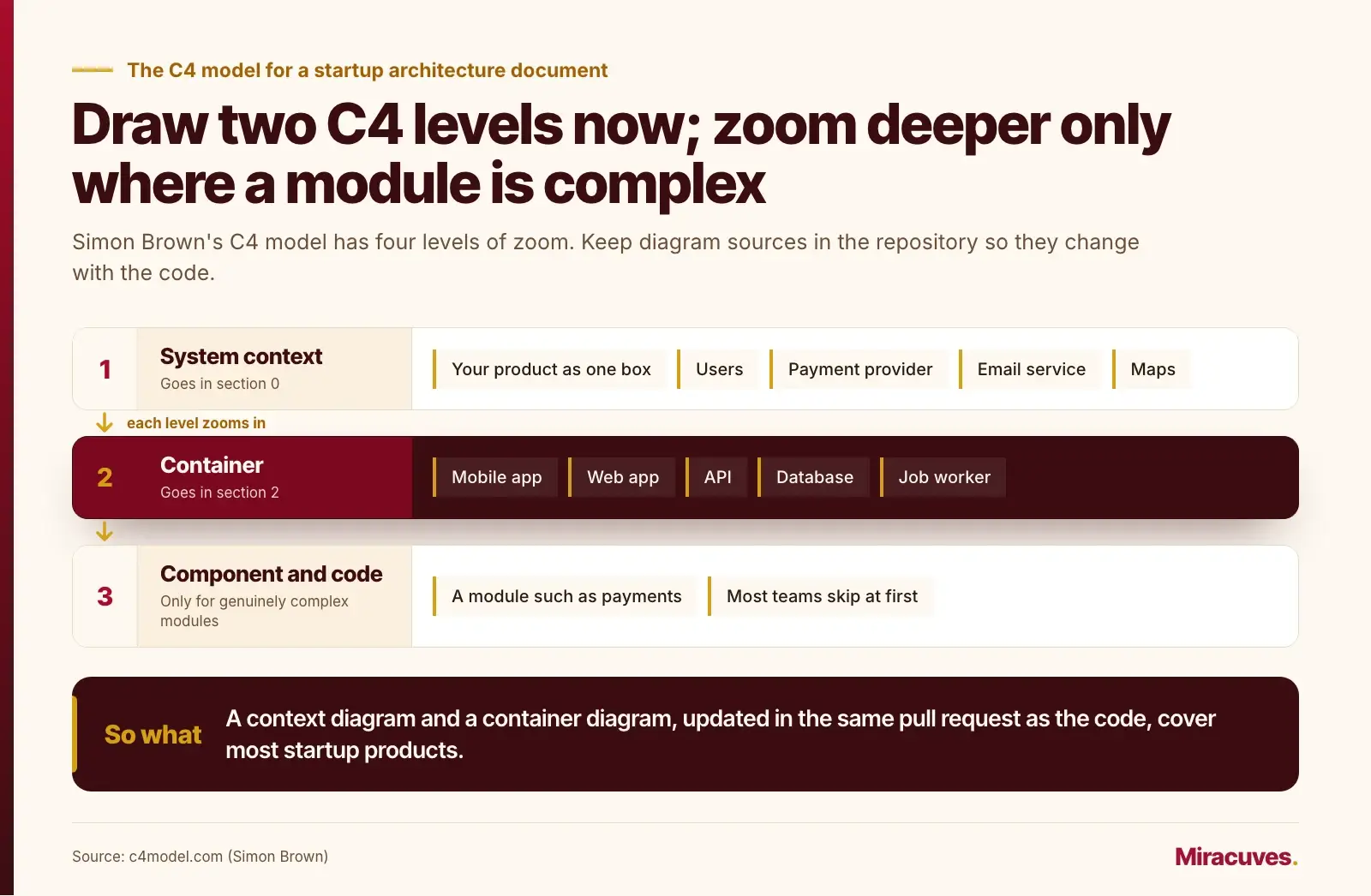
Diagrams make the document faster to read, but only if they are consistent. The C4 model, created by Simon Brown, describes four levels of zoom: system context, container, component and code.
- System context: your product as one box, with the users and external systems around it (payment provider, email service, maps). Goes in section 0.
- Container: the deployable pieces, such as mobile app, web app, API, database and job worker, and how they talk. Goes in section 2.
- Component and code: worth drawing only for a module that is genuinely complex, such as payments. Most startup teams can skip these at first.
The C4 site itself says the context and container diagrams are sufficient for most software development teams, and that you do not need all four levels. Keep diagram sources (for example text-based diagram files) in the repository so they change in the same pull request as the code.
Worked Example: A Services Marketplace (Illustrative)
Consider a hypothetical startup building an on-demand local services platform. Version one lets customers search providers, request appointments and pay in the app.
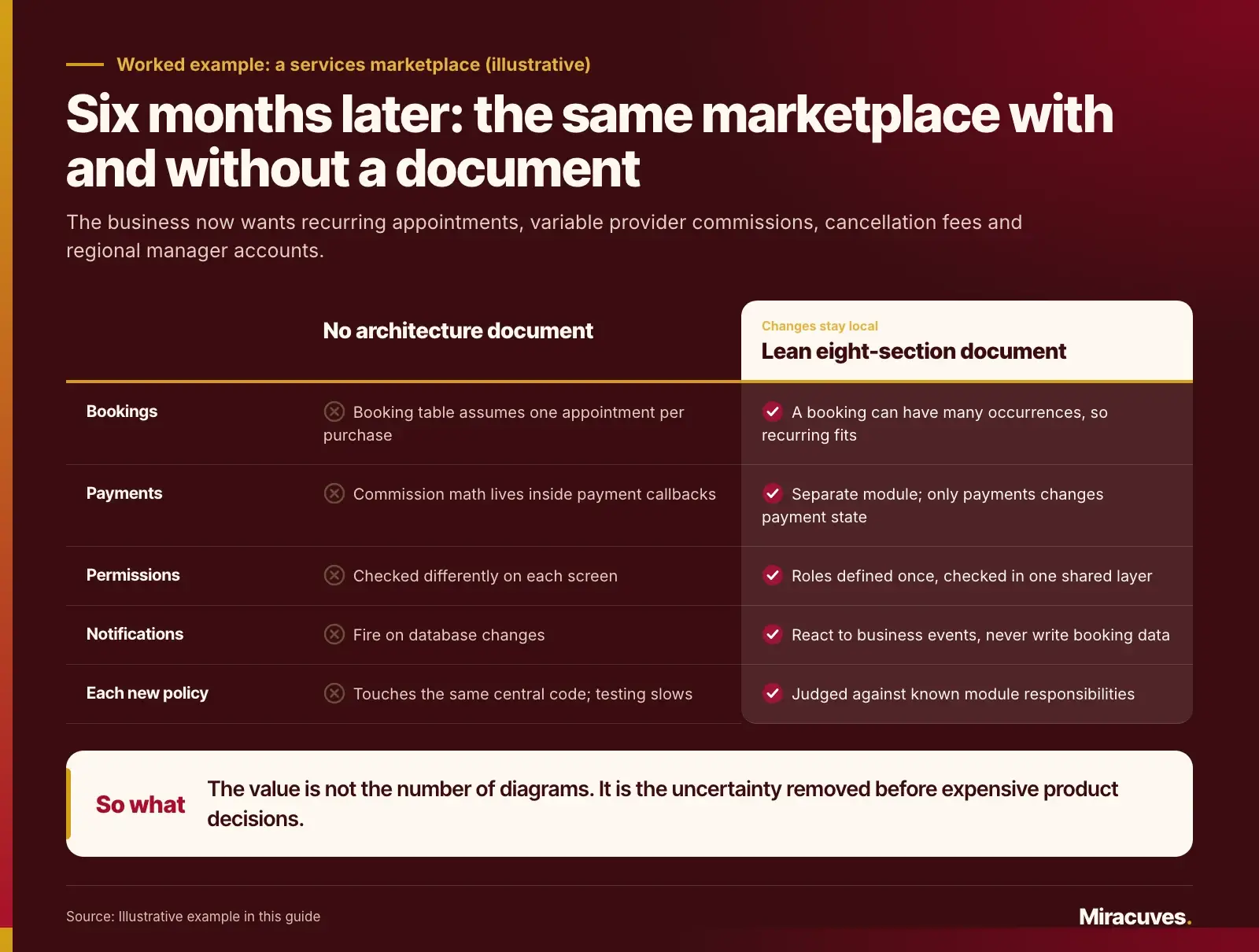
Without a document: to launch quickly, booking logic, payments, availability, notifications and admin actions share several tables and functions. Six months later the business wants recurring appointments, variable provider commissions, cancellation fees and regional manager accounts. Each change exposes a hidden dependency. The booking table assumes one appointment per purchase. Commission math lives inside payment callbacks. Admin permissions are checked differently on each screen. Notifications fire on database changes instead of business events. Every change touches the same central code, and testing slows down.
With a lean document: the team spends a few days filling in the eight sections. Bookings, payments, provider accounts and notifications become separate logical modules. Appointment history and payment records are modeled explicitly, roles are defined once, and an ADR records the single-database choice and its review triggers. The product still launches as one deployable application. When the new policies arrive, engineers evaluate them against known responsibilities instead of rediscovering the system.
The value is not the number of diagrams. It is the amount of avoidable uncertainty removed before expensive product decisions. The comparison below sums up the same five areas side by side.
How Much Documentation Is Enough?
Overdocumenting can be as costly as not documenting. A startup testing demand should not spend months describing infrastructure it may never need. Match the depth of each section to four signals.
Business Criticality
Payments, identity, inventory and other high-consequence workflows deserve the most detail.Change Frequency
Modules likely to change often need the clearest responsibilities and interfaces.Dependency Risk
External providers and shared data structures need documented failure and exit plans.Team Capacity
The architecture, and its document, must match what the team can build, run and maintain.A practical rule: sort decisions into easily reversible, moderately disruptive and expensive to reverse. Write ADRs for the last group and keep the rest to a line or two. For a straightforward product, the whole document might be a context diagram, a container diagram, a data model, an integration list, a few operational targets and three to five ADRs. A platform handling money or sensitive personal data may also need threat modeling, load tests and recovery planning.
One choice that belongs in an early ADR is the starting shape of the system. Martin Fowler’s MonolithFirst advice, published in 2015, is to begin with one application and split it once the right boundaries are clear. We compare the options in detail in modular monolith vs microservices for an MVP, so your record can simply link to that reasoning.
When you outgrow the lean version
A larger customer, an investor’s technical due diligence or a second engineering team may ask for something closer to arc42. Because the lean template covers the same ground, you can move content across rather than rewrite it. The closest arc42 homes are:
| Lean section | Closest arc42 section |
|---|---|
| 0. Context | 1. Introduction and Goals, 3. Context and Scope |
| 1. Business workflows | 1. Introduction and Goals (requirements overview), 6. Runtime View |
| 2. Modules and ownership | 4. Solution Strategy, 5. Building Block View |
| 3. Data | 8. Crosscutting Concepts (domain model) |
| 4. APIs and integrations | 3. Context and Scope (external interfaces), 5. Building Block View (internal interfaces) |
| 5. Security and access | 8. Crosscutting Concepts |
| 6. Performance and reliability | 10. Quality Requirements |
| 7. Delivery and operations | 7. Deployment View (environments), 8. Crosscutting Concepts (development and operations) |
| 8. Decisions | 9. Architectural Decisions |
| Open questions and technical debt | 11. Risks and Technical Debt |
The two arc42 sections with no lean equivalent are 2. Constraints and 12. Glossary. Add a constraints line to section 0 if a client contract, regulator or existing system limits your choices, and start a glossary once the team argues about what “booking” or “order” means.
Keep It Alive: Version Control and Review Triggers
An architecture document that sits in a forgotten folder is worse than none, because it misleads. Four habits keep it useful:
- Store it next to the code. Markdown files and ADRs in the repository change in the same pull request as the code they describe.
- Name an owner. At a startup this is usually the CTO or lead engineer, with the founder reviewing sections 1 and 6.
- Review on triggers, not only on a calendar. New integration, new user role, new market, a major incident or an ADR review trigger firing should all prompt an update.
- Watch delivery trends. The DORA software delivery metrics (change lead time, deployment frequency, failed deployment recovery time, change fail rate and deployment rework rate) are useful signals. Steady deterioration across several of them can point to an architectural problem the document should address.
Track trends rather than chasing a single benchmark number. DORA’s own guide lists “one metric to rule them all” and setting metrics as goals as pitfalls, and warns against comparing very different applications.
Checklist Before Development Begins
Use these questions in an early architecture review. The answers should make sense to both technical and business stakeholders.
- Business workflows: Which user actions generate revenue, create obligations or affect customer trust?
- System boundaries: Which modules own users, transactions, permissions and other core responsibilities?
- Data model: How are important entities related, validated, stored and migrated?
- API design: What contracts connect the interface, backend and external services?
- Security: How are sensitive operations authorized and important actions audited?
- Reliability: What happens when a payment provider, message queue or database is temporarily unavailable?
- Scalability: Which workflows will face heavier usage, and how will bottlenecks be measured?
- Deployment: How will releases be tested, monitored and rolled back?
- Ownership: Who controls the source repository, infrastructure accounts, documentation and deployment access?
- Change management: Where are architecture decisions and accepted technical debt recorded?
If the team cannot answer several of these, it is too early to commit to a complex build. And if the product already exists and the answers reveal deep problems, write down which of the problems are local (fixable one module at a time) and which run through the data model or module boundaries, before anyone approves a rewrite.
Turning the Template Into a Working Architecture With Miracuves
A template is only a starting point. The hard part is answering the questions honestly for your product: which workflows are truly critical, where the boundaries should sit and which decisions are expensive to reverse.
Miracuves helps founders with that step. Through IT consulting and architecture advisory, our team can review an existing system or fill in the document with you before a build. When you are ready to build, our custom software development team takes the agreed architecture from scoping through delivery, with the documentation handed over alongside the code.
Frequently Asked Questions
What goes in a software architecture document?
A lean software architecture document covers eight areas: critical business workflows, module boundaries and ownership, data and record ownership, API contracts and integrations, security and access control, performance and reliability expectations, delivery and operations, and a list of architecture decision records. Add a system context diagram, a container diagram and a short section for open questions and accepted technical debt.
How long should a software architecture document be for a startup?
Long enough to answer the template questions and short enough that people read it. For a straightforward product that usually means a few pages plus two diagrams and three to five decision records. Products that handle money or sensitive personal data need more detail in the security, data and reliability sections, but length should follow risk, not habit.
What is the difference between a software architecture document, a PRD and a technical spec?
A product requirements document says what to build, for whom and why. A software architecture document explains how the whole system is organized to deliver that reliably. A technical design document or spec describes how one feature or change will be implemented, inside the boundaries the architecture document sets. The PRD changes most often and the architecture document least.
What is an architecture decision record?
An architecture decision record, or ADR, is a short file that captures one significant technical decision. The format Michael Nygard described in 2011 has a title, context, decision, status and consequences. Records are numbered in sequence and kept in the repository. When a decision changes, a new record supersedes the old one, which stays in place so the reasoning history is preserved.
Is arc42 a good software architecture document template for a startup?
arc42 is a solid, free template, but its 12 sections are more than most early teams need. A lean eight-section version covers the same ground in a few pages. Because each lean section maps onto an arc42 section, you can move to the full template later, for example before due diligence, by moving content across rather than rewriting it.
Who should own the architecture document at a startup?
Usually the CTO or lead engineer owns it and keeps it current. The founder should review the business workflow and performance sections, because those reflect commercial priorities. If development is outsourced, make sure the document and the repository it lives in belong to the company, so knowledge stays with the business when contractors change.
Do I need diagrams in a software architecture document?
Two diagrams cover most startup needs. A system context diagram shows your product, its users and the external services it depends on. A container diagram shows the deployable parts such as apps, API, database and background workers. These are the first two levels of the C4 model, and the C4 site says they are sufficient for most teams.
Miracuves is an independent software development company. We are not affiliated with, connected to, sponsored by, or endorsed by any company or product named in this article.
Terms such as “X Clone” are used descriptively. It is how the software industry refers to building a platform with functionality comparable to a known service, and how clients search for it.
The entire design and codebase of our products is built by our own team. Our products contain no code, design, graphics, or content originating from any third-party website or applications.
All third-party names and marks referenced in this article are the property of their respective owners, referenced solely to identify the services discussed.