Key Takeaways
- A calorie counter is four systems, not one. A food catalog, a set of logging inputs, a budget engine and a feedback loop must all work together, and the catalog is the hardest of the four.
- Portions decide trust. Members forgive a missing dish but not a wrong portion, so serving units and a quick multiplier matter more than raw database size.
- Store the budget, do not recompute it. Calculate calories and macros once from a published equation, save the targets per member, and let coaches adjust them with a visible reason.
- Six logging inputs cover real life. Search, barcode, photo, a typed or spoken description, label scan and custom foods each handle a different moment, and AI-based inputs always need a confirmation step.
- Offline logging is a design choice. Save locally first, mark entries as unsynced, and upload later. Decide the conflict rule before the first screen is built.
- India needs Hindi, rupees and home-style foods on day one. Members who pay in rupees by phone every day will not stop to fetch an international card, so a card-only checkout loses them.
- Coach chat is where a free app becomes a paid plan. An AI coach reading the diary plus human coaches in the same thread give members a reason to upgrade.
- Custom takes weeks, ready-made takes 6 working days. Miracuves custom work runs 15-30 days for most scopes and 45-60 for larger ones, while the ready-made build goes live in 6 working days.
Most founders who search for calorie counting app development, often after studying HealthifyMe, picture a food diary with a search box. That is the visible tenth. Underneath sits a nutrition catalog with portion rules, several ways to capture a meal, a budget formula that has to be explainable, a sync layer that survives bad networks, billing in the member’s own currency, and a coaching layer that keeps people logging after the first fortnight.
This guide walks through those layers the way an engineering lead would plan them for an app in the style of HealthifyMe: what to build, what to buy, where the quiet risks hide, and how long each route takes. It is written for founders and product owners, so each section ends with a decision you can take back to your team.
If you would rather start from a working product than a blank repository, the ready-made calorie tracking and coaching app from Miracuves covers the layers below out of the box, and the final sections show exactly what it includes and where custom work begins.
What a Calorie Counting App Actually Has to Do
Strip away the branding and every successful calorie counter runs the same loop. The member tells the app who they are, the app turns that into a daily budget, the member records what they eat against the budget, and the app reflects the result back in a way that changes tomorrow’s choices. Each step is a separate engineering problem, and weak links show up as churn rather than as bugs.
It helps to name the layers before you scope them. The table below lists the four systems, what each one owns, and the failure members actually notice.
| Layer | What it owns | Where it quietly fails |
|---|---|---|
| Food catalog | Foods, serving units, nutrient values per amount, brands, barcodes, member-added foods | Missing home dishes, duplicate entries, values that disagree with the package |
| Logging inputs | Search, barcode scan, photo, typed or spoken description, label scan, custom foods | Slow search, wrong photo guesses, no way to correct an entry |
| Budget engine | Calorie target, protein, carbohydrate and fat split, water and step targets | A formula nobody can explain, targets that silently change |
| Feedback and coaching | Day view, weekly trend, nudges, coach chat, follow-up tasks | Members see numbers but get no reason to come back tomorrow |
Notice that none of the four is a screen. They are data and rules that screens present. Teams that begin with mockups often discover in month two that the catalog cannot answer the question a screen asks, such as “how much protein is in half a serving of this dish?” Planning the data first avoids that rework.
The public record shows how seriously the category takes the catalog. When HealthifyMe launched photo-based recognition of home-style dishes, TechCrunch reported that the feature was built around 150,000 Indian food items, with the company claiming 60 to 70 percent recognition accuracy at launch. The lesson for a new builder is that capture features are only as good as the data behind them.
The Food Database Is the Product
A calorie counter without a trusted catalog is a notepad. The catalog is what members search, what the barcode scanner matches against, what a photo result maps to, and what a coach points at when explaining a day. Treat it as a product with an owner, a quality bar and a change process, not as a table you fill once.
Three Ways to Source Foods
You have three realistic sources, and most serious apps combine them.
- A curated catalog you own. Your team or your coaches enter and review foods. It is slower to grow, but every entry has an owner, which makes trust and local relevance easy.
- An imported commercial or open nutrition database. Fast to start and broad in packaged goods, but licensing, update cadence and mismatched units need planning, and local home dishes are usually thin.
- Member-contributed foods. Members add a dish when they cannot find it. This fills long-tail gaps quickly, provided an admin moderates entries before they reach everyone.
The ready-made platform takes the first and third routes by default: the operator curates the catalog, members can add custom foods with full macros, and the console moderates member-contributed entries. Importing a commercial database is a supported path for teams that want packaged-goods breadth, treated as custom scope. If your audience eats mostly home-cooked meals, our deeper guide to an Indian food database for nutrition apps covers sourcing and recipe handling in detail, so this guide will not repeat it.
What Every Food Record Needs
Whatever the source, give each food the same minimum structure, because every later feature depends on it.
- Nutrient values stored against a clear reference amount, such as per 100 grams or per serving, never a mix of both.
- One or more serving units with a gram or millilitre equivalent, so a cup, a piece or a bowl can convert to the reference amount.
- Calories, protein, carbohydrate and fat at minimum, with optional fiber, sugar and sodium if you plan to show them.
- A flag for curated versus member-contributed, so moderation and trust signals can differ.
- An optional barcode, matched exactly, for packaged foods.
One design choice pays off for years: snapshot the nutrients on every diary entry. When a member logs a meal, copy the values into the log row instead of pointing at the live food. If an admin later corrects the food, old days stay as they were, and weekly averages do not shift under the member’s feet. MXHealthy works this way, and it is the safest default for any app that shows history.
Density Bands Make a Big Catalog Usable
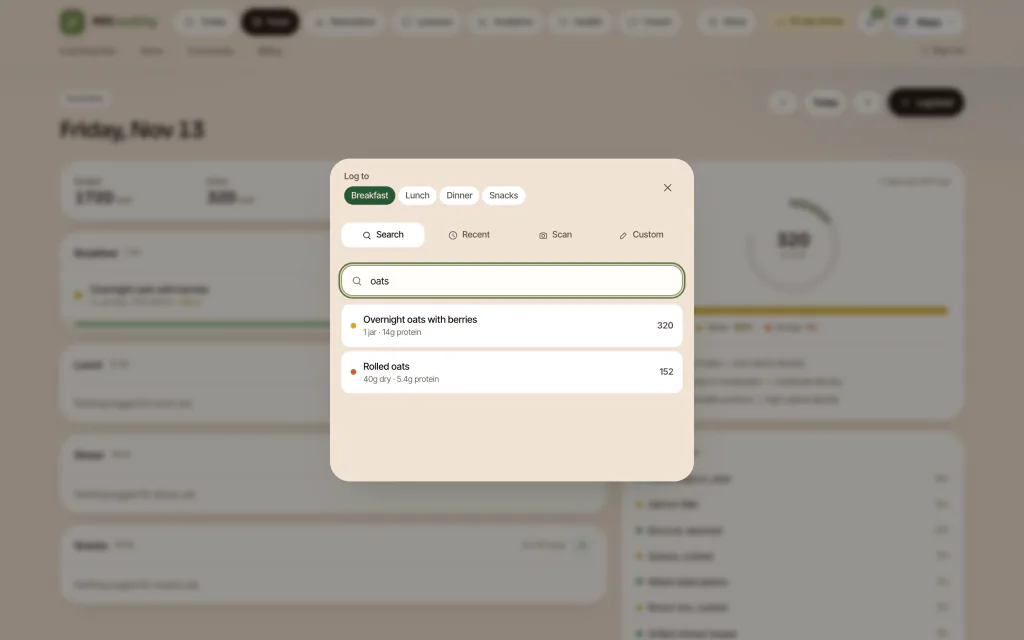
A catalog of thousands of foods is overwhelming without guidance. A simple three-band color system, such as green, yellow and orange for calorie density, lets a member judge a food before logging it. MXHealthy shows the band on the search result itself, which turns the catalog from a lookup table into a lightweight teaching tool. It also gives coaches shared vocabulary: “choose more green foods this week” is easier to say than “lower your average calorie density.”
Portions and Units: Where Trust Is Won or Lost
Ask people why they quit calorie counters and the answer is rarely the interface. It is that logging “one bowl of dal” felt like guessing, and guessing felt pointless. Portions are the part of the catalog members touch most, so they deserve their own design pass.
Household Units Beat Grams
Most members do not own a food scale. Offer household units first (a cup, a spoon, a piece, a slice, a bowl) and keep grams as an option for people who weigh food. Each unit needs a stored gram equivalent per food, because a cup of cooked rice and a cup of leafy greens weigh very differently. If a unit has no stored equivalent, hide it rather than guess.
A Quick Multiplier Beats a Long Picker
Offer a serving multiplier in small steps, for example quarter-step increments, so “one and a half” or “three quarters” takes one tap. Pair it with sensible defaults per food: one roti, one egg, one banana. The fewer taps between finding a food and saving the log, the more days a member completes, and completed days are what drive retention.
Be Honest About Label and Recipe Error
Nutrition values are estimates. Packaged-food labels round and allow tolerances, home recipes vary with oil and cook, and a “medium” apple is a guess. The US Food and Drug Administration explains that a label’s calories and nutrient amounts apply to one stated serving, so eating two servings doubles every figure. Design around that fact: show the serving the numbers refer to, let members scale it, and avoid false precision such as displaying decimals on calories.
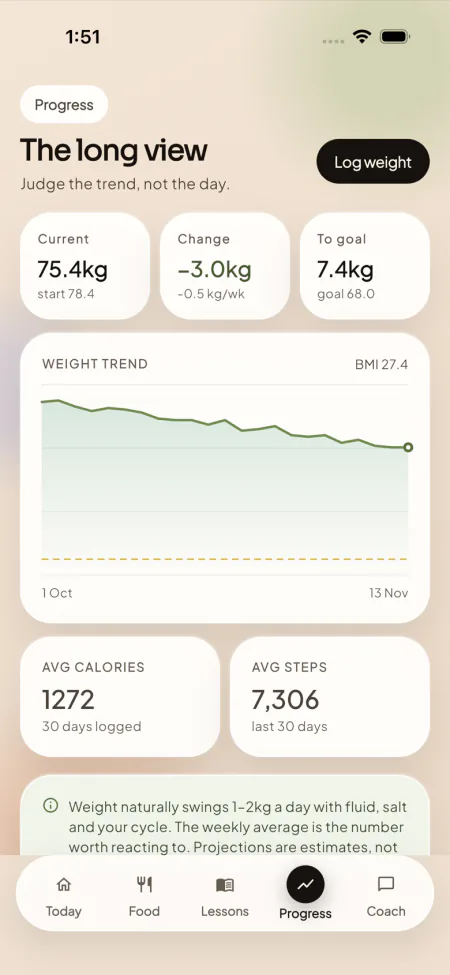
Honest framing also protects your brand. A progress screen that calls a projection an estimate, not a promise, sets the right expectation. MXHealthy words its progress and body-measurement screens this way, which keeps the product on the side of general wellness guidance rather than medical claims.
Six Ways to Log a Meal, and When Each One Wins
Logging effort decides whether a member keeps a streak. No single input suits every moment, which is why modern calorie counters offer several. The practical question for a builder is which inputs to ship first and what each one needs behind it.
| Input | Best moment | Needs behind it | Main risk |
|---|---|---|---|
| Text search | Anything in the catalog | Fast search over names, brands and categories | Slow or noisy results frustrate on the first try |
| Barcode scan | Packaged foods | Exact barcode matches in the catalog | Unmatched barcodes if the catalog is thin |
| Photo | Plated meals, restaurant food | An AI provider key and a confirmation screen | Wrong guesses on mixed dishes |
| Typed or spoken description | Quick entries such as two eggs and toast | An AI provider key and text parsing | Ambiguous quantities |
| Label scan | Package without a barcode match | An AI provider key and image capture | Smudged or foreign-language labels |
| Custom food | Home recipes, local dishes | Moderation for member-added foods | Duplicates and bad macros |
Two principles hold across all six. First, search and custom foods are the dependable base, because they work without any external service. Second, every AI-assisted input must end in a confirmation step. The model proposes items and amounts, the member edits or approves, and only then does the entry save. That keeps errors visible and keeps the member in control of their own diary.
In MXHealthy, text search, barcode scanning on mobile and custom foods are built in, while photo analysis, typed or spoken descriptions and label scanning work once the operator connects an AI provider key. That split is worth copying in any build: the core diary never depends on a third party, and the clever inputs switch on when the key is present.
Frequent Foods and Add-From-Plan Shortcuts
Beyond new inputs, the biggest speed gain is not typing at all. People eat the same breakfast most days, so a recent and frequent-foods list can cut a log to a single tap. If your app also generates weekly meal plans, add a button that logs a planned meal as eaten. Comparing planned against eaten on the same day key gives coaches a clean adherence signal with no extra member effort.
The Budget Maths: Resting Energy, Activity and Macros
The budget is the number a member sees first, so it has to be defensible. The standard approach has three steps: estimate resting energy, scale it for activity, then adjust for the member’s goal. Each step should use a published method that you can cite and a coach can explain.
Step 1: Estimate Resting Energy
A widely used choice is the equation from a 1990 study of 498 healthy adults, reported in the American Journal of Clinical Nutrition. It uses weight, height, age and sex. In metric units, resting energy equals 10 times weight in kilograms, plus 6.25 times height in centimeters, minus 5 times age in years, then plus 5 for men or minus 161 for women. The same paper reported that the older 1919 Harris-Benedict equations overestimated measured resting energy by 5 percent.
A worked example shows how simple the arithmetic is. For a 30-year-old woman who is 165 cm tall and weighs 70 kg: 700 plus 1,031 minus 150 minus 161 gives roughly 1,420 calories of resting energy per day.
Step 2: Scale for Activity
Multiply resting energy by an activity factor chosen from the member’s answers. A common set of factors runs from about 1.2 for a mostly seated day up to about 1.9 for very heavy training. For the woman above, a lightly active factor of 1.375 gives around 1,950 calories to maintain her current weight. Your goal adjustment then moves that number up or down by a modest, explainable amount, with a floor that the app never goes below.
Step 3: Split Into Macros
Macros follow from energy values per gram. The Food and Agriculture Organization lists the general Atwater factors as 4 calories per gram for protein, 9 for fat and 4 for carbohydrate. Choose a split, then convert. For a 1,700-calorie budget at 30 percent protein, 40 percent carbohydrate and 30 percent fat, that is roughly 128 g of protein, 170 g of carbohydrate and 57 g of fat.
Show the member the grams, not only the percentages, because grams are what a food label reports. Add water and step targets beside the calorie ring so the day view feels like a plan rather than a single number.
Store the Result, Do Not Recompute It
One architecture rule prevents many support tickets: calculate targets at assessment time and store them as columns. If you recompute on every page load from current weight, the budget drifts every time the member logs a new weigh-in, and old days no longer match their original targets. When a coach changes a target, record who changed it and why. MXHealthy stores the four targets (calories, macro split, water and steps) from its 12-question assessment, and the operator console records changes with an audit trail.
These numbers are planning tools. Show them with plain wording that they are general guidance and that members with a medical condition should ask a qualified professional before changing how they eat.
Offline Logging and Sync
Food gets eaten in canteens, trains and basements, which is exactly where mobile data fails. If logging needs a live connection, members will remember meals later and log them badly, or not at all. An offline-capable diary is therefore a retention feature, not a technical nicety.
The pattern is well documented. Flutter’s architecture guide on offline-first apps recommends that the repository be the single source of truth, that writes go to local storage first, and that a flag tracks which changes still need uploading. A background task then sends pending changes and marks them synced.
Decisions to Make Before You Build
- What works offline? The minimum is viewing today’s diary and logging from recent, frequent and custom foods. Full catalog search offline means shipping a local slice of the catalog.
- How do conflicts resolve? If a member edits one day on a phone and on the web, decide whether the latest edit wins or whether entries merge. Merging by entry, not by day, avoids losing meals.
- How does the member know? Show a quiet pending marker on unsynced entries and a clear synced state afterwards, so totals never look wrong.
- What about AI inputs? Photo and description logging need a server, so queue the image or text and resolve it when the network returns, asking for confirmation then.
If your members log in places with weak signal, an offline queue with these conflict rules can be added to MXHealthy’s Flutter apps as scoped custom work.
Hindi, Rupees and the India Payment Stack
An app that wants Indian members cannot treat language and payments as polish. Both decide whether a first-time user finishes onboarding and whether a free member ever pays.
Language Is More Than Translation
Translating labels is the easy ten percent. Real Hindi support also means fonts that render Devanagari cleanly at small sizes, layouts that survive longer strings, and search that copes with how people actually type. A member may type a food in Hindi script, in Roman letters, or as a mix, and the catalog should find it either way. Store alternate names and transliterations on foods so the search box meets members where they are.
MXHealthy ships with English and Hindi, and Indian foods are part of the catalog. If you later need Tamil, Telugu, Bengali, Marathi, Arabic or Spanish, regional language packs are available as an add-on, so the base product stays simple and each extra language is scoped and priced on its own.
Rupee Checkout Is a Conversion Feature
Payments are where many global templates fail in India. Rupee payments through UPI-style apps are an everyday habit for Indian members, and a subscription flow that accepts only international cards asks them to abandon that habit at the exact moment they decide to pay.
The ready-made platform accepts rupee payments through UPI-style Indian checkout and takes card payments through Stripe, with plan tiers, annual pricing and trial days set by the operator at runtime. The processor holds every card number; MXHealthy stores only the provider’s reference for each payment. On the coach side, monthly settlements list each line, the operator approves them, and payouts go out through the connected Stripe Connect account on a schedule the operator sets.
| Area | Minimum for India | Where teams usually slip |
|---|---|---|
| Language | Hindi and English with a one-tap switch | Translating the UI but not food names or search |
| Foods | Home dishes, regional staples and common portions | Treating packaged foods as the whole catalog |
| Payments | Rupee checkout alongside card payments | Card-only billing and no annual plan in rupees |
| Support | Hindi-capable coaches or templates | Coaches who cannot read the member’s diary language |
Coach Chat, the AI Coach and the Operator Console
A diary tells members what happened. Coaching tells them what to do next. This is the layer that usually separates a free tracker from a paid plan, and it is where build effort quietly doubles, because it adds two more user roles and a lot of workflow.
An AI Coach That Reads the Diary
An AI coach is useful when it answers from the member’s own day: what was eaten today, what budget is left, how protein is tracking and how the weight line is moving. A short panel listing what the coach can see builds trust, and suggested prompts such as asking why hunger spikes mid-afternoon help members who do not know what to ask. Cap AI calls and tokens per member per day, with a friendly message at the limit, so costs stay predictable. Remember that an AI coach gives general guidance and is not medical advice, and say so in the app.
Human Coaches in the Same Thread
On a coaching tier, human replies should sit in the same thread as AI replies, so the member sees one conversation. Coaches need one screen that opens a client’s diary, targets and message history before a reply goes out, a queue that surfaces members who have gone quiet, and dated follow-up tasks. Without that desk, coaching becomes a chat inbox and does not scale. If you also want to build behavior-change lessons around the diary, our companion guide to building a behavior-change coaching app covers the curriculum side.
Coach Pay Is Part of the Product
Coaches are paid in different ways, and your admin console has to support whichever you choose. MXHealthy supports four pay models: a monthly retainer, a rate per client, a rate per session and commission. Rate cards drive itemized monthly settlements. Building this late is painful because it touches billing, attribution and reporting at once.
The Operator Console
Behind the apps sits a console where the business actually runs. In MXHealthy it has 14 areas, covering members, plans and prices, trials and coupons, the store and orders, coach rates and settlements, AI routing per task, feature switches and an audit trail. The point of building it early is that price, trial length or AI settings can change without a new app release. The founders who regret their first build usually skipped this and hard-coded business rules into the app.
Optional Extensions
Some capabilities sit beyond the core, and it is cleaner to treat them as separate modules. Wearable adapters for steps and sleep are an add-on. Smart scale and glucose monitor sync is an add-on. Live video coaching and group classes are an add-on, as is a video lesson studio and a corporate wellness portal with employer plans and team challenges. Each is scoped and priced in writing, so the base product launches without carrying work you may not need on day one.
Founder Decision Signals: Is Your Calorie Counter Ready to Build?
Your Food Source Is Chosen
Do you know whether your catalog will be curated by your team, imported from a licensed database, or both, and who owns fixing a wrong entry?
Portions Match Real Plates
Can a member log one katori, one roti or half a serving in two taps, or does every meal start with a gram scale?
The Budget Rule Is Written Down
Is there one agreed formula for calories and macros, stored per member, that your coaches can explain in a sentence?
Logging Works Without Signal
Do you know what a member sees when a log is saved on a train with no network, and when it syncs?
Rupees and Hindi Are Day One
Will your first buyers pay in rupees and read the app in Hindi, or is that a phase-two promise?
Someone Owns the Coach Desk
Is there a named person who reads the at-risk queue every morning once members start to lapse?
Security and Data Controls for a Diary App
A food diary with weight, sleep and private coach messages is personal data, so the controls need to be dull and reliable rather than clever. These are the controls to specify for any build.
- One authorization path. The server decides who is calling from its own session, trusting nothing the client claims, and each action re-checks the role.
- Row-level scoping. A member reads their own records alone, and a coach reads just the clients assigned to them.
- Parameterized SQL. Every query uses bound parameters, with no string-built SQL anywhere.
- Safe sessions. HTTP-only, same-site session cookies, with no tokens in browser storage.
- Hashed passwords. A modern key derivation with a per-record salt, and no plaintext stored.
- Card data stays out. The payment provider holds card details; your database keeps references.
- Data rights. Members can download their data, and an account closure request waits through a short cooling-off window.
MXHealthy ships with every control on this list in place. The operator’s go-live checklist then covers the deployment itself: retire or re-password the demo accounts, set request limits at the proxy in front of the app, and choose a hosting region close to your members. Your team is also responsible for curating foods, reviewing health screening escalations and choosing payment and AI providers.
Custom Build Timeline Versus the 6-Day Route
Founders usually ask the same question once the layers are clear: how long will this take? The honest answer depends on whether you are building the layers or configuring them. The table below compares the workstreams under both approaches.
| Workstream | Build from scratch | Ready-made base plus configuration |
|---|---|---|
| Food catalog and portions | Schema, import tooling, moderation, unit conversion | Included, with Indian foods in the catalog |
| Logging inputs | Search, scanner, AI capture, confirmation screens | Included, with AI inputs live once a provider key is added |
| Budget engine and assessment | Formula, onboarding flow, stored targets | Included, with a 12-question assessment |
| Android and iOS apps plus web app | Two clients or one cross-platform codebase, store setup | Included together, with store review handled separately |
| Coach portal and admin console | Roles, caseload, payouts, pricing controls | Included, with 14 console areas |
| Billing in rupees and cards | Gateway integration, webhooks, invoices | Included, configured with your accounts |
| Hindi and English | Localization, fonts, search handling | Included |
| Custom features on top | Scoped per feature | Scoped per feature, 15-30 days for most, up to 45-60 for larger scope |
Two routes follow from that. If your product is the standard calorie-and-coaching model, start from the ready-made base: Miracuves takes it live in 6 working days of Miracuves work, with app store review as a separate step governed by the stores. If your differentiator is a new workflow, such as a clinical data feed or an unusual coach marketplace, scope it as custom work on top of the base. That way you pay for the new part and not for rebuilding the diary.
Whichever route you pick, plan the non-code steps early: developer accounts for the app stores, a payment account in your company name, your hosting and database choice, and your first batch of foods, recipes and lessons. Those items, not code, are what delay most launches. For a buyer’s view of what to look for in a packaged product, see our guide to what to check in a calorie-and-coaching script before you buy.
Four Mistakes That Add Months
- Treating the food catalog as a data import instead of an ongoing editorial job.
- Computing budgets on the fly so targets change underneath members.
- Launching AI logging without a confirmation step, then fielding complaints about wrong entries.
- Postponing rupee checkout and Hindi until after launch, then losing the first cohort of members.
How Miracuves Helps You Launch a Calorie Counting App
Miracuves delivers MXHealthy, its weight-management and nutrition coaching product, as your own branded app. The handover bundles Android and iOS member apps, a browser edition, screens where coaches run their caseload, a 14-area back office for the owner, and the full source code. The tech stack is Next.js, TypeScript, PostgreSQL and Flutter, with Stripe for cards and rupee checkout for Indian members. The app runs in English and Hindi, and Indian foods are part of the catalog.
The ready-made calorie tracking and coaching app gives you the HealthifyMe-style experience at a fixed one-time price of $3,399, with no revenue share and no per-seat fee. It goes live in 6 working days of Miracuves work, and store review runs separately. Custom work on top takes 15-30 days for most scopes and 45-60 days for larger ones.
Every build also carries support in three stages: 60 days of dedicated platform guidance, 6 months of priority bug resolution and 12 months of continuous product evolution. Paid add-ons cover wearable adapters, smart scale and glucose monitor sync, live video coaching and group classes, a video lesson studio, a corporate wellness portal and regional language packs, each scoped with you in writing before we build.
For the wider picture of health and wellness products we build, browse our healthcare solutions. If you want to see the diary, coach desk and console working before you decide, book a walkthrough and we will map each screen to your market and coach model.
Final Thoughts
Building a calorie counter looks simple from the outside and layered from the inside. The founders who match what HealthifyMe members expect treat the food catalog as a living product, design portions around real plates, store budgets instead of recomputing them, choose a clear rule for offline sync, and put Hindi and rupee checkout in the first release rather than the second.
You do not have to build every layer yourself. A proven base with source code in your hands gets you to a live, branded app in days, and your custom budget can go to what makes your service different. Miracuves is ready to help you decide where that line falls, with a fixed price, a clear timeline and support that continues after launch.
Frequently Asked Questions
How accurate does a calorie counting app need to be?
Accuracy has two parts: the arithmetic and the data. The arithmetic can be exact, because calories follow from protein, carbohydrate and fat amounts. The data cannot, because label values, home recipes and portion guesses all carry error. Aim for consistent logging with visible portions and let members correct entries, rather than promising precision the food data cannot support.
Which logging methods should a calorie counting app support at launch?
Offer text search first, then a barcode scan for packaged foods, photo analysis, a typed or spoken description, label scanning and custom foods. Search and custom foods are the dependable base. Photo, description and voice methods add speed but need an AI provider key and a confirmation step so the member approves every guess before it is saved.
How do you calculate a daily calorie budget in an app?
Estimate resting energy from sex, age, height and weight with a published equation, multiply by an activity factor, then adjust for the member goal and store the result. Split the budget into protein, carbohydrate and fat using energy values per gram. Treat the output as a planning number that a coach or the member can adjust, not as a prescription.
Can a calorie counting app work offline?
Yes, if you design for it. Save each log to local storage first, mark it as unsynced, and upload it when the connection returns. The hard parts are conflict handling when two devices edit one day, and showing the member a clear synced or pending state so totals never look wrong.
Does an app need Hindi and rupee payments to succeed in India?
For a mass-market audience, both lower friction a great deal. Members who think about meals in Hindi and pay through UPI-style rupee checkout convert and renew more easily than those pushed through a card-only English flow. Plan them for the first release, and treat further regional languages as later additions.
How long does it take to build a calorie counting app?
A fully custom build is a multi-month project for most teams, because food data, logging, coaching, billing and two mobile apps all need work. A ready-made platform removes most of that. Miracuves delivers the ready-made build live in 6 working days of Miracuves work, plus store review time, while custom additions are scoped separately.
What does a coach portal add to a calorie counting app?
It turns a diary into a service. A coach opens a member’s diary, targets and messages first, a queue highlights people who have gone quiet, and dated tasks keep every check-in on schedule. That coaching layer is usually what supports a paid plan above the free tier.
Can I add wearables, video classes or more languages later?
Yes. Each of these is a paid add-on on top of the ready-made build, scoped and priced in writing before work starts: wearable adapters, smart scale and glucose monitor sync, live video coaching and group classes, a video lesson studio, a corporate wellness portal and regional language packs. The base product stays lean because every extension is its own add-on.
Is the AI coach in a calorie counting app a replacement for a dietitian?
No. An AI coach answers from the data the member has logged and offers general guidance, and it is not medical advice. Members with a medical condition should still speak to a qualified professional. Keep clear wording in the app and let human coaches handle anything beyond everyday food and habit questions.
Miracuves is an independent software development company. We are not affiliated with, connected to, sponsored by, or endorsed by any company or product named in this article.
Terms such as “X Clone” are used descriptively. It is how the software industry refers to building a platform with functionality comparable to a known service, and how clients search for it.
The entire design and codebase of our products is built by our own team. Our products contain no code, design, graphics, or content originating from any third-party website or applications.
All third-party names and marks referenced in this article are the property of their respective owners, referenced solely to identify the services discussed.