
Key Takeaways
- Digital Freight Marketplace Tracking should connect GPS location, geofencing, dispatch, shipment milestones, POD, invoicing, and admin reporting.
- GPS shows where the truck is, while geofencing converts location data into meaningful arrival, departure, delay, and delivery events.
- Tracking should stay connected to one load record instead of operating as a separate map or external system.
- Automated geofence events reduce repetitive driver check-ins and help dispatchers focus on shipment exceptions.
- Permission-based tracking views can improve shipper visibility without exposing unnecessary driver, carrier, or commercial information.
Tracking Signals
- Pickup and delivery geofences can automatically create timestamped arrival and departure milestones.
- Route deviation, long dwell time, driver inactivity, and missing POD should trigger actionable exception alerts.
- Public tracking links should show shipment progress while restricting sensitive marketplace and driver data.
- Admin dashboards should turn raw GPS positions into load timelines, ETA status, geofence events, and exception flags.
- Tracking reliability should account for weak connectivity, background location permissions, device status, and interrupted GPS updates.
Real Insights
- Freight visibility becomes valuable when location data triggers operational actions instead of only displaying a moving map marker.
- One connected load record makes pickup, transit, delivery, documents, POD, invoicing, and disputes easier to audit.
- Geofence automation does not replace dispatchers; it reduces routine follow-up so they can focus on exceptions.
- Connecting delivery location, timestamps, and POD creates stronger evidence for billing and dispute resolution.
- The strongest flow is: assign load → activate GPS → detect pickup arrival → record departure → monitor transit → detect exceptions → confirm delivery geofence → upload POD → complete shipment → prepare invoice.
A Freight Marketplace is not complete when a shipper posts a load and a carrier accepts it.
That is only the match.
The real operational value begins after the load is booked. The shipment must move from pickup to transit to delivery, and every party wants visibility without chasing the driver through phone calls, WhatsApp messages, spreadsheet notes, or disconnected TMS records.
This is where GPS tracking and geofencing become critical.
GPS tracking shows where the truck is. Geofencing tells the system when the truck enters or exits a defined location, such as a pickup point, delivery site, warehouse, yard, port, plant, or rest area. Together, they help a Digital Freight Marketplace Tracking platform create automated milestone updates, reduce manual check-ins, improve dispatcher control, and give shippers better confidence from pickup to delivery.
For startups building a freight technology product, visibility should not be treated as a map feature. It should be designed as an execution layer connected to load records, dispatch workflows, documents, proof of delivery, alerts, payments, and admin reporting.
Why Visibility Matters After Freight Matching
Many freight platforms focus heavily on the marketplace layer: posting loads, searching trucks, comparing bids, negotiating rates, and assigning carriers.
That is important, but it does not solve the full logistics problem.
If you are still mapping the basics of load posting, carrier discovery, and broker-carrier matching, this freight load board guide explains how digital freight boards work before visibility tools like GPS tracking and geofencing come into play.
Once the load is booked, the operator still needs to know:
- Did the driver reach the pickup site?
- Did loading start on time?
- Has the vehicle departed?
- Is the truck following the expected route?
- Is there a delay near a toll, port, warehouse, or border?
- Did the driver reach the delivery geofence?
- Was proof of delivery uploaded?
- Is the invoice ready to be raised?
- Can the shipper see progress without calling dispatch?
For a deeper explanation of how large freight boards are used by truckers, fleets, and brokers, you can also read this guide on how freight load boards work.
Without visibility, the platform becomes a digital listing board rather than an execution system.
For founders, the difference matters. A Freight Marketplace that only helps users find loads may attract initial activity, but a platform that tracks the freight after booking creates stronger operational trust.
GPS Tracking: The Live Location Layer of a Freight Marketplace
GPS tracking allows the platform to receive vehicle or driver location updates during the trip.
Depending on the product design, location data may come from:
- Driver mobile app
- Vehicle GPS device
- Telematics system
- ELD integration
- Carrier fleet system
- Third-party tracking API
- SIM-based or network-assisted tracking where applicable
In a digital freight marketplace, GPS tracking should not be limited to showing a moving dot on a map. It should update the shipment record, dispatcher dashboard, shipper view, carrier app, and notification system.
Founders who want to connect tracking with dispatch, load management, carrier tools, POD, and admin workflows can review this freight marketplace feature breakdown.
A strong GPS layer helps answer three operational questions:
- Where is the truck now?
- Is the shipment moving according to plan?
- Does any party need to take action?
The third question is the most important. Visibility is only useful when it helps the business respond faster.
Geofencing: Turning Location Into Automated Milestones
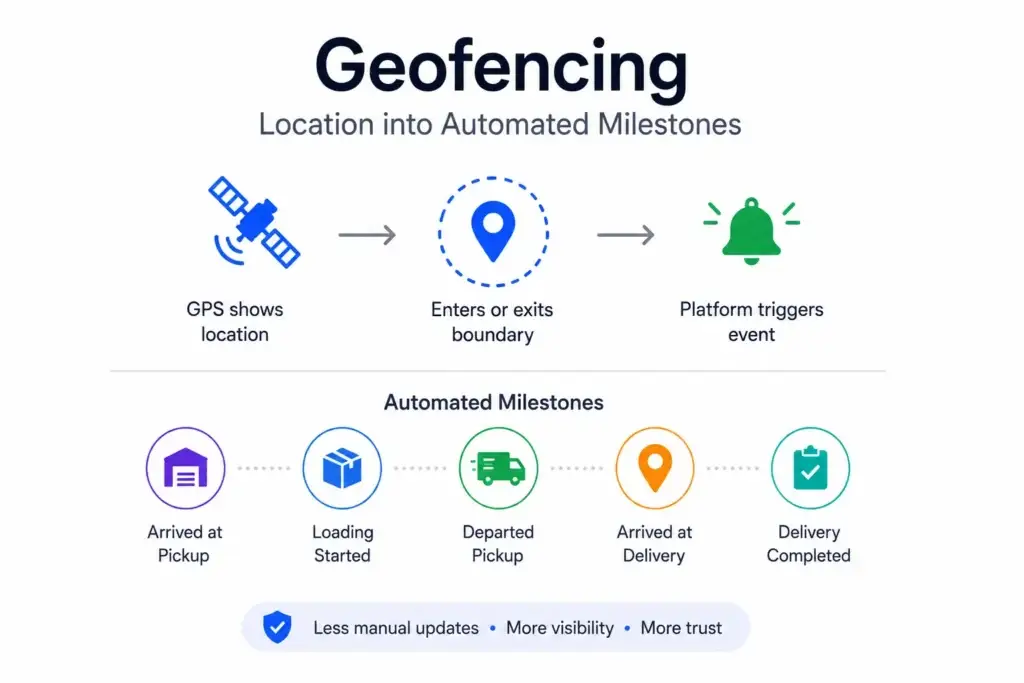
GPS shows location. Geofencing turns location into meaning.
A geofence is a virtual boundary around a physical place. When the driver or vehicle enters or exits that boundary, the platform can trigger an event.
For freight operations, common geofence locations include:
- Pickup facility
- Delivery facility
- Warehouse
- Port
- Rail terminal
- Factory gate
- Distribution center
- Fuel stop
- Maintenance yard
- Toll zone
- Restricted area
- Cold-chain checkpoint
- Customer delivery location
Geofencing helps the platform automate status changes such as:
- Arrived at pickup
- Loading started
- Departed pickup
- Arrived at stop two
- Route deviation detected
- Long dwell time detected
- Arrived at delivery
- Delivery completed
- Proof of delivery pending
- Shipment ready for invoicing
This reduces dependence on manual driver updates and improves trust in the shipment timeline.
How GPS and Geofencing Improve Freight Visibility
| Visibility Layer | What It Tracks | Business Value | Founder Impact |
|---|---|---|---|
| GPS Tracking | Driver or vehicle location during transit. | Gives dispatchers and shippers live or periodic shipment visibility. | Reduces manual status calls and improves operational confidence. |
| Pickup Geofence | Arrival and departure from pickup location. | Creates timestamped pickup milestones. | Helps prove whether the carrier arrived on time. |
| Delivery Geofence | Arrival at consignee or destination location. | Confirms delivery-site presence before POD upload. | Supports dispute resolution and invoice readiness. |
| Route Deviation Alerts | Unexpected movement away from planned route. | Helps detect delays, risk, theft, or operational exceptions. | Improves proactive intervention before delivery failure. |
| Public Tracking Link | Controlled shipment progress shared with outside parties. | Lets customers check shipment status without platform login. | Reduces dispatcher workload and improves shipper experience. |
From Pickup to Delivery: The Ideal Tracking Flow
A good Freight Marketplace should track the load as one continuous operational record.
Here is a practical pickup-to-delivery flow:
- Shipper posts a load with pickup and delivery details.
- Carrier bids or accepts the load.
- Dispatcher assigns a driver and vehicle.
- Driver receives route, pickup details, and instructions.
- GPS tracking starts when the trip is activated.
- Pickup geofence detects arrival.
- Platform records pickup arrival timestamp.
- Driver confirms loading or uploads pickup documents if required.
- Pickup departure geofence triggers in-transit status.
- Platform monitors route movement and delay signals.
- Delivery geofence detects arrival at destination.
- Driver uploads proof of delivery.
- Shipment status moves to delivered.
- Invoice is raised against the same load record.
- Admin, shipper, broker, and carrier can review the complete trip history.
The key is continuity.
The load should not start in one system, get tracked in another, and close in a third. When tracking, documents, dispatch, POD, and invoicing stay connected, the platform becomes easier to audit and easier to operate.
Why One Load Record Matters
Freight visibility becomes weak when data is scattered.
A common broken workflow looks like this:
- Load posted in a marketplace
- Negotiation handled by phone
- Driver assigned in a spreadsheet
- Location tracked in a GPS tool
- Proof of delivery sent through messaging
- Invoice created in accounting software
- Disputes handled manually
This creates gaps.
A better digital freight marketplace keeps everything connected to one load record:
- Pickup and delivery legs
- Carrier bid
- Counter-offer history
- Driver assignment
- Vehicle assignment
- GPS positions
- Geofence events
- Route history
- Delay alerts
- Proof of delivery
- Invoice
- Payment status
- Admin notes
- Activity logs
This structure helps operators answer shipment questions quickly.
Instead of asking multiple teams for updates, the platform can show what happened, when it happened, where it happened, and who took action.
How Geofence Alerts Reduce Manual Dispatch Work
Dispatch teams spend a lot of time asking for updates.
“Have you reached pickup?”
“Has loading started?”
“Are you near the delivery point?”
“Why are you delayed?”
“Can you send POD?”
Geofence alerts reduce this repetitive work.
When the driver enters the pickup radius, the platform can automatically notify the dispatcher. When the driver leaves, the load can move to in-transit. When the driver reaches the delivery location, the system can ask for proof of delivery.
This does not remove the dispatcher. It makes the dispatcher more effective.
Instead of manually collecting routine updates, the dispatcher can focus on exceptions:
- Driver did not reach pickup on time
- Truck stayed too long at loading site
- Vehicle moved away from planned route
- Delivery location reached but POD missing
- Driver stopped unexpectedly
- Temperature or compliance issue detected
- Customer needs proactive notification
For a growing Freight Marketplace, this is where operational leverage begins.
Public Tracking Links Improve Shipper and Customer Experience
Not every person who needs shipment visibility should have a platform login.
A shipper, consignee, warehouse manager, broker customer, or support team member may only need a controlled tracking view.
A public tracking link can show:
- Current shipment status
- Last known location
- Pickup milestone
- Transit progress
- ETA
- Delivery milestone
- Driver contact rules, if allowed
- Proof of delivery status
The link should be permission-based and limited. It should not reveal unnecessary carrier, driver, rate, or marketplace data.
This is useful because the biggest source of frustration in freight is uncertainty. Even when a load is moving correctly, lack of visibility creates calls, messages, and unnecessary operational noise.
A secure tracking link helps reduce that noise.
Founder Decision Signals for Freight Visibility
Speed
If your marketplace needs faster operational adoption, build visibility into the first version instead of treating tracking as a later add-on.
Trust
If shippers cannot see where freight is, they will keep calling brokers and dispatchers. Tracking builds confidence after booking.
Scalability
If load volume grows, manual status updates become expensive. Geofence automation helps teams manage more shipments with less repetitive follow-up.
Revenue
If your platform monetizes subscriptions, carrier tools, premium tracking, or broker workflows, shipment visibility can become a strong value driver.
What GPS Tracking Should Show in the Admin Dashboard
The admin dashboard should not overwhelm users with location points. It should make the trip understandable.
A useful dispatch and admin view should include:
- Active loads on map
- Assigned driver and vehicle
- Last known location
- Pickup arrival and departure
- Delivery arrival and departure
- ETA status
- Route deviation alerts
- Stop duration
- Speed violations where applicable
- Geofence event logs
- Tracking link status
- Driver app status
- POD upload status
- Exception flags
- Load timeline
- Admin intervention notes
This helps the operator monitor the marketplace without opening every load manually.
For example, an admin should be able to filter by “late pickup,” “POD missing,” “geofence arrival without departure,” or “driver inactive.” These views turn raw GPS data into operational intelligence.
GPS Tracking, Proof of Delivery, and Invoice Readiness
Proof of delivery is stronger when it is connected to location and time.
A basic POD upload only says a document was submitted.
A stronger workflow can show:
- Driver reached delivery geofence
- Arrival timestamp was recorded
- POD was uploaded from the delivery area
- File passed basic validation
- Delivery status changed
- Invoice was generated against the load
- Admin or broker can review the complete chain
This matters during disputes.
If the shipper questions delivery timing, the platform can show delivery geofence arrival, POD timestamp, and load activity history. If a carrier claims detention or delay, the platform can show dwell time at pickup or delivery.
That visibility can support cleaner billing and stronger operational trust.
How GPS and Geofencing Improve Broker and Carrier Trust
Freight marketplaces depend on trust between multiple parties.
Shippers want reliable carrier execution. Brokers want fewer check calls. Carriers want clear records of pickup, detention, delivery, and payment readiness. Drivers want fewer interruptions while moving freight.
GPS and geofencing help all sides:
| Marketplace Participant | Visibility Benefit |
|---|---|
| Shipper | Can monitor shipment movement and reduce uncertainty. |
| Broker | Can provide proactive customer updates and reduce manual check calls. |
| Carrier | Can prove arrival, departure, route progress, and delivery activity. |
| Dispatcher | Can manage exceptions instead of chasing every routine update. |
| Driver | Can focus on the trip while automated milestones update the platform. |
| Platform Operator | Can audit load movement, delays, documents, and user actions. |
Visibility turns the freight marketplace from a matching tool into an operating system.
Security, Privacy, and Permission Rules for Freight Tracking
Location data is sensitive.
A Freight Marketplace should not expose driver or vehicle movement without clear permission rules. The platform must decide who can see what, when, and for how long.
Important controls include:
- Role-based access control
- Permission-based tracking links
- Limited tracking visibility after trip completion
- Secure API integration
- Encrypted data transfer
- Audit logs for tracking access
- Driver consent workflows where required
- Admin access controls
- Customer-facing tracking views with restricted data
- Data retention rules
- Location-sharing status indicators
The goal is to create visibility without exposing unnecessary private or commercial information.
For example, a shipper may need shipment progress and ETA. They may not need full driver identity, carrier cost, bid history, or other loads on the route.
Common Mistakes Startups Should Avoid
Treating GPS as Only a Map Feature
A map is useful, but the real value comes from connected events: pickup arrival, departure, route deviation, delivery arrival, POD upload, and invoice readiness.
Separating Tracking From the Load Record
If location data lives outside the shipment record, the platform becomes harder to audit. Tracking should connect to dispatch, documents, billing, and admin history.
Sending Too Many Alerts
Every location event does not need a notification. The platform should prioritize actionable exceptions, not create alert fatigue for dispatchers and shippers.
Ignoring Driver App Reliability
If the driver app loses permissions, battery, signal, or background location access, tracking becomes unreliable. The product should handle offline and low-connectivity scenarios.
How Freight Visibility Supports Monetization
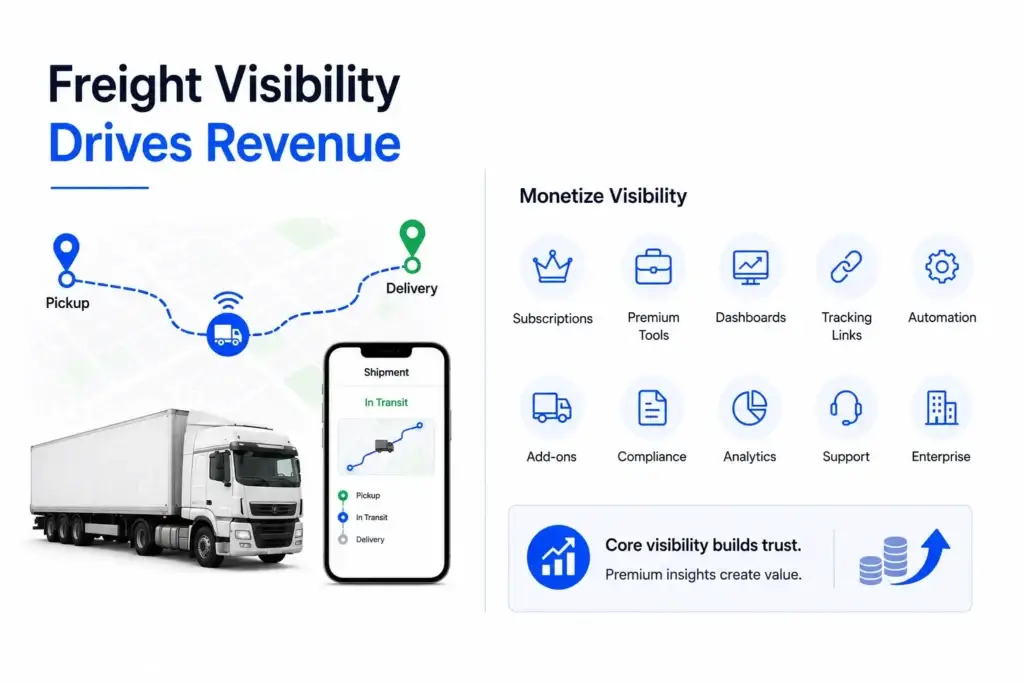
GPS tracking and geofencing can also support revenue.
Visibility can also strengthen monetization when paired with subscriptions, premium carrier tools, broker dashboards, and shipper-facing tracking features. Miracuves explains this in its freight platform business model.
A marketplace operator can package visibility as part of:
- Carrier subscription plans
- Broker premium tools
- Shipper tracking dashboards
- Paid public tracking links
- Dispatch automation modules
- Fleet management add-ons
- Compliance and document packages
- Performance analytics
- Premium support workflows
- Enterprise shipper accounts
This does not mean every visibility feature should be monetized separately. The platform needs a clear business model.
For early-stage founders, the stronger move is usually to make core shipment visibility part of the platform experience. Advanced analytics, extended tracking history, branded tracking pages, reporting exports, or API access can become premium layers later.
Where a Ready-Made Freight Platform Foundation Helps
Building a Freight Marketplace from zero is not only about posting loads. It also requires user roles, load records, bidding, counter-offers, dispatch, route assignment, GPS tracking, geofence alerts, document uploads, proof of delivery, invoicing, admin control, and reporting.
Startups that need implementation support can also evaluate Miracuves as a freight app development partner for marketplace workflows, GPS tracking, geofencing, dispatch dashboards, POD, and admin control.
A ready-made foundation helps founders avoid rebuilding every operational layer from scratch.
If you are comparing budgets, modules, integrations, and launch scope, this guide on freight marketplace development cost factors can help you understand what affects the final build.
Miracuves provides a freight marketplace and load board solution for businesses that want a launch-ready platform with marketplace, carrier, dispatch, tracking, compliance, and admin workflows. This blog focuses on the visibility strategy, while the solution page remains the commercial destination for product evaluation.
For teams comparing broader implementation routes, Miracuves also offers white-label load board software and logistics app development services for freight, dispatch, delivery, and supply-chain workflows.
Final Thoughts: Freight Visibility Is the Real Post-Booking Advantage
A Freight Marketplace should not stop at the match.
For broader digital transformation across transportation, fulfillment, fleet operations, and supply-chain workflows, explore Miracuves’ logistics and supply chain.
The real platform value appears when the load moves and every party can see what is happening without constant manual follow-up. GPS tracking shows where the freight is. Geofencing confirms important milestones. Dispatch dashboards turn location data into action. Public tracking links reduce uncertainty. POD and invoice workflows complete the shipment record.
For founders, this is the key decision: build a platform that only helps users find freight, or build one that helps them manage freight from pickup to delivery.
The second option creates stronger trust, better operational visibility, and a more defensible product foundation.
For custom workflows across fleet tracking, freight marketplaces, dispatch tools, carrier portals, and supply-chain automation, explore Miracuves’ logistics app development services.
FAQs
What is GPS tracking in a Freight Marketplace?
GPS tracking is the process of collecting driver or vehicle location data during a shipment. In a Freight Marketplace, it helps shippers, brokers, carriers, dispatchers, and admins monitor load movement from pickup to delivery.
How does geofencing improve freight visibility?
Geofencing creates virtual boundaries around pickup points, delivery sites, warehouses, yards, and checkpoints. When a driver enters or exits a geofence, the platform can trigger automated arrival, departure, delay, or delivery milestone updates.
Why should GPS tracking be connected to the load record?
When GPS data is connected to the load record, the platform can keep dispatch, documents, proof of delivery, invoices, route history, and activity logs in one place. This improves auditability and reduces manual reconciliation.
What are public tracking links in freight platforms?
Public tracking links are controlled shipment visibility pages that can be shared with shippers, consignees, or customers who do not need full platform access. They help reduce status calls while protecting sensitive marketplace data.
Can geofencing help with proof of delivery?
Yes. Geofencing can confirm that the driver reached the delivery location before proof of delivery is uploaded. This creates a stronger delivery record with location, timestamp, document, and load history connected together.
What alerts should a freight visibility platform send?
Useful alerts include pickup arrival, pickup delay, route deviation, long dwell time, delivery arrival, missed POD, driver inactivity, speed violations where applicable, and exception-based dispatcher notifications.
Is GPS tracking enough for freight visibility?
GPS tracking is important, but it is not enough on its own. The platform also needs geofence events, load status updates, dispatch workflows, document handling, proof of delivery, notifications, admin controls, and permission-based visibility.
Can Miracuves help build a freight marketplace with GPS and geofencing?
Yes. Miracuves helps founders launch ready-made and white-label freight marketplace platforms with dispatch workflows, GPS tracking, geofencing, public tracking links, proof of delivery, invoicing, admin dashboards, and source-code ownership.
Miracuves is an independent software development company. We are not affiliated with, connected to, sponsored by, or endorsed by any company or product named in this article.
Terms such as “X Clone” are used descriptively. It is how the software industry refers to building a platform with functionality comparable to a known service, and how clients search for it.
The entire design and codebase of our products is built by our own team. Our products contain no code, design, graphics, or content originating from any third-party website or applications.
All third-party names and marks referenced in this article are the property of their respective owners, referenced solely to identify the services discussed.