
Imagine booking a car for an early morning trip. You arrive at the designated parking spot, open your smartphone, and unlock the vehicle without meeting the owner, collecting a physical key, or visiting a rental counter.
That experience depends on more than a mobile application. Behind the scenes, connected hardware, vehicle communication systems, cloud services, and temporary digital permissions work together to authorize access to a physical car.
Keyless car-sharing technology makes contactless vehicle handovers possible by connecting a booking system to compatible telematics hardware or manufacturer-supported vehicle access services. When implemented correctly, this technology helps operators automate pickup and return while maintaining visibility into vehicle access events.
For founders evaluating the underlying software, a car-sharing marketplace foundation manages reservations, renter and owner workflows, and administrative controls, while a separately integrated vehicle-access system handles authorized physical unlocking. These two layers must work together, but they serve different purposes.
However, remote unlocking introduces decisions involving hardware compatibility, connectivity, cybersecurity, permissions, and emergency access. Understanding those decisions is essential before introducing keyless functionality into a shared mobility business.
Key Takeaways
- Hardware telematics connects digital booking permissions with physical vehicle access.
- Remote unlocking can operate through cellular connectivity, Bluetooth Low Energy, or compatible manufacturer APIs.
- Every access request should be verified against an authorized user, vehicle, and permitted booking period.
- Offline access, device compatibility, failed commands, and emergency recovery need to be considered before deployment.
- Keyless vehicle access is an integration project, not simply an unlock button added to an app.
What Is Keyless Car-Sharing Technology?
Keyless car-sharing technology allows an authorized driver to access a shared vehicle using a digital credential, typically managed through a smartphone application.
Instead of requiring a physical key exchange, a platform uses a booking record to determine whether a particular driver should have access to a vehicle at a specific time.
The actual locking or unlocking action is performed through compatible vehicle electronics. Depending on the integration, this may involve an aftermarket telematics device, a digital key controller, a secure vehicle gateway, or a manufacturer-provided remote access service.
The application is therefore only one part of the system. A reliable implementation needs three elements to work together:
- Booking authorization: Confirms who may access the vehicle and when.
- Connected vehicle interface: Delivers permitted commands to compatible vehicle hardware.
- Operational monitoring: Records command outcomes, device status, and exceptions requiring assistance.
Importantly, unlocking the doors is not necessarily the same as enabling the engine to start. Some vehicles require separate immobilizer authorization, while other systems use a securely stored physical key or manufacturer-approved digital credentials.
How Hardware Telematics Connects a Smartphone to a Vehicle
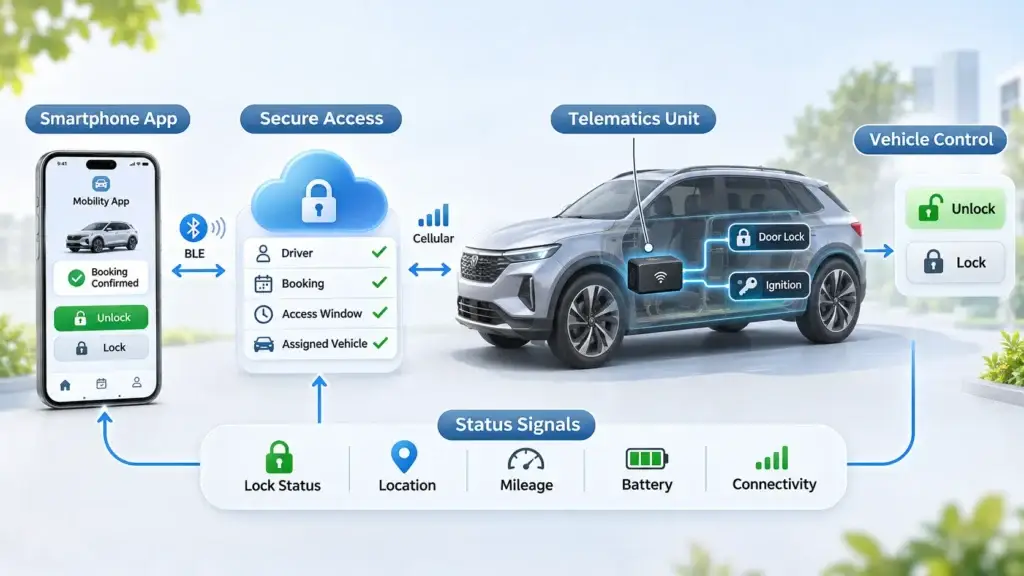
Telematics combines telecommunications with vehicle-related data and electronic control. In a shared vehicle, a telematics control unit may act as the communication bridge between a remote platform and supported vehicle functions.
1. A Vehicle-Compatible Hardware Interface
An aftermarket device may be installed inside an eligible car and connected to supported electronics. Depending on its design and vehicle compatibility, it can interact with central locking, ignition authorization, vehicle signals, or onboard diagnostics.
Not every device supports all these functions. An OBD-connected tracker that reports location and mileage, for example, does not automatically have permission or the electrical interfaces required to unlock doors.
Vehicle compatibility must therefore be validated at the exact make, model, model year, and supported configuration level.
2. A Communication Channel
The device needs a communication path for access commands. Cellular networks are commonly used for cloud-connected remote control, while Bluetooth Low Energy (BLE) can enable short-range interaction between a smartphone and compatible vehicle hardware.
Some vehicle systems support NFC or other digital key technologies. These methods are not interchangeable, and their availability depends on the vehicle, hardware, software, and access provider.
3. A Secure Authorization Layer
The platform must determine whether a person requesting access has an active and valid authorization.
A typical authorization decision considers the driver’s identity, confirmed reservation, permitted access window, assigned vehicle, and any applicable restrictions.
The system then requests an access action through a trusted integration. The vehicle controller or provider validates the command according to its own security model.
4. Vehicle Status and Event Reporting
Where supported, telematics can return information such as door lock status, device connectivity, mileage, location, battery condition, and command acknowledgments.
These signals help operators investigate failed handovers and reconcile trip records. However, a command acknowledgment does not always prove the doors physically changed state. Systems should distinguish between a request being accepted, an action being executed, and the final vehicle state being confirmed.
From Confirmed Booking to Digital Unlock: The Complete Workflow
The most important part of keyless car sharing is coordinating a software reservation with a physical vehicle action.
Consider a driver who reserves a car from 10:00 AM until 2:00 PM.
How a Booking Becomes a Vehicle Unlock
Each stage connects the reservation, driver authorization, and assigned vehicle.
- 01Reservation confirmed
The booking and required checks are completed.
- 02Permission assigned
The eligible driver receives time-limited access rights.
- 03Access window opens
The platform permits an unlock request during the authorized period.
- 04Command transmitted
The trusted access integration communicates with supported vehicle hardware.
- 05Outcome checked
The system reports available confirmation, failure, or pending status.
- 06Trip access maintained
Valid permissions support authorized use during the reservation.
- 07Access expires or is revoked
Checkout and booking changes trigger the required permission updates.
Step 1: Confirm the Reservation
The platform checks that the vehicle is available, the booking has been approved or confirmed, and the required payment and driver-verification conditions have been satisfied.
A pending request should not automatically generate an active vehicle access permission.
Step 2: Assign the Vehicle Access Permission
Once the booking is eligible, the access system creates or activates a permission associated with the correct vehicle and authorized driver.
This permission should have a defined validity period and should not grant unrestricted access to other vehicles.
Step 3: Make the Unlock Action Available
When the permitted access period begins, the application can display the unlock action. An early-arrival allowance may be configured, but it should be deliberate rather than an accidental consequence of booking status changes.
The platform should recheck authorization when processing the command rather than relying only on whether a button is visible.
Step 4: Send the Authorized Command
The application initiates an unlock request. Depending on the implementation, it may travel through the platform backend to a telematics provider, through a manufacturer API, or directly to compatible hardware over an authenticated local connection.
The receiving component validates the request and, where authorized, communicates with the supported vehicle locking mechanism.
Step 5: Confirm the Outcome
The system returns a success, failure, timeout, or pending status based on the information available.
The application should not immediately display “Vehicle Unlocked” merely because the server accepted the request. Ideally, the interface confirms the resulting vehicle state when reliable feedback is available.
Step 6: Manage Access Throughout the Trip
During the authorized rental, the driver may need to lock and unlock the vehicle multiple times. Permissions should remain consistent with the booking rules and should be updated when reservations are legitimately extended or changed.
Step 7: Complete the Return and Revoke Access
At return, the system should verify the required checkout conditions, record the final trip status, and revoke or expire the driver’s access according to the provider’s security capabilities.
For systems supporting offline credentials, revocation may not take effect immediately on disconnected devices. This limitation must be addressed during integration design.
Cellular, Bluetooth, NFC, and Manufacturer APIs: Which Access Method Fits?
Different access technologies have different reliability, compatibility, and deployment characteristics. The right option depends on the vehicle supply, geographic coverage, available hardware, and desired user experience.
Vehicle Access Technology Comparison
Each approach has different integration requirements, network dependencies, and operational limitations.
| Access method | How it works | Main consideration |
|---|---|---|
| Cellular telematics | Cloud commands reach an installed vehicle device through a cellular connection. | Coverage, device subscription, connectivity, and command delays. |
| Bluetooth Low Energy | The smartphone communicates locally with compatible vehicle hardware. | Proximity, secure credential provisioning, mobile compatibility, and offline revocation. |
| NFC digital access | A compatible device exchanges access credentials at short range. | Supported vehicle hardware and digital key provisioning. |
| Manufacturer vehicle API | The platform requests supported vehicle actions through an authorized integration. | Brand coverage, user consent, contractual permissions, and API availability. |
Swipe horizontally to view the complete comparison.
Operators should not assume that every manufacturer’s connected-car API provides remote unlocking or that every vehicle with a smartphone app can be used for commercial sharing.
A sensible evaluation starts with the actual vehicles being onboarded, not with a preferred technology name.
What Hardware and Software Components Are Required?
A practical keyless deployment involves more than purchasing a tracking device. The following components should be considered as part of a connected vehicle access system.
Vehicle Hardware and Installation
The chosen device must support the necessary access functions, be suitable for the vehicle, and be installed using an approved and documented procedure.
Installation planning should include power consumption, physical tampering risks, maintenance access, vehicle warranties, and the process for removing or transferring the device.
Device Provisioning and Identity
Every installed unit needs a trustworthy association with the correct vehicle record. Device identifiers, credentials, ownership changes, and replacements should be handled through controlled provisioning processes.
Without a reliable identity relationship, a software command could be routed to the wrong device or an obsolete vehicle assignment.
Booking and Permission Integration
Confirmed reservations must be translated into limited access rights. Cancellation, expiry, early pickup, extensions, and vehicle reassignment must update those rights consistently.
This requires explicit integration between booking logic and the access provider rather than simply embedding a hardware manufacturer’s application inside the user journey.
The connection between booking systems and hardware services often depends on secure API communication. Miracuves also provides API development services for businesses evaluating custom integration requirements.
Fleet Monitoring and Support Tools
Operators need visibility into connected device health, failed commands, unexpected disconnections, battery warnings, and access-related support cases.
Event logs should associate each action with the booking, vehicle, authorized actor, timestamp, request identifier, and response result where available.
How to Protect Digital Vehicle Access Against Unauthorized Use
Granting remote access to a vehicle is a security-sensitive action. Unlike changing a profile setting, an incorrect authorization can affect physical property and personal safety.
A responsible implementation should treat digital keys as temporary, revocable permissions rather than permanent credentials attached to a user account.
Use Booking-Scoped Permissions
Permissions should be limited to an eligible vehicle, authorized driver, intended action, and defined period. Booking cancellation or reassignment should trigger a corresponding access review and revocation process.
Protect Credentials and Communication
Secure systems should use appropriate encryption, authenticated communication, protected credential storage, and controlled key management. Hardware providers should demonstrate how they prevent unauthorized commands and replayed requests.
API credentials must never be exposed as reusable secrets inside a publicly distributed mobile application.
Separate Operational Access From Customer Access
A renter, vehicle owner, support agent, and platform administrator should not automatically receive identical vehicle permissions.
Emergency overrides should be narrowly controlled, logged, and reviewed. Staff access should follow role-based authorization and, where appropriate, stronger authentication requirements.
Build Around Safe Vehicle States
Vehicle control systems must respect manufacturer and hardware safety restrictions. Access logic should not attempt unsafe immobilizer changes while a vehicle is moving or bypass safety protections to resolve a booking issue.
Operators should evaluate cybersecurity obligations, privacy requirements, insurance conditions, and local rules before deployment. No hardware installation or software integration automatically establishes regulatory compliance.
For broader guidance on authentication, vehicle data protection, and operational safeguards, see the related Miracuves article on security integrations for peer-to-peer vehicle sharing.
What Happens When the Internet Connection Fails?
This is one of the most important operational questions for founders considering contactless vehicle pickup.
A car may be parked in an underground garage, a remote location, or an area with weak cellular coverage. The driver’s phone may also be offline or have insufficient battery.
In a purely cloud-dependent setup, an unlock command may not reach the vehicle. Repeatedly pressing the unlock button is not necessarily an effective solution.
Some systems support locally provisioned Bluetooth credentials that permit access without an active internet connection. However, offline access introduces its own considerations, including credential expiration, synchronization, and the timing of revocation.
A dependable operating plan should answer these questions:
- Can the vehicle be accessed when cellular connectivity is unavailable?
- How long can previously issued permissions remain valid offline?
- What happens when a booking is cancelled after the device becomes disconnected?
- How does the platform prevent repeated or conflicting access commands?
- What support process applies if the driver’s phone is lost or discharged?
- Can the owner or an authorized recovery team safely regain access?
Not every problem requires an automated solution. For certain fleets, a controlled physical-key contingency may be more appropriate than complex offline credential management.
The priority is to define a recovery process before a stranded renter needs it.
How Telematics Improves Fleet Operations Beyond Unlocking
Remote access is the most visible capability, but supported telematics data can also improve vehicle operations and reduce manual reconciliation.
Where compatible sensors and integrations are available, operators may be able to monitor:
- Mileage: Compare trip usage against the agreed rental allowance.
- Location: Help verify vehicle positioning and investigate missing or incorrectly returned cars.
- Fuel or battery information: Support relevant return-condition and charging workflows.
- Device connectivity: Identify vehicles that may require technical assistance before the next reservation.
- Vehicle alerts: Highlight maintenance or operational conditions requiring review.
- Access events: Reconstruct an authorized sequence during a customer support investigation.
Availability varies by vehicle model, hardware and permissions. These signals should not be presented as universally available or perfectly accurate.
Location tracking also requires an appropriate privacy policy, lawful basis where required, transparent user disclosures, limited retention, and access controls. Collecting more data than the business needs can create unnecessary privacy and operational risks.
Vehicle operators considering additional fleet intelligence can explore the related guide to telematics and GPS tracking integration for rental applications, which discusses location, mileage, geofencing, and operational data workflows in more detail.
When Does Keyless Access Make Business Sense?
Installing access hardware on every vehicle may not be the right first decision for a marketplace.
The business case depends on how frequently vehicles are booked, how much effort physical handovers require, and whether the reduced coordination costs justify the total cost of hardware operations.
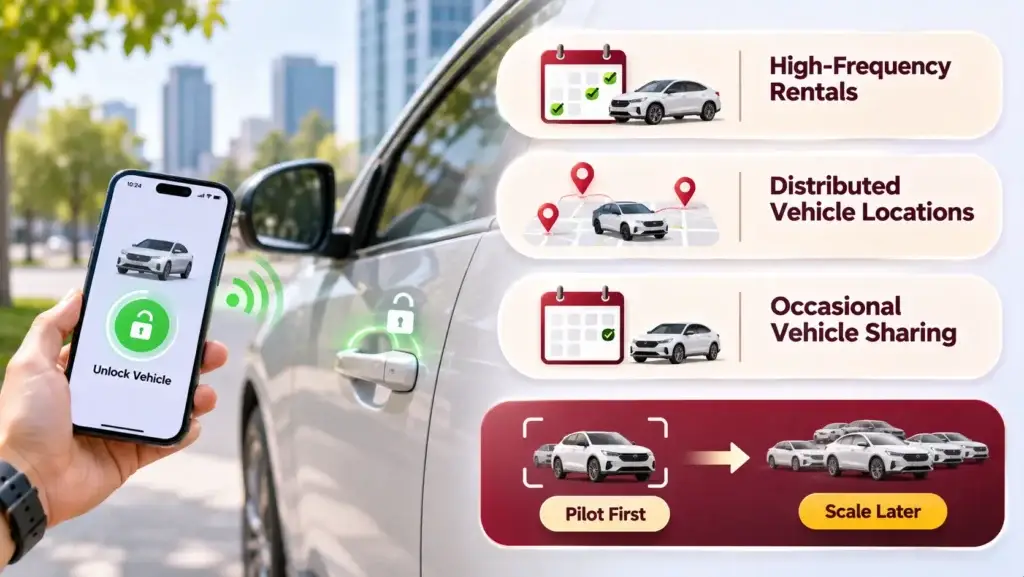
High-Frequency, Short-Duration Rentals
Vehicles with frequent reservations may benefit from automated pickup because manual key coordination becomes repetitive. The potential advantage is particularly relevant when multiple drivers use the same vehicle across different times of day.
Distributed Vehicle Locations
When vehicles are spread across a city, physical handovers can require significant travel or coordination. Contactless pickup may make operations more flexible, provided local connectivity and vehicle support are reliable.
Occasional Vehicle Sharing
If a vehicle is rented infrequently, manual handover may remain the more practical choice. Hardware installation, connectivity subscriptions, and maintenance can outweigh the time saved.
A Phased Deployment Strategy
A founder can evaluate keyless functionality on a limited group of compatible vehicles before expanding the installation program.
Useful pilot measurements include successful unlock rate, failed handovers, average recovery time, installation effort, device uptime, technical support volume, and ongoing operational expense per active vehicle.
This provides evidence for the expansion decision without requiring the entire vehicle network to adopt new hardware immediately.
Operational Costs Founders Should Evaluate Before Integration
The cost of keyless access is not limited to the purchase price of an installed device.
Depending on the provider and integration scope, operators may need to budget for hardware, professional installation, connectivity subscriptions, API access, backend integration, testing, device replacement, support, and ongoing security maintenance.
Vehicle compatibility testing can also create additional work when the fleet contains different manufacturers, models, and electronic architectures.
Before choosing an integration partner, request written clarity on:
- Supported vehicle makes, models, years, and functions.
- Hardware procurement, ownership, installation, and removal responsibilities.
- Available API operations, rate limits, and service availability expectations.
- Recurring connectivity, subscription, and support charges.
- Offline access behavior and credential revocation limitations.
- Security documentation, firmware update policy, and incident response procedures.
- Who manages failures, replacements, and emergency vehicle recovery.
The correct question is not simply how much the telematics device costs. It is whether the complete access system improves operational efficiency enough to justify its total ownership and support requirements.
Founder Decision Signals: Is Your Vehicle Network Ready?
Before Introducing Keyless Access
Six important questions to resolve before connecting digital reservations to physical vehicle control.
Vehicle compatibility
Have your actual vehicle models been verified against the proposed access solution?
Booking controls
Can the platform reliably identify active, cancelled, extended, and completed reservations?
Operational recovery
Is there an approved process for failed unlocking, disconnected devices, and emergency access?
Security
Can access be restricted to the right driver, vehicle, action, and time window?
Business economics
Is expected booking activity sufficient to justify installation and ongoing device operations?
Support readiness
Can your team diagnose access problems without exposing sensitive credentials or overriding vehicle safety restrictions?
If these questions do not yet have clear answers, a limited integration pilot is generally more defensible than a fleet-wide rollout.
How a Car-Sharing Software Foundation Fits Into the Integration
Telematics hardware controls supported vehicle functions, but it does not replace the booking, owner management, payment, and administrative workflows needed to operate a shared mobility marketplace.
These responsibilities belong to different layers of the business system.
The marketplace determines which reservation is legitimate. The access integration translates permitted reservation events into hardware-specific operations. The device or vehicle service then processes supported commands and returns available status information.
Keeping these responsibilities separate helps reduce dependence on a single hardware provider and makes future integration changes easier to manage.
For founders planning this architecture, Miracuves offers ready-made car-sharing software with booking, renter, owner, and administrative workflows.
Its ready-made platform has a published six-working-day delivery window for the base software. Hardware-based lock control is a separately scoped add-on and should not be assumed to be included in that timeline. Hardware compatibility, provider arrangements, installation, and integration testing require their own assessment.
This separation allows a business to plan its booking platform and connected-vehicle capabilities according to their actual implementation requirements.
Mistakes to Avoid When Deploying Remote Vehicle Access
Assuming GPS Tracking Automatically Includes Door Control
Tracking devices and access-control devices are not necessarily the same. Verify supported commands, vehicle compatibility, and approved installation procedures before purchasing hardware.
Granting Access Based Only on App Login
A logged-in user is not automatically authorized to unlock a vehicle. Access must be checked against the active reservation and its permitted scope.
Ignoring Failed or Delayed Commands
Commands may be delayed, rejected, or acknowledged without confirmation of the final physical state. Design support and user messaging around these distinctions.
Overlooking Offline Credential Revocation
Locally cached credentials may remain valid during disconnection, depending on the provider. Expiration and recovery rules need explicit testing.
Expanding Before Measuring Reliability
A working demonstration on one car does not establish compatibility or acceptable reliability across an entire fleet. Pilot testing should include multiple vehicle conditions and realistic network failures.
Final Thoughts: Keyless Access Is an Operational System, Not Just a Feature
Keyless car-sharing technology connects two separate worlds: digital reservations and physical vehicle control.
Hardware telematics, authorized access credentials, communication networks, secure APIs, and recovery procedures must work together to deliver a dependable contactless handover.
For founders, the opportunity is to reduce manual coordination and support more flexible vehicle availability. The challenge is implementing those benefits without creating avoidable security, compatibility, or reliability risks.
The stronger approach is to validate the vehicle integration, define the permission lifecycle, measure operational outcomes, and expand only when the system demonstrates reliable performance.
Frequently Asked Questions About Keyless Car-Sharing Technology
How does keyless car-sharing technology work?
A car-sharing system verifies an authorized booking and uses compatible vehicle hardware or an approved vehicle API to enable door access. Depending on the implementation, commands travel through cellular networks, local Bluetooth communication, or another supported digital key mechanism.
Does every car need telematics hardware for remote unlocking?
Not necessarily. Some compatible vehicles offer manufacturer-supported access APIs or digital key capabilities. Others need approved aftermarket equipment. The available approach depends on the vehicle’s model, year, electronic systems, and the permissions offered by the access provider.
Can a shared car be unlocked without internet access?
Certain Bluetooth-based digital key systems support offline unlocking after the required credentials have been provisioned. Cloud-only access methods generally require connectivity. Offline capabilities, credential expiration, and revocation behavior vary by provider.
Is a GPS tracking device enough for keyless vehicle entry?
No. GPS tracking provides location information but does not inherently provide permission or hardware control for locking and unlocking doors. An appropriate access-control interface and a supported vehicle integration are required.
How are digital car keys protected against unauthorized access?
Appropriate protections can include encrypted communication, authenticated devices, short-lived credentials, booking-scoped permissions, secure key storage, and auditable access events. The specific safeguards depend on the vehicle and digital key provider.
What happens when a remote unlock command fails?
The platform should distinguish between an unsuccessful request, a timeout, and an unconfirmed vehicle state. It can then guide the user through a controlled retry or support procedure. A predefined recovery process is essential when physical access cannot be completed remotely.
Can hardware telematics help monitor mileage and vehicle condition?
Yes, if the device and vehicle support those data points. Compatible systems may provide mileage, location, battery information, fuel readings, device health, or other operating signals. Data availability and accuracy must be confirmed for each supported vehicle configuration.
What should founders evaluate before integrating keyless vehicle access?
Founders should verify vehicle compatibility, hardware requirements, access authorization, offline behavior, provider costs, installation procedures, cybersecurity protections, emergency recovery, and operator support responsibilities. Testing a limited number of vehicles before expanding is a practical way to identify integration risks.
Miracuves is an independent software development company. We are not affiliated with, connected to, sponsored by, or endorsed by any company or product named in this article.
Terms such as “X Clone” are used descriptively. It is how the software industry refers to building a platform with functionality comparable to a known service, and how clients search for it.
The entire design and codebase of our products is built by our own team. Our products contain no code, design, graphics, or content originating from any third-party website or applications.
All third-party names and marks referenced in this article are the property of their respective owners, referenced solely to identify the services discussed.