

Key Takeaways
- Telematics and GPS tracking help car rental platforms monitor vehicles, improve safety, reduce misuse, and manage fleet operations in real time.
- GPS tracking shows where a vehicle is, while telematics can also capture driving behavior, mileage, fuel level, ignition status, diagnostics, and trip activity.
- For Turo-like and P2P car sharing apps, tracking features protect vehicle owners by improving trip visibility, geofencing, theft prevention, and dispute handling.
- For traditional rental companies, telematics supports fleet utilization, maintenance planning, late return alerts, branch operations, and vehicle recovery.
- Long-term success depends on secure device integration, accurate trip data, privacy controls, admin alerts, compliance readiness, and smooth user communication.
Tracking & Fleet Signals
- Real-time location tracking helps admins confirm pickup, monitor active trips, manage drop-offs, and support users during emergencies.
- Geofencing allows the platform to set allowed zones, restricted areas, airport boundaries, city limits, or long-distance travel rules.
- Driving behavior data can help detect harsh braking, overspeeding, unusual route activity, risky usage, and possible rental policy violations.
- Mileage and diagnostics data support preventive maintenance by helping teams identify service needs before vehicle downtime increases.
- Development complexity changes based on GPS provider, telematics hardware, API integration, data refresh rate, alert logic, admin dashboard, privacy rules, and reporting needs.
Real Insights
- A car rental app is managing high-value physical assets, so tracking is not just a feature; it is part of the platform’s risk-control system.
- Telematics becomes more valuable when it connects with booking status, driver profiles, payment records, damage reports, and admin workflows.
- Founders should balance safety with privacy by clearly explaining what data is collected, when tracking is active, and how trip information is used.
- Admin alerts are critical because real-time data only creates value when the platform can act on late returns, zone violations, theft risk, or vehicle issues.
- The strongest rental platforms combine GPS tracking, telematics, geofencing, maintenance alerts, secure payments, user verification, and scalable fleet control.
Car Rental Apps are no longer simple booking platforms. A modern car rental business needs to know where each vehicle is, how it is being used, whether it is returned on time, whether the renter followed trip rules, and whether the vehicle needs maintenance before the next booking.
This is where telematics and GPS tracking become important in car rental software development.
For founders building a traditional rental fleet app, a peer-to-peer car sharing marketplace, or a Turo clone app, GPS tracking helps locate vehicles in real time. Telematics goes further by collecting vehicle usage, odometer, fuel, ignition, diagnostics, driving behavior, and trip activity data. Geotab describes telematics as using GPS technology and onboard diagnostics to monitor vehicles and plot asset movement on fleet software.
For a rental business, this data is not just technical. It affects revenue, safety, trust, disputes, maintenance, insurance workflows, and platform scalability.
Miracuves helps founders build car rental and Turo-like platforms where GPS tracking and telematics are connected with booking, billing, admin control, host workflows, renter verification, and fleet operations from the beginning.
What Telematics Means in Car Rental Software Development
Telematics in a car rental app is the system that connects a vehicle with your software platform.
It usually combines GPS hardware, vehicle sensors, onboard diagnostics, cellular connectivity, cloud infrastructure, backend APIs, and dashboards. Together, these layers help the platform understand vehicle location, trip movement, usage patterns, vehicle health, and risk signals.
In simple terms:
GPS tells you where the car is.
Telematics tells you where the car is, how it is being driven, how far it travelled, whether it crossed a boundary, whether fuel changed, and whether the vehicle may need attention.
A car rental telematics system usually includes:
| Component | Role in Car Rental Software |
|---|---|
| GPS device | Tracks real-time vehicle location |
| OBD-II or CAN bus data | Reads mileage, fuel, diagnostics, and vehicle health |
| SIM or cellular network | Sends data from the vehicle to the cloud |
| Telematics API | Transfers vehicle data to the software backend |
| Backend server | Stores, processes, and connects data with bookings |
| Admin dashboard | Helps operators monitor cars, alerts, trips, and reports |
| Renter or host app | Shows relevant vehicle location, trip status, and support data |
For founders, the real value is not just installing a tracker. The value comes from connecting tracking data with the rental business workflow.
GPS Tracking vs Telematics: Why Founders Should Know the Difference
Many founders use GPS tracking and telematics as if they mean the same thing. They are related, but they are not identical.
| Factor | GPS Tracking | Telematics |
|---|---|---|
| Main purpose | Shows vehicle location | Shows location, vehicle health, usage, and driving behavior |
| Data collected | Latitude, longitude, speed, route | GPS, fuel, odometer, ignition, diagnostics, harsh braking, acceleration, vehicle alerts |
| Best use case | Live location, pickup, drop-off, theft recovery | Fleet management, maintenance, billing, risk scoring, host protection, operational reporting |
| Business value | Helps locate cars | Helps manage the full rental lifecycle |
| Ideal for | Small tracking use cases | Scalable car rental platforms and Turo-like marketplaces |
AVLView explains that telematics goes beyond GPS tracking by combining GPS, telecommunications, and onboard vehicle diagnostics.
For a car rental business, GPS tracking is the starting point. Telematics is the operating layer.
Read More: How to Start a Car Rental Business in 2026: Complete Founder’s Guide
Why GPS Tracking Is Critical for Turo Clone and Car Rental Platforms
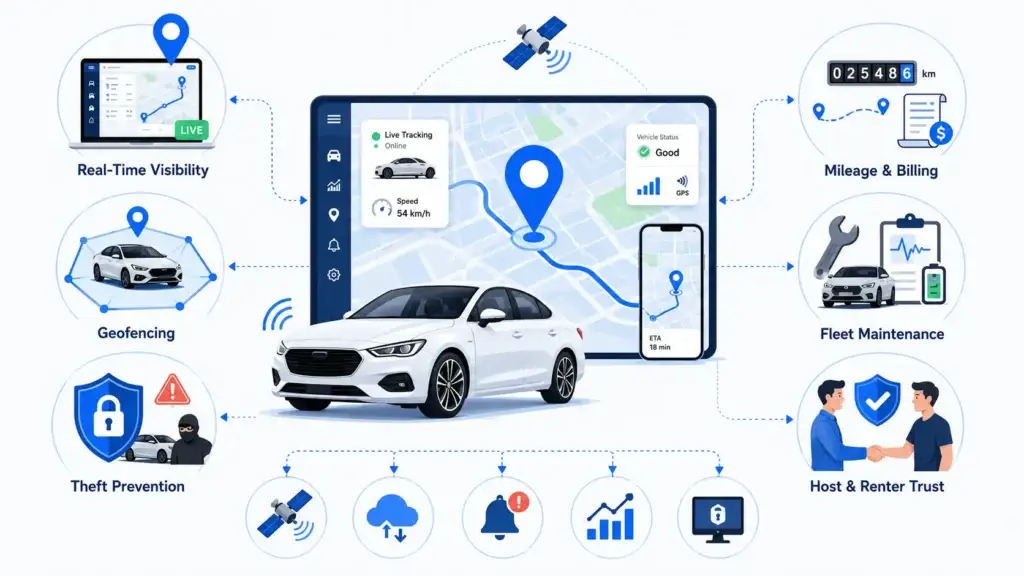
A car rental or car sharing platform manages high-value physical assets. Every booking includes operational risk: late returns, vehicle misuse, theft, damage disputes, wrong drop-off location, fuel mismatch, and unauthorized travel.
GPS and telematics reduce these risks by giving the platform better visibility.
Real-Time Vehicle Visibility
Rental operators need to know where every vehicle is before, during, and after a booking. Real-time tracking helps admins confirm pickup, monitor active trips, identify late returns, and support customers during emergencies.
For a Turo-like marketplace, real-time visibility also helps hosts protect their vehicles while giving renters a smoother pickup and drop-off experience.
Geofencing and Trip Boundary Control
Geofencing allows the platform to define virtual boundaries. These may include pickup zones, drop-off zones, city boundaries, airport zones, restricted areas, or long-distance limits.
If a renter drives outside an allowed area, the system can send alerts to the admin, host, or operations team. Teltonika highlights geofencing, fuel monitoring, real-time fleet data, and remote immobilization as useful telematics capabilities for large rental companies.
Theft Prevention and Vehicle Recovery
Rental cars are expensive assets. If a vehicle is not returned, moves after the trip ends, or leaves an approved area, GPS tracking can help operators respond faster.
Some telematics systems also support remote vehicle disabling in high-risk cases. Teltonika notes that GPS trackers can support secure engine cut-off functionality for stolen vehicle recovery scenarios.
This feature should be implemented carefully, with legal review, safety controls, and clear operating rules.
Mileage and Usage-Based Billing
Car rental businesses often charge based on time, distance, fuel, extra mileage, late returns, or special usage rules. Telematics can help automate these calculations.
For example, if a booking includes 100 free miles and the renter drives 145 miles, the system can calculate extra mileage charges automatically. If the fuel level drops below the starting level, the platform can flag a fuel adjustment.
Maintenance and Fleet Health
A rental platform loses revenue when cars are unavailable. Telematics helps track odometer readings, diagnostic alerts, battery health, fuel usage, and service requirements.
Instead of waiting for a breakdown, the admin can schedule maintenance before the next booking cycle.
Better Host and Renter Trust
In a peer-to-peer car rental marketplace, trust is everything. Hosts want confidence that their vehicle is protected. Renters want a simple, transparent booking experience.
Telematics can support both sides by recording trip history, pickup confirmation, return location, mileage, and vehicle condition signals.
Core Telematics Features Every Car Rental App Should Include
A strong car rental software platform should not treat GPS as a basic map feature. It should connect vehicle data with operations, billing, security, and user experience.
| Feature | What It Does | Business Value |
|---|---|---|
| Live GPS tracking | Shows vehicle location in real time | Improves fleet visibility and theft response |
| Geofencing | Creates allowed and restricted zones | Reduces unauthorized vehicle movement |
| Trip history | Stores route and movement records | Supports dispute review and trip verification |
| Mileage tracking | Records distance travelled | Enables mileage-based billing |
| Fuel monitoring | Tracks fuel level or fuel usage | Reduces fuel-related disputes |
| Odometer sync | Connects vehicle usage with app records | Improves maintenance planning |
| Ignition status | Detects trip start and stop events | Helps automate trip monitoring |
| Driver behavior tracking | Records speeding, braking, acceleration, and cornering | Supports renter scoring and risk management |
| Maintenance alerts | Flags service needs and diagnostics | Reduces downtime and booking cancellations |
| Tamper alerts | Detects device removal or power-off events | Improves asset protection |
| Remote immobilization | Helps disable vehicle in serious risk cases | Supports theft control with proper safeguards |
| Admin dashboard | Centralizes fleet, trip, alerts, and reports | Improves operational control |
For early-stage founders, not every feature needs to be launched at once. The right approach is to match telematics depth with the business model.
Step-by-Step Process to Integrate Telematics and GPS Tracking
Step 1: Define the Car Rental Business Model
Before choosing GPS hardware or telematics APIs, define how your platform works.
A traditional car rental company has different needs from a peer-to-peer car sharing marketplace. A corporate fleet rental platform has different tracking requirements from a local self-drive rental app.
| Business Model | Telematics Requirement |
|---|---|
| Traditional car rental | Pickup, return, mileage, fuel, fleet monitoring, maintenance |
| Peer-to-peer car sharing | Host dashboard, renter tracking rules, geofencing, trip proof |
| Turo clone marketplace | Booking validation, host protection, dispute support, insurance workflow |
| Corporate fleet rental | Driver behavior, usage reporting, policy control, fleet analytics |
| Subscription car rental | Long-term vehicle health, odometer tracking, recurring usage monitoring |
| Airport car rental | Parking zone validation, drop-off tracking, location-based fees |
This decision affects hardware choice, app modules, data retention, billing logic, and admin permissions.
Step 2: Choose the Right Tracking Hardware
The hardware layer decides the quality of your telematics data.
Common options include:
| Hardware Type | Best For | Limitation |
|---|---|---|
| OBD-II GPS tracker | Quick installation, diagnostics, mileage, fuel data | Can be removed if not secured |
| Hardwired tracker | Long-term fleet control and anti-tamper use cases | Requires professional installation |
| Battery-powered tracker | Backup tracking or temporary assets | Limited data and battery dependency |
| OEM telematics API | Connected vehicles with built-in data access | Availability depends on vehicle brand and API access |
| Smartphone GPS | Basic trip tracking | Less reliable for fleet-level control |
For serious car rental software development, OBD-II or hardwired telematics is usually stronger than relying only on mobile GPS. Smartphone GPS may help with renter navigation, but it should not be the only source of vehicle truth.
Step 3: Connect Vehicle Data to the Cloud
Once the tracker is installed, vehicle data must move from the car to your software backend.
The typical flow is:
Vehicle GPS / OBD Device
↓
SIM / Cellular Network
↓
Telematics Provider API
↓
Backend Server
↓
Database + Event Processing
↓
Admin Dashboard + Host App + Renter App
The backend should receive and process key data points such as:
| Data Point | Use in Car Rental App |
|---|---|
| Latitude and longitude | Real-time vehicle location |
| Speed | Driver behavior monitoring |
| Ignition status | Trip start and stop detection |
| Odometer | Mileage billing and service scheduling |
| Fuel level | Fuel dispute prevention |
| Battery status | Vehicle health monitoring |
| Diagnostic trouble codes | Maintenance alerts |
| Device status | Tamper and offline alerts |
| Route history | Trip playback and dispute review |
This is where app architecture matters. The telematics provider may send frequent data updates, but your backend should only process what is useful for the business.
Step 4: Build Real-Time Tracking in the Admin Dashboard
The admin dashboard is where the rental operator controls the fleet.
A strong admin dashboard should include:
| Admin Module | Purpose |
|---|---|
| Live fleet map | Track all active and idle vehicles |
| Vehicle status | Show available, booked, moving, idle, offline, or maintenance status |
| Trip monitoring | View ongoing trips and booking-linked movement |
| Geofence alerts | Detect when vehicles leave approved areas |
| Late return alerts | Notify admins when a vehicle is not returned on time |
| Trip playback | Review completed route history |
| Maintenance panel | Track service alerts and odometer-based schedules |
| Risk alerts | Flag speeding, tampering, suspicious movement, or power-off events |
| Fleet utilization reports | Understand which cars generate revenue and which remain idle |
For founders, the dashboard should not be designed only for tracking. It should help operators make decisions quickly.
Step 5: Add GPS Features to the Renter App
Renter-facing GPS features should improve convenience, not feel intrusive.
Useful renter-side features include:
| Renter Feature | Purpose |
|---|---|
| Find booked car | Helps renter locate the vehicle |
| Pickup navigation | Guides renter to the pickup point |
| Drop-off location | Shows approved return location |
| Active trip status | Displays trip duration, time left, and basic trip rules |
| Emergency support | Allows support team to access location during active booking |
| Return confirmation | Helps verify that the car was dropped off in the correct zone |
For privacy, renters should clearly understand when location data is collected and how it is used.
Step 6: Add GPS and Telematics Features to the Host App
For a Turo clone or peer-to-peer car rental platform, the host app is critical.
Hosts may need:
| Host Feature | Business Value |
|---|---|
| Vehicle location during active trip | Helps host feel protected |
| Pickup and return confirmation | Reduces operational confusion |
| Mileage summary | Supports transparent billing |
| Fuel or battery summary | Helps identify usage differences |
| Trip history | Supports dispute review |
| Damage claim support data | Gives context during post-trip review |
| Geofence alerts | Helps detect unauthorized movement |
| Maintenance reminders | Helps hosts keep vehicles booking-ready |
This is one of the biggest gaps in generic telematics content. In a marketplace, telematics should serve the platform operator, host, and renter without exposing unnecessary data.
Step 7: Connect Telematics With Booking and Billing
This is where GPS tracking becomes a business engine.
Telematics should not sit separately from the rental app. It should connect with the core modules of your car rental software.
| App Module | Telematics Connection |
|---|---|
| Booking engine | Confirms trip start, trip end, pickup, and return |
| Pricing engine | Calculates mileage, late return, extra usage, and location-based fees |
| Payment system | Applies approved additional charges |
| Wallet module | Supports refunds, deposits, and adjustments |
| Host dashboard | Shows trip-linked vehicle data |
| Renter profile | Supports behavior scoring and booking rules |
| Damage claims | Provides trip route, mileage, speed, and event context |
| Insurance workflow | Supports claim review with trip evidence |
| Admin reports | Tracks utilization, idle time, vehicle revenue, and fleet risk |
For example, if a renter returns a vehicle two hours late and drives beyond the included mileage, the system can calculate the additional fee based on booking rules and telematics data.
How Telematics Data Flows During a Car Rental Trip
Telematics becomes most valuable when it is connected to the complete rental journey. Instead of collecting vehicle data separately, the platform should connect GPS and vehicle signals with each booking stage.
| Rental Stage | Telematics Action | Business Value |
|---|---|---|
| Before booking | Vehicle status, location, fuel, and availability are checked | Prevents booking unavailable or unhealthy vehicles |
| Booking confirmation | Vehicle is linked with renter, host, time slot, pricing, and trip rules | Creates a clear trip record |
| Pickup | GPS confirms pickup zone and ignition status | Helps validate trip start |
| Active trip | Location, mileage, speed, fuel, and geofence activity are monitored | Improves safety, billing, and support |
| Rule violation | Geofence breach, harsh driving, late return, or tamper alert is triggered | Helps admins respond faster |
| Drop-off | GPS confirms return location and trip end | Reduces wrong-location disputes |
| Post-trip review | Mileage, fuel, route history, and event logs are summarized | Supports billing, claims, and host/renter transparency |
| Maintenance check | Odometer and diagnostic data update vehicle health status | Helps prepare the car for the next booking |
For founders, this workflow is important because it shows that telematics is not only a tracking feature. It becomes part of booking validation, payment accuracy, vehicle protection, and customer trust.
Telematics Architecture for Car Rental Applications
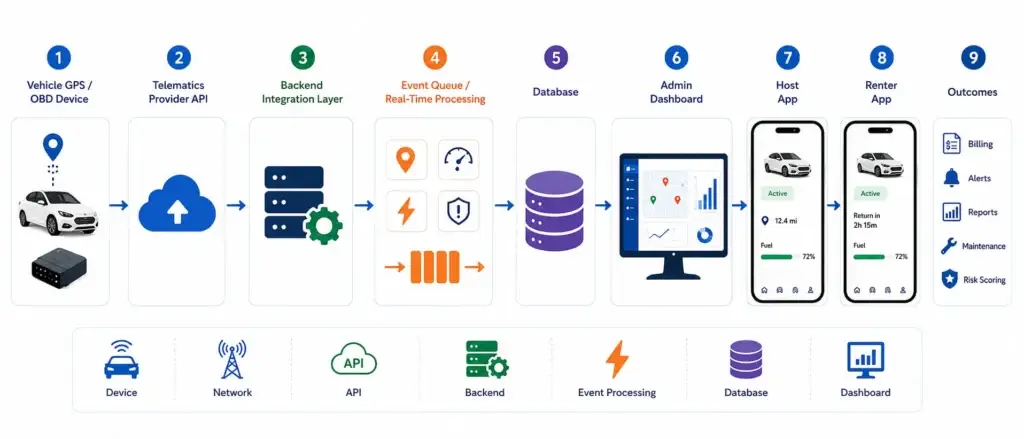
A scalable car rental platform needs a clean telematics architecture.
Simple architecture:
Vehicle GPS / OBD Device
↓
Telematics Provider API
↓
Backend Integration Layer
↓
Event Queue / Real-Time Processing
↓
Database
↓
Admin Dashboard
↓
Host App
↓
Renter App
↓
Billing, Alerts, Reports, Maintenance, Risk Scoring
The backend integration layer is important because telematics data can arrive continuously. Without event processing, the system may store too much data, send too many alerts, or slow down during high-usage periods.
A practical setup should include:
| Layer | Responsibility |
|---|---|
| Device layer | Collects vehicle data |
| Network layer | Sends data through SIM or connected vehicle API |
| API layer | Receives data from telematics provider |
| Backend layer | Validates, filters, and connects data with bookings |
| Event processing layer | Detects alerts, trip events, geofence breaches, and risk signals |
| Database layer | Stores trip, vehicle, alert, and report data |
| Dashboard layer | Displays actionable insights to admins, hosts, and support teams |
Miracuves can help founders design this layer so GPS data supports actual rental operations instead of becoming a disconnected tracking feature.\
Raed More: AI Features for Car Rental Platforms: How Turo-Like Apps Boost Profitability
Privacy, Consent, and Security Considerations
Telematics involves sensitive vehicle and trip data. Founders must treat privacy and security as part of product design, not as an afterthought.
Key areas to consider:
| Area | Best Practice |
|---|---|
| User consent | Explain what location and vehicle data is collected |
| Trip-based tracking | Track renters only during active bookings where possible |
| Data visibility | Show each role only the data they need |
| Admin access | Use role-based permissions |
| Data retention | Avoid storing detailed trip data longer than needed |
| Encryption | Use encrypted data transfer and encrypted data storage |
| Audit logs | Record who accessed sensitive trip or vehicle data |
| Dispute policy | Explain how trip data may be used in claims or violations |
| Legal review | Align policies with local privacy, insurance, and mobility regulations |
For regulated or privacy-sensitive markets, final compliance depends on jurisdiction, legal review, integrations, consent flows, and operating model. A platform can be built with compliance-ready workflows, but founders should not assume that software alone guarantees legal compliance.
Common Telematics Integration Mistakes Founders Should Avoid
Mistake 1: Treating GPS Tracking as a Standalone Feature
Many founders add a map and assume the tracking problem is solved. But if GPS data is not connected with booking, billing, admin alerts, and trip history, it creates limited business value.
The better approach is to connect tracking with the full rental lifecycle.
Mistake 2: Relying Only on Smartphone GPS
Mobile GPS can help with renter navigation, but it is not reliable enough for full vehicle protection. If the renter turns off the phone, loses battery, or disables permissions, tracking quality drops.
Vehicle-level tracking is stronger for fleet control.
Mistake 3: Collecting Too Much Data Without a Use Case
Telematics can generate a large amount of data. More data does not always mean better software.
Founders should define which signals matter: location, mileage, fuel, ignition, geofence breach, maintenance alert, tamper alert, and risky driving events.
Mistake 4: Ignoring Host Data Visibility in a Turo Clone
In a peer-to-peer car rental marketplace, hosts need confidence. If the app does not give hosts useful trip and vehicle visibility, trust becomes harder to build.
At the same time, host visibility should be controlled to protect renter privacy.
Mistake 5: Not Planning for Offline Data
Vehicles may move through areas with poor network coverage. The system should support last-known location, delayed sync, offline buffering, and alert recovery when the device reconnects.
Mistake 6: Sending Too Many Alerts
If admins receive alerts for every small event, they stop paying attention. Smart thresholds matter.
For example, an alert for crossing a city boundary may be useful. An alert for every small GPS drift may not be.
What Affects the Cost of Telematics Integration in Car Rental Software?
The cost of telematics integration depends on the depth of tracking, hardware selection, API complexity, dashboard features, and business rules. A basic GPS-enabled rental app may only need real-time location and trip history, while a larger Turo-like marketplace may need geofencing, host dashboards, mileage billing, driver behavior scoring, claims support, and maintenance alerts.
| Cost Factor | Impact on Development |
|---|---|
| GPS hardware type | OBD-II, hardwired, OEM, and battery-powered trackers have different setup needs |
| Telematics provider API | Well-documented APIs reduce integration complexity |
| Real-time tracking frequency | More frequent updates require stronger backend processing |
| Geofencing rules | More zones and rule types increase logic complexity |
| Billing integration | Mileage, fuel, late return, and extra usage rules need careful testing |
| Admin dashboard depth | Fleet maps, alerts, reports, and analytics add development scope |
| Host and renter visibility | Role-based dashboards require permission planning |
| Security and privacy controls | Consent, encryption, audit logs, and data retention add essential backend work |
| Maintenance workflows | Odometer, diagnostics, and service reminders require additional logic |
| Scaling requirements | Larger fleets need event queues, optimized databases, and reliable cloud infrastructure |
For founders, the better decision is not to build every telematics feature at once. Start with the tracking features that directly support your rental model, then expand into advanced analytics, predictive maintenance, and risk scoring as the platform grows.
How Miracuves Helps Build Telematics-Ready Car Rental Apps
Miracuves builds car rental and Turo-like platforms where telematics is connected with the product workflow from the start.
Instead of adding GPS as a separate feature later, Miracuves can help founders design a rental platform where vehicle data supports booking control, mileage billing, geofencing, trip monitoring, host dashboards, renter verification, admin reports, maintenance planning, and dispute resolution.
A telematics-ready car rental app can include:
| Module | Miracuves Development Focus |
|---|---|
| Customer app | Search, booking, pickup, trip status, payments, return |
| Host app | Vehicle listing, availability, tracking visibility, earnings, trip history |
| Admin dashboard | Fleet map, users, vehicles, bookings, alerts, claims, reports |
| GPS integration | Real-time location, route history, pickup and return validation |
| Telematics integration | Mileage, fuel, ignition, diagnostics, alerts, behavior signals |
| Billing engine | Distance-based, time-based, late return, fuel, and extra usage logic |
| Security workflows | Verification, access control, audit logs, dispute support |
| Analytics | Fleet utilization, revenue per vehicle, idle time, maintenance risk |
For founders planning car rental app development or a Turo clone app, this approach creates a stronger product foundation. It helps the platform move beyond basic listings and bookings toward a smarter, safer, monetization-ready mobility system.
Founder Decision Signals: When Should You Add Telematics?
Telematics is worth prioritizing when your rental business depends on asset control, usage visibility, host trust, or automated billing.
You should consider telematics early if:
| Signal | Why It Matters |
|---|---|
| You manage high-value cars | Theft and misuse risk is higher |
| You offer self-drive rentals | Operators need trip and return visibility |
| You are building a Turo-like marketplace | Hosts need vehicle protection and trip transparency |
| You charge by mileage | Odometer and GPS data help billing accuracy |
| You support long-distance rentals | Geofencing and route history reduce unauthorized use |
| You want insurance or claims support | Trip data can support review workflows |
| You want to scale fleet operations | Manual tracking becomes inefficient as bookings grow |
If you are launching a small validation-ready version, you can begin with core GPS, geofencing, trip history, and admin alerts. As the platform grows, you can add driver behavior scoring, maintenance alerts, usage-based pricing, and deeper analytics.
Founder Decision Signals
Speed
If you want to launch a car rental platform faster, start with core GPS tracking, geofencing, trip history, and admin alerts before adding advanced analytics.
Cost
Telematics cost depends on hardware, provider APIs, backend processing, dashboard depth, and the number of vehicle data points you want to track.
Scalability
As bookings grow, telematics should connect with billing, maintenance, host dashboards, renter profiles, and fleet utilization reports.
Market Fit
A Turo-like app needs host trust and renter accountability. Telematics helps prove trip activity, mileage, return location, and vehicle usage.
Final Thoughts
Telematics and GPS tracking can turn a basic car rental app into a smarter mobility operating system.
For founders building car rental software, a Turo clone, a car sharing marketplace, or a fleet rental platform, the goal is not only to see where a vehicle is. The real value is connecting vehicle data with bookings, billing, host trust, renter accountability, maintenance, theft prevention, and admin decision-making.
A well-integrated telematics layer helps rental businesses reduce risk, improve utilization, prevent disputes, automate billing, and create a more reliable rental experience.
Miracuves helps founders build ready-made and customisable car rental platforms with GPS tracking, telematics-ready architecture, admin dashboards, source-code ownership, and scalable workflows for faster market validation.
FAQs
What is telematics in car rental software development?
Telematics in car rental software development is the use of GPS, vehicle sensors, OBD data, cellular connectivity, and cloud software to track vehicle location, mileage, fuel, diagnostics, trip activity, and driver behavior.
Is GPS tracking enough for a car rental app?
GPS tracking is useful for location visibility, but it is not enough for a scalable car rental app. Telematics adds mileage tracking, fuel monitoring, ignition status, diagnostics, driver behavior, geofencing, and maintenance alerts.
How does GPS tracking help a Turo clone app?
GPS tracking helps a Turo clone app verify pickup and return locations, monitor active trips, support hosts, detect late returns, reduce theft risk, and provide trip history for disputes.
Can telematics support mileage-based billing?
Yes. Telematics can track odometer readings, trip distance, fuel level, and usage time. This helps car rental platforms calculate extra mileage charges, late return fees, and fuel adjustments.
What hardware is needed for car rental telematics?
Common hardware options include OBD-II GPS trackers, hardwired GPS trackers, battery-powered trackers, and OEM connected vehicle APIs. For rental fleets, OBD-II or hardwired trackers usually provide stronger vehicle-level data than smartphone GPS alone.
How does geofencing work in car rental applications?
Geofencing creates virtual boundaries around pickup zones, drop-off zones, city limits, airport areas, or restricted regions. If a vehicle enters or leaves a defined area, the system can trigger alerts or business rules.
Is telematics useful for peer-to-peer car rental marketplaces?
Yes. Peer-to-peer car rental marketplaces can use telematics to improve host trust, renter accountability, trip verification, mileage billing, damage claim review, and vehicle protection.
Can Miracuves build a car rental app with GPS tracking and telematics?
Yes. Miracuves helps founders build car rental and Turo-like platforms with GPS tracking, telematics-ready architecture, admin dashboards, host and renter apps, billing workflows, and scalable backend logic.
What is the best GPS tracking option for a Turo clone app?
For a Turo clone app, OBD-II or hardwired GPS trackers are usually stronger than smartphone-only GPS because they provide vehicle-level data such as location, mileage, ignition status, fuel information, and diagnostic signals. The best option depends on fleet type, tracking depth, provider API, and host/renter workflows.
Miracuves is an independent software development company. We are not affiliated with, connected to, sponsored by, or endorsed by any company or product named in this article.
Terms such as “X Clone” are used descriptively. It is how the software industry refers to building a platform with functionality comparable to a known service, and how clients search for it.
The entire design and codebase of our products is built by our own team. Our products contain no code, design, graphics, or content originating from any third-party website or applications.
All third-party names and marks referenced in this article are the property of their respective owners, referenced solely to identify the services discussed.