
Key Takeaways
What You’ll Learn
- Mailchimp offers tools for email marketing, automation, and audience management.
- Users can create campaigns using templates and drag-and-drop builders.
- Automation allows emails to be triggered based on user actions.
- Segmentation helps target specific groups for better engagement.
- The platform combines marketing, analytics, and communication tools in one system.
Stats That Matter
- Features include A/B testing, automation flows, and content personalization.
- Analytics tools track open rates, clicks, and campaign performance.
- AI tools help generate content and improve targeting.
- The platform supports integrations with ecommerce and marketing tools.
- Automation workflows can be triggered by actions like signups or purchases.
Real Insights
- Combining multiple marketing tools in one platform simplifies workflows.
- Automation and personalization improve engagement.
- Data insights help refine campaigns and increase conversions.
- Integrations enable connection with ecommerce and CRM systems.
- Success depends on consistent communication and effective targeting.
Ever built a killer product or launched a new course, and then… crickets? You’re not alone. Ask any startup founder, and they’ll tell you—marketing’s not just about shouting into the void. It’s about whispering the right message in the right ear at the right time. And that’s exactly where Mailchimp swoops in.
I still remember the first time I used Mailchimp. It felt like the tech version of a Swiss army knife—email campaigns, audience segmentation, analytics—all packed into one slick platform. Back then, I was bootstrapping a digital zine. Now, even the big shots use it to power newsletters, ecommerce, and automation flows.
Mailchimp isn’t just “that email tool.” It’s become a must-have marketing cockpit for creators, solo entrepreneurs, SaaS founders, and even mid-sized ecommerce brands. And if you’re thinking about building a similar SaaS or clone product—check out our Mailchimp Clone
Read more: How to Build an App Like Mailchimp – A Developer’s Guide
Why Mailchimp Remains the MVP for Marketers
Let’s cut to the chase: Mailchimp’s toolkit is the stuff digital dreams are made of. Whether you’re a newbie startup testing your first MVP or a growth-stage founder gunning for Series A, these features could mean the difference between audience engagement or digital tumbleweeds.
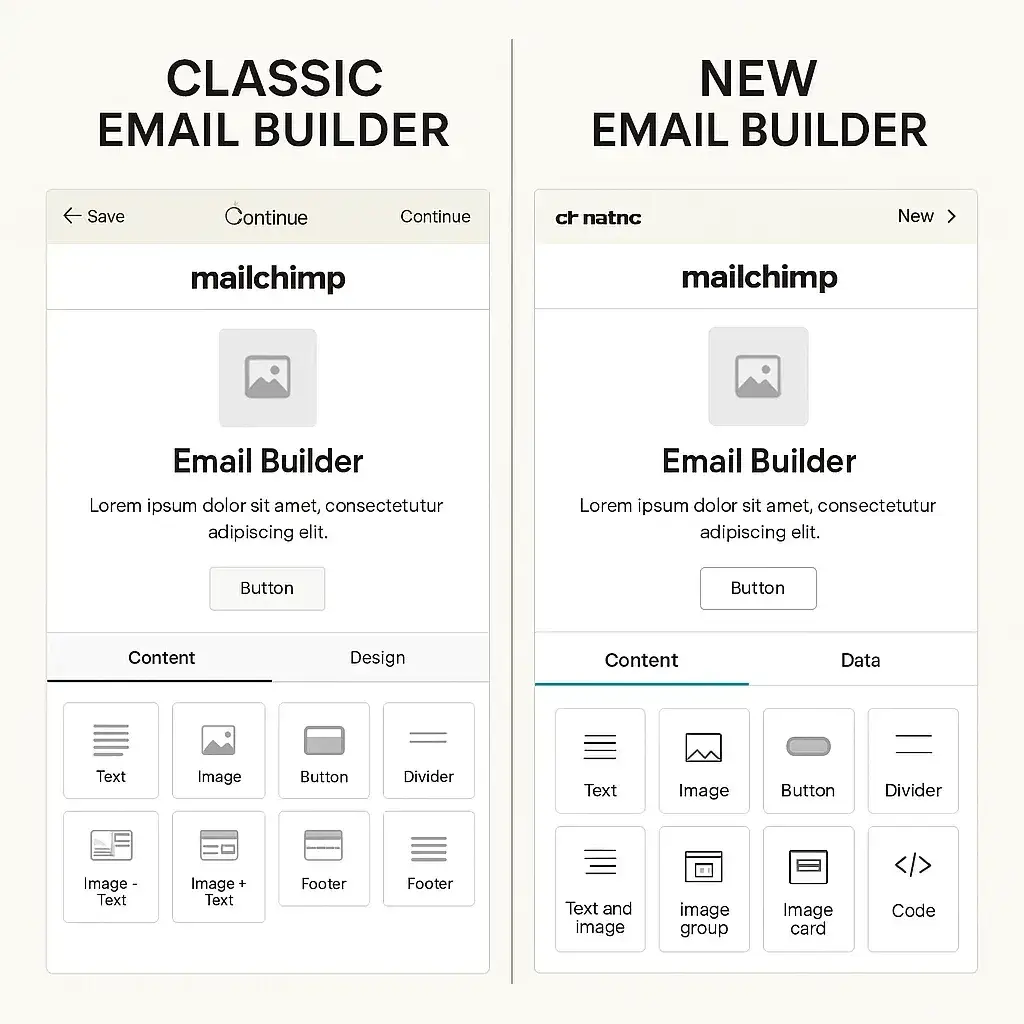
1. Drag-and-Drop Email Builder That’s Actually Fun
No code. No clutter. Just simple, visual building blocks.
Mailchimp’s email builder makes creating beautiful campaigns as easy as playing with LEGO bricks. You choose a template, drag elements around, and hit “Send.” That’s it.
- Image + Text combinations
- Social links
- CTAs that don’t look like 2007 popups
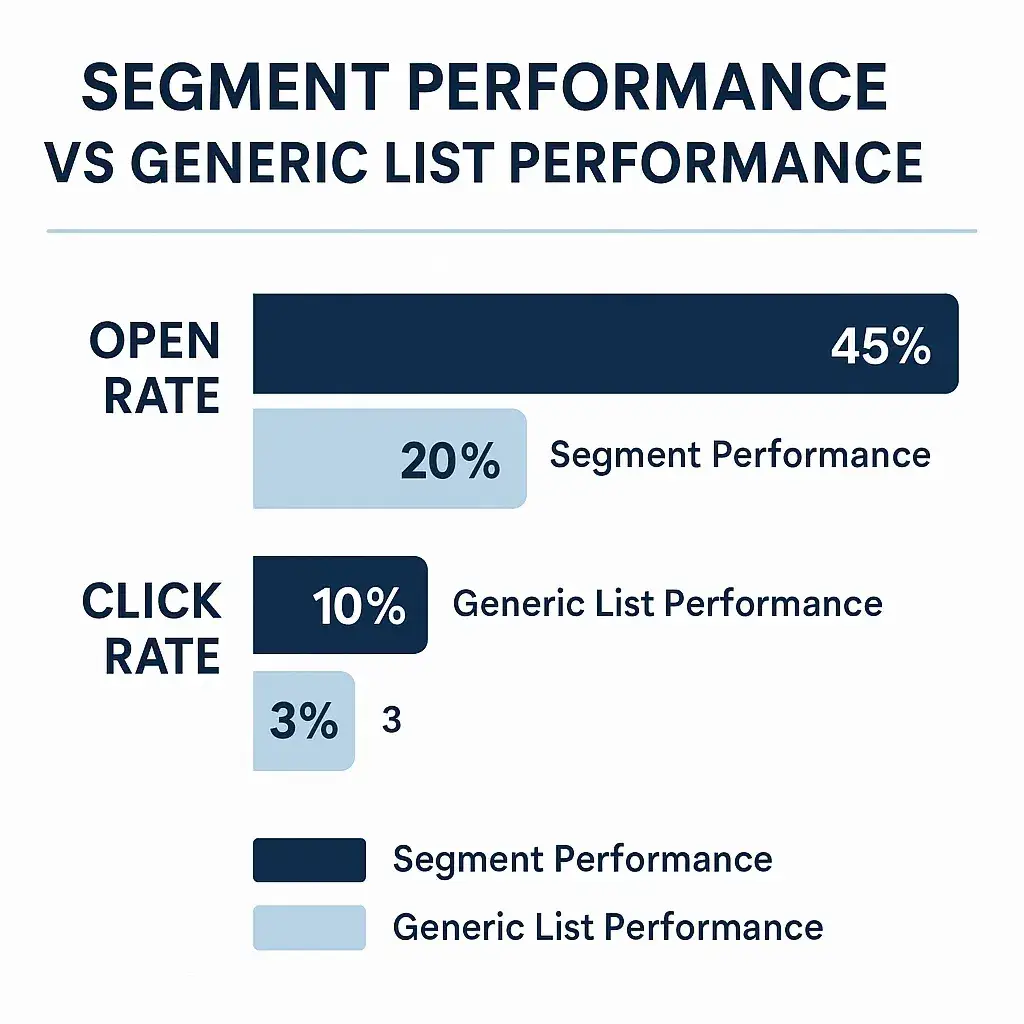
2. Audience Segmentation That Feels Psychic
Imagine sending product launch updates only to past buyers or early adopters. Mailchimp’s segmentation features help you slice and dice your audience based on:
- Demographics
- Behavior (clicks, opens)
- Purchase history
- Tags, sign-up source, and custom fields
It’s like whispering sweet nothings to your most engaged subscribers while ghosting the tire-kickers. Smart marketing, right?
3. Marketing Automation That Works While You Sleep
Welcome emails, cart abandonment nudges, birthday offers—you name it. Mailchimp’s automation features let you build customer journeys without touching your keyboard after setup.
Use pre-built journeys or create custom triggers like:
- “If user clicks link A → Send follow-up B”
- “If user buys product X → Send upsell offer Y after 3 days”
Think of it as cloning yourself. Or better—cloning your entire marketing department.
4. A/B Testing That Doesn’t Require a Data Scientist
Sometimes it’s the subject line. Sometimes it’s the emoji. You won’t know until you test it.
Mailchimp’s A/B testing features let you trial:
- Different subject lines
- Send times
- Content variations
- Button placements
Then it picks the winner automatically and sends it to the rest of your list. Lazy? Maybe. Smart? Definitely.
5. Built-in CRM with Real-Time Insights
Mailchimp isn’t just about campaigns. It’s also a mini CRM (Customer Relationship Manager). You can track user behavior, sales activity, and engagement over time.
For startups, this means:
- No need for a separate CRM tool
- Unified view of marketing + customer data
- Smarter decisions about product-market fit
6. Ecommerce Integrations That Drive Real Revenue
Selling merch? Dropshipping? SaaS subscriptions?
Mailchimp integrates with Shopify, WooCommerce, Stripe, and more. You can:
- Track purchases per campaign
- Set up product recommendations
- Email people based on cart behavior
And yeah, it’s GDPR-compliant. Your legal team can breathe easy.
7. Templates, Landing Pages & Social Posts Galore
Beyond email, Mailchimp also lets you build:
- Beautiful landing pages (great for lead magnets)
- Organic social posts (schedule & post directly)
- Ads on Facebook and Instagram
So instead of juggling five tools, you’re down to one. Handy, especially if you’re running lean.
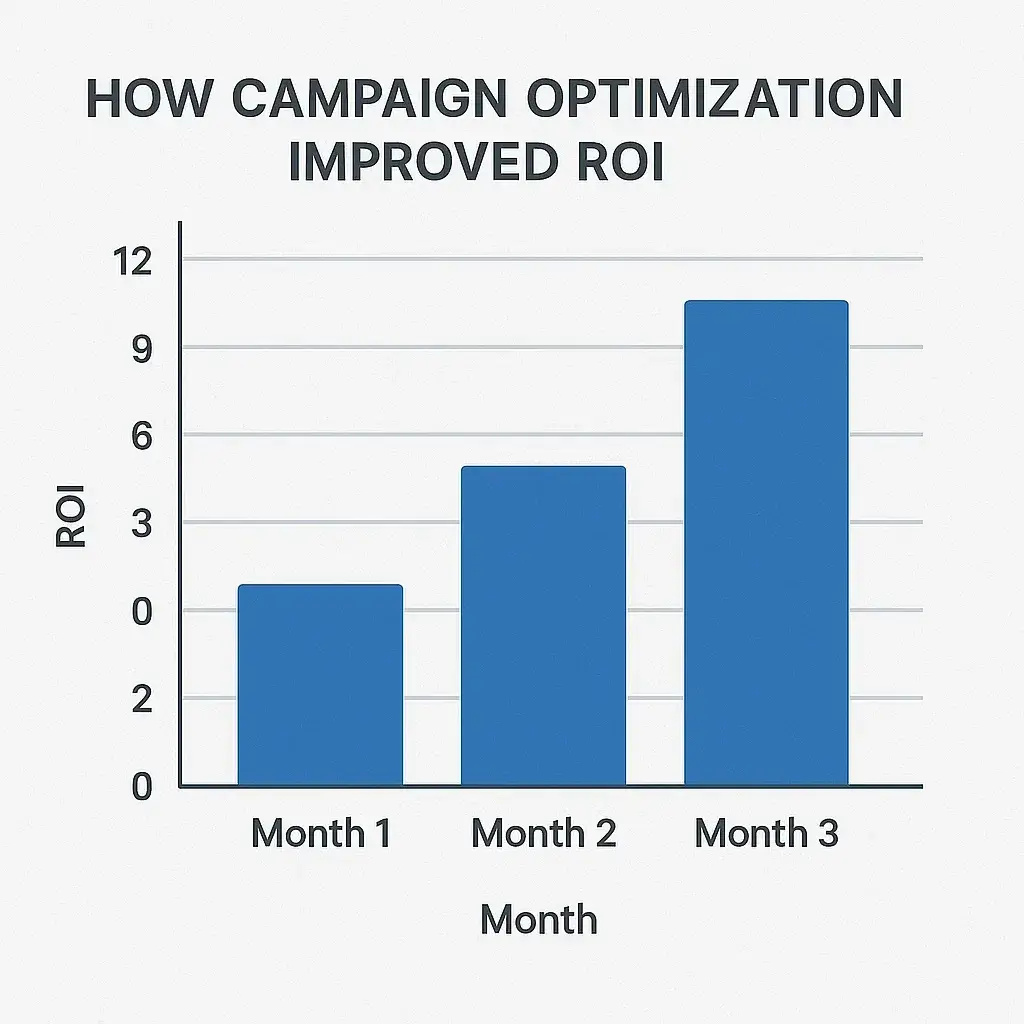
8. Analytics That Show the Whole Story
Mailchimp’s analytics aren’t just pretty graphs. They give you:
- Campaign open & click rates
- ROI per campaign
- Revenue attribution
- Audience growth over time
All visual, all easy to digest. No PhD required.
9. Mobile App That Keeps You in Control
Out grabbing coffee? On a train? Launch a campaign from your phone. The Mailchimp mobile app is surprisingly powerful:
- Approve content
- Monitor performance
- Manage contacts
Basically, you can run your email empire from your pocket. Just don’t hit “Send All” by mistake at the gym.
Read more: Pricing Guide for Building a Mailchimp Clone Platform
Conclusion
Mailchimp isn’t about doing more marketing—it’s about doing smarter marketing. Every feature feels built with real-world hustle in mind. It understands the rollercoaster of building something from scratch and makes the ride smoother.
Whether you’re looking to start a newsletter, automate lead gen, or track conversions, Mailchimp gives you serious firepower without the SaaS fatigue
.At Miracuves, we help innovators launch high-performance app clones that are fast, scalable, and monetization-ready. Ready to turn your idea into reality? Let’s build together.
FAQs
What’s the biggest benefit of using Mailchimp?
It’s an all-in-one platform that combines email marketing, automation, CRM, and ecommerce tools—perfect for startups and solo founders who want results without juggling five tools.
Is Mailchimp free to use?
Yes! There’s a Free plan with up to 500 contacts and basic email tools. As you grow, you can upgrade for more advanced features.
Can I integrate Mailchimp with my Shopify store?
Absolutely. Mailchimp integrates with Shopify, WooCommerce, Magento, and others. This lets you send targeted product emails, track sales, and automate ecommerce flows.
How good is Mailchimp’s automation?
Very good. It lets you build customer journeys based on behavior triggers (like signups or purchases) and automate follow-ups, upsells, and reminders with minimal effort.
Does Mailchimp have templates for beginners?
Yes, tons! You can use drag-and-drop email templates, landing pages, or even social media templates. No design skills needed.
Can Mailchimp handle A/B testing?
Definitely. You can test subject lines, send times, and even entire email content blocks to see what works best for your audience.
Related Articles:
Miracuves is an independent software development company. We are not affiliated with, connected to, sponsored by, or endorsed by any company or product named in this article.
Terms such as “X Clone” are used descriptively. It is how the software industry refers to building a platform with functionality comparable to a known service, and how clients search for it.
The entire design and codebase of our products is built by our own team. Our products contain no code, design, graphics, or content originating from any third-party website or applications.
All third-party names and marks referenced in this article are the property of their respective owners, referenced solely to identify the services discussed.