Key Takeaways
What You’ll Learn
- Google Drive-like platforms enable secure cloud storage, file sharing, and collaboration in one place.
- Users can upload, manage, and access files anytime with real-time sync across devices.
- Advanced features include file versioning, permissions, and team collaboration tools.
- Cloud infrastructure ensures scalability, data security, and high availability.
- Custom clone solutions allow businesses to launch storage platforms quickly with full ownership.
Stats That Matter
- Cloud storage market is expected to exceed $300 billion globally by 2027.
- Over 1 billion users rely on cloud storage platforms for personal and business use.
- Remote work and collaboration tools are driving massive demand for file-sharing apps.
- Data security and privacy remain top priorities for users and enterprises.
- Subscription-based storage services generate recurring and scalable revenue.
Real Insights
- Simplicity drives adoption — users prefer clean interfaces with easy file access.
- Collaboration features like sharing and editing increase daily engagement.
- Security layers such as encryption and access control build user trust.
- Scalable architecture is essential for handling growing storage needs.
- Successful platforms focus on performance, reliability, and user experience over complexity.
Cloud storage is no longer just a convenience—it’s the backbone of modern business operations. From remote teams collaborating on documents to agencies managing heavy project files, the demand for fast, secure, and user-friendly storage keeps growing. Spreadsheets, contracts, videos, source code, or product assets—today’s users expect seamless access anytime, anywhere. In 2026 .Google Drive Clone Script are emerging as the go-to solution.
Why? Because Google Drive isn’t always flexible. For many startups, SaaS founders, agencies, or enterprises with strict compliance needs, it can feel limiting as a file sharing platform. There’s no option to white-label, no way to customize workflows, and per-seat costs keep climbing. Even worse, industries like healthcare, education, and law require strict data control and private hosting—needs that public cloud platforms often can’t meet.
That’s why clone Script are thriving. They deliver Drive-like features—file upload, sharing, admin controls, sync, and versioning—while giving full control over branding, pricing, and hosting. In this blog, we’ll explore the best Drive clone Script of 2026 and help you choose the perfect launchpad.
Why Businesses Are Looking Beyond Google Drive
Ownership and Privacy Concerns
Not every business is thrilled about storing sensitive files on Google’s servers. Concerns around data ownership, unauthorized access, and compliance have pushed many companies toward private cloud solutions. If you serve industries like healthcare, finance, or legal services, client confidentiality is non-negotiable. A Google Drive clone gives you the infrastructure you need, but with full control over where your data lives and how it’s managed.
Branding and Custom Functionality
Google Drive is great, but you can’t exactly slap your logo on it. Enterprises and SaaS startups increasingly want branded file storage experiences for their users or clients. Whether it’s custom user roles, specialized file types, or integrations with internal tools, off-the-shelf services can’t keep up. Google Drive clones allow you to shape the platform to your audience, not the other way around.
Monetization Opportunities
If you’re a startup building a SaaS product, offering cloud storage as part of your platform can open up premium revenue channels. From tiered plans and file storage limits to custom access controls, a self-hosted Google Drive alternative lets you monetize storage just like the big players.
Read More : Top Google Drive Features Every Startup Needs
Must-Have Features in a Google Drive Clone Script
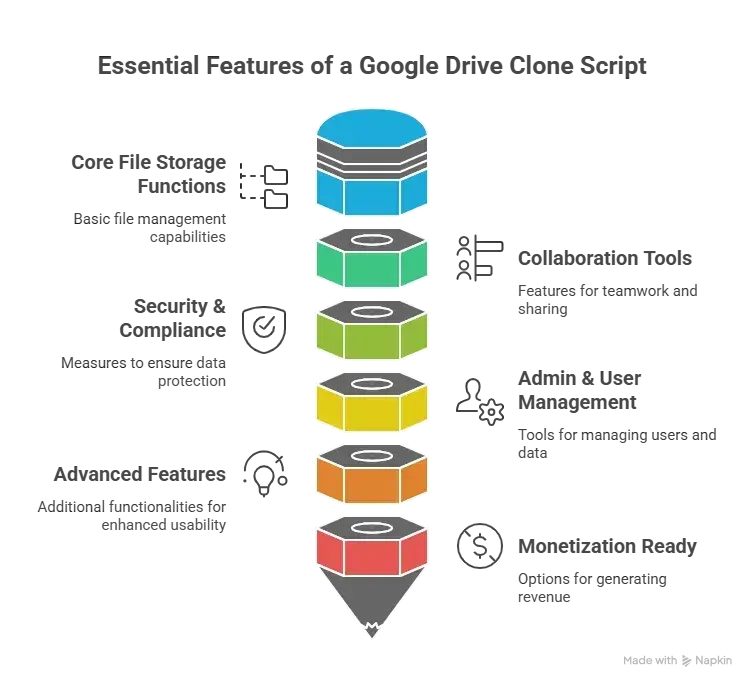
Not every clone script is worth your money. A proper Google Drive alternative must support more than just file uploads. Here’s what you should look for:
Core File Storage Functions
- Upload, download, preview, and delete files
- Folder creation, nesting, and hierarchy
- Drag-and-drop file management
- File version history and rollback options
- Multi-device synchronization
Collaboration Tools
- Share files/folders with custom permissions
- View/edit access controls
- Comments and annotations
- Real-time activity logs
Security & Compliance
- End-to-end encryption and SSL
- User authentication and access logs
- Role-based user permissions
- GDPR, HIPAA, and SOC-2 readiness
- Two-factor authentication and password protection
Admin & User Management
- Dashboard to manage users, plans, storage quotas
- Audit logs and file access reports
- Suspicious activity monitoring
- Custom roles and team management
Advanced Features
- Offline file access
- Desktop and mobile app support
- File type previews (PDF, DOCX, video, images)
- Trash and file recovery
- Cloud storage integrations (AWS S3, Google Cloud, Azure)
Monetization Ready
- Subscription plans with storage tiers
- In-app purchases for additional space
- White-label and reseller support
- Payment gateway integration
Uncover the Exact Cost to Build a Google Drive Clone – Explore Features, Pricing Breakdown & Get Started with Your Cloud Storage App Today!
Best Google Drive Clone Script in 2026
Here’s a comparison of the most reliable and performance-focused Google Drive clone Script available this year.
1. Miracuves Google Drive Clone
Miracuves delivers a full-stack, scalable file storage platform that mirrors Google Drive’s functionality while offering the freedom to host, customize, and scale it your way. Whether you’re building for internal teams or launching a SaaS for end users, this clone script is production-grade and monetization-ready.
Best For: SaaS builders, enterprises, data-heavy businesses
Top Features:
- Real-time collaborative sharing
- Secure encryption and access logs
- Multi-tenant architecture with user quotas
- Custom branding and white-label support
- API for integrations and file automation
2. FileStackX by DevGrid
FileStackX is ideal for companies that want a self-hosted file sharing and document management platform without the complexity of building one from scratch. It includes core functionality but focuses more on team productivity than end-user SaaS.
Best For: Internal company use, small teams
Top Features:
- Drag-and-drop UI with cloud sync
- Simple admin dashboard for file governance
- Basic collaboration permissions
- Integration-ready with Dropbox and OneDrive
Limitations: No monetization features, limited API access
3. DriveVault by CodeFusion
DriveVault offers a performance-first approach with scalable infrastructure support and containerized deployment. It’s designed for high-volume teams and startups aiming to run a branded alternative to cloud storage apps.
Best For: Startups and tech teams
Top Features:
- Container support (Docker, Kubernetes)
- Role-based file access controls
- Automatic file cleanup and quotas
- Multi-language support
- Developer-ready API suite
Limitations: Requires technical setup, no UI customization by default
Read More : WeTransfer vs Google Drive Business Model | Guide for Cloud Startups
Global Cost Factors & Pricing Breakdown
Google Drive–Style Cloud Storage & File Management Platform — Market Price
PHP/Laravel is often the most practical choice for launching a Google Drive clone quickly and affordably. Node.js/Python is better suited for real-time syncing and collaboration features, while Go microservices fit enterprise-level cloud storage platforms requiring high scalability and performance.
Miracuves Google Drive-Like App Solution Cost and Tech Stack
Miracuves Pricing for a Google Drive-Like File Storage App developed in PHP/Laravel with Flutter Apps for $2,499 USD (One-Time Price) in just 6 days
Get a fully developed, deployment-ready platform modeled after Google Drive. Built on a reliable PHP/Laravel foundation, this complete package includes everything you need to launch and scale:
Core Workflows: Secure file upload, storage, sharing, and folder management with seamless user access.
Built-in Storage Logic: Cloud file handling, permission controls, file syncing, and version management.
Management Hub: Comprehensive user access control, storage monitoring, and centralized admin dashboard.
Launch-Ready: Fully prepared for your custom branding, configuration, deployment, and immediate market entry.
Why is it so affordable?
Most advanced cloud storage platforms rely on costly architectures and infrastructure-heavy systems that require specialized development teams. Building from scratch significantly increases both time and cost.
We took a smarter, more practical approach:
You Aren’t Paying for Ground-Up Development: Our file management engine is already developed, tested, and ready to deploy. You avoid unnecessary development costs and long timelines.
The Power of PHP / Laravel: Built on a stable and globally trusted framework, this solution reduces upfront costs while ensuring long-term scalability. PHP’s large developer ecosystem makes future upgrades, maintenance, and customizations highly cost-efficient.
You get a scalable, enterprise-capable file storage solution without the high development expense.
Note: This cost is for the solution, re-branding, deployment, and source code only.
Choosing the Right Script for Your Goals
Pick Miracuves if:
- You want to offer your own cloud storage SaaS
- You need premium features like team roles, quotas, and billing
- You plan to scale the app with integrations and automation
- You want full control over source code and design
Pick FileStackX if:
- You’re looking for an easy-to-deploy internal document system
- Your users don’t need complex automation or APIs
- You care more about simplicity than scalability
Pick DriveVault if:
- You’re comfortable with containerized app deployment
- You want API-first architecture for dev teams
- You plan to run it in a multi-region environment
Monetizing a Google Drive Clone
Cloud storage isn’t just a utility—it’s a business model. If you’re launching your own SaaS or service using a Drive clone, here are a few ways to turn files into funds:
Subscription Billing
- Offer different tiers with increasing storage space and features
- Add user/team limits per plan for pricing flexibility
Pay-As-You-Go
- Let users purchase extra storage space or bandwidth on demand
- Works well with freelancers or businesses with bursty usage
White-Labeling & Reseller Licenses
- Allow agencies or businesses to rebrand and resell your platform
- Charge for custom domains, logos, and admin access
Feature-Based Upsells
- Sell additional collaboration tools, custom analytics, or integrations
- Example: Add priority support, email notifications, or PDF editing
Make sure your script includes admin tools that let you track usage, handle billing, and restrict or expand access based on subscription status.
Data Hosting & Scalability Considerations
Cloud storage eats space fast. Choosing the right hosting backend is critical. Most clone Script support third-party storage backends like:
- Amazon S3
- Google Cloud Storage
- Azure Blob
- DigitalOcean Spaces
You can also deploy on your own VPS, but make sure your hardware can handle it. SSD storage, daily backups, and auto-scaling are all best practices you shouldn’t ignore. For serious scale, look for Script that support object storage, CDN integration, and region-based data rules.
Final Thoughts
Launching a Google Drive clone in 2026 isn’t about competing with tech giants—it’s about offering something tailored, controlled, and closer to your user’s needs. Whether you’re solving internal workflow headaches or building a new SaaS platform with cloud storage at its core, a well-built Drive clone script gives you a strong starting point. Choose based on your audience, your growth strategy, and your technical comfort zone. At Miracuves, we help innovators launch high-performance app clones that are fast, scalable, and monetization-ready. Ready to turn your idea into reality? Let’s build together.
FAQs
Still have questions about Google Drive Clone Script ? Let’s clear them up.
What is a Google Drive clone?
It’s a software script that mimics the core features of Google Drive—file storage, sharing, access controls, and collaboration—while giving you full control over hosting and customization.
Is it safe to use a clone script for cloud storage?
Yes, as long as it includes proper encryption, access logs, and follows security best practices. Choose a provider that offers secure architecture and compliance tools.
Can I launch a SaaS using a Google Drive clone?
Absolutely. Many clone Script are built with multi-tenancy and subscription models in mind, allowing you to monetize your own cloud storage platform.
Does it support large files and different formats?
Yes. Most modern Drive clones support large file uploads, previewing for PDFs, videos, images, and even live editing for documents.
Can I use third-party storage like AWS or Google Cloud?
Yes. Premium Script allow integration with S3, Google Cloud, Azure, and other object storage services for scalability and performance.
Do I need a technical team to run this?
Basic deployment can be done with minimal tech skills, especially if the provider offers setup help. For scaling, integrations, or UI customization, developer support is useful.
Related Articles
Miracuves is an independent software development company. We are not affiliated with, connected to, sponsored by, or endorsed by any company or product named in this article.
Terms such as “X Clone” are used descriptively. It is how the software industry refers to building a platform with functionality comparable to a known service, and how clients search for it.
The entire design and codebase of our products is built by our own team. Our products contain no code, design, graphics, or content originating from any third-party website or applications.
All third-party names and marks referenced in this article are the property of their respective owners, referenced solely to identify the services discussed.