
Key Takeaways
- An OTT Streaming Platform for Smart TVs should deliver a consistent viewing experience across television, mobile, and web while adapting navigation and playback to each device.
- Core cross-device features include synchronized profiles, watchlists, Continue Watching, viewing history, recommendations, subscriptions, parental controls, and account settings.
- A unified OTT experience depends on reliable streaming, device compatibility, responsive interfaces, account synchronization, content security, and seamless movement between screens.
Cross-Device Experience Signals
- Viewers should be able to begin content on mobile or web and continue on a Smart TV with playback position, watch history, preferences, and account data synchronized.
- Mobile and web interfaces can prioritize touch, search, and browsing, while Smart TV apps need remote-friendly navigation, larger controls, clear focus states, and simplified content discovery.
- Adaptive bitrate streaming, CDN delivery, device detection, subtitles, multiple audio tracks, DRM, and playback monitoring help maintain consistent video quality across different screens and networks.
Smart TV & Platform Insights
- Operators should evaluate Smart TV operating systems, app-store requirements, remote navigation, authentication methods, performance limits, playback compatibility, and device-specific testing.
- Cross-device analytics should track viewing sessions, device switching, playback failures, watch time, completion rates, search behavior, and subscription activity to identify experience gaps.
- Miracuves develops customizable OTT streaming platforms with Smart TV apps, mobile and web viewing, synchronized profiles, adaptive streaming, DRM, recommendations, subscriptions, analytics, and admin controls.
An OTT Streaming Platform does not become truly multi-device simply because the same content catalogue can open on a phone, browser and television.
The harder problem is making all three screens feel like parts of the same viewing experience.
A subscriber may discover a programme while commuting on mobile, add it to a watchlist from a laptop, start watching it on a Smart TV in the evening and return to the phone the next morning.
From the viewer’s perspective, those actions should feel continuous. From the product team’s perspective, however, each screen behaves differently. mobile users tap and swipe. web users click, scroll and type. smart TV viewers sit several feet away from the screen and navigate with directional controls.
That creates the central design challenge for any OTT streaming platform for Smart TVs:
How do you preserve one product identity without forcing one interface onto every device?
The answer is not identical screens. It is consistent behaviour adapted to each viewing environment.
One OTT Product Does Not Mean One Identical Interface
Cross-device consistency is often misunderstood.
Teams sometimes assume the goal is to make the mobile app, website and television interface look almost identical. That can create a worse experience.
A mobile user holds the screen at arm’s length and can touch any visible control directly. A desktop user has a mouse, keyboard and larger amount of usable screen space. A television viewer may be sitting across the room using only up, down, left, right, select and back. the interface therefore has to change.
The product logic should remain familiar, while the interaction model adapts.
A user should recognize:
- the same profile
- the same catalogue
- the same content hierarchy
- the same watchlist
- the same Continue Watching row
- the same subscription access
- the same programme artwork and metadata
- the same playback position
But the route used to reach those things can differ substa
Start With One Viewer Identity Across Every Screen
Cross-device OTT design should begin with identity rather than layout.
When someone signs in on television, web or mobile, the platform should understand that this is the same subscriber relationship.
That affects:
- profile selection
- subscription access
- parental restrictions
- viewing history
- watchlists
- recommendations
- playback progress
- content entitlements
Without that continuity, the product feels fragmented even if every individual application looks polished. a viewer who adds a title to a watchlist on mobile should not have to find and save it again on television.
A programme paused on television should not restart from the beginning when opened later on the web. the visible interface changes by device. the viewer state should not.
Treat Smart TV as a Living-Room Experience, Not a Large Mobile Screen
The television interface has a fundamentally different interaction model. the viewer is farther away. the screen is large. the remote is slower than touch. typing is inconvenient. Navigation depends heavily on focus movement. those constraints should influence the interface from the beginning.
A Smart TV OTT experience normally benefits from:
- larger text
- larger artwork
- fewer competing actions
- clear selection states
- predictable horizontal and vertical movement
- minimal typing
- simple playback controls
- obvious back behaviour
- limited navigation depth
The question designers should repeatedly ask is:
“Can the viewer understand what is selected and reach the next action using only directional controls?”
If the answer is no, the interface may work visually while still failing as a television experience.
Make Focus States Impossible to Miss
Touchscreens reveal intent because the user touches the exact object they want.
Television interfaces work differently. the user moves an invisible cursor through selectable elements. that makes focus state one of the most important TV design elements.
A viewer should immediately know:
- which content card is selected
- which navigation item is active
- which playback button currently has focus
- where focus will move after pressing a direction
- what happens after pressing back
Useful visual signals can include:
- enlargement
- stronger contrast
- borders
- shadows
- text expansion
- subtle animation
The exact visual treatment can vary by brand.
Clarity cannot. If viewers repeatedly lose track of focus, even a beautiful Smart TV interface becomes frustrating.
Design Navigation Around the Remote Control
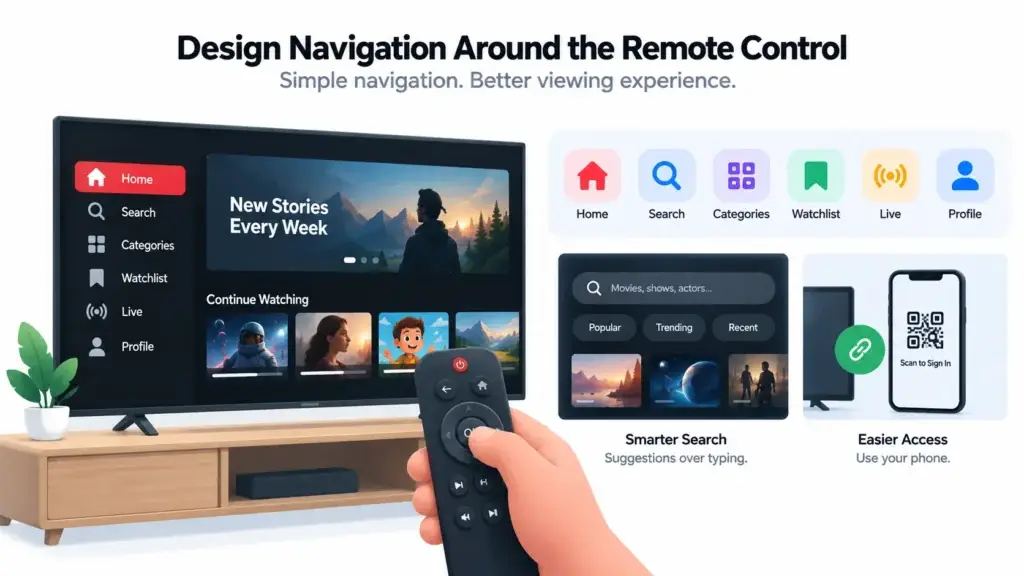
Remote navigation rewards simplicity. Long menus, deeply nested categories and forms that require extensive typing create more friction on television than they do on web or mobile.
Consider reducing television navigation to a small number of high-value destinations such as:
- Home
- Search
- Categories
- Watchlist
- Live
- Profile or account
Even search needs different thinking.
Typing a long phrase using an on-screen keyboard can be slow. Search therefore benefits more from suggestions, recent searches, popular categories and strong content discovery.
Where appropriate, an OTT product can also use device-linking or mobile-assisted authentication to reduce the amount of information viewers need to enter with a remote.
The principle is straightforward:
Every unnecessary television interaction costs more effort than the same interaction on mobile.
Keep Content Discovery Familiar Across Mobile, Web and TV
Although the controls change, the content model should remain recognizable.
If the mobile experience prominently uses:
- Continue Watching
- New Releases
- Recommended for You
- My Watchlist
- Recently Added
- Genre collections
The right discovery structure also depends on the type of catalogue being served. A focused specialist service may organize content very differently from a broad entertainment platform. This guide to niche OTT content strategy explains why relevance and catalogue depth can matter more than raw content volume.
then the television experience should not suddenly organize the same catalogue according to completely unrelated logic.
Viewers develop expectations across screens. Keeping core discovery patterns familiar lowers the learning curve when they change devices. at the same time, each interface can prioritize differently mobile may surface shorter viewing opportunities web may expose more metadata. television may emphasize large visual collections and fewer simultaneous decisions. the catalogue is shared. the presentation adapts.
Continue Watching Is a Cross-Device Feature, Not Just a Homepage Row
Continue Watching is easy to treat as a visual component. Its real value is deeper.
It communicates:
“The platform remembers where you were.”
For a multi-device OTT service, that promise should survive device changes. a viewer might watch 35 minutes of a film on television, continue on mobile during travel, and later finish it from a browser. Ideally, playback state follows the profile rather than the device. That requires thinking beyond simple watch history.
The platform may need to understand:
- title
- episode
- profile
- playback position
- completion status
- last watched time
- next episode
- device state
From the viewer’s perspective, none of that complexity should be visible. They should simply press play and continue.
Watchlists Should Belong to the Viewer, Not the Device
The same logic applies to saved content.
Watchlists become much more useful when subscribers can discover content wherever it is convenient and watch it later wherever viewing is comfortable.
For example:
Mobile: discover a documentary while commuting.
Web: read the description and add it to the watchlist.
TV: open the watchlist that evening and start watching.
That is one continuous user journey.
If each application maintains isolated state, the OTT service behaves like multiple products sharing a logo.
If the state moves with the user, the system behaves like one streaming platform.
Playback Quality Has to Adapt to the Screen and Connection
Cross-device experience is not only about navigation. Playback quality heavily influences how viewers perceive the platform. Mobile viewers may move between Wi-Fi and cellular connections. Web viewers may watch through different browsers and network conditions.
Smart TV users often expect longer uninterrupted sessions and may notice playback problems more quickly on a large screen.
This is where adaptive streaming becomes important. Rather than assuming one video quality is suitable for everyone, the delivery workflow can make different versions available and adjust playback according to connection and device conditions.
Important playback considerations include:
- adaptive quality
- startup time
- buffering behaviour
- subtitle support
- alternate audio
- resume position
- seek behaviour
- episode transitions
- error recovery
Teams that need a deeper view of the technical layer can use this OTT streaming architecture guide to understand how applications, APIs, video delivery, playback, data, and infrastructure work together behind the viewing experience.
The product should feel consistent even when the technical conditions are not.
Mobile, Web and Smart TV Should Share Rules but Not Interaction Patterns
| Experience Area | Mobile | Web | Smart TV |
|---|---|---|---|
| Primary Interaction | Touch and gestures | Mouse, keyboard and responsive controls | Remote and directional navigation |
| Viewing Distance | Close | Desk distance | Living-room distance |
| Navigation Density | Compact | Can expose more information | Should remain simple and highly visible |
| Search | Easy keyboard input | Fast keyboard input | Typing should be minimized where possible |
| Content State | Shared profile state | Shared profile state | Shared profile state |
| Watchlist | Synced | Synced | Synced |
| Playback Progress | Synced | Synced | Synced |
| Design Priority | Speed and touch convenience | Discovery and flexibility | Clarity, focus and effortless navigation |
The strongest cross-device strategy is therefore:
centralize the rules that define the viewer relationship, while adapting the interface to each device.
Founders planning the broader product layer can review these OTT Streaming Platform features to understand how viewer, content, playback, subscription, and administrative capabilities can fit into a connected OTT experience.
Keep Subscription Access Consistent Across Devices
Subscribers generally think in terms of access, not application boundaries.
If their account includes a particular content collection, they expect that access to remain understandable when moving between supported devices.
This makes entitlement consistency important.
The platform should clearly understand:
- which profile is active
- which plan is active
- what content the account can access
- whether a rental or one-time unlock remains valid
- whether parental restrictions apply
- whether the account has reached relevant viewing limits
The television experience should not invent its own version of these rules. Neither should mobile or web.
The same principle applies to monetization. Subscriptions, rentals, premium access, and other revenue models should remain understandable across devices. Founders evaluating these options can explore Miracuves’ OTT Streaming Platform business model framework in more detail.
Consistency at this level reduces customer confusion and support burden.
Profiles Should Preserve Household Context
Many OTT services are household products.
Different viewers may have different:
- watch histories
- recommendations
- watchlists
- maturity settings
- language preferences
- viewing habits
Profiles help preserve those distinctions.
For Smart TV specifically, profile selection also needs to work comfortably with remote controls. avoid unnecessarily complicated profile flows. the goal is to make it easy for a household member to enter the correct viewing context before browsing. once selected, that profile should remain meaningful across other supported devices.
TV Search Should Not Depend on Long Typing Sessions
Search is one of the clearest examples of why identical UX fails.
Typing on mobile is simple.
Typing on a physical keyboard is fast.
Typing using a television remote can be painful.
A better TV discovery strategy reduces dependence on text entry through:
- useful categories
- recent searches
- trending collections
- intelligent suggestions
- strong metadata
- genre navigation
- personalized rows
- voice input where the environment supports it
The better the discovery system becomes, the less frequently the viewer needs to type.
That is particularly valuable in a living-room interface.
Design Error States for a Viewer Holding a Remote
Error handling often receives less attention than the normal journey.
On television, poor error states can be especially frustrating.
Imagine playback fails and the user receives a small technical message with no clearly focused action.
The viewer now has to understand the problem from several feet away and determine what the remote can do next.
Useful TV error states should:
- explain the problem clearly
- avoid unnecessary technical language
- present one obvious primary action
- preserve navigation focus
- allow retry
- provide a sensible route backward
The same principle applies to expired sessions, entitlement errors, connectivity problems and unavailable content.
Testing the Living-Room Experience Requires Real TV Behaviour
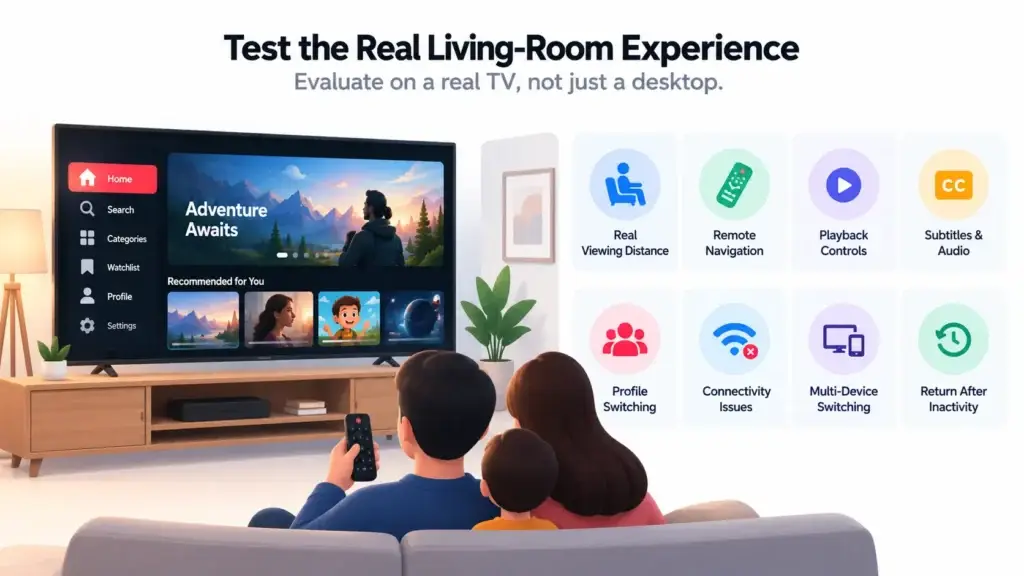
A television interface should not be judged only from a desktop preview.
Teams need to evaluate what actually happens when viewers:
- sit several feet from the screen
- use directional controls
- press back repeatedly
- navigate long content rows
- search with the remote
- pause and resume playback
- change subtitle or audio options
- switch profiles
- return after inactivity
- lose connectivity
- move from another device to television
Small design flaws become much more visible in real living-room use.
A button that looks clear on a monitor may feel tiny across a room.
A navigation path that seems reasonable with a mouse may become irritating after twenty remote presses.
Smart TV testing should therefore evaluate the complete viewing context, not merely whether the application technically opens.
Decide Which Screens Actually Matter to Your Audience
Not every OTT business needs every device on day one.
Device strategy should follow viewing behaviour.
Founder Decision Signals
Viewing Format
Long-form films, shows, sports, fitness, education, and family content can make living-room viewing more strategically important.
Session Length
If viewers typically watch for longer periods, television support may influence the overall value they perceive from the subscription.
Household Use
Shared household viewing increases the importance of profiles, parental controls, synchronized watch history, and easy TV access.
Launch Scope
If TV demand is still uncertain, design the core OTT foundation for connected-device expansion without forcing every TV platform into the first release.
Device priorities should also influence the wider product roadmap. This OTT feature planning guide explains how founders can prioritize discovery, playback, retention, monetization, and operational capabilities around actual audience needs.
Build for TV Expansion Without Building Every TV App Immediately
There is an important difference between:
being ready for television
and
launching on every television ecosystem immediately.
Founders can prepare the core OTT product for future connected-TV expansion by keeping user identity, content data, playback state, subscriptions and APIs centralized.
The front-end TV applications can then be scoped according to actual audience demand.
Scope also affects investment. Founders comparing mobile, web, and connected-TV requirements can review the factors behind OTT Streaming Platform development cost before deciding which applications belong in the first release and which can be added later.
This avoids two extremes:
- building every possible television application before knowing whether viewers need them;
- building the original product in a way that makes television expansion unnecessarily difficult later.
A scalable OTT roadmap should leave room for connected-device growth without making device count the main success metric.
Mistakes OTT Founders Should Avoid
Copying the Mobile Interface Onto Television
Mobile layouts assume direct touch. Smart TV interfaces need clear focus states, remote-friendly movement, larger visual targets, and simpler navigation paths.
Building Separate Viewer State for Every Device
Isolated watchlists, playback progress, profiles, or entitlements make the service feel fragmented. The viewer relationship should remain connected across supported screens.
Making TV Search Depend on Typing
Remote-based typing creates friction. Strong categories, suggestions, metadata, recommendations, and curated rows can reduce unnecessary text entry.
Testing TV UX Only on a Desktop
A television experience should be tested at real viewing distance with actual remote navigation. Focus movement, readability, playback controls, back behaviour, and error states can feel very different in a living room.
Launching Every Device Without Audience Evidence
More applications create more testing and maintenance responsibility. Prioritize the screens that match the content format and actual viewing behaviour, then expand deliberately.
Treating Playback as Separate From UX
Navigation can be excellent and the experience can still fail if videos start slowly, buffer repeatedly, lose progress, or behave inconsistently across devices.
How Miracuves Helps Create a Connected OTT Foundation
Designing for multiple screens becomes easier when the product begins with shared viewer identity, centralized catalogue logic, consistent access rules and reusable backend workflows.
Founders exploring different video formats can also review Miracuves’ video content platform solutions to compare OTT, creator, short-video, and other streaming product models.
Miracuves helps founders begin with a ready-made OTT platform foundation for mobile and web rather than rebuilding the standard streaming product layers from zero.
For founders who prefer a brand-first route, a white-label video streaming platform can provide the underlying OTT foundation while leaving the viewer-facing brand, content strategy and product positioning under the operator’s control.
The standard ready-made foundation can support a six-day delivery approach where the existing scope fits the requirements. Native Smart TV applications, connected-device certification, specialist DRM, advanced infrastructure, and additional TV ecosystems should be scoped separately according to the required platforms and technical requirements.
For teams comparing implementation options, choosing the right OTT Streaming Platform development partner also means checking source-code ownership, streaming expertise, connected-device scope, infrastructure responsibilities, and post-launch flexibility.
The objective is not to make every screen identical. It is to establish one OTT business system that can deliver the right viewing experience on each screen.
Final Thoughts: Design One Viewer Relationship, Not Three Separate Apps
The strongest multi-device OTT experience is not the one where every interface looks identical.
It is the one where viewers never have to think about the boundaries between devices.
They discover content on one screen.
Save it on another.
Watch it on television.
Continue later from somewhere else.
Their profile, access, history and preferences move with them.
Behind the scenes, mobile, web and Smart TV may require very different interaction patterns. That is expected.
What should remain consistent is the relationship between the viewer and the platform.
For founders, that creates a clearer product principle:
Centralize the viewer experience. Adapt the interface to the device.
That approach makes Smart TV expansion part of one OTT strategy rather than a separate product added after everything else has already been built.
FAQs
What is an OTT streaming platform for Smart TVs?
An OTT streaming platform for Smart TVs allows viewers to browse and watch internet-delivered video through a television application while remaining connected to the same account, catalogue, subscription, profile and viewing history used on other supported devices.
Should a Smart TV OTT interface look exactly like the mobile app?
No. The visual identity and product logic should remain familiar, but television requires different interaction patterns because viewers use remote controls, sit farther from the display and typically expect simpler navigation and larger interface elements.
Why is remote-control navigation important for Smart TV streaming apps?
Remote controls provide limited directional input compared with touchscreens and keyboards. Clear focus states, predictable movement and reduced navigation depth help viewers understand where they are and reach content with less effort.
Should Continue Watching sync between mobile, web and television?
For a connected multi-device experience, playback progress should ideally follow the viewer profile. That allows someone to begin watching on one supported device and continue from the same point on another.
What should remain consistent across OTT devices?
Account identity, profiles, subscription access, watchlists, viewing history, playback position, content metadata and core discovery concepts should remain consistent. Layout and controls can change according to the screen.
Is Smart TV support necessary for every OTT startup?
No. It depends on audience behaviour and content format. Long-form entertainment, films, sports, training, family viewing and premium subscription content can make television more important, while some mobile-first formats may have different priorities.
Can an OTT business launch mobile and web first and add Smart TV later?
Yes. A product can be designed so the underlying viewer identity, content, entitlements and playback data can support future connected-TV expansion. Native TV applications can then be scoped when audience demand justifies them.
Is a six-day OTT launch the same as a six-day Smart TV rollout?
Not necessarily. Miracuves’ six-day delivery applies to applicable standard ready-made OTT scopes. Native Smart TV applications, device-specific certification, custom integrations, DRM requirements and additional connected-TV environments may require separate scope and timelines.
Miracuves is an independent software development company. We are not affiliated with, connected to, sponsored by, or endorsed by any company or product named in this article.
Terms such as “X Clone” are used descriptively. It is how the software industry refers to building a platform with functionality comparable to a known service, and how clients search for it.
The entire design and codebase of our products is built by our own team. Our products contain no code, design, graphics, or content originating from any third-party website or applications.
All third-party names and marks referenced in this article are the property of their respective owners, referenced solely to identify the services discussed.