Social Discovery App · Production Ready

Bumble Clone App - White-Label Video-Clip Dating Platform

Built by Miracuves, the ready-made, white-label Bumble clone for video-first dating delivers a member app with a web version, a separate manager app and an admin panel, unencrypted source code and the MySQL schema you own, live under your name within six working days.

Members film 15, 30 or 60 second clips for their profiles, narrow a nearby grid by age, gender and distance, then message or call over Agora. Reports go to regional managers in their own app. Android and iOS builds reach the stores from your accounts; voice notes and astrological matching are available add-ons, priced on their own. A different review workflow or another call provider is priced in writing first, then built in about 2-8 weeks.

Launch in 6 Days with

  • Source Code
  • MySQL Schema
  • Member App
  • Manager App
  • Member Web App
  • Admin Panel

StackFlutter · Node.js · PHP · Bootstrap · MySQL · Agora SDK · Firebase

MXingle console · ModerationIllustrative
Reports open7
Photos to review12
Members online218

Community activity

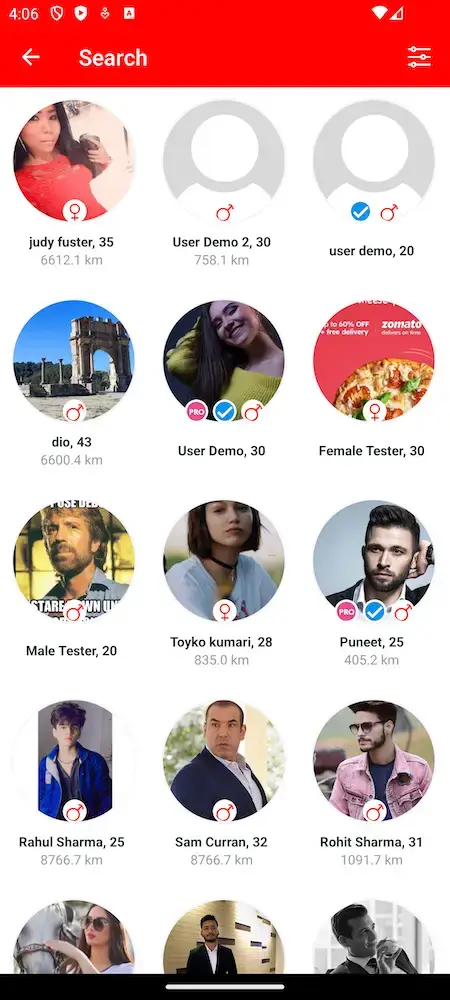
Bumble Clone people-nearby screen with a grid of member photos, names, ages and distances.
Managers work their own regionreports and analytics
  • 6Income Linespaid tiers, spotlight & boosts, credit packs, ads, regional offers and PayPal web purchases
  • 3Separate Loginsmember, manager and admin sides, each with its own app or panel
  • 0%Revenue Share With Miracuvesno seat fees, no usage fees and no license to renew
  • 3Clip Lengths15, 30 or 60 seconds, compressed on the phone before upload
  • 6Days to Launchand if the delay is ours, we keep going free
  • $3,399Paid Once, Not Rentedsource code yours, no per-seat fee, no monthly rental

Live in six working days, or we keep working free until you launch. Every build carries 60 days guidance, 6 months bug fixes and 12 months updates.Verify every figure

Try the Demo Yourself

The proof is the MXingle demo: a nearby grid, filter sheet, call screen and manager login you open yourself.

Managers Can Grow a Region

Beyond closing reports, a regional manager can run local discounts and trial periods and track what they bring in, so moderation also drives growth.

Stores and PayPal Take the Card

Upgrades and credit packs sell through app-store billing, and PayPal, a PCI DSS Level 1 processor, adds a second route on Android and the web.

Ready to open your own dating platform?Talk to Product Expert

Chosen by 6,000+ clients across the globe

Miracuves is listed by Expertise.com as a managed IT service provider.Miracuves is an official member of the Forbes Business Council.Miracuves is a verified agency on DesignRush, listed among top design agencies in India.Miracuves is reviewed on Trustpilot as a software development company.Miracuves is listed by The Manifest among top managed software development companies.Miracuves is listed by DesignRush as a top software development company.Miracuves is recognized by GoodFirms as a top software development company.Miracuves is ranked among the top 1000 companies globally by Clutch.Miracuves is a top managed service provider in the United States on Clutch.

01Try it

Hands-On

Try the Bumble Clone: Member App, Manager App, Web App and Admin Panel

Miracuves hands you the member and manager logins for its Bumble clone app, so you can walk through it on your own before any call. You will find a member login and a manager login below, and the admin login is shared on a guided call. Scroll the people-nearby grid, apply a few filters, open a profile and check the call screen.
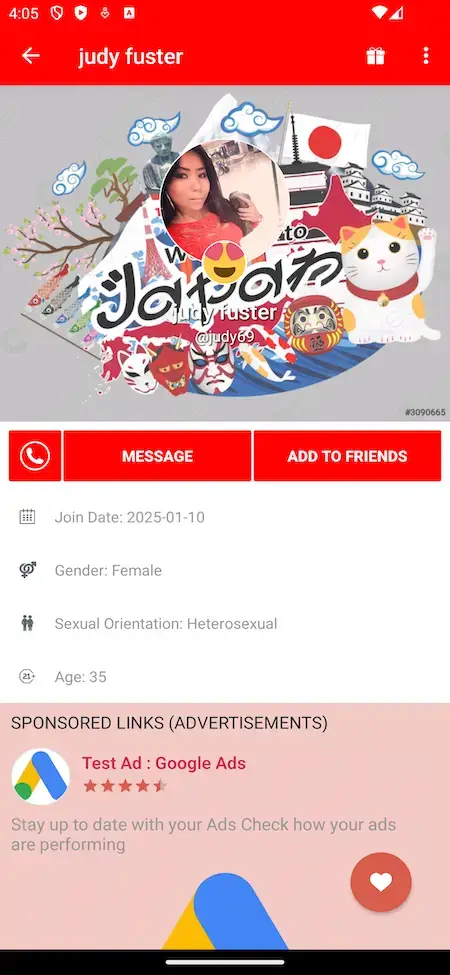
Bumble Clone people-nearby screen with a grid of member photos, names, ages and distances.Bumble Clone profile page with message and add to friends buttons, join date, gender, orientation, age and a sponsored link.
Member app

Member App on Your Phone

What a member sees on a phone: a nearby grid showing distances, a filter sheet, profile cards with message and add-friend buttons, a notifications list and a call screen.

  1. 1Choose your handset on the portal
  2. 2Use the demo login shown here
  3. 3Explore: Search, Profile, Notifications, Call
Login:user@demo.com | User_321
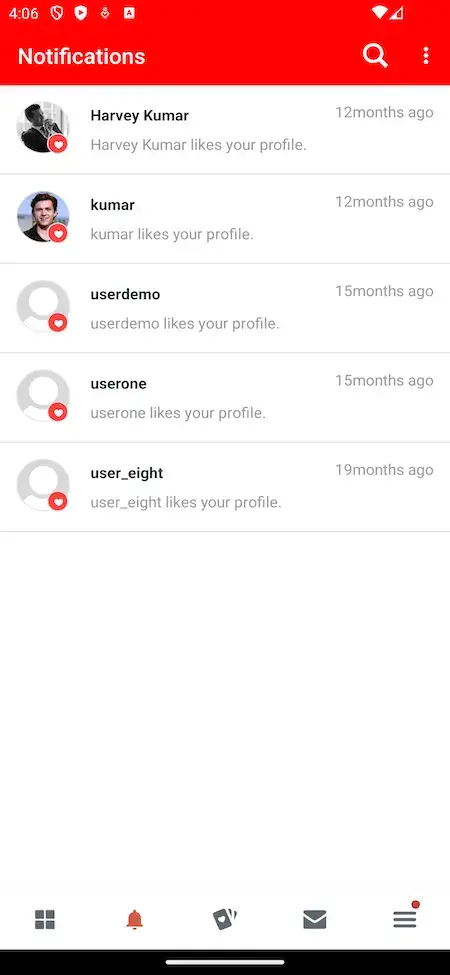
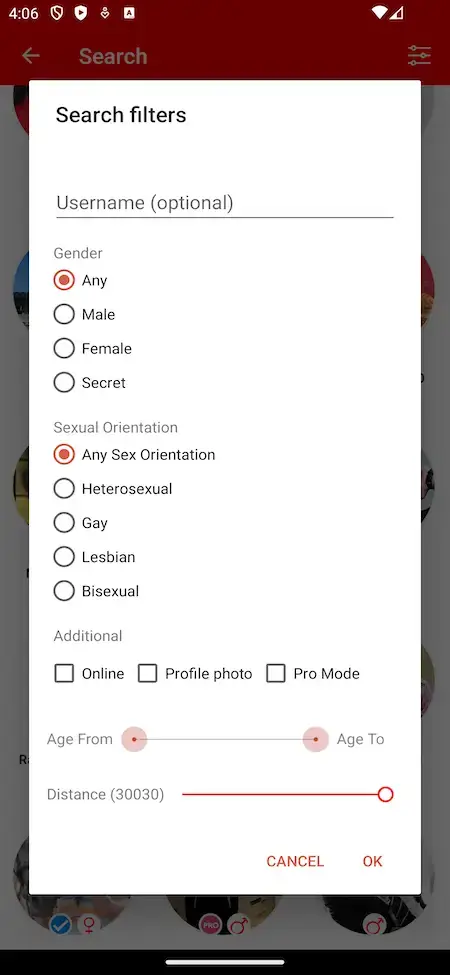
Bumble Clone notifications list showing members who liked the profile.Bumble Clone search filters with gender, sexual orientation, online, profile photo, pro mode, age range and distance controls.
Manager app

Regional Moderation With the Manager App

The moderation side: managers sign in to their own app to work through member reports, check flagged content and read analytics for their region. The phone screens beside this card belong to the member app.

  1. 1Choose your handset on the manager portal
  2. 2Use the manager login shown here
  3. 3Compare it with the manager answers in the FAQ
Login:manager@demo.com | Manager_321
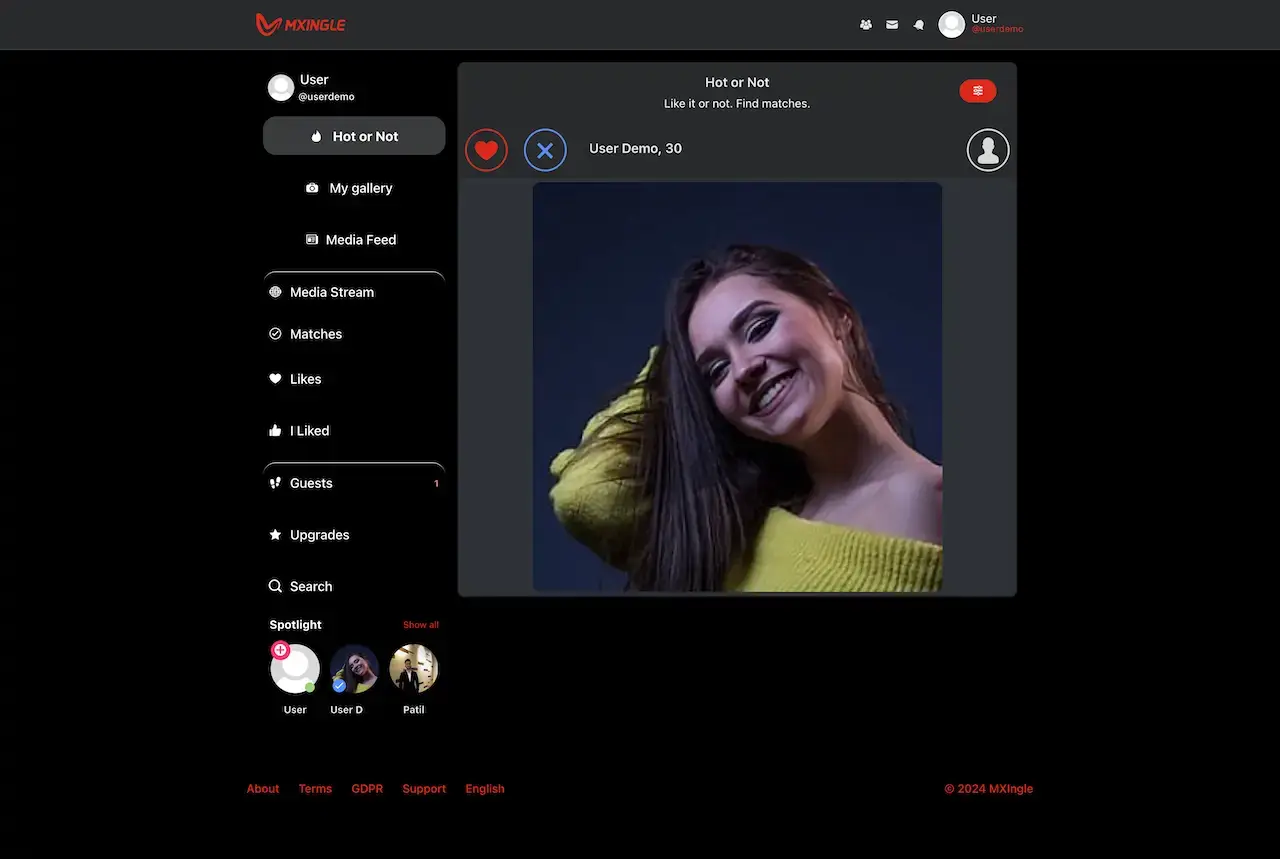
Bumble Clone member web app with a like or pass card, gallery, matches, likes, guests, upgrades, search and a spotlight row.
Web app

Member Web App - Matches, Likes & Search

The member side in a browser: a dark layout with a like-or-pass card, gallery, matches, likes, guests, upgrades, search and a spotlight row, plus a day and night switch and a language picker.

  1. 1Open the demo web address
  2. 2Log in with the member details shown here
  3. 3Explore: Matches, Likes, Guests, Search
Login:user@demo.com | User_321
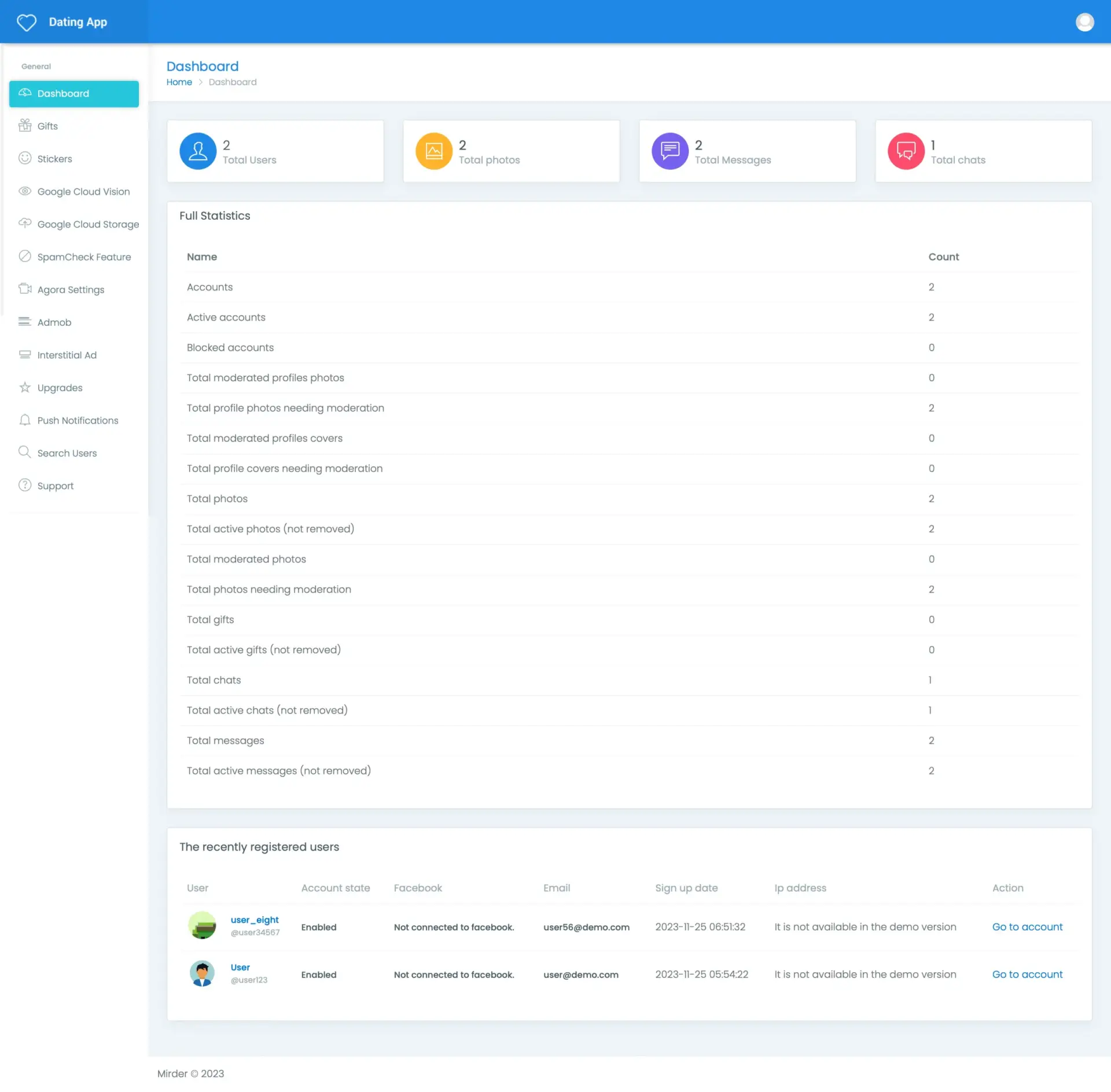
Bumble Clone admin dashboard with user, photo, message and chat counters, a moderation statistics table and a menu with spam check, call settings, ads and upgrades.
Admin panel

Admin Panel - Moderation Counters, Spam Check & Call Settings

The operator side: totals for users, photos, messages and chats, active and blocked accounts, photos and covers queued for review, and menus for spam check, calls, ads, upgrades and push.

  1. 1Go to the admin page on the demo host
  2. 2Get the admin login from our team
  3. 3Explore: Dashboard, Spam check, Upgrades
Admin login:given during a guided call
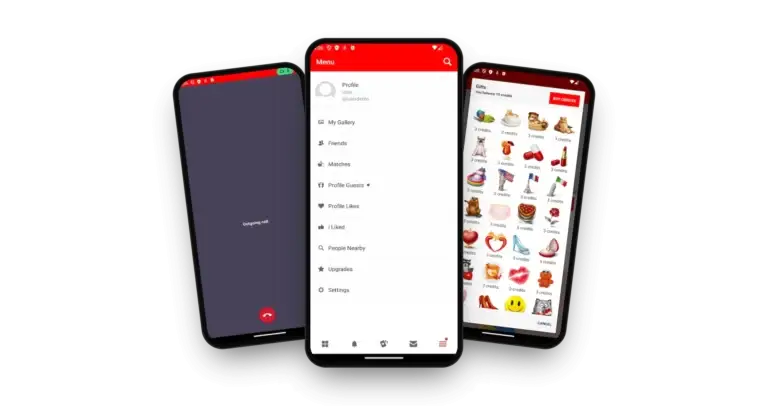
Bumble Clone on three phones: the member menu with gallery, friends, matches and upgrades, the outgoing call screen and the virtual gifts picker

See It With Us

Video Walkthrough of an App Like Bumble: Profiles, Nearby Search, Calls & Moderation

The fastest route to seeing every surface together is a guided call. Within 30 minutes we trace a clip from the camera to a gallery, a search from filters to a message, and a report from the member who files it to the manager who closes it, and then map each step onto your own market and launch date.

Book a live walkthrough.

Screen by Screen

Bumble-Like Dating App Screens - Phone App, Admin Dashboard & Web Version

Genuine screens from the phone app, the admin dashboard and the web version, running from the app menu and nearby grid through filters, profiles and a call to the notifications list.
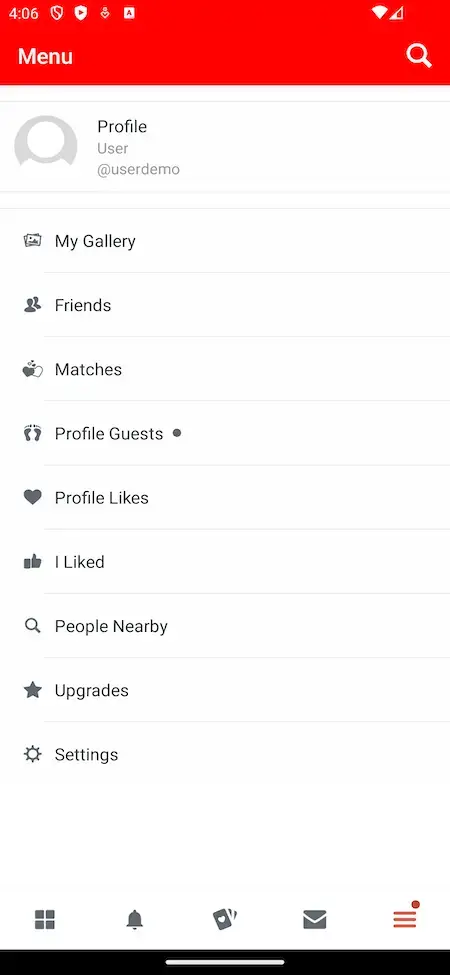
Bumble Clone app menu with gallery, friends, matches, profile guests, profile likes, people nearby and upgrades.
Bumble Clone people-nearby screen with a grid of member photos, names, ages and distances.
Bumble Clone search filters with gender, sexual orientation, online, profile photo, pro mode, age range and distance controls.
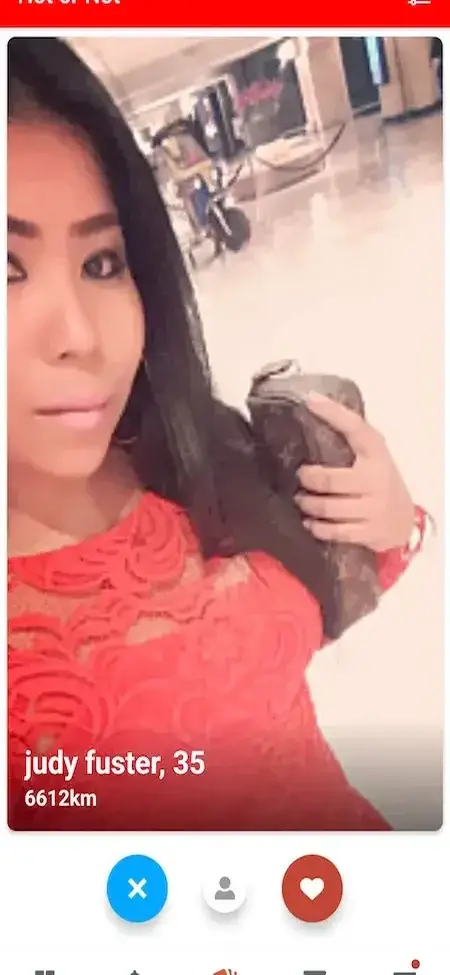
Bumble Clone member card with a large photo, name, age and distance and like and pass buttons.
Bumble Clone profile page with message and add to friends buttons, join date, gender, orientation, age and a sponsored link.
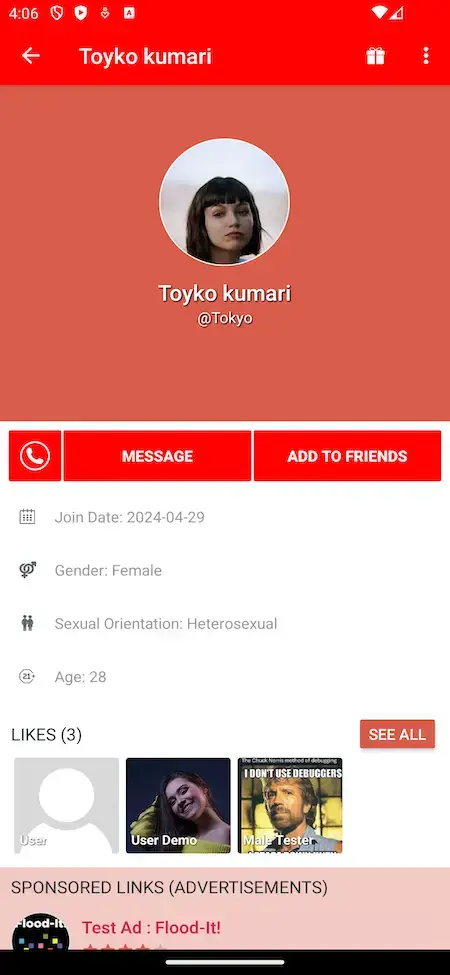
Bumble Clone member profile with a likes strip and a sponsored link.
Bumble Clone notifications list showing members who liked the profile.
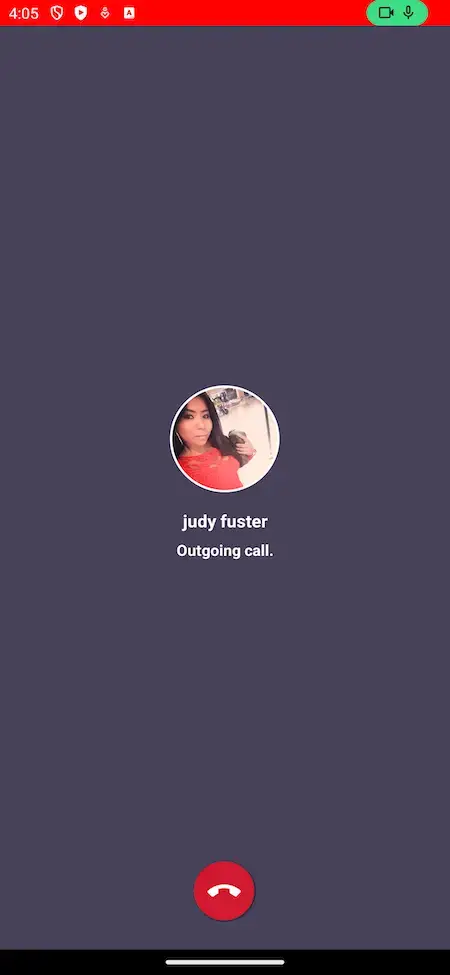
Bumble Clone outgoing-call screen with the other member's photo and a hang-up button.
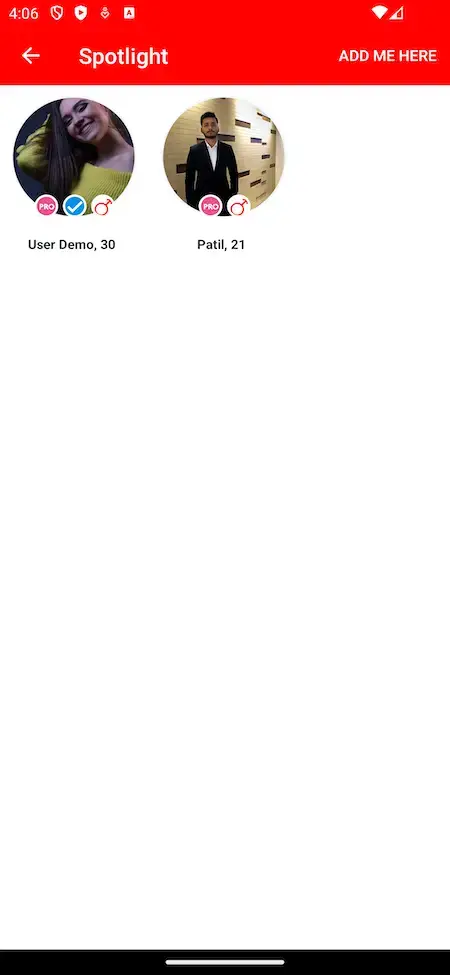
Bumble Clone spotlight screen showing featured members with an add me here button.
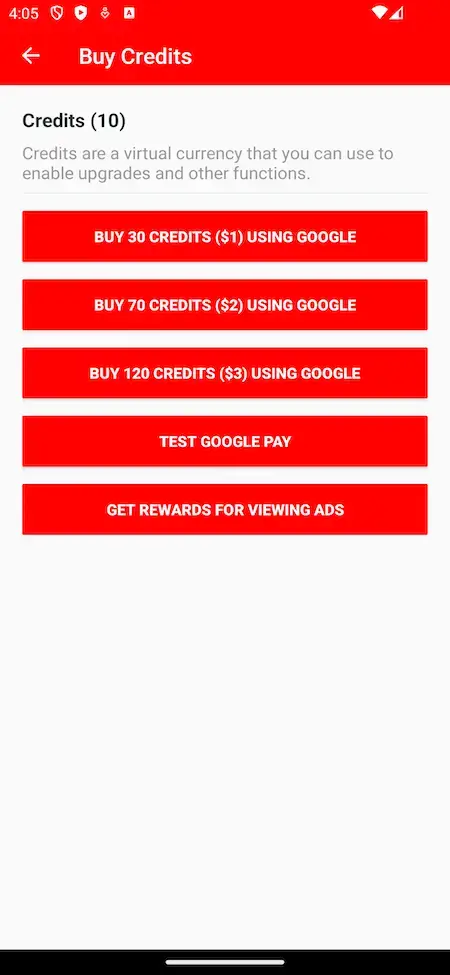
Bumble Clone buy credits screen with credit packs and a get rewards for viewing ads button.
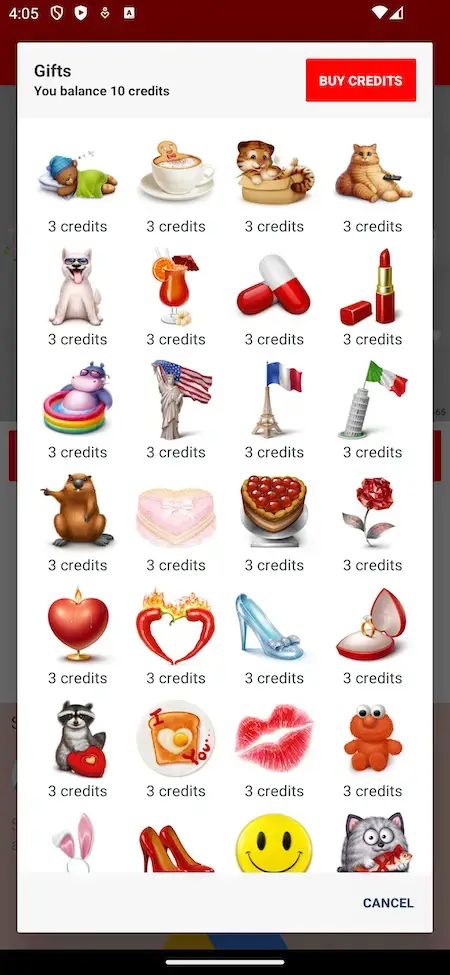
Bumble Clone gift picker with animated gifts priced in credits and a buy credits button.
11 screens · scroll →
Bumble Clone admin dashboard with user, photo, message and chat counters, a moderation statistics table and a menu with spam check, call settings, ads and upgrades.
1 screen
Bumble Clone member web app with a like or pass card, gallery, matches, likes, guests, upgrades, search and a spotlight row.
1 screen

Trace a member from the nearby grid via the filter sheet and a profile to a call and an alert, then trace an operator from the dashboard totals to the menus behind spam check, calls, ads and upgrades.

Explore Our Solutions

02Evidence

Client Voices

Bumble Clone Client Reviews - Operators in Their Own Words

No client on file runs a dating product, so these are the nearest operating models. Same Place Wellness runs a privacy-first community app, where Miracuves built its encrypted journal and practitioner booking; Miracuves built Polyvibe a social product where tipping and a custom feed ranker were the new work.

NNico OrlandoCo-founder & CEO, Polyvibe Inc
“Relaybe is an Instagram-style social product with a creator-economy layer on top. The base product is well-trodden, but the creator side — tipping, collab posts, and a custom feed ranker — is where we needed to move fast. Miracuves's MXSocial base gave us the photo/video feed, the stories, and the messaging layer. We added our tipping/collaborator-payouts module, our custom feed ranker, and a creator-tools dashboard. We launched the beta in 5 months and the full feature set in 10. The team's estimate is that a from-scratch build would have been 12+ months longer.”
AAnton Pascella BarbaroFounder, Same Place Wellness Ltd
“A privacy-first community app is a long road from scratch. Feed, events and the circle permission model came ready. They built our journal module with end-to-end encryption, the practitioner booking flow and a wellbeing widget. Retention is well above what we modelled.”
Read More Client TestimonialsOperators and founders in their own words

Where Things Stand

Bumble Clone Case Study - What Is Available and How to Verify It

We have no publishable case study from a client that launched a dating app here. Instead of borrowing a result from another industry, this section sets out what is available and how you can test it.

Not Published
No Named Dating Client Yet

Nothing in /portfolio/ covers this product, so we have no client name, logo or outcome to display. The working demo, with four surfaces you can open, is the proof on offer today.

MXingleDemo base
DatingModel
None namedClient
4Surfaces to try
6 working daysBase build
0Made-up results
Bumble Clone admin dashboard with user, photo, message and chat counters, a moderation statistics table and a menu with spam check, call settings, ads and upgrades.
What to check in the demo
  • Set gender, orientation, age and distance in the filter sheet
  • Open a profile and look for the message and add-friend buttons
  • Find the call screen and the notifications list
  • Sign in as a manager and compare the role with the FAQ
  • Ask for the admin login and read the dashboard totals
Why there is no name
  • Case studies are reserved for finished, real launches
  • An outcome from another sector says nothing about dating
  • No name, logo or figure is ever made up
  • Once a dating client allows it, a genuine write-up replaces this card
What we will not do
  • Print a figure with no client behind it
  • Dress a demo screen up as a client outcome
  • Guarantee members, matches or income
  • Pretend the demo logins are private

03What it is

At a Glance

How the Bumble Clone App Serves Members and Moderators

Miracuves ships its Bumble clone as a ready-to-launch dating platform. Members shoot short clips for their profiles, browse nearby people by geolocation, filter by age, gender and distance, like and match, then message or call. Regional managers answer reports behind the scenes while an admin runs the whole service.

Bumble Clone on three phones: the member menu with gallery, friends, matches and upgrades, the outgoing call screen and the virtual gifts picker

More Than a Swipe Deck

The worth lies around the profile: clips, a distance filter, calls, alerts and the moderation tools that keep a community usable.

Not a Locked Box

Readable, unencrypted source code lets your team reshape screens and rules as the service grows, with no per-seat charge.

Extras Stay Extras

Voice and video notes, event-based matchmaking, astrological compatibility and VR dating are separate add-ons with their own price, and none is counted as a base feature.

Android, iOS & Web

What You Get With the Script

Swiping is the easy bit of a dating product. The harder bit is trust: an unreviewed photo, an unanswered report, a member who has to be blocked. Those queues and tools arrive working, alongside the discovery and call features people sign up for.

Bumble Clone admin dashboard with user, photo, message and chat counters, a moderation statistics table and a menu with spam check, call settings, ads and upgrades.
  1. 01Video clips of 15, 30 or 60 seconds on a profile
  2. 02People-nearby search with distance and filters
  3. 03Messages, photos, GIFs and voice or video calls
  4. 04Manager app for regional reports and analytics
  5. 05Admin panel with moderation counters, ads and upgrades

Delivery covers a member app with a web version, a separate manager app and an admin panel with 13 menu entries, all as Flutter apps with the full source code.

Everything Included

Bumble Clone Features - Video Profiles, Nearby Discovery, Calls, Moderation & Manager App

Each capability below, from the nearby grid and filter sheet to the manager app, traces to a demo screen, an admin menu entry or a release-log line in the Miracuves Bumble clone. Whatever needs an extra module is marked as an add-on lower down.

Feature 01 / 12

Video Profiles

A member films a clip of 15, 30 or 60 seconds with the camera and posts it next to their photos. Uploads show a percentage and a progress bar, and the file is compressed before sending.

  • Three clip lengths: 15 s, 30 s and 60 s
  • Camera capture inside the app
  • Published straight to the profile gallery
  • Upload progress shown as a percentage
  • Video compression before the upload
Feature 02 / 12

Location Discovery

People close by are easy to find. The app reads the device location, prints each profile's distance and lets a member widen or narrow the radius in the filter sheet.

  • GPS location read from the device
  • A People Nearby item in the app menu
  • Distance printed on every profile tile
  • Distance slider in the search filters
  • Real-time distance calculation
Feature 03 / 12

Filters & Search

The search sheet narrows the grid by username, gender, sexual orientation, age range and distance, with switches for online members and for profiles that carry a photo, plus a Pro mode toggle.

  • Username search is optional
  • Choice of gender and orientation
  • Age range and distance sliders
  • Online-only and with-photo switches
  • Pro mode toggle
Feature 04 / 12

Profiles & Matching

A profile shows join date, gender, orientation and age with a message button and an add-to-friends button. Members like, pass and match, and the menu keeps lists of matches, likes, profiles they liked and guests.

  • Join date, gender, orientation and age on a profile
  • Buttons to message and to add a friend
  • Menu lists for Matches, Profile Likes and I Liked
  • Profile Guests list of who looked
  • Swipe gestures to like or pass
Feature 05 / 12

Voice & Video Calls

An outgoing-call screen with the other member's photo and a red hang-up button lives inside the app. Video calls reached the Android app in release 6.7 and the call SDK was updated in 6.8.

  • Outgoing-call screen with the member's photo
  • Video calls added to the Android app
  • Call SDK update shipped in release 6.8
  • Call settings menu in the admin panel
  • Video calling fixes in later releases
Feature 06 / 12

Chat & Media

Members message in real time and share photos and GIFs. A message button on every profile opens the thread, and push alerts bring members back when someone replies.

  • Real-time text messages
  • Photos and GIFs in chat
  • Message button on every profile
  • Stickers menu in the admin panel
  • Instant messaging in the app feature set
Feature 07 / 12

Alerts & Notifications

A notifications list shows who liked a profile and when, and push alerts cover matches and chats. Push moved to Firebase Cloud Messaging V1 and asks permission on Android 13 and later.

  • Notifications list with likes and timestamps
  • Push alerts for matches and chats
  • Firebase Cloud Messaging V1 in release 6.8
  • Android 13 permission prompt in release 6.7
  • Push Notifications menu in the admin panel
Feature 08 / 12

Sign-In & Onboarding

Members join with an email address, a phone number or a social account. Apple and Google sign-in create an account on the spot with a random login the member can change later.

  • Email, phone number or social account
  • Phone login on Android and web in release 6.9
  • Google and Apple authorization on iOS in release 6.8
  • Account created automatically with a random login
  • Facebook and Google buttons on the web login
Feature 09 / 12

Privacy Controls & Legal Pages

Members set who may view their profile and who may contact them. Operators change the wording of the Terms, GDPR, About and Privacy texts in the admin editor, and the web footer links to each.

  • Visibility and contact settings for members
  • Terms text you can edit
  • GDPR text you can edit
  • About and Privacy texts you can edit
  • Cookie notice on the web app
Feature 10 / 12

Reports, Blocks & Content Review

Members report and block other members from inside the app. The admin dashboard counts accounts, blocked accounts and the photos or profile covers waiting for review, and a spam-check feature has its own menu.

  • Report and block from inside the app
  • Blocked accounts counter
  • Photos needing moderation counter
  • Profile covers needing moderation counter
  • SpamCheck feature menu
  • Automated filtering and manual moderation tools
Feature 11 / 12

Manager App & Roles

Managers get their own app and login to look after a region or a category: they read reports, review flagged content, answer members and open analytics for their area. The admin hands out roles like moderator, manager or support staff.

  • Separate manager app and demo login
  • Regional or category scope
  • Reports and flagged content to review
  • Analytics for the assigned area
  • Roles and permissions set by the admin
  • Localized discounts and trial periods
Feature 12 / 12

Upgrades & Monetization

Premium plans in a freemium model unlock extras such as unlimited swipes, profile boosts and location changes, while credit packs, a spotlight row, banner and interstitial ads and sponsored links give further lines to switch on.

  • Upgrades menu in the app and the admin panel
  • Spotlight row with an add-me-here button
  • Credit packs and a reward-for-ads button
  • Ad banner IDs, AdMob and interstitial ad menus
  • PayPal virtual-currency purchases in release 7.0

What you bring: Miracuves rebrands the platform and deploys it on your hosting. You provide the domain, a verified developer account for each store, your branding and legal details, third-party keys such as maps, calls and push, and your own ad and payment accounts. Store review belongs to Apple and Google and sits outside our 6-day dating app build.

Talk to Our Team

How Operators Earn

How a Bumble Clone Earns - Paid Tiers, Boosts, Ads, Regional Offers & Web Purchases

A dating app like Bumble earns from several places, and Miracuves wires each income line on its own, so turning on ads never disturbs premium plans or credit packs.

The heaviest lines are normally the subscriptions members take out and the extras they buy one by one.

  1. 01

    Paid Tiers

    Subscriptions and in-app purchases unlock extras such as unlimited swipes, profile boosts and location changes. Tiers live in the upgrades menu, so changing a price or a perk is a setting, not a code change.

  2. 02

    Spotlight & Boosts

    A spotlight row puts chosen members in front of the grid with an add-me-here button, and boosts raise a profile's visibility. Both are paid extras beside the main plans.

  3. 03

    Credit Packs

    Members can buy credit packs, or earn credits by watching an ad, and spend them on the paid extras inside the app.

  4. 04

    Advertising

    Ad banner IDs, an AdMob menu and an interstitial ad menu are admin settings, and profiles can carry sponsored links, so free members become an ad audience.

  5. 05

    Regional Offers

    A manager can offer local discounts and trial periods inside the region and track what they bring in, which turns a moderation role into a growth lever.

  6. 06

    Web & PayPal Purchases

    Virtual-currency purchases can be paid with PayPal on the Android app and the website, a second route beside the app stores.

Published figures from listed dating companies, the app stores and a card gateway for the income lines this platform can run: revenue per payer, store commission, ad share and processing fees.
Revenue lineHow it is billedTake rateTypical rateWhat limits it
Paid TiersA repeating subscription fee collected via the app stores or your own gateway, with extras unlocked by tier.Bumble reports $26.80 a month per paying user; Grindr $24.25; Match Group $20.09 per payer.How many members pay at all. Grindr reports 8.4% of its monthly users paying, and Bumble reports 2.4 million paying users on its own app.
Boosts, Spotlight & Credit PacksOne-off in-app purchases, where the app store keeps a commission on each sale.Apple: 30% standard, 15% under its Small Business Program. Google Play: 20% + 5% billing fee (25% + 5% for existing installs) in the US, UK and EEA, after 10% + 5% on the first USD 1 million a developer earns each year.The store and your annual proceeds. Google Play still lists 15% on the first $1M and 30% above it in markets not yet moved, and subscriptions run 10% + 5% in the US, UK and EEA.
AdvertisingAd placements filled through an ad network and shown to free members, plus sponsored links.Match Group reports $72.3m of 2025 indirect revenue, almost all advertising; Grindr reports ads at 16.7% of revenue.Free-member traffic and fill rates. At Grindr the advertising share rose from 13.2% in 2023 to 16.7% in 2025, so ads supplement subscriptions rather than replace them.
Web Purchases & Card FeesA payment taken through your own gateway on the web or an Android build, carrying a processing fee.Stripe lists 2.9% + 30 cents per successful domestic US card payment.What the gateway charges in your country for your mix of cards. Stripe's UK page lists 1.5% + 20p for standard UK cards, so the same gateway prices differently by market.

Sources. The per-payer and ad numbers are lifted from the 2025 Form 10-K filings of Bumble Inc., Grindr Inc. and Match Group. Store commissions come from Apple and from Google Play (service-fee table read on 20 October 2026), and the card example from Stripe US pricing with its UK page for contrast. The listed-company numbers are reported revenue, not a fee anyone charges you. Treat each figure purely as a modeling input. This table quotes nothing and forecasts no app's earnings; your own prices go in the admin settings.

Revenue Model

Bumble Clone Revenue Model, Stage by Stage

Six income lines ship ready in this Bumble clone, from premium plans and boosts to PayPal checkout on the web, yet a dating grid only earns once it has faces in it, so each stage below leans on a different line.

Launch

In a first city, premium plans carry the revenue: members pay for unlimited swipes, boosts and location changes once enough profiles fill the nearby grid.

Traction

As the grid fills, the spotlight row and credit packs earn from members who never subscribe, and regional managers start running local discounts and trial periods.

Scale

Across several regions, banner and interstitial ads monetize a dating app's free audience, and PayPal web purchases add a second route beside app-store billing.

Plan prices, boost perks and ad banner IDs are settings in the upgrades and ads menus, and with 0% revenue share every member payment is yours.

Need a revenue model that fits your own dating service?Design My Revenue Model

The Back Office

Admin Panel for a Bumble-Style Platform - Moderation, Users, Ads & Upgrades

Miracuves gives Bumble clone operators a single console for the working day: who has signed up, what waits for review, where spam and call settings live, which ads run and which upgrades members can buy.

Bumble Clone admin dashboard with user, photo, message and chat counters, a moderation statistics table and a menu with spam check, call settings, ads and upgrades.
Bumble Clone member web app with a like or pass card, gallery, matches, likes, guests, upgrades, search and a spotlight row.

What the Console Covers

  • 01

    Dashboard & Totals

    Four counters, one each for users, photos, messages and chats, sit above a table that breaks out accounts, active and blocked accounts, photos, gifts, chats and messages.

  • 02

    Photo & Cover Review

    Counters show profile photos, profile covers and other photos that still need moderation beside the ones already moderated.

  • 03

    Spam Check & Image Analysis

    A SpamCheck menu and a Google Cloud Vision menu sit with the other settings, and media storage has its own Google Cloud Storage menu. Each needs your own account.

  • 04

    Users & Search

    Search members, open an account and read its state, its sign-up date, its email and whether Facebook is connected.

  • 05

    Call Settings

    A dedicated settings menu for the call service behind the voice and video calls.

  • 06

    Ads & Interstitials

    AdMob and interstitial ad menus make ad placement a setting, with banner IDs entered in the panel.

  • 07

    Upgrades, Gifts & Stickers

    Menus for upgrades, gifts and stickers cover the premium plans and the paid extras members see in the app.

  • 08

    Push & Support

    A push notifications menu and a support entry keep announcements and member help in the same console.

Roles & Reports

How review work is divided between the admin and the regional managers.

  • Moderator, manager and support roles
  • Permissions set for each role
  • Reports and flagged content reviewed by managers
  • Bans and suspensions handled by the admin

Legal Pages & Content

The texts and settings that sit behind the public site and daily operation.

  • Terms and GDPR texts edited in the panel
  • About and Privacy texts in the built-in editor
  • Ad banner IDs entered in the panel
  • Language picker on the web app

Want more from the console? Additional reports, a different review workflow, more roles or another call provider are scoped separately. Describe what your moderators need and we will price it in writing.

Talk to Our Team

04What you get

The Full Package

Bumble Clone Script Package - Code, Apps, Panels & Installation

With the Miracuves Bumble clone script you take delivery of a running video dating service: member app plus web version, manager app, admin panel, and the source code and MySQL schema underneath. It becomes fully yours, free of seat fees, usage fees or renewals. The only bills after that come from providers you pick yourself, such as hosting, store memberships, push, calls and your payment and ad accounts.

01

Full Source Code

Every line of the web platform and the Flutter apps, unencrypted, so your developers can change screens, rules and flows.

  • Web platform code, unencrypted
  • Code for both Flutter apps
  • Manager app code included
  • Placed in your own repository
02

Database Design

The MySQL layout for members, photos, messages, chats, gifts, ad settings and moderation states, supplied so it can be recreated from nothing.

  • Table definitions
  • MySQL as the store
  • Members, photos and chats
  • Moderation and ad settings
03

Messaging, Calls & Push

Live messaging, the call screens and the push channel that draws members back, configured against your own accounts.

  • Live chat with photos and GIFs
  • Screens for voice and video calls
  • Push over Firebase Cloud Messaging V1
  • In-app notifications list
Bumble Clone member web app with a like or pass card, gallery, matches, likes, guests, upgrades, search and a spotlight row.
04

Member Web App

The browser version of the member side, with matches, likes, guests, upgrades, search and a spotlight row.

  • Matches, likes, guests and search
  • Like-or-pass card and spotlight row
  • Day and night switch
  • Language picker and legal footer links
05

Apps for Members and Managers

A pair of Flutter apps: members get search, profiles and calls, while regional managers get the moderation role.

  • Member app: search, profile, call
  • Manager app for regional moderation
  • Menu with gallery, friends and matches
  • Shipped to the stores from your accounts
Bumble Clone people-nearby screen with a grid of member photos, names, ages and distances.
Bumble Clone admin dashboard with user, photo, message and chat counters, a moderation statistics table and a menu with spam check, call settings, ads and upgrades.
06

Admin Panel

The operator console with dashboard counters, spam check, image analysis, call settings, ads, upgrades and push notifications.

  • Dashboard counters and statistics
  • Spam check, image analysis and call settings
  • Ads, interstitials, upgrades and push
  • Search users and a support entry
07

Roles & Safety Tools

Separate member, manager and admin logins, with the report, block and review tools described above.

  • Roles that each carry their own permissions
  • Report and block inside the app
  • Photo and cover review counters
  • SpamCheck menu
08

Handover & Support

Rebranding and deployment are done for you, with a handover pack and three support periods that start together at launch.

  • Your logo, icons and colors applied throughout
  • Installed on your own hosting
  • Setup notes for your team
  • Support clocks start together: updates 12 months, fixes 6, guidance 60 days

Want a look before you decide? Use the member or manager login in the demo, or book a guided tour covering the nearby grid, the filter sheet, a profile, the call screen and the admin dashboard, each set against your own dating plan.

Talk to Our Team

Transparent Pricing

What Does a Bumble-Style Dating App Cost to Launch?

The white-label Bumble Clone, ready to launch, costs a fixed $3,399. Miracuves scopes anything past the base, whether voice notes, astrological matching or a custom review flow, and quotes it separately in writing.

Most Popular

Professional

Ready-Made Launch Package
$3,399one-time payment
Live in 6 days

Suits: First-time dating founders, regional brands, niche community operators

Apps and panels arrive as the demo shows them, dressed in your logo, icons and colors and installed on your hosting.

Get Started

Enterprise

Custom Work for Larger Ambitions
Customquote
Go-live: based on final scope

Suits: Dating groups, multi-country networks, teams that need flows the base lacks

Looking for something the base lacks? We shape the build around your brief and confirm scope and price in writing first.

Request a Quote
Development Cost

Bumble Clone Development Cost in 2026

One payment of $3,399 buys the Bumble clone from Miracuves: both Flutter apps for members and regional managers, the browser version of the member side, a 13-menu admin console, unencrypted source and the MySQL schema, all carrying your brand within six working days.

$3,399 Paid once
6 working days Rebranded and live
0% Revenue share

What moves your total sits outside the software invoice

  • Hosting, a domain and store developer accounts
  • Your call-service account behind voice and video calls
  • Push, maps, image-analysis and storage accounts
  • App-store commission on in-app upgrades and credit packs
  • Extra modules such as astrological matching or event-based matchmaking, each with its own price

Swapping Agora for another call provider or reshaping how managers review photos is quoted in writing before any build starts, with most such projects landing in 2-8 weeks.

Compare Your Options

Ready-Made Bumble Clone vs Custom Development vs SaaS

With Miracuves, video profiles, a nearby grid and regional managers come as a Bumble clone you own outright, rather than a platform you rent or commission. Here is how each path plays out for a Bumble-style launch.

CriteriaMiracuvesReady-Made Bumble CloneCustom DevelopmentSaaS
Launch timeBranded and deployed in 6 working daysQuoted in writing, 2-8 weeksSame-day trial on shared servers
Upfront cost$3,399 one timeScoped quote in writingEntry plan plus subscription
Source code ownershipWeb platform and both Flutter apps, unencryptedSet by your contractNever handed over
CustomizationRework clips, grid, filters and tiersUnlimited at extra costVendor settings only
Ongoing feesNo license or seat feesPaid maintenance termsRecurring per-user charges
Branding & app-store listingMember and manager apps under your nameYour brand, longer pathVendor-held listing
Best forVideo-first dating brands with regional managersUnproven dating mechanicsVery early demand tests

Six Setups

Video Dating App Use Cases - Local Discovery, Moderation Desks & Niche Networks

Operators of a Miracuves Bumble clone tend to lean on different parts of one product. A video-first brand pushes clips and the gallery forward, a local service puts the nearby grid first, and a trust-led operator starts with managers and review counters. Emphasis is a configuration choice.

VideoProfilesVideo-First Dating

Let members introduce themselves with a 15, 30 or 60 second clip beside their photos, and use the profile gallery as the first thing another member opens.

01
Bumble Clone member card with a large photo, name, age and distance and like and pass buttons.
NearbyLocalLocal Dating by Distance

Put the nearby grid first: tiles with names, ages and distances, a radius slider in the filter sheet and a People Nearby entry in the menu.

02
Bumble Clone search filters with gender, sexual orientation, online, profile photo, pro mode, age range and distance controls.
ManagersRegionsRegional Moderation Desk

Staff a manager per region or category, each with their own app, a report queue, flagged content to review and analytics for their own area.

03
Bumble Clone admin dashboard with user, photo, message and chat counters, a moderation statistics table and a menu with spam check, call settings, ads and upgrades.
CallsMeetupsCalls Before Meetups

Offer matched members a voice or video call without leaving the app, so the first conversation takes place before a phone number changes hands.

04
Bumble Clone outgoing-call screen with the other member's photo and a hang-up button.
UpgradesRevenueFreemium With Upgrades

Open the app free and sell premium plans, a spotlight slot and boosts, with ads and credit packs as extra lines you can switch on.

05
Bumble Clone app menu with gallery, friends, matches, profile guests, profile likes, people nearby and upgrades.
NicheCommunityNiche Community Network

Run a dating or social network for one interest, language or region, with your own legal pages and a language picker on the web app.

06
Bumble Clone member web app with a like or pass card, gallery, matches, likes, guests, upgrades, search and a spotlight row.
Business Model

Bumble Clone Business Model: Three Ways to Run It

The same Bumble clone install can front a clip-led brand, a manager-run regional network or a niche community, depending on which part of the product you push first.

Video-first brand

Sell premium plans and boosts to members who size each other up through 15, 30 or 60 second clips, letting the clip gallery do the selling.

Regional franchise

Staff a manager per area, let each one run local discounts and trial periods, and grow city by city on the same deployment.

Niche network

Build a dating circle around a shared interest or language, edit its Terms and Privacy texts in the admin panel's internal editor, and let ads and credit packs earn from free members before upgrades take over.

Whichever model leads, plan prices and manager roles stay under your control, and every profile, clip and match sits in your MySQL database.

Six uses, one product. Each case runs on the same member apps, manager app and admin panel. Only the emphasis changes: which features lead, which regions open, how many managers you staff and how the brand looks, so a single codebase stays to maintain.

Talk to Our Team

The Timing

Why Build a Dating App With Video Profiles in 2026?

Miracuves built its video dating app for a market that is local and trust-sensitive, where people want to know who is close, who is real and who they can reach. A platform under your own brand lets you decide how those questions are answered, and keeps the members and the revenue that come from answering them well.

01

A Clip Gives More to Judge Than a Photo

Fifteen seconds of video carries movement, voice and humor that a still image cannot, which gives a member more to go on before they send a first message.

02

Distance Decides Whether a Match Becomes a Meeting

Showing how far away each person is, on every tile and in the filter sheet, keeps discovery tied to people a member could actually meet.

03

Calls Let Two People Check Each Other

Calling from inside the app lets matched members hear and see each other before any phone number is exchanged.

04

Trust Needs People as Well as Software

A report queue helps only if someone answers it. Regional managers with their own app spread that work by area instead of piling it on one admin.

05

Your Rules for Your Market

Ads, upgrades, legal pages and languages are settings you control, which matters where expectations about dating differ from one country to the next.

06

Ready-Made Beats a Long Build

Profiles, search, chat, calls, a manager app and an admin console are most of a dating platform. Six days after kickoff, a white-label copy of it can be running on your own hosting.

Platform by the Numbers

13

Admin Menu Entries

3

Surfaces, One Codebase

3

Video Clip Lengths

6

Days of Build Time

The effort in a dating app hides in the plumbing: media uploads, location, report queues, review counters, push and the console that watches over them. That plumbing is finished here.

Sectors

Sectors That Fit

Any business that connects people under its own brand can use the Bumble Clone. Dating startups launch a first service. Niche and regional brands serve one community or country. Social discovery apps add a nearby search to what they already offer. Community networks give members a place to meet. Video-first apps put short clips at the center of every profile. Event organizers and media brands extend an audience they already hold. Super apps and telecom operators add dating to a wider bundle.

  1. 01Online Dating
  2. 02Niche Dating
  3. 03Regional Brands
  4. 04Social Discovery
  5. 05Community Networks
  6. 06Video-First Social
  7. 07Local Meetups
  8. 08Event Organizers
  9. 09Media Brands
  10. 10Telecom & Super Apps
  11. 11Affinity Groups
  12. 12Dating Franchises

This dating platform adapts to many community and discovery models, with video profiles, nearby search and moderation tools that carry your name from the first screen.

06How it runs

Start to Finish

How the Bumble Clone Works - Sign Up, Find, Filter, Open, Connect & Upgrade

In the Bumble clone Miracuves delivers, a member experiences a handful of taps and a face. Beneath that runs a chain of profile, discovery, connection and moderation, shown below from sign-up to a call and followed by the architecture that carries it.

The Member Path, Sign-Up to Call

  1. Bumble Clone app menu with gallery, friends, matches, profile guests, profile likes, people nearby and upgrades.
    1Sign Up & Record a Video Profile

    Joining works with email, a phone number or a social media login; the member then uploads photos, records a short video clip and fills in profile details.

    • Email, phone number or social sign-in
    • Photos, bio and interests
    • A 15, 30 or 60 second video clip
  2. Bumble Clone people-nearby screen with a grid of member photos, names, ages and distances.
    2Browse Singles Near You

    People Nearby shows other members as tiles carrying a photo, name, age and distance, with the main menu a single tap away.

    • People Nearby from the app menu
    • Name, age and distance on each tile
    • Gallery, friends and matches in the menu
  3. Bumble Clone search filters with gender, sexual orientation, online, profile photo, pro mode, age range and distance controls.
    3Filter by Age, Distance & More

    A search sheet trims the grid by gender, orientation, age range and distance, and toggles show only online members or only profiles with photos.

    • Gender and sexual orientation choices
    • Age range and distance sliders
    • Online-only and with-photo switches
  4. Bumble Clone member card with a large photo, name, age and distance and like and pass buttons.
    4View a Profile Card

    Tapping a tile opens a large photo card and then a full page with join date, gender, orientation and age, plus message and add-friend buttons.

    • Large photo card with name and distance
    • Buttons to message and to add a friend
    • Likes and a sponsored link on the page
  5. Bumble Clone outgoing-call screen with the other member's photo and a hang-up button.
    5Chat or Start a Video Call

    Matched members message in real time, send photos and GIFs, or place a voice or video call from the outgoing-call screen.

    • Real-time messages
    • Photos and GIFs in chat
    • Outgoing-call screen with a hang-up button
  6. Bumble Clone notifications list showing members who liked the profile.
    6See Who Liked You & Upgrade

    The notifications list shows who liked a profile, push alerts bring members back, and paid extras sit in the Upgrades menu.

    • Alerts list with timestamps
    • Push alerts for matches and chats
    • An Upgrades item in the menu
The path in six wordsSign upFindFilterOpenConnectUpgrade

Behind the Screens

How a Bumble-Like Platform Is Built - Architecture and Moderation Flow

Talk to Our Team
  1. Part 01

    Three Logins, Separate Permissions

    Member, manager and admin are separate logins with their own apps or panels, and the admin decides what each role may do, so a manager never opens the operator console.

  2. Part 02

    Profiles, Media & Chats in One Data Tier

    Members, photos, video clips, messages and chats live in the MySQL data tier, which is why the dashboard can count each of them.

  3. Part 03

    Report and Block Flow

    A member reports or blocks from the app, the report reaches a manager or the admin, and the outcome shows up as a blocked account or a cleared item.

  4. Part 04

    Real-Time Messages & Calls

    Chat updates arrive as they happen, and voice and video calls run through a call SDK that is configured in the admin settings.

  5. Part 05

    Push Delivery

    Alerts go out through Firebase Cloud Messaging V1, with a permission prompt on Android 13 and later and a push menu in the admin panel.

  6. Part 06

    Upgrades & Ads

    Premium plans, credit packs, banner and interstitial ads are configured in the admin menus, so changing a price or a placement needs no new release.

The Stack

Technology Behind the Video Dating Platform - Web, Data, Mobile, Calls & Integrations

A dating platform leans on a dependable web layer, a database that keeps user profiles and chats consistent, mobile apps that handle camera and location, and outside services for calls and push. Miracuves built the Bumble clone on Flutter, Node.js, PHP and MySQL, with Agora carrying the calls, per the product pages and release log.

WEB & ADMIN

Web Layer

Node.js PHP Bootstrap
  • Web version for members, plus the admin panel
  • Responsive Bootstrap layout
  • A day theme and a night theme
  • English and Russian in the language picker
DATA

Database

MySQL
  • Members, photos, chats and messages stored in MySQL
  • Moderation and ad settings held as records
  • Table layout shipped with the code
  • Can be recreated from scratch
MOBILE

Mobile Apps

Flutter Android iOS
  • Flutter apps on up-to-date packages
  • Member app and manager app
  • Camera capture for video clips
  • Shipped to the stores from your accounts
CALLS & PUSH

Calls & Notifications

Agora SDK Firebase Cloud Messaging V1
  • Video calls added to Android in release 6.7
  • Call SDK update in release 6.8
  • FCM V1 replaced the legacy interface in 6.8
  • Android 13 permission prompt in 6.7
INTEGRATIONS

Connected Services

Google Maps Twilio Firebase
  • Google Maps for location features
  • Twilio and Firebase named in the integration list
  • Payment APIs and translation listed
  • Admin menus for Google Cloud Vision and Storage
HANDOVER

Source & Documentation

Repository Schema Config
  • Web and admin source with its history
  • Flutter projects with store signing explained
  • Setup notes for your hosting
  • Architecture notes for your developers
Tech buyer notes:

The web and admin side is listed as PHP, Bootstrap, Node.js and MySQL, and both apps are Flutter. Outside services such as maps, calls, push, ads, image analysis and payments run on your own accounts and keys, supplied at deployment. Hiring developers who know these tools is straightforward.

Talk to Our Team

Room to Grow

Built to Scale - Media Uploads, Call Services, Push & a Moderation Queue You Can Count

The platform is built as separate surfaces around one data tier and a few outside services, so adding members, clips and reports is a matter of capacity and configuration rather than a rewrite.

Three Surfaces, Three Release Paths. The member app, manager app and admin panel keep separate logins and permissions, so an update to one need not ship with the rest.

Clips That Travel Light. Video is compressed and uploaded with a visible progress bar, and the admin panel has a storage menu for where media lives.

Calls on a Service. Voice and video calls run through a call SDK with its own settings menu, so call capacity is a matter of that service's plan and your account.

A Backlog You Can Read. Photos, covers, accounts and chats are counted on the dashboard, so a growing review queue shows up as a number before it becomes a problem.

01

Separate Surfaces

Each of member, manager and admin has a distinct login and permission set, so one can change while the others stay put.

02
ClipCompressUpload

Video Upload Path

Clips are compressed and uploaded with a visible percentage, and the admin panel has a Google Cloud Storage menu for media.

  • 15, 30 and 60 second clips
  • Compression before upload
  • Progress shown as a percentage
  • Storage menu in the admin panel
03

Calls Through a Service

Voice and video calls use a call SDK, so capacity follows that service's plan and your own account rather than your web server.

  • Video calls on Android since 6.7
  • Call settings menu in the admin panel
  • Your own call-service account
  • Fixes shipped in later releases
04
DeviceFCMAlert

Push Through Google

Alerts use Firebase Cloud Messaging V1, the current push interface, instead of the legacy API that was retired from the app.

  • FCM V1 replaced the legacy API
  • Android 13 permission prompt
  • Push menu in the admin panel
  • Notifications list in the app
05

A Countable Moderation Queue

Photos, covers, accounts and chats are counted on the dashboard, so growth in the queue is visible early.

  • Photos and covers needing review
  • Active and blocked accounts
  • Totals for photos, chats and messages
  • Manager analytics by region
06

Documented Hand-Over

The source, the schema, the deployment configuration and written architecture notes all transfer, so a different team could take over the platform without help.

Room to Change and Grow. Every dating service ends up needing something particular to its market. Because you hold the full source code and the stack is conventional, a new screen, rule or integration is routine dating app development that your team or ours can do.

Launching a dating service? Begin with the regions you can staff and grow on the single deployment you already have. As traffic rises, capacity becomes a hosting and service-plan decision, and anything past the base gets its own written scope and price.

Talk to Our Team

07Trust and safety

Open to Inspection

Dating App Safety Controls - Roles, Reports, Content Review & Stated Limits

Photos, locations, conversations and payment references all sit inside a Bumble clone, so Miracuves puts first the controls that decide who can see what, how reports get answered and what is verified before launch. The cards split what the platform does from what stays with you.

  1. 01 · Roles
    Role Separation

    Member, manager and admin are separate logins with their own apps or panels, and the admin sets what each role may do.

    • Manager Scope: Managers work the region or category they are assigned. Choosing the regions, and deciding which people are trusted as managers, stays with you.
  2. 02 · Reports
    Reports & Blocks

    Members can report and block from inside the app, and the manager and admin sides carry the queue those reports land in.

    • Report Handling: Reports reach the manager or admin side of the product. How quickly they are answered, and what happens next, is your policy and your staffing.
  3. 03 · Photos
    Photo & Cover Review

    The dashboard counts photos and profile covers that still need moderation, so a backlog is visible instead of hidden.

    • Review Backlog: Counters show what is waiting. A person, or an image service you connect, still has to decide what happens to each photo or cover.
  4. 04 · Spam
    Spam Check

    A spam-check feature and an image-analysis menu sit in the admin settings, with the keys and accounts they need supplied by you.

    • Image Service Accounts: Image analysis, media storage and spam-check settings need your own accounts and keys before they do any work.
  5. 05 · Consent
    Consent & Legal Pages

    The Terms, GDPR, About and Privacy texts are managed in the admin panel, and release 6.8 added a consent form for ads.

    • Minors and Age Rules: A profile shows an age, but this page does not claim an age-verification check. The minimum age and any verification are your rules, set under the law where you operate.
  6. 06 · Launch
    Before Launch

    Launch readiness is planned with you as a named checklist covering testing, key handling, restores and the review of your own legal text.

    • Named Launch Tasks: Penetration testing, key rotation, a restore drill and a legal-page review are listed as pre-launch work, never assumed to be done.

The base follows the control families security reviewers request. A review of your legal pages, a penetration test, new keys and a restore drill all sit in your launch plan with us. The base takes its controls from ISO 27001, SOC 2 and GDPR, the families security reviewers ask about. For the audit, independent audit partners guide you, and its attestation names your own company (how audits are handled).

Plan Security With Us

Safety Obligations

Trust and Safety for a White-Label Bumble App - Included Tools and What You Still Own

A dating app connects strangers who may meet in person, and some of them will be minors, impostors or worse. Miracuves builds the profile, report and review tooling. Who may join, what is allowed, how quickly reports are answered and which laws apply in your markets remain the operator's decisions.

Made for trust and safety work, certified by no one.

Ready, for this video dating base, simply means you can watch the tool run in the demo or admin panel. Licensing and the legal pages for your service are yours to set as operator.

Built Into the Software

In-app report and block, a manager app with regional scope, roles and permissions, totals for photos and covers awaiting review, a spam-check menu, editable Terms, GDPR, About and Privacy texts, and privacy settings for members.

Left to the Operator

Your community rules, your moderators and their response times, the minimum age and any age check, how you handle intimate or harmful content, what you tell members about their data, and your own policies on refunds and upgrades.

Minors & Content

Each country sets its own rules on minors, on content that harms or exploits them and on illegal material, COPPA in America, Britain's Online Safety Act and Europe's Digital Services Act among them. Get local advice for every market before the first member signs up.

Data & Payments

Photos, locations and chats are personal data under rules such as the GDPR and India's IT Rules 2021, and the app stores have their own billing and dating-app policies. Choose lawful bases, retention periods and payment routes with qualified local advisers.

08Extend it

In the boxMXingle
  • Video clips & nearby search
  • Chat & calls
  • Manager app & moderation
  • Admin panel & upgrades

How a module joins

  1. 1
    Choose a module

    Discovery or engagement, at launch or later.

  2. 2
    Price agreed first

    Every module is scoped and priced in writing before anything is built.

  3. 3
    Delivered as code

    It lands inside the source you already own.

Discuss a Module With Us

Optional Extras

Extra Modules for Your Dating App - Voice and Video Notes, Events, Astrology & VR Dating

The platform as delivered runs end to end and can be shown in the demo. Voice and video notes, event matchmaking, astrology and VR dating are the four extras Bumble clone operators request most, so Miracuves quotes each one against your own service.

  • Discovery

    VR Dating

    A virtual-reality layer for immersive first dates, letting two members in different places share one scene rather than a flat video call.

    VR · Dating
  • Discovery

    Astrological Compatibility

    Compatibility readings drawn from zodiac signs and astrological traits, displayed on a profile as one more conversation starter.

    Astro · Match
  • Engagement

    Event-Based Matchmaking

    Let members create or join events and meet through shared interests and activities, rather than through the grid alone.

    Events · Match
  • Engagement

    Voice & Video Notes

    Short voice and video notes inside a chat thread, for members who would rather send a quick recording than type a message.

    Voice · Video

The Dating & Social Suite

Is Your Plan Bigger Than Dating? These Neighbors Fit Next Door.

The Bumble Clone belongs to a wider dating and social suite. When your plans reach past profiles and matching, these four are the natural next products.
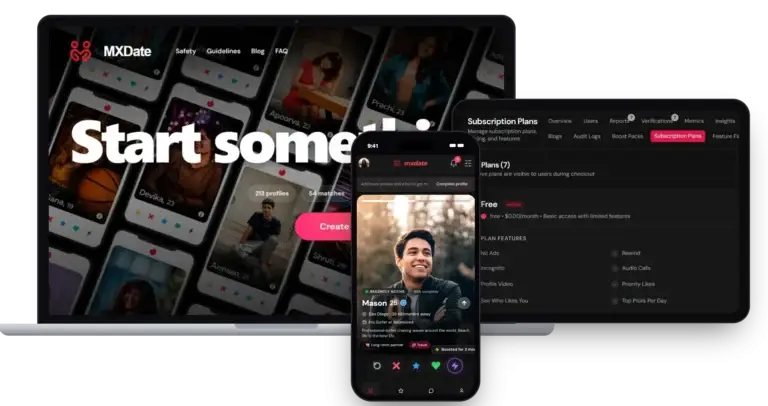
Tinder Clone on a laptop, a tablet and a phone: the web landing page, the admin plan editor and a member profile card.01
Pick it if: You want a second swipe-dating takeTinder Clone

Swipe-based dating on the web, Android and iOS with an admin console, sold at its own separate price.

See This Platform
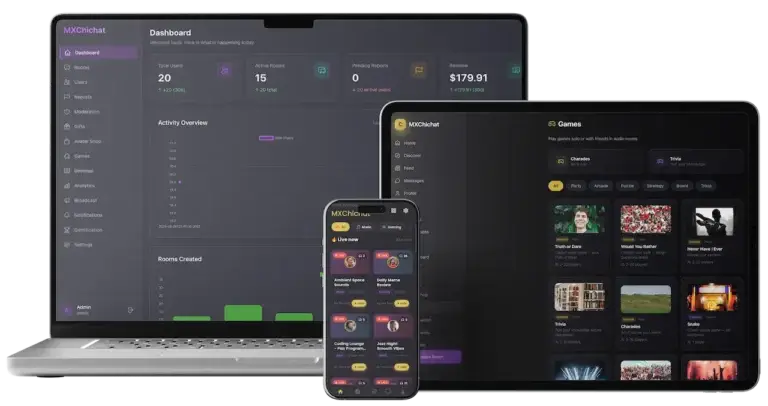
ChillChat Clone platform across the admin dashboard, the web app and the phone app.02
Pick it if: Voice rooms matter more than profilesChillChat Clone

Live voice rooms for a social community, with gifts between members and a console for the team running it.

See This Platform
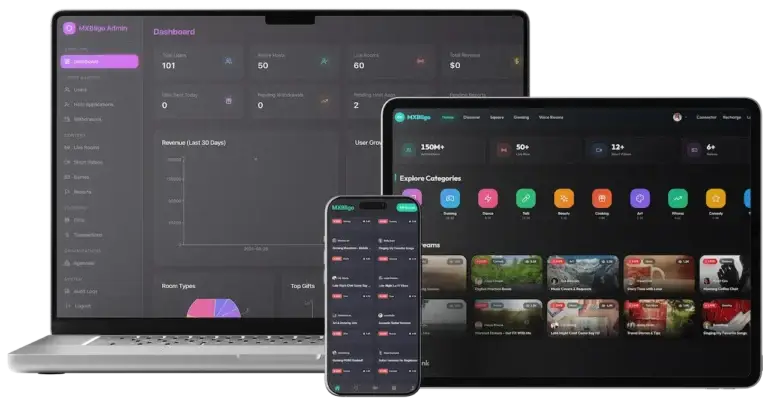
Bigo Live Clone platform across the admin dashboard, the live web app and the phone app.03
Pick it if: You want live video, not clipsBigo Live Clone

Live video broadcasting with several room formats and a coin economy, managed from a back-office console.

See This Platform
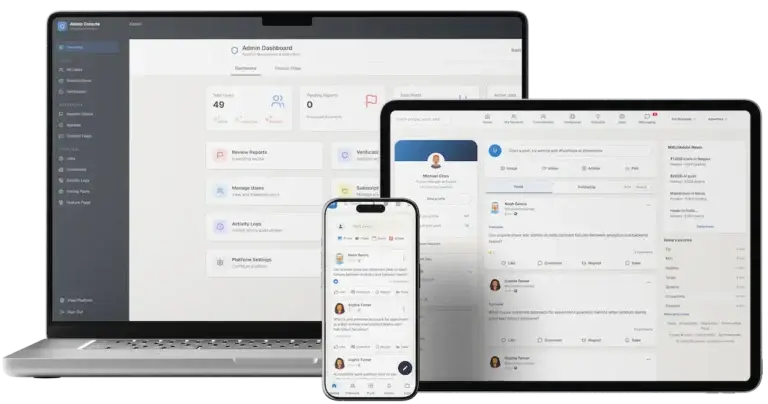
LinkedIn Clone platform across the web app, the phone app and the admin dashboard.04
Pick it if: Your members connect for workLinkedIn Clone

A work-oriented network of profiles, connections, a feed and messaging, managed from an admin console.

See This Platform
Full rangeBrowse 90+ solutions

09Money

Market Benchmarks

Online Dating Market Benchmarks - Independent 2025-2026 Data

The revenue models above are ours. The figures below are not. They come from the Match Group, Bumble and Grindr annual reports on Form 10-K and from Ofcom, reproduced as published. Together they show what paying dating users bring in each month, how much revenue comes from subscriptions versus ads, and how many adults actually use these services.

Match Group 10-K01

$20.09 Monthly Revenue per Payer at Match Group

Match Group's annual report on Form 10-K reports 2025 total revenue of $3.49 billion, flat on 2024's $3.48 billion, from 14.2 million average Payers, down 5 percent, at $20.09 of monthly revenue per payer, up 5 percent. Tinder's revenue per payer was $17.20 on 9.0 million Payers; Hinge's was $31.97, and Hinge Direct Revenue grew 26 percent.

Bumble 10-K02

$26.80 Monthly Revenue per Paying User at Bumble

Bumble's annual report on Form 10-K shows 2025 total revenue of $965.7 million, down from $1,071.6 million. Bumble App revenue was $783.0 million: Bumble App Paying Users fell 13.3 percent to 2.4 million while ARPPU rose 4.2 percent to $26.80. Badoo App and Other ARPPU was $11.48 on 1.2 million paying users.

Grindr 10-K03

83.3% of Grindr Revenue Came From Subscriptions

Grindr's annual report on Form 10-K reports 2025 revenue of $439.9 million. Direct revenue, from subscriptions and add-ons, was 83.3 percent of total revenue and indirect revenue, from advertising, was 16.7 percent. Average Paying Users were 1.3 million, 8.4 percent of 15.0 million Average MAUs, with ARPPU of $24.25.

Ofcom04

4.9 Million UK Adults Used a Dating Service

Ofcom's Online Nation 2024 report, summarized in its February 2025 release, found that one in ten UK adults, 4.9 million, used an online dating service in 2024. Tinder reached 1.9 million adults in May 2024, Hinge 1.4 million, Bumble 1.1 million, Grindr 913,000 and Badoo 521,000, and the majority used more than one service.

Where each figure comes from.

Match Group, Inc., Annual Report on Form 10-K for the year ended 31 December 2025, signed 26 February 2026 - sec.gov

Bumble Inc., Annual Report on Form 10-K for the year ended 31 December 2025, signed 16 March 2026 - sec.gov

Grindr Inc., Annual Report on Form 10-K for the year ended 31 December 2025, filed 2 March 2026 - sec.gov

Ofcom, 'Appy Valentine's Day: top online dating trends revealed, 14 February 2025 - ofcom.org.uk

All figures are the publishers’ own filings and statistics, reproduced as published. They describe the market and three listed operators, not the performance of any platform Miracuves builds, and nothing here is a revenue projection for your business.

Why It Pays

Business Model of an App Like Bumble - Revenue Potential & Market Prospects

Revenue in dating starts with trust: a member has to feel safe enough to build a profile before paying for extra reach. The four points below show how the platform supports both steps and why the relationship stays yours.

  1. 01

    Tiers That Grow With Members

    Paid tiers, boosts and a spotlight slot earn from the members you already have, so income can climb with engagement instead of headcount.

  2. 02

    Several Lines, One Console

    Upgrades, ads, credit packs and regional offers each get an independent toggle inside the operator console, and flipping one never disturbs its neighbors. A sensible order is premium plans first, boosts and the spotlight next, and ads once the free audience is large, with Miracuves taking no cut of any of it.

  3. 03

    Members and Reports You Own

    Profiles, clips, matches and moderation history sit in your database, so what the service learns about its community accumulates with you.

  4. 04

    Exit Optionality

    The full source code and the schema are yours, so moving host, team or direction later needs nobody's consent.

Main Revenue Levers
  • Paid Tiers
  • Spotlight & Boosts
  • Credit Packs
  • Advertising
  • Regional Offers
  • Web & PayPal Purchases
Long-Term Value

A dating platform defends itself with community and trust, not features.

  1. 01Profiles and match history keep members
  2. 02Fast report handling keeps the right people
  3. 03That value builds from launch in your database
  4. 04Managers who know their region are the second moat
Example Revenue Scenarios

The three cases below change one thing, the number of registered members, and name the lever that leads at each size. They are planning examples, not a prediction of what any dating app will earn.

City Pilot1,000Members

Premium plans carry early revenue.

A small launch in one city where a few thousand people are enough to test the grid, and where premium plans and a spotlight slot cover the first running costs. Size is illustrative.

Regional Brand25,000Members

Plans plus ads and regional offers.

A national or regional service where managers start to matter, ads fill part of the free audience and localized discounts help each region grow. Size is illustrative.

Multi-Country Platform250,000Members

Several regions, with every line active.

A multi-country service with several managers, more than one language and every revenue line switched on, where the dashboard guides where to focus. Size is illustrative.

10Why Miracuves

Why Miracuves

Bumble Clone Builders Compared: Miracuves, Scripts and Agencies

Video dating founders weigh four sources: a bare script, a single freelancer, a custom agency, or Miracuves' tested Bumble clone with its manager app already built. Before paying any of them, open a working demo, ask which parts are excluded and confirm unencrypted source code; the rows below settle those points here.

Why Founders Choose Miracuves

  • 01

    Video Clips Included

    Camera capture, compression and upload for 15, 30 and 60 second clips come with the base, where generic dating scripts often stop at photos.

  • 02

    A Manager App for Moderation

    Regional managers get their own app, reports and analytics instead of sharing one admin login with the owner.

  • 03

    Calls and Push Wired Up

    Voice and video call screens, push through Firebase Cloud Messaging V1 and the settings menus behind them are already in place.

  • 04

    Three Surfaces, One Codebase

    Member, manager and admin arrive as separate applications that already talk to each other, instead of three projects to join.

  • 05

    Full Source Code Ownership

    You get the entire codebase unencrypted, plus the schema and deployment notes, so no one can reprice it or rewrite the terms afterwards.

  • 06

    Straight Talk About Scope

    Base features, add-ons and your own responsibilities are separated on this page, including ad accounts, call keys and store developer accounts.

Development Company

How to Choose a Bumble Clone Development Company

Make any Bumble clone vendor show you a working report queue, not just a swipe deck, before you pay.

What to look for Miracuves

  • A demo you open yourself Member and manager logins work without a call
  • Moderation built in A separate manager app with regional scope, reports, flagged content and analytics
  • Video in the profile In-app profile clips up to 60 seconds, posted to a browsable gallery
  • Source ownership The web platform, both Flutter apps and the MySQL schema, unencrypted and yours
  • Time to launch Six working days to your branded launch, with any overrun worked free
  • Support after launch 12 months of updates, six months of priority fixes, 60 days of guidance

Walk away from any vendor who

  • Shows a swipe deck but no report queue or review counters
  • Puts managers on the owner's admin login
  • Counts paid add-ons as base features
  • Ships encrypted or partial source
  • Prints a dating client result it cannot name

Where the Bumble Clone Leads, Compared With Generic Scripts and Custom Agencies

CriteriaMiracuvesMiracuves Bumble CloneOff-the-Shelf ScriptCustom Agency Build
Time to Launch6 days of Miracuves build workUnknown, or do it yourselfQuoted per project, often months
Source-Code OwnershipEntire codebase, unencryptedFrequently restricted or lockedNormally yes
Dating DepthNearby search, filters, profiles, calls and chatPlain profile pagesWhatever the budget allows
Video ProfilesCamera clips of 15, 30 and 60 secondsRarely includedBuilt to order
Moderation ToolsManager app, report flow and review countersThin or absentBuilt to order, extra cost
Calls & PushCall screens and FCM V1 pushVaries by scriptCustom integration
Security & ComplianceRole logins, consent pages, honest limitsMinimalVaries widely
Cost, Speed & QualityOne fixed price on a tested baseCheap but riskyCostly and slow
Ongoing Support & Updates60 days guidance, 6 months bug fixes, 12 months updatesSeldom offeredDefined in the agreement

Few routes to a dating app survive a first year of real members intact. The rows above show where the options split.

Talk to Our Team

Changelog

Video Dating Platform Changelog - Versions and What Changed

Notes for the apps and the web platform, latest first. They carry no dates, and anything naming a customer or a page this build does not show has been omitted.

ReleaseSizeDetails
7.02 changesNew and changed
PayPal can now be used for virtual-currency purchases on the Android app and the website
The admin panel gained an internal editor for the Terms, GDPR, About and Privacy texts
6.9.11 changeNew and changed
Ad banner IDs are entered in the admin panel
6.92 changes, 2 repairsNew and changed
Members can log in with a phone number on Android and the web
The Android app has a new main page
Repaired
A push notification problem
Smaller improvements and bugs
6.84 changes, 3 repairsNew and changed
An Apple or Google sign-in opens an account automatically, with a random login the member may rename
Google and Apple sign-in reached the iOS app
A consent form for ads (GDPR) was added
Push moved from the legacy Cloud Messaging API to Firebase Cloud Messaging V1
Repaired
Video calling issues and a refreshed call SDK
Numerous iOS bugs
Assorted other bugs
6.74 changes, 1 repairNew and changed
Android members can place video calls
Support for Android 14
A permission prompt for push on Android 13 and later
Code tied to the SafetyNet API was dropped
Repaired
Assorted bugs
6.63 changes, 1 repairNew and changed
Android file handling for images and video was rebuilt, with upload and compression progress shown as a percentage and a bar
Members can film 15-second, 30-second or 1-minute clips and post them to their gallery
Lists such as search results and likes use 3 columns, or 5 when the phone is turned sideways
Repaired
Assorted bugs

Start the conversation

Let's turn your dating app idea into a working platform.

A free consultation gives you a realistic schedule and direct answers. We would rather win your trust than close a fast sale.

  • Answer within two hours
  • Free consultation
  • No lock-in contracts
  • Full source code ownership

11Read next

From the Blog

Fresh Reading on the Bumble Clone App

Guides to keeping user-generated video safe, to building a dating app end to end, and to what a ready-made Bumble-style script contains and costs.

Basics5 questions

01What exactly is the Bumble Clone?

It is a white-label dating platform that is ready to launch. The Miracuves Bumble Clone bundles a member app with a web version, a manager app for regional moderation and an admin panel, covering video profile clips, nearby search, filters, chat and voice or video calls. It runs under your brand and does not copy anyone's service.

02Can the Bumble Clone be tailored to my brand and my feature list?

Yes. Miracuves applies your logo, icons and colors to the apps and the web version, and the complete source code arrives unencrypted so your developers can alter screens, rules and flows. Extra modules, namely voice and video notes, event-based matchmaking, astrological compatibility and VR dating, are add-ons with their own scope and price.

03Do the apps run on iOS as well as Android?

Both platforms are covered. Members and managers each get a Flutter app for Android and iOS, and members also get a web version. The apps reach the stores through your own developer accounts, and Apple and Google do the review outside the 6-day build.

04Do you offer multi-language and multi-currency support?

The web demo includes a language picker offering English and Russian, and translation appears in the list of outside services. Multi-currency pricing can be added as scoped custom work for operators selling in several markets.

05What features are available for users?

Members can film a profile clip, browse people nearby with distances, filter by gender, orientation, age and distance, like and match, chat with photos and GIFs, place voice or video calls, read an alerts list and buy upgrades. Credit packs, a spotlight row and ads are further paid lines inside the same app.

Members, calls & moderation7 questions

06How does a new member join and build a profile?

Sign-up works with an email address, a phone number or a social account. Phone login for Android and web came in release 6.9, and Apple or Google sign-in on iOS creates an account with a random login the member can edit. A profile holds photos, a bio, interests and a short clip.

07How do video profiles work?

A member records a clip of 15, 30 or 60 seconds from the camera inside the app and publishes it to the profile gallery. The app shows a percentage and a progress bar while the file is compressed and uploaded, which release 6.6 introduced for Android.

08How does location discovery work?

The app reads the device location, lists people nearby as tiles with a photo, a name, an age and a distance, and offers a distance slider in the filter sheet. How precisely you show distance, and what you tell members about location data, are your policy decisions.

09Does the Bumble Clone support voice and video calls?

The app includes a call screen, video calls reached Android in release 6.7, and the call SDK was updated in 6.8. A call settings menu in the admin panel configures the service, which needs your own account. Calls run in the mobile app, and calling from the web version can be added as scoped custom work.

10How private and secure is the app for members?

Members get visibility and interaction settings, and member, manager and admin are separate logins. End-to-end message encryption is available as scoped custom work. Transport security, storage and key handling are reviewed with you as part of launch planning.

11What happens if I encounter inappropriate behavior?

Inside the app a member can report or block someone else. Reports go to the manager or admin side to be reviewed, and the admin dashboard counts blocked accounts and the photos and profile covers waiting for moderation. How fast you answer and what you decide is your policy and your staffing.

12What should I check about minors and age rules?

A profile shows an age, but this page does not claim an age-verification check. Set a minimum age in your terms, decide whether and how to verify it, and take legal advice for each market, because rules such as COPPA in the US, the UK Online Safety Act and the EU Digital Services Act differ. Miracuves gives no legal advice.

Managers, admin & money10 questions

13What does a manager do on the platform?

A manager looks after particular regions or categories: handling member reports, reviewing flagged content and checking that community guidelines are respected. The manager app is a separate app with its own demo login.

14Can a manager see analytics for their own area?

Yes. A manager can open reports and analytics for the assigned region, which cover member activity, match rates and the revenue that region generates.

15How do managers handle user complaints or reports?

From their own dashboard, a manager reviews flagged content, acts against inappropriate behavior and contacts the member when that is needed.

16Can managers manage subscription and monetization settings?

The admin keeps control of overall monetization. Inside their own region, managers may offer local discounts and trial periods and follow the revenue that results.

17What can the admin panel control?

The admin panel has 13 menu entries: a dashboard of totals, gifts, stickers, Google Cloud Vision, Google Cloud Storage, spam check, call settings, ads, interstitial ads, upgrades, push notifications, user search and support. Together they cover members, content moderation, plans, purchases and analytics.

18Can I define roles and permissions for my staff?

Yes. Moderator, manager and support staff are examples of roles the admin can hand out, and each role gets its own set of allowed actions.

19Can I sell premium features and subscriptions?

Yes. You can create premium plans with extras such as unlimited swipes, profile boosts and location changes. Credit packs, a spotlight slot, banner and interstitial ads and PayPal virtual-currency purchases (release 7.0) are further lines you can switch on.

20Is there an analytics dashboard to monitor app performance?

The admin dashboard opens with counters for users, photos, messages and chats, followed by a table that lists accounts, blocked accounts and items waiting for moderation. Engagement and revenue analytics belong to the admin and manager feature set, and any extra reporting is scoped separately.

21Where does first revenue realistically come from?

Premium plans usually come first, since members who want more reach will pay for it once the grid has people in it. Boosts, the spotlight slot and credit packs follow, and ads and regional offers can be switched on as the audience grows. Other lines named for this kind of platform, such as sponsorships, affiliate offers or licensing the white-label deployment to another operator, depend on your own commercial arrangements and are agreed rather than built in.

22How defensible is a dating platform?

A dating platform defends itself with community and trust, not features. Members who have invested in a profile, a clip gallery and a match history have reason to stay, and quick answers to reports keep the people you most want. The platform starts that build-up at launch and stores the data in your own database. Sound moderation, with managers who know their region, is the second moat, because a trusted community is hard to copy.

Launch & Miracuves12 questions

23How soon can the platform go live?

Rebranding a ready-made build, deploying it to your hosting and publishing the apps from your developer accounts takes Miracuves 6 days. Apple, Google and your payment provider handle store review and onboarding, so those steps fall outside that window. Custom changes are scoped separately.

24Is the full source code mine to keep?

Yes. The web platform and both Flutter apps ship as complete, unencrypted source code, with the database schema and the deployment setup included, so your team is free to change anything.

25What must I bring before launch?

You bring hosting and a domain, a verified developer account for publishing, your branding and legal details, keys for maps, calls and push, your own ad and payment accounts, and any image-analysis or storage accounts you want connected. Miracuves does not apply for payment gateways for you or write your privacy policy or terms.

26Is support included after launch?

Yes. Every ready-made solution includes 60 days of dedicated platform guidance, 6 months of priority bug resolution and 12 months of continuous product evolution, running side by side from launch at no extra cost.

27What makes Miracuves a good builder for a Bumble clone?

Because the clips, nearby search, call screens, manager app and admin panel arrive working, in a product you can open today. At a fixed $3,399 it goes live in 6 working days with 60 days of guidance, 6 months of priority bug fixes and 12 months of product updates, and the team behind it counts 9,000+ projects delivered for 6,000+ clients, across 90+ ready-made solutions. A first reply comes within two hours, Monday to Saturday, 10:00-19:00 IST.

28How much does a Bumble clone cost?

One payment of $3,399 covers the Miracuves Bumble Clone: the member app with its web version, the manager app, the admin panel and the full source code. Nothing is charged per seat, and nothing needs renewing. Any add-on, such as voice and video notes or VR dating, and any custom flow is priced in a separate written quote.

29Is a ready-made Bumble clone better than custom development?

Usually, when speed and budget matter. Video clips, the People Nearby grid, calls, regional managers and moderation already run in the demo, and launch takes 6 working days. A commissioned video dating build begins with a priced proposal on paper, then 2-8 weeks pass before any member can join. Many operators launch on this base and commission only the features unique to their community.

30How long until my Bumble clone is live on the App Store and Google Play?

The rebrand and deployment take Miracuves 6 working days. Both Flutter apps, member and manager, are then submitted from your own Apple and Google accounts, and review time depends on each store. The web version is live as soon as deployment ends, so members can join in a browser while the store listings are pending.

31What is the business model of an app like Bumble?

Most revenue comes from a minority of members paying for reach. Premium plans with unlimited swipes, boosts and location changes lead, while credit packs, a spotlight slot, banner and interstitial ads and regional offers add income from members who never subscribe. Each line is a setting in the admin panel, priced by you.

32What is the step-by-step process to launch my Bumble clone?

Begin with the demo logins for member and manager. Share your brand kit, regions, plans and ad accounts. Miracuves rebrands the apps, web version and admin panel, installs them on your hosting and wires up push and calls. Store submissions then go out under your developer accounts. Six working days covers the build; store review runs separately.

33Who can use the Bumble clone besides dating startups?

Any business that connects people under its own brand can use it. Social discovery apps can add nearby search to what they already offer, community networks can give members a place to meet, and video-first apps can put short clips at the center of every profile. Event-led communities fit too, all running under your brand.

34Can the Bumble clone screen uploaded photos for moderation?

The admin panel includes a Google Cloud Vision entry for image analysis, which runs on your own account, plus a spam check. The dashboard also counts photos and profile covers waiting for moderation, and members can report or block others. Reports reach managers or admins, who review them and decide what action to take.

Disclaimer

Miracuves is an independent software development company. We are not affiliated with, connected to, sponsored by, or endorsed by Bumble.

Read our full Legal Notice & Disclaimer →
Why this name

“Bumble Clone” is used descriptively. It is how the software industry refers to building a platform with functionality similar to Bumble, and how clients search for it.

Who built this

The entire design and codebase is built by our own team. The product contains no code, design, graphics, or content originating from the Bumble website or applications.

Trademarks

Bumble and all other third-party names and marks are the property of their respective owners, referenced here solely to describe the category of software offered.