A closed deal should trigger a predictable sequence: confirm billing, grant access, and tell the customer they can get started. For a small team, connecting those apps with a no-code tool may be the quickest and most sensible way to make that happen.
Then one morning, the billing step times out. The automation reports a failure, but finance can’t tell whether the billing account was created. Customer success wants to send the welcome email. Engineering has to decide whether replaying the workflow will fix it or create a second account.
That is the point at which the question changes. It’s no longer “Can we automate this?” It’s “Can we tell what happened and recover without making it worse?”
In the custom workflow automation vs no-code decision, keep no-code automation when the rules are clear, failures are visible, and mistakes are easy to reverse. Consider dedicated internal middleware when a process makes consequential changes across systems and your team needs more control over its state, decisions, or recovery. If only one step needs that control, a hybrid setup may be enough.
In this guide, “no-code” means hosted connector platforms such as Zapier, Make, and n8n, plus enterprise integration platforms such as Workato. “Custom” means code your team deploys and owns. The comparison below is about where each one fits, not which product is best, and it holds whichever connector tool you use today.
Key Takeaways
- Assess one workflow at a time. Headcount and run volume don’t tell you what a failure will cost.
- Keep connectors for work that is easy to recover. Routine reminders, alerts, and reporting can stay where they are if they’re reliable.
- Use a hybrid setup when one rule or write needs stronger controls. Move only the part that creates the risk.
- Compare cost per correct outcome. Include cleanup, maintenance, and build costs, not just subscription fees.
- During a migration, give one system authority over each critical write. Rollback changes who handles the next action; it doesn’t undo changes already made.
What Is Dedicated Internal Middleware?
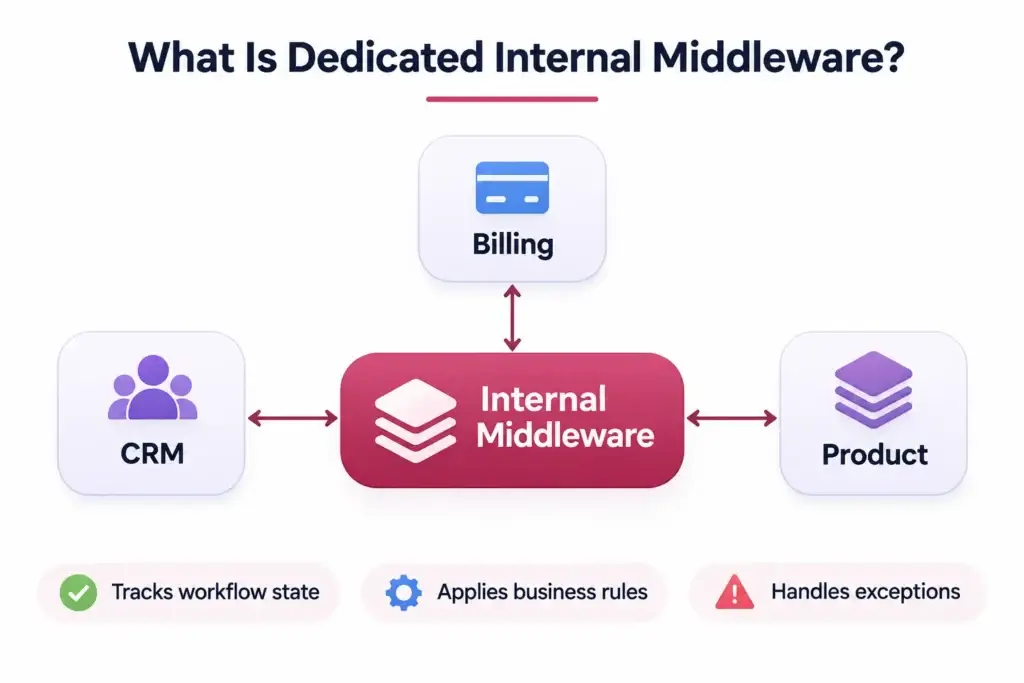
Dedicated internal middleware is software your team controls that coordinates a process across applications. It can keep a record of what has happened, enforce business rules, and decide what to do when a dependency fails. Your CRM can still own the deal, your billing platform can own invoices and account status, and your product can own permissions. The middleware owns the process that connects them.
A connector is often enough when the job is to move information or trigger a straightforward action. If an automation posts a deal notification in the wrong channel, someone can correct it. If that same automation grants the wrong product access, recovery may involve checking who had access, revoking it, and determining whether other records were affected. The tools might look similar on a diagram, but the cost of being wrong is different.
A billing timeout shows why workflow state matters
Imagine an onboarding process that creates a billing account, activates a workspace, and sends a welcome email. The billing platform accepts the account creation request, but the response never reaches the workflow. From the workflow’s perspective, the outcome is unknown, not necessarily failed.
A reliable design keeps the case pending and checks the authoritative billing record. If the API supports idempotency keys, the workflow can reuse the same key for the same intended operation, subject to the API’s rules. Stripe’s documentation on idempotent requests is a useful reference: it saves the result of the first request made with a key and returns that saved result on retries, and for its v1 API it can prune keys once they are at least 24 hours old, so a retry days later is treated as a new request. If there’s no safe retry mechanism, it can look up a stable customer reference. When that lookup can’t establish whether the original write succeeded, the case goes to an exception queue rather than being retried blindly.
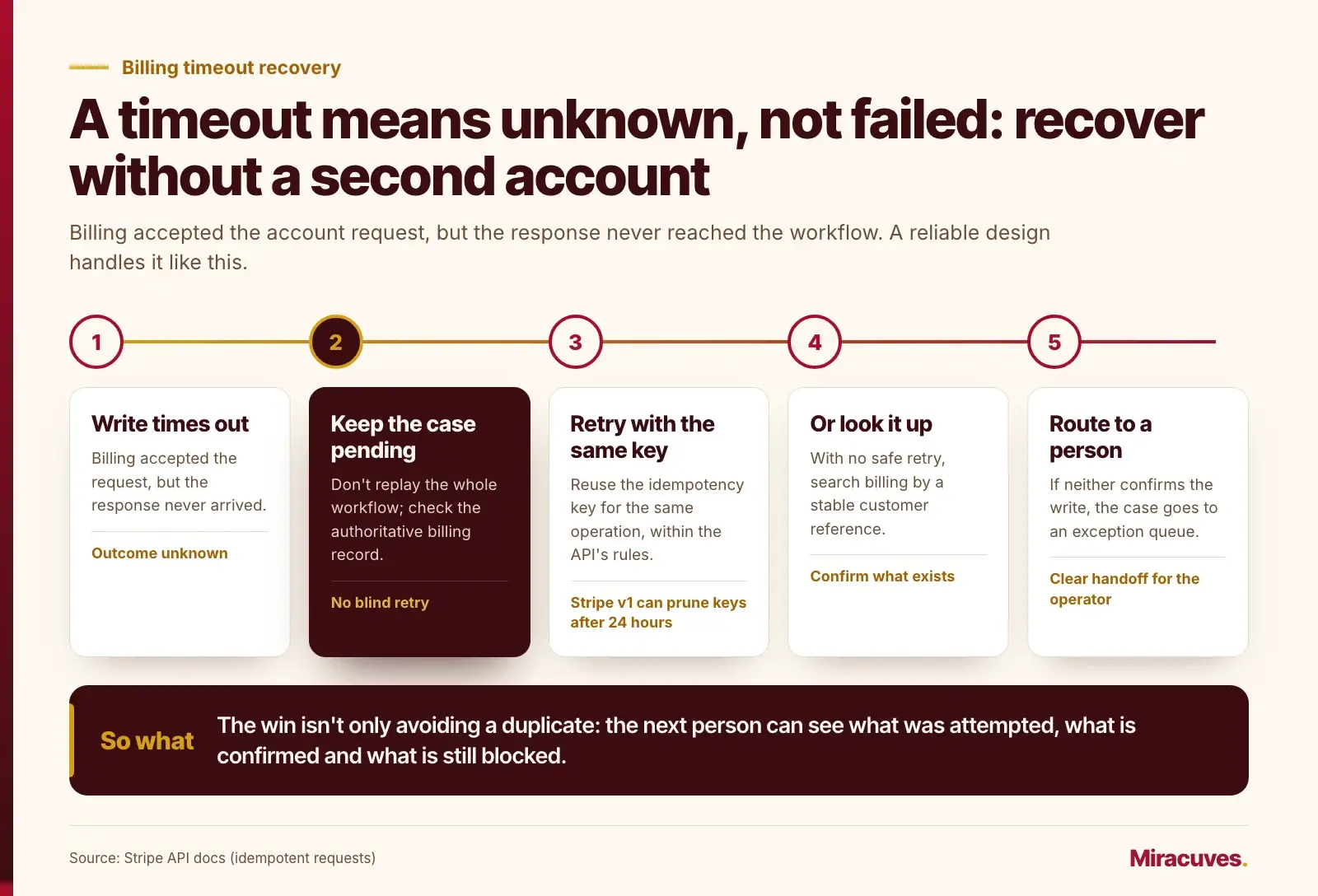
The benefit isn’t just preventing a duplicate. It’s giving the next person a clear answer: which action was attempted, what is confirmed, and what is still blocked. If your existing tools can already provide that reliably, you may not need to replace them.
Why Growing Startups Start Rethinking No-Code Workflows
An automation becomes responsible for a customer outcome
An early workflow might alert the team that a deal has closed. Later, it may start billing, assign seats, and grant access to customer data. These are different jobs. A missed alert can be resent; a premature activation may expose information or violate a contract condition. As the job changes, reassess what the workflow is allowed to do and what evidence it needs before doing it.
The same policy gets copied into several places
Suppose annual accounts require approval before activation. That rule may end up in separate flows for new customers, upgrades, and reactivations. When the policy changes, someone updates two flows and misses the third. Instead of rewriting all three, put the rule in one place, test it there, and let each flow ask for the same decision.
Recovery depends on the person who built the automation
The builder remembers that “failed” at step four sometimes means “succeeded in billing but didn’t update the CRM.” Everyone else sees a red indicator. Ask someone who didn’t build the workflow to recover a test case using only the available records and runbook. If they can’t identify what changed and what’s safe to repeat, improve recovery before adding more steps.
The team is paying for errors it doesn’t measure
A subscription is easy to budget. Time spent checking accounts, recreating records, or calming a customer is harder to see. Look for recurring work that doesn’t show up in the automation dashboard: finance reconciling mismatched accounts, support chasing late activations, or engineering checking whether a run is safe to replay. Those are part of the cost of operating the workflow.
Custom Workflow Automation vs No-Code vs Hybrid: Which Fits?
The right choice depends on what the workflow needs to control. A visual tool can handle branching, run history, or replay; a custom service can still be brittle if nobody maintains it. Compare how each setup handles your actual exceptions rather than choosing on the feature list alone.
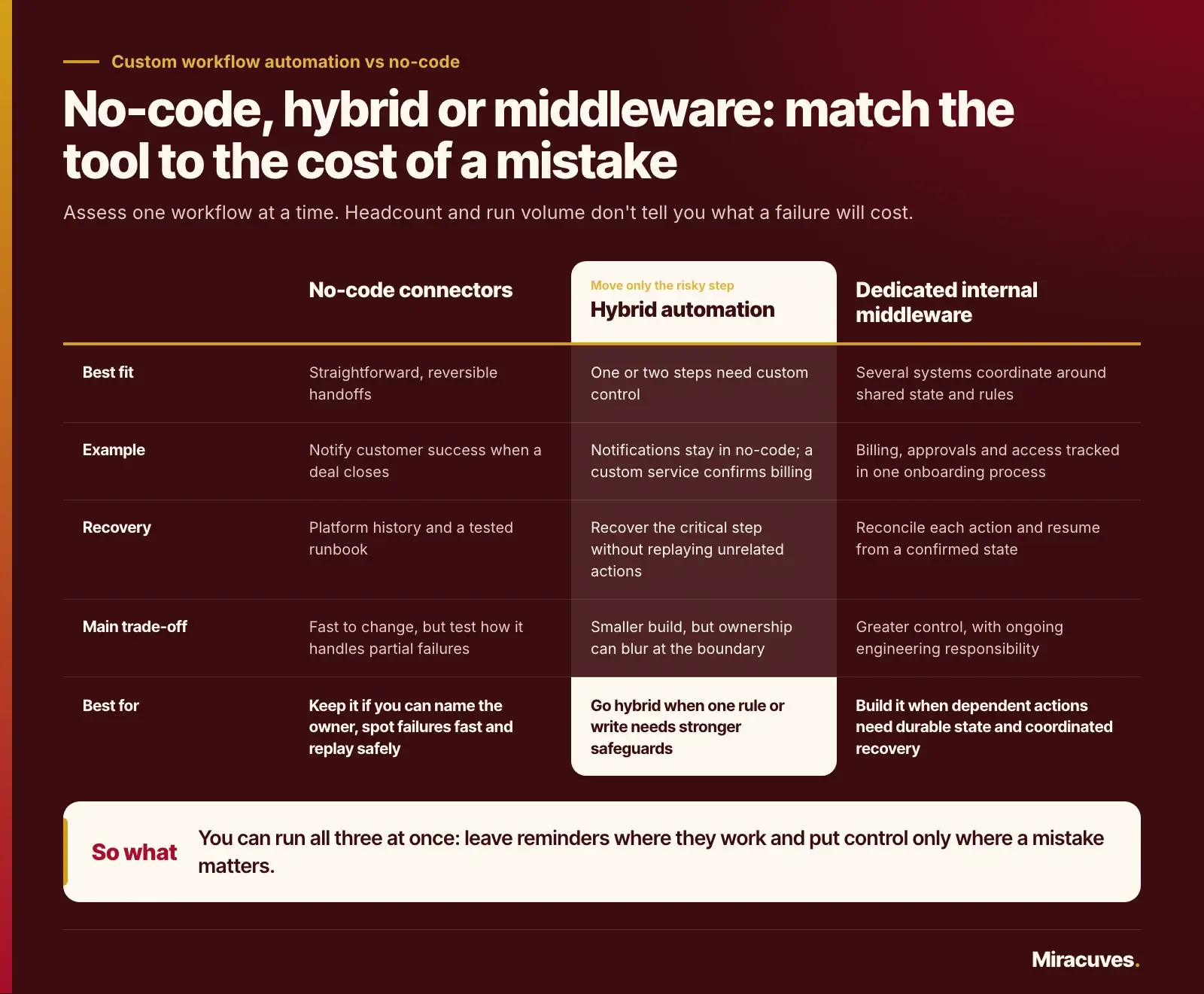
| Decision factor | No-code connectors | Hybrid automation | Dedicated internal middleware |
|---|---|---|---|
| Best fit | Straightforward, reversible handoffs | One or two steps need custom control | Several systems must coordinate around shared state and rules |
| Example | Notify customer success when a deal closes | Keep notifications in no-code; confirm billing in a custom service | Track billing, approvals, and access in one onboarding process |
| Recovery | Use platform history and a tested runbook | Recover the critical step without replaying unrelated actions | Reconcile individual actions and resume from a confirmed state |
| What your team owns | Configuration, credentials, and escalations | The custom component plus its handoff with the connector | Deployment, monitoring, permissions, incidents, and maintenance |
| Main trade-off | Fast to change, but test how it handles partial failures | Smaller build, but ownership can blur at the boundary | Greater control, with ongoing engineering responsibility |
| Typical tools | Zapier, Make, n8n, or an enterprise platform such as Workato | The same tools calling a small internal API or serverless function for the risky step | Your own service, usually with a queue or a workflow engine that stores state between steps |
A startup can use all three at once. Leave reminders where they work, put a shared approval rule behind an internal endpoint, and reserve a dedicated orchestration layer for processes that need it. The aim is not to standardize every automation on one tool. It’s to avoid paying for control you don’t need while making sure you have it where a mistake matters. If you are still deciding how far no-code tools can take a new product, not just its back-office workflows, see this look at launch speed with AI tools, no-code, and pre-built platforms.
When Does No-Code Get Too Expensive?
Hosted automation platforms charge for usage, and each one counts usage differently. That difference shapes how the bill grows with volume more than the headline plan price does. The figures below come from the public pricing pages of Zapier, Make, n8n, and Workato as of November 2026. They change often, so check them before you decide.
| Platform | Billing unit | What counts as one unit | Published reference point (November 2026) |
|---|---|---|---|
| Zapier | Tasks | Each successful action step; triggers and built-in tools such as Filter, Paths, Formatter, and Delay do not count | Pro: $19.99 a month for 750 tasks, $89 for 5,000, $129 for 10,000 (billed annually) |
| Make | Credits | Most module actions, including reading a webhook or searching an app; Router and error-handler modules do not count | Free plan includes 1,000 credits a month; paid allowances scale by plan |
| n8n Cloud | Workflow executions | One run of the whole workflow, however many steps it has | Starter: 20 euros a month for 2,500 executions; Pro: 50 euros for 10,000 (billed annually) |
| Workato | Tasks within a quoted plan | Set in the contract | No public list price; quoted by sales |
Take an onboarding workflow with one trigger and five action steps that runs 1,000 times a month. On Zapier that is about 5,000 tasks, which fits the 5,000-task Pro tier. At 2,500 runs it becomes about 12,500 tasks and moves to the 20,000-task tier, listed at $189 a month on annual billing. If pay-per-task is switched on, usage above the plan is billed at 1.25 times the base rate on annual plans and 2.5 times on monthly plans. On Make, the same run uses roughly six credits once the webhook read is counted. On n8n Cloud, each run is one execution whatever its length, so 2,500 runs still fit the Starter plan.
So when does no-code get too expensive? Rarely because of the subscription alone. A hybrid component that moves one risky step into code might take one developer two to four weeks. At the US median wage for software developers reported by the Bureau of Labor Statistics ($135,980 a year in May 2025, about $65 an hour), that is roughly $5,200 to $10,400 in salary before benefits, overhead, testing, and ongoing maintenance. A dedicated middleware layer built by two developers over six to ten weeks is closer to $31,000 to $52,000 on the same basis. These are illustrative estimates, not quotes.
Against a plan that costs $89 to $189 a month, those builds take years to pay back on fees. They pay back when they remove recurring cleanup, failed runs that someone has to investigate, or a risk your team cannot accept. That is why the next section measures cost per correct outcome rather than cost per run.
What Does Each Approach Cost per Correct Outcome?
Say a startup receives 1,000 eligible onboarding cases in a month. A correct outcome means the right customer gets the right access after billing is confirmed, within the agreed time, with no duplicate record. Cases repaired in time count as correct, but the labor to repair them still goes into the cost.
These numbers are hypothetical planning inputs, not vendor prices or client results.
| Monthly cost or outcome | Existing no-code setup | Proposed hybrid setup |
|---|---|---|
| Platform and infrastructure | $350 | $300 |
| Maintenance and monitoring | $240 | $360 |
| Manual review and cleanup | $720 | $240 |
| Build cost allocated over the evaluation period | $0 | $300 |
| Total monthly cost | $1,310 | $1,200 |
| Correct, on-time outcomes | 960 | 985 |
| Cost per correct, on-time outcome | $1.36 | $1.22 |
In this example, the hybrid setup wins because it reduces manual cleanup, not because its software costs are dramatically lower. If the team can resolve the same problems by tightening the existing workflow, the build may not pay off. And if custom maintenance turns out to be higher than expected, the comparison changes again.
Cost per correct outcome = total workflow cost for the period ÷ cases completed correctly within the agreed time. Use the same case definition and evaluation period for both options. For a proposed build, include development, testing, and migration; then test the estimate under different maintenance and exception volumes.
Keep a separate tally of incidents with serious consequences. One incorrect access grant can matter more than a dozen late welcome emails. The cost calculation helps decide where to invest, but it shouldn’t override a security requirement or a contractual obligation.
What a Reliable Internal Middleware Layer Needs
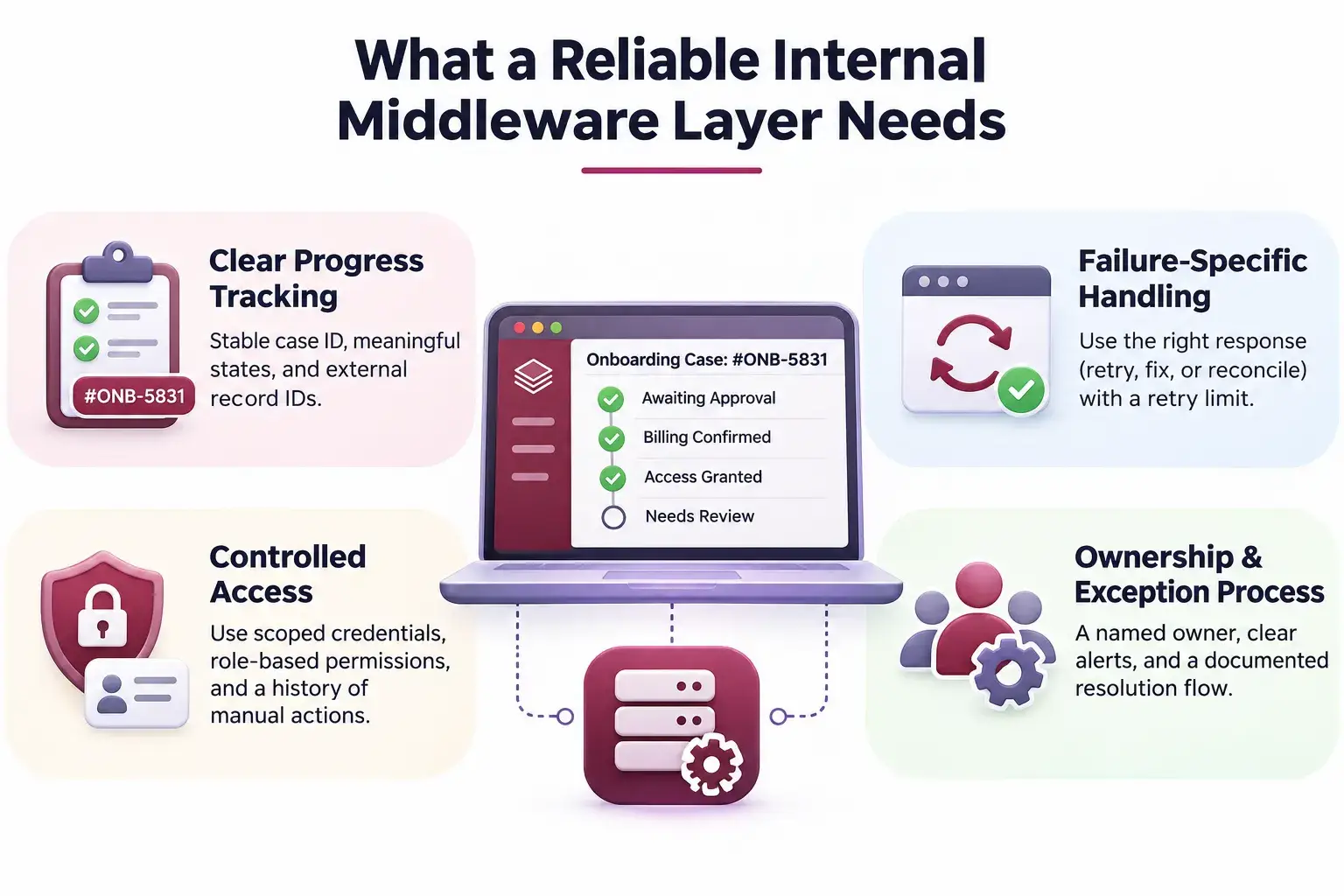
A record of progress that operators can understand
Give each case a stable ID and record meaningful states such as awaiting approval, billing confirmed, access granted, and needs review. Store the external record IDs needed to verify each step. An operator should be able to open an onboarding case and see where it stopped without searching three dashboards or asking engineering to read raw logs.
Different handling for different failures
A temporary service outage may call for a delayed retry. A rejected request with invalid data needs correction. A timeout after a write needs reconciliation or a retry that is known to be safe. Repeating all three failures the same way can overload the downstream system or create duplicates. Set a retry limit and tell the team what happens when it’s reached.
Defined access to sensitive actions
Use narrowly scoped service credentials and restrict who can retry, approve, or override a case. Keep a history of manual decisions and avoid copying full documents or secrets into logs. An operator might need to confirm that a billing account exists; they don’t necessarily need access to the complete billing payload. Design permissions around the work people must do to resolve the case.
A named owner and an exception procedure
Decide who receives an alert, how quickly they need to act, and when an issue belongs with finance, customer success, or engineering. A queue full of unresolved cases is not a recovery process. For each common exception, document what the operator can check, what they may change, and who can approve a manual correction.
How to Migrate One Workflow Without Interrupting Operations
A migration deserves its own plan, so this is the short version. Move one narrow, recurring problem first, such as billing confirmation, and leave welcome emails and internal reminders in the current tool.
- Baseline. Review recent failures with the people who handled them, name the system that owns each record, and list the actions that must never happen twice.
- Shadow mode. Feed the new logic the same inputs without write access and compare what it would have done with what actually happened, including duplicate, out-of-order, and lost-response cases.
- Limited cutover. Give the new workflow sole write authority for one identifiable group of cases, account for jobs already queued in the old tool, and agree on stop conditions before expanding.
If you roll back, stop the new writer and reconcile what it already changed. Switching the writer back does not reverse a billing record or revoke access. Those actions need a separate, approved recovery procedure.
Five Metrics That Show Whether the Migration Worked
| Metric | What to measure | Why it matters |
|---|---|---|
| Correct, on-time completion rate | Eligible cases that finish correctly within the agreed time | Measures the customer outcome, not just successful runs |
| Manual intervention rate | Share of cases that need a person to complete or correct them | Shows whether hidden work is shrinking |
| Time to recover | Time from detection to confirmed resolution | Tests whether a failure is easier to fix |
| Duplicate or incorrect writes | Unintended changes to billing, access, or another critical record | Reveals mistakes a completion metric can hide |
| Age of unresolved cases | How long pending exceptions remain open | Exposes delays even when new cases finish normally |
Compare similar groups before and after the change. Standard accounts and enterprise accounts may have different approval requirements, so blending them can make a result look better or worse than it is. Review individual incidents alongside the totals: if failures are rarer but much harder to recover, the new workflow still needs work.
Founder Decision Signals: Are You Ready to Build?
Keep no-code if you can name the workflow owner, detect a failure quickly, and show that a replay won’t create an unsafe duplicate. Improve configuration or documentation before replacing a tool that already fits.
Go hybrid if the same rule is copied in several places or one write needs stronger safeguards. You can move that decision into a small service while keeping existing connectors for triggers, notifications, and reporting.
Build dedicated middleware if several dependent actions need durable state, approvals, and coordinated recovery. The case is stronger if you can show recurring incidents or manual work and have someone ready to own the system after launch.
Improve the process first if teams can’t agree on the correct outcome or who has authority to approve an exception. A custom build will make an unclear process run faster without resolving the disagreement.
Common Mistakes When Moving Beyond No-Code
Rebuilding the whole stack to fix one fragile step
A connector may still do an excellent job sending notifications even if it isn’t the right place to control account activation. Keep what works. Migrate the smallest part that removes the actual risk, and revisit the rest only if new evidence justifies it.
Treating replay as a substitute for reconciliation
Replay tells a system to try again. Reconciliation tells you what already happened. They’re not interchangeable when an external write may have succeeded. Design the workflow so a person can verify the outcome before asking either system to make another change.
Building for the happy path and handing off the exceptions
Demoing an onboarding flow with perfect inputs is easy. Operating it with an expired credential or a duplicate account is the real test. Ask the team that will handle exceptions to run through those scenarios before launch. If its only fallback is messaging the developer, the handoff isn’t finished.
Measuring launch success by how much moved
The number of automations retired says little about whether customers get access sooner or finance spends less time fixing records. Judge the migration against the original problem: fewer errors, clearer recovery, and a workload your team can support.
Where AI Helps, and Where Explicit Rules Should Stay in Charge
You don’t need AI to confirm an account ID, enforce approval requirements, or decide whether a user has a specific permission. Those actions should depend on authoritative records and explicit rules. Keep the logic predictable so operators can explain why a case was allowed or blocked.
AI can help when a workflow receives information that isn’t neatly structured. For example, a model might extract a requested start date from an onboarding email and highlight the text it used. If the date is missing or ambiguous, send it for review. The workflow still needs to check the date against the contract and require approval where appropriate. For more on separating model outputs from application actions, see the guide to integrating AI agents into an existing app.
How Miracuves Can Help Growing Startups
The most useful starting point is one workflow and one failure your team has had to fix. Bring the trigger, the systems involved, the record that went wrong, and the outcome you expected. That makes it easier to identify whether you need better configuration, a small custom component, or an orchestration layer with its own state and recovery controls.
When the problem is interpreting emails, documents, or other unstructured inputs, Miracuves can help you build AI into an existing workflow without giving the model authority over critical records. For the middleware and integration layer itself, see Miracuves business process automation services. If a ready-made AI platform already fits the requirement, Miracuves lists 6-working-day delivery for eligible ready-made deployments within the agreed base scope. Custom middleware, additional integrations, and approval requirements are scoped separately; the six-day timeline does not apply to a bespoke build.
Final Thoughts: Own the Workflow Where Failure Matters
No-code tools let startups solve real problems before they know which processes will become central to the business. Keep that advantage. You don’t need to replace a dependable automation just because it’s visual, hosted, or easy to build.
What changes as a startup grows is the cost of uncertainty. If the team can’t tell whether billing succeeded, why access was granted, or whether a retry is safe, the process needs clearer ownership. Sometimes that means improving what’s already in place. Sometimes it means moving one rule or write. Dedicated middleware earns its place when several critical actions need a shared record of what happened and a dependable way to recover.
Start with the workflow your team keeps rescuing. Define what a correct result looks like, test the failure that worries you most, and choose the smallest change that makes recovery dependable.
Frequently Asked Questions
When should a startup move beyond no-code automation?
Consider moving a workflow when it makes consequential changes and the current setup cannot reliably enforce rules, verify outcomes, or recover from partial failures. Test a real failure first. If a configuration change or a clearer runbook closes the gap, keep the existing tool and spend the engineering time elsewhere.
Is Zapier or n8n enough for a startup?
Often, yes. Hosted connectors handle notifications, reporting, lead routing, and simple record syncs well, and they are fast to change. They become a weaker fit when one workflow makes several dependent writes, such as billing and access, and your team needs a durable record of what happened and a safe way to resume. Many startups keep the tool and move only that step into code.
When does no-code get too expensive?
The subscription is rarely the deciding cost. Zapier bills per successful action step, Make per module action, and n8n Cloud per workflow run, so long workflows at high volume climb tiers faster on per-step pricing. The bigger cost is usually manual cleanup after partial failures. Compare total cost per correct outcome, including people time, before deciding to build.
Can no-code connectors and internal middleware work together?
Yes. A connector can collect a trigger or send a notification while middleware handles approvals, case state, or critical writes. Define what each side owns and give only one system authority over each sensitive action for a given case, so a replay in one tool cannot repeat a write made by the other.
Is there a minimum workflow volume that justifies middleware?
No. The impact of an error matters more than the number of runs. A low-volume process that grants access to sensitive information may need stronger controls sooner than a high-volume process that sends reminders. Start from what a single mistake would cost, then look at volume.
How do you prevent duplicate records after a timeout?
Treat the write as unconfirmed. Reuse the same idempotency key if the downstream API supports it, keeping in mind that some providers prune keys after a set period, or verify the result against an authoritative record before trying again. If neither option can establish what happened, route the case to an operator.
What is the difference between a custom connector and internal middleware?
A custom connector exposes an app action the automation tool does not already support. Middleware coordinates the larger process: it remembers progress, applies rules, and handles exceptions. One missing app action usually is not a reason to build a new orchestration layer when a connector or a small function would do.
How long does a workflow migration take?
It depends on the number of systems, available test environments, failure scenarios, and production approvals. A single low-risk handoff is different from moving billing and account access. Allow for shadow testing, reconciliation, and a rollback rehearsal rather than estimating from development time alone.
What should we test before turning off the old workflow?
Test duplicate events, out-of-order inputs, expired credentials, missing approvals, and uncertain writes. Confirm that the old process can no longer modify records for the migrated group. Then rehearse how you will handle pending cases if you need to restore the old path.
Do we need AI to build internal middleware?
No. Use fixed rules for known conditions such as approval status, account access, or payment confirmation. Consider AI only when the workflow needs to interpret unstructured information, such as a start date in an email, and validate its output before it affects a critical record.
Miracuves is an independent software development company. We are not affiliated with, connected to, sponsored by, or endorsed by any company or product named in this article.
Terms such as “X Clone” are used descriptively. It is how the software industry refers to building a platform with functionality comparable to a known service, and how clients search for it.
The entire design and codebase of our products is built by our own team. Our products contain no code, design, graphics, or content originating from any third-party website or applications.
All third-party names and marks referenced in this article are the property of their respective owners, referenced solely to identify the services discussed.