
Freelancer Clone App - White-Label Dual-Mode Freelance Marketplace
Miracuves' white-label Freelancer clone arrives ready-made to sell talent as fixed-price gigs and bid-based projects under your brand, and you own every source file for its buyer and seller web platform, seller dashboard, admin panel and two Flutter apps, live in six working days.
A buyer either orders a gig, choosing a plan and optional add-ons at a set price, or posts a project and weighs the proposals that arrive. Members can hold subscription packages, finished work collects reviews with more than one rating, and AI matching or skill checks are paid modules outside the base. A vertical of your own, tutoring or legal work for instance, is set out in writing, quoted first and usually built in 2-8 weeks.
Launch in 6 Days with
- Source Code
- Buyer & Seller Web
- Admin Panel
- User App
- Seller App
- Android + iOS
StackFlutter · Vue · Bootstrap · Laravel · PHP · MySQL
Gig and project activity
- New gig order with an add-onGig orders
- Package renewed by a sellerPackages
- Project featured for seven daysFeatured
- Featured profile expires tomorrowExpiry
- Order approved by the buyerPayments
- Withdrawal request receivedWithdrawals
- Review posted with three ratingsReviews
- Refund request openedRefunds

- 6Ways the Marketplace Earnsgig commission, project commission, featured placement, subscription packages, employer fee and processing fees
- 5Languages NamedArabic, French, Spanish, Russian and Portuguese
- 0%Revenue Share With Miracuvesnothing taken from any gig order or project payment
- 3Separate Loginsbuyer, seller and admin
- 6Days to Launchand if the delay is ours, we keep going free
- $2,799Paid Once, Not Rentedsource code yours, no per-seat fee, no monthly rental
Live in six working days, or we keep working free until you launch. Every build carries 60 days guidance, 6 months bug fixes and 12 months updates.Verify every figure
Featured Slots That Expire
A project or a seller profile is featured for a period you price, and a scheduled job ends the placement when it runs out, so visibility can be sold again.
Withdrawals Wait for You
A freelancer's withdrawal reaches the admin panel as a request, so the timing and method of every payout stay an operator decision.
No Card Number on File
Card details travel to the gateway you connect and the platform records an order and invoice instead; six more gateways, Razorpay to Paytm, arrive through a paid add-on module.
01See it live
Hands-On Demo
Freelancer Clone Demo: Buyer View, Seller View, Mobile Apps & Admin Panel
Miracuves runs the Freelancer clone demo as a working marketplace, not a slide deck. A single account menu flips between the buyer and the seller side, the two mobile apps are run for you on a call, and the operator console opens once we hand over a login. Place a gig order, read an invoice, check a project.
Freelancer Clone - Buyer Dashboard
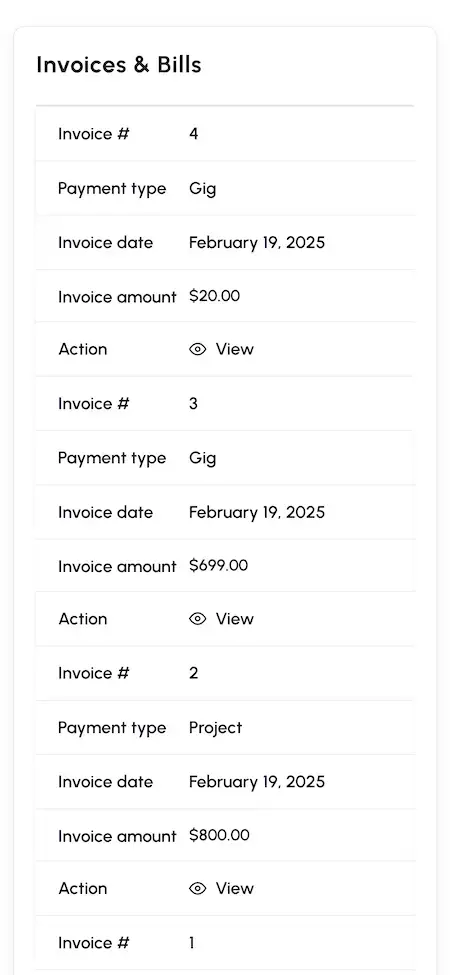
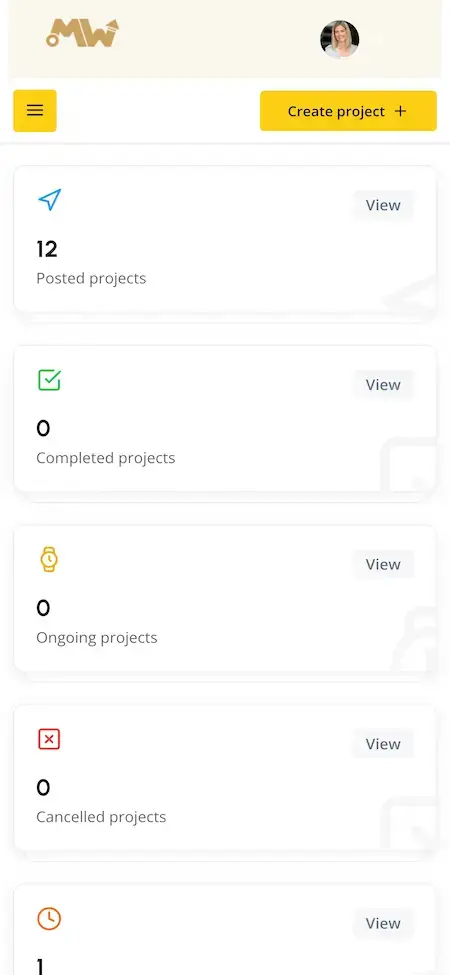
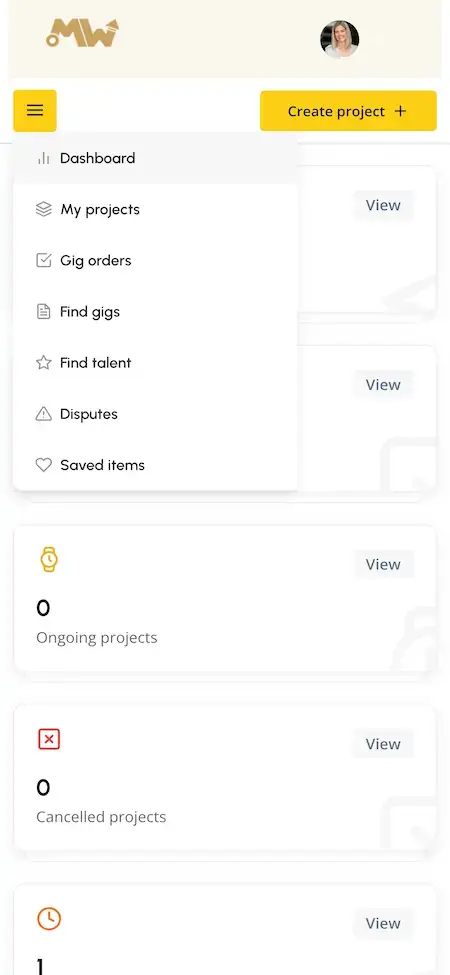
The ordering side in a browser: start a project, follow your gig orders, watch the wallet and read the spend chart and the invoice list.
- 1Launch the web demo in a browser
- 2Use the buyer credentials shown here
- 3Look at: Gig orders, Find gigs, Invoices
user@demo.com | User_321
Seller Panel - Gigs, Orders & Packages
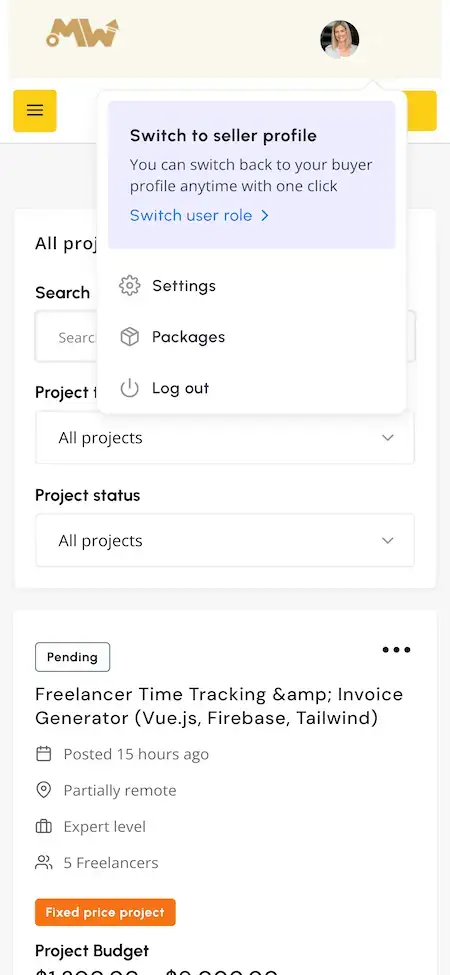
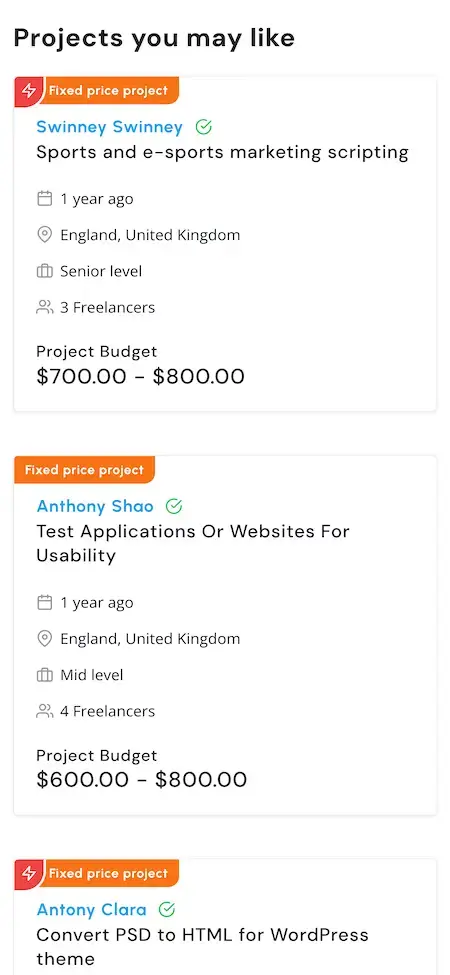
The selling side: flip to the seller profile from the account menu, take gig orders with their plan and deadline, answer projects and look at your package.
- 1Open the demo sign-in page
- 2Enter the seller credentials shown here
- 3Look at: Gig orders, Recommended projects, Packages
seller@demo.com | Seller_321

Buyer & Seller Apps - Run on Request
Two mobile apps come with the delivery, one for users and one for sellers. We open both apps for you on a guided call, logged in with the same two demo accounts.
- 1Arrange a guided call
- 2Say Android or iOS
- 3Look at: gigs and projects on a handset
user@demo.com | User_321
seller@demo.com | Seller_321
Admin Panel - Commission, Packages & Withdrawals
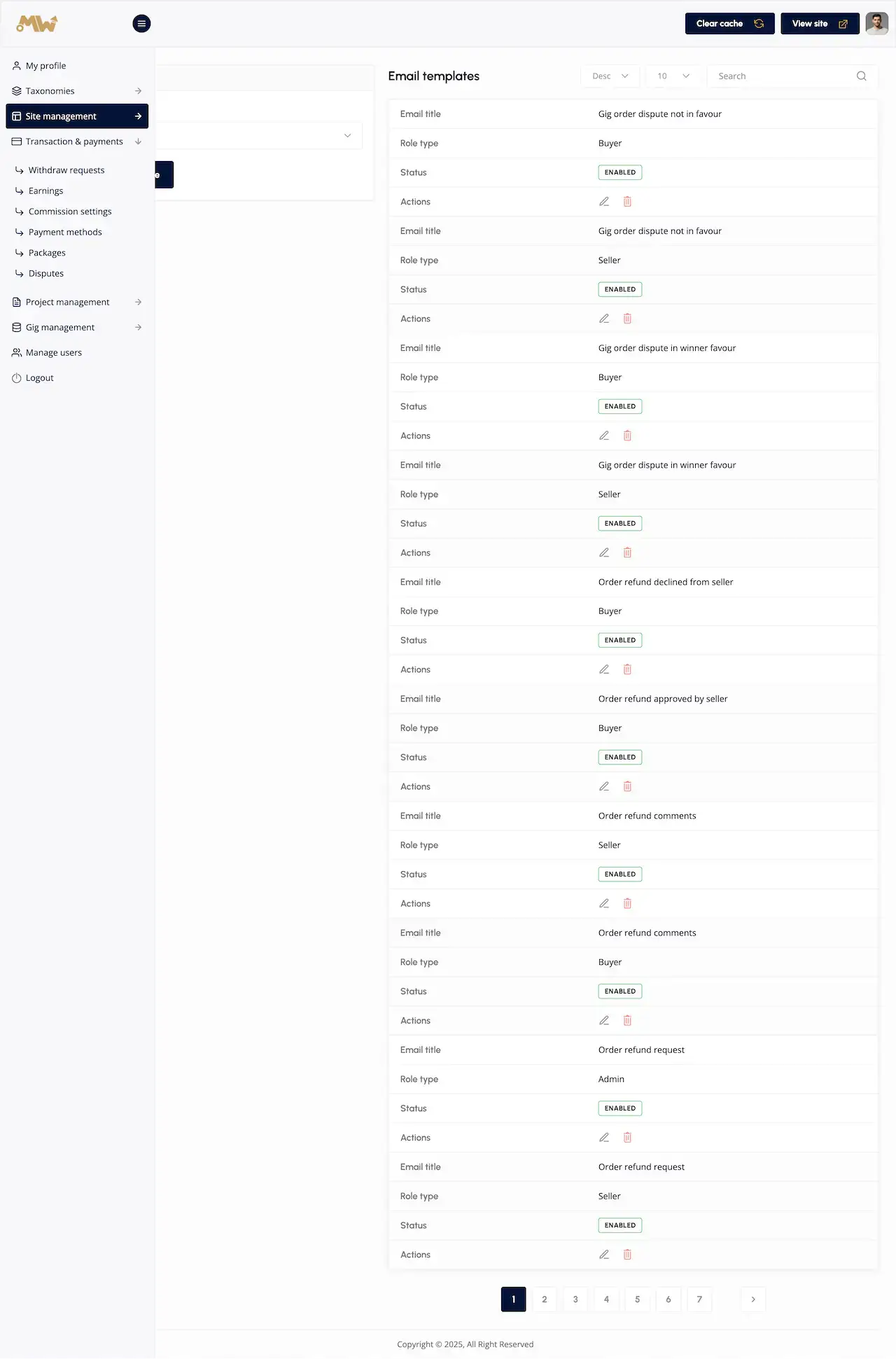
The operator side: set the commission, read earnings, process freelancer withdrawals and manage payment methods and packages, next to gig, project and user management.
- 1Open the demo sign-in page
- 2Ask us for the admin login
- 3Look at: Packages, Disputes, Email templates
handed over during a guided call
Walk Through It Live
See Gigs, Projects, Packages & Reviews Running Together on a Guided Call
There is no recorded tour to press play on, so we show the real thing instead. Over a half-hour call we open the buyer view, the seller view and the admin panel, and set each one against your own plan: the gig categories, the packages you would sell, the commission and the day you want to open.
Book a Guided WalkthroughScreen by Screen
Screens From an App Like Freelancer: Phone Views & the Admin Panel
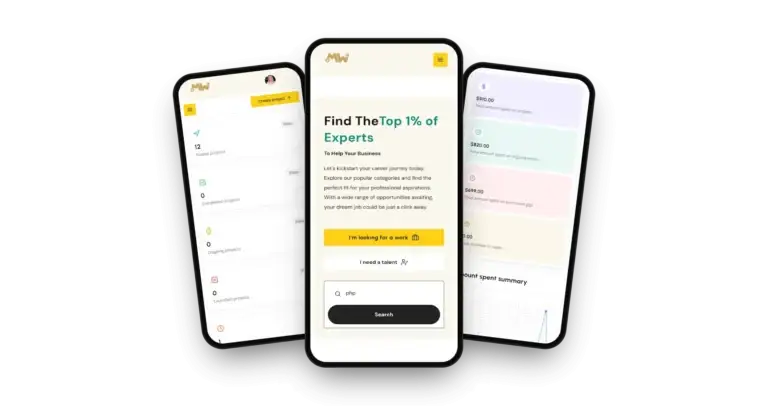
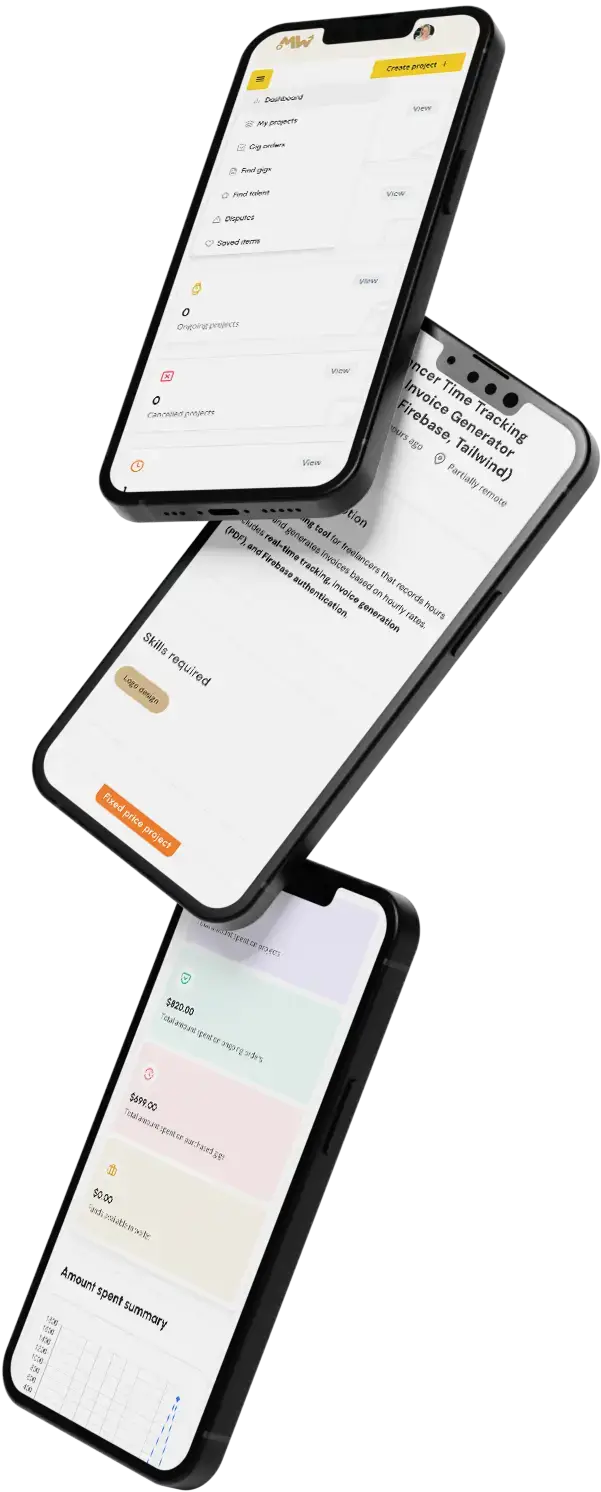
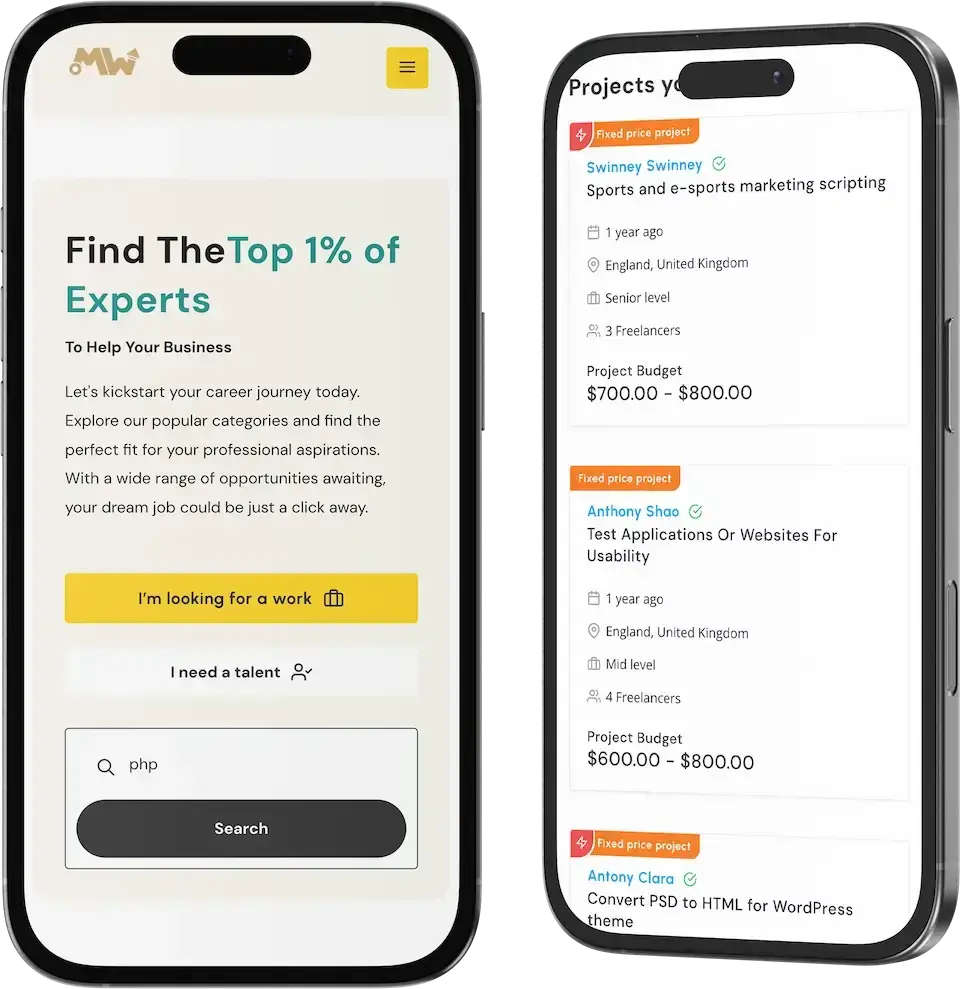
Here is the Miracuves Freelancer clone as a member sees it at phone width, from search to gig orders to invoices, then the long admin panel that runs the whole marketplace behind it.
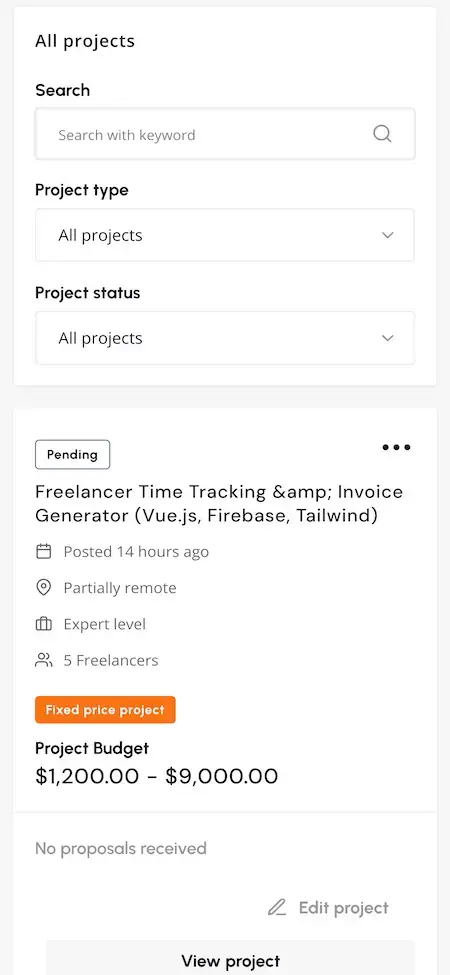
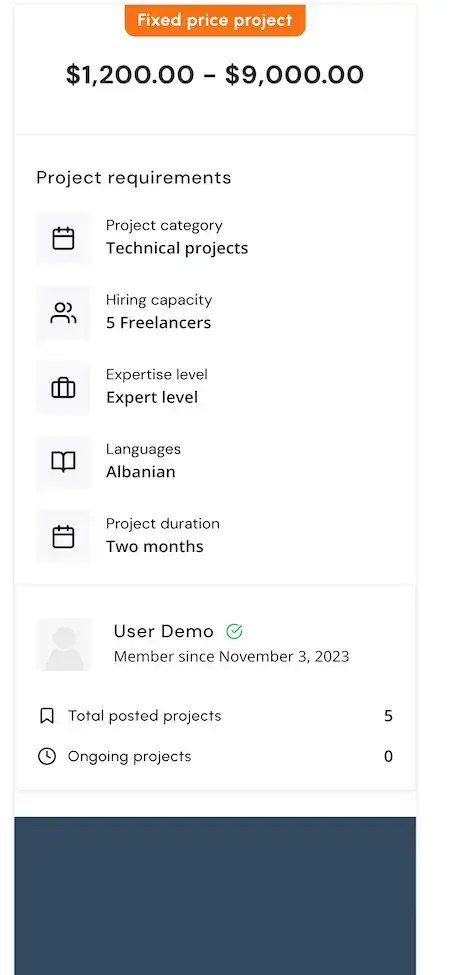
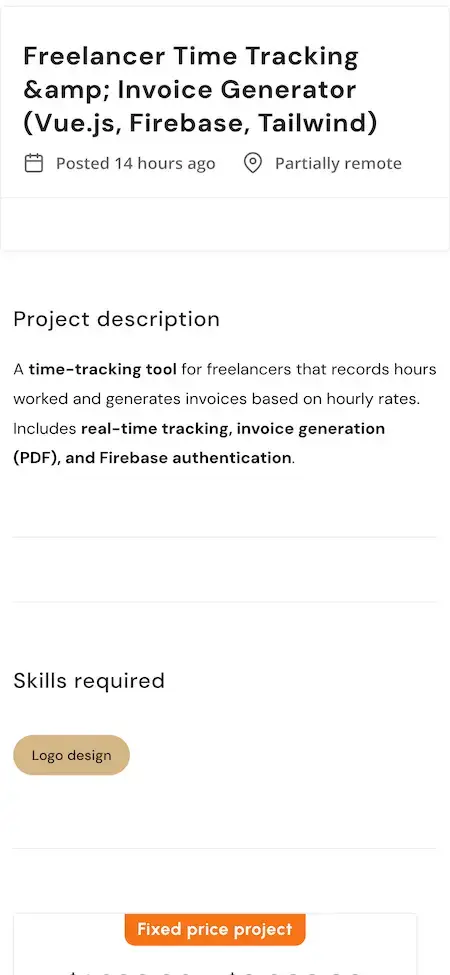
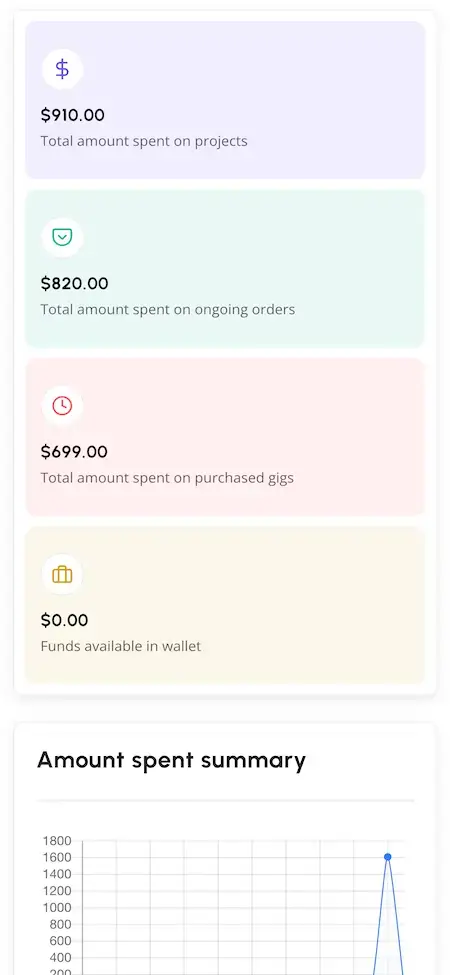


Start a buyer on the home screen and follow them into a gig order, the spend summary and the invoice list. Start a seller on the account menu and follow them to recommended projects and the order queue.
02Proof
Founders Speak
Freelancer Clone Client Reviews: Operators on Building With Miracuves
Truxfinder Consulting is the nearest match: a creator marketplace with matching, messaging and escrow, live in six working days. Saas Home Services, Kroon and Appforany are adjacent, since none of the four runs a general freelance marketplace.
“We were building a creator marketplace — influencers list themselves, brands search and book them, the platform handles briefs, deliverables, and payouts. Building the matching, messaging, escrow, and the brand/creator apps from scratch was always going to be the slowest part. Miracuves's MXInfluencer suite gave us exactly that foundation. We added our own brief-template engine, the escrow-with-milestones flow, and our branding. We launched in 6 working days and had paying brands on the platform within the first month. We estimate it saved us 4–5 months of build time.”
“Provider onboarding, quoting, booking and payments came off the shelf. We added our service categories and our vetting rules. Both sides of the marketplace were live inside a month.”
“Booking, brief capture, the recording queue and creator payouts came ready. We localised the brief templates and added a mobile-money payout mix for our region. We launched with eighty creators onboarded on day one, and it looks like our platform rather than a US template.”
“Several on-demand services under one brand was the requirement, not several apps. The multi-service base supported that natively, so we configured verticals instead of building them. Delivered inside a month.”
A Build We Can Point To
Case Study: How Miracuves Delivered Truxfinder's Creator and Brand Marketplace on This Base
A short account of a creator and brand booking marketplace that began from this freelance base, drawn from the Truxfinder case study published on our site.
Truxfinder's creator and brand booking marketplace was delivered in 2024 on the same freelance base this page sells. Nineteen of the 23 platform pieces came as shipped, and the team spent its effort on the four that were its own: categories, fee model, escrow terms and brand.
- Money has to sit safely until work is approved, or strangers will not transact
- Milestones, evidence and arbitration have to exist before the first dispute
- Weak clients push strong freelancers out as surely as the reverse
- Open a booking marketplace without redoing mechanics the base had already proven
- Put the effort into four decisions that belonged to the client
- Take full ownership of the source code
- Three surfaces (client, freelancer, admin) with separate permissions
- Categories, the fee model and the escrow release terms, all set for Truxfinder
- Branding and theming applied to every surface
- Three environments: development, staging, production
- Source handed to the client's own account
“We were building a creator marketplace — influencers list themselves, brands search and book them, the platform handles briefs, deliverables, and payouts. Building the matching, messaging, escrow, and the brand/creator apps from scratch was always going to be the slowest part. Miracuves's MXInfluencer suite gave us exactly that foundation. We added our own brief-template engine, the escrow-with-milestones flow, and our branding. We launched in 6 working days and had paying brands on the platform within the first month. We estimate it saved us 4–5 months of build time.”Madhur Yadav · Founder, Truxfinder Consulting LLC
03The product
Start Here
What the Freelancer Clone App Is and Who Uses It
Miracuves' Freelancer clone is a ready-made marketplace where talent is sold in two ways at once. Sellers publish gigs with plans and add-ons that buyers order at a fixed price, employers post projects that freelancers answer with proposals, and an admin panel keeps commission, packages and withdrawals in order.

Two Ways to Sell
Gigs and projects share one account system, one wallet and one set of invoices, and the admin panel can switch either module off when you want a narrower marketplace.
Visibility You Can Sell
Featured projects, featured seller profiles and subscription packages give members a reason to pay you beyond the commission.
Honest About Add-Ons
AI matching, smart contracts, skill checks and shared workspaces are separate modules that each carry a price. They appear as add-ons and are kept out of the base-feature count.
Web & Mobile
What Is a Freelancer Clone Script?
A marketplace needs more than a listing page. It needs a way for sellers to stand out, a way for members to pay for more reach, a record of how past work went and a route for money to leave the platform. This freelance marketplace script ships with all four already working.

- 01Gigs with plans, add-ons and gig orders
- 02Projects with budgets, skills and proposals
- 03Featured placement and subscription packages
- 04Reviews with more than one rating, plus private chat
- 05An admin panel covering commission, payouts and disputes
The delivery covers the buyer and seller web platform, a seller dashboard, the admin panel, two Flutter apps (user and seller) and every line of source code.
What You Get
Freelancer Clone Features: Gigs, Projects, Featured Listings, Packages, Reviews & Admin
Every item Miracuves lists here can be seen in the demo, in the admin panel or in the release notes. Whatever calls for an extra module is flagged as an add-on lower down.
Gigs With Plans & Add-Ons
Sellers publish gigs the way a shop lists products, each with plans, optional add-ons and a price, and buyers browse them from the Find gigs entry of the account menu.
- Find gigs entry in the account menu
- Gig plans, made more flexible in release 2.4
- Add-ons attached to a gig order
- Gig management in the admin panel
- Gigs invoiced next to projects
- A switch that turns the gig module off
Gig Orders, Start to Finish
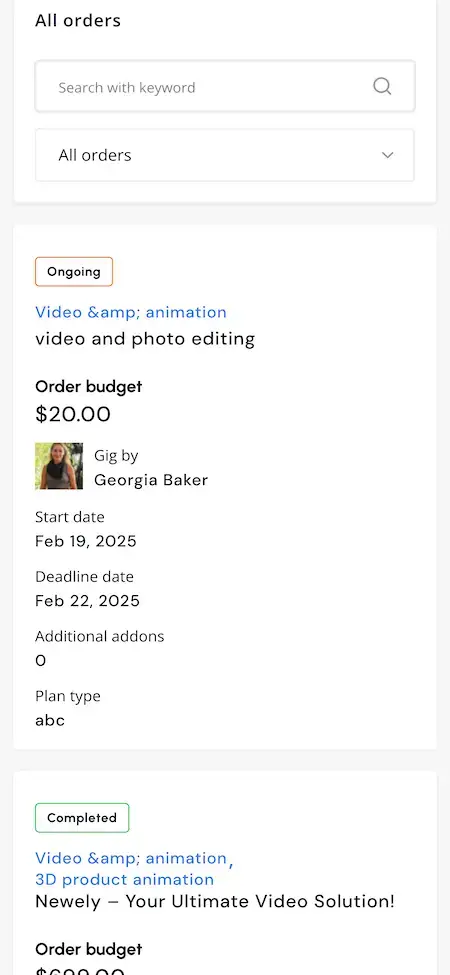
Every purchased gig becomes an order that carries a status, a budget, start and deadline dates, the chosen add-ons and the plan type, listed as ongoing or completed.
- Gig orders menu for the buyer
- Keyword search and an order status filter
- Ongoing and completed orders on one list
- Budget, dates, add-ons, plan type and seller name on each order card
Projects Beside Gigs
When a buyer wants something bespoke, they open Create project on the dashboard and describe it, listing project requirements: what is needed, in which category, by whom and for how much.
- Create project button on the buyer dashboard
- Fixed price projects carrying a budget range
- Project facts: category, capacity to hire, expertise level, languages, duration
- Skills required and a written description
- Remote or partially remote tag on each card
- Pending status and posting time in the buyer's list
Proposals & Invitations
Freelancers answer a project with a proposal covering approach, price and qualifications, and a buyer can also invite a freelancer whose profile fits.
- Proposals that spell out approach, price and qualifications
- A no-proposals-received note on a fresh project
- How many freelancers have applied, on each project card
- Invitations sent to chosen freelancers
Featured Projects & Seller Profiles
Visibility can be given a period and a price: a project or a seller profile is featured for a while, and a scheduled job ends the placement when the period is over.
- Featured projects and featured seller profiles
- A scheduled job expires featured placements (release 1.9)
- Improved search on projects and seller pages (release 1.8)
- Recommended projects shown to freelancers
Subscription Packages
Packages turn membership into a product: members find Packages in their menu, an active package shows what is left of it, and plans can differ for employers and freelancers.
- Packages entry in the seller menu
- Remaining detail of the active package (release 1.9)
- Plans aimed at employers
- Plans aimed at freelancers
- Premium features reached through a plan
- Packages managed from the admin panel
Profiles & Multi-Rating Reviews
Freelancers build a profile with skills and experience, and finished work can be reviewed with more than one rating, so a profile shows how someone did and not just a score.
- Reviews that carry multiple ratings
- A review from both sides once work is complete
- A dedicated freelancer page arrived in release 2.0
- Skills, experience and expertise on the profile
- Switch between buyer and seller profile from the menu
Buyer-Seller Chat
A private one-to-one chat lets buyer and seller clear up a gig order or settle project terms without leaving the platform, so the agreement stays in a single thread.
- Live chat for two people, introduced in release 2.0
- Handy for gig questions, scope and proposals
- Visible only to the two parties
- System emails built from editable templates
Wallet & Invoice Records
Every buyer has a wallet balance and a spend overview split across projects, ongoing orders and bought gigs, and each payment lands in an invoice list tagged as a gig or a project.
- Wallet balance shown as funds available
- Separate totals for projects, live orders and gigs
- A chart summarizing what was spent
- Invoices and Bills list: number, type, date, amount
- A View button on each invoice
- Every invoice tagged as gig or project
Held Payments, Refunds & Disputes
The platform keeps the money safe while work is under way and releases it only after the buyer signs off. If something goes wrong, refunds and disputes follow their own routes and emails, and the admin settles them.
- The platform holds payment during delivery and releases it when the buyer approves
- A Disputes link inside the account menu
- Emails for refund requests, approvals, declines and comments
- Dispute notices to buyer and seller, whichever way it goes
Platform Commission & Payouts
From one console the operator fixes the commission, follows earnings and works through the withdrawal requests freelancers submit, along with payment methods and packages.
- Commission settings you control
- An Earnings screen for the operator
- Freelancers file withdraw requests
- Operator-defined payment methods
- Gateway APIs plus a paid add-on that brings six more gateways (release 2.1)
- All of it grouped under Transaction and payments
Multilingual, RTL & Brand Settings
Language support has an on/off switch, right-to-left screens are handled, and email templates, SEO tags and landing pages are shaped to your brand.
- Languages such as Arabic, French, Spanish, Russian and Portuguese
- On/off switch for multilingual support (release 2.4)
- Right-to-left support from release 1.8, with fixes in 1.9 and 2.1
- Per-event, per-role email templates
- Search and social tags added in release 2.1, and a fresh page builder shipping with 13+ landing pages in release 2.0
Check this before you commit: what we deliver is the platform, rebranded and running on hosting you control. What you supply is a domain and a server, a store developer account of your own that is already verified, logos and company details, a payment gateway approved and through KYC, and any third-party API keys. The app stores review submissions on their own clock, a timeline that sits apart from the 6-day build we commit to.
Where the Money Comes From
Freelancer Clone Revenue Models: Gig & Project Commission, Featured Listings, Packages and Fees
A gig and project marketplace built by Miracuves has more ways to earn than a plain job board. The platform keeps each one separate, so switching on a new line leaves the others untouched.
Commission usually carries the first months, and featured placement and packages come in once enough sellers compete for attention.
- 01
Gig Order Commission
Retain a share of each gig a buyer orders. The commission lives in the admin settings, so the rate can change across the whole marketplace without a rebuild.
- 02
Project Commission
Keep a slice of what a freelancer earns on a paid project. It is a setting apart from gigs, so each side of the marketplace can be priced separately.
- 03
Featured Placement
Let projects and seller profiles buy a featured spot. A scheduled job closes it on time, which turns visibility into something members renew.
- 04
Subscription Packages
Offer packages to employers and freelancers. An active package displays what remains of it, giving you recurring income that does not depend on a single order.
- 05
Employer Fee
Put a fee on top of what a buyer pays and display it at checkout, separate from the seller's price so the payout stays easy to read.
- 06
Processing Fees
Win back gateway costs through a transaction fee instead of swallowing them, with withdrawals passing through the admin panel.
| Revenue stream | How it is charged | BenchmarkTypical take rate | What sets the ceiling |
|---|---|---|---|
| Gig and Project Commission | A share of the seller's earnings on each paid gig order or project contract. | Freelancer.com takes the higher of 10% or $5 on fixed-price projects. Upwork moved talent to a 0% to 15% range for contracts from May 2025 after a flat 10%. | What sellers are willing to bear. For 2025 the two filers reported blended take rates of 18.7% (Upwork) and 27.7% (Fiverr), the territory users already pay in. |
| Employer Fee | A percentage the buyer pays on top, displayed beside the price. | Freelancer.com charges the higher of 3% or $3 once a fixed-price project is awarded. Upwork adds 5% to each transaction, or 3% by ACH, and 10% (8% by ACH) for Business Plus clients. | Whether the buyer sees it coming. A fee taken at award lands before any work is delivered. |
| Featured Placement | A paid upgrade that lifts a project or a profile above the rest for a set period. | On Freelancer.com a featured-project upgrade costs $10.99 in its fee table (the page's FAQ prints $9.99), and a Verified badge costs $99. | What added reach is worth in your categories. A placement that lapses on schedule has to be bought again. |
| Subscription Packages | A recurring charge for a membership tier with more capability. | Freelancer.com memberships span Basic at $4.99 a month up to Premier at $99. Fiverr booked $133.4 million, roughly 31% of its 2025 revenue, from subscription products. | What each tier opens up. Sold through a store app, a subscription costs 30% to Apple in the first year and 15% afterwards, while from 30 June 2026 Google Play charges a 5% billing fee on top of 10% in the US, UK and EEA. |
| Processing Fees | A transaction charge through which gateway costs fall on the payer, or get absorbed by you. | Stripe US pricing: 2.9% and 30 cents on each successful domestic card payment. | Your own gateway contract. Stripe's US page is just a reference point, and your actual rate follows your country and card mix. |
How to read the table. Upwork and Fiverr figures are taken from the Upwork 2025 Form 10-K and the Fiverr 2025 Form 20-F. Freelancer.com prices come from its fees and charges page and its membership page. For app store cuts, see Google's Google Play service fees page and Apple's subscriptions page. The card-processing example is drawn from Stripe US pricing. Every price here belongs to another company and is shown only as input for your own model. It is not a quote or a prediction, because your rates are set in the admin panel.
Freelancer Clone Revenue Model, Stage by Stage
Six earning switches sit in the Freelancer clone admin panel, from gig and project commission to packages and processing fees, so you open on commission and add more later.
Launch
Gig order commission and project commission do the early work, since the first paid order earns them, and an employer fee shown at checkout can run from day one.
Traction
Once sellers in a category compete for the same buyers, featured projects and featured seller profiles become worth paying for, and the scheduled job that ends each placement turns visibility into a renewal.
Scale
With a large seller base, subscription packages for freelancers and employers add recurring income that does not hang on any single order, while processing fees recover gateway costs.
Every freelancer payout waits for your approval in the admin panel, and Miracuves takes 0% of any order.
The Operator Console
Running a Freelancer-Like Marketplace: Gigs, Packages, Users & Withdrawals
Miracuves fits an operator's working day inside one Freelancer clone console: live gigs and projects, new members, seller earnings and withdrawal requests, active packages, open disputes and the wording of every system email.

What the Console Covers
- 01
Gig Management
Gigs and gig orders get a menu of their own. Turn it off and the marketplace runs on projects alone.
- 02
Project Management
Browse every project on the platform by status and budget, with the freelancers who answered each one.
- 03
Manage Users
Buyer and freelancer accounts sit in one list, and release 1.8 added a delete option for users on the admin side.
- 04
Packages
The membership packages members can hold, together with the remaining-detail view of an active package.
- 05
Earnings & Commission
An Earnings screen for the operator, plus Commission settings that fix the platform's cut of every paid order.
- 06
Payouts & Payment Methods
Freelancer withdrawal requests land here, beside the payment methods the platform offers.
- 07
Dispute Cases
A Disputes entry under Transaction and payments, with refund and dispute emails that go to buyer, seller and admin.
- 08
Site Settings
Email templates, taxonomies and general settings, plus Clear cache and View site buttons at the top of the page.
Cash Flow Controls
The finance side, from a held payment to a payout.
- Operator earnings screen
- Where the commission is set
- Incoming withdrawal requests
- Payment methods and package plans
Messages & Site Switches
The controls behind the messages and pages members see.
- Role-based on/off control for email templates
- Refund and dispute notices addressed to buyer, seller or admin
- Shortcuts to clear the cache or view the site
- The multilingual support switch
Want the console to behave differently? A new payout schedule, additional reports, more languages or a bespoke approval step can each be scoped separately. Describe how your operations team works and we will send a written quote.
04Package and price
What Ships
Freelancer Clone Script Package: Source Code, Apps, Panels & Deployment
What Miracuves hands over is a Freelancer clone script that already runs: a buyer and seller web platform, two apps, the admin panel, plus every line of source and the schema underneath. It all becomes yours, free of seat or order fees and with nothing to relicense. Hosting, a domain, store developer accounts and your processor's fees are billed by others, and paid extras such as AI matching or the release 2.1 gateway pack carry their own price.
$ git clone gig-marketplace Complete Source Code
All of the code behind the website and the mobile apps, unencrypted, so your developers can reshape the product around your business.
- Unencrypted web platform source
- Android and iOS builds in Flutter
- You may modify, expand and redeploy it
- Transferred into a repository you own
Database Schema
The structure that holds gigs, projects, users, packages, payments and content, delivered so a fresh database can be built from it.
- Schema plus migrations
- MySQL as the data tier
- Tables for gigs, projects, users and packages
- Tables for payments, invoices and content
Chat & Email Templates
The buyer-to-seller chat, and the templates behind the emails sent about orders, refunds and disputes.
- Live one-to-one chat
- Refund and dispute templates
- Enabled or disabled per role
- Edited without touching code
Buyer & Seller Web Platform
A responsive site with gig browsing, project lists, dashboards, invoices and a seller view that opens from the account menu.
- Gig search, gig orders and project lists
- Project pages showing budget and requirements
- Dashboard, invoice list and spend overview
- Landing pages built with the page builder

Mobile Apps for Both Sides
Two Flutter apps, one for people who buy and one for people who sell, ready to go out from developer accounts you own.
- One buyer app, one seller app
- Android and iOS builds in Flutter
- Released through accounts you hold
- Run for you during a guided call


Admin Panel
The console for operators, with gig, project and user management, taxonomies, site settings and the Transaction and payments area.
- Commission, earnings and withdrawal handling
- Payment methods, packages and disputes
- Management of gigs, projects and users
- Email templates plus cache and site shortcuts
Role Logins
Separate sign-ins for buyer, seller and admin, so each person reaches only the panel that fits their role.
- Buyer, seller and admin panels
- The seller profile opens from the buyer menu
- Card details stay with the gateway
- Environment settings noted for your hosting
Handover & Support
Rebranding and deployment are handled for you, the code arrives with its notes, and three support periods start together at launch.
- Your logo, icons and colors applied
- Deployment onto your hosting
- Configuration and architecture notes
- 60 days guidance, 6 months bug fixes, 12 months updates
Rather look first? Log in to the demo as a buyer or a seller, or ask for a guided tour in which we open a gig order, an invoice and the admin panel and relate each to your own plan.
Fixed Pricing
What Does a Gig and Freelance Marketplace Like Freelancer Cost to Launch?
The white-label Freelancer Clone, ready to launch, costs a fixed $2,799. When work goes beyond the base, such as an add-on, more gateways or a custom flow, Miracuves gives it its own scope and a written quote.
Professional
Launch-Ready PackageBuilt for: Gig marketplace founders and startups, talent platforms that also take projects, membership-led freelance networks
Delivered as the demo behaves, in your colors with your logo and icons, and installed on a server that you own.
Get StartedEnterprise
Tailored Builds for Bigger ScopeBuilt for: Staffing groups, multi-country networks, teams with approval flows of their own
Need flows that the base lacks? We shape the build around your brief and settle scope and price on paper first.
Request a QuoteFreelancer Clone Development Cost in 2026
Miracuves prices the Freelancer clone at $2,799. One payment covers the dual-mode marketplace from the demo: the web platform where buyers hire and sellers deliver, each seller's dashboard, the admin console, user and seller Flutter apps on Android and iOS, and unencrypted source, all rebranded and running on your servers in six working days.
What moves your total sits outside the software invoice
- Hosting and a domain
- Apple and Google developer accounts
- A gateway merchant account and its fees
- The release 2.1 gateway pack, if you want Razorpay, Paytm and four more
- AI matching, smart contracts, skill certification or shared workspaces as add-ons
Turning the base into a tutoring, legal or other niche vertical begins with a written scope and quote, and that custom work usually lands in 2-8 weeks.
Compare Your Options
Ready-Made Freelancer Clone vs Custom Development vs SaaS
If you want gigs and bid-based projects under one brand, here is how buying Miracuves' finished Freelancer clone stacks up against commissioning a build or renting a hosted tool.
| Criteria | MiracuvesReady-Made Freelancer Clone | Custom Development | SaaS |
|---|---|---|---|
| Launch time | 6 working days of our build | Depends on the agreed scope | Fast, inside their limits |
| Upfront cost | Fixed $2,799, one payment | Priced after a written scope | Small fee, then monthly billing |
| Source code ownership | Complete source in your repository | Negotiated in the contract | No access to the code |
| Customization | Gig and project modules both editable | Anything, at custom-build cost | Toggles the vendor allows |
| Ongoing fees | Nothing per seat or contract | Developer retainer or in-house team | Subscription plus possible commission |
| Branding & app-store listing | Your name on web and apps | Your name, built from scratch | Vendor branding often visible |
| Best for | Gigs plus projects, launched quickly | Unusual workflows with deep budgets | Small pilots with simple needs |
Same product, other editions: Upwork Clone · White Label Freelance Marketplace · Browse all Freelance solutions
Ways to Run It
How Operators Use a Gig and Project Platform: Gig Shops, Mixed Marketplaces, Paid Memberships & Niche Boards
The Freelancer clone from Miracuves leans in different directions depending on who runs it. A gig shop puts orders and plans up front, a membership network puts packages up front, and a niche board puts categories and featured sellers up front. The emphasis is set in configuration, not in code.
Swipe · 6
Open a marketplace where sellers publish gigs with plans and add-ons and buyers place orders, and let the commission on each order be the core income.

Give buyers two doors, a gig they can order at once or a project they can post for proposals, all under one wallet and one invoice list.

Sell packages to freelancers and employers, show members what is left of their package and treat commission as the second income line.

Let projects and seller profiles pay for a featured spot that ends on schedule, so visibility becomes an income of its own.

Limit the marketplace to one craft, with categories, skills and expertise levels that suit that trade alone, so every page feels made for it.

Operate in a local language with translated pages, right-to-left screens and email templates that speak to buyers and sellers in their own tongue.

Freelancer Clone Business Model: Three Ways to Run It
Every Freelancer clone member signs in once and can either buy a gig or post a project for proposals, so one install backs any of the three businesses below.
Gig-led storefront
Fixed-price gigs, each carrying its own plans and extras, make up the whole shop, gig order commission is the core income, and the project module stays switched off until you want a bidding system.
Dual-mode marketplace
Buyers either order a gig now or post a project for proposals, so commission flows from both sides and each invoice shows which mode wins in each category.
Membership-led network
Subscription packages for freelancers and employers lead, featured profiles and projects follow, and commission becomes the second line as the network grows.
Which modules run, which fees apply and which sellers get featured are settings, so you can change course without touching the code.
A single platform that runs six different ways. All six share one web platform, one set of mobile apps and one admin console. They differ in which modules are switched on, which fees you set, which sellers you feature and which brand is applied, so only one codebase needs maintaining.
Talk to Our TeamMarket Timing
Why Launch a Gig and Freelance Marketplace in 2026?
Hiring someone remotely for a single job is ordinary now, yet most buyers and sellers still find each other through a handful of big names. Under your own brand, you collect the commission, the featured-listing income and the memberships that those names take today.
01Buying Talent by the Gig Is Routine
Many buyers already treat a service like a product: choose a plan, tick an extra, pay, receive. A marketplace that keeps this simple meets a habit that is already there.
02Sellers Need a Way to Be Seen
In a crowded category the best seller is rarely the one found first. Featured placement lets you earn from that gap, and lets sellers decide to close it.
03Membership Beats One-Off Income
A package that members renew brings income that does not swing with every order, which evens out the quiet weeks of a young marketplace.
04Buyers Read Reviews Before Paying
Reviews with more than one rating tell a buyer how someone performed and not only what they scored overall, and they accumulate inside your own database.
05Your Name Instead of Someone Else's Listing
When the marketplace wears your brand, the orders, the repeat buyers and the relationship with both sides remain with you.
06Buy-or-Build Settles Fast
Gigs, projects, packages, a wallet and an admin console make up most of a freelance marketplace. A white-label copy sits on your own hosting once our 6-day build ends.
Platform by the Numbers
Ways to Sell
Build Days
Languages Named
Releases in the Log
The unglamorous middle takes most of the effort in a gig and project marketplace: orders, held payments, visibility, packages and payouts. In this product that middle ships finished.
Industries
Industries We Serve
Any marketplace that sells talent by the gig or by the project can use the Freelancer Clone. Developers, designers and illustrators, writers and translators, video editors, marketers, consultants, tutors, accountants and lawyers, data and AI specialists and staffing agencies may each get a vertical of their own, or share a general marketplace as separate categories.
on one codebaseMXWork
- 01DiDesign & Illustration
- 02SiSoftware & IT
- 03WtWriting & Translation
- 04VaVideo & Animation
- 05MsMarketing & Social
- 06CcConsulting & Coaching
- 07EtEducation & Tutoring
- 08SrStaffing & Recruitment
- 09AlAccounting & Legal
- 10EaEngineering & Architecture
- 11RmRegional Marketplaces
- 12DaData & AI
Whatever the field of expertise, Miracuves’ Freelancer Clone gives you a gig and project marketplace in which featured listings, packages and the admin console all carry your brand from page one.
06Under the hood
The Full Journey
How a Freelancer Clone App Works: Browse, Order or Post, Chat, Deliver, Pay & Review
Buying talent through the Freelancer clone Miracuves delivers takes a member a few taps. Behind them sits a strict chain of listing, order or proposal, agreement, held payment and release. That chain is traced below from first screen to review, followed by the architecture that carries it.
The Buyer and Seller Journey, First Screen to Review
Swipe · 6
- 1Pick a Side: Hire Talent or Find Work
Someone looking to hire a freelancer or to find freelance work sees both options on the home screen and registers for the one they need.
- A pair of entry buttons: find work or hire talent
- Search by keyword right from the first screen
- Sign-up for buyers and for sellers
- 2Search Gigs & Browse Freelance Projects
Members search by keyword and narrow the project list by type and status, or go to Find gigs to see what sellers have published.
- Keyword search
- Filters for project type and status
- Find gigs and Find talent in the menu
- 3Buy a Gig or View a Project Brief
A buyer orders a gig with its plan and add-ons, or opens a project page that lists budget, category, expertise level, languages and duration.
- Gig orders show plan type and add-ons
- Budget range on a fixed price project
- Required skills and a description
- 4Get Proposals & Agree Terms in Chat
Freelancers send proposals, the two sides settle terms in a private chat, and the buyer's project list shows what has arrived.
- Pending status with posting time
- A message when nothing has arrived yet
- Edit project and View project buttons
- 5Deliver the Work & Sign Off
The work is done and delivered, and the dashboard tallies posted, ongoing, completed and cancelled items until the buyer signs off.
- Tallies for posted, ongoing, completed and cancelled
- Deliverables passed through the platform
- The buyer approves before money moves
6Release Payment & Rate Each OtherPayment is released, an invoice records its type, date and amount, and each side can leave a review with more than one rating.
- Invoices and Bills with a View button
- Spend overview and the wallet
- Multi-rating reviews written by both sides
Under the Surface
Marketplace Architecture: How Gigs, Projects and Payments Connect
- 01Stage 01
Panels With Separate Roles
Buyer, seller and admin run as separate panels with permissions of their own, so a seller account cannot open the operator console.
- 02Stage 02
Two Modules, Two Switches
The gig module and the project module can each be enabled or disabled in the admin panel, so the platform holds only what you sell.
- 03Stage 03
Orders, Proposals & Invitations
A gig order follows one route and a project another. Proposals and invitations end in the same hire, and the dashboard counts every state along the way.
- 04Stage 04
Held Payments & Release
The platform holds payment and releases it on approval, then logs an invoice typed as gig or project. Balances sit in the wallet and payout requests wait in the admin panel.
- 05Stage 05
Featured & Package Layer
Featured projects, featured seller profiles and member packages all run for a set period, and a scheduled job closes them once it is over.
- 06Stage 06
Language & Direction Layer
Pages change language and reading direction, left-to-right or right-to-left, with the controls kept in the admin panel.
Behind the Screens
Technology Inside the Freelancer Clone: Laravel, Vue, MySQL, Flutter and Payment APIs
Selling gigs and projects calls for a web tier that stays up, a database that keeps orders and payments consistent, and apps that feel at home on a phone. Here is what Miracuves made the Freelancer clone from, as its own product pages describe it.
Website & Panels
- Panels for buyers, sellers and admins
- Laravel application with Vue components
- Responsive layouts built on Bootstrap
- Templates for RTL and for other languages
Data Storage
- MySQL, as the product page names it
- MySQL listed as the database
- Schema and migrations travel with the code
- A new database can be built from empty
Mobile for Both Sides
- Complete Flutter apps built against up-to-date dependencies
- One app for buyers, another for sellers
- Released through your own developer accounts
- Run for you during a guided call
Payments & Wallet
- Payment APIs named in the stack
- Six more gateways (Razorpay, PayFast, Paystack, Flutterwave, PayPal and Paytm) arrive through a paid add-on module
- The dashboard shows the wallet balance and invoices
- A gateway account of your own, through KYC
Outside Integrations
- The stack lists Google Maps, Twilio and Firebase
- Translation service for languages
- Payment gateway APIs
- You supply the keys from your own accounts
Source & Notes
- The application code and its history
- App signing steps documented for the mobile projects
- Deployment configuration on paper
- Architecture notes passed to your team
The product page lists the web stack as PHP with Bootstrap and MySQL, and describes the web side as a Laravel application that uses Vue. The apps are written in Flutter. Google Maps, Twilio, Firebase, payment APIs and translation connect through accounts and keys that you hold. All of it is mainstream technology, which makes hiring developers straightforward.
Room to Grow
Built to Scale: Separate Panels, Module Switches & Scheduled Housekeeping
Separate panels wrap around shared parts in Miracuves' Freelancer clone, so welcoming more sellers, gigs and projects means adding capacity and adjusting settings, never starting over.
Panels With Their Own Permissions. Each of buyer, seller and admin holds its own permission set, so altering one view does not force changes in the others.
Switches for Whole Modules. The admin panel lets you turn gigs, projects and multilingual support on or off, so the live platform runs only what your marketplace needs.
Expiry on a Timer. Featured projects and featured seller profiles are taken down automatically by a scheduled job, so nobody has to remember to do it.
Money Records You Can Reconcile. Each member has stored invoices, wallet movements and withdrawal requests, so admin totals can be tested against what members see on screen.
Separate Panels
Panels for buyer, seller and admin hold their own permissions, so any one of them can change without upsetting the rest.
Module Switches
Gigs, projects and multilingual support can each be enabled or disabled, so a marketplace runs only what it uses.
- Switch for the gig module
- Switch for the project module
- Switch for multilingual support
- More flexible gig plans
Scheduled Expiry
A timed job ends featured placements when they are due, whether they belong to a project or a seller profile.
- Introduced in release 1.9
- Featured projects lapse
- Featured seller profiles lapse
- Packages show their remaining detail
Real-Time Chat
Chat delivers messages instantly between the two sides of an order or contract.
- Introduced in release 2.0
- Private to two members
- Handy for gigs, proposals and terms
- Each role signs in separately
Recorded Money Movement
Each member's invoices, wallet changes and withdrawal requests are logged and open to the admin to inspect.
- Invoices tagged gig or project
- Wallet balance and spend overview
- Withdrawal requests waiting in the admin panel
- Earnings screen for the operator
Documented Handover
The code, the schema, the deployment configuration and the architecture notes all change hands, so a different team can operate the platform alone.
Space to Change. Sooner or later every marketplace needs something specific to its trade or its country. With the full source in a conventional stack, a new screen, rule or integration counts as routine development for your team or ours.
Just starting? Open with the buyers and sellers you can attract and let that single deployment carry you forward. When traffic climbs, extra capacity is a hosting and settings choice, while anything past the base is scoped and priced as a separate piece of work.
07Security and trust
Open to Inspection
Security on a White-Label Freelancer App: Role Separation, Gateway Payments & Plain Limits
A marketplace of gigs and projects stores member accounts, orders and payment references, so what matters most is who can see what, where card data travels and what happens when a buyer and a seller disagree. This section separates what the platform does from what remains your own work.
- 01 · RolesRole Separation
Each of buyer, seller and admin has its own panel, sign-in and permissions, which keeps a seller login out of the operator console.
- 02 · AccountsAccount Management
Accounts are handled from the admin panel, which since release 1.8 includes a user delete option, so an account that should leave can be removed.
- Account Review: Accounts are reviewed and managed through the Manage users menu, so who remains on the marketplace is a call you can act on.
- Skill Verification: Seller skill testing and certification is available as an add-on module, scoped and priced for your market.
- 03 · GatewayCards Stay at the Gateway
Card details travel to the payment gateway you connect. The platform keeps an order and invoice record in place of a card number.
- Fund Holding: You decide how the platform holds and releases a payment and which processor stands behind it, within the rules of your country.
- Named Launch Tasks: Penetration testing, rotating keys and auditing your own gateway configuration are pre-launch work, never something presumed finished.
- 04 · DisputesDisputes & Refund Trail
Disputes and refunds pass through the Disputes menu and its emails, so every case shows who asked, who replied and how it ended.
- Dispute Handling: Every case leaves a trail in the Disputes menu and in the refund and dispute emails, and the admin panel is where it ends.
- 05 · PayoutsPayout Requests
A freelancer asks to withdraw, and the request waits in the admin panel, so money leaving the platform stays under operator control.
- Withdrawal Control: A withdrawal arrives in the admin panel as a request, so the timing and method of paying freelancers out stay an operator decision.
- 06 · MessagesMessages by Role
System emails are templates that can be enabled or disabled for each role, so every party hears only about its own side of an order.
System emails are role-scoped templates, and the code is open for your team to review in full. A pen test, key rotation and a check of your gateway setup are planned together and scheduled into the deployment. Order records are shaped around SOC 2, GDPR and ISO 27001 controls. Auditing is handled by independent audit partners, with any attestation made out to your business. Reference: compliance capability record.
Talk Security Before You LaunchBefore You Open
Operator Readiness for a Talent Marketplace: Software Duties and Your Duties
Strangers meet around work and money on a freelance marketplace. Miracuves supplies the gig, project, package and payment tooling, while who may join, what may be sold and which local rules apply are decisions for you as operator.
Ready on this page means a feature you can find in the demo or admin screens. Operating licenses for a freelance marketplace sit with your company, and nothing here counts as legal advice.
Built Into the Software
Gigs with plans and add-ons, gig orders, budgeted projects, proposals and invitations, featured placement, packages, multi-rating reviews, a private chat, a wallet and invoices, held payments, refund and dispute emails, logins by role, commission settings, withdrawal requests and the admin panel.
Left to the Operator
Writing the terms of service and the privacy policy, choosing who gets in, deciding what sellers must show about themselves, judging disputes, setting limits on what may be listed as a gig and any refund rules past the defaults.
Holding Member Money
Whether a marketplace may hold money for other people, and through which licensed provider, varies by country. The platform logs and releases payments, but whether a licence is needed is for you and your counsel to work out.
Worker Status & Tax
Worker status, tax forms and cross-border payment rules change from one country to the next. Dashboards list invoices, yet how freelancers are classified for work and tax purposes is for you to settle, so take qualified local advice before members arrive.
08Grow the platform
- Gigs, projects & proposals
- Wallet, packages & invoices
- Buyer & seller panels
- Admin console & email templates
How a Module Gets Added
- 1Pick a module
AI matching, smart contracts, skill testing or a shared room, now or later.
- 2Scope and price first
You get a written scope and a quote before anyone starts work.
- 3Delivered as code
Whatever module gets built is added to your existing source code.
Add More
Optional Add-Ons for a Freelancer-Style Platform: AI Matching, Smart Contracts, Skill Certification and Shared Workspaces
Delivered as it stands, Miracuves' Freelancer clone runs end to end, and the demo lets you try it. The four modules here are separate products layered on top, each with a scope and a price of its own, because their cost depends on the market you serve.
Drag to explore · hover to pause
- 01Matching
AI-Powered Matchmaking
Seller profiles and buyer briefs are compared automatically and the strongest candidates surface first, so a buyer never starts from an empty search box.
Match · Talent - 02Trust
Blockchain Smart Contracts
Terms and payments run through smart contracts, for operators whose members want agreements that live on a shared ledger and not only on the platform.
Smart · Contracts
- 03Trust
Skill Verification & Certification
Sellers can have their skills tested or certified, and the result is shown on the profile so buyers see which claims were checked.
Skills · Proven - 04Collaboration
Virtual Collaboration Spaces
Every engagement gets a shared room for discussion, file sharing and live working sessions, working alongside the private chat that the base already includes.
Shared · Workspace
Next Door
Not Sure a Gig and Project Mix Is Right? Try These Four Neighbors.
Miracuves designed this Freelancer clone to sell talent two ways, as gigs and as projects. Should your plan lean toward bidding, pure gigs, local jobs or a broader marketplace, one of these may suit you better.
01The project-first sibling that shares this code and price: proposals, bidding, a private chat, held payments and an admin panel for commission and disputes.
Explore Solution

02A gig-only marketplace where sellers post fixed-price services and buyers order them straight away, supported by chat and escrow-style payments.
Explore Solution
03Customers post what they need and nearby professionals bid for each lead in this local services network, backed by chat and secure escrow.
Explore Solution
04A configurable foundation for any marketplace: tools for buyers and sellers, payments, commissions and an admin console.
Explore Solution09The business case
Market Benchmarks
Freelance Marketplace Benchmarks - Independent 2025-2026 Data
The revenue models above are ours. The figures below are not. They come from Upwork's annual report on Form 10-K and Fiverr's annual report on Form 20-F, reproduced as published. Together they show what two listed freelance marketplaces actually keep from each dollar of work, so you can test your own fee design against numbers you can check.
18.7% Marketplace Take Rate at Upwork in 2025
Upwork's annual report on Form 10-K says it enabled $4.0 billion of gross services volume in both 2025 and 2024, and that its marketplace take rate increased to 18.7 percent for the year ended 31 December 2025. It also reports that the number of active clients decreased 6 percent while gross services volume per active client increased 7 percent.
27.7% Take Rate at Fiverr With 3.1m Active Buyers
Fiverr's annual report on Form 20-F for 2025 gives a marketplace take rate of 27.7 percent, against 27.6 percent in 2024, and total revenue of $430.9 million. It counts 3.1 million annual active buyers at year end, each spending $342 a year on average, up 13.3 percent from $302.
$133.4m in Fiverr Services Revenue, 31% of Total
Fiverr reports in its 2025 Form 20-F that it generated services revenue of $133.4 million, about 31 percent of total revenue, from subscription products such as Seller Plus and AutoDS. Marketplace revenue was $297.5 million, down 1.8 percent, on marketplace GMV of $1,073.0 million, down 2.2 percent.
Upwork Inc., Annual Report on Form 10-K for the year ended 31 December 2025, certified 12 February 2026 - sec.gov
Fiverr International Ltd., Annual Report on Form 20-F for the year ended 31 December 2025 - sec.gov
All figures are the publishers’ own, reproduced as published from annual filings. Take rate is defined by each company in its own filing and the definitions differ. They describe the companies named, not any platform Miracuves builds, and nothing here is a revenue projection for your business.
Why It Pays
Marketability, Revenue Potential & Business Prospects
A gig and project marketplace earns once buyers trust it enough to order and sellers trust it enough to keep listing; the points below lower both barriers and leave the relationship in your hands. Running both modes also shows which one your buyers prefer in each category before you spend on marketing, because every invoice records whether a gig or a project produced it.
- 01
Income From Several Directions
Gig commission, project commission, featured placement and packages are separate settings, so no marketplace has to lean on a single line of income.
- 02
Packages Smooth the Quiet Weeks
A package members renew pays whether or not orders arrived that week, which keeps a young marketplace steady.
- 03
Reviews Stay With You
Multi-rating reviews, profiles and order history live in your database, so the trust a seller earns accrues to your marketplace and not to somebody else's.
- 04
A Way Out That Needs No Permission
Because the source code and the schema are in your hands, switching host, team or direction later asks nobody's consent.
- Gig Order Commission
- Project Commission
- Featured Placement
- Subscription Packages
- Employer Fee
- Processing Fees
What protects a marketplace is the community already on it.
- 01Reviews and paid orders keep sellers loyal
- 02Past purchases bring buyers back
- 03Your own database holds the history from day one
- 04Careful moderation is the second safeguard
The three cases vary only in how many gigs are listed, and each names the lever in front at that size. They are conversation starters for planning, with no promise of what a given marketplace will make.
Gig commission carries the early income.
A focused shop in which a handful of sellers publish a few dozen gigs, and the commission on each order pays for the running costs. A sample size to talk through; it forecasts nothing.
Commission from both sides, plus featured placement.
A marketplace where buyers either order a gig or post a project, so commission comes from two directions and sellers start paying for a featured spot. A sample size to talk through; it forecasts nothing.
Packages, placement and commission all active.
A large network in which subscription packages and featured profiles pile up next to commission, and the admin figures reveal which line deserves the next push. A sample size to talk through; it forecasts nothing.
10Why Miracuves
Why Miracuves
How Miracuves Stacks Up Against Other Freelancer Clone Providers
A freelance marketplace can come from a generic script, a freelancer you hire, an agency doing Freelancer clone app development, or a ready-made base whose team has launched it already, and the routes differ in ways that matter. Put the same questions to each: do gig orders and project contracts land in the same records, how does money wait for approval and who picks the processor, and which parts of the demo cost extra?
What Founders Value in Miracuves
- 01
Gigs and Projects Together
Gig orders with plans and add-ons live next to projects that gather proposals, so you do not have to commit to one model. Job-board scripts mostly stop at postings.
- 02
Visibility and Membership Built In
Featured projects, featured seller profiles and subscription packages already exist, which opens income lines beyond commission.
- 03
Held Payments, Wallet and Withdrawals
The platform holds the money until approval and releases it afterwards, with invoices, a wallet and withdrawal requests that make the cash flow visible from the first order.
- 04
Source Code That Is Yours
The entire codebase comes unencrypted along with the schema and deployment notes, which stops anyone from repricing it or changing terms down the line.
- 05
A Foundation With a Proven History
The same base carried the Truxfinder marketplace, where 19 of 23 building blocks went in unchanged, and the published case study lays out the full ledger.
- 06
Three Panels That Already Talk
The buyer, seller and admin panels come wired to one another, in place of three separate projects that you would still have to join.
How to Choose a Freelancer Clone Development Company
A freelance marketplace vendor should let you test both selling modes and the money flow before you sign.
What to look for Miracuves
- Both modes in one demo Buyer and seller logins open gig orders, projects and packages
- A delivered client build Carried Truxfinder, reusing 19 of 23 blocks
- Money that waits for approval Holds payment until the buyer approves, then logs an invoice
- Source ownership Unencrypted source and schema in your repository
- Time to launch Six working days, with free work through any delay
- Support after launch Updates run 12 months, bug fixes 6, guidance 60 days
Walk away from any vendor who
- Sells a job board as a marketplace
- Keeps gig orders and project contracts in separate records
- Pays out without an operator approving the withdrawal
- Counts paid add-ons as base features
- Rents encrypted source by the year
Putting the Freelancer Clone Next to Scripts and Agencies, Feature by Feature
| What you compare | MiracuvesMiracuves Freelancer Clone | Off-the-Shelf Job Board | Agency Build |
|---|---|---|---|
| Time to Launch | 6 days of build on our side | Open-ended, often DIY | Scoped for each project |
| Source-Code Ownership | Complete and unencrypted | Often limited or locked | Usually included |
| Marketplace Depth | Gigs, projects, packages, reviews, chat and wallet | Plain job postings | Whatever the budget stretches to |
| Paid Visibility | Featured projects and seller profiles that expire | Rarely included | Built to order |
| Memberships | Packages for employers and freelancers | Differs between scripts | Built to order, at extra cost |
| Admin Controls | Commission, earnings, withdrawals, disputes and email templates | Thin or missing | Built to order, at extra cost |
| Safeguards | Logins by role, card data kept at the gateway, limits stated plainly | Basic checks at best | Depends on the agency |
| Price, Speed and Quality | A fixed price, quick delivery, a base that has been through production | Cheap but risky | Slow and costly |
| Ongoing Support & Updates | 60 days guidance, 6 months bug fixes, 12 months updates | Seldom offered | Defined by the contract |
Few routes reach real users without changes along the way. Here is where they diverge.
Talk to Our TeamChangelog
Version-by-Version Release Notes for the Dual-Mode Marketplace
What changed in each release of the web platform, latest on top. The notes are undated, and an entry that appeared twice is listed once.
| Release | Summary | Details |
|---|---|---|
| V2.4 | 4 additions | New or improved Gig and project modules each get an on/off switch Multilingual support gets an on/off switch Gig plans become more flexible Assorted improvements and fixes |
| V2.1 | 4 additions, 3 corrections | New or improved A redesigned admin panel Extra payment methods as a paid add-on: Razorpay, PayFast, Paystack, Flutterwave, PayPal and Paytm Multilingual support for widely spoken languages, among them Arabic, French, Spanish, Russian and Portuguese Search and social sharing tags in the page head Corrected Problems with the mega menu Right-to-left display issues Styling faults across the application |
| V2.0 | 7 additions, 1 correction | New or improved A real-time one-to-one chat 13+ landing pages A redesigned dashboard A refreshed project detail page A new page for each freelancer A new page builder Styles refreshed throughout Corrected Obsolete shortcodes from the earlier page builder deleted |
| V1.9 | 2 additions, 2 corrections | New or improved A scheduled job that expires featured projects and featured seller profiles Packages show the remaining detail of an active package Corrected Right-to-left display issues Assorted tidying and bug fixes |
| V1.8 | 4 additions, 1 correction | New or improved Dashboards for sellers and buyers Right-to-left support An option to delete users from the admin side Better search across projects and seller pages Corrected Assorted tidying and bug fixes |
Whenever you are ready
Let's turn your gig and project marketplace idea into a platform people can use.
Reserve a free consultation and walk away with a firm timeline and direct answers. Earning your trust matters more to us than a hasty sale.
- Responses arrive within 2 hours
- A free consultation
- No lock-in contracts
- You own the source code
11Learn more
Blog & Resources
Guides for Founders Building an App Like Freelancer: What to Read Next
New reading on picking a clone script, building an alternative to a big freelance platform and keeping a white-label freelance app secure.



About the product6 questions
01What exactly is a Freelancer Clone?
It is a ready-made marketplace for selling talent. In the Miracuves version, sellers list gigs with plans and add-ons, buyers who want custom work post projects that freelancers answer with proposals, and the operator manages everything from an admin panel. You receive it white-label under your own name, along with the full source code.
02Is it legal to launch a freelance marketplace modelled on Freelancer?
Nothing generally stops anyone from building or selling software that does what a freelance marketplace does. The Miracuves Freelancer Clone follows common marketplace patterns, uses nothing from Freelancer's code, design or content, and it goes out under your brand with your own terms and fees. Leave the Freelancer name and logo out of your own branding. Holding money for others, classifying workers and tax rules differ by country, so ask local counsel to review each market you plan to serve. Miracuves gives no legal advice.
03Can the platform be customized?
Yes. Rebranding is part of the delivery, so the web platform and the apps are redone with your logo, icons and colors and then deployed. You also receive the full unencrypted source code, which your team or ours can change to alter flows, screens and features. Anything outside the base receives a written scope and quote before work starts.
04Which technologies does the platform run on?
On the web side the product pages describe Laravel with Vue components and Bootstrap, and they list MySQL. The apps are written in Flutter. Services such as Google Maps, Twilio, Firebase, payments and translation connect through accounts and keys that are yours.
05Does it work well on mobile?
It does. The website is responsive, and the screens on this page show how it looks on a phone. The delivery also holds two Flutter apps for Android and iOS, one for users and one for sellers, which we demonstrate on a guided call. Both go out from your own developer accounts, and Apple and Google review them independently of our 6-day build.
06Do you install the platform and support it afterwards?
We do. Putting the platform on your hosting is part of the delivery. Once you launch, three cover periods begin together: 60 days of dedicated platform guidance, 6 months of priority bug resolution and 12 months of continuous product evolution. Our first response takes less than 2 hours, Monday through Saturday, 10:00 to 19:00 IST.
Gigs, projects & reviews7 questions
07How does an employer post a job?
After signing in, the employer presses Create project on the dashboard and describes the work: its name, an explanation, a category, the skills needed, the level of expertise, where it can be done, how long it takes and the budget range. It joins the project list with a status and is ready for proposals.
08Can I ask particular freelancers to apply to my job?
Yes. Through Find talent an employer can browse freelancer profiles and send invitations to the ones that suit the brief, while any other freelancer can still propose on an open project.
09How do gigs work?
A seller lists a gig with plans and optional add-ons, and a buyer finds it under Find gigs and orders it. Each order shows up in the Gig orders list with its status, budget, start and deadline dates, add-ons and plan type. Release 2.4 made gig plans more flexible.
10What are featured projects and featured seller profiles?
They are placements that last for a period. A project or a seller profile is featured for a while, and since release 1.9 a scheduled job takes the placement down by itself once the period is over. How long a placement runs and what it costs is for you to decide.
11How do reviews and ratings work?
Completed work can be reviewed, and the reviews system supports several ratings at once, so a profile shows more than one score. Employer and freelancer both leave a review after the work. A dedicated freelancer page arrived in release 2.0.
12Can I follow what a freelancer is doing?
Yes. Buyer and freelancer talk in a private chat, the freelancer hands in deliverables through the platform and the buyer checks them before approving payment. The dashboard keeps counts of posted, ongoing, completed and cancelled work.
13Can one account both buy and sell?
Yes. From the account menu a member flips to the seller profile and back again, and every profile has a dashboard of its own.
Payments, packages & admin10 questions
14How does payment work for finished projects?
A buyer pays the platform, which keeps the money while the work is carried out and lets it go once the buyer accepts the delivery. Each payment is recorded as an invoice with its date and marked as a gig or a project. The processor behind the platform, and the way funds are held, are your choice and follow the rules of your country.
15Which payment gateways can I connect?
Payment gateway APIs are supported out of the box, and release 2.1 brought compatibility with Razorpay, PayFast, Paystack, Flutterwave, PayPal and Paytm as a paid add-on. What you pick depends on your country and on a merchant account of your own, with KYC completed before launch.
16How can I keep an eye on platform transactions?
Operators use the Transaction and payments area of the admin panel, which gathers commission settings, earnings, payment methods, withdraw requests, packages and disputes. Members see their own spend and invoices on their dashboards.
17What does the admin panel cover?
The Transaction and payments area sits beside gig, project and user management, taxonomies for categories and site settings that include email templates. Two buttons in the header clear the cache or open the live site.
18Can I vet and approve users?
The Manage users section is where accounts are reviewed and managed, and release 1.8 added a delete option for users on the admin side. Sellers can have skills formally tested and certified through an add-on module, and identity checks connect through a verification provider as a separately quoted integration.
19Can features be switched on or off?
To a degree, yes. The admin panel has switches for the gig module, the project module and multilingual support. A change that needs fresh code is scoped separately, and with the source in your hands the work can be done by your team or ours.
20How does the platform make money?
Income comes from commission on gig orders and on projects, an employer fee, featured placement, subscription packages and payment processing fees. The admin panel holds the commission settings and the Packages, while featured projects and seller profiles lapse on a timer.
21Does it support subscription plans?
Packages ship with the product. Sellers find Packages in their menu, and a live package shows how much of it remains. Employers and freelancers can be offered different plans, and the number of plans and what each unlocks is yours to design.
22What does a realistic path to first revenue look like for a gig marketplace?
Commission pays first, because there is nothing extra to sell: the first paid gig order or project contract triggers it. Featured placement and packages come next, once enough sellers chase the same buyers to want more reach. Other lines mentioned for platforms like this, such as certification charges, integration charges or licensing the white-label setup to another operator, hinge on your own commercial deals and are agreed with you instead of being built in.
23What keeps a gig and freelance marketplace from being copied?
What protects a marketplace is the community already on it. Sellers with reviews, a profile and a record of paid orders have reason to stay, and buyers with a trail of past purchases have reason to come back. That history begins at launch and lives in your database. Careful moderation of gigs and accounts is the second safeguard, since a marketplace members trust is hard to imitate.
Launching with Miracuves9 questions
24Do I need technical skills to run it?
Not for the daily routine. Users, gigs, projects, packages, payments and settings are all handled in the admin panel, and email templates are edited there too. Altering the code itself is developer work, whether yours or ours.
25How long does deployment take?
A ready-made launch needs 6 working days of build effort on our side, starting once your branding, hosting and accounts are ready. App store review is its own step and falls outside that window.
26Will I own the source code?
Yes. You get all of the web and mobile source without encryption, along with the database schema, the deployment configuration and the architecture notes, handed into a repository you own. There is no fee per seat or per order.
27What must I provide before launch?
A server and a domain, a store developer account of your own that is already verified, your logos and company details, a payment gateway that has finished onboarding and KYC, plus any third-party API keys. Your gateway application, privacy policy and terms stay with you as the operator.
28Why should a Freelancer clone be built by Miracuves?
Because gigs, projects, packages and the admin panel arrive already working, on a base that carried the Truxfinder marketplace with 19 of 23 building blocks reused unchanged. Miracuves has written software since 2010, delivering 9,000+ projects to 6,000+ clients and keeping 90+ ready-made solutions on the shelf. The price of the Freelancer Clone is fixed at $2,799, launch takes 6 working days, and cover consists of 60 days of guidance, 6 months of priority bug fixes and 12 months of product updates, and our first reply lands in under 2 hours, Monday through Saturday, 10:00 to 19:00 IST.
29How much does a Freelancer clone cost?
One fixed price of $2,799 covers the gig and project marketplace together: web platform, Flutter apps for buyers and sellers, admin panel, your branding and installation on your hosting. Gigs, projects, featured placement and packages all arrive in that single purchase, with no later charge for seats or contracts.
30Is a ready-made Freelancer clone better than custom development?
When you need both selling modes, usually yes. Gigs, project proposals, held payments, featured placement and packages already run on one ledger, and the Truxfinder marketplace kept 19 of its 23 building blocks from this base. A from-scratch team would spend its budget rebuilding those parts. Custom development makes sense when your workflow has nothing in common with gigs or projects; changes on top of the base are priced in writing first and normally run 2-8 weeks.
31What is the step-by-step process to launch my Freelancer clone?
Try the demo as a buyer, a seller and an admin. Send us your brand assets, hosting, domain, store accounts and a processor with completed KYC. We rebrand the website, apps and console, install everything on your server, set the gig and project commissions, then submit the apps from your developer accounts. Our work fits in 6 working days, and the Apple and Google review that follows runs on their own timetable.
32What commission rate should I charge on a niche freelance marketplace?
The rate is yours to set, because commission settings live in the admin panel and gigs and projects are priced separately. Most operators open on commission alone, since the first paid gig order or project contract triggers it. Featured placement, packages and processing fees can be added later, when sellers begin competing for the same buyers.
More on the Freelancer Clone and its neighbors
Reading on how a gig and project marketplace earns, one real build on this base and the neighboring pages, all gathered here.
Marketplace development services
Visit the service page→Case studyTruxfinder
Launched on this base in a build of 6 working days: a creator and brand booking marketplace, with the ledger of what was reused.
Read how it went→Business model
The anatomy of a freelance marketplace and the places its income comes from.
Open the guide→Related platformUpwork Clone
The project-first twin of this product, built around proposals and bidding.
Visit the page→Disclaimer
Miracuves is an independent software development company. We are not affiliated with, connected to, sponsored by, or endorsed by Freelancer.
Read our full Legal Notice & Disclaimer →“Freelancer Clone” is used descriptively. It is how the software industry refers to building a platform with functionality similar to Freelancer, and how clients search for it.
The entire design and codebase is built by our own team. The product contains no code, design, graphics, or content originating from the Freelancer website or applications.
Freelancer and all other third-party names and marks are the property of their respective owners, referenced here solely to describe the category of software offered.
















