Project Hiring App · Production Ready

Upwork Clone App - White-Label Freelance Bidding Marketplace

Miracuves' Upwork clone gives you a ready-made, white-label system for bid-based project work: you own the source for the employer and freelancer web platform, a seller dashboard, an admin panel and Flutter apps for both sides on Android and iOS, live in six working days.

Employers post a brief with a budget, freelancers answer with priced proposals, and payment sits on the platform until the employer approves delivery, while the admin sets commission and settles disputes. Matchmaking, smart contracts and skill certification are priced add-ons, while Apple and Google keep their own pace for store review. A custom approval step or a different payout rhythm is scoped and quoted in writing, and typically lands within 2-8 weeks.

Launch in 6 Days with

  • Source Code
  • Web Platform
  • Seller Dashboard
  • Admin Panel
  • User & Seller Apps
  • Android + iOS

StackFlutter · Vue · Bootstrap · Laravel · PHP · MySQL

MXWork console · MarketplaceIllustrative
Open projects42
Proposals today128
Awaiting release9

Marketplace activity

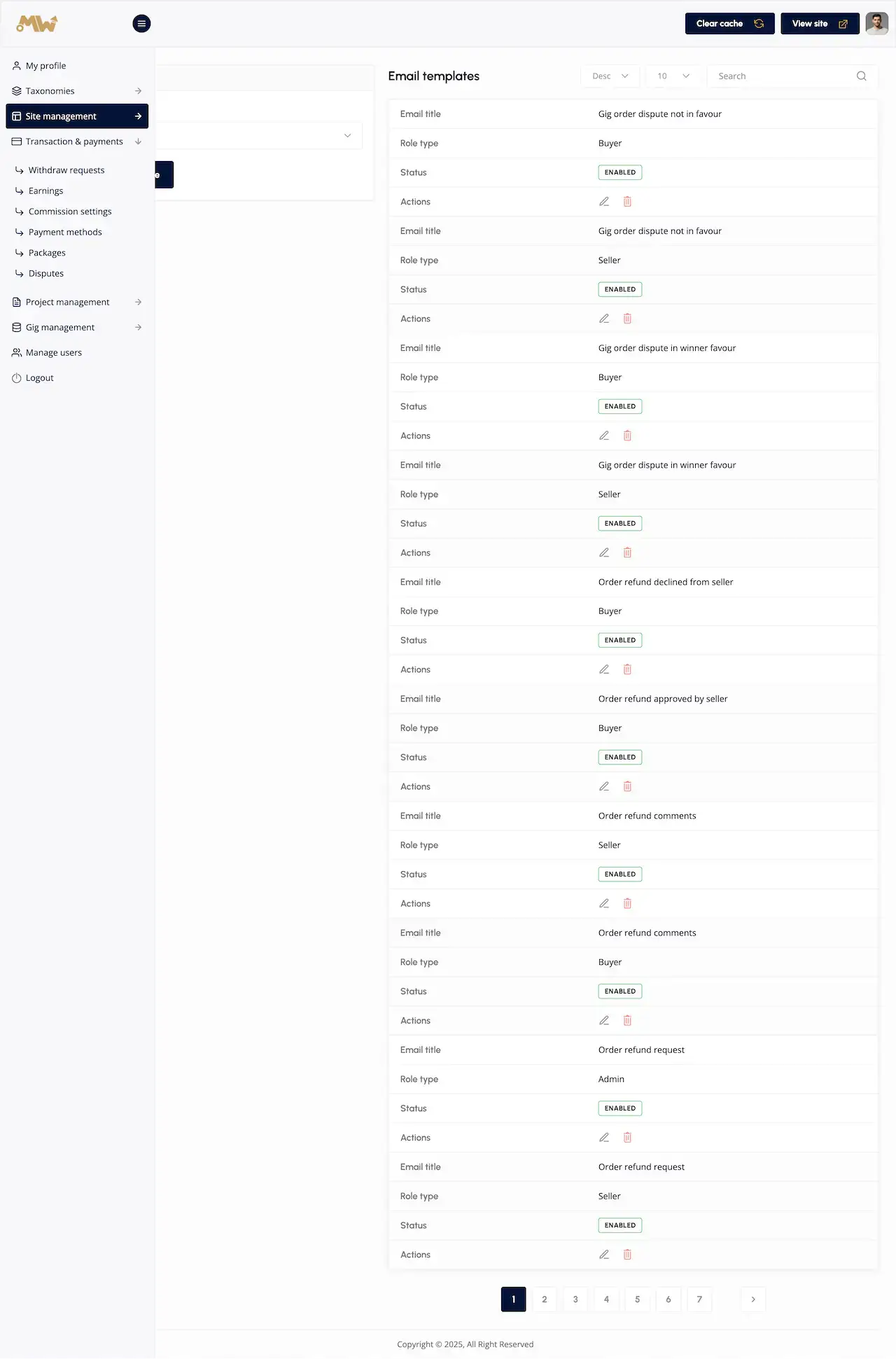
Admin · Email TemplatesReal screen
Upwork Clone App - White-Label Freelance Bidding Marketplace - real admin screen, Email Templates
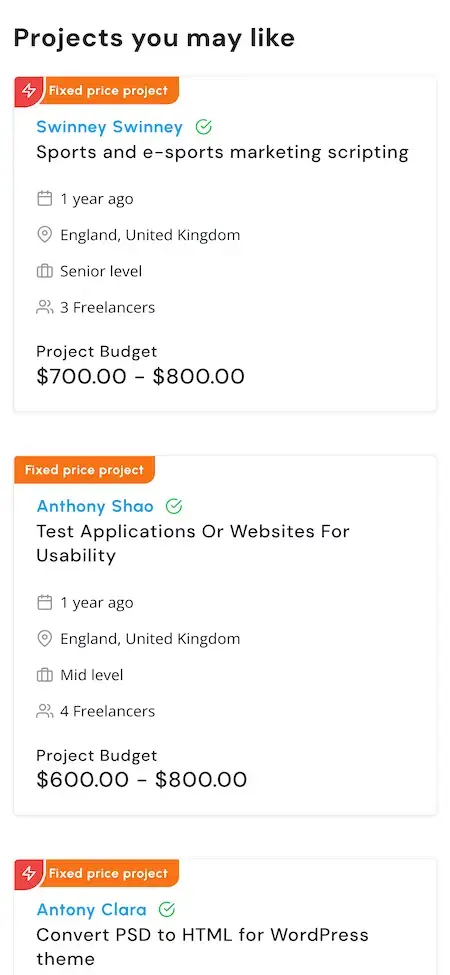
Upwork Clone list of recommended projects with a fixed price tag, level, freelancer count and budget range on each card.
Proposal, chat and paymenton one project page
  • 6Revenue Linesfreelancer commission, employer fee, posting fees, packages, featured placement and processing fees
  • 2Switchable Modulesthe project module and the gig module, each set in the admin panel
  • 0%Revenue Share With Miracuvesno royalty on any contract your marketplace closes
  • 13+Landing Pagesbuilt with the page builder that arrived in release 2.0
  • 6Days to Launchand if the delay is ours, we keep going free
  • $2,799Paid Once, Not Rentedsource code yours, no per-seat fee, no monthly rental

Live in six working days, or we keep working free until you launch. Every build carries 60 days guidance, 6 months bug fixes and 12 months updates.Verify every figure

Truxfinder Was Built on This Base

Miracuves delivered Truxfinder's creator and brand booking marketplace on the Upwork clone base in 2024, reusing 19 of 23 building blocks.

Invoices Employers Can Read

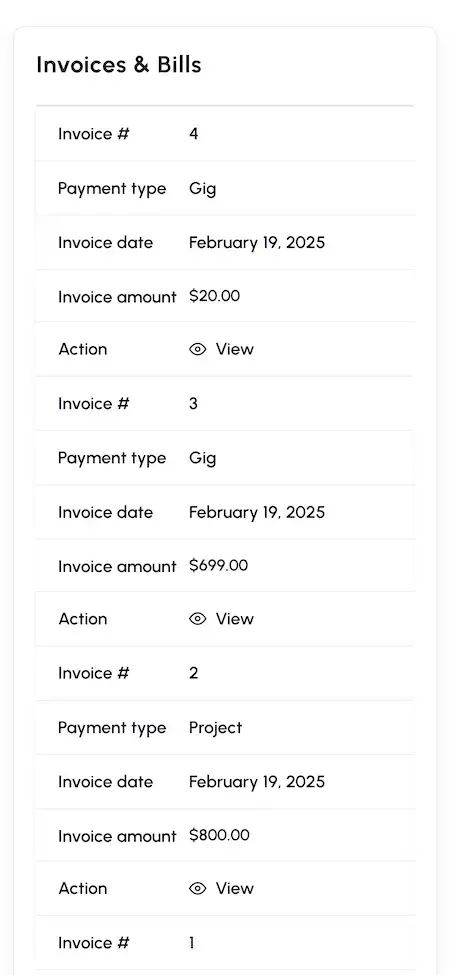
Employers get invoices and bills with number, type, date and amount, beside a charted spend summary across projects, ongoing orders and gigs.

Cards Go to Your Gateway

Card details pass straight to the payment gateway you connect and the platform keeps a payment reference; PayPal, Flutterwave, Paystack, Paytm, Razorpay and PayFast come as a paid add-on.

Ready to open your own freelance marketplace?Talk to Product Expert

Chosen by 6,000+ clients across the globe

Miracuves is listed by Expertise.com as a managed IT service provider.Miracuves is an official member of the Forbes Business Council.Miracuves is a verified agency on DesignRush, listed among top design agencies in India.Miracuves is reviewed on Trustpilot as a software development company.Miracuves is listed by The Manifest among top managed software development companies.Miracuves is listed by DesignRush as a top software development company.Miracuves is recognized by GoodFirms as a top software development company.Miracuves is ranked among the top 1000 companies globally by Clutch.Miracuves is a top managed service provider in the United States on Clutch.

01See it live

Live in Action

Upwork Clone Demo - Employer Side, Freelancer Side, Mobile Apps & Admin Panel

Try the Miracuves Upwork Clone hands-on. One account menu moves between the employer and freelancer views, the apps run for you on a guided call, and the admin login is shared on that call too. Open a project, look at the invoices, read the spend summary.
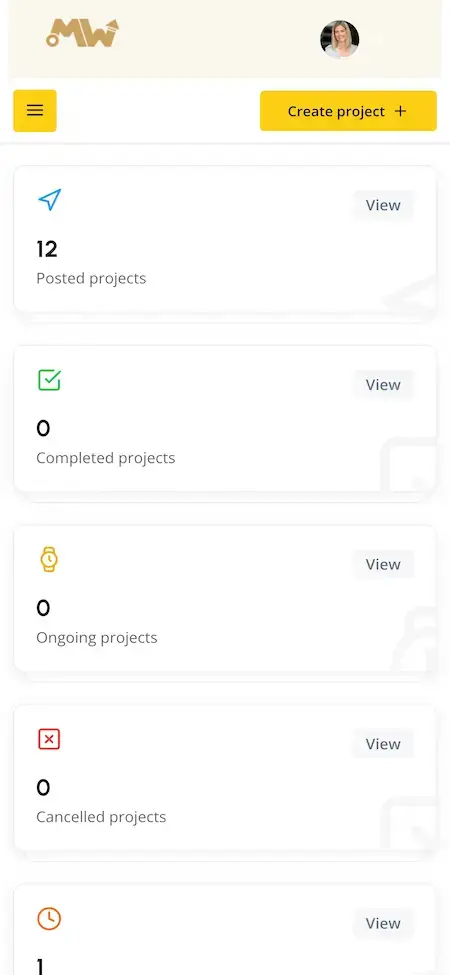
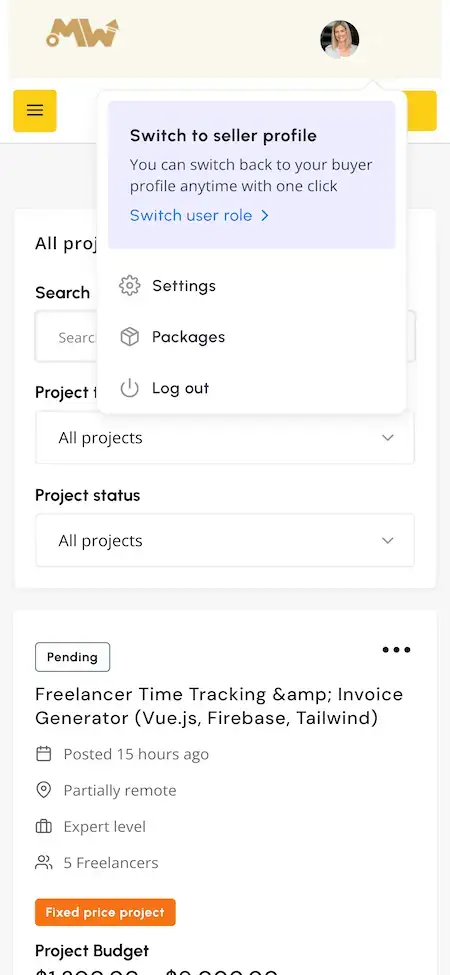
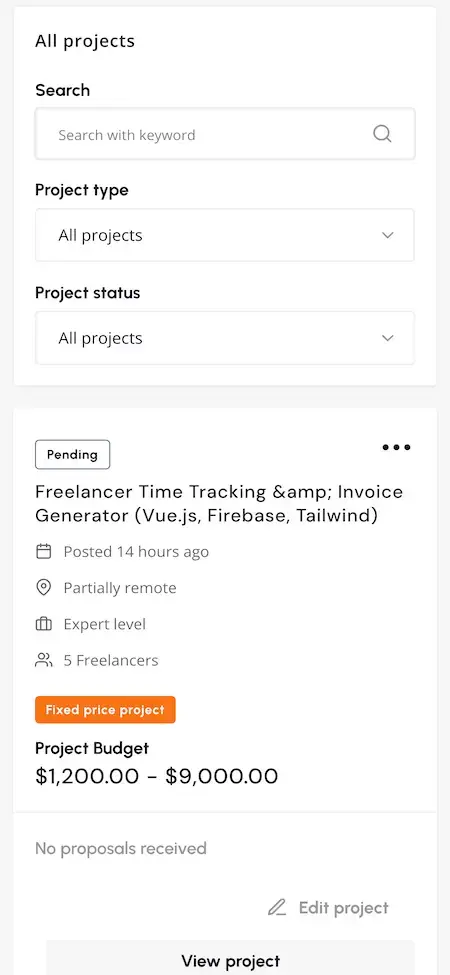
Upwork Clone employer dashboard with tiles for posted, completed, ongoing and cancelled projects and a Create project button.Upwork Clone My projects list with a pending project, its budget, a no-proposals note and Edit project and View project buttons, plus a switch-to-seller-profile menu.
Employer side

Upwork Clone - Employer Dashboard

The hiring side in a browser: create a project, watch it collect proposals, follow ongoing work, and read the invoices and the spend summary.

  1. 1Start the web demo in your browser
  2. 2Sign in with the buyer login below
  3. 3Explore: Create project, My projects, Invoices
Try:user@demo.com | User_321
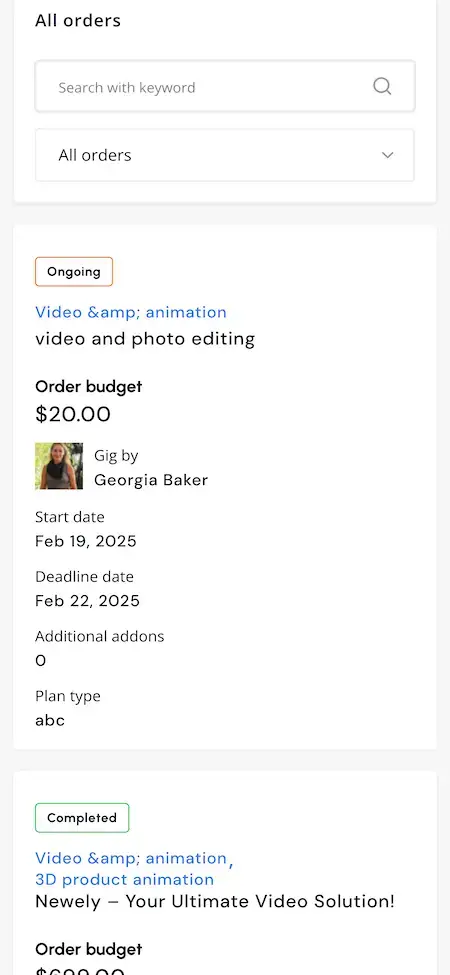
Upwork Clone list of recommended projects with a fixed price tag, level, freelancer count and budget range on each card.Upwork Clone gig orders screen with a keyword search, an order status filter and ongoing and completed orders with budget, dates and plan.
Freelancer side

Seller Panel - Projects, Gig Orders & Packages

The working side: switch to a seller profile from the account menu, browse recommended projects, send proposals and follow gig orders with budget, deadline and plan.

  1. 1Open the sign-in page of the demo
  2. 2Log in with the seller details below
  3. 3Explore: Recommended projects, Gig orders, Packages
Try:seller@demo.com | Seller_321
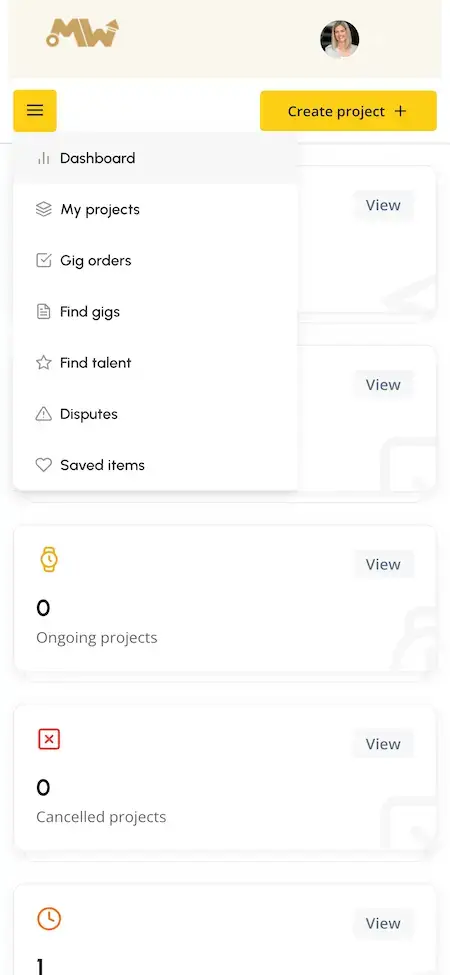
Upwork Clone home screen with a search box and buttons for people looking for work or needing a talent.Upwork Clone dashboard menu listing Dashboard, My projects, Gig orders, Find gigs, Find talent, Disputes and Saved items.
Mobile apps

User & Seller Apps - Shown on Request

A user app and a seller app belong to the delivery. Both apps are opened for you on a guided call, using the demo logins below.

  1. 1Book a guided call
  2. 2Tell us Android or iOS
  3. 3Explore: the same flows on a phone
Logins:user@demo.com | User_321 and seller@demo.com | Seller_321
Upwork Clone admin panel with a side menu for site management, transactions and payments, project and gig management and users, beside a table of email templates.
Admin panel

Admin Panel - Earnings, Withdrawals & Disputes

The operator console: commission settings, earnings, withdraw requests, payment methods, packages and disputes, beside project, gig and user management.

  1. 1Open the sign-in page of the demo
  2. 2Ask the team for the admin login
  3. 3Explore: Earnings, Disputes, Email templates
Admin login:shared on a guided call
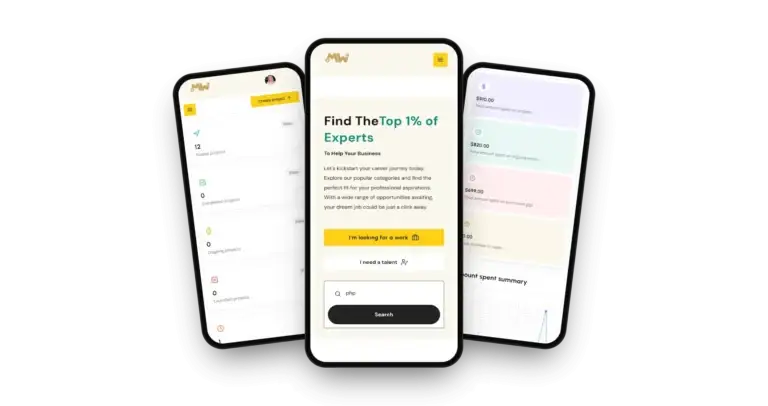
Upwork Clone on three phones: the marketplace home with talent search, the client dashboard with posted, completed and ongoing project counts and the spend summary by projects, orders and wallet

See It With Us

Video Walkthrough of a Freelance Marketplace Like Upwork: Projects, Proposals, Payments & Admin

A live call is the fastest way to see the whole platform. In 30 minutes we open the employer side, the freelancer side, the apps and the admin panel, and tie each one to your plan: your categories, your commission, your payout rules and your launch date.

Schedule a Live Walkthrough

Every Screen Mapped

Upwork-Like App Flows: Mobile Views & Admin Panel

These are the real screens of the Miracuves Upwork clone demo at phone width, in the order a project moves, followed by the full-height admin panel that sits behind them.
Upwork Clone home screen with a search box and buttons for people looking for work or needing a talent.
Upwork Clone All projects screen with a keyword search and project type and project status filters.
Upwork Clone list of recommended projects with a fixed price tag, level, freelancer count and budget range on each card.
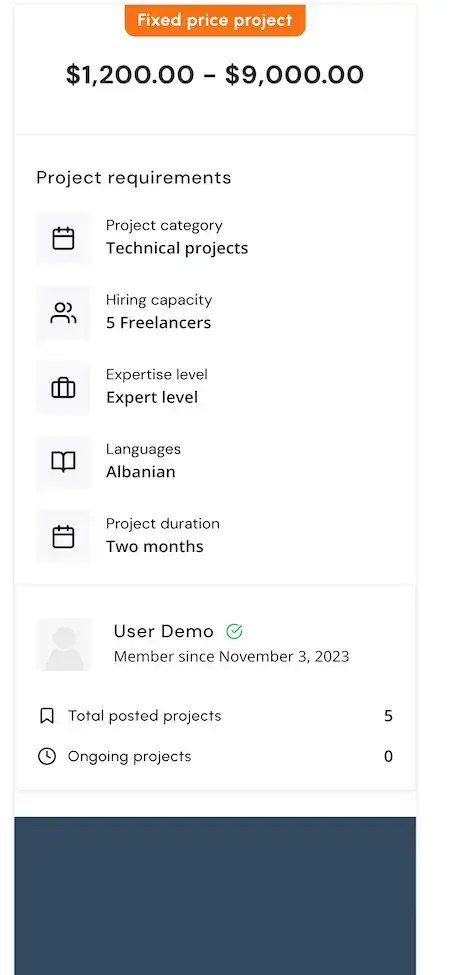
Upwork Clone project page with a fixed price budget range and project requirements: category, hiring capacity, expertise level, languages and duration.
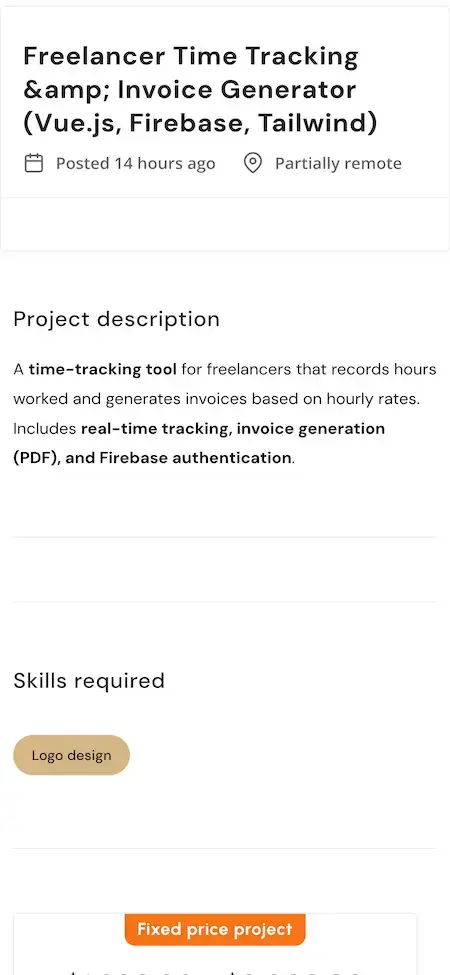
Upwork Clone project page with the posting date, location type, project description and required skills.
Upwork Clone My projects list with a pending project, its budget, a no-proposals note and Edit project and View project buttons, plus a switch-to-seller-profile menu.
Upwork Clone employer dashboard with tiles for posted, completed, ongoing and cancelled projects and a Create project button.
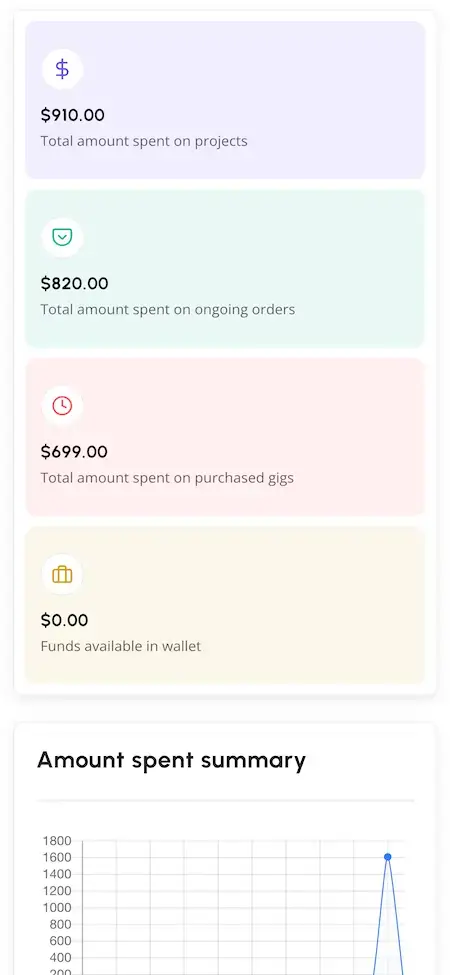
Upwork Clone spend summary with amounts spent on projects, ongoing orders and purchased gigs, funds in the wallet and a spending chart.
Upwork Clone Invoices and Bills list with invoice number, payment type, date, amount and a View action.
Upwork Clone gig orders screen with a keyword search, an order status filter and ongoing and completed orders with budget, dates and plan.
Upwork Clone dashboard menu listing Dashboard, My projects, Gig orders, Find gigs, Find talent, Disputes and Saved items.
11 screens · scroll →
Upwork Clone admin panel with a side menu for site management, transactions and payments, project and gig management and users, beside a table of email templates.
1 screen

Follow an employer from the home screen through project filters, a project page and a list of received proposals to the dashboard and the invoices, and a freelancer through recommended projects, gig orders and the seller menu.

Explore Our Solutions

02Proof

In Their Words

Upwork Clone Client Reviews - Founders on Building With Miracuves

None of these four runs a general freelance marketplace. The closest is Truxfinder's creator marketplace, where influencers list themselves and brands search, book and pay through escrow. ooivioo and Kroon book creators for personalized videos, and Saas Home Services matches service providers with customers.

MMadhur YadavFounder, Truxfinder Consulting LLC
“We were building a creator marketplace — influencers list themselves, brands search and book them, the platform handles briefs, deliverables, and payouts. Building the matching, messaging, escrow, and the brand/creator apps from scratch was always going to be the slowest part. Miracuves's MXInfluencer suite gave us exactly that foundation. We added our own brief-template engine, the escrow-with-milestones flow, and our branding. We launched in 6 working days and had paying brands on the platform within the first month. We estimate it saved us 4–5 months of build time.”
oooivioo TeamFounding team, ooivioo
“Creators, categories and a local payout mix were our contribution. The booking flow, brief capture and recording queue were already built. Live in weeks with creators onboarded from day one.”
SSaas Home Services TeamFounding team, Saas Home Services
“Provider onboarding, quoting, booking and payments came off the shelf. We added our service categories and our vetting rules. Both sides of the marketplace were live inside a month.”
AAdelek AdrianFounder & Creative Director, Kroon LLC
“Booking, brief capture, the recording queue and creator payouts came ready. We localised the brief templates and added a mobile-money payout mix for our region. We launched with eighty creators onboarded on day one, and it looks like our platform rather than a US template.”
Read More Client TestimonialsFounders and operators in their own words

Proof in Production

Upwork Clone Case Study - Truxfinder Creator and Brand Marketplace

The delivery of a creator and brand booking marketplace on the Miracuves Upwork Clone base. This summary draws on the published case study, which covers what was delivered in 2024.

Case Study
Creator and Brand Booking Marketplace

Truxfinder needed a creator and brand booking marketplace. Miracuves started from the Upwork Clone base, spent the build on the parts that were the client's own, and transferred the source code at handover.
TruxfinderClient
2024Delivered
Creator and brand bookingIndustry
6 working daysBase build
19 of 23Blocks reused
3Applications shipped
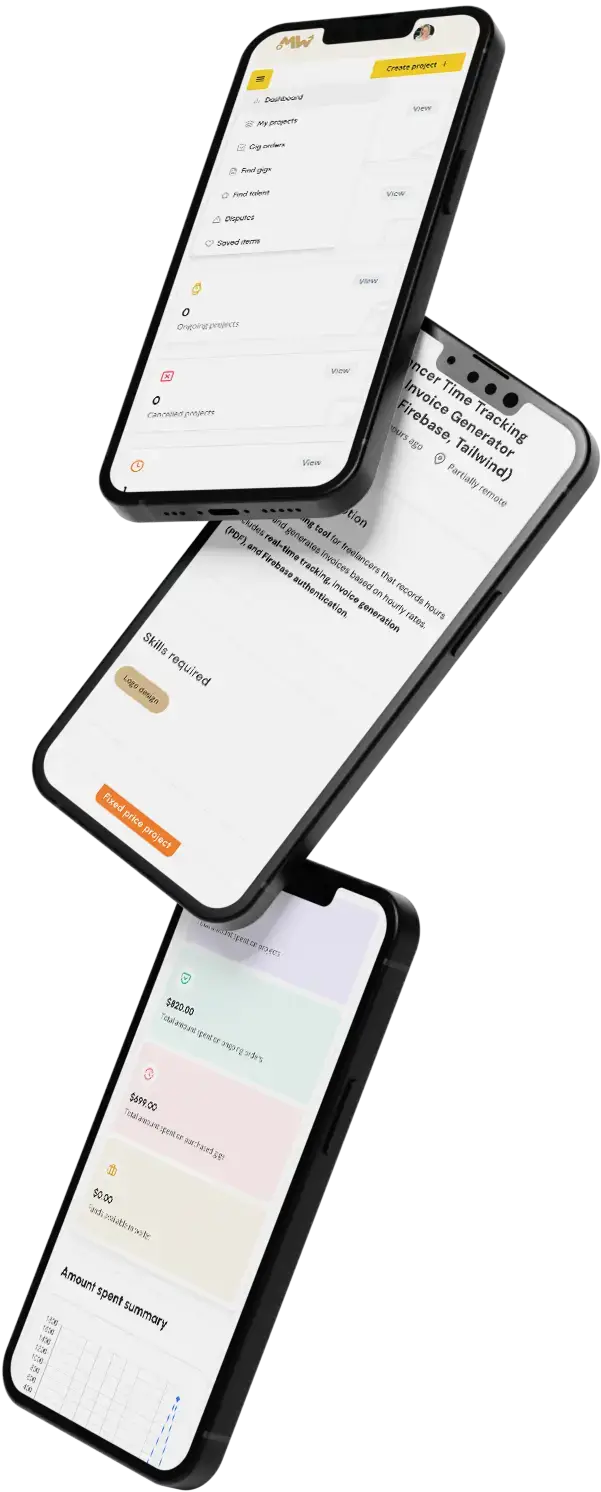
Upwork Clone screens on three tilted phones: a project list, a project page and the spend summary.
Challenges
  • Strangers only transact when money is held until the work is approved
  • Milestones, evidence and arbitration must exist before the first dispute
  • Bad clients drive good freelancers away as fast as the reverse
Goal
  • Launch a booking marketplace without rebuilding mechanics already proven on the base
  • Put the work into the choices that belonged to the client
  • Hold the source code outright
Solution by Miracuves
  • Client, freelancer and admin applications, each with its own permissions
  • Categories, fee model and escrow terms configured for the client
  • Brand and theming applied across every surface
  • Source, schema, deployment configuration and architecture notes handed over
  • The base in 6 working days, then Truxfinder's own marketplace rules

“We were building a creator marketplace — influencers list themselves, brands search and book them, the platform handles briefs, deliverables, and payouts. Building the matching, messaging, escrow, and the brand/creator apps from scratch was always going to be the slowest part. Miracuves's MXInfluencer suite gave us exactly that foundation. We added our own brief-template engine, the escrow-with-milestones flow, and our branding. We launched in 6 working days and had paying brands on the platform within the first month. We estimate it saved us 4–5 months of build time.”Madhur Yadav · Founder, Truxfinder Consulting LLC

Read the full case studySee the scope ledger and the 19 of 23 blocks that were reused.

03The product

The Basics

What the Upwork Clone App Does for Employers and Freelancers

An Upwork clone is a ready-made freelance marketplace, and Miracuves ships its version with proposals, held payments and an admin console already working together. Employers post projects with a budget, freelancers send proposals, the two agree terms in a private chat, and the platform holds and releases payment while an admin panel follows commission, withdrawals and disputes.

Upwork Clone on three phones: the marketplace home with talent search, the client dashboard with posted, completed and ongoing project counts and the spend summary by projects, orders and wallet

More Than a Job Board

What matters surrounds the listing itself - proposals, private chat, payments held until approval, invoices and an admin console that handles commission, withdrawals and disputes.

Not a Locked Box

You get the complete source code, owned by you rather than open source, with no encryption, so your team can reshape flows and screens, with no per-seat or per-project licence fee to pay.

Plain About What Is Extra

Matchmaking, smart contracts, skill certification and collaboration rooms are add-ons with a price of their own. They are listed as add-ons and never counted as base features.

Web & Mobile

What Is an Upwork Clone Script?

The hard part of a talent marketplace is not the project list. It is the money between strangers: a budget agreed in chat, a payment held while work is done, a release on approval, and a route for when the two sides disagree. Those parts ship working.

Upwork Clone admin panel with a side menu for site management, transactions and payments, project and gig management and users, beside a table of email templates.
  1. 01Projects with budgets, skills and expertise levels
  2. 02Proposals, invitations and a private chat
  3. 03Payments held until approval, with invoices and a wallet
  4. 04Freelancer profiles and a seller dashboard
  5. 05Admin panel with commission, freelancer withdrawals and disputes

You receive the employer and freelancer web platform (the Upwork clone website), a seller dashboard, an admin panel, user and seller apps built with Flutter, and the complete source code.

Everything Included

Upwork Clone Features - Projects, Proposals, Milestones, Escrow Payments, Chat & Admin

Nothing below is a promise on paper, because Miracuves shows each capability in the demo, the admin panel or the release log. What needs an extra module is named as an add-on lower on the page.

Feature 01 / 12

Projects With Real Briefs

Employers create a project from the dashboard with a title, a description, a category, skills, an expertise level and a budget that is either a fixed price range or an hourly rate.

  • Create project button on the employer dashboard
  • Fixed price projects shown with a budget range
  • Category, hiring capacity, expertise level and languages
  • Project duration and required skills
  • Remote or partially remote tag on every project
Feature 02 / 12

Search & Discovery

Visitors and members narrow the project list by keyword, type and status, browse recommended projects and look through a talent directory.

  • Keyword search from the home screen and the project lists
  • Project type and project status filters
  • Projects you may like on the freelancer side
  • Find talent and Find gigs in the account menu
  • Saved items to shortlist for later
Feature 03 / 12

Proposals & Bidding

Freelancers answer a project with a proposal that sets out approach, price and qualifications, and employers see what has arrived on their own project.

  • Tailored proposals with approach, price and qualifications
  • A note on each project showing whether proposals have arrived
  • Freelancer count shown on every project card
  • Direct invitations to freelancers whose profile fits
  • Several freelancers per project through hiring capacity
Feature 04 / 12

Milestones & Delivery

Work is tracked against milestones, deliverables are submitted through the platform and the employer reviews them before payment is approved.

  • Milestone tracking on the project
  • Deliverables submitted from the freelancer side
  • Employer review before payment is approved
  • Progress and deadlines visible to both parties
  • Ongoing and completed counts on the dashboard
Feature 05 / 12

Escrow-Style Payments

The employer pays into the platform and the money is released to the freelancer when the work is approved, so neither side has to trust the other first.

  • Payment held on the platform during delivery
  • Release by the employer on approval
  • Payment gateway integration through third-party APIs
  • Six more gateways as a paid add-on from release 2.1
  • Refund requests with approve, decline and comment steps
Feature 06 / 12

Wallet, Invoices & Spend

Every employer has a wallet balance, a running spend summary and a list of invoices, each payment typed as a project or a gig.

  • Funds available in the wallet on the dashboard
  • Totals spent on projects, ongoing orders and gigs
  • Amount spent summary with a chart
  • Invoices and Bills with number, type, date and amount
  • View action on every invoice
Feature 07 / 12

Private Chat

A one-to-one real-time chat lets employer and freelancer clear up scope, negotiate terms and keep the agreement in one thread.

  • One-to-one real-time chat, added in release 2.0
  • Used to discuss work details, proposals and terms
  • Private between the two parties
  • Email templates for the messages the system sends
Feature 08 / 12

Profiles & Role Switching

Freelancers build profiles with skills and experience, and one account can swap between the buyer and the seller view from the menu.

  • Freelancer profiles with skills, experience and expertise
  • Freelancer detail page added in release 2.0
  • Switch to seller profile and back with one click
  • Separate buyer and seller dashboards from release 1.8
  • Two entry buttons on the home screen: looking for remote work, or needing freelance talent
Feature 09 / 12

Project & Gig Modules

Projects are the core. The gig module, with plans, add-ons and orders, sits beside it, and each module can be switched on or off in the admin panel.

  • Toggle the project and gig modules on or off (release 2.4)
  • More flexible gig plans (release 2.4)
  • Gig orders with budget, dates, add-ons and plan type
  • Projects and gigs invoiced side by side
  • A projects-only marketplace is a setting
Feature 10 / 12

Disputes & Refunds

Disagreements have a route: orders can be disputed or refunded, email templates tell each party what happened and the admin settles the case.

  • Disputes entry in the account menu
  • Disputes under Transaction and payments in the admin panel
  • Refund request, approval, decline and comment emails
  • Dispute emails for buyer and seller, in their favour or not
  • Each template enabled or disabled by role
Feature 11 / 12

Commission, Earnings & Withdrawals

The admin panel sets the commission, shows earnings and works through withdrawal requests, payment methods and packages.

  • Commission settings in the admin panel
  • Earnings view for the operator
  • Withdraw requests from freelancers
  • Payment methods configured by the operator
  • Packages with the remaining time shown (release 1.9)
Feature 12 / 12

Languages, RTL & Branding

Right-to-left layouts and a switch for multilingual support ship in the box, and email templates, SEO tags and pages follow your brand.

  • Right-to-left layouts (releases 1.8 and 2.1)
  • Multilingual support including Arabic, French, Spanish, Russian and Portuguese
  • Multilingual support switchable on or off (release 2.4)
  • Email template settings per event and role
  • SEO meta tags and Open Graph tags (release 2.1)
  • A page builder and 13+ landing pages (release 2.0)

Before you buy, note this: The platform is handed over with your branding applied and running on your hosting. Bring the domain and hosting, a verified store developer account, your brand assets and business details, a gateway account that is onboarded and KYC-cleared, and any third-party keys. Apple and Google set their own review pace, so it falls outside our 6-day build.

Talk to Our Team

How Operators Earn

Upwork Clone Revenue Models - Commission, Employer Fees, Posting Fees, Packages & Featured Projects

A freelance marketplace earns in several places, and Miracuves' Upwork clone keeps each line apart, so switching one on leaves the others as they were.

Two lines usually move the numbers most: the commission on each paid contract and the packages or placements you sell to members.

  1. 01

    Freelancer Commission

    A percentage kept from the freelancer's earnings on each paid contract. It lives in the commission settings of the admin panel, so the rate can change without a rebuild.

  2. 02

    Employer Fee

    A fee added on top of what the employer pays, shown at checkout and kept apart from the freelancer's price so the freelancer payout stays clean.

  3. 03

    Project Posting Fees

    A charge for publishing a project, or for giving one extra weight, which suits operators who want serious briefs more than volume.

  4. 04

    Membership Packages

    The admin panel carries Packages, and an active package shows its remaining time to the member, a recurring line that does not depend on any single contract.

  5. 05

    Featured Placement

    Projects and seller profiles can be featured for a period and drop back on schedule when it ends, which turns visibility into something to buy.

  6. 06

    Payment Processing Fees

    Gateway costs can be recovered through a transaction fee instead of being absorbed, with withdrawals passing through the admin panel.

Published fees from freelance marketplaces for the lines this platform can run: the freelancer commission, the employer fee, memberships and card processing, each figure traced to a filing, a fee page or a store policy.
Revenue streamHow it is chargedTake rateTypical take rateWhat sets the ceiling
Freelancer CommissionA percentage deducted from the freelancer's earnings on each paid contract.Upwork: 0% to 15% for talent on contracts from May 2025, a flat 10% before. Freelancer.com: 10% or $5, whichever is greater.What freelancers will tolerate. For 2025 the filings report blended take rates of 18.7% at Upwork and 27.7% at Fiverr, the combined fees users already see elsewhere.
Employer FeeA percentage added to each payment the employer makes, shown beside the project price.Upwork: 5% per transaction, 3% via ACH, and 10% (8% via ACH) for Business Plus. Freelancer.com: 3% or $3, whichever is greater.Whether the extra cost is visible up front. Freelancer.com charges its fixed-price fee when a project is awarded, so the fee lands before any work is delivered.
Membership PackagesA recurring charge for a package that adds capability for freelancers or employers.Fiverr earned $133.4 million, about 31% of 2025 revenue, from subscription products such as Seller Plus and AutoDS.What the package unlocks. If sold inside a store app, Apple keeps 30% of a subscription in year one and 15% after; Google Play lists 10% plus a 5% billing fee in the US, UK and EEA from 30 June 2026.
Payment Processing FeesA transaction fee that passes gateway costs on to the payer, or absorbs them.Stripe US: 2.9% plus 30 cents per successful domestic card payment.What your gateway charges where you operate, for your cards. The Stripe US pricing page serves as the reference, but the true figure comes from your own gateway contract.

How to read this. Upwork figures come from its 2025 Form 10-K, Fiverr figures from its 2025 Form 20-F, and Freelancer.com fees from its fees and charges page. Store billing follows the Apple subscriptions page and the Google Play service fee page, and the card example comes from Stripe US pricing. Those are prices and filings that other companies have published. Treat them purely as inputs for modeling: the table is neither a quote nor a forecast, and your own rates are configured in the admin settings.

Revenue Model

Upwork Clone Revenue Model, Stage by Stage

A bidding marketplace on Miracuves' Upwork clone can open on freelancer commission alone, then turn on employer, posting and processing fees from Commission settings and Packages as briefs and bids pile up.

Launch

Freelancer commission on each paid contract leads, since the first approved delivery earns it, and an employer fee kept apart from the freelancer's price adds a second line without muddying payouts.

Traction

When freelancers start competing for the same briefs, featured projects and seller profiles sell on a timer, and project posting fees can favor serious employers over sheer volume.

Scale

Across many skill families, membership packages bring recurring income beside commission, and payment processing fees recover gateway costs instead of eating into margin.

Miracuves takes 0% of every contract and gig your marketplace bills, and freelancer commission changes in Commission settings, not code.

Want a revenue model built around your own freelance marketplace?Design My Revenue Model

Operate It Day to Day

Admin Panel for Your Bidding Marketplace: Projects, Users, Payments & Disputes

Miracuves gives Upwork clone operators one console for the whole day: which projects are live, who is on the platform, what freelancers have earned and asked to withdraw, which disputes are open and what the system emails say.

Upwork Clone admin panel with a side menu for site management, transactions and payments, project and gig management and users, beside a table of email templates.

Admin Panel Sections

  • 01

    Project Management

    See and manage every project on the platform, with its status, budget and the freelancers attached to it.

  • 02

    Gig Management

    The gig module has its own menu for gigs and orders, and it can be switched off when you want a projects-only marketplace.

  • 03

    Manage Users

    Review and manage employer and freelancer accounts, the starting point for any decision about who stays on the platform.

  • 04

    Taxonomies

    The categories and labels that projects and freelancers are filed under, so the catalog reflects your market.

  • 05

    Earnings & Commission

    An Earnings view for the operator and Commission settings that decide what the platform keeps from each paid contract.

  • 06

    Withdrawals & Payment Methods

    Withdraw requests from freelancers arrive here, next to the payment methods the platform accepts and the Packages members can hold.

  • 07

    Disputes & Refunds

    A Disputes menu under Transaction and payments, backed by refund and dispute email templates for buyer, seller and admin.

  • 08

    Site Management

    Email templates, taxonomies and site settings in one menu, with Clear cache and View site buttons in the header.

Money Movement

The finance side of the console, from a held payment to a withdrawal.

  • Earnings view for the operator
  • Commission settings
  • Withdraw requests
  • Payment methods and Packages

Messages & Site Controls

The settings behind what members read and see.

  • Email templates enabled or disabled by role
  • Refund and dispute notices for buyer, seller and admin
  • Clear cache and View site shortcuts
  • Multilingual support switch

Need the console to do more? A different payout rhythm, more reports, further languages or a custom approval step are scoped on their own. Tell us what your operations team needs and we will quote it in writing.

Talk to Our Team

04Package and price

The Full Package

Package Contents: Source Code, Apps & Deployment for a White-Label Upwork App

From Miracuves you receive a working Upwork clone script with full source code rather than a box of parts: the employer and freelancer web platform, the apps, the admin panel, the source code and the schema behind them. Ownership passes to you in full, with nothing charged per seat or per contract and no licence needed to keep it running.

01

Full Source Code

The complete source for the web platform and the mobile apps, with no encryption, so your team can change it to suit your business.

  • Web platform source, unencrypted
  • Flutter source for the Android and iOS apps
  • Yours to modify, extend and redeploy
  • Delivered into your own repository
02

Schema & Migrations

The database structure behind projects, proposals, users, packages, payments and content, delivered so it can be rebuilt from empty.

  • Database schema with migrations
  • MySQL data tier
  • Projects, proposals, users and packages
  • Payments, invoices and content tables
03

Chat & Email Templates

The one-to-one chat between employer and freelancer, and the email templates the platform sends for orders, refunds and disputes.

  • One-to-one real-time chat
  • Templates for refunds and disputes
  • Enabled or disabled by role
  • Edited from the admin panel
04

Employer & Freelancer Web Platform

The responsive web platform with project lists, filters, project pages, dashboards, invoices and the seller view, switchable from one menu.

  • Project search, filters and recommended projects
  • Project pages with budget and requirements
  • Dashboards, invoices and the spend summary
  • Page builder and landing pages
Upwork Clone list of recommended projects with a fixed price tag, level, freelancer count and budget range on each card.
05

User & Seller Apps

Two Flutter apps, one for members hiring and one for sellers working, published from your own developer accounts.

  • User app and seller app
  • Flutter, for Android and iOS
  • Published from your own accounts
  • Shown on a guided call
Upwork Clone employer dashboard with tiles for posted, completed, ongoing and cancelled projects and a Create project button.
Upwork Clone admin panel with a side menu for site management, transactions and payments, project and gig management and users, beside a table of email templates.
06

Admin Panel

The operator console with project, gig and user management, taxonomies, site management and the Transaction and payments area.

  • Earnings, commission and withdraw requests
  • Payment methods, packages and disputes
  • Project, gig and user management
  • Email templates, clear cache, view site
07

Access & Security Layer

Separate logins and permissions for buyer, seller and admin, with the protections the web platform ships with.

  • Separate roles with their own permissions
  • Credentials kept out of the repository
  • Payment details handled by the gateway
  • Audit trail of who changed what
08

Handover & Support

Branding and deployment done for you, a handover pack, and three support periods that run side by side from launch.

  • Rebranding with your logo, icons and colors
  • Deployment to your hosting
  • Deployment configuration and architecture notes
  • 60 days guidance, 6 months bug fixes, 12 months updates

Want to see it before deciding? Sign in to the demo as an employer or a freelancer, or ask for a guided tour. We can walk through a project page, the invoices and the admin panel, each tied to your own marketplace plan.

Talk to Our Team

Transparent Pricing

How Much Does It Cost to Build a Freelance Marketplace Like Upwork?

The launch-ready white-label Upwork Clone is a fixed price of $2,799. Miracuves scopes work beyond the base, such as add-ons, extra gateways or custom flows, and quotes it separately in writing.

Most Popular

Professional

Ready-Made Launch Package
$2,799paid once
Ships in 6 days

Chosen by: Freelance marketplace startups and enterprises, niche talent platforms, agencies building a branded hiring network

You receive the marketplace as the demo runs it, carrying your logo, icons and colors and installed on hosting that you own.

Get Started

Enterprise

Custom Builds for Larger Scope
Customquote
Go-live: based on final scope

Chosen by: Staffing firms, multi-country talent networks, companies with their own approval flows

Missing a workflow in the base? We build it from your brief, with scope and price agreed in writing ahead of any work.

Request a Quote
Development Cost

Upwork Clone Development Cost in 2026

One payment of $2,799 makes the demo's bidding marketplace yours: the employer and freelancer platform, seller dashboard, admin console, Flutter apps for Android and iOS and unencrypted source. Miracuves brands it on hosting you control, the launch lands six working days later, and no contract after that owes a fee.

$2,799 Paid once
6 working days Rebranded and live
0% Revenue share

What moves your total sits outside the software invoice

  • Hosting and a domain
  • Apple and Google developer accounts
  • Your processor's fee on each card payment
  • A paid gateway add-on from release 2.1 covering PayPal, Paystack, Razorpay, Flutterwave, Paytm and PayFast
  • Matchmaking, smart contracts, skill checks or collaboration rooms as add-on modules

Adding an approval step before a held payment is released, or a new freelancer payout schedule, typically runs 2-8 weeks, with Miracuves' quote in writing before work starts.

Compare Your Options

Ready-Made Upwork Clone vs Custom Development vs SaaS

Planning a bidding marketplace for clients and freelancers? Compare Miracuves' finished Upwork clone with a commissioned build and a hosted subscription before you choose a route.

CriteriaMiracuvesReady-Made Upwork CloneCustom DevelopmentSaaS
Launch timeLive after 6 working daysTimeline follows the written scopeInstant account, generic setup
Upfront cost$2,799 once, fixedQuote agreed in writing firstEntry plan, billed every month
Source code ownershipUnencrypted code delivered to youDepends on contract termsCode never leaves the vendor
CustomizationProposals, milestones, fees all editableUnlimited, priced per changeWithin the vendor's menus
Ongoing feesNo charge per contractMaintenance you fund yourselfRecurring plan, sometimes a revenue share
Branding & app-store listingPublished under your developer accountsYour accounts, after a full buildUsually hosted under their domain
Best forBidding marketplaces needing speedHighly specific hiring flowsValidating an idea cheaply

Go Deeper

Four Guides Compared on Building an App Like Upwork

Four guides from the Miracuves blog on what the script includes and costs, how the model is built, where the money comes from and how the app works, each going further than this overview.

Where It Fits

Who Runs an Upwork-Style Platform: Open Marketplaces, Niche Talent, Regional Networks & Agencies

Different operators lean on different parts of the Upwork clone Miracuves delivers. An open marketplace puts search and commission first, a niche board puts categories and expertise first, and a regional network puts languages and layout first. You set the emphasis in configuration.

OpenMarketplaceOpen Freelance Marketplace

Let employers post projects across many categories and freelancers bid for them, while you earn commission and run the admin panel.

01
Upwork Clone All projects screen with a keyword search and project type and project status filters.
NicheTalentNiche Talent Platform

Narrow the catalog to one skill family and shape the categories, skills and expertise levels around it, so the marketplace reads as made for that work.

02
Upwork Clone project page with a fixed price budget range and project requirements: category, hiring capacity, expertise level, languages and duration.
RegionalLanguageRegional Marketplace

Serve a market in its own language, with right-to-left layouts, translated pages and email templates that speak to local employers and freelancers.

03
Upwork Clone admin panel with a side menu for site management, transactions and payments, project and gig management and users, beside a table of email templates.
AgencyNetworkAgency Talent Network

Give an agency a branded space where clients post briefs, the agency invites chosen freelancers and payments run through one wallet.

04
Upwork Clone My projects list with a pending project, its budget, a no-proposals note and Edit project and View project buttons, plus a switch-to-seller-profile menu.
ProjectsOnlyProjects-Only Hiring Board

Switch the gig module off and run a clean board of fixed price and hourly projects, with proposals, chat and invoices.

05
Upwork Clone dashboard menu listing Dashboard, My projects, Gig orders, Find gigs, Find talent, Disputes and Saved items.
CompanyPortalContractor Portal for a Company

Let a business post work to outside specialists, collect proposals, chat and keep invoices in one place instead of scattered across inboxes.

06
Upwork Clone Invoices and Bills list with invoice number, payment type, date, amount and a View action.
Business Model

Upwork Clone Business Model: Three Ways to Run It

Because projects and gigs are separate switches in the admin panel, one Upwork clone deployment can carry three quite different freelance businesses.

Open marketplace

Employers post projects across many categories, freelancers bid with priced proposals, and commission plus an employer fee on every paid contract carries the business.

Niche or regional board

One skill family or one language market, with its own categories, expertise levels and right-to-left layouts where needed, earning from packages and featured placement as competition builds.

Private talent network

An agency lets its clients post projects and invites chosen freelancers to them under its own brand, with payment held until approval and the gig module switched off for a projects-only board.

Moving between these is admin work: open or close categories, set the commission and employer fee, and turn the gig module on or off.

One product, six ways to use it. All six cases share the web platform, the apps and the admin panel. What differs is which categories you open, what commission you set, who you invite and how it is branded, so there is one codebase to look after.

Talk to Our Team

Market Timing

Why Build a Freelance Marketplace in 2026?

Remote, project-based work is now a normal way to staff a task, and a Miracuves Upwork clone lets you serve the employers and freelancers as an Upwork alternative who still gather on a few large platforms. A marketplace under your brand keeps the supply, the employers and the commission those platforms currently hold.

01

Hiring by Project Is Now Ordinary

Employers are used to briefing a specialist, agreeing a price and moving on. A marketplace that makes that routine simple meets a habit that already exists.

02

Employers Want Offers They Can Compare

A proposal sets approach, price and qualifications next to each other, which is easier to judge than a profile alone and gives your marketplace its pricing signal.

03

Freelancers Want to Be Sure of Payment

Money held until the work is approved lowers the risk on both sides, which is what makes a first contract between strangers possible.

04

Local Languages Widen the Market

Right-to-left layouts and multilingual support let you serve readers of Arabic, French, Spanish, Russian and Portuguese in their own language.

05

Your Brand, Not a Listing on Another Site

When the marketplace carries your name, the reviews, the repeat hires and the relationship with both sides stay with you.

06

Buy Versus Build Is Quick to Settle

Projects, proposals, chat, a wallet and an admin console are most of a marketplace. After 6 days of our build time a white-label copy runs on your own hosting.

Platform by the Numbers

3

Web Panels

6

Days of Build Time

5

Languages Named

5

Logged Releases

Most of the work in a freelance marketplace is the unglamorous middle: proposals, money held between strangers, withdrawals and a route for disputes. Here it is already built.

Industries

Industries We Serve

The Upwork Clone suits any marketplace where one side posts work and the other side bids for it. Software and IT specialists, designers and creatives, marketers and writers, translators and video editors, lawyers and accountants, engineers and architects, tutors and consultants, data and AI practitioners and staffing agencies can all be served, each as a vertical of its own or as one category among many in a general marketplace.

  1. 01Software & IT
  2. 02Design & Creative
  3. 03Marketing & Content
  4. 04Writing & Translation
  5. 05Video & Animation
  6. 06Legal & Finance
  7. 07Engineering & Architecture
  8. 08Education & Tutoring
  9. 09Consulting
  10. 10Data & AI
  11. 11Staffing & Recruitment
  12. 12Regional Marketplaces

Miracuves’ Upwork Clone is a project marketplace you can aim at any field of expertise, with proposals, held payments and the admin panel carrying your name from the first screen.

06Under the hood

End to End

How an Upwork Clone App Works: Sign Up, Find, Open, Propose, Deliver & Pay

To a member of Miracuves' Upwork clone, hiring a freelancer is a handful of taps. Underneath it is a strict chain of brief, proposal, agreement, held payment and release. Below is that chain from sign-up to payment, followed by the architecture that carries it.

Employer and Freelancer Journey - From Sign-Up to Payment

  1. Upwork Clone home screen with a search box and buttons for people looking for work or needing a talent.
    1Join as an Employer or a Freelancer

    A new member lands on the home screen, chooses between looking for work and needing a talent, and registers.

    • Home screen with two entry buttons
    • Keyword search from the first screen
    • Registration for buyers and sellers
  2. Upwork Clone All projects screen with a keyword search and project type and project status filters.
    2Find Freelance Projects by Keyword

    Members browse the project list and narrow it by keyword, project type and status until the right brief appears.

    • Keyword search
    • Project type filter
    • Project status filter
  3. Upwork Clone project page with a fixed price budget range and project requirements: category, hiring capacity, expertise level, languages and duration.
    3Read the Project Brief & Budget

    A project page shows the budget, the requirements and the description: category, hiring capacity, expertise level, languages and duration.

    • Fixed price budget range
    • Category, expertise level and languages
    • Required skills and description
  4. Upwork Clone My projects list with a pending project, its budget, a no-proposals note and Edit project and View project buttons, plus a switch-to-seller-profile menu.
    4Bid, Chat & Hire a Freelancer

    Freelancers bid on the project with priced proposals and agree terms in a private chat, while the employer's project list tracks every bid that arrives.

    • Pending status and posting time
    • A note when no proposals have arrived
    • Edit project and View project actions
  5. Upwork Clone employer dashboard with tiles for posted, completed, ongoing and cancelled projects and a Create project button.
    5Submit the Work & Get Approval

    Once terms are agreed the work starts, the freelancer submits deliverables and the dashboard counts ongoing and completed projects.

    • Posted, completed, ongoing and cancelled counts
    • Deliverables shared through the platform
    • Employer approval before payment is released
  6. Upwork Clone Invoices and Bills list with invoice number, payment type, date, amount and a View action.
    6Release the Payment & Leave Reviews

    Payment is released through the platform, invoices are listed by type, date and amount, and both parties leave a review.

    • Invoices and Bills with a View action
    • Amount spent summary and wallet
    • Reviews from both sides
Visual Flow DiagramSign upFindOpenProposeDeliverPay

How It's Built

Platform Architecture Behind the Bids & Project Flow

Talk to Our Team
  1. Stage 01

    Three Panels, Separate Permissions

    Employer, freelancer and admin are separate panels with their own permissions, so a freelancer never reaches the operator console.

  2. Stage 02

    Project Lifecycle

    A project moves from posted to proposals, then ongoing, completed or cancelled, which is why the dashboard can count each state.

  3. Stage 03

    Proposals & Invitations

    Freelancers send proposals to a project and employers can invite chosen freelancers, two routes to the same hire.

  4. Stage 04

    Held Payments & Release

    Payment is held by the platform and released on approval, then recorded in invoices typed by project or gig, with balances in the wallet and withdrawals waiting in the admin panel.

  5. Stage 05

    Real-Time Chat

    Messages between the two parties travel through a real-time chat, added in release 2.0.

  6. Stage 06

    Language & Direction Layer

    Templates switch between languages and between left-to-right and right-to-left layouts, controlled from the admin panel.

Under the Hood

Upwork Clone Script Tech Stack: Laravel, Vue, MySQL, Flutter Apps & Payment Gateways

Miracuves' Upwork clone pairs a dependable web tier with a database that keeps projects and payments consistent and mobile apps that feel native. Here is what the platform is built with, as the product pages list it.

WEB & ADMIN

Web Platform

PHP Laravel Bootstrap Vue
  • Employer, freelancer and admin panels
  • Vue components on a Laravel application
  • Bootstrap-based responsive interface
  • Right-to-left and multilingual templates
DATABASE

Data Tier

MySQL
  • MySQL named by the product page and the case study
  • MySQL listed as the database
  • Schema and migrations delivered with the source
  • Rebuildable from empty
MOBILE

User & Seller Apps

Flutter Android iOS
  • Flutter full-component apps with current dependencies
  • One app for users and another for sellers
  • Published from your own developer accounts
  • Shown on a guided call
PAYMENTS

Gateways & Wallet

Payment APIs Wallet Invoices
  • Third-party payment APIs listed in the stack
  • PayPal, Flutterwave, Paystack, Paytm, Razorpay and PayFast as a paid add-on
  • Wallet balance and invoices in the dashboard
  • Your own gateway account and KYC required
INTEGRATIONS

Third-Party Services

Google Maps Twilio Firebase
  • Listed integrations: Google Maps, Twilio and Firebase
  • A translation service for languages
  • Payment gateway APIs
  • Keys come from your own accounts
HANDOVER

Source & Documentation

Repository Schema Config
  • Application source with full history
  • Mobile projects with signing documented
  • Deployment configuration written down
  • Architecture notes transferred
Tech buyer notes:

The product page lists PHP with Bootstrap and MySQL, and describes a Laravel application with Vue components. The Truxfinder case study names PHP Laravel and MySQL. The apps are Flutter. Google Maps, Twilio, Firebase, payment gateways and translation connect through your own accounts and keys. Everything named here is mainstream and easy to hire for.

Talk to Our Team

Build to Scale

Built to Scale - Separate Panels, Module Switches & Growth Headroom

Miracuves builds the Upwork clone as separate panels around shared building blocks, so adding employers, freelancers and projects is a question of capacity and configuration rather than a rewrite.

Three Panels, Three Permission Sets. Employer, freelancer and admin each carry their own permissions, so a change to one view does not have to ship with the others.

Modules You Can Switch. Projects, gigs and multilingual support are toggles in the admin panel, so the running platform holds only what your marketplace uses.

Housekeeping That Runs Itself. A scheduled job expires featured projects and featured seller profiles when their period ends, instead of waiting for someone to remember.

Money Records That Reconcile. Invoices, wallet movements and withdrawal requests are kept per member, so the admin figures can be checked against what members see.

01

Separate Panels

Employer, freelancer and admin panels have their own permissions, so each can change without touching the others.

02
ProjectsGigsLanguages

Module Switches

Projects, gigs and multilingual support can each be turned on or off, so a marketplace carries only what it needs.

  • Project module toggle
  • Gig module toggle
  • Multilingual support toggle
  • Gig plans with more flexibility
03

Scheduled Expiry

A scheduled job ends featured placements on time, for both projects and seller profiles.

  • Added in release 1.9
  • Featured projects expire
  • Featured seller profiles expire
  • Remaining time shown on packages
04
ChatRepliesHistory

Real-Time Chat

The one-to-one chat delivers messages live between the two parties of a contract.

  • Added in release 2.0
  • Private between two users
  • Used for proposals and terms
  • Separate logins per role
05

Recorded Transactions

Invoices, wallet movements and withdrawal requests are recorded per member and visible to the admin.

  • Invoices typed by project or gig
  • Wallet balance and spend summary
  • Withdraw requests in the admin panel
  • Earnings view for the operator
06

Documented Hand-Over

Source, schema, deployment configuration and architecture notes are handed over so another team can run the platform unaided.

Room to Change and Grow. Every marketplace ends up needing something particular to its category or its country. With the complete source code and a conventional stack, adding a screen, a rule or an integration is ordinary development work that your team or ours can carry out.

If you are launching a marketplace: Start with the categories and freelancers you can bring in and grow on the one deployment you already have. As traffic rises, capacity is a hosting and configuration choice, and anything beyond the base is scoped and quoted on its own.

Talk to Our Team

07Security and trust

Built to Be Checked

Safeguards in a Freelance App Like Upwork: Separated Roles, Payments via the Gateway & Honest Limits

Identities, contracts and payment references all live in a freelance marketplace, which makes three controls count most: who may see what, where card data goes and how a dispute between two sides is handled. The rest of this section separates what the platform does from what stays with you.

  1. 01 · Roles
    Role Separation

    Buyer, seller and admin each see only what their role permits, enforced on the server rather than hidden in the interface, so a freelancer cannot open the operator console.

    • User Moderation: The Manage users menu lets you review and manage accounts, so who stays on the marketplace is a decision you can act on.
    • Skill Verification: Freelancer skill checks, including AI skill assessment, and certification come as an add-on module, with a scope and price of their own.
  2. 02 · Audit
    Audit Trail

    The base keeps a record of who changed what and when, so a dispute over a contract can be answered with a record instead of a recollection.

  3. 03 · Transport
    Transport & Storage

    Traffic runs over TLS, credentials are stored hashed, and sensitive values at rest are encrypted rather than merely obscured.

  4. 04 · Secrets
    Secrets Handling

    Keys live in environment configuration on your own infrastructure, never inside the repository that is handed over.

    • Named Launch Tasks: Penetration testing, key rotation, a restore drill and a review of your own gateway settings are listed as pre-launch work, not assumed done.
  5. 05 · Cards
    Cards Stay at the Gateway

    Card details go straight to the payment gateway you connect, and the platform keeps a payment reference instead of a card number.

    • Fund Holding: How the platform holds and releases payment, and which processor stands behind it, is configured by you and depends on the rules of your country.
  6. 06 · Disputes
    Disputes & Refund Trail

    Disputes and refunds run through the Disputes menu and the refund emails, so each case records who asked, who answered and how it was settled.

    • Dispute Handling: The Disputes menu and the refund and dispute emails give each case a record, and the admin panel is where a case is settled.
    • Withdrawal Control: Withdraw requests reach the admin panel as requests, so when and how freelancers are paid out is an operator decision.

The base is built to controls that security teams ask for, with an evidence trail any reviewer can follow. Key rotation, penetration testing and a pass over your gateway settings are lined up with you for go-live. Contracts and identities are handled by code built to ISO 27001, SOC 2 and GDPR controls. Your team takes the audit alongside independent audit partners, and the attestation reaches the company you run. Details: audit evidence record.

Discuss Security Before Launch

Marketplace Readiness

Operator Readiness: What the Marketplace Software Handles and What You Own

A freelance marketplace connects strangers who agree on work and money. Miracuves builds the project, proposal, payment and dispute tooling; deciding who may join, what work is allowed and which rules apply where you operate stays with you as the operator.

Software, not a licence.

Ready points to a feature that runs in the demo or admin panel. Your entity handles any licensing, and counsel should answer legal questions.

Built Into the Software

Projects with budgets and requirements, proposals and invitations, a private chat, a wallet with invoices, payments held and released, refund and dispute emails, separate buyer, seller and admin logins, commission settings, withdraw requests and an admin panel.

Left to the Operator

Your terms of service and privacy policy, who you let in, what you ask freelancers to prove about themselves, how disputes are decided, and refund rules beyond the defaults you configure.

Holding Client Money

Whether a marketplace may hold payments for other people, and through which licensed payment provider, depends on your country. The platform records and releases payments; the licensing question stays with you and your advisers.

Work Law & Tax

Worker classification, tax forms and cross-border payment rules differ by country. The dashboards list invoices; deciding how freelancers are treated and how tax is handled is yours, with qualified local advice before you open to users.

08Grow the platform

The base buildMXWork
  • Projects, proposals & chat
  • Wallet, payments & invoices
  • Employer & freelancer panels
  • Admin panel & email templates

How a Module Is Added

  1. 1
    Choose a module

    Matching, contracts, skill checks or shared rooms, at launch or later.

  2. 2
    Scope and price first

    Each module gets a written scope and a quote before any work starts.

  3. 3
    Delivered as code

    A finished module is merged into the source code you own already.

Ask About Custom Modules

Go Further

Add-Ons for an Upwork-Like Marketplace: Matchmaking, Smart Contracts, Skill Checks & Collaboration Rooms

The Upwork clone works end to end the day Miracuves delivers it, and every base flow can be tried in the demo. The four modules below are separate products on top of it. Each carries its own scope and price, because what they involve depends on the market you run.

  • Matching

    AI-Powered Matchmaking

    A matching layer that reads freelancer profiles and project briefs and puts the strongest candidates in front of an employer, so choosing does not start from a blank search.

    Match · Talent
  • Trust

    Blockchain Smart Contracts

    Contract terms and payments executed through smart contracts, for operators whose users want agreements that run on a shared ledger instead of the platform alone.

    Smart · Contracts
  • Trust

    Skill Verification & Certification

    A path for freelancers to have skills tested or certified, shown on their profile so employers can see which claims have been checked.

    Skills · Checked
  • Collaboration

    Virtual Collaboration Spaces

    A shared room for each engagement with project discussion, file sharing and live working sessions, beside the private chat that already ships in the base.

    Shared · Workspace

Next Door

Planning Beyond Freelance Projects? These Four Sit Next Door.

Miracuves' Upwork clone covers bid-based project work. If your plan leans toward gigs, local jobs, recruiting or a wider marketplace, one of these may fit better.

Fiverr Clone gig marketplace: a freelancer working on a laptop.01
Pick it if: You want to sell packaged gigs instead of bid-based projectsFiverr Clone

A gig marketplace where sellers publish fixed-price services and buyers order them directly, with chat and escrow-style payments.

Explore Solution
Thumbtack Clone local services marketplace: two professionals at work.02
Pick it if: Your talent are local tradespeople and service prosThumbtack Clone

A local services network where customers request work and professionals bid for the lead, with chat and secure escrow.

Explore Solution
LinkedIn Clone professional network on web and mobile.03
Pick it if: Hiring staff matters more than outsourcing tasksLinkedIn Clone

A professional network with profiles, a hiring pipeline and paid tiers, for businesses that recruit rather than outsource.

Explore Solution
White label marketplace software shown on a laptop beside a branded shopping bag.04
Pick it if: You sell goods or services other than freelance workWhite Label Marketplace Software

A configurable marketplace base with buyer and seller tools, payments, commissions and admin controls.

Explore Solution
CatalogAll 90+ solutions

09The business case

Market Benchmarks

Freelance Marketplace Benchmarks - Independent 2025-2026 Data

The revenue models above are ours. The figures below are not. They come from Upwork's annual report on Form 10-K and Fiverr's annual report on Form 20-F, reproduced as published. Together they show what two listed freelance marketplaces actually keep from each dollar of work, so you can test your own fee design against numbers you can check.

Upwork 10-K01

18.7% Marketplace Take Rate at Upwork in 2025

Upwork's annual report on Form 10-K says it enabled $4.0 billion of gross services volume in both 2025 and 2024, and that its marketplace take rate increased to 18.7 percent for the year ended 31 December 2025. It also reports that the number of active clients decreased 6 percent while gross services volume per active client increased 7 percent.

Fiverr 20-F02

27.7% Take Rate at Fiverr With 3.1m Active Buyers

Fiverr's annual report on Form 20-F for 2025 gives a marketplace take rate of 27.7 percent, against 27.6 percent in 2024, and total revenue of $430.9 million. It counts 3.1 million annual active buyers at year end, each spending $342 a year on average, up 13.3 percent from $302.

Fiverr 20-F03

$133.4m in Fiverr Services Revenue, 31% of Total

Fiverr reports in its 2025 Form 20-F that it generated services revenue of $133.4 million, about 31 percent of total revenue, from subscription products such as Seller Plus and AutoDS. Marketplace revenue was $297.5 million, down 1.8 percent, on marketplace GMV of $1,073.0 million, down 2.2 percent.

Where each figure comes from.

Upwork Inc., Annual Report on Form 10-K for the year ended 31 December 2025, certified 12 February 2026 - sec.gov

Fiverr International Ltd., Annual Report on Form 20-F for the year ended 31 December 2025 - sec.gov

All figures are the publishers’ own, reproduced as published from annual filings. Take rate is defined by each company in its own filing and the definitions differ. They describe the companies named, not any platform Miracuves builds, and nothing here is a revenue projection for your business.

The Commercial Case

Marketability, Revenue Potential & Business Prospects

A freelance marketplace earns when employers trust it enough to fund a project and freelancers trust it enough to do the work. Everything below is about making those two decisions easier, and about owning the relationship once they are made.

  1. 01

    Commission on Every Paid Contract

    The operator keeps a share of each paid contract, so revenue grows with the number of projects completed rather than with headcount.

  2. 02

    Several Lines, One Console

    Commission, packages, featured placement and fees are separate levers in the same admin panel, so you can switch one on without redesigning the rest.

  3. 03

    Owned Freelancers and Employers

    Profiles, reviews and hiring history sit in your database, so the marketplace's value builds up with you and not with someone else's platform.

  4. 04

    Exit Optionality

    You hold the complete source code and the schema, so a future change of host, team or direction needs nobody's permission.

Main Revenue Levers
  • Freelancer Commission
  • Employer Fee
  • Project Posting Fees
  • Membership Packages
  • Featured Placement
  • Payment Processing Fees
Long-Term Value

A marketplace defends itself through the people already on it.

  1. 01Reviews and paid history keep freelancers
  2. 02Past hires bring employers back
  3. 03The history starts at launch, in your database
  4. 04Moderation of projects is the second moat
Example Revenue Scenarios

These three cases differ only in how many projects are posted, and each names the lever that leads at that size. They are examples for planning conversations, not predictions of what any marketplace will earn.

Niche Talent Board20Projects Posted

Commission carries early revenue.

A focused board where a small group of freelancers answer a few dozen briefs, and the commission on each paid contract covers running costs. Illustrative size, not a forecast.

Regional Marketplace200Projects Posted

Commission plus packages and featured placement.

A regional marketplace in its own language, where many freelancers compete for the same projects, so packages and featured placement start to matter beside commission. Illustrative size, not a forecast.

Multi-Category Marketplace2,000Projects Posted

Several categories, with fees and placement both active.

A platform across many skill families, where employer fees, packages and featured projects add up beside commission, and the admin figures show where to focus. Illustrative size, not a forecast.

10Why Miracuves

Why Miracuves

Miracuves Compared With Other Upwork Clone Developers

There are several ways to get a freelance marketplace: a generic job-board script, a freelancer you hire directly, an agency, or a ready-made base from a team that has shipped it before.

Why Founders Choose Miracuves

  • 01

    Proposals, Not Just Listings

    Projects collect priced proposals and invitations, and a private chat settles terms. Generic job-board scripts often stop at a list of postings.

  • 02

    Held Payments Built In

    Payment is held until approval and released afterwards, with invoices, a wallet and withdraw requests, so the money flow is visible from the first contract.

  • 03

    Three Panels, One Codebase

    Employer, freelancer and admin panels come together and already talk to each other, instead of three projects to join.

  • 04

    Full Source Code Ownership

    The whole codebase arrives unencrypted, with the schema and deployment notes, so nobody can reprice it or change the terms later.

  • 05

    A Proven Base

    The same base carried the Truxfinder marketplace in 2024, with 19 of 23 building blocks reused as they were, and the published case study shows the ledger.

  • 06

    Right-to-Left and Multilingual

    Right-to-left layouts and multilingual support are in the release log, so a regional launch is a setting, not a project.

Development Company

How to Choose an Upwork Clone Development Company

Before signing, post a brief, send a proposal and approve a held payment in the vendor's live demo.

What to look for Miracuves

  • A live bidding flow Employer and freelancer logins to post, propose and invoice
  • Held payments with a dispute route Payment held until approval, plus a Disputes menu
  • A client launch on the base Delivered Truxfinder on this base in 2024, reusing 19 of 23 blocks
  • Source ownership Complete unencrypted source in your repository
  • Time to launch Live after six working days of build time
  • Support after launch 60 days guidance, 6 months bug fixes, a year of updates

Walk away from any vendor who

  • Stops at job postings with no proposals
  • Releases payment before the employer approves delivery
  • Has no route for refunds and disputes
  • Offers left-to-right layouts only
  • Charges a fee per seat or per contract

How the Upwork Clone Stacks Up Against Scripts and Agencies, Row by Row

CriteriaMiracuvesMiracuves Upwork CloneGeneric Job-Board ScriptCustom Dev Agency
Time to Launch6 days of our build timeUnknown or DIYScoped per project
Source-Code OwnershipComplete, unencryptedOften limited or lockedUsually yes
Freelance Marketplace DepthProjects, proposals, chat, wallet and disputesPlain job postingsWhatever the budget allows
Money FlowHeld payments, invoices, withdrawals, commission settingsVaries by scriptCustom integration
Languages & LayoutRight-to-left and multilingual supportOften left-to-right onlyBuilt to order
Admin ControlsEarnings, disputes, users, email templatesThin or absentBuilt to order, extra cost
Security & ComplianceRole logins, gateway-held card data, honest limitsMinimalVaries widely
Cost vs Speed vs QualityFixed price, fast, tested baseLow price, high riskExpensive and slow
Ongoing Support & Updates60 days guidance, 6 months bug fixes, 12 months updatesRarely offeredSet by the contract

Few routes to a marketplace reach real users unchanged. This is where they part ways.

Talk to Our Team

Changelog

Release Log for the Bidding Marketplace: Versions & Updates

Release notes for the web platform, newest first. The notes carry no dates, and a repeated entry appears once.

VersionChangesWhat changed
V2.44 updatesAdded or updated
Switch the project module and the gig module on or off
Enable or disable multilingual support
More flexible gig plans
Various improvements and fixes
V2.14 updates, 3 fixesAdded or updated
Revamped admin panel
Compatibility with more payment methods, as a paid add-on: PayPal, Flutterwave, Paystack, Paytm, Razorpay and PayFast
Multilingual support for widely spoken languages including Arabic, French, Spanish, Russian and Portuguese
SEO meta tags and Open Graph tags
Fixed
Mega menu problems
RTL issues
Style problems across the application
V2.07 updates, 1 fixAdded or updated
One-to-one real-time chat
13+ new landing pages
New dashboard design
Updated project detail page
New freelancer detail page
New page builder
Updated styles throughout the application
Fixed
Old shortcodes from the previous page builder removed
V1.92 updates, 2 fixesAdded or updated
Cron job to expire featured projects and seller featured profiles
Remaining detail of the active package shown in packages
Fixed
RTL issues
Some improvements and bug fixing
V1.84 updates, 1 fixAdded or updated
Seller and buyer dashboards
RTL support
User delete option on the admin side
Improved search on projects and seller pages
Fixed
Some improvements and bug fixing

Ready when you are

Let's turn your freelance marketplace idea into a working platform.

A free consultation gives you a clear timeline and honest answers. Our preference is to earn your trust rather than rush a sale.

  • We answer first in less than 2 hrs
  • Free consultation
  • No lock-in contracts
  • Full source code ownership

11Learn more

Blog & Resources

Building a Freelance Marketplace Like Upwork: Newest Guides & Insights

Stay up to date with guides on starting a freelance marketplace, the ideas that earn and how to build an app like Upwork on your own stack.


The product6 questions

01What is an Upwork Clone?

An Upwork clone is a ready-made freelance marketplace platform. The Miracuves Upwork Clone lets employers post projects and lets freelancers answer with proposals. Payment is held until the work is approved, and the operator gets an admin panel for commission, withdrawals and disputes. It ships white-label under your brand with the complete source code.

02Can I launch a freelance marketplace like Upwork legally?

Software with freelance-marketplace features is generally lawful to build and sell. The Miracuves Upwork Clone follows ordinary marketplace patterns, uses no code, design or content from Upwork and launches under your own brand, terms and fees. Do not use the Upwork name or logo in your own branding. Holding money for other people, worker classification and tax rules differ by country, so have local counsel review them for every market you serve. Miracuves gives no legal advice.

03Is the platform customizable?

Yes. Branding is part of delivery: we rebrand the web platform and the apps with your logo, icons and colors, then deploy them. You also receive the complete source code with no encryption, so your team or ours can change flows, screens and features. Anything beyond the base is scoped and quoted in writing before work starts.

04What technologies are used in this solution?

The product page lists a Laravel application with Vue components and Bootstrap, plus MySQL. The Truxfinder case study names PHP Laravel and MySQL. The mobile apps are built with Flutter. Google Maps, Twilio, Firebase, payment gateways and translation connect through your own accounts and keys.

05Is the solution mobile-friendly?

Yes. The web platform is responsive, and the demo screens on this page are its phone-width views. The delivery also includes a user app and a seller app built with Flutter for Android and iOS, which we show on a guided call. We publish them from your own developer accounts; Apple and Google run the store review, outside our 6-day build time.

06Do you provide installation and support?

Yes. We deploy the platform to your hosting as part of delivery. From launch, three support periods run side by side: 60 days of dedicated platform guidance, 6 months of priority bug resolution and 12 months of continuous product evolution. First response is under 2 hours, Monday to Saturday, 10:00-19:00 IST.

Projects & proposals5 questions

07How can I post a job on the platform?

An employer signs in, opens Create project on the dashboard and fills in the title, description, category, skills, expertise level, location type, duration and a budget, either a fixed price range or an hourly rate. The project then appears in the project list with its status.

08Can I invite freelancers to apply for my job?

Yes. Employers can look through freelancer profiles with Find talent and invite the ones that match the brief, while any freelancer can still send a proposal to an open project.

09How do freelancers find and bid on projects?

Freelancers search by keyword, filter by project type and status and open recommended projects. A project page shows the budget, the requirements and the description, and the freelancer replies with a proposal that states approach, price and qualifications.

10Is there a way to track freelancer progress?

Yes. The two sides talk in a private chat, the freelancer submits deliverables through the platform and the employer reviews them before approving payment. The dashboard counts posted, ongoing, completed and cancelled projects.

11Can one account both hire and work?

Yes. A member can swap between the buyer profile and the seller profile from the account menu with one click, and each profile has its own dashboard.

Payments, admin & money10 questions

12How do I manage payments for completed projects?

The employer pays into the platform, the money is held while the work is done and it is released when the employer approves the delivery. Invoices list every payment by type, date and amount. How funds are held and which processor sits behind them is your decision and depends on your country.

13Can I integrate third-party payment gateways?

Yes. The platform connects to payment gateway APIs, and release 2.1 added compatibility with PayPal, Flutterwave, Paystack, Paytm, Razorpay and PayFast as a paid add-on. Which gateway you use depends on your country and your own merchant account, with KYC completed before launch.

14How do I monitor platform transactions?

The admin panel has a Transaction and payments area with earnings, withdraw requests, commission settings, payment methods, packages and disputes, and each member's dashboard shows spend and invoices.

15What features does the admin panel include?

Project management, gig management, user management, taxonomies for categories, site management with email templates, and the Transaction and payments area. Clear cache and View site shortcuts sit in the header.

16Can I control user verification and approvals?

The Manage users section is where you review and manage accounts. Formal skill verification and certification is offered as an add-on module, and identity checks run through a verification provider you choose, quoted as a separate integration.

17Can I add or remove features from the platform?

Yes. The project and gig modules can each be switched on or off, and multilingual support can be enabled or disabled, from the admin panel. Anything that needs new code is scoped separately, and you hold the source to change it.

18How can I monetize the platform?

Through a freelancer commission, an employer fee, project posting fees, membership packages, featured placement and payment processing fees. Commission settings and Packages sit in the admin panel, and featured projects and featured seller profiles expire on a schedule.

19Is there a subscription-based model for users?

Packages are a built-in feature: freelancers see Packages in their menu, and an active package shows its remaining detail. How many plans you offer and what each unlocks is your design.

20Which route leads to the first revenue, realistically?

Most freelance marketplaces start with the commission, because it needs nothing extra to sell: the first paid contract earns it. Packages and featured placement follow once enough freelancers compete for the same categories to want visibility. Other lines named for this kind of platform, such as certification fees, integration fees or licensing the white-label deployment to another operator, depend on your own commercial arrangements and are agreed rather than built in.

21How defensible is a freelance marketplace?

A marketplace defends itself through the people already on it. Freelancers with reviews, a profile and a history of paid contracts have reason to stay, and employers with a trail of past hires have reason to return. That history starts at launch and stays in your database. Good moderation of projects and accounts is the second moat, because a marketplace people trust is hard to copy.

Launch & Miracuves11 questions

22Do I need technical expertise to manage the platform?

No coding is needed for daily work. The admin panel handles users, projects, gigs, payments and settings, and the email templates are edited there. Changing the code itself is a job for developers, yours or ours.

23What is the timeline for deploying the solution?

The ready-made launch is 6 working days of our build time, counted once your branding, hosting and accounts are in place. App store review is separate and sits outside it.

24Can I take delivery of the source code myself?

Yes, the complete source code with no encryption, for the web platform and the mobile apps, plus the database schema, deployment configuration and architecture notes. It is delivered into your own repository, and nothing is charged per seat or per contract.

25What do you need from me ahead of launch?

Hosting and a domain, a developer account you own and have verified for the stores, your branding and business details, an onboarded payment gateway with KYC complete, and any third-party API keys. Applying for the gateway and drafting your privacy policy and terms remain operator tasks.

26Why choose Miracuves to build an Upwork clone?

Because the proposal flow, the held payments and the admin panel arrive working, on a base that already carried the Truxfinder marketplace in 2024 with 19 of 23 building blocks reused. Miracuves has been building software since 2010, with 9,000+ projects delivered for 6,000+ clients and 90+ ready-made solutions. The Upwork Clone is a fixed $2,799, goes live in 6 working days, and comes with 60 days of guidance, 6 months of priority bug fixes and 12 months of product updates, with a first response in under 2 hours Monday to Saturday, 10:00-19:00 IST.

27How much does an Upwork clone cost?

The Upwork Clone costs a fixed $2,799, paid once, covering the employer and freelancer web platform, both Flutter apps, the admin console, branding and installation on your hosting. You still pay outside parties for hosting, a domain, the Apple and Google developer accounts and your processor's fees. Paid extras such as matchmaking or the release 2.1 gateway pack are priced separately, and each custom flow gets a written quote first.

28Is a ready-made Upwork clone better than custom development?

For a bidding marketplace, mostly yes. Briefs, priced proposals, private chat, held payments and invoices already work together, and Miracuves delivered Truxfinder's marketplace on this base in 2024 with most building blocks unchanged. A custom team starts from an empty repository. Choose custom development only when your hiring flow looks nothing like projects and proposals; layered changes are priced in writing and usually need 2-8 weeks.

29Is the Upwork clone open source?

It is not a public open-source project, and that works in your favor. You buy it once and receive the complete source code without encryption, covering web, mobile apps, database schema and deployment configuration, in a repository you own. Your developers can read and change every file, and no license fee is charged per seat or per contract. Free open-source scripts still leave hosting, payments and the apps for you to build.

30What is the step-by-step process to launch my Upwork clone?

Open the demo and test the employer, freelancer and admin sides. Then share your brand files, hosting, domain, store developer accounts and a merchant account with KYC complete. We brand the platform and apps, deploy them on your server, configure commission, fees and gateways, and submit the apps from your accounts. That build runs 6 working days; store review by Apple and Google happens afterwards on their schedule.

31Can I use the Upwork clone to launch a niche freelance marketplace?

Yes. The Upwork clone suits a focused marketplace because Miracuves rebrands it and leaves the source code with you to change. Truxfinder is an example: it needed a creator and brand booking marketplace and started from this base, spending the build on the parts that were its own.

32Can I resolve disputes between employers and freelancers on my platform?

Yes. Payment is held while the work is done and released when the employer approves delivery, which gives you a clear point to step in. The admin panel's Transaction and payments area lists disputes next to earnings, withdraw requests and commission settings, so one console covers the whole day.

Disclaimer

Miracuves is an independent software development company. We are not affiliated with, connected to, sponsored by, or endorsed by Upwork.

Read our full Legal Notice & Disclaimer →
Why this name

“Upwork Clone” is used descriptively. It is how the software industry refers to building a platform with functionality similar to Upwork, and how clients search for it.

Who built this

The entire design and codebase is built by our own team. The product contains no code, design, graphics, or content originating from the Upwork website or applications.

Trademarks

Upwork and all other third-party names and marks are the property of their respective owners, referenced here solely to describe the category of software offered.