

















Fiverr Clone App - White-Label Gig Marketplace
Freelance Services Clone Script with Priced Upgrades, Custom Offers and Seller Verification
Open a gig marketplace in which a single account can sell and buy. Sellers post gigs with a starting price and a delivery time, buyers search ten categories, check for a verified seller, put a gig in the cart and pay, and the admin steps in if an order goes wrong.
The package is a marketplace website, Android and iOS apps and an admin panel, delivered white-label with the complete source code and the verification, refund and review tools already in place.
Launch in 6 Days with
- 60 Days of Platform Guidance
- The Complete Source Code
- Full Rebranding to Your Name
- White-Labeling Included
- Help Publishing Your Apps
- 6 Months Bug Fixes, 12 Months Updates
Marketplace activity
- New order placedOrders
- Wallet deposit receivedPayments
- Gig sent for approvalListings
- Refund request openedRefunds
- Seller ID document approvedVerification
- Delivery marked completeDelivery
- Review posted on a gigReviews
- Seller withdrawal paidPayouts
- New order placedOrders
- Wallet deposit receivedPayments
- Gig sent for approvalListings
- Refund request openedRefunds
- Seller ID document approvedVerification
- Delivery marked completeDelivery
- Review posted on a gigReviews
- Seller withdrawal paidPayouts

The Platform in Brief
our build time; store review runs separately
with subcategories under them in the demo
passport, driver license or government ID accepted
handed over complete and unencrypted
Trust Checked Before the First Order
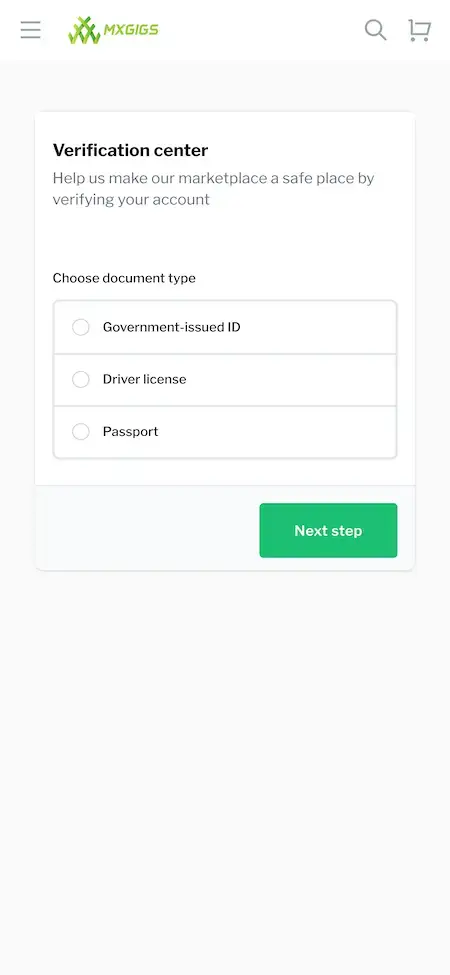
A seller files an identity document in the verification center and then carries a verified tick on every gig listed.
A Way Back When an Order Goes Wrong
Each side has a refunds page, orders keep a message trail, and the admin can enter a dispute with the order history on screen.
01See it live
Hands-On Access
Test Drive the Fiverr Clone - Buyer Site, Seller Dashboard, Apps & Admin Panel
Click through the working product before you decide. A single demo login covers both the buyer and the seller side, while app builds and the admin login are handed out on a call. A good first route: pick a category, open a gig, put it in the cart, then visit the verification center.

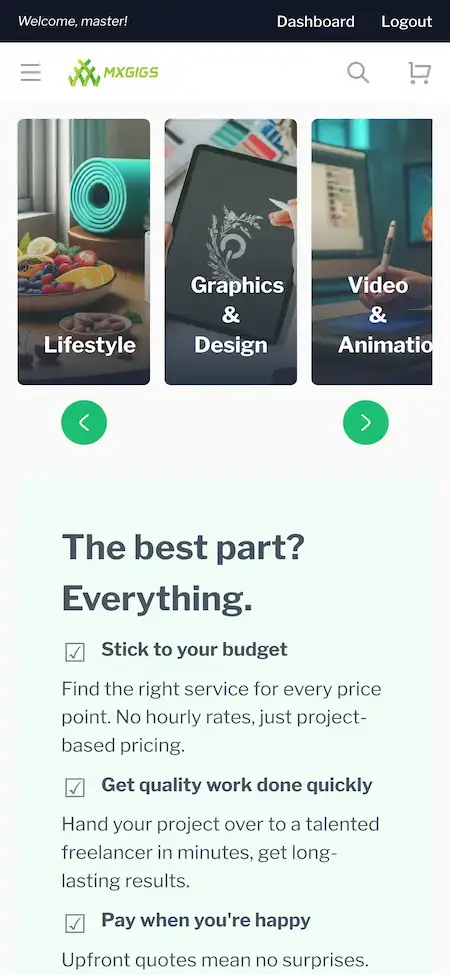
Fiverr Clone - Buyer Website
Move through the ten categories, search for a gig, open its page and add it to the cart, as a first-time buyer would.
- 1Start the demo site in a separate tab
- 2Log in with the credentials listed here
- 3Look at: Categories, Search, Gig page, Cart
user@demo.com | User_321
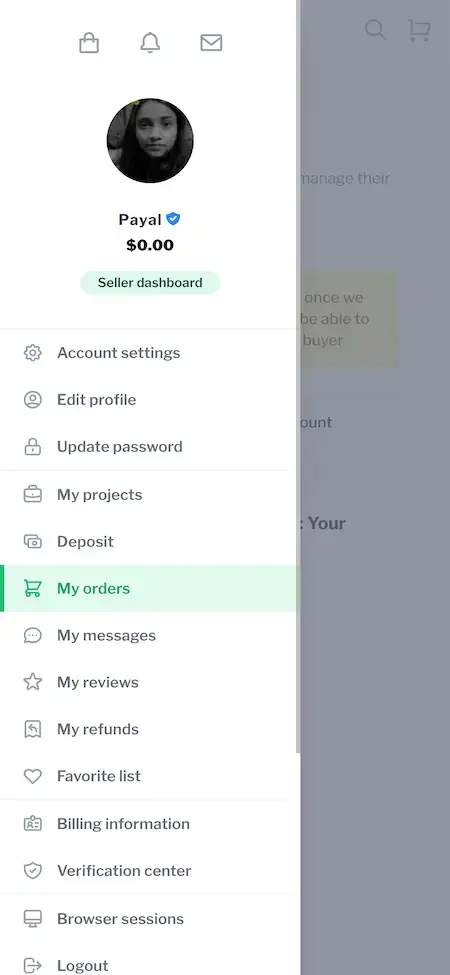
Seller Side - Gigs, Orders & Verification
That account also opens the seller dashboard: wallet balance, orders, messages, reviews, refunds and the verification center sit there.
- 1Use the same demo credentials
- 2Choose Seller dashboard in the account menu
- 3Look at: My orders, My reviews, Verification center
user@demo.com | User_321
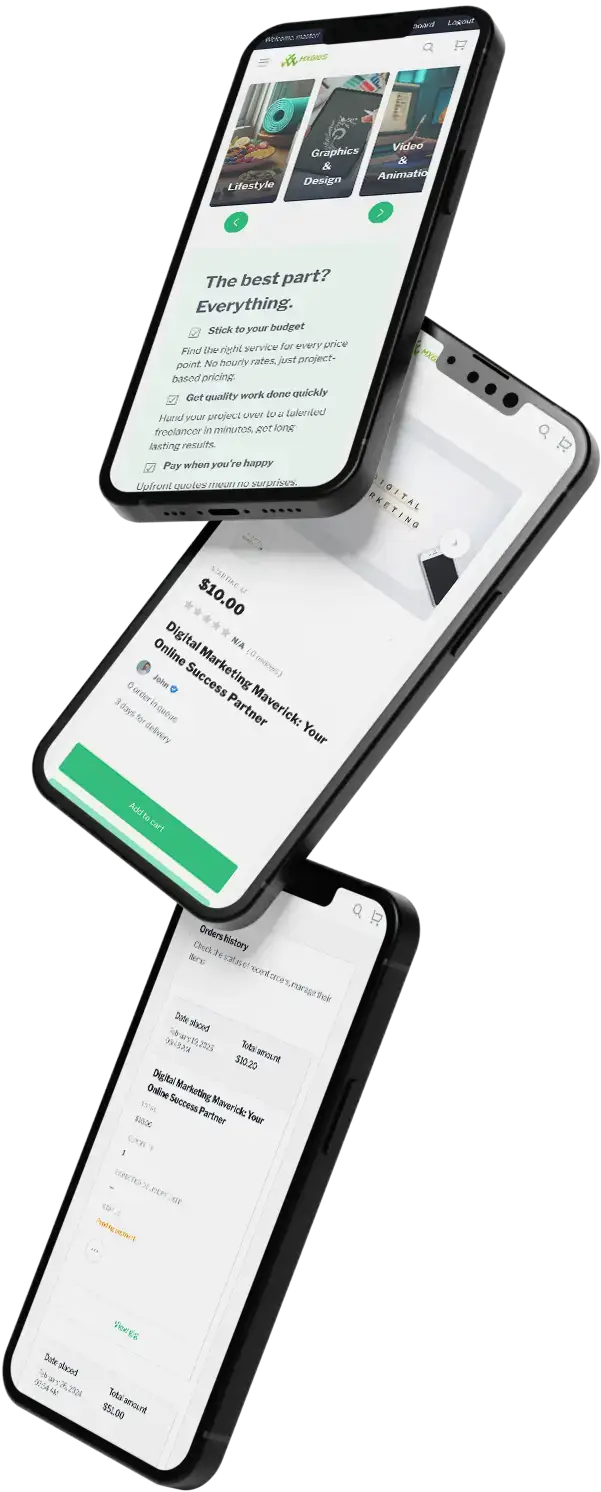
Mobile Apps - Android and iOS
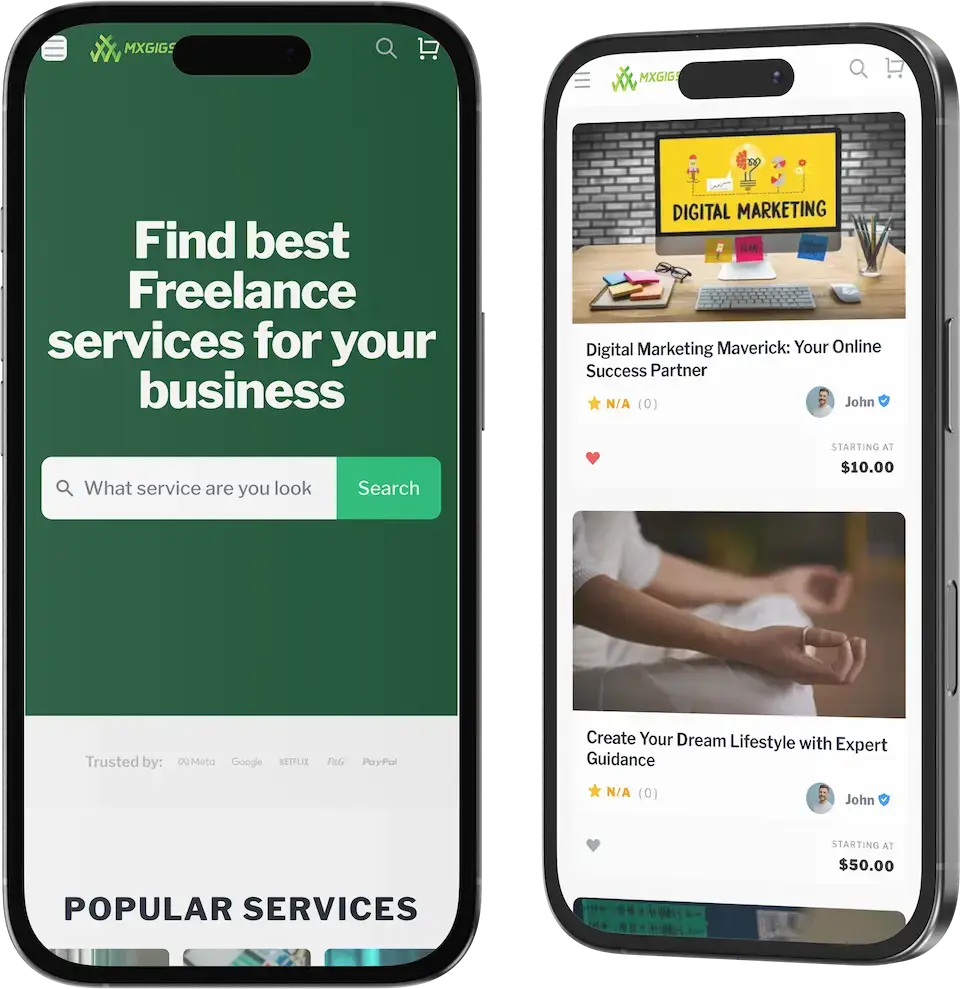
Flutter apps for both platforms belong to the delivery. The phone screens on this page are the demo website at phone width, and the app install links are given out on a call.
- 1Request the current app build
- 2Receive install links from us
- 3Look at: buyer and seller screens
available on request
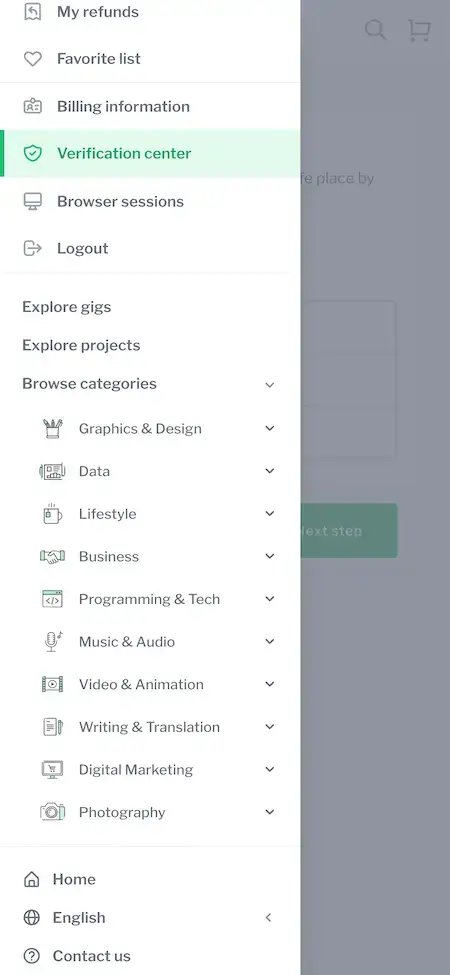
Admin Panel - Users, Gigs, Orders & Disputes
The operator console, where gigs get approved, seller documents get reviewed, commission is followed and refund disputes are settled.
- 1Go to the admin sign-in page of the demo host
- 2Get the admin credentials from our team
- 3Look at: Users, Gigs, Orders, Refunds
handed out on a call
See It With Us
A Guided Tour of the Fiverr Clone: Gig Pages, Seller Verification, Orders & Dispute Tools
Nothing shows a marketplace better than a conversation about yours. During a 30-minute call we go through the buyer site, the seller dashboard and the admin panel in turn, and relate each to what you intend to run: which categories open first, what commission you charge, how strict your identity checks are and when you want to be live.
Schedule a guided call.Every Screen Mapped
Fiverr Clone App Flows - Buyer Screens, Seller Tools & Verification Center
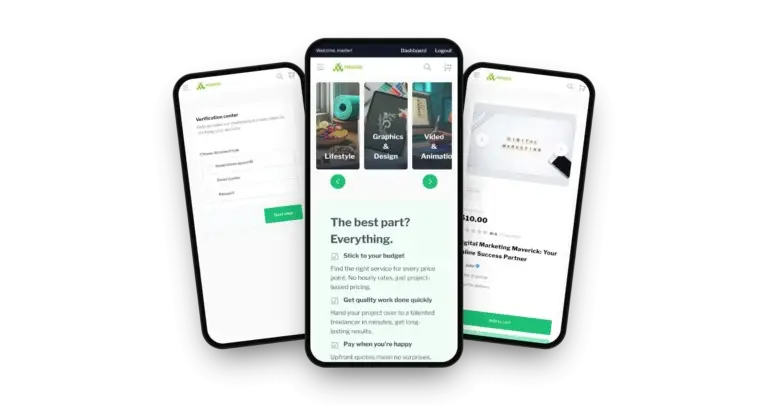
Actual captures of the demo at phone width, arranged in the order the work happens: what a buyer sees first, then the seller tools and the trust checks.


Trace a buyer from the home screen via search to a gig page, then a seller from the account menu to the orders page and the verification center. Every image is a capture from the demo.
02Proof
Client Voices
Fiverr Clone Client Reviews - Founders in Their Own Words
Clients describe what building on a Miracuves base was like. Two of the eight run services marketplaces, six come from other industries, and each quote appears exactly as its author wrote it.
“Every HMS I tried was built for general physicians, with no lesion mapping, no before/after tracking, and no procedure-based billing. Their MXHealth base gave us the patient app, doctor app, EMR and video consult out of the box. Front-desk time on scheduling and follow-ups is down ~70%, and we went fully digital in 9 months, where a fully custom job would have been 18.”
“Turo is the obvious reference, but the Caribbean specifics, from different insurance norms to different payment rails, meant we needed a real partner, not just a clone. Miracuves’s MXCar base covered the listing, the trip flow, and the host payouts. We launched in 6 working days and are live in three islands.”
“The team was running it on a dispatcher and a Google Sheet, and we needed a real platform quickly, because we were about to onboard a major retail client. Miracuves’s Delivery Genie base gave us the rider app, the dispatch console, and live tracking. We launched in 6 weeks and cleared 4x the previous order volume in the first month.”
“We were running it on phone calls and a paper calendar, and we were losing bookings to bigger OTAs. Miracuves’s GetmyBoat Clone base gave us the calendar, the booking flow, and the payment engine. Online bookings are up roughly 70% in the first six months, and the ops team finally has a live view of the fleet.”
“Building a compliant telehealth stack from scratch in three markets would have been a year-plus effort. Miracuves’s MXHealth base covered the patient and doctor apps, video consult, e-prescription and the pharmacy integrations. We launched in our first market in 9 weeks and rolled out to two more in the following six months.”
“We were juggling spreadsheets, a third-party GPS provider, and a phone. We needed a single operations console. Miracuves’s MXLogistics base covered the trip lifecycle, the driver app, and the customer tracking page. We’ve cut operations admin time by about 40%.”
“Provider onboarding, quoting, booking and payments came off the shelf. We added our service categories and our vetting rules. Both sides of the marketplace were live inside a month.”
“We were building a creator marketplace — influencers list themselves, brands search and book them, the platform handles briefs, deliverables, and payouts. Building the matching, messaging, escrow, and the brand/creator apps from scratch was always going to be the slowest part. Miracuves's MXInfluencer suite gave us exactly that foundation. We added our own brief-template engine, the escrow-with-milestones flow, and our branding. We launched in 6 working days and had paying brands on the platform within the first month. We estimate it saved us 4–5 months of build time.”
Proof, Honestly
Fiverr Clone Case Study - The Published Part and the Unpublished Part
Miracuves has published no case study of a named gig marketplace. Below is what you can verify yourself.
Miracuves has not published a named client deployment for the gig marketplace model, so this section does not show one. What a buyer can check today is the working demo and the delivery terms.
- Open the demo site and place a gig in the cart
- Open the verification center and see which documents it asks for
- Find My refunds and My reviews in the account menu
- Show a client logo that is not a client of this product
- Quote results that no deployment has produced
- Present a mockup as a live marketplace
- Your name, logo and colors applied to the site and the apps
- Deployment on hosting you own
- Apps are submitted to the stores from your developer accounts
- The complete source code handed over
- Six working days of Miracuves build time
Ask on a guided call and we will say plainly which Miracuves clients can be introduced and which cannot, rather than imply a reference that does not exist.
03The product
The Basics
How the Fiverr Clone App Works for Buyers and Sellers
This product turns skills into gigs people can order. A seller posts a gig with a starting price and a delivery time, a buyer finds it through the categories, checks who is behind it, pays and receives the work, and the operator watches over everything from the admin panel.

More Than a Storefront
Gigs, the cart, the wallet, orders, messages, reviews and refunds are wired together, so a sale carries on after the checkout button.
Code You Actually Own
The source arrives complete and unencrypted with no per-seat fee, which lets your own developers reshape flows and screens whenever the marketplace calls for it.
Clear on What Costs Extra
Portfolio VR, translation, skill matching and a video studio carry their own price and sit further down the page as add-ons, not as part of the base.
Web, Android & iOS
What Is a Fiverr Clone Script?
A page of listings is the easy part. What takes effort is trust and recovery: knowing a seller is who they claim to be, having somewhere to send a late or disappointing order, and keeping a record of who paid whom. Those pieces ship working.

- 01Ten categories, subcategories and search
- 02Gig pages showing price, delivery days and seller
- 03Cart, billing form, wallet and gateways
- 04Seller dashboard with orders, reviews and refunds
- 05Verification center and the admin panel
What arrives is the marketplace website, apps for Android and iOS and an admin panel, plus the complete source code, all white-labeled to your brand.
Everything Included
Fiverr Clone Features - Categories, Gig Pages, Cart, Seller Verification & Dispute Tools
Each item below can be checked on the demo site, in the screens above or in the release log. Whatever depends on an additional module is labelled an add-on lower on the page.
Categories & Search
Buyers start from a search bar and a row of popular categories, then narrow things down through ten top-level categories and their subcategories.
- Search bar in the home hero with popular category shortcuts
- Ten categories, from Graphics & Design to Photography
- Subcategories such as YouTube thumbnail design and web app
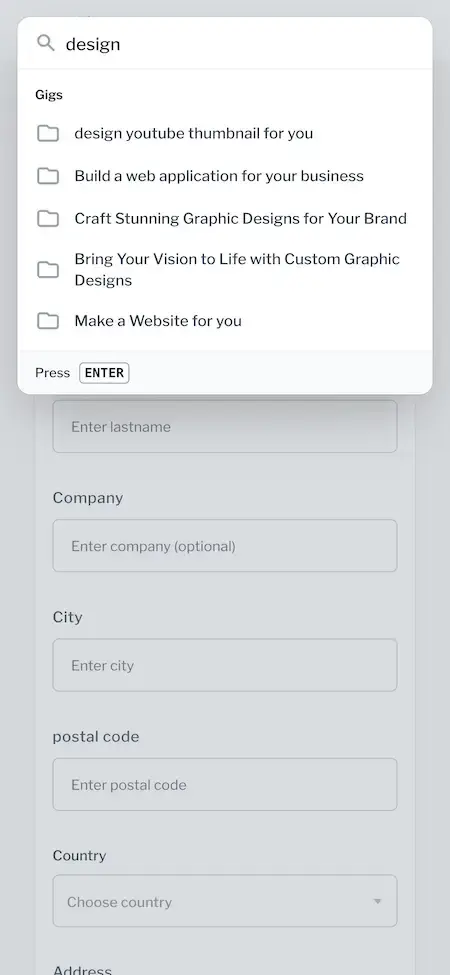
- Gig suggestions appear while the buyer types and Enter opens the advanced search
Gig Pages
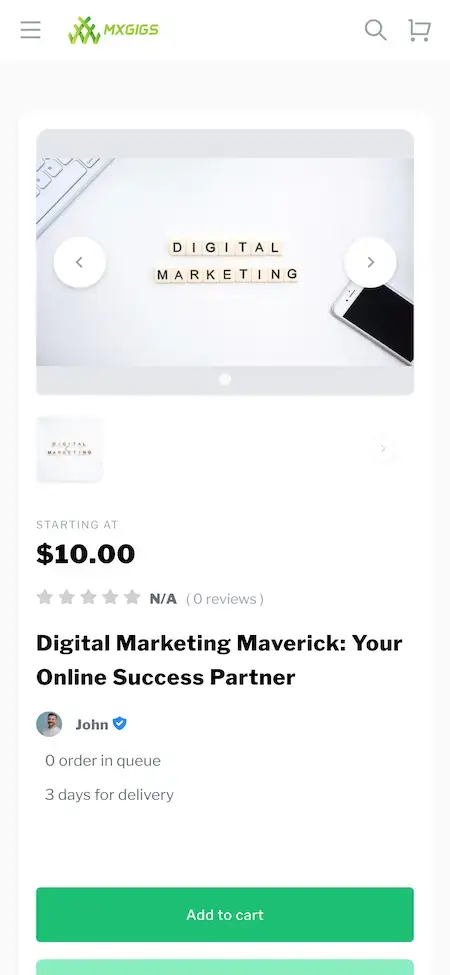
Every gig has its own page that gathers the images, the starting price, the delivery days, the seller and the buyer reviews in one place.
- Image gallery with next and previous arrows
- Starting-at price and delivery days shown together
- Orders in queue shown on the page
- Description, FAQ and Reviews tabs and related gigs below
Pricing & Gig Upgrades
A seller sets a price and a delivery time for each gig and can attach upgrades that add to both, so one listing can be sold at more than one level.
- Starting-at price on every gig card
- Delivery time in days set by the seller
- Optional upgrades that add price and extra days
- A seller-written FAQ tab on each gig
Cart & Checkout
Buyers add gigs to a cart from any gig page, enter billing details and pay through a connected gateway or from their wallet.
- Add to cart on every gig page
- Shopping cart panel in the header
- Billing form with company, city, postal code, country and address
- Stripe, PayPal, Razorpay, offline payment or the wallet amount (release 2.3)
Messages & Alerts
A buyer can write to a seller straight from the gig page, and both sides have a message inbox and a notification bell.
- Contact seller button on every gig page
- My messages inbox in the account menu
- Notification and message icons in the header
- Messaging before and after the order
Orders & Delivery
Orders run from payment through work in progress to a delivered result, and the seller is paid once the buyer approves.
- My orders page for buyers and for sellers
- Seller progress updates and deliverables on each order
- Order completion followed by a rating and review
- Payment released to the seller after approval
Seller Verification
A verification center asks for an identity document, and a verified tick then follows the seller across their gigs and profile.
- Verification center in the account menu
- Government-issued ID, driver license or passport
- Account verified label beside the seller name and a tick on the avatar
- Admin reviews seller profiles
Refunds & Disputes
Buyers and sellers each have a refunds page, and a case that cannot be settled goes to the admin with the full order history.
- My refunds page for buyers and for sellers
- Raise a dispute when a delivery is late
- Admin sees the order history, messages and reviews
- Report action on every gig page
Reviews & Ratings
Star ratings and review counts appear on the gig cards, and buyers review a seller once the order is complete.
- Rating and review count on each gig card
- Reviews tab on the gig page
- My reviews page in the account menu
- Review requested after order completion
Seller Dashboard
Anyone can start selling from the account they already have, with a dashboard that brings the balance, orders, reviews and settings together.
- Become a seller link in the site header
- Seller dashboard pill under the profile
- Wallet balance beside the avatar
- Edit profile and update password pages and a browser sessions page
Wallet & Payouts
A wallet holds a balance that buyers can top up, and sellers are paid out after an order is completed and approved.
- Wallet balance shown in the account menu
- Deposit page for adding funds
- Billing information page
- Payout to the seller after completion and approval
Languages & Content
The marketplace runs in more than one language, and the admin looks after the pages, categories and blog behind it.
- Language switcher in the header and the menu, with new languages in release 2.4
- Dark mode switch in the footer
- Privacy policy and terms pages managed by the admin
- A blog with its own section
Before you buy, note this: The platform comes finished and carries your branding. What you provide: hosting and a domain, a developer account with each app store, brand assets and business details, a payment gateway whose KYC is complete, and keys for any outside service. Apple and Google run store review on their own schedule, apart from our build.
Run the Marketplace
Fiverr Clone Admin Panel - Users, Gig Approval, Commission & Disputes
A single console follows the operator through the day: who joined, which gigs are live, what was ordered or refunded, who awaits verification and what the public site displays.


Admin Panel Sections
- 01
User Management
Review profiles, manage buyer and seller accounts and keep members within the platform guidelines.
- 02
Gig Approval
New gigs can wait for review before they go live, and a rejected gig can carry the reason back to the seller.
- 03
Verification Queue
Identity documents submitted in the verification center are reviewed here, and the account is marked verified or declined.
- 04
Orders & Commission
Follow every order and the commission it earned, so revenue is tracked against real transactions.
- 05
Refunds & Disputes
Open a refund case with the order history, messages and reviews in front of you, then rule on it.
- 06
Reviews & Reports
Read the reviews buyers leave and look at gigs or accounts that members have reported.
- 07
Categories & Content
Organize the categories and subcategories buyers browse, plus the pages and the blog on the public site.
- 08
Analytics & Settings
Read the performance of the platform and set the commission, payment gateways, languages and security options.
Money Movement
The money controls in the console, tracing a payment from buyer to seller.
- Commission setting for orders
- Withdrawal rules for sellers
- Gateway settings, including offline payment
- Wallet deposits and billing records
Settings & Tools
The controls behind the public site and the daily operation.
- Languages and the language switcher
- reCAPTCHA option for sign-up forms
- Social sign-in option
- List of blocked IP addresses
Want the console to do something else? A further report, an extra approval step, more languages or another payout rhythm is scoped separately. Describe what your operations people need and you receive a written quote.
04Package and price
What You Receive
What You Get With the Fiverr Clone: Source, Apps, Admin Panel & Deployment
The delivery is a running marketplace rather than a box of parts: site, apps, admin panel, code and the database schema under them. Ownership is yours outright, with nothing billed per seat or per run and no license to renew.
$ git clone your-gig-site Full Source Code
Everything needed to run and extend the marketplace: the site and both mobile apps, readable and unencrypted.
- Website code, unencrypted
- Flutter source for the Android and iOS apps
- Yours to modify, extend and redeploy
- Stored in a repository that you own
Schema & Migrations
The tables behind gigs, orders, members, reviews, refunds and verification records, supplied so the database can be recreated from nothing.
- Schema with migrations
- MySQL as the data store
- Gigs, orders, members and reviews
- Refund, wallet and verification records
Messages & Notifications
The inbox that links buyer and seller, plus the alerts telling each side that something changed.
- My messages inbox for every member
- Contact seller from any gig page
- Notification bell in the header
- Message icon with unread alerts
Marketplace Website
The responsive public site: category browse, search, gig pages, the cart and an account area for buyers and sellers.
- Search, categories and subcategories
- Gig pages with reviews and delivery days
- Cart, billing form and wallet
- Privacy policy, terms and blog pages

Android & iOS Apps
Flutter apps for Android and iOS that put the buyer and seller sides of the marketplace on a phone.
- Complete Flutter apps
- Current dependencies throughout
- Published through your developer accounts
- Install links on request

Admin Panel
The operator console covering users, gig approval, verification, orders, commission, refunds, reviews, content and settings.
- Users and seller verification
- Gig approval and category management
- Orders, commission and refunds
- Content, languages and settings

Access & Security Layer
Members and the admin sign in separately, and the web platform adds its own safeguards.
- A distinct admin sign-in
- reCAPTCHA option on forms
- Browser sessions page for members
- Card data kept at the gateway
Handover & Support
We apply your branding, deploy the product, hand over the working files and start the three support windows that run together from launch.
- Branding applied: logo, icons, colors
- Deployed on your hosting
- Deployment notes and an architecture overview
- 60 days guidance, 6 months bug fixes, 12 months updates
Want to try before talking? Open the demo with the buyer login, or ask us for a walkthrough of a gig page, the cart, the verification center and the refunds page, each mapped to your own plans.
Transparent Pricing
What Does a Ready-Made Gig Marketplace Like Fiverr Cost to Launch?
One fixed price of $2,499 buys the launch-ready white-label Fiverr Clone. Add-ons, further integrations and custom flows lie outside it and are priced separately after a written scope.
Professional
Gig Marketplace Launch PackageChosen by: Startups opening a gig marketplace, niche skill platforms, agencies packaging services
The platform reaches you as shown in the demo, carrying your logo, icons and palette and running on your own hosting.
Get StartedEnterprise
Tailored Builds for Bigger PlansChosen by: Multi-country marketplaces, talent networks with bespoke workflows, companies adding a services line
Flows the base lacks? We build to your brief, and scope and price are settled before anything begins.
Get a Quote05Who it is for
Know Your Buyer
Who Gets the Most Out of a Fiverr Clone App?
Anyone who wants people to sell skills as ready-to-order gigs, and who prefers doing it under a name of their own to sending buyers and sellers to a rival’s platform.
Founders opening a general freelance marketplace in which sellers list gigs across many categories and the operator takes commission on each order.
Operators devoted to one field such as design, video or writing, who want category pages and seller checks tailored to that one market.
Teams that turn their services into fixed-scope gigs and want a storefront, a cart and an order trail under their own brand.
Marketplaces that sell on trust, using the verification center and the verified tick to show buyers which sellers were checked.
Operators who serve one country or language group, with the language switcher and local gateways to meet members on their own terms.
Companies already running an online product that want a services line without writing a gig marketplace from scratch.
When your business lives on matching skilled people with buyers, a marketplace under your brand keeps orders, payments and the customer relationship with you, and the code is in your hands.
Speak to Our TeamWhere It Fits
Ways to Run a Fiverr Clone - Open Marketplace, Niche Skills, Vetted Sellers & Agency Storefront
The same product fits quite different businesses. An open marketplace starts from search and commission, a vetted-seller one from the verification center, and an agency storefront from gig pages and delivery days. Configuration sets the emphasis.
Swipe · 6
Start a general marketplace where anyone can become a seller and publish gigs in ten categories, while you earn a commission you define.

Cut the categories down to one field and build around it, with category pages, search and gig pages aimed at that audience.

Put identity checks into the pitch: sellers file documents in the verification center and buyers see a verified tick next to the name.

List productized services with a starting price and delivery days so clients can order, pay and follow the work with no sales call.

Serve a single country or language community with the language switcher, local gateways and a category list that fits the region.

Add a gig marketplace next to a product you already run, with its own cart, wallet and admin section under your brand.

Six setups on one foundation. Each runs on the same site, apps and admin panel. The differences are the categories you open, the commission you set, how closely sellers are verified and the branding, which keeps you to a single codebase.
Speak to Our TeamIndustries
Service Fields It Fits
Any business that sells skills as ready-to-order services can use it. Design and branding studios list logo and graphic gigs. Video and animation creators sell edits and explainers. Writers and translators offer articles and localization. Developers sell websites and web apps. Marketing specialists offer social and email campaigns. Musicians and audio editors list tracks and mixing. Photographers sell shoots and retouching. Business and data specialists offer analysis and consulting, and regional or agency-run marketplaces serve one community under their own name.
one codebaseMXGigs
- 01GdGraphics & Design
- 02VaVideo & Animation
- 03WtWriting & Translation
- 04PtProgramming & Tech
- 05DmDigital Marketing
- 06MaMusic & Audio
- 07PhPhotography
- 08BsBusiness Services
- 09DsData Services
- 10LcLifestyle & Coaching
- 11RmRegional Marketplaces
- 12AsAgency Storefronts
The Fiverr Clone from Miracuves bends to any field of services, and its verification center, refunds and admin panel all carry your name.
06Under the hood
End to End
From Sign-Up to Payout: How an Order Moves Through the Fiverr Clone
For a buyer, ordering a gig takes a few taps. Beneath it runs a chain of identity, search, payment, delivery and approval. The chain is laid out here from sign-up to a released payment, followed by the structure that supports it.
Buyer and Seller Journey - Sign-Up to Released Payment
Swipe · 6
- 1Sign Up & Verify
A new member joins with an email or a social account and can submit an identity document from the verification center.
- Email or social account sign-up
- Verification center in the account menu
- Government ID, driver license or passport
- 2Browse by Category
The home screen offers a search bar, popular categories and a carousel of the top-level categories.
- Search bar with popular shortcuts
- Category carousel with arrow controls
- Ten top-level categories
- 3Search & Compare
Typing in the search box suggests gigs, and pressing Enter opens the advanced search for a closer look.
- Gig suggestions while typing
- Starting price on each card
- Rating and verified seller on each card
- 4Open a Gig
A gig page brings together the images, starting price, delivery days, seller, orders in queue and reviews.
- Gallery, starting price and delivery days
- Seller with an account verified label
- Description, FAQ and Reviews tabs
- 5Message, Order & Pay
The buyer can message the seller, add the gig to the cart, fill in billing details and pay.
- Contact seller button
- Cart and billing information
- Wallet, gateway or offline payment
- 6Deliver, Review & Release
The seller delivers, the buyer approves and leaves a review, and payment is released to the seller.
- My orders for both sides
- Review after completion
- My refunds if the order needs one
How It's Built
Inside the Fiverr Clone: Roles, Orders & Records
- 01Part 01
One Account, Two Roles
A member can buy and sell from the same account, with the seller dashboard opened from the account menu, while the admin works in a separate panel with its own sign-in.
- 02Part 02
Order Lifecycle
An order moves from payment through work in progress to delivery and approval, which is why the orders page can show where each one stands.
- 03Part 03
Verification Records
Each document submitted in the verification center is kept as a record with a status, so the admin can mark an account verified or declined.
- 04Part 04
Wallet & Billing
Deposits, wallet balances and billing details sit in their own records, so what a member sees can be checked against the payment history.
- 05Part 05
Refund Trail
A refund request keeps the order, the reason and the messages together, and an unresolved case can be passed to the admin.
- 06Part 06
Messages & Notifications
Conversations between buyer and seller and the alerts shown in the header are stored apart from the orders they refer to.
Under the Hood
Fiverr Clone Tech Stack - PHP, Laravel, MySQL, Flutter & Payment Gateways
A marketplace of this kind rests on a steady web layer, a database that keeps orders and balances in line and apps that feel native on a phone. These are the building blocks, as the product pages list them.
Site & Admin Layer
PHP · Laravel · Bootstrap- Marketplace site and admin panel
- Responsive Bootstrap interface
- Language switcher and dark mode
- Blog and content pages
Database
MySQL- MySQL holds gigs, orders, members and reviews
- Refund, wallet and verification records
- Table definitions and migrations ship with the code
- The database can be rebuilt from nothing
Mobile Apps
Flutter · Android · iOS- Complete Flutter apps on current packages
- Both buyer and seller sides on the phone
- Released through your developer accounts
- Install links available on request
Payments & Wallet
Stripe · PayPal · Razorpay · Offline Payment- Stripe, PayPal, Razorpay and bank transfer are named for the product
- Offline payment and Stripe updated in releases 2.3 and 2.4
- Wallet payment arrived in release 2.3
- You bring your own gateway account with KYC finished
Outside Services
Maps · SMS · Push · Translation- Google Maps handles location features
- Twilio covers text messaging
- Firebase covers push notifications
- Translation and payment gateway APIs join them
Code & Docs
Repository · Tables · Setup- Application code with its commit history
- Mobile projects with signing steps written up
- Deployment settings recorded
- Architecture notes passed on
The web and admin side is listed as PHP with Bootstrap and Laravel on MySQL, and the apps are written in Flutter. Outside services such as Google Maps, Twilio, Firebase, payment gateway APIs and translation need accounts and keys of your own, handed over at deployment. Every one of these technologies has a large pool of developers.
Build to Scale
Room to Grow - Separate Roles, Order Records & Editable Categories
The marketplace is split into distinct areas that share one database, so taking on more sellers, gigs and orders means adding capacity and adjusting settings, not rewriting code.
Separate Sign-Ins for Separate Jobs. Members and the admin use different sign-ins, so the operator console is never one click away from a buyer.
A Category Tree That Can Grow. Categories and subcategories are records the admin edits, so opening a new field means adding entries rather than changing code.
Orders Recorded One by One. Each order item carries its own status and the commission it earned, so what the reports show can be traced to real orders.
Media Handled Per Gig. Every gig holds its own images and a seller-written FAQ, which keeps the pages self-contained as the catalog grows.
Separate Sign-Ins
Members and the admin sign in separately, and the admin panel lives on its own address, apart from the public site.
Editable Category Tree
Categories and subcategories are managed in the admin panel and drive both browse and search.
- Ten top-level categories in the demo
- Subcategories under each category
- Category carousel on the home screen
- Gig suggestions in search
Recorded Orders
Each order item has its own status, delivery date and commission, so totals can be checked against individual orders.
- Status on every order
- Commission recorded per item
- Delivery date tracked
- Cancellation and refund states
Gig Media
A gig keeps its own images, description and FAQ, so a new gig adds content without touching the rest of the site.
- Image gallery per gig
- Description and FAQ tabs
- Reviews attached to the gig
- Related gigs on the page
Several Languages
The language switcher and translated page templates let one deployment serve more than one market.
- Language switcher in the header
- New languages in release 2.4
- Pages managed by the admin
- Add-on translation service available
Written Hand-Over
Code, tables, deployment settings and architecture notes pass to you, so a different team could pick the platform up without help.
Space to Adapt. Eventually each marketplace wants something peculiar to its own field or sellers. With full source and a mainstream stack, a new screen, rule or integration is routine development that your engineers or ours can take on.
Launching small is fine: Open with the categories and sellers you can recruit and grow on the single deployment you have. When traffic climbs, capacity becomes a hosting and settings decision, and work beyond the base is quoted separately.
07Security and trust
Checked, Not Claimed
Security in the Fiverr Clone - Separate Roles, Seller ID Checks & Plain Limits
Identity documents, order records and payment references all live in a gig marketplace, so the controls that count are who may see what, how sellers get checked and which tasks remain before opening day. Below: what the platform does, and what stays with you.
- 01 · RolesRole Separation
Buyers, sellers and the admin see only what their role allows, and the admin panel has a sign-in of its own, separate from the public site.
- Gig Approval: New gigs can wait for review in the admin panel before buyers see them, so the catalog does not fill with listings nobody has looked at.
- Dispute Handling: Disputes are raised on the refunds page of either side and settled in the admin panel, with the order and message history behind each case.
- 02 · IdentitySeller Identity Checks
A seller files an identity document in the verification center, and the verified label appears only after the admin has reviewed it.
- Review Moderation: The operator can read what buyers post in the reviews area, so a seller's reputation cannot shift without anyone noticing.
- 03 · SessionsSessions & Passwords
From the account menu members can change their password and look over their browser sessions, and email verification confirms new accounts.
- 04 · FormsForm & IP Protection
Sign-up forms can be placed behind reCAPTCHA, and the admin can block addresses that misbehave.
- Form Protection: A reCAPTCHA option can guard sign-up forms and an admin-managed list of blocked IP addresses turns away repeat offenders, limiting automated abuse.
- 05 · CardsCard Data Stays Elsewhere
Card data travels directly to the gateway you connect, and what the platform stores is a payment reference, never a card number.
- Payout Controls: Commission and withdrawal rules are admin settings, which puts what a seller is paid, and how often, in your hands.
- 06 · LaunchLaunch Work We Plan With You
Before the marketplace opens we work through penetration testing, secret rotation, a backup restore test and a review of your gateway settings with you.
- Named Launch Tasks: Ahead of opening day we run a penetration test, rotate keys, rehearse a restore and review your gateway settings. None of this is taken for granted.
No security framework certifies this platform, and Miracuves does not claim ISO 27001; the base follows the controls such frameworks look for. Penetration testing, key rotation and a restore test are pre-launch jobs we schedule with you.
Talk Security With UsMarketplace Readiness
Operator Readiness for a Fiverr Clone - What the Software Covers and What Remains Yours
People who have never met will pay each other for work on a gig marketplace. Miracuves supplies the ordering, payment, verification and review tooling. Choosing who may sell, what may be sold, how workers are classified and what local law requires is the operator's job.
We use the word ready for functions that exist and run in the demo. Neither the software nor Miracuves claims a license, a certificate or an official approval, and none of this text is legal advice.
Already in the Software
Listings priced from a starting amount with delivery days, a cart and billing form, orders that end in delivery and approval, a wallet, ratings and reviews, refunds pages for both sides, a verification center, reporting on gigs, and an admin panel covering approval, commission and disputes.
Left to the Operator
Terms of service and privacy policy, the kinds of services you permit or ban, who owns finished work, how disputes get decided, refund rules beyond the defaults you set, and the tax settings that apply to your sales.
Identity & Verification
The verification center gathers the document and the admin records a decision. Which documents you accept, how closely you inspect them and how you store and protect them is your policy; the verified label is your marketplace's statement, not a government check.
Where You Operate
How freelancers are classified, how digital services are taxed, whether you may hold customer funds and what consumers are owed all vary by country and often by state. Ask qualified local advisers about every market you serve before taking orders.
08Grow the platform
- Gigs, search & categories
- Cart, wallet & orders
- Verification, refunds & reviews
- Admin panel & settings
Adding a module
- 1Choose modules
Select what suits you, at launch or later.
- 2Quote before work
Every module is priced from a written scope before we start.
- 3Delivered as code
The finished module is added to your own repository.
Go Further
Extra Modules for the Fiverr Clone - Portfolio VR, Translation, Skill Matching & Video Collaboration
As the demo shows, the marketplace works from end to end. Operators most often ask about the four modules below, and each is scoped and priced alone because the effort depends on your plan.
Drag to explore · hover to pause
- 01Discovery
Virtual Reality Showcases
Immersive portfolio views, so a seller can walk a client through finished work instead of attaching screenshots.
Portfolio · VR - 02Discovery
Language Translation Service
A built-in translation layer so a seller can offer a gig in several languages and a buyer can read it in theirs.
Translation · Reach
- 03Collaboration
AI Skill Matching
A matching layer that reads a buyer brief and a seller profile and suggests the gigs and sellers that fit, on top of category browse and search.
Matching · AI - 04Collaboration
Video Collaboration Studio
A meeting room inside the platform where buyer and seller talk, share a screen and work on an order together.
Video · Collab
Freelance & Services Suite
Not Sure Gigs Are the Right Model? Compare Four Close Alternatives.
Gigs here are fixed-scope services delivered online. If your plan leans toward proposals, contests or work done in person, one of these might serve you better.
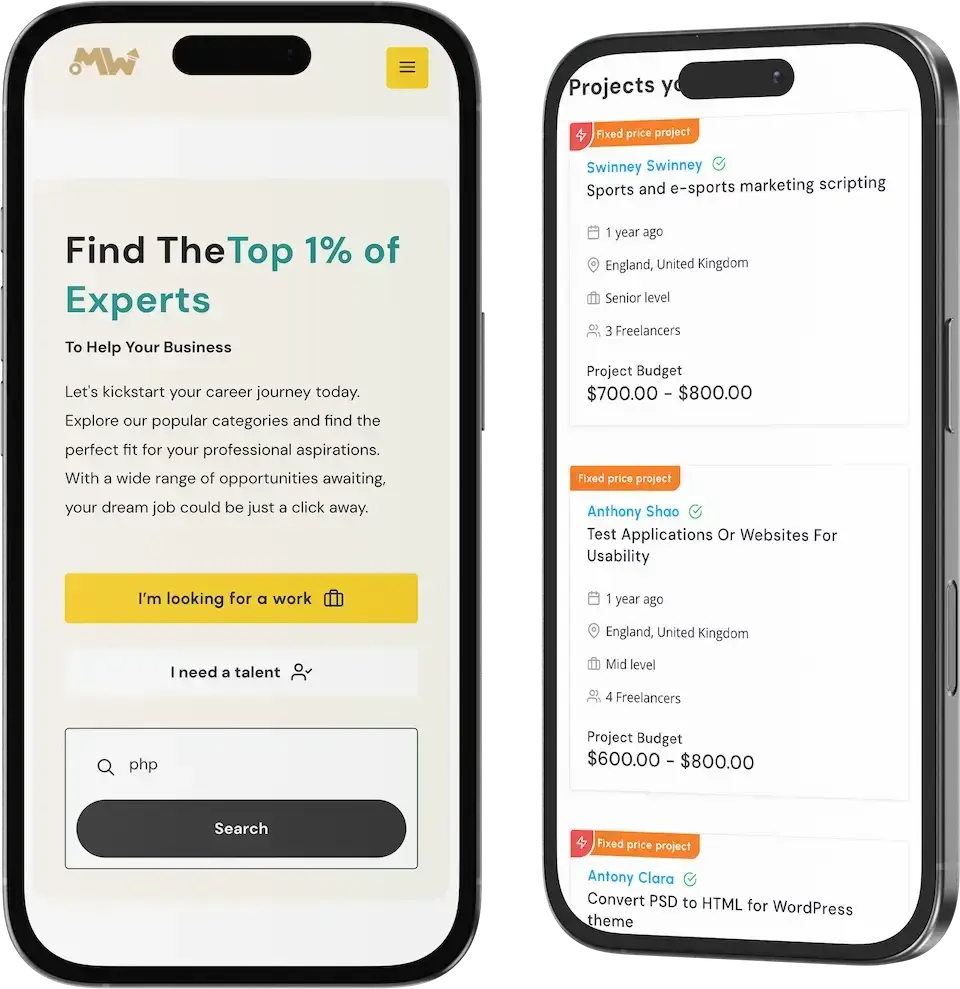
01The project-led neighbor, built around proposals and bidding with milestone payments rather than ready-to-order gigs.
Explore Solution
02A talent marketplace that sits projects, contests and gigs side by side, with several rating criteria on each review.
Explore Solution
03A local services marketplace where customers describe a job and nearby professionals respond to it.
Explore Solution

04An on-demand services platform for any category where a customer books a nearby provider in real time.
Explore Solution09The business case
Income Sources
Fiverr Clone Revenue Models - Commission, Offer Fees, Payment Fees & Wallet Float
Income in a gig marketplace comes from a handful of separate sources, and the platform keeps each setting on its own so that adjusting one does not disturb the others.
Commission on completed orders typically does the heavy lifting; offer fees and paid project upgrades follow.
- 01
Order Commission
The operator retains a percentage of every completed order and the seller receives the remainder. The percentage is a setting in the admin panel.
- 02
Seller Fee on Custom Offers
A custom offer sent by a seller can attract its own seller-side fee, configured separately from the ordinary gig commission.
- 03
Buyer Fee on Custom Offers
On the buyer side, a custom offer has a fee setting of its own that shows up in the amount the buyer pays.
- 04
Payment Fee Recovery
Gateway and card costs can be met by a transaction fee rather than eaten by the commission. Stripe, PayPal, Razorpay and offline payment are the gateways named for the product.
- 05
Wallet & Deposit Float
Buyers load a wallet and the balance stays with the platform until it is spent or withdrawn. The wait before a payout is a rule you define.
- 06
Paid Project Upgrades
Entries in the project catalog can carry paid Featured and Highlight plans, income that does not hinge on any one gig order.
| Revenue line | How the charge works | BenchmarkPublished benchmark | What limits it |
|---|---|---|---|
| Order Commission | A share of each completed order, deducted before the seller is paid. | Fiverr reports a 27.7% blended take rate for 2025 and Upwork 18.7%. | How much of an order sellers accept losing. Take rate is defined per company; Fiverr divides marketplace revenue by marketplace volume, so compare with care. |
| Seller Fee on Custom Offers | A percentage withheld from the seller on a custom offer. | On fixed-price projects Freelancer.com keeps 10% with a $5 floor, and Upwork charges talent between 0% and 15%. | The floor: a $5 minimum makes the effective rate climb on small jobs at Freelancer.com, while Upwork still lists a flat 10% for contracts begun before May 2025. |
| Buyer Fee on Custom Offers | A percentage on top of what the buyer pays for the offer. | Upwork bills clients 5% (3% by ACH); Freelancer.com bills employers the greater of 3% or $3. | How visible the fee is to the buyer at checkout. Upwork lists 10% for Business Plus clients, so a higher plan can carry a higher rate. |
| Payment Fee Recovery | A fee on the payment itself, either passed to the buyer or absorbed. | Stripe publishes 2.9% plus 30 cents for each domestic US card payment. | What your gateway charges for your country and card mix, which varies by market and card type. |
How to read this. The Fiverr and Upwork blended rates are from their annual filings, the Fiverr Form 20-F and the Upwork Form 10-K, and the Upwork fee levels are described there too. The per-project fees come from the Freelancer.com fee page, and the card example from Stripe US pricing. Every figure here is a price some other company publishes, and each defines take rate its own way. Treat them as inputs to your modeling: the table is not a quote, not a forecast of earnings, and your chosen rates live in the admin settings.
Market Benchmarks
Freelance Marketplace Benchmarks - Independent 2025-2026 Data
The revenue models above are ours. The figures below are not. They come from Upwork's annual report on Form 10-K and Fiverr's annual report on Form 20-F, reproduced as published. Together they show what two listed freelance marketplaces actually keep from each dollar of work, so you can test your own fee design against numbers you can check.
18.7% Marketplace Take Rate at Upwork in 2025
Upwork's annual report on Form 10-K says it enabled $4.0 billion of gross services volume in both 2025 and 2024, and that its marketplace take rate increased to 18.7 percent for the year ended 31 December 2025. It also reports that the number of active clients decreased 6 percent while gross services volume per active client increased 7 percent.
27.7% Take Rate at Fiverr With 3.1m Active Buyers
Fiverr's annual report on Form 20-F for 2025 gives a marketplace take rate of 27.7 percent, against 27.6 percent in 2024, and total revenue of $430.9 million. It counts 3.1 million annual active buyers at year end, each spending $342 a year on average, up 13.3 percent from $302.
$133.4m in Fiverr Services Revenue, 31% of Total
Fiverr reports in its 2025 Form 20-F that it generated services revenue of $133.4 million, about 31 percent of total revenue, from subscription products such as Seller Plus and AutoDS. Marketplace revenue was $297.5 million, down 1.8 percent, on marketplace GMV of $1,073.0 million, down 2.2 percent.
Upwork Inc., Annual Report on Form 10-K for the year ended 31 December 2025, certified 12 February 2026 - sec.gov
Fiverr International Ltd., Annual Report on Form 20-F for the year ended 31 December 2025 - sec.gov
All figures are the publishers’ own, reproduced as published from annual filings. Take rate is defined by each company in its own filing and the definitions differ. They describe the companies named, not any platform Miracuves builds, and nothing here is a revenue projection for your business.
Market Timing
Is 2026 a Good Year to Launch a Gig Marketplace?
People who buy freelance work tend to want two things before committing: a clear price and a reason to trust the seller. A marketplace under your own brand gathers the orders, commission and reviews that would otherwise strengthen somebody else's platform.
01Buyers Like to Know the Price Before They Talk
A gig puts a starting price and a delivery time on the page, which suits buyers who want to compare fast and commit without haggling.
02Skills Sell Better With Proof of Identity
Someone paying a stranger wants a reason to trust them, and a verified tick that stays with the seller across the site supplies one.
03A Marketplace Needs a Way Back When Things Go Wrong
A refunds page on each side, an order history and an admin able to step in can turn a bad delivery into a settled case instead of a lost customer.
04Sellers Are Plentiful, Good Storefronts Are Rare
Many people can offer a service. The marketplace that hands them a tidy gig page, a cart and a payout wins their listings.
05The Relationship Stays Yours
Under your own name, the reviews, the order history and the repeat purchases accumulate in your database and not in a rival's.
06Starting From Working Software
Categories, gigs, a cart, a wallet, reviews and an admin console together form the bulk of a marketplace, and a white-label copy can be running on your hosting after six days of our work.
The Platform in Numbers
Top-Level Categories
ID Document Types
Roles, One Account
Days of Build Time
The bulk of a gig marketplace is the unglamorous middle: identity checks, order records, refunds and an admin console that ties them together. That middle is already built here.
Why It Pays
Marketability, Revenue Potential & Prospects for a Gig Marketplace
Revenue begins when sellers trust the marketplace enough to list and buyers trust it enough to pay. The points below ease both decisions and keep the relationship yours afterwards.
- 01
A Cut of Every Order
A share of each completed order stays with the operator, so income tracks the number of gigs sold and not the size of the team.
- 02
Fees on Both Sides of an Offer
Seller-side and buyer-side fees on custom offers are independent settings, so either can be tuned while the other stays put.
- 03
Owned Sellers and Buyers
Profiles, verification records, reviews and order history are stored in your database, so the value of the marketplace piles up with you rather than with a third-party site.
- 04
Freedom to Move
The full source and the schema are in your possession, so a new host, team or direction later on needs nobody's consent.
- Order Commission
- Seller Fee on Custom Offers
- Buyer Fee on Custom Offers
- Payment Fee Recovery
- Wallet & Deposit Float
- Paid Project Upgrades
Defensibility comes from supply and trust rather than features.
- 01Sellers with reviews and a verified label do not casually move
- 02Buyers with an order history and favorites have a reason to return
- 03You own that record from launch day, held in your own database
- 04Careful gig approval and review moderation are the second moat
The three cases below differ only in the number of active sellers, and each names the revenue lever that matters most at that size. Use them for planning talks; they predict nothing about what a marketplace will earn.
The order commission carries early revenue.
A small marketplace focused on one field, where a handful of sellers take most orders and the commission on every completed gig covers running costs. Sample size only; it is not a forecast.
Commission plus fees on custom offers.
A marketplace aimed at one country or language group, where repeat buyers start sending custom offers and seller-side and buyer-side fees begin to count beside commission. Read the size as an example, not a forecast.
Several lines active, with reports guiding focus.
A platform spanning many categories, where commission, offer fees and paid project upgrades each contribute income and the admin reports show where to focus. The size is illustrative and not a forecast.
10Why Miracuves
Why Miracuves
Why Founders Pick Miracuves Over Other Fiverr Clone Builders
A gig marketplace can come from a generic listing script, a solo developer, an agency or a ready-made base built by a team that has shipped one before.
What You Get That Others Skip
- 01
Trust Tools Included
The verification center, the verified tick, refunds for both sides and reporting on gigs are part of the base, where generic scripts often end at the listing page.
- 02
Wallet and Several Gateways
Orders can be paid from a wallet, and Stripe, PayPal, Razorpay and offline payment are named for the product, making the money trail clear from order one.
- 03
Website, Apps and Admin Together
Site, apps and admin panel arrive as parts that already work with each other, saving you from stitching three projects together.
- 04
Source Code You Own
The entire codebase comes unencrypted along with schema and deployment notes, which stops anyone repricing the product or changing the terms later.
- 05
A Demo You Can Test
The buyer site and the admin sign-in answer on the demo host, so you can judge the product yourself rather than trust a brochure.
- 06
Plain Scope Language
This page separates base features from add-ons and from what you supply yourself, such as gateway accounts, hosting and store developer accounts.
Fiverr Clone Against the Alternatives, Line by Line
| Criterion | MiracuvesMiracuves Fiverr Clone | Generic Listing Script | Custom Agency Build |
|---|---|---|---|
| Launch Speed | Takes six days of our build effort | Unknown, or do it yourself | Planned project by project |
| Who Owns the Code | You do, complete and unencrypted | Frequently restricted or locked | Normally you |
| Gig Marketplace Depth | Categories, gig pages, cart, orders, refunds and reviews | Basic listing pages | As far as the budget stretches |
| Seller Trust Tools | Verification center plus a verified tick | Seldom present | Commissioned separately |
| Payments & Wallet | Stripe, PayPal, Razorpay, offline payment, wallet | Differs by script | Integrated to order |
| Admin & Reports | Users, gig approval, commission, disputes, analytics | Sparse or missing | Custom work on request, priced separately |
| Security & Readiness | Role sign-ins, reCAPTCHA option, gateway-held card data and stated limits | Barely addressed | Differs widely |
| Price, Speed and Quality | Fixed price on a tested base, delivered quickly | Cheap but risky | Costly and slow |
| Support & Updates | 60 days guidance, 6 months bug fixes, 12 months updates | Seldom offered | Whatever the contract says |
Few routes to a marketplace survive the first real orders unchanged, and the table shows where they split.
Speak to Our TeamChangelog
What Changed in Each Fiverr Clone Release
Notes for the web platform with the newest version on top. The source gives no dates, so only version numbers appear.
| Version | Changes | What changed |
|---|---|---|
| V2.4 | 1 update, 2 fixes | Added or updated Added new languages Fixed Fixed offline payment and Stripe Minor issues fixed |
| V2.3 | 2 updates, 1 fix | Added or updated Updated offline payment and Stripe Added pay via wallet amount Fixed Minor issues fixed |
| V2.2 | 1 fix | Fixed Minor issues fixed |
| V2.1 | 1 fix | Fixed Minor issues fixed |
| V2.0 | 1 update, 1 fix | Added or updated Added the gig services module Fixed Minor issues fixed |
| V1.0 | 1 update | Added or updated Initial release |
Let's build together
Ready to take your gig marketplace idea from sketch to a live product?
Book a free consultation, leave with a realistic timeline and straight answers, and decide in your own time. We would sooner win your trust than a rushed order.
- Answer within 2 hours, Mon-Sat
- Free consultation
- No lock-in contracts
- Full code ownership
11Learn more
From the Blog
Fiverr Clone App: Fresh Reading From Our Blog
Posts on how freelance gig marketplaces get built, which features carry weight and which business ideas pay best.




About the product6 questions
01What is the Fiverr Clone solution?
The Miracuves Fiverr Clone is a finished freelance gig marketplace you launch under your own name. Sellers publish gigs with a starting price and a delivery time, buyers search ten categories and place orders, and the operator manages verification, refunds and commission from an admin panel. The package covers the marketplace website, Android and iOS apps and the admin panel.
02Is it legal to launch a gig marketplace like Fiverr?
Selling software that offers gig-marketplace features is lawful in general. What matters is how you run the marketplace. This clone is our own build and uses none of Fiverr's code, design or content, so your brand, terms and fees are yours to set. Do not put the Fiverr name or logo on your product. Worker classification, taxes and rules on holding customer money differ between countries, so ask local counsel before you open each market. Miracuves does not give legal advice.
03Can I customize the platform to match my business needs?
Yes. Branding comes with the delivery: your logo, icons and color scheme go onto the website and the apps before we deploy them. The unencrypted source code is yours, so your developers or ours can reshape flows, screens, gateways and features over time. Anything beyond the base gets a written scope and quote first.
04Is the platform mobile-friendly?
Yes. The website adapts to any screen in a browser, and Flutter apps for Android and iOS are included in the delivery. Publishing happens from developer accounts you own, and the review that Apple and Google carry out is theirs alone, outside our 6-day build.
05Why build a Fiverr clone with Miracuves?
Since 2010 Miracuves has delivered 9,000+ projects for 6,000+ clients and keeps 90+ ready-made solutions on the shelf. This one costs a fixed $2,499, goes live after 6 days of our work, and arrives with the complete source code plus three support windows that start together at launch: 60 days of platform guidance, 6 months of priority bug fixes and 12 months of updates.
06What do I need to provide before launch?
Bring hosting and a domain, a verified developer account for each app store, your brand assets and business details, a gateway whose KYC is already complete, and keys for outside services such as maps, SMS or push. Miracuves applies the branding, deploys, and publishes from your accounts. Applying for gateways in your name and drafting your terms and privacy policy fall outside our scope.
Buyers & gigs6 questions
07How do I sign up and book a service?
A member signs up with an email or a social account, browses the categories or searches, opens a gig page and checks the seller, the starting price and the delivery days. They can message the seller, add the gig to the cart, fill in billing details and pay.
08Can I chat with sellers before purchasing a gig?
Yes. Every gig page has a Contact seller button, and conversations land in the My messages inbox, so a buyer can ask a question before placing an order.
09What happens if a seller doesn't deliver on time?
The buyer can raise a dispute from the orders and refunds pages. The admin can open the order history, the messages and the reviews and decide the case under the policy you set for your marketplace.
10Are there refunds if I'm unsatisfied with the service?
Buyers and sellers each have a My refunds page. Whether a refund is partial or full follows the seller's terms and your platform guidelines, and a case that cannot be settled between the two can be passed to the admin.
11Can I leave reviews for sellers?
Yes. Once an order is complete the buyer can rate and review the seller. The star rating and review count appear on the gig cards, and the full reviews sit in the Reviews tab on the gig page.
12How do buyers know a seller is genuine?
Sellers can submit a government-issued ID, driver license or passport in the verification center. After the admin has reviewed the document the account carries an account verified label, and a verified tick appears beside the seller on their gigs.
Sellers & payouts5 questions
13How do sellers register and list services?
A member can start selling from the account they already have. They fill in their profile, open the seller dashboard from the account menu and publish gigs with a description, a starting price and a delivery time. If you switch approval on, new gigs wait for the admin before buyers see them.
14Can sellers offer multiple packages for a service?
A gig carries one starting price and a delivery time, and a seller can attach upgrades that each add their own price and extra days, so one listing can be sold at more than one level. The demo does not label tiers as Basic, Standard and Premium. A fixed three-tier layout would be a scoped change that we quote in writing.
15How do sellers get paid?
The seller is paid once the order is completed and the buyer has approved it. Withdrawal rules, such as the minimum amount and how often a payout can be requested, are settings in the admin panel.
16Can sellers set their own pricing?
Yes. Each seller sets the starting price and the delivery time of every gig, and can add upgrades that raise the price and extend the delivery time.
17How can sellers increase their visibility on the platform?
In the demo, visibility comes from the category a gig sits in, search, its rating and review count, a verified label and quick replies to buyers. Paid promotion of gigs is not in the demo. Featured and Highlight plans exist for projects, and promoted gig placement would be a scoped add-on.
Admin, money & payments7 questions
18How does the platform generate revenue?
The operator earns a commission on completed orders. Custom offers have their own seller-side and buyer-side fee settings, and projects can carry paid Featured and Highlight plans. Seller subscriptions and promoted gigs are not part of the demo and would be agreed and quoted separately.
19What payment gateways are integrated?
Stripe, PayPal, Razorpay and offline payment, which covers bank transfers, come named with the product, and buyers may also pay from their wallet balance. Support for more gateways can be added when you ask. Your own onboarded gateway account, with KYC completed, is yours to provide, and the gateway rather than the platform handles card details instead of storing them.
20How does the admin manage users and sellers?
The admin panel lists users and sellers, lets the admin review profiles and seller documents, approve or reject gigs, and mark accounts verified or declined.
21Can the admin set commission rates?
Yes. The commission on orders is a setting in the admin panel, and custom offers have separate seller-side and buyer-side fee settings. Different rates per category or per seller are not in the demo and would be scoped as a custom change.
22How does the admin handle disputes between buyers and sellers?
The admin has access to the order history, the messages and the reviews behind a case, so a refund request or a late delivery can be decided with the facts in front of them.
23What analytics does the admin get?
The admin panel reports on orders and commission and shows how gigs perform through counts such as visits and sales. A deeper analytics view is scoped as custom work.
24Can the admin enable featured listings for sellers?
Not for gigs in the demo. The shipped Featured and Highlight plans apply to projects. Featured placement for gigs would be a scoped add-on that we quote in writing before any work starts.
The business case2 questions
25What is the realistic route to first revenue?
Gig marketplaces usually earn their first money from commission on completed orders, since nothing extra has to be sold: the first paid order produces it. Custom-offer fees and paid project upgrades come later, once there is activity worth charging for. Seller subscriptions, promoted gigs and white-label licensing to another operator sometimes get named for this model, yet the demo does not include them, so each would be agreed and quoted rather than assumed.
26How defensible is a freelance gig marketplace?
Defensibility comes from supply and trust rather than features. Sellers who built a profile, gathered reviews and earned a verified label rarely move on a whim, and buyers with an order history and saved favorites have reasons to come back. The platform lets that accumulation begin on launch day and stores it in your database. Careful gig approval and review moderation form a second moat: a marketplace that people trust is hard to imitate.
Go deeper on this platform
Browse the pricing section, our build service, a market overview, helpful articles and sibling platforms below.
Marketplace development
See the service→GuideHow it works
The user journey, the core mechanics of a gig marketplace and what sits behind them.
Open the guide→Business model
How a gig marketplace is organized and where its money originates.
Open the guide→Related platformUpwork Clone
A project marketplace built around proposals and bidding, with milestone payments.
Visit the platform→Disclaimer
Miracuves is an independent software development company. We are not affiliated with, connected to, sponsored by, or endorsed by Fiverr.
Read our full Legal Notice & Disclaimer →“Fiverr Clone” is used descriptively. It is how the software industry refers to building a platform with functionality similar to Fiverr, and how clients search for it.
The entire design and codebase is built by our own team. The product contains no code, design, graphics, or content originating from the Fiverr website or applications.
Fiverr and all other third-party names and marks are the property of their respective owners, referenced here solely to describe the category of software offered.