
Google Gemini Clone App - White-Label AI Assistant Workspace
Built by Miracuves, the ready-made, white-label Google Gemini clone gives a team or a class one AI workspace: unencrypted source code you keep, a member web panel sized for phones, two Flutter apps (Android, iOS) and an admin panel, branded in six working days.
People narrate a script with language and voice pickers, put a document through file chat and turn a plain request into code, all from one login and one balance. A team members line on each plan decides seats, and the cost list shows what every model bills you. Need one more way to pay or a new usage report? We quote it in writing first, and custom builds of that size take 2-8 weeks.
Launch in 6 Days with
- Source Code
- Android + iOS Apps
- Member Web Panel
- Admin Panel
- Rebranding
- Publishing Help
StackFlutter · Bootstrap · Laravel · PHP · Model APIs · MySQL · Firebase
Workspace activity
- Narration job finishedVoice
- Team plan renewed for the monthBilling
- PDF opened in file chatFiles
- Characters balance below 10%Meters
- Code request completedCode
- A bank transfer is awaiting approvalPayments
- Template starred as a favoriteTemplates
- New seat added to a planSeats
- Narration job finishedVoice
- Team plan renewed for the monthBilling
- PDF opened in file chatFiles
- Characters balance below 10%Meters
- Code request completedCode
- A bank transfer is awaiting approvalPayments
- Template starred as a favoriteTemplates
- New seat added to a planSeats

- 4Voiceover Export FormatsMP3, WAV, OGG and WEBM
- 6Groups It Is Built Forcompany teams, schools, trainers, developer teams, marketers, narrators
- 0%Revenue Share With Miracuvesno cut of seats, monthly plans or allowances goes to us
- 4Workspace Balancesminutes, characters, images and words
- 6Days to Launchand if the delay is ours, we keep going free
- $2,799Paid Once, Not Rentedsource code yours, no per-seat fee, no monthly rental
Live in six working days, or we keep working free until you launch. Every build carries 60 days guidance, 6 months bug fixes and 12 months updates.Verify every figure
A Utility Firm Launched Here
A utility-sector software company put its own conversational AI product live on this base in 2025; 18 of 22 blocks came straight from it and the source was handed over.
Extras Carry Their Own Price
Spoken dialogue, subject knowledge packs, tone-aware replies and team-chat links are paid add-ons, kept off the base tool list.
Cards Go to Your Gateway
Cards are typed straight into your payment gateway and the workspace stores only a payment reference; a plan paid by bank transfer starts after an admin signs it off.
01Try it first
Try Before You Talk
Open the Demo Yourself: Member Workspace, Phone View, Plans and Admin Sign-In
One demo login opens the member side of the Miracuves Google Gemini Clone, and the admin login is passed along during a guided call. Chat with an assistant, push a document through file chat, listen to a voiceover being built and run the code generator.
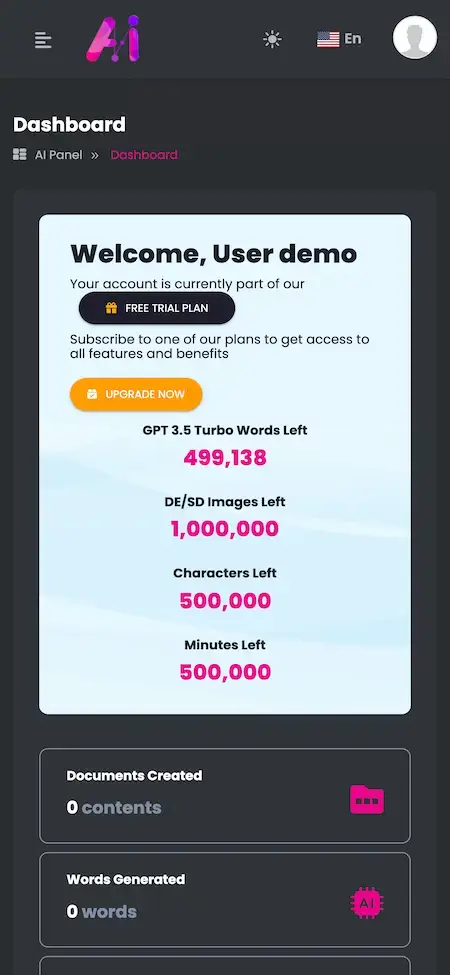
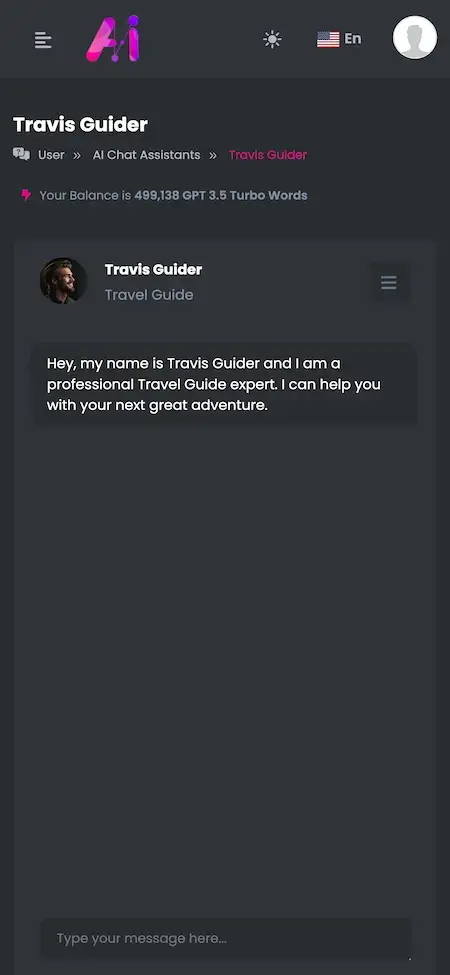
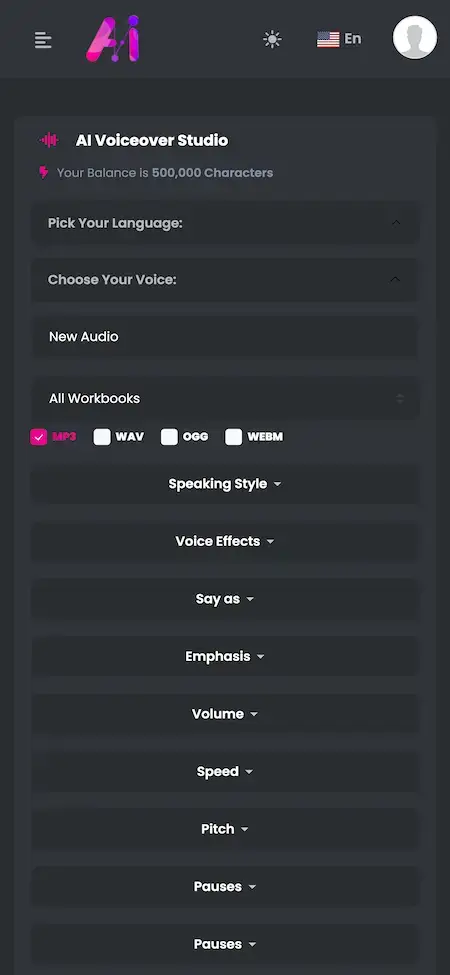
Google Gemini Clone - Member Workspace at Phone Width
The member side narrowed to a phone: the dashboard and its meters, the side menu holding every tool, an assistant chat, templates, the code form, the voiceover studio and the plan page.
- 1Visit the demo address on your phone
- 2Enter the login printed on this card
- 3Test the voiceover, file chat, code and plans screens
user@demo.com | User_321
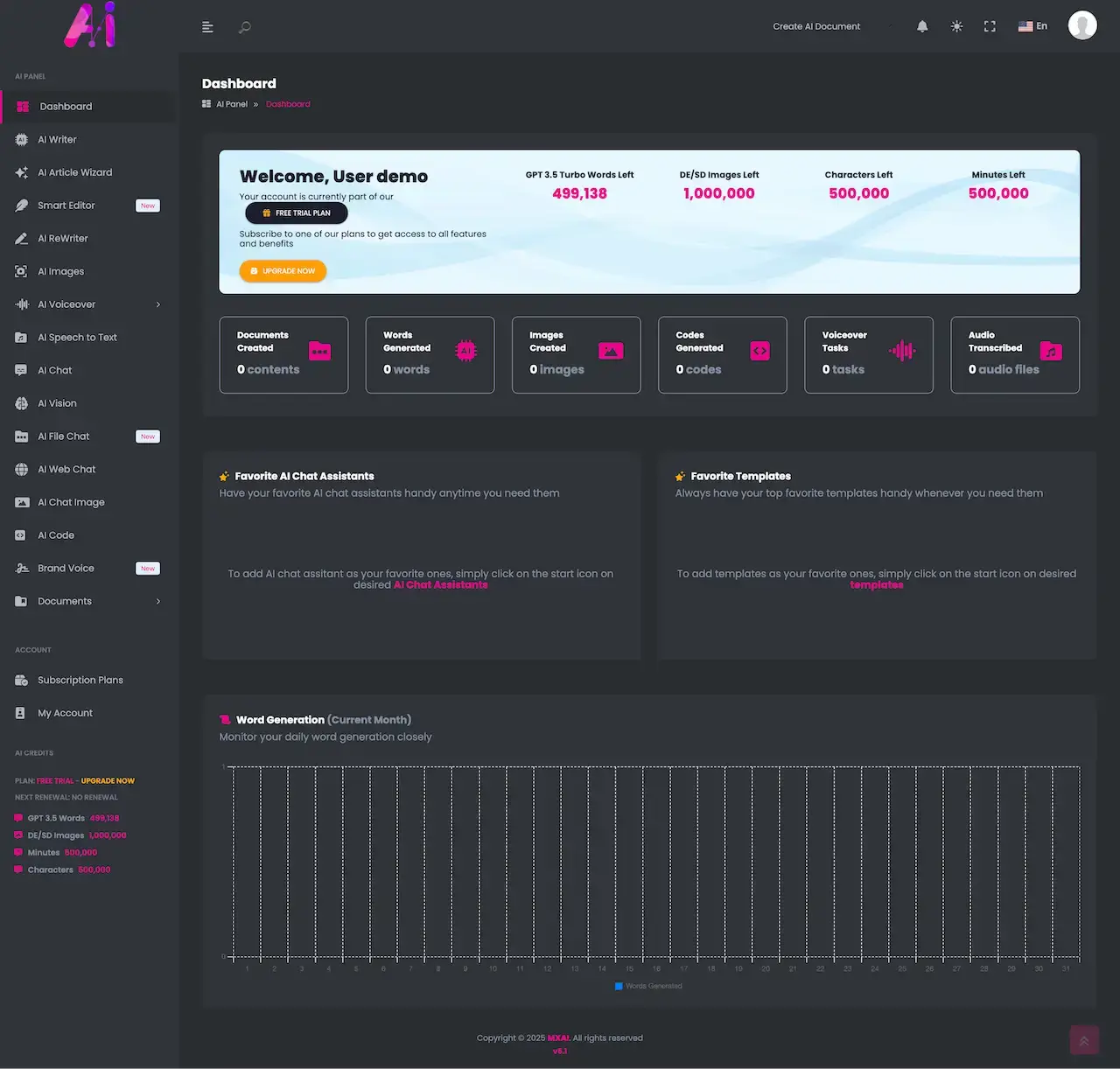
Member Web Panel - Dashboard and Tools
Seen on a laptop, the same workspace shows a welcome card for the trial plan, counters of finished work, pinned assistants and templates, and a monthly chart of words produced.
- 1Visit the demo address in a browser
- 2Enter the login printed on this card
- 3Explore the dashboard, chat, templates and profile
user@demo.com | User_321
Plan Page, Allowances and Team Seats
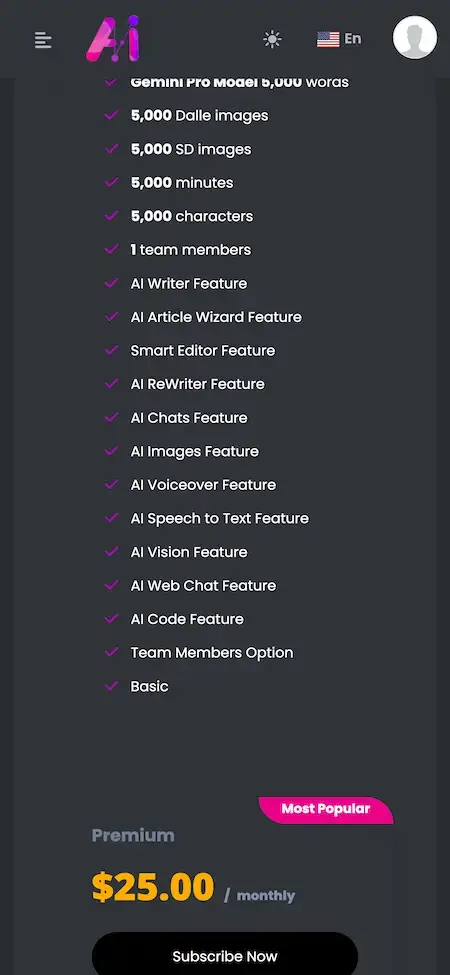
Here a trial user decides to pay: the plan card lists a monthly price and the included tools, a team members line sits beside a Subscribe Now button, and counters fall as work gets done.
- 1Go to the plans page once signed in
- 2Compare the checklist with the trial counters
- 3Follow the Subscribe Now path through to the profile
user@demo.com | User_321- 01 Plans
- 02 Credits
- 03 Vendor prices
- 04 Calculator
- 05 AI settings
- 06 Extensions
Operator Console - Plans, Credit Use and Model Prices
What the operator sees: plans, approving bank transfers, credit use, vendor prices with a calculator, AI settings, extensions, themes and pages. A second web panel can be shown on request, and the admin login is passed on during a call.
- 1Locate the admin sign-in page on the demo host
- 2Ask our team to send you the admin login
- 3Review plans, credits, prices and settings together
provided during a guided callPlatform Walkthrough
Watch the Workspace in Motion: Chat, Voice, Code and Document Tools on Video
Play the short video to see the platform at work. To have the same screens explained against your own use case, book a call: we open the member side and the admin console side by side and talk through who will use it, what each person can spend and when you want to launch.
Book a guided session.Screen by Screen
The Whole Member Journey in Pictures: Nine Phone Screens and the Web Dashboard
Every picture is a real screen of the member side Miracuves built. The phone-width set runs in the order a new person meets the screens, and the full web dashboard comes after it.
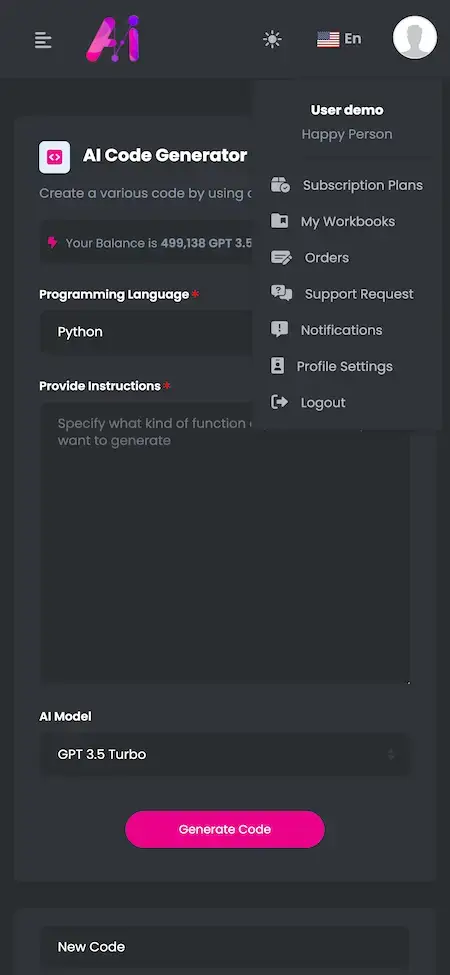
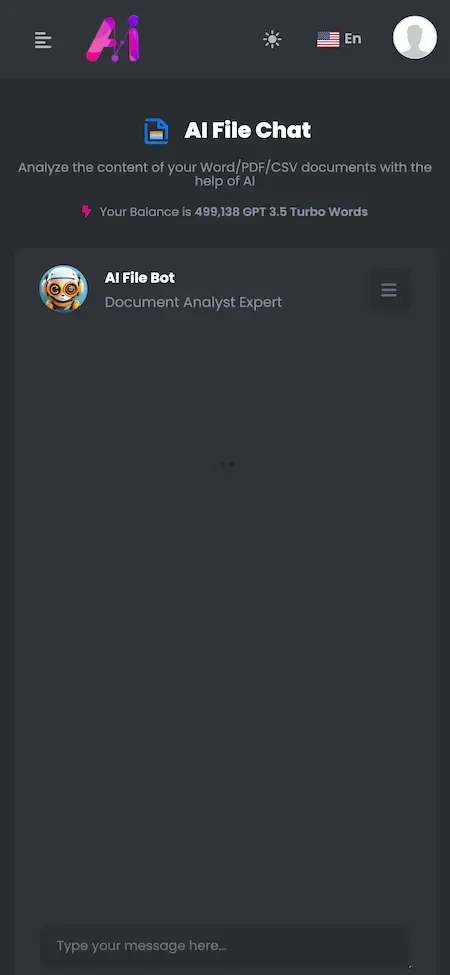


Follow one learner or colleague from the first screen to the last: dashboard, tool menu, chat, a file put through file chat, the voice and code tools, then the plan page where a trial turns into a paid seat.
02Evidence
In Their Words
What a Client Running on the MXAI Base Says
Only one account on the Miracuves testimonials page names this exact base. It appears here exactly as its author wrote it.
“Conversational workflows, knowledge-base integration and the automation layer were already built. We connected our own data sources and tuned multilingual accuracy for support and lead qualification. The team now runs the whole AI operation from one place.”
A Real Delivery on This Base
A Utility Company's Conversational Product, Delivered on This Same Platform
The published case study of a utility-sector software company that launched a conversational AI product on the platform this page sells. It records what was delivered, not a promise about your project.
A utility-sector company wanted a conversational generative AI product of its own. Miracuves began with the ready-made base this page sells, spent the engagement on decisions that were the client's, and handed over the source code when it finished.

- Know what the model will refuse before real users arrive
- Answer what a conversation costs and who ran it
- Attribute usage so it can be charged back inside the company
- Launch a conversational product without redoing groundwork the base had proven
- Use the engagement on the decisions that were the client's alone
- Own the source code, the schema and the deployment configuration
- A member-facing surface and an admin console with separate permissions
- Models, guardrails, usage caps and branding chosen by the client
- Eighteen of the twenty-two platform blocks used as they were
- A hand-off pack: source, schema, deployment setup and architecture notes
- A 6 working-day build window on the ready-made base
“The conversation surface, model routing and usage accounting were already working. That let us spend the engagement on our own prompts, guardrails and limits rather than on the plumbing beneath them.”Jemell Cotton · CTO, Global Utility Systems Ltd
03What it is
The Basics
One Login for Writing, Speaking, Coding and Reading Documents
Think of Miracuves' Google Gemini clone as a shared AI workspace that carries your name. Colleagues or classmates write with an assistant, hand it a document, ask it for code, turn a script into narration and watch their remaining balance, while you set up plans and follow the bill from an admin panel.
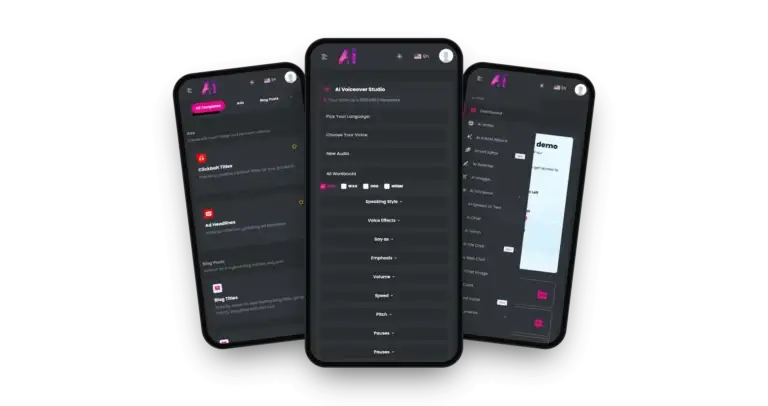
Tools Under One Roof
Writing, chat, pictures, speech and code share a single menu, a single balance and a single login, so nobody bounces between products to finish a piece of work.
No Locked Box
Source code is handed over whole and unencrypted. Your developers can reshape screens and flows later, and no fee is attached to a seat or a run.
Extras Labeled as Extras
Spoken dialogue, subject knowledge packs, tone-aware replies and team-chat links are paid add-ons, shown apart from the base tools and never counted among them.
Web, Android & iOS
What a Google Gemini Clone Script Really Ships
The chat box itself is the small part. The months go into everything that surrounds it: tools that sit side by side, balances that shrink as people work, plans a manager can edit and a price list showing what each model charges. In this package that surrounding work is done.

- 01Chat with an assistant that has a named role
- 02Voiceover, file chat, templates and code in one menu
- 03A free trial, then a plan card with Subscribe Now
- 04Four counters: words, images, characters, minutes
- 05An admin panel covering plans, credits and model prices
In the package: a member web panel and its phone view, two Flutter apps (Android and iOS), an admin panel and every line of the source code.
Inside the Workspace
The Google Gemini Clone Toolkit: Voice, Code, Files, Chat, Templates, Plans and Balances
Each item below is built into the Miracuves Google Gemini clone and appears on a demo screen or in the release log. Whatever needs a separate module is listed further down as an add-on.
Voiceover Studio
Write a script, choose a language and a voice, and the studio produces the narration. Export formats and many delivery settings share the screen, and every job is counted in characters.
- Language first, voice second
- Four export formats: MP3, WAV, OGG, WEBM
- Style, effects, say-as and emphasis settings
- Volume, speed and pitch controls, plus pauses
- Characters remaining are printed on the screen
- A Speech to Text entry sits next to it in the menu
- Release 6.8 brought a free voice isolator extension
Code Generator
A compact form converts a plain request into code. You name the programming language, describe the function, choose a model and press the button.
- A field names the programming language
- A box takes the instruction
- A model selector completes the form
- The Generate Code button runs it (its copy action was repaired in release 6.8)
File Chat
Attach a file, then question it in a chat run by a document-analyst bot. Word, PDF and CSV are the file kinds the screen mentions.
- AI File Chat carries a New tag in the menu
- A Document Analyst Expert bot gives the answers
- Word, PDF and CSV are the formats named
- The remaining balance sits above the chat, and follow-up questions go in the message box
Assistant Chat
Start a chat with a named assistant, for example a travel guide, read the greeting it opens with and type your question. Favorites are pinned to the dashboard.
- Every assistant carries a short role line and a greeting
- The message box sits at the bottom of each chat
- Pinned favorites appear on the dashboard
- AI Web Chat has a menu entry of its own
- AI Chat Image is for conversations about pictures
- Welcome messages in chats may carry HTML tags
Template Library
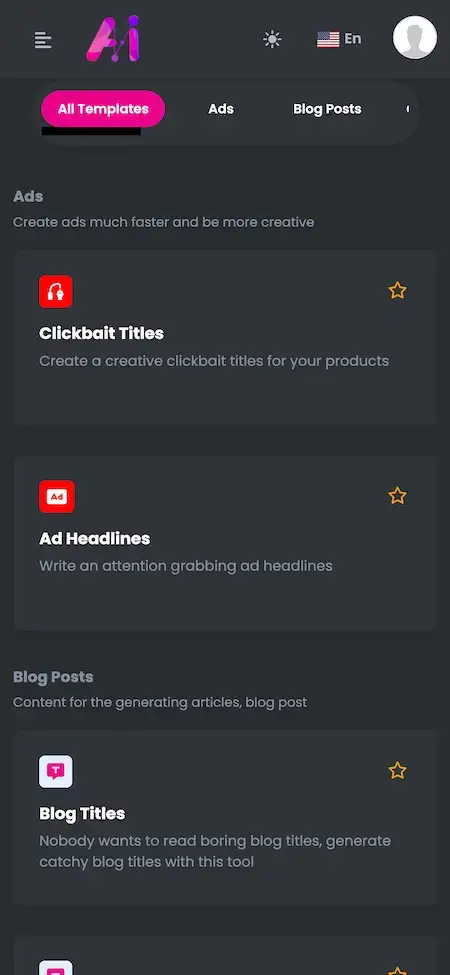
Prepared prompts sit under tabs, one card per kind of task, and a star flags the ones you use most.
- Clickbait Titles, Ad Headlines and Blog Titles each have a card
- Tabs named All Templates, Ads and Blog Posts
- A click on the star keeps a template as a favorite
- Write templates of your own under categories you create
- Edit the status of a custom template whenever needed
Writing Suite
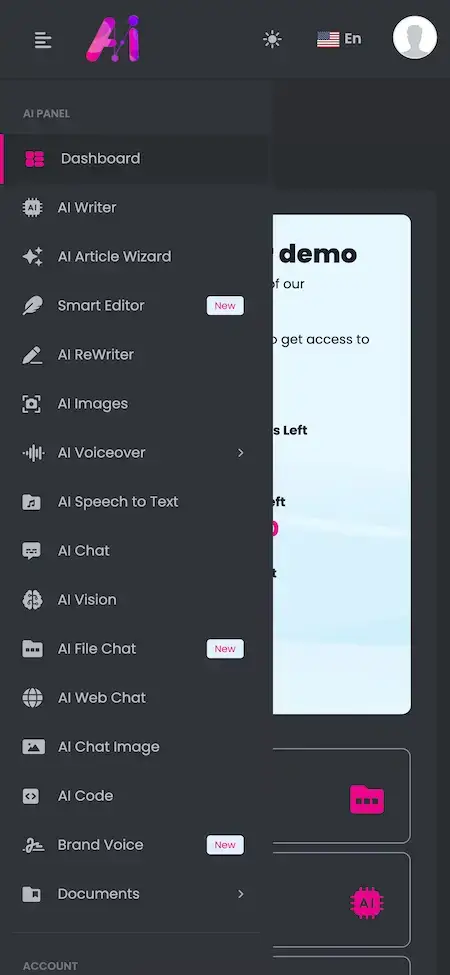
For long-form work the menu has a writer, an article wizard, a smart editor, a rewriter and a brand voice option.
- Smart Editor (tagged New)
- AI Writer with the AI Article Wizard
- AI ReWriter and Brand Voice (tagged New)
- Saved work lives in a Documents folder
Pictures & Vision
Alongside the text tools sit picture tools: an image generator, a vision tool and an image-centered chat, each spending from an image allowance.
- The AI Images entry
- The AI Vision entry
- Your image allowance is counted on the dashboard
- Release 6.9 corrected the image sizes of one model and added a fashion option to the product photo extension
Plans & Team Seats
The manager sets up each plan, which then shows a monthly price, a Most Popular tag, a tool list with its allowances, and a Subscribe Now button; a free trial comes first and has its own Upgrade Now button.
- The monthly price and the Most Popular badge appear on the card
- A checklist names the tools and allowances of each plan
- The checklist also has a line for team members
- The free trial plan ends in an Upgrade Now button
- Repairs: checkout on the free plan (release 6.8) and bank transfer approval (release 6.6)
- Release 6.9 revised the SaaS business extension
Balances & Usage Counters
Every tool spends from a balance anyone can read: words, images, characters and minutes remaining, tiles for finished work and a chart for the month.
- Remaining words, images, characters and minutes are on the dashboard
- Six tiles: documents, words, images, code snippets, voice jobs, audio files
- A chart plots the words written in the current month
- The credits panel shows when the next renewal falls
- View Credits has a separate line for every model
Account & Profile Safety
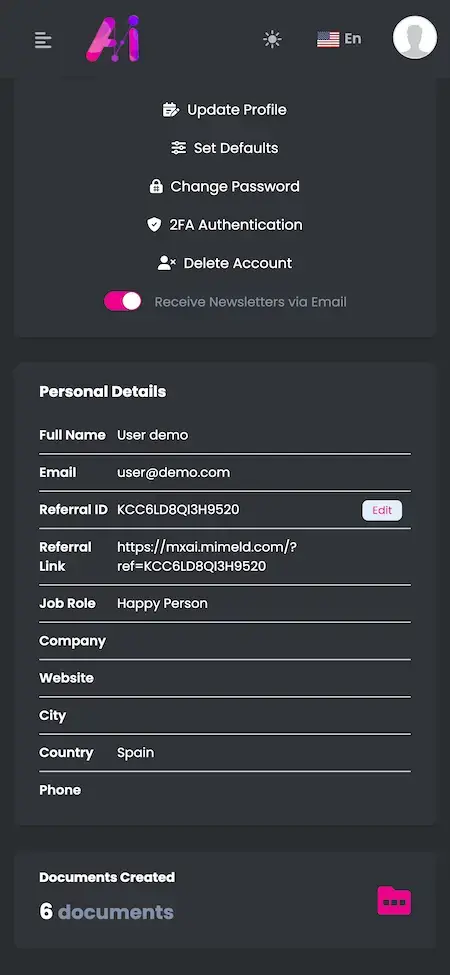
The profile page covers what people expect from an account: personal data, a referral ID and link, plus the security and consent controls.
- Personal data next to a count of documents created
- A referral ID and a link to share
- A two-factor setting you can switch on
- Update the profile and choose defaults
- An action to delete the account
- A newsletter on-off switch
Marketplace & Extensions
More modules arrive through a marketplace page. Some cost nothing and some are paid, and the way items update was refined across several releases.
- A marketplace page lists extensions and themes, part free and part paid
- Marketplace items can be updated in place
- Maintenance mode is free, while the menu builder is paid
- Release 6.9 introduced a sitemap builder
Appearance, Language & Storage
Look, language and upkeep are configured, not coded: a choice of three themes, a language switcher and storage options for generated files.
- Choose from the Classic, Sonic and Modern themes
- The header carries a language switcher
- Gaps in the language file were filled
- A schedule cleans out stored images
- Chat images can sit on external storage
Worth knowing before you order: We deliver the platform finished and branded as yours. You provide your logo and company details, hosting, a domain and a verified developer account for the stores, a payment gateway that has cleared onboarding and KYC, and keys for every model provider you connect. Store review by Apple and Google runs on its own timeline, apart from our 6-day build.
Where the Money Comes From
How a Shared AI Workspace Earns: Seats, Monthly Plans, Tiers and Allowances
Income from a shared workspace arrives in layers, and Miracuves keeps each one separate, so repricing seats leaves allowances and tiers alone.
Two numbers tend to settle the outcome: what share of trial users convert, and how much model spend each plan must carry.
- 01
Team & Classroom Seats
A team members line sits in the plan checklist, which lets you sell one plan to a department, an agency pod or a class and decide for yourself what each seat is worth.
- 02
Monthly Individual Plans
Every plan pairs a monthly price with a Most Popular tag and its list of included tools. Plans are made and priced in the admin panel, and members are billed again each month.
- 03
From Trial to Paying Seat
Everyone starts on a free trial with live counters and an Upgrade Now button. The plan card shows up just as an allowance starts to run low, the point where it persuades best.
- 04
Tool-Gated Tiers
A plan spells out which tools it holds, so narration, the smart editor or file chat can be saved for an upper tier and turn into the motive to upgrade.
- 05
Allowance Tiers
Four allowances exist side by side: words, images, characters and minutes. Each plan sets its own amount of each, and the credits view reveals the pace of spending.
- 06
Store & Card Fees
The cost side of each sale: card processors and app stores keep a share of every payment, so a plan price must leave room for them. A bank transfer approved in the admin panel sidesteps both.
| Revenue stream | How it is collected | Take rateTypical figure | What limits it |
|---|---|---|---|
| Team & Classroom Seats | A monthly charge per seat on a team or business plan. | Gemini Enterprise lists $21 per seat per month for its Business edition and $30 for its Standard and Plus editions (Google). | The number of people sharing a plan, and whether the buyer is a manager or a person paying out of pocket. |
| Monthly Individual Plans | A recurring flat fee per plan, taken by the store or a gateway. | US App Store price ladders: ChatGPT $8, $19.99, $100-$200; Google AI $4.99, $19.99, $199.99; SuperGrok $10, $30, $300. | What your members are willing to pay for the listed tools. The amounts are developer-set prices on store pages, so read them as a market ladder instead of a fee schedule. |
| Allowance Tiers | A fixed allowance inside each plan, weighed against the model vendor's price per million tokens. | Input then output, per million tokens: OpenAI $2.00 and $10.00, Gemini API $2.00 and $12.00, xAI $2.00 and $6.00, DeepSeek $0.15 and $0.60 outside peak hours. | Your margin on each allowance. A cheaper model stretches it, and every model's price is stored in the vendor cost list of the admin panel. |
| Store & Card Fees | A share withheld from every payment by the app store or card processor. | Apple: 30% of a subscription in the subscriber's first year, 15% afterward, or 15% from the start in its Small Business Program. Google Play: 10% plus a 5% billing fee on US, UK and EEA subscriptions from 30 June 2026. Stripe: 2.9% plus 30c per US domestic card payment. | How the member pays: through a store, through a card gateway or by bank transfer. Regions not yet moved to the new Google Play structure still list subscriptions at 15%. |
Sources for the table. Individual plan prices are amounts set by the developers on the US App Store pages of ChatGPT, Gemini and Grok. Seat prices come from the Gemini subscriptions page. Token rates are taken from the price lists of DeepSeek, xAI, the Gemini API and OpenAI, and the fees of stores and card processors from Apple, Google Play and Stripe. Each number is another company's price and works only as an input for modeling. Nothing here is an offer, and nothing forecasts what you would earn; your own prices and costs belong in the admin settings you control.
Google Gemini Clone Revenue Model, Stage by Stage
A shared workspace earns most when one buyer pays for many users, so Miracuves ships this Google Gemini clone with solo plans, a seat line and allowance meters side by side.
Launch
Start with a free trial and an individual monthly plan, and let a pilot class or department prove the tools before a manager signs for everyone.
Traction
Switch on the team members line in a plan checklist and one purchase covers a company team, an agency or a school group, at a per-seat price you set.
Scale
Hold narration, the smart editor or file chat for upper tiers, and give each tier its own word, image, character and minute amounts so larger groups buy the bigger allowance.
Seats, plans and allowances move independently in the admin panel, and no seat income is shared with Miracuves.
The Manager's Side
Running the Business Side: What the Google Gemini Clone Admin Panel Lets You Control
One Miracuves console serves the people who manage the workspace, showing what a plan costs and earns, the models that get paid, the templates and themes that are live and the wording of the public pages.
- 01Plans
- 02Bank transfers
- 03Credits
- 04Vendor prices
- 05Calculator
- 06AI settings
- 07Templates
- 08Extensions
- 09Themes
- 10Pages
- 11Languages
What the Console Covers
- 01
Plans & Payments
Set up the plans people subscribe to, handle checkout on the free plan and approve the bank transfers that reach you outside the card gateway.
- 02
Credits View
See the credits each model and tool has used, so you can tell at a glance where allowances go, while every member follows the six counters on their own dashboard.
- 03
Vendor Costs & Calculator
A price list showing what each model vendor bills you, with a dynamic calculator that turns those prices into choices about plans and allowances.
- 04
AI Settings
Where the AI side is configured: the greeting shown in chats and the list of models people may choose.
- 05
Templates & Categories
Add templates of your own, grouped in categories you define next to the built-in ones, and turn each one on or off by changing its status.
- 06
Extensions Marketplace
Extra modules and themes are offered on a marketplace page; part of the catalog costs nothing and part is paid, and updates are supported.
- 07
Themes & Menus
Three themes to begin from, plus a paid menu builder extension for the navigation of your public site.
- 08
Pages, Languages & Storage
Pages for blogs and system content, maintenance mode, translation files, a sitemap builder and timed housekeeping for stored images.
Money & Cost Side
Money matters in one place, from putting a plan on sale to settling a model invoice.
- Plans, with free-plan checkout
- Bank transfer approvals
- Credits consumed per model and tool
- Vendor prices and a live calculator
Site & Housekeeping
Everything behind the public pages that keeps the platform running smoothly.
- Themes, menus and pages
- Maintenance mode, sitemap builder
- Translation files, language switcher
- Scheduled image clean-up
Should the console reach further? A different approval route, a new usage report or one more way to pay each count as separate work. Tell us what your organization requires and we quote it in writing before anything is built.
04Contents and price
Everything Delivered
Inside the Package: Source Code, Apps, Admin Panel and Deployment
The workspace arrives from Miracuves complete rather than in pieces: member panel, mobile apps, admin panel, full source and the schema below them. You own it all, and no seat charge, usage charge or renewal ever applies. Your model bill, voice and speech services, card fees, hosting and store accounts are paid to those providers directly.
$ ls src config db Full Source Code
The web platform and both mobile apps are delivered without encryption, so your developers can reshape them whenever your needs change.
- Web platform source, no encryption
- The Flutter project that builds both apps
- Open for you to modify, expand and deploy again
- Delivered to a repository of your choosing
Schema & Migrations
The tables behind accounts, plans, chats, documents, usage and payments, supplied for rebuilding on an empty server.
- Migrations ship with the schema
- MySQL runs the data tier
- Chat threads sit beside members and plans
- Usage, credits and payments each have records
Conversation & Usage Ledger
The saved conversations and the ledger that feeds the counters, noting what each person asked, which tool answered and how much allowance was spent.
- Each member's threads and turns are kept
- Usage is logged by member and by thread
- Every tool has its own falling allowance
- Usage and audit data flow into an event stream

Member Web Panel
Dashboard, assistants, templates, file chat, code tools, voiceover, the plan page and the profile make up the responsive screens people use.
- A dashboard of counters and balances
- Assistants with file chat and templates
- A code generator and a voiceover studio
- Plans, a profile and a referral link
Phone Screens & Flutter Apps
The panel narrowed to phone width, plus Flutter apps for Android and iOS carrying the same tools in a side menu.
- A side menu lists every tool
- Chat, templates, code and narration
- One Flutter app each for Android and iOS
- Publishing runs from your developer accounts

Admin Panel
The control room for operators, with plan setup, bank transfer approvals, credit tracking, vendor prices, AI settings, extensions, themes and pages.
- Plan setup and transfer approvals
- Credit tracking next to vendor prices
- A cost calculator that updates live
- Extensions, themes, pages and AI settings
Access & Security Layer
Members and admins log in separately with their own permissions, and a gateway guards the calls made to models.
- Roles with separate permissions
- A gateway that authenticates and limits rates
- Two-factor sign-in as an option for members
- No credentials stored in the repository
Handover & Aftercare
After branding and deployment we hand over written notes, and three support periods start together on launch day.
- Logo, icons and colors applied throughout
- Installed on the hosting you choose
- Deployment setup and architecture notes in writing
- 60 days guidance, 6 months bug fixes, 12 months updates
Prefer to see it first? Try the demo as a member, or ask for a guided session in which we step through a voiceover, a file chat, a code request and the plan page, each shaped around your use case.
One Fixed Price
The Cost of Launching a Gemini-Style AI Workspace Under Your Own Brand
Miracuves sets one fixed price for its ready-to-launch white-label Google Gemini clone: $2,799. Whatever lies beyond the base, whether an add-on, a link to another system or a flow of your own, is scoped and quoted in writing first.
Professional
Ready-to-Launch PackageChosen by: Company teams, schools, course providers, training firms and agencies that run an AI workspace under their own name
The platform is delivered as shown in the demo, with your logo, icons and colors, hosted wherever you decide.
Get StartedEnterprise
Custom Work for Larger NeedsChosen by: Organizations that host their own models, keep internal document libraries or answer to a compliance team
If the base lacks a flow you need, we build it to your brief and agree scope and price in writing first.
Request a QuoteGoogle Gemini Clone Development Cost in 2026
A single $2,799 payment buys this Google Gemini clone outright: the member web panel and its phone view, Gemini-style Android and iOS apps written in Flutter, the operator console where you set plans, approve bank transfers and price each model's credits, plus the unencrypted source. In six working days it wears your logo and colors on a Classic, Sonic or Modern theme.
Running costs your AI workspace carries after purchase
- The model bill from each provider you connect
- Voice and speech services for narration
- Card fees and app store commission
- Hosting, a domain and a verified store developer account
- Any add-on module, from voice dialogue to team chat links
Extras sit outside that price: a further payment method or a fresh usage report gets a written quote and runs 2-8 weeks, while internal document libraries or self-hosted models move to the Enterprise route.
Compare Your Options
Ready-Made Google Gemini Clone vs Custom Development vs SaaS
Schools, training firms and companies wanting a branded AI workspace like the Gemini app can buy the Miracuves Google Gemini clone, fund a custom build, or subscribe to a hosted assistant. The trade-offs look like this.
| Criteria | MiracuvesReady-Made Google Gemini Clone | Custom Development | SaaS |
|---|---|---|---|
| Launch time | Branded and deployed in 6 working days | A scoped project, often many weeks | Instant accounts, vendor branding |
| Upfront cost | $2,799 for the whole workspace | Project fee agreed in writing | Nothing upfront, per-user billing |
| Source code ownership | Full web and app source handed over | Depends on your agency terms | Never available to you |
| Customization | Seats, tools, voices, templates, models | Anything you can specify | Admin toggles the vendor allows |
| Ongoing fees | Model bill and hosting you control | Retainers for upkeep and changes | Per-user fees every month |
| Branding & app-store listing | Your workspace brand on Android and iOS | Your brand on commissioned apps | Vendor name on every screen |
| Best for | Schools and firms reselling AI seats | Teams with proprietary model needs | Small teams needing an assistant today |
Same product, other editions: ChatGPT Clone · Grok Clone · DeepSeek Clone · Apple AI ReALM Clone · Browse all AI & Automation solutions
Put It to Work
Six Daily Uses of the Google Gemini Clone: Team Assistant, Study Files, Narration, Code, Lesson Templates and a Branded Portal
Teams, schools and studios using the Miracuves workspace each lean on a different part of it. A team relies on chat and file work, a school on file chat and templates, a studio on the voiceover desk, a developer group on the code form. Which tools you feature is a matter of configuration.
Swipe · 6
Give a department one assistant to write, rephrase and answer questions. A free trial opens the door, and a monthly plan whose checklist has a team members line takes over.

A learner attaches a Word, PDF or CSV file and quizzes it through the file chat bot while the remaining balance stays visible above the chat.

Produce narration from a script in a studio offering voices, four output formats and delivery controls, with the work counted in characters.

Give a technical group a code request form where they choose a language, describe the function and select the model that writes it.

Write your own templates and categories for lesson plans, briefs or announcements, star the favorites and keep finished pieces in the Documents folder.

Run the whole toolset under your school or company name, with your logo on every screen, plan names you choose and your own list of tools per plan.

Google Gemini Clone Business Model: Three Ways to Run It
The Google Gemini clone business model puts writing, voice, code and documents behind one login and one balance, and a single Miracuves install supports three ways of selling that.
Seats for organizations
Companies, schools and colleges buy a plan with a team members line, so a manager pays once and measures one balance across many users.
Plans for individuals
Learners, writers and narrators buy their own monthly plan for the AI assistant, picking the tier whose tool checklist and allowances match their work.
Branded training portal
A training firm or EdTech brand runs the workspace under its own name, with lesson templates and file chat sold inside its courses.
Every route keeps chat history, accounts and usage data in your database rather than with a model vendor.
One build, six working styles. Each scenario runs on the member panel, its phone view and the admin console. What varies is the set of tools you highlight, how plans are cut, the allowances you set and the branding, so one codebase serves them all.
Speak With Our TeamWhy Now
Why a Shared AI Workspace for Teams and Learners Makes Sense in 2026
According to the independent figures above, AI assistants are an everyday working and learning aid for many adults. Still unsettled is who offers the shared workspace and holds the accounts, and with a branded platform that can be you.
01People Already Know the Chat Box
Typing into a message field needs no training. What sets products apart is the tooling around the field, how it is priced and whose name it carries, and you decide all three.
02One Login Beats Five Subscriptions
With writing, voice, code and files under one account and one balance, a team has a single thing to buy and a manager has a single thing to measure.
03Documents Are Where Work Lives
Much of what teams and classes rely on already sits in Word, PDF or CSV files. With file chat, people can put questions to that material as it is.
04Seats Make Pricing Easy to Explain
A plan checklist with a team members line, a monthly price and visible allowances is something a buyer can compare within a minute.
05Model Prices Move, Your Product Stays
A price change at a model provider becomes a settings edit, thanks to the vendor cost list and calculator in the admin panel, and not a rebuild.
06Build-or-Buy Has an Easy Answer
Most of the product is plans, balances, tools and the admin console, so within six days of kickoff a white-label copy can be live on hosting of your own.
The Workspace at a Glance
Tools in one menu
Allowances counted
Surfaces from one codebase
Days to go live
What makes AI hard to offer to a group is the layer between the chat box and the invoice: tools that fit together, balances that fall, plans a manager can edit and a price list worth trusting. Here that layer is already built.
Industries
Industries We Serve
Any organization that handles text, documents, speech or code can use the Google Gemini Clone. Schools and colleges let learners question course files. Corporate training teams draft materials. Consultancies and agencies write and summarize. Software groups generate code. Media studios and publishers produce scripts and narration. Support teams answer from their own documents. Coaching firms give clients an assistant under their own name.
one codebaseMXAI
- 01ScSchools & Colleges
- 02CtCorporate Training
- 03EsEdTech Startups
- 04CfConsulting Firms
- 05MaMarketing Agencies
- 06StSoftware Teams
- 07PuPublishing
- 08MsMedia Studios
- 09ApAudio Production
- 10CsCustomer Support
- 11PsProfessional Services
- 12CbCoaching Businesses
The Miracuves Google Gemini Clone is one multi-tool workspace that adapts to many kinds of organization, with plans, counters and an admin panel that show your name on every screen.
06Behind the screens
Step by Step
One Person's Path Through the Workspace, From First Login to a Paid Plan
Users of a Gemini clone app built by Miracuves see a message and a reply. Underneath runs a pipeline: taking in the prompt, gathering context, choosing a model, streaming the reply and counting usage. The member journey comes first, followed by the architecture that supports it.
Member Journey - From Sign-In to Subscription
Swipe · 6
- 1Log In to the AI Workspace
A Gemini clone app login lands on a dashboard holding a welcome card, the trial plan and counters that show each remaining allowance.
- The welcome card names the free-trial plan
- Counters for words, images, characters and minutes
- An Upgrade Now button sits on the card
- 2Open the Tool You Need
Writer, editor, vision, file chat, code and brand voice are all listed in one menu, so each task starts from the same place.
- Tools for writing, chat, images and voice
- New tags on the latest additions
- A Documents folder keeps saved work
- 3Talk to a Named AI Assistant
Each assistant has a name and greets the member first, and questions go into the box beneath its message.
- An assistant with a short role line
- A greeting and a message box
- Balance printed above the chat
- 4Ask Questions About a File
For study notes or company papers, file chat lets a member load a Word, PDF or CSV document and put questions to the document analyst bot.
- A document analyst answers in file chat
- Word, PDF and CSV are named on the screen
- Follow-up questions stay in the same thread
5Generate Voiceovers and CodeType a script and the voiceover studio reads it aloud in the voice you pick; describe a task and the code form writes the function. Both spend from separate balances.
- A script, a language and a voice
- A programming language and an instruction
- A balance that drops while the job runs
- 6Move to a Paid Seat or Plan
Near the end of an allowance the member is one tap from a plan card listing its monthly price and included tools, with Subscribe Now to continue.
- The Most Popular badge on the card
- Tools and allowances set out as a checklist
- The Subscribe Now button
The Base Itself
How a Gemini Clone App Is Assembled, Following One Request Through It
- 01Layer 01
Chat Memory
Each member's threads, turns and context are saved. The store is the record of what was said, which makes it possible to reopen a chat and carry on.
- 02Layer 02
Model Switchboard
Each request goes to the provider and model that was picked, so one product can list several models together.
- 03Layer 03
Live Answer Stream
Answers arrive while tokens are being produced, and one that is still being written can be halted rather than awaited.
- 04Layer 04
Rule Checker
Every request passes filters, refusals and an audit log, and you write the rules about what gets refused.
- 05Layer 05
Usage Meter
Counting happens per member and per thread; those counts are why allowances shrink and the credits view adds up.
- 06Layer 06
Plans & Permissions
The plan a member bought sets tiers, quotas and fair-use limits, and those rules drive the counters on the dashboard.
Under the Hood
Gemini Clone Script Technology Stack: PHP Web Layer, MySQL, Flutter Apps and Model APIs
A shared AI workspace stands on three things: a reliable web layer, a database where usage and payments stay in step, and apps that feel native. Here is what Miracuves made this platform from, per the product pages.
Web Application
- A single codebase serves members and operators
- A responsive interface built with Bootstrap
- Classic, Sonic and Modern themes
- Translation files and a language switcher
Data Store
- Members, plans, chats and usage are stored in MySQL
- Schema and migrations are part of the source
- A blank server can rebuild the database
Mobile Apps
- Flutter apps that use up-to-date dependencies
- The tools are reached through a side menu
- The demo shows the member panel at phone width
- You submit to the stores from your own accounts
AI Models
- The code form carries a model selector
- Each model has its own line in the credits view
- A cost list and a dynamic calculator track vendor prices
- The provider accounts and keys are yours
Outside Services
- The integration list names Firebase, Twilio and Google Maps
- Payment gateway APIs, plus bank transfer approval
- A translation service
- Speech services behind the voiceover studio
Code Handover
- The application source, history included
- Mobile projects come with documented signing steps
- Deployment configuration written down
- Architecture notes handed to you
According to the product pages, PHP and Bootstrap carry the web and admin layer; the published GUS - ChatGPT case study mentions Laravel on PHP with MySQL. Mobile apps use Flutter. Each outside service, whether a model or speech provider, Firebase, Twilio, Google Maps, a payment gateway or translation, requires an account and keys in your name, which are entered at deployment. These are all common technologies, so developers for them are easy to find.
Room to Grow
Built for More Seats: Gateway Limits, Streamed Answers, a Usage Ledger and Spare Capacity
Miracuves wraps separate blocks around one conversation store, so more people, chats and models mean added capacity and a few settings rather than a new build.
Member and Admin Apart. The member panel and the admin console keep their own permissions and release path, so a change to one need not ship with the other.
A Gateway Before Every Call. A request is authenticated, rate-limited and checked for repeats before any model sees it, which stops one account from flooding the system.
Answers Stream and Can Be Halted. Tokens return as they are produced, and an answer in progress can be canceled, so a long reply never freezes the screen.
A Ledger You Can Audit. Per-member and per-thread usage is recorded and streamed for audit, which lets you check dashboard figures against stored data.
Separate Surfaces
The member and admin applications each have separate permissions and releases, so either can change independently.
Gateway With Limits
All requests pass an API gateway that checks identity, enforces rate limits and catches repeated calls before a model is reached.
- Identity checked at the gateway
- Traffic held to rate limits
- Repeated calls caught
- Separate logins for each role
Streaming Replies
Answers flow back token by token and can be canceled halfway, instead of appearing only once complete.
- Tokens sent as they are made
- Cancel an answer in progress
- The balance stays visible above the chat
- Counters move as people work
Event Stream
Events about usage and audit trails go to a stream, keeping reports and accounting off the conversation's critical path.
- One usage event per request
- Audit events held for review
- Many readers can consume the stream
- Reports built on the ledger
Token Accounting
Token totals per member and thread are checked against plans, quotas and fair-use limits.
- Totals by member and thread
- Tier-level quotas
- Fair-use caps
- Credits listed per model and tool
Written Handover Pack
The source, the schema, the deployment setup and the architecture notes all change hands, so a different team can run the platform alone.
Room to Adapt. Sooner or later an organization needs something specific to its own work. With the complete Gemini clone script source and a conventional stack, a new tool, rule or provider is ordinary development that your team or ours can take on.
Starting small? Begin with the plans and tools you can offer today, on the one deployment you already have. Heavier traffic is met with hosting capacity and settings, and anything beyond the base is scoped and quoted separately.
07Trust and safety
Open to Inspection
How an AI Workspace Like Gemini Handles Security: Roles, Guardrails, Gateway Limits and Honest Gaps
In an AI workspace delivered by Miracuves, accounts, conversations, uploaded documents and payment references share one home. Begin with these checks: where card details go, what the model is allowed to be asked, who can see what, and what remains before launch. The sections below cover what the platform handles and what stays with you.
- 01 · RolesRole Separation
Members and admins see only what their role allows, and the server enforces it instead of the interface merely hiding the rest.
- Account Controls: The profile page carries a two-factor option, an action to delete the account and a newsletter switch, covering basic safety and consent.
- 02 · AuditAudit Trail
Usage and audit events are recorded, which means a query about a charge or a refusal is settled by looking it up, not by remembering.
- Guardrail Rules: Each request meets filters, refusals and an audit log. What the product declines is your choice, and the base is where the choice is enforced.
- 03 · TransportTransport & Storage
Traffic is carried over TLS, credentials are stored hashed, and sensitive values at rest are encrypted rather than just obscured.
- Usage Limits: A member's plan sets the quotas and fair-use limits, so no one account can run up an unlimited portion of the model bill.
- 04 · SecretsSecrets Handling
Model, speech and payment keys live in environment configuration on your servers and never inside the repository you receive.
- Provider Keys: Keys for models, speech and payments belong to you and sit in environment configuration on your servers, which keeps one leaked repository from exposing any account.
- 05 · CardsCard Data Goes Straight to the Gateway
Cards are entered straight into your payment gateway; the platform stores a payment reference, not a card number.
- Payment Approvals: Before a bank-transfer plan is activated, an admin approves it, so a person ties offline money to a member.
- 06 · BackupsBackups & Restore
Backups run on a schedule as part of the deployment, and a restore is rehearsed before launch, because a backup nobody has tested is only a hope.
- Named Launch Tasks: Penetration testing, key rotation, a restore rehearsal and a review of your model providers' data terms are listed as pre-launch work, never presumed complete.
Every request passes filters and refusals and lands in an audit log, while TLS carries the traffic and stored values are hashed or encrypted. Rotating keys, rehearsing a restore and running a penetration test are the three items we settle with you before go-live. The attestation is addressed to your business, never Miracuves, and independent audit partners take your business through the audit. Filters, the audit log and encryption are coded to control requirements from ISO 27001, SOC 2 and GDPR (see our facts ledger).
Talk Security Through Before You LaunchOperator Duties
What the Google Gemini Clone Provides and What You Remain Responsible For
A shared AI workspace gives people answers, stores what they type and may bill them. Miracuves provides the chat, plan and usage tooling, while the operator settles what the assistant says, how member data is handled and which laws govern sales.
Ready is meant narrowly: the software works in the demo and the admin panel. Licenses and approvals for your offering sit with your own entity, and this block is not legal advice.
Already in the Software
Built and working: an assistant, file chat, templates, code generation and voice tools; a trial plus paid plans; usage meters for words, images, characters and minutes; credit reporting with a cost list; guardrails with an audit log; individual member and admin logins; and the admin panel.
Yours to Decide
You write the terms of service and privacy policy, decide what the assistant may answer under your policy guidelines, set retention for chats and uploads, handle deletion requests and define refund and cancellation rules beyond the defaults.
Students, Minors & AI Rules
Where users are pupils or students, rules on children's data, parental consent and school records may apply. Policies on moderating generated content and on labeling synthetic speech or images are yours as well. The base can filter and log, but the decisions are not its to make.
Where You Operate
Rules on data protection, consumers, tax and AI differ from country to country and frequently from state to state, and prompts or uploaded files may hold personal or confidential data. Consult qualified local advisers for every market before you open sign-ups.
08Beyond the base
- Assistant, file chat, templates, code
- Voice and writing tools
- Plans, counters, trial flow
- Admin panel, cost list
How a module is added
- 1Pick a module
Voice dialogue, subject knowledge, tone or team chat, at launch or at any later date.
- 2Price first
You get a written scope and a quote for each module before any work starts.
- 3Delivered as code
The finished module joins the codebase that is already yours.
Optional Modules
Add-Ons for a Gemini-Style Workspace: Voice Dialogue, Knowledge Packs, Tone Awareness and Team Chat Links
What you receive from Miracuves works from end to end and can be tried in the demo. The four modules that follow are the extras buyers request most often, and each one is quoted on its own, since the work involved varies with your product.
Drag to explore · hover to pause
- 01Depth
Talk-to-Assistant Voice
People say their question aloud and hear the answer spoken back inside the conversation. The base already ships a narration studio and a transcription tool, so this module goes one step further and makes the dialogue itself voice-driven, which helps hands-free use and accessibility.
Voice · Dialogue - 02Depth
Subject Knowledge Packs
Collections of terminology, background and reference text for one subject area, for example healthcare, finance, law or technology, which lets answers use that field's own vocabulary and be more precise.
Knowledge · Packs
- 03Reach
Tone-Aware Replies
Reads the mood behind a message and adapts the reply, calming an irritated user and handling a sensitive exchange with more care.
Sentiment · Replies - 04Reach
Team Chat Connections
Bring the assistant into the chat tools a team already has open, namely Slack, Microsoft Teams and WhatsApp, so people can put questions to it without switching windows.
Slack · Teams · WhatsApp
Around the Workspace
Building for Teams or Classrooms? Four Platforms That Fit Alongside.
The Google Gemini Clone handles the AI side of a shared workspace. Should your plan need courses, live meetings or a home for shared files as well, these four fit naturally beside it.
01A course marketplace with instructor courses, quizzes, live classes and verified certificates.
Explore Solution
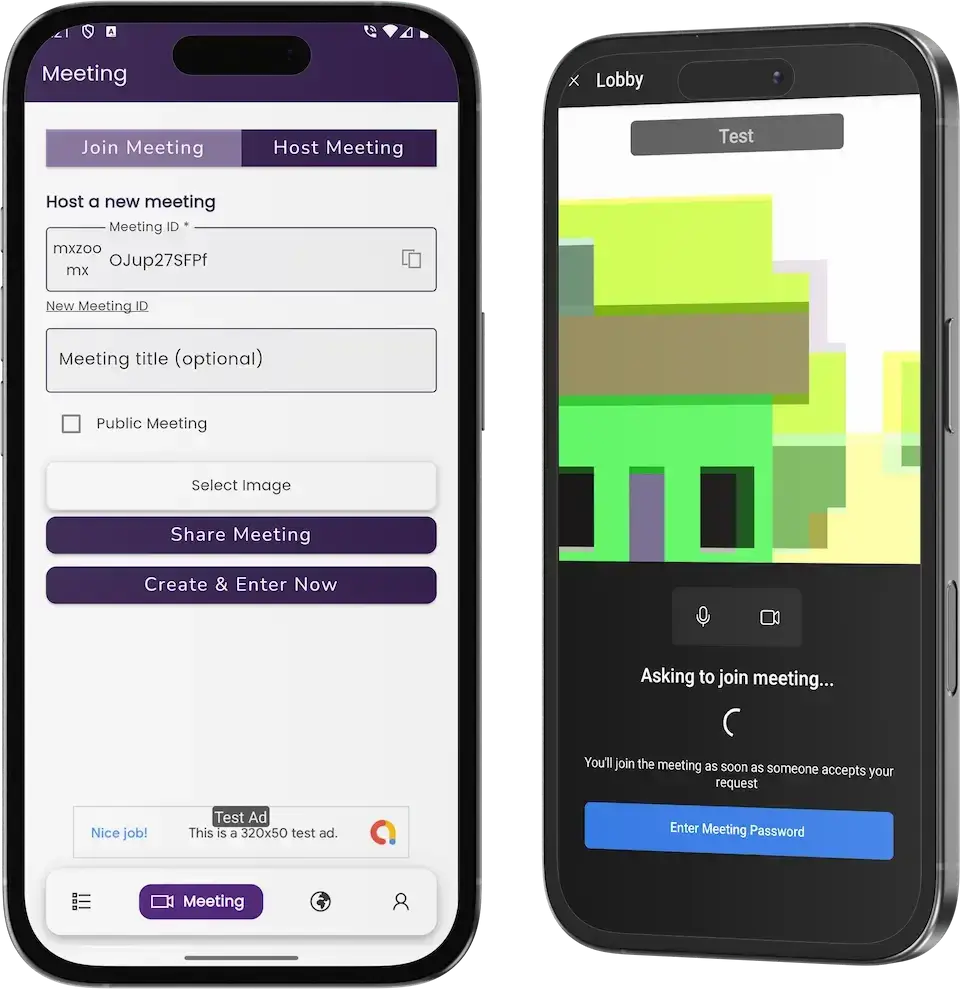
02Branded video meetings with join by link or ID, scheduling, recording, chat and host controls.
Explore Solution
03Team file storage with shared workspaces, uploads, sharing links and an admin panel.
Explore Solution
04A prompt-to-app platform with per-model credits and an admin console.
Explore Solution09Money and market
Market Benchmarks
AI Assistant Market Benchmarks - Independent 2025-2026 Data
The revenue models above are ours. The figures below are not. They are published numbers from Pew Research Center, Ofcom, the Stanford AI Index and Alphabet's annual filing, reproduced as published. They show how many adults use AI chatbots in the US and UK, how fast generative AI spread worldwide, and how a platform owner uses Gemini, so you can check a business case against sources you can verify.
49% of US Adults Use AI Chatbots, Up From a Third
Pew Research Center surveyed 5,119 US adults from 17 to 23 February 2026 and reported on 17 June 2026 that 49 percent ever use AI chatbots such as ChatGPT, Gemini or Copilot, up from 33 percent in 2024. Ever using ChatGPT specifically rose from 18 percent in 2023 to 44 percent in 2026, according to the same report.
54% of UK Adults Use AI Tools Such as ChatGPT
Ofcom's Adults' Media Use and Attitudes report, published 2 April 2026, finds that just over half of UK adults (54 percent) say they use applications such as ChatGPT, Copilot or Gemini. About four in five 16-24s (79 percent) and three quarters of 25-34s (74 percent) use AI tools, and 57 percent of men use them against 51 percent of women.
53% Population Adoption of Generative AI in 3 Years
The Stanford Institute for Human-Centered AI's 2026 AI Index Report says generative AI reached 53 percent population adoption within three years, faster than the PC or the internet, though the pace varies by country and correlates strongly with GDP per capita. It cites Singapore at 61 percent and the United Arab Emirates at 64 percent.
Gemini Runs Across 15 Products With 500M+ Users
Alphabet's Form 10-K for fiscal 2025, filed 5 February 2026, states that all 15 of its half-billion-user products, including seven with two billion users, use its Gemini models. It also reports Google subscriptions, platforms and devices revenues of US$48,030 million in 2025, up US$7.7 billion, citing paid subscriptions across YouTube services and Google One.
Pew Research Center, Americans and AI 2026: Chatbots, Smart Devices and Views on Impact, 17 June 2026 - pewresearch.org
Ofcom, Adults' Media Use and Attitudes Report 2026, 2 April 2026 - ofcom.org.uk
Stanford Institute for Human-Centered AI, The 2026 AI Index Report, top takeaways, report PDF metadata dated 29 June 2026 - hai.stanford.edu
Alphabet Inc., Form 10-K for the fiscal year ended 31 December 2025, filed 5 February 2026 - sec.gov
All figures are the publishers’ own survey results, index values and filing figures, reproduced as published. They describe the market, not the performance of any platform Miracuves builds, and nothing here is a revenue projection for your business.
The Commercial Picture
Marketability, Revenue Potential & Business Prospects
Money arrives when a trial user trusts the workspace enough to buy a plan, and keeps arriving while tools, allowance and price stay worthwhile. The aim here is to make that decision easy and to keep the relationship afterward.
- 01
Revenue That Recurs
A monthly seat or plan earns again every month, so income grows with the people who stay, not with the effort of hunting for newcomers.
- 02
Separate Levers, One Admin Panel
Seats, plans, tiers and allowances move independently in one admin panel, so schools and companies can buy seats while individuals buy plans. Price each seat above the model bill it creates; none of that plan income is shared with Miracuves.
- 03
Accounts and Usage Data Stay Yours
Chat history, accounts and usage records are stored in your database, which keeps the knowledge about users with you instead of a model vendor.
- 04
Free to Change Models
The source and schema are yours in full, and the model providers sit on accounts in your name, so changing vendor, host or team needs nobody's permission.
- Team & Classroom Seats
- Monthly Individual Plans
- From Trial to Paying Seat
- Tool-Gated Tiers
- Allowance Tiers
- Store & Card Fees
The defense is the relationship with your users, not the model.
- 01Stored documents, favorites and past chats anchor people
- 02Audience-tuned templates and a brand voice are difficult to duplicate
- 03Your pricing draws on plan and usage data you hold
- 04Vendors come and go while your product and users stay
The three cases differ only in how many seats are paid for, and each notes which lever matters most at that size. Use them as material for planning, not as anyone's revenue forecast.
Monthly plans carry the early revenue.
One subject or one school served by a small workspace, in which a hundred paying seats on one plan cover running costs. Illustrative size for planning discussions, not a forecast.
Several plans, with team seats and gated tools starting to count.
A brand aimed at one language or country, in which team seats and upper tiers start to build on the base plan while the credits view reveals where the model bill goes. Illustrative size for planning discussions, not a forecast.
Seats, plans and tools all in use.
Every tool is active here, so the mix of plans and the design of allowances settle the margin, and the cost list steers each decision. Illustrative size for planning discussions, not a forecast.
10Choosing a builder
Why Miracuves
Picking a Builder for Your Gemini-Style Workspace: Miracuves Against the Other Routes
AI workspaces come from three places: a generic script, a freelance or agency build, or a base its builder has already shipped. When vetting anyone, ask where each model's cost appears and how a disputed balance can be checked; here the vendor price list and the per-model credits view answer both.
Why Teams Pick Miracuves
- 01
Plans Come Wired
A free trial, a plan card with Subscribe Now and counters that fall are already in the base, whereas many chat scripts end at the conversation itself.
- 02
Many Tools, One Account
A single login and balance reach voiceover, code, templates, file chat, plain chat and the writing suite, so a plan has more to offer.
- 03
An Admin That Sees Model Cost
With the credits view, vendor price list and calculator, each model's cost sits next to the selling price of each plan.
- 04
The Code Is Yours
It all arrives unencrypted together with the schema and deployment notes, so nobody can reprice the product or alter the terms later.
- 05
A Base With History
GUS - ChatGPT ran on this same base in 2025, reusing 18 of 22 building blocks as they were; its published case study names the four new ones.
- 06
Clear Lines Between Parts
Base features, add-ons and the items you supply yourself, like model keys, hosting and store developer accounts, are kept in separate lists on this page.
How to Choose a Google Gemini Clone Development Company
A workspace builder should show where model cost appears and how a disputed balance is checked.
What to look for Miracuves
- Model cost on screen Per-model credits shown beside what each vendor charges
- Balances you can audit Usage logged per member and thread, audit events on a stream
- Many tools, one account Voiceover, code, templates, file chat and writing on one balance
- Seats built in A team members line on every plan checklist
- A shipped base Ran the Global Utility Systems assistant in 2025, with four of 22 blocks written new
- Ownership, speed, support Unencrypted source, a six-day build, then three support periods side by side
Walk away from any vendor who
- Has no usage record to settle a disputed balance
- Sells a plain chat window as a workspace
- Bills per user for software you never own
- Puts its own name on every screen
How the Google Gemini Clone Compares With Off-the-Shelf Scripts and Agency Builds
| Factor | MiracuvesMiracuves Google Gemini Clone | Off-the-Shelf Script | Agency Build |
|---|---|---|---|
| Speed to Launch | A six-day build | Unclear, mostly DIY | Quoted per project, usually months |
| Ownership of Code | Complete and unencrypted | Often restricted or locked | Normally included |
| Breadth of Tools | Chat, files, templates, code, narration | A plain chat window | Whatever budget allows |
| Subscription Billing | Trial period, plan card and Subscribe Now already in place | Rarely included | Built on request |
| Usage Metering | Four allowances per plan: words, images, characters, minutes | Varies by script | Custom accounting |
| Admin & Model Costs | Credit view, vendor prices, calculator | Thin or missing | Built on request, extra cost |
| Security & Compliance | Role-based logins, guardrails, stated limits | Minimal | Depends on who builds it |
| Value for Money | Fixed price, quick start, proven base | Low price, high risk | High price, slow start |
| Support After Launch | 60 days guidance, 6 months bug fixes, 12 months updates | Seldom offered | Whatever the contract states |
Very few paths put an AI workspace in front of paying users without rework. The table lays out where they diverge.
Speak With Our TeamChangelog
Release Notes for the Gemini-Like AI Workspace by Version
Release notes for the web platform, latest first and undated. Names of tools and models are generic. One note about another marketplace's licensing is omitted, as it is not a product change.
| Version | In short | Full notes |
|---|---|---|
| V6.9.2 | 1 repair | Repaired Installing the social media extension no longer fails |
| V6.9.1 | 2 repairs | Repaired Blog page display problem solved System page display problems solved |
| V6.9 | 14 new or revised items and 5 repairs | Added or revised Added: video-to-video extension (paid) Added: text-to-music extension (paid) Added: menu builder (paid) Added: face swap extension (paid) Added: image generation tool (paid) Added: maintenance mode (free) Added: a sitemap builder Fashion option for the product photo extension (v1.1) New video models and custom credits for image-to-video (v1.1) Update to the social media extension (v1.1) Voice search and a new generation page for the avatar extension (v1.4) Update to the text-to-video extension (v1.2) Update to the SaaS business extension (v1.2) Chat welcome messages can contain HTML tags Repaired Status of custom templates can be edited once more One language model name now shows correctly Smart editor: a small fault solved Web chat: a small fault solved Image sizes of one image model solved (v1.1) |
| V6.8 | 8 new or revised items and 5 repairs | Added or revised Added: social media extension (paid) Added: voice isolator (free) Per-model credits for the text-to-video extension (v1.1) Per-option credits for the avatar extension (v1.2) Theme update to v1.3: Classic and Sonic AI settings page reworked Marketplace page reworked Stored images are cleaned out more sensibly Repaired Language file now holds the missing words Code tool: copy action restored E-mails show the logo properly Free-plan checkout restored Modern theme: update fault solved |
| V6.7 | 5 new or revised items and 2 repairs | Added or revised Added: text-to-video extension (paid) Theme update to v1.2: Classic and Sonic Marketplace updating is smoother Avatar extension (v1.1): asset upload, a list of all voices, and deleting results Plans may include avatar features Repaired Avatar extension: photo upload restored Chat image storage faults on two external services solved |
| V6.6 | 5 new or revised items and 3 repairs | Added or revised Added: avatar extension (paid) Modern theme update (v1.1) Two advanced reasoning models appear in View Credits, in the vendor cost list and in the cost calculator Themes and marketplace open faster Update to the image model extension (v1.1) Repaired Categories for custom templates work now Cost calculator: fault solved Bank transfer approval: fault solved |
Let us talk it through
Give your team or classroom an AI workspace that carries your name.
Book a free consultation and leave with a launch timeline you can plan around and plain answers. Winning your trust matters to us more than closing a quick sale.
- A reply inside two hours
- Your first consultation is free
- No contracts that lock you in
- The source code is yours
11Further reading
Blog & Resources
Recent Reading on AI Assistants: What They Cost, How Safe They Are and Where They Struggle
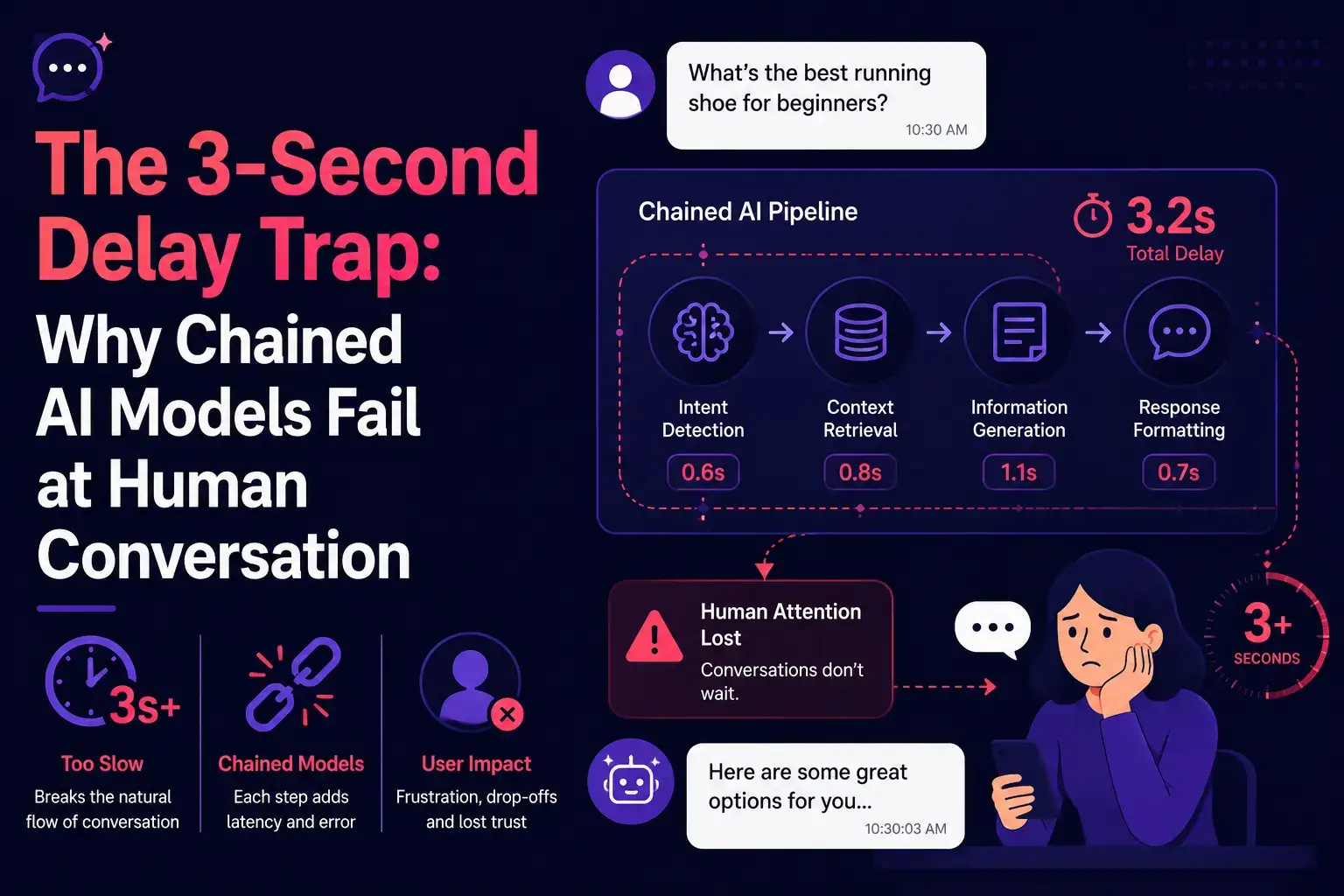
Guides from the Miracuves blog on the cost of building an AI chat assistant, on the safety of a white-label one and on why chained models feel slow in a spoken conversation.


About the workspace10 questions
01What is the Google Gemini Clone, and how do people use it?
Think of it as a ready-built AI workspace carrying your brand. Your people draft with an assistant, put questions to uploaded files, request code, produce voiceovers and start from templates, and you manage plans and watch credit use in the admin panel. Replies come from whichever model provider you connect: that provider owns answer quality, and Miracuves owns the product wrapped around it.
02Can a Gemini-style app be launched legally?
Launching an assistant of this kind is generally lawful. The Miracuves Google Gemini Clone reuses nothing from Google Gemini, whether code, design or content, and you should leave the Google and Gemini names and logos out of your branding. Content, data protection, child-safety and consumer billing rules differ between markets, so get advice locally; Miracuves does not give legal advice.
03May I shape the AI around my organization?
You pick the model providers and the models people may choose, and each model's price is kept in the vendor cost list. Roles for assistants, templates, brand voice and branding are all adjustable, and the complete source lets your developers or ours go further. Training your own model is custom work with its own scope and price, outside the base.
04Do I need technical skills to run the workspace?
None is needed to operate it. We hand it over rebranded and deployed, and routine work, from building plans to editing templates and changing settings, happens in the admin panel. What you must arrange is hosting, a domain, accounts with your chosen model providers and, for publishing the apps, a developer account.
05How do people reach and use the assistant?
The member web panel opens in any browser, including on a phone, and Flutter apps exist for Android and iOS. Reaching the assistant from Slack, Microsoft Teams or WhatsApp is a separate add-on priced on its own.
06Can people use the assistant in several languages?
The panel includes a language switcher and a translation file, and the voiceover studio has its own language picker. Which languages the answers cover is set by the model connected, so pick a provider that serves your users' languages.
07What can the assistant produce for people?
The demo shows blog titles, ad headlines, articles, rewrites, code, narration, pictures, speech turned into text and answers built on uploaded files. The menu names every tool, and what each can produce is set by the model behind it.
08Does it handle pictures, audio and video as well as text?
The demo shows text chat, narration, speech-to-text, a code generator, file chat, an image generator and a vision tool. Video tools are available as paid extensions in the release log, ready to add when your users want them. Each tool is bounded by the model behind it.
09Can it be used in a school or training business?
It can be offered that way. The demo shows file chat for Word, PDF and CSV files, templates and categories you write yourself, and a team members line on the plan checklist. A class roster, grade book or teacher view can be built as scoped custom work. Rules about student data and children remain yours to meet.
10Which kinds of organizations can run it?
Any group working with text, documents, speech or code can run it, among them schools, corporate training teams, consultancies, agencies, software groups, media studios and support teams. It is general-purpose software, and sector rules such as healthcare privacy are applied by your own team.
Plans, money & usage6 questions
11Can I sell different plans to different groups?
Yes. Subscription plans are created in the admin panel. A plan card is priced monthly, is tagged Most Popular where you choose, names the included tools (team members among them) and ends in a Subscribe Now button, and newcomers begin on a free trial. Checkout for the free plan and approval of bank transfers sit in the payment flow, while card payments depend on a payment gateway of your own that has finished onboarding.
12How can a shared AI workspace make money?
The base earns through plans: a free trial, paid plans priced monthly with a tool checklist, allowances that fall with use, and team seats. API sales or lead generation can be layered on as custom work.
13Can I see how much each person uses?
Each member dashboard carries six counters (documents, words, images, code snippets, voice jobs, audio files) and a month-by-month words chart, while the credits view in the admin panel reports what every model and tool consumed. An engagement or satisfaction report can be added for you; describe what you want and we will quote it.
14Which AI models power it, and do I need my own API keys?
Keys that you provide connect the platform to model providers, and the demo displays a model selector and allowances per model. Providers charge you for usage, which is the reason the admin panel includes a vendor price list and a dynamic calculator.
15Which revenue line should a shared AI workspace open with?
Begin with the paid seat or plan: a trial user reaches an allowance, upgrades, and the subscription starts earning right away. Tool-gated plans, team seats and upper tiers come after that, once there are people to sell them to. Other lines sometimes suggested for products like this, such as sublicensing the white-label build to operators or selling developer access, rest on your own commercial deals, so they are negotiated and not built in.
16Why is a branded AI workspace hard to copy?
The defense is the relationship with your users, not the model. People who keep documents, favorites and chat history in the workspace have reason to remain, audience-tuned templates and a brand voice are difficult to duplicate, and your pricing draws on plan and usage data held in your own database. Vendors of models will change, so the platform treats them as swappable providers while the product and its users stay yours.
Admin, data & safety4 questions
17What can I do in the admin panel?
You get subscription plans with bank transfer approval, credit reporting, vendor prices next to a calculator, AI settings, templates with categories, an extensions marketplace, themes, menus, language files, pages, maintenance mode and a sitemap builder. The admin section above describes each one.
18How do I give the assistant new information?
Answers come from the providers you connect, so the base does not train a model. Assistant roles, templates and brand voice steer the replies, and people can bring their own documents to file chat. Field-specific knowledge packs are an add-on; anything further is custom work scoped separately.
19How well is my data protected?
Roles for members and admins are separate, credentials are hashed, traffic runs over TLS, keys stay out of the repository and cards are handled entirely by your gateway. How long chats and uploads are retained, and what model providers may do with the data, follow your own policies. Our shared checklist before go-live covers a restore rehearsal, a pen test and rotating the keys.
20Can it connect to the tools my team already uses?
Payment gateways, translation services, Firebase, Twilio and Google Maps are the services the stack names. Hooking up a CRM, a store platform or a support tool would be custom work, with scope and price agreed in writing.
Launch & Miracuves10 questions
21How long until the workspace is live?
A ready-made build takes 6 days from us. Inside that time we rebrand, deploy to your hosting and submit the apps through your developer accounts. Reviews and onboarding by Apple, Google and your payment provider happen separately and are not counted in the 6 days. Work beyond the base gets its own scope.
22Will the source code be mine?
It does. The web platform and Flutter apps arrive as complete source with no encryption, with the database schema, deployment configuration and architecture notes alongside. No per-seat charge applies, and there is no runtime license.
23What do I have to provide before launch?
Have these ready before launch: hosting plus a domain, a verified developer account for the app stores, your logo and company details, a payment gateway with KYC finished, and accounts and keys for each AI model, speech or other outside service you intend to connect. Opening those accounts, writing your privacy policy and drafting terms are not part of our work.
24What help do admins get after launch?
Support runs Monday to Saturday between 10:00 and 19:00 IST with a first response under 2 hours. Three periods run concurrently: 60 days of platform guidance, 6 months of priority bug fixes and 12 months of product updates.
25Why build my Gemini-style workspace with Miracuves?
Plans, counters, file chat and the admin panel arrive working. In 2025 the same base powered the GUS - ChatGPT platform, where 18 of 22 blocks were reused. Miracuves has shipped over 9,000 projects for more than 6,000 clients, with a shelf of 90+ ready-made solutions. For a fixed $2,799 you receive a launch within 6 working days, and the price includes 60 days of guidance, 6 months of priority bug fixes and 12 months of updates; first replies arrive within 2 hours, 10:00 to 19:00 IST, Monday to Saturday.
26How much does a Google Gemini clone cost?
Our Google Gemini Clone is $2,799 as a single payment. You receive the member workspace, Android and iOS apps in Flutter, the admin panel with plans, credits and the vendor price list, and every line of source, rebranded and deployed within 6 working days. Voice dialogue, knowledge packs, tone awareness and team chat links are add-ons, each priced separately before work begins.
27Is a ready-made Google Gemini clone better than custom development?
For a branded AI workspace, it usually is. Voiceover, speech to text, code generation, file chat, templates, seats, plans and usage counters already work together, so a school or company can sell access within days instead of funding a long build. Custom development only pays when you need a model trained on your own data, and even that can sit behind this workspace later, scoped in writing.
28What is the step-by-step process to launch my Google Gemini clone?
Try the member workspace and phone view in the demo, then decide which tools, seats and plans each group of users should get. Share your branding, domain, hosting, store accounts and model provider keys. Within 6 working days the workspace carries your name, runs on your server, has your plans loaded and has its apps submitted. Apple, Google and your payment gateway complete their own reviews afterwards.
29How does a Gemini-style AI assistant app work behind the chat box?
A member sees a message and a reply, while a pipeline runs underneath: it takes in the prompt, gathers context, chooses a model, streams the reply and counts usage against the member's balance. Writing, voice, code and documents sit behind one login, one menu and one balance, so nobody switches products to finish a task.
30Can members pay by bank transfer in a Google Gemini clone?
Yes. The operator console is where you set plans, approve bank transfers and price each model's credits. Members pick a plan card with a monthly price and an included tool list, then subscribe, while you approve transfers from the admin panel. Cards are handled entirely by the payment gateway you connect.
Further Reading for Founders of an App Like Gemini
Services, a real delivery, business guides and a related learning product.
Build a Google Gemini-Style AI Assistant: Complete Developer Guide for Node.js & PHP
Read the guide→Speak with an expert →Fixed price, paid once
See pricing→ServiceGenerative AI development
Visit the service→IndustryEducation and edtech
See the industry→GUS - ChatGPT
A dialogue-based AI assistant for a utility company, produced on this same base in a 6 working-day window, with a note of the blocks it reused.
Open the case study→GuideBusiness model
How a Gemini-style assistant is organized as a business and where its income comes from.
Go to the guide→Disclaimer
Miracuves is an independent software development company. We are not affiliated with, connected to, sponsored by, or endorsed by Google or Google Gemini.
Read our full Legal Notice & Disclaimer →“Google Gemini Clone” is used descriptively. It is how the software industry refers to building a platform with functionality similar to Google Gemini, and how clients search for it.
The entire design and codebase is built by our own team. The product contains no code, design, graphics, or content originating from the Google Gemini website or applications.
Google Gemini and all other third-party names and marks are the property of their respective owners, referenced here solely to describe the category of software offered.
















