














DeepSeek Clone
Run an AI chat platform on which every model comes with its price. Members write, code, speak and question documents from one login, while you choose the models behind each tool, read what each one costs in the admin panel and cut plans that leave room for that cost.
This is a ready-made, white-label build. You receive the members' web panel (which also runs at phone width), Flutter apps for both Android and iOS, an admin panel with plans and vendor costs, and the complete source code, branded as yours.
Go Live in 6 Days with
- 60 days of platform guidance
- Full source code, unencrypted
- Rebranded with your identity
- White-label deployment on your hosting
- Help publishing the apps
- 6 months of bug fixes, 12 months of updates
Platform activity
- Code request finishedCode
- Monthly plan renewedBilling
- A PDF question asked in file chatFiles
- Words balance under 10%Meters
- Narration job completedVoice
- Bank transfer awaiting approvalPayments
- Vendor price list editedCosts
- Seat added to a team planSeats
- Code request finishedCode
- Monthly plan renewedBilling
- A PDF question asked in file chatFiles
- Words balance under 10%Meters
- Narration job completedVoice
- Bank transfer awaiting approvalPayments
- Vendor price list editedCosts
- Seat added to a team planSeats

Key Numbers
store review runs apart from our build
writing, chat, images, voice and code under one login
words, images, characters and minutes, each counted apart
handed over complete and unencrypted
Model Choice With the Cost Beside It
A model picker on the code form, balances kept per model and a vendor price list all live in one admin panel, so the choice of a model and its cost are read together.
Plans That Cap the Bill
Every plan lists its allowances, balances drop while people work and the credits view shows where spending lands, which helps you price each tier above the models behind it.
01Hands-on
Test Before You Call
Try It Yourself: Member Panel, Phone View, Plan Card and Admin Sign-In
The demo hands you a ready member login, while an admin login is shared on a guided call. Read the balances on the dashboard, pick a model on the code form, put a document through file chat and study a plan card, then ask us to open the vendor cost list and calculator on the admin side.
DeepSeek Clone - Member Panel Shrunk to Phone Width
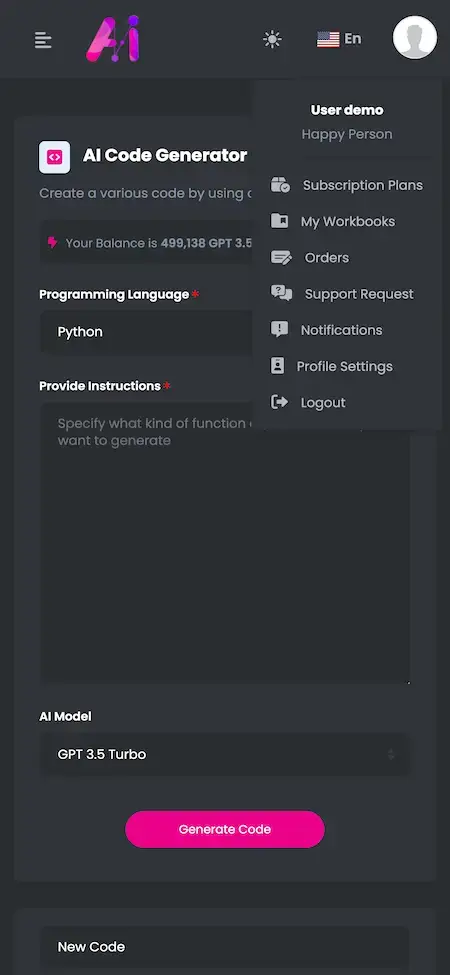
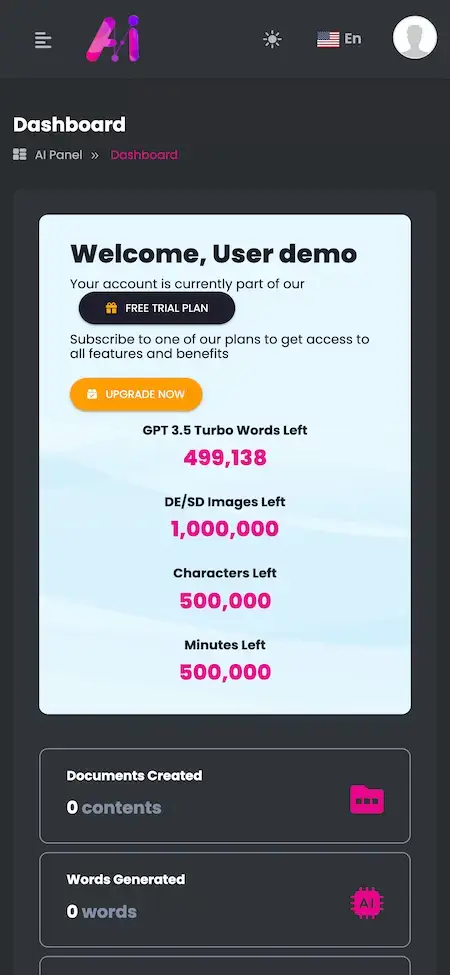
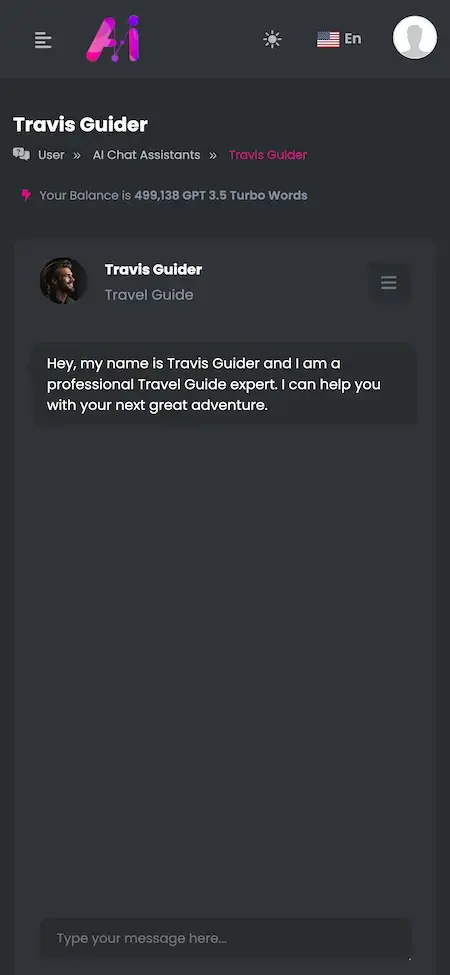
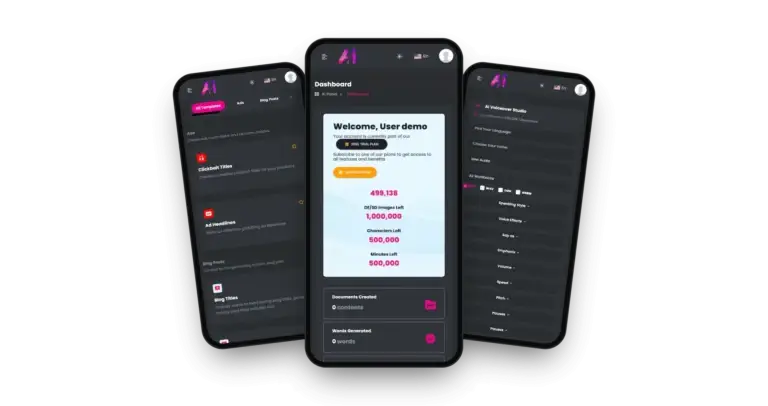
The member panel at the width of a phone. Screens include a dashboard that shows words left for the active model beside counters for images, characters and minutes, plus a tool menu, an assistant chat, a template library, the code form with its model picker and the plan page.
- 1Navigate to the demo site from your phone
- 2Log in with the details on this card
- 3Try the code form, file chat and plan screens
user@demo.com | User_321
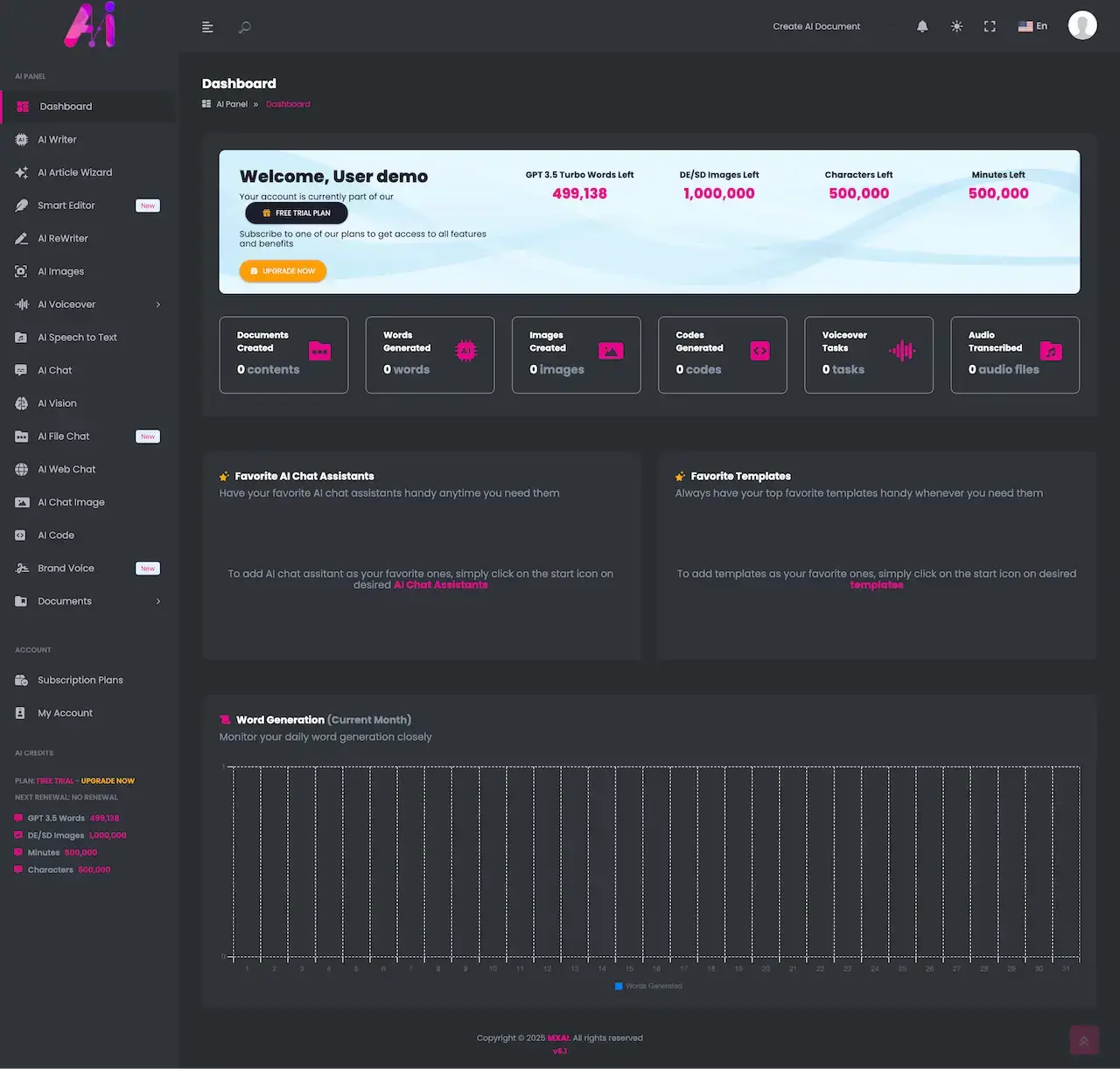
Web Panel on a Laptop - Dashboard and Balances
On a laptop the panel opens with a welcome card for the trial plan. Beneath it sit balances for words, images, characters and minutes, tiles for completed work, a chart of monthly word output and a shelf holding favorite assistants and templates.
- 1Go to the demo address in a browser
- 2Log in with the details on this card
- 3Explore the dashboard, the chat tool, templates and your profile
user@demo.com | User_321
Plan Card - What Each Tier Holds
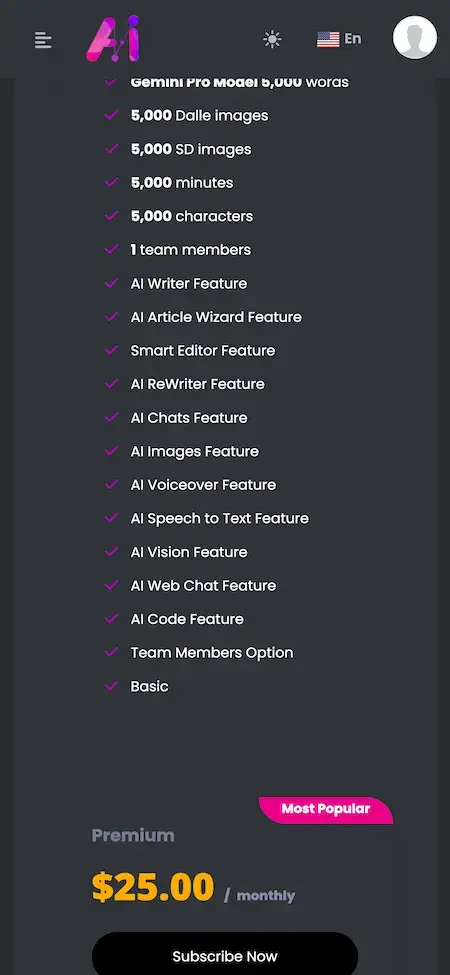
The screen where a trial member decides to pay: a Most Popular badge, a monthly price, a checklist of allowances for words, images, characters and minutes with a team members line, and a Subscribe Now button.
- 1After login, open the plans page
- 2Compare its checklist with the trial counters
- 3Click Subscribe Now and note where it leads
user@demo.com | User_321- 01Credits
- 02Vendor costs
- 03Calculator
- 04Plans
- 05AI settings
- 06Themes
Operator Console - Credits, Vendor Costs and Plans
The operator's workspace: credits per model, a vendor service cost list with a dynamic calculator, plans and bank transfer approvals, AI settings, extensions, themes and pages. We can also show a second web panel on request, and the admin login comes with a call.
- 1Find where admin sign-in lives on the demo host
- 2Have our team send you the admin login
- 3Review credits, vendor prices and plans with us
shared during a callVideo Walkthrough
See the Platform Working First, Then Ask Us About Your Own Pricing
The short video moves through the member screens. If you would rather hear it explained against your own numbers, book a call. We will open the member panel next to the admin console and discuss the models you would offer, what each plan would hold and your target launch date.
Book a walkthrough callScreen by Screen
Nine Phone Screens and the Laptop Dashboard, Shown in the Order a New Member Meets Them
Every image is a capture of the working member panel, not a mock-up. The phone-width set follows a trial member from first screen to plan page; the laptop dashboard follows it.
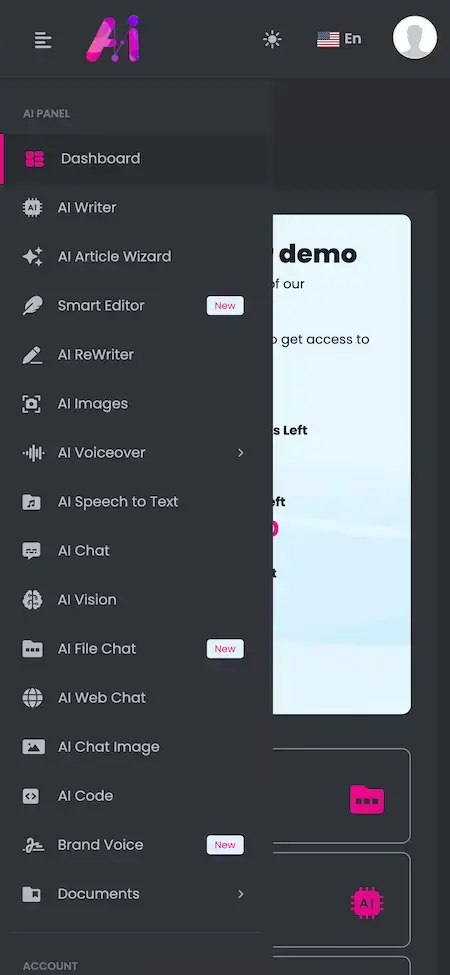
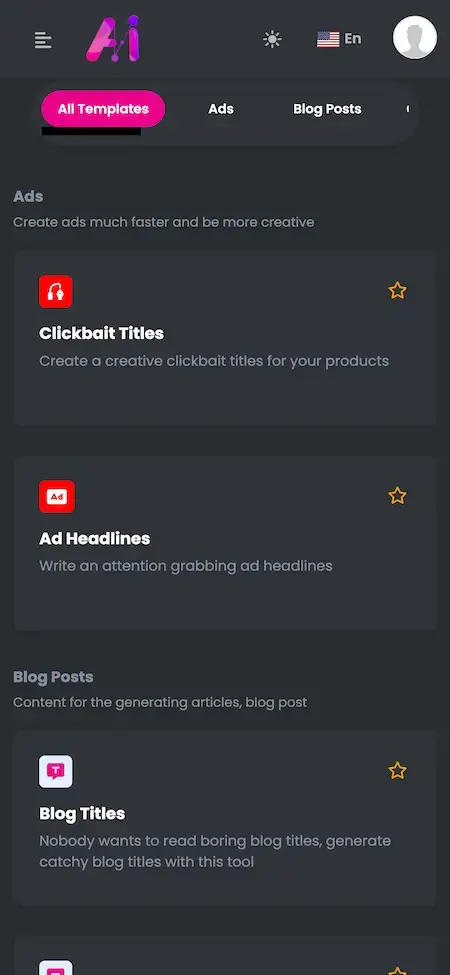
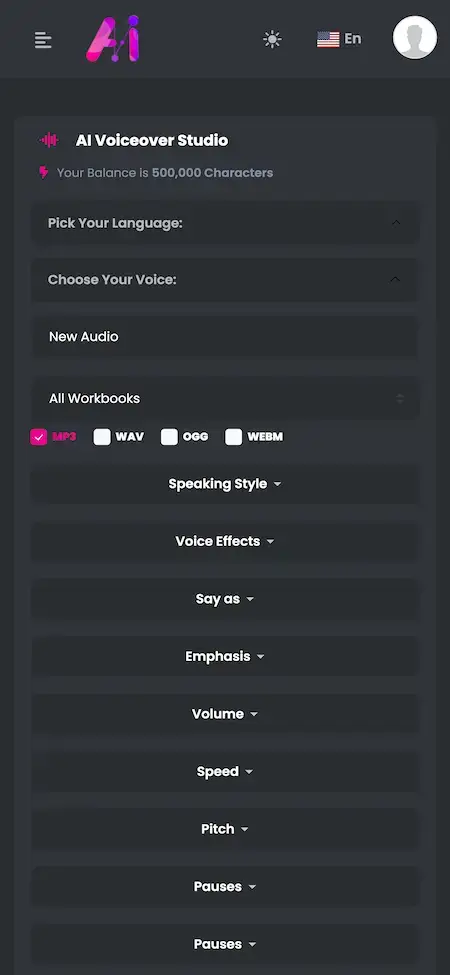
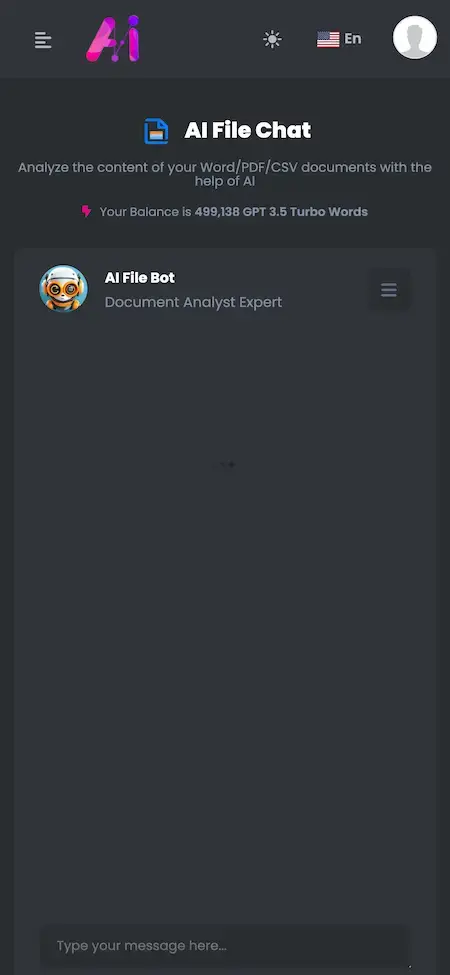


Trace one trial member from start to finish: the dashboard counters, the tool menu, an assistant chat, templates, the code form and its model picker, voiceover, a file put through file chat and, last, the plan card where a free trial becomes a paid account.
02Proof
In Their Words
A Real Client Voice From the MXAI Base
One account on the Miracuves testimonials page names this exact base. It is reproduced here exactly as its author wrote it.
“Conversational workflows, knowledge-base integration and the automation layer were already built. We connected our own data sources and tuned multilingual accuracy for support and lead qualification. The team now runs the whole AI operation from one place.”
Delivery Record
The Second Assistant That Global Utility Systems Launched on This Platform in Six Working Days
This is the published case study of a second conversational AI deployment built on the base sold on this page. It lists what was delivered and what stayed with the client, and it promises nothing about your project.
Global Utility Systems Ltd needed a second conversational AI deployment. Miracuves started from the ready-made base this page sells, so the engagement went into the four choices that belonged to the client alone: which models to offer, what to refuse, how much each plan may use and how the interface looks.

- Put a different model behind the same screens without a rewrite
- Keep usage and cost comparable across models so plans can be priced
- Hold one set of guardrails whichever model answers
- Stand up a second assistant without redoing proven groundwork
- Spend the engagement on the four decisions that were the client's own
- Receive the source code in the client's own account
- Two applications, each with its own permissions and release path
- Models, guardrails, plan limits and interface branding chosen by the client
- Eighteen of twenty-two platform blocks reused unchanged
- Source, schema, deployment configuration and architecture notes handed over
- Delivery inside a 6 working-day window on the ready-made base
“The second deployment reused everything we had learned on the first. Because the base was the same, standing up another model behind the same surface was a much shorter piece of work.”Jemell Cotton · CTO, Global Utility Systems Ltd
03The product
The Essentials
A White-Label AI Platform Where Every Model Comes With Its Price
Picture the DeepSeek Clone as a branded AI chat platform built around cost control. People write, code, speak and question documents with assistants under your name, while you pick the models behind each tool, read what every model costs in the admin panel and cut plans that leave room for it.
Models You Can See and Choose
A model selector sits on the code form and balances are counted by model, while the credits view and the vendor price list name the cost of each one.
Source Without a Lock
The code is handed over whole and unencrypted, so your developers can reshape screens and flows whenever needed. Nothing is charged per seat or per request.
Add-Ons Kept Apart
Spoken conversations, knowledge packs, mood-aware replies and messenger links are paid extras, listed separately from the base tools.
Web, Android & iOS
What You Receive Behind the Chat Box
Wiring a chat box to a model is the easy part. The effort goes into what surrounds it: balances counted per model, plans that cap usage, a price list showing what the vendor bills you and a calculator that turns those prices into plan decisions. That surrounding layer is the part delivered here.

- 01A free trial with live balances
- 02A model picker on the code form
- 03Plan cards with allowances and Subscribe Now
- 04Credits view, vendor prices and a calculator
- 05Guardrails with an audit log
Included: the member web panel with its phone view, the admin panel, Flutter apps for both Android and iOS, and the full source code.
Inside the Platform
DeepSeek Clone Features: Model Choice, Vendor Costs, Plans, Counters, Chat, Files, Code and Voice
Each capability listed here can be seen in the live demo or is recorded in the release log. Modules that need separate work appear further down as paid add-ons.
Model Choice & Per-Model Balances
The code form has an AI Model field. On the dashboard, the words still available for the model in use are printed next to separate counters for images, characters and minutes.
- The AI Model selector completes the code form
- A words-left figure follows the model in use
- Counters for images, characters and minutes sit apart
- View Credits lists every model on its own line
- Release 6.6 added two reasoning models to the credits view
Vendor Costs & Calculator
Operators keep a price list of what each model vendor bills them and use a dynamic calculator to turn those prices into plan and allowance decisions.
- AI Vendor Service Costs, a list in the admin panel
- A dynamic cost calculator next to it
- Release 6.6 put the same two reasoning models into both
- One calculator fault was repaired in 6.6
- Spend per model can be read in View Credits
Plans & Allowances
A plan card carries a monthly price, shows a Most Popular badge where you set one and holds a checklist of what is included. A free trial sits first in line, with an Upgrade Now button of its own.
- Word allowances carry the name of the model they apply to
- Two separate image allowances are listed
- Characters and minutes cover voice work
- A team members line appears in each checklist
- Checkout on the free plan was repaired in 6.8
- Bank transfer approval was repaired in 6.6
- The SaaS business extension was updated in 6.9
Usage Counters & Dashboard
One dashboard shows what is left of each balance and what has been produced during the current month.
- Remaining words, images, characters and minutes
- Six tiles count audio files, voice jobs, code snippets, images, words and documents
- A chart of words produced each month
- The credits panel shows the next renewal date
- The profile page repeats the documents-created count
Assistant Chat
Open a conversation with a named assistant (the demo has a travel guide), read the greeting it starts with and type below it. Favorites stay pinned on the dashboard.
- Each assistant carries a role line and an opening greeting
- A message box closes every chat screen
- Favorites are pinned on the dashboard
- The menu gives AI Web Chat its own entry
- AI Chat Image is meant for talking about pictures
- Chat welcome messages can include HTML tags (6.9)
- The published architecture list includes a guardrail engine that filters, refuses and logs requests
File Chat
Attach a document and put questions to it through a document analyst bot; the screen mentions Word, PDF and CSV files.
- The menu tags AI File Chat as New
- Answers come from a Document Analyst Expert bot
- The screen lists Word, PDF and CSV
- Your balance sits above the conversation, and follow-ups go in the message box
- The architecture list also includes a retrieval block and a vector store
Code Generator
One short form converts a plain request into code. Name the language, describe the function, pick a model and press the button.
- A programming language field
- An instruction box
- The AI Model selector chooses which model writes the code
- Generate Code runs the request; its copy action was repaired in 6.8
Voiceover Studio & Speech to Text
Paste in a script, set the language and the voice, and narration comes back counted in characters. Speech to Text has its own menu entry nearby.
- Language comes first, then the voice
- Exports: MP3, WAV, OGG or WEBM
- Controls for speaking style, effects, say-as and emphasis
- Settings for volume, speed and pitch, plus pauses
- The characters balance is printed on the screen
- A free voice isolator extension arrived with 6.8
Templates & Writing Suite
Ready-made prompts are grouped under tabs, one card per job, and a star marks a favorite. Longer work is supported by the AI Writer, AI Article Wizard, Smart Editor, AI ReWriter and Brand Voice entries in the menu.
- Cards for clickbait titles, ad headlines and blog titles
- Template tabs labeled All Templates, Ads and Blog Posts
- Your own templates, filed under categories you make
- The status of a custom template can be edited at any time
- New tags mark Smart Editor and Brand Voice
- Finished work is kept in a Documents folder
Pictures & Vision
Next to the text tools are an image generator, a vision tool and a chat centered on images, and each spends from an image allowance.
- An AI Images entry in the menu
- An AI Vision entry beside it
- Your image balance is counted on the dashboard
- Image sizes for one image model were corrected in 6.9
Account & Profile
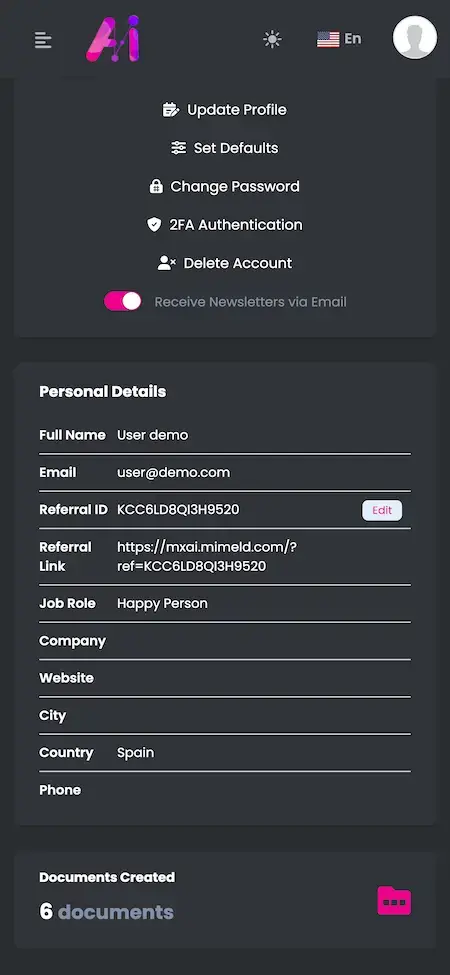
The profile page holds the usual account items: personal details, a referral ID and link, and controls for security and consent.
- Personal details beside a documents-created count
- A referral ID with a link to share
- Two-factor authentication can be switched on
- Profile update, defaults and password change
- A delete-account action
- A switch for newsletter e-mails
Marketplace, Themes & Storage
Extra modules come through a marketplace page, and look, language and upkeep are handled by settings and not by code.
- Extensions and themes are listed on the marketplace, some free and some paid
- Items on the marketplace update in place
- Maintenance mode costs nothing; the menu builder is a paid extra
- Choose between the Classic, Sonic and Modern themes
- A header language switcher, with the language file gaps filled
- Stored images are cleaned out on a schedule, and chat images may use external storage
- A sitemap builder came in 6.9
Before you order: Miracuves delivers the platform rebranded and deployed. On your side: your logo and company details, hosting with a domain, Apple and Google developer accounts in your name, a payment gateway whose onboarding and KYC are complete, and an API key for each model provider you choose to connect. Apple and Google carry out the store review, which takes its own time and sits outside our 6 days of build work.
The Operator's Side
Controlling the Cost Side: The DeepSeek Clone Admin Panel at Work
A single console is where the person managing the business works. It shows the price of each model, how much members have used, which plans are on sale and which pages, themes and templates are live.
- 01Credits
- 02Vendor costs
- 03Calculator
- 04Plans
- 05Bank transfers
- 06AI settings
- 07Extensions
- 08Themes
- 09Templates
- 10Pages
- 11Languages
What the Console Holds
- 01
Plans & Payments
Build the plans members subscribe to, run the free plan through checkout and approve bank transfers paid outside the card gateway.
- 02
Credits View
Shows the credits consumed by each model and tool, an early sign of where allowances are draining.
- 03
Vendor Service Costs
A list of the prices your model vendors charge, stored in the admin panel so the cost of every model is on record.
- 04
Dynamic Cost Calculator
Converts vendor prices into numbers for plan decisions: change an allowance and read the cost it implies. Release 6.6 added two reasoning models.
- 05
AI Settings
Where the AI side gets configured. The page was reworked in 6.8 and sits close to the cost list and the credits view.
- 06
Templates & Categories
Create your own templates and sort them into categories of your choosing next to the built-in ones; each one is switched on or off through its status.
- 07
Marketplace & Extensions
A marketplace page offers additional modules and themes. Some are free and some are paid, and they can be updated in place.
- 08
Themes, Pages & Language
Three themes, pages for the blog and for system content, maintenance mode, a sitemap builder, translation files and scheduled clean-up of stored images.
Money & Cost Side
Every financial task, from putting a plan on sale to checking a vendor bill.
- Plan setup and free-plan checkout
- Approval of bank transfers
- Credit use by model and by tool
- A vendor price list with a calculator
Site Upkeep
Settings and housekeeping that sit behind the public pages.
- Themes, menus and pages
- Maintenance mode and a sitemap builder
- Translation files and the language switcher
- Scheduled clean-up of stored images
Need the console to do more? A different approval route, another usage report or one more payment method would each be custom work. Describe what your organization needs and we will give you a written quote before building anything.
04Box and price
Everything Delivered
What Arrives in the Box: Source Code, Apps, Admin Panel and Handover Notes
You get a complete platform and not loose components: a web panel for members, mobile apps, an operator panel, all the source code and the database schema beneath them. Ownership is outright, with no charge per seat or per request and no renewal to keep it running.
$ ls app database config Full Source Code
Both mobile apps and the web platform come unencrypted, so your developers can reshape them as your needs change.
- Source of the web platform, unencrypted
- A single Flutter project for Android and iOS
- Open to changes, extensions and redeployment
- Handed over to a repository you name
Schema & Migrations
Database tables for accounts, plans, chats, documents, usage and payments, provided so the whole thing can be rebuilt on a blank server.
- The schema comes with its migrations
- The data tier runs on MySQL
- Chats are saved alongside members and plans
- Separate records track usage, credits and payments
Usage & Cost Ledger
The saved conversations plus the ledger behind the counters: who asked, which tool and model replied and how much allowance the request consumed.
- Every member's threads and turns are stored
- Logged for each member and for each thread
- Each tool draws from its own allowance
- Usage and audit events are sent to an event stream

Member Web Panel
The responsive screens members use every day: dashboard, assistants, templates, file chat, code form, voiceover, plan page and profile.
- A dashboard of balances and counters
- Assistants, file chat and templates
- A code form and a voiceover studio
- The plan page, profile and referral link
Phone Panel & Flutter Apps
The same panel at phone width, along with Flutter apps for Android and iOS that put the tools in a side menu.
- Every tool is listed in a side menu
- Chat, templates, code and narration
- A Flutter app for Android and one for iOS
- Publishing happens from your developer accounts

Admin Panel
Where operators work: credits per model, vendor prices with a calculator, plan setup, bank transfer approvals, AI settings, themes, extensions and pages.
- Plan setup and bank transfer approval
- Credits shown beside vendor prices
- A calculator that recalculates as inputs change
- Settings for the AI side, plus themes, extensions and pages
Access & Guardrail Layer
Members and admins have separate logins and separate permissions. A gateway guards the calls to the models, and a guardrail engine applies the rules you write.
- Separate permissions for each role
- A gateway that authenticates callers and caps request rates
- Members may switch on two-factor sign-in
- The repository holds no credentials
Handover & Support
When branding and deployment are finished you receive written notes, and three support periods begin at once on launch day.
- Your logo, icons and colors on every screen
- Deployment on the hosting you pick
- Written deployment steps and architecture notes
- 60 days of guidance, 6 months of bug fixes, 12 months of updates
Prefer to try it first? Open the demo as a member, or book a walkthrough in which we go through a code request, a file chat, a plan card and the vendor cost list, built around your own use case.
Single Price
What It Costs to Launch a Cost-Controlled AI Chat Platform Under Your Own Brand
A single fixed price of $2,799 buys the ready-to-launch, white-label platform. Anything outside the base, such as an add-on, a link into another system or a flow specific to you, gets a written scope and quote before work begins.
Professional
Launch-Ready PackageChosen by: Startups selling AI subscriptions, agencies reselling assistants, internal AI desks and training firms that run the platform under their own name
You receive the platform as the demo shows it, rebranded with your logo, icons and colors and deployed on the hosting you choose.
Get StartedEnterprise
Bespoke Work for Bigger RequirementsChosen by: Teams that host their own models, need a curated knowledge library or work with a compliance team
A flow missing from the base is built to your brief, with scope and price settled in writing beforehand.
Ask for a QuoteGo Deeper
Four Guides on How the Product Works, What It Costs, How Safe It Is and How It Earns
The Miracuves blog goes further than this page: the logic behind the assistant, what a ready-made script holds and charges, the security questions worth asking and the revenue lines behind an AI chat product.
05Who it serves
Who It Fits
Which Businesses Gain Most From a DeepSeek Clone Platform That Puts Model Cost in View?
It fits operators who sell or give away AI access and need to know what every answer costs, and who would rather hold the plans, accounts and data themselves than rent a seat on another company’s platform.
Founders selling chat access by the month, who need plans, balances and a vendor cost list in one place so each tier can be priced above the cost of its models.
Studios giving each client a branded assistant with its own plans, billing the client for the tools and allowances it picks.
Company teams offering staff a governed assistant, using plans and allowances to cap spend per group and the credits view to see who used what.
Founders building for programmers, whose code request form takes the language, the instruction and the model, next to chat and file tools.
Groups that answer from Word, PDF and CSV material through file chat, supported by templates and a document analyst bot that takes the questions.
Operators serving a single language or country, using the language switcher, a translation file and a voiceover studio with its own language picker.
When people use AI often and the model bill is real, a branded platform leaves pricing, balances and the customer relationship with you, and the delivered source code backs that up.
Speak With Our TeamDay-to-Day Uses
Six Ways to Put Model Choice to Work: Entry Plan, Premium Tier, Document Desk, Cost Review, Prompt Library and Reseller Portal
Different operators lean on different parts of the same platform. A subscription startup relies on plans and balances, an internal desk on allowances and the credits view, a support team on file chat. Which parts you put forward is configuration work.
Swipe · 6
Put members on a free trial, show the balance falling for the model in use and let Upgrade Now carry the sale. Price the tier above what its model costs you.

Reserve the stronger model for a paid tier. On the code form a member names the language, describes the function and chooses the model that writes it.

Support and knowledge teams drop a Word, PDF or CSV file into file chat and ask the document analyst bot about it, with the balance always in sight.

Open credits and vendor costs side by side, try an allowance change in the calculator and measure the outcome against your plan prices.

Create templates and categories for the jobs your staff repeat, star the best ones and store completed work in the Documents folder.

Run the whole toolset under a client name, with their logo on every screen, plan names of your choosing and a tool list set separately for each plan.

One build, six business shapes. Every scenario runs on the same member panel, phone view and admin console. What changes is the tools you feature, how plans are structured, which allowances you set and which brand you apply, so one codebase covers all of them.
Speak With Our TeamIndustries
Business Types It Suits
Any business that sells or hands out AI access can run the DeepSeek Clone. AI startups and SaaS resellers charge for plans. Agencies brand an assistant for each client. Support and documentation teams answer from their own files. Education and training firms give learners templates and a document desk. Consultancies, publishers and developer-tool makers use the writing, code and voice tools under their own name.
one codebaseMXAI
- 01AsAI Startups
- 02SrSaaS Resellers
- 03MaMarketing Agencies
- 04CsCustomer Support
- 05EtEducation & Training
- 06EcE-commerce
- 07PsProfessional Services
- 08CfConsulting Firms
- 09PuPublishing
- 10DtDeveloper Tools
- 11UiUtilities & Infrastructure
- 12CtCoaches & Trainers
The DeepSeek Clone is a single cost-aware platform that fits many kinds of business, with plans, meters and an admin panel under your own name.
06How it is built
Step by Step
From First Login to a Paid Plan: One Member's Route Through the Platform
A member sees a message and a reply. Beneath that runs a pipeline: the prompt comes in, guardrails apply, a model is chosen, the answer streams back and usage is counted. First comes the member journey, then the architecture beneath it.
A Member's Path - Trial to Subscription
Swipe · 6
- 1Open the Dashboard
Signing in drops the member on a dashboard that shows a welcome card, the trial plan and the counters for the words, images, characters and minutes left.
- The welcome card names the free trial
- Words left are tied to the model in use
- The card carries an Upgrade Now button
- 2Pick a Tool and a Model
The side menu names each tool. On the code form the member also picks the model that does the work, and the balance reacts to that choice.
- A language field and an instruction box
- The AI Model selector
- A Generate Code button
- 3Chat With an Assistant
A named assistant opens with a greeting, then waits for a question typed beneath it, while the balance stays printed above the conversation.
- An assistant with a role line
- Greeting and message box
- Balance in view above the chat
- 4Question a Document
In file chat a member puts questions about a Word, PDF or CSV file to the document analyst bot, and every follow-up remains in the same thread.
- The document analyst replies in the chat
- Listed formats: Word, PDF and CSV
- Follow-ups continue in the same thread
- 5Turn a Script Into Narration
A script goes into the voiceover studio and comes out as audio in the chosen language and voice, metered in characters.
- A language, a voice and an output format
- Style, speed, pitch and pauses
- A characters balance that drops with the job
- 6Upgrade to a Paid Plan
When an allowance nears its end, one tap opens the plan card with its monthly price, an allowance checklist and a Subscribe Now button.
- A Most Popular badge
- Allowances and tools listed as a checklist
- Subscribe Now as the closing action
Behind the Screens
How a Single Request Travels Through the DeepSeek Clone, Layer by Layer
- 01Stage 01
Thread Storage
Threads, turns and context are saved per member, so a conversation can be picked up again where it stopped.
- 02Stage 02
Model Selection
A request is sent to whichever provider and model were chosen for it, which is how one platform can offer several models at once.
- 03Stage 03
Token Streaming
Tokens reach the screen as they are generated, and a reply in progress can be stopped rather than waited out.
- 04Stage 04
Guardrails
Filters and refusals screen each request and an audit log records it, while the rules for what is refused stay in your hands.
- 05Stage 05
Spend Metering
Counts are kept for each member and each thread. Those totals explain why allowances shrink and why the credits view adds up.
- 06Stage 06
Plan Entitlements
The plan a member bought fixes the tier, quotas and fair-use limits, and those settings drive the dashboard counters.
Under the Hood
The DeepSeek Clone Stack: Laravel and PHP, Node.js, MySQL, Flutter Apps and the Model APIs You Connect
Three layers decide how an AI platform behaves: the web application, the database that keeps usage and payments in agreement, and the phone apps. The product pages describe this platform as follows.
Web & Admin Layer
Node.js · PHP · Laravel · Bootstrap- Members and operators share one codebase
- The interface is responsive, built on Bootstrap
- Choose among Classic, Sonic and Modern themes
- A language switcher with translation files
Database
MySQL · MongoDB- MySQL stores members, plans, chats and usage
- MongoDB is named in the stack list beside it
- Schema and migrations ship inside the source
- An empty server can rebuild the database from them
Phone Apps
Flutter · Android · iOS- Flutter apps on up-to-date dependencies
- The tool list lives in a side menu
- In the demo the member panel is seen at phone width
- Publishing goes through your developer accounts
Model Connections
Vendor Costs · Your Keys- The code form has a model selector
- Credits are listed per model
- A cost list and calculator track vendor prices
- Provider accounts and keys belong to you
External Integrations
Google Maps · Twilio · Firebase- The product's stack list also names Google Maps, Twilio and Firebase
- Payment gateways connect through their APIs, and an admin approves bank transfers
- Translation through an outside service
- The voiceover studio relies on speech services
Source Handover
Schema · Repository · Config- Application source with its history
- Mobile projects with signing steps noted
- Written deployment configuration
- Architecture notes for your team
The stack list on the product page gives the web and admin layer as PHP with Bootstrap, Node.js and MySQL with MongoDB, and the case study published for GUS - DeepSeek lists PHP, Laravel and MySQL. The mobile apps are Flutter. Whichever outside service you wire in (Google Maps, Firebase, Twilio, a payment gateway, translation, speech or a model provider) needs its own account and keys in your name, entered at deployment. All of this is common technology, so developers are easy to hire.
Growth Headroom
Ready for More Members and More Models: Gateway Limits, Streamed Answers, Metering and a Written Handover
Separate blocks surround the conversation store, so a bigger audience or a longer model list calls for added capacity and a few settings, not a fresh build.
Two Surfaces, Two Release Cycles. Members and operators use separate applications with their own permissions, so one can ship without waiting for the other.
A Gateway Before Each Model Call. Requests are authenticated, rate-limited and screened for repeats before a model sees them, which keeps one account from flooding the system or the bill.
Streamed Answers You Can Stop. Tokens come back as they are produced, and a reply still being written can be canceled, so a long answer never locks the screen or keeps spending.
An Audit-Ready Ledger. Usage by member, thread and model is recorded and sent to an audit stream, so dashboard numbers can be checked against stored data.
Separate Surfaces
Member and admin run as two applications with separate permissions and release paths, which lets either change alone.
Gateway With Limits
A gateway sits in front of the models: it identifies the caller, applies rate limits and spots repeated calls before any model is reached.
- Callers are identified at the gateway
- Request rates are capped
- Duplicate calls are caught
- Members and admins log in separately
Streaming Replies
Replies stream back token by token and may be canceled halfway rather than arriving only when finished.
- Tokens are sent as they are made
- A running answer can be canceled
- The balance stays in view above the chat
- Counters move while people work
Event Stream
Usage and audit events go to a stream, which keeps reports and accounting off the critical path of the conversation.
- Each request emits one usage event
- Audit events are kept for review
- Several readers can consume the stream
- Reports are based on ledger data
Token Accounting
Token totals are tracked per member and per thread and compared with the plan, its quotas and its fair-use limits.
- Totals per member and thread
- Quotas per tier
- Fair-use caps
- Credits split by model and by tool
Written Handover Pack
Source code, schema, deployment setup and architecture notes all change hands, so another team can run the platform alone.
Room for Your Own Rules. Sooner or later a business needs something particular to its work. Complete source plus a conventional stack make a new tool, rule or provider routine development, whether your team or ours does it.
Starting small? Begin modestly: launch the plans and tools you can sell now from one deployment. More traffic calls for hosting capacity and settings; anything past the base is scoped and quoted on its own.
07Safety and duties
Security Posture
Security in the DeepSeek Clone: Role Separation, Audit Trail, Spend Caps and What Is Still Open
On an AI platform, accounts, conversations, uploaded files and payment references all end up together. Four questions come first: where card details travel, which prompts the models will accept, who can see which data and what work is left before launch. The cards below split what the platform covers from what remains yours.
- 01 · RolesRole Separation
Each role, member or admin, is shown only its own data and actions, and the server enforces this rather than the interface simply hiding things.
- Separate member and admin logins
- Permissions checked on the server
- Member Account Controls: Two-factor sign-in, account deletion and a newsletter opt-out sit on the profile page, covering the minimum for safety and consent.
- 02 · AuditAudit Trail
Every request leaves usage and audit events behind, which lets you settle a dispute over a charge or a refusal with a lookup.
- Usage events recorded per request
- Audit events kept for review
- Guardrails & Moderation: Every request passes filters and refusals and is logged for audit. Whatever the product declines is your decision; the base enforces it, and the rules deserve a test against real prompts before launch.
- Spend Caps: A plan sets quotas and fair-use limits for the member, so a single account cannot run up an unbounded share of the model bill.
- 03 · TransportTransport & Storage
Traffic is sent over TLS, credentials are stored hashed and sensitive data at rest is encrypted, not merely hidden.
- TLS on all traffic
- Hashed credentials and encrypted sensitive values
- 04 · SecretsSecrets Handling
Environment configuration on your own servers holds the keys for models, speech and payments, and the repository you receive stays free of secrets.
- Keys held in environment configuration
- Nothing secret inside the repository
- Provider Keys: The keys belong to you, not to us, and sit in server-side environment settings, so even a leaked repository gives nothing away.
- 05 · CardsCards Stay at the Gateway
Card numbers are typed into your payment gateway, and the platform stores a payment reference instead of the card.
- Cards entered at your gateway
- Only a payment reference is stored
- Transfer Approvals: A bank-transfer plan is activated only after an admin approves it, which ties offline money to a named member.
- 06 · BackupsBackups & Restore
Backups are scheduled as part of the deployment, and a restore gets rehearsed ahead of launch, since an untested backup proves nothing until a restore has actually been run.
- Scheduled backups with the deployment
- A restore rehearsed before launch
- Pre-Launch Tasks: Key rotation, a restore rehearsal, a penetration test and a read-through of your model providers' data terms are on the list of work still to do, never assumed done.
No certificate comes with the platform, and Miracuves does not hold ISO 27001: we build to the controls such frameworks examine and leave a trail an auditor can follow. Ahead of launch we agree three jobs with you: rotating keys, rehearsing a restore and commissioning a penetration test.
Go Through Security With Us Before LaunchWho Does What
The DeepSeek Clone Covers the Software and You Cover the Rules
An AI chat platform writes answers, stores what people type and may bill for it. Miracuves delivers the chat, plan and usage tooling, and the operator sets what the assistants may say, handles member data and answers to the laws that apply to the sales.
In this context “ready” describes software that runs in the demo and the admin panel. The platform and Miracuves hold no license, certificate or approval, and nothing here is legal advice.
Already in the Software
Working today: the admin panel itself; separate member and admin sign-ins; guardrails with an audit log; a credits view beside a vendor cost list and calculator; four kinds of metered allowance; a free trial plus paid plans; and the chat, file chat, template, code and voice tools.
Yours to Decide
Terms of service and the privacy policy are yours to write, along with which topics the assistants may address, how long chats and uploads are retained, how deletion requests are handled and which refund and cancellation terms apply beyond the defaults.
Minors, Moderation & AI Rules
Where minors may use the platform, rules on children's data and parental consent can apply. Moderating generated content, telling people that replies are machine-written and labeling synthetic speech or images are policies for you to set. The base can filter and log, but it cannot make those judgment calls.
Your Markets
Data protection, consumer, tax and AI rules change from country to country and frequently within a single country, and prompts or uploaded files can hold personal or confidential data. Check each market with qualified local advisers before sign-ups open.
08Extras
- Chat, file chat, templates and code
- Voice and writing tools
- Plans, meters and the trial flow
- Admin panel and vendor cost list
How an add-on is delivered
- 1Choose a module
Spoken conversations, subject knowledge, mood awareness or messenger links, at launch or at any later point.
- 2Quote before work
Every module starts with a written scope and price, ahead of any building.
- 3Delivered as code
Once built, the module is merged into your own codebase.
Paid Extras
Four Paid Add-Ons for the DeepSeek Clone: Spoken Conversations, Domain Knowledge Packs, Mood-Aware Replies and Messenger Links
The base is complete and can be tried in the demo. These four modules are the extras requested most often, and each is priced separately because the work depends on your product.
Drag to explore · hover to pause
- 01Expertise
Spoken Conversations
A member asks aloud and hears the answer read back within the same exchange. Because the base already includes a narration studio and a speech-to-text tool, this module only has to make the dialogue itself spoken, for hands-free use and for accessibility.
Voice · Spoken - 02Expertise
Domain Knowledge Packs
Bundles of vocabulary, background and reference text for one field, for example law, finance, healthcare or technology, so replies use that field's own words and come out more exact.
Knowledge · Packs
- 03Reach
Mood-Aware Replies
Picks up the tone of a message and adapts the reply, easing an irritated user or treating a sensitive moment with extra care.
Sentiment · Replies - 04Reach
Team Messenger Links
Place the assistant in the chat tools a team already keeps open (Slack, Microsoft Teams and WhatsApp), so questions can be asked without leaving them.
Slack · Teams · WhatsApp
Beyond the Chat Box
Selling More Than Chat? Four Products That Pair With It.
The DeepSeek Clone handles the AI chat and cost-control side of a platform. If your roadmap also includes app building, video, messaging or shared files, these four products sit well next to it.
01Turns a prompt into an app, bills through per-model credits, supports 22 LLM providers and ships with an admin console.
Explore Solution
02Creates video from a script using avatars, voices and localization, organized into workspaces with admin controls.
Explore Solution
03Chat, voice and video calls, groups and stories on servers you host yourself.
Explore Solution
04Team file storage with shared spaces, upload handling, share links and an operator panel.
Explore Solution09Revenue picture
Where the Money Comes From
How a Cost-Aware AI Platform Earns: Tiered Plans, Seats, Metered Allowances and the Spread Over Model Cost
Income and cost on an AI platform both move with the model, so this section keeps them apart: the plan side is what you charge, and the model side is what the vendor bills you.
Two figures matter first: the share of trial members who convert and the model cost that every plan has to cover.
- 01
Model-Tier Plans
A plan card names its word allowances by model, so a low-cost model can anchor an entry tier while a stronger one sits in a higher tier. You set each tier's monthly price in the admin panel.
- 02
Team Seats
The checklist on every plan has a team members line. One plan can be sold to a small group at a price you decide, with the seat count printed beside the allowances.
- 03
Metered Credits
Words, images, characters and minutes are counted apart, and the credits view shows what each model has spent. When an allowance runs out, the member is nudged toward a larger plan.
- 04
Trial-to-Paid Upgrade
New members start on a free trial whose balances count down on the dashboard. Its welcome card carries an Upgrade Now button, which is where the plan card does its selling.
- 05
Spread Over Model Cost
The vendor cost list and the calculator set what each model costs you against what a plan brings in. Choosing a cheaper model for routine tools widens the gap, and premium work is priced to cover its own cost.
- 06
Store & Card Fees
A cost line rather than income: app stores and card processors keep a cut of every payment, so plan prices must leave room for it. Bank transfers approved in the admin panel bypass both.
| Stream | How the money moves | Take rateTypical rate | What caps it |
|---|---|---|---|
| Model-Tier Plans | A flat recurring fee per plan, collected by an app store or a gateway. | US App Store ladders: ChatGPT $8, $19.99, $100 and $200; Google AI $4.99, $19.99 and $199.99; SuperGrok $10, $30, $100 and $300. | Members' willingness to pay for the tiers you list. The figures are prices developers chose for their own store pages, so they indicate a market ladder, not a fee schedule. |
| Team Seats | A per-seat monthly price on a business edition. | Google lists Gemini Enterprise from $21 per seat per month for Business and from $30 for the Standard and Plus editions. | How many people share a plan, and whether a company or an individual pays. |
| Premium-Model Cost | Billed to you per million tokens, with input and output priced separately. | Standard short-prompt rates: xAI lists $2.00 in and $6.00 out, the Gemini API $2.00 in and $12.00 out and OpenAI $2.00 in and $10.00 out. | How many tokens a plan allowance lets a member burn. The vendor cost list holds each price and the calculator turns it into a margin. |
| Budget-Model Cost | The same per-million-token billing, applied to lower-priced models. | DeepSeek lists $0.15 in and $0.60 out off-peak and doubles both at peak hours; OpenAI lists a second model at $0.10 in and $0.50 out. | Whether the cheaper model is good enough for the tool in question. It widens your margin, and quality decides how far you can lean on it. |
| Store & Card Fees | A cut kept from each payment by the app store or the card processor. | Apple retains 30% of a subscription during the first subscriber year and 15% afterward, or 15% throughout in its Small Business Program. Google Play charges 10% plus a 5% billing fee on subscriptions in the US, UK and EEA from 30 June 2026. Stripe's US rate is 2.9% plus 30c per domestic card payment. | The route the member pays by: store billing, card gateway or bank transfer. Where Google Play has not switched structures, subscriptions stay at 15%. |
Where the numbers come from. Consumer plan prices are the amounts developers set on the US App Store pages for ChatGPT, Gemini and Grok, and the seat prices are on Google's subscriptions page. Per-token prices are read from the price lists of OpenAI, the Gemini API, xAI and DeepSeek, and payment fees from Apple, Google Play and Stripe. Every number belongs to another company and serves only as a modeling input: none is an offer or a forecast of earnings, and your own prices and costs are set in the admin panel you control.
Market Benchmarks
AI Assistant Market Benchmarks - Independent 2025-2026 Data
The revenue models above are ours. The figures below are not. They are published numbers from Pew Research Center, Ofcom, the Stanford AI Index and Alphabet's annual filing, reproduced as published. They show how many adults use AI chatbots in the US and UK, how fast generative AI spread worldwide, and how a platform owner uses Gemini, so you can check a business case against sources you can verify.
49% of US Adults Use AI Chatbots, Up From a Third
Pew Research Center surveyed 5,119 US adults from 17 to 23 February 2026 and reported on 17 June 2026 that 49 percent ever use AI chatbots such as ChatGPT, Gemini or Copilot, up from 33 percent in 2024. Ever using ChatGPT specifically rose from 18 percent in 2023 to 44 percent in 2026, according to the same report.
54% of UK Adults Use AI Tools Such as ChatGPT
Ofcom's Adults' Media Use and Attitudes report, published 2 April 2026, finds that just over half of UK adults (54 percent) say they use applications such as ChatGPT, Copilot or Gemini. About four in five 16-24s (79 percent) and three quarters of 25-34s (74 percent) use AI tools, and 57 percent of men use them against 51 percent of women.
53% Population Adoption of Generative AI in 3 Years
The Stanford Institute for Human-Centered AI's 2026 AI Index Report says generative AI reached 53 percent population adoption within three years, faster than the PC or the internet, though the pace varies by country and correlates strongly with GDP per capita. It cites Singapore at 61 percent and the United Arab Emirates at 64 percent.
Gemini Runs Across 15 Products With 500M+ Users
Alphabet's Form 10-K for fiscal 2025, filed 5 February 2026, states that all 15 of its half-billion-user products, including seven with two billion users, use its Gemini models. It also reports Google subscriptions, platforms and devices revenues of US$48,030 million in 2025, up US$7.7 billion, citing paid subscriptions across YouTube services and Google One.
Pew Research Center, Americans and AI 2026: Chatbots, Smart Devices and Views on Impact, 17 June 2026 - pewresearch.org
Ofcom, Adults' Media Use and Attitudes Report 2026, 2 April 2026 - ofcom.org.uk
Stanford Institute for Human-Centered AI, The 2026 AI Index Report, top takeaways, report PDF metadata dated 29 June 2026 - hai.stanford.edu
Alphabet Inc., Form 10-K for the fiscal year ended 31 December 2025, filed 5 February 2026 - sec.gov
All figures are the publishers’ own survey results, index values and filing figures, reproduced as published. They describe the market, not the performance of any platform Miracuves builds, and nothing here is a revenue projection for your business.
Timing
Why an AI Platform That Shows Its Costs Has an Edge in 2026
The independent figures above show AI assistants turning into an everyday tool for many adults. What remains open is who sets the prices, holds the accounts and controls the model bill; a platform carrying your brand puts those decisions with you.
01Model Prices Differ Widely
In the price lists cited above, a budget model and a premium one sit ten times apart or more per million tokens. A platform that records each model's cost can steer routine work to the cheaper one and charge accordingly for premium work.
02Margins Live in Allowances
When allowances are counted per model and plans cap them, the gap between a plan price and the model cost behind it is something you set on purpose.
03Vendors Change Their Prices
If a provider revises its rates, the vendor cost list and the calculator make it a settings edit and not a rebuild.
04Buyers Compare Plans Quickly
A monthly price, a Most Popular tag and a visible checklist of allowances can be judged in under a minute.
05Your Accounts Are an Asset
Chats, documents, favorites and usage history are stored in a database you own, so whatever you learn about customers remains yours and does not pass to a model vendor.
06Build-or-Buy Is Easy to Settle
Most of the effort lies in plans, counters, tools and an admin console, so a white-label base can be live in 6 days on hosting you choose.
The Platform at a Glance
Tools behind one login
Meters per member
Surfaces, one codebase
Days to launch
Offering AI to a customer base is hard mainly because of the layer that connects the chat box to the invoice: falling balances, plans with caps and a price list you can trust. This build already contains it.
Commercial Logic
Marketability, Revenue Potential & Business Prospects
Revenue begins when a trial member trusts the platform enough to buy a plan, and it continues while the tools, allowances and price stay worth it. The goal is an easy buying decision and a lasting relationship.
- 01
Recurring Income, Variable Cost
A monthly plan earns again each month while the model cost behind it moves with use, so allowances and the vendor cost list decide how much of every payment you keep.
- 02
One Console, Separate Levers
Plans, seats, allowances and model choice are separate settings in a single admin panel, so one can move without reworking the others.
- 03
Customer Data Stays With You
Member accounts, chat history and usage records are kept in a database you own, so the knowledge about your members stays with you and not with a model vendor.
- 04
Models Are Swappable
The source and schema are yours and the provider accounts are in your name, so changing a vendor, a host or a developer needs nobody's permission.
- Model-Tier Plans
- Team Seats
- Metered Credits
- Trial-to-Paid Upgrade
- Spread Over Model Cost
- Store & Card Fees
Your edge is the relationship with members, not the model underneath.
- 01Saved chats and files keep members
- 02Tuned templates and a brand voice
- 03Pricing grounded in your own usage data
- 04Swappable vendors, members stay yours
Each case varies only by the number of paying seats, and each names the lever that matters at that size. Use them as planning material, not as a forecast of anyone's revenue.
One entry plan carries the early revenue.
A single audience served by a small platform on a low-cost model; a hundred paying seats on one plan are enough to cover running costs. Illustrative size for planning talks, not a forecast.
Budget and premium tiers both earn.
A brand for one language or country, with an entry tier on a cheaper model and a top tier on a stronger one; once model cost is counted, the credits view shows which tier earns more. Illustrative size for planning talks, not a forecast.
Seats, tiers and metering all in play.
Many models and several plans are live, so how allowances are designed and how accurate the cost list is settle the margin. Illustrative size for planning talks, not a forecast.
10The build partner
Why Miracuves
Who Should Build Your Cost-Aware AI Platform? Miracuves Compared With the Alternatives
There are three routes to an AI platform: a generic script, a freelancer or an agency, or a ready-made base from a team that has already delivered it.
Why Operators Choose Miracuves
- 01
Plans Arrive Wired
The base already holds a free trial, a plan card ending in Subscribe Now and countdown counters, while plenty of chat scripts end once the conversation is done.
- 02
Cost Next to the Model
Balances per model, a vendor price list and a calculator set what a model costs beside what each plan sells for.
- 03
Many Tools, One Account
One login and one balance reach chat, file chat, code, voiceover, templates and the writing suite, giving every plan more to offer.
- 04
Full Ownership of the Source
All of it arrives unencrypted, with the schema and the deployment notes, so no one else can change the product's price or terms afterward.
- 05
A Base With a Record
GUS - DeepSeek launched a second assistant on it in 2025, reusing 18 of 22 blocks; the published case study names the four built new.
- 06
Clear Lines Between Parts
Included features, paid add-ons and what you bring yourself (model keys, hosting, store developer accounts) each have a separate list on this page.
Where the DeepSeek Clone Stands Against Packaged Scripts and Custom Agency Work
| What You Compare | MiracuvesMiracuves DeepSeek Clone | Packaged Script | Agency Build |
|---|---|---|---|
| Time to Launch | Six days of Miracuves build time | Open-ended, mostly DIY | Quoted per project, often months |
| Code Ownership | Whole and unencrypted | Frequently restricted or locked | Usually transferred |
| Model Cost Visibility | Credits per model, vendor price list, calculator | Seldom any | Built to order at extra cost |
| Subscription Billing | A free trial, plan cards and Subscribe Now already built | Rarely included | Built to order |
| Usage Metering | Words, images, characters and minutes counted per plan | Differs by script | Custom accounting |
| Tool Breadth | Chat, files, templates, code and narration | A bare chat window | As much as the budget allows |
| Security & Compliance | Role-based sign-in, guardrails and documented limits | Minimal | Varies with the builder |
| Value for Money | Fixed price, fast start, proven base | Cheap but risky | Expensive and slow to start |
| Support After Launch | 60 days of guidance, 6 months of bug fixes, 12 months of updates | Seldom offered | As the contract states |
Few routes reach paying members without rework; this table shows where the routes part.
Speak With Our TeamChangelog
Version-by-Version History of the DeepSeek Clone
Notes for the web platform, newest version first, without dates. Names of tools and models are kept generic, and an entry about license terms on a third-party marketplace is left out since it records no product change.
| Release | Summary | Details |
|---|---|---|
| V6.9.2 | 1 fix | Fixed The social media extension installs without error |
| V6.9.1 | 2 fixes | Fixed Display faults on the blog page corrected Display faults on system pages corrected |
| V6.9 | 11 additions or updates, 5 fixes | New and updated Welcome messages in chats accept HTML tags SaaS business extension updated (v1.2) Social media extension updated (v1.1) Avatar extension (v1.4): voice search plus a new generation page Image-to-video extension receives more video models and its own credit setting (v1.1) Text-to-video extension updated (v1.2) A fashion option is added to the product photo extension (v1.1) A sitemap builder arrives New free extension: maintenance mode New paid extension: a menu builder New paid extensions: text-to-music, video-to-video, face swap and an image generation tool Fixed Sizes fixed for one image model (v1.1) Web chat: minor fault corrected Smart editor: minor fault corrected One language model name displays correctly Editing the status of a custom template works again |
| V6.8 | 8 additions or updates, 5 fixes | New and updated Classic and Sonic themes updated (v1.3) Text-to-video extension: credits per video model (v1.1) Marketplace page reworked AI settings page reworked Clean-up of stored images runs more sensibly New paid extension: social media New free extension: voice isolator Avatar extension (v1.2): a credit setting per video option Fixed Modern theme: update fault corrected Checkout on the free plan works again Logo in e-mails displays correctly Code tool: the copy action works again Words missing from the language file added |
| V6.7 | 5 additions or updates, 2 fixes | New and updated Plans can now list avatar features Avatar extension (v1.1): asset upload, a page listing all voices and deletion of results Marketplace updates run more smoothly Classic and Sonic themes updated (v1.2) New paid extension: text-to-video Fixed Faults with chat image storage on two outside services fixed Avatar extension: photo upload works again |
| V6.6 | 5 additions or updates, 3 fixes | New and updated New paid extension: avatar The credits view, vendor cost list and calculator now include two reasoning models Faster loading for the themes and marketplace pages Image model extension updated (v1.1) Modern theme updated (v1.1) Fixed Bank transfer approval: fault fixed Calculator: fault fixed Categories of custom templates function again |
Start a conversation
Launch an AI platform whose model costs you can see.
Reserve a free consultation and you will leave with a launch timeline and honest answers to your questions. We would rather earn your trust than close a fast sale.
- First reply in under 2 hours
- A free first consultation
- Source code handed over complete
- One fixed price, no per-seat fee
11Read more
Blog & Resources
Recent Reading on AI Costs: Credits and Margins, Retrieval Quality and What a Ready-Made Script Holds
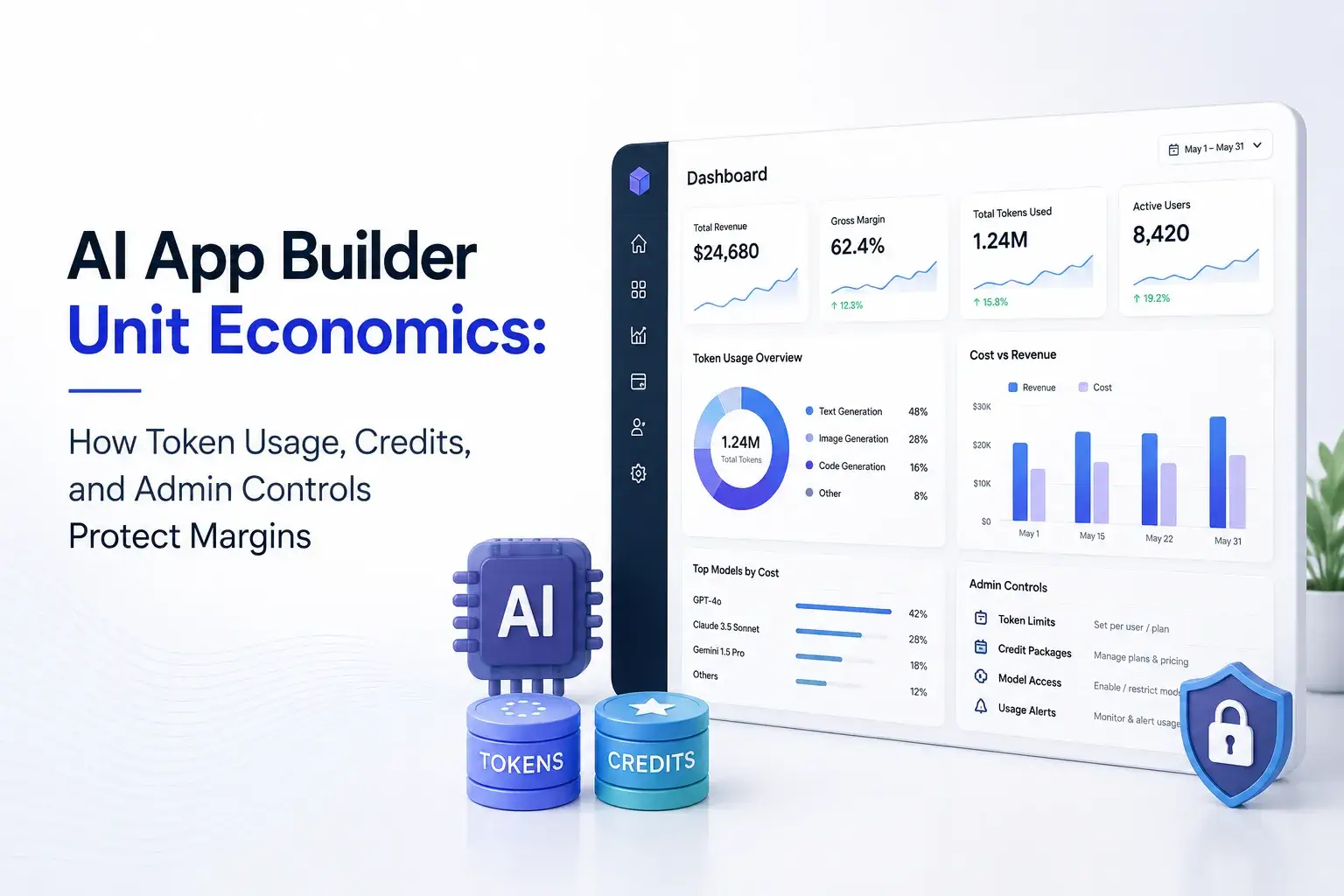
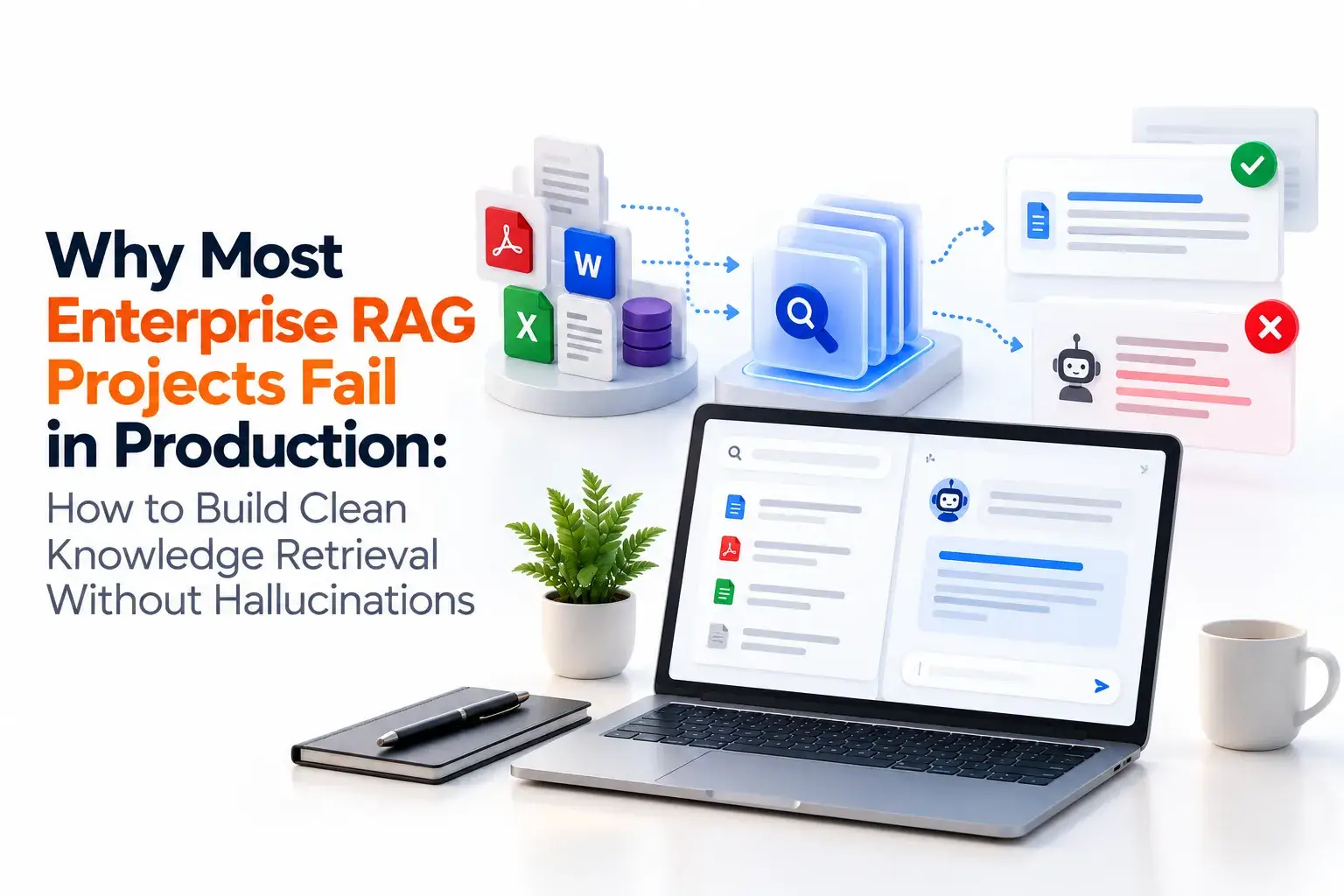
Guides from the Miracuves blog on how credits and admin limits protect the margin of an AI product, why knowledge-retrieval projects stall in production and what to look for in a ready-made DeepSeek-style script.

About the platform10 questions
01What exactly is the DeepSeek Clone, and how does it work in practice?
It is a ready-made AI chat platform that carries your brand. Members draft with an assistant, put questions to files they upload, request code, record voiceovers and begin from templates, while you manage plans and follow credits and vendor costs in the admin panel. Answers come from the model provider you connect, so answer quality is that provider's, and the product built around it is Miracuves's work.
02Is a platform modeled on DeepSeek lawful to operate?
Running an AI assistant is generally lawful. Nothing in the Miracuves DeepSeek Clone is copied from DeepSeek, whether source, visuals or wording, and your own branding should leave out the DeepSeek name and logo. What the law requires on content, personal data, child safety and consumer billing depends on the market, so take local advice; Miracuves gives no legal advice.
03Can I choose which models the platform uses?
You decide which provider accounts to connect, and the code form shows a model selector, with credits listed per model. The published GUS - DeepSeek case study describes putting a different model behind the same surface as configuration rather than a rebuild. Switching automatically to the cheapest model for each request is not shown in the demo, so that behavior would be custom work.
04Where can I see what each model costs me?
In the admin panel: an AI Vendor Service Costs list records what each vendor bills you, a dynamic cost calculator sits beside it and View Credits gives every model its own line. Release 6.6 added two reasoning models to all three. Keep the list aligned with your vendors' own price pages, because those are the figures that count.
05Do I need coding knowledge to run the platform?
No coding is needed. The platform reaches you rebranded and deployed, and everyday work like building plans, editing templates and adjusting settings happens in the admin panel. You arrange hosting, a domain, accounts with the model providers you pick and, for the apps, a developer account.
06How do members reach the assistant?
The web panel opens in any browser, on phones too, and the delivery also contains Flutter apps for Android and iOS. A paid add-on, priced separately, covers access from Slack, Microsoft Teams or WhatsApp.
07Does the assistant work in several languages?
Language handling consists of a switcher, a translation file and, in the voiceover studio, a language picker of its own. The languages of the answers follow the connected model, and no tested language list exists on record.
08What can the assistants produce for members?
Visible in the demo: titles for blogs and ads, long articles, rewrites, code, narration, images, speech converted to text and answers drawn from uploaded files. Each tool is named in the menu, and the model behind it sets the limit of what it can produce.
09Beyond text, does the platform deal with images, sound or video?
Demonstrated: chat, narration, speech to text, code generation, file chat, image generation and a vision tool. No demo screen shows video analysis, and video appears in the release log solely as paid extensions, which makes it an add-on matter. Each tool is limited by its model.
10Which kinds of businesses can run it?
Any business that sells or gives away AI access can run it, from AI startups and SaaS resellers to agencies, support and documentation teams, training firms and consultancies. It is general-purpose software without certification for any sector, so industry duties such as healthcare or finance requirements stay with you.
Plans, money & usage7 questions
11Is it possible to offer several plans to different kinds of customers?
Yes. You build plans in the admin panel. Each plan card shows a monthly price, may carry a Most Popular tag, lists its allowances and tools (a team members line included) and ends with a Subscribe Now button, and new members begin on a free trial. The payment flow covers free-plan checkout and the approval of bank transfers, whereas card payments need your own payment gateway with onboarding completed.
12How does an AI platform like this earn money?
Income comes from plans: a free trial, then paid plans with a monthly price and an allowance checklist, plus team seats and allowances that shrink with use. Your margin is what a plan collects less what its models cost, which is why the vendor cost list and calculator sit in the admin panel. Neither API sales nor lead generation appears in the demo, so adding either is a custom job.
13Can I limit what a plan lets a member spend?
Each plan holds allowances for words, images, characters and minutes, and its checklist can include a team members line. Once an allowance is gone the member is shown the plan card. Limits are written as those allowances, not as currency amounts, and the base architecture lists entitlements and per-member, per-thread token accounting behind them.
14Do I need my own API keys for the AI models?
Yes, you connect model providers with keys from your own accounts. The demo shows a model selector and allowances per model, and providers charge you for usage, which is why the admin panel carries a vendor price list and a calculator.
15Can I see how much each member uses?
Each member dashboard has six counters (audio files, voice jobs, code snippets, images, words and documents) plus a monthly chart of words, while the admin credits view reports consumption by model and by tool. The demo shows no engagement or satisfaction report; describe what you need and we will quote it.
16Which revenue line should a cost-aware AI platform lead with?
Start with the paid plan: a trial member runs into an allowance, upgrades, and the subscription begins to earn at once. Model-tier plans, team seats and metered allowances come next, once there are members to sell to. Other lines that get proposed for products like this, such as granting operators a license to the white-label build or charging for developer access, hinge on commercial deals you strike yourself, so they are negotiated separately and are not built into the base.
17What makes a branded AI platform hard to copy?
Your edge is the relationship with members, not the model underneath. Anyone who keeps documents, favorites and chat history on the platform has a reason to stay; templates tuned to your audience and a distinctive brand voice take time to copy; and your pricing rests on plan and usage data stored in your own database. Model vendors will come and go, so the platform treats them as interchangeable providers while the product and its members stay yours.
Admin, data & safety6 questions
18Which tasks can I handle from the admin panel?
Credit reporting, vendor prices beside a calculator, subscription plans with bank transfer approval, AI settings, templates and categories, a marketplace for extensions, themes, menus, pages, language files, a sitemap builder and maintenance mode. For detail on each, see the admin section above.
19Can the platform refuse certain topics or moderate replies?
The base architecture on the published GUS - DeepSeek page names a guardrail engine, which applies filters and refusals to every request and keeps an audit log. Deciding what gets refused is the operator's job, and the rules should be tried against real prompts before launch. Neither the demo nor the release log shows an admin screen for reviewing member conversations, so a review queue or a moderation workflow would be custom work.
20How do I give the assistant my own information?
Members can bring Word, PDF or CSV files into file chat and question them. Domain Knowledge Packs, which bundle reference text for one field, are a paid add-on. The demo has no admin screen for building a shared knowledge library, so a curated company-wide library would be a custom job with a scope and price of its own.
21Can I train or fine-tune a model on the platform?
No. The base calls the providers you connect and trains nothing itself. Assistant roles, templates and brand voice shape the replies, and anything like training or fine-tuning your own model would be custom work, scoped and quoted on its own.
22How is member data protected on the platform?
Roles for members and admins are separate and passwords are stored hashed. TLS protects traffic, secrets are kept out of the repository and card numbers go straight to your gateway instead of the platform. No security certification is held. Chat and upload retention, plus the data terms of your model providers, fall under your own policies. Ahead of launch we agree three jobs with you: rotating keys, rehearsing a restore and commissioning a penetration test.
23Does it plug into software my team already runs?
The stack lists Firebase, Twilio, Google Maps, translation services and payment gateways. Connecting a CRM, store platform or support desk is custom work whose scope and price are agreed in writing beforehand.
Launch & Miracuves5 questions
24How long does it take to go live?
Our share of a ready-made build is 6 days, during which we rebrand the platform, deploy it on your hosting and publish the apps from your developer accounts. Reviews and onboarding at Apple, Google and your payment provider run on their own schedules and sit outside the 6 days. Anything beyond the base is scoped separately.
25Will the source code be mine?
Yes. The web platform and both Flutter apps are delivered as unencrypted source, accompanied by the schema, the deployment configuration and written architecture notes. There is no charge per seat and no runtime license.
26What do I need to provide before launch?
Before launch you need hosting, a domain, developer accounts at Apple and Google that have been verified, branding assets and company details, a payment gateway that has passed KYC, and keys for every outside service you plan to use, from model providers to speech. Opening those accounts, writing a privacy policy and drafting terms are outside our scope.
27Who helps the admins once the platform is live?
Support hours are 10:00-19:00 IST on Mon-Sat, and the first reply arrives in under 2 hours. Three support periods run side by side: 60 days of platform guidance, 6 months of priority bug fixes and 12 months of product updates.
28Why build a DeepSeek-style platform with Miracuves?
You receive working plans, meters, file chat and an admin panel, with a vendor cost list and calculator built in. In 2025 the same base carried a second conversational deployment for GUS - DeepSeek, which reused 18 of 22 blocks. Since 2010 Miracuves has completed 9,000+ projects for 6,000+ clients and keeps 90+ ready-made solutions on the shelf. One fixed $2,799 covers a launch in 6 working days, with 60 days of guidance, 6 months of priority bug fixes and 12 months of updates; our first reply comes in under 2 hours on working days (Monday to Saturday, 10:00 to 19:00 IST).
Where to Go Next With the DeepSeek Clone
One service page, a published delivery, an industry page and the guides behind this product.
LLM development
Explore the service→Case studyGUS - DeepSeek
A second conversational AI deployment on this same base. Built in 6 working days, with a page that lists which blocks were reused and which were new.
Read the case study→Business model
Where an AI chat business earns and how its parts are organized.
Go to the guide→GuideHow it works
A plain explanation of the assistant this clone is modeled on and how its parts fit together.
Read the guide→Technology and SaaS
See the industry→GuideRevenue model
Plan structure, API access and costs of an AI chat product, offered as ideas for pricing your own.
Read the guide→Speak with an expert →Features and pricing
What a ready-made script includes, how its features are grouped and what it costs.
Read the guide→Related platformWhite Label AI App Builder
Prompt-to-app generation with per-model credits, for operators who want to sell builders as well as chat.
See the platform→Disclaimer
Miracuves is an independent software development company. We are not affiliated with, connected to, sponsored by, or endorsed by DeepSeek.
Read our full Legal Notice & Disclaimer →“DeepSeek Clone” is used descriptively. It is how the software industry refers to building a platform with functionality similar to DeepSeek, and how clients search for it.
The entire design and codebase is built by our own team. The product contains no code, design, graphics, or content originating from the DeepSeek website or applications.
DeepSeek and all other third-party names and marks are the property of their respective owners, referenced here solely to describe the category of software offered.