AI Helper App · Production Ready

Apple AI ReALM Clone App - White-Label Role-Based AI Assistant

Miracuves' ready-made, white-label Apple AI ReALM clone runs a helper app around members' own files: unencrypted source code that becomes yours, a web panel that fits phones, a Flutter app each for Android and iOS plus an admin panel, ready in six working days.

Members hand file chat a Word, PDF or CSV document and a document analyst bot answers in the same thread, while a header switcher and translation files change the interface language. The language of each reply follows the model you connect, on API keys you own. An extra approval step or another payment method is custom work, quoted in writing and usually delivered in 2-8 weeks.

Launch in 6 Days with

  • Source Code
  • Android + iOS Apps
  • Member Web Panel
  • Admin Panel
  • Your Logo & Colors
  • Hosting Rollout

StackFlutter · PHP · Laravel · Bootstrap · Model APIs · MySQL · Firebase

MXAI console · Members and filesIllustrative
Active members1,382
File questions today327
Chats today2,140

Member activity

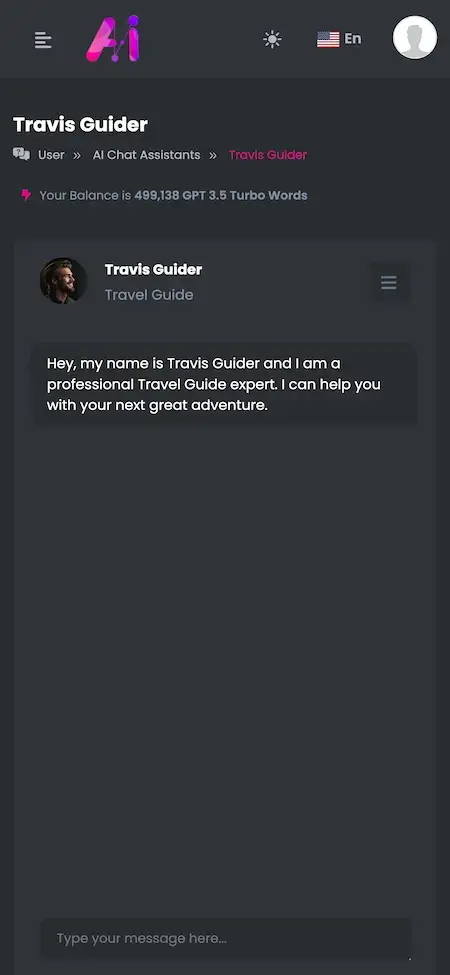
Apple AI ReALM Clone phone chat with a travel guide assistant: its portrait, a role line, an opening greeting and an empty message box.
Each chat opens on a named assistanta role line and a greeting come first
  • 9Demo Phone Screensdashboard, tool menu, assistant, templates, code form, voiceover, file chat, plan card, profile
  • 3Interface ThemesClassic, Sonic and Modern
  • 0%Revenue Share With Miracuvesno royalty on member plans or allowances, ever
  • 4Priced-Apart Add-Onsspoken dialogue, domain knowledge packs, mood-aware replies, team-messenger links
  • 6Days to Launchand if the delay is ours, we keep going free
  • $2,799Paid Once, Not Rentedsource code yours, no per-seat fee, no monthly rental

Live in six working days, or we keep working free until you launch. Every build carries 60 days guidance, 6 months bug fixes and 12 months updates.Verify every figure

Four Decisions Were the Client's

Miracuves built the conversational AI product of Global Utility Systems Ltd from this base, and the work went into four calls: models on offer, refusals, usage per plan and appearance.

Narration in Their Language

The voiceover studio has its own language and voice pickers and bills narration in characters, and a separate Speech to Text entry works the other way.

Your Gateway Holds the Cards

Members enter card numbers at your payment gateway and the platform keeps a payment reference instead; a plan paid by bank transfer waits for admin sign-off.

Picture an app that answers from your members' own files and works in their language. Want one under your name?Talk to a Product Expert

Trusted by 6,000+ clients worldwide

Miracuves is listed by Expertise.com as a managed IT service provider.Miracuves is an official member of the Forbes Business Council.Miracuves is a verified agency on DesignRush, listed among top design agencies in India.Miracuves is reviewed on Trustpilot as a software development company.Miracuves is listed by The Manifest among top managed software development companies.Miracuves is listed by DesignRush as a top software development company.Miracuves is recognized by GoodFirms as a top software development company.Miracuves is ranked among the top 1000 companies globally by Clutch.Miracuves is a top managed service provider in the United States on Clutch.

01Try it

Try Before You Talk

Test the Helper Yourself: Phone View, Laptop View, Plan Card and the Operator Console

Each card prints a member login for the Miracuves Apple AI ReALM clone that you can use straight away; the admin login is handed over on a call. Good first moves: open an assistant and see how it greets you, hand file chat a Word, PDF or CSV document, click the language flag in the header and read the plan card, then ask us for the operator view.
Apple AI ReALM Clone phone dashboard: a trial welcome card with an Upgrade Now button, balances for words, images, characters and minutes, and tiles for documents and words generated.Apple AI ReALM Clone phone chat with a travel guide assistant: its portrait, a role line, an opening greeting and an empty message box.
On a phone

Apple AI ReALM Clone - the Member Panel Narrowed to a Phone

The member panel narrowed to a phone. Nine screens are on offer: dashboard balances, the tool menu, a named assistant, templates, the code form, the voiceover studio, file chat, the plan card and the profile.

  1. 1Visit the demo address from a phone
  2. 2Sign in with the member details shown here
  3. 3Open the assistant first and file chat second
Login:user@demo.com | User_321
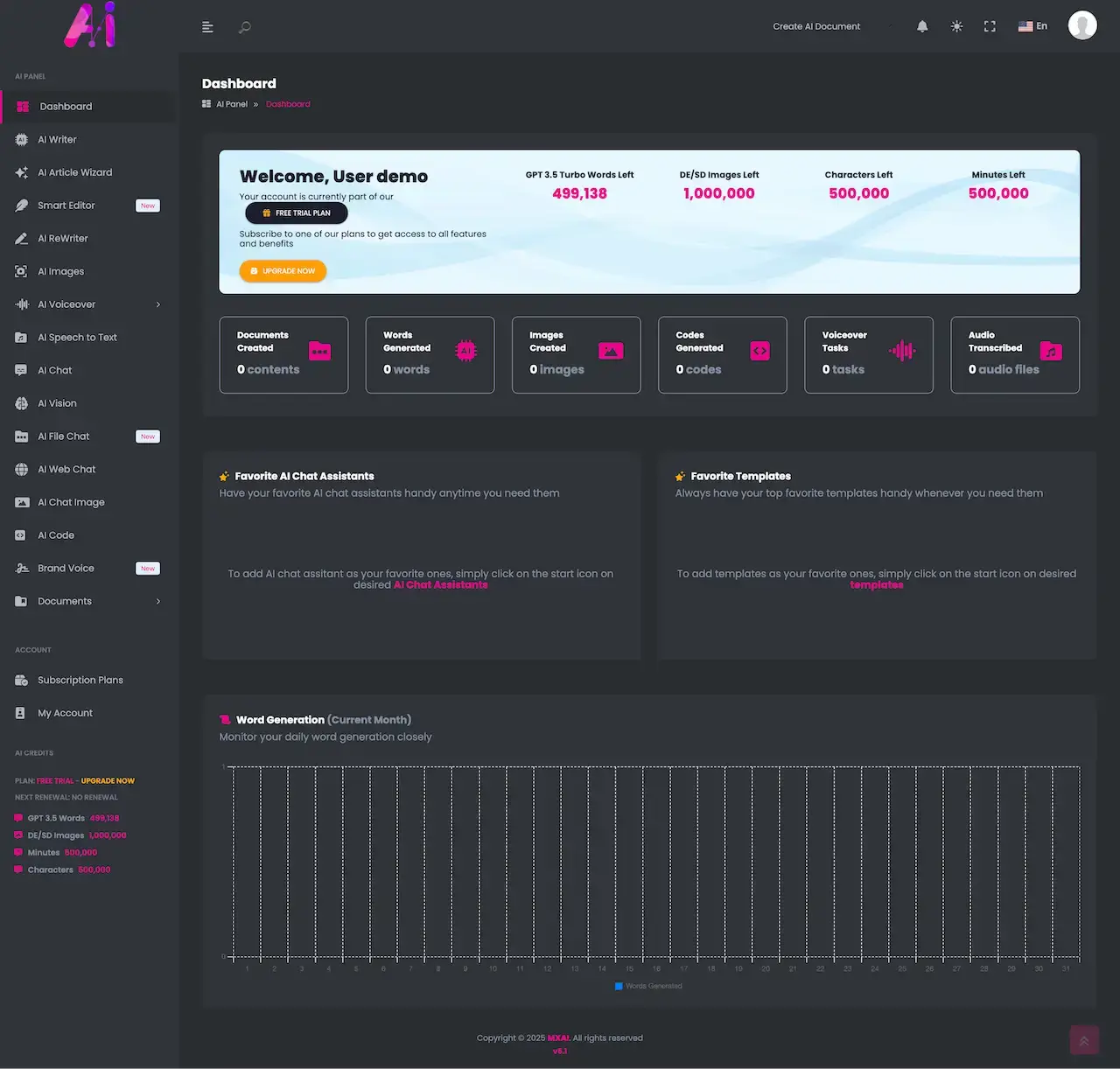
Apple AI ReALM Clone member web dashboard: a trial-plan welcome card, balances for words, images, characters and minutes, six usage counters, favorite assistant and template shelves and a monthly words chart.
On a laptop

Laptop Layout - Favorites, Counters and Balances

The laptop layout opens on a trial-plan welcome card carrying four balances. Beneath it come six work counters, two favorites shelves (assistants and templates) and a month-to-date word chart.

  1. 1Browse to the demo address
  2. 2Log in with the member details above
  3. 3Scan the dashboard, then try chat and the profile page
Login:user@demo.com | User_321
Apple AI ReALM Clone phone plan card: a checklist of allowances and tools, a Most Popular badge, a monthly price and a Subscribe Now button.Apple AI ReALM Clone phone profile page: profile actions, a two-factor option, a delete-account action, a newsletter switch, personal details, a referral ID and link and a documents-created counter.
The paywall

Plan Card - Allowances, Tools and Subscribe

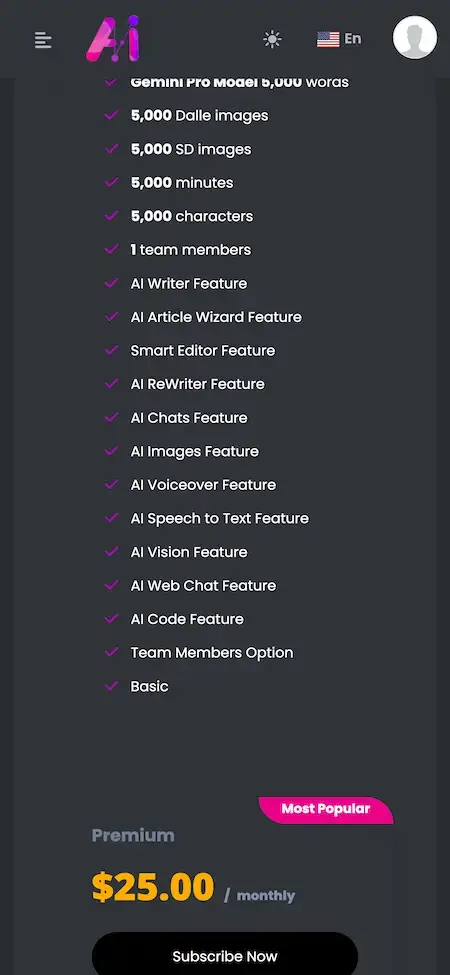
This is where a trial member is asked to pay. The card combines a monthly price with a Most Popular badge, then lists allowances, tools and a team members line above a Subscribe Now button.

  1. 1Open Subscription Plans after logging in
  2. 2Compare its checklist with your trial balances
  3. 3Press Subscribe Now and note where it goes
Login:user@demo.com | User_321
  • 01 Plan builder
  • 02 Transfers
  • 03 Credit totals
  • 04 Price sheet
  • 05 Calculator
  • 06 Themes
Operator console

Operator Console - Credits, Vendor Prices and Plans

The operator workspace holds credits for each model and a vendor price list paired with a dynamic calculator. It also covers plans with transfer approvals and AI configuration, as well as the pages, themes and extensions. A second web panel is available for demonstration on request, and admin credentials are given out on a call.

  1. 1Look for the admin entrance on the demo host
  2. 2Ask us to send the admin credentials
  3. 3Discuss plans, credits and vendor prices together
Admin login:shared on a call

Watch First

Watch the Helper Work, Then Bring Us Your Own Documents and Languages

A short film walks through the member screens. Prefer to see your own material in it? Arrange a call, and our team will set the member panel beside the admin console and talk through which assistants, file types and interface languages you would begin with.

Plan My Demo Call

Screen by Screen

Nine Phone Screens Plus the Laptop Dashboard, Ordered as a New Member Would Meet Them

All ten images are captures of the working member panel Miracuves ships, not mock-ups. The phone set starts at the dashboard and ends at the plan page; the laptop capture shows that same dashboard at full width.
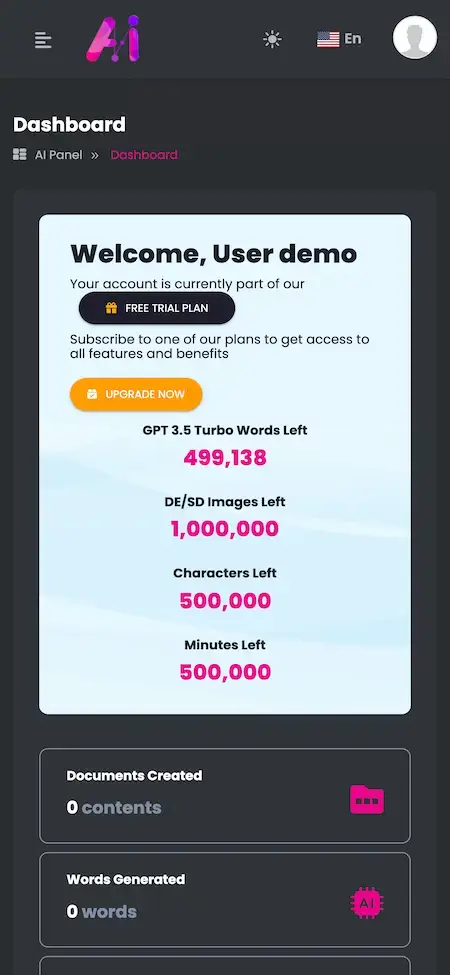
Apple AI ReALM Clone phone dashboard: a trial welcome card with an Upgrade Now button, balances for words, images, characters and minutes, and tiles for documents and words generated.
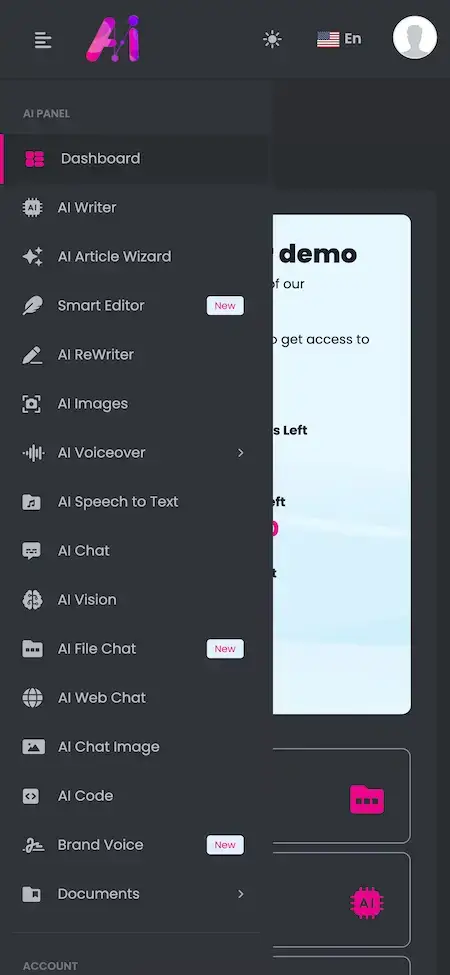
Apple AI ReALM Clone phone tool menu: AI Writer, Article Wizard, Smart Editor, ReWriter, Images, Voiceover, Speech to Text, Chat, Vision, File Chat, Web Chat, Chat Image, Code, Brand Voice and Documents.
Apple AI ReALM Clone phone chat with a travel guide assistant: its portrait, a role line, an opening greeting and an empty message box.
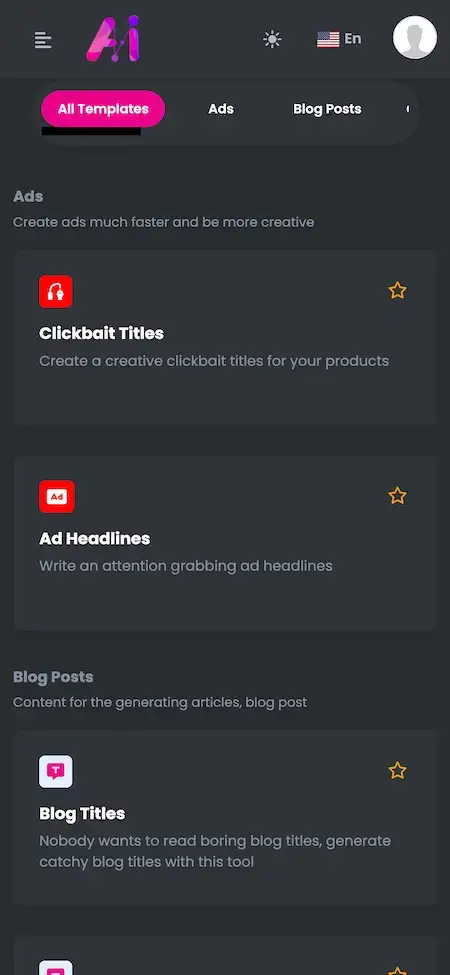
Apple AI ReALM Clone phone template library under All Templates, Ads and Blog Posts tabs, with star-marked cards for clickbait titles, ad headlines and blog titles.
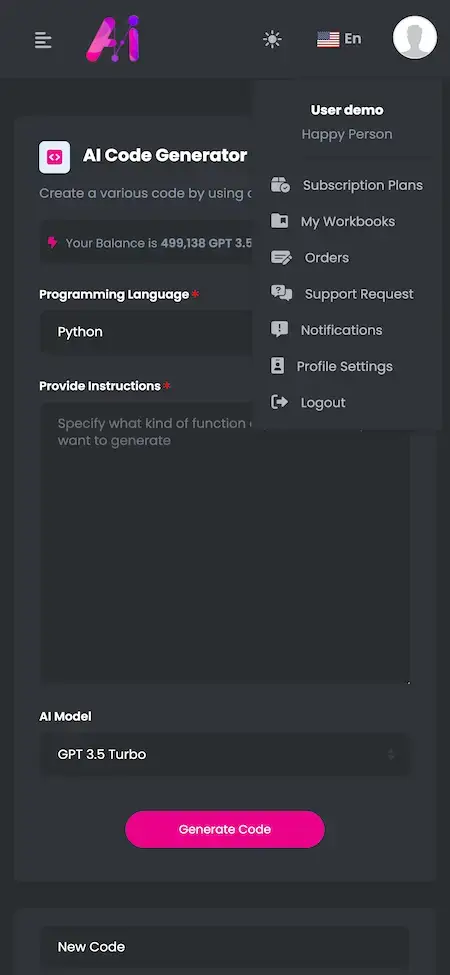
Apple AI ReALM Clone phone code generator: a programming language field, an instruction box, an AI Model selector and a Generate Code button.
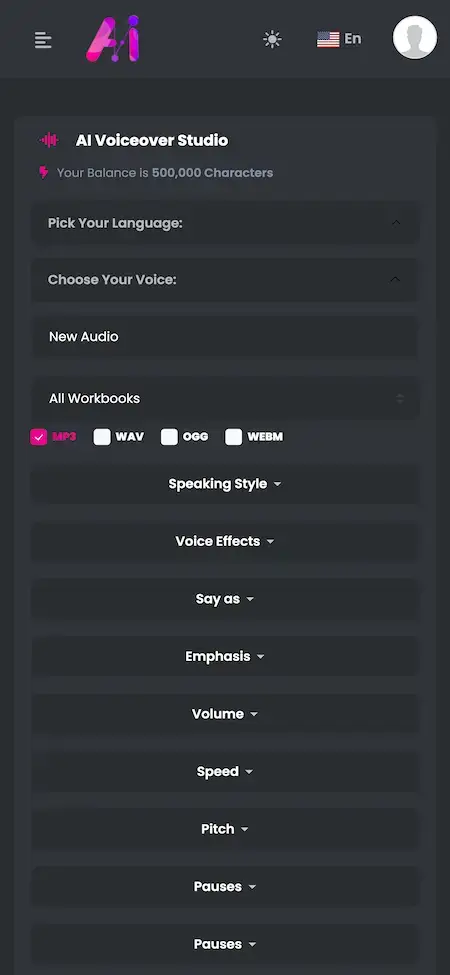
Apple AI ReALM Clone phone voiceover studio: pickers for language and voice, four output formats, and speaking style, effects, volume, speed and pitch controls.
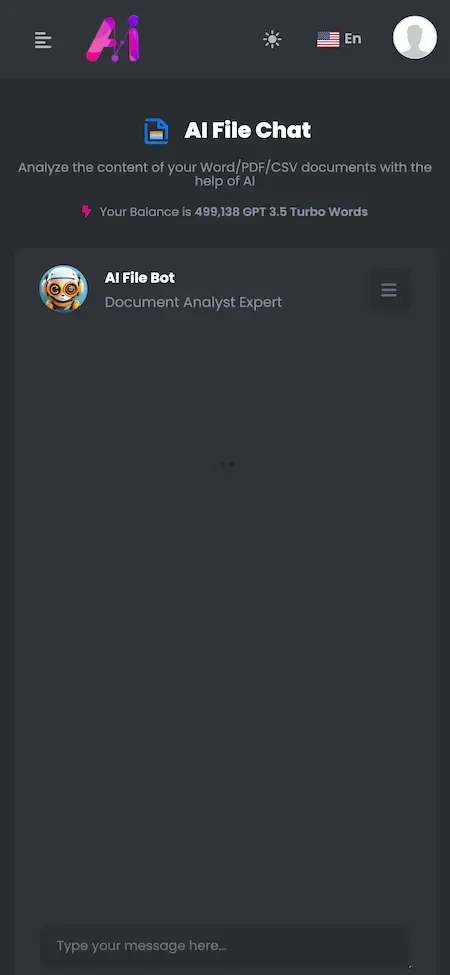
Apple AI ReALM Clone phone file chat: a document analyst bot, a line saying Word, PDF and CSV files can be analyzed, a balance line and a message box.
Apple AI ReALM Clone phone plan card: a checklist of allowances and tools, a Most Popular badge, a monthly price and a Subscribe Now button.
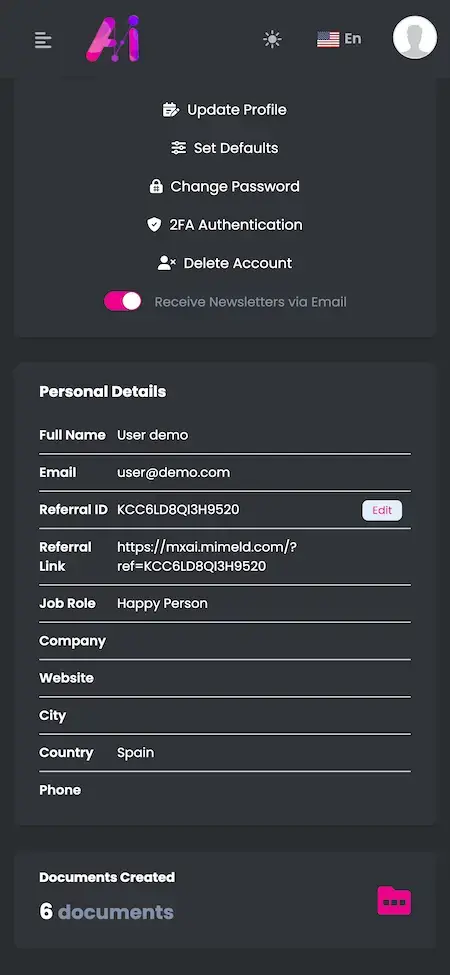
Apple AI ReALM Clone phone profile page: profile actions, a two-factor option, a delete-account action, a newsletter switch, personal details, a referral ID and link and a documents-created counter.
9 views · scroll →
Apple AI ReALM Clone member web dashboard: a trial-plan welcome card, balances for words, images, characters and minutes, six usage counters, favorite assistant and template shelves and a monthly words chart.
1 view

Trace a single trial member from the first dashboard to the paywall: balances, the tool menu, a chat with a named assistant, templates, the code form, voiceover, a document in file chat and finally the plan card that turns a free trial into a paid account.

See All Solutions

02Evidence

In Their Words

One Real Client Voice From the MXAI Base

The Miracuves testimonials page carries a single account that names this exact base. It is printed below exactly as its author wrote it.

CCyril DarmonFounder & Coach, Coachs Online
“Conversational workflows, knowledge-base integration and the automation layer were already built. We connected our own data sources and tuned multilingual accuracy for support and lead qualification. The team now runs the whole AI operation from one place.”
Read Every Client StoryFounders and operators, unedited

Case Record

How Global Utility Systems Got Its Conversational Platform on This Base

This published case study covers a conversational AI platform built from the base sold on this page. It sets out what was handed over and what the client kept, and promises nothing about your own project.

Case Study
A Conversational Platform Built From This Same Base

Global Utility Systems Ltd wanted a conversational AI product. The ready-made base sold here was the starting point, so the engagement went into four decisions that only the client could take: the models on offer, the refusals, the usage each plan permits and the product's appearance.

GUS - ChatGPTProject
Global Utility Systems LtdClient
2025Delivered
6Working days for the base build
18 of 22Blocks used as they were
4Made for the client
Apple AI ReALM Clone member web dashboard: a trial-plan welcome card, balances for words, images, characters and minutes, six usage counters, favorite assistant and template shelves and a monthly words chart.
What Was Hard
  • Launch a conversational platform without rebuilding what lies under the chat box
  • Keep refusals and model cost in the client's own hands
  • Make usage attributable to a plan tier
What They Wanted
  • Put the effort into choices that belonged to the client
  • Launch under the client's brand
  • Receive the complete source code in the client's account
What Was Built
  • A pair of applications with separate permissions and release paths
  • Model choice, guardrails, usage limits and branding written for the client
  • 18 of the 22 platform blocks carried over untouched
  • Source, schema, deployment configuration and architecture notes transferred
  • Base build: 6 working days, before the client-specific work

Global Utility Systems Ltd asked for Gus, a ChatGPT-style assistant whose business advice was sold by subscription; Miracuves delivered it on MXAI in 2025 and transferred the source code.Project summary · published Gus case study

See every detail in the case studyIts ledger names all 22 blocks, including a conversation store and a retrieval block, and says which four were written for the client.

03What you get

What It Is

What Is an Apple AI ReALM Clone App? A White-Label Helper That Starts From What Each Member Brings

Picture Miracuves' Apple AI ReALM clone as a branded AI assistant app with one job: help people with their own files, in their own interface language, through an assistant that opens on a role and a greeting. You pick the models behind each tool and the plans members can buy.
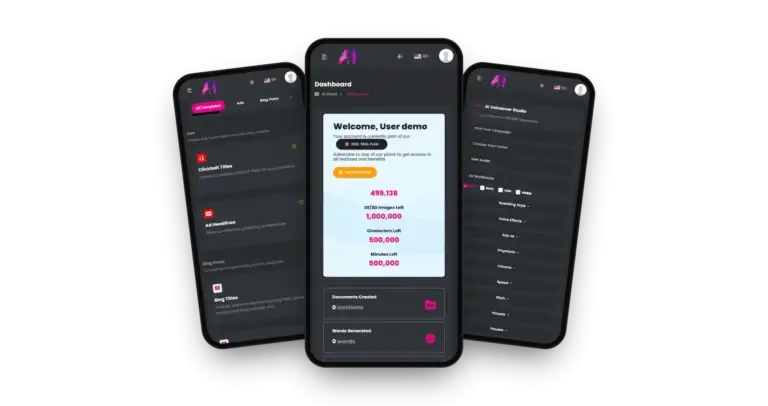
Apple AI ReALM Clone on three phones: the member dashboard with word, image and minute balances, the template library for ads and blog posts and the voiceover studio with voice and speed controls

Their Language on Screen

Each screen header has a flag-and-code switcher, translation files supply the interface wording, and the voiceover studio adds language and voice pickers of its own.

Their Files in the Thread

File chat accepts Word, PDF and CSV documents, and a document analyst bot replies inside the same thread, so the helper begins with whatever the member uploads.

Paid Extras Stay Paid

Spoken dialogue, domain knowledge packs, mood-aware replies and team-messenger links carry their own prices and are never folded into the base list.

Web, Android & iOS

The Parts Around the Chat Window

On its own a chat window is thin. A product needs the rest: file chat for documents, a language switcher, a voiceover studio, saved templates, balances that count down and plan cards that sell. That surrounding set is what you receive.

Apple AI ReALM Clone member web dashboard: a trial-plan welcome card, balances for words, images, characters and minutes, six usage counters, favorite assistant and template shelves and a monthly words chart.
  1. 01Named assistants with a role and a greeting
  2. 02File chat for Word, PDF and CSV
  3. 03A language switcher in the header
  4. 04A free trial plus four balances and plan cards
  5. 05An admin panel with credits and vendor prices

The delivery covers the member web panel (usable at phone width as well), the admin panel, both Flutter apps and every line of source.

Inside the Product

What the Apple AI ReALM Clone Offers: Role-Led Chat, File Questions, Language Switching, Voice, Templates and Meters

Everything Miracuves lists here can be tried in the live demo or is written in the release log. Whatever takes separate effort appears lower down as a paid add-on.

Capability 01 of 12

Role-Led Assistants

A natural language chat opens on a named assistant rather than a blank box. In the demo it is a travel guide: portrait, role line and greeting come first, and the dashboard keeps a shelf of favorite assistants.

  • Every assistant carries a name, a role line and a greeting
  • A message box sits at the foot of the chat
  • A Favorite AI Chat Assistants shelf on the laptop dashboard
  • Separate menu entries for AI Chat, AI Web Chat and AI Chat Image
  • Release 6.9 lets welcome messages use HTML tags
  • The words balance is printed above the conversation
Capability 02 of 12

File Chat on Your Own Documents

Upload a Word, PDF or CSV document to file chat and ask it things through a document analyst bot, with the balance in view above the thread.

  • A New tag marks File Chat in the menu
  • Its header says Word, PDF and CSV documents can be analyzed
  • The bot is labeled Document Analyst Expert
  • Further questions are typed into the box underneath
  • A Documents entry in the menu covers saved work
  • The published GUS block list adds retrieval, a vector store and file storage
Capability 03 of 12

Interface Language & Translation Files

Every screen header shows a flag with a language code that opens a switcher. Interface wording lives in translation files, and the voiceover studio keeps its own language and voice pickers.

  • A switcher beside the profile picture (En in the demo)
  • Release 6.8 filled gaps in the language file
  • Language pickers inside the voiceover studio
  • Which languages a reply covers depends on your connected model
  • Interface wording for each added language lives in the translation files
Capability 04 of 12

Read-Aloud Studio & Transcription

Set a language and a voice, supply a script and narration returns, billed in characters. A separate Speech to Text entry handles the opposite direction.

  • Language is chosen first, voice second
  • Four output formats: MP3, WAV, OGG, WEBM
  • Dropdowns: speaking style, voice effects, say-as, emphasis
  • Dropdowns for volume, speed, pitch and pauses
  • The characters balance heads the screen
  • A free voice isolator extension joined in 6.8
Capability 05 of 12

Templates & Saved Prompts

Prompts come pre-written, one card per task and grouped under tabs; a star pins the ones you reuse. Custom templates can be added under categories of your choosing.

  • Starter cards: clickbait titles, ad headlines, blog titles
  • Three tabs: All Templates, Ads, Blog Posts
  • The star icon pins a template as a favorite
  • Pinned ones appear on a Favorite Templates shelf
  • Custom templates can have their own categories
  • Release 6.9 restored status editing for custom templates
Capability 06 of 12

Writing Suite & Brand Voice

Long-form generative AI drafting gets menu entries of its own: AI Writer, the Article Wizard, Smart Editor and the ReWriter, plus Brand Voice.

  • AI Writer for drafts and the AI Article Wizard for longer pieces
  • Smart Editor carries a New tag
  • AI ReWriter for second passes
  • Brand Voice carries a New tag too
  • A Documents Created counter tracks output
  • Release 6.9 repaired a minor Smart Editor fault
Capability 07 of 12

Code From a Plain Request

One short form, four inputs: a programming language, a description of the function, a model and a button.

  • Language field, Python in the demo
  • A free-text box for the function you want
  • An AI Model dropdown decides who writes the code
  • Generate Code launches it; the copy action was fixed in 6.8
Capability 08 of 12

Image Tools & Vision

Beside the text tools sit picture generation, a vision feature and a picture-based chat, each spending from an image balance.

  • AI Images appears in the menu
  • AI Vision sits right below it
  • AI Chat Image is listed separately
  • An images-left figure shows on the dashboard
  • Release 6.9 fixed the sizes of one image model
Capability 09 of 12

Dashboard Balances & Counters

The dashboard answers two questions at a glance: how much is left in each balance, and how much has been produced.

  • Words, images, characters and minutes each have a balance
  • Six tiles count documents, words, images, codes, voiceover tasks and transcribed files
  • A chart plots words written this month
  • The sidebar names the plan and its next renewal
  • The profile page echoes the documents-created figure
Capability 10 of 12

Plans, Trial & Payments

New accounts land on a free trial that shows an Upgrade Now button. Each plan card shows its monthly price, can wear a Most Popular badge and carries a checklist of inclusions.

  • A trial plan with its own welcome card
  • Monthly price on the card, Most Popular as a badge
  • Four allowance lines (words, images, minutes, characters), then team members
  • The checklist names tools such as AI Writer, Smart Editor and AI Vision
  • A Subscribe Now button closes the card
  • Fixed in 6.8: free-plan checkout; fixed in 6.6: bank transfer approval
Capability 11 of 12

Account, Support & Referral

The member menu and profile gather everyday account tasks: plans, workbooks, orders, a support request, notifications and personal settings.

  • Member menu entries: Subscription Plans, My Workbooks, Orders
  • Support Request and Notifications entries
  • Each member has a referral ID and a shareable link
  • Update Profile, Set Defaults and Change Password actions
  • A 2FA Authentication option
  • Delete Account, plus a newsletter email switch
Capability 12 of 12

Extensions, Themes & Housekeeping

Further modules come from a marketplace page; look, language and upkeep are settings, not code changes.

  • The marketplace lists free and paid extensions and themes
  • Marketplace items can be updated where they sit
  • Maintenance mode costs nothing, while the menu builder is paid
  • Classic, Sonic and Modern themes
  • A sitemap builder arrived in release 6.9
  • Stored images are cleared on a timer; chat images can go to outside storage

Good to know first: we deliver the platform rebranded and deployed. What you supply: your logo and company details, hosting plus a domain, your own developer accounts at Apple and Google, a payment gateway with onboarding and KYC complete, plus an API key from every model provider you plug in. Store review at Apple and Google follows their own schedule and falls outside our 6 days of build work.

Talk With Our Team

Income and Outgoings

Where a Helper App Earns: Tiered Plans, Team Seats, Metered Work and a Specialist Tier

In the helper app Miracuves builds, both sides of the ledger follow one driver: how much work members ask for. The cards list what members pay you, and the table adds what vendors and stores take back.

Start by watching two numbers: what share of trial members become paying, and how much model spend a single plan allowance can trigger.

  1. 01

    Helper Plans by Tier

    A plan card names the assistants, tools and allowances it unlocks. Put the everyday helper in an entry tier and reserve larger word counts and more file work for a higher one, with every monthly price set in the admin panel.

  2. 02

    Team Seats

    Each plan checklist closes with a team members line. A group can take one plan at a price you pick, and the seat count prints next to the allowances.

  3. 03

    Metered File Work

    Four counters run separately: words, images, characters and minutes. A heavy file-chat user and an occasional writer therefore end up on different plans, and an empty balance sends the member to the plan card.

  4. 04

    Trial-to-Paid Upgrade

    A free trial starts every account, its balances shrinking on the dashboard while the welcome card keeps an Upgrade Now button in view. That is where the plan card gets to sell.

  5. 05

    Specialist Tier With Knowledge Packs

    Field-specific vocabulary and background text can be bought from Miracuves as a paid add-on. With one installed, you could price a premium tier for law, finance or healthcare readers above your general plan.

  6. 06

    Store & Card Fees

    Treat this one as a cost, not income. Every payment through a store or a card processor loses a slice, so plan prices need headroom; transfers approved by an admin skip both.

Market prices and payment-rail fees side by side: plan ladders, seat prices, token prices and store and card cuts, each read from the publisher's own page.
StreamHow the money movesRateTypical rateWhat caps it
Helper Plans by TierA recurring charge for each plan, taken via an app store or your own gateway.US App Store entries: ChatGPT lists Go at $8, Plus at $19.99 and Pro at $100 and $200. Google AI lists Plus $4.99, Pro $19.99, Ultra $199.99. Grok lists SuperGrok at $10 Lite, $30, $100 Plus and $300 Heavy.Willingness to pay for each rung. Those developers picked the amounts for their own listings, so treat them as a market ladder rather than a rate card.
Team SeatsA monthly fee per seat, charged on a business tier.Gemini Enterprise: from $21 a seat per month on the Business edition, from $30 on Standard and Plus, per Google.The number of seats each customer buys, and who is paying: a firm or one person.
Metered Work on Premium ModelsThe vendor bills per million tokens, charging one rate for input and another for output.Per 1M tokens on short prompts: Gemini API charges $2.00 for input and $12.00 for output, xAI $2.00 and $6.00, OpenAI $2.00 and $10.00.The number of tokens one plan allowance lets a member burn. Your vendor price list and calculator turn each rate into a margin.
Metered Work on Budget ModelsIdentical per-million-token invoicing, at lower rates.DeepSeek publishes $0.15 input and $0.60 output off-peak, doubling at peak hours. One smaller OpenAI model is listed at $0.10 and $0.50.Whether the cheaper model answers well enough for the task. It widens the margin, and answer quality sets how heavily you can rely on it.
Store & Card FeesA cut taken from each payment before it reaches you.Stripe takes 2.9% plus 30c on a US domestic card. Apple retains 30% of a subscription for the subscriber's first year, then 15%; its Small Business Program applies 15% from the beginning. In the US, UK and EEA, Google Play subscriptions cost 10% plus a 5% billing fee as of 30 June 2026.How the member pays decides it: through a store, by card at a gateway or by bank transfer. In markets where Google Play has not changed yet, subscriptions stay at 15%.

Reading the figures. Subscription prices are what each developer lists in its US App Store entry: Grok, ChatGPT and Gemini. Per-seat figures are on Google's subscriptions page. Token prices come from the price pages of DeepSeek, OpenAI, xAI and the Gemini API, and store commissions from Apple and Google Play, with the card fee from Stripe. All of it is other companies' pricing, offered as a modeling input only. It is neither an offer nor an earnings forecast, and you set your own prices and costs in the admin panel.

Revenue Model

Apple AI ReALM Clone Revenue Model, Stage by Stage

Revenue here grows with the files members bring: trial balances convert on the plan card, seats follow desks and cohorts, and a specialist tier waits for a knowledge pack.

Launch

Begin with the trial and an entry helper plan. File chat on a member's own Word, PDF or CSV document is the hook, and an empty balance sends them to the plan card.

Traction

As desks and cohorts sign up, sell team seats through the team members line and let the four separate meters push heavy file-chat users onto a larger plan.

Scale

With a steady base, install Domain Knowledge Packs so a field like law gets its own vocabulary, charge more for it than the general plan, or run reseller portals per client.

Store and card fees come off each payment, and admin-approved bank transfers sidestep both.

Curious what a plan ladder could look like for your assistants and file limits?Map My Plan Ladder

Behind the Counter

Running the Helper App: The Apple AI ReALM Clone Admin Panel in Use

Whoever runs the business works from one Miracuves admin panel: it holds the plans on sale, reports what members have consumed, stores the prices your AI vendors charge and governs the pages, themes and templates members see.

  • 01Plan builder
  • 02Transfers to approve
  • 03Credits by model
  • 04Vendor price sheet
  • 05Cost calculator
  • 06AI setup
  • 07Template library
  • 08Marketplace
  • 09Themes
  • 10Pages
  • 11Language files

Inside the Console

  • 01

    Plans & Payments

    Create the plans members subscribe to, try checkout on the free plan and sign off bank transfers made away from the card gateway.

  • 02

    Credits View

    Shows credits spent by model and by tool, so you notice early when an allowance drains faster than its price allows, and can resize the plan before it costs more than it earns.

  • 03

    Vendor Service Costs

    A price sheet of what every AI vendor bills you, kept in the admin panel beside the credits.

  • 04

    Dynamic Cost Calculator

    Turns vendor prices into figures you can plan with: move an allowance and see what it costs you. Two reasoning models joined it in release 6.6.

  • 05

    AI Settings

    Home of the AI configuration. Release 6.8 reworked this page, and it lies close to the cost sheet and the credits view.

  • 06

    Templates & Categories

    Write your own templates, group them under categories of your own next to the built-in ones and toggle each by status.

  • 07

    Marketplace & Extensions

    A marketplace page lists extra modules and themes, free and paid, and updates them where they sit.

  • 08

    Themes, Pages & Language

    Three themes, blog and system pages, a maintenance switch, a sitemap builder, translation files and timed cleaning of stored images.

Money In, Money Out

Every finance task, from listing a plan to checking a vendor invoice.

  • Building plans and testing free checkout
  • Signing off bank transfers
  • Credits spent, split by model and tool
  • Vendor prices plus a calculator

Housekeeping

Settings that stand behind the public pages.

  • Menus, themes and pages
  • A sitemap builder and maintenance mode
  • Translation files plus the language switcher
  • Scheduled cleaning of stored images

Missing something in the console? Extra approval steps, a further usage report or an additional payment method each count as custom work. Describe your team's needs and you get a written quote before any building starts.

Talk With Our Team

04Package and price

The Full Package

The Complete Handover: Source Code, Schema, Apps, Panels and Written Notes

What Miracuves hands over is a running platform, not a box of parts: the member web panel, Flutter apps, the admin panel, all the source and the database schema beneath it. It is yours without conditions, free of seat, request or renewal charges. Provider bills for models, voice, payments, servers and store accounts go to you directly from those providers.

01

Every Line of Source

Web platform and both mobile apps come unencrypted, so your developers can alter screens, flows and rules as the business shifts.

  • Unencrypted web platform source
  • A single Flutter project covers Android and iOS
  • Free to edit, extend and redeploy
  • Delivered into a repository you name
02

Database Definition

A database definition that lets the whole product be rebuilt on a blank server, supplied together with the migrations behind it.

  • Schema and migrations travel together
  • MySQL is the data tier
  • The published block list names stores for threads, messages and uploads
  • Separate records follow usage, credits and payments
03

Usage Records & Threads

The record behind the counters: which member used which tool and model, and how much allowance each request used up.

  • The published block list names a conversation store for threads, turns and context
  • Every tool draws from its own allowance
  • Usage is tallied by member and by thread
  • Usage and audit events travel on an event stream
Apple AI ReALM Clone member web dashboard: a trial-plan welcome card, balances for words, images, characters and minutes, six usage counters, favorite assistant and template shelves and a monthly words chart.
04

The Member Web Panel

The responsive screens members open every day: the dashboard, assistants, templates, file chat, the code form, voiceover, the plan page and the profile.

  • Balances and counters on the dashboard
  • Assistants, file chat, templates
  • The code form with the voiceover studio
  • Plan page, profile page, referral link
05

Phone View & Mobile Apps

This same panel at phone width, along with a Flutter app for each of Android and iOS, whose tools all hang off a side menu.

  • Each tool is listed in the side menu
  • Chat, templates, code and narration open from it
  • One Flutter app for Android, another for iOS
  • Publishing runs through your own developer accounts
Apple AI ReALM Clone phone file chat: a document analyst bot, a line saying Word, PDF and CSV files can be analyzed, a balance line and a message box.
06

The Operator Panel

The operator workspace, with credits per model, vendor prices beside a calculator, plan setup, transfer approvals, AI settings, pages, themes and extensions.

  • Setting up plans and approving transfers
  • Credits displayed next to vendor prices
  • A calculator that updates as inputs move
  • AI configuration along with themes, extensions and pages
07

Sign-In & Guardrail Rules

Each role has its own login and its own permissions. A gateway stands guard over model calls, and a guardrail engine enforces the rules you define.

  • Permissions follow the role
  • A gateway that identifies callers and limits request rates
  • Members can turn on two-factor login
  • No credentials sit in the repository
08

Written Handover & Cover

When branding and deployment are done, written notes arrive, and on launch day three support periods begin side by side.

  • Your logo, icons and colors across every screen
  • Rollout onto hosting of your choosing
  • Deployment steps and architecture notes in writing
  • 60 days of guidance, 6 months of bug fixes, 12 months of updates

Would a trial run help? Use the demo as a member, or schedule a session where we push a file through chat, switch the interface language, open a plan card and show the vendor price sheet, all built around your use case.

Talk With Our Team

Single Price

How Much Does an Apple AI ReALM Clone Cost When It Carries Your Brand?

The ready-to-launch, white-label platform costs a single fixed $2,799. Anything outside the Miracuves base (an add-on, a hook into another system, a flow unique to you) is scoped and quoted in writing before it starts.

Most Popular

Professional

Ready-to-Run Helper App
$2,799paid once
Live in 6 days

Suits: Founders of document and helper apps, agencies reselling branded assistants, internal help desks and training firms operating under their own brand

You receive the platform exactly as the demo shows it, dressed in your logo, icons and colors and running on hosting you select.

Get Started

Enterprise

Tailored Work for Bigger Projects
Customquote
Timeline: set by the scope

Suits: Groups hosting their own models, wanting a managed company knowledge library or answering to a compliance function

A flow the base does not have is built from your brief, with scope and price agreed in writing first.

Request a Quote
Development Cost

Apple AI ReALM Clone Development Cost in 2026

Members asking about their own documents in their own interface language are what this Apple AI ReALM clone serves, and a one-time $2,799 covers it whole: a phone-friendly member panel, an Android and an iOS app in Flutter, an operator console that turns vendor rates into margins, and unencrypted source with its schema; the helper carries your logo and goes live in six working days.

$2,799 Paid once
6 working days Rebranded and live
0% Revenue share

What moves your total sits beyond the software invoice

  • Token bills from each model provider on your keys
  • Translation and speech services you connect
  • Store commission and card processing fees
  • Apple and Google developer accounts, hosting and a domain
  • Domain Knowledge Packs or any other paid module

A further console sign-off or a new way to pay is quoted in writing first and usually lands in 2-8 weeks; groups running their own models take the Enterprise route.

Compare Your Options

Ready-Made Apple AI ReALM Clone vs Custom Development vs SaaS

A document-aware, multilingual artificial intelligence (AI) helper can be bought as the Miracuves Apple AI ReALM clone, built to order, or rented as a hosted assistant. This table shows what changes between the three.

CriteriaMiracuvesReady-Made Apple AI ReALM CloneCustom DevelopmentSaaS
Launch timeYour branded helper in 6 working daysLong, scoped build quoted in writingAccount ready almost immediately
Upfront cost$2,799 one-time paymentDevelopment budget set per scopeCheap entry, then per-user fees
Source code ownershipAll source, schema and migrationsAgreed in the build contractNone, hosted by the vendor
CustomizationRoles, languages, file tools, plansTailored without limits, at costConfiguration screens only
Ongoing feesProvider usage plus your hostingSupport retainer for the codebaseSeat licenses renewed indefinitely
Branding & app-store listingYour helper brand in both storesYour brand, if apps are fundedVendor brand, typically browser only
Best forDocument desks and language-led brandsEnterprises with deep integrationsTesting a helper before committing

Real-World Setups

Six Setups for a Helper App: Document Desk, Language Brand, Prompt Library, Specialist Tier, Cohort Plan and Reseller Portal

Operators of the Miracuves helper emphasize different parts of one platform: a help desk leans on file chat, a language brand on the switcher and voiceover, a trainer on plans and templates. Choosing what to feature is configuration work.

FilesSupportDocument Desk

Members send a Word, PDF or CSV document to file chat and then quiz the document analyst bot, with their balance on screen throughout.

01
Apple AI ReALM Clone phone file chat: a document analyst bot, a line saying Word, PDF and CSV files can be analyzed, a balance line and a message box.
LanguageVoiceLanguage-First Brand

Serve a single language community through the header switcher, the translation files and a voiceover studio that has a language picker. Replies follow whichever model you connect, so test your languages with it first.

02
Apple AI ReALM Clone phone voiceover studio: pickers for language and voice, four output formats, and speaking style, effects, volume, speed and pitch controls.
PromptsStaffPrompt Library for Staff

Assemble templates and categories for the jobs your people repeat, star the strongest and keep finished pieces under Documents.

03
Apple AI ReALM Clone phone template library under All Templates, Ads and Blog Posts tabs, with star-marked cards for clickbait titles, ad headlines and blog titles.
KnowledgeAdd-OnSpecialist Tier (Add-On)

Install the Domain Knowledge Packs add-on to give one field its own vocabulary and background text, then sell that result as a premium step above the general plan.

04
Apple AI ReALM Clone member web dashboard: a trial-plan welcome card, balances for words, images, characters and minutes, six usage counters, favorite assistant and template shelves and a monthly words chart.
PlansTrainingCohort Plans for Trainers

Set up a plan per class or team: a checklist of allowances, a team members line and Subscribe Now at the bottom.

05
Apple AI ReALM Clone phone plan card: a checklist of allowances and tools, a Most Popular badge, a monthly price and a Subscribe Now button.
BrandingWhite-LabelReseller Portal

Operate the toolset under a client's name, with their logo throughout, plan names you invent and a separate tool list for each plan.

06
Apple AI ReALM Clone phone chat with a travel guide assistant: its portrait, a role line, an opening greeting and an empty message box.
Business Model

Apple AI ReALM Clone Business Model: Three Ways to Run It

Every Apple AI ReALM clone business model starts from what members bring, their files and their language, and the same Miracuves install carries three different operators.

Document desk

A help or support desk sells answers on members' own Word, PDF and CSV files, pricing plans by how much file work each one allows.

Language-first brand

A brand serving one language community leads with the header switcher, translation files and voiceover in that language, on a model you choose for it.

Specialist reseller

An agency or trainer runs a branded helper per client or cohort, with the knowledge pack add-on lifting one field into a premium tier.

In all three, the plans, member accounts and saved work belong to you, with no royalty to Miracuves.

One platform, six business shapes. All six scenarios run on one member panel, one phone view and one admin console. Featured tools, plan structure, allowances and the brand on top are the only variables, so a single codebase serves each of them.

Talk With Our Team

Timing

Why 2026 Favors a Helper App Built Around Members' Own Material

The independent figures above point to assistants becoming routine. What remains open is who owns the member relationship, the plans and the records, and a platform under your brand puts those questions in your hands.

01

Members Carry Their Own Material

The independent figures above show assistants becoming a daily tool. A helper whose file chat takes Word, PDF and CSV documents meets members at the place their own papers already live.

02

Language Gives You a Selling Point

A switcher in the header, translation files and a voiceover studio with a language picker hand a brand that serves one language something tangible to offer. Reply quality still depends on the model behind it.

03

A Role Makes Answers Feel Specific

An assistant introduced as a named specialist, with a role line and a greeting, seems made for its purpose, and that helps a niche brand look distinctive.

04

One Look at a Plan Card Is Enough

Monthly price, Most Popular tag, plain allowance checklist: a plan card can be judged within a minute, and dashboard balances keep telling trial members what an upgrade adds.

05

Member Records Become an Asset

Accounts, usage history and saved work live in a database you own, so everything you learn about members stays with you instead of flowing to a model vendor.

06

Ready-Made Beats Starting From Zero

Most of the effort goes into plans, meters, tools and the admin console, and a white-label base is live in 6 days on hosting of your choice.

The Platform at a Glance

14

Menu entries for tools

4

Balances on the dashboard

3

Surfaces on one codebase

6

Build days to launch

Buying the assistant is the easy part. The months go into everything around it: files, language, balances, plans and an admin console, and this build arrives with all of that.

Industries

Kinds of Business That Fit

The Apple AI ReALM Clone suits any business whose members bring their own material or work in their own language. Document and support desks answer from files, training and coaching firms hand learners templates and a file desk, regional brands serve one language, agencies brand a helper per client and AI startups sell plans. Publishers, consultancies and tools for developers draw on the writing, code and voice features under their own names.

  1. 01Document Help Desks
  2. 02Language Brands
  3. 03Education & Training
  4. 04Customer Support
  5. 05Coaching & Consulting
  6. 06E-commerce
  7. 07Publishing
  8. 08Professional Services
  9. 09AI Startups
  10. 10Marketing Agencies
  11. 11SaaS Resellers
  12. 12Developer Tools

A single platform serves many kinds of business: plans, meters and an admin panel, all under your name.

06How it works inside

Step by Step

From the First Sign-In to a Paid Subscription: How the Apple AI ReALM Clone App Works for Members

What a member of an Apple AI ReALM clone app by Miracuves sees is a message and a reply. What happens underneath is a chain: the prompt lands, an uploaded file may be consulted, guardrails check it, a model is picked, the answer streams back and usage is tallied. The member's route is shown first, and the architecture behind it follows.

One Trial Member, Step by Step

  1. Apple AI ReALM Clone phone dashboard: a trial welcome card with an Upgrade Now button, balances for words, images, characters and minutes, and tiles for documents and words generated.
    1Begin on the Free Trial

    Inside the Apple AI ReALM clone app, the trial plan opens with a welcome card, four balances for words, images, characters and minutes, and an Upgrade Now button.

    • The card names the trial plan
    • Four balances shrink as work gets done
    • Favorites shelves sit further down the page
  2. Apple AI ReALM Clone phone tool menu: AI Writer, Article Wizard, Smart Editor, ReWriter, Images, Voiceover, Speech to Text, Chat, Vision, File Chat, Web Chat, Chat Image, Code, Brand Voice and Documents.
    2Browse the AI Tools

    Every AI tool sits in the side menu, from writing aids to file chat, with Smart Editor, File Chat and Brand Voice tagged as new.

    • Writing, voice, chat, vision and code in one list
    • New tags point at recent additions
    • Documents closes the list
  3. Apple AI ReALM Clone phone chat with a travel guide assistant: its portrait, a role line, an opening greeting and an empty message box.
    3Chat With a Role-Based Assistant

    Each assistant introduces its role, says hello and then answers what the member types, keeping the current balance in view at the top.

    • Name and role line at the top
    • Greeting, then a message box
    • Balance visible above the thread
  4. Apple AI ReALM Clone phone file chat: a document analyst bot, a line saying Word, PDF and CSV files can be analyzed, a balance line and a message box.
    4Get Answers From Your Own Files

    With file chat, members hand over a Word, PDF or CSV file and quiz the document analyst bot about it, with each follow-up kept in one conversation.

    • The analyst answers inside the chat
    • The screen itself says Word, PDF and CSV
    • One thread holds all follow-ups
  5. Apple AI ReALM Clone phone voiceover studio: pickers for language and voice, four output formats, and speaking style, effects, volume, speed and pitch controls.
    5Switch Language and Hear It Spoken

    A language switcher lives in the header, and the voiceover studio reads any script aloud in the chosen language and voice, counted against the character balance.

    • Language and voice are picked first
    • MP3, WAV, OGG or WEBM come back
    • The characters balance drops as the job runs
  6. Apple AI ReALM Clone phone plan card: a checklist of allowances and tools, a Most Popular badge, a monthly price and a Subscribe Now button.
    6Upgrade to Keep Going

    Once a balance gets low, members open the plan card to compare its monthly price with the tools and allowances it lists, then press Subscribe Now.

    • The Most Popular badge sits on the card
    • Allowances and tools are listed as a checklist
    • Subscribe Now is the last thing on the card
Visual Flow DiagramSign inPersonaDocumentsModelStreamMeter

Behind the Screens

Following One Request Through the Apple AI ReALM Clone, Layer by Layer

Talk With Our Team
  1. Hop 01

    Conversation Store

    The published block list names a store for each member's threads, turns and context, with an event stream next to it for usage and audit records.

  2. Hop 02

    Model Routing

    A request is sent to the provider and AI model picked for it, which is how one product can list several models side by side.

  3. Hop 03

    Token Streaming

    Tokens show up on screen while the large language model is still producing them, so a long reply begins to read at once.

  4. Hop 04

    Retrieval & Recall

    The same list names retrieval over documents using embeddings, backed by a vector store. In the demo, members meet documents through file chat.

  5. Hop 05

    Guardrail Engine

    Filters and refusals vet each request and an audit log keeps the trace; what gets refused stays your call.

  6. Hop 06

    Accounting & Entitlements

    Usage is totaled by member and by thread and checked against what the plan allows, meaning its tiers, quotas and fair-use limits; the totals feed the dashboard.

Under the Hood

What Powers the Apple AI ReALM Clone Script: Web Layer, Database, Flutter Apps and Your Model Connections

The Apple AI ReALM clone script Miracuves delivers breaks into three parts: the web application that members and operators open, the data store behind it and the apps for phones. The notes below name what each part is made of.

WEB

Browser Layer

PHP Laravel Bootstrap
  • Members and operators share a codebase
  • Responsive layouts built with Bootstrap
  • Classic, Sonic or Modern theme
  • Header language switcher backed by translation files
DATA

Data Store

MySQL database
  • MySQL keeps members, plans and usage
  • Schema and migrations travel inside the source
  • Starting from an empty server, they recreate the database
APPS

Mobile Apps

Flutter for Android and iOS
  • Flutter builds on current dependencies
  • Every tool opens from a side menu
  • The demo squeezes the member panel to phone width
  • Publishing is done from your developer accounts
AI

Model Links

Your Keys Vendor Prices
  • The code form includes a model dropdown
  • Credits are itemized by model
  • A price sheet and calculator follow vendor rates
  • Accounts and keys at each provider are yours
SERVICES

Outside Services

Firebase Twilio Google Maps
  • The stack notes also name Google Maps, Twilio and Firebase
  • Gateways connect through their own APIs, and an admin signs off bank transfers
  • Translation runs through an external service
  • Speech services stand behind the voiceover studio
HANDOVER

What You Receive

Repository Schema Config
  • Application source with its history
  • The mobile projects beside the web source
  • Deployment configuration in writing
  • Architecture notes written for your team
For technical buyers:

On the web and admin side the product's stack notes list PHP with Bootstrap and MySQL; the published GUS - ChatGPT case study lists PHP, Laravel and MySQL. The phone apps are written in Flutter. Every outside service you link up, be it a model provider, a payment gateway, translation, speech, Google Maps, Firebase or Twilio, needs an account and keys of its own under your name, and these go in at deployment. None of it is exotic, so developers are easy to find.

Talk With Our Team

Room to Grow

Ready for More Members, Files and Languages: Gateway Limits, Streamed Replies, Metering and a Handover Pack

Miracuves assembles the product from separate blocks, so a bigger audience, a longer model list or another language calls for capacity and a few settings, not a second build.

Two Apps, Two Release Paths. The member app and the admin app hold their own permissions and ship independently, so a change to one does not have to wait on the other.

A Gateway Before the Models. Callers are authenticated and rate-limited before any model sees a request, which stops one account from swamping the system or the bill.

Replies That Stream. Tokens appear on screen as they are generated, so a long answer starts reading immediately and does not land in one piece.

A Ledger You Can Audit. Usage by member, thread and model is written down and sent on to an event stream, so dashboard figures can be checked against stored records.

01

Two Apps, Kept Apart

Member and admin applications run apart, each with its own permissions and release path, so either can change on its own.

02
AuthRate limitRole check

Gateway With Rate Limits

A gateway stands ahead of the models: it identifies the caller and applies rate limits before any model is reached.

  • The caller is identified at the gateway
  • Request rates have caps
  • Separate logins for members and admins
  • No model call bypasses it
03

Replies as They Form

Answers return token by token instead of appearing only when complete.

  • Tokens go out as they are produced
  • The remaining balance stays on screen during the chat
  • Counters tick while people work
  • Long answers start showing at once
04
Per memberPer threadPer model

Usage Event Stream

Usage and audit events ride on a stream, so reporting and accounting stay off the path of the conversation.

  • A usage event follows each request
  • Audit events stay available for review
  • The stream can feed several readers
  • Reports are built from ledger data
05

Token Bookkeeping

Token counts are held per member and per thread, then compared with the plan and its limits on quotas and fair use.

  • Counts by member and by thread
  • A quota for each tier
  • Fair-use ceilings
  • Credits divided by model and by tool
06

The Handover Pack

Code, database schema, deployment setup and architecture notes are all passed across, so a different team could run the platform without us.

Space for Your Own Rules. Every business ends up needing something particular to its trade. Complete source on a conventional stack turns a new tool, rule or provider into routine development, whether your team or ours writes it.

Starting small? Start with whichever plans and tools you can sell now, running from a single deployment. Growth asks for more hosting capacity and some settings, and anything the base lacks is scoped and quoted separately.

Talk With Our Team

07Safety and rules

Safety Notes

Where Security Stands in the Apple AI ReALM Clone: Separate Roles, an Audit Trail, Spend Limits and Unfinished Work

A helper app of the kind Miracuves builds collects accounts, uploaded documents, chat content and payment references in one place. Four questions come first: where do card details go, which prompts will the models accept, who may see which records and what is still undone before launch. Below, each card separates what the platform handles from what remains your job.

  1. 01 · Access
    Roles Kept Apart

    A member sees only member data and an admin sees only admin tools; the server enforces that, instead of the interface merely hiding menu items.

    • Member and admin log in separately
    • Permissions are checked server-side
    • Member Account Controls: On the profile page sit a two-factor option, account deletion and a newsletter opt-out, which cover the basics of safety and consent.
  2. 02 · Records
    A Record of Every Request

    Every request leaves usage and audit records, which means a disagreement over a charge or a refusal can be settled by looking it up.

    • A usage event for every request
    • Audit events retained for review
    • Guardrails & Moderation: Filters and refusals vet every request and an audit log records it. What the product turns down is for you to decide; the base enforces it, and the rules merit testing against real prompts first.
    • Spend Limits: Quotas and fair-use limits come with each plan, so one account cannot run up an open-ended share of the model bill.
  3. 03 · Wire
    Encryption in Transit and at Rest

    Traffic travels over TLS, passwords are stored hashed, and sensitive data resting in storage is encrypted, not just hidden.

    • TLS covers all traffic
    • Hashed credentials, encrypted sensitive values
  4. 04 · Keys
    Where the Keys Live

    Keys for models, speech and payments are kept in environment configuration on your servers; the repository handed to you holds none of them.

    • Keys live in environment configuration
    • The repository is free of secrets
    • Provider Keys: The keys belong to you and sit in server-side environment settings, which means a leaked repository would still reveal nothing.
  5. 05 · Payments
    Card Numbers Never Land Here

    Card numbers are entered at your payment gateway; the platform keeps a payment reference and never the card.

    • Card entry happens at your gateway
    • A payment reference is all that is stored
    • Transfer Approvals: A plan paid by bank transfer goes live only after an admin approves it, so offline money is tied to a named member.
  6. 06 · Recovery
    Backups You Have Restored

    Backups are set up during deployment, and a restore is practiced before launch, since a backup only counts once it has been restored.

    • Backups scheduled with the deployment
    • A restore practiced before launch
    • Pre-Launch Tasks: Rotating keys, rehearsing a restore, commissioning a penetration test and reading each model provider's data terms are listed as outstanding work, not as finished.

Traffic travels over TLS, passwords are hashed, sensitive data at rest is encrypted and keys stay out of the repository, leaving a record every reviewer can follow. Key rotation, a practice restore and a commissioned penetration test are booked into the launch plan with you. Encryption at rest and key handling are written under the controls laid out in ISO 27001, SOC 2 and GDPR. Miracuves holds no attestation; your company does, once independent audit partners carry the audit through with you. Source: FACT-010 on capability.

Go Over Security With Us Ahead of Launch

Who Does What

Software Is Our Part, Policy and Law Are Yours: Readiness for a Helper App

A helper app writes replies, keeps what members type and upload and may charge for the privilege. Miracuves supplies the chat, file, language, plan and usage tooling, while the operator decides what the assistants may say, protects member data and answers to the laws covering the sales.

Working software, ready to operate.

In this section, “ready” covers software you can operate in the demo and through the admin panel. Approvals and licenses for your helper app are held by you as operator, and this is product information, not legal guidance.

Already in the Software

Present now: the admin panel, member and admin sign-ins kept apart, guardrails plus an audit log, credits displayed beside a vendor price sheet and calculator, four metered allowances, a free trial with paid plans, and the tools for chat, file chat, templates, code, voice and language switching.

Left to You

Your terms of service and privacy policy, with translations for every language you serve; the topics your assistants may cover; how long chats and uploaded files are retained; how deletion requests are dealt with; and any refund and cancellation terms beyond the defaults.

Minors, Moderation & AI Rules

Should young people use your platform, children's-data and parental-consent rules can apply. How generated content is moderated, whether members are told replies come from a machine and how synthetic speech or images are labeled are policies you decide. The base can filter and keep logs, but it cannot decide for you.

Your Markets

Regulation on data protection, consumers, tax and AI varies from one country to the next and sometimes inside a single one. Prompts and uploaded files can carry personal or confidential data, so let qualified local advisers review each market before registration opens.

08Add-ons and neighbors

In the baseMXAI
  • Assistants, file chat, templates, code
  • Writing and voice tools
  • Trial flow, plans and meters
  • Admin panel with a vendor price sheet

How a module reaches you

  1. 1
    Choose a module

    Spoken conversations, field knowledge, mood awareness or messenger links, now or at any later date.

  2. 2
    Quote in writing first

    Every module begins with a written scope and price before anyone starts building.

  3. 3
    Merged into your code

    When finished, the module joins your own codebase.

Discuss a Custom Module

Add-On Modules

Domain Knowledge Packs, Messenger Links, Mood-Aware Replies and Spoken Conversations: Four Paid Modules You Can Add

The base is complete and open to a demo trial. These four modules are the ones customers ask for most, and every one carries its own price since the effort depends on your product.

  • Expertise

    Domain Knowledge Packs

    Vocabulary, background and reference material collected for a single field, such as law, finance, healthcare or technology, so answers pick up that field's own terms and land nearer the mark.

    Knowledge · Packs
  • Reach

    Team Messenger Links

    Places the assistant inside the chat tools a team keeps open all day (Slack, Microsoft Teams and WhatsApp), so a question can be asked without changing windows.

    Slack · Teams · WhatsApp
  • Reach

    Mood-Aware Replies

    Senses the tone of a message and shapes the answer to it, settling an annoyed member or treating a delicate moment with more care.

    Sentiment · Replies
  • Expertise

    Spoken Conversations

    A member speaks a question and hears the reply read out in the same exchange. The base already has a narration studio and speech-to-text, so the module only needs to make the dialogue itself spoken, which suits hands-free use and accessibility.

    Voice · Spoken

Beyond the Helper

Selling More Than a Helper? Four Products That Sit Beside It.

The Apple AI ReALM Clone looks after assistants, files, language and plans. Should your roadmap also include app building, messaging, shared storage or video, these four products sit comfortably beside it.

White Label AI App Builder: a prompt box on a laptop with tiles for chat, image, video and voice apps.01
Pick it if: Members should be able to build, not only askWhite Label AI App Builder

Generates apps from prompts, billed through per-model credits, with 22 LLM providers supported and an admin console built in.

Explore Solution
White Label Messaging App: a phone showing a chat between two people beside a speech bubble and a paper-plane icon.02
Pick it if: People using the helper should also be able to message one anotherWhite Label Messaging App

Chats, voice and video calls, groups and stories, running on servers you host yourself.

Explore Solution
Dropbox Clone team file storage: a person at a desk with a monitor showing a grid of shared files beside a laptop.03
Pick it if: The files members ask questions about need a common homeDropbox Clone

Shared team file storage with upload handling, share links, shared spaces and an operator panel.

Explore Solution
White Label AI Video Generator on a laptop and a phone: a script box, avatar choices and a video preview with a Generate Video button.04
Pick it if: Members begin asking for video once text and voice are coveredWhite Label AI Video Generator

Produces video from a script with avatars, voices and localization, organized in workspaces that have admin controls.

Explore Solution
MoreBrowse 90+ solutions

09The money side

Market Benchmarks

AI Assistant Market Benchmarks - Independent 2025-2026 Data

The revenue models above are ours. The figures below are not. They are published numbers from Pew Research Center, Ofcom, the Stanford AI Index and Alphabet's annual filing, reproduced as published. They show how many adults use AI chatbots in the US and UK, how fast generative AI spread worldwide, and how a platform owner uses Gemini, so you can check a business case against sources you can verify.

Pew Research01

49% of US Adults Use AI Chatbots, Up From a Third

Pew Research Center surveyed 5,119 US adults from 17 to 23 February 2026 and reported on 17 June 2026 that 49 percent ever use AI chatbots such as ChatGPT, Gemini or Copilot, up from 33 percent in 2024. Ever using ChatGPT specifically rose from 18 percent in 2023 to 44 percent in 2026, according to the same report.

Ofcom02

54% of UK Adults Use AI Tools Such as ChatGPT

Ofcom's Adults' Media Use and Attitudes report, published 2 April 2026, finds that just over half of UK adults (54 percent) say they use applications such as ChatGPT, Copilot or Gemini. About four in five 16-24s (79 percent) and three quarters of 25-34s (74 percent) use AI tools, and 57 percent of men use them against 51 percent of women.

Stanford AI Index03

53% Population Adoption of Generative AI in 3 Years

The Stanford Institute for Human-Centered AI's 2026 AI Index Report says generative AI reached 53 percent population adoption within three years, faster than the PC or the internet, though the pace varies by country and correlates strongly with GDP per capita. It cites Singapore at 61 percent and the United Arab Emirates at 64 percent.

Alphabet 10-K04

Gemini Runs Across 15 Products With 500M+ Users

Alphabet's Form 10-K for fiscal 2025, filed 5 February 2026, states that all 15 of its half-billion-user products, including seven with two billion users, use its Gemini models. It also reports Google subscriptions, platforms and devices revenues of US$48,030 million in 2025, up US$7.7 billion, citing paid subscriptions across YouTube services and Google One.

Where each figure comes from.

Pew Research Center, Americans and AI 2026: Chatbots, Smart Devices and Views on Impact, 17 June 2026 - pewresearch.org

Ofcom, Adults' Media Use and Attitudes Report 2026, 2 April 2026 - ofcom.org.uk

Stanford Institute for Human-Centered AI, The 2026 AI Index Report, top takeaways, report PDF metadata dated 29 June 2026 - hai.stanford.edu

Alphabet Inc., Form 10-K for the fiscal year ended 31 December 2025, filed 5 February 2026 - sec.gov

All figures are the publishers’ own survey results, index values and filing figures, reproduced as published. They describe the market, not the performance of any platform Miracuves builds, and nothing here is a revenue projection for your business.

Commercial Logic

Marketability, Revenue Potential & Business Prospects

Money starts flowing once a trial member trusts the helper enough to buy a plan, and keeps flowing for as long as the tools, allowances and price remain worth paying for. The aim: an easy purchase, then a habit.

  1. 01

    A Subscription With a Moving Cost

    A plan pays again every month, yet the model cost behind it shifts with usage, so allowances and the vendor price list decide how much of each payment is yours.

  2. 02

    Separate Levers, One Console

    Plans, seats, allowances and model choice are independent settings inside one admin panel. That lets you sell a plan built around one language, offer shared seats to a team or resell the helper, a white-label AI assistant, to other organizations, and Miracuves takes no cut of what members pay.

  3. 03

    The Member Record Stays Yours

    Accounts, usage history and saved work sit in a database you own, so what you learn about members belongs to you and not to a model vendor.

  4. 04

    Vendors Can Be Swapped

    The source and the schema are in your hands and the provider accounts carry your name, so replacing a vendor, a host or a developer takes no one's consent.

Main Revenue Levers
  • Helper Plans by Tier
  • Team Seats
  • Metered File Work
  • Trial-to-Paid Upgrade
  • Specialist Tier With Knowledge Packs
  • Store & Card Fees
Long-Term Value

Your lasting advantage is the bond with members, whichever model runs underneath.

  1. 01Files and saved work hold members
  2. 02Templates shaped for your audience
  3. 03Prices set from your own usage data
  4. 04Replaceable vendors, members stay yours
Example Revenue Scenarios

Only the count of paying seats changes between cases, and each one names the lever that counts at that scale. Use them as planning input, not as anyone's revenue forecast.

Niche Document Helper100Paying Seats

An entry plan brings in the first revenue.

One audience, a small platform and a low-cost model: a hundred seats paying for a single plan would cover running costs. The size is chosen for planning conversations and is not a forecast.

Language-First Brand1,000Paying Seats

Entry and top tiers both earn.

A brand built around one language community: a cheaper model serves the entry tier and a stronger one the top tier. Once model cost is netted off, the credits view reveals which tier brings in more. The size is chosen for planning conversations and is not a forecast.

Many-Assistant Service10,000Paying Seats

Plenty of moving parts: seats, tiers, metering.

Many assistants and several plans run at once, so the way allowances are cut and the accuracy of the vendor price sheet decide the margin. The size is chosen for planning conversations and is not a forecast.

10Why Miracuves

The Build Partner

Who Should Build Your Helper App? Miracuves Set Against the Alternatives

Three kinds of builder can supply a helper app: script sellers, freelance or agency teams, and vendors with a proven base and earlier deliveries. Ask each one to run your own document through the product on a call and to show whose accounts hold the model and payment keys; our demo call does the first, and the keys are always yours.

Reasons to Pick Miracuves

  • 01

    Plans Arrive Wired Up

    The base ships with a free trial, a plan card that ends on Subscribe Now and counters that fall as work happens, whereas many chat scripts stop where the conversation stops.

  • 02

    Files, Not Just Chat

    File chat on Word, PDF and CSV, a document analyst bot and a Documents entry all come with the base.

  • 03

    Language Controls Included

    The header switcher, the translation files and a voiceover studio with language and voice pickers are part of the build.

  • 04

    Source You Own

    Everything is delivered unencrypted along with the schema and deployment notes, so nobody outside can alter your product's price or terms later on.

  • 05

    A Base With History

    Miracuves delivered GUS - ChatGPT from it in 2025, keeping 18 of 22 blocks unchanged; the case study it published names the four written fresh.

  • 06

    Clear Lines Between Parts

    This page lists included features, paid add-ons and your own responsibilities (model keys, hosting, store developer accounts) separately.

Development Company

How to Choose an Apple AI ReALM Clone Development Company

Hand each shortlisted vendor a Word, PDF or CSV file of your own and watch their file chat answer it live.

What to look for Miracuves

  • Your file, tested live Your document run through file chat on a demo call
  • Documents in the base Word, PDF and CSV file chat with a document analyst bot
  • Real language controls Header switcher, translation files and voiceover language and voice pickers
  • Keys in your name Model and payment keys held in your accounts, on your servers
  • A delivery record Global Utility Systems' 2025 platform kept 18 of 22 base blocks unchanged
  • Ownership, launch, cover Unencrypted source, six working days, then three overlapping support periods

Walk away from any vendor who

  • Will not run your own document on a call
  • Holds the keys in its own accounts
  • Offers multilingual help only as a sales line
  • Ships encrypted code on a renewable license

What Sets the Apple AI ReALM Clone Apart From Generic Scripts and Agency Builds

Point of ComparisonMiracuvesMiracuves Apple AI ReALM CloneGeneric ScriptAgency Build
Launch SpeedSix build days on our sideOpen-ended, largely do-it-yourselfQuoted per project, often months
Code OwnershipComplete and unencryptedFrequently restricted or lockedNormally transferred
Cost VisibilityCredits per model, a vendor price sheet, a calculatorRarely offeredBuilt on request at extra cost
Subscription BillingTrial, plan cards and a Subscribe button already builtSeldom includedBuilt on request
Document QuestionsFile chat on Word, PDF and CSV in the baseUsually missingBuilt on request
Language ControlsHeader switcher, translation files, voiceover language pickerVaries by scriptBuilt on request
Security & ComplianceRole-based sign-in, guardrails, documented limitsMinimalDepends on the builder
Overall ValueFixed price, quick start, tested baseInexpensive but riskyPricey and slow to begin
Support After Launch60 days of guidance, 6 months of bug fixes, 12 months of updatesRarely providedAs written in the contract

Few routes reach paying members without rework, and the table shows where they diverge.

Talk With Our Team

Changelog

Release History of the Apple AI ReALM Clone, Version by Version

These are the web platform's release notes with the newest on top. The old page gave no dates, so none appear; tools and models are named generically, and one note on a marketplace's license terms is left out since it reflects no product change.

VersionAt a glanceFull notes
V6.9.2Repaired: 1Repaired
Social media extension: installation problem solved
V6.9.1Repaired: 2Repaired
Blog page rendering fixed
System pages render properly again
V6.9Added or updated: 11 · Repaired: 5Added or updated
Chat welcome messages may contain HTML tags
SaaS business extension updated to v1.2
Social media extension updated to v1.1
Avatar extension v1.4 brings voice search and a rebuilt generation page
Image-to-video extension v1.1: extra video models and a credit setting of its own
Text-to-video extension updated to v1.2
Product photo extension v1.1: a fashion option
New sitemap builder
Maintenance mode shipped as a free extension
Menu builder shipped as a paid extension
Four more paid extensions arrive: face swap, text-to-music, video-to-video and an image tool
Repaired
Image dimensions for one model fixed (v1.1)
AI web chat: a minor bug removed
Smart editor: a minor bug removed
A language model name now shows correctly
Custom templates can have their status edited again
V6.8Added or updated: 8 · Repaired: 5Added or updated
Classic and Sonic themes updated to v1.3
Text-to-video v1.1: a credit setting for each video model
Marketplace page redesigned
AI settings page redesigned
Clean-up of stored images improved
Social media added as a paid extension
Voice isolator added as a free extension
Avatar v1.2 adds credits per video option
Repaired
Modern theme update problem resolved
Checkout on the free plan works once more
The e-mail logo displays correctly
The code tool copy action works once more
Missing language file words supplied
V6.7Added or updated: 5 · Repaired: 2Added or updated
Plans may list avatar features
Avatar v1.1: asset upload, a page listing every voice, deletion of results
Marketplace updating smoothed out
Classic and Sonic themes updated to v1.2
Text-to-video added as a paid extension
Repaired
Chat image storage on two outside services repaired
Avatar photo upload works once more
V6.6Added or updated: 5 · Repaired: 3Added or updated
Avatar added as a paid extension
Credits view, vendor price list and calculator include two reasoning models
Themes and marketplace load faster
Image model extension updated to v1.1
Modern theme updated to v1.1
Repaired
Bank transfer approval fault repaired
Calculator fault repaired
Custom template categories work once more

Start a conversation

Launch a helper app that works from your members' own files.

Reserve a free consultation and walk away with a launch timeline and plain answers. Our priority is earning your trust, not rushing you into a purchase.

  • A first reply within 2 hours
  • A free opening consultation
  • Complete source code handed over
  • One fixed price and no seat fees

11Keep reading

From the Blog

Recent Reading: Retrieval Done Right, Support Answers That Stay Grounded and How an AI Product Earns

Reading from the Miracuves blog: why knowledge-retrieval projects stall once real users arrive, how a support assistant was stopped from inventing answers and how an AI product's income is put together.
Helper, files & language11 questions

01What does the Apple AI ReALM Clone give a member, from the first screen to the last?

A ready-made AI helper under your brand. The member starts on a dashboard with a free trial, opens a named assistant that greets them with a role line, asks about a Word, PDF or CSV file, drafts from templates, requests code, hears a script read aloud and ends up at a plan card. Replies are supplied by the model provider you connect, so their quality is that provider's; the product wrapped around them is Miracuves's work.

02Does this have anything to do with Apple?

No. Miracuves is an independent company with no link to Apple. “Apple AI ReALM Clone” is simply the name people type when they want software like this; what we deliver is the MXAI chat suite, written by our own team, and none of its code, screens or wording is taken from Apple. Give your platform its own name and logo.

03Is it legal to operate a platform modeled on this name?

Running an AI assistant is normally lawful. Nothing in the Miracuves product is taken from Apple, and your own branding should avoid the Apple AI ReALM name and the Apple logo. What the law demands about content, personal data, children's safety and consumer billing differs by market, so get local advice; Miracuves does not give legal advice.

04Can members question their own documents?

Yes, in file chat. The member uploads a Word, PDF or CSV file and asks a document analyst bot about it, and later questions stay in the same thread. File size and retention limits are agreed with us and set for your case.

05Will the assistant answer from my company's own knowledge base?

Members can question the files they upload, and Domain Knowledge Packs (reference text assembled for one field) can be bought as a paid add-on. A curated, company-wide knowledge base is available as custom work, priced after a written scope.

06Does the assistant remember what was said in earlier conversations?

Each member's threads are kept, so a conversation stays in its thread for follow-up questions. The published block list in the GUS - ChatGPT case study does name a conversation store for threads, turns and context. Recall that carries across separate conversations can be added as scoped custom work.

07Will answers arrive in my members' own language?

A language switcher sits in the header, translation files carry the interface text and the voiceover studio comes with a language picker of its own. The language of a reply is decided by the model you connect, so choose a provider that serves your members' languages and try them before launch.

08Can the assistant learn from conversations, or can I fine-tune it?

No. The base calls whichever providers you connect and runs no training itself. Assistant roles, templates and a brand voice shape the replies; any training or fine-tuning of a model is custom work and comes with its own scope and quote.

09What kinds of output can the assistants give members?

The demo shows blog and ad titles, long articles, rewrites, code, narration, images, speech turned into text and answers taken from uploaded files. Each tool has its own menu entry, and the model behind it sets how far it can go.

10Does it handle pictures, sound or video as well as text?

On screen in the demo: file chat, plain chat, code generation, image generation, a vision tool, narration and speech to text. Video is offered as an add-on, through paid extensions recorded in the release log. The model behind each tool caps what that tool can do.

11Can I pick the models that power it?

You choose which provider accounts to connect; the code form has a model dropdown and credits are listed model by model. Automatic routing of each request to the cheapest model is available as custom work.

Plans, money & usage7 questions

12Can I sell different plans to different kinds of members?

Yes, in the admin panel. A plan card shows a monthly price, can carry a Most Popular badge, lists allowances and tools (a team members line among them) and finishes with Subscribe Now; new members start on a free trial. Free-plan checkout and bank transfer approval are covered, while card payments depend on your own payment gateway having finished onboarding.

13What is the earning model for a helper app like this?

Revenue comes through plans: a free trial first, then paid plans that show a monthly price and a checklist of allowances, plus team seats and allowances that run down with use. Your margin is a plan's takings minus what its models cost you, so the admin panel keeps a vendor price sheet and a calculator beside the credits. API sales or lead generation can be built on top as a custom job.

14Can I limit how much a plan lets a member use?

Plans carry allowances for words, images, characters and minutes, plus a checklist that may include a team members line. When an allowance runs out, the member lands on the plan card. Limits are expressed as allowances, not money, and the base architecture lists entitlements and token accounting per member and per thread behind them.

15Do the AI models need keys from my own accounts?

Yes. Model providers are connected with keys from accounts you hold, and they invoice you for usage. That is why the demo has a model dropdown and per-model allowances, and why the admin panel holds a vendor price sheet and calculator.

16Is it possible to see each member's usage?

On each member dashboard six counters (documents, words, images, codes, voiceover tasks and transcribed audio files) sit above a monthly words chart, while the admin credits view totals consumption by model and by tool. Engagement or satisfaction reporting is offered as custom work; describe the report you want and we will quote it.

17Which revenue line should a helper app lead with?

Lead with the subscription. A trial member hits an allowance, upgrades, and money starts arriving at once. Seats and metered allowances can follow when you have members. Some products of this kind also talk about licensing the white-label build onward or charging developers for access; those rest on commercial arrangements you negotiate yourself, so they sit outside the base.

18What makes a branded helper app hard to copy?

Your lasting advantage is the bond with members, whichever model runs underneath. Members who store documents, favorites and finished work on your platform have reasons to remain; templates shaped for your audience and a voice that is unmistakably yours take time to imitate; and you set prices from plan and usage figures kept in your own database. Model vendors change, and the platform treats each one as a replaceable provider while the product and its members stay with you.

Admin, data & safety4 questions

19What can I do from the admin panel?

Review credit use, keep vendor prices next to a calculator, manage subscription plans and bank transfer approvals, set AI options, edit templates and categories, browse a marketplace of extensions, and run themes, menus, pages, translation files, a sitemap builder and maintenance mode. The admin section above walks through each item.

20Can the platform decline certain subjects or moderate replies?

The architecture on the published GUS - ChatGPT page includes a guardrail engine that applies filters and refusals and keeps an audit log. What gets declined is the operator's decision, and realistic prompts should test the rules before launch. A review queue or moderation workflow for member conversations is available as scoped custom work.

21How well is member data protected?

Member and admin roles are separate and passwords are stored hashed. Traffic runs over TLS, secrets stay out of the repository and card numbers are handled by your gateway rather than the platform. Retention of chats and uploads, and your model providers' data terms, follow your own policies. Before launch we agree three tasks with you: rotating keys, practicing a restore and ordering a penetration test.

22Can it connect to software my team already runs?

The stack notes name Google Maps, Firebase, Twilio, payment gateways and a translation service. Linking a CRM, a shop platform or a support desk would be custom work, scoped and priced in writing before anything is built.

Launch & Miracuves14 questions

23How will members get to the assistant?

Through the web panel in any browser, phones included, and by way of the Android and iOS apps built in Flutter that come with the delivery. Slack, Microsoft Teams or WhatsApp access is a separately priced add-on.

24Does running it take programming skills?

No. The platform is delivered rebranded and deployed, and routine work such as building plans, editing templates and adjusting settings is done in the admin panel. You bring hosting plus a domain, model provider accounts of your choosing and a developer account for the apps.

25What types of business can use it?

Anyone selling or handing out AI access: document and support desks, training firms, brands built around one language, agencies, AI startups and SaaS resellers among them. It is general-purpose software, so duties specific to healthcare or finance remain with you.

26When can I go live?

Our part of a ready-made build takes 6 days: we rebrand, deploy to your hosting and publish the apps from your developer accounts. Store approval at Apple and Google, and merchant onboarding with your payment provider, follow their own schedules, outside those 6 days. Work beyond the base is scoped separately.

27Will the source code belong to me?

Yes. The web platform and the two Flutter apps arrive as unencrypted source, accompanied by the database schema, deployment configuration and architecture write-ups. No fee is charged per seat and no runtime license is required.

28What do I need to bring along before launch?

Verified Apple and Google developer accounts, plus hosting and a domain; company details and branding assets; a payment gateway whose KYC has cleared; and keys to the external services you plan to use, such as speech or model providers. Creating those accounts is outside our scope, and so are privacy policies and terms of service.

29Who supports admins once the platform is live?

Our team is reachable between 10:00 and 19:00 IST, Monday to Saturday, and the first reply arrives inside 2 hours. Three support periods overlap: 60 days of platform guidance, 6 months of priority bug fixes and 12 months of product updates.

30Why choose Miracuves to build an Apple AI ReALM clone?

You get working assistants, file chat, language controls, plans, meters and an admin panel with a vendor price sheet and calculator included. Miracuves delivered GUS - ChatGPT on this base in 2025, keeping 18 of 22 blocks as they were. Miracuves has delivered 9,000+ projects for 6,000+ clients, and 90+ ready-made solutions are ready to ship. One fixed $2,799 buys a 6 working-day launch with 60 days of guidance, 6 months of priority bug fixes and 12 months of updates, and replies come within 2 hours on working days.

31How much does an Apple AI ReALM clone cost?

The Apple AI ReALM Clone costs $2,799 once. The price covers the member web panel with file chat and language switching, the two Flutter apps, the admin panel with vendor prices and a calculator, plus the full source code and database schema, branded and deployed within 6 working days. Domain knowledge packs, messenger links, mood-aware replies and spoken conversations are four paid modules you can add.

32Is a ready-made Apple AI ReALM clone better than custom development?

Yes for most document and language businesses. Role-based assistants, file chat on Word, PDF and CSV, language switching, voiceover, plans and usage meters already work, so you can sell help with members' own material within days. A custom build only makes sense when you need deep links into private systems, and that work can be scoped in writing and layered onto this base later.

33What is the step-by-step process to launch my Apple AI ReALM clone?

Book the demo call and see the member panel beside the admin console. Choose the assistants, file types and interface languages you want to start with, then send your brand assets, domain, server details, app store accounts and the keys for your model providers. In 6 working days the helper is rebranded, deployed and configured with your plans, and its apps are submitted. Apple and Google review the listings afterwards on their own schedule.

34Can I launch my own branded AI assistant app in the style of Apple AI ReALM?

Yes. You launch a branded assistant app whose job is to help people with their own files, in their own interface language, through assistants that open on a role and a greeting. You pick the models behind each tool and the plans members can buy, and the whole product carries your logo, colors and domain.

35Can I use a cheaper AI model on one plan and a stronger one on another?

Yes. Plans, seats, allowances and model choice are independent settings, so a cheaper model can serve an entry tier and a stronger one the top tier. After model cost is netted off, the credits view shows which tier brings in more. Whether the cheaper model answers well enough for the task decides how heavily you rely on it.

36Does Miracuves take a cut of what my members pay for the assistant?

No. Plans, seats and allowances are set in your own admin panel, and Miracuves takes no cut of what members pay. You can sell a plan built around one language, offer shared seats to a team or resell the assistant to other organizations. Model providers invoice you directly for usage.

Disclaimer

Miracuves is an independent software development company. We are not affiliated with, connected to, sponsored by, or endorsed by Apple AI ReALM.

Read our full Legal Notice & Disclaimer →
Why this name

“Apple AI ReALM Clone” is used descriptively. It is how the software industry refers to building a platform with functionality similar to Apple AI ReALM, and how clients search for it.

Who built this

The entire design and codebase is built by our own team. The product contains no code, design, graphics, or content originating from the Apple AI ReALM website or applications.

Trademarks

Apple AI ReALM and all other third-party names and marks are the property of their respective owners, referenced here solely to describe the category of software offered.