
Rappi Clone App - White-Label Multi-Category Delivery Super App
Miracuves' hyperlocal Rappi clone puts grocery, pharmacy and liquor shops in one ready-made, white-label marketplace: Flutter apps for customers, stores and delivery partners on Android and iOS, a React web ordering site, store and admin panels and full source, ready after six working days.
Shoppers order from every kind of neighborhood shop on one home screen, now or for a later slot; a store sells once the admin approves it, and riders take nearby orders and hand over with an OTP. Age, prescription and license checks stay yours, and a shopping assistant or pickup points are priced add-ons. Your own approval step or another payout schedule is custom work: we put a price on it in writing, and it typically ships within 2-8 weeks.
Launch in 6 Days with
- Source Code
- Customer App
- Store App + Panel
- Delivery App
- Web Storefront
- Admin Panel
StackFlutter · React · Laravel · PHP · MySQL · Google Maps
Network activity
- Order confirmed by the storeOrders
- Two stores merged into one cartCheckout
- Nearest rider assignedDispatch
- Scheduled slot reachedScheduling
- Delivery completed with OTPDelivery
- Coupon applied at checkoutOffers
- Store and rider ratedReviews
- Store payout requestedPayouts
- Order confirmed by the storeOrders
- Two stores merged into one cartCheckout
- Nearest rider assignedDispatch
- Scheduled slot reachedScheduling
- Delivery completed with OTPDelivery
- Coupon applied at checkoutOffers
- Store and rider ratedReviews
- Store payout requestedPayouts
- 5Store Typesrestaurants, grocery stores, pharmacies, liquor shops and pet-supply stores
- 4Order Stagesconfirmed, picked, en route, delivered
- 0%Revenue Share With Miracuvesno share of any basket, delivery fee or store plan
- 4Built-In Revenue Linesorder commission, delivery charges, paid ad placement and store plans
- 6Days to Launchand if the delay is ours, we keep going free
- $4,599Paid Once, Not Rentedsource code yours, no per-seat fee, no monthly rental
Live in six working days, or we keep working free until you launch. Every build carries 60 days guidance, 6 months bug fixes and 12 months updates.Verify every figure
Several Shops, One Checkout
Items from different stores sit in a single cart, are paid for together and reach the door in one delivery, followed on one tracking screen.
Proof You Can Test Yourself
No client build of this marketplace is published, so the evidence is the demo logins for every role and a release log running from 2.8.1 to 2.12.
Your Gateway, Your Cash Rules
Card payments run through the gateway you onboard and clear for KYC, under that provider's rules; wallet and cash on delivery sit beside it, with rider cash handled by your policy.
01Try it first
Hands-On Demo
Rappi Clone App Demo - Customer App, Store App, Delivery App & Web Panels
Miracuves lets you test its Rappi clone the way a shopper, a shop and a rider would. Three phone logins stand in for those roles, the web demo loads in a browser tab, and the admin login is handed out on a guided call. Place an order, then follow it across to the other sides.
Rappi Clone - Customer App
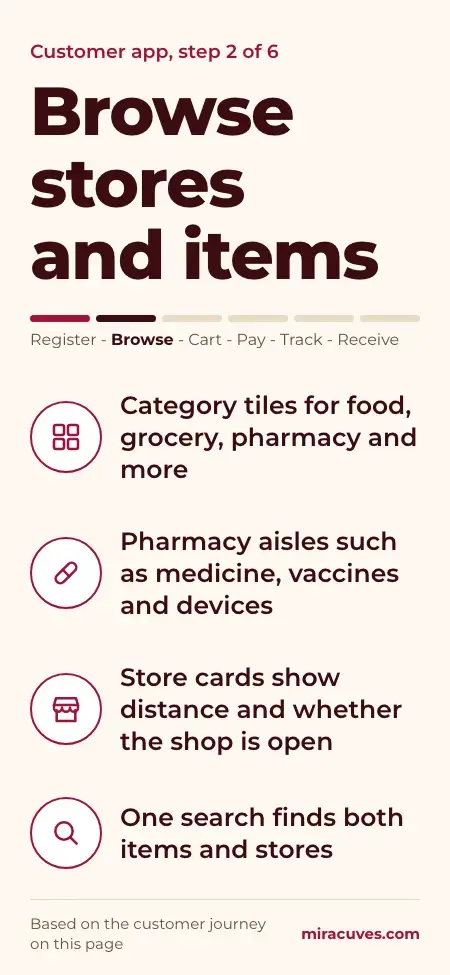
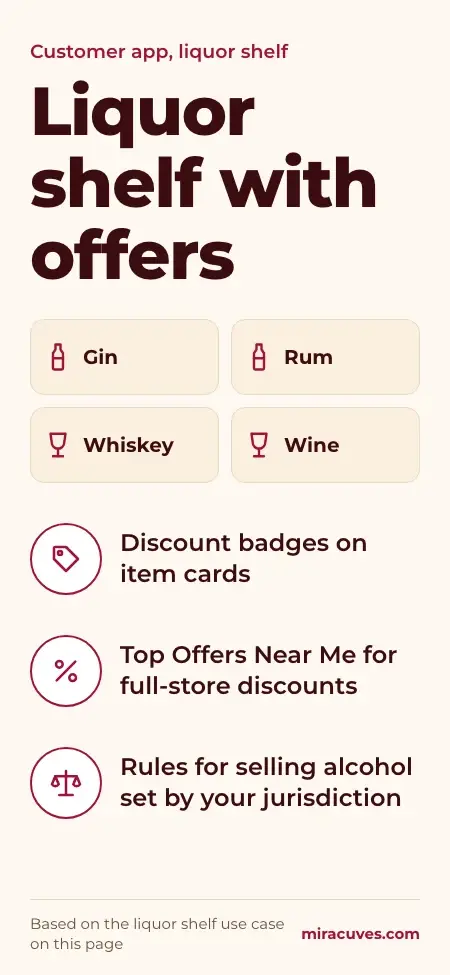
The shopper on a phone: pharmacy aisles, a liquor shelf, courier requests and store cards that show distance and whether the shop is open, with a cart, favorites and an orders tab.
- 1Pick Android or iOS from the app portal
- 2Use the demo credentials listed below
- 3Explore: Home, Favourite, Cart, Orders
+911234567890 | User_321Rappi Clone - Store App
The shop owner on a phone: take incoming orders, keep items and prices current, and let delivery partners know when an order is ready for pickup.
- 1Visit the store app portal and choose your device
- 2Log in with the store credentials shown below
- 3Explore: incoming orders and the item list
food@demo.com | Store_321Rappi Clone - Delivery Partner App
The rider on a phone: accept or decline orders that arrive as delivery requests by proximity, follow turn-by-turn navigation to the store and the customer, and watch earnings build up.
- 1Visit the rider app portal and choose your device
- 2Log in with the rider credentials shown below
- 3Explore: new orders, navigation, earnings
+919876543210 | Delivery_321Browser Storefront, Store Dashboard & Admin Dashboard
The browser side: a web storefront for customers, an admin panel for the operator and a separate store panel where each shop runs its listings.
- 1Open the demo website in another browser tab
- 2Browse categories, stores and items
- 3Ask the team for the panel logins
mxlovo.mimeld.com/admin/login/store

Walk Through It Live
A Super App Like Rappi in Action: One Cart, Several Stores, Riders on the Map
A live call is the fastest way to see every side of the network. Within 30 minutes we go through the customer, store and rider apps and the admin panel in turn, and tie each to your plan: categories, fees, commission and a launch date.
Schedule a live walkthrough call.Screens From the Demo
Screens of a Delivery App Like Rappi - Pharmacy Aisles, Parcel Requests, Liquor Shelf & Offers
Miracuves pulled these real screens from the Rappi clone customer app, in the order a shopper meets them: the home screen with pharmacy categories and store cards, the courier request screen and a liquor shelf with a special offers row.


Follow a customer from the home screen through a pharmacy aisle, a parcel request and a liquor shelf with offers, then ask for a guided call to see the store app, the delivery app and the panels that sit behind them.
02What clients say
What Clients Say
Rappi Clone Client Reviews - Operators in Their Own Words
What each of the nine clients added is the story here: local payment partners at Shophy, a surge-pricing engine at Speedyven, provider onboarding at Z-gig, three store-listed apps at Makaalu, and categories at Aeygo.
“Having done this once with Miracuves, the second build was mostly configuration. Same dispatch and merchant tooling, different market and different payment rails. It went live in under a month and we knew exactly what we were getting.”
“Ride-hailing, food, courier and a marketplace, and we were chasing a holiday window. Their Gojek base had the rider and driver apps, dispatch and the merchant console already. We added local payment partners and our regional marketplace layer, and were taking live orders inside a month.”
“We opened with three verticals rather than phasing them, which was only possible because dispatch and the merchant tooling already existed. Our work was the market and the payment partners. Delivered inside a month.”
“Our market, our payment partners and our categories were the work. Dispatch, the rider and driver apps and the merchant console were already built and proven. Live inside a month on infrastructure that had already run at volume elsewhere.”
“Customer, driver and merchant apps plus dispatch were ready. We configured our verticals, our payments and our branding. Delivered inside a month and it has scaled since without a rebuild.”
“Multi-city was the requirement from day one, and the dispatch and merchant console handled it natively - which is exactly the part we did not want to build. Rides, food and courier across several cities, live inside a month.”
“Several gig verticals in one product. Because multi-service dispatch was already solved, we spent the time defining categories and provider onboarding rather than infrastructure. Delivered under a month.”
“We needed three apps that agree with each other: customer, driver and store. The shared state model was already built, which is the part people underestimate. Live inside a month with all three in the stores.”
“Speedyven is a hyperlocal courier network — packages, food, and same-day essentials across a few metros. The dispatch and rider app were the parts where we needed to move fastest, because riders have low tolerance for clunky tools. Miracuves's Delivery Genie base gave us the rider app, the dispatch console, and live tracking. We added our custom surge-pricing engine, our multi-merchant order router, and a custom rider-incentives module. We launched in 7 weeks. Rider activation is high and the platform's been stable through weekend peaks.”
Check It Yourself
Rappi Clone Case Study - What Exists Today and What You Can Test Yourself
Miracuves publishes no named client deployment of this delivery marketplace, so there is no case study to condense here. The demo and the release log are our evidence, and this section explains how to put them to use.
Miracuves has published no named client build of this delivery marketplace, and it will not display one that does not exist. In its place we offer a live demo and a release log that you can read entry by entry.

- Place an order in the customer app using the demo credentials
- Open the store app and the delivery app to see the other two sides
- Ask for the admin login on a guided call and follow the same order
- Step through the release notes version by version
- Name a client who has not agreed to it
- Pass off a quote or number from another product as this one's
- List an add-on among the base features
- Your logo, icons and colors can be applied to the apps and to the web platform
- Set up your categories, fees and commission rules
- Deploy on your hosting and hand over the full source code
- Upload the apps from your developer accounts, with store review on its own clock
A named deployment will be shown here only once a client agrees to be named and its case study is live.Miracuves · Where we stand on case studies
03Inside the product
The Idea
What a Super App Like Rappi Gives Shoppers, Stores and Riders
The Rappi clone from Miracuves is a hyperlocal on-demand delivery marketplace that arrives ready-made. One customer app puts restaurants, grocery stores, pharmacies, liquor shops and pet-supply stores side by side, a store app and panel let each shop run its own catalog, and a delivery partner app carries the order from the shelf to the door while the admin panel watches the whole network.


More Than a Storefront
The value sits around checkout: a store side with an approval step and stock tools, a rider side with navigation and earnings, and an admin console that sets fees and commissions.
Not a Locked Box
Every line of source is delivered unencrypted, so your developers can reshape flows, screens and rules whenever the business asks.
Plain About What Is Extra
Four extras are sold separately: a virtual shopping assistant, community delivery points, social sharing rewards and custom delivery windows. None of them is counted in the base feature list.
Android, iOS & Web
What Does a Rappi Clone Script Include?
The hard part of a neighborhood delivery app is not the product page. It is everything around the order: several stores feeding one cart, a rider matched by distance, a shop that has to accept before anyone moves, and a payout trail the operator must stand behind. Those parts ship working.
- 01One home screen for food, grocery, pharmacy, liquor and parcels
- 02Several stores combined in one cart and one delivery
- 03Store app and panel with approval, stock and earnings tools
- 04Delivery partner app for each delivery person with proximity orders and navigation
- 05Admin panel with commissions, offers and reports
Handed over: three role apps for shoppers, stores and riders, plus a storefront on the web, a store panel and the operator console, all with their source.
What You Get
Rappi Clone Features - One Cart, Store Tools, Rider Dispatch, Payments & Admin
Everything listed below is part of the Rappi clone platform Miracuves delivers. Extras that need a separate module are called out as add-ons lower on the page.
One Home Screen, Many Categories
The customer app opens on category tiles and store cards for food, grocery, pharmacy, liquor and pet supplies, with search that covers both items and stores.
- Category tiles on the home screen
- Pharmacy aisles such as medicine, vaccines and medical devices
- A liquor shelf with brand tiles
- Search across items and stores
- Address shown on the home header
Single Checkout Across Stores
Items from different stores go into one cart and leave as one order, so a customer can add a pharmacy item to a grocery run without placing a second order.
- Items from several stores in one cart
- One combined delivery for the order
- Cart review with quantity changes
- Address selection at checkout
- Saved delivery preferences for quick reorders
Store Cards With Distance & Status
Store listings show how far the shop is and whether it is open, and the offers row surfaces discounts near the customer.
- Featured and new stores on the home screen
- Distance from the customer on each store card
- Each store shows whether it is open or closed
- Top Offers Near Me for full-store discounts
- Discount badges on item cards
Instant or Scheduled Delivery
Customers can order for now or pick a later time from the delivery options, which suits planned events, and past orders are kept so a favourite basket is a few taps away.
- Immediate delivery or a chosen time
- Schedule ahead for events
- Order history for reordering
- Favourite tab in the app navigation
Live Order Tracking & Chat
Every order shows its stage, and the customer can follow the delivery partner on a map with real-time order tracking and message the rider or the store.
- Status from confirmed to picked to en route to delivered
- Live GPS position from pickup to drop-off
- Driver details and delivery OTP on the tracking screen
- In-app chat with the rider and the store
- Push notifications for every update
Payments & Wallet
Customers can pay by card, wallet, cash on delivery or a connected gateway, and the wallet holds rewards, cashback and refunds.
- Cards, wallets and cash on delivery
- Third-party payment gateways
- Wallet with rewards, cashback and refunds
- Currency and gateway settings checked before saving
- Cash collected by riders handled by platform policy
Parcel Pickup & Drop
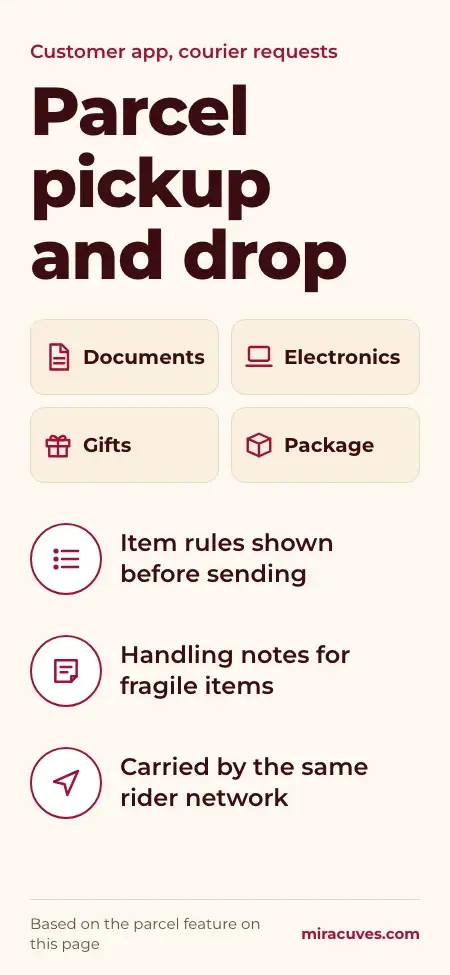
A courier screen takes document, electronics, gift and package requests, so the same riders carry both store orders and sent parcels.
- Documents, Electronics, Gifts and Package request cards
- Item rules shown per category before sending
- Handling notes for fragile items
- Parcels move through the same rider network
Store App & Store Panel
Shops register, wait for approval, then run their own catalog from a phone or the web, and receive a notification when an order arrives.
- Registration with admin approval
- Add items and change prices in real time
- Quick stock update and low-stock alerts
- Nutrition, allergy and generic-name fields for items
- Own delivery charges or platform-based pricing
Delivery Partner App
Riders register with documents, get approved, then receive orders by proximity, accept or decline them and follow navigation to the store and the customer.
- Sign-up with document upload and approval
- Orders assigned by proximity
- Accept or decline each request
- Turn-by-turn GPS navigation
- Earnings dashboard with trip history and payouts
Delivery Zones & Live Order View
The admin landing page shows delivery zone information, and a live order view follows active deliveries, store status and rider locations.
- Delivery zone details shown on the admin start page
- Active deliveries in one live view
- Store status at a glance
- Rider locations on the map
Promotions, Ads & Loyalty
Admins run discount codes, referral programs and seasonal offers, sell paid ad placement to stores, and send campaigns by push, SMS and email.
- Discount codes and seasonal promotions
- Referral programs
- Ad placement sections that stores pay for
- Push, SMS and email switches under admin control
- Subscribed customer list export with filters
Admin, Languages & Reports
One console manages customers, stores and riders, sets commissions and delivery fees, and reports on sales, customers, rider performance and revenue.
- Role-based admin access for fleet, support and finance teams
- Commission percentages and delivery charges
- Auto-translate across all features
- You set the display order of stores, items and categories
- Chat with admin from the order details page
Before you buy, know the boundaries: You receive the whole platform, rebranded with your identity. On your side: hosting, a domain, a developer account per app store, brand assets, business details, a gateway through KYC, and any third-party keys. Store approval is up to Apple and Google, so it falls outside our 6-day build.
Where the Income Comes From
Rappi Clone Revenue Models - Order Commission, Ads, Store Plans & Payment Margin
Commission, delivery charges, ad placement and store plans each sit on their own line in the admin panel of Miracuves' Rappi clone, so changing the commission rate leaves delivery charges and ad pricing untouched.
Two lines usually carry the most weight: the commission on each order and the placement and plans you sell to stores.
- 01
Order Commission
The operator keeps a percentage of every order a store receives. The commission rate is a setting in the admin panel, and stores can see what they owe on each order.
- 02
Delivery & Service Fees
Customers pay a delivery charge that the admin sets, or the store sets its own. The gap between what the customer pays and what the rider earns is the operator's margin.
- 03
Sponsored Listings & Banners
The release notes add paid ad promotion sections, so a store can pay for placement above its neighbors, and banners carry offers on the home screen.
- 04
Store Subscription Plans
The 2.9 release widened subscriptions, so a shop can buy a paid plan: income that arrives on a schedule instead of order by order.
- 05
Payment & Wallet Margin
A charge on the order can recover card and gateway costs rather than leaving you to absorb them. The wallet also holds rewards, cashback and refunds.
- 06
Store Onboarding Fees
Stores register and wait for approval, which is a natural place to charge a listing fee. That fee is a commercial choice you set, and dedicated billing for it can be added as scoped custom work.
| Revenue line | How it is billed | Take rateObserved take rate | What caps it |
|---|---|---|---|
| Order Commission | A percentage of the order value, taken from what the store earns before it is paid out. | Grab says it charges merchants around 15%-30% of order value on average. Rates vary by country and contract. | What stores will bear, and local law. New York City caps delivery at 15%, basic service at 5%, enhanced service at 20% (only if basic is 5% or less) and payment processing at 3%. |
| Sponsored Listings & Banners | A fee for placement or a campaign, separate from the commission on orders. | Delivery Hero reports advertising revenue approaching EUR 1.5bn on EUR 49.2bn of GMV, about 3% of GMV (our arithmetic). | The number of stores chasing the same shoppers. Ads pay off only when order volume gives a placement genuine reach. |
| Payment & Wallet Margin | A transaction charge on the payment, passed on to the customer or the store, or absorbed. | Grab puts card costs around 2.5%-3% of the transaction. Stripe lists 2.9% + 30c for US domestic cards. | Your gateway's rates for your country and mix of cards. New York's 3% cap on payment processing is an example of where a regulator can block the pass-through. |
| Store Subscription Plans | A recurring fee for a plan, billed on its own schedule. | No platform publishes a standard plan rate. If a plan is bought inside an app, Apple lists 30% (15% for Small Business Program members or qualifying subscriptions). | Store commissions apply to digital purchases made in an app, not to the physical orders themselves. Google lists 15% on the first USD 1M outside the US, UK and EEA, which moved to a service fee plus a 5% billing fee on 30 June 2026. |
| Delivery & Service Fees | A fee added to the order, from which the rider who completes the delivery is paid. | Grab's Deliveries segment kept about 12.6% of GMV as revenue before incentives, and Delivery Hero 8.1% as gross profit (our arithmetic). | Promotions and rider pay. Swiggy's Instamart net order value was 72% of gross order value in Q4 FY26, so discounts took about 28% (our arithmetic). |
How to read this. Commission and card-cost ranges come from Grab's undated Thailand merchant explainer, and the ceilings from the New York City delivery-app rules. The advertising and blended shares are our arithmetic on Delivery Hero, Grab and Swiggy results. Card pricing is on the Stripe pricing page; store commissions are on the Apple and Google Play pages. They are other companies' published numbers, so use them as modeling inputs: the table is neither a quote nor a forecast, and your own rates go in the admin settings.
Rappi Clone Revenue Model, Stage by Stage
The Rappi clone Miracuves delivers builds four revenue lines into one admin panel, and you add the rest as stores and shoppers arrive.
Launch
The first completed basket earns the order commission, and the delivery charge you or the store sets rides along with it, so income starts without anything extra to sell.
Traction
When pharmacies, grocers and liquor shops start competing for the same baskets, paid ad promotion sections and home-screen banners give placement real reach, and store subscription plans add income on a schedule.
Scale
With volume, a payment charge recovers card and gateway costs instead of leaving you to absorb them, and a listing fee at store approval becomes a commercial lever of your own.
Commission rates, fees and plans are admin settings, and the 0% revenue share means every basket's margin stays with you.
Run the Network
Rappi Clone Admin Panel - Orders, Stores, Riders, Offers & Reports
The Rappi clone admin console Miracuves ships answers the operator's daily questions: which stores are live, where the riders are, what each order is doing and which offers are running.


Admin Panel Sections
- 01
Dashboard & Analytics
A central dashboard for orders, deliveries, user activity and earnings, with reports and data analysis on sales, customer trends, rider performance and revenue.
- 02
Stores & Services
Approve new stores, control which services are offered, and set pricing and availability as the market changes.
- 03
Delivery Partners
Onboard riders after document checks, follow their performance and see where orders and riders are in real time.
- 04
Delivery Zone Info
Delivery zone information sits on the admin landing page, so it is the first thing the operator sees.
- 05
Live Order Oversight
Active deliveries, store status and rider locations in one view, with the order details behind each one.
- 06
Promotions & Offers
Discount codes, referral programs, seasonal promotions and paid ad sections for stores.
- 07
Customer Support
Tools to handle queries, complaints and feedback, and an admin chat reachable from the order details page.
- 08
Languages, Lists & Settings
Auto-translate, custom sorting of stores and items, and the switches for push, SMS and email.
Money Flow
The finance side of the console, following a customer's payment through to the store's payout.
- Commission percentages for stores
- Delivery charges and dynamic pricing
- Store earnings withdrawn to bank accounts
- Currency and gateway settings with validation
Roles & Controls
The access rules behind the console and the daily operation.
- Role-based access for fleet, support and finance teams
- Which sign-in methods are active is the admin's decision
- reCAPTCHA v3 on public forms
- Notification, email and SMS switches
Need the console to go further? Extra reports, another payout schedule, more languages or your own approval step are quoted as separate work. Tell us what your operations team lacks and we will put a price in writing.
04Cost and contents
In the Box
Everything in the Rappi Clone Script Box: Source, Apps, Panels & Deployment
Miracuves hands you a marketplace that already trades: apps, storefront, panels and every line of source, carrying your brand and installed for you. The one payment of $4,599 covers that setup in full; the costly part of any custom build, a basket that spans several shops, is already inside it, and only add-ons or new flows are priced separately on paper.
$ git clone your-marketplace Full Source Code
Project source for the web platform and all three apps, delivered readable and unencrypted so your developers can adapt it.
- Source for the web platform, unencrypted
- Flutter code for all three apps
- Yours to modify and extend
- Project codes handed over
Store App
The shop owner app: incoming order alerts, the item list, prices and stock, and earnings.
- Notification for every new order
- Items, prices and stock in real time
- Low-stock alerts
- Earnings withdrawn to a bank account
Delivery Partner App
The rider app: documents and approval, orders by proximity, navigation and an earnings dashboard.
- Sign-up with document upload
- Accept or decline by proximity
- Turn-by-turn GPS navigation
- Trip history and payout summaries
Web Storefront
A browser storefront for customers, with built-in registration pages so stores and delivery partners can apply from the web.
- Browse categories, stores and items
- Cart and checkout in the browser
- Registration pages for stores and riders
- Language switching
Customer App
Shoppers get an Android and iOS app with categories, store cards, a cart, favorites, orders and tracking.
- Tabs for Home, Favorites, Cart, Orders and Menu
- Pharmacy, liquor and parcel screens
- Live order tracking
- Store listings go out under your developer accounts

Admin & Store Panels
The operator console and the store panel: dashboard, stores, riders, offers, support and reports.
- Dashboard with orders, deliveries and earnings
- Stores and riders
- Offers, ads and support tools
- Reports on sales and rider performance
Rebranding & Deployment
Your logo, icons and colors go onto the web platform and the apps, and we deploy the result on your hosting.
- Branding with your own logo, icons and palette
- Web and apps both rebranded
- Deployment to your hosting
- You supply hosting, domain and developer accounts
Publishing & Support
We publish the apps from your developer accounts, and the three support periods run side by side from launch.
- Apps uploaded to the stores from your accounts
- 60 days of platform guidance
- 6 months of priority bug fixes
- 12 months of product updates
Prefer to see it first? Book a guided tour or sign in to the demo in the shopper, store or rider role, and we will open a pharmacy aisle, a parcel request and the offers shelf against your marketplace plan.
Fixed Price
What Does a Rappi-Style Delivery App Cost to Launch?
The white-label Rappi Clone launches at a fixed $4,599. Anything beyond the base, whether an add-on, an extra integration or a custom flow, is scoped and priced separately in writing.
Launch Plan
Fixed-Price White-Label PackageSuits: Hyperlocal delivery startups, grocery and pharmacy chains, regional multi-category operators
The demo is the product you receive, dressed in your logo, icons and colors, then deployed to hosting that belongs to you.
Start NowEnterprise
Bespoke Builds for Bigger ScopeSuits: Retail groups, multi-city operators, businesses with unusual order flows
Does your order flow differ from the demo? We build to your spec, and the scope and price are signed off in writing before work starts.
Ask for a QuoteRappi Clone Development Cost in 2026
Miracuves prices the Rappi clone at $4,599 for three Flutter apps, a React storefront, store and admin panels and all source. In six working days the shopper, store and rider apps run under your brand, and the multi-store basket, the costliest piece to build, is inside.
What moves your total sits outside the software invoice
- Hosting and a domain
- A card gateway in your name with KYC complete
- Apple and Google accounts that publish the shopper, store and rider apps
- Keys for Google Maps, Twilio, Firebase OTP and translation
- Paid extras such as the virtual shopping assistant or community delivery points
Your own approval step, another payout schedule or any new flow gets a written price and typically ships in 2-8 weeks; retail groups and multi-city operators take the Enterprise route.
Compare Your Options
Ready-Made Rappi Clone vs Custom Development vs SaaS
A hyperlocal super app like Rappi lets one basket span several shops, and Miracuves' ready-made clone already checks that basket out as one order. Before choosing, see how our ready base, a ground-up build and a rented ordering tool differ in launch time, money and control.
| Criteria | MiracuvesReady-Made Rappi Clone | Custom Development | SaaS |
|---|---|---|---|
| Launch time | 6 working days, rebranded and deployed | In writing, usually 2-8 weeks | Same-day account, tight limits |
| Upfront cost | $4,599 one time | Priced on your scope document | Ongoing monthly charge |
| Source code ownership | All code unencrypted and yours | Per contract, often negotiated | Never handed over |
| Customization | Multi-store basket, fees, zones in code | Built only as specified | Preset menus and switches |
| Ongoing fees | No per-order cut for Miracuves | Paid maintenance agreement | Subscription plus transaction fees |
| Branding & app-store listing | Three apps in your name | Fully bespoke identity | Sometimes vendor-branded listings |
| Best for | Neighborhood marketplaces mixing shop types | Logic unlike any existing product | Low-risk demand checks |
Same product, other editions: Gojek Clone · Super App Clone · Browse all Super App solutions
Use Cases in Practice
Use Cases for a Hyperlocal App Like Rappi - Neighborhood Marketplace, Pharmacy, Liquor, Parcels & Promotion
Each kind of operator stresses a different slice of the Rappi clone Miracuves builds. A neighborhood marketplace leads with the single cart, a pharmacy network with categories and store status, an operator selling plans and ads with subscriptions and paid placement. Configuration sets the emphasis.
Swipe · 6
Put grocery stores, pharmacies, restaurants and liquor shops on one home screen, so a customer fills one cart from several stores and receives one delivery.

Run medicine, vaccine, supplement and device aisles as their own categories, with store cards that show distance and open status and a generic-name group for pharmacy items.

List brand tiles such as gin, rum, whiskey and wine with discount badges on item cards, where the rules for selling and delivering alcohol are set by your jurisdiction.

Offer pickup and drop for documents, electronics, gifts and packages beside shopping, with item rules the sender reads before the request is made.

Let customers order for now or for a set time, keep order history and favourites for quick reorders, and follow each order from confirmed to delivered.

Sell stores subscription plans and paid ad placement, and control push, SMS and email from the admin panel to promote their offers.

Rappi Clone Business Model: Three Ways to Run It
Miracuves built the Rappi clone around one basket that spans several shops, and that single checkout supports three different marketplace businesses.
Neighborhood marketplace
Grocery stores, pharmacies, restaurants and liquor shops share one home screen, and the operator earns commission on every combined cart and its single delivery.
Category specialist
A pharmacy, liquor or courier operator leads with one vertical, using its own categories, store status and item rules, and widens the lineup once riders are busy.
Store-funded network
An operator that sells to stores rather than shoppers earns from subscription plans and paid placement, with push, SMS and email campaigns keeping listings worth paying for.
Each model runs on the same shopper, store and rider apps; only the store categories, commission rates and branding you set in the admin panel change.
Six uses, one codebase. All six cases run on the customer app, the store and rider apps and the admin panel. Only the category list, the commission and the branding change, so there is one codebase to maintain.
Speak With Our TeamWhy Now
Why Build a Hyperlocal Delivery Marketplace in 2026?
Delivery habits are local, and most stores and shoppers still meet through a few large apps. Run under your own brand, a marketplace gives you the shops, the shoppers and the commission those apps now keep.
01Customers Want One App for the Whole Errand List
A shopper who orders dinner, medicine and a parcel in the same week is easier to keep when all three live behind one login, one wallet and one tracking screen.
02Stores Want Orders Without Building an App
Neighborhood shops rarely have the budget for their own app. A store app and panel that arrive with approval, stock tools and payouts give them a reason to join your marketplace.
03A Single Checkout Makes Extra Items Easy
When items from several stores share one cart and one delivery, adding a pharmacy item to a grocery order is a tap rather than a second order.
04Scheduled Delivery Meets Planned Needs
Customers can order for now or for a set time, which suits planned events and gives you early sight of what is coming.
05Your Brand, Not Someone Else's Listing
When the marketplace carries your name, the customer list, the store relationships and the repeat orders stay with you.
06Build or Buy: The Math Is Short
Most of a neighborhood delivery business is three apps, an e-commerce web storefront and the panels behind them. Six days of build time are enough to stand all of it up, white-labeled, on hosting you control.
Platform by the Numbers
Mobile Apps
Web Surfaces
Days of Build Time
Months of Updates
The heavy lifting in a delivery marketplace happens in the middle: stores taking orders, riders matched by distance, payments that settle and one admin console joining it all up. That middle comes already built.
Sectors
Sectors a Rappi-Style Marketplace Serves
Any business that moves goods from neighborhood shops to customers who would rather not travel can run on the Rappi Clone. Restaurants and food businesses take orders. Grocery and convenience chains deliver the weekly basket. Pharmacies add medicines, vaccines and supplements. Liquor and wine shops list brands with offers. Pet-supply stores join the same checkout. Courier firms add pickup and drop. Gift and electronics retailers fill the long tail. Regional marketplaces bring many of these together under one name.
one codebaseMXLovo
- 01FdFood Delivery
- 02GrGrocery
- 03PhPharmacy
- 04LwLiquor & Wine
- 05PsPet Supplies
- 06CpCourier & Parcels
- 07CsConvenience Stores
- 08HwHealth & Wellness
- 09GiGifts
- 10ErElectronics Retail
- 11RmRegional Marketplaces
- 12RcRetail Chains
Miracuves’ Rappi Clone is a hyperlocal delivery platform that adapts to any category mix, with your name on the store tools, the rider app and the admin panel.
06Engineering
Step by Step
How the Rappi Clone Works - Register, Browse, Fill the Cart, Pay, Track & Receive
In the Rappi clone Miracuves ships, an order takes the customer a few taps. Behind those taps runs a fixed chain: the store accepts, a rider is matched, payment settles and the order is delivered. The steps below follow that chain from sign-up to doorstep, and the architecture that supports it comes after.
Customer Journey - From Sign-Up to a Delivered Order
Swipe · 6
- 1Sign Up and Pin the Delivery Address
Customers register or log in, then pin the delivery address, and the whole home screen arranges itself around that spot.
- Account with basic details, or a quick login
- Delivery address on the home header
- Guest checkout can offer account creation
- 2Browse Restaurants, Pharmacies and Shops
Category rows and store cards fill the home screen, and one search finds both items and stores.
- Category tiles for food, grocery, pharmacy and more
- Each store card shows its distance and whether it is open
- Search by item or by store
- 3Mix Several Stores in One Cart
Products from different stores land in a single cart, which can be checked and edited before checkout.
- Items from several stores in one cart
- Quantity changes in cart review
- Offers and discount badges on items
- 4Pick Now or Later, Then Pay
Delivery runs now or at a scheduled time; the customer confirms the address and pays by card, wallet, cash on delivery or a connected gateway.
- Immediate or scheduled delivery
- Cards, wallets and cash on delivery
- Wallet balance for rewards and refunds
- 5Follow the Rider on a Live Map
Once the store confirms, the nearest rider is matched by distance and the order moves across a live map.
- Status: confirmed, picked, en route, delivered
- Live GPS position of the rider
- Driver details and delivery OTP
- 6Rate the Store and Reorder Later
After the handover the customer scores the store and the rider separately, and the order stays in history for a one-tap repeat.
- Stores and delivery rated separately
- Order history for reordering
- Favourite tab for stores worth returning to
Behind the Screens
Architecture & Order Flow of a Rappi-Like Marketplace
- 01Stage 01
Separate Roles, Separate Logins
Customers, stores, delivery partners and admins each sign in to their own surface, and admin access can be split between fleet, support and finance teams.
- 02Stage 02
Order Lifecycle
An order moves from placed to confirmed by the store, picked up, en route and delivered, and every stage updates what the customer sees.
- 03Stage 03
Dispatch by Proximity
Available orders go to nearby riders, who accept or decline each one.
- 04Stage 04
One Cart, One Delivery
Items from several stores are held in one cart and checked out together, so the customer sees a single order and receives a single delivery.
- 05Stage 05
Payments & Wallet
Payments run through the gateways you connect, the wallet holds rewards, cashback and refunds, and store earnings can be withdrawn to a bank account.
- 06Stage 06
Alerts & Chat
Push, SMS and email alerts with switches the admin controls, and in-app chat between customers, stores and riders.
Engineering
Tech Stack of a Delivery Super App Like Rappi - PHP, Laravel, React, MySQL, Flutter & Payment Gateways
Miracuves engineered the Rappi clone on the rule that orders stay consistent only if the web tier, the database and the apps are sound. The stack below is what the platform runs on, as the product pages and release notes list it.
Core Web Platform
- Admin panel and store panel
- Bootstrap-based responsive interface
- Role-based admin access
- Version 2.12 is the latest release in the log
Customer Web
- A React web app for customers
- Built-in registration pages for stores and riders
- Language switching with auto-translate
- Shopping and checkout work in any browser
Data Tier
- MySQL listed as the database
- Stores, items, orders, riders and customers
- Caching in the backend and front end (release 2.12)
- Queries tuned in releases 2.10 and 2.11
Customer, Store & Delivery Apps
- Flutter apps built on up-to-date dependencies
- Three apps: customer, store and delivery partner
- Kept current with Flutter SDK 3.27.1 in release 2.12
- Released to the stores from your own accounts
Gateways & Wallet
- Cards, digital wallets and cash on delivery
- Third-party payment gateways
- Currency and gateway settings validated before saving
- You bring a gateway account that has passed KYC
Connected Services
- Google Maps for locations, navigation and tracking
- Twilio listed among the integrations
- Firebase phone authentication with OTP
- Payment gateway APIs and translation services
Web and admin run on PHP with the Bootstrap framework and Laravel, MySQL holds the data and Flutter drives the apps; the release notes add a React web app. Maps, Twilio, Firebase, payment gateways and translation each need an account and keys that you provide when we deploy. Every piece is mainstream, so hiring for it is straightforward.
Room to Grow
Built to Scale - Roles, Approval, Caching & Room for New Neighborhoods
Miracuves organizes the Rappi clone around separate roles and one admin console, so adding a neighborhood, a store category or a group of riders is a matter of configuration and capacity rather than a rewrite.
One Codebase for Every Area. Opening a new neighborhood means signing up its stores and riders on the deployment you already run, with no separate build per area.
Roles That Do Not Collide. Admin, store and rider surfaces have their own logins and permissions, and admin access can be shared out between fleet, support and finance teams.
Caching Where It Counts. Release 2.12 added caching in the backend and the front end for the business settings and the home page, the screens every customer meets first.
Numbers You Can Watch. Dashboards report orders, deliveries, user activity and earnings, so capacity and incentive decisions follow what the network is actually doing.
One Deployment, Many Areas
New neighborhoods join the platform you already run, so growth means signing stores and riders rather than shipping a new build.
Store Approval Gate
New stores register and wait for admin approval before listing, which keeps the catalog checked as it grows.
- Stores sign up and create a profile
- Admin approval before orders arrive
- Registration pages built into the web app
- Riders upload documents and wait for approval
Separate Role Logins
Customers, stores, riders and admins log in to separate surfaces, and admin permissions can be divided by team.
- Fleet, support and finance access
- Login methods set by the admin
- reCAPTCHA v3 on public forms
- Phone OTP through Firebase
Caching & Query Tuning
Release 2.12 added caching, and releases 2.10 to 2.12 tuned queries and asset files for speed.
- Caching in backend and front end
- Business settings and home page APIs
- Assets refined for responsiveness
- Queries improved in 2.10 and 2.11
Orders & Earnings on Record
Orders, store payouts and rider trips sit in the admin panel with reports on sales, customers and rider performance.
- Sales and revenue breakdowns
- Customer trend reports
- Rider performance and earnings
- Store earnings withdrawn to a bank
Languages & Currencies
Auto-translate covers all features, and currency and gateway settings are validated, so a new market needs configuration rather than code.
Room to Change. At some point every delivery business wants something particular to its city or its shops. You own the full source on a mainstream stack, so adding a screen, rule or integration is ordinary development work, handled by your team or by ours.
Launching a marketplace? Begin with the stores you can sign first, and grow on the deployment you already run. When order volume climbs, adding capacity is a hosting and configuration choice, and work beyond the base gets its own written quote.
07Safety and readiness
Security, Plainly
Security in a Rappi-Style App - Role Logins, Verified Stores & Riders, Gateway Payments & Honest Limits
Every Rappi clone Miracuves delivers keeps addresses, phone numbers, past orders and payment references, which makes three controls decisive: visibility by role, approval of stores and riders, and the hardening work done with you before launch. Each card below splits the platform side from your side.
- 01 · RolesRole Separation
Customers, stores, delivery partners and admins use separate logins, and admin permissions can be split between fleet, support and finance teams.
- Chat Moderation: Customers, stores and riders can message each other in the app, and an admin chat is reachable from the order details page, so complaints and edge cases reach an operator.
- Order Disputes: Refunds return to the wallet, and complaints and feedback are handled with the support tools in the admin panel, with the order record behind each case.
- 02 · LoginsLogins the Admin Controls
Manual, OTP and social-media login are all switched on or off by the admin, and phone OTP runs through Firebase authentication.
- Marketing Consent: The admin can export the subscribed customer list and switch notifications, emails and SMS on or off, so contact rules stay in the operator's hands.
- 03 · BotsBot Protection
reCAPTCHA v3 guards the public forms, so scripted sign-ups and abuse have a harder time getting through.
- 04 · ApprovalVerified Stores & Riders
Stores wait for admin approval, and riders upload documents and wait for approval, so the people on your network have passed a check you control.
- Age-Restricted Goods: Liquor and medicine appear as categories in the demo. Checking age, prescriptions and licenses runs as an operator process under your policy, and a verification step can be added as scoped custom work.
- 05 · GatewaysCards Go Through Your Gateway
Card payments run through the gateways you connect, so card handling follows that provider's rules, and you onboard the gateway and complete its KYC.
- Cash on Delivery: Riders collect cash and deposit it or hand it to the store according to platform policy, so the cash-handling rule is yours to write and enforce.
- 06 · LaunchLaunch Hardening
Before go-live we plan the work no demo can show: penetration testing, secret rotation, backups and a restore drill.
- Open Launch Items: Penetration testing, key rotation, a backup and restore drill and a check of your own gateway settings are named as pre-launch work rather than assumed complete.
The base is built around common security controls. A restore rehearsal, rotated keys and a penetration test are all booked into your launch calendar. Audit support is scoped per project. We build to the controls ISO 27001, SOC 2 and GDPR require, independent audit partners carry the audit forward with you, and the operator, not Miracuves, receives the attestation (audit partner record).
Discuss Security Before LaunchOperator Duties
Readiness for a Marketplace Like Rappi - Software Duties Versus the Ones You Still Own
A hyperlocal delivery marketplace puts strangers at customers' doors carrying food, medicine, alcohol and parcels. Miracuves supplies the tooling for ordering, dispatch and payments. As the operator you decide which stores may sell, which goods you carry and what legal duties apply in the markets you serve.
Ready, in this text, marks a feature that the demo or admin console shows running. Licensing for the delivery side belongs to you as operator.
Built Into the Software
Categories and store cards, one cart across stores, scheduled or instant delivery, live tracking, a wallet and cash on delivery, store approval, rider documents and approval, offers and ads, role-based admin access and reports.
Still Yours to Decide
Your terms of service and privacy policy, the stores and riders you accept and the papers you ask them for, how disputes end, and your refund and cash-handling rules beyond the defaults you set.
Pharmacy, Alcohol & Parcels
Pharmacy and alcohol rules differ by country and often by state. The platform lists the categories; it does not check licenses, prescriptions or age. The parcel screen shows item rules per category, and what may be carried is still your policy.
Riders & Where You Operate
How riders are classified, insured and paid, food-safety obligations and consumer protection all depend on the market. Confirm them for every city you serve with qualified local advisers before orders open.
08Extend it
- Categories, stores & one cart
- Store app & delivery app
- Wallet, offers & tracking
- Admin panel & reports
How a module is added
- 1Choose your extras
Guidance, pickup points, rewards or delivery windows, now or after launch.
- 2Price comes first
A written scope and quote exist for every module before work starts.
- 3Delivered as source
The finished module joins the code you already own.
Extend It
Paid Extras for an App Like Rappi - Shopping Assistant, Delivery Points, Sharing Rewards & Delivery Windows
Everything in the Miracuves Rappi clone base runs today, and the demo proves it. The four modules below are the extras listed for this product, each priced on its own because the scope varies with your marketplace.
Drag to explore · hover to pause
- 01Growth
Virtual Shopping Assistant
An AI-powered assistant that guides customers through product choices, offers personalized suggestions and speeds up the ordering process.
Assistant · Shopping - 02Delivery
Community Delivery Points
Designated neighborhood pickup points where customers collect orders from convenient, secure locations, which takes some of the weight off last-mile delivery.
Pickup · Points
- 03Growth
Social Sharing Rewards
A referral program where customers earn rewards for inviting friends, so word of mouth feeds organic growth.
Referral · Rewards - 04Delivery
Custom Delivery Windows
Let customers pick a specific delivery window that fits their day, so orders arrive when it suits them.
Delivery · Windows
Neighbors in the Catalog
Need a Narrower or Broader Delivery Product? These Four Sit Next to It.
The Rappi Clone covers many store categories in one app. If you would rather launch one vertical, or add rides, these four are the natural neighbors.

01The multi-service sibling: rides, delivery and home services in one app.
View This Product

02A courier-style delivery app that takes orders from local shops and brings them to the door.
View This Product
03A grocery marketplace where shoppers pick items from partner supermarkets for delivery.
View This Product
04A restaurant ordering marketplace with customer, restaurant and delivery apps and an admin console.
View This Product09The money side
Market Benchmarks
Multi-Category Delivery Market Benchmarks - Independent 2025-2026 Data
The revenue models above are ours. The figures below are not. They come from Delivery Hero's FY 2025 results, Grab's 2025 results release and New York City's published fee caps, reproduced as published. They show how much volume multi-category delivery platforms process, what they keep from it, and where a regulator sets a ceiling on merchant fees.
EUR 49.2bn in GMV at Delivery Hero in 2025
Delivery Hero reports Group GMV of EUR 49.2 billion for 2025, up 9 percent like-for-like, and adjusted EBITDA of EUR 903 million, or 1.8 percent of GMV. Its Quick Commerce vertical passed EUR 7.5 billion of GMV and AdTech revenue is approaching EUR 1.5 billion, according to the company's FY 2025 results presentation of 26 March 2026.
$14.2bn in Grab Deliveries GMV in 2025
Grab reports Deliveries GMV of $14,236 million and Deliveries revenue of $1,800 million for 2025, both up 21 percent, with a segment adjusted EBITDA margin of 2.0 percent. Revenue is about 12.6 percent of GMV, our arithmetic on reported figures. Grab's annual report states that merchant-partners pay a commission at an agreed rate on the goods ordered.
15% Fee Cap on Delivery Apps in New York City
New York City's Department of Consumer and Worker Protection lists the fee caps that third-party delivery apps may charge restaurants: 15 percent to deliver the order, 5 percent for a basic listing service, 20 percent for enhanced service and 3 percent to process electronic payment. An enhanced service fee is allowed only if a basic service is priced at or under 5 percent.
Delivery Hero SE, FY 2025 Results Presentation, 26 March 2026 - ir.deliveryhero.com
Grab Holdings Ltd, Grab Reports Fourth Quarter and 2025 Results, Form 6-K exhibit 99.1, 12 February 2026; and Annual Report on Form 20-F for the year ended 31 December 2025, filed 6 March 2026 - sec.gov
New York City Department of Consumer and Worker Protection, We Want Your Feedback on the City's Fee Caps, April 2026 - nyc.gov
All figures are the publishers’ own, reproduced as published from company results and a city regulator's rules. Metric definitions differ by company, Grab's segment figures are unaudited, and the Grab revenue-to-GMV ratio is our arithmetic on reported figures. They describe the companies and rules named, not any platform Miracuves builds, and nothing here is a revenue projection for your business.
The Money Side
Marketability, Revenue Potential & Business Prospects
A delivery marketplace earns once stores trust it enough to list and customers trust it enough to reorder. The points below make both decisions easier, and keep the relationship with you after they are made.
- 01
Commission on Every Order
A cut of each basket goes to the operator, which ties income to stores and order count rather than to headcount.
- 02
Several Lines, One Admin Panel
Delivery charges, ads, store plans and payment margin are separate levers in one console, so turning one on does not mean redesigning the others.
- 03
Owned Customers, Stores and Riders
Accounts, order history and rider records stay in your own database, so the value the marketplace builds up belongs to you and not to a third-party app.
- 04
Exit Optionality
The full source is yours, so moving host, team or direction later needs nobody's permission.
- Order Commission
- Delivery & Service Fees
- Sponsored Listings & Banners
- Store Subscription Plans
- Payment & Wallet Margin
- Store Onboarding Fees
Staying power comes from supply and habit more than from features.
- 01Stores with loaded catalogs and prices do not casually move
- 02Riders who know their routes stay on the network
- 03Customers with a wallet, favourites and history return
- 04Reliable dispatch and store approval are the second moat
Store count is the only thing that changes between the three cases, and each points at the lever with the most pull at that scale. They are prompts for planning, never forecasts of earnings.
Early revenue rests on the commission from each order.
A small launch in one district, where a handful of stores take orders and the commission on each completed order covers running costs. An illustration of scale, not a forecast.
Commission plus ads and store plans.
Several districts of one city, with stores chasing the same shoppers, so paid placement and store plans begin to add to commission. A scale example only.
Multiple cities running with both fees and placement live.
A regional network across many districts, where delivery charges, ads and store plans add up beside commission, and the reports show where to focus. An illustration of scale, not a forecast.
10Why us
Why Miracuves
Miracuves Against Other Ways to Get a Rappi Clone
Options for a Rappi clone script range from a boxed ordering script to a freelancer, an agency or a ready base from Miracuves. Put the same tests to each: show the product running, prove one basket can hold items from several shops, hand over all source without encryption and explain how fast questions get answered.
What Buyers Weigh
- 01
Three Apps and Panels Included
Customers, stores and riders each get their own app, and the web side adds a storefront, a store panel and an admin panel. Off-the-shelf scripts frequently end at the customer screen.
- 02
One Cart Across Stores
Items from several shops check out together as one order and one delivery, which is the part of a multi-store marketplace that is hardest to retrofit.
- 03
Rider Side Built In
Riders sign up with documents, receive orders by proximity, navigate and see earnings, so dispatch does not have to be bolted on afterwards.
- 04
You Own the Source
The whole codebase comes unencrypted and in your hands, so no vendor can reprice it or rewrite the terms later.
- 05
Release Notes You Can Follow
The release notes run from version 2.8.1 to 2.12 and show what each version added, instead of asking you to trust a feature list.
- 06
Plain Readiness Language
The page separates base features from add-ons and from what you bring yourself: gateway accounts, hosting and store developer accounts.
How to Choose a Rappi Clone Development Company
A delivery marketplace developer should prove, live and before you sign, that one cart can hold items from several shops.
What to look for Miracuves
- Proof in the product Phone logins for the shopper, store and rider apps
- Multi-store checkout Several shops in one order and one delivery
- A readable release record A release log spanning 2.8.1 through 2.12
- Source ownership The whole codebase, unencrypted and in your hands
- Time to launch Six working days of build time
- Support after launch Rider, store and shopper apps: 12-month updates, 6-month priority fixes, 60-day guidance
Walk away from any vendor who
- Demos one restaurant at a time and calls it a marketplace
- Bolts dispatch on after launch
- Displays a client story the client never agreed to
- Lists paid extras among the base features
- Takes a cut of each basket
Rappi Clone Measured Against Scripts and Agencies, Point by Point
| What you compare | MiracuvesMiracuves Rappi Clone | Off-the-shelf Script | Agency Build |
|---|---|---|---|
| Launch speed | 6 days of build time | Unknown, often DIY | Months of scoping and work |
| Who owns the code | You do, fully unencrypted | Frequently restricted | Normally you |
| Multi-store checkout | Category tiles, store cards, one combined cart | One restaurant at a time | As far as the budget stretches |
| Store and rider tools | Store app, store panel and rider app | Seldom included | Built to order |
| Payments and wallet | Cards, wallets, cash on delivery, gateways | Differs by script | Custom integration work |
| Admin and reports | Dashboard, offers, reports | Sparse or missing | Built to order at extra cost |
| Security posture | Role logins, reCAPTCHA v3, stated limits | Bare minimum | Depends on the vendor |
| Price, speed, quality | Fixed price, quick, proven base | Cheap but risky | Costly and slow |
| Support and updates | 60 days guidance, 6 months bug fixes, 12 months updates | Rarely offered | Whatever the contract says |
Few routes to a delivery marketplace survive a first busy week intact. Where they diverge is laid out in the rows above.
Speak With Our TeamRelease Notes
Release History of the Rappi-Style Base - Versions & Changes
Notes covering the web platform and the apps, latest version first. They carry no dates, and the wording is tidied while each entry still describes what shipped.
| Version | Changes | What changed |
|---|---|---|
| V2.12 | 5 updates, 1 fix | Added or updated Flutter apps now compatible with Flutter SDK 3.27.1 and 3.24.5 and the newest Android Studio Backend and front-end caching for the business settings and home page APIs Assets tuned for responsive layouts Reworded system messages and labels to read more clearly Refinements to the interface and user experience Fixed Problems resolved to make operation smoother |
| V2.11 | 9 updates, 1 fix | Added or updated One central login with three options (manual, OTP and social media), all controlled from the admin side Phone sign-in through Firebase using OTP Top Offers Near Me lists stores running discounts on everything Improved item and store search Stock can be adjusted straight from the product list Alerts when stock falls to thresholds you set Nutrition, allergy and generic details added to item campaigns Web app includes sign-up pages for stores and delivery partners Support for Flutter SDK 3.24.4, small interface touches and query and page tuning Fixed Several known issues |
| V2.10 | 10 updates, 1 fix | Added or updated Admin landing page improved with delivery zone information Push notification clicks open the matching page Predefined message suggestions in chat Nutrition and allergy information and tags for food and grocery items Generic group names and filters for pharmacy items Export of the subscribed customers mail list with filters POS section improvements Chat with admin from the order details page reCAPTCHA v3 for added security Flutter SDK 3.24.3 support and query and performance tuning Fixed A few known issues |
| V2.9.1 | 2 updates, 1 fix | Added or updated Firebase phone authentication using OTP Flutter SDK 3.22.3 support Fixed Issues in the web panels and apps |
| V2.9 | 8 updates, 1 fix | Added or updated Sections for paid ad promotion Switches for notifications, emails and SMS, and the admin controls store access The admin panel can set the order of stores, items, categories and other lists Guests can create an account during checkout Automatic translation across every feature Subscriptions now handle many more scenarios Currency and payment gateway settings are validated Interface upgrades in the mobile and web app Fixed Known issues resolved for more stable performance |
| V2.8.1 | 1 update, 1 fix | Added or updated Flutter SDK 3.22.2 support Fixed Issues in the web panels and the user app |
Ready when you are
Let's turn your delivery marketplace idea into a live platform.
Book a free consultation and you leave with a timeline you can plan around and answers without the sales gloss.
- A response lands inside 2 hours, Mon-Sat
- Free consultation
- No lock-in contracts
- Source code is yours
11Keep reading
Latest Reading
Building a Super App Like Rappi: Latest Guides & Reading
Fresh reading on what a delivery app like Rappi costs, how it is built and which features and revenue options matter first.

The product6 questions
01What is the Rappi Clone solution?
The Miracuves Rappi Clone is a ready-made hyperlocal delivery marketplace. Customers order from restaurants, grocery stores, pharmacies, liquor shops and pet-supply stores in one app, stores and delivery partners each get an app of their own, and the operator runs the network from an admin panel. It ships white-labeled to your brand, with the complete source code.
02Can I launch a delivery app like Rappi legally?
Building and selling delivery-marketplace software is generally lawful. The Rappi Clone from Miracuves reuses nothing from Rappi, whether code, design or content, and it launches under your own brand and terms. Keep the Rappi name and logo out of your branding, and ask local counsel about the rules for each category you sell, above all pharmacy products, alcohol and courier items. Miracuves does not give legal advice.
03Is it possible to tailor the platform to fit my business?
Yes. As part of delivery we apply your logo, icons and color scheme to the web platform and the apps. Since the source arrives unencrypted, your team or ours can adjust branding, features, pricing models and delivery categories later. Anything beyond the base is scoped in writing and priced before work begins.
04What types of deliveries can this platform support?
The demo shows food and grocery stores, pharmacy aisles for medicines, vaccines and supplements, a liquor shelf, and a courier request screen for documents, electronics, gifts and packages. Pet supplies and other goods follow the same store model, with each shop listing its own catalog.
05Is the platform scalable for large operations?
It is organized around separate customer, store, rider and admin roles and a dashboard that reports orders, deliveries and earnings. Release 2.12 added caching to speed up the settings and home page calls. How far one deployment goes depends on your hosting and order volume, so capacity beyond the base is a hosting and configuration decision, and any extra work is quoted in writing.
06Do I get apps for both iOS and Android?
Yes. The customer, store and delivery partner apps are written in Flutter for Android and iOS, and a web storefront covers browsers. We upload the apps from your own developer accounts; when the stores approve them is for Apple and Google to decide, outside our 6-day build.
Customers & stores10 questions
07How can users place an order?
A customer browses categories and stores, adds items to the cart, confirms a delivery address and pays. From then on the order shows its stage in the app until it reaches the door.
08Can users schedule a delivery?
Yes. The customer can ask for delivery as soon as possible or pick a later time, which helps with planned events. Choosing from a set of custom delivery windows is an add-on that is priced separately.
09How do users track their deliveries?
The app shows each stage, from confirmed to picked up to en route to delivered, and follows the delivery partner by GPS on a map from pickup to drop-off. Push notifications report changes along the way.
10Which payment methods can customers use?
Customers can pay by card, with a digital wallet, in cash on delivery, or through the third-party gateways you connect. The gateway account is yours, already onboarded with KYC complete, and the admin panel validates currency and gateway settings when they are saved.
11Can users order from multiple stores in one order?
Yes. Items from different stores can sit in one cart, are checked out together and arrive in a single delivery. The customer sees one order and one tracking screen.
12How do stores register on the platform?
A store signs up from the app or from the built-in registration page on the web, creates a profile and lists its products. It starts receiving orders once the admin approves it.
13Can stores update their menu or product listings?
Yes. Store owners manage their own items, add new ones and change prices in real time. They can update stock from the product list and set low-stock alerts at thresholds of their own, and food and grocery items can carry nutrition and allergy information.
14How do stores handle incoming orders?
A store gets a notification when an order arrives, prepares it and tells delivery partners it is ready for pickup. The order status that the customer sees moves with those steps.
15Can stores set their own delivery charges?
Yes. A store can set its own delivery fee, or use the platform-wide pricing the admin defines.
16How do stores receive payments?
Payments for completed orders go through the platform, and store owners can withdraw their earnings to their bank accounts. Commission and payout rules are set by the admin.
Delivery partners5 questions
17How do delivery agents sign up?
Riders register in the delivery app or on the web registration page, upload the documents you require and start taking orders once the admin approves them. Which documents you ask for is your policy.
18How do delivery partners receive orders?
Available orders are assigned by proximity, and the rider can accept or decline each one.
19Is there a real-time navigation system?
Yes. The delivery app gives turn-by-turn GPS navigation to the store and then to the customer.
20Can delivery agents track their earnings?
Yes. The app has an earnings dashboard with trip history and payout summaries.
21How do riders handle cash-on-delivery orders?
The rider collects the cash and then deposits it or hands it over to the store, depending on the policy you set. The platform records the order and the payment type; the cash-handling rule itself is yours to write and enforce.
Admin, money & payments8 questions
22How does the admin manage users, stores, and delivery agents?
The admin panel has tools to manage customers, approve and onboard stores and riders, and oversee order fulfillment. Admin access can be split into roles for fleet, support and finance teams.
23Can the admin set commission rates and delivery fees?
Yes. The admin defines the commission percentage for stores, sets delivery charges and can configure dynamic pricing.
24How does the admin monitor real-time orders and deliveries?
A live order view shows active deliveries, store status and rider locations. The admin landing page shows delivery zone information.
25Can the admin manage promotions and discount campaigns?
Yes. The admin can create discount codes, referral programs and seasonal promotions, run paid ad promotion sections for stores, and switch push, SMS and email notifications on or off.
26What kind of reports and analytics does the admin get?
The admin gets reports on sales, customer trends, rider performance, revenue breakdowns and platform growth, alongside a dashboard of orders, deliveries, user activity and earnings.
27What are the revenue models supported by this platform?
Revenue can come from the commission on each order, delivery charges, paid ad placement and store subscription plans, plus payment margin and onboarding fees if you choose to charge them. How much each line earns depends on your market, and the sourced figures on this page are other companies' published numbers, not a forecast.
28How soon can a delivery marketplace expect its first revenue?
The order commission is where most delivery marketplaces begin, since nothing extra has to be built or sold: the first completed order earns it, and delivery charges ride along. Paid ad placement and store plans follow once enough stores compete for the same customers to want visibility. Further lines sometimes named for platforms like this, such as regional licensing or fulfillment deals with brands, rest on your own commercial agreements and are negotiated, not built in.
29How defensible is a hyperlocal delivery marketplace?
Staying power comes from supply and habit more than from features. Stores that have loaded their catalogs, and riders who know their routes, are slow to leave, while customers with a wallet balance, favourites and order history keep coming back. The platform lets that build-up begin on launch day and holds it in your database. Reliable dispatch and honest store approval are the second moat, because trust is the part rivals find hardest to copy.
Launch & Miracuves10 questions
30What do I need to supply to launch?
Plan on supplying hosting and a domain name, one verified developer account for each app store, your branding assets and business details, a gateway through KYC, and third-party keys for services like Google Maps, Twilio or Firebase. We rebrand, deploy and publish. Store approval is up to Apple and Google, so it falls outside our 6-day build.
31How much does the Rappi Clone cost?
The launch-ready white-label Rappi Clone has a fixed price of $4,599. Any add-on, integration or custom flow gets its own written scope and price before work begins.
32Is the source code included?
Yes. The web platform and the apps come with their full source, unencrypted, so your team or ours can keep changing it as the business grows.
33What support is included after launch?
Three cover periods run side by side from launch: 60 days of platform guidance, 6 months of priority bug fixes and 12 months of product updates. We respond to a first message within 2 hours, from Monday to Saturday, 10:00 to 19:00 IST.
34What makes Miracuves a sound choice for building a Rappi clone?
The store side, the rider side and the admin panel arrive working, with a release history you can read from version 2.8.1 to 2.12. The company has built software since 2010: 9,000+ projects delivered, 6,000+ clients served and a catalog of 90+ ready-made solutions. A fixed $4,599 buys the Rappi Clone, live in 6 working days, with the three cover periods above.
35Ready-made Rappi clone or a custom super app: which pays off sooner?
The ready base usually pays off sooner. The shared basket across shops, store and rider apps, card, wallet and cash payments and live tracking already work, and the platform is rebranded and on your servers 6 working days after kick-off for $4,599. A super app built from nothing needs a scope, a quote and a long build before the first basket. Extra flows get a written quote and typically take 2-8 weeks.
36When will my Rappi clone appear on the App Store and Google Play?
Our build takes 6 working days: rebranding the customer, store and delivery apps, installing the platform on your hosting and preparing the store submissions under your own developer accounts. Store review then happens at Apple and Google, on timelines they set, outside those six days. A verified developer account and complete store listings on your side keep that review step short.
37How does a Rappi clone go from demo to launch, step by step?
Place a mixed basket in the demo as a customer, then accept it as a store and carry it as a rider. Agree categories, fees and the first neighborhood with us. We brand every surface, set the platform up on your server with your keys, configure commission and offers, and walk test orders end to end. Six working days later it is ready, and the app stores then review it.
38Who is a Rappi clone app built for?
Any business that moves goods from neighborhood shops to customers can run on it. That includes restaurants, grocery and convenience chains, pharmacies, liquor and wine shops, pet-supply stores, courier firms and regional marketplaces that bring several of these under one name. Configuration decides which part leads, such as the single cart, store status or paid placement.
39Does the Rappi clone support different languages and currencies?
The admin panel carries language and currency settings, and it validates currency and gateway settings each time you save them. Customers can pay by card, digital wallet, cash on delivery or any third-party gateway you connect. Anything beyond the base setup is scoped in writing and priced before work begins.
More on Hyperlocal Apps Like Rappi
Open blog explainers, its industry and a Miracuves service from here.
On-demand app development
See the service→GuideReasons startup choose our Rappi clone over custom development
Read the guide→Business model
The shape of a multi-category delivery marketplace and the sources of its income.
Read the guide→GuideHow it works
How a shopper, a shop and a rider move one order from tap to doorstep.
Read the guide→Disclaimer
Miracuves is an independent software development company. We are not affiliated with, connected to, sponsored by, or endorsed by Rappi.
Read our full Legal Notice & Disclaimer →“Rappi Clone” is used descriptively. It is how the software industry refers to building a platform with functionality similar to Rappi, and how clients search for it.
The entire design and codebase is built by our own team. The product contains no code, design, graphics, or content originating from the Rappi website or applications.
Rappi and all other third-party names and marks are the property of their respective owners, referenced here solely to describe the category of software offered.
















