















Super App Clone
One app, several service lines, and you pick the lineup. Start with the lines your market needs, such as taxi, food and grocery, and bring in pharmacy, parcels, bookings or home services as the business grows.
Customers get one login and one wallet for all of it. Vendors, drivers and providers have apps of their own, and admin, vendor and manager panels run the platform from the web, in your brand, and the full source code is yours.
Delivered in 6 Days, Covering
- 60 Days of Platform Guidance
- Unencrypted Source Code
- Rebranded to Your Identity
- White-Label From Day One
- Publishing From Your Developer Accounts
- 6 Months Bug Fixes + 12 Months Updates
Network activity
- Taxi ride completedTaxi
- Grocery order accepted by the vendorOrders
- Parcel request matched to a driverParcels
- Prescription order placedPharmacy
- Home service booking confirmedServices
- Referral reward creditedRewards
- Wallet top-up receivedWallet
- Vendor plan paid from the manager walletPlans
- Taxi ride completedTaxi
- Grocery order accepted by the vendorOrders
- Parcel request matched to a driverParcels
- Prescription order placedPharmacy
- Home service booking confirmedServices
- Referral reward creditedRewards
- Wallet top-up receivedWallet
- Vendor plan paid from the manager walletPlans

Numbers at a Glance
e-commerce to taxi, as the demo shows
customer, vendor and driver
admin, vendor and manager
store review runs on its own clock
You Pick the Lineup
Taxi, food, grocery, pharmacy, e-commerce, parcels, bookings and home services all sit on one base. We agree with you which of them open first.
One Wallet Under Every Line
Customers hold a wallet balance with Top-Up, collect loyalty points that move into it and share a referral code, whichever service they use.
01Take it for a spin
Open the Demo
Super App Clone Demo - Customer, Vendor & Driver Apps Plus the Web Panels
Use the Miracuves Super App Clone the way each of its users would. Three app portals hold the customer, vendor and driver apps, the demo storefront opens in a browser tab, and a panel sign-in page sits behind it. Open a service tile in the customer app, then step into the vendor and driver apps to see the matching view.

Customer App in the Super App Clone
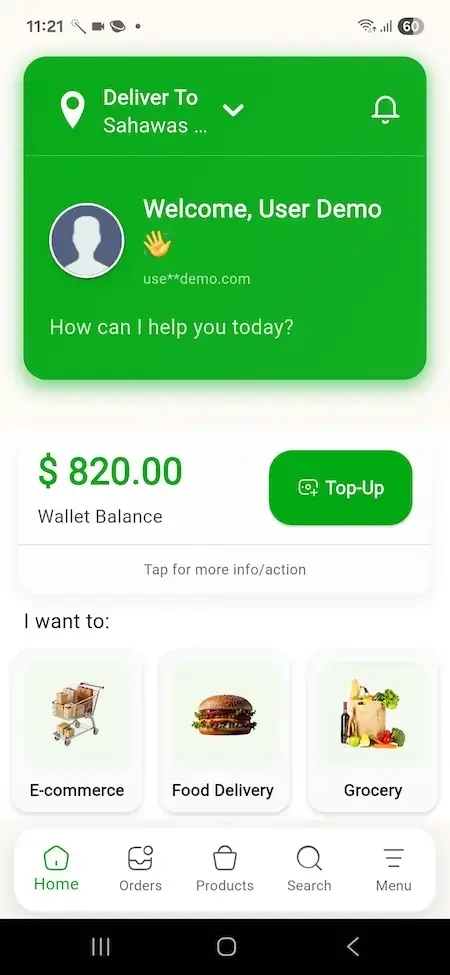
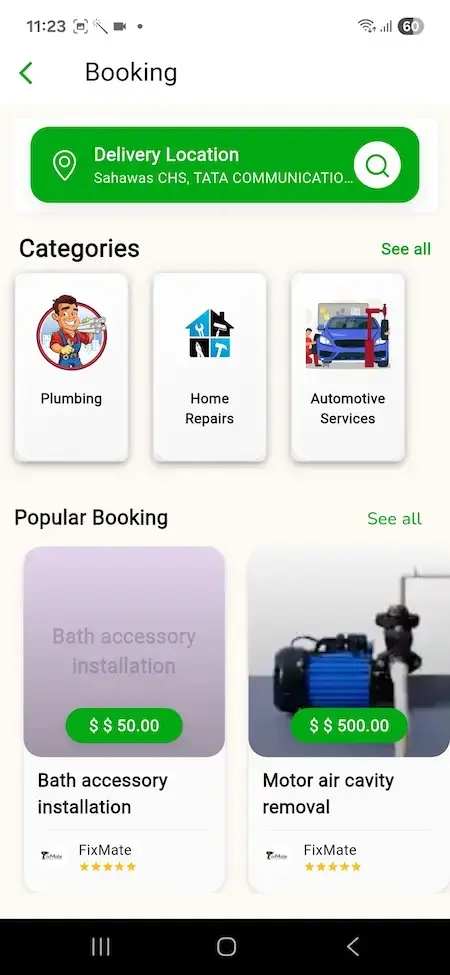
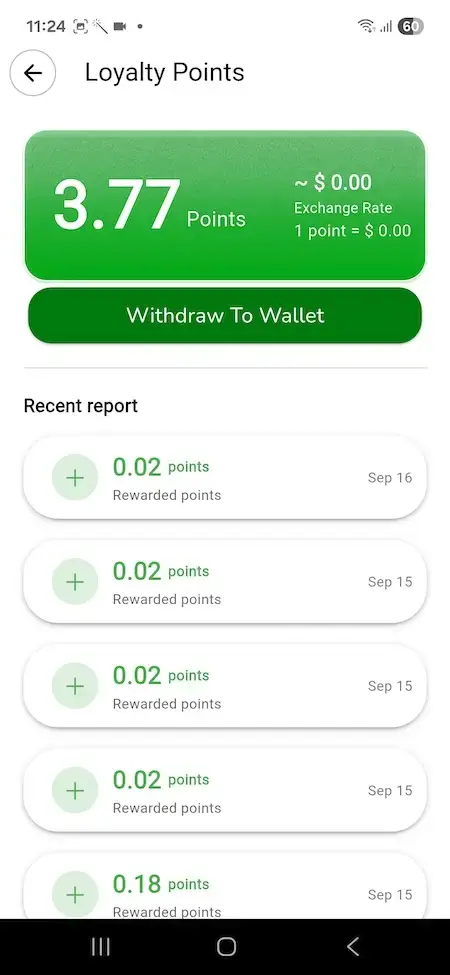
The person ordering or booking: a home screen with a wallet and service tiles, plus a booking screen with provider cards, saved addresses, payment methods and a loyalty points page.
- 1Begin at the app portal and select your platform
- 2Log in with the demo account shown below
- 3Look at: service tiles, wallet, bookings, orders
user@demo.com | User_321Vendor App in the Super App Clone
The restaurant, grocer, pharmacy or shop owner: keep products and options current, receive orders with an in-app alert, set up printing and read earnings, sales and payout reports.
- 1Open the vendor app portal on your device
- 2Log in with the vendor account shown below
- 3Look at: reports, the product list, incoming orders
vendor@demo.com | Vendor_321Driver & Provider App in the Super App Clone
The driver or service provider: switch between online and offline, take requests from nearby customers and follow what has been earned.
- 1Open the driver app portal on your device
- 2Log in with the driver account shown below
- 3Look at: earnings, requests, the online switch
driver@demo.com | Driver_321Web Storefront and Three Web Panels
The browser side: a demo storefront showing eight service tiles, and a single sign-in page in front of the admin, vendor and manager panels.
- 1Load the demo storefront in a new tab
- 2Scan the service tiles and categories
- 3Ask us for panel logins on a guided call
handed out on a guided call

See It Live
Super App Clone Walkthrough: Every Service Line, Every App, One Call
A call shows more than a recording can. We open the customer, vendor and driver apps side by side, step through the admin, vendor and manager panels, and settle which service lines you launch with, what you charge and when you go live.
Book a walkthrough with our team.Inside the App
Super App Clone Screens - Wallet, Service Tiles, Bookings, Loyalty Points & Payments
Real screens from the demo customer app and the demo web storefront: the home screen with its wallet and service tiles, a booking screen with provider cards, saved addresses, payment methods, the profile menu and the loyalty points page.
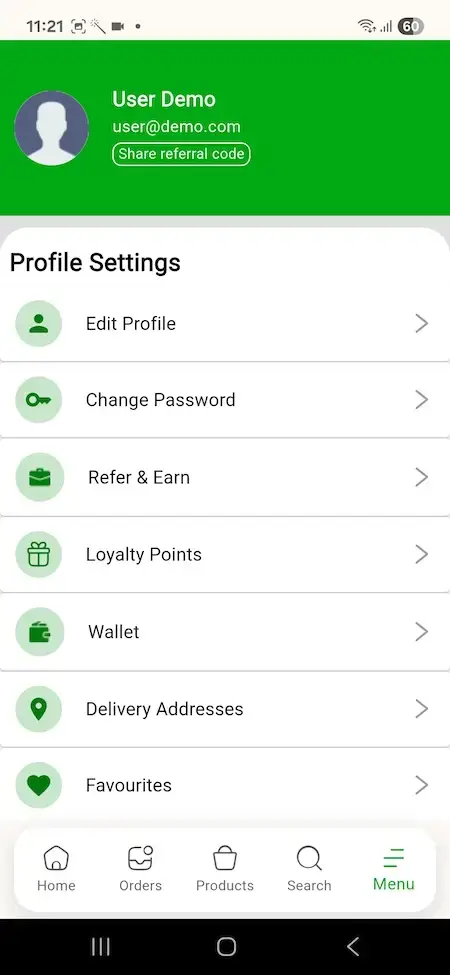
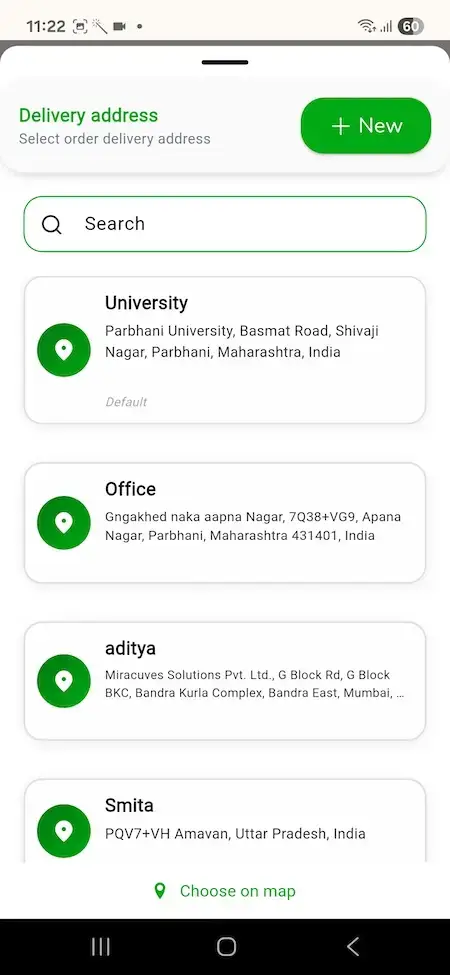
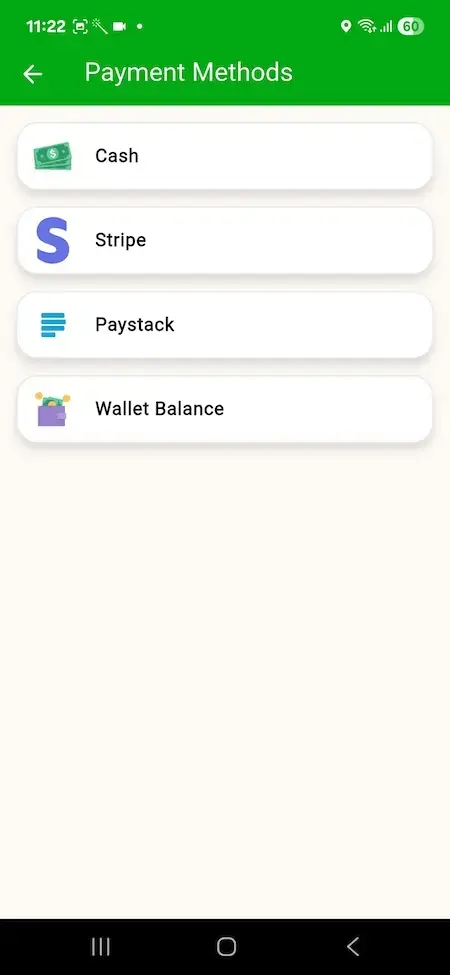
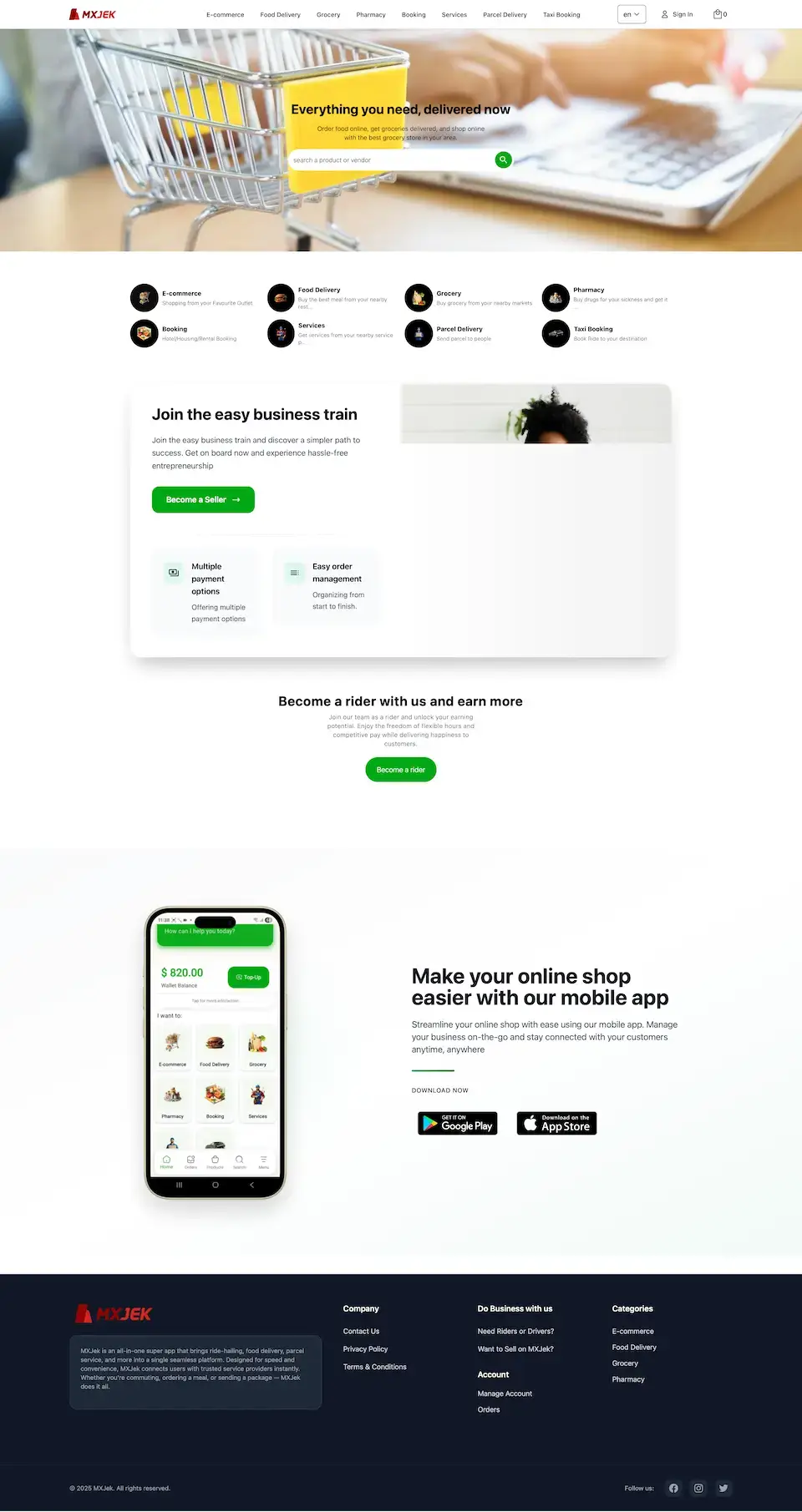


Follow the path from the wallet on the home screen to a booking, a saved address and a payment method. A guided call then covers the vendor app, the driver app and the panels behind them.
02Voices and evidence
What Clients Say
Super App Clone Client Reviews - Founders Who Built on a Miracuves Base
What clients say about building on Miracuves bases. Five of these describe delivery, ride-hailing, logistics or a multi-vertical launch; the others come from other industries and are shown exactly as their authors gave them.
“Every HMS I tried was built for general physicians, with no lesion mapping, no before/after tracking, and no procedure-based billing. Their MXHealth base gave us the patient app, doctor app, EMR and video consult out of the box. Front-desk time on scheduling and follow-ups is down ~70%, and we went fully digital in 9 months, where a fully custom job would have been 18.”
“Turo is the obvious reference, but the Caribbean specifics, from different insurance norms to different payment rails, meant we needed a real partner, not just a clone. Miracuves’s MXRental base covered the listing, the trip flow, and the host payouts. We launched in 10 weeks and are live in three islands.”
“The team was running it on a dispatcher and a Google Sheet, and we needed a real platform quickly, because we were about to onboard a major retail client. Miracuves’s Delivery Genie base gave us the rider app, the dispatch console, and live tracking. We launched in 6 weeks and cleared 4x the previous order volume in the first month.”
“We were running it on phone calls and a paper calendar, and we were losing bookings to bigger OTAs. Miracuves’s GetmyBoat Clone base gave us the calendar, the booking flow, and the payment engine. Online bookings are up roughly 70% in the first six months, and the ops team finally has a live view of the fleet.”
“Building a compliant telehealth stack from scratch in three markets would have been a year-plus effort. Miracuves’s MXHealth base covered the patient and doctor apps, video consult, e-prescription and the pharmacy integrations. We launched in our first market in 9 weeks and rolled out to two more in the following six months.”
“We were juggling spreadsheets, a third-party GPS provider, and a phone. We needed a single operations console. Miracuves’s MXLogistics base covered the trip lifecycle, the driver app, and the customer tracking page. We’ve cut operations admin time by about 40%.”
“Ride-hailing, food, courier and a marketplace, and we were chasing a holiday window. Their Gojek base had the rider and driver apps, dispatch and the merchant console already. We added local payment partners and our regional marketplace layer, and were taking live orders inside a month.”
“Live GPS tracking, bookings, driver and customer apps and the admin dashboard were all in place. We reshaped the workflows to our bid-and-ride model and wired in our own payments and notifications. Live inside a month on infrastructure that was already proven.”
“Talokitoko is grocery and food delivery for the African diaspora market in Europe. The rider app, dispatch and the merchant console were already built, so we spent the engagement on our own local payment mix, the vendor onboarding flow and the regions we actually operate in. The platform was live inside a month, which was months faster than our internal estimate.”
Evidence Today
Super App Clone Case Study - Evidence Available Now and How to Check It
No named client deployment of this multi-service app is on the Miracuves portfolio, so there is nothing honest to summarize. The demo and the release log stand as the evidence, and the cards here explain how to use them.
Miracuves has not published a named client build of this multi-service app. Rather than invent one, it points to a live demo, a nine-version release log and a call on which any service line can be opened.

- Log in to the customer app with the demo account and open a few service tiles
- Open the vendor and driver apps and look at the same job from their side
- Request the panel logins on a guided call and trace one booking end to end
- Work through the release log version by version
- Name a client without that client's agreement
- Borrow another product's results for this one
- List an add-on as if it were a base feature
- Put your identity on the three apps and the web platform
- Configure the service lines you open with, your gateways and your fees
- Install everything on your hosting and pass over the whole source
- Submit the apps from your developer accounts; store review keeps its own pace
This page will name a client build only after that client agrees and the case study is live in the portfolio.Miracuves · How we treat case studies
03What is inside
The Idea
What the Super App Clone Does for Customers, Vendors and Drivers
The Super App Clone packages a multi-service platform that is already built, with flexibility as its point. A single customer app carries eight service lines, from taxi booking and food delivery to pharmacy, parcels and home services, and you choose which ones open first. Vendors and drivers get apps of their own, and three web panels run the platform.


A Lineup, Not a Single Service
Taxi booking, food, grocery, pharmacy, e-commerce, parcels, bookings and home services share one customer app, one wallet and one account.
Source in Your Hands
All source code arrives unencrypted, so your own developers can reshape screens, flows and rules when the business changes course.
Extras Are Labeled as Extras
Video calls inside services, an errand runner, a bidding system, region-specific payment gateways and a rotation across map providers are priced on their own and always kept apart from the base features.
Android, iOS & Web
What Is Inside a Super App Clone Script?
A single-purpose app has one job to get right. A super app must keep several jobs running under one login, one wallet and one set of operator tools without them tripping over each other. That shared base arrives working, so a new line builds on it instead of starting over.
- 01Eight service lines in one customer app
- 02Vendor and driver apps with their own logins
- 03One wallet, loyalty points and referral rewards
- 04Admin, vendor and manager panels
- 05Source code, rebranding and deployment
Inside the package: the customer, vendor and driver apps, the web storefront, three web panels and the source code behind every one of them.
The Base Platform
Super App Clone Features - Service Lines, Wallet, Vendor and Driver Apps, Subscriptions & Admin
The twelve areas below are the base platform, as the demo and the release log show it. Anything that needs its own module is marked as an add-on further down the page.
Eight Service Lines in One App
The customer app opens on "I want to" tiles, and the demo storefront lists the same lines: e-commerce, food delivery, grocery, pharmacy, booking, services, parcel delivery and taxi booking.
- I-want-to tiles on the customer app home screen
- Eight lines in the demo: e-commerce, food, grocery, pharmacy, booking, services, parcels and taxi
- The same lines shown as a menu on the web storefront
- The launch lineup is agreed with you at setup
- A line beyond the eight is scoped and quoted as custom work
One Wallet, Rewards & Referrals
Every customer has a wallet balance with a Top-Up button, loyalty points that can move into the wallet and a code to share with friends.
- Wallet balance on the home screen with Top-Up
- Loyalty points page with Withdraw To Wallet
- Refer and earn from the profile menu
- Referral rewards payable at sign-up or after a first order (1.7.42)
- Payment methods page listing cash, Stripe, Paystack and wallet balance
Taxi Booking
A taxi tile sits beside the delivery lines, so a ride and a delivery share one account, one wallet and one set of payment methods.
- Taxi booking tile in the customer app and on the web storefront
- Order details and driver rating after a completed ride (fixed in 1.7.50)
- Vehicle-type icons that change with the type chosen (1.7.51)
- More accurate nearby-driver search (1.7.50)
- Taxi tax support (1.7.50)
Food, Grocery & Shop Catalogs
Vendors list products with options, timings and an approval step, and the same tools serve restaurants, grocers and e-commerce shops.
- Product approval system (1.7.40)
- Product options and groups managed in one editing window (1.7.45)
- Product timing and slot intervals set by the vendor (1.7.45)
- Preparation and delivery time with minutes, hours, days or weeks as the unit (1.7.45)
- Digital product downloads for customers (fixed in 1.7.40)
- Customers can favorite a vendor, and banners can be set by zone (1.7.51)
Pharmacy & Prescription Orders
A pharmacy tile and a prescription upload let customers order medicines that need a prescription, with the cart total kept out of such orders.
- Pharmacy tile on the home screen and the web storefront
- Prescription upload on the customer side (fixed in 1.7.42 and 1.7.51)
- Cart total kept out of prescription orders (1.7.45)
- Checking prescriptions, licenses and age stays an operator process
Home Services & Bookings
Customers browse service categories such as plumbing, home repairs and automotive services, compare provider cards with prices and ratings, and book. A booking tile covers hotel, housing and rental stays.
- Service categories with provider cards, prices and star ratings
- Delivery location search on the booking screen
- Providers choose a service category when they register
- Providers accept or decline requests and manage a calendar from a provider app or panel
- Booking tile for hotel, housing and rental bookings
Parcel Delivery
A parcel tile lets customers send a package to another person, with address checks that keep each stop inside the chosen country, state or city.
- Send-a-parcel tile in the demo
- Geolocation boundaries: stops are matched against the chosen country, state or city (1.7.50)
- Better parcel vendor matching when the address is picked on the map (1.7.60)
- Parcel types that failed to load were fixed (1.7.51)
- Parcel managers can place parcel orders on a customer's behalf from the backend (1.7.42)
Vendor App & Alerts
Vendors run their day from a phone: alerts for new orders, printing, opening hours and reports on earnings, sales and payouts.
- In-app alert view for new orders (fixed in 1.7.41)
- Printer settings, plus Arabic printing (1.7.42 and 1.7.43)
- Automatic open and close, with a setting for how many hours ahead it starts (1.7.42)
- Earning, sales and payout reports inside the app (1.7.40)
- Vendors can register with address details (1.7.44)
Drivers & Service Providers
People who drive or deliver services register with documents, flip between online and offline and keep an eye on what they earn.
- Registration with documents such as a license and vehicle papers, then verification
- Online and offline toggle (a minimized-app error was fixed in 1.7.51)
- Requests from nearby customers, found by the nearby-driver search
- Earnings land in an in-app wallet and are paid out on the admin's schedule
- Earning and payout reports (1.7.40)
Subscriptions
The release log documents one subscription mechanism: a vendor plan paid through the manager wallet.
- Vendor subscription through the manager wallet (1.7.50)
- A manager role with its own web panel
- Customer membership plans are not shown in the demo or the log, so they are custom work
- Store billing rules reach plans sold inside an app (see the take-rate table)
Addresses, Maps & Tracking
Customers save labeled addresses, pick a spot on a map and follow the provider; location search and fetching were refined release by release.
- Saved addresses with labels and a Choose on map option
- Customers follow the provider's position on a map
- Backend address search (1.7.43) and location fetching (1.7.51) improved
- Duplicate address saving prevented (1.7.60)
- Google Maps is the listed map provider
- Rotating between several map providers is custom work, not part of the base
Admin, Languages & Looks
The admin side shapes how the platform looks and speaks: theme, languages, phone rules and where the backend lives.
- Light, dark or system theme in the apps (1.7.44)
- Romanian added (1.7.51), with Arabic printing and reports (1.7.42 and 1.7.43)
- A regex rule for phone numbers from countries the app does not cover natively (1.7.45)
- Backend served from a path you choose, for example /admin or /backend (1.7.50)
- Smallest and largest order value set per payment method (1.7.41)
- Disabled accounts barred from ordering (1.7.42)
What you bring yourself: We rebrand the platform with your identity. You supply hosting, a domain, a developer account for each app store, brand assets, business papers, a payment gateway whose KYC is done and any third-party keys. Apple and Google decide on store review, so it cannot be counted inside our 6-day delivery.
Run Every Line
Super App Clone Admin Panel - Services, Vendors, Earnings, Offers & Support
A web console, flanked by vendor and manager panels, covers the operator's whole day: which services and providers are live, what each vendor sells, who earned what and which offers are active.


Inside the Admin
- 01
Dashboard & Analytics
Headline numbers and trends in one view, so the operator can tell which service line is pulling its weight before deciding where to push.
- 02
Service Management
Services, categories, providers and user accounts are organized from a single place as the lineup changes.
- 03
Vendor Control
Approve vendor products, apply one action to many vendors at once and keep catalogs tidy.
- 04
Earnings & Payouts
Earnings, commissions and payouts are tracked centrally, and vendors and drivers can open reports on their own takings and payouts inside their apps.
- 05
Users & Accounts
Customer, vendor and driver accounts are managed here, activity is tracked and a disabled account cannot order.
- 06
Promotions & Banners
Campaigns, discounts and offers go out from here, banners can be set by zone and referrals can be rewarded.
- 07
Support & Disputes
Built-in support tools carry complaints and disagreements between customers and providers toward a settlement.
- 08
Manager Panel & Settings
A manager role with a panel and wallet of its own, along with themes, languages and the path the backend is served from.
Where Money Moves
How a customer's payment travels through the platform to what vendors and drivers can withdraw.
- Earnings and commission tracking
- Taxi tax support
- Vendor plans funded from the manager wallet
- Smallest and largest order value per payment method
Who Can Do What
The access rules that sit behind the console and the daily running of the platform.
- Admin, vendor and manager panels kept apart
- Backend served from a path you choose
- Disabled accounts cannot place orders
- Rules on changing a profile are enforced
Want the console to go further? Additional reports, another payout cycle, more languages or a bespoke approval step are quoted as separate work. Describe the gap your operations team feels and we will send a written quote.
04What you pay and receive
Package Contents
What Is in the Package: Source Code, Apps, Panels, Rebranding & Deployment for Your Super App Clone
What you receive is a finished multi-service platform: three mobile apps, a web storefront, three panels and the full source, rebranded and deployed for you.
$ cd your-platform/source Full Source Code
The source of the web platform and of all three apps, unencrypted and readable, so your developers can build on it.
- Web platform source, no encryption
- Flutter source for the three apps
- Yours to change and extend
- Project codes included
Vendor App
The app for restaurants, grocers, pharmacies and shops, covering orders, products and options, printing and reports.
- An alert for every new order
- Products and options kept current
- Printer settings
- Earning, sales and payout reports
Driver & Provider App
The app for drivers and service providers, with document approval, requests, an online toggle and earnings.
- Sign-up with documents
- Online and offline toggle
- Requests from nearby customers
- Earning and payout reports
Web Storefront
The customer-facing website, with the service tiles, search, sign-in and a cart running in the browser.
- Eight service tiles
- Search by product or vendor
- Seller and rider sign-up sections
- Language switching
Customer App
An Android and iOS app with service tiles, a wallet, bookings, orders, addresses, loyalty points and payment methods.
- Home, Orders, Products, Search and Menu tabs
- Wallet, loyalty points and referral code
- Saved addresses and payment methods
- Published to the stores from your own accounts

Admin, Vendor & Manager Panels
The operator console and the two panels beside it: services, vendors, earnings, offers and support.
- Dashboard and analytics
- Service and vendor management
- Offers, banners and support tools
- A manager role with its own wallet
Rebranding & Deployment
We apply your identity to the web platform and all three apps, then deploy the whole thing on hosting that you own.
- Logo, icons and palette applied
- Web and apps rebranded together
- Installed on your hosting
- You provide hosting, domain and developer accounts
Publishing & Support
We submit the apps from your developer accounts, and three support periods start together at launch.
- Apps submitted to the stores from your accounts
- 60 days of platform guidance
- 6 months of priority bug fixes
- 12 months of product updates
Rather see it before deciding? Run the demo as a shopper, a shop owner or a driver, or book a walkthrough shaped around your own plan that covers the service tiles, the wallet and the panels.
Fixed Price
What Does It Cost to Launch a Multi-Service Super App?
The white-label Super App Clone is priced at a fixed $4,599. Whatever lies beyond the base, whether an add-on, one more service line or a bespoke flow, is scoped and priced on its own in writing.
Standard Launch
One Fixed Price, White-LabelFits: Regional super app founders, ride and delivery operators adding lines, home-service networks
The platform arrives as the demo presents it, wearing your logo, icons and colors and running on hosting that belongs to you.
Start NowCustom Scope
Bespoke Builds for Wider ScopeFits: Multi-city operators, businesses with a service line the demo does not cover
Missing a line the demo lacks, or want another flow? We build to your spec, and both scope and price are settled in writing before work starts.
Ask for a QuoteMore Reading
Four Guides That Explain the Super App Model
Four Miracuves blog guides covering what a super app is, which features matter, how it earns and how to build one, each going deeper than this page.
05Whom it serves
Your Audience
Who Should Buy the Super App Clone?
Built for businesses that want customers to reach many services through one app and one wallet, and that would rather own the app, its vendors and its drivers than rent a corner of a bigger platform.
Founders aiming at one city or country who want ride, delivery and service lines under a single brand from the first release.
Taxi and ride businesses that want food, grocery and parcels in the same app, so drivers and customers have more to do inside it.
Delivery companies and grocers who want a taxi line and home services next to their orders, on one wallet.
Handyman, repair and professional-service networks that want a booking app with provider cards, prices and ratings, with delivery lines around it.
Pharmacies and shop groups adding an app that takes prescription uploads and product orders beside other services, within the rules where they operate.
Marketplaces that sign up many vendors and want vendors, drivers and customers on one platform with one wallet and one admin.
If the plan is to begin with a few services and grow the lineup, a branded super app keeps the customer relationship, the wallet balances and the source code on your side.
Talk With the TeamSix Ways to Use It
Super App Clone Use Cases - Launch Lineup, Rides Plus Delivery, Home Services, Pharmacy, Parcels & Vendor Plans
Each kind of operator leans on a different part of the app. A ride business leads with taxi booking, a home-service network with provider cards, an operator selling plans with the vendor side. The lineup you switch on sets the emphasis.
Swipe · 6
Open the lines your city needs first, such as taxi, food and grocery, and keep the rest of the eight in reserve. Customers get one account, one wallet and one set of payment methods from the first order.

Let a taxi business add food, grocery and parcels, so its drivers and customers meet in one app. Taxi tax support, driver ratings and nearby-driver search come with the ride line.

List service categories such as plumbing, home repairs and automotive work with provider cards, prices and ratings, and let providers accept or decline requests from their own app or panel.

Run a pharmacy line with prescription upload and keep prescription orders apart from ordinary carts, while the rules for selling and delivering medicine stay set by your jurisdiction.

Offer parcel delivery with address checks that keep each stop inside the chosen country, state or city, and let parcel vendor managers create orders from the backend.

Charge vendors a plan through the manager wallet, and give customers loyalty points and a referral code that pay into the wallet they already use.

One platform behind every case. Each of the six rides on the same apps and panels. Only the service lines, the fees and the branding change.
Talk With the TeamWhere It Fits
Where the Super App Clone Fits Best
A business that connects customers with rides, goods or services through a single app can run on the Super App Clone. Cab and ride operators handle bookings, while restaurants take orders and supermarkets send out the weekly shop. Chemists add medicines, online shops use the e-commerce line and couriers add parcels. Handyman and repair networks take bookings, stays and rentals use the booking line, and regional platforms combine several of these under one name.
one platformMXJek
- 01CrCab & Ride Operators
- 02ReRestaurants
- 03SuSupermarkets
- 04ChChemists
- 05OsOnline Shops
- 06RhRepair & Handyman
- 07CoCouriers
- 08SrStays & Rentals
- 09CsCorner Stores
- 10RgRetail Groups
- 11RpRegional Platforms
- 12FoFleet Owners
Miracuves’ Super App Clone adapts to whichever lineup you pick, and carries your name on the customer app, the vendor and driver apps and the panels.
06How it is built
The Path
How the Super App Clone Works - Register, Choose, Customize, Pay, Follow & Rate
A customer needs only a few taps. Behind them a steady chain runs: the request goes in, a vendor or provider accepts, payment settles and the job closes. The six steps trace that chain, and the architecture holding it up follows them.
The Customer Path - From First Login to a Finished Job
Swipe · 6
- 1Register & Set a Location
A new customer registers through email or a social account, then gives a location by GPS or by typing it in, and can save it under a label.
- Email or social registration
- Location by GPS or typed in
- Addresses saved under labels
- 2Choose a Service
The home screen shows each service line as a tile, so the customer taps a ride, a meal, groceries, medicine, a parcel or a booking.
- I-want-to tiles on the home screen
- Eight lines in the demo
- Wallet balance visible from the start
- 3Customize the Request
The customer shapes the request to the service, such as a ride type or the items and options of an order.
- Ride type or order options
- Provider cards with prices and ratings
- Delivery location on the booking screen
- 4Set How to Pay
The customer picks a payment method and tops up the wallet if they want to.
- Cash, Stripe, Paystack or wallet balance
- Top-Up from the home screen
- Minimum and maximum order limits per method
- 5Confirm & Follow
Once the details look right the customer confirms, then watches the provider's location and estimated arrival on a map.
- Review before confirming
- Provider position on a map
- Status locked once an order ends
- 6Complete & Rate
When the service ends the customer rates and reviews the provider, payment is settled from the chosen method and loyalty points can be collected.
- Rating and review of the provider
- Payment settled automatically
- Loyalty points moved to the wallet
Behind the Screens
Super App Clone Architecture & the Life of a Request
- 01Phase 01
Separate Roles, Separate Surfaces
Customers, vendors and drivers or providers each use their own app, and operators work in the admin, vendor and manager panels.
- 02Phase 02
Request Lifecycle
A request travels from placed to accepted, under way and finished, and after it fails, is cancelled or succeeds, its status is frozen.
- 03Phase 03
Nearby Provider Search
Requests go to drivers and providers near the customer, located by a nearby-driver search that release 1.7.50 made more accurate.
- 04Phase 04
Shared Catalog Engine
Restaurants, grocers, pharmacies and shops all list products with one set of vendor tools covering options, timings and approval.
- 05Phase 05
Wallet & Payments
The gateways you connect process payments, the wallet holds balances, points and rewards, and vendor plans draw on the manager wallet.
- 06Phase 06
Alerts & Messaging
Push notifications and in-app alerts keep each role informed, and built-in chat links customers with providers.
Engineering
Super App Clone Technology - PHP, Node.js, MySQL, MongoDB, Flutter & Payment Gateways
A platform that carries several services is only as steady as the technology under it. Here is what the Super App Clone runs on, as the product listing and the release notes name it.
Web Platform & Panels
PHP · Bootstrap- Admin, vendor and manager panels
- A responsive Bootstrap interface
- Backend served from a path you choose
- A simple welcome web app comes with it (1.7.50)
Services & Databases
Node.js · MySQL · MongoDB- Node.js sits beside the PHP web layer
- MySQL and MongoDB are listed for data
- Users, vendors, products, orders and bookings
- A finished order can no longer change status
Three Mobile Apps
Flutter · Android · iOS- Flutter apps with current dependencies
- Three apps: customer, vendor and driver
- Flutter 3.27.1 support arrives in release 1.7.60
- Submitted to the stores from your own accounts
Customer Web
Storefront · Search · Sign-in- Eight service tiles on the storefront
- Search by product or vendor
- Become a seller and become a rider sections
- Language switching
Payment Layer
Cash · Wallet · Gateways- Methods in the demo: cash, Stripe, Paystack and wallet balance
- Other gateways can be wired in per region
- Smallest and largest order value per method
- Your own gateway account must have cleared KYC
Third-Party Services
Maps · SMS · Push- Google Maps drives locations and tracking
- Twilio appears in the integration list
- Firebase appears for notifications and sign-in
- APIs for payment gateways and translation
The web and admin side uses PHP with the Bootstrap framework next to Node.js, and MySQL plus MongoDB hold the data. Android and iOS apps are Flutter, updated against recent Flutter versions. Maps, SMS, push, payment and translation services each need an account and keys from you at deployment. All of it is mainstream, so developers are easy to find.
Room to Grow
Built to Scale - New Service Lines, Roles, Languages & Maps
Separate roles and a single admin keep growth cheap: opening a service line, signing more vendors or turning on another language is mostly configuration and capacity, not a rebuild.
One Codebase Under Every Line. Taxi, food, grocery, pharmacy, parcels, bookings and shops sit on one base, so a new line borrows the account, the wallet and the vendor tools.
Roles That Keep Their Distance. Customers, vendors, drivers and operators each work in their own surface, and the manager role has a panel and a wallet to itself.
Languages and Looks. Releases brought Romanian, Arabic printing and reports, a theme choice and custom phone validation, the things a new market usually asks for.
Figures You Can Watch. The dashboard and the in-app reports show earnings, sales and payouts, so decisions about capacity and incentives follow real activity.
A Lineup That Can Widen
Eight lines already share one base, so another line reuses accounts, wallet and vendor tools instead of shipping a new app.
Approval Before Listing
Vendor products pass a product approval system, and drivers submit documents for verification before they take requests.
- A product approval system (1.7.40)
- Driver and provider documents checked
- Bulk vendor actions in the admin (1.7.60)
- Disabled accounts barred from ordering
Roles With Their Own Surfaces
Customers, vendors, drivers and operators work in separate apps and panels, with a manager role next to the admin.
- Admin, vendor and manager panels
- A manager panel with its own wallet
- A backend path you choose
- Profile-change rules enforced
Languages, Themes & Phone Rules
Releases added a theme choice, Romanian and Arabic support and custom phone validation, so a new market calls for settings, not new code.
- Light, dark or system theme
- Romanian language (1.7.51)
- Arabic printing and reports (1.7.42 and 1.7.43)
- Phone validation by regex (1.7.45)
Orders & Earnings on Record
Earnings, sales and payouts sit in the admin and in the vendor and driver apps, so each role sees its own numbers.
- Earning, sales and payout reports (1.7.40)
- Commission and earnings tracking
- Vendor plans funded from a manager wallet
- Smallest and largest order value per method
Maps & Regions
Google Maps drives locations and tracking, and parcel stops are checked against country, state or city boundaries.
Room to Change. Sooner or later a multi-service business needs something peculiar to its city or its vendors. With the whole source in hand on a mainstream stack, a new screen, rule or integration is ordinary development that your team or ours can carry out.
Starting a super app? Open the lines you can staff first and widen the lineup on the deployment you already run. As volume rises, extra capacity is a hosting and configuration decision, and anything past the base is quoted in writing.
07Trust and duties
Security, Plainly
Super App Clone Security - Role Separation, Account Controls, Verified Providers, Gateway Payments & Honest Limits
A super app keeps addresses, phone numbers, bookings, prescription uploads and payment references for several kinds of user. Three questions decide how safe that is: who may see what, who is approved to join and what work is still open before launch. The cards below split what the platform handles from what remains yours.
- 01 · RolesRole Separation
Customers, vendors and drivers each use their own app, and operators work in separate admin, vendor and manager panels.
- Messaging Rules: Customers and providers can message each other inside the app, so the operator sets what is acceptable, how complaints are handled and who may read a reported conversation.
- Service Disputes: Complaints and disputes between customers and providers are handled through the support tools, so your refund and mediation rules decide how a case ends.
- 02 · Sign-inSign-In You Can Tune
Customers sign up with phone, email or a social account, the forgot-password flow was reworked in release 1.7.51 and a custom phone rule can be set by regex.
- Notification Consent: Push and browser notifications reach users on their devices, so the consent wording and the opt-out you offer are for the operator to write.
- 03 · AccountsAccount Controls
A disabled account cannot order, profile-change settings are enforced and an order that has failed, been cancelled or succeeded can no longer switch status.
- 04 · ApprovalVerified Providers & Products
Drivers upload a license and vehicle papers to be verified, and vendor products go through a product approval system.
- Prescription & Age-Restricted Goods: Pharmacy appears as a tile in the demo and a prescription can be uploaded. Verifying prescriptions, licenses and age is something the operator must run, because the platform does not do it.
- 05 · GatewaysPayments Go Through Your Gateway
The gateways you connect handle payments, so card entry is governed by that provider's rules, and opening the gateway account and passing its KYC fall to you.
- Cash Payments: Cash is one of the payment methods in the demo, so the policy for collecting, reporting and handing over that cash needs to be drafted and applied by you.
- 06 · LaunchPre-Launch Hardening
A demo cannot show everything, so before go-live we plan a penetration test, secret rotation, backups and a restore rehearsal.
- Open Launch Items: A penetration test, new keys, a backup and restore rehearsal and a review of your own gateway settings are listed as work to do before launch, not assumed to be finished.
No security certification is held by the platform, and Miracuves does not claim ISO 27001. The base follows the kinds of controls such standards ask for, and ahead of launch we book a penetration test, replace keys and practice a restore together with you.
Talk Through Security Before LaunchWho Does What
Super App Clone Readiness - What the Software Gives You and What Remains Yours
In a multi-service app one customer account reaches taxis, couriers, medicines, meals and home-repair visits. Miracuves provides the apps, the panels and the payment tooling. The services you license, the vendors and drivers you accept and the legal duties in every market you serve remain decisions for you, the operator.
Ready here means something you can watch working in the demo or the panels. Neither the platform nor Miracuves is presented as licensed, certified or approved by any authority, and nothing on this page is legal advice.
Built Into the Software
Eight service lines in one customer app, a wallet with loyalty points and referral rewards, vendor and driver apps, product approval, driver document checks, vendor plans through a manager wallet, address boundaries for parcels and three web panels.
Still Yours to Decide
Your terms and privacy policy, which vendors and drivers you onboard and which papers you ask for, how refunds and disputes end, and the rules for collecting and handing over cash payments.
Taxi, Pharmacy & Services
Taxi operation, medicine sales and home-service work are licensed or regulated differently from country to country and often from city to city. The platform offers these lines and accepts prescription uploads, but it never checks a license, a prescription or an age.
Drivers & Where You Operate
How drivers and providers are classified, insured and paid, how personal data is handled and what consumer protection requires all depend on the market. Confirm each with qualified local advisers before you open any line.
08Add more
- Eight service lines & one wallet
- Vendor app & driver app
- Vendor plans via manager wallet
- Three web panels
How a module gets added
- 1Pick what you need
Calls, errand runners, bidding, regional gateways or map rotation, at launch or later.
- 2Quote before work
Every module gets a written scope and price before anyone starts building.
- 3Source comes with it
The finished module is added to the code that is already yours.
Extend It
Super App Clone Extras - Calls in Services, Errand Runner, Bidding, Regional Payments & Map Rotation
The base already runs and the demo shows it. The five modules here are optional extras, each priced separately because the work depends on your lineup and your region.
Drag to explore · hover to pause
- 01Growth
Video Calls in Services
Video calling inside the app, so a customer and a provider can consult, guide or help each other live while a service is being delivered.
Calls · Services - 02Platform
Delivery Runner / Genie
A concierge line where customers hire a runner for shopping, queueing or small errands, on top of the regular delivery lines.
Errands · Concierge
- 03Growth
Bidding for Rides & Services
A bidding system in which providers offer on a customer request, so users can see competing prices and providers can set their own.
Bids · Pricing - 04Platform
Region-Wise Payment Gateways
Gateways chosen for each region, so customers in different countries and currencies can pay in the way they are used to.
Payments · Regions - 05Platform
Map Provider Rotation
Switching between several map providers is custom work. The demo and the release log show Google Maps only, so this is quoted separately and is not part of the base.
Maps · Custom
Neighbors in the Catalog
Want a Narrower or a Different Multi-Service Product? Start Here.
The Super App Clone lets you pick from eight service lines. Prefer to start from a product built around a single theme? These four sit closest in the catalog.

01A neighboring multi-service product that gathers rides, deliveries and home services, with user, vendor and driver apps.
See the Product
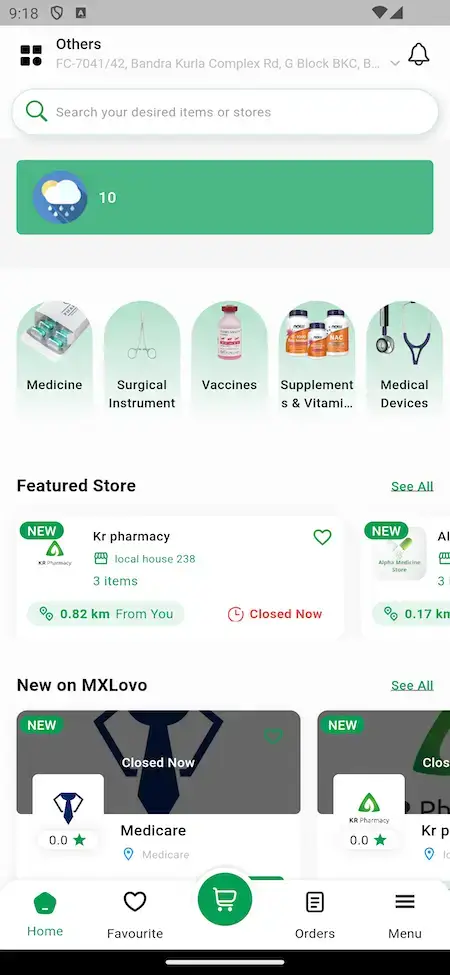
02A neighborhood shopping app whose single checkout spans restaurants, groceries, pharmacies and liquor shops.
See the Product

03A mobility-led super app that adds food delivery and services, built around a driver app and a customer app.
See the Product

04A courier-style app that collects orders from nearby shops and carries them to the customer's door.
See the Product09Revenue and market
Income, Line by Line
Super App Clone Revenue Models - Ride Commission, Order Commission, Shop Sales, Vendor Plans & Payment Margin
A multi-service app earns in several places at once, and every line bills on its own terms, so opening one more leaves the running ones untouched.
Early on, two lines usually weigh the most: commission on rides and orders, and what vendors pay to stay listed.
- 01
Taxi Ride Commission
A slice of each fare stays with the operator and is tracked next to driver earnings. The release log also lists taxi tax support.
- 02
Delivery Order Commission
Food, grocery and pharmacy orders hand the operator a portion of the order value, in addition to whatever delivery charge you apply.
- 03
Shop Sales Commission
E-commerce vendors trade inside the same app, so a percentage of item sales, with or without a flat fee per order, becomes a line of its own.
- 04
Vendor Subscription Plans
Release 1.7.50 lets a vendor pay for a plan through the manager wallet, which brings in money on a fixed rhythm rather than per order.
- 05
Wallet & Payment Margin
Top-ups and gateway payments cost money to process, and your pricing can recover that cost rather than swallow it. Loyalty points and referral rewards are paid into the same wallet.
- 06
Parcel & Service Fees
Parcels and home-service bookings are priced by you, per parcel or per booking. No public benchmark exists for either, so neither gets a row in the table.
| Line of income | How you bill it | Take rateTake rate seen elsewhere | What limits it |
|---|---|---|---|
| Taxi Ride Commission | A percentage of each fare, kept by the operator before the driver is paid. | Indonesia: 15% cap plus an optional 5% welfare fee. Grab Malaysia: up to 20%. | Local transport rules and the earnings drivers will accept. Grab's mobility revenue is about 15% of mobility GMV, net of incentives (our arithmetic). |
| Delivery Order Commission | A share of order value taken from the vendor, plus any delivery charge you set. | Grab reports deliveries revenue at 13% of deliveries GMV; regional food delivery is about 10% (our arithmetic). | The ratios blend ads and fees with commission, so neither is one merchant rate. Vendors weigh your terms against the larger apps they already sell on. |
| Shop Sales Commission | A percentage of item price on e-commerce sales, sometimes with a fixed fee on each order. | Tokopedia lists 2.5%-12.2% by seller type and category, plus Rp1,250 per order. | Category and seller type. Tokopedia also lists a Mall service fee of 1.8%, capped at Rp50,000 per product. |
| Vendor Subscription Plans | A recurring plan fee, which the release log shows vendors paying through a manager wallet. | No standard plan price is published. Store billing, if used: Apple 15%-30%, Google Play 10% + 5% (US, UK, EEA). | Store fees reach only digital purchases made inside an app, not orders, rides or a plan paid outside it. Google Play's older 15% and 30% tiers still apply in the remaining markets. |
| Wallet & Payment Margin | A charge on top-ups or orders that passes gateway costs on, or leaves them with you. | Stripe quotes 2.9% + 30c per US domestic card payment. Indonesia sets QRIS at 0%-0.7% from 1 October 2026. | Your gateway, country and card mix. Bank Indonesia sets the QRIS rate by business size and transaction value, so a regulator can fix the ceiling for you. |
How to read this. The Indonesian commission cap comes from Grab's annual report on Form 20-F, its Malaysian driver terms from Grab's published terms, QRIS rates from Bank Indonesia and seller fees from Tokopedia's seller page. The delivery ratios are our arithmetic on the Grab filing and the e-Conomy SEA 2025 release, so they describe blended revenue and not a single commission. Store and card pricing sits on the Apple, Google Play and Stripe pages. Use every figure as one input to your own model. None of it is a quote or a forecast, and the rates you charge are your decision.
Market Benchmarks
Super App Market Benchmarks - Independent 2025-2026 Data
The revenue models above are ours. The figures below are not. They come from Grab's annual report on Form 20-F, the e-Conomy SEA 2025 report from Google, Temasek and Bain, GoTo's 2025 results and Bank Indonesia, reproduced as published. They show what multi-service apps in Southeast Asia process and keep across rides, deliveries and payments, so you can test your own business case against numbers you can check.
$22.1bn On-Demand GMV at Grab in 2025
Grab's annual report on Form 20-F, filed 6 March 2026, shows on-demand GMV of $22.1 billion in 2025, up 21 percent, and revenue of $3,370 million. Grab states that deliveries revenue as a percentage of deliveries GMV stayed at 13 percent in 2025 and 2024, on deliveries GMV of $14.2 billion.
$23bn Food Delivery and $11.5bn Transport GMV
Google, Temasek and Bain & Company's e-Conomy SEA 2025 report, released 11 November 2025, says Southeast Asia's digital economy is on track to surpass $300 billion in GMV in 2025. Food delivery GMV is projected at $23 billion with revenue nearing $2.4 billion, and transport GMV at $11.5 billion with revenue of $1.9 billion.
Rp400tn Core GTV at GoTo in 2025
GoTo reports that group core gross transaction value rose 49 percent year on year to Rp400 trillion in 2025, with 66 million annual transacting users. Net revenue rose 24 percent to Rp18.3 trillion, and adjusted EBITDA reached Rp2 trillion for the full year, of which on-demand services contributed Rp1.4 trillion.
0.7% QRIS Fee for Larger Merchants in Indonesia
Bank Indonesia's QRIS merchant discount rate schedule sets 0 percent on micro-enterprise transactions up to Rp500,000 and 0.3 percent above that. Small, medium and large enterprises pay 0 percent up to Rp100,000 and 0.7 percent above it. The schedule takes effect on 1 October 2026, per a Bank Indonesia press release dated 17 August 2026.
Grab Holdings Limited, Annual Report on Form 20-F for the year ended 31 December 2025, filed 6 March 2026 - sec.gov
Google, Temasek and Bain & Company, e-Conomy SEA 2025, press release, 11 November 2025 - bain.com
PT GoTo Gojek Tokopedia Tbk, GoTo beats guidance, achieving record results as it reports 2025 fourth quarter and full year earnings, press release, 11 March 2026 - gotocompany.com
Bank Indonesia, MDR QRIS Bagi Merchant: Kategorisasi dan Simulasi, 13 October 2026 - bi.go.id
All figures are the publishers’ own reported results, projections and published rates, reproduced as published. They describe the market, not the performance of any platform Miracuves builds, and nothing here is a revenue projection for your business.
The Case for Now
Is 2026 a Good Time to Launch a Multi-Service Super App?
People already hop between apps for rides, meals, groceries and repairs all day. Under your own brand, one app gathers those habits, along with the vendors, the drivers and the commission that bigger platforms currently keep.
01One Login Beats Many Apps
A person who books a taxi on Monday and orders groceries on Friday is easier to keep when both sit behind one login, one wallet and one set of saved addresses.
02Vendors and Drivers Want More Jobs per App
A driver who can take rides and parcels, or a shop that sells food and groceries in one place, has a stronger reason to stay on your platform.
03Start Narrow, Widen Later
Launching with two or three service lines keeps early operations manageable, and the demo shows eight lines on the same base for when demand justifies more.
04One Wallet Ties the Lines Together
A wallet balance, loyalty points and a referral code give customers reasons to use a second and third line once they have used the first.
05A Brand That Is Yours
When the app carries your name, the customer list, the vendor relationships and the wallet balances stay with you and not with a third-party platform.
06Build or Buy: A Short Calculation
Seven surfaces, meaning three apps, a storefront and three panels, would keep a custom team busy for ages. They exist already, so the 6-day build is spent on your branding and deployment.
The Build in Figures
Service Lines
Mobile Apps
Web Panels
Months of Updates
The hard part of a multi-service app is the shared middle: one account, one wallet, vendor and driver apps, and an admin holding it together. That middle comes already built.
Revenue Outlook
Marketability, Revenue Potential & Business Prospects
A multi-service app pays off once vendors are confident enough to list and customers are confident enough to return for a second service. These points ease both decisions and leave the relationship in your hands.
- 01
Several Lines Billing in Parallel
Rides, orders, shop sales, vendor plans and wallet margin each bill on their own terms, so income never hangs on a single service.
- 02
A Second Service Costs Less to Sell
A customer holding an account, a wallet and saved addresses can try another line without signing up again, which cuts the cost of each extra order.
- 03
Owned Customers, Vendors and Drivers
Accounts, histories and provider records live in your database, so whatever value the app accumulates is yours and not a third party's.
- 04
Freedom to Move On
Because the full source is yours, switching host, team or direction later asks nobody for permission.
- Taxi Ride Commission
- Delivery Order Commission
- Shop Sales Commission
- Vendor Subscription Plans
- Wallet & Payment Margin
- Parcel & Service Fees
What keeps users is the number of reasons they have to open the app, more than any one feature.
- 01A wallet, points and saved addresses make the next service cheap to try
- 02Drivers and vendors earning across several lines are slow to leave
- 03The habit starts on launch day and stays in your database
- 04Reliable provider approval and honest payouts are the second moat
The three cases change only the number of live service lines, and each names the lever doing the most work at that size. Treat them as discussion material for planning, never as a prediction of what any app will earn.
Commission on each ride or order funds the early days.
A small launch with a single line, such as taxi or food, where the cut on every completed job covers running costs. Shown for scale only; it is not a forecast.
Commission from several lines plus vendor plans.
A city app with rides, food and grocery live, where the second and third lines draw on the same customers and vendor plans begin to matter beside commission. Shown for scale only; it is not a forecast.
Every line billing, wallet margin included.
An app with the whole lineup open, where commission, shop sales, vendor plans and wallet margin all accumulate and the reports point to where to concentrate. Shown for scale only; it is not a forecast.
10Why Miracuves
Why Miracuves
How Miracuves Compares With Other Routes to a Super App Clone
The options are a packaged script, a freelancer, an agency, or a base that a team has already shipped and tested.
What Buyers Weigh
- 01
Three Apps, Three Panels
Customers, vendors and drivers have an app each, while the web side adds a storefront and the admin, vendor and manager panels. Many scripts end at the customer screen.
- 02
Eight Lines on One Base
Taxi, food, grocery, pharmacy, e-commerce, parcels, bookings and services already share an account and a wallet, the piece that is hardest to add later.
- 03
Vendor Plans on Record
The release log documents vendor subscription through a manager wallet, so recurring income has a concrete starting point and is not merely promised.
- 04
The Source Is Yours
Every file arrives unencrypted and under your control, which leaves nobody able to reprice it or change the terms afterwards.
- 05
Releases You Can Read
Notes from version 1.7.40 to 1.7.60 spell out what each version added, so you are not asked to take a feature list on trust.
- 06
Plain Wording on Readiness
Base features, add-ons and your own responsibilities (gateway accounts, hosting, store developer accounts) are kept apart on this page.
How Our Super App Clone Compares With Packaged Scripts and Agencies, Row by Row
| Criterion | MiracuvesMiracuves Super App Clone | Packaged Script | Agency Build |
|---|---|---|---|
| Time to launch | 6 days of build time | Up to you to find out | Months of scoping, then building |
| Code ownership | Yours, fully unencrypted | Often limited by a license | Usually yours |
| Service lines | Eight in the demo, on one wallet | Commonly one or two | As many as the budget covers |
| Supplier and driver side | Vendor app, driver app, three panels | Rarely part of the package | Made to order |
| Payments and wallet | Wallet, loyalty points, cash and gateways | Varies from script to script | Integration work billed on top |
| Admin and reports | Dashboard, bulk vendor actions, reports | Thin, if present at all | Made to order, at extra cost |
| Security stance | Role separation, account controls, stated limits | Minimal | Rests on the supplier |
| Price, pace, quality | Fixed price, quick, tested base | Low price, higher risk | High price, slow pace |
| Support and updates | 60 days guidance, 6 months bug fixes, 12 months updates | Seldom offered | As the contract states |
Not many paths to a multi-service app come through a busy first month untouched. The table shows where they diverge.
Talk With the TeamVersion History
Super App Clone Release History - Versions & Changes
Entries for the web platform and the apps, newest first. No dates are recorded, and the phrasing has been smoothed while each line still says what shipped.
| Release | Count | Details |
|---|---|---|
| 1.7.60 | 4 updates | Added or updated Flutter 3.27.1 support A user's address can no longer be saved twice Better parcel vendor matching when an address is chosen on the map One-step bulk actions on vendors |
| 1.7.51 | 10 updates, 5 fixes | Added or updated Customer search pages improved Location fetching improved Flutter 3.24.3 support Taxi icon follows the chosen vehicle type Forgot-password reset flow improved Romanian language added Scheduled orders can be cancelled Banner by zone Product feature checkbox Customers can favorite a vendor Fixed Home screen scrolling on some home screen types Driver app error when minimized while online (Android) Parcel types not loading in some cases Vendor and driver file permission issue (Android) Prescription upload |
| 1.7.50 | 10 updates, 2 fixes | Added or updated A basic welcome web app is bundled The backend can sit under a path you pick, such as /admin or /backend Parcel delivery gets boundary checks: the address must match the chosen country, state or city name, and the coordinates of each stop must lie within its limits Flutter 3.22.1 support Tax handling for taxi fares Profile-change settings are enforced An order that has failed, been cancelled or succeeded keeps its status Nearby driver search is more precise Vendors can subscribe to a plan using the manager wallet Backend pages can be shared as dynamic pages Fixed In-app report for vendors and drivers Taxi order details and driver rating after a completed order |
| 1.7.45 | 7 updates | Added or updated Time windows for products Options and option groups handled in a single create-or-edit window Preparation and delivery times per vendor, with minutes, hours, days or weeks to choose from Prescription orders no longer add the cart total Payment methods can be restricted for pickup orders Vendor slot interval, set in minutes A regex rule for validating phone numbers from countries without built-in support |
| 1.7.44 | 3 updates, 2 fixes | Added or updated Apps can follow the system theme or be set to dark or light An admin switch decides whether the customer app shows the vendor phone number Vendors can sign up with their address details Fixed How product and vendor HTML descriptions display in the customer app A problem with product requests after ordering |
| 1.7.43 | 2 updates, 3 fixes | Added or updated Printer settings for vendors Arabic text in the in-app error reports of vendors and drivers Fixed Backend address search Permission request that got no response (iOS) Assorted bugs |
| 1.7.42 | 6 updates, 3 fixes | Added or updated Referral rewards for registering or for placing a first order Parcel vendor managers can enter parcel orders in the backend A setting for the lead time before automatic vendor opening and closing applies Arabic printing from the vendor app Improved rich-text editor Disabled accounts cannot order or use the app Fixed Pharmacy prescription upload Role error during account creation Automatic vendor open and close |
| 1.7.41 | 5 updates, 4 fixes | Added or updated Admins can turn product reviews on or off A smallest and largest order value for each payment method Stale browser notification tokens are cleared and each browser gets a unique id, so one browser stops receiving duplicates The contact selection feature is gone Flutter 3.19.3 support Fixed Offline transaction image Products going to review when an order is cancelled Vendor in-app alert view and its text wrapping Checkout summary showing zero when a product has no options |
| 1.7.40 | 3 updates, 1 fix | Added or updated A product approval system Earning, sales and payout reports inside the vendor and driver apps Vendors create and edit product options straight from their app Fixed Customer digital product download |
Your next step
Take your multi-service app idea from a sketch to a running platform.
A free consultation ends with a schedule you can plan around and clear answers on which service lines to open first.
- First reply inside 2 hours, Mon-Sat
- Free first consultation
- No lock-in contracts
- You own the source code
11Read on
From the Blog
Super App Clone Reading List: New Guides on Features and Income
New articles on what a super app is, which features come first and how multi-service platforms make money.

The product6 questions
01What exactly is a Super App Clone solution?
It is a ready-made, white-label multi-service platform: one customer app that offers taxi booking, food delivery, grocery, pharmacy, e-commerce, parcels, bookings and home services, with vendor and driver apps and admin, vendor and manager panels behind it. Miracuves rebrands it, deploys it on your hosting and hands over the full source code.
02Which services does the demo show?
The demo storefront lists eight service lines: e-commerce, food delivery, grocery, pharmacy, booking, services, parcel delivery and taxi booking. The customer app opens on I-want-to tiles for them, next to a wallet balance with a Top-Up button.
03Can I choose which service lines to launch with?
Yes. The lineup is settled with you during setup, so you might open with taxi, food and grocery and hold the rest back. Opening another line later is a scoped change, which we quote in writing when it needs development.
04How customizable is the Super App Clone?
You receive the complete source code unencrypted, so your team or ours can change screens, flows, fees and integrations. Rebranding with your logo, icons and colors is part of the fixed price, and anything beyond the base is scoped and priced separately.
05Are Android and iOS apps both included?
Yes. The customer, vendor and driver apps are Flutter builds for Android and iOS, and we submit them from your developer accounts. Apple and Google run their own reviews, so those fall outside our 6-day build.
06Can I launch a super app like this legally?
Miracuves gives no legal advice, and what you may launch depends on the services you open. Taxi operation, medicine sales and home-service work are regulated differently by country and city, and each may need licenses of its own, so confirm every line with a local adviser before you open it.
Customers5 questions
07How do I sign up and create an account on the app?
Registration works with a phone number, an email address or a social account. One account reaches every service line the operator has opened, with the same wallet and saved addresses throughout.
08Is my payment information secure?
Payments run through the gateways the operator connects, so card entry follows the rules of that provider and the platform itself does not claim a payment certification. The demo lists cash, Stripe, Paystack and a wallet balance as methods.
09What should I do if I face any issue with my order or ride?
Use the support option in the app, choose the issue that fits and the operator's support team takes it from there. The platform also carries in-app chat between customers and providers, and the admin panel holds the tools for working through disputes.
10Which payment methods does the demo show?
The payment methods screen lists cash, Stripe, Paystack and the wallet balance. Other gateways, such as PayPal or Razorpay, can be integrated for your region, and a region-wise gateway module is available as an add-on.
11How do loyalty points and referrals work?
The customer app has a loyalty points page with a Withdraw To Wallet button, and a refer-and-earn option in the profile menu. Release 1.7.42 added a referral reward that can be paid on registration or on a first order.
Vendors & stores4 questions
12How can I list my products or services on the platform?
After onboarding you use the vendor app or the vendor panel to add products, options and prices. The release log mentions a product approval system, options and groups handled in one window and bulk actions that the operator can apply to vendors.
13How are earnings calculated and how do I get paid?
Sales and transactions are tracked as they happen, and the vendor app reports on earnings, sales and payouts. Payouts follow a schedule the operator sets, so the rhythm is a business decision on your side.
14Can I set my own delivery areas and timings?
Vendors can specify opening hours, a delivery radius and order acceptance preferences, which keeps orders to the areas and times they choose. The release log adds automatic opening and closing with a lead-time setting, plus preparation and delivery times counted in minutes, hours, days or weeks.
15Can vendors pay for a subscription plan?
Yes, in one documented way: release 1.7.50 added vendor subscription through the manager wallet. Customer membership plans are not shown in the demo or the release log, so they would be custom work.
Drivers & providers6 questions
16How do I register as a driver on the platform?
Register through the driver app or the website and submit documents such as a driver's license and vehicle registration. Once the operator has verified them, requests can start coming in.
17How do I get paid for the rides I complete?
What you earn lands in your in-app wallet and can be sent to a bank account on the schedule the admin sets. The driver and vendor apps both have earning and payout reports, introduced in release 1.7.40.
18Can I set my availability or go offline when I’m not ready for rides?
Drivers get an online and offline switch in their app, and requests from nearby customers reach you only while you are online. Release 1.7.51 fixed an error that could show up when the app was minimized while online.
19What kind of services can I offer?
The service categories depend on how the platform is configured, and the demo shows home services such as plumbing, home repairs and automotive work. You pick your category during registration, and the operator decides which categories exist.
20How do I manage service bookings and schedules?
A provider app or panel shows incoming requests, lets you accept or decline them, keeps a calendar and lists completed jobs. The booking screen in the customer app shows provider cards with prices and ratings.
21How do I handle payments and disputes?
Every payment is processed by the platform's payment gateway. If a customer and a provider disagree about quality or payment, the operator's support team can step in and decide using the evidence and the conversation on record.
Admin, money & payments7 questions
22What kind of administrative controls do I get?
Through the admin panel the operator handles services, service categories, customers, drivers, vendors and providers, together with transactions, promotions and settings. A manager panel sits alongside it, and the backend can be served from a path you choose, such as /admin or /backend.
23Can I integrate multiple payment gateways?
Yes. The demo shows Stripe and Paystack, gateways such as PayPal or Razorpay can be integrated, and more can be added for a region or a business need. Every method can also get a floor and a ceiling on order value.
24How does the analytics and reporting system work?
Admins get a dashboard of key metrics and insights, with reports on earnings, sales and payouts. Vendors and drivers can open reports on their own takings and payouts inside their apps.
25What revenue models does this platform support?
The platform supports commission on taxi rides and on vendor orders, shop sales commission, vendor subscription plans paid through the manager wallet, and a margin on wallet and gateway payments. Parcel and booking fees are priced by you, and the take-rate table above shows published figures from other platforms.
26How soon can a multi-service app expect its first revenue?
Commission is usually the first income, because the first completed ride or order earns it with nothing extra built or sold, and a delivery charge can ride along. Vendor plans and additional lines follow once enough vendors and customers are present to justify them. Other lines that get mentioned for platforms like this, such as advertising, API access or licensing, depend on commercial agreements you negotiate and are not built in.
27How defensible is a multi-service app?
What keeps users is the number of reasons they have to open the app, more than any one feature. A customer with a wallet balance, loyalty points and saved addresses finds the next service cheap to try, and a driver or vendor who earns across several lines is slow to leave. The platform lets that habit begin on launch day and keeps it in your database. Dependable provider approval and honest payouts form the second moat, since trust is what rivals struggle to copy.
28Does it include a multi-maps API rotator?
No. Google Maps is the map provider the product lists, and neither the demo nor the release log shows a rotation across several providers. If you want that, it is custom work that we scope and quote in writing.
Launch & Miracuves6 questions
29What is the typical timeline for launching my Super App Clone platform?
A white-labeled build takes 6 working days. That period covers Miracuves' own rebranding, configuration and deployment, while app store review, your gateway onboarding and any custom development keep their own clocks.
30What do I need to bring to get live?
Prepare hosting and a domain, a developer account in each app store, your logo and brand assets, your business and legal details, a payment gateway that has passed KYC and any third-party keys, for example for Google Maps or Twilio. Rebranding, deployment and submitting the apps from your accounts are on our side.
31What is the price of the Super App Clone?
It is a fixed $4,599 for the white-label package, with a 6-day build. Add-ons, additional integrations and any service line beyond the demo's eight are quoted separately and in writing.
32Do I receive the source code?
Yes, all of it: the web platform and the three apps, unencrypted. You can change and extend the code without asking us first.
33What help do I get once the app is live?
Three cover periods start together at launch: 60 days of dedicated platform guidance, 6 months of priority bug fixes and 12 months of product updates. Anything outside the base is scoped and priced in writing.
34Why build a super app clone with Miracuves?
The vendor app, the driver app and the admin panels come working, and the release history from version 1.7.40 to 1.7.60 is open to read. Miracuves has been writing software since 2010 and has delivered 9,000+ projects for 6,000+ clients, and its catalog holds 90+ ready-made solutions. For a fixed $4,599 you get the Super App Clone live within 6 working days, covered by the three support periods above.
Beyond This Page: the Super App Clone
Guides behind this page, plus the service and industry pages it connects to.
Super app development
See the service→ServiceOn-demand app development
Building an app where customers request a service and a nearby provider answers.
See the service→What a super app is
The idea behind a multi-service app, how it works and why startups are building them.
Open the guide→GuideBuild one like Gojek or Careem
The business model, features and launch plan for a super app in that style.
Open the guide→Disclaimer
Miracuves is an independent software development company. This platform is our own product and is not affiliated with, connected to, sponsored by, or endorsed by any third-party service.
Read our full Legal Notice & Disclaimer →“Super App Clone” is used descriptively. It is how the software industry refers to building a platform of this category, and how clients search for it.
The entire design and codebase is built by our own team. The product contains no code, design, graphics, or content originating from any third-party website or application.
All third-party names and marks that may appear on this page are the property of their respective owners, referenced solely to describe the category of software offered.