Key Takeaways
- Building an app like Zillow requires strong property search, listing, and map-based discovery features.
- Buyers, renters, agents, property owners, and admins need separate workflows.
- Property listings, filters, saved searches, mortgage tools, and inquiries are core features.
- Development cost depends on app complexity, data integrations, UI design, and custom features.
- A well-planned Zillow-like app can reduce launch risks and improve user engagement.
Feature Signals
- Users need property search, advanced filters, maps, photos, saved listings, and inquiry options.
- Agents and property owners need listing management, lead tracking, pricing, and profile tools.
- Admins need control over users, listings, payments, approvals, reports, and featured properties.
- Map integration, location accuracy, and listing verification help build platform trust.
- Notifications keep buyers, renters, agents, and property owners updated in real time.
Real Insights
- A Zillow-like platform needs reliable property data before it can scale.
- Poor search filters can make users leave before contacting an agent.
- Clear property details, pricing, photos, and location data improve inquiry rates.
- Lead management helps agents respond faster and convert more property inquiries.
- Miracuves builds Zillow Clone apps with property listing, map search, and real estate marketplace workflows.
Looking to launch your own real estate marketplace an App like Zillow? You’re not alone—and for good reason. In today’s tech-driven housing market, digital real estate platforms are doing more than listing homes—they’re connecting buyers, sellers, and agents through powerful search, recommendation, and transaction tools.
In this guide, I’ll walk you through exactly how I built a Zillow-like app from scratch, covering both JavaScript (Node.js + React) and PHP (Laravel/CodeIgniter) development approaches. Whether you’re a startup founder, tech-savvy entrepreneur, or agency planning your own Zillow clone development, this guide will help you understand the full lifecycle—from stack selection to deployment.
Why a Zillow Clone is a Smart Move in Today’s Market
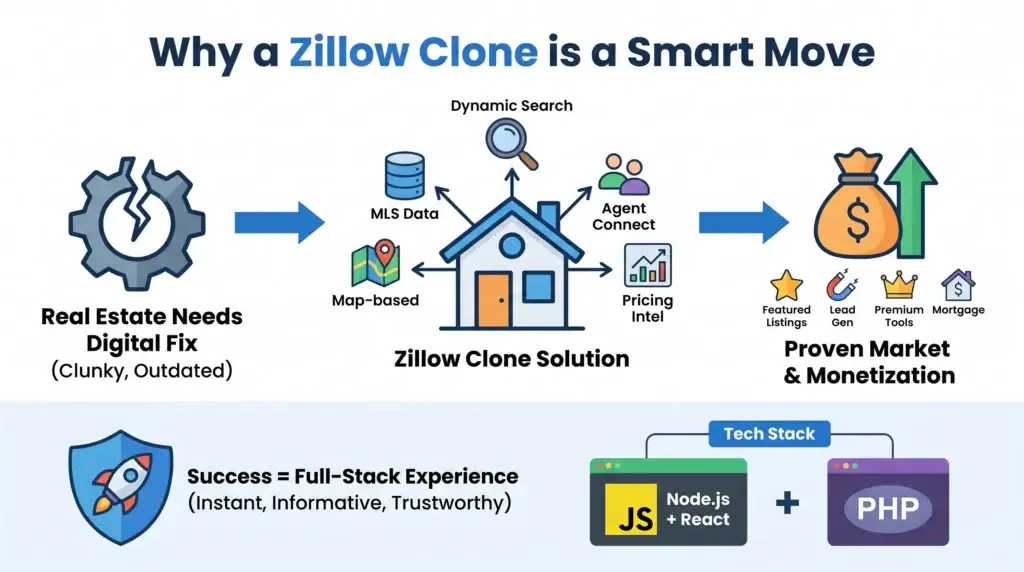
The real estate industry is ripe for digital transformation. Traditional home buying or renting journeys are often clunky, filled with outdated listings, and missing real-time user-centric features. Zillow revolutionized this space by creating a platform that blends MLS data, dynamic search filters, map-based interfaces, agent connectivity, and pricing intelligence—all wrapped in a responsive and intuitive UI.
So, if you’re thinking about building an app like Zillow, you’re entering a market with proven demand and clear monetization opportunities: featured listings, lead generation for agents, premium tools for users, and even mortgage integration. But to succeed, your app has to offer more than just listings—it must deliver a full-stack experience that feels instant, informative, and trustworthy.
Whether you’re eyeing a lean MVP or a full-fledged marketplace, you’ll need the right tech stack and architecture. Here’s how I approached it, using both JavaScript (Node.js + React) and PHP
Choosing the Right Tech Stack: JavaScript vs PHP for an App Like Zillow Development
When building a Zillow clone, your tech stack choice shapes everything—from developer velocity to app performance to long-term scalability. I’ve built versions of this platform using both JavaScript (Node.js + React) and PHP (Laravel/CodeIgniter), and each approach comes with its strengths.
JavaScript Stack (Node.js + React): This is my go-to for modern, real-time web apps. Node.js handles asynchronous operations beautifully, which is crucial when you’re fetching listings, filtering results, or hitting third-party APIs like Zillow’s Zestimate engine or a property valuation tool. React on the frontend ensures a dynamic, component-driven UI. It’s great for performance, SEO (with SSR via Next.js if needed), and modularity.
PHP Stack (Laravel or CodeIgniter): If you want faster initial development or your team is more experienced with traditional backend MVC patterns, Laravel is a beast. Its built-in ORM (Eloquent), routing, and templating (Blade) help you get features out fast. CodeIgniter is lighter and easier for small teams or when building a lean MVP. It doesn’t offer the same level of built-in tooling as Laravel but is extremely straightforward for CRUD-heavy apps.
When to choose JavaScript: You’re prioritizing real-time features, plan to scale aggressively, or want a SPA/PWA-style experience. It’s ideal for more interactive UIs and mobile-first performance.
When to choose PHP: You’re bootstrapping, working with tight budgets, or your backend is more admin-heavy than real-time. Laravel lets you build powerful dashboards, admin panels, and complex form-based flows quickly.
Read More :Best Zillow Clone Scripts in 2025: Features & Pricing Compared
Database Design: Structuring for Flexibility and Scale
A solid database design is the backbone of any Zillow-like platform. Whether you’re using MySQL with Laravel/CodeIgniter or MongoDB/PostgreSQL with Node.js, your schema needs to handle complex relationships—properties, users, agents, transactions, favorites, and more—without breaking under growth.
For PHP (Laravel/CI), I use MySQL with InnoDB engine. Here’s a simplified schema example:
users(id, name, email, password, role [buyer/seller/agent], phone, created_at)properties(id, title, address, city, state, zipcode, price, bedrooms, bathrooms, sqft, type [rent/sale], user_id, status, created_at)images(id, property_id, image_url)favorites(id, user_id, property_id)inquiries(id, user_id, property_id, message, created_at)
Using Eloquent ORM, the relationships (hasMany, belongsTo, morphMany) make property-to-user and property-to-images associations seamless. Laravel migrations also give you version control over schema changes.
For JavaScript (Node.js + MongoDB), the structure is more document-driven. Here’s a sample Mongo schema using Mongoose:
const PropertySchema = new mongoose.Schema({
  title: String,
  location: {
    address: String,
    city: String,
    state: String,
    zipcode: String
  },
  price: Number,
  type: { type: String, enum: ['rent', 'sale'] },
  bedrooms: Number,
  bathrooms: Number,
  sqft: Number,
  images: [String],
  listedBy: { type: mongoose.Schema.Types.ObjectId, ref: 'User' },
  status: { type: String, default: 'active' }
});
MongoDB’s nested structures allow flexible data modeling—perfect for storing variable-length image arrays or dynamic filters without rigid JOINs. It’s faster for read-heavy, real-time apps like Zillow clones, especially when you index fields like city, price, or status.
Explore a Detailed Cost Breakdown of the Most Affordable Zillow Alternative – A Smarter Choice for Real Estate Agents and Homebuyers Seeking Better Value.
Key Modules and Features: Building Zillow-Level Functionality
To replicate the Zillow experience, your app needs more than property listings. It must be feature-rich yet intuitive. I broke the project down into core modules, and here’s how I implemented each—across both the JavaScript and PHP stacks.
1. Property Listing & Management
- In Laravel: I used resource controllers (
PropertyController) to handle CRUD operations. The admin panel uses Blade templates with Livewire for reactive interactions. Uploading images is handled via Laravel’sStorageAPI and stored in AWS S3 or local disk. - In Node.js: Built RESTful APIs using Express and Mongoose. For file uploads, I integrated
multerand connected to Cloudinary for image hosting. Admin dashboard is built in React using a role-based access system.
2. Search and Filter System
- In PHP: Filters are handled through query builder chaining (
where,orWhere,when) based on parameters passed via GET requests. Laravel Scout or ElasticSearch is used for fuzzy matching and geolocation. - In Node.js: Search endpoints allow dynamic filtering via query strings. I optimized performance by indexing key fields and caching queries in Redis. For full-text and map-based search, I used MongoDB’s text indexes and geo queries.
3. Map Integration
Both stacks integrate Google Maps or Mapbox to visualize property locations. Frontend uses the map API to place markers, and clicking a marker reveals property cards.
- React uses the
react-google-maps/apilibrary for dynamic rendering. - Blade templates use Google’s JS SDK for map rendering in admin views.
4. Admin Panel
- Laravel: Built-in auth, middleware, and permission gates make it easy to isolate routes. Nova or Voyager can speed up admin panel development.
- React + Node: Admin routes are handled in Express with role guards. The frontend uses a protected route pattern in React Router, and components are reused with MUI or Tailwind for speed.
5. User Dashboard (Buyers, Sellers, Agents)
Each user type sees different data. Sellers can manage listings, buyers can favorite and contact agents, and agents can manage inquiries. Role-specific routing and Blade/React conditional rendering handle these views.
6. Lead Forms and Messaging
Every property detail page includes a form to message the agent or seller.
- In Laravel: Form submission is stored in the
inquiriestable and emailed using Laravel Mail. - In Node.js: The message is saved in MongoDB and emails are triggered using Nodemailer or integrated via SendGrid.
7. Property Comparison Tool
I implemented a local state-based comparison in React where users can select multiple properties and compare them side by side. In Laravel, this is cookie/session-based for users without logins and stored as a compare array for logged-in users.
Data Handling: Third-Party APIs and Manual Listings
One of the key advantages of a Zillow-style app is the ability to pull in rich real estate data. Depending on your business model, you may rely on public APIs or allow agents and property owners to list manually via your admin panel. I built support for both to give maximum flexibility.
Using Third-Party APIs (Amadeus, Realtor.com, or Zillow API)
For apps targeting broader markets or quick population of listings, I integrated external APIs.
- In Node.js: I used Axios to fetch data from APIs like Realtor.com or RapidAPI-based property feeds. Data was normalized into our schema and saved to MongoDB. I ran cron jobs using Node’s
node-cronand PM2 to sync data every 24 hours. - In Laravel: I used Guzzle HTTP client to make the same API calls. Responses were parsed and stored via Eloquent models. Laravel’s
schedulerinKernel.phphandles cron automation. Data was validated and de-duplicated before being shown.
Manual Property Listings via Admin Panel
Every property owner or agent can log in and manually list a property through a guided UI.
- React Frontend: Form steps cover property details, location (with map pin), price, amenities, and image upload. Validation is done via Formik + Yup.
- Laravel Blade: Multi-step forms managed through session data. Validation handled server-side with Laravel’s
Requestclasses.
Image Uploads
- In Node: I used Multer for handling file uploads and Cloudinary for storage. Each image is assigned to a property and linked via an array field.
- In PHP: Laravel’s
Storagesystem makes it easy to work with local or remote filesystems. For production, I configured AWS S3 and stored URLs in theimagestable.
Moderation Tools
To prevent spam or misleading data, I built a moderation layer.
- Admins can approve or reject listings before they go live.
- In Laravel: I added a
statuscolumn withpending/approved/rejectedstates and filtered queries accordingly. - In Node.js: Similar logic with status fields and protected admin routes to moderate via dashboard.
Read More : Reasons startup choose our Zillow clone over custom development
API Integration: Endpoints and Logic in JavaScript and PHP
A Zillow-like app is heavily API-driven. Whether it’s handling search filters, managing user data, or fetching listings, I designed a RESTful API layer that’s both flexible and secure. Below are examples of how I built out key endpoints in both JavaScript (Node.js + Express) and PHP (Laravel).
JavaScript Stack (Node.js + Express)
I structured my routes in separate modules for scalability. Middleware handled auth, validation, and rate limiting. Here’s a sample endpoint to fetch filtered properties:
// routes/property.js
router.get('/search', async (req, res) => {
  const filters = {};
  if (req.query.city) filters['location.city'] = req.query.city;
  if (req.query.priceMin && req.query.priceMax) {
    filters.price = { $gte: req.query.priceMin, $lte: req.query.priceMax };
  }
  const results = await Property.find(filters).limit(20);
  res.json(results);
});
Another example: create a new listing
router.post('/create', authMiddleware, upload.array('images'), async (req, res) => {
  const property = new Property({ ...req.body, listedBy: req.user._id });
  await property.save();
  res.status(201).json({ message: 'Property listed successfully' });
});
PHP Stack (Laravel)
Laravel makes RESTful routes very elegant using resource controllers. Here’s how I set up search filtering:
public function search(Request $request)
{
  $query = Property::query();
  if ($request->has('city')) {
    $query->where('city', $request->city);
  }
  if ($request->has(['priceMin', 'priceMax'])) {
    $query->whereBetween('price', [$request->priceMin, $request->priceMax]);
  }
  return response()->json($query->limit(20)->get());
}
To create a listing with images:
public function store(Request $request)
{
  $property = Property::create($request->all());
  foreach ($request->file('images') as $image) {
    $path = $image->store('properties', 's3');
    Image::create(['property_id' => $property->id, 'image_url' => $path]);
  }
  return response()->json(['message' => 'Listing created'], 201);
}
Authentication Middleware
In both stacks, I used JWT for API-level auth.
- Node.js: Used
jsonwebtokenand custom Express middleware to decode and verify tokens. - Laravel: Used Laravel Sanctum or Passport depending on need—Sanctum for SPA tokens, Passport for OAuth-level complexity.
This modular API structure allows mobile apps, third-party tools, and frontend clients to interact with the backend seamlessly. Whether you’re scaling to hundreds of requests per second or just starting out, this setup gives you clean separation of logic, validation, and routing.
Read More : Zillow App Marketing Strategy: Turning Clicks into Closings
Frontend & UI Structure: Layout, UX, and Responsiveness
The frontend of a Zillow-like platform has to be crisp, fast, and mobile-optimized. Whether using React or Laravel Blade, I focused on a layout that highlights listings first, makes filtering intuitive, and keeps navigation minimal but powerful.
React Frontend (with Tailwind CSS or MUI)
I structured the app into core components: Header, Sidebar Filters, PropertyCard, MapView, and Pagination. React Router handles routing between pages like Home, Search Results, Property Detail, and Dashboard. State management is handled by Context API or Redux for larger apps. I used Tailwind CSS for styling due to its utility-first approach and responsiveness out of the box. Example folder structure:
/src
  /components
    Header.jsx
    PropertyCard.jsx
    FilterSidebar.jsx
    MapView.jsx
  /pages
    Home.jsx
    Search.jsx
    PropertyDetail.jsx
    Dashboard.jsx
  /contexts
  /utils
For responsiveness, Tailwind’s grid and flex utilities made it easy to render cards in single-column on mobile and multi-column on desktop. Map and list views are toggled with a state toggle and conditional rendering.
Laravel Blade Templates
When using Laravel with Blade, I followed a master layout approach using @extends and @section. Layout includes partials for the navbar, footer, and reusable components like filter panels and listing cards. Bootstrap 5 or Tailwind CSS are both suitable; I used Tailwind for full control. Example of a Blade structure:
@extends('layouts.master')

@section('content')
  @include('components.filters')
  <div class="grid grid-cols-1 md:grid-cols-3 gap-4">
    @foreach($properties as $property)
      @include('components.property-card', ['property' => $property])
    @endforeach
  </div>
@endsection
UX Considerations
- Mobile-first design: I prioritized the mobile layout, ensuring buttons were thumb-friendly, filters were collapsible, and map interactions were smooth.
- Quick filters: Location, price, type, and bedroom count are all top-level filters with dropdowns or sliders for fast access.
- Lazy loading: Used Intersection Observer in React and Laravel’s
@infiniteScrollpackages to lazy-load property cards.
Property Detail Page
It includes a full-width image carousel, pricing details, property specs, a map, and a lead form.
- In React, I used
react-slickfor the image slider andreact-hook-formfor form validation. - In Blade, image sliders used Swiper.js and validation was handled via Laravel’s validation system.
The result is a responsive, smooth, and professional UI that feels as polished as Zillow—because users won’t tolerate less when comparing homes or submitting inquiries. Clean transitions, fast image loading, and intuitive layout are essential.
Authentication & Payments: Securing Access and Enabling Monetization
Authentication and payments are mission-critical for a Zillow-like app, especially if you’re allowing user roles like buyers, sellers, agents, and admins to interact in different ways. I implemented both authentication flows and payment systems in JavaScript and PHP stacks, making sure they’re secure, scalable, and user-friendly.
Authentication
In Node.js (JWT + Bcrypt)
I used bcryptjs to hash passwords and jsonwebtoken to issue secure tokens. Here’s a simplified version of user login:
router.post('/login', async (req, res) => {
  const user = await User.findOne({ email: req.body.email });
  const isMatch = await bcrypt.compare(req.body.password, user.password);
  if (!isMatch) return res.status(401).json({ error: 'Invalid credentials' });
  const token = jwt.sign({ id: user._id }, process.env.JWT_SECRET, { expiresIn: '7d' });
  res.json({ token, user });
});
Each protected route checks the token in a middleware and injects req.user.
In Laravel (Sanctum or Passport)
Laravel Sanctum is perfect for single-page applications or mobile apps. You issue tokens during login:
public function login(Request $request)
{
  $user = User::where('email', $request->email)->first();
  if (! $user || ! Hash::check($request->password, $user->password)) {
    return response()->json(['message' => 'Invalid credentials'], 401);
  }
  return response()->json(['token' => $user->createToken('auth_token')->plainTextToken]);
}
Routes are protected via auth:sanctum middleware.
Role-Based Access
Both stacks support middleware-based access control.
- Node.js: I wrote a simple role-check middleware that rejects access to protected admin routes unless
req.user.role === 'admin'. - Laravel: Laravel’s Gate and Policy system makes it easy to define abilities like
viewAny,create,update, etc., based on the user’s role.
Payment Integration
To monetize premium listings or featured properties, I integrated Stripe and Razorpay for payment processing.
In Node.js (Stripe SDK)
const session = await stripe.checkout.sessions.create({
  payment_method_types: ['card'],
  line_items: [{
    price_data: {
      currency: 'usd',
      product_data: { name: 'Featured Listing' },
      unit_amount: 99900,
    },
    quantity: 1,
  }],
  mode: 'payment',
  success_url: `${process.env.BASE_URL}/success`,
  cancel_url: `${process.env.BASE_URL}/cancel`,
});
In Laravel (Laravel Cashier for Stripe)
Laravel Cashier abstracts much of the Stripe logic. You create a checkout session like this:
$user->charge(99900, $paymentMethodId);I used webhook endpoints to listen for successful payments and update the featured flag on properties accordingly.
Both payment flows include email notifications and transaction logs, ensuring users are informed and admins have a record. Whether you’re charging for visibility, subscription tiers, or per-lead access, this layer is what turns a Zillow clone into a business.
Read More : Business Model of Zillow Explained for Startup Founders
Testing & Deployment: Stability at Scale
Shipping a Zillow-like platform isn’t just about getting features live—it’s about making sure everything runs reliably under real-world conditions. I set up testing and deployment pipelines for both stacks to ensure stability, performance, and ease of iteration.
Testing Strategy
In Node.js:
I used Jest and Supertest for unit and integration testing. Services like user auth, property search, and API responses were tested using mocked database connections with MongoDB memory server for isolated testing.
describe('GET /api/properties', () => {
  it('should return 200 and list properties', async () => {
    const res = await request(app).get('/api/properties');
    expect(res.statusCode).toBe(200);
    expect(res.body).toBeInstanceOf(Array);
  });
});
In Laravel:
Laravel’s built-in PHPUnit support is robust. I used artisan make:test to generate feature tests for routes like listing creation, login, and filters.
public function test_property_creation()
{
  $response = $this->actingAs($user)->post('/api/properties', [...]);
  $response->assertStatus(201);
}
I also included form validation tests, permission checks, and edge case coverage using Laravel’s assertDatabaseHas and assertJson tools.
CI/CD Pipelines
Node.js (GitHub Actions + PM2 + Docker)
- I set up a GitHub Actions workflow to lint, test, and deploy on merge to
main. - For deployment, I containerized the app using Docker and ran it on DigitalOcean with PM2 as the Node process manager.
- NGINX was used as a reverse proxy to handle SSL and route requests to the app container.
Laravel (GitHub Actions + Apache/Nginx + Envoy/Docker)
- GitHub Actions built and deployed the Laravel app using rsync and SSH for lighter environments or full Docker builds for containerized servers.
- Apache handled web requests, and Laravel was deployed behind HTTPS with Let’s Encrypt SSL.
- I used Laravel Envoy to automate deployments and clear cache, run migrations, and restart services on push.
Performance Optimization
I enabled HTTP caching for static assets, paginated all listing queries, and used Redis to cache frequently searched filters. In production, both stacks used .env files and centralized logging with services like Loggly or Papertrail for observability.
This setup ensures you can iterate fast while staying confident your Zillow clone won’t break under load. Automated tests catch regressions early, and CI/CD pipelines keep deployments smooth and rollback-ready.
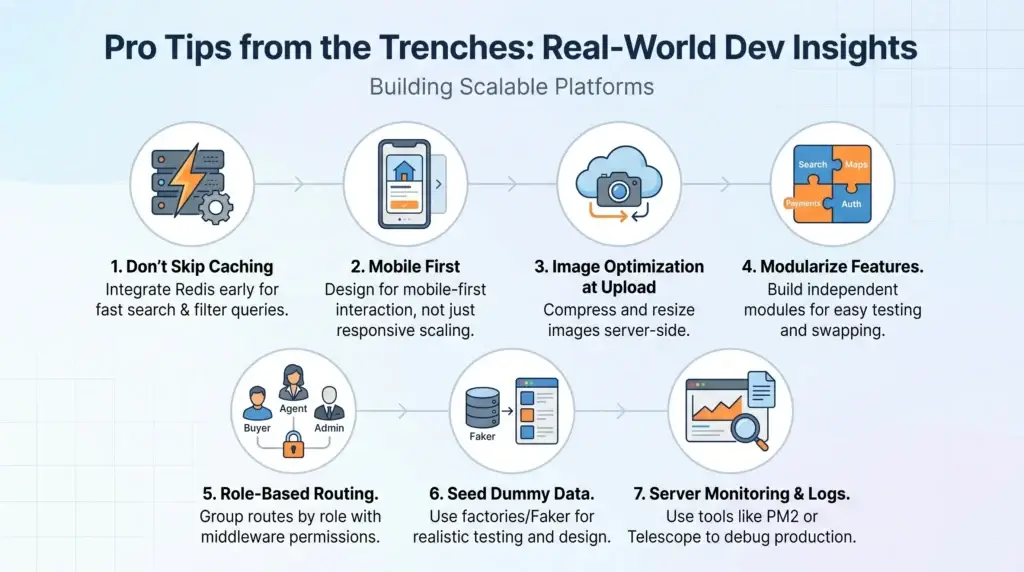
Pro Tips from the Trenches: Real-World Dev Insights
After building Zillow-like platforms across both stacks, I’ve picked up a few hard-earned lessons that can save you time, money, and technical headaches. These aren’t just nice-to-haves—they’re foundational for scaling cleanly.
1. Don’t Skip Caching
Search and filter queries are performance killers without caching. Whether you’re using Laravel or Node.js, integrate Redis early. Cache the results of common queries like “properties in New York under $500k” and invalidate the cache on new listings or edits.
2. Optimize Mobile First, Not Just Responsively
Users are often browsing listings on their phone while commuting or standing in line. Don’t just scale down the desktop version—build for mobile-first interaction. Use fixed bottom navigation, swipe-friendly cards, and tap-sized CTAs. In React, test mobile layout with Chrome’s device emulators continuously during development.
3. Handle Image Optimization at Upload Time
Big property images will slow everything down. Use tools like Cloudinary (Node) or Laravel Image Intervention to compress and resize images on upload. Don’t rely on frontend resizing—it won’t help your load times or SEO.
4. Modularize Features Early
Build features like search filters, map integration, or payment logic as independent modules. It makes them easier to test, reuse, and swap. For example, you might start with Stripe but move to Razorpay for an India-focused audience—modular architecture makes that switch painless.
5. Use Role-Based Route Grouping
Especially in Laravel, group routes for buyers, agents, and admins separately with middleware enforcing permissions. In Node, do the same with Express route prefixes and RBAC middleware. This prevents spaghetti logic and makes debugging easier.
6. Seed Your App with Dummy Data
Use factory classes in Laravel or Faker.js in Node to generate property listings for testing and frontend development. This keeps your design realistic and helps you spot UX issues like long titles, missing images, or weird price formats.
7. Invest in Server Monitoring and Logs
Use tools like PM2’s dashboard (Node) or Laravel Telescope to monitor app health. Log every failed payment, unauthorized attempt, or data anomaly. This helps you debug production issues quickly and improves user trust.
These tips aren’t theory—they come from real projects with real deadlines and expectations. Following them helped me deliver faster, avoid rework, and create platforms that feel solid and scale-ready from day one.
Read More : Zillow App Features Explained for Startups & Founders
Final Thoughts
Building a Zillow-style app from scratch is incredibly rewarding—but it’s also a serious commitment. You get full control over features, design, and data architecture, but you’re also taking on ongoing maintenance, security, and scaling challenges. From my experience, this approach makes the most sense if you’re targeting a niche market with unique workflows, or if you’re planning to innovate well beyond the typical listing model.
On the other hand, using a ready-made Zillow clone solution, especially one built by a team like Miracuves, can save you months of dev time and tens of thousands in initial costs. These solutions often come with the core modules pre-built—listings, search, maps, user dashboards, payments—leaving you free to focus on branding, growth, and market fit.
That’s why I always tell startup founders and agencies: choose based on your runway and vision. If you’re solving a problem that Zillow doesn’t touch (think rural land sales, rental bidding, or decentralized ownership), then custom is probably worth it. If you’re trying to launch fast, validate, or own your local territory, a clone gives you leverage without compromise.
And the beauty? With the right architecture—like what we walked through in this guide—you can always start with a clone and extend it into something uniquely yours.
If you’re ready to explore a Zillow clone that’s customizable, scalable, and already 80% of the way built, check out our ready-to-launch solution here: Zillow Clone
FAQs
1. Can I use a Zillow clone to target a niche market like rentals only or commercial properties?
Absolutely. The codebase and data models are modular. You can filter out purchase-specific features and focus purely on rental workflows or adapt the system for commercial, coworking, or even farmland listings. Both PHP and JavaScript stacks allow for this kind of focused customization.
2. How do I ensure compliance if I’m importing data from third-party APIs like Realtor or MLS?
Check the API provider’s licensing and attribution terms. Most require a display credit or restrict data use to non-commercial scenarios unless you’re a certified partner. When in doubt, supplement with manually added listings or partner directly with brokers and agents via your admin panel.
3. How scalable is the clone app if I suddenly get thousands of users or listings?
With the right setup, very scalable. In Node.js, MongoDB with indexed fields and Redis caching handles large datasets well. In Laravel, MySQL paired with queue workers and CDN-delivered media gives you strong performance. Using Docker and horizontal scaling, you can distribute the load with minimal downtime.
4. Can I integrate multi-language and multi-currency support?
Yes. Laravel has built-in localization support via language files, and React apps can use libraries like react-i18next. Currency conversion can be integrated using APIs like OpenExchange or built manually with exchange rate tables and switchable price fields.
5. How fast can I go live with a clone solution from Miracuves?
If you’re using the base Zillow clone from Miracuves and only need branding, payment integration, and deployment, you can go live in as little as 7–14 days. For more complex customizations, we work with you in sprints to launch MVP fast and scale features post-launch.
Related Articles
Miracuves is an independent software development company. We are not affiliated with, connected to, sponsored by, or endorsed by any company or product named in this article.
Terms such as “X Clone” are used descriptively. It is how the software industry refers to building a platform with functionality comparable to a known service, and how clients search for it.
The entire design and codebase of our products is built by our own team. Our products contain no code, design, graphics, or content originating from any third-party website or applications.
All third-party names and marks referenced in this article are the property of their respective owners, referenced solely to identify the services discussed.