Zocdoc Clone App - White-Label Doctor Search & Booking Marketplace
Miracuves' ready-made, white-label Zocdoc clone puts a doctor search and booking marketplace on your own domain, with patient and doctor apps for Android and iOS, a patient website, doctor, lab and pharmacy panels, an admin console and full source code, deployed in six working days.
Patients narrow doctors by specialty, treatment, gender and distance, read reviews left only by patients who booked, pick an open slot and add their insurer and policy number; the doctor accepts the visit, at the practice or on video. Insurance network search and eligibility checks are available add-ons. A sync with your EHR or practice-management system is scoped and priced in writing, typically delivered in 2-8 weeks.
Launch in 6 Days with
- Full Source Code
- Patient App
- Doctor App
- Patient Website
- Admin Console
- Android + iOS
StackFlutter · PHP 8.1 · Laravel 10 · Bootstrap · MySQL · Zoom · Agora
Booking activity
- Appointment bookedBookings
- Consultation fee paidPayments
- New doctor sent for verificationProviders
- Insurer and policy number addedCalendar
- Lab report uploadedReports
- Prescription sent to a pharmacyOrders
- Review posted on a doctor profileReviews
- Pharmacy order deliveredDeliveries
- Appointment bookedBookings
- Consultation fee paidPayments
- New doctor sent for verificationProviders
- Insurer and policy number addedCalendar
- Lab report uploadedReports
- Prescription sent to a pharmacyOrders
- Review posted on a doctor profileReviews
- Pharmacy order deliveredDeliveries

- 5Ways to Narrow the Doctor Listspecialty, treatment, gender, distance and rating
- 2Ways Doctors Pay the Platforma commission on each booking and a paid listing plan
- 0%Revenue Share With Miracuvesno cut of any booking fee, commission or listing plan
- 1Review per Booked Visitonly a patient with that appointment can rate the doctor
- 6Days to Launchand if the delay is ours, we keep going free
- $4,299Paid Once, Not Rentedsource code yours, no per-seat fee, no monthly rental
Live in six working days, or we keep working free until you launch. Every build carries 60 days guidance, 6 months bug fixes and 12 months updates.Verify every figure
Insurance Details at Booking
A patient marks the visit as insured, picks the policy provider from the insurer list your admin keeps and enters the policy number, stored on the appointment.
Doctors Accept Each Booking
Bookings reach the doctor app and panel as requests to accept or cancel; a request still pending at its time cancels itself after the minutes you set.
Card Numbers Stay at the Gateway
Patients pay through Stripe, PayPal, Razorpay, Flutterwave or Paystack on your own accounts, or pay offline; the platform keeps a payment reference, and each doctor's share follows your commission.
01Try it yourself
Hands-on Demo
Zocdoc Clone Demo: Doctor Search, Booking, Doctor App, Web Panels & Admin
Open the Miracuves Zocdoc Clone and use it. A patient login opens the patient app and a doctor login opens the doctor app; the web panels and the admin console open on a guided call. Search by specialty, read a doctor profile, start a booking and look at the insurance question on the form.


Zocdoc Clone Patient App
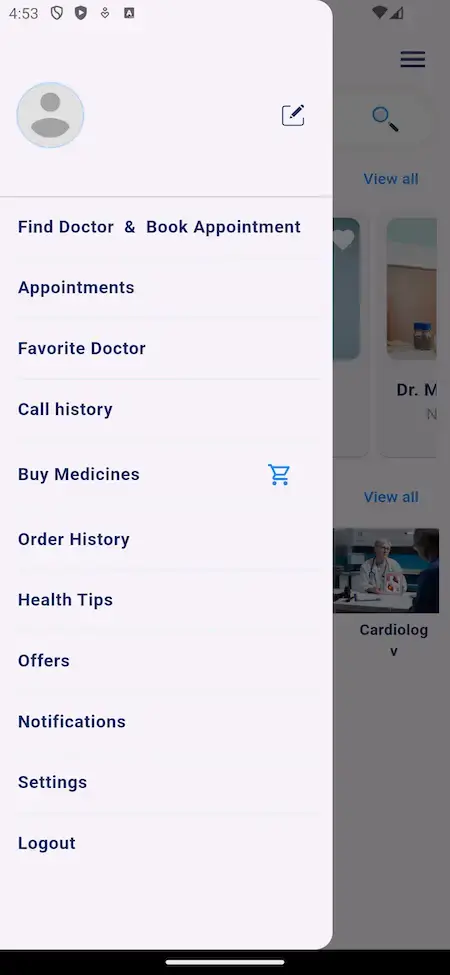
The patient side on a phone: look up a doctor by name, specialty or treatment, compare profiles and fees, pick an open slot and book for yourself or a family member.
- 1Open the app portal and choose your phone
- 2Sign in with the patient demo login below
- 3Explore: Find doctors, Treatments, Booking, Insurance question
user@demo.com | User_321

Doctor App: Schedule & Bookings
The doctor side on a phone: incoming booking requests to accept, the day's appointments, the working hours patients book against and the video visits a doctor runs.
- 1Open the app portal and choose your phone
- 2Sign in with the doctor demo login below
- 3Explore: Appointments, Working hours, Video visits
doctor@demo.com | Doctor_321

Patient Website & Practice Panels
The responsive patient site with find-doctor, offers and blog pages, plus sign-in pages for the doctor, laboratory and pharmacy panels.
- 1Open the demo website in a new tab
- 2Browse the doctor search and a doctor profile
- 3Go to the sign-in page for practice panels
shared on a guided call
Admin Panel: Verification, Insurers & Reports
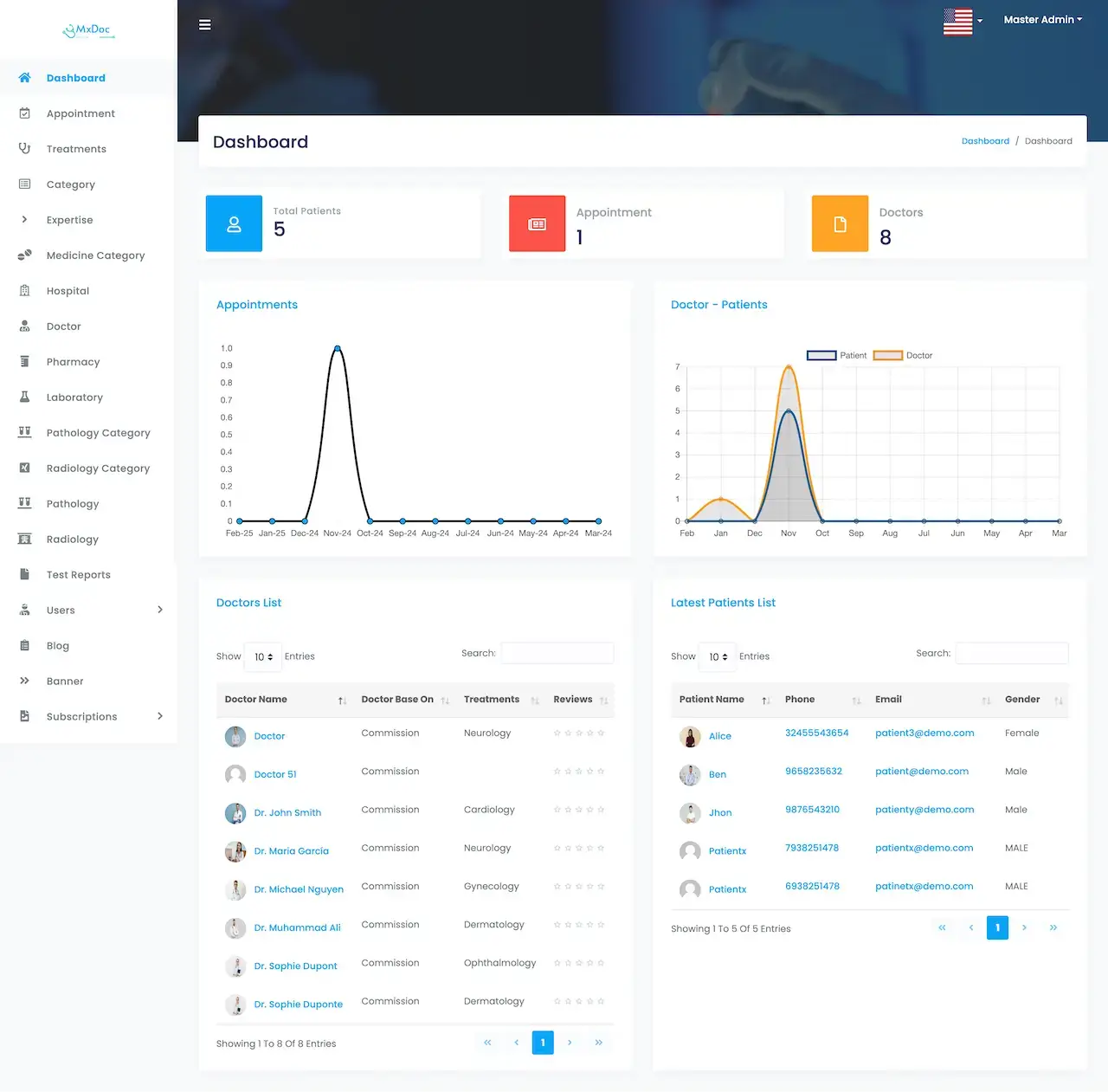
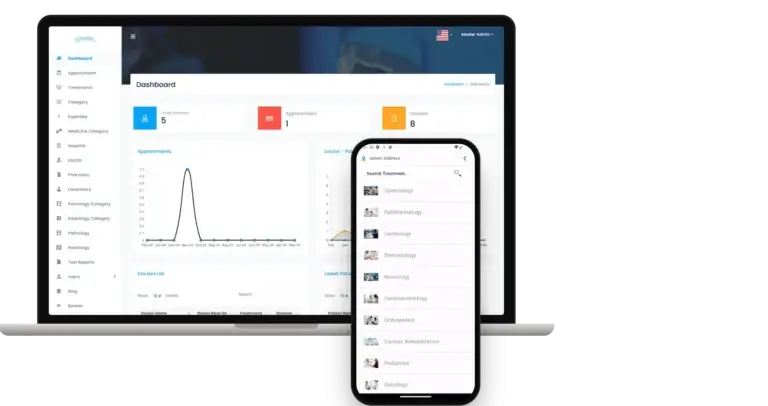
The operator console: tiles counting patients, appointments and doctors, a bookings chart, a doctors list, plus menus for hospitals, insurers, laboratories, pharmacies, blog, banners and subscriptions.
- 1Go to the sign-in page of the demo host
- 2Request the admin login from the team
- 3Explore: Dashboard, Doctors, Insurers, Reports
shared on a guided callSee It Run
Demo Video of an App Like Zocdoc: Doctor Search, Booking, Video Visits & Practice Panels
The video walks through the platform from search to visit. If you would rather hear it matched to your own plan, ask for a short call. We show the patient app, then the doctors' side, then the admin panel, and tie each to your specialties, your fee model and your launch date.
Book a live walkthrough call.Screen by Screen
Zocdoc Clone Screens Across the Patient App, Admin & Website
Real screens from the patient app, an admin dashboard and the public website, in the order a booking moves: search, compare, choose a slot, pay.


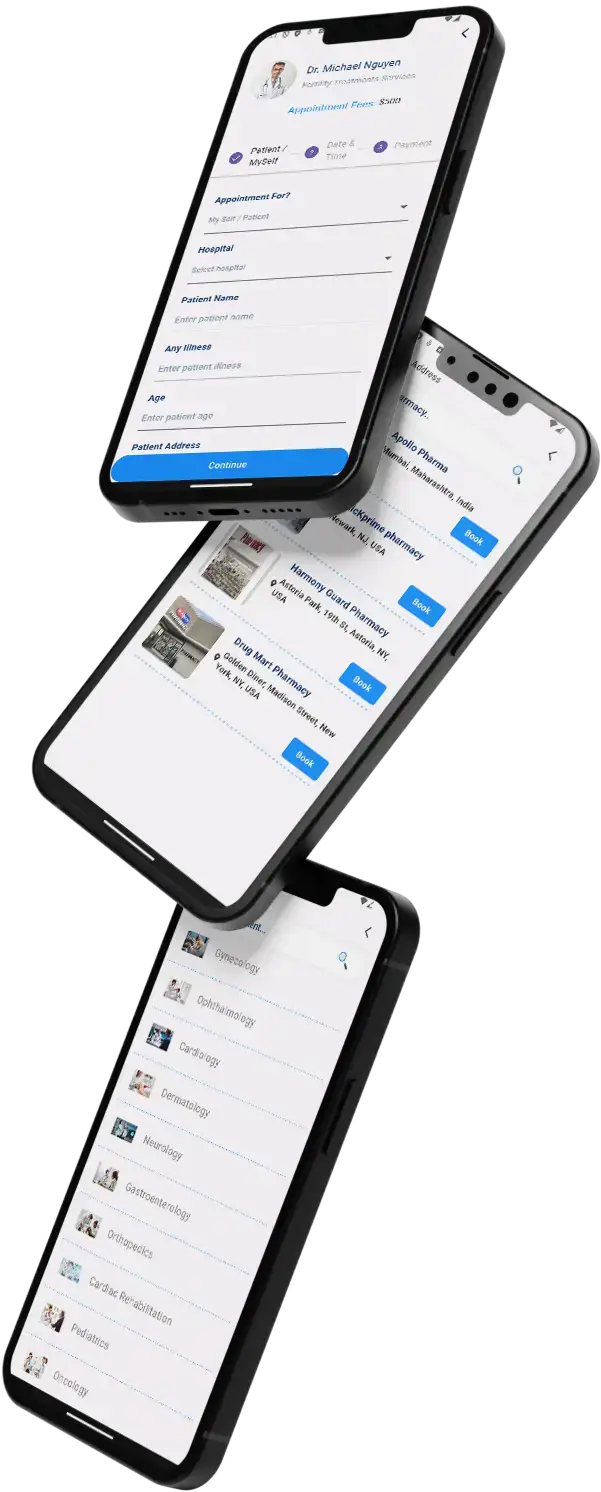
Trace a patient from the home search to the doctor list, a treatment and the booking form, past the pharmacy list to the current offers, and compare that with the admin dashboard and the patient website.
02Proof
Client Voices
Zocdoc Clone Client Reviews - What Healthcare Founders Tell Us
What clients say about building on Miracuves bases. Four of these come from doctor-booking and telehealth operators; the other four come from other industries and are shown exactly as their authors gave them.
“Every HMS I tried was built for general physicians, with no lesion mapping, no before/after tracking, and no procedure-based billing. Their MXHealth base gave us the patient app, doctor app, EMR and video consult out of the box. Front-desk time on scheduling and follow-ups is down ~70%, and we went fully digital in 9 months, where a fully custom job would have been 18.”
“Building a compliant telehealth stack from scratch in three markets would have been a year-plus effort. Miracuves’s MXHealth base covered the patient and doctor apps, video consult, e-prescription and the pharmacy integrations. We launched in our first market in 9 weeks and rolled out to two more in the following six months.”
“Wellyansh is a doctor-booking platform with our own payment gateway sitting underneath — we handle the full patient payment flow, not just the booking. Building a healthcare product and a payment gateway at the same time is a lot, and we needed it in one quarter. Miracuves's MXHealth base gave us the doctor and patient apps, the booking flow, and the prescription module. They added our custom payment gateway with the UPI and card rails we needed, plus a reconciliation module tied to our finance stack. We launched in 11 weeks. The product is stable, the gateway is processing real volume, and our settlement times are well under what a third-party processor would have given us.”
“Appointments, doctor profiles and consultations were all ready. What we needed on top was the pharmacy side: prescriptions flowing to fulfilment, and stock the clinics could actually see. That was the work, and it shipped in weeks.”
“Turo is the obvious reference, but the Caribbean specifics, from different insurance norms to different payment rails, meant we needed a real partner, not just a clone. Miracuves’s MXCar base covered the listing, the trip flow, and the host payouts. We launched in 6 working days and are live in three islands.”
“The team was running it on a dispatcher and a Google Sheet, and we needed a real platform quickly, because we were about to onboard a major retail client. Miracuves’s Delivery Genie base gave us the rider app, the dispatch console, and live tracking. We launched in 6 weeks and cleared 4x the previous order volume in the first month.”
“We were running it on phone calls and a paper calendar, and we were losing bookings to bigger OTAs. Miracuves’s GetmyBoat Clone base gave us the calendar, the booking flow, and the payment engine. Online bookings are up roughly 70% in the first six months, and the ops team finally has a live view of the fleet.”
“We were juggling spreadsheets, a third-party GPS provider, and a phone. We needed a single operations console. Miracuves’s MXLogistics base covered the trip lifecycle, the driver app, and the customer tracking page. We’ve cut operations admin time by about 40%.”
Proof in Production
Zocdoc Clone Case Study - Dermacian on the Same MXDoc Base
The story of a dermatology practice that went live on the Miracuves Practo Clone base, drawn from the published case study of what was delivered in 2025.
Dermacian needed a dermatology consultation platform. Miracuves built on the Practo Clone base, spent the effort on the parts that were the clinic's own, and transferred the source code at handover.

- Clinical records, consent and prescribing carry duties that differ by jurisdiction
- Patient, doctor, laboratory and pharmacy all touch one record that has to stay coherent
- Practitioner credentials have to be verified before anyone is listed
- Launch an online doctor consultation platform without rebuilding the mechanics already proven on the base
- Put the effort into specialties, practitioner network and the clinic's own compliance
- Hold the source code outright from day one
- Five applications, each with its own permissions: patient, doctor, laboratory, pharmacy and admin
- Specialties, practitioner network, compliance rules and payment gateways set for the client
- Patient and clinician branding applied across every surface
- Source, schema, deployment configuration and architecture notes handed over
- Build window of 6 working days on the ready-made base
“Booking, consultation and the patient record were already built to a standard we would not have reached quickly on our own. Our time went into our specialities and the compliance our practice actually answers to.”Dr. Vivek Rungta · Founder & Chief Dermatologist, Dermacian
03Overview
The Basics
How the Zocdoc Clone App Serves Patients and Practices
Miracuves' Zocdoc clone is a ready-made doctor booking marketplace built around discovery. Patients search by specialty, treatment, gender and distance, compare profiles, fees and reviews, then book an open slot. Doctors accept requests from their app or panel, and the operator earns through a commission per booking or a paid listing plan.
Discovery Before the Booking
Search, filters, doctor profiles and reviews sit in front of the appointment, and insurance details, payment and the doctor's accept step follow it, all in one flow.
Code You Own
The complete source code arrives unencrypted, so your team can reshape screens and flows as the marketplace grows, with no per-seat fee.
Add-ons Named as Add-ons
Insurance-network search and eligibility checks, EHR and practice-system sync, a health chatbot and a health marketplace are add-ons, scoped and priced in writing first. They are never counted as base features.
Web, Android & iOS apps
What Is a Zocdoc Clone Script?
A directory is the easy part of a doctor marketplace. The hard part is the trust around each booking: a doctor whose credentials an admin has checked, reviews that need a real appointment, open slots that match each doctor's working hours and a payout rule for the operator. Those links ship working.

- 01Doctor search by specialty, treatment, gender and location
- 02Open slots, booking form, fees and payment steps
- 03Reviews tied to a booked visit and video visits
- 04Insurance details at booking from your own insurer list
- 05Admin panel with commissions, listing plans and reports
You receive the patient website with its app, a doctor app, three practice panels (doctors, laboratories, pharmacies) and an admin panel of 19 menu sections. Flutter powers the Android and iOS apps, and the full source code is included.
What Is Included
Zocdoc Clone Features: Search, Open Slots, Verified-Visit Reviews, Video Visits, Insurance Details & Admin
Everything below ships with the Miracuves Zocdoc clone and appears in app screens, demo sites, FAQ answers or release notes. Any extra module is flagged with the word add-on, lower down.
Doctor Search & Filters
Patients type a doctor name or pick a specialty, then narrow the list by treatment, gender and distance and sort it by rating, newest or popular.
- Search bar on the app home screen for a doctor name
- Specialty filter with several choices at once
- Treatment filter plus a gender filter, so patients narrow a long list quickly
- Location search within the radius your admin sets around the patient
- Sort by rating, latest or popular (popular is an admin flag)
- Near-me doctor list in the app and a save heart on each doctor
Profiles & Booked-Visit Reviews
Each profile shows the bio, education, certificates, years of experience, languages spoken and fee, plus reviews that only patients who booked can leave.
- Photo, bio, education and certificate lines on the doctor tab
- Specialty, treatment, experience in years and gender
- Languages spoken and the appointment fee on the profile
- Review tab with average rating and one to five star counts
- Reviews need the patient's own booked visit
Open Slots & Booking
Each doctor sets weekly working hours and a slot length. The patient picks an open slot for a date, completes three steps and pays, and the doctor accepts the request.
- Open slots for the chosen date, from the doctor's hours
- Book for yourself or for another patient
- Name, age, address, illness details and report upload
- Patient, Date and Time, Payment: three steps
- Appointment fee shown before the patient continues
- Each booking arrives as pending, and the doctor or admin accepts it
- Pending requests past their time auto-cancel after minutes the admin sets
Video Visits & Chat
Patients and doctors meet face to face over video, with Zoom meetings created for them, and can message or share an image around the call.
- Video visits between patient and doctor
- Zoom meetings created through OAuth 2.0, link kept on the appointment
- Agora keys in settings, a per-doctor video switch, call history
- In-app messaging with doctors and image upload from the phone camera
- Digital prescription written by the doctor after the visit
Insurance Details at Booking
At booking the patient says whether the visit is insured, picks the insurer from your list and types the policy number, so the insurer and policy number sit on the appointment.
- "Patient insured?" question on the booking form
- Insurer chosen from a list the admin maintains
- Policy number typed in by the patient
- Insurer name and policy number stored with the appointment and shown to the admin
- Insurers added, edited, activated or deactivated from the admin panel
Practice Pages
Hospitals and clinics carry their own details: an address, a map pin, facilities and a photo gallery, linked to the doctors who practice there.
- Hospital or clinic name with address and map position
- Photo gallery for each practice
- Facilities listed on the Hospital Information tab of a profile
- A doctor linked to one or more practices
- Hospital selection on the booking form, with the practice address and map pin
Labs & Pharmacy
Labs and pharmacies are extra depth beside the doctors: each registers, is verified by the admin and works from its own panel.
- Laboratory sign-up with certifications for verification
- Test bookings, home sample collection and report upload
- Pathology and radiology categories, with a Test Reports menu for admins
- Pharmacy sign-up with licenses and store details for verification
- Prescription upload and home delivery
- Orders, delivery tracking and inventory in a panel
Doctor App & Schedules
Doctors register with credentials, licenses and specialization, wait for admin verification, then set their hours and accept or decline bookings from their own panel and app.
- Registration with credentials, licenses and specialization
- Verification in the admin panel before the doctor is listed
- Weekly working hours per weekday and a slot length, editable later
- Android and iOS doctor app
- Day's bookings and open requests in one appointment dashboard
- Country phone code picker on registration (release 8.3.0)
Reminders & Calendar
Push and mail on each booking, appointment reminders, a Google Calendar link and medication reminders keep patients on time.
- Push notification and mail when a patient books
- Appointment reminders for patient and doctor
- Google Calendar link on the patient dashboard (release 8.3.0)
- Medication reminders for dosing schedules
- Improved mail templates since release 9.0.0
Payments, Commission & Plans
Fees run through your payment gateway, and each doctor is paid by commission per booking or sits on a paid listing plan with an appointment cap.
- Stripe, PayPal, Razorpay, Flutterwave and Paystack, plus offline payment
- Commission set separately for doctors, labs and pharmacies
- Doctor subscription plans with price options and a total appointment cap
- Doctors listed while their plan is active; Kenya and Ghana currencies
- Settlements tracked for each doctor, lab and pharmacy
Offers, Blog & Banners
Coupon offers show on the home screen of the app, and a health blog, banners and popular-doctor flags are run from the admin panel.
- Flat or percentage coupon codes as offer cards on the home screen
- Popular flag that lifts chosen doctors
- Blog and Banner menus for the admin
- Landing pop-up and Subscriptions menu
- Patient website available in English and Arabic
Admin Console & Reports
The admin home shows totals for patients, appointments and doctors, plots booking trends and lists the doctors and newest patients, with reports behind it.
- Tiles for total patients, appointments and doctors
- Chart of appointments and a doctor-to-patient chart
- List of doctors and list of latest patients
- Reports covering appointments, transactions, user activity and revenue
- Insurers list to add, edit and activate or deactivate
- Language switcher in the admin header
Before you launch: The platform arrives complete and rebranded to your identity. You supply hosting and a domain, a developer account per app store, branding and business details of your own, a payment gateway with KYC finished, plus whatever third-party keys you use. Store review by Apple and Google follows their own schedule and sits outside the 6-day build.
Where the Money Comes In
Zocdoc Clone Revenue Models: Booking Commission, Listing Plans, Lab & Pharmacy Fees & Banners
A booking app like Zocdoc earns at more than one step of a visit, and the admin panel holds each line on its own, so changing one rate leaves the rest alone.
Two levers usually matter most: the commission on each booking and the listing plans you sell to doctors.
- 01
Commission on Each Booking
A set share of every paid appointment fee stays with the operator. Each doctor has a rate of their own in the admin panel, and payouts go out after it is deducted.
- 02
Commission on Lab Tests
Every laboratory can have a rate of its own on tests booked through the platform, with home sample collection counted in.
- 03
Commission on Pharmacy Orders
Orders filled by a partner pharmacy earn their own commission, separate from the one charged on bookings.
- 04
Doctor Listing Plans
The admin menu has a Subscriptions section where doctors buy a plan with a price, a duration and an appointment cap, and a doctor appears in search only while the plan is active.
- 05
Banners & Offer Codes
The admin menu also has Banner and Offer sections: set aside app and website slots for promoted doctors, and issue flat or percentage coupon codes.
- 06
Health Marketplace Add-On
The Health Marketplace add-on, priced on its own, lets you sell wellness products and digital resources. Once it is added, retail becomes another line beside appointments.
| Revenue stream | How it is billed | Take rateTypical take rate | What limits it |
|---|---|---|---|
| Booking Commission | A percentage of each appointment fee. The rate belongs to the doctor in the admin panel and comes off before the doctor is paid. | Teladoc self-pay visits: $89 urgent care, $119 mental health. Amwell earned $71 per visit in 2025. | Whatever patients will pay per visit, less what doctors keep after your share. Card fees come on top: the Stripe rate for US domestic cards is 2.9% + 30c, so on a $71 visit about $2.36 goes to card fees before any commission (our arithmetic). |
| Doctor Plans & Booking Fees | A listing plan for doctors with a price, a duration and an appointment cap, or a per-booking commission instead. Plans are managed in the admin Subscriptions section. | Doximity: 94% of fiscal 2026 revenue from subscriptions. Zocdoc: one-time fee per new-patient booking, no subscription. | Whether a doctor gets enough new bookings to keep paying. Zocdoc says it charges no subscription, only a one-time fee when a new patient books, set by specialty and location (Zocdoc, 17 Dec 2025). |
| Banners, Coupons & Featured Doctors | An agreed fee for a banner slot or the popular-doctor flag, plus coupon codes you issue to patients. | BetterHelp: $70-$100 per week, billed every 4 weeks. Teladoc: 83% of 2025 revenue from client access fees. | How much attention the home screen can hold, and what a coupon costs you in margin against the bookings it brings. Zocdoc bills its Sponsored Results by bid, apart from booking fees (Zocdoc, 4 Feb 2026). |
| Commission on Labs & Pharmacies | A percentage per test booking or medicine order, set for each provider type in the commission settings. | No published rate found for this stream, so no figure is quoted. | Your agreements with laboratories and pharmacies. Pricing rules for medicines and tests vary from one country to the next, and the operator checks them before launch. |
How to read this. Visit prices come from Teladoc's self-pay page, and revenue per visit from the Amwell annual report. The 83% and 94% shares come from the Teladoc and Doximity annual reports, the per-booking fee from Zocdoc's own booking fee explainer, and the therapy price from the BetterHelp FAQ. Card and store costs come from Stripe US pricing, Apple and Google Play. All are other companies' published prices and filings, so treat them as modeling inputs: this table is not a quote, not a forecast, and your own rates belong in the admin settings.
Zocdoc Clone Revenue Model, Stage by Stage
One appointment on the Zocdoc clone can pay you through the doctor, and lab and pharmacy lines stay separate so each switches on when you choose.
Launch
In one city, a commission rate for each doctor, taken from every paid booking, carries the early revenue.
Traction
As doctors fill their calendars, plans with appointment caps can sit beside commission, and verified laboratories and pharmacies add test and order commission priced apart from bookings.
Scale
Across many cities, banner slots, coupon-led campaigns and the listing plans doctors buy build up next to commission, while an optional Health Marketplace add-on opens a retail line.
Booking, lab and pharmacy commissions all reach you with no royalty to Miracuves, so the rates you set are the rates you keep, and a 0% revenue share applies to every booking.
Run It Every Day
Zocdoc Clone Admin Panel: Doctors, Insurers, Labs, Appointments & Reports
Miracuves gives Zocdoc clone operators a single console for every working day: which doctors are verified, which appointments are booked, which insurers patients can choose, what providers are owed and what the public site shows.


Admin Menu Sections
- 01
Dashboard & Reports
Totals for patients, appointments and doctors, an appointments chart, a chart of doctors against patients and reports on revenue, transactions and user activity.
- 02
Doctors & Verification
Check each doctor's submitted credentials, licenses and specialization before the profile goes live, then see how the doctor is paid, for example by commission.
- 03
Hospitals, Treatments & Insurers
Keep the hospitals, treatments, specialties and insurers that patients search and book by, adding, editing or switching each on or off.
- 04
Appointments
See each appointment in one place, with the insurer and policy number the patient gave, and reschedule or cancel it.
- 05
Laboratory & Radiology
Add laboratories, maintain pathology and radiology categories and read the test reports labs upload for their patients.
- 06
Pharmacy & Medicines
Check each pharmacy's licenses, organize medicine categories and watch the orders and deliveries it handles.
- 07
Users & Subscriptions
Look after patient and staff accounts, plus the Subscriptions section where doctor listing plans are set.
- 08
Blog & Banners
Write the health articles patients read, and decide which banners appear in the app and on the website.
Money & Commission
Everything financial in the console, from what the patient pays to what the doctor receives.
- Payments and commissions followed from one screen
- A separate commission rate for each doctor, laboratory and pharmacy
- Provider payouts sent through the connected gateway
- Reports covering appointments, transactions and revenue
Roles & Access
Each side of the platform has its own sign-in for the people who run it.
- Admin, doctor, pharmacy admin and pathologist sign-ins
- Password recovery link on the sign-in page
- A language switch in the admin header
- Main admin menu with profile settings
Want the console to go further? Extra report types, a second approval step for doctors, more languages or another payout rhythm are scoped separately. Tell us the needs of your operations team and we will quote in writing.
04Scope and price
What You Receive
Source Code, Apps, Panels & Deployment in the Package: What the Zocdoc Clone Script Includes
You receive a working Zocdoc clone script with its apps, not loose parts: the patient website and the patient app, the doctor app, doctor, laboratory and pharmacy panels, the admin panel, and every line of source code with its database schema. It is all yours outright: no seat fees, no usage fees, no license needing renewal. A few costs stay on your side: hosting, a domain, developer accounts for the app stores, video and SMS services and your gateway fees. Add-ons such as insurance-network search, EHR sync and the health chatbot are priced separately, and any custom flow gets a written quote before work begins.
$ git clone your-doctor-marketplace Complete Source Code
Every file of the web platform and the mobile apps, unencrypted, so your team can reshape it to fit your marketplace.
- Unencrypted web platform source
- Flutter code for both the Android and iOS apps
- Yours to change, extend and redeploy
- Handed over into your own repository
Schema & Migrations
The database design behind patients, doctors, slots, appointments, reviews, insurers and orders, supplied so it can be rebuilt from scratch.
- Schema delivered with migrations
- MySQL database layer
- Appointments, reviews and reports
- Doctors, labs and pharmacies
Reminders & Notifications
Appointment alerts, medication reminders and push messages, plus a Google Calendar link and the mail patients get after booking on the website.
- Reminders for medication and refills
- Push messages to the patient app
- Mail after website bookings
- Release 9.0.0 refreshed the mail templates

Website & Provider Panels
A responsive patient website, plus separate panels for doctors, labs and pharmacies, entered through a single sign-in page.
- Find-doctor, profile, booking, offers and blog pages
- Doctor panel for working hours and appointments
- Lab panel for tests and report uploads
- Pharmacy panel for orders and inventory
Apps for Patients & Doctors
A Flutter app for patients and another for doctors, covering search, booking, video visits, reviews and offers.
- Patient app: search, profiles and booking
- Doctor app: accept or cancel bookings, set hours
- Home screen rows for specialists, treatments and offers
- Published under your own developer accounts


Admin Panel
The operator console: dashboard counts and charts, then doctors, hospitals, insurers, laboratories, pharmacies, test reports, plus users, blog, banners and subscriptions.
- Dashboard with an appointments chart
- Lists of doctors, hospitals, treatments and insurers
- Menus for laboratories, pharmacies and test reports
- Menus for users, blog, banners and subscriptions
Role Access & Provider Checks
Every role signs in separately with its own permissions, and providers' credentials are reviewed before they are listed.
- Admin, doctor, pharmacy and pathologist each sign in separately
- Credentials and licenses reviewed before a doctor is listed
- Pharmacy checks the prescription before dispensing
- Card details stay with the payment gateway
Handover & Support
We rebrand and deploy it for you, hand over a pack of notes, and start the three support periods side by side at launch.
- Your logo, icons and colors throughout
- Deployed on your own hosting
- Configuration and architecture notes for the deployment
- 60 days of guidance, then 6 months of bug fixes, then 12 of updates
Want a look before you decide? Try the patient app or the doctor app using the demo logins, or ask us for a guided tour. We can step through a specialist search, a doctor profile, the booking form with its insurance fields and the accept screen against your own launch plan.
Transparent Pricing
What Does It Cost to Launch a Doctor Booking App Like Zocdoc?
Miracuves sells the ready-made Zocdoc Clone for a fixed $4,299, paid once. Anything past the base build, such as insurance network search, an EHR sync or custom booking rules, is scoped by our team and priced in writing as its own line.
Professional
Ready-Made Zocdoc CloneChosen by: Doctor-booking startups, clinic groups, multi-specialty directories
You receive the platform as the demo shows it, wearing your logo, icons and colors and running on your own hosting.
Get StartedEnterprise
Custom Work for Bigger ScopeChosen by: Hospital systems, multi-country groups, builds with extra regulatory scope
Need something the base lacks, such as insurance-network search? We build to your brief, with scope and price agreed before work starts.
Ask for a QuoteZocdoc Clone Development Cost in 2026
For $4,299, paid once, Miracuves delivers the Zocdoc Clone as working software: Android and iOS apps for patients and doctors, a patient website, doctor, lab and pharmacy panels and the admin console, with unencrypted source, schema and architecture notes, rebranded to your name and deployed in six working days. Every booking commission and listing plan fee is yours.
What your marketplace pays for separately
- Hosting, a domain and object storage in a bucket you own
- A developer account with each app store
- Your gateway account, set up with KYC, and its fees
- Video and SMS services, including Zoom
- Priced add-ons such as insurance-network search or EHR sync
Anything past the shipped base, for instance a further provider role or a rebuilt booking form, is quoted in writing by Miracuves before work starts and usually ships within 2-8 weeks.
Weigh the Options
Ready-Made Zocdoc Clone vs Custom Development vs SaaS
There are three routes to a doctor-discovery and booking marketplace: buy the Miracuves Zocdoc clone already working, pay for custom appointment-app development, or rent a hosted booking tool. Here is how they compare.
| Criteria | MiracuvesReady-Made Zocdoc Clone | Custom Development | SaaS |
|---|---|---|---|
| Launch time | Live within 6 working days | Settled once the requirements are written | Quick sign-up, fixed feature list |
| Upfront cost | $4,299, a single payment | A written quote for each requirement | Small setup fee, then recurring billing |
| Code ownership | Complete source code supplied | Ownership depends on the contract | Stays inside the vendor's system |
| Customization | Specialties, insurers and flows editable | As much as your budget covers | Limited to the options on offer |
| Ongoing fees | No Miracuves fee per booking or doctor | You pay for maintenance | Charges per provider or per month |
| Branding & store listing | Patient and doctor apps under your name | Your apps on your own timeline | Often a shared vendor app |
| Best for | Doctor directories and clinic groups | Hospital-scale bespoke programs | One clinic testing online booking |
Same product, other editions: Practo Clone · Lybrate Clone · White Label Telemedicine App · All Healthcare solutions
Who It Suits
Use Cases for an App Like Zocdoc: Doctor Directories, Practice Networks, Listing Plans & Pharmacy Orders
Each operator leans on a different part of the Zocdoc clone. A directory startup starts with doctor search and open slots, a practice group with schedules and payouts, a specialty clinic with its profile and reviews, a pharmacy partner with prescription orders. The emphasis is a configuration choice.
Swipe · 6
Open a directory where verified doctors list their specialties, languages and fees, patients compare reviews and book an open slot, and you earn a commission on every booking.

Take bookings for several practices and hospitals on one platform, each doctor's working hours, slots and payout managed from the same console.

Sell doctors a listing plan with an appointment cap, or take a commission per booking instead, and follow bookings and payouts from the admin dashboard.

After the visit, a prescription can go to a partner pharmacy that checks it, then fills the order and follows delivery.

A single-specialty practice gets its own patient app and doctor app, built around the treatments and expertise it lists and the hours its doctors keep.

Cover one region under one brand, with the website's language options reaching patients in English and Arabic.

Zocdoc Clone Business Model: Three Ways to Earn From It
One install can run three booking businesses, since commission, listing plans and group schedules are separate settings. Zocdoc charges a one-time fee per new-patient booking and no subscription (Zocdoc, 17 Dec 2025); you can charge per booking, sell plans or mix both.
Commission marketplace
Doctors are verified and listed, patients compare fees and reviews and book an open slot, and the operator takes a commission, set per doctor, on each booking.
Multi-practice network
A group of practices and hospitals manages each doctor's hours, slots and payout from one console, every booking tied to a hospital.
Listing-plan directory
Doctors pay for a listing plan with an appointment cap instead of a commission, and appear in search only while the plan is active, so recurring income funds the directory.
Switching between them comes down to which providers the admin verifies, whether doctors pay commission or a plan and whose brand the patient app carries.
One product, six uses. All six rest on the same patient website, apps, provider panels and admin console. Only the specialties on offer, the providers you verify, the commission or plan you set and the branding change, so one codebase is all you maintain.
Speak to Our TeamMarket Timing
Why Build an App Like Zocdoc in 2026?
Booking a doctor online is now ordinary. An MGMA poll in August 2026 found 32% of US medical groups reporting higher no-show rates so far that year than in 2025, and a Tebra 2026 survey, cited by MGMA, found 69% of patients wanted to reschedule online without calling. What operators can still own is the platform itself.
01Patients Search by Fit, Not by Phone
Patients want to filter by specialty, treatment, gender and location, read reviews and fees, and book an open slot, in person or on video, in one place. A platform that keeps those steps together is easy to come back to.
02Practices Want Control of Their Calendar
A doctor who sets their own weekly hours and slot length, and accepts or cancels each booking from the app, spends less time on the phone and more with patients.
03A Booking Page That Stops at the Slot Leaves Gaps
Reminders, a calendar entry, the review and any lab or pharmacy order all follow the booking. Keeping them in one platform keeps the whole visit under your brand.
04Pricing Can Differ by Doctor
Each doctor can carry their own rate, and labs and pharmacies carry theirs, so commission is priced line by line instead of being averaged.
05Patients Remember Your Brand, Not a Listing Site
With your name on the platform, the reviews, the booking history and the repeat visits stay yours rather than a third-party directory's.
06Buying Beats Building From Scratch
Search, slots, booking, video visits, reviews, three provider panels and an admin console make up most of a booking marketplace. Six working days from the start, a white-label copy is live on your own hosting.
The Build in Numbers
Sign-In Roles
Admin Console Sections
Mobile Apps
Working Days to Launch
Most of the work in a booking marketplace is the plain middle: verifying doctors, holding slots, capturing insurance details and settling commission. Here it is already built.
Industries
Industries It Fits
Miracuves' Zocdoc clone suits any business that puts patients in front of the right doctor. Telehealth groups sell video visits. Specialty practices and dermatology clinics publish open slots. Diagnostic and imaging centers list test bookings along with home pickup. Pharmacies handle prescription orders. Hospital networks put their doctors into one directory. Family, pediatric and women’s health providers share schedules. Eye-care and wellness businesses get found by specialty.
one codebaseMXDoc
- 01TgTelehealth Groups
- 02SpSpecialty Practices
- 03DcDermatology Clinics
- 04LbLaboratory Networks
- 05ImImaging Centers
- 06PnPharmacy Chains
- 07HgHospital Groups
- 08FmFamily Medicine
- 09PcPediatric Care
- 10WcWomen's Care
- 11EyEye Clinics
- 12WlWellness Centers
Miracuves’ Zocdoc Clone is a doctor booking marketplace you can adapt to many practice types, with doctor panels, patient apps and your own branding on every screen from day one.
06Inside the build
Full Flow
How a Zocdoc Clone App Works: Search, Compare, Book, Visit & Review
On the Zocdoc clone app, booking takes a patient a few taps. Behind those taps sits a firm chain: search, slot, insurance details, payment, doctor acceptance and the visit. The steps below follow it from first search to review, then show the architecture underneath.
Patient Journey: From First Search to a Posted Review
Swipe · 6
- 1Sign Up & Search for a Doctor
A patient signs up or signs in with basic details, then looks for a doctor by name, specialty or treatment from the home screen, with a distance filter around their own location.
- Account with basic details
- Doctor search bar with specialists below
- Treatments shown below the specialists
- 2Compare Profiles, Fees & Reviews
Each doctor card shows photo, name and specialty. A profile adds bio, education, languages, fee and the star rating breakdown.
- Doctor photo, name and specialty on a card
- Profile with bio, languages and fee
- Reviews from patients who booked
- 3Filter by Treatment or Specialty
Patients who start with a need, not a name, open the treatments list and filter by gender or specialty before choosing among the doctors who treat it.
- Cardiology, dermatology and other treatments
- Specialty tiles on the patient site
- Gender filter and rating sort on the list
- 4Pick a Slot, Add Insurance Details & Pay
The booking form sets who the visit is for, the patient details, the open slot and the insurer, then takes payment. The doctor accepts the request, and the visit runs in person or over video.
- Open slots for the chosen date
- Insurer from your list, plus policy number
- Doctor accepts, then a reminder follows
- 5After the Visit: Prescription, Lab Tests & Pharmacy
Once the visit is done, the prescription and any lab results land in the patient account. Test bookings go to laboratories, and pharmacies fill orders against a prescription.
- Prescriptions and reports in the account
- Lab home sample collection
- Pharmacy orders checked against a prescription
- 6Review the Doctor & Rebook
Only a patient with an appointment can review it, from one to five stars plus a note. Coupon offers show on the home screen, and past visits stay in the account for the next booking.
- Offer cards with coupon codes
- One review per appointment
- Past bookings stay in the account
How It Is Built
Doctor Booking Marketplace Architecture & Appointment Flow
- 01Part 01
Five Apps With Their Own Permissions
Patient, doctor, laboratory, pharmacy and admin are five applications with permissions and release paths of their own, so the operator console stays out of a pharmacy's reach.
- 02Part 02
Booking Lifecycle
A request starts at an open slot, moves through payment and waits for the doctor to accept it. Stale pending requests cancel on their own, and reminders fire at the right moment.
- 03Part 03
Directory & Specialties
Doctor profiles, specialties and practice addresses sit in one directory that search, filters and the booking form all read from.
- 04Part 04
Video Visits
A Zoom meeting link is created for the appointment when it needs one and stored on the booking, so patient and doctor open the same visit.
- 05Part 05
Lab & Pharmacy Orders
Prescription, lab and pharmacy orders hang off the same patient account, with consent rules deciding who gets to read it.
- 06Part 06
Reminder & Result Events
Reminders and result-ready messages go out as background jobs, so the booking screen never has to wait.
Inside the Stack
Zocdoc-Style Platform Tech Stack: Laravel, PHP, MySQL, Flutter, Zoom & Five Payment Gateways
The Miracuves Zocdoc clone stack covers what a booking marketplace depends on: a steady web tier, a database that holds appointments in order, working video, and native-feeling mobile apps. It is drawn from the product pages plus the release notes.
Web & Admin Tier
- Patient website plus the doctor, lab, pharmacy and admin panels
- Responsive Bootstrap interface
- Runs on PHP 8.1 or newer since release 9.0.0
- Libraries refreshed with each framework upgrade
Data Layer
- MySQL holds patients, doctors, slots and appointments
- Schema and migrations come with the source
- Upgrade queries sit in the root folder
- Rebuilds from empty data
Two Mobile Apps
- Flutter apps built on current dependencies
- Patient app, doctor app
- Released from your own developer accounts
- A separate store listing for each app
Video Visits & Scheduling
- Zoom meetings created through OAuth 2.0
- Patients add a booking to Google Calendar
- Email and push notice when a booking is made
- Needs your own Zoom and Google accounts
Payments & Currencies
- Stripe, PayPal, Razorpay, Paystack
- Kenya and Ghana currencies included
- Flutterwave ships too; other gateways on request
- Needs your own gateway account and KYC
Source Code & Docs
- Application source with its full history
- Flutter projects with signing steps written down
- Deployment settings documented
- Architecture notes handed over
Web and admin run on Laravel 10 and PHP 8.1 or newer with Bootstrap screens, and both apps are Flutter. Zoom, Google Calendar and the payment gateways each use your own account and keys, supplied at deployment. Everything here is mainstream, so developers are simple to find.
Room to Grow
Built to Scale: Separate Apps, Slot Locks, Gateway Limits & Growth Headroom
Miracuves builds the Zocdoc clone as separate apps over shared components, so adding doctors, practices, laboratories and patients is capacity and configuration work, with no rewrite.
Five Apps, Five Release Paths. Patient, doctor, lab, pharmacy and admin run on permissions of their own, so one can change without the others shipping alongside it.
No Double Bookings. Slot holds and session locks mean patients and doctors always see the same answer on whether a time is open.
Reports Kept Outside the App. Lab reports and scans are kept in an object storage bucket you own, in the region you pick, so the web tier stays light as files accumulate.
Reminders Run in the Background. Reminders and result-ready messages are background events, which keeps the booking screen quick when volume rises.
Separate Applications
Five applications, patient through admin, each hold their own permissions and release path, so any of them can change alone.
Locked Slot Calendar
Open times sit in a calendar of slot holds and session locks, so two patients cannot book one time.
- Slot held while a patient books
- Locks on running sessions
- Each doctor sets working hours
- Reschedule and cancel supported
Rate-Limiting API Gateway
An API gateway fronts the booking logic and applies authentication and rate limits to each request.
- Gateway handles authentication
- Rate limits for public requests
- Separate sign-ins for each role
- Password recovery by email
Separate Report Storage
Lab reports, scans and prescription files go to an object storage bucket you own, in your chosen region, outside the web tier.
- Your bucket in your region
- Reports served on their own
- Prescription PDFs kept as files
- Admin panel has a Test Reports menu
Logged Orders & Payments
Each fee, prescription, lab order and pharmacy order lands in the log as a separate event on one patient account.
- Appointment fees logged
- Lab and pharmacy orders tied to the account
- Commission tracked by provider type
- Refunds logged as events
Documented Handover
Source, schema, deployment settings and architecture notes pass to you, so another team can run the platform without us.
Room to Change and Grow. Every marketplace ends up needing something local: a regional insurer, a specialty workflow, an extra integration. With the full source on a conventional stack, a new screen, rule or connection is standard coding that either your team or ours can handle.
Launching a marketplace? Start by signing up the doctors and practices you can reach, then grow from the one deployment you already own. Once traffic climbs, hosting and configuration decide how far it stretches, and work past the base gets its own scope and quote.
07Security and Controls
Controls You Can Inspect
Security in a Doctor Booking App: Role Separation, Record Access, Gateway Payments & Launch Checks
The Zocdoc clone stores identities, appointments, insurance details and health records, so three things matter most: who can read what, where card data travels, and which checks run before launch. This section lists what the platform does and what your rollout covers.
- 01 · RolesRole Separation
Each surface sees only what its role allows. The server enforces that, rather than the screen hiding things, so the operator console stays out of a pharmacy's reach.
- Provider Verification: Each doctor, lab and pharmacy submits credentials, licenses or certifications for review, and only providers the admin verifies show up in patient search.
- Prescription Checks: Prescription medicines need an uploaded prescription from the patient, which the pharmacy can check before the order proceeds.
- 02 · RecordsRecord Access Trail
Consent rules decide who is allowed to see a patient record, and the base logs every edit with who made it and when, so a dispute is settled from the log.
- Report Delivery: A laboratory uploads the report into the patient's own account, so the result reaches the person it belongs to.
- Clinical Boundaries: The software handles booking, records and connections. Diagnosis stays with the clinician, and the chatbot add-on supports a visit rather than replacing one.
- 03 · TransportTransport & Storage
Traffic travels over TLS, credentials are hashed before storage, and sensitive values at rest are encrypted instead of just obscured.
- 04 · SecretsSecrets Handling
Keys live in environment configuration on infrastructure you control and stay out of the repository that is handed over.
- Pre-Launch Work: Your gateway settings, your own privacy terms, key rotation, a restore drill and a penetration test all get booked into the deployment with your team.
- 05 · CardsCard Data Stays at the Gateway
Card details go straight to the gateway you connect; the platform keeps a payment reference in place of a card number.
- Payout Controls: Commission rates and settlements are admin settings, so what each doctor is paid, and when, is your decision.
- 06 · BackupsBackups & Restore
Backups run on a schedule within the deployment, and a restore is tried before launch because an untested backup is only a guess.
Patient records are protected by sign-ins tied to roles, consent rules and a change history of who edited what and when. Your privacy-policy review, a penetration test, key rotation and a restore check are each dated in the rollout plan.
Review Security Before LaunchHealthcare Readiness
Operator Readiness: Where the Booking Software Ends and Your Duties Start
A healthcare marketplace deals in personal health information and links patients to licensed professionals. Miracuves supplies the tooling for search, booking, records and payments. Who may practice, which laws apply where, and how you govern patient data stays with you as the operator.
Here, ready means anything shown in the demo apps or on a guided tour of the panels. The software's job is scheduling, records and connections; licensing by health authorities is the operator's responsibility, and this page is neither legal nor medical advice.
Included in the Software
Doctor search and filters, slot booking, insurance details at booking, video visits, reviews from booked patients, lab and pharmacy panels, provider verification screens, commission and plan settings, role-specific sign-ins and an admin panel that reports.
Kept by the Operator
Your own privacy policy and terms, how you gather patient consent, which providers you take on along with the vetting you run, your retention rules, and the privacy program your regulators expect.
Licensed Professionals
Doctors, labs and pharmacists must hold the licenses their country requires. The platform collects credentials for the admin to review and lets a pharmacy check a prescription; issuing a license is for the authority, and prescribing is the doctor's act.
US Privacy & Telehealth Rules
US operators bring their own HIPAA program and sign business associate agreements with each vendor, and telehealth rules differ by state. The software supplies controls that support a program; build that program with advisers who know your state before bookings open.
08Extend the platform
- Search, booking & video visits
- Reviews & insurance details
- Panels for doctors, labs, pharmacies
- Provider verification & reports
How add-ons work
- 1Choose your modules
Insurance search, EHR sync, chatbot or marketplace, now or after launch.
- 2Quote before work
Every module gets a written scope and price before any work starts.
- 3Delivered as code
The module joins the source you already own.
Go Further
Add-Ons for a Zocdoc-Style Platform: Insurance Search, EHR Sync, Health Chatbot & Marketplace
Out of the box the Zocdoc clone is complete and demo-ready. The four modules below are the extensions buyers ask about most, each priced separately because scope depends on your market and your partners.
Drag to browse · hover to pause
- 01Insurance
Insurance Search
Lets patients search doctors by the insurance network they belong to and runs eligibility checks against your insurer partners. Scope and price in writing first, typically 2-8 weeks.
Insurance · Eligibility - 02Integration
EHR & Practice Sync
Connects the booking calendar with the EHR or practice-management system a practice already runs. Scope and price in writing first, typically 2-8 weeks.
EHR · Practice Sync
- 03Guidance
Health AI Chatbot
A module that fields basic health and wellness questions inside the app. It supports patients and never stands in for a clinician. Scope and price in writing first, typically 2-8 weeks.
Chatbot · Guidance - 04Extension
Health Marketplace
A shop inside the app for wellness products and digital resources, letting patients spend beyond appointments, with retail revenue beside booking fees. Scope and price in writing first, typically 2-8 weeks.
Shop · Wellness
Our Healthcare Range
Planning a Care or Pharmacy Product? Four Neighbors Fit Next.
Zocdoc Clone sits inside a broader healthcare range. If you lean toward medicine delivery or an India-style care network over doctor discovery, these four sit close by.
01The same MXDoc build sold under the Practo name, at one price, with 6-day delivery, and framed around labs, pharmacies and a shared patient record.
Explore Solution
02An online pharmacy platform that brings medicine orders, health consultations and diagnostic tests into one app.
Explore Solution
03A drugstore-to-online platform for pharmacy and medicine delivery, with a feature set you can shape.
Explore Solution
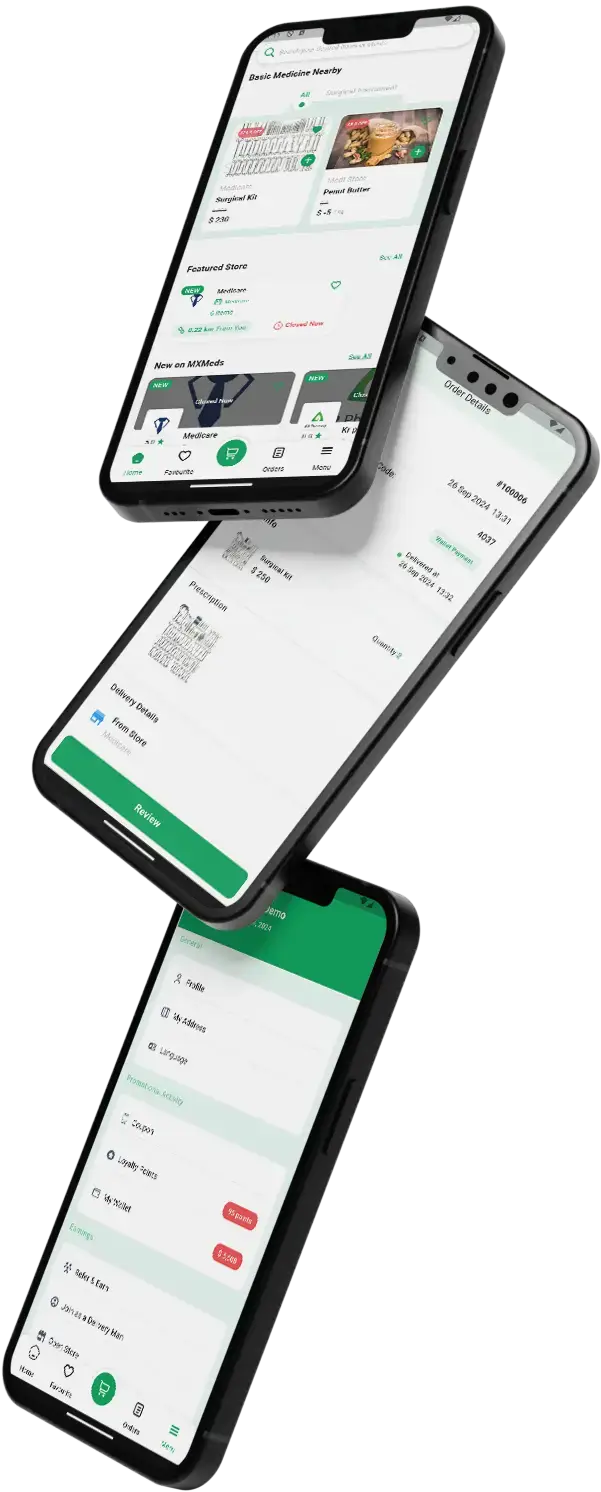
04A medicine delivery platform for white-label launch, built for speed, with order tracking and secure payments.
Explore Solution09The business case
Market Benchmarks
Telehealth Market Benchmarks - Independent 2025-2026 Data
The revenue models above are ours. The figures below are not. They come from the CDC's National Center for Health Statistics, India's Press Information Bureau, and the Teladoc Health and Doximity annual reports on Form 10-K, reproduced as published. They show how widely clinicians and patients use telemedicine, and how listed telehealth companies are actually paid.
80% of US Office Physicians Used Telemedicine
The CDC's National Center for Health Statistics reports that 80.0 percent of office-based physicians in the United States used telemedicine in 2024, down from 86.5 percent in 2021. Use was 86.2 percent among primary care physicians and 60.1 percent among surgical specialists. The figures come from the 2024 National Electronic Health Records Survey, published in June 2026.
50 Crore Teleconsultations on India's eSanjeevani
India's Press Information Bureau reports that the national telemedicine service eSanjeevani crossed 50 crore (500 million) teleconsultations on 15 September 2026, across all 36 States and Union Territories. It supports 19,473 medical hubs, 901 online OPDs and more than 1.42 lakh Ayushman Arogya Mandir spokes, with 2,41,923 registered healthcare providers, in 15 languages.
83% of Teladoc Revenue Came From Access Fees
Teladoc Health's 2025 annual report on Form 10-K says it completed 17.1 million telehealth visits in 2025 and that 83 percent of consolidated revenue came from access fees, which clients pay per member, per employee or per participant each month. BetterHelp, its consumer therapy segment, earned $950.4 million, down 9 percent.
94% of Doximity Revenue From Subscriptions
Doximity's annual report on Form 10-K for the fiscal year ended 31 March 2026 reports revenue of $644.9 million, up 13 percent, with about 94 percent derived from subscription customers. It says its registered members represent more than 85 percent of US physicians, and that pharmaceutical manufacturers buy programs brand by brand.
National Center for Health Statistics, Health E-Stat 120: Telemedicine Use Among Office-based Physicians in 2021 and 2024, June 2026 - cdc.gov
Press Information Bureau, Ministry of Health and Family Welfare, E-Sanjeevani Crosses 50 Crore Teleconsultations, Strengthening Access to Healthcare Across the Country, 6 October 2026 - pib.gov.in
Teladoc Health, Inc., Annual Report on Form 10-K for the year ended 31 December 2025, filed 26 February 2026 - sec.gov
Doximity, Inc., Annual Report on Form 10-K for the fiscal year ended 31 March 2026, filed 19 May 2026 - sec.gov
All figures are the publishers’ own, reproduced as published. Metric definitions differ by publisher and are as each states them. They describe the companies and markets named, not any platform Miracuves builds, and nothing here is a revenue projection for your business.
The Business Case
Marketability, Revenue Potential & Business Outlook
A doctor-discovery marketplace earns when two sides show up: practices that want new patients, and patients who want an open slot with a doctor they trust. The notes below help with both and keep the relationship with you. One booking can pay the platform in more than one way, through a commission on the visit or a paid listing plan for the doctor, with lab and pharmacy lines beside them.
- 01
Fee on Every Booking
The operator sets a commission for each doctor, so every paid appointment earns a share, and labs and pharmacies carry their own rates. Income grows with bookings rather than with headcount.
- 02
Commission or Plan, Per Doctor
A doctor can be paid on commission or sit on a paid listing plan with an appointment cap. Both live in the one admin panel, so you can start with either and add the other later.
- 03
Doctors and Patients You Own
Doctor profiles, patient accounts, reviews and appointment history sit in your own database, so the value of the marketplace builds up with you and not with a directory site.
- 04
Room to Change Course
The full source code and schema are yours, so switching host, team or direction needs nobody's permission.
- Booking Commission
- Doctor Listing Plans
- Lab and Pharmacy Commission
- Featured Placement
- Banners and Coupons
- Health Marketplace Add-On Sales
Reviews and supply count for more than features.
- 01Open hours and booked-visit reviews give doctors a reason to stay
- 02Patients who find a good doctor here come back to book again
- 03A profile that shows fees, languages and a clinic address earns trust
- 04Admin review of every doctor before listing is the second moat
The three cases differ only in how many providers are listed, and each names the revenue line that counts most at that size. Treat them as planning examples, not as a forecast of what any marketplace will earn.
Booking commission carries early revenue.
A small marketplace where a few dozen practices list their specialties and the cut on every paid booking pays for running costs. Illustrative size, not a forecast.
Commission plus listing plans and lab lines.
A regional marketplace where doctors on paid listing plans, labs and pharmacies add lines beside the booking commission. Illustrative size, not a forecast.
Many cities, with plans, banners and coupons running.
A platform across several cities, where listing plans, banners and coupons add up beside commission, and admin reports show where to put effort. Illustrative size only, not a forecast.
10Why Choose Us
Why Miracuves
Miracuves Compared With Other Zocdoc Clone App Developers
An app like Zocdoc can come from an off-the-shelf booking script, a freelancer, an agency that builds Zocdoc-style apps, or a finished base Miracuves has already delivered. Ask each one how patients search by specialty and location, who approves a doctor, and whether a slot can be booked twice. Here doctors set their own hours, double bookings are refused by the calendar, and the apps show each control in the demo, with the panels on a guided call.
Reasons Founders Pick Miracuves
- 01
Search and Booking in One
Patients filter doctors by specialty, treatment, gender and distance, read reviews and book an open slot. Generic appointment scripts often stop at a doctor list and a calendar.
- 02
Commission or a Listing Plan
You choose how doctors pay: a commission per booking, or a paid listing plan with an appointment cap, all visible from the first appointment.
- 03
Five Apps, One Codebase
Patient, doctor, lab, pharmacy and admin arrive as separate applications that already work together, rather than five projects to join.
- 04
You Own the Source Code
The whole codebase is delivered readable, with the schema and deployment notes included, so your team can run and change it without asking us.
- 05
A Tested Base
Dermacian launched on this same base in 2025, reusing 21 of 26 building blocks, and its published case study lays out the scope ledger.
- 06
Readiness, Stated Plainly
This page sorts base features, add-ons and the items that stay with you: licenses, gateway accounts, hosting and store developer accounts.
How to Choose a Zocdoc Clone Development Company
Ask a doctor booking app developer to show a patient filtering by specialty, opening a profile and booking a slot the doctor then accepts.
Checklist Miracuves
- Doctor search that works Specialty, treatment, gender and distance filters, sorted by rating
- No double bookings The calendar holds slots and locks sessions
- Insurance at booking Insurer from your own list, plus the policy number
- A shipped client project Dermacian went live on this base in 2025, with 21 of 26 blocks reused
- Source ownership Readable source in full, with schema and architecture notes
- Support after launch Fixes for 6 months, guidance for 60 days, updates for 12 months on all five apps
Walk away from any vendor that
- Lists a doctor, lab or pharmacy without reviewing credentials first
- Cannot show how a doctor accepts or declines a booking
- Allows two patients to book one slot
- Says a health authority has certified or licensed the platform
- Keeps the schema back at handover
Zocdoc Clone Against Scripts and Agencies, Line by Line
| Criteria | MiracuvesMiracuves Zocdoc Clone | Off-the-Shelf Booking Script | Custom Agency Build |
|---|---|---|---|
| Launch Speed | 6 days of build time on our side | Unknown, or DIY | Scoped per project, often months |
| Source Ownership | Complete and readable | Frequently limited or locked | Often yes |
| Discovery Depth | Search, profiles, slots, video visits and insurance details | A doctor list and a calendar | Depends on the budget |
| Practice Tools | Doctor app and panel, with lab and pharmacy panels | Rarely included | Made to order |
| Payments & Commission | Gateway payments, commission or listing plans | Differs by script | Custom integration |
| Admin & Reports | Dashboard, doctor review, reports | Thin or missing | Made to order, at extra cost |
| Security & Compliance | Role sign-ins, card data kept by the gateway, honest limits | Minimal | Varies widely |
| Price, Speed and Quality | Fixed price, quick, tested base | Cheap, but risky | Costly and slow |
| Support & Updates | 60 days of guidance, 6 months of fixes, 12 months of updates | Rarely offered | Depends on the contract |
Few routes to a booking marketplace hold up once real patients arrive. This is where they part ways.
Talk to Our TeamChangelog
Release Log for the Doctor Booking Platform: Versions & Updates
Release notes for the web platform, newest at the top. Dates are not printed here, and internal developer entries are left out.
| Version | Changes | What changed |
|---|---|---|
| V9.1.0 | 1 fix | Fixed Small fix |
| V9.0.1 | 1 fix | Fixed Small bug fix |
| V9.0.0 | 5 updates and 1 fix | Added or updated Moved to Laravel 10 with PHP 8.1 or newer Libraries aligned with the new framework and PHP versions Improvements across the platform Better mail templates Database update queries now sit in the root folder Fixed Mail bugs corrected |
| V8.4.0 | 2 updates | Added or updated Zoom meetings created through OAuth 2.0 Database update queries now sit in the root folder |
| V8.3.0 | 4 updates and 2 fixes | Added or updated Add to Google Calendar from Appointments in the patient website dashboard Mail plus push notification when a patient books on the website Location search added to settings Redirect after login Fixed Phone code choice on the doctor sign-up form Cursor style on time-slot links in the doctor detail page |
| V8.2.0 | 2 updates and 2 fixes | Added or updated Kenya and Ghana currencies added Updated Paystack support Fixed Button behavior for pending and canceled appointments A prescription file is now deleted with its appointment |
Let's build it together
Let's turn your doctor booking idea into a working marketplace.
Book a free consultation and walk away with a clear timeline and plain answers. We would sooner earn your trust than rush a sale.
- First reply within 2 hours
- Free consultation
- No lock-in contracts here
- You own the full source code
11Learn more
Blog & Resources
Zocdoc Clone Reading: Doctor Booking Apps, Features & Revenue
Start with our guide to building a Zocdoc-style scheduling app, then read how a doctor booking platform on this same product earns and which features carry it.


Product basics5 questions
01What is a Zocdoc Clone?
It is a ready-made, white-label marketplace where patients find a doctor and book. Patients search by specialty, treatment, gender and location, compare profiles, fees and reviews, pick an open slot and book for themselves or a family member. Doctors manage hours and bookings in their own app and panel, and the operator runs verification, commissions and reports from an admin console. Delivery covers patient and doctor apps, a patient website, lab and pharmacy panels and that console.
02Is it legal to run a doctor booking app like Zocdoc?
Building and selling software with booking features for doctors is generally lawful. The Miracuves Zocdoc Clone contains nothing taken from Zocdoc, whether code, design or content, and goes live under your own brand and rules. Leave the Zocdoc name and logo off your app and marketing. Whether you may run a doctor marketplace, which providers may join it and what rules cover remote visits all vary by country and state, so ask local counsel to confirm. Miracuves gives no legal advice.
03Can I customize the Zocdoc Clone to fit my brand?
Branding is part of delivery. The web platform and apps take your logo, icons and colors before we deploy them. You get the complete source code, unencrypted, so your team or ours can reshape screens, specialties, flows and payment gateways as you grow. Work beyond the base is scoped and priced in writing before it begins.
04Do the apps run on both iOS and Android?
Yes. Patients and doctors each get a Flutter app that runs on Android and iOS, and the website works in any browser. Apps are published from developer accounts you own. Apple and Google handle store review, which sits outside our 6-day build time.
05Is the Zocdoc Clone a medical device, and what about patient privacy law?
The platform is scheduling and communication software for booking care, and diagnosis stays with your licensed doctors. Its controls support a privacy program: separate role logins, access rules for records, encryption in transit and at rest, and an audit trail. In the US, HIPAA and a business associate agreement with each vendor are the operator's duty, as are the rules in the EU or India. What applies to you depends on how you run the service, including consent, provider agreements and hosting.
Patients4 questions
06How does a patient book an appointment in the app?
A patient searches by doctor name, specialty or treatment, filters by gender or distance, opens a profile and picks an open slot for a date. The booking form covers who the visit is for, the patient details, any insurance details and payment. The fee is shown before paying, the doctor accepts the booking, and reminders follow.
07Can patients see a doctor by video?
Yes. Doctors can offer video visits, with Zoom meetings created through OAuth 2.0 since release 8.4.0 and Agora video calling available through its keys in settings. The meeting link is stored on the appointment. Patients can also add intake details and upload a report before the visit.
08Can patients order medicines through the app?
Yes. The pharmacy panel is part of the package. For prescription medicines the buyer uploads a valid prescription and the pharmacy reviews it before processing the order. Pharmacy onboarding, and the licenses each one must hold in your country, are your call.
09Can a patient see records and test results?
Yes. Prescriptions and test results are kept in the patient account, and labs upload reports straight into it, so each result reaches the patient it belongs to.
Doctors3 questions
10How does a doctor register on the platform?
A doctor signs up through the app or web portal with credentials, licenses and specialization. The admin team reviews what was submitted and activates the profile before patients can find it.
11Can a doctor manage schedules and appointments?
Yes. Each doctor sets weekly working hours and slot length, then accepts or cancels bookings from the doctor app on Android and iOS or from the web panel.
12How does a doctor get paid for consultations?
Fees pass via the payment gateway you connect, and the settlement owed to each doctor is recorded after your commission is taken. You bring a gateway account that is already onboarded.
Insurance & labs6 questions
13How does a laboratory join the platform?
A lab registers through the app or web portal with its details and credentials, and your admin team verifies it prior to listing.
14Does the Zocdoc Clone check patient insurance?
At booking, yes. The patient says whether the visit is insured, picks the insurer from your admin list and enters the policy number; the admin sees both. Plan-based doctor search and eligibility checks are add-ons.
15Are doctor reviews verified?
Only a patient with an appointment can review that doctor, once per appointment, with 1 to 5 stars and text.
16Is booking instant, or does the doctor accept each one?
A patient books an open slot and it stays pending until the doctor or admin accepts. Requests left pending too long are canceled on a timer you set.
17Can it connect to our EHR or practice-management system?
Not in the base build. A link to your practice system is custom work, scoped and priced in writing first, typically 2-8 weeks.
18Do medicine orders require prescription checks?
Medicines sold by prescription require an upload that the pharmacy can review before processing. Which medicines qualify is decided by local law and your pharmacy partners, never by the software.
Admin, money & payments6 questions
19What can the admin panel control?
The admin panel covers users, doctor and pharmacy verification, commission settings, payments, analytics and the insurer list, plus menus for appointments, treatments, hospitals, labs, test reports, blog, banners and subscriptions.
20Can I set separate commissions for doctors, labs and pharmacies?
Yes. Commission is set per provider type, and each doctor can be on commission or on a paid listing plan, shown in the doctor list.
21Can I track platform performance with reports?
Yes. The dashboard shows counts of patients, appointments and doctors with a chart of appointment trends. Reports include appointments, transactions, user activity and revenue.
22What payment gateways and currencies work out of the box?
Stripe, PayPal, Razorpay, Flutterwave and Paystack are built in, with cash payment as an option, and you pick the currency. Release 8.2.0 added Kenya and Ghana currencies. More regional gateways can be added on request. You supply an onboarded gateway account, and card details stay with the gateway rather than the platform.
23How does Zocdoc earn, and can I charge doctors per booking?
Zocdoc says on its own site (Dec 2025) that it charges providers a one-time fee when a new patient books, with no subscription, and bills Sponsored Results separately by bid. On the Miracuves build you choose: a commission per booking set for each doctor, a paid listing plan with an appointment cap, or both, with banners and coupons beside them. Miracuves takes no cut of your bookings.
24How is the Zocdoc Clone different from your Practo Clone?
Both ship from the same MXDoc codebase at the same price, with the same apps, panels and support. The difference is the framing: this page presents the build as a doctor-discovery and booking marketplace, with search, profiles, open slots and insurance details at booking. Choose whichever fits how you will sell it; delivery is the same either way.
Launch & Miracuves8 questions
25How long does deployment take once we start?
Go-live comes after 6 days of Miracuves build work: rebranding, setup on your servers and publishing the apps under accounts you own. Store review and gateway onboarding rest with Apple, Google and your payment provider, outside that count. Custom changes get their own scope.
26Does the purchase include the source code?
Yes. The web platform and Flutter apps arrive with full source code, unencrypted, plus the schema, deployment settings and architecture notes. There is no seat-based fee, and no runtime license.
27What must I supply before launch?
You supply hosting and a domain, a developer account to publish the apps from, your branding and business details, an onboarded payment gateway with KYC complete, and Zoom and Google Calendar accounts if you want video visits and calendar links. Miracuves does not apply for gateways for you, and you write your own privacy policy and terms. The licenses of your doctors, labs and pharmacies remain theirs.
28Is technical support included after launch?
Yes. Each ready-made launch carries 60 days of guidance, bug fixes for half a year and product updates for 12 months, running side by side. Our first answer arrives within 2 hours, six days a week, between 10:00 and 19:00 IST.
29Why choose Miracuves to build your Zocdoc clone?
Because search, profiles, open slots, reviews and the admin console come ready to use, on a base already proven in 2025 when Dermacian launched its dermatology consultation platform on it, reusing 21 of its 26 building blocks. Since 2010 Miracuves has delivered 9,000+ projects for 6,000+ clients and built 90+ ready-made solutions. This build sells at a fixed $4,299, launches within 6 working days, and carries 60 days of guidance, 6 months of priority bug fixes and 12 months of product updates.
30How much does a Zocdoc clone cost?
You pay a fixed $4,299 once for the ready-made Zocdoc Clone. That covers the Android and iOS apps for patients and doctors, the patient website, lab and pharmacy panels, the admin console, branding and deployment, and no fee is charged per booking or per doctor.
31Is a ready-made Zocdoc clone better than custom development?
For a doctor discovery and booking marketplace, usually yes. Doctor search, profiles, open slots, video visits, insurance details at booking, verified-visit reviews and commission or listing plans already work. Dermacian's consultation platform ran on this base, reusing 21 of 26 building blocks. Go custom only if your model shares little with booking; extra work is quoted in writing, most jobs taking 2-8 weeks.
32What are the steps to launch my Zocdoc clone?
Open the demo and explore the admin, doctor, lab, pharmacy and patient sides. Next, agree on launch specialties and supply your brand assets, a domain, hosting, developer accounts and a gateway account. Then your brand goes onto every surface, the platform is installed on your hosting, commissions and settings are set, and the apps are released from your accounts. Our side takes 6 working days; Apple, Google and your gateway provider then review on their own schedules.
Go Deeper on Building an App Like Zocdoc
Guides, the case study and related pages, and how they all fit together.
How to Build a Virtual Healthcare App Like Zocdoc for Medical Scheduling
Read this guide→Speak with an expert →A fixed price, paid once
See pricing→ServiceHealthcare app build services
View the service→IndustryHealthcare
View the industry→Disclaimer
Miracuves is an independent software development company. We are not affiliated with, connected to, sponsored by, or endorsed by Zocdoc or by any other brand or platform named on this page.
Read our full Legal Notice & Disclaimer →“Zocdoc Clone” is used descriptively. It is how the software industry refers to building a doctor search and booking platform with functionality comparable to a known service, and how clients search for it.
The entire design and codebase is built by our own team. The product contains no code, design, graphics, or content originating from the Zocdoc website or applications.
Zocdoc and all other third-party names and marks are the property of their respective owners, referenced here solely to describe the category of software offered.