
Key Takeaways
- A prompt-to-app platform converts natural language instructions into application interfaces, workflows, data structures, backend logic, and connected software components.
- The process typically combines AI interpretation, code generation, UI creation, database configuration, API integration, testing, previews, and deployment workflows.
- Successful prompt-driven app development depends on how accurately the platform understands user intent, maintains application context, connects components, and handles iterative changes.
Prompt-to-App Workflow Signals
- Users describe features, pages, layouts, forms, dashboards, authentication, or business workflows through natural language prompts instead of configuring every component manually.
- AI models interpret the request, generate frontend and backend code, connect databases and APIs, and assemble application components into a working project.
- Follow-up prompts can refine layouts, add features, fix errors, change logic, connect services, and update existing application code while preserving project context.
Platform Architecture Insights
- Prompt-to-app architecture may combine large language models, code-generation engines, component libraries, databases, sandboxes, API connectors, version control, and deployment infrastructure.
- Real-time previews, debugging tools, permission controls, project history, reusable components, environment variables, and deployment workflows help users move from prompt to functional application.
- Miracuves develops customizable AI-powered app creation platforms with natural language prompts, code generation, visual previews, API integrations, project management, analytics, deployment tools, and admin controls.
Prompt-to-app platforms are changing how founders think about early product development. Instead of starting with long requirement documents, wireframes, database plans, and manual coding from day one, a founder can now describe an application in plain language and receive a working first version.
A simple prompt like “Build a booking app for fitness coaches with client profiles, subscriptions, class schedules, payments, and an admin dashboard” can become screens, user flows, data models, and working code inside an AI-powered builder.
But the process is not magic.
A prompt-to-app platform works because it uses large language models, code generation, interface templates, workflow logic, database planning, preview environments, and deployment pipelines together. The real value is not only that the app appears quickly. The value is that a business idea becomes something visible, testable, and editable much faster.
For founders, this creates a new question. The question is no longer only, “Can AI build an app?” The better question is, “How do we turn an AI-generated first version into a secure, scalable, monetization-ready product?”
That is where an AI app builder platform becomes useful for founders who want to move from natural-language prompts to working product flows, builder workspaces, preview environments, and scalable application logic.
Miracuves helps founders answer that question through AI app development, LLM development, ready-made app foundations, and white-label AI builder solutions that combine faster launch execution with source-code ownership and practical product architecture.
What Is a Prompt-to-App Platform?
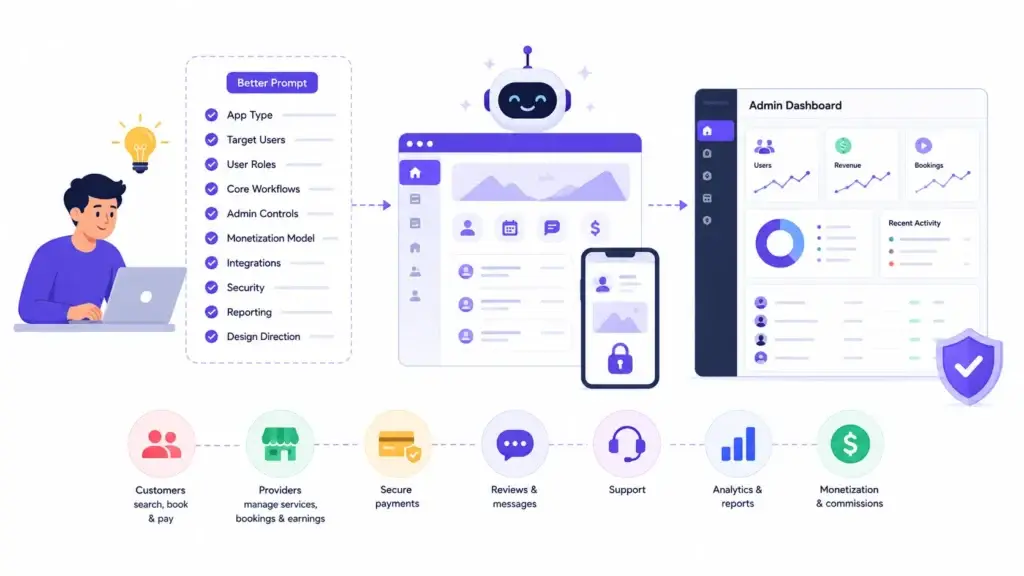
A prompt-to-app platform is an AI-powered software builder that creates applications from natural-language instructions. It fits naturally inside the broader category of AI automation and builder solutions, especially when the platform includes prompt workflows, code generation, live previews, admin control, usage billing, and deployment support.
Instead of asking users to manually design every screen or write every line of code, the platform asks the user to describe what the app should do. The AI then converts that description into an application structure.
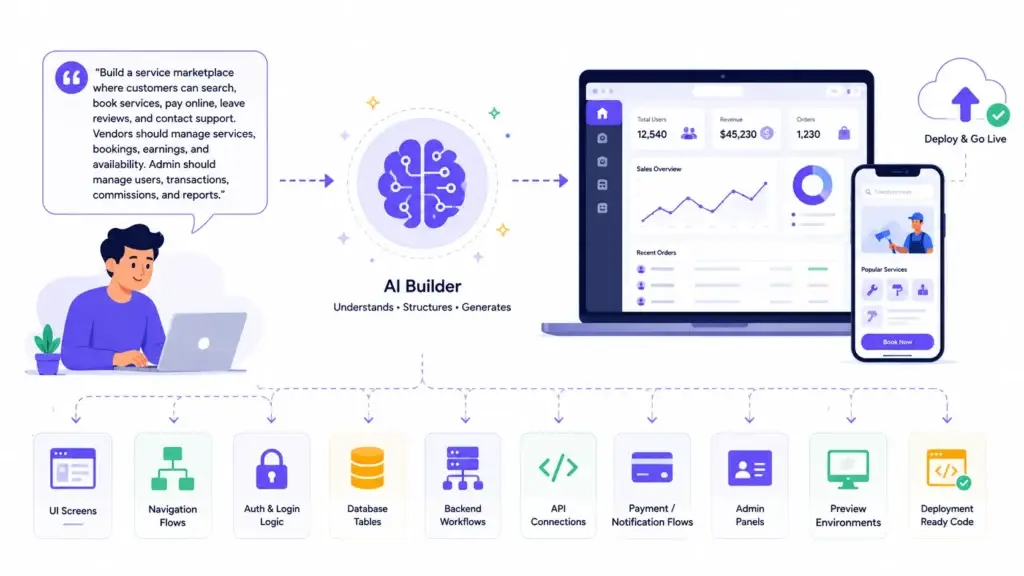
A prompt-to-app platform may generate:
- User interface screens
- Navigation flows
- Login and authentication logic
- Database tables
- Backend workflows
- Admin panels
- API connections
- Payment or notification flows
- Preview environments
- Deployment-ready code
For example, if a founder asks for a marketplace app, the AI may identify customers, vendors, listings, orders, payments, reviews, commissions, and admin controls. If the prompt describes a SaaS dashboard, the system may generate sign-up flows, subscription plans, charts, settings, and team management.
This is why prompt quality matters. The platform can only build from what it understands.
Why Natural Language Has Become a Product Input
Natural language is becoming a product input because founders, product teams, and business owners often know what they want before they know how to technically describe it.
This is especially important in app development for non-technical founders, where the founder may understand the customer problem, business model, and workflow clearly but still need help turning that idea into structured software.
A non-technical founder may not know how to create database schemas, API routes, frontend components, or authentication logic. But they can explain the business idea clearly.
For example:
“I want a platform where local tutors can list classes, students can book sessions, payments are handled online, and the admin can manage tutors, disputes, commissions, and reports.”
A traditional development team would convert that into requirements, user stories, wireframes, database plans, backend tickets, frontend tasks, and QA cycles. A prompt-to-app platform compresses the early version of that process into one AI-assisted workflow.
This does not remove the need for product thinking. It simply gives founders a faster way to move from idea to first working version.
How Prompt-to-App Platforms Read a User Prompt
The first step is prompt interpretation.
The platform reads the user’s natural-language request and tries to identify the product intent. It looks for the app category, user roles, actions, data objects, workflows, integrations, permissions, and design expectations.
A prompt like this:
“Create a food delivery app for local restaurants with customer ordering, restaurant menus, delivery tracking, online payments, and an admin dashboard.”
May be interpreted as:
| Prompt Detail | What the Platform Understands |
|---|---|
| Food delivery app | Marketplace-style app with multiple user roles |
| Local restaurants | Merchant profiles, menus, locations, and availability |
| Customer ordering | Browsing, cart, checkout, order status, and history |
| Delivery tracking | Driver assignment, status updates, and map logic |
| Online payments | Payment gateway integration and transaction records |
| Admin dashboard | Platform control over users, restaurants, orders, payments, and reports |
This is the first major transformation. The AI turns a paragraph into a rough product map.
How the Platform Converts Intent Into App Structure
After understanding the prompt, the platform starts converting intent into structure.
This means it decides what pages, modules, data objects, and user journeys the app needs.
For a booking app, the structure may include:
- Home page
- Search page
- Provider profile
- Booking calendar
- Payment checkout
- User dashboard
- Provider dashboard
- Admin panel
- Notification system
- Booking history
For a SaaS app, the structure may include:
- Landing page
- Sign-up and login
- Workspace dashboard
- User settings
- Billing page
- Team invite flow
- Reports
- Admin controls
This stage is important because the application cannot work properly if the structure is weak. A beautiful screen is not enough. The platform needs to understand how users move through the product and what data changes at each step.
How Screens and User Interfaces Are Generated
Once the structure is clear, the platform generates user interface screens.
The AI may create layouts, buttons, forms, cards, menus, dashboards, modals, and navigation elements. Some platforms use prebuilt design systems, while others generate custom frontend code based on the prompt. A strong set of AI app builder features should support screen generation, workflow editing, live previews, workspace control, and backend logic together.
For example, a prompt for a project management app may create:
- Task board
- Project dashboard
- Team members page
- Task creation form
- Calendar view
- Notifications
- Analytics page
The AI is not only placing random design elements. It is trying to match the interface to the workflow described in the prompt.
However, founders should still review the generated UI carefully. AI can create a functional layout, but it may not fully understand brand positioning, conversion flow, accessibility, mobile behavior, or user psychology.
How Backend Logic Is Created
A working application needs more than screens. It needs backend logic.
For platform operators, backend logic also connects directly to the AI app builder business model, because subscriptions, credits, usage limits, project workspaces, and admin permissions all depend on how the backend is structured.
Backend logic controls what happens when a user takes action. For example:
- What happens when a user signs up?
- What happens when a payment succeeds?
- What happens when a booking is cancelled?
- What happens when an admin approves a provider?
- What happens when a user changes subscription plans?
Prompt-to-app platforms generate backend workflows based on the expected product logic.
In a marketplace app, the backend may manage users, listings, orders, payments, commissions, and disputes. In a subscription app, it may manage plans, billing status, upgrades, downgrades, failed payments, and access control.
This is where founders must be careful. AI can generate workflow logic quickly, but business rules should be reviewed by humans. Payment rules, refund flows, user permissions, admin controls, and security logic should not be accepted blindly.
Where Databases Fit Into Prompt-to-App Platforms
Every serious app needs data.
A prompt-to-app platform usually creates a data model based on the app description. It may decide what tables or collections are needed and how they relate to each other.
For a creator platform, the database may include:
- Users
- Creators
- Followers
- Membership plans
- Paid content
- Transactions
- Payouts
- Messages
- Reports
- Admin actions
For a delivery app, the database may include:
- Customers
- Restaurants
- Menus
- Orders
- Delivery partners
- Payments
- Ratings
- Support tickets
The database is one of the most important parts of the generated application. If the data model is weak, the app may work in the demo but struggle when real users, payments, analytics, and admin workflows are added.
Founders should review database structure before treating an AI-generated app as production-ready.
How APIs and Integrations Are Added
Modern applications rarely work alone. They connect with payment gateways, maps, email tools, SMS providers, AI models, analytics platforms, CRMs, calendars, cloud storage, and third-party services.
Prompt-to-app platforms may generate API connection points or integration logic based on the prompt.
For example:
- A booking app may need calendar and payment APIs.
- A delivery app may need maps, notifications, and payment APIs.
- A fintech app may need KYC, wallet, transaction, and compliance workflows.
- An AI SaaS app may need LLM APIs, usage tracking, and subscription billing.
- A creator platform may need payments, payouts, media storage, and moderation workflows.
This is where API development becomes important. AI can suggest or generate integration logic, but real business apps need secure API handling, error management, authentication, rate limits, logging, and fallback behavior.
Why Live Preview and Iteration Matter
One of the strongest parts of prompt-to-app development is the live preview loop.
The user writes a prompt, the platform generates an app, and the user can immediately test it. If something is missing, the user can refine the app through another prompt.
For example:
- “Add a provider approval workflow before tutors can accept bookings.”
- “Create a monthly subscription plan for premium users.”
- “Add a dispute management section inside the admin panel.”
- “Make the dashboard mobile-friendly and show revenue analytics.”
This iterative loop makes early product shaping faster. Founders can test ideas visually instead of waiting for long design and development cycles.
But iteration also creates risk. If every change is added through isolated prompts without a clear product plan, the app can become messy. The code may work, but the product logic may become inconsistent.
That is why prompt-to-app platforms are most useful when combined with product strategy, architecture review, and development discipline.
What AI Still Cannot Decide Safely
Prompt-to-app platforms are powerful, but they should not be treated as automatic product strategists.
AI can generate an app structure, but it cannot safely decide every business rule, legal requirement, security standard, monetization strategy, or scaling path.
Founders should not leave these decisions entirely to the AI:
- Payment and refund rules
- Data privacy requirements
- User permission logic
- Admin access controls
- Content moderation policies
- Payout workflows
- Fraud prevention
- Compliance workflows
- Infrastructure scaling
- Long-term source-code strategy
- Monetization model validation
This does not make prompt-to-app platforms weak. It makes them realistic.
They are excellent for moving faster from concept to first working version. They are not a replacement for business judgment, secure engineering, testing, QA, and product ownership.
Prompt-to-App vs Traditional Development
Prompt-to-app platforms and traditional development are not enemies. They solve different problems. For founders comparing speed, control, budget, and long-term flexibility, this guide on AI app builder vs custom development gives a deeper view of when a ready-made AI builder foundation makes sense and when custom development is the better route.
| Approach | Best For | Main Advantage | Main Limitation |
|---|---|---|---|
| Prompt-to-app platform | Early product versions, internal tools, demos, validation, quick workflows | Fast idea-to-working-app execution | Needs review before production use |
| Traditional custom development | Complex business apps, regulated products, advanced workflows | Strong architecture and full control | Slower and more expensive at the beginning |
| Hybrid approach | Founders who want speed plus long-term product quality | Fast validation with expert refinement | Requires clear ownership and roadmap discipline |
The strongest founder approach is often hybrid.
Use prompt-to-app tools to test structure, user journeys, and feature logic. Then use expert development support to improve architecture, security, code quality, integrations, admin control, and scalability.
How Founders Should Use Prompt-to-App Platforms
Founders should use prompt-to-app platforms as a product acceleration tool.
The goal should not be to generate a random app from a vague sentence. The goal should be to turn business thinking into a working first version that can be reviewed, improved, and launched responsibly.
Founders should also think about owning an AI app builder platform versus depending only on third-party SaaS tools, especially when source-code ownership, hosting control, pricing flexibility, and long-term customization matter.
A strong prompt should include:
- App type
- Target users
- User roles
- Core workflows
- Admin controls
- Monetization model
- Required integrations
- Security expectations
- Reporting needs
- Design direction
Instead of writing:
“Build me a marketplace app.”
Write:
“Build a service marketplace where customers can search providers, view profiles, book services, pay online, leave reviews, and contact support. Providers should manage availability, bookings, earnings, and services. Admin should approve providers, manage users, monitor transactions, handle disputes, set commission rates, and view analytics.”
The second prompt gives the AI a clearer product foundation.
Mistakes Founders Should Avoid
Starting With a Vague Prompt
A vague prompt creates a vague app. Founders should include user roles, workflows, admin needs, integrations, and monetization logic from the beginning.
Treating the First Version as Final
Prompt-to-app platforms are strong for first versions, but founders should still review code quality, security, performance, and business logic before launch.
Ignoring Admin Control
A real product needs backend control. Admin dashboards, user management, payment visibility, reports, permissions, and moderation workflows matter as much as user-facing screens.
Forgetting About Source-Code Ownership
Some AI app builders are useful for fast creation but may limit code export, hosting control, customization, or long-term ownership. Founders should understand what they own before building a business on top of the platform.
Adding Features Without Product Logic
Prompt-by-prompt changes can create messy workflows if there is no roadmap. Founders should define core flows before adding advanced features.
Final Thoughts
Prompt-to-app platforms are not just a faster way to write code. They are a new way to translate business intent into working software.
The user describes an idea. The platform interprets that idea, generates structure, creates screens, builds workflows, connects data, adds integrations, and provides a preview that can be tested and refined.
Security, database quality, API reliability, admin control, monetization logic, deployment strategy, source-code ownership, and AI app builder development cost planning still matter.
Miracuves helps founders bridge that gap by turning AI-generated ideas, prompt-to-app concepts, and LLM-powered workflows into production-ready applications with practical architecture and business control.
FAQs
What is a prompt-to-app platform?
A prompt-to-app platform is an AI-powered builder that turns natural-language instructions into working applications. It can generate screens, workflows, backend logic, databases, APIs, and live previews based on the user’s prompt.
How does AI turn natural language into an app?
A prompt-to-app platform is an AI-powered builder that turns natural-language instructions into working applications. It can generate screens, workflows, backend logic, databases, APIs, and live previews based on the user’s prompt.
Are prompt-to-app platforms only for prototypes?
No. They are useful for prototypes, demos, internal tools, early product versions, and validation. However, production-ready apps still need human review, security checks, architecture planning, QA, and deployment discipline.
Can prompt-to-app platforms build mobile apps?
Some prompt-to-app platforms can generate mobile-friendly apps, responsive web apps, or mobile app code. The final capability depends on the platform, export options, supported frameworks, and deployment workflow.
What should founders include in a prompt?
Founders should include the app type, target users, user roles, workflows, admin controls, monetization model, integrations, security needs, and reporting requirements. A detailed prompt usually creates a better first version.
What are the risks of AI-generated applications?
Common risks include weak security logic, incomplete database design, poor admin controls, unclear permissions, fragile integrations, messy code, and limited scalability. These risks can be reduced through expert review and structured development.
How is prompt-to-app different from no-code development?
No-code tools usually rely on visual builders and predefined components. Prompt-to-app platforms use natural language as the starting point and generate app structure, interface elements, workflows, and code with AI assistance.
Can Miracuves help build a prompt-to-app platform?
Yes. Miracuves helps founders build AI-powered applications, LLM products, white-label AI builder platforms, and prompt-to-app solutions with source-code ownership, admin control, secure workflows, and scalable architecture.
Miracuves is an independent software development company. We are not affiliated with, connected to, sponsored by, or endorsed by any company or product named in this article.
Terms such as “X Clone” are used descriptively. It is how the software industry refers to building a platform with functionality comparable to a known service, and how clients search for it.
The entire design and codebase of our products is built by our own team. Our products contain no code, design, graphics, or content originating from any third-party website or applications.
All third-party names and marks referenced in this article are the property of their respective owners, referenced solely to identify the services discussed.