Key Takeaways
- Cursor builds can move fast but become unstable without structure.
- A prompt loop starts when one AI fix breaks another workflow.
- Long prompts do not always solve weak product architecture.
- Founders should extract business logic before rewriting code.
- A stable clone foundation can preserve the idea and replace fragile code.
Prompt Loop Signals
- Freeze the build before asking for more fixes.
- Map user roles, workflows, rules, and failure states.
- Separate UI screens from backend system logic.
- Extract data models, admin controls, and monetization rules.
- Discard broken patches instead of migrating every generated file.
Real Insights
- A prototype can be useful even when the codebase is fragile.
- The goal is to save product intelligence, not AI spaghetti.
- Admin control is often missing in AI-generated builds.
- Stable architecture matters more than another quick patch.
- Miracuves helps founders move Cursor logic into structured app foundations.
A Cursor build can feel magical in the first few hours.
You describe the feature, the AI writes the code, the interface appears, and suddenly your product idea looks real. For a founder, that moment is powerful. You are no longer staring at a blank screen. You are clicking through something that feels close to a launch-ready product.
Then the loop starts.
You ask Cursor to fix the login error. It fixes login, but breaks onboarding. You ask it to repair onboarding. Now payments fail. You ask it to fix payments. The dashboard stops loading. After a few sessions, the app still exists, but your confidence does not.
This is the prompt loop.
The problem is not that Cursor is useless. AI coding tools can be extremely helpful when used with controlled scope, clear context, and strong engineering review. The problem begins when a founder treats the AI-generated build as a stable software architecture instead of what it often is: a fast prototype with hidden technical debt.
For solo developers and founders, the smarter move is not always to keep prompting. Sometimes the better move is to extract the real business logic from the AI spaghetti and port it into a stable product foundation.
That is where a ready-made, white-label app architecture from Miracuves can help founders preserve the product vision without continuing to patch an unstable build from every direction.
Context Window Amnesia: Why Fixing One Bug Creates Two More
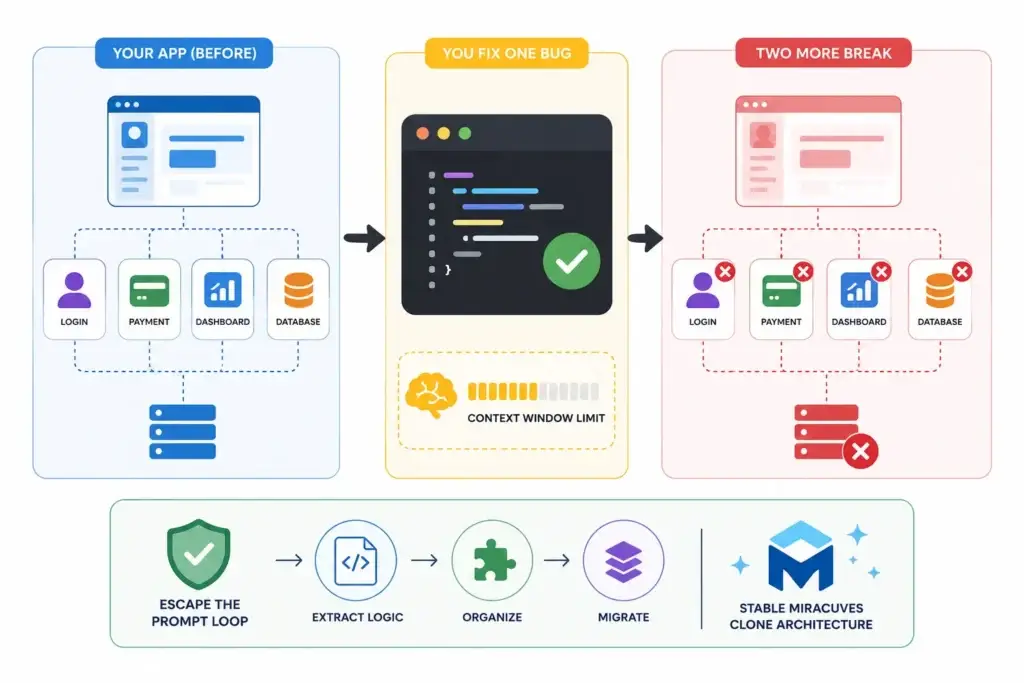
Image Source: AI-generated visual by Miracuves
The most frustrating part of a Cursor prompt loop is that the AI often sounds confident while making the project worse.
You paste an error. It explains the likely cause. It changes a file. The original error disappears. Then another part of the app fails.
This happens because an AI coding assistant does not understand your project the same way a senior engineer does. It works from the context available in the current request, including your prompt, open files, referenced files, chat history, indexed project fragments, and retrieved code snippets. Cursor’s own documentation explains that context is made of both intent and project state, and that users often need to guide context precisely with referenced files, folders, and symbols rather than relying only on automatic retrieval.
That matters because your app is not one file. It is a system.
A payment bug might depend on:
- frontend form validation
- backend route logic
- database schema
- authentication middleware
- environment variables
- webhook handling
- admin permissions
- failed transaction states
- test data
- deployment configuration
If Cursor sees only part of that chain, it may generate a patch that makes local sense but system-wide damage.
The “Context Window Amnesia” Problem
A context window is the amount of text and code an LLM can consider at one time. Cursor’s model documentation defines it as the maximum span of tokens the model can consider, including the input prompt and generated output. Cursor also notes that it normally uses a context window of around 200k tokens, roughly 15,000 lines of code.
That may sound large, but real apps can exceed that quickly when you include frontend components, APIs, config files, database migrations, package files, environment assumptions, test output, and previous AI-generated changes.
This creates a practical issue: the AI may remember the current error, but lose the older architectural reason why a flow was built that way.
That is context window amnesia.
The AI does not literally forget like a human. Instead, it may stop seeing the earlier design constraint, user flow, or dependency that made the original code necessary. So it edits for the immediate bug, not for the full product.
A founder experiences this as:
“Why did fixing one bug create two more?”
The technical answer is:
The AI patched a symptom without holding the whole system in reliable working memory.
Why Prompting Harder Usually Does Not Solve It
Many founders respond by writing longer prompts.
They add more explanation. They paste more files. They ask the AI to “think carefully.” They tell it not to break existing features.
Sometimes this helps. Often it creates more noise.
A recent research paper on long-context automated bug fixing found that longer accumulated contexts can correlate with lower success rates, and that successful agent workflows often come from decomposing tasks into shorter-context steps rather than relying on one huge context dump. The paper also describes failure modes such as incorrect file targets, malformed patches, and hallucinated diffs.
For founders, the lesson is simple:
More context is not always better context.
The AI needs the right slice of the system. If the codebase has become messy, contradictory, or full of half-applied AI patches, feeding more of it into the assistant can reinforce the wrong patterns.
Read More: The Infinite API Loop: Why AI-Built MVPs Bankrupt Founders on Day 1
How to Know You Are Stuck in a Cursor Prompt Loop
Not every AI-generated error means your app is broken beyond repair.
Sometimes you only need to isolate the issue, inspect the logs, review the file path, and patch one missing dependency. Debugging is the process of finding, isolating, and resolving software errors, not just asking for another generated answer.
But there is a difference between normal debugging and a prompt loop.
You are probably stuck in a prompt loop if:
- the same error returns in different forms
- fixing one flow repeatedly breaks another flow
- the AI keeps rewriting files instead of isolating the root cause
- the codebase has several versions of the same function
- your database schema no longer matches the frontend assumptions
- authentication works in one screen but fails in another
- generated components depend on missing or imaginary APIs
- the app runs locally but collapses during deployment
- you no longer understand which files are safe to change
The dangerous point is not when the app throws an error.
The dangerous point is when you lose architectural confidence.
A founder can tolerate a bug. A founder cannot build a business on a codebase where every fix feels like a gamble.
Why AI-Generated Builds Become Fragile Over Time
A Cursor build usually becomes fragile for four reasons.
1. The AI Optimizes for the Current Prompt, Not the Whole Business
When you ask an AI coding assistant to “fix checkout,” it may optimize for passing the immediate screen error. But your business logic may require much more:
- cart state preservation
- coupon validation
- tax logic
- refund rules
- failed payment handling
- admin order status control
- customer notifications
- invoice history
- fraud checks
If those rules are not explicitly represented in the architecture, the AI may create a working-looking patch that misses the real operational flow.
2. The Codebase Accumulates Contradictory Decisions
In one session, the AI may create a users table. In another, it may reference customers. In one file, the app expects role = vendor. In another, it checks account_type = seller.
These differences look small until they spread across the app.
Soon, the app does not have one product model. It has multiple partial product models competing with each other.
That is how AI spaghetti forms.
3. Testing Is Usually Added Too Late
Many founders build with AI visually.
They check whether the page loads, whether the button works, and whether the screen looks acceptable. But they often skip regression testing, edge cases, database state validation, permission checks, and production deployment testing.
The result is a product that looks alive but has no quality safety net.
When you keep prompting without tests, you are not debugging. You are rolling dice.
4. The Architecture Was Never Designed for Scaling
An AI-generated prototype may be enough to test an idea internally. But a product business needs structure:
- user roles
- permission boundaries
- admin controls
- database consistency
- modular services
- payment reliability
- content or listing moderation
- analytics
- deployment discipline
- security-aware workflows
This is where founders need to step back and ask a harder question:
“Am I fixing bugs, or am I trying to turn a prototype into infrastructure?”
If the answer is infrastructure, a stable clone app development path may be more practical than continuing to rebuild the same app through prompts.
How to Extract Your Core Business Logic from AI Spaghetti
The goal is not to rescue every line of generated code.
The goal is to rescue the business logic.
Your Cursor build may be messy, but it likely contains valuable decisions. It shows what you wanted the product to do, how users should move through the app, which screens matter, what monetization model you imagined, and what operational controls you expected.
That is the useful layer.
Here is how to extract it.
Step 1: Freeze the Build Before Asking for More Fixes
Before you prompt again, stop editing the codebase.
Create a clean backup or Git branch. Name it something clear, such as:
cursor-prototype-freeze-before-extraction
This matters because every new prompt can overwrite useful clues. Even broken code contains decision history. You want to preserve the prototype as evidence before trying to repair or migrate it.
At this stage, do not ask Cursor to “clean everything.” That usually creates a large refactor without reliable boundaries.
Instead, switch from build mode to audit mode.
Step 2: Map the Actual Product Flows
Open the app and write down the flows that matter.
Do not start with code. Start with the business.
For example, if you built a marketplace, document:
- How does a user sign up?
- How does a provider or vendor get approved?
- How are listings created?
- How does search work?
- How does booking or checkout happen?
- How are payments handled?
- What does the admin control?
- What happens when there is a refund, cancellation, dispute, or failed transaction?
For each flow, write:
Flow name:
User role:
Trigger:
Input data:
System action:
Output:
Admin visibility:
Failure state:
Revenue impact:
This turns a messy codebase into a business logic map.
That map is more valuable than the generated components.
Step 3: Identify the Core Rules That Must Survive Migration
Your app may have hundreds of files, but the real business usually depends on a smaller set of rules.
Examples:
- A driver can only accept one active ride at a time.
- A restaurant cannot receive orders outside operating hours.
- A creator payout is released only after admin approval.
- A host cannot accept two bookings for the same date range.
- A wallet transfer cannot complete without identity verification.
- A service provider must upload documents before going live.
- A customer can cancel for free only before a defined cutoff time.
These are business rules.
They are not UI preferences. They are the logic that makes the product work.
Create a table like this:
| Business Rule | User Role | Where It Appears | What Breaks If Missing | Migration Priority |
|---|---|---|---|---|
| Provider must be approved before accepting bookings | Provider/Admin | Signup, admin panel, booking flow | Unverified providers can transact | High |
| Customer cannot pay without valid order total | Customer | Cart, checkout, payment API | Failed or incorrect payments | High |
| Admin can suspend abusive users | Admin | User management | Platform safety risk | Medium |
| Vendor receives notification on new order | Vendor | Order flow | Operational delay | Medium |
This table becomes your migration blueprint.
Step 4: Separate Screens from Systems
A common founder mistake is assuming the screen is the product.
It is not.
A screen is only the visible layer. The real product is the system behind it.
For each feature in your Cursor build, separate it into three layers:
| Feature | UI Layer | Logic Layer | System Layer |
|---|---|---|---|
| Login | Email/password form | Validate credentials | Auth service, session, role permissions |
| Checkout | Payment button | Calculate order total | Payment gateway, transaction record, webhook |
| Booking | Calendar selection | Prevent date conflict | Availability engine, database lock, admin view |
| Feed | Content cards | Rank content | Media storage, moderation, analytics |
This helps you see what can be reused and what should be rebuilt.
Usually, AI-generated UI can inspire the final design, but the system layer needs stronger engineering.
Step 5: Extract the Data Model
Your database structure tells you what the app believes about the business.
Look for:
- tables
- collections
- schemas
- models
- relationships
- enums
- status fields
- timestamps
- payment records
- user role fields
Then convert them into a cleaner format.
Example:
Users:
- id
- name
- phone
- role
- verification status
- created date
Orders:
- id
- customer id
- vendor id
- item total
- delivery fee
- commission
- payment status
- order status
- cancellation reason
Admin actions:
- id
- admin id
- action type
- target user/order/listing
- timestamp
- notes
If your Cursor build has three different ways to represent the same thing, choose the business truth, not the generated implementation.
Step 6: Document What the AI Got Right
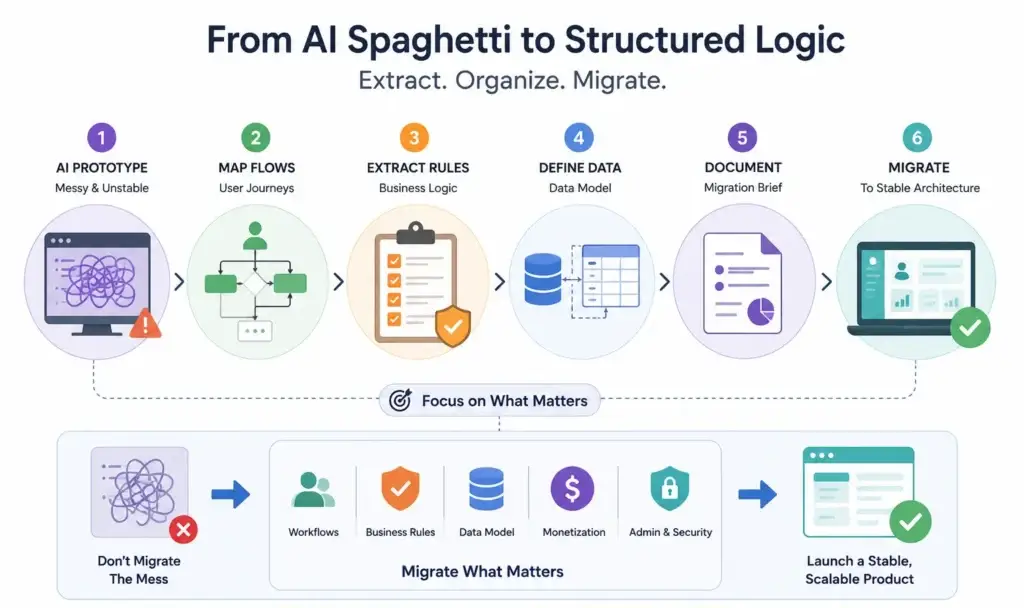
Image Source: AI-generated visual by Miracuves
Do not assume the whole build is useless.
Your AI-generated prototype may have useful assets:
- screen flow ideas
- onboarding copy
- dashboard layout
- database field inspiration
- feature naming
- role assumptions
- edge case hints
- early product positioning
- API route concepts
Extract these into a “keep list.”
Example:
Keep:
- creator profile layout
- admin approval concept
- subscription pricing idea
- referral flow
- booking cancellation states
Discard:
- duplicated auth logic
- inconsistent database models
- hardcoded payment status
- fake admin permissions
- untested API routes
- generated files nobody understands
This is the founder mindset shift:
You are not saving the codebase.
You are saving the product intelligence inside the codebase.
Read More: Why AI-Built MVPs Break at Scale: Founder Crash Patterns After Launch Traffic
Founder Decision Signals Widget
Speed
If every Cursor fix creates another bug, your build speed is no longer helping you. It is creating rework. A stable foundation can help you move from patching to product execution.
Cost
The visible cost of AI coding may look low, but the hidden cost appears in broken flows, repeated debugging, missed launch windows, and unclear ownership of the final architecture.
Scalability
An app that works only when one founder manually repairs it after every change is not scalable. The backend, database, permissions, and admin controls need predictable structure.
Market Fit
Your market does not care whether the first prototype was built with AI. It cares whether the product works reliably, supports the right workflows, and solves a real operational problem.
Porting Your Vision into a Stable Miracuves Clone Architecture
Once you extract the business logic, the next decision is whether to keep repairing the AI-generated build or port the idea into a more stable foundation.
This is where a ready-made clone app solution becomes useful.
A clone architecture does not mean blindly copying another app. For a serious founder, it means starting with a proven product pattern and customizing it around your market, brand, workflows, monetization model, and operational needs.
Miracuves helps founders move from scattered prototype logic into white-label app foundations with source-code ownership, admin dashboards, and launch-ready modules. Miracuves’ homepage positions its model around ready-made platforms, custom builds, AI-native products, source ownership, and faster deployment options.
The key difference is structure.
A Cursor prototype often grows feature by feature. A stable clone app architecture starts with the product system:
- customer app
- provider/vendor/creator/driver app, depending on model
- admin dashboard
- backend services
- database logic
- payment flow
- notifications
- role-based access
- analytics
- moderation or verification workflows
- deployment pipeline
That foundation gives your idea a place to live.
What Should Be Ported from the Cursor Build?
You do not need to port everything.
Port the strategic layer.
| Extracted Asset | Should You Port It? | Why It Matters |
|---|---|---|
| Business rules | Yes | These define how the platform operates |
| User roles | Yes | They shape permissions, dashboards, and workflows |
| Monetization logic | Yes | Revenue model must be built into the product foundation |
| Screen inspiration | Selectively | Useful for design direction, but not always production-ready |
| Generated backend code | Usually no | Often unstable unless reviewed and refactored carefully |
| Database structure | Partially | Useful for understanding entities, but may need redesign |
| Prompt history | Selectively | Helps explain original intent |
| Broken patches | No | Avoid carrying unstable logic into the new build |
The migration goal is not “copy my Cursor app exactly.”
The better goal is:
“Use my Cursor build to explain the product vision, then rebuild it inside a stable architecture.”
Stable Clone Architecture vs Cursor Prompt Loop
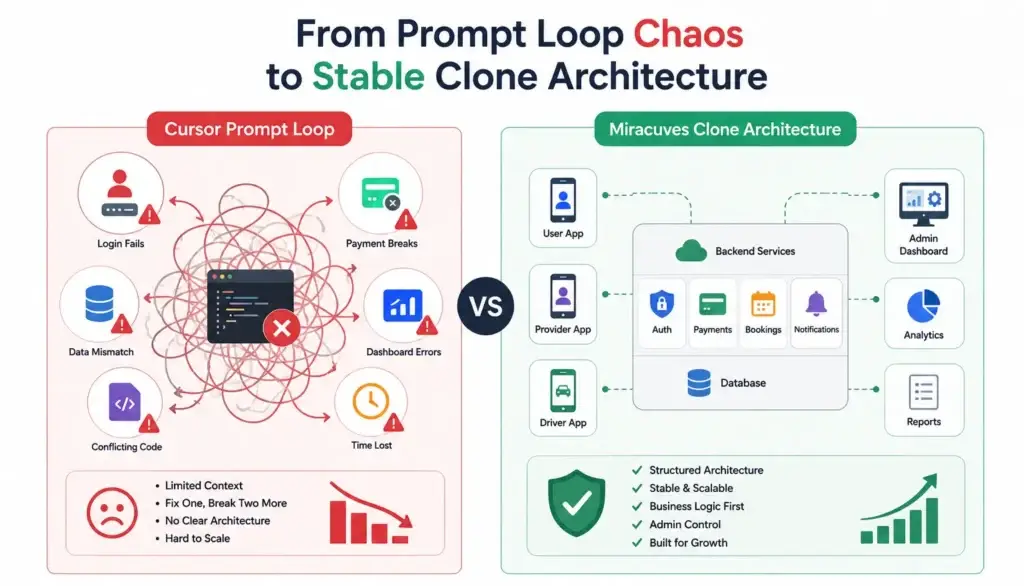
Image Source: AI-generated visual by Miracuves
| Area | Cursor Prompt Loop | Stable Miracuves Clone Architecture |
|---|---|---|
| Development pattern | Fix-by-prompt | Structured product foundation |
| Context reliability | Depends on current AI context | Defined app modules and workflows |
| Business rules | Often scattered across files | Documented and implemented systematically |
| Admin control | Frequently incomplete | Built as a core operating layer |
| Scalability | Unclear until problems appear | Planned through backend and module structure |
| Source ownership | Depends on setup and generated code management | Source-code ownership positioned as part of Miracuves delivery |
| Launch confidence | Unstable if fixes keep causing regressions | Stronger foundation for validation and deployment |
| Best use | Prototype exploration | Founder-ready product execution |
Miracuves is especially relevant when the founder already knows the product category. For example, if your Cursor build is trying to become a delivery platform, marketplace, fintech app, creator platform, ride-hailing app, or on-demand service product, a clone-based foundation can reduce the need to rebuild standard modules from zero.
Read More: Exposed API Keys in Your AI App? Here Is the 3-Step Emergency Rotation Protocol
How to Prepare Your Cursor Build for Migration
Before speaking with a development partner or moving into a white-label architecture, prepare a clean extraction package.
Include these items:
- Product summary
Write a one-page explanation of what the app does, who it serves, and what problem it solves. - User roles
List each role: customer, vendor, provider, driver, creator, admin, super admin, or business owner. - Core workflows
Document the top 5–10 workflows the app must support. - Business rules
List the rules that must never break. - Monetization model
Explain how the platform makes money: commission, subscription, listing fee, ads, delivery fee, service charge, paid upgrades, wallet margin, or creator revenue share. - Screenshots or screen recordings
Capture the useful parts of your Cursor build before changing anything else. - Error list
Document the current bugs, but do not make them the center of the migration. Bugs explain why the prototype is unstable. Business rules explain what the final product should become. - Integration needs
List payment gateways, maps, notifications, AI features, CRM tools, analytics, or third-party APIs. - Security and compliance requirements
For fintech, healthcare, marketplaces, creator platforms, and user-generated content products, document verification, permissions, dispute handling, moderation, audit logs, encrypted data handling, and compliance workflow needs. Final compliance depends on jurisdiction, legal review, integrations, and operating model.
This gives the engineering team a clean starting point.
What to Extract Before Migrating a Cursor Build
| Extraction Area | Business Value | Founder Impact |
|---|---|---|
| Core workflows | Shows how users, providers, vendors, or admins move through the product. | Prevents the new build from becoming a random feature list. |
| Business rules | Defines the logic that protects revenue, permissions, and operations. | Helps engineers rebuild the real product, not just the visible screens. |
| Data model | Clarifies entities such as users, orders, bookings, wallets, listings, and payouts. | Reduces confusion caused by inconsistent AI-generated schemas. |
| Admin controls | Determines how the platform operator manages users, transactions, disputes, and content. | Turns the app from a prototype into an operable business system. |
| Monetization logic | Connects the product architecture to revenue streams. | Helps founders launch with business model clarity instead of adding revenue later. |
When to Stop Prompting and Start Rebuilding the Foundation
The hardest decision for a founder is knowing when to stop.
You may feel that one more prompt will fix everything. Sometimes it might. But if the same class of issues keeps returning, the problem is usually structural.
Stop prompting and consider a rebuild when:
- authentication keeps breaking across user roles
- the database schema has become inconsistent
- core payment or booking logic is unreliable
- the app has no clear admin control layer
- the AI repeatedly edits unrelated files
- deployment fails even when local development works
- you cannot explain how the backend works
- the product cannot be tested confidently
- you are spending more time repairing than validating the market
A prototype is successful if it clarifies the product.
It does not have to become the final product.
In fact, the best outcome of a Cursor build may be that it helps you understand what you actually want to launch. Once that clarity exists, the next step is stable execution.
For founders who want to move faster without restarting from a blank page, Miracuves offers full stack app development, software development, and ready-made clone app foundations that can be customized around the extracted business logic. Miracuves’ service pages position source ownership, web and mobile delivery, and ready-made solution bases as part of its delivery model.
Mistakes Founders Should Avoid
Mistake 1: Asking AI to Rewrite the Whole App
A full rewrite prompt sounds efficient, but it often destroys working pieces and creates new assumptions. Large rewrites should be done with architecture planning, file-level ownership, tests, and rollback control.
Mistake 2: Treating Generated Code as Product Strategy
AI can generate implementation quickly, but it does not know your market, pricing, operations, support model, or compliance needs unless you define them clearly.
Mistake 3: Ignoring the Admin Dashboard
Many AI prototypes focus on user-facing screens. But real businesses need backend control. Admin dashboards manage users, transactions, approvals, content, disputes, reports, and platform settings. Without admin control, the founder becomes the backend.
Mistake 4: Migrating Broken Code Instead of Business Logic
Do not carry every generated function into the new build. Extract what the business needs, then implement it cleanly.
Mistake 5: Waiting Until Launch Week to Think About Security
If your product handles payments, user-generated content, private data, healthcare workflows, bookings, wallets, or provider verification, security cannot be added casually at the end. It should be part of the product foundation through access control, audit logs, secure integrations, and privacy-conscious data handling.
The Practical Debug-to-Migration Framework
Here is a simple founder-friendly framework:
Diagnose
Identify whether the current problem is a normal bug or a sign of architectural instability.
Ask:
- Is the bug isolated?
- Does the fix affect unrelated flows?
- Can I reproduce it consistently?
- Do I know which file owns the logic?
- Is there a test or manual flow to confirm the fix?
Extract
Pull out the business logic before the code becomes more tangled.
Document:
- roles
- workflows
- rules
- data entities
- revenue model
- admin controls
- third-party integrations
- compliance-sensitive flows
Decide
Choose whether the current build is worth stabilizing or whether the logic should move into a stronger foundation.
Keep repairing if:
- the architecture is understandable
- bugs are isolated
- tests can be added
- the data model is consistent
- deployment is predictable
Consider migration if:
- fixes keep causing regressions
- the AI created conflicting patterns
- the backend is unclear
- admin control is missing
- security-sensitive workflows are fragile
- the app category already maps to a proven clone architecture
Port
Move the business logic into a structured application base.
For example:
- a broken ride-hailing prototype can be mapped into a ride-hailing app architecture
- a messy delivery prototype can be mapped into a food, grocery, pharmacy, or courier delivery foundation
- a creator app can be mapped into a short video, subscription, or content platform architecture
- a marketplace prototype can be mapped into a rental, ecommerce, service, or booking marketplace
- a fintech concept can be mapped into a wallet, remittance, neobank, or payment workflow foundation
This is where Miracuves’ solutions hub becomes useful for founders comparing product categories and launch-ready foundations.
Final Thoughts: Do Not Throw Away the Idea, Throw Away the Fragile Build
A broken Cursor build can feel like failure.
It is not.
It may be the first rough version of your product thinking. It helped you discover the screens, workflows, user roles, and business model you care about. That has value.
But founders need to know when a prototype has done its job.
If the build is stuck in a prompt loop, the answer is not always another AI-generated patch. The stronger move is to extract the business logic, clarify the product architecture, and rebuild on a foundation that can support real users, admin operations, payments, security, and growth.
Miracuves helps founders move from idea to launch faster with ready-made, white-label app solutions built for branding, admin control, monetization, and source-code ownership. For founders trying to escape a broken AI build, that can mean preserving the vision while replacing the unstable code underneath.
FAQs
Why does my Cursor build break another feature when fixing one bug?
This usually happens because the AI is working from partial context. It may fix the visible error without fully understanding older decisions, hidden dependencies, database relationships, or business rules in other parts of the app.
Is Cursor bad for building apps?
No. Cursor can be useful for prototyping, code generation, refactoring support, and debugging assistance. The risk appears when founders treat AI-generated code as production-ready architecture without systematic review, testing, and product structure.
What is a Cursor prompt loop?
A Cursor prompt loop is when you repeatedly ask the AI to fix bugs, but each fix causes another issue. The project keeps changing, but stability does not improve.
Should I keep debugging my AI-generated app or rebuild it?
Keep debugging if the bugs are isolated, the architecture is understandable, and the data model is consistent. Consider rebuilding if fixes repeatedly break unrelated flows, the backend is unclear, or the app lacks admin control, testing, and stable workflows.
What should I extract from my Cursor build before migration?
Extract the business logic, user roles, workflows, data model, monetization logic, admin requirements, integration needs, screenshots, and useful UI ideas. Avoid migrating broken patches directly.
Can Miracuves rebuild my Cursor prototype into a stable app?
Miracuves can help founders turn a product concept into a ready-made, white-label, or custom app foundation depending on the business model, required modules, and launch scope. Final pricing and scope should be confirmed after reviewing the product requirements.
What is the benefit of moving to a clone app architecture?
A clone app architecture gives founders a structured starting point for common product categories such as delivery, marketplaces, ride-hailing, fintech, creator platforms, and on-demand services. It can reduce the need to rebuild standard modules from zero.
Do I need to share my full Cursor codebase?
Not always. A useful migration brief includes product flows, business rules, screenshots, user roles, data entities, and the current problem areas. The codebase can help, but the most important asset is the logic behind the product.
Miracuves is an independent software development company. We are not affiliated with, connected to, sponsored by, or endorsed by any company or product named in this article.
Terms such as “X Clone” are used descriptively. It is how the software industry refers to building a platform with functionality comparable to a known service, and how clients search for it.
The entire design and codebase of our products is built by our own team. Our products contain no code, design, graphics, or content originating from any third-party website or applications.
All third-party names and marks referenced in this article are the property of their respective owners, referenced solely to identify the services discussed.