
Key Takeaways
- Exposed API keys can turn an AI app into a security, billing, and data-leak risk.
- AI-built MVPs often place secrets in frontend code, public repositories, or poorly managed environment files.
- API keys, model access, payment gateways, storage services, and admin tools need backend-level protection.
- Security risk depends on key permissions, usage limits, deployment setup, logging, and access control.
- A security-first AI app protects users, founder budget, and platform trust before public launch.
Security Signals
- Founders need to check frontend code, GitHub history, build files, browser requests, and public environment variables.
- Users need protected prompts, private files, secure sessions, safe payments, and controlled access to AI features.
- Admins need key rotation, role-based permissions, usage limits, audit logs, alerts, and billing visibility.
- Backend systems should proxy AI requests instead of exposing provider keys directly to the client side.
- Real-time monitoring helps detect abnormal token usage, failed requests, suspicious traffic, and unexpected cost spikes.
Real Insights
- A leaked API key can allow outsiders to use paid AI services under the founder’s account.
- Weak secret management can expose model providers, databases, payment systems, and storage buckets.
- Founders should rotate exposed keys, remove secrets from public code, and move sensitive logic to the backend.
- Rate limits, scoped keys, server-side validation, and usage alerts reduce damage if a key is misused.
- Miracuves builds AI MVPs with protected API access, backend request handling, secure environment setup, monitoring, and admin control.
You opened your inbox and saw the warning: AWS detected an exposed access key. Stripe flagged a secret key. OpenAI usage suddenly spiked. Your AI-generated app still works, but now you are not sure who else can use your backend, cloud account, payment system, or AI credits.
This is not a normal “hide API keys” problem.
For many solo founders, the real issue is architectural. AI coding tools often generate working frontend screens first, then quietly place backend responsibilities inside the client. The result is a mobile app, web app, or prototype that looks complete but ships sensitive credentials directly into JavaScript bundles, Flutter builds, configuration files, source maps, or public repositories.
That is the frontend secret leak.
A public client should never be trusted with backend secrets. Stripe separates publishable keys, which can be used in frontend code, from secret and restricted keys, which are server-side credentials. Stripe also recommends using restricted keys where possible and storing sensitive keys in a secrets vault or environment variable rather than application code. AWS similarly warns against putting access keys or credential information in application files and recommends temporary credentials such as IAM roles instead of long-term access keys where possible.
This guide gives you the emergency protocol first. Then it explains why a decoupled app architecture — Flutter client, Laravel/API backend, admin control, role-based access, and environment-managed secrets — is safer than a rushed frontend-only build. For founders who need a more reliable launch foundation, Miracuves’ white-label app development approach helps keep business logic and sensitive integrations behind the backend.
Why AI-Generated Apps Leak Backend Secrets Into the Frontend
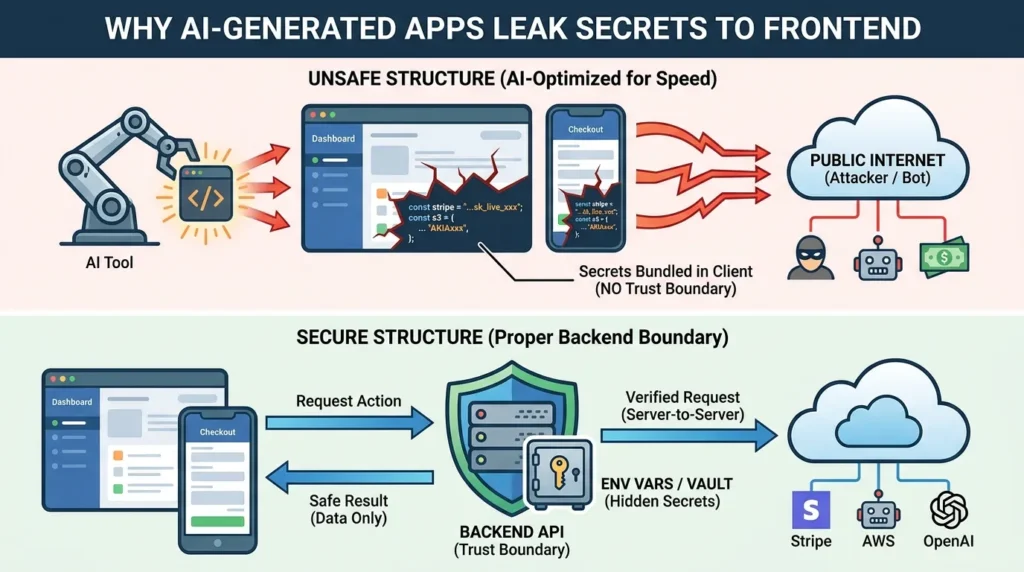
AI coding tools are excellent at producing visible product progress. They can generate onboarding screens, dashboards, checkout pages, chat interfaces, upload flows, and payment forms quickly. The problem starts when the same tool is asked to “make it work” without a proper backend boundary.
A common AI-generated pattern looks like this:
const stripe = require("stripe")("sk_live_xxxxxxxxx");
const s3 = new AWS.S3({
  accessKeyId: "AKIAxxxxxxxxx",
  secretAccessKey: "xxxxxxxxx"
});
In a backend file, this is still risky if the key is hardcoded. In frontend or mobile client code, it is an incident.
The public client cannot keep secrets. A browser user can inspect bundled JavaScript. A mobile user can reverse-engineer an app package. A source map can reveal original files. A GitHub commit can remain in history even after you delete the visible line. OWASP’s mobile weakness references specifically classify hardcoded API keys in app packages as a security weakness, and recent research continues to show credential leakage in mobile and web-facing environments.
The AI tool did not necessarily “mean” to create an insecure app. It optimized for completion. It saw a payment feature, an S3 upload, a map service, or an AI inference call and placed the fastest working credential path near the code that needed it.
That is dangerous because the frontend is not your trust boundary.
The Structural Mistake
The mistake is not only this:
STRIPE_SECRET_KEY=sk_live_xxxThe deeper mistake is allowing this secret to cross into a public execution environment.
In a secure product structure:
- The Flutter or web frontend requests an action.
- The Laravel or backend API validates the authenticated user.
- The backend reads secrets from server-side environment variables or a vault.
- The third-party provider receives the request from your server.
- The frontend receives only the safe result.
In an unsafe AI-generated structure:
- The frontend directly calls Stripe, AWS, OpenAI, SendGrid, or another provider.
- The key is bundled into the client.
- Any user, bot, scraper, or attacker can extract it.
- Your account absorbs the bill, fraud risk, data exposure, or suspension.
Read More: How to Start App Development When You Are Not Technical
Emergency Protocol: Rotate Keys, Revoke Access, and Contain Damage
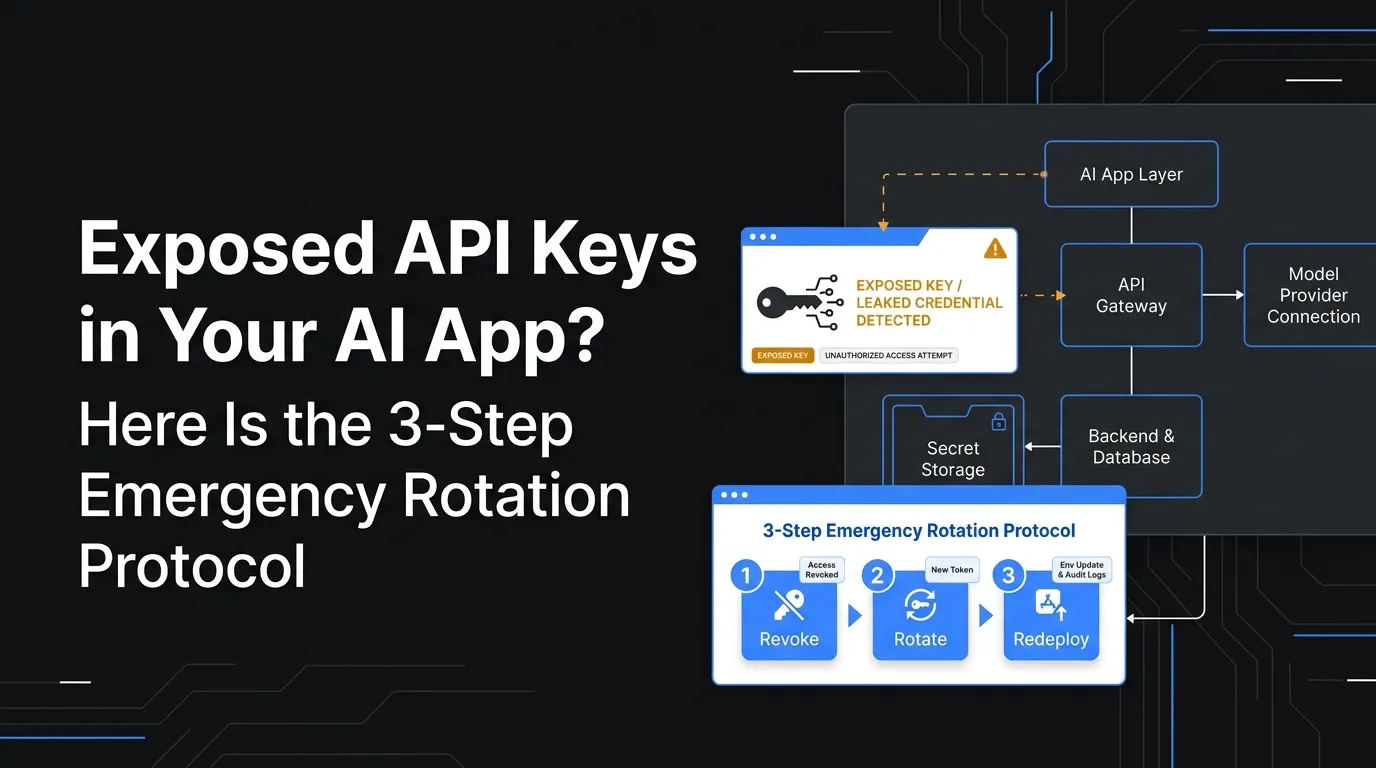
If AWS, Stripe, or another provider has warned you about an exposed key, treat it as a live incident even if you have not seen suspicious activity yet. Stripe’s guidance says exposed or compromised restricted/secret keys should be rotated immediately, and AWS advises immediate rotation for potentially compromised access keys.
Step 1: Freeze the Leak Before Touching the Codebase
Your first job is to stop additional exposure.
Do this immediately:
- Make the public repository private if the key is in GitHub, GitLab, Bitbucket, or a public demo repo.
- Disable public source maps if the secret appears in frontend bundles.
- Remove exposed build artifacts from public hosting, CDN buckets, app preview links, and staging domains.
- Restrict provider dashboards to trusted admins only.
- Capture evidence before deleting everything: key ID, warning email timestamp, affected environment, last known commit, bundle path, and provider logs.
Do not only delete the line from code and redeploy. A key that was public for even a short time should be considered compromised.
Step 2: Rotate or Revoke the Exposed Key
The safest action depends on provider behavior and production risk.
For AWS IAM access keys, AWS documentation allows IAM users to have two access keys, which supports creating a replacement key, updating applications, then deactivating and deleting the old key. AWS also explains that deactivated access keys can no longer be used by API calls and can be reactivated if needed, while deleted keys cannot be recovered.
For Stripe, rotating an API key revokes it and generates a replacement key. Stripe also supports a grace period for safer rotation, gradual rollout, and request-log monitoring before final revocation.
Use this decision logic:
| Scenario | Immediate Action | Why |
|---|---|---|
| Key is live and clearly abused | Revoke or deactivate now | Damage containment is more important than uptime |
| Key is live but no suspicious usage yet | Rotate, deploy replacement, then revoke old key quickly | Reduces downtime while closing exposure |
| Key is a test key | Rotate anyway | Test keys often reveal integration structure and bad habits |
| Key is in Git history | Rotate even if removed from latest code | Public history can still expose the secret |
| Key is in mobile app build | Rotate and release patched app | Published binaries can be extracted after release |
Step 3: Audit Usage Before Declaring the Incident Closed
Rotation stops future use. It does not tell you what already happened.
Audit these areas:
- AWS CloudTrail events for the exposed access key.
- IAM user permissions connected to that key.
- S3 bucket reads, writes, deletes, or public policy changes.
- EC2, Lambda, SES, SNS, SQS, and billing anomalies.
- Stripe request logs for the affected key.
- Created charges, refunds, customers, subscriptions, payouts, connected accounts, or webhook changes.
- OpenAI, Anthropic, Google, SendGrid, Twilio, Mapbox, Firebase, or other provider usage spikes.
- New users, admin accounts, webhooks, access tokens, or OAuth apps created during exposure.
- CI/CD variables, build logs,
.envfiles, crash logs, and debug traces.
AWS specifically recommends reviewing available S3 bucket logs and CloudTrail logs to understand what actions may have been performed after credential exposure.
If the exposed AWS key had permission to create temporary credentials, rotation alone may not invalidate previously issued temporary credentials. AWS notes that temporary credentials can remain valid for a limited lifetime and may require separate handling.
Read More: Offline Video Streaming App Development: Building Secure Download Capabilities for Video Apps
How to Find Every Place the Leaked Key Was Used
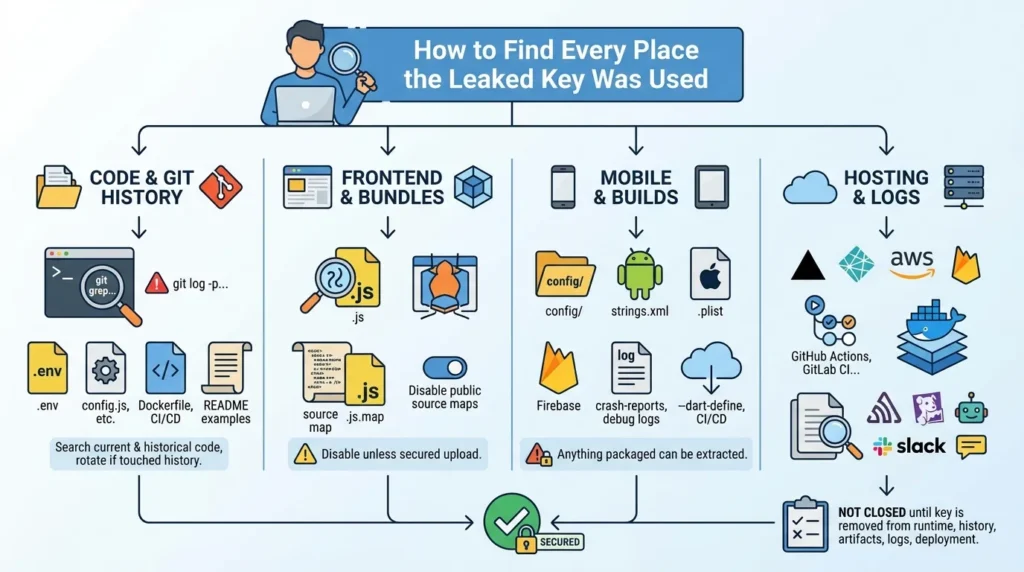
A founder often rotates one key, redeploys the app, and assumes the job is done. That is risky because the same secret may exist in multiple layers.
Search all of these locations.
Code and Repository History
Run local scans across current and historical code:
git grep -n "sk_live\|sk_test\|AKIA\|OPENAI_API_KEY\|SECRET_KEY"
git log -p --all | grep -i "sk_live\|AKIA\|secret"
Also check:
.env.env.local.env.productionconfig.jsfirebase_options.dartmain.dartapp.config.jsnext.config.jsvite.config.js- CI/CD YAML files
- deployment scripts
- Dockerfiles
- README examples
If the secret ever touched Git history, rotate it.
Frontend Bundles and Source Maps
Search your deployed JavaScript bundles:
curl -s https://yourdomain.com/assets/app.js | grep -i "sk_live\|AKIA\|secret"Search source maps:
curl -s https://yourdomain.com/assets/app.js.map | grep -i "secret\|api_key\|accessKey"Disable public source maps in production unless your team intentionally uses secured source-map upload to a monitoring provider.
Flutter and Mobile Builds
For Flutter apps, inspect build-time configuration and compiled artifacts. Do not assume that a Dart constant is safe because it is not visible in the UI.
Check:
lib/config/lib/constants/--dart-definevalues- Android
strings.xml - iOS plist files
- Firebase config files
- CI/CD secrets passed into release builds
- crash-report breadcrumbs
- debug logs
A mobile app is distributed to users. Anything packaged into the app can eventually be extracted.
Hosting, CI/CD, and Logs
Review:
- Vercel, Netlify, Render, Railway, Fly.io, AWS Amplify, Firebase Hosting
- GitHub Actions, GitLab CI, Bitbucket Pipelines
- Docker image layers
- Sentry, LogRocket, Datadog, CloudWatch, Papertrail
- Slack bot logs and AI coding assistant transcripts
- customer support tickets where credentials may have been pasted
The incident is not closed until the key is removed from runtime, history, artifacts, logs, and deployment surfaces.
Read More: Why Time to Market Matters More Than Ever in App Development
What Should Never Live in Frontend or Flutter Client Code
Some values are safe to expose. Others are not.
| Value Type | Safe in Frontend? | Example | Correct Location |
| Stripe publishable key | Yes | pk_live_... | Frontend/client |
| Stripe secret key | No | sk_live_... | Backend only |
| Stripe restricted key | No | rk_live_... | Backend only |
| AWS access key ID + secret | No | AKIA... + secret | Backend/IAM role/secrets manager |
| OpenAI API key | No | sk-... | Backend only |
| SendGrid API key | No | SG... | Backend only |
| Firebase public config | Usually yes, with rules | Project IDs/config | Frontend plus strict security rules |
| Map publishable token | Sometimes | Public map token | Frontend with domain/app restrictions |
| Webhook signing secret | No | whsec_... | Backend only |
| Database URL | No | MySQL/Postgres URI | Backend only |
| JWT signing secret | No | HS256 secret | Backend only |
The rule is simple: if the value allows a user to spend money, access private data, mutate backend state, impersonate your app, sign requests, bypass quotas, or call a provider as your business, it belongs behind the backend.
Read More: Clone App Development: The Fastest Way to Validate a Market Without Starting From Zero
Decoupling the Stack: Why Backend-Controlled MVC Architecture Wins
A secure product does not rely on the frontend to behave honestly. It assumes the frontend is public and builds control behind the server.
That is where decoupled architecture matters.
In a safer Flutter + Laravel setup, the Flutter app handles user experience. Laravel handles authentication, authorization, provider calls, secret storage, payment orchestration, admin controls, queues, logs, and database workflows.
A clean request flow looks like this:
Flutter App
   ↓ authenticated request
Laravel API
   ↓ validates user, role, permission, rate limit
Server-side secret manager / environment variables
   ↓ provider request
Stripe / AWS / OpenAI / Twilio
   ↓ safe response
Laravel API
   ↓ filtered response
Flutter App
The secret never enters the client.
Why MVC Helps Founders Avoid Security Debt
MVC architecture separates business logic from presentation. That separation matters when a founder is moving fast.
The frontend asks for a business action: create checkout session, upload file, generate AI response, start ride, create booking, trigger payout, or send notification.
The backend decides whether that action is allowed.
That difference protects the business because the backend can enforce:
- User authentication.
- Role-based access control.
- API rate limits.
- Payment validation.
- Usage quotas.
- Fraud flags.
- Audit logs.
- Admin approval.
- Webhook verification.
- Provider secret isolation.
- Retry and queue handling.
AI-generated frontend code usually does not reason deeply about those boundaries. It solves for “working demo.” A production-ready architecture solves for operational control.
Read More: What 70%+ of AI-Built Apps Get Wrong About Security — And Why Users Can See Each Other’s Data
Founder Decision Signals: Patch the Leak or Rebuild the Boundary?
Speed
If you only exposed a test key in a private prototype, rotation and cleanup may be enough. If the key reached a public app, store build, or production repo, rebuild the integration boundary immediately.
Cost
A quick patch is cheaper today, but repeated key leaks, provider suspensions, fraud, or cloud-billing spikes can become more expensive than fixing the architecture properly.
Scalability
If payments, AI usage, uploads, maps, notifications, and admin actions are scattered across the frontend, scaling will increase risk. Backend orchestration gives you one control layer.
Market Fit
A founder can validate faster only when the foundation is safe enough to launch. A demo that leaks secrets creates false progress and operational risk.
The Emergency Rotation Checklist for AWS
Use this when an AWS access key is exposed.
1. Identify the IAM User and Permissions
Find which IAM user owns the key. Review attached policies, groups, inline policies, and permissions boundary. Check whether the key can access S3, EC2, Lambda, SES, IAM, billing, secrets, RDS, or production data.
2. Create a Replacement Key Only If Needed
AWS allows up to two access keys per IAM user. If the application still needs long-term credentials, create a new key, store it securely, and deploy it to the backend environment. AWS notes that a newly created secret access key can only be viewed or downloaded at creation time.
Where possible, replace long-term keys with IAM roles, instance profiles, workload identity, or managed cloud credentials.
3. Deactivate the Old Key
Deactivate the exposed key after the replacement is deployed. AWS states that deactivated keys can no longer be used by API calls and can be activated again if needed.
4. Review CloudTrail and Billing
Search CloudTrail by access key ID. Check service usage, IAM changes, S3 object access, SES sending, EC2 launches, Lambda modifications, new users, access-key creation, and unusual regions.
5. Delete the Old Key
After you confirm production is stable and logs do not show legitimate dependency on the old key, delete it. AWS documentation states that deleted keys cannot be recovered.
The Emergency Rotation Checklist for Stripe
Use this when a Stripe secret or restricted key is exposed.
1. Confirm the Key Type
Stripe publishable keys can be used in frontend code. Secret keys and restricted keys are server-side credentials. If sk_live_ or rk_live_ appeared in frontend code, logs, a repository, an AI prompt, or a client build, treat it as exposed.
2. Rotate the Key
Stripe’s Dashboard supports rotating API keys. Rotation revokes the existing key and creates a replacement key ready for use. Stripe also supports scheduled rotation, which can help avoid downtime when the key is still used by production services.
3. Store the Replacement Safely
Use a secrets vault where available. If not, use server-side environment variables. Stripe specifically warns not to put sensitive keys in application code.
4. Update Backend Services Only
Do not update the frontend with the new secret. The frontend should call your backend. Your backend should call Stripe.
5. Review Request Logs
Check Stripe request logs for unexpected API calls, customers, charges, refunds, subscriptions, webhooks, connected accounts, transfers, or payout changes.
6. Move to Restricted Keys Where Possible
Stripe recommends restricted API keys for most use cases because they limit the damage if a key is exposed.
Read More: AI MVP Security Audit: The 14-Point Checklist for Founder Survival
Mistakes Founders Should Avoid After a Key Leak
Mistakes Founders Should Avoid
Only deleting the key from code
Deleting the line does not revoke the credential. If the key was public, rotate or revoke it through the provider dashboard.
Putting the replacement key back into the frontend
This repeats the same incident with a fresh credential. The replacement must live server-side.
Ignoring Git history and old builds
Secrets can remain in commit history, app packages, source maps, Docker layers, and logs after the visible code is patched.
Using one broad key for every service
Broad keys increase blast radius. Use least-privilege credentials, restricted keys, scoped IAM policies, and separate keys per environment.
How Miracuves Helps Founders Avoid AI-Induced Security Debt
A fast launch should not mean placing business-critical secrets into the client.
Miracuves helps founders build ready-made and white-label app solutions where the client experience and backend control layer are separated from the start. In a Miracuves-style architecture, the Flutter app focuses on user workflows while the backend handles secure payment gateway integration, API orchestration, admin access controls, transaction records, audit visibility, and provider credentials.
For founders comparing a fragile AI-generated prototype with a more reliable product foundation, the difference is practical:
| Risk Area | AI-Generated Frontend-Heavy App | Backend-Controlled White-Label Architecture |
| API secrets | Often hardcoded or exposed through build config | Stored server-side through environment or managed secrets |
| Payment flow | May call payment provider directly from client | Backend creates sessions, verifies webhooks, and controls state |
| Admin control | Usually missing or shallow | Admin dashboard manages users, payments, content, and reports |
| Security logic | Scattered across screens | Centralized in backend middleware and policies |
| Incident response | Hard to trace usage | Logs, dashboards, and provider boundaries are clearer |
| Scaling | More fragile as features grow | More maintainable through backend modules and queues |
Miracuves’ white-label app development approach supports source-code ownership, admin control, and faster deployment for scoped app foundations. For founders who already have a prototype but discovered security debt, the practical next step is not to keep patching the same frontend leak. It is to move sensitive workflows behind a backend boundary.
Explore Miracuves’ white-label app development services if you need a safer launch-ready foundation, or review the clone app development approach if your product is based on a proven marketplace, delivery, fintech, social, or creator platform model.
Related reading: Why We Built DeBunkered: Applying Startup Agility to Humanitarian Needs.
Final Thoughts: Key Rotation Solves the Incident, Architecture Prevents the Repeat
An exposed API key is recoverable if you act quickly. Rotate the key. Revoke the old credential. Audit usage. Remove the secret from code, history, builds, logs, and deployment systems.
But do not stop there.
The real lesson is architectural. Frontend clients should never hold backend secrets. AI-generated apps often blur that boundary because they optimize for visible progress, not production-grade security. For solo founders, that can create a dangerous illusion: the product looks ready, but the business account is exposed.
The stronger path is a decoupled structure where Flutter handles the user experience, Laravel or the backend API controls sensitive operations, and third-party secrets remain server-side. That is how founders launch faster without turning every feature into a future incident. For a safer launch-ready foundation, explore Miracuves Solutions built around white-label apps, backend control, admin dashboards, and source-code ownership.
FAQs
What should I do first if AWS warns me about an exposed access key?
Deactivate or rotate the exposed key, identify the IAM user, review permissions, check CloudTrail, and look for unusual AWS usage. AWS recommends reviewing account activity and logs after exposed credentials because the key may have allowed access to resources depending on its policies.
Is it enough to delete the API key from my frontend code?
No. If the key was exposed, assume it may already be copied. Delete it from code, but also rotate or revoke it in the provider dashboard and search repo history, build artifacts, logs, source maps, and deployment systems.
Can Stripe secret keys be used in frontend code?
No. Stripe publishable keys are client-side, but secret and restricted keys are server-side. Stripe recommends storing sensitive keys in a secrets vault or environment variable and using restricted keys where possible.
Why do AI-generated apps leak API keys?
AI tools often generate code that makes a feature work quickly without enforcing proper backend boundaries. If the prompt asks for Stripe, AWS, OpenAI, or file-upload functionality, the tool may place provider credentials near the frontend code unless the architecture explicitly requires a backend API.
Are environment variables safe in frontend apps?
Not always. Frontend build-time environment variables can still be bundled into public JavaScript or mobile builds. Sensitive secrets must live in the backend runtime environment, not in variables exposed to the browser or mobile client.
Should I rotate test keys too?
Yes. Test keys may not move real money, but they reveal integration patterns and can still create operational confusion. More importantly, leaving test secrets hardcoded trains the team to repeat the same mistake in production.
How does Laravel/Flutter architecture reduce key-leak risk?
Flutter handles the user interface, while Laravel or the backend API handles provider calls, authentication, authorization, payment logic, webhook verification, and secret storage. The key difference is that sensitive credentials stay server-side.
Can Miracuves help rebuild an AI-generated app with safer architecture?
Yes. Miracuves can help founders move from fragile prototype code toward a white-label or custom app foundation with backend-controlled APIs, admin dashboards, secure integrations, and source-code ownership.
Miracuves is an independent software development company. We are not affiliated with, connected to, sponsored by, or endorsed by any company or product named in this article.
Terms such as “X Clone” are used descriptively. It is how the software industry refers to building a platform with functionality comparable to a known service, and how clients search for it.
The entire design and codebase of our products is built by our own team. Our products contain no code, design, graphics, or content originating from any third-party website or applications.
All third-party names and marks referenced in this article are the property of their respective owners, referenced solely to identify the services discussed.