Key Takeaways
- AI apps often work during demo testing but crash when real users create unpredictable load patterns.
- Founder-built MVPs can fail because AI-generated code may ignore database, API, queue, and infrastructure limits.
- N+1 queries, missing indexes, connection pool exhaustion, memory spikes, and poor error handling are common failure points.
- Stability depends on backend architecture, database optimization, load testing, monitoring, and deployment planning.
- A production-ready rebuild can help AI apps handle real traffic without sudden crashes or user drop-offs.
Crash Signals
- Users need fast onboarding, reliable responses, stable dashboards, saved data, and clear error recovery.
- Founders need load testing, query profiling, queue handling, API limits, and production monitoring before launch.
- Admins need visibility into crashes, slow endpoints, failed jobs, database load, server health, and user activity.
- Backend systems need indexed queries, caching, retries, rate limits, workers, and safe deployment workflows.
- Real-time alerts help detect traffic spikes, API failures, memory pressure, slow queries, and crash loops early.
Real Insights
- An AI-built app can pass founder testing because one user rarely exposes concurrency, database, or scaling problems.
- Real users trigger messy behavior such as repeated clicks, bulk uploads, simultaneous requests, and abandoned sessions.
- Weak database architecture can turn normal product actions into expensive queries under real launch traffic.
- Crash prevention should start before launch with profiling, stress testing, logging, and infrastructure review.
- Miracuves rebuilds AI apps with scalable backend architecture, database optimization, monitoring, queues, and production-ready workflows.
Your AI-built app worked during testing. It loaded on your laptop. The login flow passed. The dashboard rendered. The demo looked impressive enough to launch on Product Hunt.
Then real users arrived.
Pages slowed down. API calls timed out. The database started rejecting requests. Your server dashboard looked confusing because CPU usage was not always maxed out, yet users were still seeing errors. The app did not fail because the idea was weak. It failed because the code path that worked for one user multiplied badly for hundreds.
This is where many AI-built MVPs break. The issue is rarely just “more traffic.” It is usually inefficient backend logic, unoptimized database access, missing queues, weak caching, and a hidden N+1 query problem that turns normal user activity into a database storm.
For founders, this is a painful but useful signal. Your market may have responded. The product may have demand. But the architecture was not ready for real-user pressure.
The Product Hunt Crash: Why LLM Code Fails Under Load
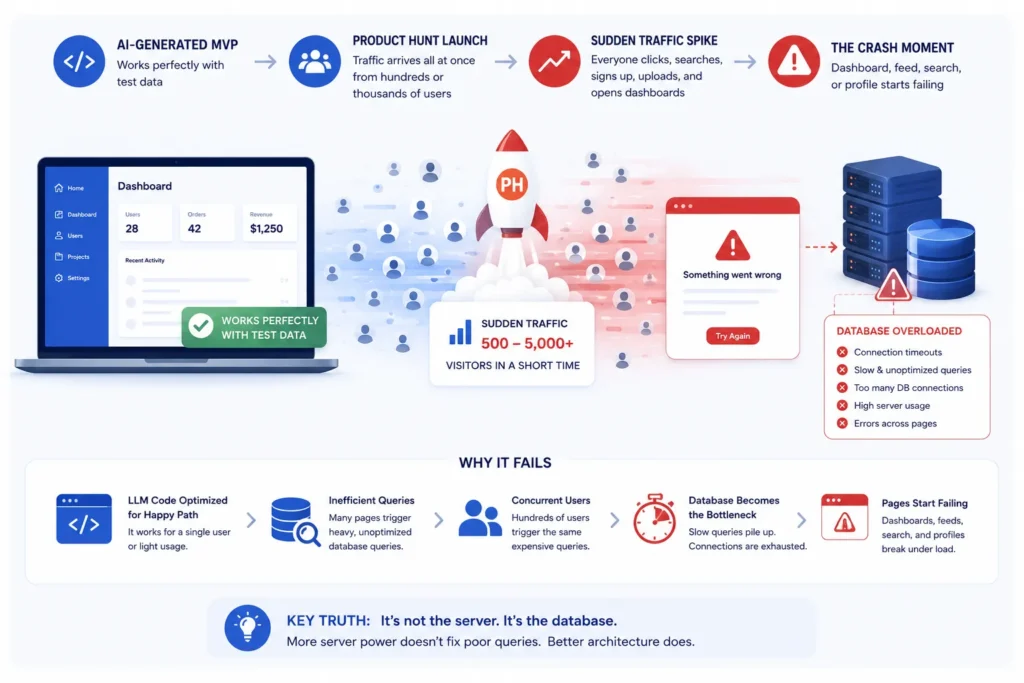
Image Source: AI-generated visual by Miracuves
A Product Hunt launch is a brutal test for AI-generated MVPs because traffic arrives in a compressed pattern. Instead of one founder clicking through screens slowly, hundreds or thousands of visitors may land, register, search, open dashboards, create records, upload files, or trigger AI workflows within a short period.
That difference matters.
AI generators are good at producing code that appears correct for the happy path. They can create forms, API routes, authentication screens, dashboards, and database models quickly. But production reliability is not just about whether a button works. It is about what happens when 500 users press that button within the same hour.
Many founders discover the same pattern:
- The app works perfectly with test data.
- The homepage survives launch traffic.
- The dashboard, feed, search page, or user profile page starts failing.
- The database hits connection or timeout errors.
- Adding a bigger server does not fully solve the problem.
This happens because the expensive part is often not the server rendering the page. It is the database repeatedly answering inefficient queries triggered by the page.
Why “It Works” Is Not the Same as “It Scales”
AI-generated code often passes the first founder test: “Can I see the feature working?”
But real users test a different question: “Can this feature work repeatedly, concurrently, and predictably while many people are using it?”
That second question requires production engineering judgment. It includes database indexing, relationship loading, request lifecycle design, queue separation, caching, rate limits, background workers, API timeout handling, and monitoring.
A generated MVP can be functionally correct but operationally fragile. It may save data, retrieve records, and show a dashboard. But it may do so in a way that wastes database calls every time a user opens a screen.
That is the danger. AI code can look clean in the editor while behaving expensively in production.
The N+1 Query Disaster Hiding Inside AI-Generated Apps
The N+1 query problem happens when an app loads one set of records and then makes an additional database query for each related record. This is common in ORM-based applications when relationships are lazily loaded instead of fetched efficiently.
Here is a simple example.
A dashboard shows 50 projects. Each project has an owner. A weak implementation may do this:
// Pseudo-code pattern
projects = getProjects()

for project in projects:
    owner = getOwner(project.owner_id)
    show(project, owner)
At first, that looks harmless. But the database behavior is expensive:
- 1 query to fetch the 50 projects
- 50 additional queries to fetch the owner for each project
- Total: 51 database queries for one dashboard request
That is N+1. The “1” is the initial query. The “N” is one extra query per returned record.
Now imagine the AI-generated app also loads comments, tags, permissions, invoices, notifications, or analytics for each project. The problem compounds quickly.
N+1 Query Pattern: Demo vs Real Launch
| Scenario | Looks Fine In Testing | Breaks Under Real Users |
|---|---|---|
| Founder dashboard with 5 test records | 1 main query + 5 related queries feels fast | The weakness is hidden because data volume is tiny |
| Launch dashboard with 100 user records | Same code path still runs | 1 request can trigger 101+ queries |
| 200 users opening dashboard together | Server may still appear alive | Database receives thousands of queries in a short burst |
| Connection pool under pressure | Errors may look random | Requests wait, timeout, or fail because database connections are exhausted |
The Math: How One Page View Becomes Thousands of Database Queries
Founders often underestimate the math behind backend failure. Let’s model a simple AI-built dashboard.
Assume the page loads:
- 50 records
- 1 related user per record
- 1 related status per record
- 1 related billing record per record
A weak ORM implementation may trigger:
- 1 query for the base records
- 50 queries for users
- 50 queries for statuses
- 50 queries for billing records
That is 151 queries for one page view.
Now multiply that by launch traffic:
| Concurrent Users | Queries Per Dashboard Load | Total Query Burst |
|---|---|---|
| 10 users | 151 | 1,510 queries |
| 50 users | 151 | 7,550 queries |
| 100 users | 151 | 15,100 queries |
| 500 users | 151 | 75,500 queries |
This is why “it worked on my machine” means very little. On your machine, the app may have loaded one dashboard once. During launch, the same code path may be hit repeatedly by real users, bots, referral traffic, investors, and curious testers.
The bug is not visible in the UI. It lives in the relationship between code structure and database behavior.
Why Connection Pools Max Out Before the Server Looks “Busy”
When an app crashes, founders usually check server CPU, RAM, and hosting tier first. That makes sense, but it can miss the real bottleneck.
A connection pool controls how many database connections the application can use at once. If too many requests need database access at the same time, new requests may wait, timeout, or fail. The server can still have available CPU while the database layer is blocked.
This is especially common when:
- Every request triggers too many queries
- Queries are slow because indexes are missing
- Long-running AI workflows hold resources open
- Background jobs run in the same path as user requests
- Serverless functions create connection spikes
- The app opens new database connections instead of reusing them efficiently
For a founder, the symptom feels strange: “The server is not fully used, but the app is still down.”
The explanation is often simple: the database is the bottleneck, not the web server.
Read more: What 70%+ of AI-Built Apps Get Wrong About Security — And Why Users Can See Each Other’s Data
What AI Generators Usually Miss in Backend Architecture
LLMs generate likely code based on patterns. They do not automatically understand your future launch traffic, your database size, your pricing model, your admin workflows, or your investor demo timeline unless those constraints are explicitly designed into the architecture.
That is why AI-generated MVPs often miss the production layer.
1. Relationship Loading Strategy
AI-generated code may use simple ORM relationships because they are easy to write and easy to understand. But simple relationship access can become expensive when used inside loops. Production code needs eager loading, selective fields, joins, pagination, and query profiling.
2. Query Budget Per Request
Every important page should have a query budget. A founder dashboard should not silently trigger hundreds of database calls. A feed, marketplace listing, AI workspace, or admin panel needs predictable query behavior.
3. Queue Separation
AI apps often perform slow work inside the request cycle: file parsing, model calls, embeddings, email notifications, PDF processing, image resizing, or analytics updates. These should often move to background jobs so users are not forced to wait while the server completes heavy tasks.
4. Caching Strategy
AI-generated MVPs often skip caching because caching is not visible in screenshots. But real-user traffic needs cached configuration, repeated lookups, read-heavy data, dashboard summaries, and session-related optimizations.
5. Admin Control
Founders need admin controls to diagnose real issues after launch. Without logs, user states, failed job views, payment states, abuse reports, and activity tracking, the founder is blind during the most important traffic window.
6. Load Testing Before Launch
Many AI-built MVPs are tested manually by the founder. That is not enough. A launch-ready app should be tested against expected traffic patterns: signup bursts, dashboard loads, AI requests, search queries, file uploads, and payment callbacks.
Read more: AI MVP Security Audit: The 14-Point Checklist for Founder Survival
Founder Decision Signals: Patch, Refactor, or Rebuild?
After a launch crash, the worst move is panic-scaling everything without understanding the failure. More server power can hide bad code temporarily, but it does not fix the query pattern.
Founder Decision Signals
Patch
Patch if the issue is isolated: one slow query, one missing index, one overloaded endpoint, or one background task blocking user requests.
Refactor
Refactor if the product works but several screens show N+1 queries, duplicated logic, weak controller structure, or inconsistent API patterns.
Rebuild
Rebuild if the AI-generated foundation has no clear architecture, no separation between business logic and UI, no admin control, and repeated failures under basic load.
Scale
Scale only after the query behavior is understood. Scaling poor database logic can increase cost without creating true reliability.
Transitioning to Miracuves Laravel Architecture
When an AI-built MVP crashes with real users, the solution is not always to throw the product away. The product idea may be valid. The user demand may be real. What needs to change is the architecture underneath.
This is where a structured Laravel architecture becomes valuable. Laravel gives founders a mature MVC foundation with routing, controllers, service layers, Eloquent ORM, queues, middleware, validation, jobs, caching, events, scheduled commands, and admin-ready workflows. Used correctly, it helps teams move from scattered AI-generated code to a clearer production model.
Miracuves helps founders rebuild or strengthen fragile MVPs using a more structured app foundation. Instead of leaving business logic mixed across random generated files, Miracuves can organize the product into clear layers:
- Controllers for request handling
- Models for structured database relationships
- Services for business logic
- Jobs and queues for background processing
- Policies and middleware for access control
- Admin dashboards for operational visibility
- Database optimization for relationship loading, indexes, and query efficiency
For founders who need a faster path, Miracuves also offers ready-made and white-label app solutions that can be customized around proven product patterns instead of rebuilding every module from zero.
If your AI-built product is already showing demand but the backend cannot survive real usage, the decision is not simply “custom vs AI.” The better decision is “fragile generated code vs production-ready architecture.”
How Laravel Helps Control N+1 Query Risk
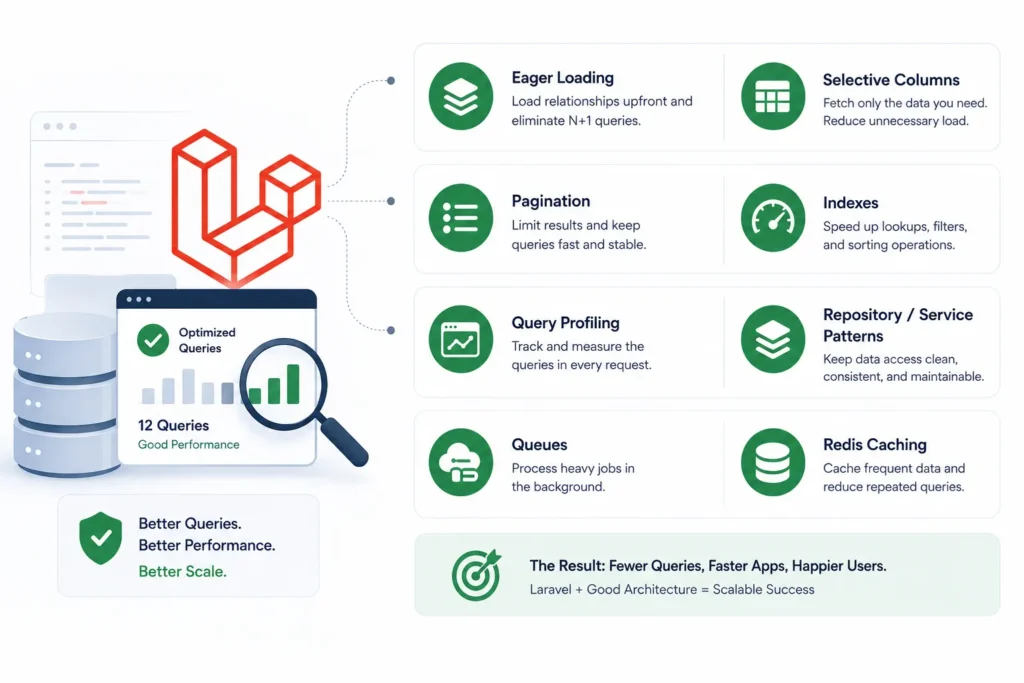
Image Source: AI-generated visual by Miracuves
Laravel does not magically prevent poor architecture. But it gives experienced teams the right tools to manage database behavior properly.
A production-ready Laravel build can reduce N+1 risk through:
- Eager loading: Loading related records upfront instead of triggering queries inside loops.
- Selective columns: Fetching only the fields needed for a screen or API response.
- Pagination: Avoiding large uncontrolled result sets.
- Indexes: Supporting frequent lookup, filtering, and sorting patterns.
- Query profiling: Measuring how many queries each request triggers.
- Repository or service patterns: Keeping data access logic maintainable.
- Queues: Moving slow jobs outside the user-facing request cycle.
- Redis caching: Reducing repeated reads for common data.
This is why architecture matters more than the language alone. A poorly structured Laravel app can still fail. A well-structured Laravel app gives founders the control needed to diagnose, optimize, and scale with more confidence.
AI-Built MVP vs Production-Ready Laravel Architecture
| Layer | AI-Built MVP Risk | Production-Ready Laravel Approach |
| Database relationships | Lazy loading inside loops creates N+1 queries | Eager loading, joins, scoped queries, and query profiling |
| Request lifecycle | Heavy tasks run during user requests | Queues and background jobs handle slow work |
| Business logic | Scattered across generated components | Service classes, controllers, and clean MVC separation |
| Admin control | Limited visibility into users, failures, jobs, and logs | Admin dashboard for operations, moderation, records, and reporting |
| Scaling path | Add more hosting without fixing bottlenecks | Optimize query load, cache hot paths, separate workloads, then scale infrastructure |
| Founder impact | Unpredictable launch failures and unclear fixes | Clearer debugging, stronger maintainability, and better launch readiness |
The Right Technical Rescue Plan After Your AI App Crashes
If your app crashed after real users arrived, start with evidence. Do not guess. Do not rewrite everything immediately. Do not upgrade servers blindly.
Step 1: Capture the Failure Pattern
Document what failed first. Was it signup, dashboard loading, AI generation, search, payment, file upload, or admin login? The first failure usually points to the most expensive path.
Step 2: Count Queries Per Request
Measure how many database queries each important endpoint triggers. Focus on dashboards, feeds, profile pages, search results, and admin panels.
Step 3: Identify N+1 Loops
Look for loops that access relationships repeatedly. If each record triggers another database call, the page will become expensive as data grows.
Step 4: Check Connection Pool and Database Limits
Review active connections, waiting queries, slow queries, idle connections, and timeout errors. A connection pool issue often appears before CPU exhaustion.
Step 5: Move Slow Work to Queues
AI calls, email sending, file processing, imports, analytics updates, and notifications should not block the main request path unless the user truly needs an instant result.
Step 6: Rebuild the Weakest Architecture Layer
If the generated code is structurally messy, refactor the highest-risk layer first: database access, API controllers, authentication, background jobs, or admin operations.
Mistakes Founders Should Avoid After a Launch Crash
Mistakes Founders Should Avoid
Only upgrading the server
A bigger server may delay the next crash, but it will not fix a page that triggers hundreds of unnecessary database queries.
Blaming Product Hunt traffic alone
Launch traffic exposes the weakness. It is usually not the root cause. The real issue is how the app behaves when many users repeat the same action.
Asking AI to “make it scalable” without constraints
Generic scaling prompts often produce generic fixes. You need query logs, connection data, endpoint traces, and a clear architecture plan.
Ignoring admin visibility
Without an admin control layer, founders cannot easily see failed jobs, user states, abuse patterns, payment issues, or backend bottlenecks.
When Should Founders Move Beyond AI-Generated Code?
AI-generated code is useful for validation. It can help founders explore ideas, build quick prototypes, and understand workflows faster. The problem begins when the prototype becomes the production system without technical hardening.
You should move beyond raw AI-generated code when:
- Real users are signing up
- Payments or subscriptions are involved
- User data must be protected
- Dashboards are slow with moderate data
- The codebase is difficult to debug
- Admin workflows are missing
- You need investor, client, or marketplace confidence
- You are preparing for a major launch or paid campaign
At that point, the goal is not to reject AI. The goal is to put the product on a stronger engineering foundation.
Read more: Failing the Audit: How an AI-Built MVP Leaked PII and Why the White-Label Rescue Worked
How Miracuves Helps Founders Recover From AI MVP Failure
Miracuves helps founders convert fragile MVPs into stronger, launch-ready app foundations. For an AI-built MVP that crashed with real users, the process usually starts with a technical audit of the failure path: database behavior, API load, query count, server logs, admin gaps, background jobs, and architecture structure.
From there, Miracuves can help founders choose the right path:
- Optimization: Fix N+1 queries, add indexes, improve caching, and optimize critical endpoints.
- Refactoring: Move scattered logic into Laravel controllers, services, jobs, and cleaner database models.
- Rebuild: Replace fragile generated code with a structured Laravel foundation when the current codebase is too risky.
- Ready-made foundation: Use a white-label app solution when the business model matches a proven app category and speed matters.
For founders planning a serious launch, a source-code-owned foundation matters. It gives you control over the architecture, data flows, admin layer, monetization logic, and future customization. That is difficult to achieve when the product remains trapped inside unclear generated code or a platform you cannot fully control.
Related reading: The Silent Checkout Crash: Why AI Frontends Lie to Your Database.
Final Thoughts: Your MVP Did Not Fail. Your Architecture Hit Reality.
A launch crash feels like failure, but it can also be evidence that people cared enough to try the product. The real question is whether the app foundation can support that demand.
AI-built MVPs are powerful for speed. They help founders move from idea to interface quickly. But speed without architecture creates risk. The N+1 query problem is a perfect example: the feature works, the page loads, the demo passes, and then real traffic turns hidden inefficiency into visible downtime.
The founder lesson is clear. Do not treat launch failure as only a hosting issue. Look at database behavior. Count queries. Check connection pools. Review background jobs. Audit admin visibility. Then decide whether to patch, refactor, or rebuild.
Miracuves helps founders make that transition with structured Laravel architecture, white-label app foundations, source-code ownership, and practical product execution. The goal is not just to make the app work again. The goal is to make it ready for the next wave of real users.
FAQs
Why does my AI app crash when real users start using it?
Your AI app may crash because the generated code works for small tests but performs inefficiently under concurrent users. Common causes include N+1 database queries, missing indexes, exhausted connection pools, slow API calls, background jobs running inside user requests, and weak caching.
What is the N+1 query problem in an AI-generated app?
The N+1 query problem happens when an app fetches one group of records and then runs an extra query for each related record. For example, loading 100 projects and then separately loading the owner of each project can create 101 database queries for one page.
Why did my Product Hunt launch crash my MVP?
A Product Hunt launch creates a concentrated traffic burst. If many users open the same dashboard, signup flow, search page, or AI feature at once, inefficient backend code can overload the database even if the app worked during manual testing.
Can I fix an AI-built MVP without rebuilding everything?
Yes, if the core architecture is still understandable. You may only need query optimization, eager loading, indexing, caching, queue separation, or endpoint refactoring. However, if the codebase has no clean structure, a rebuild on a stronger architecture may be safer.
Is Laravel good for scaling an AI-built MVP?
Laravel can be a strong choice when used properly because it provides MVC structure, Eloquent ORM, queues, middleware, caching, validation, scheduled jobs, and admin-friendly backend patterns. The key is disciplined architecture, not just the framework name.
How do I know if my app has N+1 queries?
Check query logs, use debugging tools, profile endpoints, and count how many database queries each page triggers. If the number of queries grows with the number of records displayed, you may have an N+1 problem.
Should I upgrade my server after an AI app crash?
Upgrade only after identifying the bottleneck. If the issue is inefficient database access, a bigger server may reduce symptoms temporarily but will not solve the root problem. First inspect query counts, connection usage, slow queries, and request timing.
Can Miracuves help rebuild an AI-generated app?
Yes. Miracuves can help founders audit, refactor, or rebuild AI-generated MVPs using structured Laravel architecture, optimized database flows, admin dashboards, source-code ownership, and scalable product execution.
Miracuves is an independent software development company. We are not affiliated with, connected to, sponsored by, or endorsed by any company or product named in this article.
Terms such as “X Clone” are used descriptively. It is how the software industry refers to building a platform with functionality comparable to a known service, and how clients search for it.
The entire design and codebase of our products is built by our own team. Our products contain no code, design, graphics, or content originating from any third-party website or applications.
All third-party names and marks referenced in this article are the property of their respective owners, referenced solely to identify the services discussed.