
Key Takeaways
- Clients rarely fail in the session. They drift in the days between visits, when nobody sees what they eat. A branded app puts the food log, the plan and the conversation in that gap.
- Your brand, not a directory listing. Clients open an app with your name and colors, and your meal plans, your messages and your recommendations live inside it.
- One caseload view replaces scattered tools. Logs, weight trend, notes and follow-up tasks sit on one screen per client, so a small team can see who needs a nudge this week.
- Launch in steps, not in one big bang. Start with a pilot group, tune plans and onboarding, then open to the wider client list and to new paying clients.
- Price plans around attention, not features. A self-guided tier, a guided tier and a coaching tier let clients pick how much of your time they buy.
- Ready-made is a launch decision, not a compromise. A fixed one-time price, source code and Android and iOS apps together shorten the path from idea to first client.
A dietitian can give a client a brilliant plan on Tuesday and learn on the following Monday that the plan survived for about a day and a half. The client was not lazy and did not disagree with the advice. Life simply happened between appointments, and nothing in the client’s phone connected back to the practice. This gap is the central problem a nutrition app for dietitians exists to solve.
Most practices already know the symptoms. Food diaries arrive as photos of handwritten notes or as screenshots from a generic tracker. Meal plans travel as PDF attachments that clients cannot adjust. Questions land on personal messaging apps at 10 p.m. Progress is judged from a weight the client mentions at the start of the next session. Each tool works on its own, but together they leave the dietitian doing admin instead of coaching.
A branded client app replaces that scatter with one place. Your clients log meals, follow the plan you wrote, message you, check in and see their own progress, all inside an app that carries your practice name. This guide walks through why clients drop off, what the app has to do, how to launch it in stages, how to onboard clients, how to price plans and how a small team can run it without burning out. If you want to look at a finished product while you read, the ready-made branded nutrition coaching app from Miracuves has a public demo with separate member, coach and operator logins.
Why Clients Drop Off Between Sessions
Dietetics is unusual among health services because the real work happens outside the consultation room. The session sets direction, and the client carries it out alone, three times a day, in kitchens, canteens and restaurants. Understanding how that solo stretch goes wrong is the first step in designing anything to help it.
The memory problem
Clients forget what they ate, so a diary completed from memory the night before an appointment is a rough sketch. Burke and colleagues reviewed the research on dietary self-monitoring and reported a consistent, significant link between self-monitoring and weight-loss outcomes, while rating that evidence as weak because most studies were descriptive and their samples were narrow (Burke, Wang and Sevick, 2011). The practical lesson for a practice is modest and useful: logging in the moment is more reliable than logging from memory, and a tool that makes the moment easy gets used more.
The friction problem
Every extra step in a log reduces the odds that it happens. Searching a database that does not contain the client’s regular dishes, retyping the same breakfast daily, or switching between three apps are all small barriers. When the food catalog does not match what the client actually cooks, the log becomes a chore and then a skipped chore.
The silence problem
A client who stops logging is also a client who stops hearing from you. Without a signal, the practice only finds out when the next appointment is missed or the subscription lapses. A dietitian with 60 clients cannot manually check 60 diaries each day, so disengagement stays invisible until it is expensive.
The generic advice problem
Public tracking apps give every user the same interface and the same targets logic. They do not carry your meal philosophy, your recipe library or your voice. Clients who use them can end up with advice from two sources that quietly disagree with each other. A branded app keeps one source of guidance, which is yours.
| Gap between sessions | What usually happens today | What a branded client app changes |
|---|---|---|
| Food intake | Photos, paper diaries or a generic tracker the practice cannot see | Logs land in the client record, with search, barcode scan, photo and plain-language entry |
| Meal plan | A PDF that is hard to adjust and easy to lose | A weekly plan in the app with recipes, macros and a generated shopping list |
| Questions | Personal messaging at all hours | One in-app thread tied to the client record, with clear response expectations |
| Progress | Self-reported weight at the next visit | A trend line, weekly averages and goal distance the client can see any day |
| Risk of dropout | Noticed after a missed appointment | An at-risk queue flags clients who stopped logging |
Why a Branded Client App Beats Recommending a Public Tracker
Recommending a public tracker is free and fast, and for some clients it is enough. The trade-off shows up as the practice grows. The client record lives in somebody else’s product, the relationship is mediated by someone else’s brand, and the practice cannot change what the client sees. A branded app reverses all three.
- You own the relationship. The app icon, the welcome screen, the colors and the voice are yours, so the client associates the daily habit with your practice and not with a third party.
- You own the data. Each client runs on your own deployment and database. Clients can export their data or request deletion, and a change log records who edited what.
- You control the content. The food catalog, recipes and lessons are curated by your team, so a plan you draft uses dishes your clients recognize.
- You control the commercial model. Prices, trial lengths, annual plans and coupons are set in your console, without waiting for a store release.
There is also a quieter advantage. When a practice has its own app, it can describe a service that competitors who rely on PDFs and screenshots cannot: daily visibility, quick adjustments and a visible record of progress. That is a stronger story for a prospective client than a promise of good advice, and it supports the higher-attention tiers you will read about later. The broader case for opening a coaching-led practice is covered in a separate walkthrough on how to launch an online nutrition coaching business from zero, so this article stays on what a dietitian’s practice specifically needs.
What a Client App for Dietitians Must Actually Do
Feature lists are easy to compile and hard to judge. A better test is to follow a client through a normal week and ask what the app does at each moment. The following sections do that, using the capabilities of the MXHealthy platform that Miracuves ships as a ready-made product.
Day one: assessment and targets
A new client works through twelve onboarding questions on body measurements, goal and timeline, activity level, eating pattern, dislikes and restrictions, motivation, sleep and stress. From those answers the app derives four daily budgets: energy, the macro mix, water and steps. The eating-pattern answers also narrow which recipes and plan suggestions appear for that person. The dietitian can then confirm or refine the numbers in the first session, so the appointment starts from data instead of from a blank page.
Every day: food logging with four paths
Logging is where an app wins or loses. Clients can look a dish up by name, brand or category, scan a package barcode on their phone, photograph the plate, or simply type what they ate. Photo analysis and plain-language entry use the AI provider you connect, so they are live once your team supplies that key. Custom foods with full macros are supported, and member-contributed foods go through moderation before they join the shared catalog.
Every food shows a green, yellow or orange color band for calorie density before the client confirms it. That small piece of feedback teaches portion thinking without a lecture. Every entry also stores a snapshot of its nutrients, so changing the catalog later never rewrites a client’s history.
Every week: meal plans and shopping
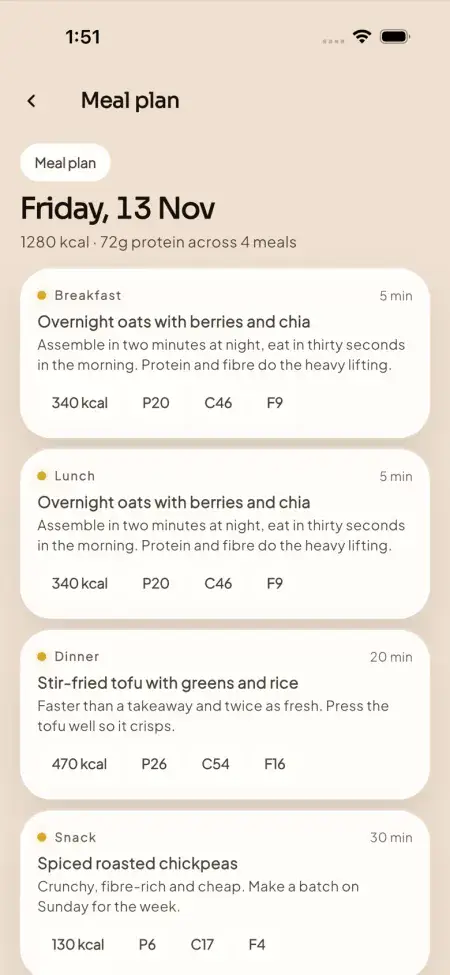
The weekly planner shows each day’s calories and protein and can auto-populate one day or the full week from your recipe library, with serving sizes that scale. Recipes list ingredients, method, macros and band. The app generates a shopping list from the week’s plan, editable and saved per week, and it compares planned meals with eaten meals on the same day. That last comparison is the one dietitians tend to value most, because it shows adherence without a conversation.
Whenever needed: coaching thread and check-ins
Clients on the coaching tier message in a single thread where the human coach and the built-in assistant both appear. The coach sees the client’s diary, targets and recent messages before replying, so answers are specific. The AI coach answers from the client’s own day, for example calories remaining, protein against target, water and weight trend, and it shows a panel listing exactly what it can see. It gives general guidance and is not medical advice, and the app says so in its own wording. Per-client daily caps on AI calls and tokens keep usage costs predictable.
Each appointment records its type, start time, status and a meeting link, which works with whichever video tool your practice already uses. Native in-app video check-ins and group classes are available as a paid add-on if you want them inside the app.
Always: progress the client can see
The weight screen charts a trend line, a weekly average, the change from the starting point, the weekly rate, a projected goal date and BMI, and it words projections as estimates, never promises. Measurements such as waist, hip, body fat and lean mass can be logged with their source. Sleep, stress and biomarkers have a place in the health record, and a screening questionnaire creates a risk band that the practice can review and escalate. The platform supports behavior change and nutrition coaching, not diagnosis or treatment, and your team handles clinical review.
The Caseload View: How a Small Team Stays on Top of Clients
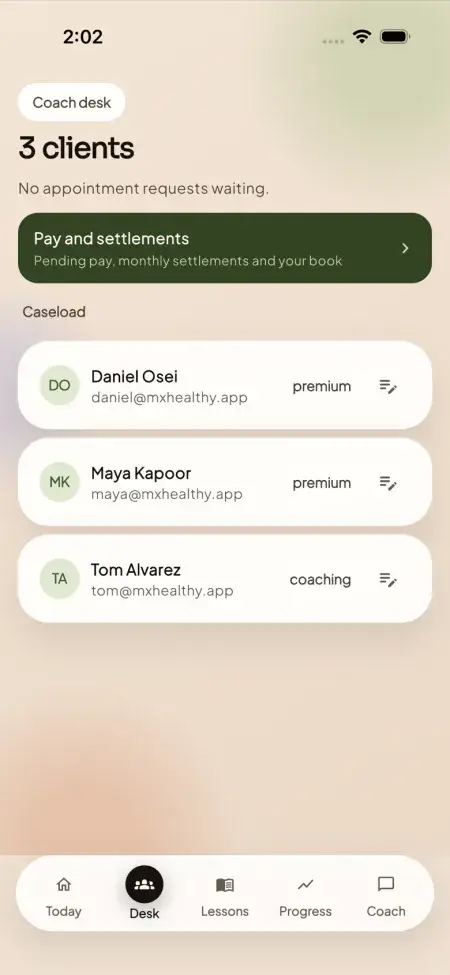
The part of the app that dietitians see is as important as the part clients see. A solo practitioner with 40 clients, or a clinic with three dietitians and 150 clients, needs triage. The coach workspace has four areas: a desk, a caseload, a member detail page and an earnings page. Together they answer four questions: who needs me today, what is this client’s history, what did we agree, and what am I owed.
- At-risk queue. Clients whose logging stopped for a week, whose water or weight entries slipped, or who have not been weighed in a while surface in a queue instead of hiding in a spreadsheet.
- Notes and follow-up tasks. Each client has coach notes and follow-ups with an owner and a due date, so nothing agreed in a session depends on memory.
- Engagement nudges. Each week an automated routine looks at adherence patterns, then alerts the coach and reminds the client. You can rehearse it in a dry run first, and trigger it from a scheduler or a portal button.
- Screening reviews. When a questionnaire raises a flag, it goes to a review queue with a reviewer, a timestamp and a note, so there is a record of who looked at what.
The effect on workload is easy to underestimate. Instead of opening 40 diaries to find three clients in trouble, the dietitian opens one queue. Time returns to the activities that justify a fee: adjusting plans, answering real questions and holding the harder conversations.
Designing Client Onboarding That Sticks
Onboarding decides whether a new client is still logging in week three. The first seven days matter more than any feature added later, so treat them as a designed experience and not as a technical step. A simple structure works well.
Before the client downloads anything
Send a short welcome message that explains what the app is for, what you will see in it and how quickly you reply. Clients who know that a human reads their log behave differently from clients who suspect nobody does. State response times honestly, for example within one working day, and keep them.
The first session
Install the app together. Let the client complete the assessment in front of you, review the four targets and agree on one habit to start with. One habit is better than five. Log a first meal during the appointment so the client leaves having already used the core loop once.
The first week
- Day one: a target set, a first meal logged and a plan opened.
- Day two or three: a short message from you responding to what you saw in the log.
- Day five: a lesson assigned from the built-in library of 10 courses and 30 short lessons, each with a quiz question, so the client sees the habit rationale and not just the numbers.
- Day seven: a weekly review card for the client and a note on your side about what to change in the plan.
Welcoming existing clients versus new ones
Existing clients already trust you, so move them in cohorts of 10 to 15 and use their feedback to fix rough edges. New clients can be onboarded straight into the app as part of your intake, which also lets the intake form and the assessment do the same work once instead of twice. Either way, keep demo accounts out of production: rotate or remove the demo logins before your public launch.
| Onboarding step | Your action | What the client experiences |
|---|---|---|
| Welcome message | State what the app is and when you reply | Clear expectations before the first login |
| Assessment | Complete it together in the first session | Personal targets within minutes |
| First log | Log one meal in the appointment | The core loop understood and used once |
| Day two response | Reply to something specific in the log | Proof that a person is watching |
| Week-one review | Adjust the plan from the data | A plan that visibly responds to them |
Launch Steps: From Decision to First Clients
A branded app is a business project and a technical project. The technical work can be short with a ready-made product, so most of your calendar goes into decisions you can start now.
Step 1: decide who the app is for
Pick the client group before the features. A practice that focuses on weight management, one on family nutrition, and one on sports nutrition would configure plans, lessons and recipes differently. Put one sentence on paper that describes your ideal client and use it to filter every later choice.
Step 2: assemble your content
The platform is operator-curated, which means your team decides what goes in. Gather the recipes you give out most, the foods your clients actually eat, and the lessons or handouts that already work. The Indian foods in the catalog and Hindi language support are included, which matters for practices serving South Asian communities. If you serve other language groups, the regional language packs add-on covers Tamil, Telugu, Bengali, Marathi, Arabic and Spanish.
Step 3: choose the model: ready-made, custom or software subscription
A ready-made product is the fastest route when your needs match a proven workflow. Miracuves delivers the MXHealthy build, with source code and Android and iOS apps together, for a single payment of $3,399. It goes live in 6 working days of Miracuves work after branding, hosting and accounts are ready (store review is separate), while custom changes need 15 to 30 days and bigger scopes 45 to 60. Cost trade-offs are covered separately in our breakdown of the cost of building a nutrition app, so here the point is only timing: the decision is measured in days, not quarters.
Step 4: prepare accounts and approvals
You need a hosting environment, a payment account, and developer accounts for both app stores, registered in your practice’s name. Rupee checkout is included alongside card payments through Stripe, so practices billing in India and abroad can both be served. Allow time for store review, since it is separate from the build. Start the accounts early because they are usually the slowest item on the list.
Step 5: pilot, adjust, then open
Run a pilot with 10 to 20 clients for three to four weeks. Watch which parts of the log get skipped, which recipes get opened, and which messages need the same answer repeatedly. Fix those in the plan library and in your onboarding script. Then widen access.
Pricing Your Plans: Selling Attention, Not Features
Dietitians often underprice because they price by the hour of a session. In an app-supported practice, what you sell is a level of attention over time, so the plan structure should mirror that. The platform supports three tiers with monthly and annual prices and a trial period for each, all set from the console without a release.
| Tier | What the client gets | What it costs you in time | Who it suits |
|---|---|---|---|
| Free or self-guided | Targets, food log, limited meal plans, lessons, community | Almost none once set up | Prospects, trial users and lead generation |
| Premium | Full meal plans, shopping lists, progress tools, the AI coach within caps | Light: periodic plan updates | Self-driven clients who want structure |
| Coaching | The Premium set, plus a human coach thread, appointments and priority replies | Highest: daily visibility and replies | Clients who want accountability and adjustment |
A few principles help when setting numbers. First, anchor the coaching tier to the real hours it takes, including log review, not only the length of a call. Second, offer annual plans at a visible discount because they smooth your income and keep clients through the slow middle weeks. Third, use trial days to let clients feel the log and the first coach reply before billing begins. Fourth, give referral partners and small corporate groups capped percentage coupons instead of ad-hoc discounts; full employer programs with per-seat billing and HR reporting come with the corporate wellness portal add-on.
The console also supports a built-in store, so you can sell your own recommended products with coach attribution and commission when clients buy. We cover plan structures, coaching fees and store income in depth in our guide to nutrition app monetization models, and we keep this article to the dietitian-specific decisions. Practices that are working out which meal-focused offers might fit alongside a coaching tier can also browse these meal prep and diet planning business ideas.
Coach pay is another number worth getting right early. You can pay associates a flat monthly retainer, an amount per assigned client, a fee per appointment or commission on attributed sales; the console itemizes each month’s settlement, and payouts can go out through Stripe Connect. A solo owner can ignore this. A clinic with associates will want it set before the first invoice.
Running the App With a Small Team
The risk with any client-facing tool is that it creates a second job. These habits keep it from doing that.
Set a weekly rhythm
Pick one block, for example Monday morning, to work the at-risk queue and clear follow-up tasks. Pick a second short block mid-week for replies. Clients adapt to a predictable rhythm, and you avoid the pull of checking logs at all hours.
Split roles clearly
The platform has three roles: member, coach and admin. In a clinic, give front-desk staff admin access for plans and coupons, give dietitians coach access limited to their own caseload, and keep owner-level console areas to yourself. Permissions apply at page and action level, and coaches see only the clients assigned to them.
Reuse instead of rewriting
Most replies fall into a few patterns: portion questions, plateau worries, eating out, family meals. Build a short list of your preferred answers and the lessons that support them. The aim is not scripted care, it is consistent care that takes less time to deliver.
Use the console as a business dashboard
The operator console has 14 areas covering members, content, store, orders, coaches, finance and platform settings. Finance shows net revenue, refunds, payouts, monthly recurring revenue and revenue by plan, and you can close a month so that its figures are frozen. Weekly attention to three numbers is plenty: active subscriptions, clients flagged as at risk and trial-to-paid conversion.
Keep clinical responsibility with your team
The app is built for nutrition coaching and habit change, not for diagnosis or treatment, and people on your team review every screening escalation. Decide in writing who reviews a flagged questionnaire, within what time, and what the next step is. Your team also remains responsible for the local rules that apply to health claims and client data where you practice.
Privacy, Security and Client Trust
Clients share weight, food habits and sometimes health details with a dietitian. They will only keep sharing if they trust where it goes. The platform handles the basics in a way that is easy to explain to clients and easy to check by a technical reviewer.
- Identity is taken from the session held on the server, never from what the phone or browser says, and every role limit is enforced at both page and action level.
- Stored passwords use a modern salted key-derivation scheme, and the session cookie is hidden from page scripts and tied to your site.
- Queries run as parameterized SQL, and anything a user types is escaped on display.
- Card numbers never reach your database. The payment provider keeps them and hands back references.
- File uploads must pass a type and size check and are delivered via an authorizing route.
- A client can download a copy of their data or ask for deletion, which starts a grace period they can cancel.
- Edits to plans, prices, payouts, features, products and orders are logged with who made them.
Because each practice runs on its own deployment, your client records sit in your database, hosted where you choose. Before going live, rotate or remove the demo accounts, put login throttling in front of the app at your proxy, and agree a backup routine. These are standard go-live steps, and your Miracuves team walks you through them as part of platform guidance.
Optional Extensions as Your Practice Grows
Start with the core and add only what your clients ask for. Six paid add-ons are available for practices that outgrow the base product, each quoted separately and none required:
- Wearable adapters (add-on) that sync steps, sleep and resting heart rate from connected devices.
- Smart scale and CGM device sync (add-on), bringing scale and glucose readings into the client trend.
- Live video coaching and group classes (add-on) inside the app, instead of a join link.
- A video lesson studio (add-on) for video lessons in the course library.
- A corporate wellness portal (add-on) for employer-paid programs, with per-seat billing, team challenges and reporting for HR.
- Regional language packs (add-on) for Tamil, Telugu, Bengali, Marathi, Arabic and Spanish, on top of English and Hindi.
A sensible order for most dietitians is to launch the core, learn which friction your clients mention, and only then pick an add-on. A practice that sells to employers might reach for the corporate wellness portal add-on first, while one that runs group programs will want live classes sooner. Each choice follows evidence from your own clients instead of a guess made before launch.
Market context supports patience too. The US Bureau of Labor Statistics projects employment of dietitians and nutritionists to grow 8 percent from 2025 to 2035, a pace the agency describes as much faster than the average across all jobs (BLS dietitian outlook), and the CDC reports that 41.9 percent of US adults had obesity in 2017 to March 2020 (CDC adult obesity facts). More professionals and more demand mean more competition for attention, and the practices with a daily touchpoint are better placed to be remembered.
| Question to ask before you commit | Why it matters | What a good answer looks like |
|---|---|---|
| Who owns the client data? | Clients trust you with records | Your deployment, your database, export and deletion supported |
| Can we change prices ourselves? | Pricing needs testing | Console edits go live with no store release |
| Are Android and iOS apps both included? | Clients use both platforms | Yes, together, from one codebase |
| Do we get the source code? | Avoids lock-in | Full source code included |
| What support follows launch? | The first months decide adoption | Defined cover periods in writing |
Founder Decision Signals: Is Your Practice Ready for a Branded App?
Clients Drift Between Visits
Do clients regularly arrive unable to say what they ate, or with a plan they stopped following in the first week?
You Cannot See Disengagement
Do you find out a client has gone quiet only when an appointment is missed or a subscription lapses?
Content Already Exists
Do you have recipes, meal plans and handouts you give out repeatedly that could move into a shared library?
Pricing Is Tied to Hours
Are your fees set by the session, with no plan that sells ongoing attention between visits?
A Pilot Group Is Ready
Can you name 10 to 20 clients who would try the app and give honest feedback?
Someone Owns the Queue
Is there a named person who will work the at-risk queue each week and reply within your promised time?
How Miracuves Helps Dietitians Launch a Branded Client App
Miracuves builds the ready-made branded nutrition coaching app on MXHealthy, a complete platform that pairs the client app with a dietitian workspace and an owner’s console. You get the source code, Android and iOS apps together, a web app and a coach portal, all for one fixed payment of $3,399. The ready-made build is live in 6 working days of Miracuves work, and store review runs separately.
Under the hood sit Next.js, TypeScript and PostgreSQL for the web and Flutter for the phone apps, with Stripe for card payments and rupee checkout for India. The member app speaks English and Hindi, and its food catalog already carries Indian dishes. Your own branding, colors and name sit across every screen.
Changes beyond the base, for example an extra plan type, a dietitian report or a reworked assessment, are scoped and priced in writing, and it takes 15 to 30 days, or up to 45 to 60 days for larger scope. Every delivery carries 60 days of dedicated platform guidance, 6 months of priority bug resolution and 12 months of continuous product evolution. Related health products sit in our healthcare solutions category, and you can test the demo with member, coach and admin logins before you speak to anyone.
Final Thoughts
Clients succeed or fail in the hours you do not see. A nutrition app for dietitians brings those hours into view, gives clients one trusted place to log, learn and ask, and gives your practice a daily presence that PDFs and screenshots cannot match. The practical path is straightforward: choose your client group, gather your content, pick a model that fits your timeline, pilot with a small group, price by level of attention and give one person ownership of the queue.
Miracuves is the team that turns that plan into a working branded app, with the product, the source code and the support periods defined up front. If you are weighing the idea, open the demo, walk through the caseload and the meal plan as a client would, and bring your questions to a consultation.
Frequently Asked Questions
What should a nutrition app for dietitians include?
At minimum: an assessment that sets daily targets, food logging with several entry methods, weekly meal plans with recipes and a shopping list, a message thread with the dietitian, progress tracking and a caseload view for the practice. A strong app also has an at-risk queue, coach notes and follow-up tasks, and a console where the practice controls prices and content.
Can I put my own brand on the client app?
Yes. A branded app carries your practice name, colors and content, so clients associate the daily habit with you. Members see your meal plans and recipes, and your team curates the food catalog, lessons and plans through the operator console.
How do I keep clients logging meals between appointments?
Make logging fast, respond visibly and watch for silence. Four entry methods reduce friction, a reply on day two shows a person is watching, and an at-risk queue tells you who stopped logging so you can reach out before the next appointment.
Is the AI coach safe to offer to clients?
The AI coach answers from the client’s own logged day and gives general guidance only. It is not medical advice, and the app says so. Daily caps on calls and tokens apply per client, and a panel shows the client exactly what the coach can see. Your dietitians stay responsible for clinical judgment.
How soon can my practice go live with its own branded app?
Expect the ready-made build to be live in 6 working days of Miracuves work, counted from the point your branding, hosting and store accounts are in place. Store review runs on its own clock. Custom changes take 15 to 30 days, or 45 to 60 days when the scope is larger. Start the store and payment accounts early, since they are often the slowest step.
Can a small team of two or three dietitians run this?
Yes. Roles separate members, coaches and admins, coaches only see their own caseload, and the at-risk queue plus weekly nudges reduce manual checking. Most small teams set a weekly block to work the queue and a shorter block for replies.
How should I price plans for clients using the app?
Price by level of attention. A self-guided tier works for prospects, a mid tier suits clients who want structure, and a coaching tier covers human replies and appointments. Price each tier monthly and annually with a trial length of its own, and hand partners coupons with a redemption cap.
Can clients log Indian meals and use the app in Hindi?
Yes. The catalog includes Indian foods, and Hindi is a built-in app language next to English. Six more languages (Tamil, Telugu, Bengali, Marathi, Arabic and Spanish) come with the regional language packs add-on. Rupee checkout is included alongside card payments through Stripe.
Who owns the client data and the source code?
You do. The app runs on your own deployment and database, and the full source code is included. Clients can download their records or ask for deletion, and every change to plans, prices and payouts is logged with the person who made it.
Miracuves is an independent software development company. We are not affiliated with, connected to, sponsored by, or endorsed by any company or product named in this article.
Terms such as “X Clone” are used descriptively. It is how the software industry refers to building a platform with functionality comparable to a known service, and how clients search for it.
The entire design and codebase of our products is built by our own team. Our products contain no code, design, graphics, or content originating from any third-party website or applications.
All third-party names and marks referenced in this article are the property of their respective owners, referenced solely to identify the services discussed.