Key Takeaways
- Production architecture requires more than working code because real users need stable, secure, and scalable infrastructure.
- Founders, developers, DevOps teams, admins, and users need reliable deployment workflows before public launch.
- Servers, SSL, databases, webhooks, backups, monitoring, and CI/CD pipelines are core production layers.
- Deployment risk depends on hosting setup, environment variables, database configuration, security, and rollback planning.
- A strong production foundation helps reduce downtime, launch delays, failed payments, and post-launch technical chaos.
Deployment Signals
- Founders need visibility into hosting, domains, SSL certificates, database backups, uptime, and deployment status.
- Developers need staging environments, CI/CD workflows, secure secrets, logs, error tracking, and release controls.
- Admins need control over users, permissions, payments, webhooks, reports, backups, and operational settings.
- Backend systems should handle webhook retries, database migrations, server scaling, queues, and failed-job recovery.
- Real-time monitoring helps detect downtime, failed deployments, broken SSL, webhook errors, slow APIs, and server overload.
Real Insights
- AI tools can generate code, but they cannot automatically guarantee secure production deployment or infrastructure readiness.
- Weak server setup can cause failed logins, broken payments, webhook desync, slow dashboards, and public downtime.
- Staging tests, rollback plans, backups, health checks, and monitoring reduce the risk of launch-day failures.
- Founders should validate infrastructure before marketing campaigns, investor demos, app store launches, or paid traffic.
- Miracuves builds AI MVPs and clone apps with production-ready architecture, deployment support, secure servers, webhooks, monitoring, and admin control.
AI coding tools have changed how founders build early products. A solo founder can now generate screens, APIs, dashboards, authentication flows, and even database logic faster than ever before. But there is one hard truth many first-time builders discover late:
A working app is not the same as a launched app.
The moment your project moves from localhost to real users, the problem changes. You are no longer asking, “Does the feature work?” You are asking, “Can this system survive real traffic, real payments, real data, real errors, and real business operations?”
That is where the DevOps wall appears.
For many solo founders, writing code feels like 80% of the work because it is visible. But in a real launch, code may only be 20% of the operating challenge. The remaining work sits in production servers, SSL certificates, database provisioning, environment variables, webhook security, monitoring, backups, logging, rollback plans, and cloud configuration.
This guide explains what actually happens when you take raw AI-generated code or unfinished application code into production. It also shows why launch-ready, white-label app engines from Miracuves reduce deployment friction by starting from a server-ready foundation instead of a disconnected code bundle. For founders who need deeper product engineering support, Miracuves’ software development services help connect application code, backend architecture, deployment workflows, and production readiness into one structured launch path.
The DevOps Wall: What AI Tools Leave Out of the Manual
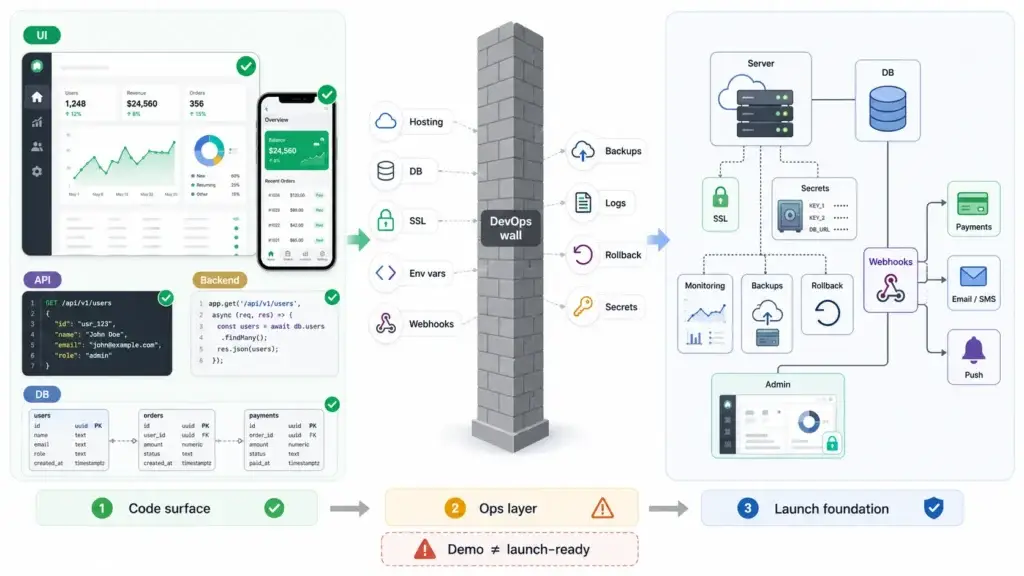
AI coding tools are excellent at producing visible output. They can generate a React dashboard, a Node.js API, a Laravel backend, a Flutter screen, or a database schema. That makes the founder feel close to launch.
But production is not only about code existing. Production is about code running safely in an environment that users, payment systems, mobile apps, third-party APIs, admin dashboards, and databases can trust.
The DevOps wall usually appears when the founder asks practical launch questions:
- Where should the backend run?
- Should the database be on the same server or separate?
- How do I configure SSL correctly?
- Where do environment variables go?
- How do I connect live Stripe, Razorpay, Twilio, Firebase, or SendGrid webhooks?
- How do I prevent database loss?
- How do I see errors after launch?
- How do I roll back if a deployment breaks?
- How do I make sure admin credentials, API keys, and payment secrets are not exposed?
These are not small tasks. They are the operational layer of the business. An app can look finished on a laptop and still be completely unprepared for production.
That is why founders should separate two ideas:
Code generation creates the product surface. Production architecture creates the launch foundation.
A founder who understands this avoids one of the most expensive mistakes in early-stage app development: assuming a working demo is automatically a market-ready system.
Read More: Why AI-Built MVPs Break at Scale: Founder Crash Patterns After Launch Traffic
Why Writing Code Is Only 20% of the Launch Process
A first-time founder often measures progress by screens and features. Login works. The dashboard loads. The payment button appears. The admin panel opens. The app feels ready.
But launch work includes many layers that are not obvious from the frontend.
A production-ready application needs a stable runtime environment. It needs a production database with backups. It needs a domain with HTTPS. It needs protected API routes. It needs reliable webhook handling. It needs environment-specific secrets. It needs logs and alerts. It needs a deployment process that can be repeated without breaking the system.
Here is the practical difference.
| Local Demo Layer | Production Architecture Layer | Why It Matters |
|---|---|---|
| Localhost server | Cloud server, container, or managed runtime | Users need public, stable access |
| Test database | Production database with backups | Real user data must persist safely |
| Test payment mode | Live payment gateway and webhooks | Orders, subscriptions, and payouts depend on reliable callbacks |
Local .env file | Secure environment variable management | Secrets must not leak into code or browsers |
| Manual restart | Process manager, container restart, or orchestration | The app must recover after crashes |
| Console logs | Centralized logging and monitoring | Founders need visibility into failures |
| Local HTTP | HTTPS with valid SSL/TLS certificates | Browsers, payment systems, and APIs require secure communication |
This is why the “last mile” of launch feels harder than building the first version. AI makes code faster, but production still requires judgment.
Miracuves’ ready-made and white-label app approach is designed around this reality. The goal is not just to hand over files. The stronger goal is to deliver a launch-ready product foundation with backend, database, admin control, app branding, deployment support, and source-code ownership aligned before go-live.
Read more: The Infinite API Loop: Why AI-Built MVPs Bankrupt Founders on Day 1
Step-by-Step: Provisioning Servers, SSL, and Production Webhooks
This section gives founders a realistic view of what happens when an app moves into production. The exact steps vary by tech stack, but the launch sequence is usually similar.
Step 1: Choose the Production Hosting Model
The first decision is where the application will run.
For a simple web app, a managed platform may be enough. For a marketplace, fintech app, delivery app, social platform, or multi-role application, you may need a more structured backend environment with API servers, database services, storage, queues, and monitoring.
Common options include:
- Managed app platforms for simpler deployments.
- Virtual private servers for more control.
- Cloud services such as AWS, Google Cloud, Azure, or DigitalOcean.
- Containerized deployment using Docker.
- Kubernetes for complex scaling or multi-service architecture.
The founder mistake is choosing infrastructure only by price. A production server should be selected based on application complexity, traffic expectations, database load, media storage, compliance needs, and integration requirements.
For example, a food delivery app does not only need a backend server. It needs customer workflows, merchant workflows, delivery partner workflows, real-time status updates, payment callbacks, map APIs, notifications, and admin operations. That creates a very different infrastructure need from a static website.
Step 2: Separate Development, Staging, and Production
A serious launch should not rely on one environment.
You need:
- A development environment for internal work.
- A staging environment for testing before release.
- A production environment for real users.
This separation matters because payment keys, webhook endpoints, database credentials, push notification settings, and third-party API secrets often differ between environments.
Without separation, a founder can easily test on real customers, overwrite production data, or connect a live webhook to unfinished code.
Step 3: Configure the Server Runtime
Once hosting is selected, the application must be installed and configured.
This may include:
- Installing Node.js, PHP, Python, Java, or the required runtime.
- Installing Nginx or another reverse proxy.
- Setting up Docker and Docker Compose.
- Configuring process managers such as PM2 or systemd.
- Opening the correct firewall ports.
- Adding SSH keys.
- Creating deployment users with limited access.
- Setting file permissions.
- Configuring build commands.
- Connecting the application repository.
This is where many AI-generated projects break. The code may run locally because the laptop already has the right packages, paths, ports, and environment variables. A clean server does not.
Production exposes every hidden assumption in the codebase.
Step 4: Set Up SSL and HTTPS
HTTPS is not optional for modern apps. Browsers expect it. Payment processors expect it. Mobile APIs expect it. Webhooks often require it.
At the server level, SSL/TLS configuration usually includes:
- Pointing the domain to the server.
- Installing a valid SSL certificate.
- Configuring Nginx or the hosting platform for HTTPS.
- Redirecting HTTP traffic to HTTPS.
- Enabling modern TLS versions.
- Renewing certificates automatically.
Nginx documentation shows that HTTPS configuration requires a server block listening on SSL, certificate and private key paths, and TLS protocol settings.
For founders, the risk is not that SSL is impossible. The risk is that one small misconfiguration can break API calls, payment callbacks, browser trust, or mobile app communication.
Step 5: Connect the Production Database
The production database is where launch becomes serious.
A local SQLite file or temporary development database may work during testing. But production needs a durable database strategy.
That usually means:
- Creating a production PostgreSQL, MySQL, MongoDB, or managed database instance.
- Setting database credentials securely.
- Running migrations in the correct order.
- Enabling backups.
- Restricting network access.
- Configuring encryption where needed.
- Testing read/write operations.
- Creating admin database users carefully.
- Avoiding direct public exposure.
For managed databases such as Amazon RDS, encryption can cover data at rest, automated backups, read replicas, and snapshots when encryption is enabled. That is the kind of production detail founders often overlook when they only focus on whether the app “connects.”
A production database is not just a storage box. It is the memory of the business.
Step 6: Configure Environment Variables and Secrets
Every production app depends on secrets:
- Database URL.
- JWT secret.
- Payment gateway keys.
- Webhook signing secrets.
- Email provider credentials.
- Cloud storage keys.
- Push notification credentials.
- OAuth client IDs and secrets.
- Admin credentials.
- AI API keys.
These should not be hardcoded into the application. They should not be committed to GitHub. They should not be exposed in frontend bundles.
The production environment needs a controlled secret management process. At minimum, this means platform-level environment variables. For larger systems, it may mean dedicated secret managers, restricted access, and rotation policies.
This is one of the most common gaps in AI-generated code. The tool may create a working .env pattern, but it does not automatically enforce secure production handling across your cloud platform, CI/CD pipeline, and team access model.
Step 7: Register Production Webhooks
Webhooks are where many founders hit the wall.
A webhook is a third-party system calling your server when something happens. Payment providers use webhooks for successful payments, failed payments, refunds, disputes, subscriptions, invoices, and account updates. Logistics tools, email tools, CRM systems, SMS providers, and marketplace systems also use webhooks.
In development, webhooks may work through a local tunnel or CLI. In production, they need a real public HTTPS endpoint.
Stripe documentation states that registered webhook endpoints must be publicly accessible HTTPS URLs, and live webhook delivery includes retry behavior. Stripe also recommends verifying that events come from Stripe through signature verification, because unverified webhook events can be forged.
For founders, that means webhook setup is not just “paste a URL into the dashboard.”
You must:
- Create the production webhook route.
- Deploy it to a public HTTPS domain.
- Register the correct endpoint URL.
- Select the right event types.
- Use the correct live signing secret.
- Verify webhook signatures.
- Handle retries safely.
- Make webhook processing idempotent.
- Log webhook failures.
- Avoid processing duplicate events twice.
- Test real payment and callback flows before launch.
This is exactly where raw AI code often fails. The code can generate a webhook handler, but it cannot know your live domain, payment account mode, infrastructure path, signing secret, SSL state, firewall rules, database transaction logic, and business consequences of duplicate processing unless a deployment engineer configures and verifies the whole flow.
Production Database Setup: Where Founder Risk Gets Real
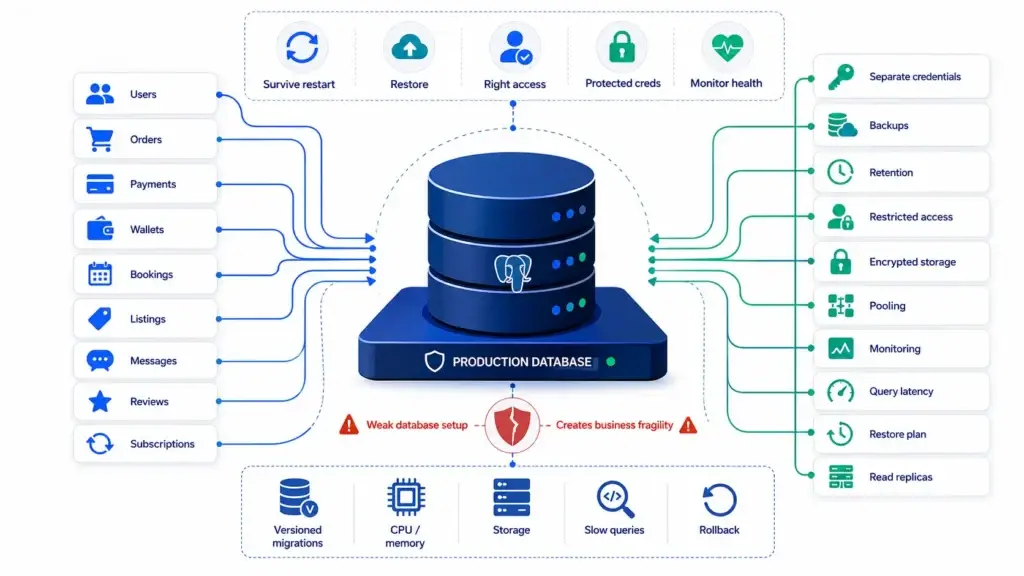
Most founders worry about app features. Experienced operators worry about data loss.
A production database should answer five questions before launch:
- Can real user data survive a server restart?
- Can we restore data if something goes wrong?
- Can only the right services access the database?
- Are credentials protected?
- Can we monitor slow queries, errors, and capacity?
- If the answer is unclear, the app is not ready.
- A proper production database setup usually includes:
- Separate production database credentials.
- Migration scripts tracked in version control.
- Backups with a defined retention period.
- Restricted inbound access.
- Encrypted storage where relevant.
- Connection pooling for high-traffic systems.
- Monitoring for storage, CPU, memory, and query latency.
- Read replicas only when traffic requires them.
- A rollback or restore plan.
This is why non-technical founders should not treat databases as a checkbox. Your database holds users, orders, payments, wallets, bookings, listings, messages, reviews, subscriptions, and operational history.
If that layer is weak, the entire business is fragile.
Read More: Stripe Payments Not Reconciling? Fix the Webhook Desync Breaking Your AI App Revenue
Why Webhooks Break When You Move From Test Mode to Live Mode
Webhooks often work during local testing and fail during live launch because production adds constraints that local testing avoids.
Common causes include:
- The webhook URL still points to a local tunnel.
- The server does not have valid HTTPS.
- The route path changed during deployment.
- The wrong signing secret is used.
- Test mode keys are mixed with live mode keys.
- The endpoint is not publicly accessible.
- The server firewall blocks requests.
- The request body is parsed before signature verification.
- The webhook takes too long to respond.
- The code assumes events arrive in order.
- The database update is not idempotent.
The founder sees only one symptom: “Payment succeeded, but the app did not update.”
Behind that symptom may be a routing issue, an SSL issue, a signature issue, a database issue, a queue issue, or an event-handling issue.
This is why production webhooks should be designed as infrastructure workflows, not just code snippets.
Read More: How an AI-Built MVP Leaked PII and Why the White-Label Rescue Worked
Monitoring, Backups, Logs, and Rollbacks
A launch without monitoring is a blind launch.
Once real users arrive, founders need to know:
- Is the server online?
- Are APIs responding?
- Are payments completing?
- Are webhooks failing?
- Is the database close to capacity?
- Are background jobs stuck?
- Are push notifications being sent?
- Are users seeing errors?
- Is the app slowing down?
Modern production platforms include production checklists around security, reliability, performance, and cost controls. Vercel’s launch checklist, for example, includes security headers, WAF rules, log drains, observability, performance checks, rate limiting, and spend controls. Supabase’s production checklist includes considerations around auth security, SMTP configuration, backups, and point-in-time recovery for stronger restore options.
The founder lesson is simple: deployment does not end when the app goes live. Deployment ends when you can operate the app safely after launch.
At minimum, production should include:
- Application logs.
- Server metrics.
- Database metrics.
- Error tracking.
- Webhook delivery logs.
- Uptime monitoring.
- Backup verification.
- Admin activity logs.
- Rollback plan.
- Incident response ownership.
This is the layer that turns a code project into an operating product.
Read More: What 70%+ of AI-Built Apps Get Wrong About Security — And Why Users Can See Each Other’s Data
Zero-Friction Deployment: How White-Label Engines Automate Infrastructure
A white-label engine is not just a faster way to get screens. The stronger value is that core production patterns are already organized.
A serious white-label app foundation can include:
- Backend structure.
- Database schema.
- Admin dashboard.
- User roles.
- API flows.
- App panels.
- Payment integration patterns.
- Notification setup.
- Deployment documentation.
- Environment configuration logic.
- Source code handoff.
- Server deployment support.
- Branding and customization paths.
- This is what reduces the DevOps wall.
Instead of asking a solo founder to assemble infrastructure from scattered AI-generated files, a white-label engine starts from a product foundation that has already been shaped for launch.
Miracuves supports this model through ready-made and white-label app solutions across multiple categories. The Miracuves solutions hub positions these as turnkey scripts and apps that can be rebranded and deployed faster for market readiness. For founders, that means less time fighting basic launch infrastructure and more time validating customers, pricing, operations, and growth.
For technical founders, this saves engineering cycles.
For non-technical founders, it reduces dependency risk.
For agencies, it creates a faster client delivery path.
For product teams, it creates a stable foundation they can customize instead of rebuilding every standard module from zero.
Founder Decision Signals
Speed
If your biggest blocker is moving from working code to a live product, a deployment-ready foundation can reduce wasted time on server setup, SSL, database provisioning, and webhook debugging.
Cost
If your budget is limited, avoid spending most of it on rebuilding standard infrastructure. Put more capital into validation, marketing, support, and real user acquisition.
Scalability
If your app depends on payments, bookings, orders, messages, or live updates, infrastructure design matters from the beginning. Retrofitting reliability later can be more expensive.
Market Fit
If you still need to validate demand, do not let DevOps complexity delay the first real launch. Start with the strongest launch-ready path and customize after market feedback.
White-Label Deployment vs Raw AI Code
The point is not that AI-generated code is useless. It is useful for ideation, prototyping, and accelerating technical exploration.
| Decision Area | Raw AI-Generated Code | White-Label Deployment Engine |
|---|---|---|
| Code structure | May be inconsistent or prompt-shaped | Built around reusable product workflows |
| Database | Often basic or local-first | Structured for production use cases |
| Webhooks | Usually generated as code snippets | Integrated into deployment and testing flow |
| SSL and server setup | Founder must configure manually | Deployment support can handle setup |
| Admin panel | Often incomplete or missing | Included as a control layer |
| Branding | Requires manual UI updates | Designed for rebranding |
| Source code | Depends on tool and setup | Delivered for ownership and customization |
| Launch risk | Higher if founder lacks DevOps experience | Lower because deployment is part of the package |
| Best for | Experiments and prototypes | Faster business launch and validation |
The point is that production requires more than generated code.
A founder planning to launch a real app should think in terms of infrastructure readiness, not only feature completion.
Read More: How to Become a White Label Reseller and Launch Your Own App Business with Miracuves
Mistakes Founders Should Avoid
Launching with a local-first database mindset
A database that works during testing may not be safe for real users. Production needs backups, restricted access, migration control, and monitoring.
Treating webhooks as copy-paste code
Payment and integration webhooks need HTTPS, signature verification, retry handling, idempotency, and logging. One weak webhook can break orders, subscriptions, refunds, or payouts.
Hardcoding secrets into the application
API keys, database credentials, JWT secrets, and webhook secrets should be stored through secure environment management, not committed into the codebase.
Deploying without rollback visibility
If a release breaks production, the founder needs logs, monitoring, backups, and a rollback process. Without visibility, every bug becomes guesswork.
Where Miracuves Fits Into the Production Launch Path
Miracuves helps founders who do not want to spend months turning disconnected code into production infrastructure.
For ready-made and white-label app solutions, Miracuves supports faster deployment with branded design, source-code ownership, admin dashboards, backend workflows, and deployment assistance. This is especially useful when the founder’s goal is not to become a DevOps engineer, but to launch a validated business model faster.
Explore the Miracuves turnkey app solutions if you want a faster starting point than building every module from zero.
For founders who need infrastructure-specific help, Miracuves also offers DevOps engineering services covering CI/CD, Kubernetes, Terraform, cloud infrastructure, and monitoring stacks.
If your product needs web, backend, database, and deployment handled together, review Miracuves’ full-stack app development services and API development services.
Final Thoughts: The Real Launch Starts After the Code Works
The hardest part of launching an app is often not writing the first version. It is making that version safe, stable, public, secure, observable, and ready for real business activity.
AI tools have made code faster. They have not removed the need for production architecture.
Founders who understand this make better launch decisions. They stop treating deployment as a final technical chore and start treating it as a core business foundation.
The smarter path is not always the longest build. It is the path that gets the right product into production with the right control layer, the right infrastructure, and the right ownership model.
For founders who want to launch faster without fighting servers, SSL, webhooks, and production databases alone, Miracuves offers a practical route: ready-made, white-label app foundations supported by deployment expertise and source-code ownership.
FAQs
What is production architecture deployment?
Production architecture deployment is the process of preparing an application for real users. It includes server provisioning, SSL/TLS setup, production database configuration, environment variables, webhooks, monitoring, logs, backups, and rollback planning.
Why does AI-generated code fail during production launch?
AI-generated code often works in a local environment but may not include secure environment handling, production database logic, webhook verification, monitoring, scaling, or deployment configuration. The code can look complete while the infrastructure remains unfinished.
Do founders need DevOps knowledge to launch an app?
Founders do not need to become DevOps engineers, but they should understand the launch layers that affect business risk: servers, databases, SSL, backups, webhooks, and monitoring. For faster execution, they can work with a deployment-ready solution provider.
What are production webhooks?
Production webhooks are live callback URLs that third-party systems use to notify your app about events such as payments, refunds, subscription changes, messages, bookings, or delivery updates. They usually require HTTPS, signature verification, retry handling, and error logging.
What is the biggest DevOps mistake first-time founders make?
The biggest mistake is assuming that a working local app is ready for real users. Production requires secure hosting, a real database, backups, domain configuration, environment variables, SSL, monitoring, and deployment reliability.
How does a white-label app reduce deployment complexity?
A white-label app starts from a ready-made product foundation with prebuilt workflows, backend logic, admin controls, database structure, and deployment support. This reduces the need to assemble everything from zero.
Does Miracuves help with deployment?
Yes. Miracuves provides ready-made and white-label app solutions with source code, admin dashboards, branding support, and deployment assistance. Miracuves also has relevant DevOps, full-stack, software development, and API development service pages for founders who need production support.
Miracuves is an independent software development company. We are not affiliated with, connected to, sponsored by, or endorsed by any company or product named in this article.
Terms such as “X Clone” are used descriptively. It is how the software industry refers to building a platform with functionality comparable to a known service, and how clients search for it.
The entire design and codebase of our products is built by our own team. Our products contain no code, design, graphics, or content originating from any third-party website or applications.
All third-party names and marks referenced in this article are the property of their respective owners, referenced solely to identify the services discussed.