
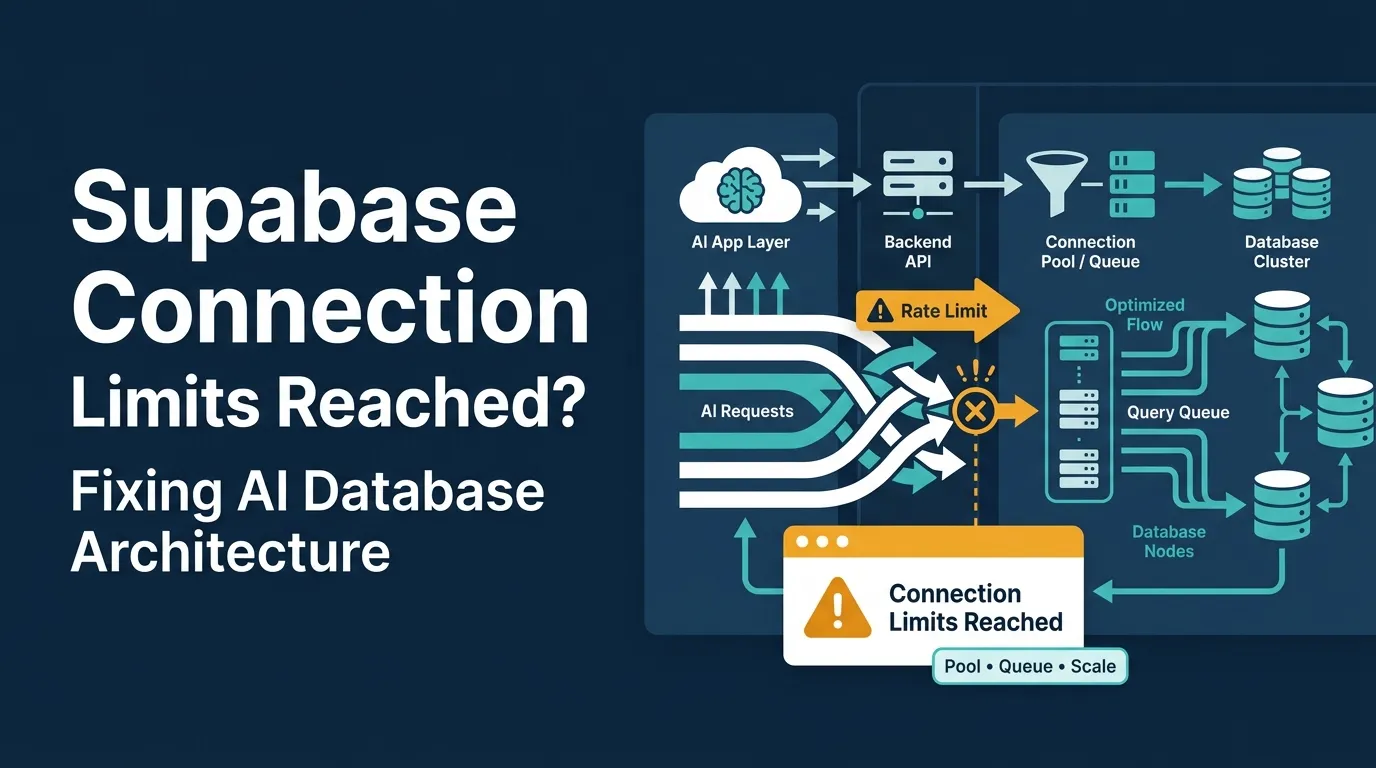
Key Takeaways
- Supabase connection limits can crash AI-built apps when every user action opens too many database connections.
- Founders, users, admins, backend systems, and database teams need stable data workflows before traffic grows.
- Connection pooling, PgBouncer, query caching, indexing, and backend optimization are core database protection layers.
- Performance risk depends on database design, API logic, user concurrency, query volume, and hosting limits.
- A scalable database architecture helps prevent early MVP crashes and supports long-term app growth.
Architecture Signals
- Founders need visibility into active connections, slow queries, failed requests, database load, and traffic spikes.
- Users need fast page loads, stable sessions, reliable data updates, and error-free app experiences.
- Admins need control over database usage, API limits, user activity, logs, backups, and performance reports.
- Backend systems should reuse database connections instead of opening new connections for every request.
- Real-time alerts help detect connection exhaustion, slow queries, API failures, database locks, and scaling bottlenecks.
Real Insights
- An AI-generated backend can look functional during testing but fail when real users create concurrent database traffic.
- Weak connection handling can cause timeout errors, failed logins, broken dashboards, and poor user retention.
- PgBouncer, caching, indexes, and query reviews help reduce unnecessary pressure on the database layer.
- Founders should test database performance under concurrent users before public launch or paid acquisition.
- Miracuves builds AI MVPs and clone apps with scalable database architecture, connection pooling, caching, backend optimization, and admin control.
AI-generated apps can look production-ready in the first demo. The screens load, authentication works, database tables exist, and the app feels ready for real users. But a working demo is not the same as production-ready database architecture.
Then the first traffic spike arrives.
A few signups. A few dashboard refreshes. A few background jobs. Suddenly, the backend starts throwing errors like “remaining connection slots are reserved,” “Max client connections reached,” “connection limit exceeded,” “database is unavailable,” or random 500 errors from API routes.
For founders, this is confusing because the app may not have thousands of users yet. Sometimes even 30, 50, or 100 active users can expose a weak backend setup if every request opens fresh connections, serverless functions multiply connection usage, or AI-generated code forgets to configure pooling.
This is where PostgreSQL database development becomes more than a technical task. It becomes a product stability decision. Supabase may help founders move fast, but high-volume apps need connection pooling, query caching, database tuning, and backend workflows designed for real usage.
This blog explains what is actually happening, how to fix Supabase connection limits using PgBouncer, pooling, and caching, and when a founder should stop patching a Backend-as-a-Service setup and move toward full stack app development or dedicated white-label app solutions with stronger infrastructure control.
Why AI-Generated Supabase Backends Hit Connection Limits Early
Most AI app builders are good at generating user interfaces, CRUD flows, authentication logic, and database schemas. They are less reliable at production database architecture.
That gap matters because a database connection is not the same as a user.
One active user may trigger several backend actions at once:
- Load profile data
- Fetch dashboard metrics
- Check subscription status
- Pull notification count
- Write activity logs
- Refresh chat or feed data
- Trigger serverless API routes
- Run background workflows
If an AI-generated backend creates a fresh database connection for each request, the database may see far more connection pressure than the founder expects.
A founder may think:
“I only have 50 users.”
The database may be experiencing something closer to:
“I have 50 users, 300 simultaneous API calls, multiple serverless cold starts, and several idle connections that were never released.”
This is why Supabase connection limits often feel like phantom traffic. The product does not look busy enough to crash, but the backend is behaving as if it is under heavy load.
Read More: Stripe Payments Not Reconciling? Fix the Webhook Desync Breaking Your AI App Revenue
The Phantom Traffic: Why 50 Users Max Out Your Supabase Connections
The “50 users crashed my backend” problem usually comes from connection multiplication.
Here is a simple example.
| Layer | What Happens | Connection Impact |
|---|---|---|
| Frontend dashboard | Loads 5 widgets independently | 5 API requests per user |
| API routes | Each route creates a database client | 5 backend database sessions |
| Serverless functions | Each function instance may open its own connection | Multiplies during traffic spikes |
| ORM | Default pool settings may be too high | Opens more connections than needed |
| Background jobs | Notifications, emails, analytics, logs | Adds hidden database pressure |
| Idle connections | Old sessions remain open | Blocks new requests |
The issue is not always raw traffic. It is uncoordinated traffic.
AI-generated applications often create database clients in the wrong place. For example, a database client may be initialized inside every function call instead of being reused at the application level. In serverless environments, this becomes worse because multiple short-lived function instances may open new connections faster than PostgreSQL can safely handle.
That is why the first serious fix is not “upgrade immediately.” The first fix is to understand how connections are being created, reused, pooled, and closed.
Read More: What 70%+ of AI-Built Apps Get Wrong About Security — And Why Users Can See Each Other’s Data
How Connection Pooling Works in Plain Founder Terms
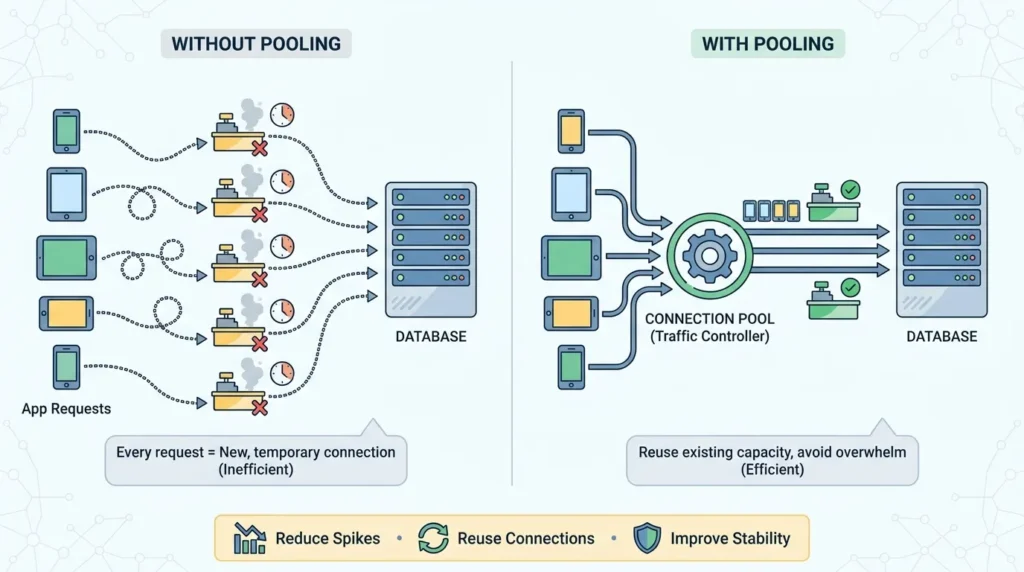
Connection pooling is a traffic controller between your app and your database.
Without pooling, every app request may behave like a customer opening a new checkout counter, using it for a few seconds, and then abandoning it.
With pooling, the app uses a controlled set of checkout counters. Requests wait their turn, reuse available capacity, and avoid overwhelming the database with unnecessary connection creation.
For PostgreSQL-backed platforms such as Supabase, connection pooling is especially important because every database connection consumes server resources. Increasing connection limits without enough memory and CPU can move the failure from “connection limit exceeded” to slower queries, memory pressure, and unstable performance.
In practical terms, pooling helps you:
- Reduce connection spikes
- Reuse existing database connections
- Keep serverless functions from overwhelming PostgreSQL
- Improve stability during short bursts of traffic
- Create a safer bridge between app traffic and database capacity
But pooling does not magically make poor architecture scalable. It buys time, creates breathing room, and improves connection discipline.
Read More: How an AI-Built MVP Leaked PII and Why the White-Label Rescue Worked
Implementing PgBouncer and Query Caching
PgBouncer is a PostgreSQL connection pooler. It sits between your application and PostgreSQL, allowing many client requests to reuse a smaller number of active database server connections.
For founders, the concept is simple:
Your app connects to PgBouncer. PgBouncer manages the actual database connections.
This matters because most early-stage AI-generated backends are too eager to open connections and too careless about releasing them.
Step 1: Confirm the Actual Error
Before changing architecture, identify the exact connection failure.
Common errors include:
remaining connection slots are reserved for non-replication superuser connectionsMax client connections reachedconnection limit exceededtoo many clients alreadyThese errors point to connection exhaustion, but the cause may differ. You may be hitting direct PostgreSQL limits, Supabase pooler client limits, ORM pool misconfiguration, serverless concurrency, or idle connection leaks.
Step 2: Check Live Database Connections
Run a query similar to this inside your PostgreSQL SQL editor:
SELECT
  pid,
  usename,
  application_name,
  client_addr,
  state,
  query_start,
  state_change,
  LEFT(query, 120) AS query_preview
FROM pg_stat_activity
ORDER BY state_change DESC;
Look for:
- Many
idleconnections - Repeated connections from the same app service
- Long-running queries
- Serverless functions creating many short-lived connections
- Background workers opening database sessions
- ORM clients using more connections than expected
If many sessions are idle, your issue may be connection leakage or poor client reuse.
Step 3: Use the Correct Supabase Connection Mode
Supabase supports different connection paths for different workloads. Use the direct connection for persistent servers and migration workflows, but use transaction pooling for serverless or short-lived functions when appropriate.
For high-traffic runtime paths, the key decision is whether your app should connect directly to PostgreSQL or through a pooler.
A simplified founder-friendly rule:
| Workload Type | Better Connection Choice | Why |
| Database migrations | Direct connection | Needs full PostgreSQL session behavior |
| Long-running backend server | Direct or session pooler | Persistent process can manage connections |
| Serverless API routes | Transaction pooler | Reduces connection spikes |
| Edge functions | Transaction pooler | Better for short-lived requests |
| High-volume app traffic | Dedicated pooler or dedicated infrastructure | Needs predictable capacity and control |
Step 4: Reduce ORM Connection Multiplication
Many AI-generated projects use Prisma, Drizzle, Sequelize, TypeORM, or node-postgres without tuning pool behavior.
The common mistake is this:
export async function handler(req, res) {
  const db = new DatabaseClient(process.env.DATABASE_URL);
  const data = await db.query("SELECT * FROM users");
  return res.json(data);
}
This pattern may create new database clients repeatedly.
A better pattern is to initialize the database client once and reuse it:
let db;

function getDb() {
  if (!db) {
    db = new DatabaseClient({
      connectionString: process.env.DATABASE_URL,
      max: 5,
      idleTimeoutMillis: 30000,
      connectionTimeoutMillis: 5000
    });
  }

  return db;
}

export async function handler(req, res) {
  const database = getDb();
  const data = await database.query("SELECT * FROM users");
  return res.json(data);
}
The exact syntax depends on your library, but the principle stays the same: do not create uncontrolled database clients per request.
Step 5: Add Query Caching Where It Actually Helps
Connection pooling controls how the app talks to the database. Query caching reduces how often the app needs to ask the database the same question.
Good candidates for caching:
- Public category lists
- App configuration
- Pricing plans
- Static marketplace filters
- Feature flags
- Popular feed sections
- Dashboard summary data
- Frequently viewed product or listing details
Poor candidates for caching:
- Wallet balance
- Payment status
- Sensitive user permissions
- Real-time inventory
- Security-critical access checks
- Compliance-related records
A safe caching layer might use Redis, in-memory caching for short-lived data, CDN caching for public API responses, or materialized views for heavy reporting queries.
For example:
async function getPlans() {
  const cacheKey = "pricing_plans:v1";

  const cached = await redis.get(cacheKey);
  if (cached) {
    return JSON.parse(cached);
  }

  const plans = await db.query("SELECT id, name, price FROM plans WHERE active = true");
  await redis.set(cacheKey, JSON.stringify(plans.rows), "EX", 300);

  return plans.rows;
}
This reduces repeated database reads and helps prevent traffic spikes from turning into database connection spikes.
Step 6: Fix Slow Queries Before Raising Limits
Connection exhaustion is sometimes caused by slow queries, not just too many users.
If one query takes five seconds instead of 100 milliseconds, every request holds its connection longer. That means fewer connections are available for the next users.
Check for:
- Missing indexes
- Large table scans
- Unbounded
SELECT * - Heavy joins on high-traffic pages
- Dashboard queries running on every page refresh
- Real-time listeners attached too broadly
- Analytics queries hitting the production database
Use EXPLAIN ANALYZE on slow queries and add indexes carefully.
Example:
EXPLAIN ANALYZE
SELECT *
FROM orders
WHERE user_id = '123'
ORDER BY created_at DESC
LIMIT 20;
A useful index might be:
CREATE INDEX idx_orders_user_created_at
ON orders (user_id, created_at DESC);
Do not add random indexes blindly. Every index helps some reads but adds overhead to writes.
Read More: The Authentication Loop: Analyzing Session Failures in AI-Generated MVPs
What to Check Before Increasing max_connections
Increasing max_connections feels like the obvious solution, but it is not always the safest one.
Before increasing limits, check:
- Are connections being reused properly?
- Are serverless functions opening too many database clients?
- Are idle sessions staying open too long?
- Are slow queries holding connections?
- Is the ORM pool size too high?
- Is the application using the correct pooler URL?
- Are background jobs competing with user-facing traffic?
- Is the database compute tier underpowered for the workload?
If the answer to any of these is yes, raising the connection limit may hide the symptom while leaving the architecture weak.
A better sequence is:
| Order | Fix | Why It Matters |
| 1 | Identify connection source | Prevents blind tuning |
| 2 | Reuse database clients | Reduces unnecessary sessions |
| 3 | Use pooler correctly | Controls traffic into PostgreSQL |
| 4 | Tune ORM pool size | Stops per-instance over-allocation |
| 5 | Add targeted caching | Reduces repeated database reads |
| 6 | Optimize slow queries | Frees connections faster |
| 7 | Upgrade compute only when justified | Adds capacity after architecture is disciplined |
When Supabase or Firebase Is Still the Right Choice
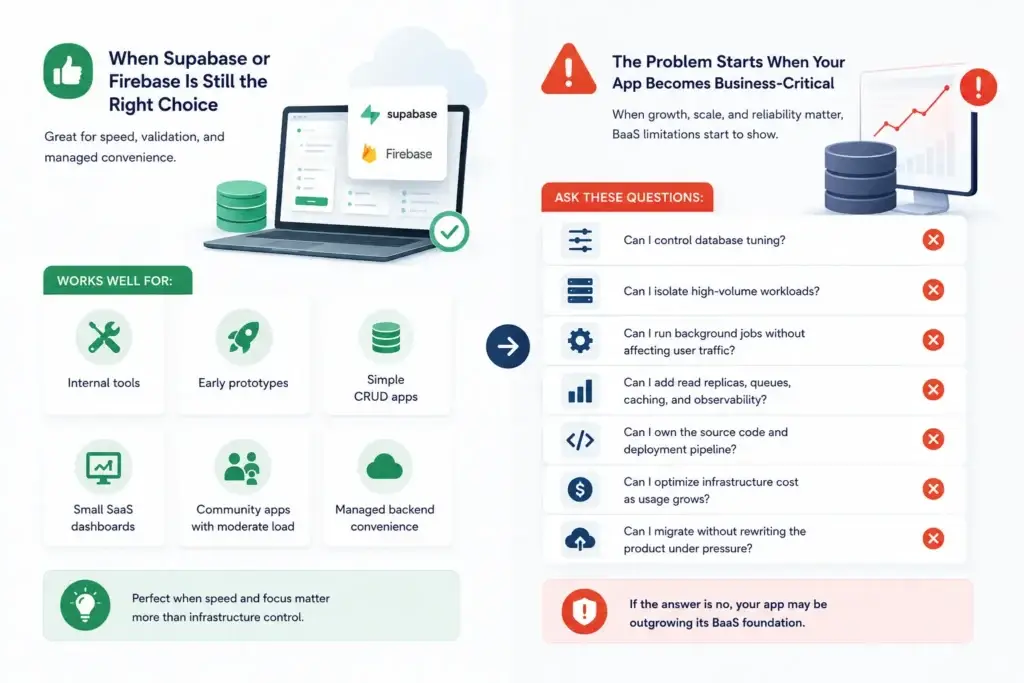
Supabase and Firebase are not bad choices. They are useful when speed matters, the product is still being validated, and the founding team wants managed authentication, storage, database APIs, and faster prototyping.
They work well for:
- Internal tools
- Early prototypes
- Simple CRUD apps
- Small SaaS dashboards
- Community apps with moderate load
- Products where managed backend convenience matters more than infrastructure control
The problem begins when the app moves from “working prototype” to “business-critical platform.”
At that stage, founders need to ask harder questions:
- Can I control database tuning?
- Can I isolate high-volume workloads?
- Can I run background jobs without affecting user traffic?
- Can I add read replicas, queues, caching, and observability?
- Can I own the source code and deployment pipeline?
- Can I optimize infrastructure cost as usage grows?
- Can I migrate without rewriting the product under pressure?
If the answer is no, the product may be outgrowing its BaaS foundation.
Read More: AI MVP Security Audit: The 14-Point Checklist for Founder Survival
Outgrowing BaaS: Moving to Dedicated White-Label Infrastructure
Backend-as-a-Service is excellent for getting started. Dedicated infrastructure is better when the product must scale as a business.
The difference is control.
With BaaS, you rent convenience. With dedicated white-label infrastructure, you own the product foundation, backend logic, deployment environment, and scaling strategy.
That control matters when your product includes:
- High user concurrency
- Frequent dashboard refreshes
- Real-time messaging or feeds
- Marketplace transactions
- Wallets, payments, or order flows
- Large media uploads
- Background jobs
- Admin reporting
- Multi-sided user roles
- Growth campaigns that create traffic spikes
A dedicated architecture can separate workloads instead of forcing everything through the same managed backend path.
For example:
| Workload | Dedicated Infrastructure Pattern |
| User-facing APIs | Node.js, Laravel, Python, or Go backend behind load balancer |
| Database | PostgreSQL or MySQL with tuned connection limits and indexing |
| Pooling | PgBouncer or managed pooler configured for app traffic |
| Cache | Redis for repeated reads and session-like workloads |
| Background jobs | Queue workers for emails, notifications, reports, and AI tasks |
| Media | Object storage plus CDN |
| Admin analytics | Read replica or reporting tables |
| Monitoring | Logs, metrics, alerts, and slow query tracking |
This is the type of structure founders need when the app is no longer just a demo. It is also why Miracuves focuses on launch-ready, white-label app foundations where backend, admin panel, database, and deployment logic are treated as one scalable product system.
Founder Decision Signals
Speed
If Supabase or Firebase helped you validate quickly, keep the learning. But if every traffic spike requires emergency debugging, your speed advantage is turning into operational drag.
Cost
BaaS pricing may look efficient early, but high-volume reads, storage, functions, and compute upgrades can change the cost equation. Dedicated infrastructure gives more room for cost planning and workload optimization.
Scalability
If connection pooling, caching, and query optimization are still not enough, the issue may be architectural. A business app needs predictable scaling, not only managed convenience.
Market Fit
If users are coming back, transactions are increasing, or campaigns are starting to work, backend reliability becomes part of product-market execution. The app must support growth without constant backend firefighting.
Supabase Fix vs Dedicated Infrastructure: What Founders Should Choose
| Decision Area | Supabase Pooling Fix | Dedicated White-Label Infrastructure |
|---|---|---|
| Best for | Early products, prototypes, internal tools, and moderate workloads. | Marketplaces, delivery apps, fintech apps, creator platforms, SaaS dashboards, and high-volume products. |
| Connection control | Managed through Supabase poolers, compute limits, and platform-level configuration. | Controlled through server architecture, PgBouncer, database tuning, workload separation, and deployment strategy. |
| Scaling flexibility | Depends on plan, compute tier, pooler limits, query design, and overall platform structure. | Can separate APIs, databases, cache, workers, media processing, analytics, and background jobs. |
| Founder control | Fast to configure, but infrastructure ownership and deep backend control remain limited. | Gives stronger source-code ownership, backend control, database visibility, admin flexibility, and DevOps freedom. |
| Operational risk | Works well until product complexity, user concurrency, and transaction volume start increasing. | Better suited for business-critical growth, custom workflows, high-volume traffic, and long-term scaling. |
| Miracuves fit | Useful for diagnosing early architecture pain and stabilizing short-term backend pressure. | Ideal for founders ready to move into a scalable, white-label, source-code-owned, launch-ready app foundation. |
Miracuves Perspective: Launch-Ready Apps Need Launch-Ready Infrastructure
The real issue is not Supabase versus PostgreSQL, Firebase versus custom backend, or PgBouncer versus direct connection.
The real issue is whether your backend architecture matches your business stage.
A founder building a marketplace, food delivery app, ride-hailing platform, fintech wallet, short video app, or SaaS dashboard cannot treat the backend as an afterthought. The backend controls user trust, transaction speed, admin visibility, monetization workflows, and long-term scalability.
Miracuves helps founders build ready-made and white-label app solutions with source-code ownership, admin dashboards, backend workflows, and deployment structures aligned with business growth. Instead of relying on a fragile AI-generated backend that was never designed for real concurrency, founders can start from a stronger product foundation.
For technical products that need stronger database control, explore Miracuves’ PostgreSQL database development expertise. For products that need backend, frontend, database, and DevOps handled together, review Miracuves’ full stack app development services. If your app needs cloud deployment, scaling, and production infrastructure, Miracuves also supports AWS development for business-ready cloud architecture.
Mistakes Founders Should Avoid
Only increasing connection limits
Raising limits without checking leaks, slow queries, serverless concurrency, and ORM pool settings can make the system more expensive and still unstable.
Using direct database connections everywhere
Serverless and edge-style workloads usually need pooling discipline. Direct connections are useful, but they are not the right answer for every runtime path.
Trusting AI-generated backend defaults
AI-generated code may create working database logic, but it often misses production concerns such as connection reuse, caching, slow query analysis, and observability.
Ignoring background jobs
Emails, notifications, reports, AI workflows, imports, and analytics can quietly consume database capacity if they are not moved into queues or worker processes.
Waiting until users complain
Connection failures create trust damage. Founders should monitor database connections, slow queries, and error rates before marketing campaigns or investor demos.
A Practical 30-Minute Triage Checklist
If your Supabase backend is crashing right now, follow this order:
- Capture the exact error message.
- Check
pg_stat_activityfor live and idle connections. - Identify which services are opening the most connections.
- Confirm whether API routes are using direct connection strings or pooler URLs.
- Reduce ORM pool size if every serverless instance is opening too many connections.
- Move serverless or short-lived traffic to transaction pooling where compatible.
- Disable or adjust prepared statements if your ORM requires it for transaction pooling.
- Cache repeated public reads.
- Add indexes for slow high-frequency queries.
- Separate background jobs from user-facing traffic.
- Monitor connection count during a real usage window.
- Decide whether the app needs a dedicated backend architecture before the next growth campaign.
This is the difference between emergency debugging and infrastructure maturity.
Final Thoughts: Fix the Pool, Then Fix the Product Foundation
Supabase connection limits are not just a database error. They are a signal that your product is moving from demo logic into real-world infrastructure pressure.
The immediate fix may be PgBouncer, transaction pooling, ORM tuning, query caching, and better connection monitoring. But the deeper founder decision is whether your app should continue depending on a general BaaS setup or move into dedicated infrastructure designed around your business model.
For early testing, Supabase and Firebase can be excellent. For high-volume platforms, transaction-heavy apps, marketplaces, and monetization-ready products, infrastructure ownership becomes a competitive advantage.
Miracuves helps founders take that next step with white-label, source-code-owned app solutions that combine backend logic, admin control, deployment support, and scalable architecture from the beginning.
FAQs
Why does Supabase say connection limit exceeded when I have only a few users?
Because database connections are not equal to users. One user can trigger multiple API requests, serverless functions, dashboard queries, background jobs, and real-time listeners. If each process opens its own database connection, a small number of users can create a large number of active or idle connections.
How do I fix Supabase connection limits quickly?
Start by checking active connections with pg_stat_activity, identify idle or repeated connections, reuse database clients, tune ORM pool sizes, use the correct Supabase pooler URL, add caching for repeated reads, and optimize slow queries before increasing limits.
Is Supabase bad for production apps?
No. Supabase can work well for many production use cases. The issue is whether the architecture, compute tier, pooling strategy, query design, and workload pattern match the app’s growth stage.
Is Firebase better than Supabase for avoiding connection limits?
Firebase and Supabase have different architectures. Firebase abstracts many server/database concerns, while Supabase exposes PostgreSQL-style database behavior. Firebase can still create cost, query, indexing, and scaling challenges as the app grows. The better question is whether your product needs managed convenience or dedicated infrastructure control.
When should founders move from BaaS to dedicated infrastructure?
Move when the app has high concurrency, transaction-heavy workflows, complex background jobs, strict admin needs, custom database logic, scaling pressure, cost-optimization needs, or source-code ownership requirements.
Can Miracuves help migrate from Supabase or Firebase?
Yes. Miracuves can help founders move toward dedicated backend architecture, white-label app infrastructure, admin dashboards, source-code-owned solutions, and scalable deployment paths based on the product’s business model.
Miracuves is an independent software development company. We are not affiliated with, connected to, sponsored by, or endorsed by any company or product named in this article.
Terms such as “X Clone” are used descriptively. It is how the software industry refers to building a platform with functionality comparable to a known service, and how clients search for it.
The entire design and codebase of our products is built by our own team. Our products contain no code, design, graphics, or content originating from any third-party website or applications.
All third-party names and marks referenced in this article are the property of their respective owners, referenced solely to identify the services discussed.