Multi-Trip Taxi App · Production Ready

Careem Clone App - White-Label Ride-Hailing Platform

Built by Miracuves, this ready-made, white-label Careem clone becomes your region's multi-service ride app, with rider and driver apps for Android and iOS, web booking, a staff console and a business portal, every source file yours and live in six working days.

One rider home holds Cab, Parcel, Freight, Ambulance and Find Driver, and the apps switch to Arabic with a right-to-left layout. Paid extras such as in-car entertainment, a tour guide or voice commands stay optional. A new service tile, such as school runs with their own fare rules, is custom work: we fix the scope in writing and have it running within 2-8 weeks.

Launch in 6 Days with

  • Source Code
  • Rider App
  • Driver App
  • Rider Web App
  • Business Portal
  • Android + iOS

StackReact Native · Laravel 11 · MySQL · Redis · Reverb · OpenStreetMap

MXUber console · Trip deskIllustrative
Rides today148
Rental bookings23
Outstation requests9

Trip activity

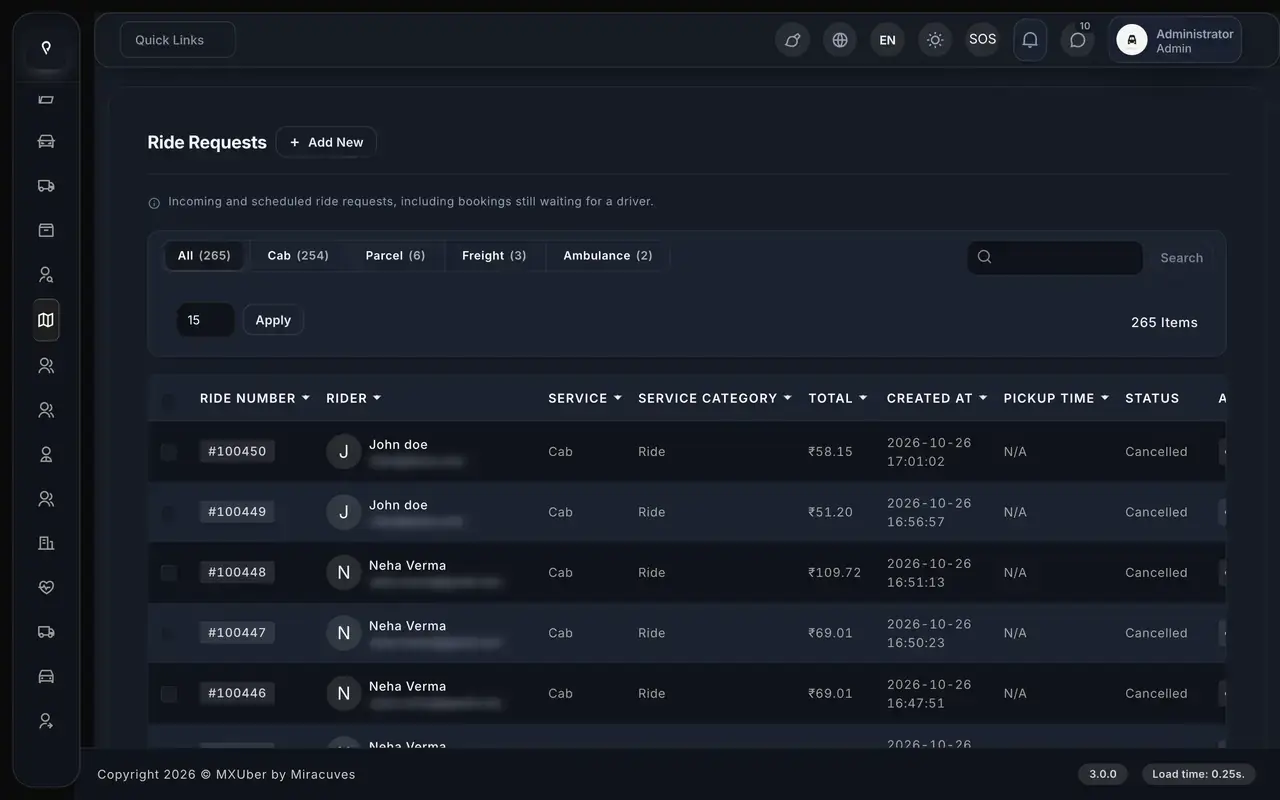
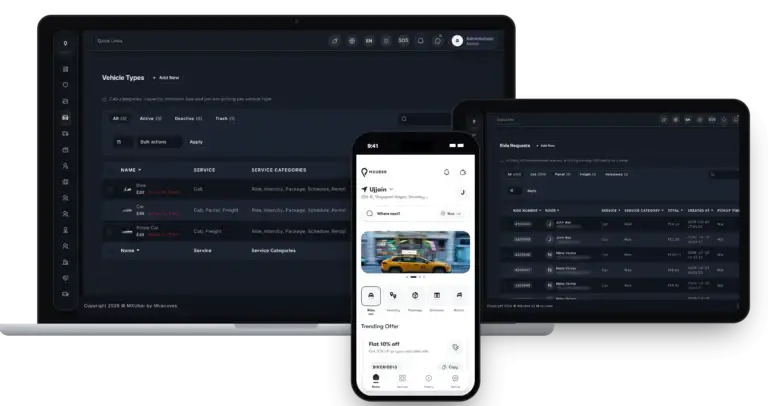
Admin · Ride RequestsReal screen
Careem Clone App - White-Label Ride-Hailing Platform - real admin screen, Ride Requests
App in action
One home mapfive trip services
  • 5Trip Servicescab, parcel, freight, ambulance and hire-a-driver
  • 4App LanguagesEnglish, Arabic, French and Spanish
  • 0%Revenue Share With Miracuvesno royalty on any fare or delivery, ever
  • 100%Source Codeeach file handed over unencrypted
  • 6Days to Launchand if the delay is ours, we keep going free
  • $3,099Paid Once, Not Rentedsource code yours, no per-seat fee, no monthly rental

Live in six working days, or we keep working free until you launch. Every build carries 60 days guidance, 6 months bug fixes and 12 months updates.Verify every figure

Parcels Close on a Code

A parcel is priced by weight, and the receiver must give the delivery OTP before the driver can close the trip.

Aone Started on MXUber

Aone set out to run a ride-hailing service of its own, and Miracuves started from an earlier release of MXUber, the base sold on this page.

Card Data Stays at the Gateway

The gateway you connect holds card data, and the platform keeps only a reference; riders can also pay cash or from a wallet they top up.

Need one ride app that serves city commutes, rental hire and trips to other towns?Ask Our Product Expert

Chosen by 6,000+ clients worldwide

Miracuves is listed by Expertise.com as a managed IT service provider.Miracuves is an official member of the Forbes Business Council.Miracuves is a verified agency on DesignRush, listed among top design agencies in India.Miracuves is reviewed on Trustpilot as a software development company.Miracuves is listed by The Manifest among top managed software development companies.Miracuves is listed by DesignRush as a top software development company.Miracuves is recognized by GoodFirms as a top software development company.Miracuves is ranked among the top 1000 companies globally by Clutch.Miracuves is a top managed service provider in the United States on Clutch.

01Start with a demo

Try It Yourself

Careem Clone Demo: Rider, Driver, Browser Booking & Operator Consoles

Miracuves lets you try its Careem clone app for yourself, with every console open before any call. Rider, driver, dispatcher, fleet and admin logins are listed below, so every console opens without a call. On the rider home screen, move between Cab, Parcel, Freight, Ambulance and Find Driver, book a trip, then switch the app to Arabic and watch the layout turn right-to-left.
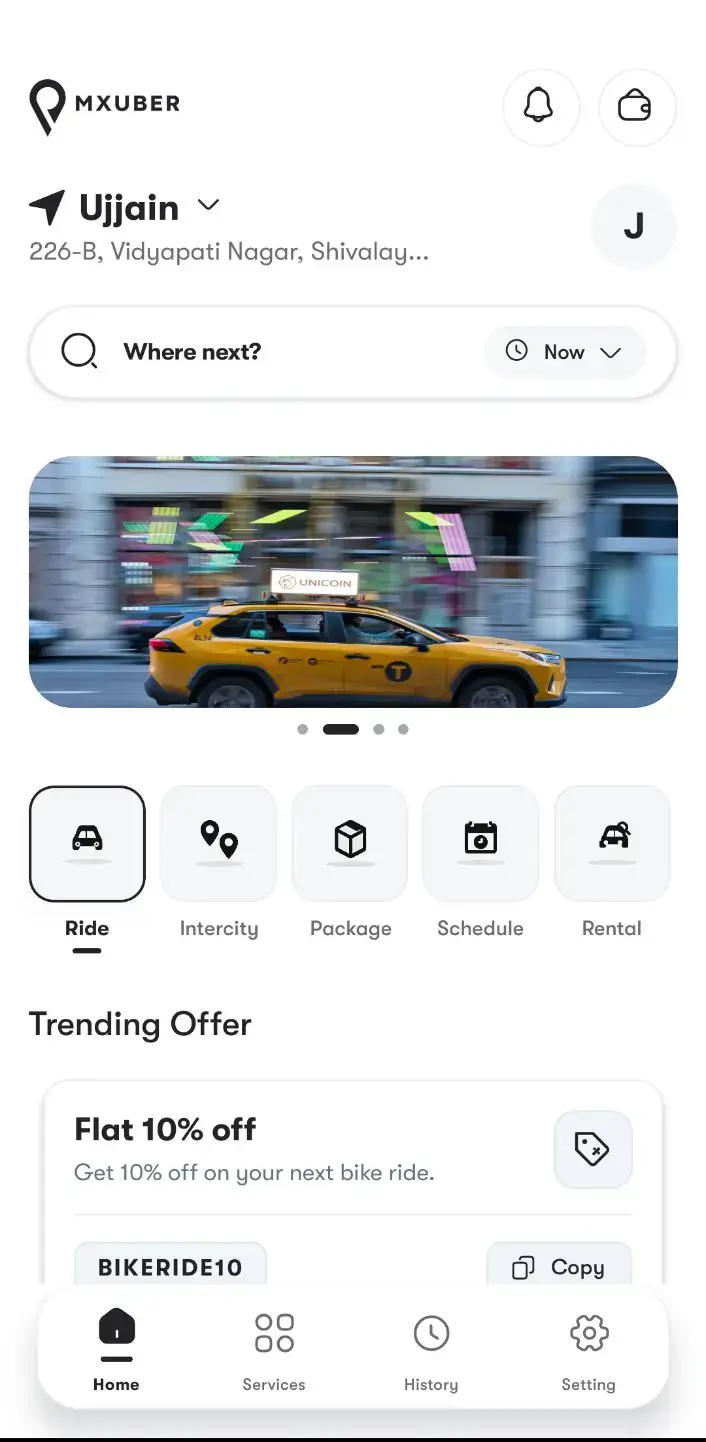
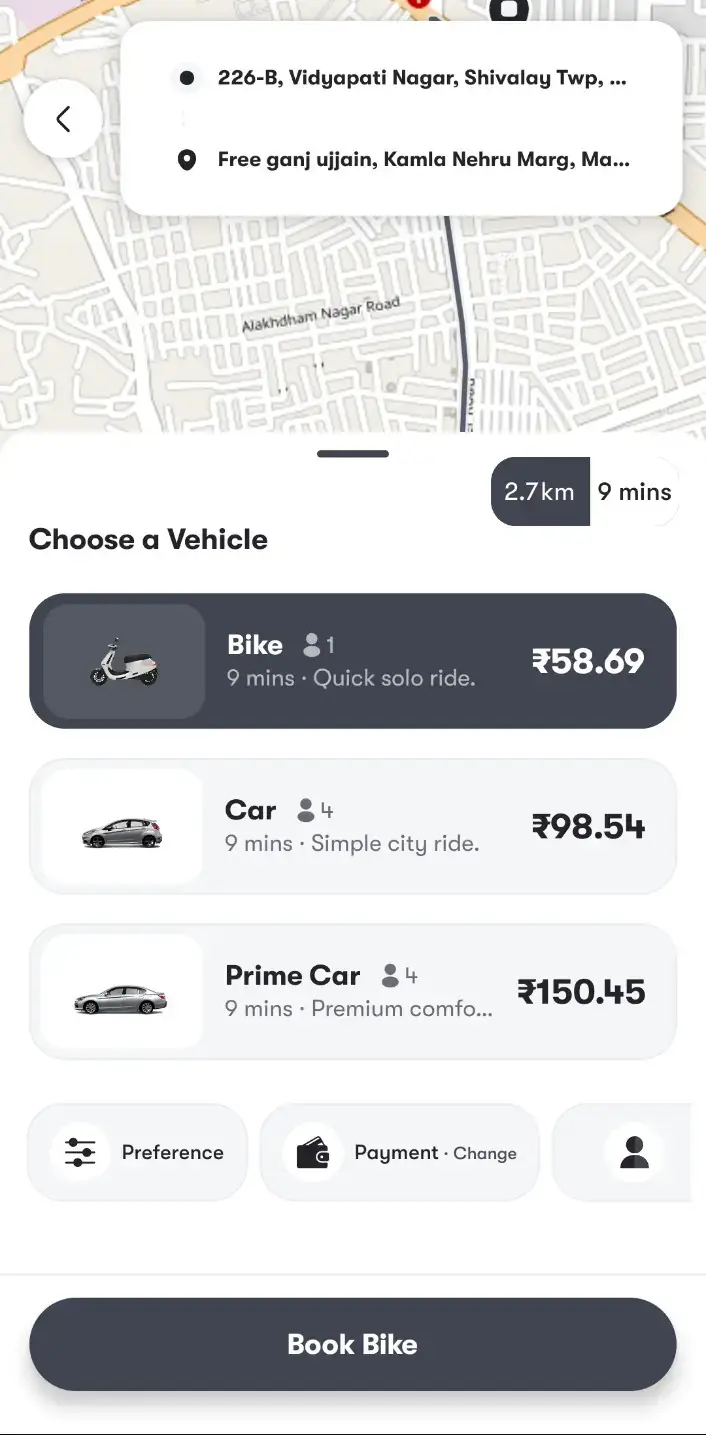
Careem Clone rider home with Where next search and Ride, Intercity, Package, Schedule and Rental tilesCareem Clone rider choosing Bike, Car or Prime Car with fares and arrival times before booking
Passengers

Try the Rider App

The full rider side on a handset: sign in with OTP, Google or Apple, or browse as a guest, choose a service tile and compare the fare and ETA for each vehicle before you book.

  1. 1Download the rider app from the portal
  2. 2Sign in with the login details given below
  3. 3Try Cab, Parcel and Find Driver, then switch to Arabic
Try:+91 9876543210 | User_321
  • Ride offers: accept or decline
  • The route on a map
  • Earnings donut chart
  • Plan subscriptions
Drivers

Try the Driver App

Where trips land. An offer rings in and the driver accepts it, or sends a counter-bid when the ride is open to bidding. Then comes the route, the fare collected and earnings building up.

  1. 1Open the driver portal
  2. 2Use the driver login below
  3. 3Flip the online switch, then open offers and earnings
Try:driver@demo.com | Driver_321
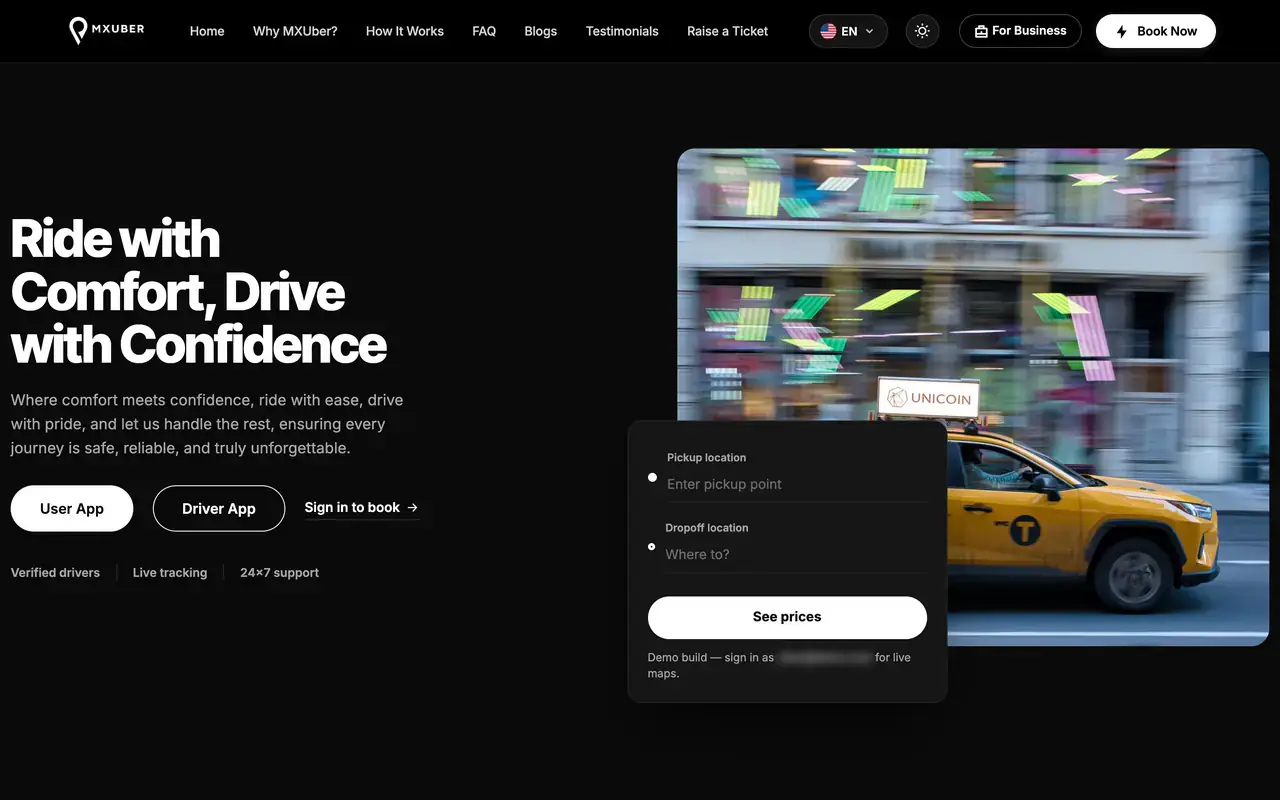
Careem Clone rider website hero with pickup and drop-off fields, See prices button and rider and driver app links
Website

Rider Web App & Site

Book from a browser at /cab, with a map for pickup and drop-off, scheduling and live GPS tracking in real time. The public site introduces the service and links both apps.

  1. 1Open the rider web login page
  2. 2Use the rider login below
  3. 3Book a ride, then check history, wallet and invoices
Rider web:+91 9876543210 | User_321
  • Dispatch: assign by hand
  • Fleet: drivers, vehicles, earnings
  • Admin: zones, surge, airports, coupons
Staff

Admin, Fleet & Dispatch Consoles

Where the staff work: dispatchers create phone bookings and assign drivers by hand, fleet managers follow their own drivers and earnings, and admins set zones, surge by vehicle and time, airports and payouts.

  1. 1Open the staff login page
  2. 2Sign in with the admin, dispatcher or fleet login below
  3. 3Check the live map, peak zones and fleet earnings
Logins:Admin: admin@demo.com | Admin_$321Dispatcher: dispatcher@demo.com | Dispatcher_321Fleet: fleet@demo.com | Fleet_321
Careem Clone on three phones: the rider app onboarding screen, the rider app menu with wallet, SOS and out-station and the suggested rides and fare listCareem Clone rider choosing Bike, Car or Prime Car with fares and arrival times before bookingCareem Clone rider home with Where next search and Ride, Intercity, Package, Schedule and Rental tiles

See It With Us

A Live Tour of a Multi-Service Ride App Like Careem: Cab, Parcel, Freight, Ambulance & Find Driver

Prefer a guide? On a 30-minute call we put the rider app, the driver app and every console on screen together and follow one booking from the home screen to its payout, covering how a cab ride, a parcel, an ambulance call and a hired driver are each requested, priced and handed to a driver. The logins above work with or without us.

Reserve a 30-minute call

Screens, Step by Step

Careem Clone App Flows - Rider Screens, Driver Screens, Admin Panel & Website

Start on the six rider screens of the Miracuves Careem clone, from splash and sign-in to the booking, then move through six driver screens, 13 admin screens and the three pages of the website.

Careem Clone rider app splash screen with the logo over a night street
Careem Clone rider sign-in with phone or email OTP, Google sign-in and guest entry
Careem Clone rider home with Where next search and Ride, Intercity, Package, Schedule and Rental tiles
Careem Clone rider choosing Bike, Car or Prime Car with fares and arrival times before booking
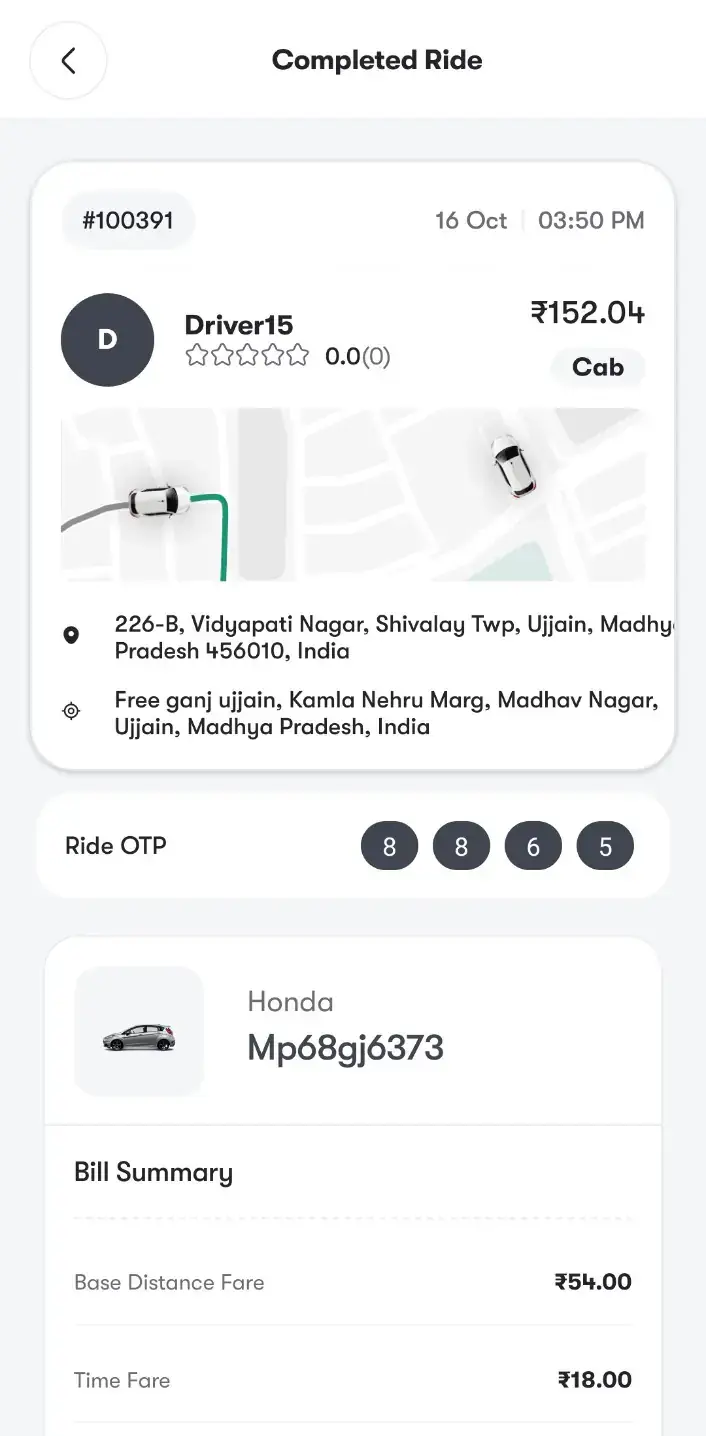
Careem Clone completed ride with route, ride OTP, vehicle and bill summary
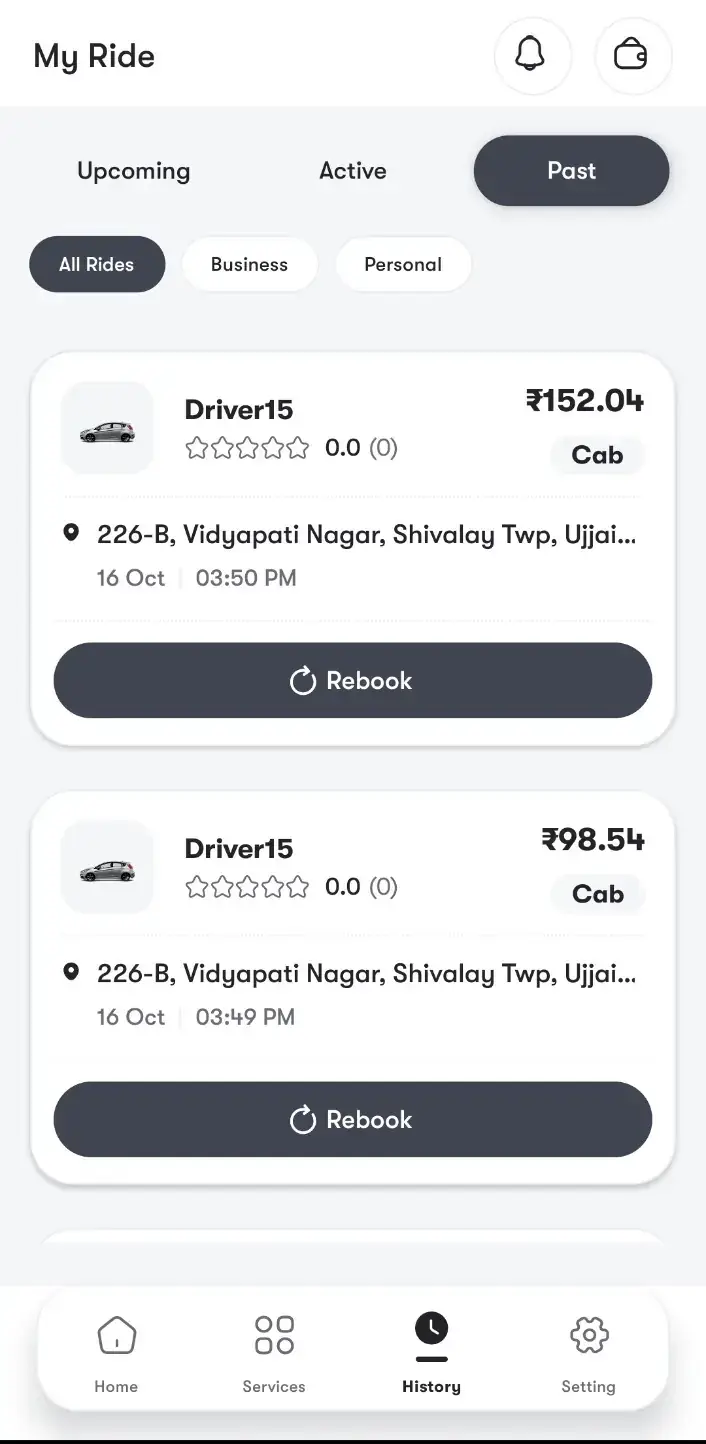
Careem Clone ride history with business and personal filters and one-tap Rebook
6 screens · scroll →
Careem Clone driver app splash screen
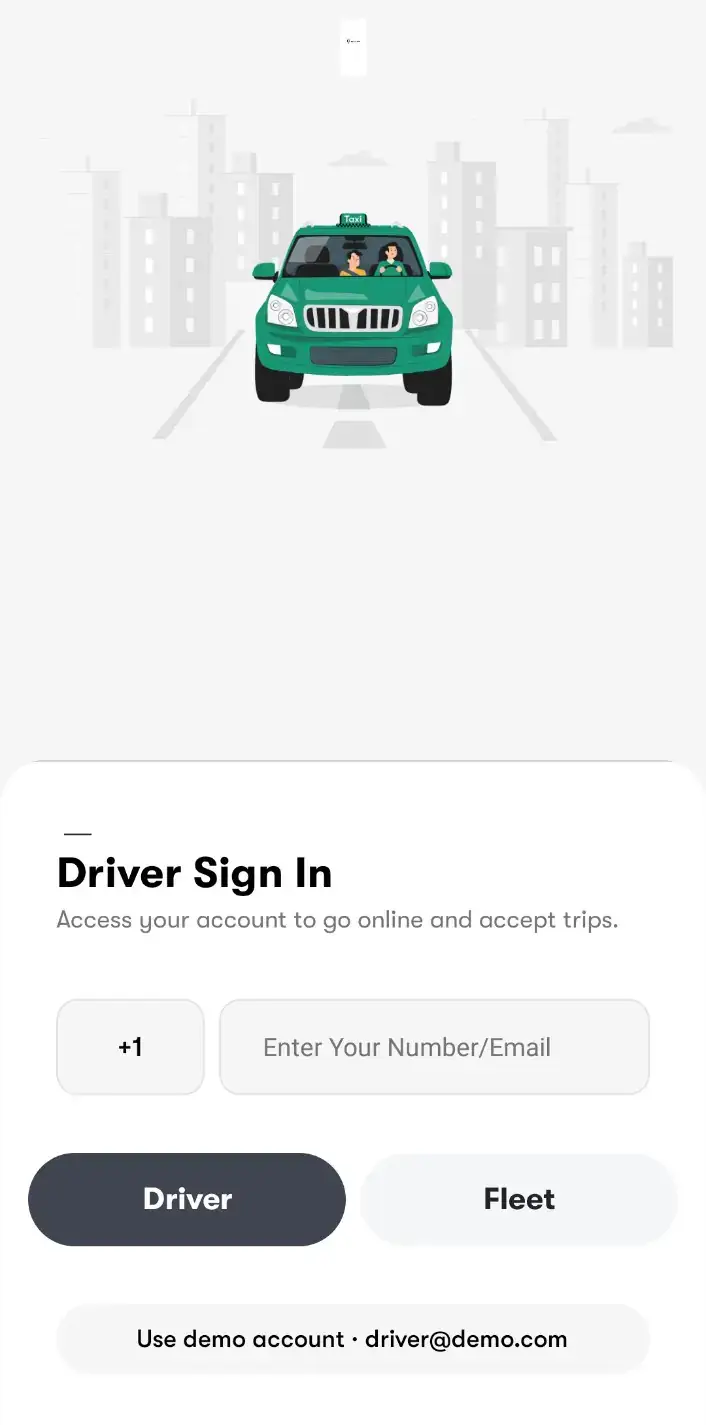
Careem Clone driver sign-in with Driver and Fleet options
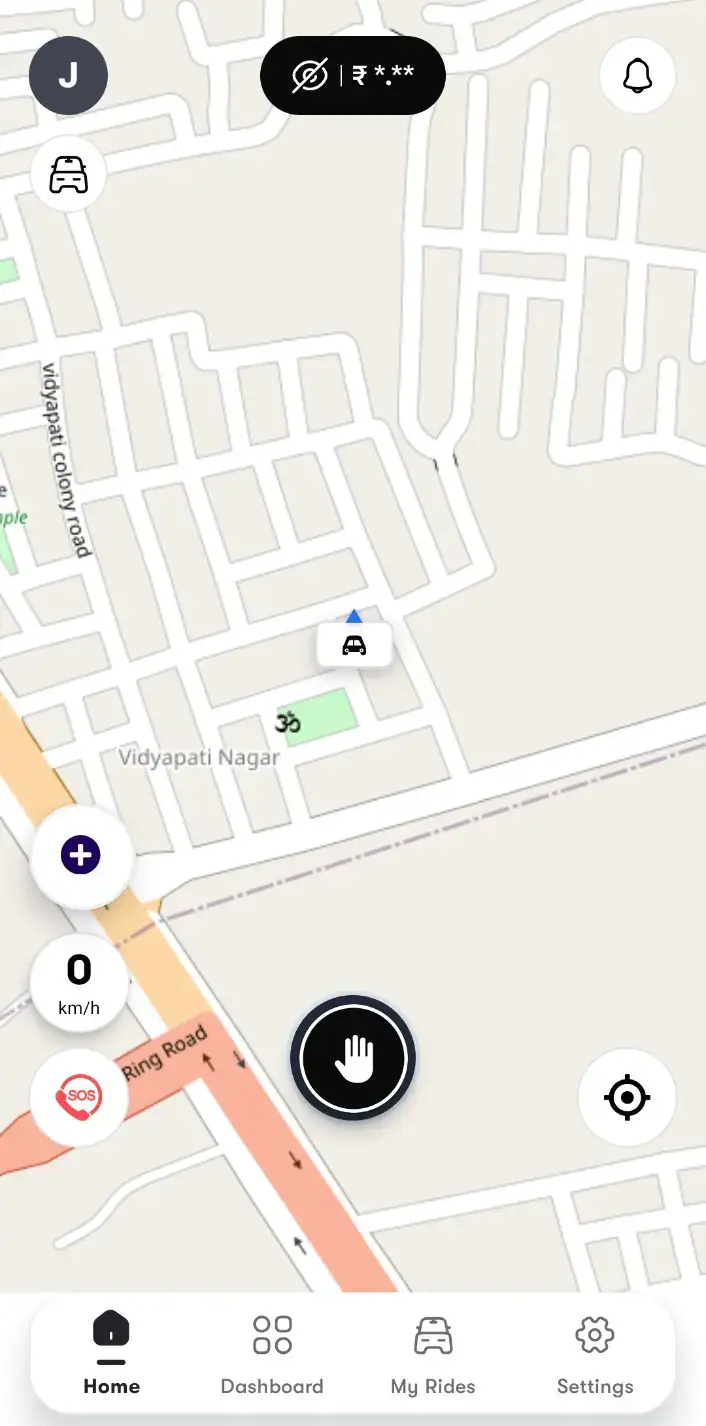
Careem Clone driver home map with the online power button and hidden earnings chip
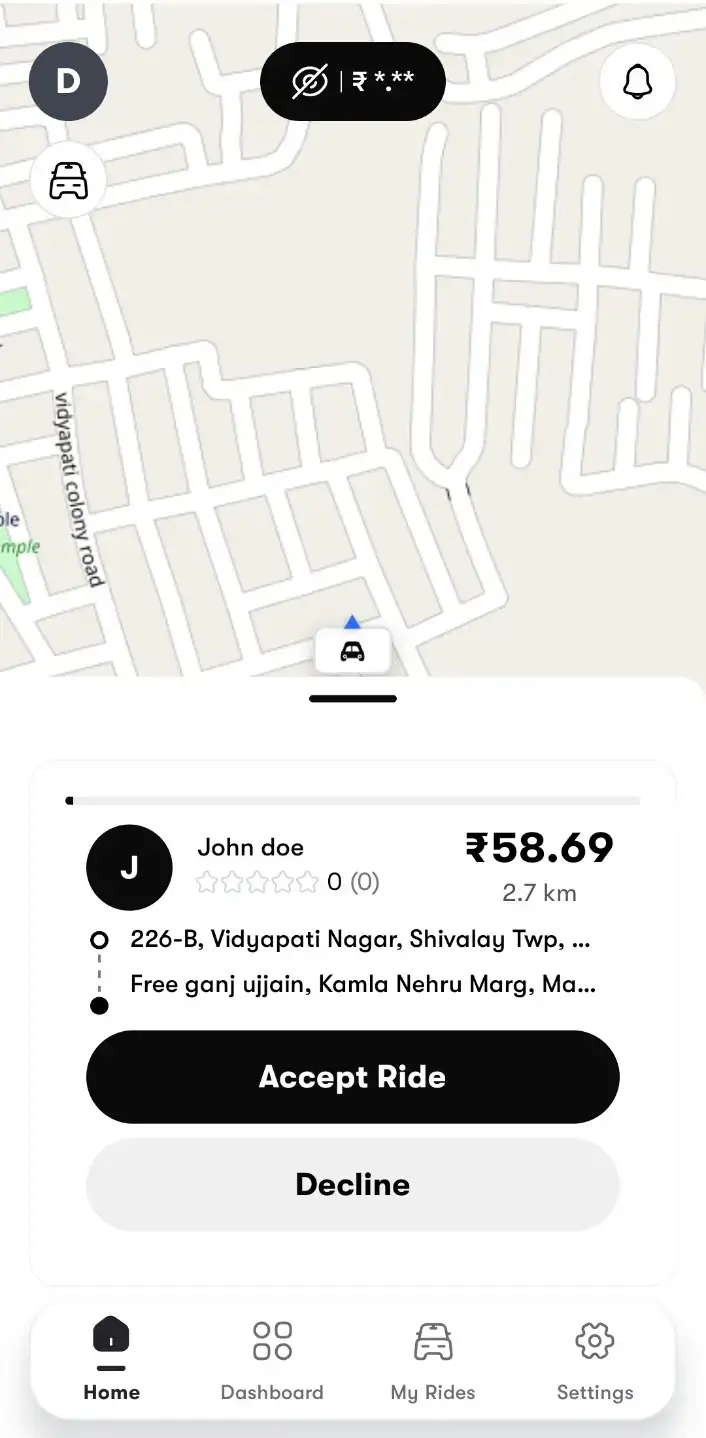
Careem Clone driver ride offer with rider, fare, distance, pickup and drop-off and Accept Ride or Decline
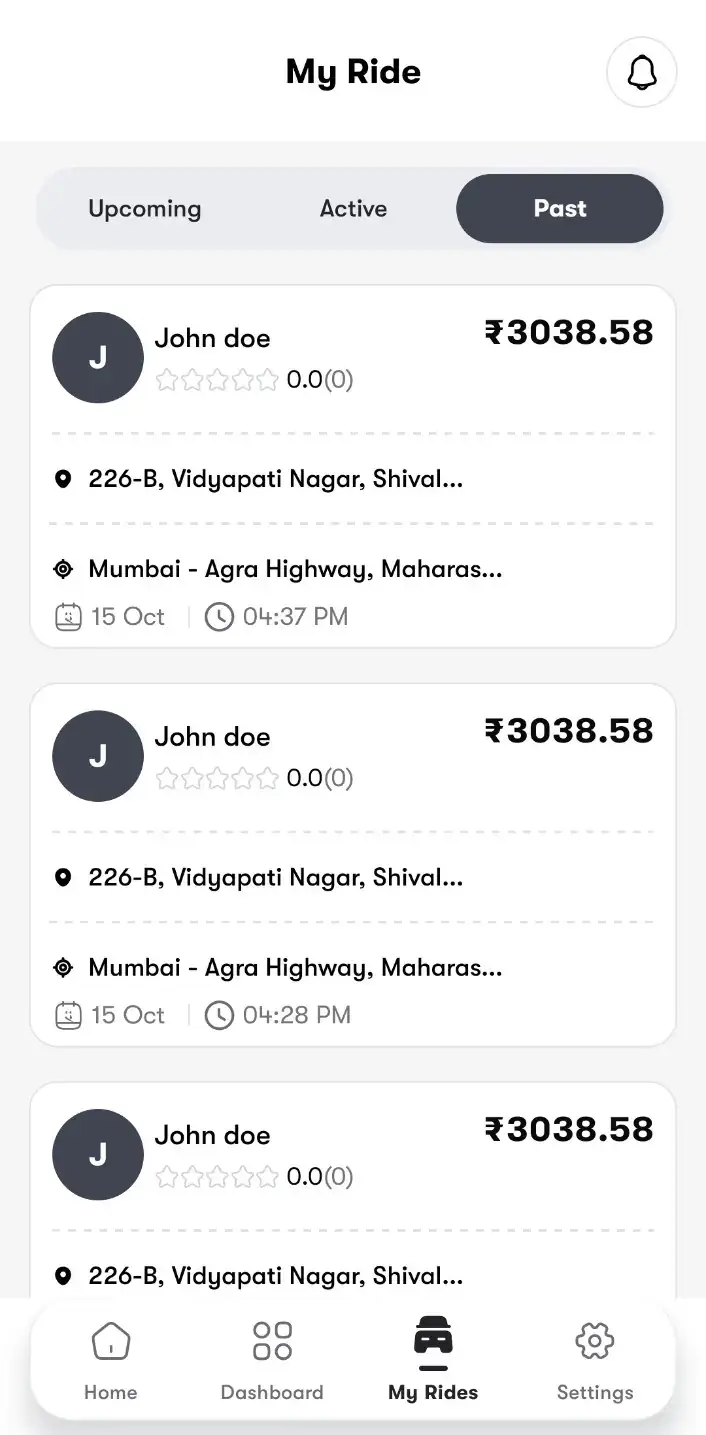
Careem Clone driver My Ride list with upcoming, active and past rides and fares
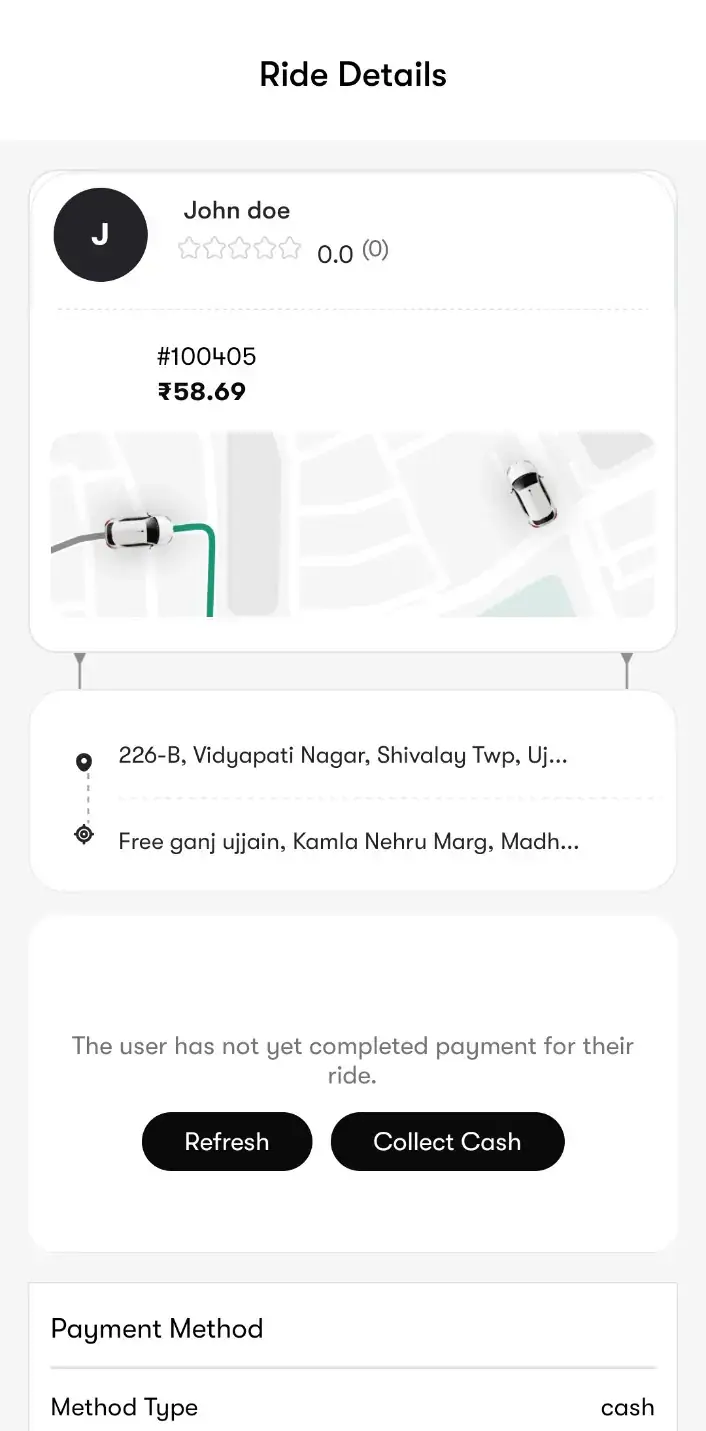
Careem Clone driver ride details with route and Collect Cash for an unpaid ride
6 screens · scroll →
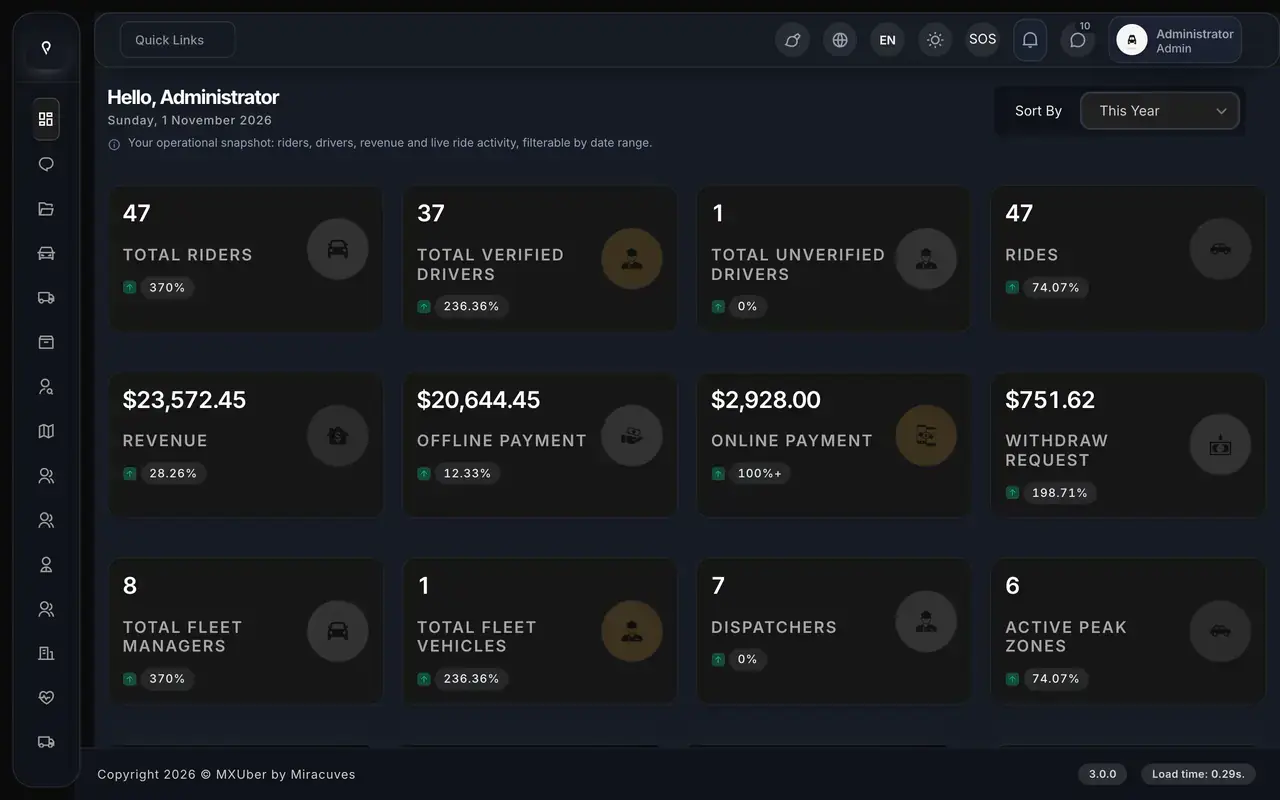
Careem Clone admin dashboard showing riders, verified drivers, rides, revenue, payments, withdrawals, fleet managers and peak zones
Careem Clone ride requests list filtered by cab, parcel, freight and ambulance with rider, service, fare and status
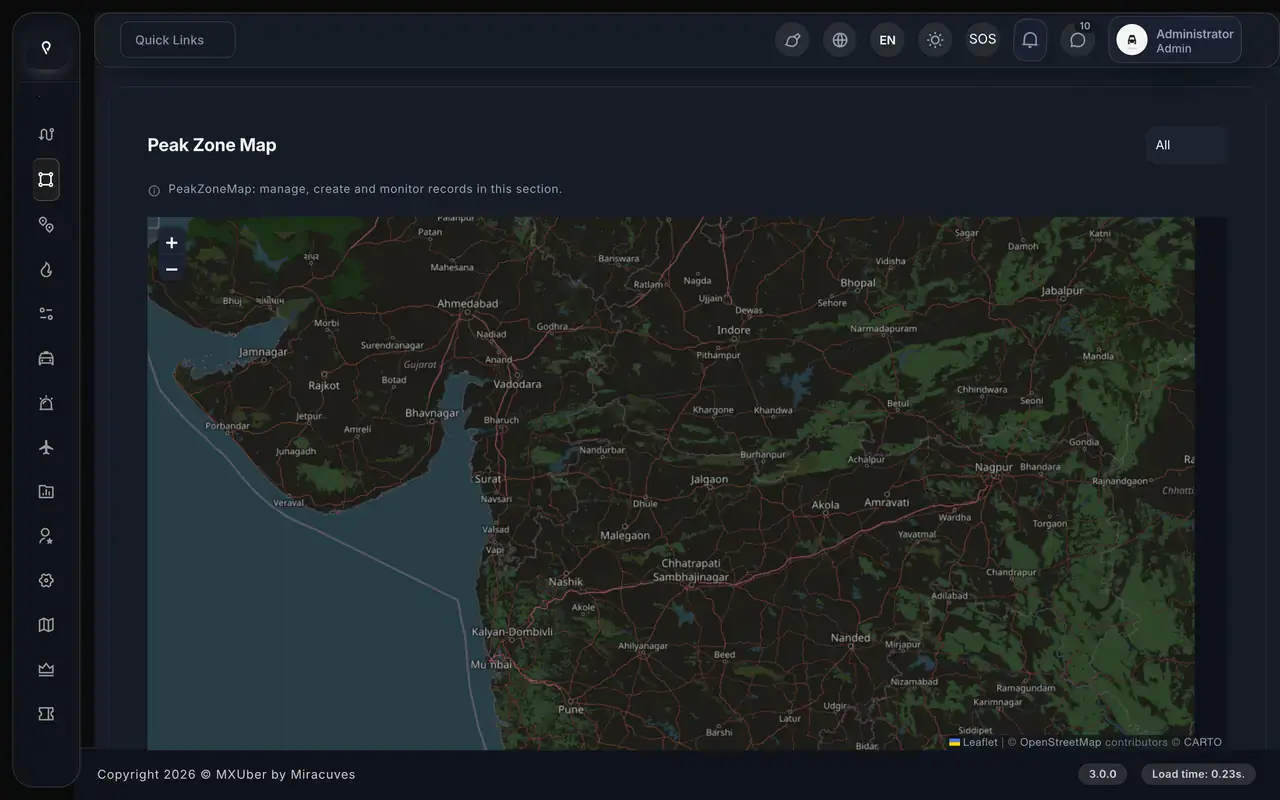
Careem Clone admin peak zone map on an OpenStreetMap base layer, where operators draw surge areas
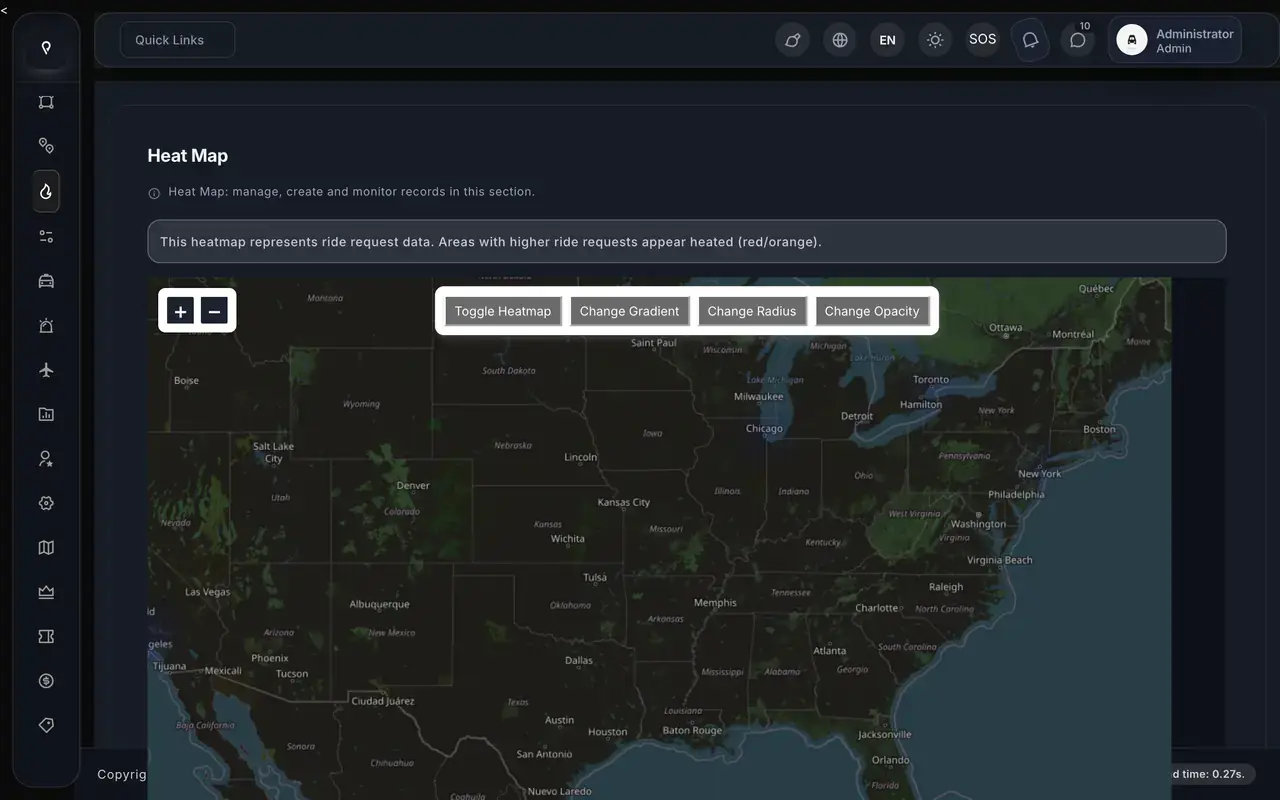
Careem Clone admin heat map showing ride request density across the map
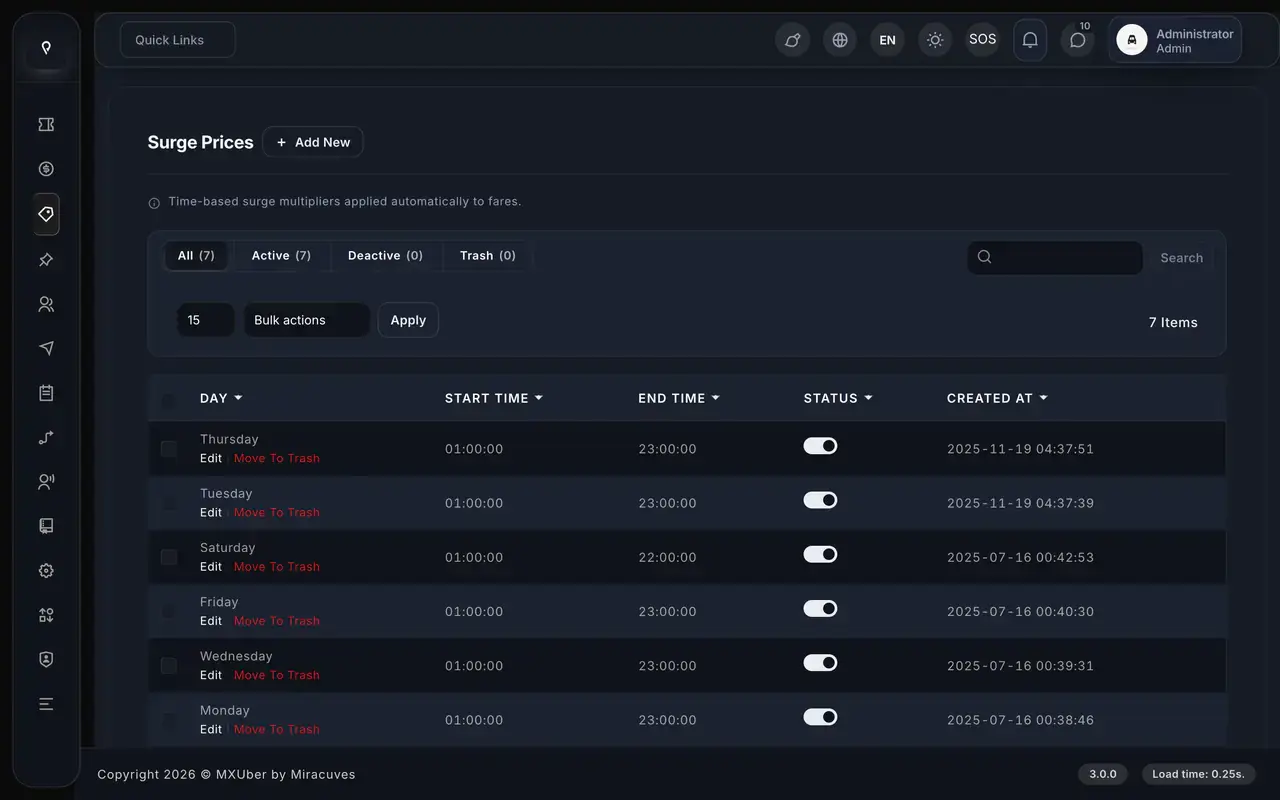
Careem Clone surge prices by day with start and end time
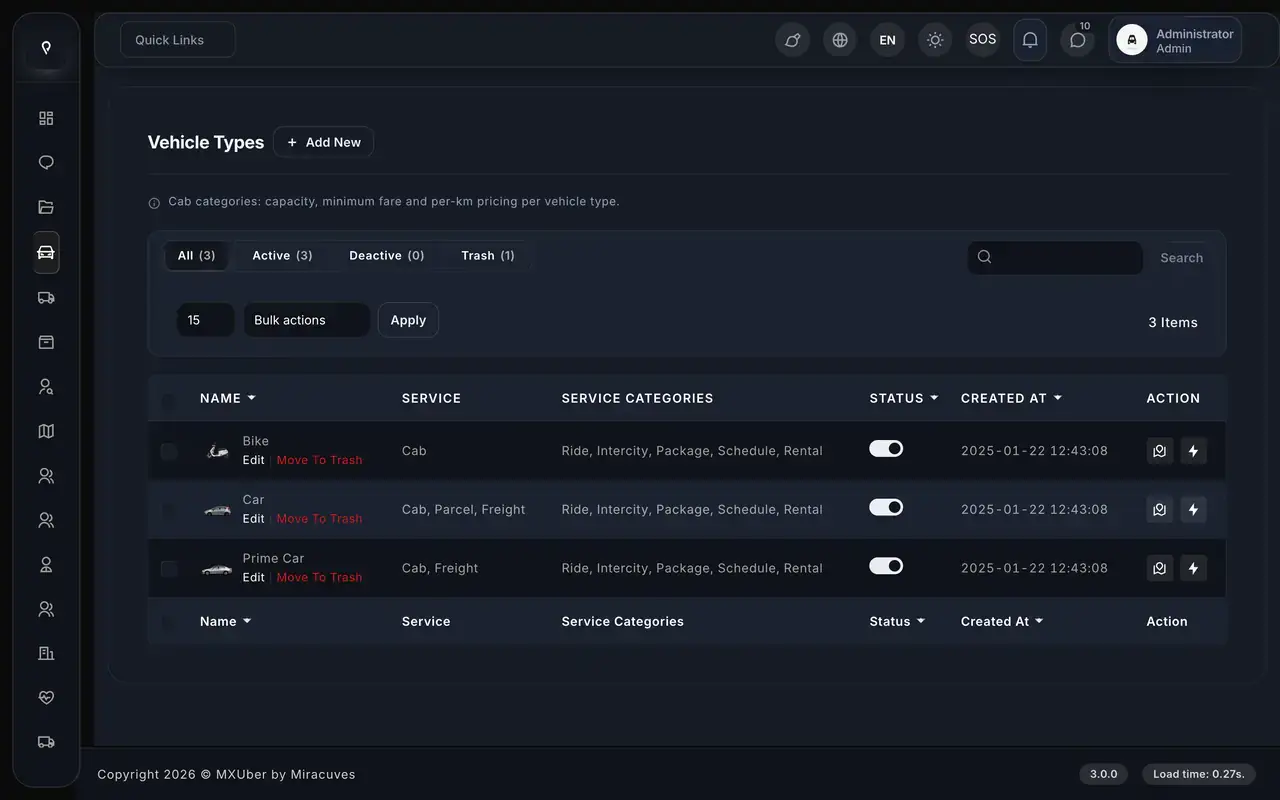
Careem Clone vehicle types bike, car and prime car mapped to cab, parcel and freight services and ride categories
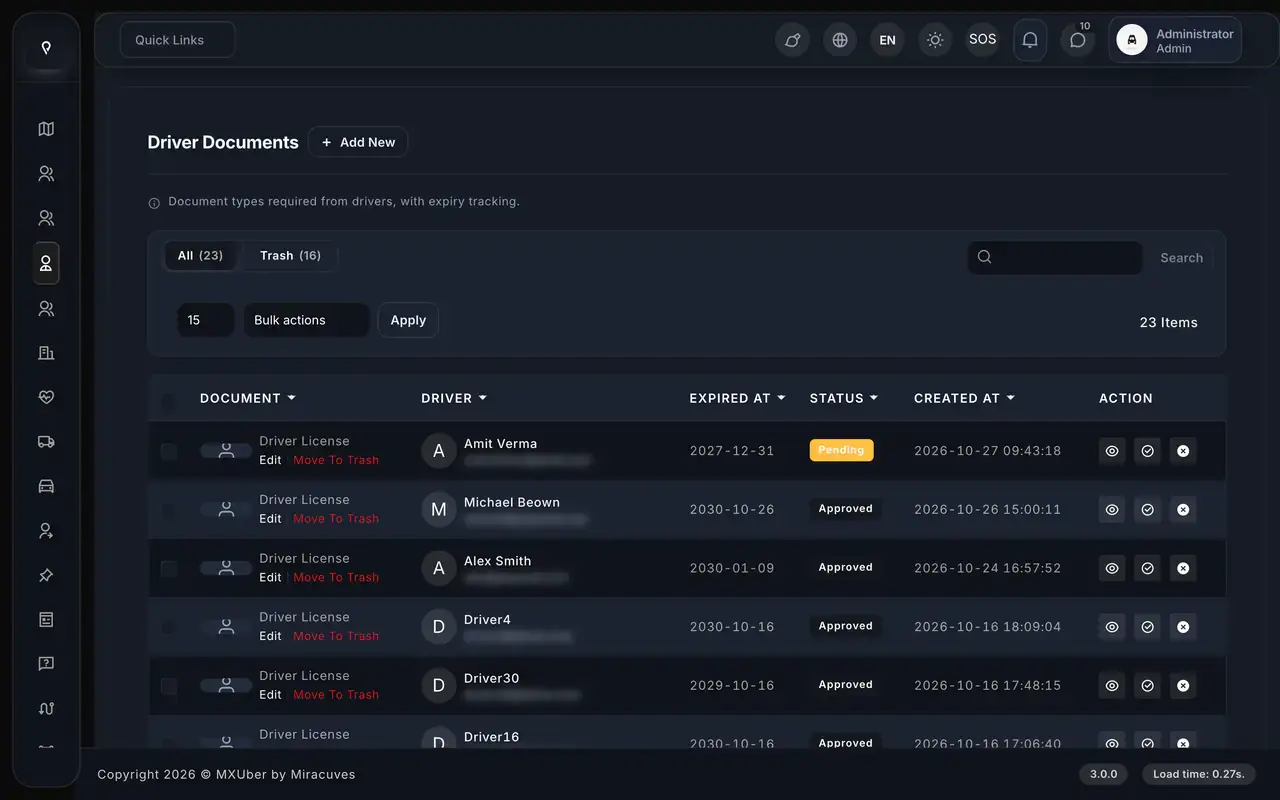
Careem Clone driver documents list with expiry dates and pending or approved status
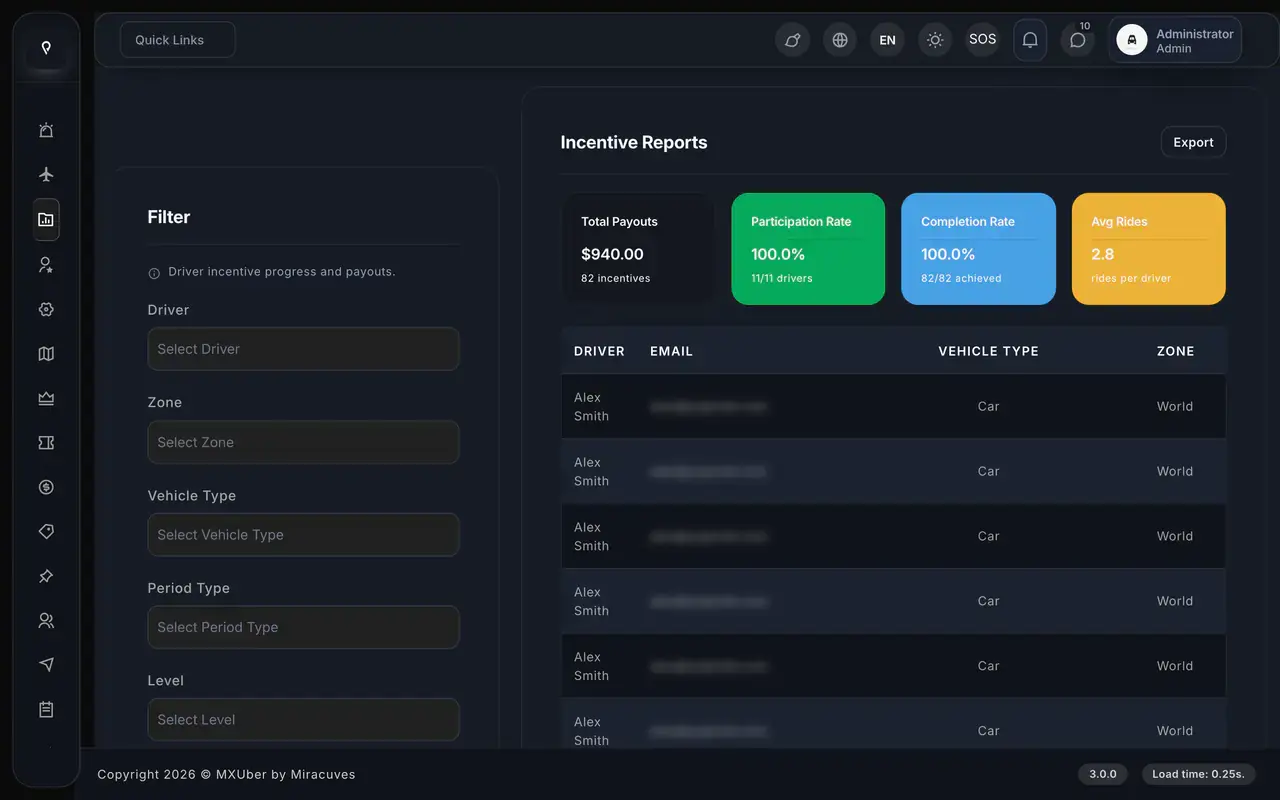
Careem Clone incentive report with total payouts, participation rate, completion rate and average rides per driver
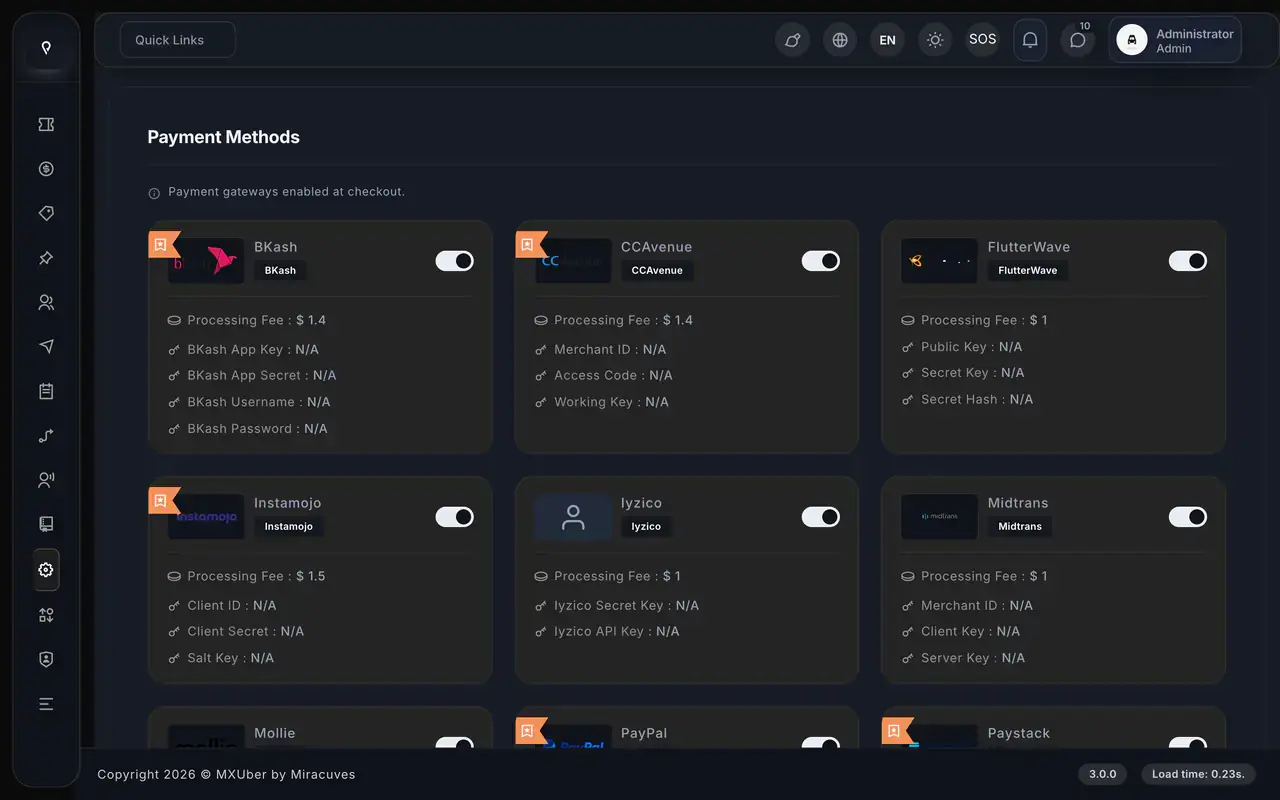
Careem Clone payment methods screen with bKash, CCAvenue, Flutterwave, Instamojo, Iyzico, Midtrans, Mollie, PayPal and Paystack toggles
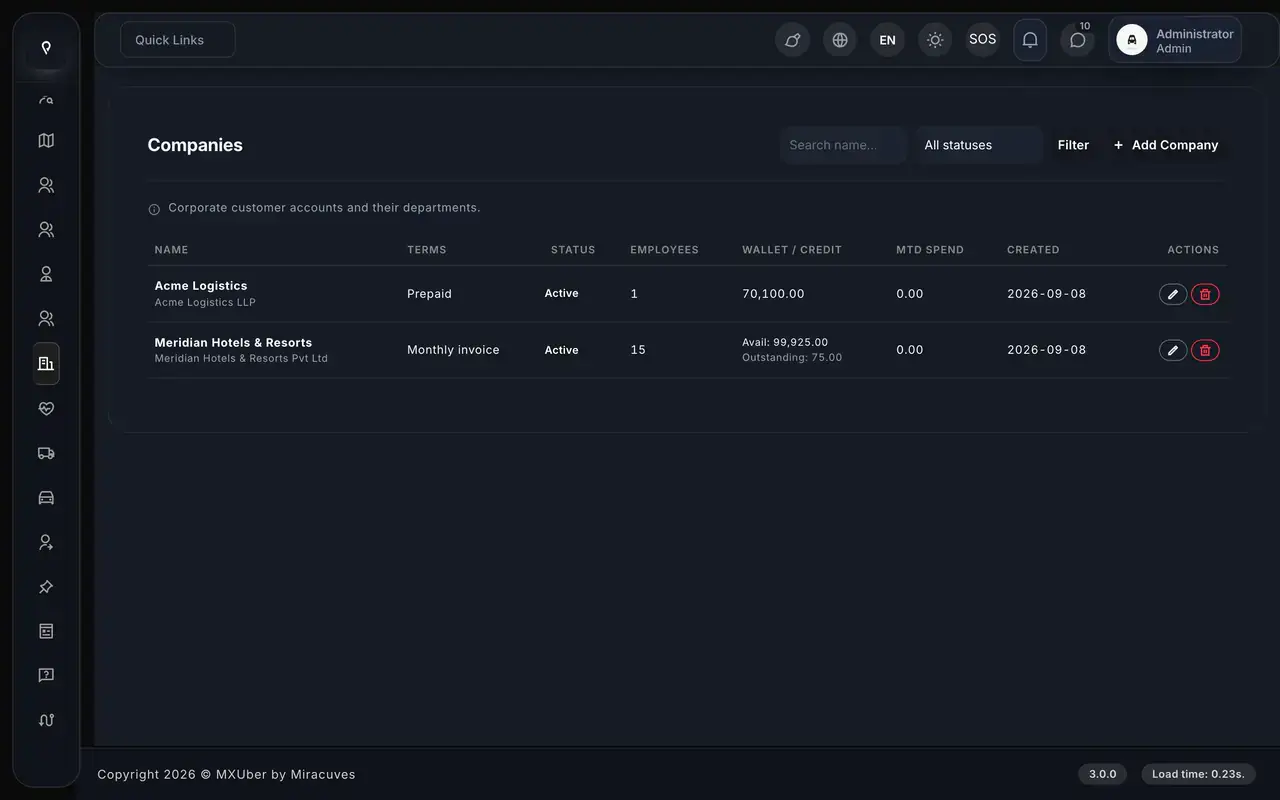
Careem Clone companies list with billing terms, employee counts, wallet credit and month-to-date spend
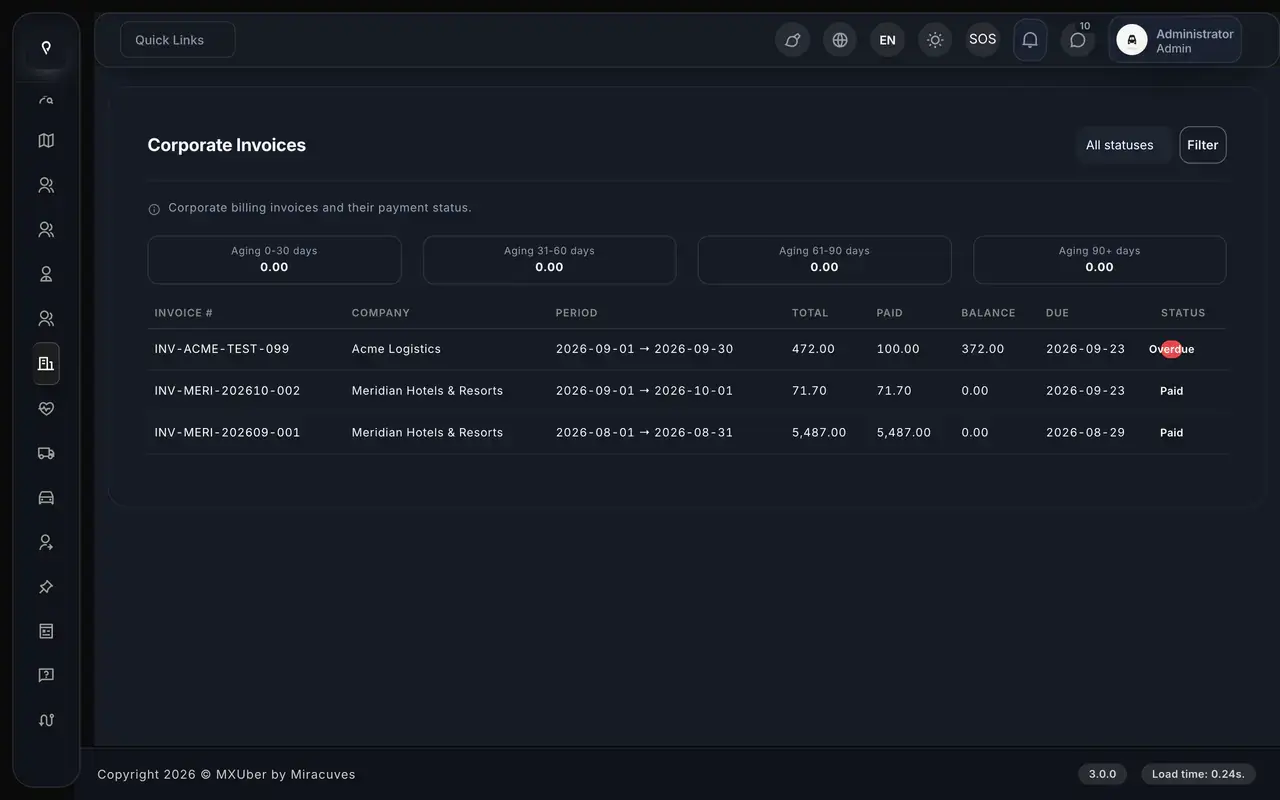
Careem Clone corporate invoices with aging buckets, billing periods, totals, balances and paid or overdue status
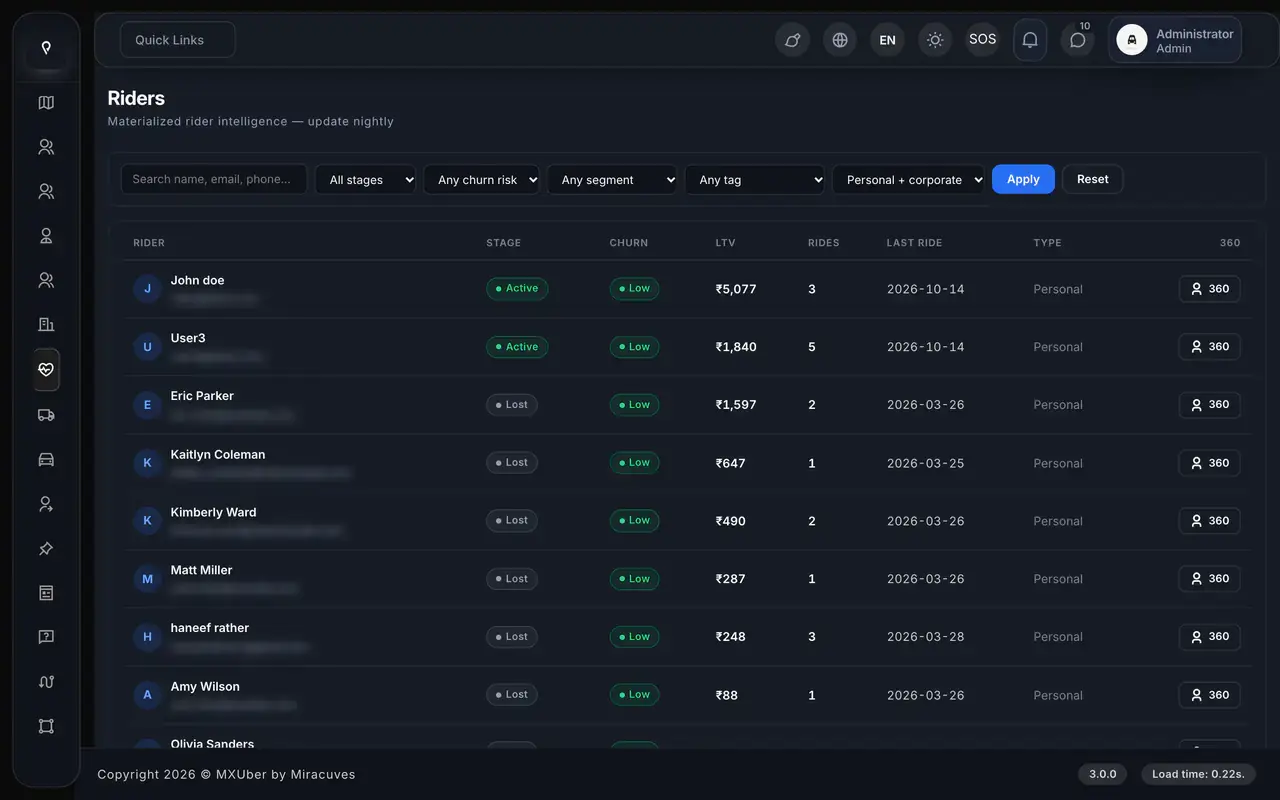
Careem Clone Riders 360 list with lifecycle stage, churn risk, lifetime value, rides and last ride date
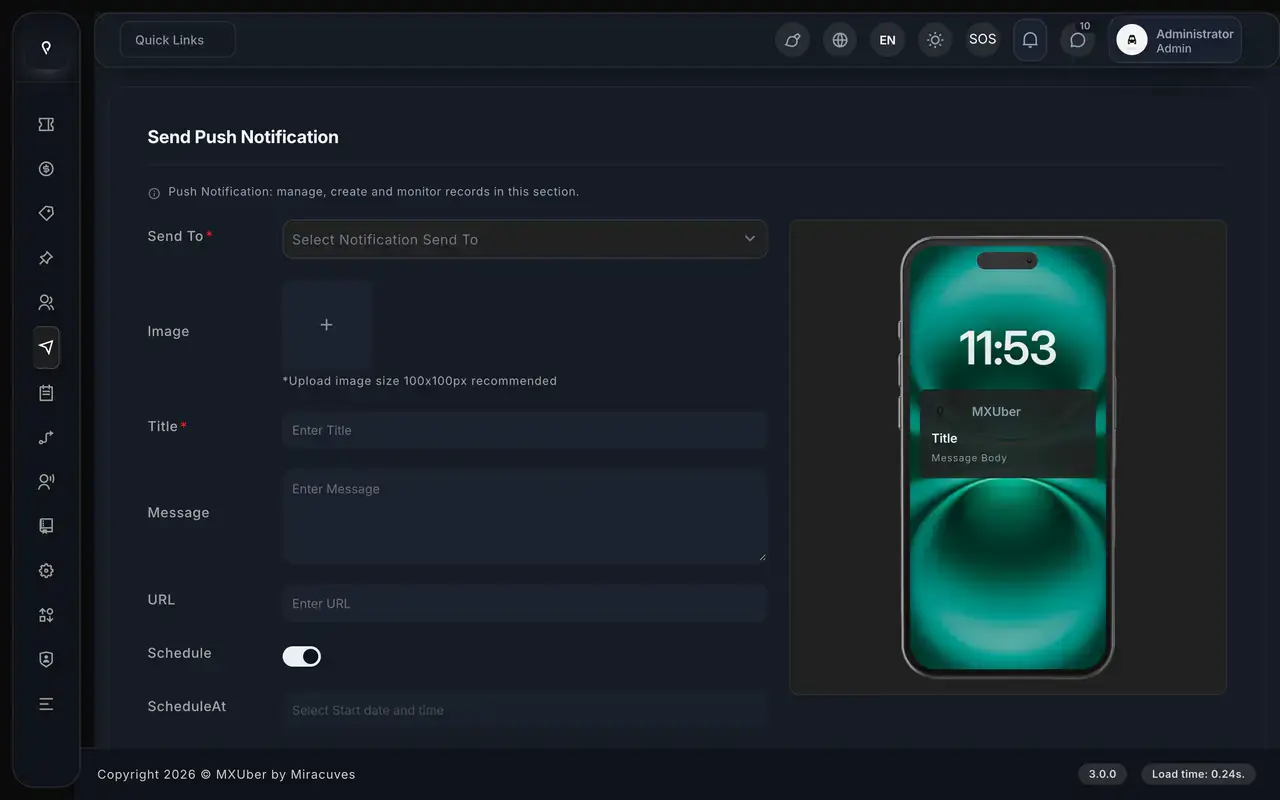
Careem Clone send push notification form with audience, image, title, message, URL and schedule options beside a phone preview
13 screens · scroll →
Careem Clone rider website hero with pickup and drop-off fields, See prices button and rider and driver app links
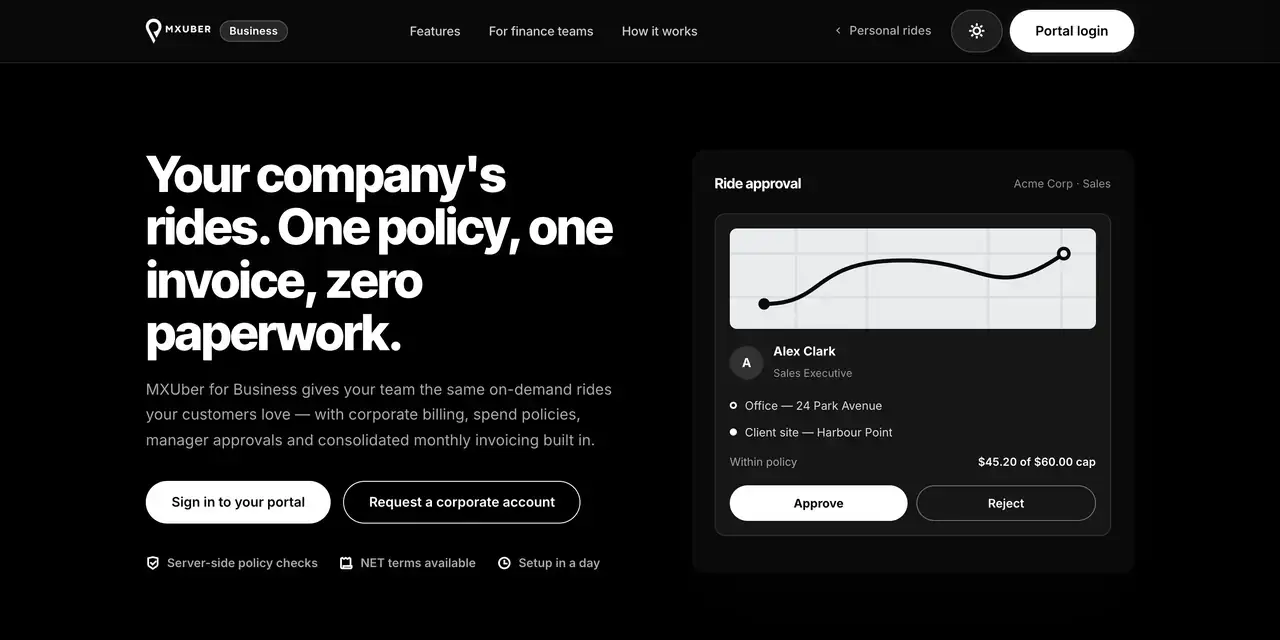
Careem Clone for Business page with corporate ride approval card, portal sign-in and corporate account buttons
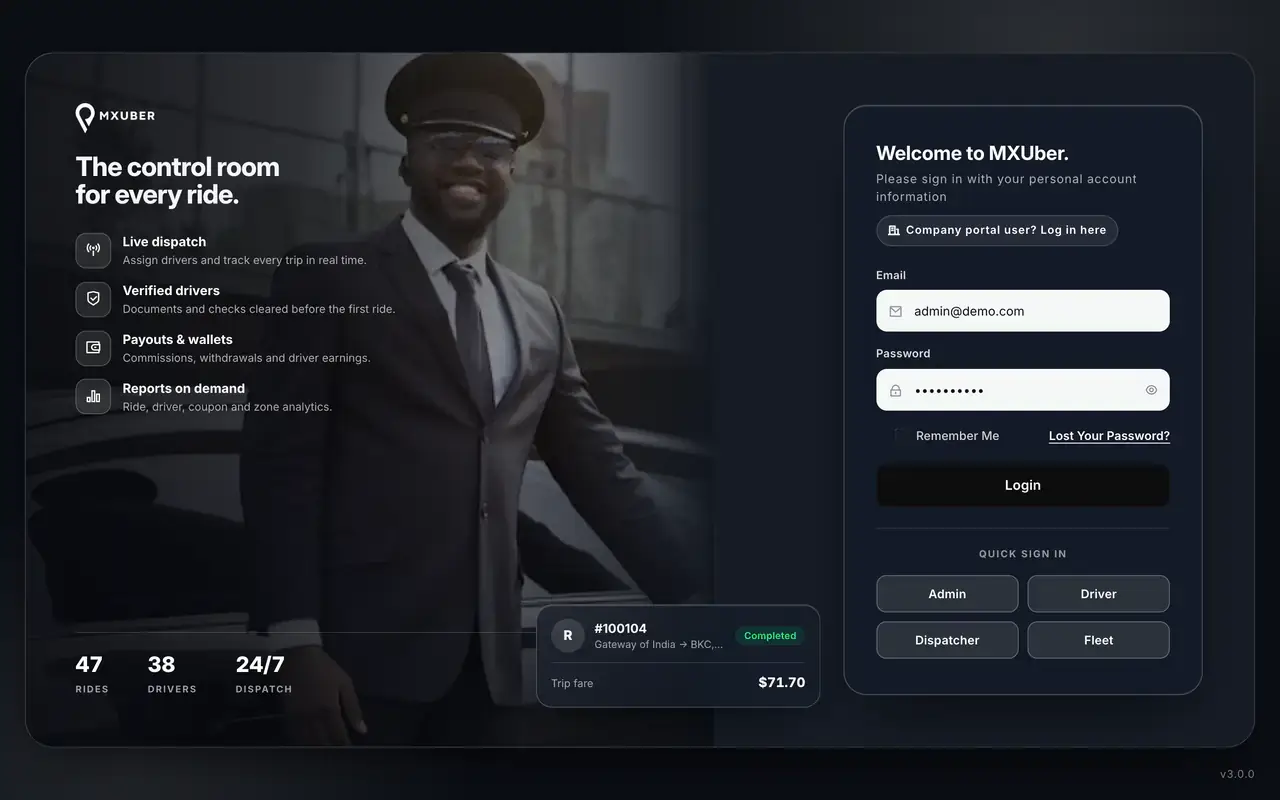
Careem Clone admin sign-in page with demo role buttons for admin, driver, dispatcher and fleet
3 screens · scroll →

Six rider screens run from splash to a paid trip, six driver screens follow the same trip from the offer to the earnings, 13 admin screens show it to the operator, and three website pages sit alongside.

See All Solutions

02What clients say

Client Voices

Careem Clone Client Reviews - Operators on Their Own Builds

Nine clients, mostly local ride teams. Zyclone shipped rider and driver apps together, OtoKab reshaped dispatch around its driver network, caninord wanted a platform for its own city and drivers, and Melvin Morales brings rides, food, courier and a marketplace together.

OOtoKab TeamFounding team, OtoKab
“The base gave us matching, tracking and payouts. We reshaped dispatch around our existing driver network and their working patterns rather than forcing them onto a generic model. Live in under a month.”
ccaninord TeamFounding team, caninord
“We did not need a global platform, we needed one that worked in our city with our drivers. The base covered matching, tracking and payouts, so the rest was configuration. Delivered under a month at a fraction of a custom quote.”
ttbtrd TeamFounding team, tbtrd
“Our corridor, our routes, our fares - that was our side. Matching, tracking and payouts were already solved. Live inside a month with no platform team of our own.”
MMarsha WilliamsFounder, Bmore On Demand Technologies, LLC
“Live GPS tracking, bookings, driver and customer apps and the admin dashboard were all in place. We reshaped the workflows to our bid-and-ride model and wired in our own payments and notifications. Live inside a month on infrastructure that was already proven.”
MMoove TeamFounding team, Moove
“The business case only worked if this was fast. Matching, tracking, payouts and the ops console came ready, and we brought the market and the fares. Delivered inside a month.”
AAone TeamFounding team, Aone
“Fares, the city and the payment partner were ours to bring. Everything underneath - matching, live tracking, driver payouts, the operations console - came ready. From kickoff to real trips was under a month, which is the only reason we made our window.”
ZZyclone TeamFounding team, Zyclone
“Both apps had to go live together, which is where these projects usually slip. The shared state model was already built, so rider and driver shipped at the same time. Live inside a month.”
TTariq ArbabDirector, Arbab Logistics FZ-LLC
“Our ops team was running last-mile on a whiteboard and a WhatsApp group. The rider app, dispatch console and live tracking came out of the box. They tuned dispatch for our COD-heavy model and added customer tracking. Where-is-my-order calls have all but stopped.”
MMelvin MoralesOperations Lead, Shophy Holdings
“Ride-hailing, food, courier and a marketplace, and we were chasing a holiday window. Their Gojek base had the rider and driver apps, dispatch and the merchant console already. We added local payment partners and our regional marketplace layer, and were taking live orders inside a month.”
Read More Client TestimonialsFounders and operators in their own words

Delivered in 2022

Aone Case Study: A Ride-Hailing Build on the MXUber Base

Aone is a ride-hailing company whose platform Miracuves built on MXUber, the code behind the Careem Clone sold on this page. What follows condenses the published Aone case study of that 2022 delivery.

Case Study
Aone, Built on This Code

Aone set out to run a ride-hailing service of its own. Miracuves started from MXUber, the base sold on this page, put the effort into the decisions only Aone could take and finally moved the source code across to Aone's account.
AoneClient
Ride-hailingSector
2022Year
6 working daysBase build
20 of 25Modules reused
5Made for Aone
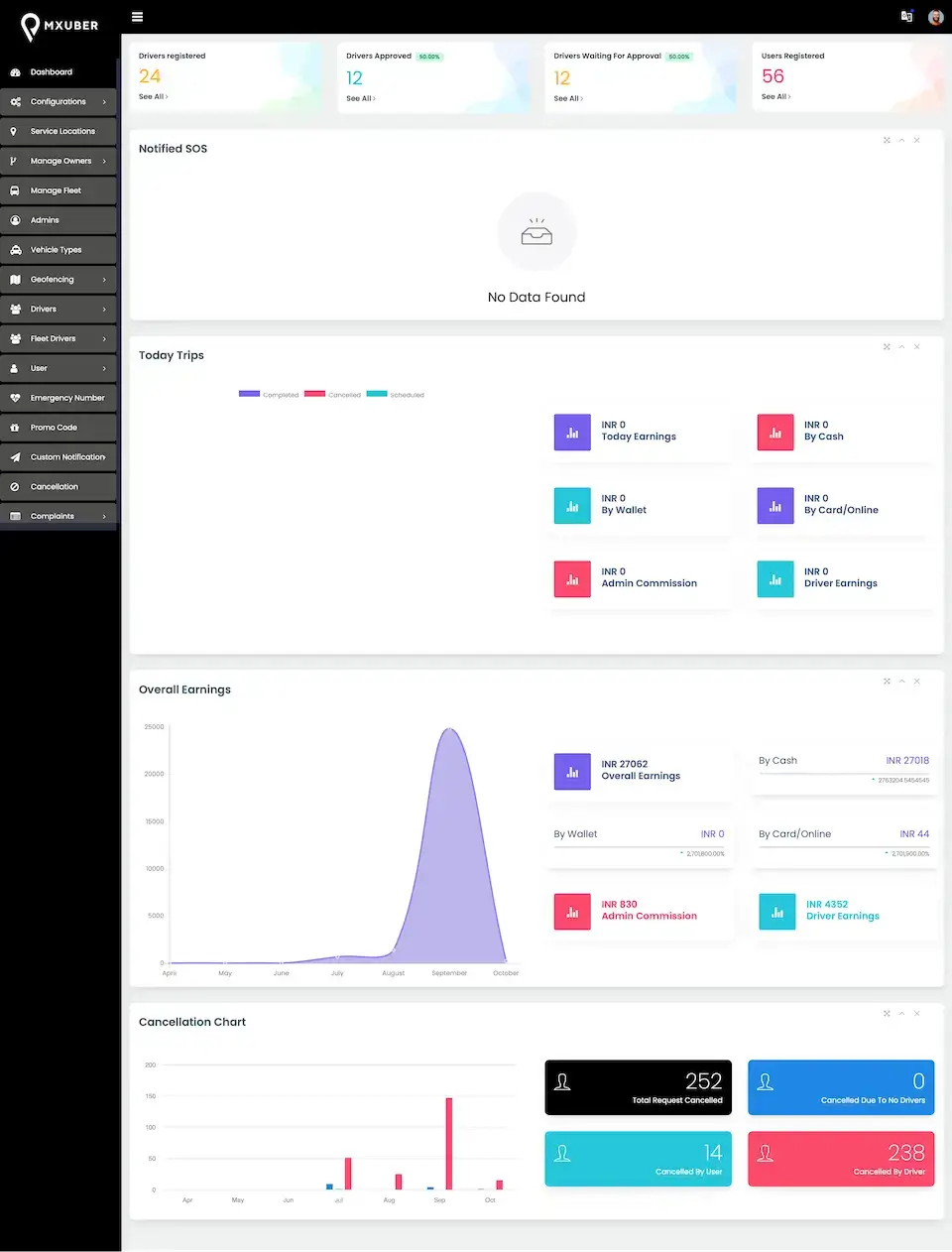
Careem Clone admin dashboard with driver, user and trip tiles, today's trips, overall earnings and a cancellation chart.
Obstacles
  • Aone picked its own cities, zones and vehicle classes
  • Fares and surge had to follow local pricing
  • Gateways and theming were still undecided
Goal
  • Get to real trips without re-creating matching, tracking or payouts
  • Spend the effort on choices only Aone could make
  • Own the code from the first day
Build
  • Five applications and consoles, each separately permissioned
  • Cities, zones, vehicle classes, fare and surge logic, payment gateways and brand theming
  • Five blocks made for Aone, twenty reused
  • Source code, database schema and deployment notes handed across
  • Built on the ready-made base, which takes 6 working days

“Fares, the city and the payment partner were ours to bring. Everything underneath - matching, live tracking, driver payouts, the operations console - came ready. From kickoff to real trips was under a month, which is the only reason we made our window.”Aone Team · Founding team, Aone

Open the complete write-upIt names the 20 blocks reused unchanged and the 5 built for the client.

03The product itself

In Short

What Riders, Drivers and Operators Get From an App Like Careem

Imagine a ride-hailing brand like Careem with your name on it, running on software built by Miracuves. Riders choose from five services, drivers and fleets fill the requests, and you set how each one is priced, dispatched and paid out.

Five Services, One Flow

Cab, parcel, freight, ambulance and hired-driver requests share one rider app, one driver app and one admin console, so the trip types in the box all run on one system.

Code You Can Reshape

Every file is delivered unencrypted. Your developers can adapt trip types, fares and screens whenever your market changes, and no per-seat license applies.

Extras Stay Extras

Arabic, right-to-left layout and in-app chat are built in. Modules beyond the standard build are quoted on their own and listed as add-ons.

Web, Android & iOS

Understanding the Careem Clone Script

A ride-hailing script, such as a Careem clone script, is the software behind the ride booking button. This one covers the whole chain: the rider app and rider web app that request a trip, the driver app that fulfils it, the admin console that runs it, the corporate portal for company accounts and the public site.

Careem Clone admin dashboard showing riders, verified drivers, rides, revenue, payments, withdrawals, fleet managers and peak zones
  1. 01Rider app for five services
  2. 02Driver app: requests, route, earnings
  3. 03Fleet manager: drivers, cars, earnings
  4. 04Dispatch console for phone bookings
  5. 05Admin console: fares, surge, payouts

Delivered together: both React Native apps, browser booking, console logins for admin, dispatcher and fleet, a corporate portal, a public website and every source file.

Everything Included

Careem Clone Features - Cab, Parcel, Freight, Ambulance, Hired Drivers & Arabic RTL

Every Careem clone feature Miracuves lists below can be tried on the live demo with the logins in the demo section, and anything that needs another module is marked as an add-on lower down.

Feature 01 of 12

City Rides & Packages

The everyday cab. A rider opens the home screen, picks Ride, looks over each vehicle with its fare and ETA, then confirms. Package books a car by the hour, and Schedule reserves a trip ahead.

  • Ride: instant trip from the live map
  • Package: a car booked by the hour
  • Schedule: at least 3 hours ahead
  • Fare and ETA per vehicle before booking
Feature 02 of 12

Rental Rides

Rental sits inside Cab as its own category. The rider sees the vehicle and its fare before booking, and the operator manages rental vehicles and hourly packages in the admin console.

  • Rental category inside the Cab service
  • Vehicle choice with the fare shown first
  • Rental vehicle management in the driver app
  • Hourly packages set in the admin console
Feature 03 of 12

Intercity & Outstation

Intercity is a category in Cab, Parcel and Freight for trips that leave the city. Hired drivers can also take an Outstation trip, and airports are set up in the admin console.

  • Intercity in Cab, Parcel and Freight
  • Same booking and tracking steps as a city ride
  • Airports and zones set in the admin console
  • Outstation option under Find Driver
Feature 04 of 12

Multi-Stop & Changes

Riders can add several stops to one journey and change the pickup or drop-off while the ride is under way; the extra cost is quoted before they agree. Free waiting minutes are shown, then a per-minute charge applies.

  • Several stops on one trip
  • Change pickup or drop-off mid-ride
  • Extra charge quoted before you agree
  • Free waiting minutes, then a per-minute charge
Feature 05 of 12

Parcel & Freight

Parcel is priced by weight, and the receiver must give the delivery OTP before the trip can close. Freight adds a cargo photo, the weight and the receiver name and phone. Both run Ride, Intercity and Schedule.

  • Parcel and Freight as separate services
  • Cargo photo, weight, receiver details
  • Weight-based parcel pricing
  • Delivery OTP closes a parcel trip
Feature 06 of 12

Fares, Estimates & Surge

A rider sees the fare and ETA for every vehicle before booking, with an itemized estimate and promo codes applied. Operators price surge per vehicle, zone and time slot, and ride preferences count in the fare.

  • Fare and ETA per vehicle type
  • Surge by vehicle type, zone and time
  • Itemized estimate and promo codes
  • Ride preferences priced into the fare
  • Cancel with reason and fee shown
Feature 07 of 12

Dispatch & Live Tracking

Dispatch picks the closest qualified driver and sends a timed offer; a timeout or decline moves it to the next. Once accepted, the car moves on the rider map over websockets, and a ride OTP starts the trip.

  • Live position over websockets
  • Nearest eligible driver gets the offer
  • Search stops at 3 minutes by default
  • Admin view across all rides in progress
  • Ride OTP starts the trip, with an ETA
Feature 08 of 12

Driver App & Requests

Each offer arrives with a ringtone and a buzz, and it is resent if the connection drops. The driver can accept or decline, counter-bid on bidding rides, follow the route and watch earnings in a donut chart.

  • Offers with ringtone and vibration
  • Accept, decline or counter-bid
  • Route shown on the map
  • Wallet, top-up and withdrawals
  • Power-button online switch
Feature 09 of 12

Ambulance & Find Driver

Ambulance runs as a separate service that riders can follow live. Find Driver puts a hired driver behind the wheel of the customer car. Choose from One Way, Round Trip, Outstation or Daily, by car type and transmission.

  • Ambulance service with live tracking
  • Find Driver: One Way, Round Trip, Outstation
  • Daily too, every mode priced per day
  • By car type and transmission
Feature 10 of 12

Fleet & Dispatch Consoles

A fleet manager signs up in the driver app, adds drivers and vehicles with documents, and follows fleet earnings by day, week or month. A dispatcher keys in phone orders and picks the driver manually.

  • Fleet manager adds drivers and vehicles
  • Fleet earnings by day, week or month
  • Each fleet sees only its own drivers
  • Dispatcher books and assigns by hand
Feature 11 of 12

Safety, Chat & Support

Riders have an SOS button that sends live location to their emergency contacts, a trip-share link, and in-app chat with the driver, photos included. Disputes take up to 5 evidence photos and support runs through tickets.

  • SOS with live location
  • Support tickets with image attachments
  • Rating and tips after each trip
  • Chat with photos, built in
Feature 12 of 12

Arabic, Maps & Admin

Arabic runs right-to-left across the apps beside English, French and Spanish, with multi-currency built in. OpenStreetMap or Google Maps is a switch in the admin console, which holds about 70 settings.

  • Arabic with right-to-left layout
  • English, French and Spanish too
  • Multi-currency built in
  • Push notifications and SMS gateways
  • OpenStreetMap or Google Maps, switched in admin
  • Reports exported to CSV, Excel or PDF

Worth knowing first: our job is to rebrand the platform and put it on your hosting. Your part is a domain, a verified store developer account, brand and business details, a payment gateway whose onboarding and KYC are finished, plus any third-party keys you want. App store review follows Apple's and Google's own timetables, so it is not part of the 6-day build.

Talk to Our Team

How the Money Flows

Careem Clone Revenue Models - Ride Commission, Rentals, Outstation, Surge & Driver Plans

A ride-hailing company running the Miracuves Careem clone collects income from several places at once. Each line here is kept separate, so changing one leaves the rest untouched.

When longer trips are the point of your business, settle two lines first: the commission on daily rides and the way rentals, intercity runs and driver hire are priced.

  1. 01

    Daily Ride Commission

    The operator takes a cut of every finished taxi trip and the driver is paid the remainder. You set the percentage before launch, and it can differ from market to market.

  2. 02

    Rental, Intercity & Hourly Fares

    Rental, intercity and hourly Package are cab categories of their own, and Find Driver is priced per day, so each longer booking can carry fare logic and a margin that belong to it alone.

  3. 03

    Surge Margin

    Admin sets surge per time window, or per vehicle type, zone and window together. When a zone gets busy the fare climbs, and the amount you keep from each trip climbs with it.

  4. 04

    Driver Subscription Plans

    A recurring fee that buys a driver steady work, income that does not hinge on any one trip. Native ads from Google inside the ride screens add another line, switched on in admin.

  5. 05

    Fleet Commission Tiers

    Commissions are configured in admin, and a fleet's earnings and withdrawals are tracked apart from solo drivers, so a company fleet and a solo driver can run on different terms.

  6. 06

    Wallet & Payment Fees

    A modest fee on card or wallet payments can recover what the gateway charges. Wallet and cash sit beside 13 gateways that connect through your own accounts.

Published and reported numbers behind four lines of a ride-hailing P&L: commission on daily rides, the share kept from bookings, the flat daily driver plan and the price of collecting payment.
Revenue streamHow it is chargedMarket rateTypical take rateWhat caps it
Daily Ride CommissionA percentage of the final fare, deducted from the driver's payout as the trip closes.Bolt publishes 30% for Saudi Arabia, 20%-25% for Estonia and 15%-20% for its general cities.What drivers in a given city will tolerate. Uber's Helsinki fee swings from 3% to 35% per trip around a 25% average, so a single flat percentage is only one model.
Rental & Outstation FaresThe same commission idea applied to one larger fare, or a separate rule you write for these bookings.Lyft 2025: revenue near 34% of Gross Bookings. Grab 2025: near 15% of Mobility GMV. Both cover every ride type (our arithmetic).No listed operator publishes a rental-only or out-station-only rate, so these company-wide ratios show the spread rather than your margin. One long booking is one big fare, so the share you keep matters more.
Driver Subscription PlansA fixed fee per day, week or month, paid by the driver instead of a slice of each trip.India, April 2025: Rapido charged 29 rupees a day in Hyderabad, Uber offered plans from 9 rupees, Namma Yatri 10-30 rupees.Whether the flat sum beats a share of the driver's own earnings. The amounts are small and daily, and come from one country, not a worldwide price.
Wallet & Payment FeesEach card payment carries a processing charge that you either absorb or add to the rider's bill.Stripe's US example is 2.9% + 30c per card payment.Whichever gateway your country offers, and the card mix. Store billing touches only digital items sold inside the app: Apple takes 15% or 30%, and Google Play charges 10% plus a 5% billing fee for subscriptions sold in the EEA, the UK and the US from 30 June 2026.

Reading the table. The daily-ride commission figures are Bolt's own published bands for Saudi Arabia, Estonia and its general cities, set next to the per-trip range in Uber's Helsinki announcement. Both share-kept ratios are our own arithmetic, drawn from the Grab results release and the Lyft 10-K, and each spans every ride type, not rentals alone. Daily plan fees come from Rest of World reporting on India, so read them as observed pricing in one country. Card pricing is from Stripe, and store billing from Apple and Google Play. Treat all of it as modeling input, not a quote and not a forecast of what any platform earns; your own terms are configured in the admin panel.

Revenue Model

Careem Clone Revenue Model, Stage by Stage

Every one of the six income lines above comes in the Careem clone from Miracuves, and longer trips decide how fast the margin grows.

Launch

In one city with a first group of drivers, the cut you take on every finished taxi trip is the first income line, at a percentage you choose before launch.

Traction

Once riders trust the app for the commute, rentals, intercity runs and Find Driver day hire add bigger single fares, each with fare logic of its own.

Scale

Across many cities, surge margins, driver subscription plans and fleet commission tiers top up the trip cut, while Google native ads switch on in admin.

Trip commission, surge margin, plan prices and fleet tiers are all typed into the admin console, and none of the fare money flows back to Miracuves.

Want a revenue plan built around the way your riders travel?Design My Revenue Model

Daily Operations

Admin Panel of a Careem-Style Platform - Trips, Zones, Fleets, Surge, Airports & Payouts

Miracuves puts the Careem clone back office in one console of 52 sections: watch trips on a live map, draw zones and airports, set surge by vehicle and time window, review fleet earnings and process withdrawals.

Careem Clone admin dashboard showing riders, verified drivers, rides, revenue, payments, withdrawals, fleet managers and peak zones

Admin Panel Sections

  • 01

    Dashboard & Reports

    A live KPI dashboard and heat map sit up front. Reports covering money, rides, drivers, coupons, zones and incentives download as CSV, Excel or PDF.

  • 02

    Users & Drivers

    Rider and driver profiles live here, next to reviews and each driver upload with its expiry date. A lapsed document takes the driver off dispatch until it is approved again.

  • 03

    Fare Settings & Surge

    Set zones, hourly packages and airports, then add surge prices per time window and per vehicle type in each zone. Peak zones redraw live on driver maps.

  • 04

    Fleets & Vehicles

    Fleet managers sign up in the driver app, or an admin adds them. Driver and fleet wallets, commissions and withdrawals are managed here per fleet.

  • 05

    Ride Oversight

    Ride and ride-request lists by status, live ride tracking and manual assignment, operator bookings included.

  • 06

    Promotions

    Coupons, push notifications with images scheduled ahead, banners and referral rewards bring riders in and back.

  • 07

    Payouts & Money Reports

    Withdrawals, commissions, wallets for drivers and fleets, and transaction reports, with extra charges such as tolls configured here.

  • 08

    White-Label Controls

    Your name, logo and theme replace ours, with translations and a landing-page editor included.

The Money Side

Every financial step, from the first fare on a trip to the payout that ends a cycle.

  • Fare and surge settings
  • Driver payouts
  • Commission and earnings per fleet
  • Reports for finance

The Control Room

The screens an operations team leaves open while trips are in progress.

  • All running rides at a glance
  • Rider and driver accounts
  • Campaign tools
  • Brand and theme settings

Missing a screen your team needs? Extra reports, another payout rhythm, a language beyond the four included or a custom approval step are each scoped on their own. Describe the gap, and a written quote follows.

Talk to Our Team

04Cost and contents

In the Box

The Careem Clone Script Package: Code, Apps & Deployment

One handover: a rider app, a driver app with the fleet manager role, browser booking, an admin console with dispatcher and fleet logins, a corporate portal, a public site, and the code and schema behind them. Nothing in the Miracuves Careem clone script is billed per seat, per trip or per year. What you pay others sits outside the price: hosting and a domain, the payment gateway, maps, SMS and push providers, store developer accounts, and the permits, insurance and advice each market asks for.

01

Source & Project Code

All code for the web platform and for both mobile apps, left unencrypted so your developers can shape it around your market.

  • Web and console code in the clear
  • React Native projects for Android and iOS
  • Free to alter, build on and redeploy
  • Lands in your own repository
02

Schema & Migrations

The structure of the database, covering trips, pricing, drivers, vehicles and payouts, so a clean copy can be rebuilt whenever needed.

  • A schema with migration files
  • MySQL, about 180 tables
  • Trip, pricing, driver and fleet tables
  • Payment, payout and settings data
03

Driver App & Plans

Where drivers spend their day: ride offers, the route, an earnings donut chart, wallet and withdrawals, and subscription plans.

  • New requests appear instantly
  • Accept or decline
  • Earnings donut and 5-tab history
  • A subscription plan option
Careem Clone rider website hero with pickup and drop-off fields, See prices button and rider and driver app links
04

Public Website

A responsive public site that introduces the services, links both app downloads and sends riders to the web booking app.

  • Service cards
  • App download buttons
  • Rider web app sign-in
  • Wears your brand
05

Rider App

The React Native rider app for Android and iOS, in English, Arabic, French and Spanish, Arabic being right to left. It covers sign-in, service tiles, vehicle fares, scheduling, a wallet and support.

  • Five service tiles on the home map
  • A fare estimate before you book
  • Booking for later, and several stops
  • Goes to the stores through accounts you own
Careem Clone rider choosing Bike, Car or Prime Car with fares and arrival times before booking
Careem Clone admin dashboard showing riders, verified drivers, rides, revenue, payments, withdrawals, fleet managers and peak zones
06

Consoles for Staff

One admin console serves the staff side through separate logins: the administrator governs zones, surge, reports and withdrawals, the fleet manager follows drivers, vehicles and earnings, and the dispatcher hands out bookings. A corporate portal serves company accounts.

  • Dispatcher assigns and reassigns rides
  • Fleet login follows drivers, cars and fleet earnings
  • Fares, surge, campaigns and payouts
  • Analytics and reports
07

Access & Security Layer

Every role, from rider to administrator, logs in separately with its own permissions, on top of the protections that come with the web platform.

  • Permissions differ by role
  • OTP sign-in for riders
  • Secrets kept out of the repository
  • The gateway holds card data
08

Handover & Support

Branding goes on the apps, the platform is deployed, a handover pack is passed across and all three support periods begin together on launch day.

  • Logo, icons and colors in place
  • Live on your hosting
  • Settings and architecture notes handed over
  • 60 days guidance, 6 months bug fixes, 12 months updates

Rather inspect it first? Every console and both apps open with the logins in the demo section, and a call can walk you through a rental booking, a driver withdrawal or a fleet earnings report, with numbers taken from your own plan.

Talk to Our Team

Clear Pricing

What a Careem-Style Ride-Hailing App Costs With Miracuves

The white-label Careem Clone is sold launch-ready at a fixed $3,099. Add-ons, extra integrations and custom flows fall outside the base; each gets its own scope and a written quote before any work starts.

Recommended

Professional

Launch-Ready Package
$3,099one-time payment
Live in 6 days

Best for: Operators opening with daily rides plus rentals and outstation, taxi firms with fleets, call-center dispatch businesses

The platform is delivered just as the demo behaves, carrying your logo, icons and colors on hosting you control.

Get Started

Enterprise

Tailor-Made Builds for Wider Scope
Customquote
Launch date follows the scope we agree

Best for: Multi-country mobility groups, sizable fleet networks, operators with unusual trip types or pricing models

Need something the base cannot do, such as a new trip type or pricing rule? We build to your brief, and scope and price are agreed in writing first.

Ask for a Quote
Development Cost

Careem Clone Development Cost in 2026

One $3,099 payment buys the whole Careem clone, from the React Native mobile apps that riders and drivers carry to browser booking, admin, dispatcher and fleet consoles, a company-account portal, the public site, about 180 MySQL tables and every source file, which Miracuves brands and puts live in six working days.

$3,099 Paid once
6 working days Rebranded and live
0% Revenue share

Running costs your ride-hailing launch adds beside it

  • Hosting and a domain
  • Your own Stripe, PayPal or Razorpay merchant account, KYC cleared
  • Maps, SMS and push provider accounts
  • Store developer accounts for both apps
  • Permits, insurance and local advice for each market

Want a tile the rider home screen does not carry yet, like school runs on a fare table of their own? Miracuves gets it scoped in writing and typically running within 2-8 weeks.

Compare Your Options

Ready-Made Careem Clone vs Custom Development vs SaaS

Here are three ways to open a multi-service ride app like Careem, the Miracuves route among them, measured on launch speed, upfront spend, code ownership and how far you can reshape trips and fares.

CriteriaMiracuvesReady-Made Careem CloneCustom DevelopmentSaaS
Launch timeRunning in 6 working days on your hostingUsually 2-8 weeks, scope set in writingFast account, slow roadmap
Upfront cost$3,099 one-timeWritten quote per trip type or ruleRecurring subscription fee
Source code ownershipUnencrypted source for every app and consoleAssigned to you by contractHeld by the platform owner
CustomizationTrip types, zones and Arabic layout under your controlNew trip types built to briefOnly the options offered
Ongoing feesNo royalty on fares or deliveriesPaid upkeep from a developerFees that scale with trips
Branding & app-store listingYour brand on Android, iOS and the webYour own brand on new codeA shared white-label shell at best
Best forRegional operators mixing rides, rentals and parcelsMobility groups with unusual pricingPilots in a single district

How Operators Use It

Six Ways to Run a Careem-Like Ride Platform: City Rides, Rentals, Intercity, Fleets, Dispatch & Parcel Runs

Each operator of the Miracuves Careem clone picks its own corner of the product: a city cab service on the home screen, a hire business on rentals, an intercity firm on Find Driver and a fleet company on the fleet manager role.

CityTaxiEveryday City Taxi

Serve the commute and the short hop with Ride and Schedule, the fare and ETA for each vehicle shown first, then watch trips, cancellations and earnings from the admin console.

01
Careem Clone rider home with Where next search and Ride, Intercity, Package, Schedule and Rental tiles
RentalHireRental Hire Service

Offer rental vehicles inside Cab, price them through hourly packages set in the admin console and let drivers manage their rental vehicles in the app.

02
Careem Clone rider choosing Bike, Car or Prime Car with fares and arrival times before booking
IntercityOutstationIntercity & Hire-a-Driver

Book intercity trips in Cab, Parcel or Freight, or hire a driver for your own car on a One Way, Round Trip, Outstation or Daily basis, priced per day.

03
Careem Clone ride history with business and personal filters and one-tap Rebook
FleetCommissionFleet-Owner Platform

Invite fleets in: each manager signs up in the driver app, adds its own drivers and vehicles, tracks earnings and withdraws, and sees only its own drivers.

04
Careem Clone admin dashboard showing riders, verified drivers, rides, revenue, payments, withdrawals, fleet managers and peak zones
DispatchPhoneCall-Center Dispatch

Take phone orders as operator bookings, assign a driver by hand with offline and busy drivers refused, and let the rider app run beside the call center.

05
Careem Clone rider home with Where next search and Ride, Intercity, Package, Schedule and Rental tiles
DeliveryParcelsParcel, Freight & Ambulance

Run parcels priced by weight with a delivery OTP, freight with a cargo photo, and ambulance trips with live tracking, all through the same dispatch.

06
Careem Clone rider home with Where next search and Ride, Intercity, Package, Schedule and Rental tiles
Business Model

Careem Clone Business Model: Three Ways to Run It

One Careem clone deployment from Miracuves can run three different mobility businesses, depending on which trips and partners you lead with.

Multi-trip city operator

Sell the daily cab alongside rentals, hourly packages and intercity runs, so a rider who trusts you for the commute books the day trip too.

Fleet aggregator

Invite company fleets that sign up in the driver app, add their own cars and drivers, and earn on commission terms separate from solo drivers.

Dispatch-led service

Let a call center key in phone bookings and hand each one to a driver who is online and free, while parcel, freight and ambulance jobs share that one dispatch desk.

Commission, plans and fees stay yours to set, market by market.

Six ways, one platform. All six cases use the same two apps and the same admin console. Only the trip types you push, the cities you open, the fleets you invite and your branding change, so one codebase serves every one of them.

Talk to Our Team

Why Now

Why Build a Ride-Hailing Service Now?

Miracuves built this Careem-style platform for a city-by-city contest in which the established apps usually handle the short taxi hop well. A platform under your own name can win ground in the trips between: rentals, journeys out of town and courier runs on one app.

01

A Longer Trip Is One Bigger Booking

A rental, an intercity run or a day of driver hire is a single, larger fare, so winning a handful of them changes what a day of bookings adds up to.

02

One App for Every Trip Length

A rider who already trusts you for the commute is the obvious customer when a car is needed for a day or for a trip out of town.

03

Fleet Owners Bring Cars by the Dozen

An owner with ten cars brings ten drivers at once, and a commission console of their own makes the platform workable for a company, not just for individuals.

04

Price and Arrival Decide the First Ride

First-time riders compare two things: a clear fare before booking and how soon the car will arrive. Both appear on screen in the demo.

05

Your Brand, Your Rider List

With the platform under your name, rider accounts, trip history and payout records belong to you rather than to an app that bills you for access.

06

Buying Beats Building

Most of a ride-hailing company is matching, tracking, payouts and the staff consoles. After six days of our work, a white-label copy is running on your hosting.

Platform by the Numbers

5

Apps & Consoles

4

Trip Types

6

Days of Build Time

12

Months of Updates

Getting matching, fares, dispatch and payouts to agree with each other is the hardest part of ride-hailing, and it is done. Your effort can go to the trip types and terms that make you different.

Markets Served

Where It Fits: Twelve Business Models

The Careem Clone works for any company whose drivers carry people or parcels from A to B. A ride-hailing brand sells everyday trips, a car hire firm sells rentals and an intercity operator sells outstation journeys. Taxi companies and fleet owners gather many vehicles on one platform, dispatch desks log phone bookings, couriers and freight carriers move cargo, and chauffeur businesses hire out drivers for a day. Airport and company transfer businesses take scheduled rides, and regional startups serve one city or corridor under their own brand, in Arabic or English.

  1. 01Ride-Hailing
  2. 02Car Hire
  3. 03Outstation Travel
  4. 04Taxi Fleets
  5. 05Fleet Operators
  6. 06Dispatch Desks
  7. 07Courier Services
  8. 08Airport Transfers
  9. 09Corporate Rides
  10. 10Regional Startups
  11. 11Chauffeur Hire
  12. 12Chauffeur Hire

For any driver-led mobility model, from the quick city hop to the long road trip, the Miracuves Careem Clone puts your name on the first screen.

06Under the hood

Rider to Payout

Careem Clone Trip Flow - Sign In, Choose a Trip Type, Set a Drop-Off, Compare, Book & Pay

On the surface a rider taps a few times. Underneath, dispatch, fare calculation, live location and payment all run. Here Miracuves follows one rider through its Careem clone from sign-in to a finished trip, then opens up the architecture behind it.

One Rider, One Trip: From Login to a Settled Fare

  1. Careem Clone rider sign-in with phone or email OTP, Google sign-in and guest entry
    1Sign In, in English or Arabic

    Log in by OTP on phone or email, with Google or Apple, or browse as a guest first; Arabic with a right-to-left layout is one language switch away.

    • Guest browsing before sign-in
    • OTP by phone or email
    • Google or Apple
  2. Careem Clone rider home with Where next search and Ride, Intercity, Package, Schedule and Rental tiles
    2Choose a Trip Type on the Map

    A live map with a search box greets the rider, along with five service tiles: Cab, Parcel, Freight, Ambulance and Find Driver.

    • Map with search field
    • Five service tiles
    • Locate-me button
  3. Careem Clone rider choosing Bike, Car or Prime Car with fares and arrival times before booking
    3Enter the Destination

    The rider searches for where they are going, checks the pin on the map and confirms with a single button.

    • Destination search
    • Map pin to check
    • One Confirm button
  4. Careem Clone rider choosing Bike, Car or Prime Car with fares and arrival times before booking
    4Compare Car Types and Fares

    Once the route appears, every vehicle shows a fare and ETA, alongside an itemized estimate, ride preferences, a promo code field and the payment choice.

    • Fare and ETA per vehicle
    • Promo code and preferences
    • Cash or another payment method
  5. Careem Clone rider home with Where next search and Ride, Intercity, Package, Schedule and Rental tiles
    5Book a Cab Now or Schedule Ahead

    Confirming sends a timed offer to the nearest eligible driver. Bookings made in advance need to be 3 or more hours away and reach drivers 15 minutes before pickup.

    • Timed offer to the nearest driver
    • A date-and-time selector
    • Confirm or cancel the booking
  6. Careem Clone ride history with business and personal filters and one-tap Rebook
    6Track the Car, Pay & Rate

    Once a driver accepts, a ride OTP starts the trip, the rider follows the car live, pays and rates, and a one-tap Rebook repeats the route another day.

    • Driver accepts and heads over
    • Finished trips with invoice PDFs
    • Rating, tips and one-tap Rebook
Visual Flow DiagramSign inServiceDrop-offOptionsBookTravel

Engine Room

How a Multi-Trip Ride App Like Careem Is Put Together

Talk to Our Team
  1. Block 01

    Five Applications

    Rider app, driver app, browser booking, admin console and corporate portal each ship as their own application. A driver login has no path into the back office.

  2. Block 02

    Matching Engine

    Online driver positions sit in Redis, and the closest qualified driver receives a timed offer; a timeout passes it down the line.

  3. Block 03

    Location Stream

    Positions travel over websockets and update the map without a refresh; ride offers carry a 10-second check.

  4. Block 04

    Pricing Rules

    Fares follow vehicle type, zone and time window, with surge and promo codes applied; commissions then split the amount between operator, fleet and driver.

  5. Block 05

    Money Movement

    Rider payments run through 13 gateways, a wallet or cash, and drivers withdraw earnings from their wallet; every transaction feeds the admin reports.

  6. Block 06

    Notifications

    Ride updates go out as FCM push notifications, SMS carries sign-in codes, while dispatch jobs and reminders run in queues.

Technology

What the Careem Clone Is Made Of: Laravel, MySQL, React Native, Maps & Gateways

Behind the screens sit a Laravel 11 web layer, MySQL and Redis holding trips, fares and payouts, plus iOS and Android apps built in React Native. The explorer below walks through the stack Miracuves chose for the Careem clone, layer by layer.

WEB & ADMIN

Web & Admin

Laravel 11 PHP 8.2+
  • Admin console plus dispatcher and fleet logins
  • Corporate portal and a rider web app at /cab
  • 887+ routes behind the apps and consoles
  • Staff roles with per-page permissions
DATA

Data Stores

MySQL Redis
  • Two data stores working together
  • About 180 tables hold trips, fares, drivers and fleets
  • Database schema delivered with the code
  • Redis holds live driver positions
APPS

Rider & Driver Apps

React Native 0.82 Android iOS
  • One React Native codebase per app
  • Rider app: 42 screen groups, driver app: 13
  • Arabic with right-to-left layout built in
  • Goes to the stores through accounts you own
MAPS

Maps

OpenStreetMap Google Maps Map cache
  • Pick OpenStreetMap or Google in admin
  • A map cache serves tiles, addresses and routes
  • Cached map tiles, about 36x faster (vendor)
  • A dark map for dark mode
MESSAGING

Realtime & Messaging

Reverb FCM SMS gateways
  • Reverb websockets for live tracking
  • FCM push for offers and trip updates
  • Five SMS gateways, Firebase phone sign-in
  • Offers rechecked every 10 seconds
HANDOVER

Payments & Handover

13 gateways Source Schema
  • 13 gateways, plus wallet and cash
  • Gateway accounts and KYC come from you
  • Source code and schema handed over
  • Architecture notes included
For your developers:

Web, admin and corporate screens are served by Laravel 11 with PHP 8.2+; MySQL stores the data and Redis carries queues, cache and live driver positions. Both phone apps use React Native 0.82. Maps (OpenStreetMap or Google), SMS gateways, Firebase push and payment gateways come from outside providers, so the accounts are opened by you and the keys supplied when we deploy. A mainstream stack keeps hiring straightforward.

Talk to Our Team

Room to Grow

Built to Grow: Separate Apps, Redis Driver Lookup & Spare Capacity

Miracuves assembles the Careem clone from five separate applications on shared blocks, so adding drivers, fleets and cities is mostly a question of capacity and settings.

Separate Release Tracks. The rider app, the driver app, the browser booking app, the staff console and the business portal are five applications with their own permissions, so an update to one never forces a release of the rest.

Matching That Scales With Supply. Online drivers' positions sit in Redis, and queued dispatch jobs pick the nearest eligible driver for each request, keeping waits steady as more cars log in.

Positions Over a Live Feed. Locations travel over websockets to keep the map current, while offers to drivers are rechecked every 10 seconds.

Books That Reconcile. Each status change is written to an append-only ride history, and fares, commission and payouts are logged per trip, so rider payments, driver earnings and dashboard totals can be set side by side.

01

Separate Applications

Every application is released on its own and keeps its own permissions, which lets one change while the others stay untouched.

02
MatchArrivalAssign

Driver Matching

Redis finds the nearest eligible driver, who gets a timed offer. A decline or timeout passes it to the next nearest.

  • Nearest eligible driver
  • Timed offer, 30 seconds by default
  • Driver may accept or decline
  • Staff can assign by hand
  • Same flow for every trip type
03

Rate-Limited Sign-In

The apps sign in with tokens and staff use per-page role permissions, with rate limits on sign-in and on offer actions.

  • Token sign-in for the apps
  • Sign-in capped at 5 per minute
  • Separate login per role
04
IdentityRate capScopes

Live Location Channel

Reverb websockets push positions to the apps; ride offers fall back to a 10-second check.

  • Route line shown in both apps
  • A moving marker on the map
  • Positions held in Redis for dispatch
  • Admin tracks rides live
05

Recorded Transactions

Payments, commission and payouts are kept as transactions, so a past cycle can always be audited.

  • A payment record for every trip
  • Commission and plan settings
  • Withdrawals for drivers and fleets
  • Exportable reports
06

Documented Handover

The code arrives with its database schema, deployment notes and architecture notes, so a fresh team can take over.

Room to Adapt. Every market eventually wants something particular: a local payment method, a new vehicle class, a zone boundary or another commission tier. Laravel and React Native are mainstream, so that is routine taxi app development for your engineers or ours.

Opening in a single city? Start from the zones you can open and the drivers you can sign, then grow on the deployment you already run. Growing trip volume turns into a hosting and settings choice, and anything beyond the base is quoted separately.

Talk to Our Team

07Safety and duty

Open to Inspection

Security in a White-Label Careem Platform: Role Separation, Gateway-Held Payments & the Limits We Admit

Who a rider is, where a car is and what a payment refers to are all sensitive inside a ride-hailing app, which puts three questions first: who can see what, where card details end up and what gets checked before launch. The cards below separate what the platform already does from what remains your job.

  1. 01 · Access
    Access by Role

    The apps sign in with tokens, while staff use sessions and per-page role permissions, so a rider or a driver never lands in a staff console and each staff login sees only the pages its role allows.

    • Fleet Boundaries: A fleet manager sees only that fleet's own drivers, vehicles and earnings. Only the admin login sees the whole network.
    • Staff Roles: Admin, dispatcher, fleet manager and support agent are separate logins with their own page permissions, so deciding who gets which role is a task for you as operator.
  2. 02 · History
    Change History

    Every ride status change lands in an append-only history, and staff actions go to an activity log, so any dispute over fares, commission or a canceled trip can be traced.

    • Driver Documents: Admin sets which documents drivers upload and tracks their expiry dates. A lapsed document pauses dispatch for that driver until staff approve a new copy.
  3. 03 · Traffic
    Traffic & Limits

    Rate limits cap sign-in at 5 attempts per minute and also cover offer actions, which slows password guessing and scripted abuse.

    • Safety Channels: The rider app has SOS with emergency contacts and live location, and alerts reach the admin console. Staffing them and answering fast is operational work for you.
  4. 04 · Keys
    Key Handling

    Maps, SMS and payment keys are yours. Going live includes rotating keys, so none of them ships with the demo setup.

    • Pre-Launch Checklist: Before launch Miracuves runs a security checklist with you: demo mode off, keys rotated, plus a pass over gateway and SMS settings.
  5. 05 · Payments
    Gateway Holds the Cards

    Card details are handled by the payment gateway you connect, never stored here. The platform keeps wallet balances and ride payments, not card data.

    • Payout Timing: Drivers and fleets request withdrawals from their wallets, and you set commissions and plans, which decides what reaches a driver after fees.
  6. 06 · Recovery
    Backups & Restore

    The admin console includes backups and an activity log. Rehearse a restore ahead of go-live, because a backup you never restored is just a hope.

The base gives you role permissions, an append-only ride history and an activity log to show when asked. A security checklist is agreed with you before launch and run together. Role permissions and ride history follow ISO 27001, SOC 2 and GDPR controls in the code. The audit is performed by independent audit partners, and your own company holds the resulting attestation (see our compliance capability fact).

Discuss Security

Your Responsibilities

Readiness for a Careem-Style Service: Software Scope Versus Operator Duties

In a ride-hailing service, strangers share a car. Miracuves provides tooling for booking, dispatch, fares, commission and payouts. Driver eligibility, vehicle qualification, insurance and local legal duties remain with the operator.

Built for a marketplace, approved by no regulator.

Ready, in this section, marks what you can see in the demo and the admin panel. Your business holds the licenses and approvals, and a lawyer covers the legal side.

Covered by the Software

Fleet and driver wallets, a dispatcher login, subscription plans, fare and surge settings and payout handling, with the rider and driver apps, Cab, Parcel, Freight, Ambulance and Find Driver services, airports, SOS, disputes, complaints, roles and admin reports.

Left to You

Terms of service and a privacy policy, the paperwork you ask drivers and fleets for, the handling of complaints and disputes, and any cancellation rules that go beyond the defaults you set.

Drivers, Vehicles & Insurance

Driver licensing, vehicle eligibility for hire and insurance cover for a trip are matters between you and your drivers. Driver documents and vehicle records are kept in the platform, which neither verifies a license nor settles a claim.

Where You Operate

Rules on taxi and private-hire licensing, rental and intercity transport, consumer protection, fare regulation and driver classification vary between countries and often between cities. Have qualified local advisers review every market before you take bookings.

08Add more

Ships in the baseMXUber
  • Two React Native apps
  • Admin, dispatcher, fleet logins
  • Five trip services
  • Fares, surge and payouts

Adding a module in three steps

  1. 1
    Select a module

    Entertainment, tour guide or voice, now or after launch.

  2. 2
    Get a written quote

    Scope and price go on paper before work begins.

  3. 3
    Own it as code

    The module is delivered into the source you already hold.

Ask About Optional Modules

Optional Extras

Optional Modules for an App Like Careem: Entertainment, Tour Guide & Voice Commands

The base already works from sign-in to payout, as the demo shows. Three optional modules from Miracuves sit beside the Careem clone, each priced separately, since the effort depends on your market.

  • For riders

    In-Car Entertainment

    Plugs the trip into entertainment platforms, so riders can enjoy movies, music or podcasts on the way.

    Comfort · Entertainment
  • For riders

    Virtual Tour Guide

    Points out landmarks and attractions along the way as the car moves, so an outstation transfer doubles as a short guided tour.

    Sightseeing · Guide
  • Hands-free

    Voice Commands

    Spoken commands for navigation, calls and other app actions, leaving drivers and riders hands-free.

    Voice · Driving

More From the Mobility Range

Different Trips or Different Services? These Platforms Sit Beside It.

Within a wider family of ride and delivery products, the Careem Clone has four close neighbors that buyers often weigh it against.
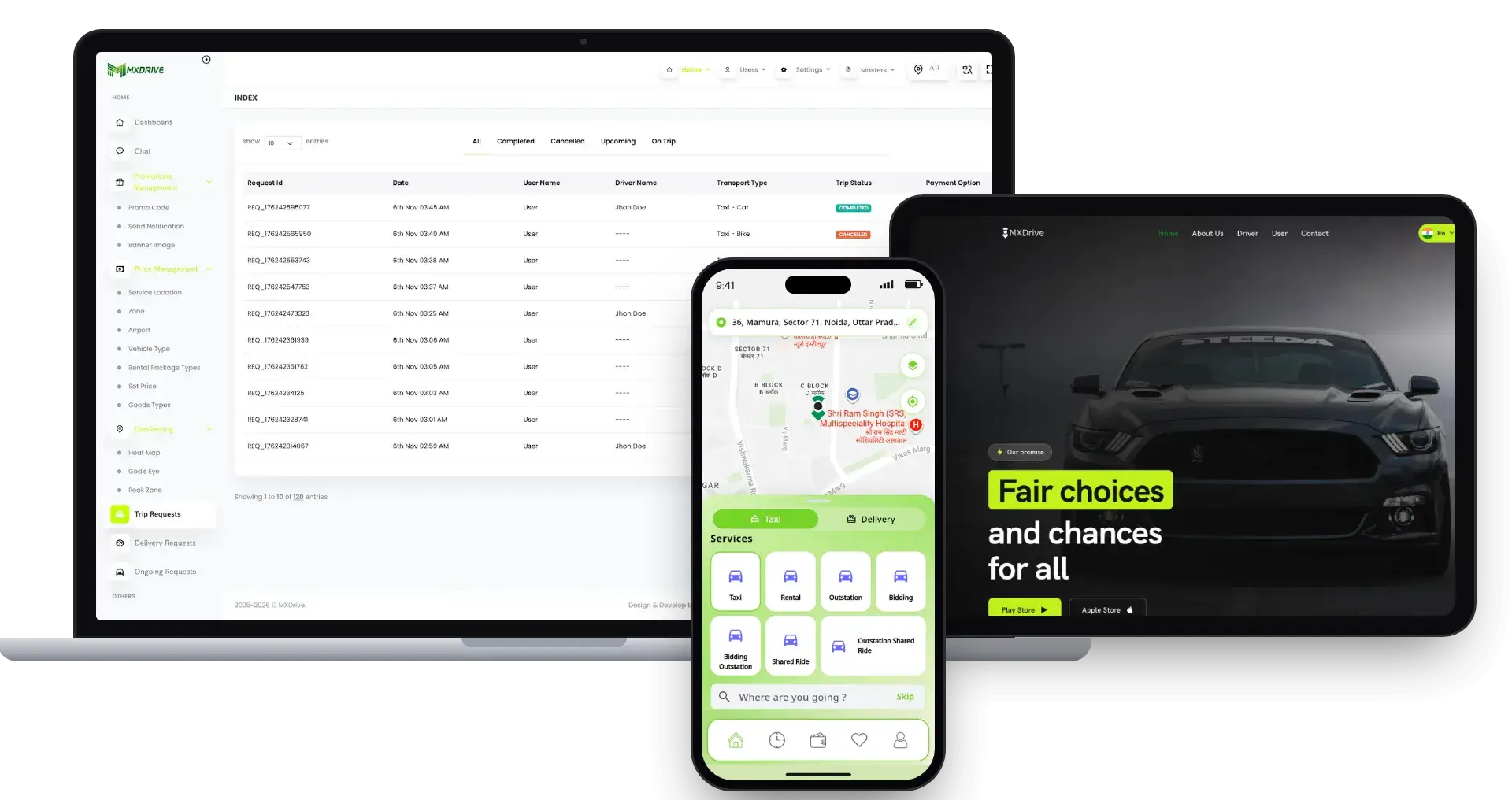
inDrive Clone cross-platform solution: the admin trip requests console, the booking website and the rider app.01
Pick it if: Your riders should set the priceinDrive Clone

In this ride-hailing platform riders and drivers bid on the fare, and rentals and outstation trips are on the menu too.

See This Solution
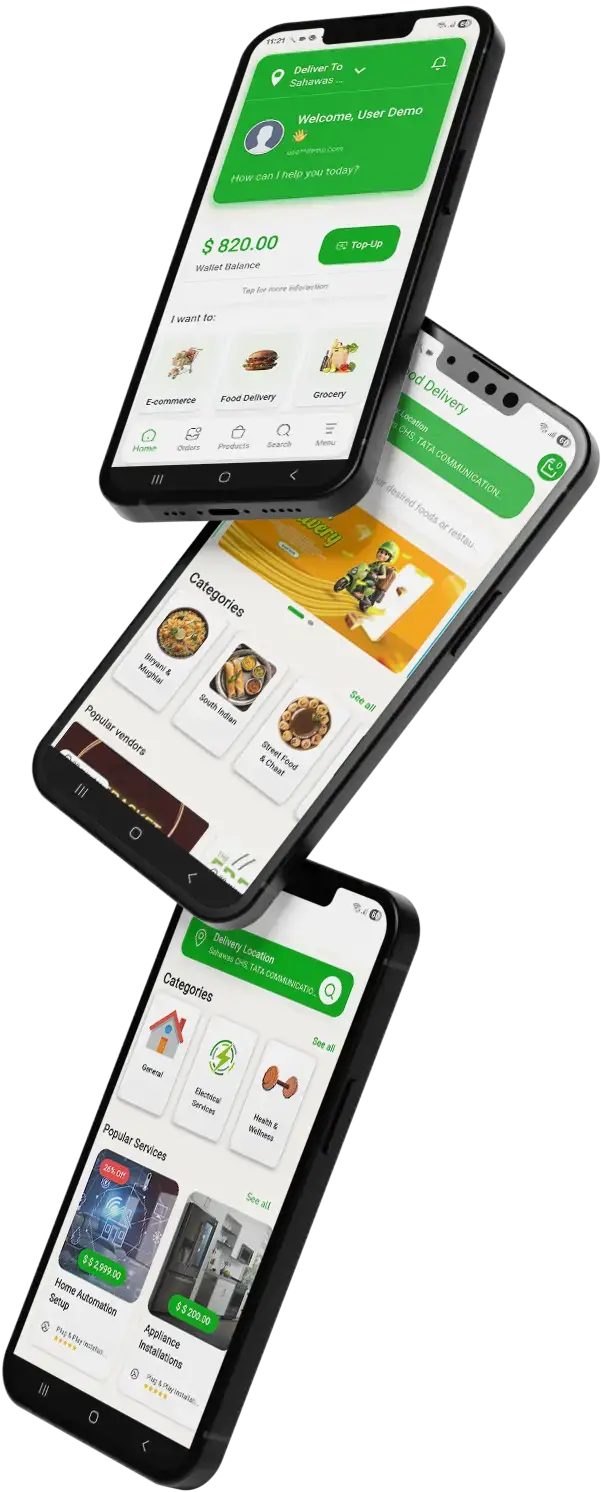
Gojek Clone super app screens on three tilted phones.02
Pick it if: Your menu goes well beyond ridesGojek Clone

A multi-service app that gathers rides, deliveries and other on-demand services behind a single wallet.

See This Solution
Turo Clone peer-to-peer car rental app screens.03
Pick it if: Owners should rent cars out without a driverTuro Clone

A peer-to-peer car-sharing marketplace where owners list cars, trips are handled and trust checks run.

See This Solution
UberEats Clone cross-platform solution with the admin orders console, the ordering website and the customer app.04
Pick it if: Meal delivery belongs on your platformUberEats Clone

A restaurant ordering marketplace with apps for customers, restaurants and couriers, plus an operations console.

See This Solution
See everythingAll 90+ ready-made solutions

09Where the money is

Market Benchmarks

Ride-Hailing Market Benchmarks - Independent 2025-2026 Data

The revenue models above are ours. The figures below are not. They come from the Uber and Lyft annual reports on Form 10-K, Grab's full-year 2025 results and the UK Department for Transport, reproduced as published. They show what ride-hailing platforms keep from each trip in the US and Southeast Asia, and how large the licensed driver base is, so you can test your own business case.

Uber 10-K01

$29.7bn in Uber Mobility Revenue in 2025

Uber's annual report on Form 10-K shows Mobility segment revenue of $29.7 billion in 2025, up 18 percent from $25.1 billion in 2024. Across all its businesses Uber completed 13.6 billion trips, up 20 percent, and reported 202 million monthly active platform consumers in the fourth quarter, up 18 percent. Uber states that revenue comes from fees paid by drivers and merchants.

Lyft 10-K02

$18.5bn in Lyft Gross Bookings in 2025

Lyft's annual report on Form 10-K reports Gross Bookings of $18.5 billion in 2025, up 15 percent, on 945.5 million rides, up 14 percent. Revenue was $6.3 billion, up 9 percent. Revenue divided by Gross Bookings is about 34 percent (our arithmetic on reported figures), the share Lyft retains after driver earnings.

Grab03

15% of Grab Mobility GMV Kept as Revenue in 2025

Grab reports that full-year 2025 Mobility revenue grew 16 percent to $1,219 million, on Mobility gross merchandise value that grew 19 percent to $7,901 million, and that Mobility segment adjusted EBITDA was $690 million. Revenue divided by GMV is about 15 percent (our arithmetic on reported figures), a lower share than Lyft retains in the US.

UK DfT04

290,000 Licensed Private Hire Vehicles in England

The UK Department for Transport counted about 290,000 licensed private hire vehicles in England as at 1 April 2026, up 13 percent on 2024, alongside 417,300 taxi and private hire driver licenses, up 9 percent. The statistics were published on 13 August 2026 and include app-based operators, though they cannot separate app drivers.

Where each figure comes from.

Uber Technologies, Inc., Annual Report on Form 10-K for the year ended 31 December 2025, filed 13 February 2026 - sec.gov

Lyft, Inc., Annual Report on Form 10-K for the year ended 31 December 2025, filed 11 February 2026 - sec.gov

Grab Holdings Limited, Grab reports fourth quarter and 2025 results with first full year net profit, press release, 12 February 2026 - grab.com

Department for Transport, Taxi and private hire vehicle statistics, England: 2026, 13 August 2026 - gov.uk

All figures are the publishers’ own, reproduced as published from annual filings, a results release and official statistics. Two ratios (Lyft and Grab revenue divided by bookings or GMV) are our arithmetic on reported figures; each company defines its metrics differently. They describe the companies and country named, not any platform Miracuves builds, and nothing here is a revenue projection for your business.

Business Outlook

Revenue Potential and Marketability for Ride-Hailing Operators

On a Careem clone from Miracuves, revenue arrives when riders keep opening the app and drivers keep choosing to stay. Here is how a wider menu of trips helps with both, and how to hold on to those relationships once you have them.

  1. 01

    A Cut of Every Ride

    Each completed ride, daily or longer, pays you a share, so revenue follows trip volume instead of headcount.

  2. 02

    More Than One Kind of Booking

    Rentals, intercity, parcel, freight, ambulance and driver hire run on the same platform as the cab, so the services already included share one system. Price the long trips before the short ones: rentals and intercity runs set your margin, while daily rides build the volume.

  3. 03

    Riders and Drivers You Own

    Your own database stores rider accounts, driver profiles, fleet records and ride history, so the value builds up on your side of the table.

  4. 04

    Room to Change Course

    Source code and schema belong to you, so a later change of host, team or direction needs nobody's consent.

Main Revenue Levers
  • Daily Ride Commission
  • Rental, Intercity & Hourly Fares
  • Surge Margin
  • Driver Subscription Plans
  • Fleet Commission Tiers
  • Wallet & Payment Fees
Long-Term Value

Features are easy to copy; a base of drivers who stay and riders who trust the app is not.

  1. 01A driver who has onboarded and settled into a pay cycle rarely switches
  2. 02Riders with saved addresses and past trips come back
  3. 03The record is yours from launch day
  4. 04Reliable dispatch and clear fares reinforce it
Example Revenue Scenarios

Three sizes of operation are shown, differing only in active drivers, with the leading revenue lever named for each. Use them to frame planning talks, not as earnings predictions.

Single-City Service50Drivers Active

Commission carries the early revenue.

One city and a first group of drivers working for commission, where the margin on each completed trip pays the running costs. Scale illustration, not a forecast.

Regional Operator With Longer Trips500Drivers Active

Commission, rentals, intercity, fleets.

A regional operator mixing company fleets with independent drivers, where rental, intercity and driver-hire bookings begin to matter beside the daily ride. Scale illustration, not a forecast.

Multi-City Network5,000Drivers Active

Many cities, all levers pulled.

A network spanning many cities, where surge, longer bookings, driver plans and fleet tiers top up commission, and reports point to where effort should go. Scale illustration, not a forecast.

10The comparison

Why Miracuves

How Miracuves Stacks Up Against Other Careem Clone Developers

Four routes realistically lead to a ride-hailing platform: a stock taxi script, a lone freelancer, a software agency, or a product already shipped for other clients. Before choosing one, ask whether a rental books the way a taxi does, whether any code is locked or withheld, where partner fleets and phone bookings live, which security checks were really run, whether a named client runs the same code and whether the apps read correctly in Arabic.

Why Founders Choose Miracuves

  • 01

    Many Trip Types Built In

    Cab, Parcel, Freight, Ambulance and Find Driver ship in one app. Stock taxi scripts often stop at the daily ride and leave the rest to you.

  • 02

    Dispatcher and Fleet Logins

    Dispatcher and fleet managers get their own permissions, and fleet managers also work in the driver app, each fleet seeing only its own drivers.

  • 03

    Five Surfaces, One Codebase

    The phone apps, the web booking app, the staff console and the business portal are delivered already connected, so you are not stitching five projects into one.

  • 04

    Code You Fully Own

    All files arrive unencrypted. Schema and deployment notes come along too, so nobody can reprice the product or rewrite the deal afterward.

  • 05

    A Proven Base

    Aone's ride-hailing platform was built on an earlier MXUber release, with 20 of 25 modules reused unchanged, and the published case study lists them.

  • 06

    Honest Scope Labels

    Every line on this page is labeled base feature, add-on or yours to supply (hosting, gateway accounts, store developer accounts).

Development Company

How to Choose a Careem Clone Development Company

A ride-hailing app development company should prove that rentals, fleets and Arabic work in its product, not in its pitch.

What to look for Miracuves

  • Every console open to test Rider, driver, dispatcher, fleet and admin logins work without a call
  • A client on the same base Aone's 2022 ride-hailing build kept 20 of 25 MXUber modules unchanged
  • Arabic done properly English, Arabic, French and Spanish, with Arabic laid out right-to-left
  • Source ownership Every Laravel and React Native file unencrypted, schema included
  • Time to launch Live in six working days, any delay of ours worked free
  • Support after launch A year of updates, six months of priority fixes and 60 days of guidance, all from launch day

Walk away from any vendor who

  • Sells a taxi-only script and calls rentals custom work
  • Has no dispatcher or fleet login
  • Takes a royalty on every fare
  • Offers Arabic without a right-to-left layout
  • Cannot name a client running the same code

The Careem Clone Measured Against Stock Scripts and Agency Builds

CriterionMiracuvesMiracuves Careem CloneStock Taxi ScriptBuilt by an Agency
Launch Time6 working daysOpen-ended, often DIYScoped per project, commonly months
Code OwnershipComplete, unencrypted codeFrequently restrictedTypically granted
Trip Types & ArabicFive services, Arabic with RTL built inOften taxi onlyCustom work
Dispatch & Fleet ConsolesBoth includedRarely includedExtra cost, custom work
Payouts & ReportsPayouts and reporting inside the admin consoleThin or absentCustom work
SecurityRole-based logins, cards at the gateway, limits spelled outMinimalVaries widely
Price & QualityOne fixed price for a tested baseCheap, but a gambleCostly and slow
Support & Updates60 days guidance, 6 months bug fixes, 12 months updatesOften excludedDepends on the contract

The table below shows how each route holds up once real trips begin.

Talk to Our Team

Changelog

Careem-Style Platform Release Notes, Version by Version

Changes to the platform and apps, newest first. Latest is 2.0 (React Native, Laravel 11, dispatch engine, corporate suite); earlier V1.x rows are kept for reference.

VersionChanges
V2.0Apps rebuilt in React Native 0.82, with Arabic and right-to-left layouts
Parcel with delivery OTP and freight with cargo photos
Ambulance service with live tracking
Hire a driver for your own car: one way, round trip, outstation or daily
Hourly packages, rentals and intercity trips under cab
Laravel 11 backend with Redis and Reverb websockets
V1.13Places API replaced by Places (new)
Directions API replaced by Routes API
Pickup confirmation screen for rental rides revised
Dark theme glitches on the OpenStreetMap view corrected
Small tweaks in the admin panel and both apps
V1.12PHP raised to version 8.2
Flutter version 3.24.4 adopted
Driver app dark theme glitch corrected
Small corrections for server and apps
V1.11Flutter 3.22.3 adopted
Android 14 compatibility
Driver app location update trouble resolved
SMS delivery through Twilio and a second gateway repaired
New End all stops action
Gender is now editable
V1.10Map and geocoding calls improved
New delivery instant ride
Several stops can be completed on a single trip
Small corrections
V1.9iOS location bug corrected
Live tracking now traces a route line in rider and driver apps
Small corrections
V1.8Sign-up for riders and drivers gained a gender field
Interface refinements
New ride preference option
Small corrections for server and apps

Start the conversation

Ready to put your ride-hailing plan on the road?

A free consultation gets you a realistic timeline and straight answers; to us, earning your trust matters more than closing a sale fast.

  • Reply within 2 hours
  • Free initial consultation
  • No long-term lock-in
  • Full source code ownership

11Read on

On the Blog

Latest Guides: How to Build an App Like Careem

New reading on choosing a Careem-style script, how its revenue works and how it measures up against the inDrive model.

About the platform11 questions

01What is the Careem Clone solution?

It is ride-hailing software sold ready-made: rider and driver apps for both phone platforms, web booking, a staff console for admin, dispatch and fleets, a business portal and a public website, all in your brand. One app covers Cab, Parcel, Freight, Ambulance and Find Driver, so city rides and longer journeys share one platform.

02How quickly can I go live?

Our own work takes 6 working days, covering your branding, deployment on your hosting and app publishing from your developer accounts. Apple and Google store review, plus your payment provider's gateway onboarding, run on their own timetables and sit outside that count. Anything custom is scoped separately.

03Does it handle rentals and outstation trips?

Yes. Rental, Intercity and hourly Package are cab categories beside Ride and Schedule. Find Driver adds One Way, Round Trip, Outstation and Daily hire of a driver for your own car, priced per day. Airports and hourly packages are set up in the admin console.

04Can the platform keep up as I add drivers and cities?

Five separate applications make up the platform, so any one can change without disturbing the rest. Driver positions sit in Redis and dispatch jobs run from a queue, which makes more drivers, fleets and trips mostly a matter of hosting capacity and settings. If the base lacks something, like a new integration or a special rule, it is scoped and quoted separately.

05Is Arabic or a right-to-left layout supported?

Yes. English, Arabic, French and Spanish all come with the rider app, and Arabic displays right-to-left. Multi-currency is built in as well. Text is managed from the translations section in the admin console, with no custom work to switch on Arabic.

06What support is included?

All three support periods start together on launch day: 60 days of platform guidance, 6 months of priority bug fixes and 12 months of product updates. First replies arrive within two hours from Monday to Saturday, between 10:00 and 19:00 IST.

07Can the apps wear my own brand?

Yes. During delivery your brand identity goes onto the admin console, the rider web app and both mobile apps, and as the code is unencrypted, any developer you choose can change screens, fares and flows later.

08Can I legally launch an app like Careem?

Broadly yes. Writing software with ride-hailing features breaks no law. The Miracuves Careem Clone is original work built on common ride-hailing patterns; it is built entirely by our own team without reusing Careem's code, design or content, and goes live under your brand. Do not reuse Careem's name or logo in your branding, and take local advice on taxi, private-hire and rental licensing, driver classification and consumer rules wherever you operate. Miracuves cannot act as your legal counsel.

09What must I arrange before launch?

A verified developer account for publishing, hosting with a domain, brand and business details and a payment gateway whose onboarding and KYC are complete, plus the keys for whichever third-party services you use (Google Maps if you prefer it to OpenStreetMap, an SMS gateway, Firebase and so on). Gateway applications and your terms and privacy policy are not part of our scope.

10Is the full source code included?

Yes. You receive the complete code of the web platform, the admin console and both React Native apps, unencrypted, and, in addition, the database schema, the deployment settings and notes on the architecture. Nothing is billed per seat or per trip, and no renewal is needed for the software to keep running.

11Why work with Miracuves on a Careem clone?

Payout handling, driver tools and the consoles for dispatch and fleets are ready on day one, and Aone's 2022 ride-hailing service started from an earlier release of this base, reusing 20 of 25 modules. Miracuves counts more than 6,000 clients across 9,000+ projects, and today it puts 90+ ready-made solutions on offer. One fixed $3,099 also covers you with 60 days of hands-on guidance, priority bug fixes covering the first 6 months and a 12-month run of product updates, all beginning on launch day, and our build takes 6 working days.

Riders8 questions

12How does a rider book a trip?

The rider signs in by OTP, Google or Apple, or browses first as a guest. Then comes a tile, a pickup and a drop-off, and a vehicle list with fare and ETA for each. One tap confirms, a nearby driver is matched and an arrival time appears.

13Can a trip be booked for a later time?

Yes. The rider picks a slot no less than 3 hours ahead, and drivers get the ride 15 minutes before pickup. If no driver takes it, the booking is canceled and the rider is notified.

14How does a rider follow the car?

Tracking runs over websockets: once a driver accepts, the car moves across the map in real time with a route line in both apps. Riders can share a public tracking link too.

15Which payment methods work?

Cash and wallet payments are built in, and 13 gateways (Stripe, PayPal, Razorpay and others) connect through accounts you arrange, KYC included. Wallet top-up works through any enabled gateway. Card details are held by the gateway, not by the platform.

16Can a rider cancel?

Yes. The rider gives a reason and the cancellation fee, if any, is shown before it is final. The fee rules are yours to set.

17Can one trip include several stops?

Yes. Riders may add more than one stop and move the pickup or drop-off while riding, once the extra cost is shown. Waiting minutes are free for a while, then a per-minute charge applies.

18Can I use it to send a parcel?

Yes. Parcel is its own service with Ride, Intercity and Schedule trips and weight-based pricing, and the receiver's delivery OTP has to be entered before a trip can close. Freight adds a cargo photo and receiver details.

19How is a fare worked out?

A base fare, distance and time make the price, with surge where it applies and any ride preferences the rider picked. The rider sees an itemized estimate per vehicle before confirming, and fare settings are kept in the admin console.

Drivers, fleets & dispatch8 questions

20How do drivers get ride requests?

The closest eligible driver gets a timed offer, 30 seconds unless you change it. A decline or lapse sends it to the next nearest, and offers survive a dropped connection.

21How are drivers paid?

Drivers earn into an in-app wallet and request withdrawals to a payout account. Commissions are set by the admin, and withdrawals and reports for each cycle live in the admin console. Cash trips are collected by the driver.

22How does the driver subscription work?

A subscription exchanges a recurring fee for steadier work, and an expired plan switches off automatically. Plan amounts and billing periods are business decisions for us to settle together before launch.

23What does the dispatcher do?

Phone orders are entered by a dispatcher on the Ride Requests page, who may choose the driver. Offline or busy drivers are refused, and other drivers holding that offer see it withdrawn.

24What if the driver backs out?

Staff can reassign the ride, and a declined offer moves to the next nearest driver by itself.

25Can I limit what a dispatcher can do?

Yes. Dispatcher is its own login with per-page permissions set by the admin, so you decide which pages that role sees. Manual assignment has guards, and every assignment is written to the ride history.

26What is the fleet console for?

Fleet managers work inside the driver app: a map of where their drivers are now, drivers and vehicles added or removed with documents, earnings per period, and withdrawals. Each fleet sees only its own.

27How do fleets get paid?

Fleet earnings show by day, week or month in the fleet manager role, and fleets request their own withdrawals. The admin sets commissions to suit the company's policy.

Control & revenue6 questions

28What can the admin panel do?

It runs 52 sections: a live dashboard, heat map and tracking, zones, surge, airports, coupons, commissions, withdrawals, CSV, Excel and PDF reports, push campaigns, help desk, staff roles and about 70 switches.

29Is surge pricing available?

Yes. Surge can be set per time window, or per vehicle type, zone and window together. Peak zones are mapped, and enabling one redraws it live for drivers.

30Can I watch rides while they run?

Yes. Live rides, driver locations and a heat map sit in the admin console, filterable by status.

31Where do I handle earnings and payouts?

In the admin console: commissions, withdrawals, wallets for drivers and fleets, plus transaction, ride and driver reports exportable as CSV, Excel or PDF.

32Where does the first revenue come from on a platform like this?

Most operators start with the commission on completed trips, because it needs no extra product: the first paid ride generates it. Rental, intercity and day-hire fares ride on the same mechanism, a driver subscription plan comes when enough drivers prefer a known fee to a share, and fleet terms arrive once company fleets sign up. Native Google ads in the driver app and incentive programs are further levers you switch on in admin. Licensing your white-label deployment to another operator depends on agreements you negotiate yourself and is scoped separately, not built in.

33What keeps a ride-hailing platform ahead of the apps that follow it?

Features are easy to copy; a base of drivers who stay and riders who trust the app is not. A driver who has onboarded, picked a plan and settled into a pay cycle rarely switches on a whim, and a rider with saved places, a one-tap Rebook and past trips has a reason to open the app again. Your own database holds that record from launch day. Reliable dispatch and clear fares reinforce it.

Tech & stores7 questions

34What is the Careem Clone built on?

The web and admin side is built with Laravel 11 (PHP 8.2+). MySQL stores data, while Redis keeps the queues, the cache and live driver positions. The mobile apps use React Native 0.82. Maps (OpenStreetMap or Google), SMS gateways, Firebase push and payment gateways come from outside providers, using accounts and keys that you own.

35Can I publish to both iOS and Android?

Yes: Android and iOS builds of both apps come from the same React Native code, and the rider web app runs in any browser. Publishing happens from your own developer accounts, and Apple and Google review falls outside the 6-day build.

36How much does a Careem clone cost?

The Careem clone sells for a fixed $3,099, a single payment that carries no royalty on fares or deliveries. It buys the rider and driver apps on both phone platforms, web booking, the staff console and the business portal, branded for your region and live in 6 working days. A new trip type or pricing rule is quoted in writing and runs within 2-8 weeks.

37Is a ready-made Careem clone better than custom development?

Usually. Cab, Parcel, Freight, Ambulance and Find Driver already share one rider home, Arabic right-to-left works, and rentals and outstation trips are built in. A custom multi-trip platform has to design all of that first, at a price set only after scoping. Commission custom work for a trip type the base lacks, such as school runs, with the scope agreed in writing.

38What is the business model of an app like Careem?

A Careem-style platform earns commission on daily rides and parcels, plus rental and outstation fares, surge margin, driver subscription plans and fleet commission tiers. Promotions with first-trip rewards and phone bookings through dispatch support growth, and native Google ads in the driver app add a line. Every rate is set by you in admin, and Miracuves takes no share.

39What is the step-by-step process to launch my Careem clone?

Pick the trip mix you want after trying the demo, and list the accounts you hold. Send your brand, region and hosting details. We rebrand every screen, install on your servers, submit both apps for review from your developer accounts and walk your team through the handover pack, inside 6 working days. Store review and gateway onboarding then follow on their own timetables.

40What costs come on top of the Careem clone price?

The fixed $3,099 covers the platform itself, with no charge per seat, per trip or per year. What you pay others sits outside that price: hosting and a domain, the payment gateway, maps, SMS and push providers, store developer accounts, and the permits, insurance and advice each market asks for.

Disclaimer

Miracuves is an independent software development company. We are not affiliated with, connected to, sponsored by, or endorsed by Careem.

Read our full Legal Notice & Disclaimer →
Why this name

“Careem Clone” is used descriptively. It is how the software industry refers to building a platform with functionality similar to Careem, and how clients search for it.

Who built this

The entire design and codebase is built by our own team. The product contains no code, design, graphics, or content originating from the Careem website or applications.

Trademarks

Careem and all other third-party names and marks are the property of their respective owners, referenced here solely to describe the category of software offered.