Ride-Booking App · Production Ready

Lyft Clone App - White-Label Friendly City Ride App

Built by Miracuves, this Lyft clone gives riders the polished app they expect, ready-made and white-label: source code for the rider and driver apps, browser booking, the staff console and a company portal, branded as your ride service and live in six working days.

Riders choose how to sign in, see every vehicle's fare and arrival time before booking, chat with photos and file disputes with evidence. Add-ons for in-car media, a virtual tour guide or voice commands can be bought separately. A new rider screen or a local payment method is custom work: we agree the scope in writing and ship it within 2-8 weeks.

Launch in 6 Days with

  • Source Code
  • Rider App
  • Driver App
  • Rider Web App
  • Admin Console
  • Android + iOS

StackReact Native · Laravel 11 · MySQL · Redis · Reverb · OpenStreetMap

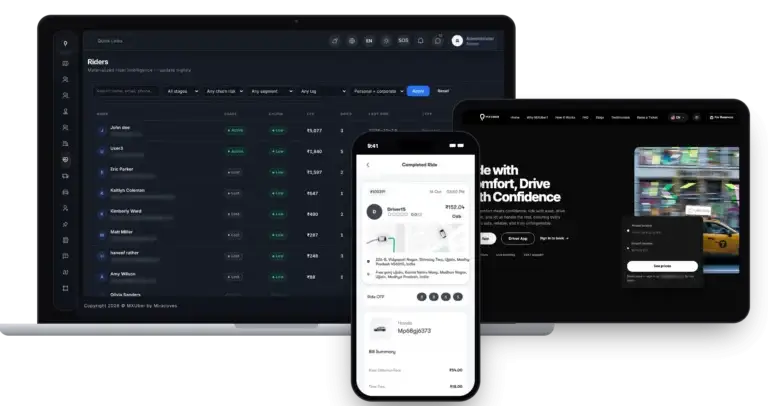
MXUber console · Ride deskIllustrative
Rides today212
Booked ahead37
Open complaints3

Ride activity

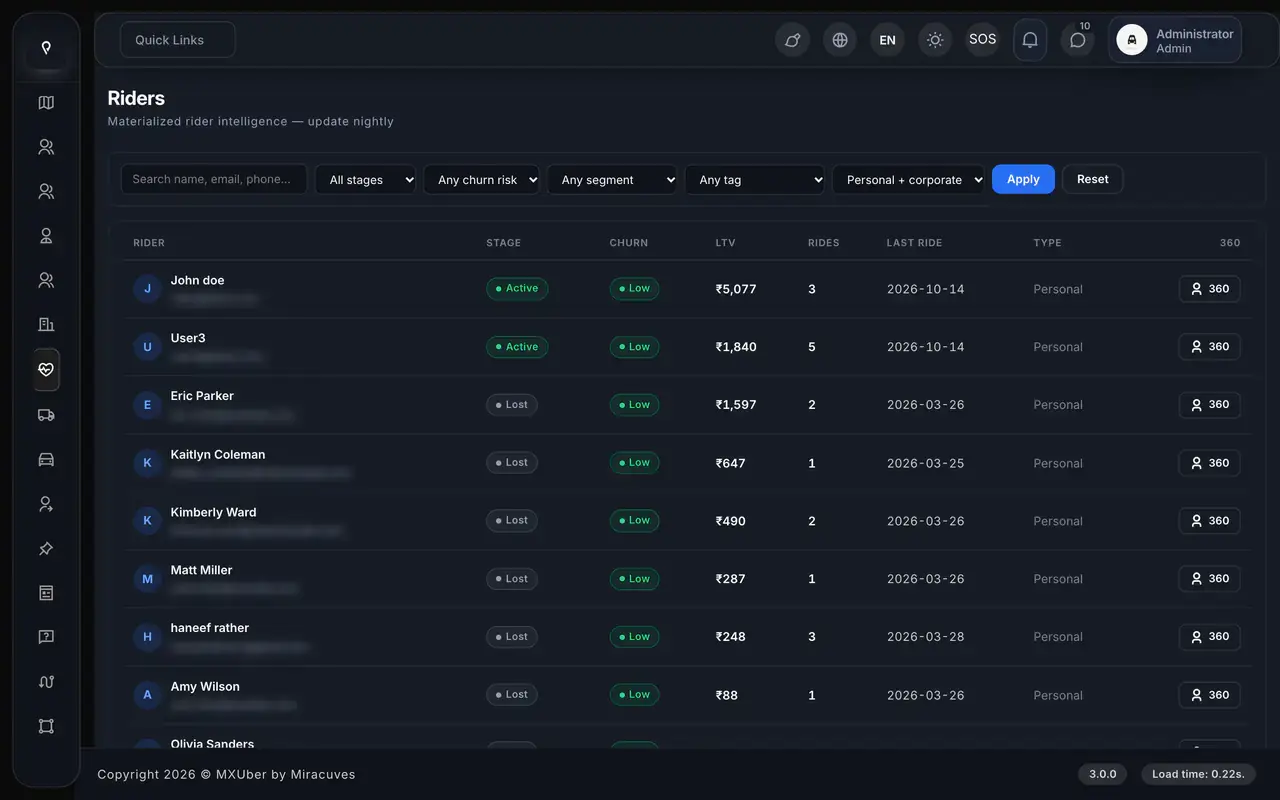
Admin · Rider 360Real screen
Lyft Clone App - White-Label Friendly City Ride App - real admin screen, Rider 360
App in action
Price firstthen Ride Now
  • 4Ways to Sign InOTP, Google, Apple or as a guest
  • 5Photos per Disputeevidence attached to a complaint about a finished ride
  • 0%Revenue Share With Miracuvesno royalty on any fare or delivery, ever
  • 100%Source Codeevery file delivered, nothing encrypted
  • 6Days to Launchand if the delay is ours, we keep going free
  • $3,099Paid Once, Not Rentedsource code yours, no per-seat fee, no monthly rental

Live in six working days, or we keep working free until you launch. Every build carries 60 days guidance, 6 months bug fixes and 12 months updates.Verify every figure

The Fare Comes First

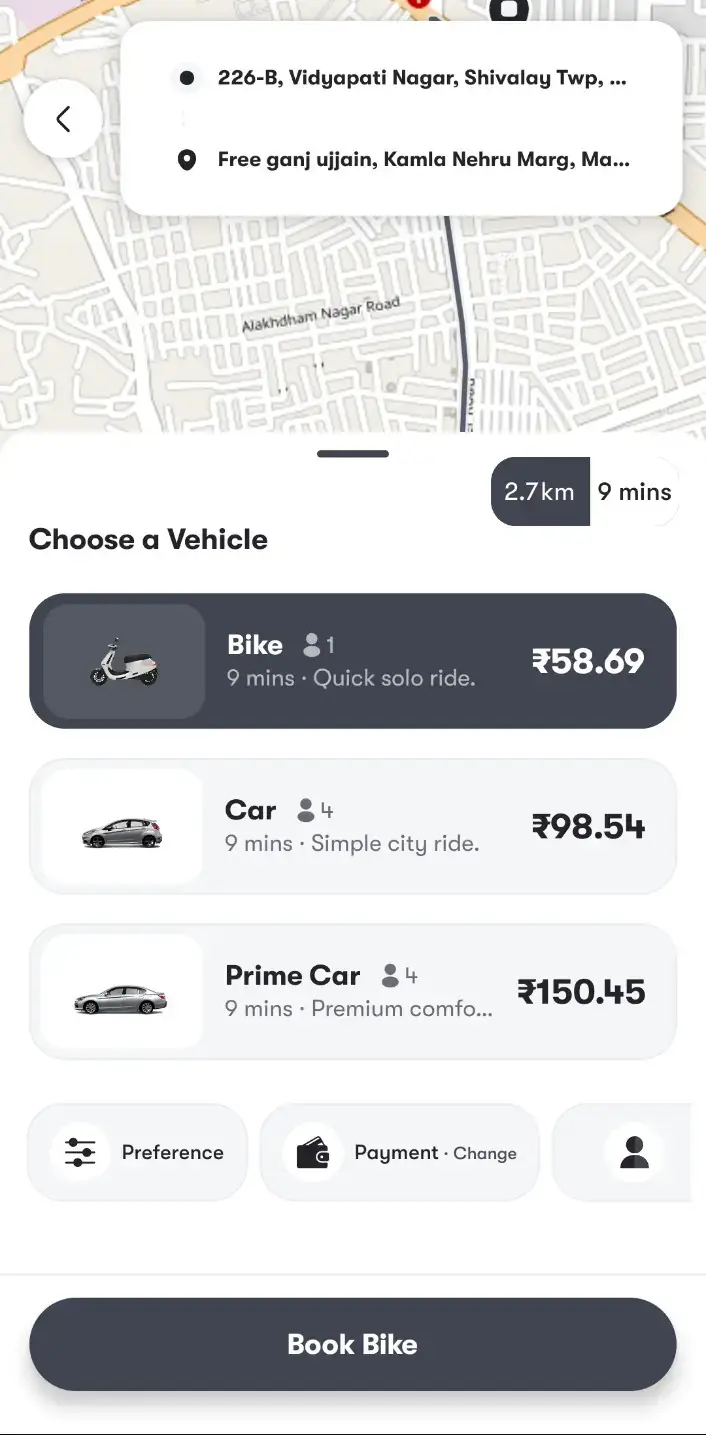
Every vehicle type shows its fare and arrival time before anything is booked, and a pickup or drop-off change mid-ride is priced before the rider accepts it.

Aone Began on MXUber

Aone launched its ride service on an earlier release of MXUber, reusing 20 of 25 modules, and its published case study names them.

The Gateway Holds the Cards

Card details go to the gateway you connect, and the platform keeps a payment reference, never a card number; riders can also pay from a topped-up wallet.

Thinking of a ride app that riders open without a second thought?Talk to a Product Expert

6,000+ clients worldwide have picked us

Miracuves is listed by Expertise.com as a managed IT service provider.Miracuves is an official member of the Forbes Business Council.Miracuves is a verified agency on DesignRush, listed among top design agencies in India.Miracuves is reviewed on Trustpilot as a software development company.Miracuves is listed by The Manifest among top managed software development companies.Miracuves is listed by DesignRush as a top software development company.Miracuves is recognized by GoodFirms as a top software development company.Miracuves is ranked among the top 1000 companies globally by Clutch.Miracuves is a top managed service provider in the United States on Clutch.

01Demo first

Hands-On Demo

Lyft Clone Demo: Try the Rider App, the Driver App, the Rider Web App & the Operator Panels

You can try the Miracuves Lyft Clone yourself. Sign in with the logins below: a rider, a driver and the admin, dispatcher and fleet panels all have public demo accounts. Start on the rider app's home tiles, compare the fare and ETA on each vehicle, then try Rebook and the SOS button.
Lyft Clone rider home with Where next search and Ride, Intercity, Package, Schedule and Rental tilesLyft Clone rider choosing Bike, Car or Prime Car with fares and arrival times before booking
Riders

Try the Rider App

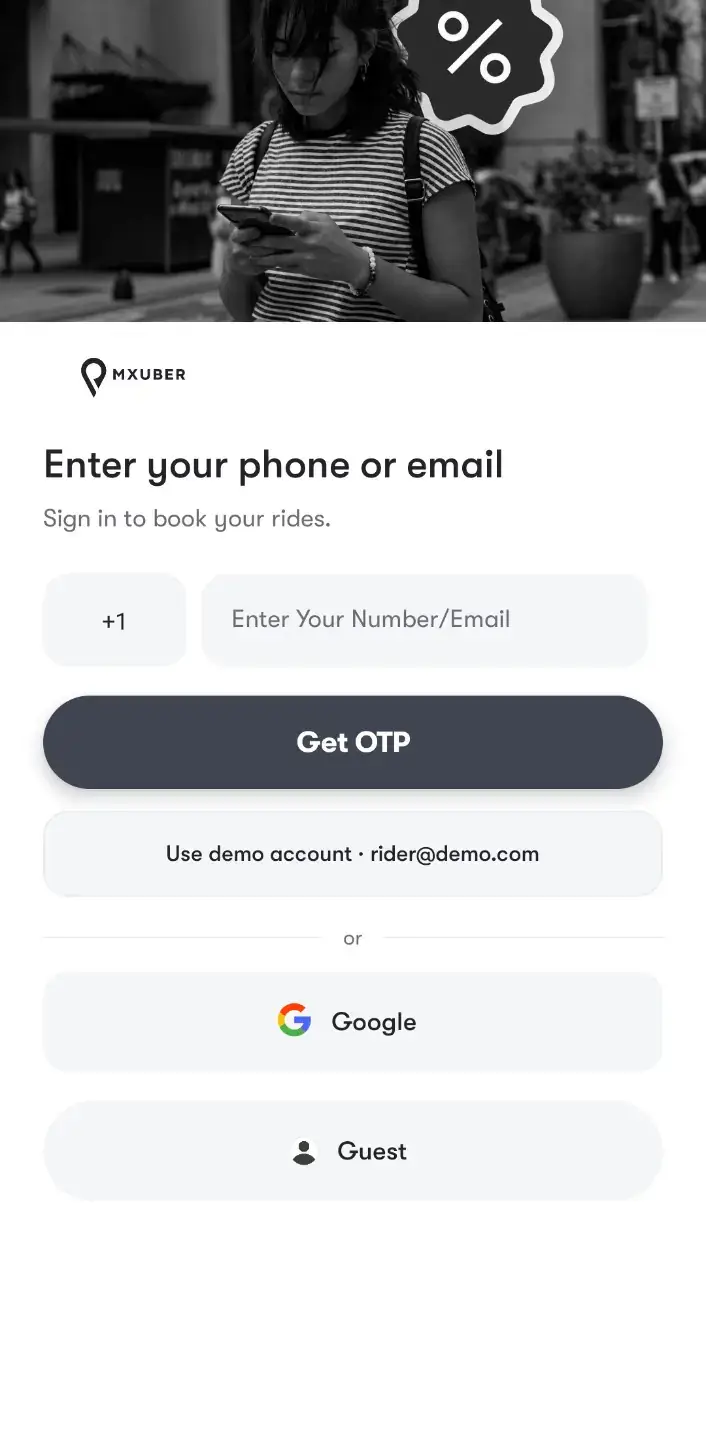
What your riders touch every day. They sign in with a phone code, a Google account, an Apple ID or no account at all, check the fare and ETA of every vehicle, then add a stop or a promo code before confirming.

  1. 1Go to the app portal and install the rider app
  2. 2Sign in with the rider login below
  3. 3Check the fare list, Rebook and the SOS button
Rider account:+91 9876543210 | User_321
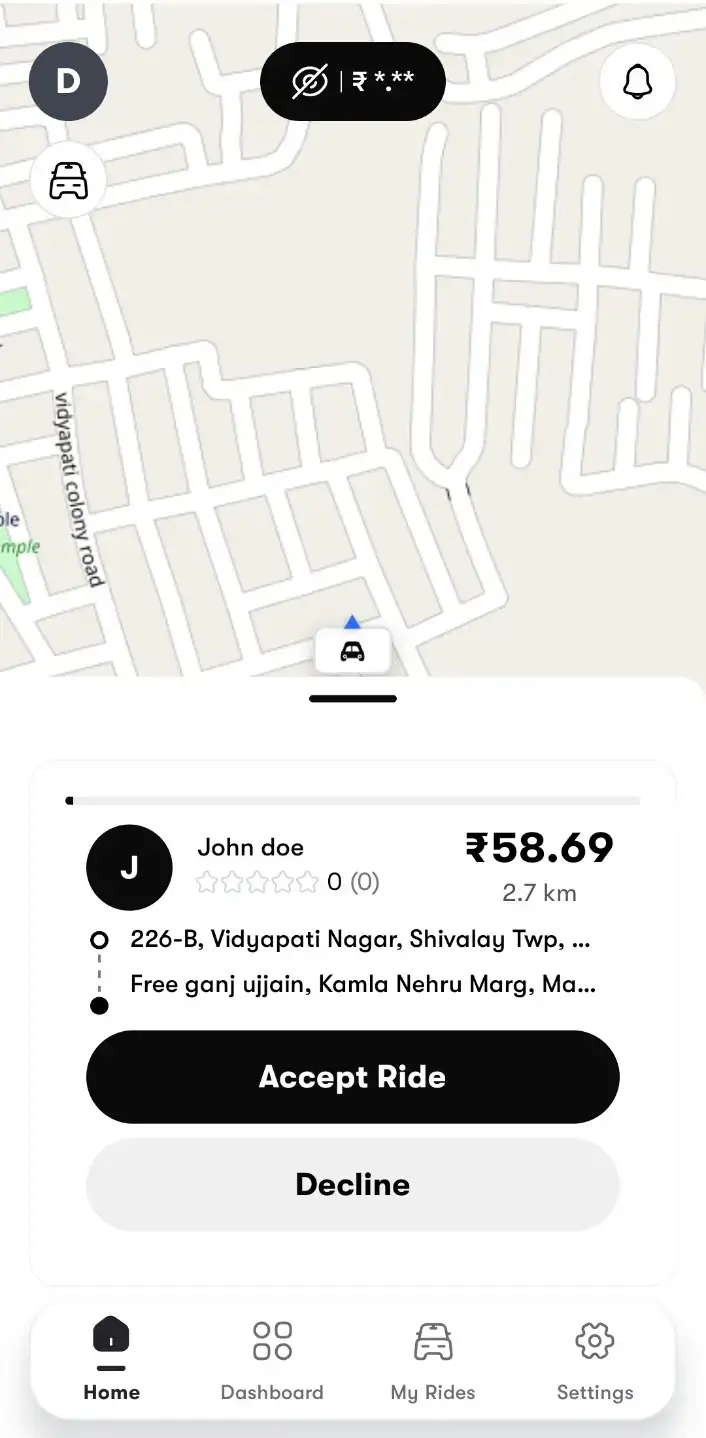
  • Ride offer: accept or decline
  • Live surge zones on the map
  • Earnings donut chart
  • Subscription plans
Drivers

Try the Driver App

Where a booking becomes a job. An offer rings in, the driver accepts or declines, starts the trip with the rider's OTP and follows earnings, wallet and subscription plans in the same app.

  1. 1Install the driver app
  2. 2Log in with the driver account below
  3. 3Flip the online switch, take an offer, open earnings
Driver account:driver@demo.com | Driver_321
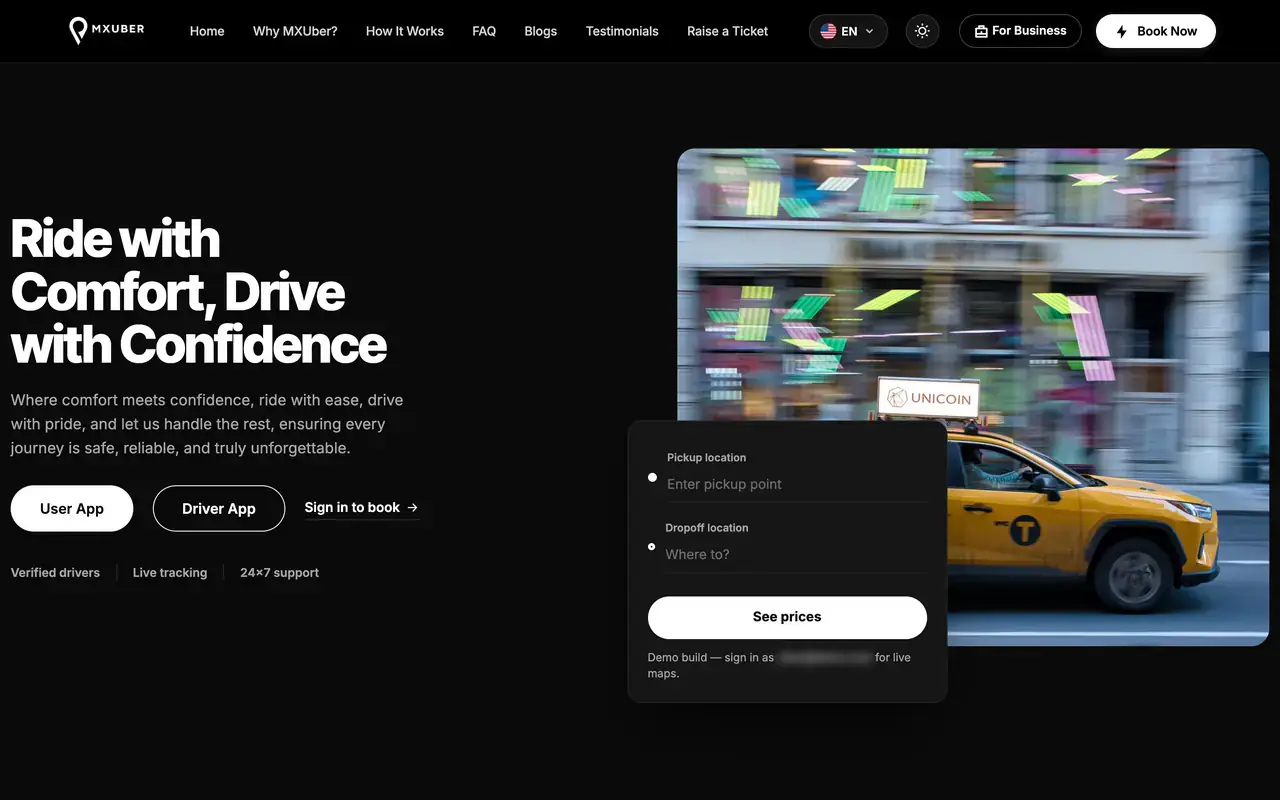
Lyft Clone rider website hero with pickup and drop-off fields, See prices button and rider and driver app links
Website

Rider Web App & Site

Your service in a browser. Riders book at /cab with a map, vehicle choice, payment and scheduling, then track the trip live and see invoices, beside a public site that presents your brand.

  1. 1Open the demo address
  2. 2Sign in at /cab with the rider login
  3. 3Book a ride, then open history and wallet
Rider web:+91 9876543210 | User_321
  • Dispatch: phone orders, manual assign
  • Fleet: live map, drivers, earnings
  • Admin: zones, surge, coupons, reports
Staff

Dispatch, Fleet & Admin Consoles

How the ride business is run behind the scenes. Dispatchers key in phone bookings and assign drivers, fleet managers watch their own drivers, and admins control zones, surge, coupons and driver withdrawals.

  1. 1Go to the admin login page
  2. 2Use the dispatcher or fleet login below
  3. 3Check peak zones and surge by vehicle type
Logins:Admin: admin@demo.com | Admin_$321Dispatcher: dispatcher@demo.com | Dispatcher_321Fleet: fleet@demo.com | Fleet_321
Lyft Clone on three phones: the rider app menu with wallet, SOS and out-station, the scheduled-ride date picker and the suggested rides and fare listLyft Clone rider choosing Bike, Car or Prime Car with fares and arrival times before bookingLyft Clone rider home with Where next search and Ride, Intercity, Package, Schedule and Rental tiles

Watch It Together

A Guided Tour of a Ride App Like Lyft: Fare, Ride, Rebook & Invoice

Some things are quicker to see than to read. The demo is open to you now, and in a 30-minute call we run a single ride across the rider app, the driver app and the admin console side by side, from the fare quote to the driver's earnings, pausing wherever you want to ask how a setting is changed.

Book a live walkthrough

Screen by Screen

The Lyft Clone App in Use: Rider & Driver Screens, Admin Panel & Website

Start with the rider app of Miracuves' Lyft clone and follow one booking from sign-in to the fare list. Then switch tabs to see the driver screens, the 13 admin screens and the site where riders can book in a browser.

Lyft Clone rider app splash screen with the logo over a night street
Lyft Clone rider sign-in with phone or email OTP, Google sign-in and guest entry
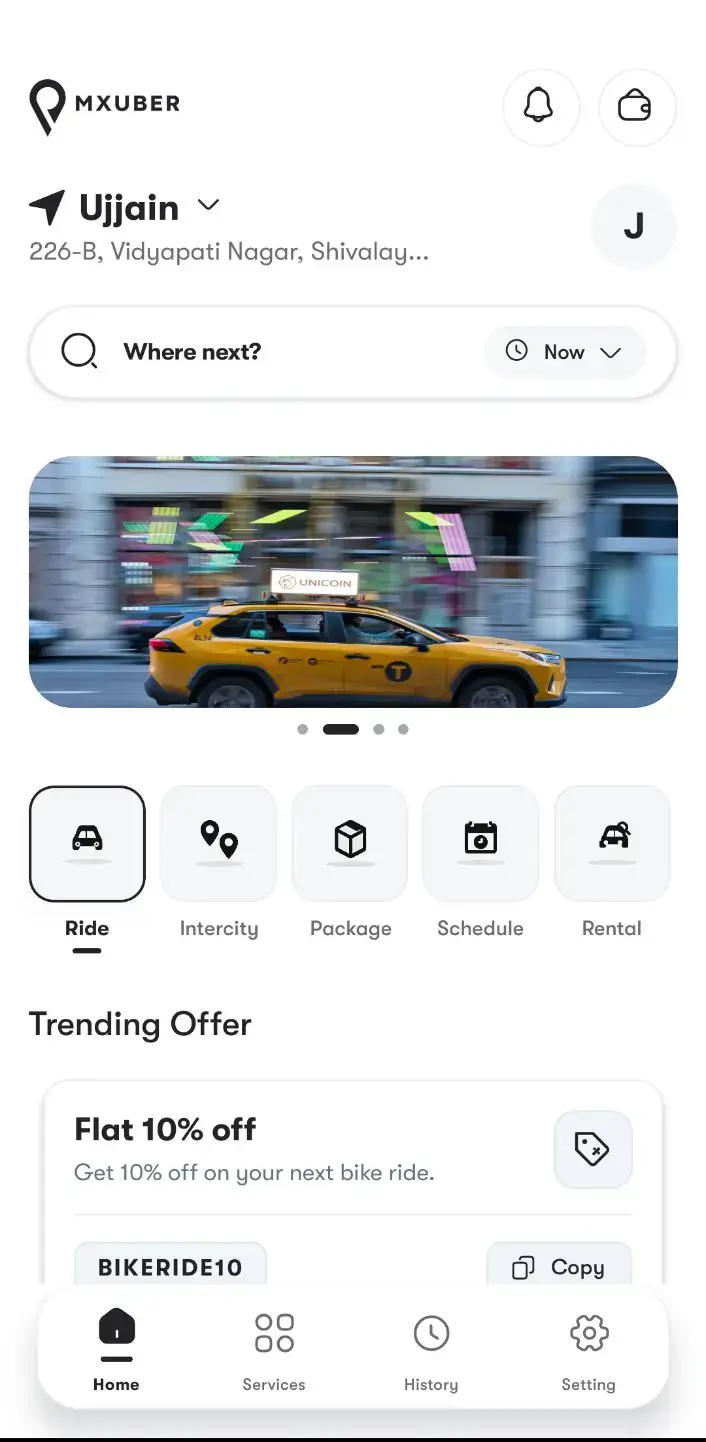
Lyft Clone rider home with Where next search and Ride, Intercity, Package, Schedule and Rental tiles
Lyft Clone rider choosing Bike, Car or Prime Car with fares and arrival times before booking
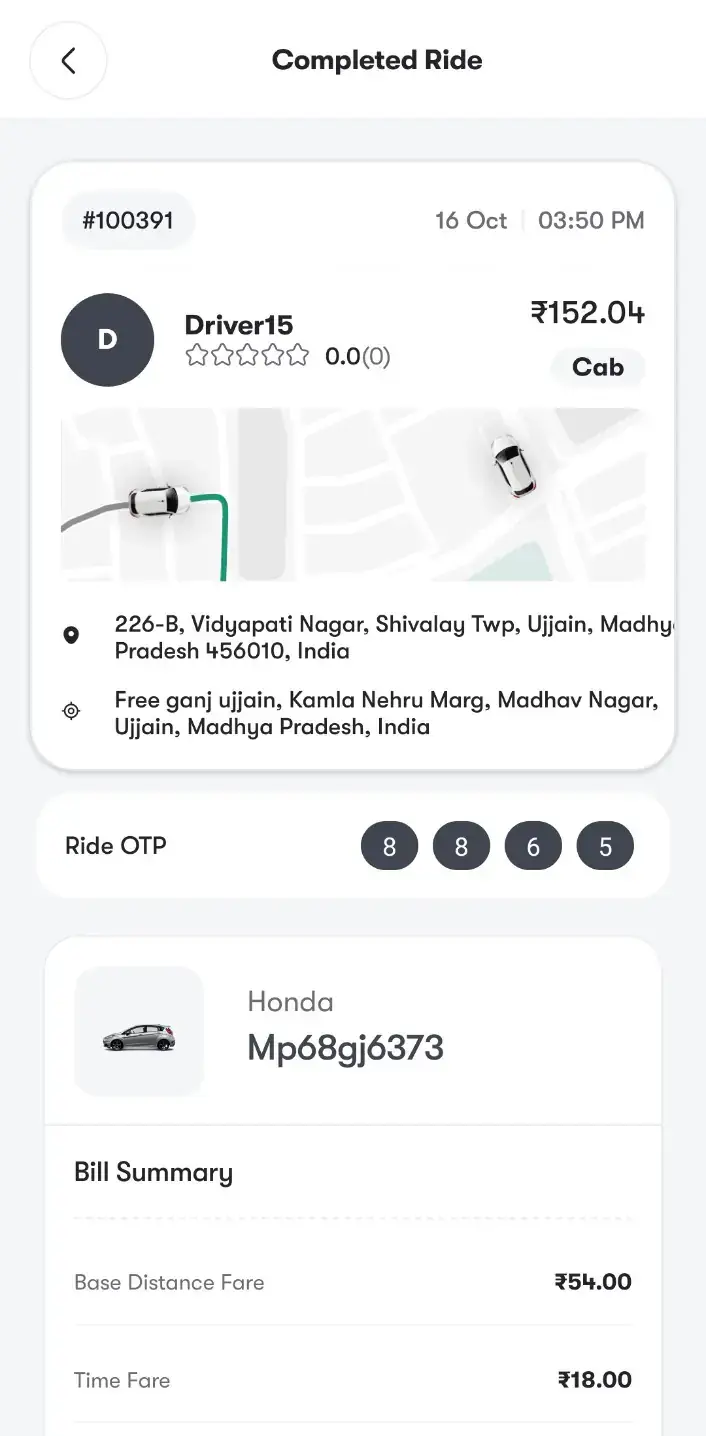
Lyft Clone completed ride with route, ride OTP, vehicle and bill summary
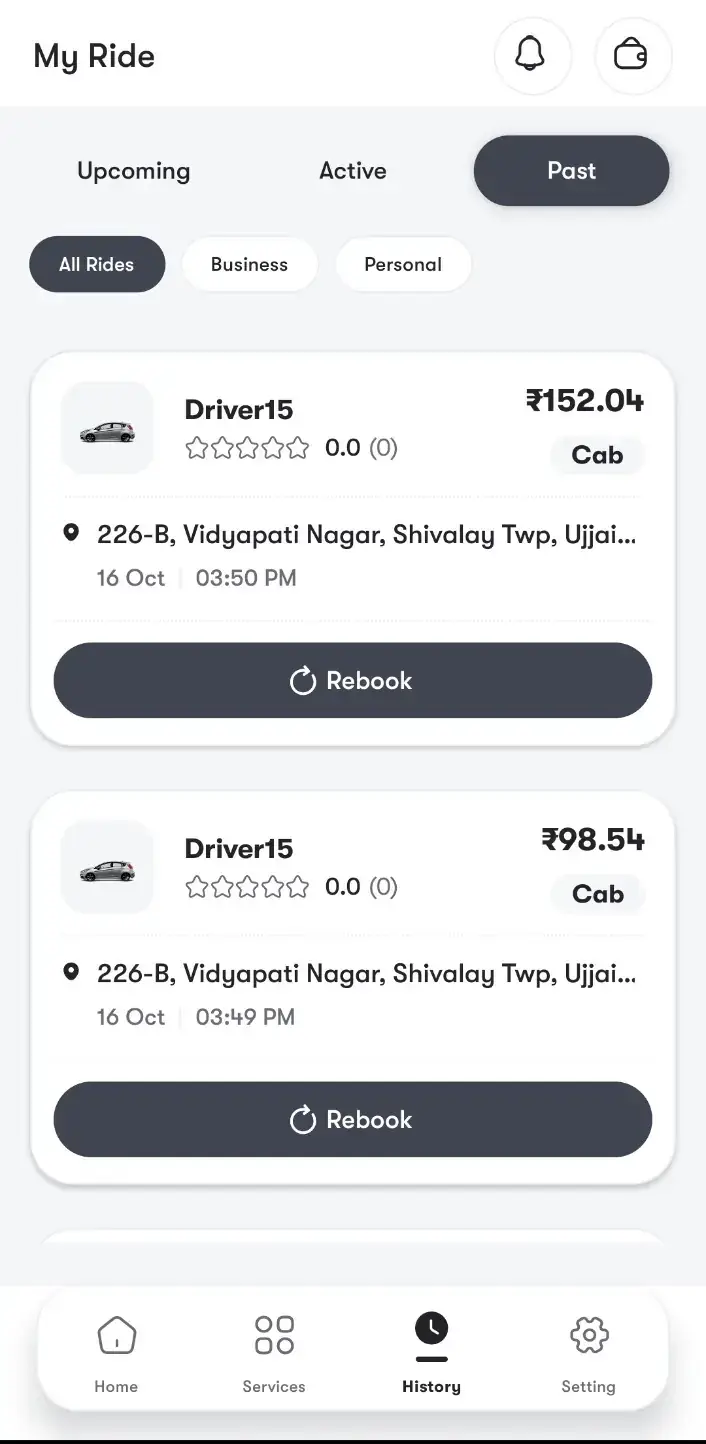
Lyft Clone ride history with business and personal filters and one-tap Rebook
6 screens · scroll →
Lyft Clone driver app splash screen
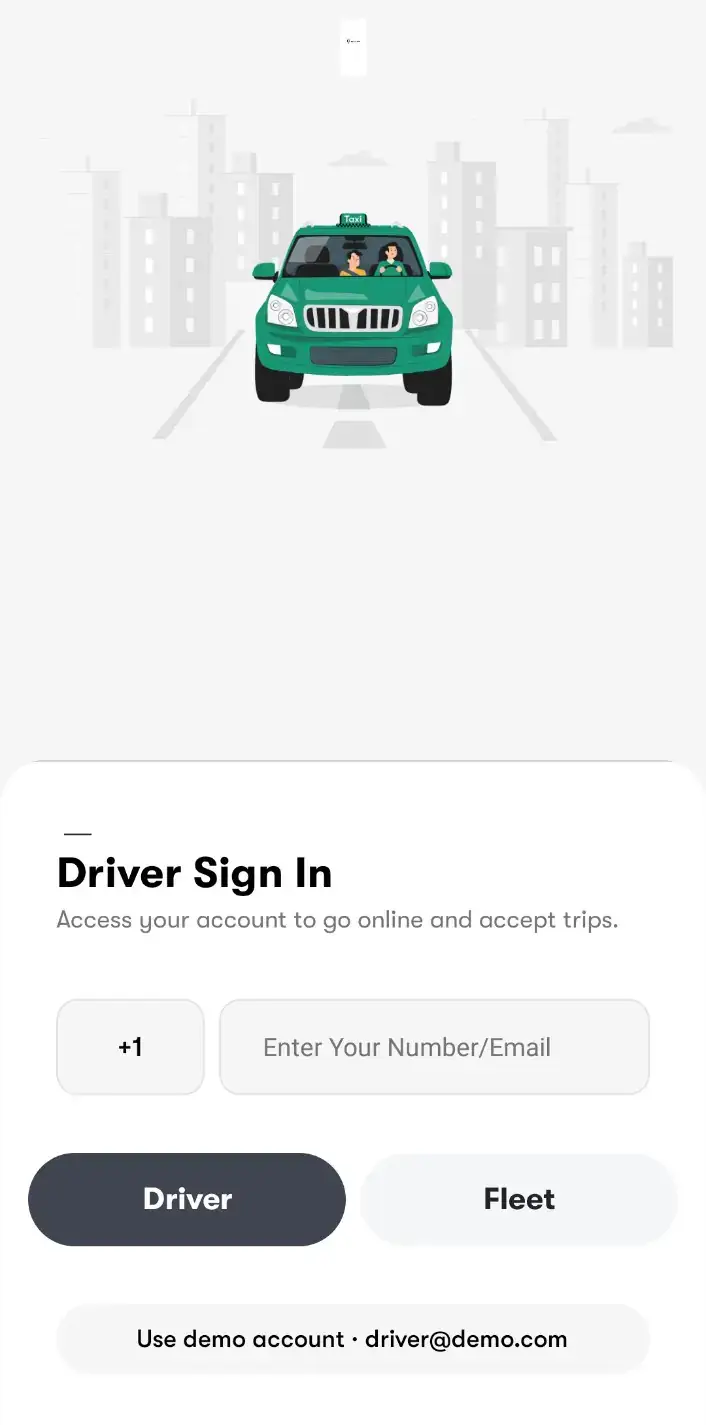
Lyft Clone driver sign-in with Driver and Fleet options
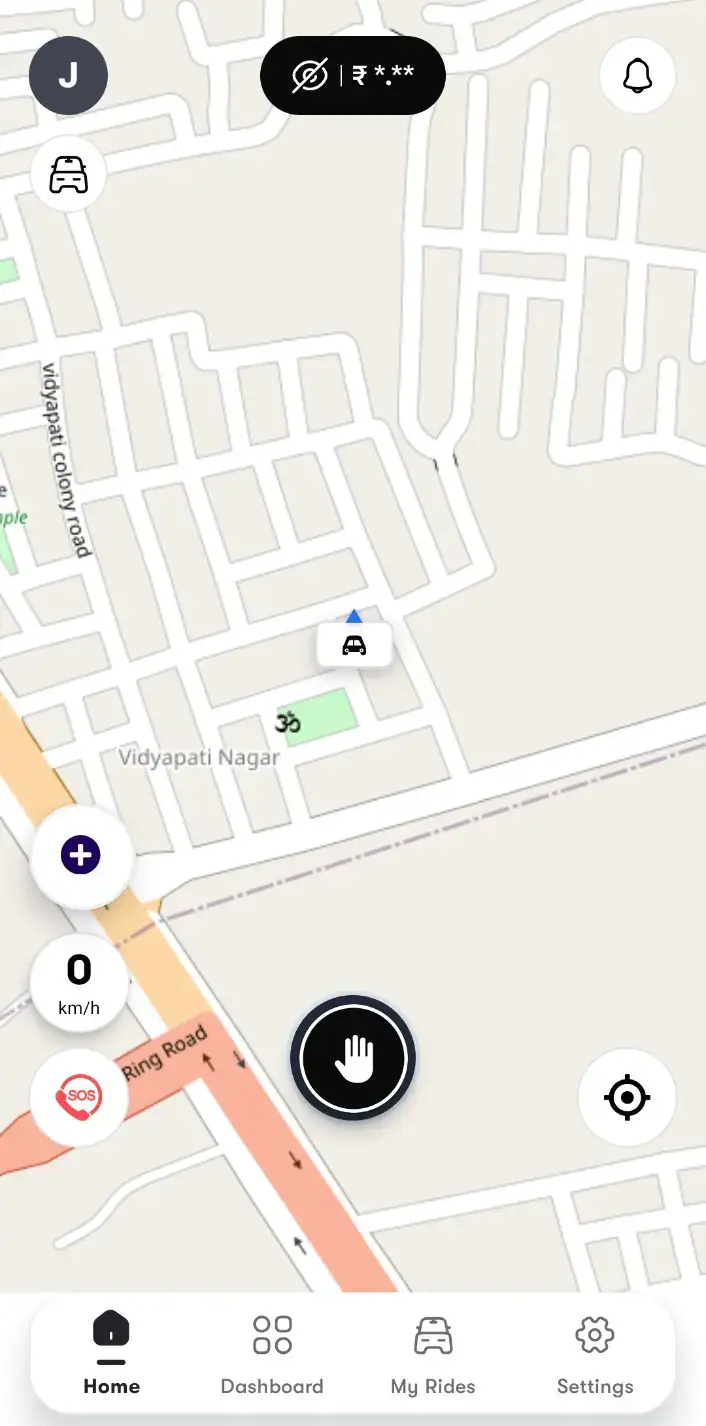
Lyft Clone driver home map with the online power button and hidden earnings chip
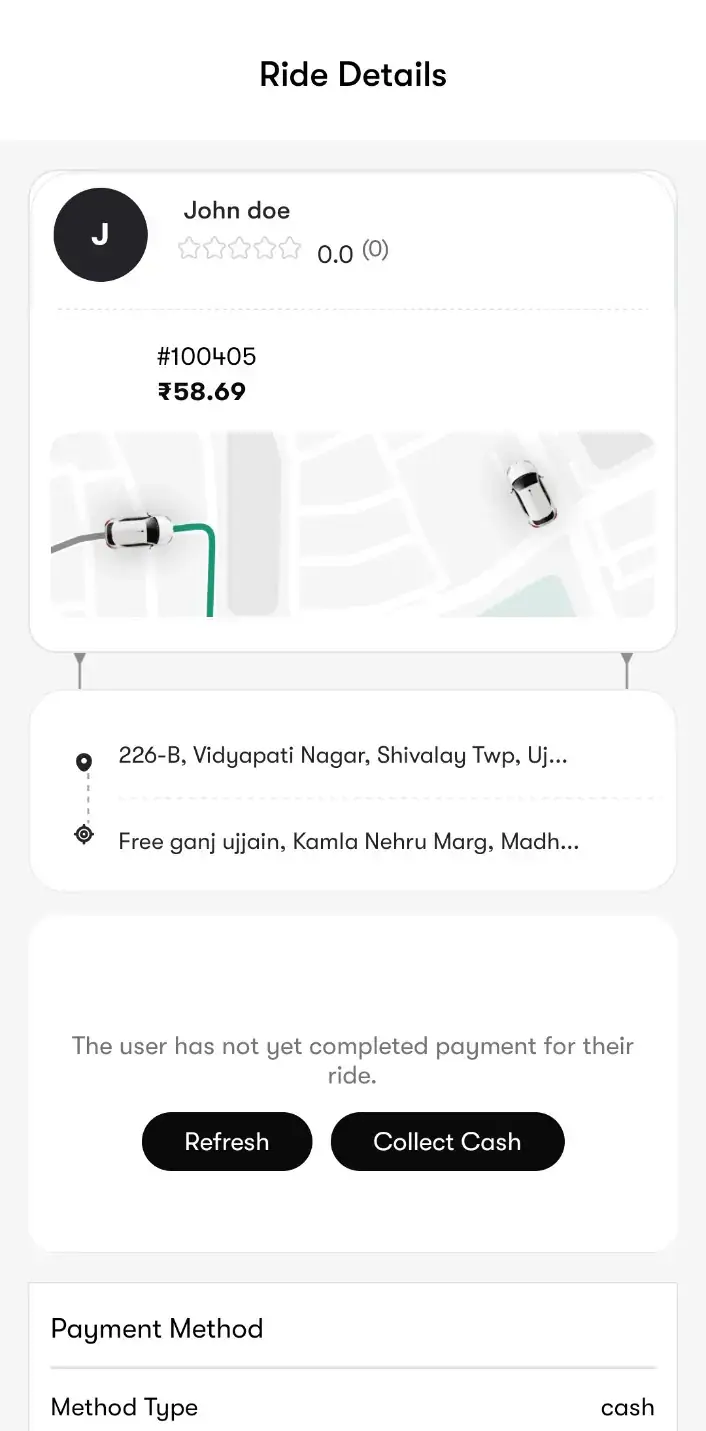
Lyft Clone driver ride offer with rider, fare, distance, pickup and drop-off and Accept Ride or Decline
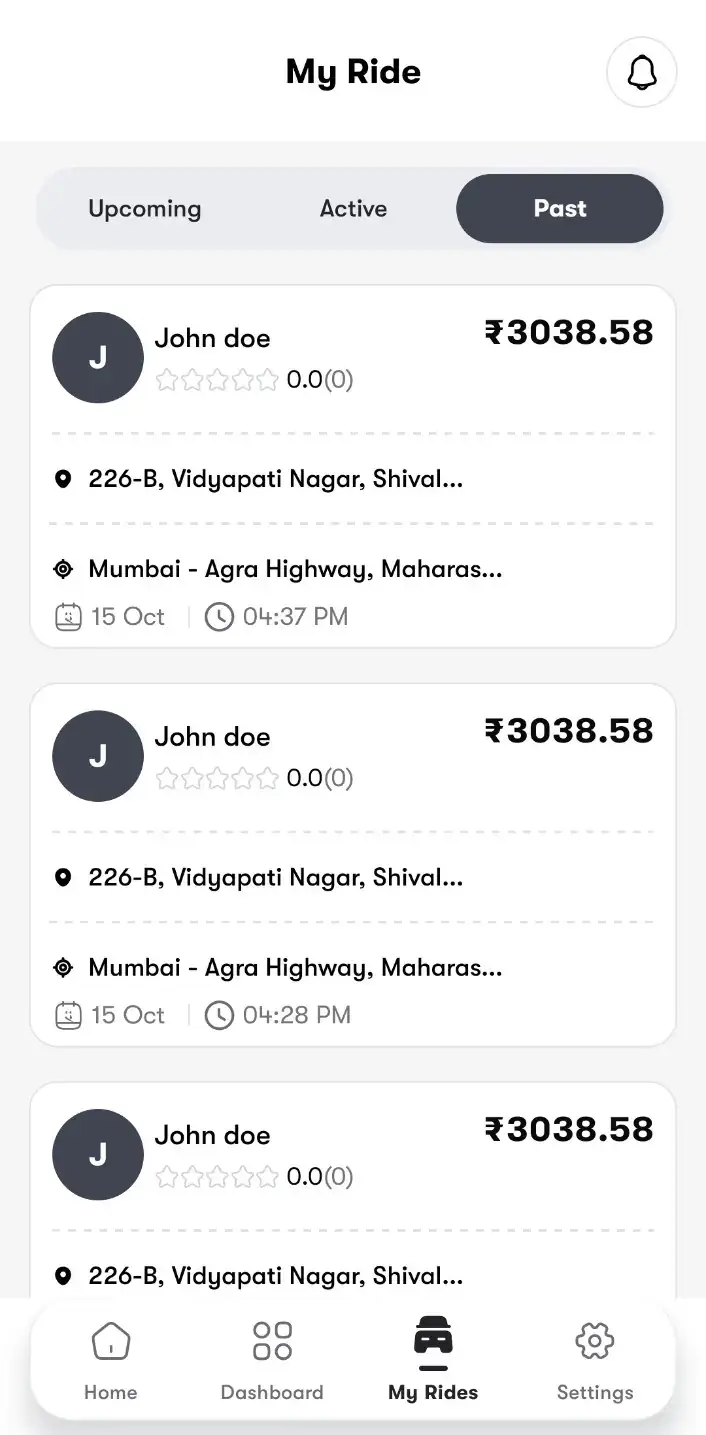
Lyft Clone driver My Ride list with upcoming, active and past rides and fares
Lyft Clone driver ride details with route and Collect Cash for an unpaid ride
6 screens · scroll →
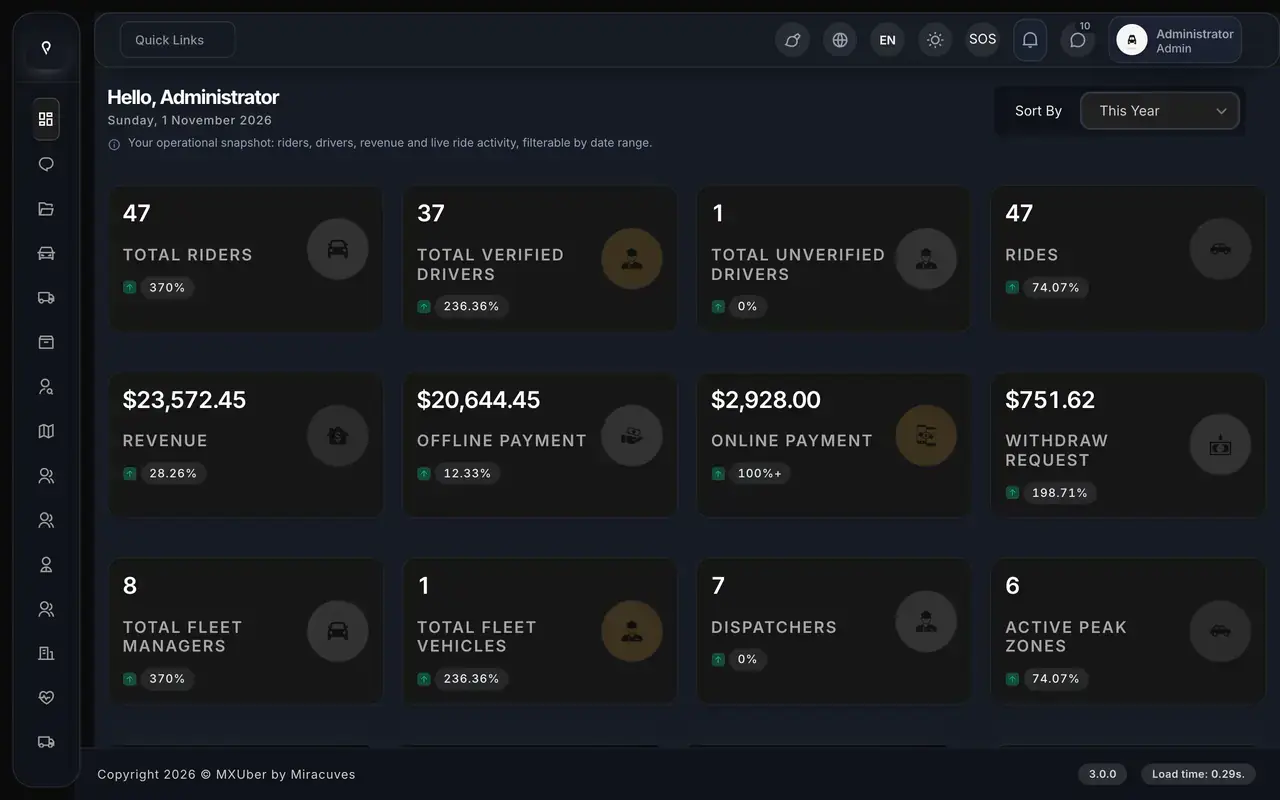
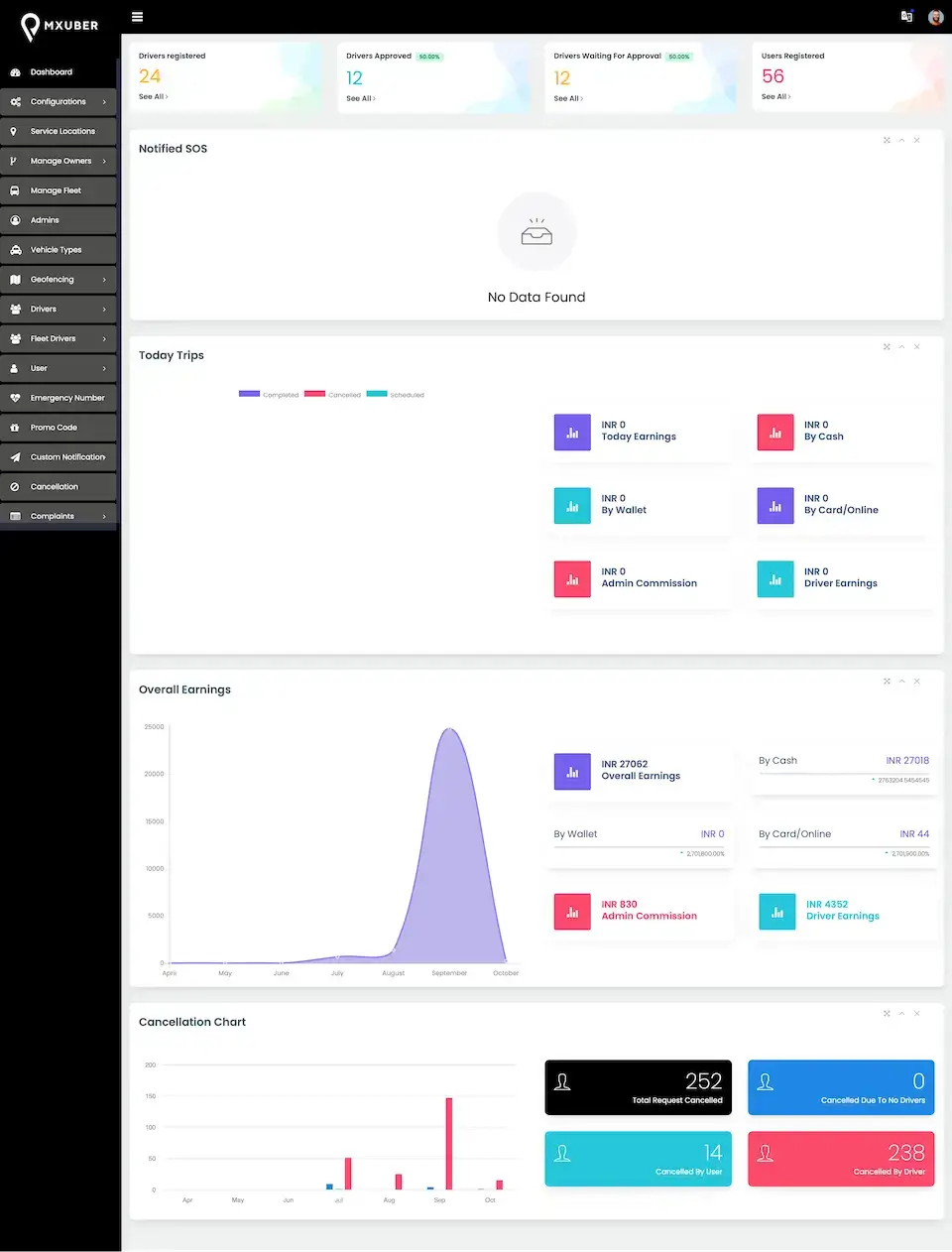
Lyft Clone admin dashboard showing riders, verified drivers, rides, revenue, payments, withdrawals, fleet managers and peak zones
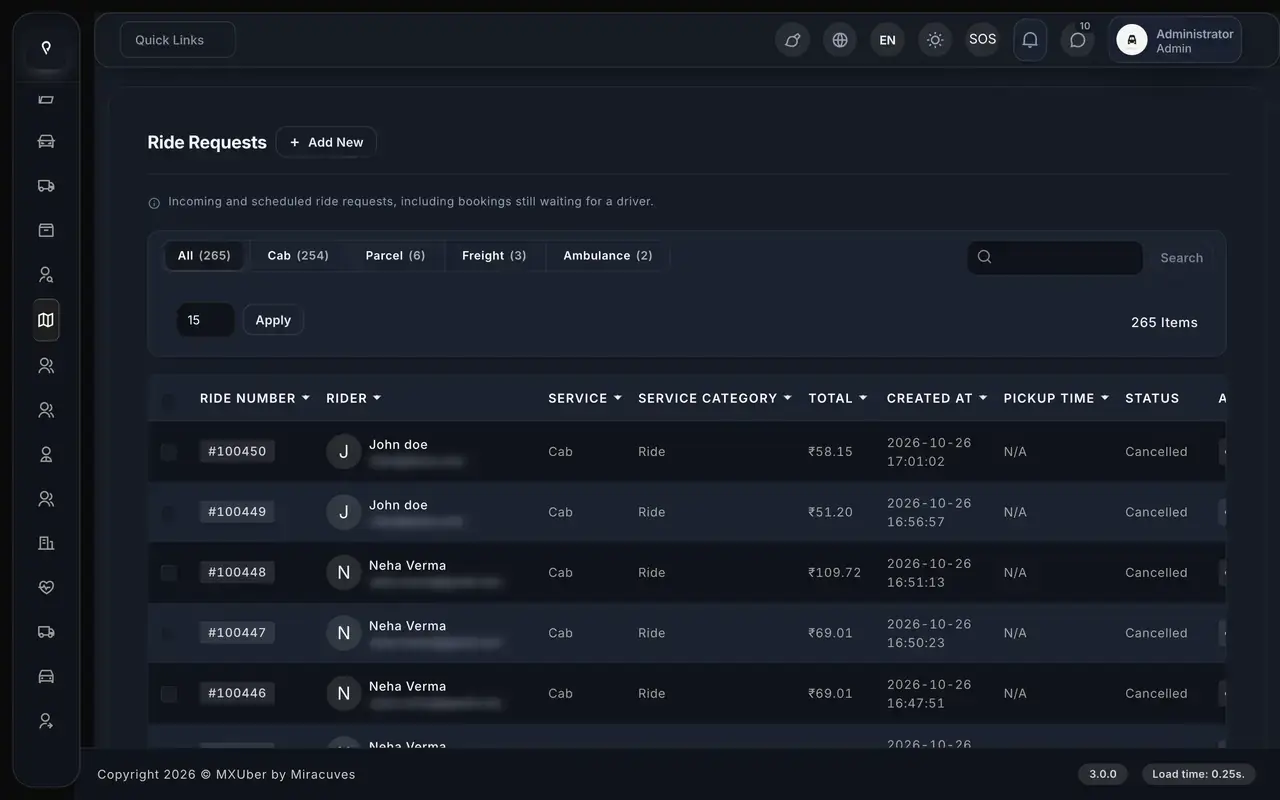
Lyft Clone ride requests list filtered by cab, parcel, freight and ambulance with rider, service, fare and status
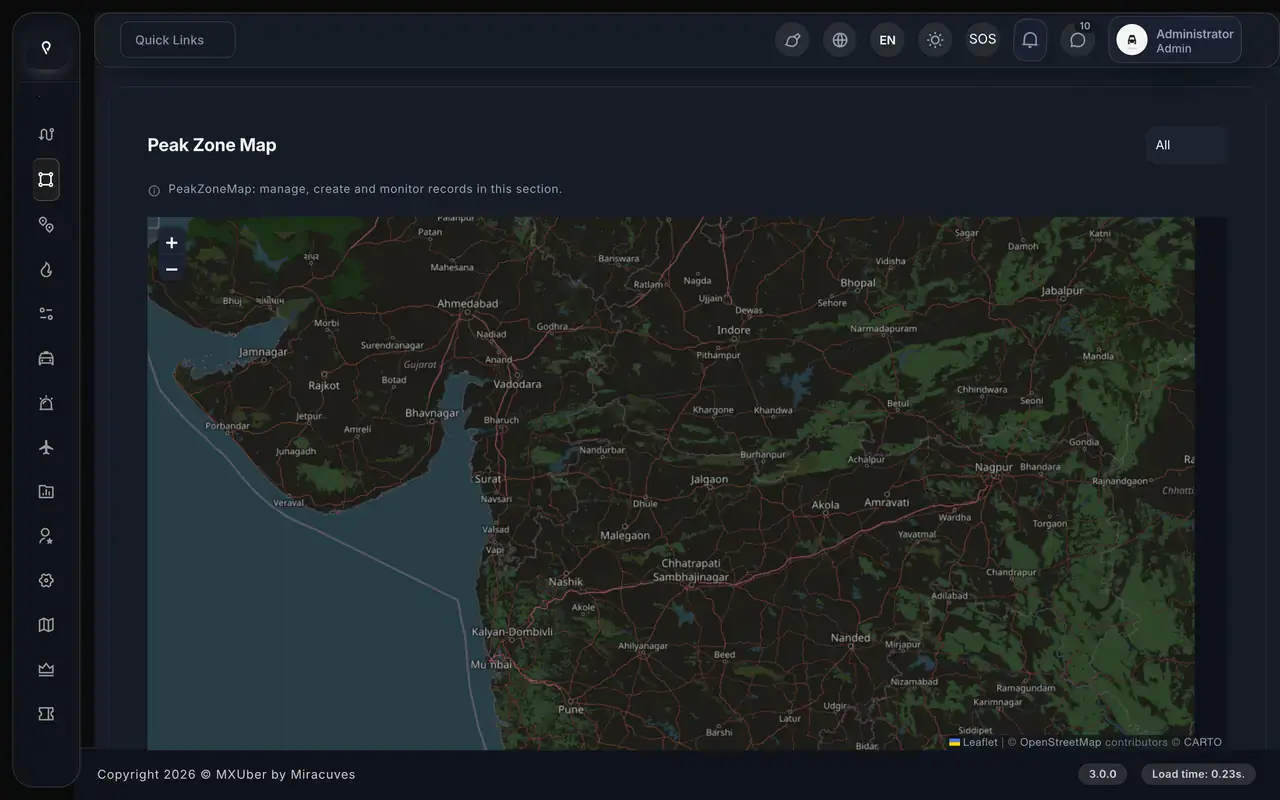
Lyft Clone admin peak zone map on an OpenStreetMap base layer, where operators draw surge areas
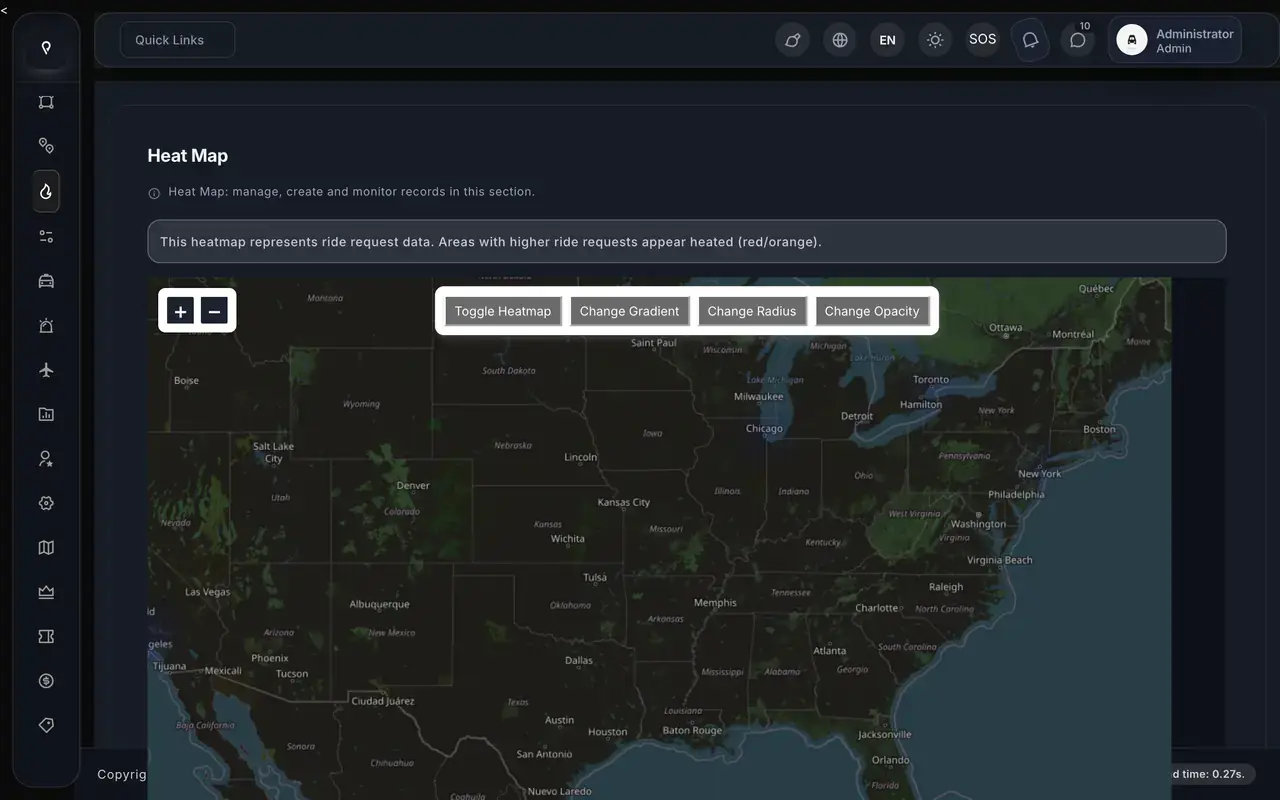
Lyft Clone admin heat map showing ride request density across the map
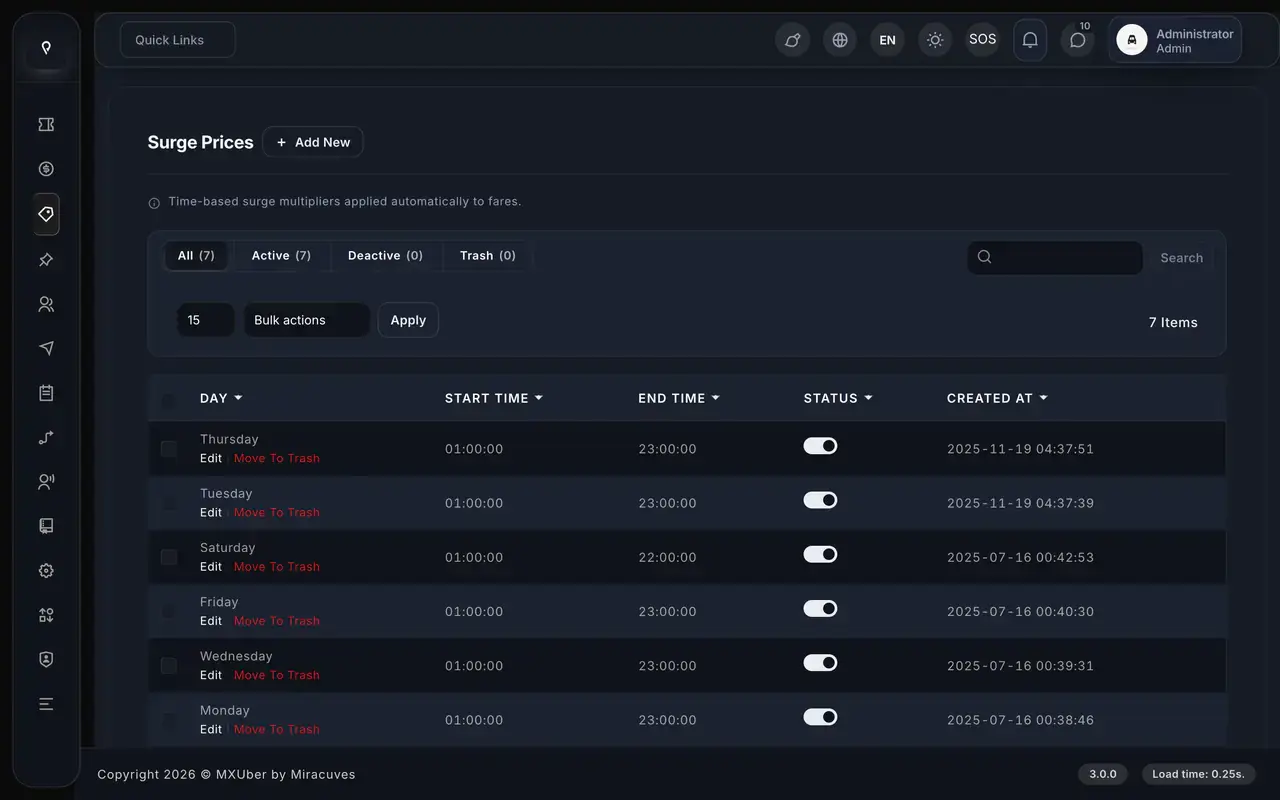
Lyft Clone surge prices by day with start and end time
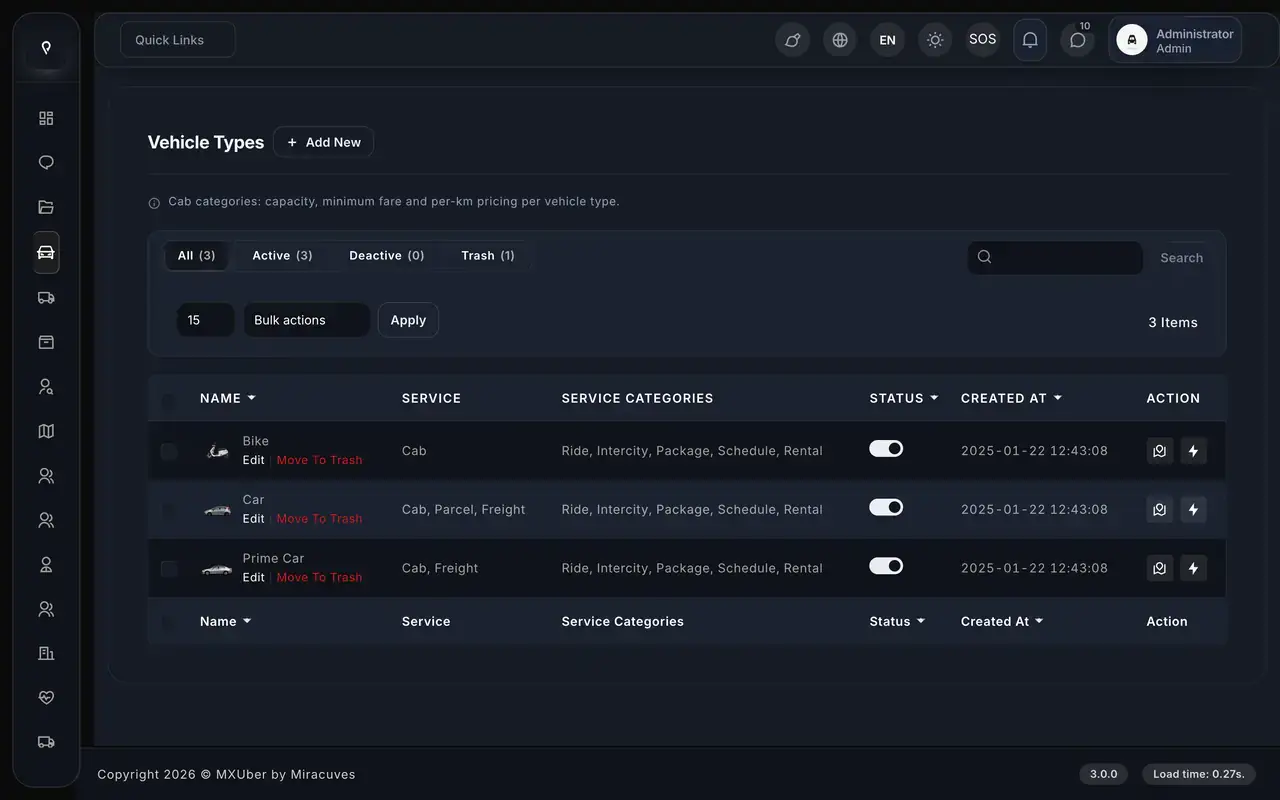
Lyft Clone vehicle types bike, car and prime car mapped to cab, parcel and freight services and ride categories
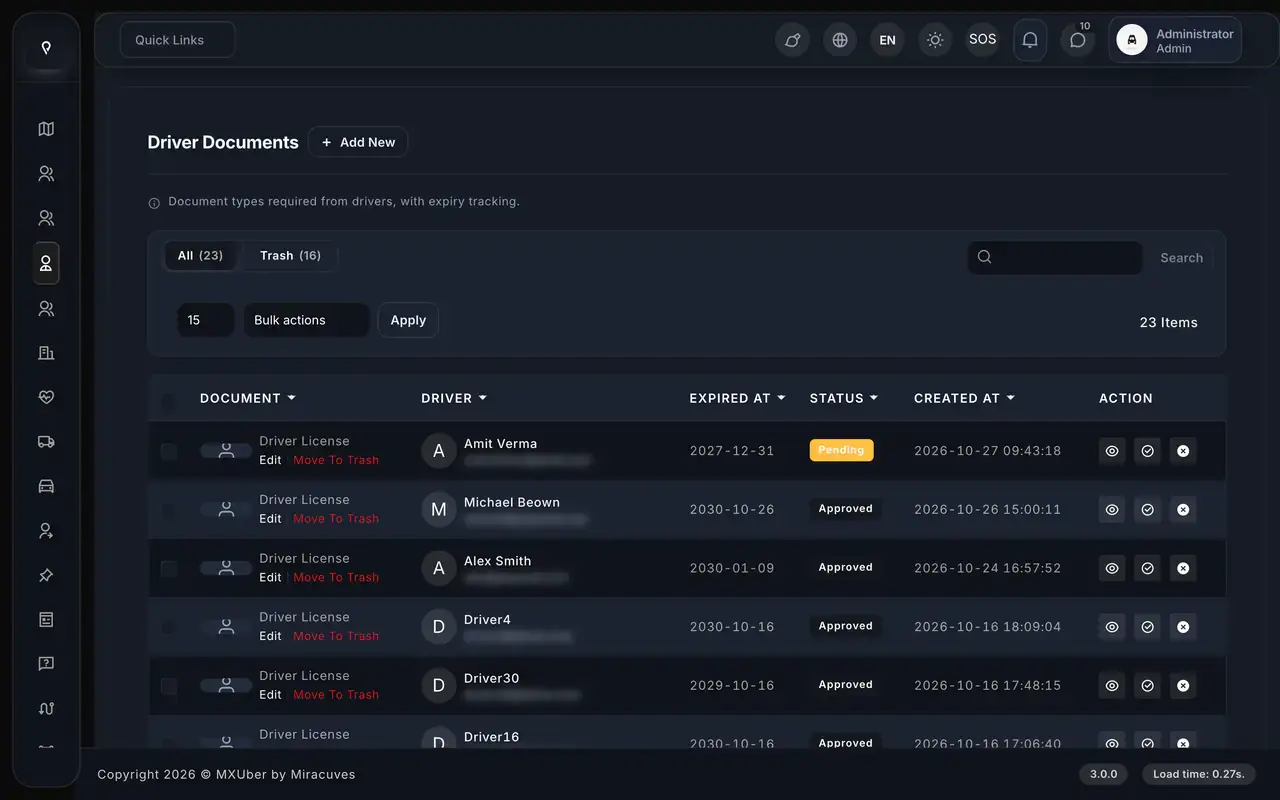
Lyft Clone driver documents list with expiry dates and pending or approved status
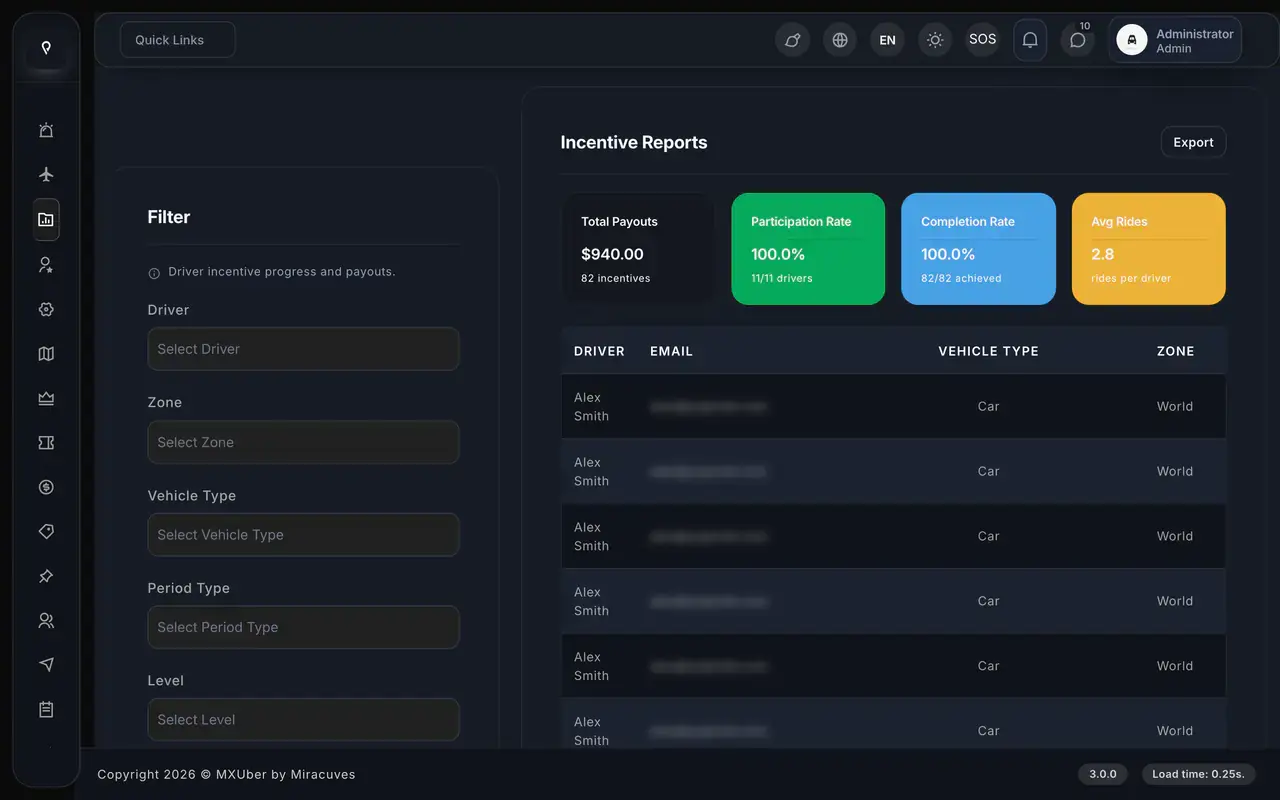
Lyft Clone incentive report with total payouts, participation rate, completion rate and average rides per driver
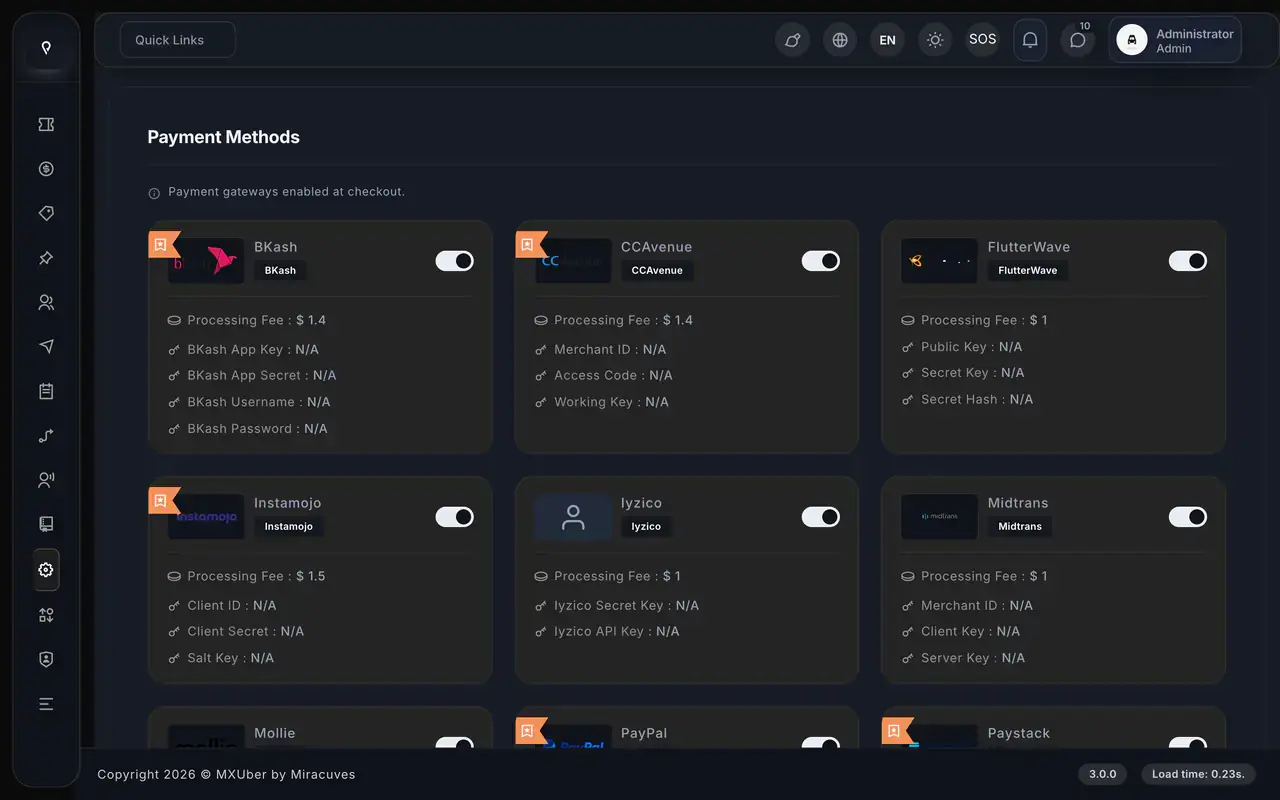
Lyft Clone payment methods screen with bKash, CCAvenue, Flutterwave, Instamojo, Iyzico, Midtrans, Mollie, PayPal and Paystack toggles
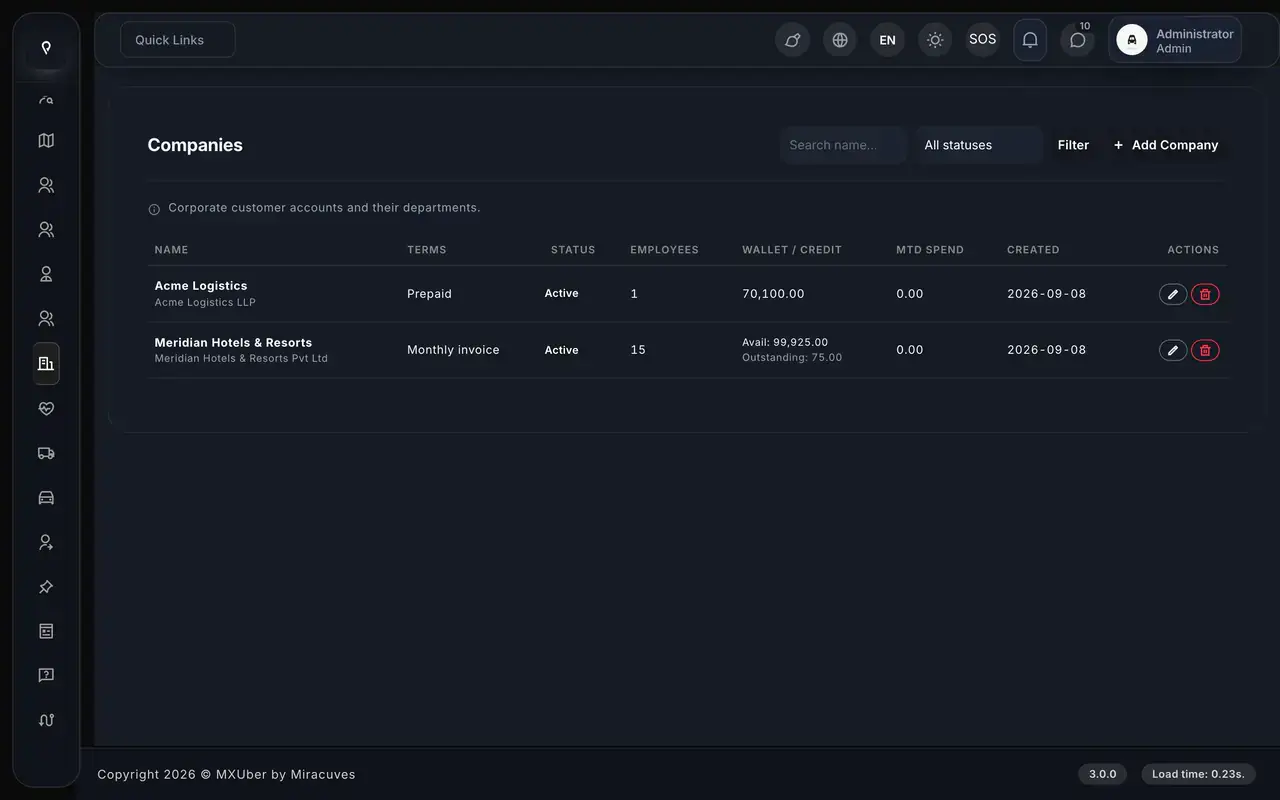
Lyft Clone companies list with billing terms, employee counts, wallet credit and month-to-date spend
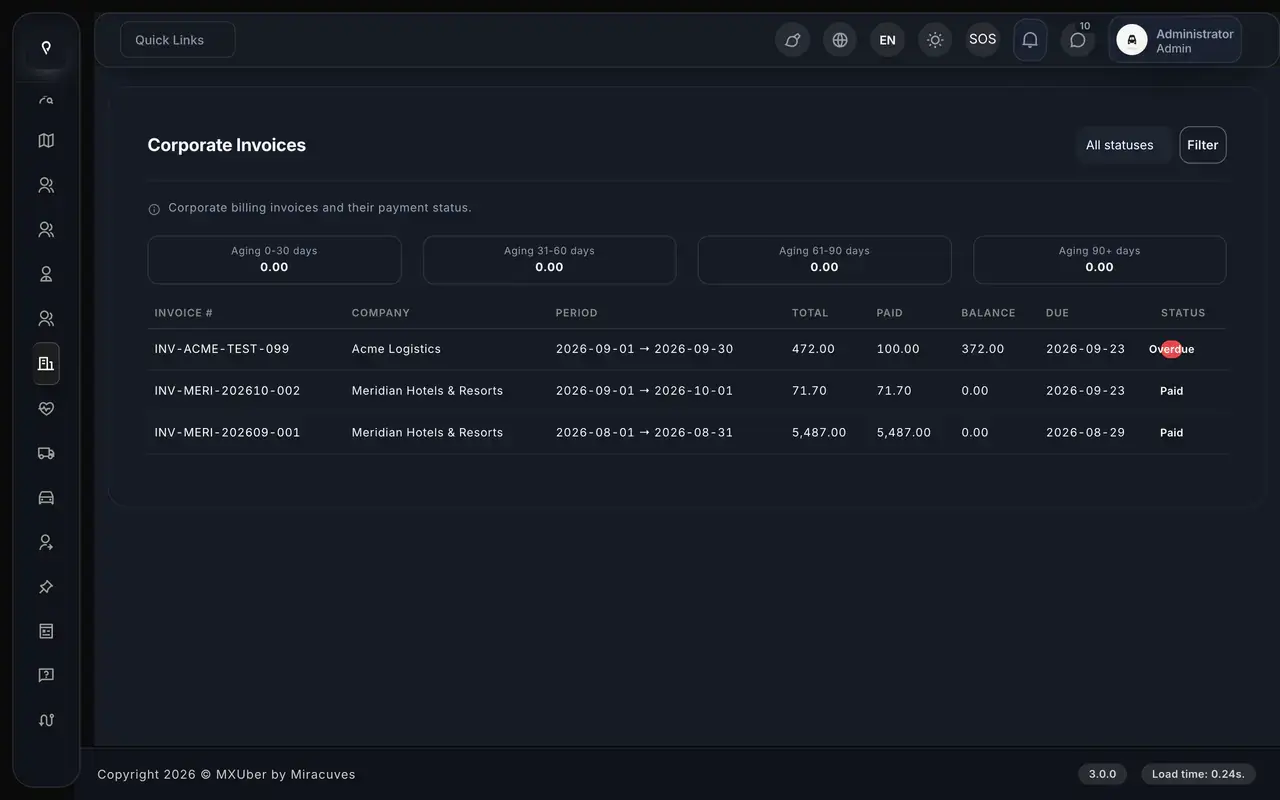
Lyft Clone corporate invoices with aging buckets, billing periods, totals, balances and paid or overdue status
Lyft Clone Riders 360 list with lifecycle stage, churn risk, lifetime value, rides and last ride date
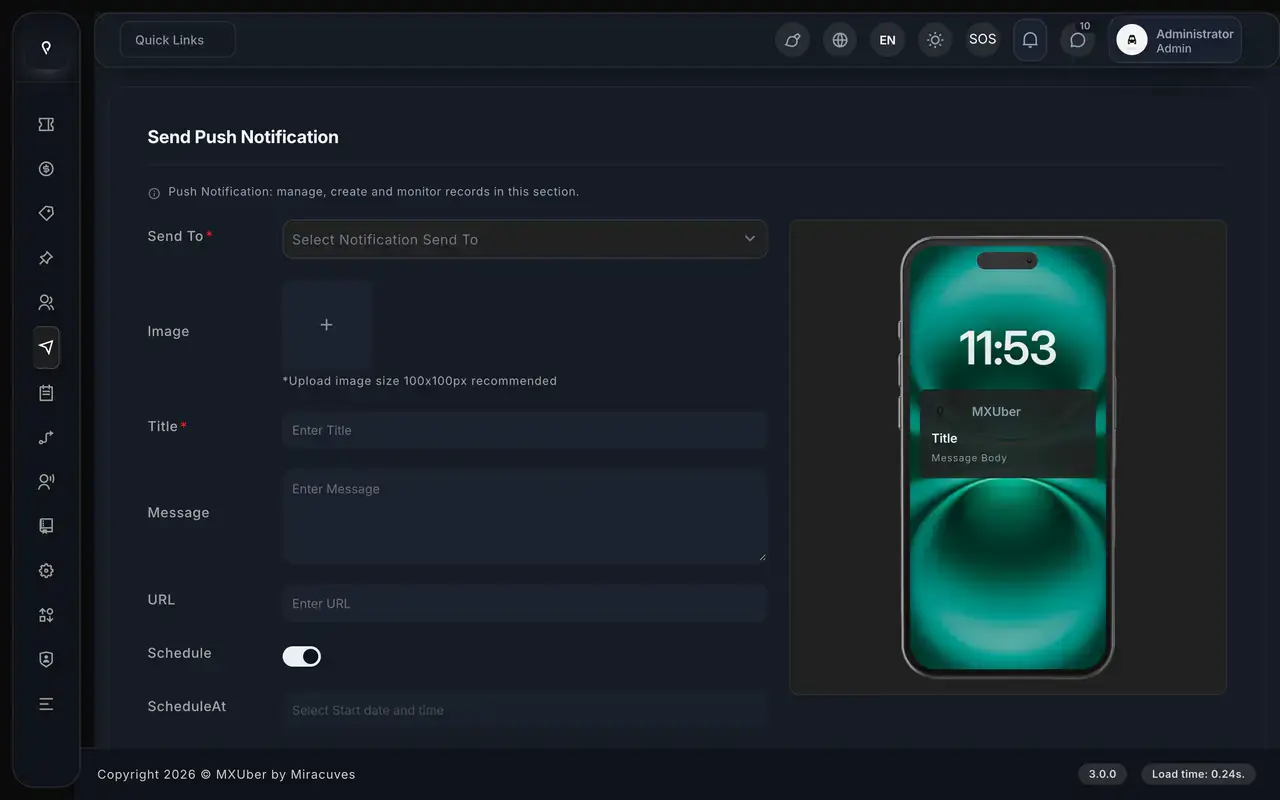
Lyft Clone send push notification form with audience, image, title, message, URL and schedule options beside a phone preview
13 screens · scroll →
Lyft Clone rider website hero with pickup and drop-off fields, See prices button and rider and driver app links
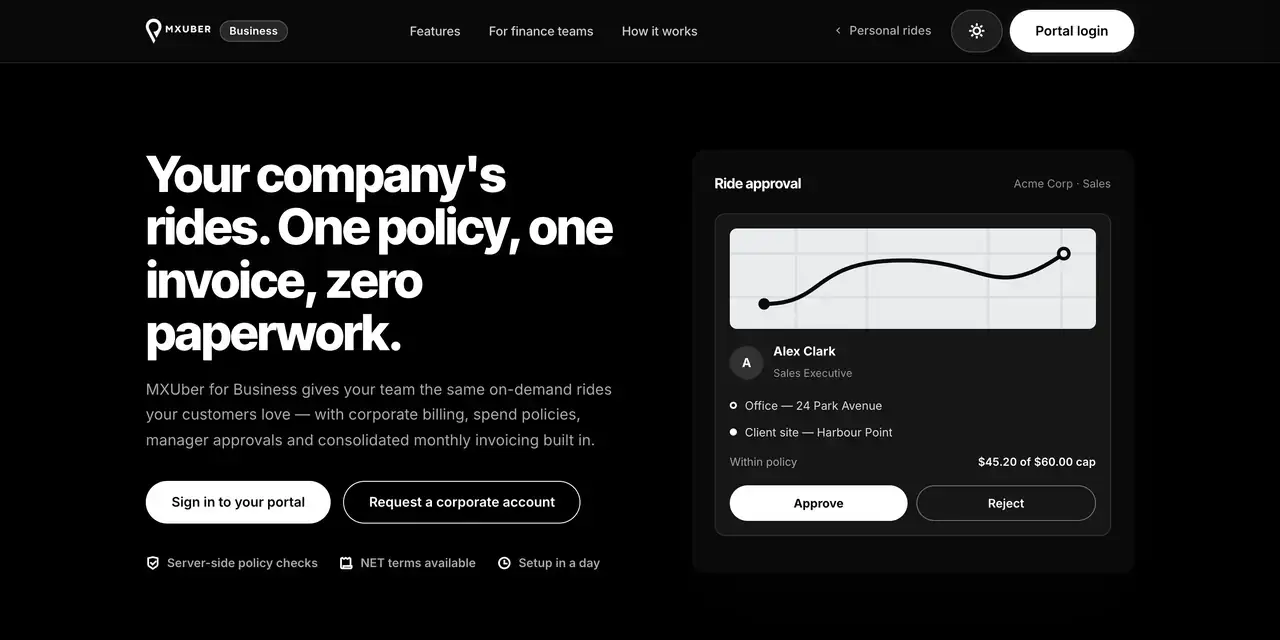
Lyft Clone for Business page with corporate ride approval card, portal sign-in and corporate account buttons
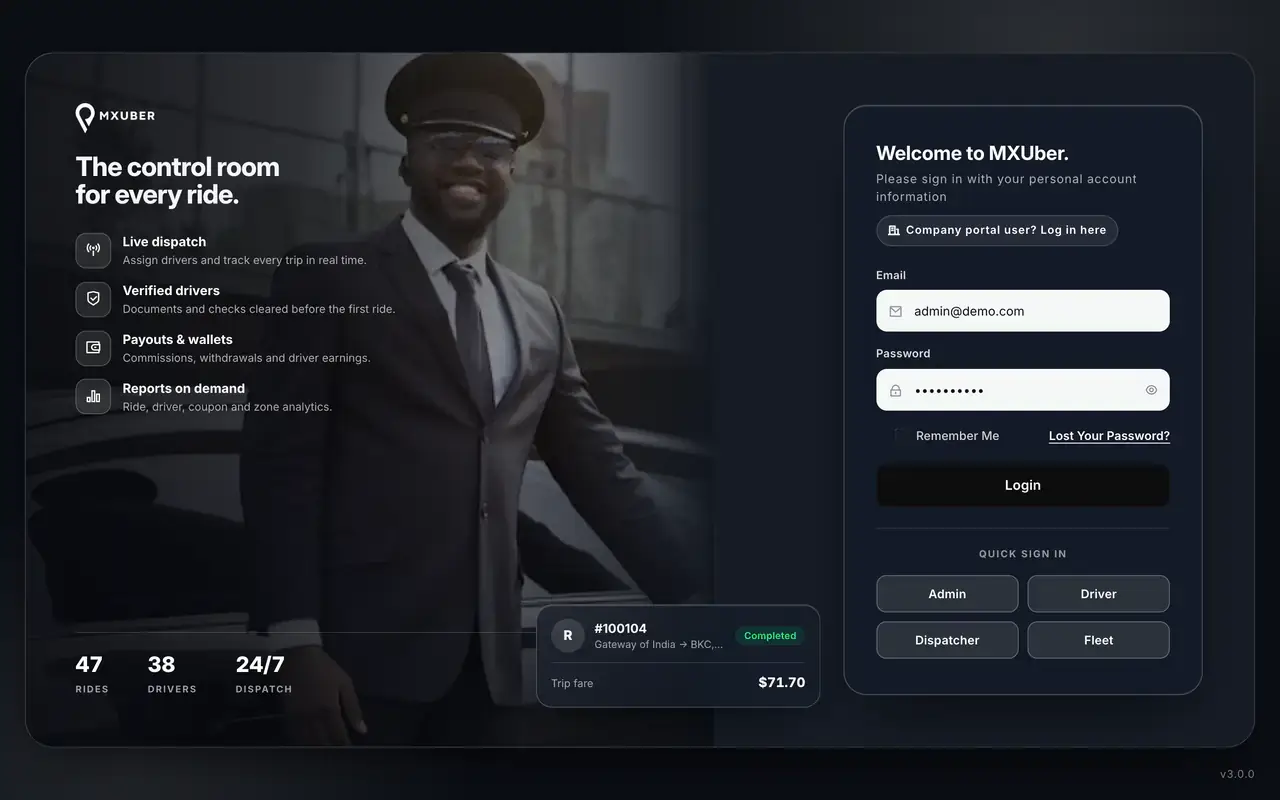
Lyft Clone admin sign-in page with demo role buttons for admin, driver, dispatcher and fleet
3 screens · scroll →

The rider screens follow a booking from sign-in to invoice. The driver tab shows the other end of the same ride, the admin screens show the operator's side, and the website tab covers the booking page and the public site.

See All Solutions

02Client proof

Client Voices

Lyft Clone Client Reviews - Teams in Their Own Words

Nine clients are quoted below. Three run ride-hailing services, one hires out cars and the others come from different industries. Every quote appears exactly as its author wrote it.

MMoove TeamFounding team, Moove
“The business case only worked if this was fast. Matching, tracking, payouts and the ops console came ready, and we brought the market and the fares. Delivered inside a month.”
ZZyclone TeamFounding team, Zyclone
“Both apps had to go live together, which is where these projects usually slip. The shared state model was already built, so rider and driver shipped at the same time. Live inside a month.”
OOtoKab TeamFounding team, OtoKab
“The base gave us matching, tracking and payouts. We reshaped dispatch around our existing driver network and their working patterns rather than forcing them onto a generic model. Live in under a month.”
AAndre GittensCEO, Ride Corporation
“Turo is the obvious reference, but the Caribbean specifics, from different insurance norms to different payment rails, meant we needed a real partner, not just a clone. Miracuves’s MXCar base covered the listing, the trip flow, and the host payouts. We launched in 6 working days and are live in three islands.”
MMarsha WilliamsFounder, Bmore On Demands LLC
“The team was running it on a dispatcher and a Google Sheet, and we needed a real platform quickly, because we were about to onboard a major retail client. Miracuves’s Delivery Genie base gave us the rider app, the dispatch console, and live tracking. We launched in 6 weeks and cleared 4x the previous order volume in the first month.”
BBrian LatailleVP Logistics Technology, IBC Tanks Canada
“We were juggling spreadsheets, a third-party GPS provider, and a phone. We needed a single operations console. Miracuves’s MXLogistics base covered the trip lifecycle, the driver app, and the customer tracking page. We’ve cut operations admin time by about 40%.”
TTiffany DandreaOperations Director, Best Cabo Yacht Rentals
“We were running it on phone calls and a paper calendar, and we were losing bookings to bigger OTAs. Miracuves’s GetmyBoat Clone base gave us the calendar, the booking flow, and the payment engine. Online bookings are up roughly 70% in the first six months, and the ops team finally has a live view of the fleet.”
DDr. Vivek RungtaFounder & Chief Dermatologist, Dermacian
“Every HMS I tried was built for general physicians, with no lesion mapping, no before/after tracking, and no procedure-based billing. Their MXHealth base gave us the patient app, doctor app, EMR and video consult out of the box. Front-desk time on scheduling and follow-ups is down ~70%, and we went fully digital in 9 months, where a fully custom job would have been 18.”
DDr. Carlos A. PalermoCo-founder & CEO, Doctta Health
“Building a compliant telehealth stack from scratch in three markets would have been a year-plus effort. Miracuves’s MXHealth base covered the patient and doctor apps, video consult, e-prescription and the pharmacy integrations. We launched in our first market in 9 weeks and rolled out to two more in the following six months.”
Read More Client TestimonialsFounders and operators in their own words

Shipped for a Client

Aone Case Study: A Ride Service Launched on MXUber

Aone runs a ride-hailing company that began on MXUber, the code beneath the Lyft Clone sold here. The cards that follow condense its published case study from 2022.

Case Study
A City Ride Service Built Out of MXUber

Aone planned a ride-hailing service of its own. We started from MXUber, the base behind this page, which left the short build window for decisions that only Aone could make. At the end, its source code was moved into an account Aone controlled.
AoneCustomer
Ride-hailingIndustry
2022Delivered
6 daysOur build window
20 of 25Modules reused
9Separate integrations
Lyft Clone admin dashboard with tiles for drivers, users and rides, today's rides, overall earnings and a cancellation chart.
Hurdles
  • City, zone and vehicle-class choices were Aone's alone
  • Fares and surge had to reflect local pricing
  • Gateways and brand theme remained undecided
Aim
  • Get to live trips with matching, tracking and payouts already done
  • Spend the window on Aone-specific decisions
  • Own the source code from the first day
Delivery
  • Five apps and consoles, each with its own permissions
  • Aone's own cities, zones, vehicle classes, pricing rules, payment gateways and theme
  • Nine integrations kept apart
  • Code, schema and deployment notes transferred
  • Finished in 6 working days of build time from the ready-made base

“Fares, the city and the payment partner were ours to bring. Everything underneath - matching, live tracking, driver payouts, the operations console - came ready. From kickoff to real trips was under a month, which is the only reason we made our window.”Aone Team · Founding team, Aone

Read the full write-upThe page names the 20 reused modules and the 5 made for Aone.

03Product tour

At a Glance

What a White-Label Lyft App Gives Riders, Drivers and the Business Owner

Miracuves designed this Lyft clone app around a ride service people like to open: the price is plain before they commit, a trip can wait for later and help is one tap away. Drivers choose which requests to take, and you decide fares and payouts.

Fares Shown First

Each vehicle shows its fare and arrival time before anyone books, with an itemized estimate, so the total is clear even with preferences or an extra stop.

Code You Own Outright

All files come unencrypted, so your team can rework screens, fares and flows whenever the market moves, and no per-seat license is charged.

Extras Priced Apart

Paid extras are available: entertainment, a tour guide and voice commands, each quoted on its own. In-app chat with photos is no longer an extra, because it is built in.

Web, Android & iOS

About the Lyft Clone Script

It is the software behind a ride-booking button, handed over whole: the rider app and the rider web app that make the request, the driver app that serves it, the admin console that runs it, a corporate portal for business customers and the public site.

Lyft Clone admin dashboard showing riders, verified drivers, rides, revenue, payments, withdrawals, fleet managers and peak zones
  1. 01Rider app that shows fares first
  2. 02Driver app with fleet manager role
  3. 03Rider web app for browser booking
  4. 04Admin console, dispatcher and fleet logins
  5. 05Corporate portal for business accounts

The package holds two React Native apps, the rider web app, the admin console, the corporate portal and the full source code.

Everything Included

Lyft Clone Features - Fares Up Front, Rebook, Live Tracking, SOS, Driver Tools & Consoles

Every feature below is in the Miracuves build you can open in the demo today. Chat with photos, dark mode, Arabic with right-to-left layout and the rider web app come built in, not as add-ons.

Capability 01 / 12

Fares & ETA Before Booking

Enter a destination and every vehicle type shows its fare and arrival time before anything is booked. An itemized estimate spells out the charges, and ride preferences and promo codes change the price on screen.

  • Fare and ETA on every vehicle
  • Itemized estimate before booking
  • Ride preferences priced in
  • Promo codes applied on screen
  • Book for another person
Capability 02 / 12

Ride Now, Later or Rebook

Ride Now goes to the nearest eligible driver at once. For planned trips a rider books at least 3 hours out, drivers see the ride 15 minutes before pickup time, and Rebook repeats a past route in one tap.

  • Ride Now matches the nearest driver
  • Book 3 or more hours ahead
  • One-tap Rebook, stops included
  • Unaccepted rides canceled, rider told
Capability 03 / 12

Live Tracking & Arrival Time

Once a driver accepts, the car moves on the rider's map in real time with GPS location tracking over websockets, with the arrival time shown. The ride OTP starts the trip, and push alerts follow every stage.

  • Live car position
  • Push alerts at every ride stage
  • ETA for the rider
  • Chime when the car arrives
  • One-tap call to the driver
Capability 04 / 12

Safety: SOS, Share Trip & Chat

SOS brings up emergency contacts and shares live location. A share-trip link lets anyone follow the ride on a public page, and built-in chat carries up to 5 photos per message.

  • SOS with emergency contacts
  • Public share-trip link
  • Chat with photos
  • Ride OTP before every start
  • Your team staffs SOS alerts
Capability 05 / 12

Wallet, Payments & Invoices

The wallet keeps a history and tops up through any enabled gateway. Unpaid rides get a Pay Now button, and finished rides produce invoice PDFs in the app.

  • Rides listed with invoice PDFs
  • Wallet with top-up
  • Pay Now for unpaid rides
  • Rating and tips after the ride
Capability 06 / 12

Stops & Changes

Add several stops to one ride, or change the pickup or drop-off while it runs. The extra charge is quoted before the rider agrees. Waiting time has free minutes first, then a per-minute rate.

  • Several stops on a single ride
  • Change pickup or drop-off on the way
  • Extra charge quoted first
  • Free waiting minutes, then per-minute
Capability 07 / 12

Every Trip Type in One App

Cab covers Ride, Intercity, Package, Schedule and Rental. Parcel and Freight add weight and a delivery OTP, Ambulance adds live tracking, and Find Driver lets a rider hire a driver for their own car.

  • Home tiles for each service
  • Parcel and freight with delivery OTP
  • Rental, Intercity and hourly Package
  • Find Driver for your own car
Capability 08 / 12

Driver App: Offers & Earnings

Offers ring in with sound and vibration, and they survive a dropped connection. The driver accepts or declines, adds tolls at the end, collects cash and watches an earnings donut and five history tabs.

  • Offers ring in at once
  • Accept or decline
  • Surge zones on the map
  • Earnings donut chart
  • Online switch with low-balance gate
Capability 09 / 12

Driver Wallet, Plans & Goals

Drivers top up and withdraw from a wallet, buy subscription plans, earn through referrals, incentives and daily goals. Each one is a revenue or retention lever beside commission.

  • Wallet, top-up and withdrawals
  • Subscription plans from admin
  • Referrals and daily goals
  • Incentives by vehicle type and zone
Capability 10 / 12

Dispatch, Fleet & Admin Consoles

Dispatchers key in phone bookings and pick the driver themselves; offline and busy drivers are refused. A fleet owner signs in to the same driver app as a manager, and the admin console has 52 sections.

  • Dispatcher assigns a driver by hand
  • Offline and busy drivers refused
  • Fleet manager role in the driver app
  • Admin console with 52 sections
  • Public demo logins for all roles
Capability 11 / 12

Languages, Maps, SMS & Push

Apps come in English, Arabic, French and Spanish, with right-to-left layout and a dark mode with its own map. Push runs on Firebase, maps on OpenStreetMap or Google, and SMS through five gateways.

  • Four app languages
  • Push notifications
  • OpenStreetMap or Google Maps
  • Five SMS gateways and Firebase sign-in
  • Dark mode with a dark map
Capability 12 / 12

Support, Disputes & Business Riders

Support tickets take a department, priority and images, and an AI-powered support chatbot can be added. A dispute can carry up to 5 photos, and a rider on a business account switches between For Me and Business before booking.

  • Support tickets with attachments
  • Disputes with up to 5 photos
  • For Me / Business switch
  • Sign in by OTP, Google, Apple or guest

Before you plan: we apply your branding and install the platform on your hosting. Your side covers a domain, a verified store developer account, business details, a payment gateway with its onboarding and KYC done, and any third-party keys. Apple and Google review apps on their own schedule, so the wait lies outside our 6-day build.

Talk to Our Team

Where Income Comes From

Lyft Clone Revenue Models: Ride Fees, Surge, Driver Plans, Fleet Terms & Payment Charges

Miracuves' Lyft clone lets a ride business earn money in several places at once. Each line is kept apart, so changing one leaves the rest alone.

For a friendly everyday ride service, fix the per-ride fee and the surge rules first, then judge whether a driver plan suits your market.

  1. 01

    Per-Ride Service Fee

    A percentage of every finished fare stays with you and the rest goes to the driver. Set commissions in the admin console before launch.

  2. 02

    Surge Margin

    Surge prices run by time window, and can be set by vehicle type, zone and time. Peak zones switch on live and redraw on driver maps, so dynamic pricing in a busy district raises fares.

  3. 03

    Driver Subscription Plans

    Drivers buy subscription plans, and expired plans switch off by themselves. This income does not depend on how long any single ride runs.

  4. 04

    Fleet Commission

    Fleets earn through their own wallet and withdrawals, with commission terms set in admin, so a fleet and a freelance driver can work on different terms within one platform.

  5. 05

    Wallet & Payment Fees

    Wallet top-ups and card payments run through any of 13 gateways, so you can price a small charge that recoups gateway costs. Cash and company billing sit alongside.

  6. 06

    Driver-App Ad Income

    Google native ads sit in the driver app ride screens and are switched on in admin, adding a revenue line that needs no extra ride.

Public figures for four income lines of a ride business: the fee on each ride, the portion of bookings a company retains, what drivers pay daily to be on the platform and the cost of taking cards.
Income lineHow it is billedObserved rateTypical take rateWhat limits it
Per-Ride Service FeeA cut of the closing fare, withheld from the driver's earnings after the ride ends.Uber in Helsinki: a 25% average, with single trips anywhere from 3% to 35%. Bolt: 30% in Saudi Arabia, 15%-20% in its general cities.How much drivers will tolerate in a given city. Rules can cap it too: New York fixes minimum driver pay at $0.681 a minute plus $1.283 a mile, limiting what an app keeps.
Surge MarginThe ordinary fee applied to a surged fare, or a distinct rule that you write.For 2025 our division gives Lyft revenue near 34% of Gross Bookings and Grab near 15% of Mobility GMV, each across every ride type.Nobody publishes a surge-only rate. These company-wide ratios show how far apart two platforms sit and say nothing about your margin.
Driver Subscription PlansA fixed amount per day, week or month that the driver pays instead of a share of individual rides.India, April 2025: Namma Yatri charged 10-30 rupees daily, Rapido 29 rupees in Hyderabad, and Uber offered plans from 9 rupees.Whether a fixed sum is better than a percentage of what a driver makes. These amounts are small, daily and drawn from one country.
Wallet & Payment FeesEach card payment incurs a processing fee, which you may absorb or pass along to the rider.Stripe US example: 2.9% + 30c per card payment.Which gateway serves your country and which cards riders use. Store billing concerns only digital items sold within the app, with Apple taking 15% or 30% and Google Play taking 10% plus a 5% billing fee on subscriptions in the US, UK and EEA from 30 June 2026.

Sources and caveats. Fee numbers come from each company's own pages: Uber's Helsinki announcement and the Bolt help articles for Saudi Arabia and its general cities. The minimum pay figure is set by the New York Taxi and Limousine Commission rate. The two bookings ratios are our own division of reported figures from the Lyft annual filing and the Grab press release, and each spans all ride types. Driver plan prices come from Rest of World coverage of India, a single country at a single moment. Stripe's support page on Connect gives the card pricing, and store billing is from Apple and Google Play. Treat each number as a planning input. None is a quote or a forecast, and the terms you actually use are entered in the admin panel.

Revenue Model

Lyft Clone Revenue Model, Stage by Stage

Miracuves keeps each Lyft clone income line apart, so a city ride service can fix its per-ride fee first and add the others as drivers and fleets join.

Launch

In one city, the service fee on every finished ride covers running costs, and surge by time window, vehicle type and zone lifts it in busy districts.

Traction

As drivers multiply, subscription plans offer a known fee instead of a percentage, and company fleets join on their own commission terms with wallets and withdrawals.

Scale

Across a citywide group, a small fee on each wallet top-up or card payment offsets gateway costs, company billing brings in business accounts, and Google ad slots on the driver's ride screens, switched on from admin, earn without a single extra trip.

Your admins type in every ride fee, surge window, plan price and fleet commission, and Miracuves takes a 0% share of fares.

Looking for a revenue plan that follows how your riders book?Design My Revenue Model

Running the Service

The Admin Panel Behind a Ride-Hailing App Like Lyft: 52 Sections for Rides, Fares, Fleets, Campaigns & Payouts

With the console Miracuves provides, an operator watches rides unfold, redraws peak zones live on driver maps, adjusts fares and surge, schedules a push campaign and handles driver and fleet withdrawals.

Lyft Clone admin dashboard showing riders, verified drivers, rides, revenue, payments, withdrawals, fleet managers and peak zones

Inside the Console

  • 01

    Dashboard & Reports

    A live KPI dashboard sits beside a heat map of demand. Reports on transactions, rides, drivers, coupons, zones and incentives export to CSV, Excel or PDF.

  • 02

    Rider & Driver Accounts

    Rider and driver records sit with driver documents and their expiry dates, plus reviews and SOS alerts, so a complaint or a safety call is handled from one screen.

  • 03

    Fares & Surge Rules

    Draw zones and peak zones on a map; a peak zone you switch on appears at once on driver maps. Surge follows the hour and varies by vehicle type and zone.

  • 04

    Fleets & Vehicles

    Fleet and driver wallets, commissions and withdrawals sit next to vehicle types and rental vehicles, so you can see what each fleet earns.

  • 05

    Ride Oversight

    Lists by status, live ride tracking and driver locations, plus manual assignment and operator bookings for phone orders.

  • 06

    Campaigns

    Coupons, home banners, onboarding screens and push notifications with images, scheduled ahead, bring back riders or announce a new city.

  • 07

    Payouts & Money Reports

    Withdrawals, wallets, commissions and subscription plans are handled here, beside the payment gateway settings.

  • 08

    Your Brand, Not Ours

    Your name, logo and colors take the place of ours on the web consoles and in both apps.

Where Money Is Handled

Every financial step: the fare of a single ride at one end, the payout that closes the cycle at the other.

  • Fare and surge settings
  • Driver withdrawals
  • Earnings and commission by fleet
  • Reports in CSV, Excel, PDF

Live Monitoring

Screens that operations staff leave open while rides are on the road.

  • Live driver locations
  • Rider and driver records
  • Coupons and banners
  • Branding and theme options

Something your staff needs is not there? Additional reports, another payout rhythm, an extra language or an approval step of your own are priced one by one. Explain the gap and a written quote comes back.

Talk to Our Team

04Price and package

In the Box

What Arrives With the Lyft Clone Script: Code, Apps & a Live Deployment

The Miracuves handover brings every part of the platform at once: both apps, the rider web app, the admin console (admin, dispatcher and fleet logins), a corporate portal and the public website, with the code and schema they run on. It is yours, and no per-seat, per-ride or yearly fee applies.

01

Source & Project Code

Every line of the web platform and of both mobile apps, left unencrypted so your own developers can adjust it to local needs.

  • Readable web and console code
  • React Native projects, Android and iOS
  • Change, extend and redeploy freely
  • Handed to your own repository
02

Schema & Migrations

The database design for rides, pricing, drivers, vehicles and payouts, so that a clean copy can be rebuilt whenever required.

  • Schema plus migration files
  • MySQL, about 180 tables
  • Tables for rides, fares, drivers, fleets
  • Payment, payout and settings records
03

Driver App & Plans

The app a driver lives in: ride offers, an online switch, earnings and wallet, plus the fleet manager role for fleet owners.

  • Offers survive a dropped link
  • Take or pass on each one
  • Earnings donut and 5-tab history
  • Optional subscription plan
Lyft Clone rider website hero with pickup and drop-off fields, See prices button and rider and driver app links
04

Rider Web App & Site

A rider web app at /cab for booking in a browser, with a map, vehicle choice, payment and scheduling, beside a public site with the app download buttons.

  • Browser booking with a map
  • Download buttons for the apps
  • Live tracking, wallet and invoices
  • Styled in your brand
05

Rider App

Built with React Native for Android and iOS: OTP, Google, Apple or guest sign-in, home tiles, fares per vehicle, scheduling, a wallet, past rides and an SOS button.

  • Home tiles for each service
  • Fares visible before booking
  • Book ahead or add stops
  • Published under your store accounts
Lyft Clone rider choosing Bike, Car or Prime Car with fares and arrival times before booking
Lyft Clone admin dashboard showing riders, verified drivers, rides, revenue, payments, withdrawals, fleet managers and peak zones
06

Staff Consoles

One browser console with admin, dispatcher and fleet logins, plus a corporate portal for business customers. Admins control zones, fares and reports, dispatchers allocate bookings, and fleets watch their own drivers.

  • Dispatchers assign rides by hand
  • Fleet logins see only their own drivers
  • Zones, surge, coupons and withdrawals for admins
  • Analytics and reports
07

Access & Security Layer

Staff roles carry per-page permissions, the apps use token sign-in, and sign-in attempts are limited to 5 per minute.

  • Permissions depend on role
  • Riders sign in by OTP, Google or Apple
  • No secrets inside the repository
  • Cards stay with the gateway
08

Handover & Support

We apply your branding, install the platform on your hosting, deliver a handover pack, and start all three support periods together on go-live day.

  • Logo, icons and colors set to your brand
  • Running on your own hosting
  • Settings and architecture notes included
  • 60 days guidance, 6 months bug fixes, 12 months updates

Prefer to look before buying? Use the demo yourself as a rider or driver, or have us walk through the staff consoles. A booking, a payout or a commission rule can be shown live with figures from your plan.

Talk to Our Team

Clear Pricing

Lyft Clone Price: What a Taxi App Like Lyft Costs From Miracuves

Miracuves sells the white-label Lyft Clone fully built for one fixed $3,099. Anything beyond the base, whether an add-on, an extra integration or a custom flow such as pool rides, is scoped and quoted on paper before work starts.

Most chosen

Standard

Ready-to-Launch Build
$3,099paid once
Ready in 6 days

Ideal for: Founders launching a ride service in one city, local taxi firms going app-first, operators who want a brand riders find friendly

The platform arrives behaving like the demo, dressed in your logo, icons and colors and installed on hosting that you control.

Get Started

Enterprise

Built to Order for a Bigger Scope
Customquote
Go-live date depends on the agreed scope

Ideal for: Teams that need pool rides, multi-city groups, large fleet networks

If you need something the base cannot do, like a pooled-ride flow, we build from your brief and settle scope and price in writing beforehand.

Request a Quote
Development Cost

Lyft Clone Development Cost in 2026

A one-time $3,099 buys the Miracuves Lyft clone script with its source and schema: the React Native rider app with Rebook and SOS, a driver app that fleet owners also sign in to as managers, rider web booking, a 52-section console where dispatchers key in phone orders, the business-customer portal and the public site, rebranded and live in six working days.

$3,099 Paid once
6 working days Rebranded and live
0% Revenue share

What moves your total sits outside the software invoice

  • A domain and the hosting the platform is installed on
  • A verified store developer account
  • Onboarding and KYC with whichever of the 13 payment gateways you switch on
  • Map, SMS and push accounts: Google Maps or OpenStreetMap, one of the five SMS gateways and Firebase
  • Any of the in-car media, tour guide or voice command modules

Pool rides, a local gateway or a market-specific rider screen get a written scope first and ship within 2-8 weeks.

Compare Your Options

Ready-Made Lyft Clone vs Custom Development vs SaaS

You can get a city ride app like Lyft, a taxi booking app, three ways: buy the ready-made clone from Miracuves, commission a build, or rent one as SaaS. Each trades speed, cost and control differently.

CriteriaMiracuvesReady-Made Lyft CloneCustom DevelopmentSaaS
Launch time6 working days of build, then store reviewQuoted in writing, often 2-8 weeksSignup is quick; features follow the vendor
Upfront cost$3,099, one paymentSet in a written quoteMonthly plan from day one
Source code ownershipEvery file handed over, nothing encryptedYours if the contract says soYou rent access, never the code
CustomizationFares, zones, fleets and screens are yours to changeWhatever the brief specifies, priced firstLimited to vendor toggles
Ongoing fees0% of fares and no per-seat feeDeveloper time you pay forPer-ride or per-driver charges are common
Branding & app-store listingYour name on rider, driver and web appsYour brand once deliveredOften a shared or co-branded app
Best forOne-city founders who want riders this monthPool rides or other flows the base lacksTesting a market before investing

Read Further

Four Guides on Launching an App Like Lyft

Each Miracuves article below digs deeper than this page into script contents and cost, the business model, revenue sources and the way the app runs.

Setups in Practice

Six Setups for a Lyft-Like Ride Platform: City Rides, Booked Rides, Safety, Fleets, Phone Dispatch & Rentals

Each operator builds around its own part of the Miracuves product: a city service around the rider app's home tiles, a booking desk around the dispatcher login, a safety-minded brand around SOS and trip sharing, and a fleet business around the fleet manager role.

CityTaxiEveryday City Rides

Serve quick hops across town: fare and ETA on every vehicle, one-tap Rebook for regular routes and an admin console that tracks rides live.

01
Lyft Clone rider home with Where next search and Ride, Intercity, Package, Schedule and Rental tiles
ScheduledPlannedBooked-Ahead Rides

Riders book airport runs or early appointments 3 or more hours ahead. Drivers see them 15 minutes before pickup, and unaccepted rides are canceled with a notice.

02
Lyft Clone rider home with Where next search and Ride, Intercity, Package, Schedule and Rental tiles
SafetySupportSafety-Led Service

Put safety at the center of your pitch: SOS with live location, a public share-trip link, ride OTP and chat with photos, backed by a team that answers.

03
Lyft Clone ride history with business and personal filters and one-tap Rebook
FleetCommissionFleet-Owner Network

Invite company fleets that bring their own cars and drivers. Each fleet manager sees only its own drivers, while the admin watches the whole network.

04
Lyft Clone admin dashboard showing riders, verified drivers, rides, revenue, payments, withdrawals, fleet managers and peak zones
DispatchPhonePhone-Booking Desk

Take calls, enter the booking yourself and assign a driver by hand; offline and busy drivers are refused, so a booking never lands on someone who cannot take it.

05
Lyft Clone rider choosing Bike, Car or Prime Car with fares and arrival times before booking
RentHireRentals & Hire

Offer hourly Package rides, Rental and Find Driver next to ordinary trips, priced from the packages and per-day rates you set in admin.

06
Lyft Clone ride history with business and personal filters and one-tap Rebook
Business Model

Lyft Clone Business Model: Three Ways to Run It

Fares shown first, Rebook and the fleet manager role let one Lyft clone business model, a service fee on each finished ride, fit three very different operators.

City ride brand

A founder serves one city with fares shown first, Rebook for regular routes and SOS in the menu, earning the service fee on every ride.

Taxi firm going app-first

A cab company moves riders onto its own branded app at its own pace, while its dispatchers keep logging callers' orders and assign each one by hand to a free driver.

Fleet and hire network

A fleet owner or rental business sells capacity and time, with fleet management and driver management handled by managers watching their own drivers and hourly Package, Rental and Find Driver priced from admin.

In any of the three, drivers can pay a plan instead of a percentage, and you set every rate.

One product behind every setup. Each of the six runs on identical apps and web consoles. Only your cities, invited fleets, ordered extras and branding differ, which means a single codebase covers them all.

Talk to Our Team

Why Now

Why Open a Ride Service Today?

Ride-hailing is won city by city, and the names already established in a market usually compete hard on price. A smaller service under its own name can win by feeling attentive: a clear fare, a ride booked in advance and a menu pointing to help.

01

Riders Weigh Price and Wait

A first-time rider checks two things before anything else: what the ride will cost and how soon the car comes. The demo displays both ahead of booking.

02

Trust Earns the Second Ride

Someone who saw help within reach, with SOS and Support in the menu, has a better reason to return after the first trip.

03

A Booked Ride Is a Committed Customer

A rider who schedules tomorrow's early ride has already picked you, and that makes demand simpler to staff.

04

Fleets Bring Drivers in Bulk

A single fleet owner can bring in a crowd of drivers, and fleet earnings and withdrawals of their own let the platform suit businesses as well as individuals.

05

Your Brand, Your Rider List

On your own platform, accounts, ride history and payout records remain with you, and not inside someone else's app that bills you for access.

06

Ready Beats Custom

Matching, tracking, payouts and staff consoles account for most of a ride-hailing company. Six days of our work puts a white-label copy live on your hosting.

Key Numbers

2

React Native Apps

3

Help Links for Riders

6

Days of Build Work

12

Months of Updates

The hardest part of a ride app is making matching, fares, dispatch and payouts agree, and that part is finished. Spend your energy on what makes your service different.

Business Types

Where It Fits: Twelve Kinds of Operator

Any business whose drivers move people or parcels can run the Lyft clone from Miracuves. City taxi firms sell booked trips, ride-hailing brands sell everyday ones and fleet owners sell the capacity of many vehicles. Dispatch desks log phone bookings, airport and corporate transfer firms take scheduled rides, ambulance and hire-a-driver services use their own tiles, and a regional startup can cover one town under its own name.

  1. 01City Taxis
  2. 02Ride-Hailing
  3. 03Fleet Operators
  4. 04Dispatch Desks
  5. 05Airport Transfers
  6. 06Corporate Rides
  7. 07Chauffeur Hire
  8. 08Regional Startups
  9. 09Campus Shuttles
  10. 10Hire a Driver
  11. 11Courier Runs
  12. 12Tourist Transfers

For every driver-led ride service, from a short city hop to a pre-booked airport run, your name goes on the first screen of the Miracuves Lyft Clone.

06How it is built

Sign-In to Payout

A Ride on the Lyft Clone: Sign In, Pick a Tile, Compare Fares, Get Matched, Track, Pay & Rebook

A rider taps the screen a few times while the Miracuves build runs matching, fare arithmetic, live location and payment out of sight. We follow one rider from sign-in to a completed ride, then open up the architecture doing the work.

Following One Rider From Sign-In to a Paid Fare

  1. Lyft Clone rider sign-in with phone or email OTP, Google sign-in and guest entry
    1Sign In to Book a Ride

    Riders log in with a phone or email code, a Google account or an Apple ID, or look around as a guest and sign in later.

    • Guest browsing first
    • Phone or email code
    • Google/Apple
  2. Lyft Clone rider home with Where next search and Ride, Intercity, Package, Schedule and Rental tiles
    2Choose a Ride Service

    The live map opens with saved places, recent searches and tiles for Cab, Parcel, Freight, Ambulance and Find Driver.

    • Saved places and recents
    • Tiles for every service
    • Pin on the map
  3. Lyft Clone rider choosing Bike, Car or Prime Car with fares and arrival times before booking
    3Set Pickup and Drop-Off

    Search or drop a pin for pickup and drop-off, add stops when the trip needs them, then tap Confirm.

    • Pickup and drop-off search
    • A pin to verify
    • One Confirm button
  4. Lyft Clone rider choosing Bike, Car or Prime Car with fares and arrival times before booking
    4See the Fare Before You Book

    With the route drawn, every vehicle lists its fare and ETA, next to an itemized estimate, preferences, a promo field and the payment choice.

    • Fare and ETA per vehicle
    • Itemized estimate
    • Promo code and preferences
  5. Lyft Clone rider home with Where next search and Ride, Intercity, Package, Schedule and Rental tiles
    5Book a Ride Now or Schedule It

    Ride Now goes straight to the nearest eligible driver. A scheduled ride must be at least 3 hours away, and drivers see it 15 minutes before pickup.

    • Nearest eligible driver
    • Pick a date and time
    • Cancel with reason and fee shown
  6. Lyft Clone ride history with business and personal filters and one-tap Rebook
    6Rate the Driver, Tip & Rebook

    After the trip the rider rates the driver, adds a tip and can repeat the same route with one Rebook tap.

    • Ride OTP starts the trip
    • Invoice PDF for every ride
    • Rating, tips and Rebook
Visual Flow DiagramLoginTilesWhere toFare listRequestTrip

Engine Room

What Sits Behind the Screens of a Lyft-Style App

Talk to Our Team
  1. Part 01

    Role-Split Applications

    Riders, drivers and staff each get their own application, plus a corporate portal for business customers. A driver login has no way into the back office.

  2. Part 02

    Driver Lookup

    Live driver positions are kept in Redis GEO. The closest eligible driver receives a timed offer (30 seconds by default) before the next one is tried, and the rider sees an ETA.

  3. Part 03

    Live Location Feed

    Laravel Reverb websockets stream positions, so the rider's map moves with the car while ride offers carry a 10-second check in the app.

  4. Part 04

    Pricing Rules

    Base fare, distance, time and surge produce the price, after which commission and plan settings share it among operator, fleet and driver.

  5. Part 05

    Money Records

    Every ride payment and driver earning is written as a transaction, fed by 13 payment gateways plus wallet, cash and corporate billing.

  6. Part 06

    Push Notifications

    Ride updates go out as Firebase push alerts, and dispatch runs as queued jobs behind an append-only ride history.

Technology

The Lyft Clone Stack: Laravel, React Native, Redis, Maps & Payment Gateways

Behind the rider screens, Miracuves runs the Lyft clone on a Laravel back end, a MySQL and Redis data layer, and React Native apps for iOS and Android. Each layer below is named, so your developers know exactly what they are taking over.

SERVER SIDE

Web & Admin

Laravel 11 PHP 8.2+
  • Runs the rider web app, public site and admin console
  • Runs on PHP 8.2 or newer, 887+ routes
  • Token sign-in for apps, roles for staff
  • Four languages, with right-to-left layout
STORAGE

Data & Cache

MySQL Redis
  • Redis for queues, cache, positions
  • About 180 tables for rides, fares and fleets
  • Database schema arrives with the source code
  • Append-only history for every ride status
MOBILE

Rider & Driver Apps

React Native 0.82 iOS Android
  • Rider app has 42 screen groups
  • Driver app also serves fleet managers
  • Dark mode on every rider screen
  • Published through your own store accounts
LOCATION

Maps

OpenStreetMap Google Maps
  • Switch the provider in the admin console
  • A map cache serves tiles, addresses, routes
  • Vendor figure: tiles up to 36 times faster
  • Dark map for the rider app dark mode
SERVICES

Messaging & Payments

Reverb FCM SMS gateways
  • Five SMS gateways plus Firebase sign-in
  • FCM push for ride and chat alerts
  • Reverb websockets for live tracking
  • Offers rechecked every 10 seconds
DELIVERABLES

Payments & Handover

13 gateways Source Schema
  • 13 gateways plus wallet, cash, billing
  • Full source for both apps, web and admin
  • Deployment configuration documented
  • Database schema and architecture notes
For your developers:

Laravel 11 on PHP 8.2+ runs the web app, admin console and corporate portal, while MySQL holds about 180 tables and Redis serves the job queues, cache and driver positions. Both mobile apps are React Native 0.82 for iOS and Android. Reverb carries live updates and FCM carries push. Maps run on OpenStreetMap or Google Maps, set in admin. Payment, SMS and map accounts are yours: you open them and we install the keys at deployment. A mainstream stack makes hiring help simple.

Talk to Our Team

Room to Grow

Made to Grow: Separate Apps, Queued Dispatch & Headroom

Five applications in Miracuves' Lyft clone share one Laravel back end. More riders, drivers, fleets and modules call for hosting capacity and settings, not a rewrite.

Independent Releases. Rider, driver, web, admin and corporate applications each keep their own release schedule, so changing one never forces a release of the others.

Matching Tracks Supply. Positions of online drivers sit in Redis, and queued dispatch jobs offer each request to the nearest eligible driver, so waits stay level as more drivers come online.

A Live Position Feed. Laravel Reverb websockets push driver positions to the rider map, while ride offers get a 10-second check if a socket drops.

Books That Balance. Every ride has its own fare, commission and payout entries, and ride history is append-only, so what the rider paid, what the driver earned and the dashboard totals can be reconciled.

01

Independent Applications

Rider, driver, web, admin and corporate surfaces ship separately, so one can change while the others keep running.

02
PairETAReplace

Driver Matching

A Redis GEO lookup picks the nearest eligible driver for the right zone, service and vehicle type, then sends a timed offer, 30 seconds by default.

  • Nearest eligible driver offered first
  • ETA shown per vehicle
  • Timeout passes it to the next driver
  • Staff can assign a driver by hand
  • Search stops at 3 minutes by default
03

Guarded Sign-In and Roles

Token sign-in for the apps, roles for staff, and rate limits on sign-in and offer actions keep traffic in check.

  • Token sign-in for the apps
  • Sign-in limited to 5 per minute
  • Staff roles by page
04
TokenRate limitRoles

Live Location Channel

Positions are pushed along a live channel and are not requested over and over.

  • Route trace in both apps
  • Car icon moving on the map
  • Driver positions held in Redis
  • Admins can watch live rides
05

Transaction Ledger

Every payment, commission and payout becomes a stored transaction, so any earlier cycle can be audited.

  • A payment record for each ride
  • Commission and plan settings
  • Driver and fleet withdrawals
  • Exportable reports
06

Documented Handover

Code, database schema, deployment settings and architecture notes arrive together, so a new team can take over.

Space to Adapt. Sooner or later every market wants a local touch: a payment method, a vehicle class, a zone edge, another commission tier or an extra rider screen. The source sits on a conventional technology stack, so your engineers or ours can build it once the scope is agreed in writing.

Launching in one city? Open the zones you can staff and sign the drivers you can find, then expand on the deployment you already run. Heavier ride volume mainly becomes a hosting and settings question, and anything past the base is priced on its own.

Talk to Our Team

07Safety and responsibility

Security Posture

Security in a Lyft-Style Ride App: Role Separation, Payments at the Gateway & Our Stated Limits

In a ride app like the one Miracuves builds, identities, car positions and payment references are all sensitive. Three questions come first: who gets to see what, where card details go and what is still undone when you launch. The cards below separate the platform's work from yours.

  1. 01 · Roles
    Access by Role

    Staff sign in with sessions and per-page role permissions, so admin, dispatcher, fleet manager and support agent each see only their own pages. The rider and driver apps use token sign-in.

    • Fleet Boundaries: Each fleet sees only its own drivers, vehicles and earnings. Company data in the corporate portal is walled off the same way, company by company.
    • Dispatcher Access: Dispatchers can assign drivers by hand and create bookings, so deciding who holds that role and reviewing the activity log is the operator's duty.
  2. 02 · Audit
    Change History

    An activity log records staff actions, and every ride status change goes into an append-only history, so a fare or cancellation dispute can be settled from the record.

    • Driver Paperwork: The base holds driver documents with expiry dates, and an expired one takes the driver off dispatch until re-approved. Which papers you require is your call.
  3. 03 · Limits
    Sign-In & Limits

    App sign-in uses tokens, staff sessions are role-checked, and sign-in is capped at 5 attempts a minute, and offer actions are limited as well.

    • Safety Responses: Riders get SOS with emergency contacts and live location, in-ride chat with photos and support tickets. Staffing the alerts and replying quickly is operations work for your people, which software cannot guarantee.
  4. 04 · Secrets
    Key Handling

    Map, SMS and payment keys are yours and are set on servers you control.

    • Pre-Launch Checklist: Production go-live includes a security checklist that Miracuves runs with you: demo mode off and keys rotated.
  5. 05 · Cards
    Gateway Holds the Cards

    Card details go direct to your chosen gateway; what the platform keeps is a payment reference, and never a card number.

    • Payment Timing: Driver and fleet withdrawals are requested in the app and handled in the admin console; the terms and timing you set decide what a driver actually receives.
  6. 06 · Restore
    Backups & Restore

    The admin console includes backups, and we suggest rehearsing a restore before launch, since an untested backup is only a hope.

The platform offers concrete controls: role permissions, an activity log, append-only ride history and card data held at the gateway. We run the go-live security checklist with you before launch.

Talk Through Security

Where Duty Lies

Ride Marketplace Readiness: What the White-Label Ride Software Does and What You Do

A rider steps into a stranger's car. Miracuves delivers the software side: booking, dispatch, fare logic, commission and payouts. Driver eligibility, vehicle standards, insurance cover and the laws of each place you serve remain the operator's concern.

Made for a marketplace, endorsed by nobody.

For this ride-hailing page, ready means shown in the demo or the admin panel, and licensing for your ride-hailing service runs through your operating entity.

Provided by the Software

Fare, surge and peak-zone settings, a dispatcher login, fleet commission rules, driver subscription plans and withdrawals, along with two mobile apps, a browser booking app, scheduled rides, SOS, in-ride chat, disputes and support tickets, a corporate portal, role-based logins and admin reports.

Provided by You

Writing the terms of service and privacy policy, deciding which paperwork drivers and fleets must supply, settling complaints and disputes, and setting cancellation terms stricter than the configured defaults all fall to you.

Drivers, Vehicles & Insurance

Whether drivers are licensed, vehicles qualify and trips are insured is decided between you and your drivers. The platform stores driver documents with expiry dates and keeps unapproved drivers offline, but your staff judge the papers and it settles no claim.

Local Rules

Rules on taxi and private-hire licensing, consumer protection, fare regulation and driver status vary by country and frequently by city. Have qualified local advisers examine every market before you take a booking.

08Extras and neighbors

Standard in the baseMXUber
  • Rider, driver and web apps
  • Staff logins by role
  • Fares and ETA before booking
  • SOS, chat, disputes, support

How adding a module works

  1. 1
    Pick a module

    Order one now or once you are live.

  2. 2
    Get a written quote

    We agree scope and price on paper before starting.

  3. 3
    Receive it as code

    Once complete, the module is folded into the codebase that is already yours.

Ask About Extras

Optional Extras

Add-On Modules for an App Like Lyft: Media, Tour Guide, Voice, Gateways & Rider Builds

From sign-in to payout, the base already works, as the demo proves. Five modules can be added on top, each priced separately because the work depends on your market. The final two are custom builds.

  • Rider comfort

    In-Car Entertainment

    Links a ride to media services so passengers can play music, podcasts or a film while they travel.

    Leisure · Media
  • Rider comfort

    Virtual Tour Guide

    Points out landmarks and sights as the car passes, so a long transfer doubles as a brief city tour.

    Travel · Local guide
  • Hands-free

    Voice Commands

    Lets people steer navigation, calls and other app actions by voice, keeping both hands free.

    Voice · Control
  • Custom build

    Extra Payment Gateway

    Thirteen gateways ship built in. A different local gateway is integrated to order, with scope and price agreed in writing first.

    Payments · Custom build
  • Custom build

    Market-Specific Screens

    A rider-side feature your market needs is built to your brief, with a separate written quote.

    Rider app · Custom build

More From the Mobility Range

Different Rides or Different Jobs? These Platforms Sit Beside It.

Close to the Lyft Clone sit four products that founders often weigh against it, each with its own page.
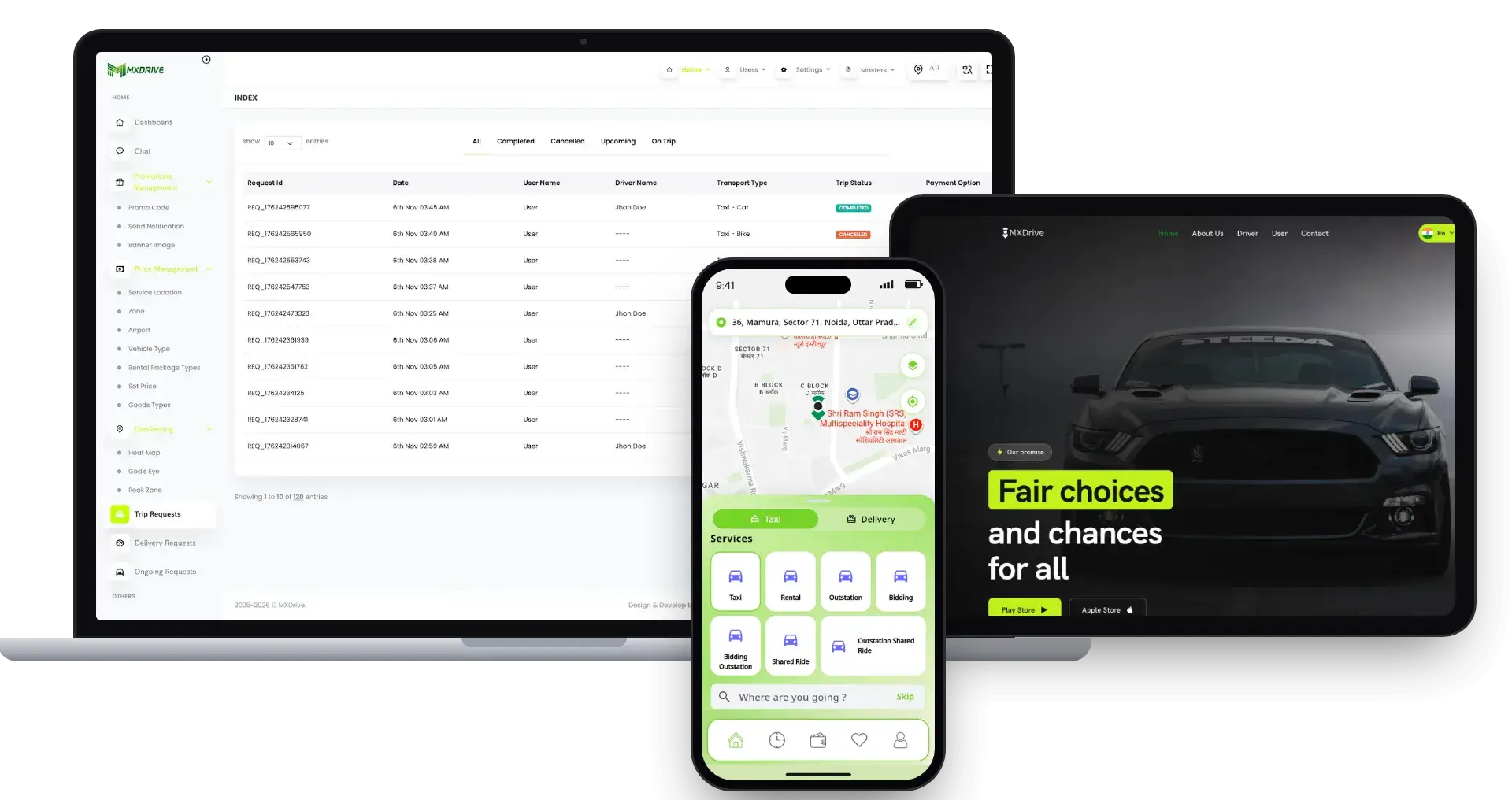
inDrive Clone platform on a laptop, a tablet and a phone: the admin trip requests console, the booking website and the rider app.01
Choose it if: Your riders should name the priceinDrive Clone

A ride-hailing platform in which riders and drivers bid on the fare, with rentals and outstation trips on the menu as well.

See This Solution
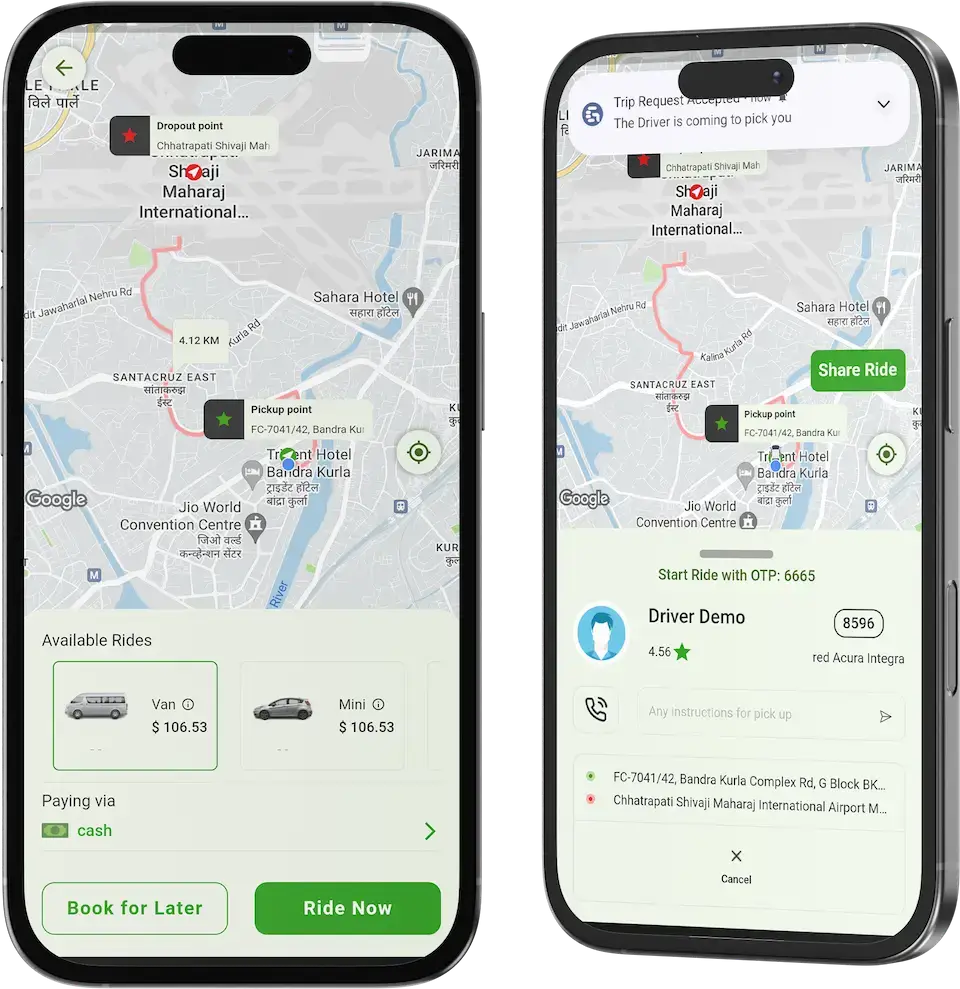
Grab Clone rider app on two phones: the booking card with Van and Mini rides, and the driver card after a request is accepted.02
Choose it if: Rides are only one of your servicesGrab Clone

One app for rides, parcels and food, run through six web panels that include dispatcher and fleet.

See This Solution
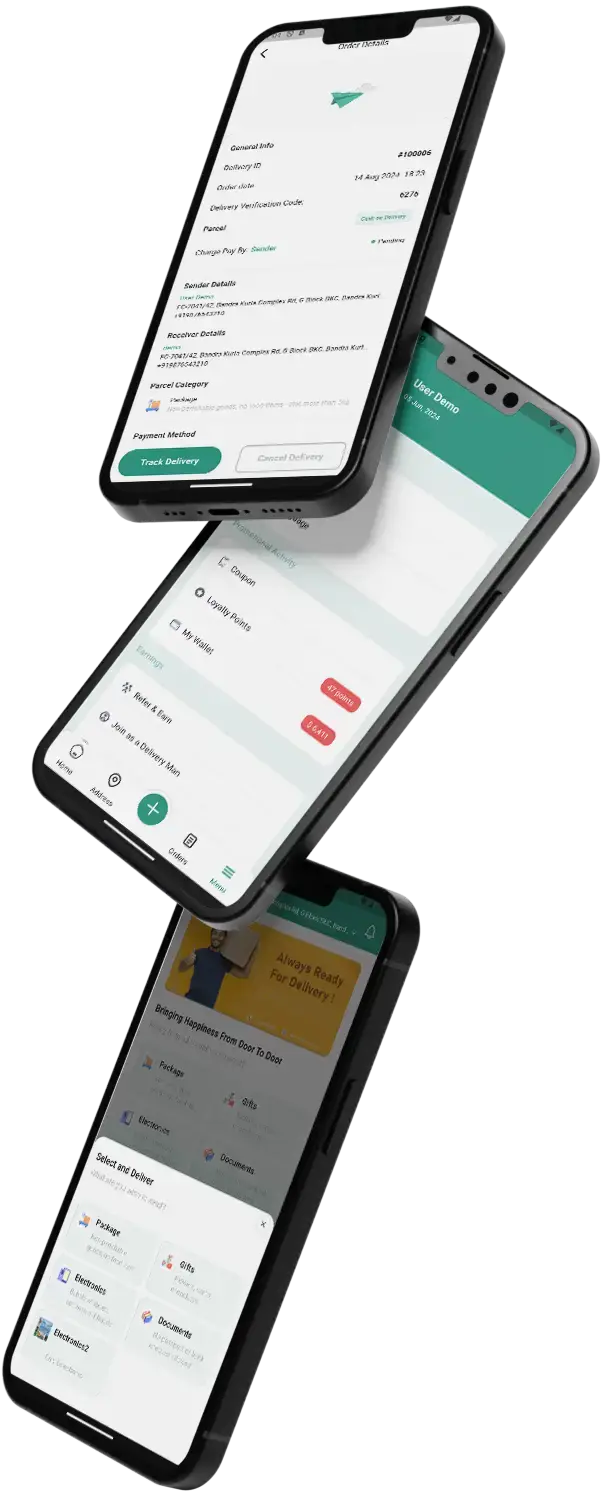
Lalamove Clone app screens on tilted phones: order details, the account menu and home.03
Choose it if: You move goods more than peopleLalamove Clone

Intra-city logistics for businesses, with multi-vehicle dispatch, proof of delivery and a merchant panel for bulk jobs.

See This Solution
Gojek Clone super app screens on three tilted phones.04
Choose it if: You want the widest service menuGojek Clone

A super app that puts rides, delivery and home services under one login, with user, vendor and driver apps.

See This Solution
Full catalogBrowse 90+ ready-made solutions

09Money and market

Market Benchmarks

Ride-Hailing Market Benchmarks - Independent 2025-2026 Data

The revenue models above are ours. The figures below are not. They come from the Uber and Lyft annual reports on Form 10-K, Grab's full-year 2025 results and the UK Department for Transport, reproduced as published. They show what ride-hailing platforms keep from each trip in the US and Southeast Asia, and how large the licensed driver base is, so you can test your own business case.

Uber 10-K01

$29.7bn in Uber Mobility Revenue in 2025

Uber's annual report on Form 10-K shows Mobility segment revenue of $29.7 billion in 2025, up 18 percent from $25.1 billion in 2024. Across all its businesses Uber completed 13.6 billion trips, up 20 percent, and reported 202 million monthly active platform consumers in the fourth quarter, up 18 percent. Uber states that revenue comes from fees paid by drivers and merchants.

Lyft 10-K02

$18.5bn in Lyft Gross Bookings in 2025

Lyft's annual report on Form 10-K reports Gross Bookings of $18.5 billion in 2025, up 15 percent, on 945.5 million rides, up 14 percent. Revenue was $6.3 billion, up 9 percent. Revenue divided by Gross Bookings is about 34 percent (our arithmetic on reported figures), the share Lyft retains after driver earnings.

Grab03

15% of Grab Mobility GMV Kept as Revenue in 2025

Grab reports that full-year 2025 Mobility revenue grew 16 percent to $1,219 million, on Mobility gross merchandise value that grew 19 percent to $7,901 million, and that Mobility segment adjusted EBITDA was $690 million. Revenue divided by GMV is about 15 percent (our arithmetic on reported figures), a lower share than Lyft retains in the US.

UK DfT04

290,000 Licensed Private Hire Vehicles in England

The UK Department for Transport counted about 290,000 licensed private hire vehicles in England as at 1 April 2026, up 13 percent on 2024, alongside 417,300 taxi and private hire driver licenses, up 9 percent. The statistics were published on 13 August 2026 and include app-based operators, though they cannot separate app drivers.

Where each figure comes from.

Uber Technologies, Inc., Annual Report on Form 10-K for the year ended 31 December 2025, filed 13 February 2026 - sec.gov

Lyft, Inc., Annual Report on Form 10-K for the year ended 31 December 2025, filed 11 February 2026 - sec.gov

Grab Holdings Limited, Grab reports fourth quarter and 2025 results with first full year net profit, press release, 12 February 2026 - grab.com

Department for Transport, Taxi and private hire vehicle statistics, England: 2026, 13 August 2026 - gov.uk

All figures are the publishers’ own, reproduced as published from annual filings, a results release and official statistics. Two ratios (Lyft and Grab revenue divided by bookings or GMV) are our arithmetic on reported figures; each company defines its metrics differently. They describe the companies and country named, not any platform Miracuves builds, and nothing here is a revenue projection for your business.

Market View

Marketability and Earning Potential for City Ride Businesses

Money follows riders who keep opening the app and drivers who keep choosing to stay. This section covers how a trusted, easy ride service supports both, and how to keep hold of those relationships.

  1. 01

    A Slice of Every Ride

    Every finished ride pays you a percentage, so revenue scales with ride volume rather than with staff numbers.

  2. 02

    Booked Rides Add Predictability

    Rides scheduled ahead of time show you tomorrow's demand, which makes driver supply easier to plan.

  3. 03

    A Customer Base That Is Yours

    Accounts of riders, profiles of drivers, fleet records and ride histories all sit in your own database, so the value piles up with you.

  4. 04

    Free to Change Direction

    You hold the source code and schema, so moving host, team or strategy requires no one's consent.

Main Revenue Levers
  • Per-Ride Service Fee
  • Surge Margin
  • Driver Subscription Plans
  • Fleet Commission
  • Wallet & Payment Fees
  • Driver-App Ad Income
Long-Term Value

Copying features is easy; copying loyalty is not.

  1. 01A driver settled into a plan and a pay cycle seldom moves
  2. 02Riders with saved places and a ride history return
  3. 03Your database keeps the record from launch day
  4. 04Visible care, such as fares shown up front and an SOS button, is hard to match
Example Revenue Scenarios

Three sizes of business appear, differing only in active drivers, with the main lever named for each. Use them to shape planning discussions and not as earnings predictions.

One-City Service50Active Drivers

Ride fees carry the early revenue.

A single city with a first batch of drivers, where each completed ride's fee covers running costs. Illustrative scale only, not a forecast.

Regional Fleet Business500Active Drivers

Ride fees, surge and fleet terms.

A regional business combining company fleets and independent drivers, where surge and rides booked ahead begin to matter next to the everyday fare. Illustrative scale only, not a forecast.

Citywide Group5,000Active Drivers

Many cities, every lever in play.

A group spread across many cities, where surge, driver plans and fleet tiers sit on top of ride fees and reports show where to concentrate. Illustrative scale only, not a forecast.

10How we compare

Why Miracuves

Miracuves Against Other Lyft Clone Developers

There are four places a ride-hailing platform can come from: an off-the-shelf taxi script, a single freelancer, a software agency, or a product that has already shipped for other clients, which is where Miracuves stands.

What Founders Pick Us For

  • 01

    Fares Before Booking

    Riders see fare and ETA for each vehicle before booking, with an itemized estimate, preferences and promo codes. Stock scripts often skip it.

  • 02

    Safety Built In

    SOS with emergency contacts, a live trip link, chat with photos, disputes and support tickets all ship in the rider app.

  • 03

    Five Surfaces, One Codebase

    Two mobile apps, a browser booking app, the admin console and a corporate portal arrive already working together, so no five projects need stitching.

  • 04

    Code You Fully Own

    The files are unencrypted and travel with the schema and deployment notes, which stops anyone repricing the product or reopening the deal later.

  • 05

    A Proven Base

    Aone launched its ride service on an earlier MXUber release, reusing 20 of 25 modules; its published case study names them.

  • 06

    Honest Scope Labels

    Everything on the page is tagged as a base feature, an add-on, a custom module or your responsibility (hosting, gateway accounts, store developer accounts).

Development Company

How to Choose a Lyft Clone Development Company

Ask any Lyft clone vendor to run one live ride for you, from fare estimate to the driver payout in admin.

What to look for Miracuves

  • Proof in the product Demo accounts to Rebook as a rider, take a driver offer and log phone orders as dispatcher
  • A client on the same base Aone set its cities, zones, fares and gateways on MXUber and owns its code
  • Fare before booking Fare and ETA per vehicle, with an itemized estimate
  • Source ownership Unencrypted source for both apps, web and admin, with the schema and architecture notes
  • Time to launch Six working days of build, then store review
  • Support after launch All three periods start on go-live day: 60 days, 6 months and 12 months

Walk away from any vendor who

  • Hides the fare until after booking
  • Sells SOS, chat or disputes as extras
  • Has no dispatcher login for phone bookings
  • Keeps the code encrypted or rented
  • Takes a percentage of every fare

Our Lyft Clone Set Beside Off-the-Shelf Scripts and Agency Work

CriterionMiracuvesMiracuves Lyft CloneOff-the-Shelf ScriptAgency Build
Time to Launch6 working daysOpen-ended, often DIYSet per project, usually months
Who Owns the CodeYou do, in React Native and LaravelOften restrictedUsually transferred
Fare Before BookingFare and ETA per vehicle, itemizedVaries by scriptCustom work
Rider Safety ToolsSOS, live trip link, chat, disputesSeldom thereExtra cost, custom work
In-App Chat & DisputesBuilt in, with photos and evidenceSometimes advertised, rarely demoedCustom work
Security ApproachRole logins, gateway-held cards, honest limitsMinimalDiffers widely
Price Against QualityA tested base at one fixed priceCheap, yet a gambleExpensive and slow
Support & Updates60 days guidance, 6 months bug fixes, 12 months updatesFrequently left outDepends on the contract

See how each option behaves when real riders start booking.

Talk to Our Team

Version Notes

Release History of the City Ride Platform, Version by Version

Updates to the web platform and both apps, newest first. The latest entry is 2.0: Laravel 11 backend, React Native apps, dispatch engine, corporate suite. V1.x rows stay below as history.

ReleaseWhat changed
V2.0Rider and driver apps rebuilt in React Native 0.82
Sign-in by OTP, Google, Apple or as a guest
Chat with photos, share-trip links and disputes with evidence
Mid-ride pickup and drop-off changes with the charge shown first
Rider web app for booking from a browser
Laravel 11 backend with Redis and Reverb websockets
V1.13Maps: the Places API gave way to Places (new)
Maps: the Routes API replaced the Directions API
The rental pickup confirmation screen was revised
Dark-theme problems on the OpenStreetMap view were cleared up
Assorted small repairs to the apps and the admin panel
V1.12Server runtime raised to PHP 8.2
Apps rebuilt on Flutter 3.24.4
A dark-theme glitch in the driver app was cleared
Assorted small repairs to server and apps
V1.11Apps rebuilt on Flutter 3.22.3
Support for Android 14
A location-update problem in the driver app was addressed
Twilio and a second text-message gateway were repaired
A new action closes every stop in one go
Riders and drivers can edit their gender entry
V1.10Geocoding and other map calls were refined
A delivery instant ride was introduced
One trip can now finish several stops
Assorted small repairs
V1.9An iOS location bug was repaired
Live tracking now traces a route line for rider and driver
Assorted small repairs
V1.8Sign-up forms for riders and drivers gained a gender parameter
Several interface touch-ups
A ride preference option arrived
Assorted small repairs to server and apps

Let us talk

Ready to put a friendlier ride service on your city map?

Book a free consultation and leave with a realistic timeline and plain answers. For us, your trust ranks above a fast sale.

  • Answer in under 2 hours
  • Free first consultation
  • No lock-in contract
  • Complete source code ownership

11Keep reading

On the Blog

New Guides on Apps Like Lyft

Fresh articles on how a Lyft-style revenue model functions, how to build a ride-hailing app yourself and which safety and compliance points deserve attention.


The product11 questions

01What exactly do I get with the Lyft Clone?

You get a finished ride-hailing product under your own name: a rider app and a driver app (React Native, iOS and Android), a rider web app at /cab, a staff console you can enter as admin, dispatcher or fleet manager, a corporate portal and a public website. Riders see fares and ETA per vehicle before booking, book now or later, share a live trip link and chat with photos.

02How soon can my taxi service be live?

Our part needs 6 working days: your branding, setup on your hosting, and releasing the apps from your developer accounts. Reviews by Apple and Google, and your payment provider's onboarding, run on their own calendars and are outside that count. Anything custom is scoped on its own.

03Can the platform keep up with growth?

It is five separate applications, so one can change while the rest keep running untouched. Taking on more drivers, fleets and rides mostly means extra hosting capacity and different settings. Whatever the base lacks, for instance an extra payment gateway or a market-specific screen, is quoted as custom work.

04What help do I get after launch, and for how long?

On go-live day three periods begin at once: 60 days of platform guidance, 6 months of priority bug fixes and 12 months of product updates. First reply time is under 2 hours, Mon-Sat, 10:00-19:00 IST.

05Can a rider book a ride for someone else?

Yes. The rider app has a book-for-someone-else option, and the trip is tracked and paid as usual. One-tap Rebook repeats a past route, stops included.

06Is there chat between rider and driver?

Yes, it is built in. Rider and driver chat inside the app, with up to 5 photos per message, and the driver app adds an Android chat bubble. Staff chat and support tickets come with it.

07Will the apps carry my branding?

Yes. Delivery includes applying your logo, icons and colors to the web consoles and both apps. The unencrypted code lets whichever developer you pick modify screens, fares and flows later.

08Is it legal to launch an app modeled on Lyft?

Generally yes: making software with ride-hailing features is not unlawful. Our Lyft Clone is original work from our own team, based on common ride-hailing patterns and not on Lyft's code, design or content, and it launches under your brand. Do not use Lyft's name or logo as part of your branding, and ask local advisers about taxi, private-hire and consumer rules wherever you operate. We write software; we are not your lawyers.

09What do I need to arrange before launch?

Prepare a verified publishing account, hosting and a domain, brand and business information, a payment gateway with onboarding and KYC finished, and keys for outside services (Google Maps, Twilio, Firebase and the like). Gateway applications and the writing of your terms and privacy policy are outside our work.

10Do I get every line of source code?

Yes. Everything for the Laravel web platform and for both React Native apps arrives unencrypted, accompanied by the database schema, deployment settings and notes on the architecture. There is no per-seat or per-ride fee, and no renewal is needed to keep the software running.

11What makes Miracuves a sound choice for a Lyft clone?

The driver toolkit, the dispatch and fleet consoles and payout handling are delivered working, and an earlier release of this base is where Aone launched, with 20 of 25 modules reused. Miracuves has finished 9,000+ projects for over 6,000 clients and lists 90+ ready-made solutions. A fixed $3,099 covers 60 days of guidance, 6 months of priority bug fixes and 12 months of product updates, and our build takes 6 working days.

Rider questions9 questions

12What does a rider do to book?

Sign-in is by OTP, Google or Apple, and a guest can look around first. Home tiles cover rides, parcels, freight, ambulance and drivers for hire; the rider sets pickup and drop-off, compares vehicles with fare and ETA, and confirms to be matched with the nearest eligible driver.

13Can a rider schedule a ride for later?

Yes. Scheduled rides can be set at least 3 hours ahead and are released to drivers 15 minutes before pickup. Any that no driver accepts are canceled and the rider is notified.

14Can a rider watch the car approach?

Yes. After acceptance the car moves live on the map over websockets, and the rider can send anyone a link to follow the trip.

15Which payment methods work?

Riders pay by cash, wallet or any of the 13 gateways you enable, among them Stripe, PayPal, Razorpay and Paystack. Wallet top-up happens in the app, and Pay Now settles an unpaid ride. You open the gateway account and finish its KYC, and the gateway keeps card details.

16Can a ride be canceled?

Yes. The rider picks a reason, and any cancellation fee is shown before confirming. Drivers cancel with reasons too.

17Is the fare visible before booking?

Yes. Each vehicle type lists its fare and ETA ahead of booking, along with an itemized estimate. Preferences such as a quiet ride or AC are priced in, and promo codes apply at the same step.

18What safety options does a rider have?

SOS shares the rider location with emergency contacts, the ride starts only with the ride OTP, and a trip can go out as a live link. Afterward the rider rates, tips and can open a dispute with up to 5 photos. Answering alerts quickly is for your operations team.

19Can one ride include several stops?

Yes. Riders add several stops and can change pickup or drop-off mid-ride, with the added charge quoted first. Some waiting time is free; after that a per-minute charge applies. Rebook repeats a past route.

20Can the app send a parcel?

Yes. Parcel is a service of its own, priced by weight, and the trip cannot close until the receiver's delivery OTP is entered. Freight adds a cargo photo, weight, and the receiver's name and phone.

Drivers, fleets & dispatch8 questions

21How do drivers receive requests?

The nearest eligible driver is offered the ride with a ringtone and vibration, for 30 seconds by default. Decline or timeout moves it to the next driver, and an offer survives a dropped connection.

22How are drivers paid?

Drivers see earnings in a donut chart, hold a wallet and request withdrawals to payout accounts. Withdrawals and driver wallets are handled in the admin console.

23What is the driver subscription?

A driver pays a repeating fee and gains more exposure and steadier work, which is meant to keep drivers loyal to your platform. Plan amounts and billing periods are yours to set, and we configure them with you before launch.

24What does a dispatcher do?

Dispatchers key in phone orders from the Ride Requests page and can pick the driver themselves, though offline drivers and drivers mid-trip are refused. The dispatcher login is in the demo section.

25What happens if a driver backs out?

A dispatcher can hand the ride to a different driver, and everyone else who saw that offer is told it is gone.

26Can a dispatcher pick any driver?

Any eligible one: offline drivers and drivers mid-trip are refused. Who holds the dispatcher role, and how their bookings are reviewed in the activity log, is up to you.

27What is the fleet module for?

Fleet managers use the same driver app: a live map of their drivers, adding or removing drivers and vehicles with documents, and fleet earnings per day, week or month. A fleet never sees another fleet's drivers.

28Can fleets withdraw their earnings?

Yes. Fleet earnings show per day, week or month, and the fleet manager requests withdrawals from the app. The admin console manages fleet wallets and those withdrawals.

Admin & revenue6 questions

29What does the admin panel cover?

The 52 sections include a live KPI dashboard, heat map, zones, peak zones, surge, coupons, driver documents, commissions and withdrawals, plus staff roles, a help desk, about 70 settings switches and reports that export to CSV, Excel or PDF. The demo has an admin login.

30Is surge pricing available?

Yes. Surge prices follow time windows and can vary by vehicle type, zone and hour. A peak zone repaints live on driver maps.

31Can rides be watched live?

Yes. The admin console shows live driver locations and follows each ride as it happens.

32Where are earnings and payouts managed?

Inside the admin console: withdrawals, driver and fleet wallets, commissions and transaction reports, exportable to CSV, Excel or PDF.

33Where does a city ride service find its first income?

Usually in the fee on finished rides, because nothing extra has to be built: the first ride that is paid for produces it. Surge margin works through that same fee, a driver subscription plan becomes attractive when many drivers prefer a known fee to a percentage, and fleet terms matter once company fleets join. Google native ads in the driver app add another line, and corporate billing brings company accounts. Reselling your white-label deployment to another operator is a further line that rests on deals you strike.

34How does a ride service stay ahead of the apps that copy it?

Copying features is easy; copying loyalty is not. Once a driver is settled into a plan and a pay cycle, leaving on impulse is unlikely, and a rider with saved places and a ride history has a reason to return. Your own database keeps that record from the first day, and visible care, such as fares shown up front and an SOS button, is hard for a newcomer to match.

Stack & stores10 questions

35What technology does the Lyft Clone use?

Data lives in MySQL, with Redis for queues, cache and driver positions, while Laravel 11 on PHP 8.2+ powers the web and admin side. Both mobile apps use React Native 0.82. Live updates go through Reverb websockets, with FCM for push. Google or OpenStreetMap maps, SMS and the payment gateways are outside providers, used through accounts and keys you own.

36Will both apps reach iOS and Android?

Yes. Each React Native app builds for Android and iOS, and the rider web app at /cab opens in any browser. You publish via your own developer accounts, and review time at Apple and Google is not counted in the 6-day build.

37Does it support Arabic or right-to-left layouts?

Yes, it is built in. The rider app ships in English, Arabic, French and Spanish with right-to-left layout, and it supports multiple currencies. Translations are edited in the admin console.

38How much does a Lyft clone cost?

The white-label Lyft clone costs $3,099, paid once, with no royalty on any fare. That one payment buys both phone apps on Android and iOS, browser booking at /cab, the staff console, the corporate portal and the website, branded and live in 6 working days. Pool rides and other custom flows get a written quote and ship in 2-8 weeks.

39Is a ready-made Lyft clone better than custom development?

For a city ride service that wants riders soon, yes. Fares up front, scheduling, live tracking, SOS, dispatch and payouts already work, and Aone opened its ride service on an earlier MXUber release, keeping 20 of 25 modules. A custom build starts from a blank brief and an open price. Keep custom work for flows the base lacks, such as pool rides, and agree it in writing.

40What is the business model of an app like Lyft?

A Lyft-style service earns a fee on every finished ride, and surge margin raises it in busy zones. Drivers can pay a subscription plan instead of a percentage, company fleets join on fleet terms, corporate billing brings business accounts, and native Google ads shown to drivers bring another line. You set every rate in admin, and Miracuves keeps 0% of fares.

41What is the step-by-step process to launch my Lyft clone?

Try the rider, driver and operator demos first. Then send your brief: launch city, brand files, fares, and your hosting and developer accounts. We brand every app, install the platform on your hosting, set it up and release the apps from your accounts, all in 6 working days. Store review at Apple and Google and gateway onboarding then run on their own calendars.

42Can I run a Lyft clone in more than one city?

Yes. The admin console includes zones, peak zones and surge pricing that can vary by vehicle type, zone and hour, so different areas can follow their own rules. Growth in drivers, fleets and rides is mainly a matter of hosting capacity and settings. Gaps such as another gateway or a screen for one market are quoted as custom work.

43Can riders book a Lyft clone ride from a computer?

Yes. The rider web app at /cab opens in any browser, so riders can book without installing anything. The same product also includes Android and iOS apps for riders and for drivers, a staff console, a corporate portal and a public website. Browser booking belongs to the same 6-day build as the apps.

44What kinds of businesses can run a Lyft clone?

Any business whose drivers move people or parcels can run it. City taxi firms sell booked trips, ride-hailing brands sell everyday ones, and fleet owners sell the capacity of many vehicles. Dispatch desks log phone bookings, airport and corporate transfer firms take scheduled rides, and a regional startup can cover a single town under its own name.

Disclaimer

Miracuves is an independent software development company. We are not affiliated with, connected to, sponsored by, or endorsed by Lyft.

Read our full Legal Notice & Disclaimer →
Why this name

“Lyft Clone” is used descriptively. It is how the software industry refers to building a platform with functionality similar to Lyft, and how clients search for it.

Who built this

The entire design and codebase is built by our own team. The product contains no code, design, graphics, or content originating from the Lyft website or applications.

Trademarks

Lyft and all other third-party names and marks are the property of their respective owners, referenced here solely to describe the category of software offered.