Convenience Store App · Production Ready

Gopuff Clone App - White-Label Instant Delivery Platform

Miracuves' ready-made, white-label Gopuff clone runs a convenience delivery brand that owns its stock: Android and iOS apps for shoppers and riders, a web storefront, a panel for each delivery hub, the admin panel and source code you own, launched in six working days.

Every hub has its own location and coverage radius, and an order goes to the hub that covers the address. Snacks, drinks and household lines leave now or in a slot the shopper books, with free-delivery coupons and loyalty points built in; alcohol licences stay yours. Age-verified checkout with an ID check at handover, or a paid membership with free delivery, is agreed in writing, with a hub-ready build in 2-8 weeks.

Launch in 6 Days with

  • Full Source Code
  • Shopper App
  • Rider App
  • Web Storefront
  • Hub Panels
  • Android + iOS

StackFlutter · Laravel 10 · PHP 8.1 · MySQL · Firebase · Google Maps

MXCore console · Delivery hubsIllustrative
Orders in progress38
Branches live6
Riders on shift21

Network activity

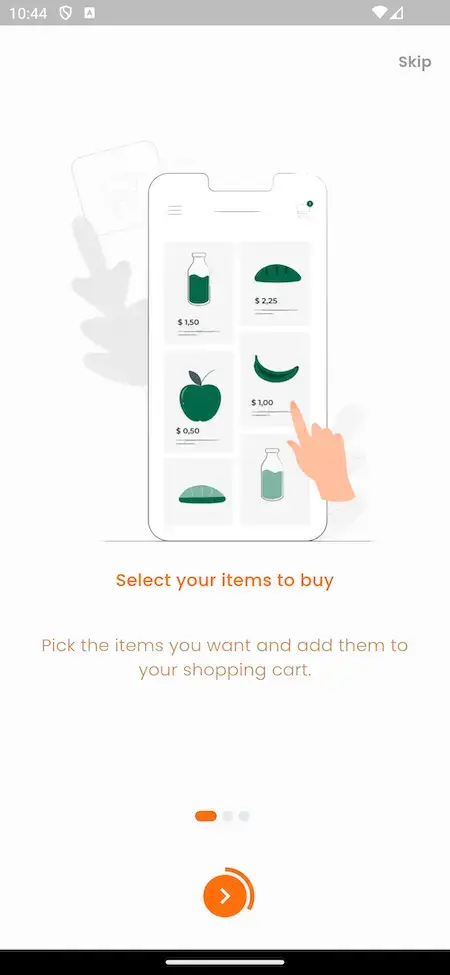
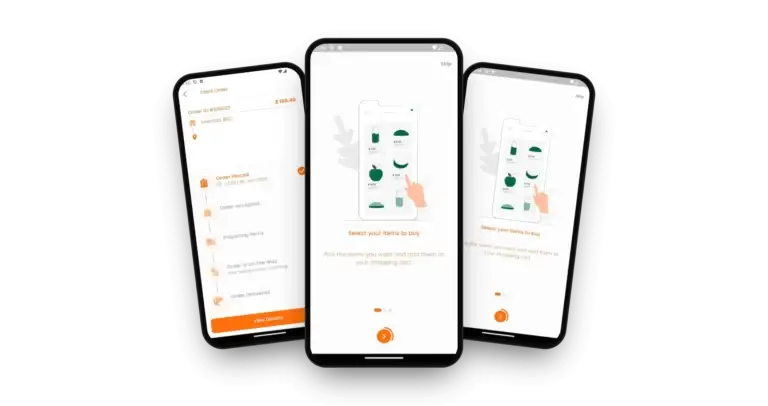
MXEpto shopper app onboarding screen: select your items to buy and add them to the cart.
Branches hear about each orderin real time
  • 5Ways a Shopper Can Paycard gateway, wallet, cash on delivery, offline transfer and a part-wallet split
  • 3Offer Tools Built Infree-delivery coupons, flash deals and loyalty points
  • 0%Revenue Share With Miracuvesno cut of your product margin or your delivery fees
  • 1Coverage Radius per Hubso orders land at a hub whose radius covers the address
  • 6Days to Launchand if the delay is ours, we keep going free
  • $2,499Paid Once, Not Rentedsource code yours, no per-seat fee, no monthly rental

Live in six working days, or we keep working free until you launch. Every build carries 60 days guidance, 6 months bug fixes and 12 months updates.Verify every figure

Late-Night Slots Are Yours to Set

Delivery windows are your own data, so a staffed hub can open slots around the clock, and shoppers choose right away or a booked time at checkout.

Searches Show What to Stock

Every keyword a shopper types and every product they open is logged, so each hub's shelf can follow real demand instead of guesswork.

Card Data Stays With Stripe or PayPal

Connect Stripe, PayPal or another gateway from the code using your own accounts; the gateway receives the card details, and the platform keeps the order with a payment reference.

Ready to launch your own convenience delivery brand?Speak With a Product Expert

Trusted by 6,000+ clients worldwide
Miracuves is listed by Expertise.com as a managed IT service provider.Miracuves is an official member of the Forbes Business Council.Miracuves is a verified agency on DesignRush, listed among top design agencies in India.Miracuves is reviewed on Trustpilot as a software development company.Miracuves is listed by The Manifest among top managed software development companies.Miracuves is listed by DesignRush as a top software development company.Miracuves is recognized by GoodFirms as a top software development company.Miracuves is ranked among the top 1000 companies globally by Clutch.Miracuves is a top managed service provider in the United States on Clutch.

01Try it live

See It Running

Gopuff Clone App Demo - Shopper App, Rider App, Web Storefront & Hub Panels

Miracuves puts its Gopuff clone app in your hands before any contract. Both the shopper and rider apps are listed on Google Play and take demo logins, the storefront runs in a browser and the hub panel opens from the links under each card, and an admin walkthrough is given on a guided call. Browse snacks and drinks, follow an order, then watch that same order from the hub and rider side.
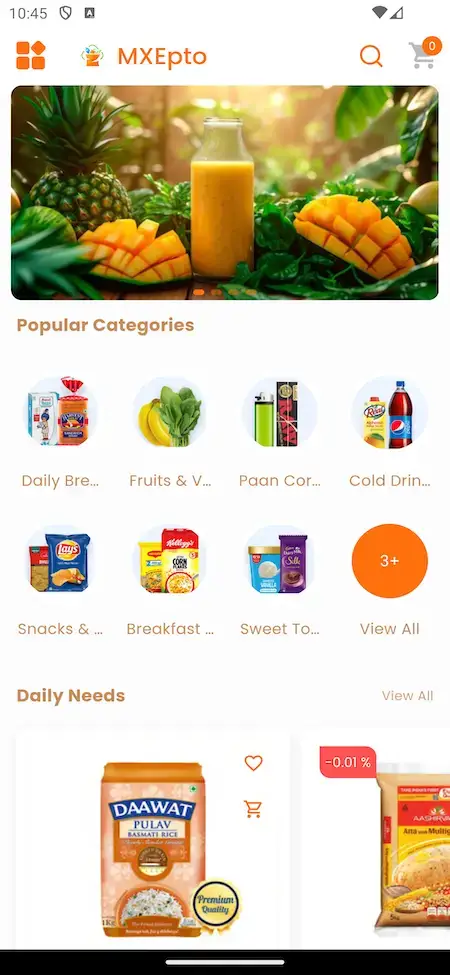
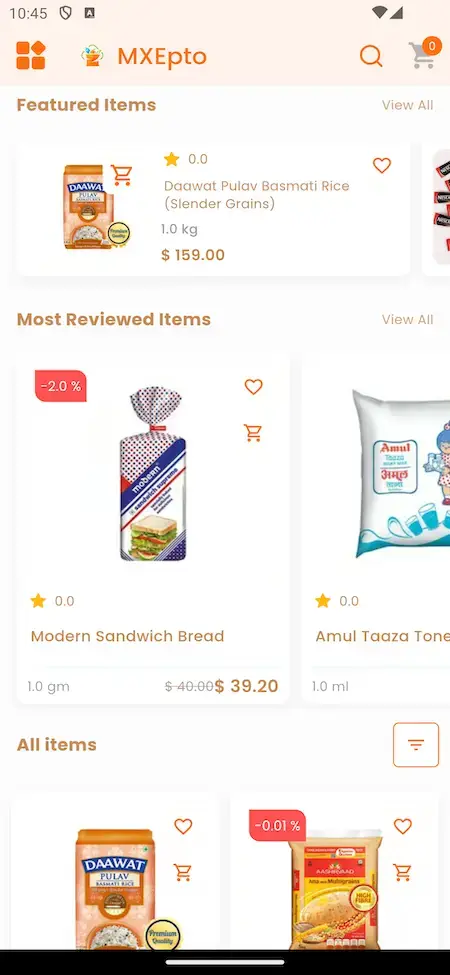
MXEpto home screen: a promo banner, popular categories and daily needs.MXEpto shopper app screen showing featured items and most reviewed items with prices and ratings.
Shopper app

Gopuff Clone - Shopper App

What a shopper holds on a phone: browse snacks and drinks by category, add items, pay and track the order until it arrives.

  1. 1Get the shopper app from Google Play
  2. 2Log in using the demo details below
  3. 3Try: Category shelves, Featured items, Live tracking
Try:+91 9876543210 | User_321
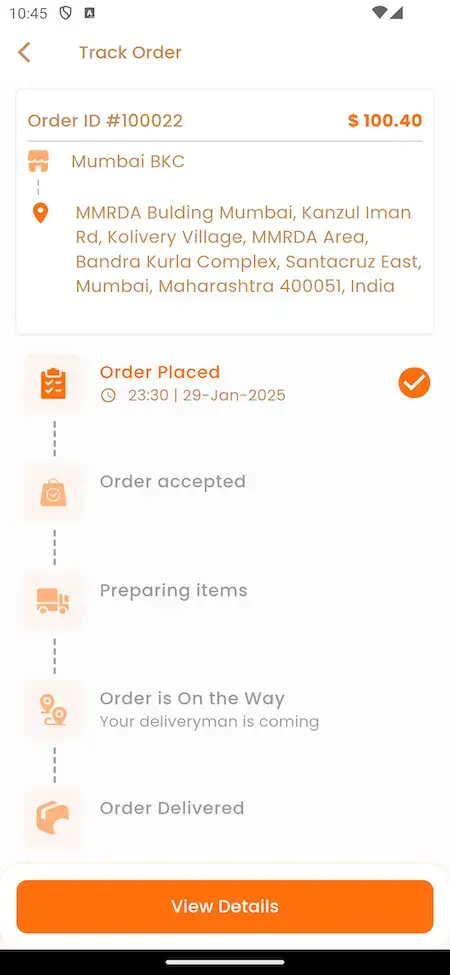
MXEpto order tracking screen with five stages: placed, accepted, preparing, on the way, delivered.
Rider app

Delivery Rider App

What a rider carries: job requests with collection and drop-off points, map navigation and earnings broken out by day, week and month.

  1. 1Get the delivery app from Google Play
  2. 2Log in using the demo details below
  3. 3Try: Incoming jobs, Maps, Earnings
Try:driver@demo.com OR +91 9876543212 | Driver_321
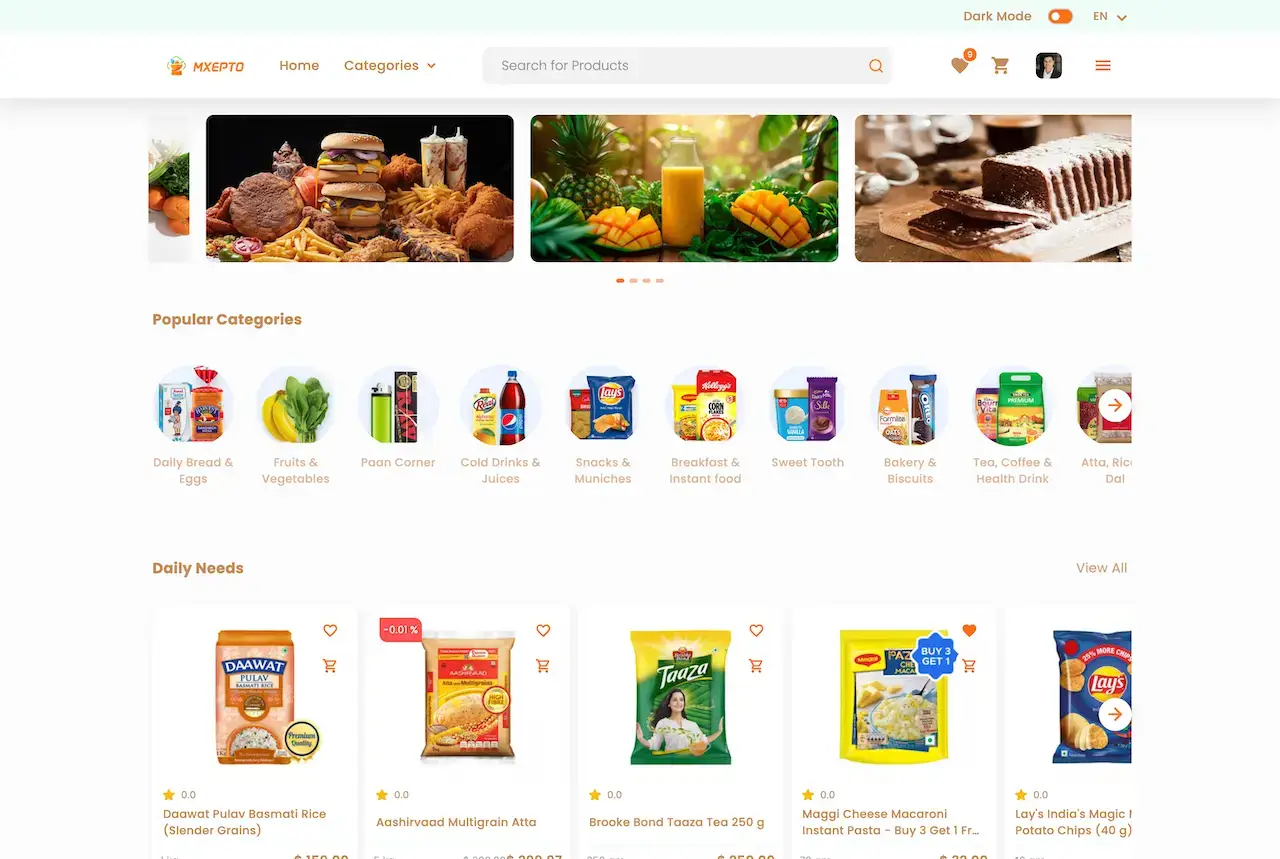
Browser storefront on the MXEpto platform: rotating banners, popular categories and cards for daily needs products.
Web & hub panels

Web Storefront & Hub Panel

The storefront shoppers open in a browser, plus the panel where a single delivery hub takes in orders and manages its own stock.

  1. 1Visit the web demo or the hub panel
  2. 2Panel logins come with a guided call
  3. 3Try: Catalog, Hub orders, Stock levels
Panel logins:shared on a guided call
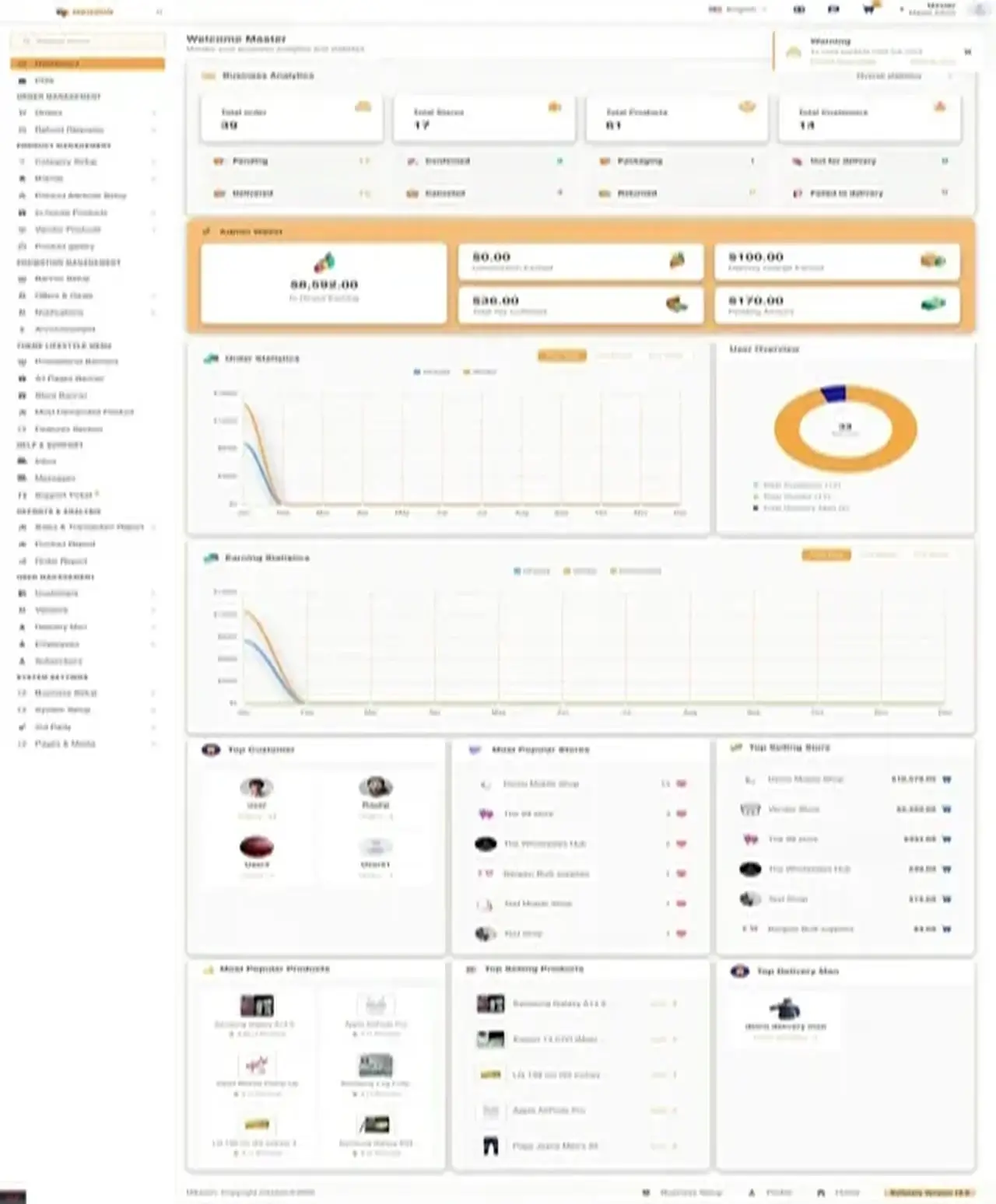
Admin dashboard of the MXEpto platform: tiles for orders and stores, a wallet widget, order and earnings charts, plus top-performer lists.
Admin console

Admin Console - Hubs, Orders, Delivery & Reports

Where the operator runs the business: the network of hubs, orders, delivery zones and fees, commissions, payouts and reports.

  1. 1Request a guided demo
  2. 2We walk through the admin together
  3. 3Try: Orders, Zones, Payouts, Reports
Admin demo:available on request
MXEpto app shown on three phones: shopper onboarding, an order tracking screen with status steps, and shopper onboarding again.

Watch It With Us

Video Walkthrough of an App Like Gopuff: Catalog, Hub Orders, Rider App & Admin Panel

A guided call is the fastest way to see all four surfaces. Within about half an hour we open the shopper app, a hub panel, the rider app and the admin panel, then tie each to your plan: your hub locations, delivery fees, revenue lines and launch date.

Book a live walkthrough call.

Screens, In Order

App Like Gopuff, Screen by Screen - Mobile App, Admin Dashboard & Web Storefront

Real screens from the Miracuves Gopuff clone, laid out in the order a purchase moves: onboarding, home, categories, featured items and live tracking.
MXEpto onboarding screen that invites the shopper to select items to buy.
MXEpto home screen: top banner, popular categories and a daily needs section.
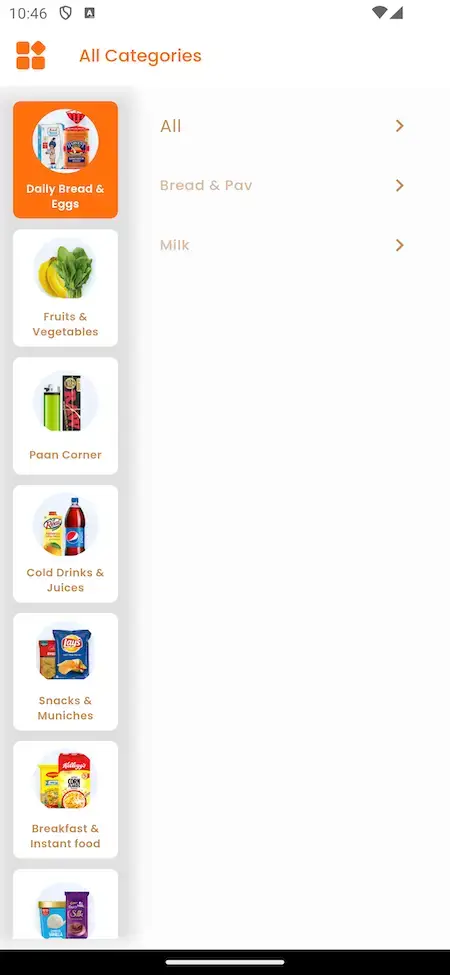
MXEpto all-categories screen with the category list running down the left side.
MXEpto screen listing featured items and a top-reviewed shelf, with price and star rating on every item.
MXEpto track order screen: a step line running placed, accepted, packing, out for delivery and delivered.
5 screens · swipe →
MXEpto admin dashboard overview: order and store counts, wallet panel, charts for orders and earnings, top lists.
1 screen
Storefront in a desktop browser: a rotating banner strip, popular categories and product cards for daily needs.
1 screen

Trace a shopper from the first screen via category lists and featured shelves to a tracked order. Next, the admin dashboard and the browser storefront show the same business from the operator's chair.

Browse Our Solutions

02Proof

Client Voices

Gopuff Clone Reviews - What Delivery Operators Say in Their Own Words

What clients say about building on Miracuves bases. Four describe delivery, courier and logistics platforms, one of them grocery; the others come from other industries and are shown exactly as their authors gave them.

CCharles EveillardManaging Partner, Izi Technologies
“Talokitoko is grocery and food delivery for the African diaspora market in Europe. The rider app, dispatch and the merchant console were already built, so we spent the engagement on our own local payment mix, the vendor onboarding flow and the regions we actually operate in. The platform was live inside a month, which was months faster than our internal estimate.”
MMarsha WilliamsFounder, Bmore On Demands LLC
“The team was running it on a dispatcher and a Google Sheet, and we needed a real platform quickly, because we were about to onboard a major retail client. Miracuves’s Delivery Genie base gave us the rider app, the dispatch console, and live tracking. We launched in 6 weeks and cleared 4x the previous order volume in the first month.”
MMustafa H.CTO, Speedyven Networks
“Speedyven is a hyperlocal courier network — packages, food, and same-day essentials across a few metros. The dispatch and rider app were the parts where we needed to move fastest, because riders have low tolerance for clunky tools. Miracuves's Delivery Genie base gave us the rider app, the dispatch console, and live tracking. We added our custom surge-pricing engine, our multi-merchant order router, and a custom rider-incentives module. We launched in 7 weeks. Rider activation is high and the platform's been stable through weekend peaks.”
BBrian LatailleVP Logistics Technology, IBC Tanks Canada
“We were juggling spreadsheets, a third-party GPS provider, and a phone. We needed a single operations console. Miracuves’s MXLogistics base covered the trip lifecycle, the driver app, and the customer tracking page. We’ve cut operations admin time by about 40%.”
AAndre GittensCEO, Ride Corporation
“Turo is the obvious reference, but the Caribbean specifics, from different insurance norms to different payment rails, meant we needed a real partner, not just a clone. Miracuves’s MXCar base covered the listing, the trip flow, and the host payouts. We launched in 6 working days and are live in three islands.”
TTiffany DandreaOperations Director, Best Cabo Yacht Rentals
“We were running it on phone calls and a paper calendar, and we were losing bookings to bigger OTAs. Miracuves’s GetmyBoat Clone base gave us the calendar, the booking flow, and the payment engine. Online bookings are up roughly 70% in the first six months, and the ops team finally has a live view of the fleet.”
DDr. Vivek RungtaFounder & Chief Dermatologist, Dermacian
“Every HMS I tried was built for general physicians, with no lesion mapping, no before/after tracking, and no procedure-based billing. Their MXHealth base gave us the patient app, doctor app, EMR and video consult out of the box. Front-desk time on scheduling and follow-ups is down ~70%, and we went fully digital in 9 months, where a fully custom job would have been 18.”
DDr. Carlos A. PalermoCo-founder & CEO, Doctta Health
“Building a compliant telehealth stack from scratch in three markets would have been a year-plus effort. Miracuves’s MXHealth base covered the patient and doctor apps, video consult, e-prescription and the pharmacy integrations. We launched in our first market in 9 weeks and rolled out to two more in the following six months.”
Read More Client TestimonialsOperators and founders in their own words

Proof You Can Check

Gopuff Clone Case Study - What Has Been Published and What You Can Check

An honest status report on proof for this model, and the ways you can test the product yourself before you decide.

Case Study
No named deployment is published for this model

Miracuves has not published a named client launch of the Gopuff Clone, so this page does not borrow one. What it offers instead is a list of what you can check for yourself and a plain statement of what we will never put in its place.

Not publishedNamed client
Demo and guided callHow to verify
Dark-store groceryModel
4Surfaces to open
8Order steps shown
6 daysBuild window
MXEpto storefront in a browser: rotating banners, popular categories and a row of daily needs.
Challenges
  • Stock held in several branches has to match what the app offers
  • Delivery charges differ by area, branch and basket weight
  • Branches, riders and shoppers must all see the same order at once
Goal
  • See an order move through every panel before you pay
  • Test the delivery charge rules against your own zones
  • Check the source code and project codes for the rest
Solution by Miracuves
  • A live demo with logins for the customer and delivery apps
  • A web storefront and a branch panel you can open yourself
  • A guided call that walks through the admin panel
  • Release notes for versions 7.2 to 7.6 showing what shipped
  • Fixed pricing, with a build time of 6 days

We will not publish an invented client, a made-up quote or a result nobody measured for this product. When a named deployment is published, it belongs here, linked to its own case study.Miracuves · Our position on proof

See the case studies that we have publishedReal food and grocery delivery builds on other Miracuves bases are listed in the portfolio.

03The platform

The Basics

What the Gopuff Clone App Does for Shoppers and Delivery Hubs

A Gopuff clone is a ready-made convenience delivery platform, and Miracuves builds it around a network of hubs that each hold their own stock and run their own panel. Shoppers order snacks, drinks and household items from a catalog, the hub that covers the address picks and packs the order, a rider brings it over, and the operator manages every hub from one admin panel that sets zones and delivery fees.

MXEpto app on three phones, showing shopper onboarding, an order tracking screen with its status steps and the onboarding screen once more.

Beyond the Storefront

The real work is behind the cart: hub consoles, stock control, rider dispatch, delivery fees and an admin that follows orders, payouts and reports.

Source You Can Edit

You receive the complete source code in readable form. Your developers can rework a flow, build a new screen or move to another host without needing our sign-off.

Clear About the Extras

Smart shopping lists, a virtual assistant, age-verified checkout and a membership with free delivery are add-ons, each scoped and priced in writing, typically 2-8 weeks. Add them whenever your hubs and customers are ready.

Web, iOS & Android

What Is a Gopuff Clone Script?

The hard part of convenience delivery is what happens behind the cart: stock spread across several hubs, orders that must land at the hub covering the address, riders who collect them and fees that differ by area. Those pieces ship working.

Web storefront of the MXEpto platform with a rotating banner, popular categories and daily needs cards.
  1. 01Catalog with categories, search and filters
  2. 02Cart, checkout and map-based order tracking
  3. 03Hub panel for orders and stock
  4. 04Rider app with job requests, maps and earnings
  5. 05Admin console with zones, payouts and reports

Four surfaces ship together: the shopper app with the web storefront, a panel for each branch, the rider app and the admin panel. Flutter apps and the full source code are included.

What Ships Inside

Gopuff Clone Features - Catalog, Hubs, Stock, Delivery Fees, Riders & Admin

Every feature of the Miracuves Gopuff clone listed here can be checked in the demo, the screen flow or the release log. Whatever requires an extra module carries an add-on label lower down.

Feature 01 of 12

Catalog, Search & Filters

Shoppers move through categories, search and filters, and open product pages with pictures, prices and product information. Snacks, drinks, household items and late-night picks can sit on the featured shelves of the home screen, set by you.

  • Search, filters and category lists on mobile and on the web
  • Home screen shelves for popular categories and daily needs
  • A featured row and a most reviewed row, each item showing rating and price
  • Product pictures, details and allergy warnings
  • Rotating banners on the web storefront
Feature 02 of 12

Delivery Hubs & Branch Network

Each branch acts as a delivery hub with a panel and a stock list of its own, while one admin console runs several branches in several cities.

  • Multiple cities, each with several branches
  • Own panel and login for each branch
  • New orders arrive at the branch live, ready to accept, pack and dispatch
  • Each branch adds and edits its own inventory
  • Multi-store and multi-warehouse setup that keeps items in stock
Feature 03 of 12

Stock & Reorder Control

Every branch tracks stock levels, reorder points and pricing, and any item that sells out is pulled from the catalog or swapped for a suggested alternative.

  • Reorder points and pricing managed from the admin
  • Items that sell out come off the shelf or get an alternative
  • Stock updated from every branch owner dashboard
Feature 04 of 12

Cart, Checkout & Slots

Shoppers build a cart, pick an address, pay and get a confirmation, choosing right-away delivery or a booked time slot at checkout.

  • Add to cart and move to checkout
  • Delivery address picked from saved locations
  • Right-away delivery or a booked time slot
  • Minimum order value per location or store
  • Confirmation after payment
  • Shoppers can attach an image to an order
Feature 05 of 12

Checkout Payments

Checkout shows the methods you connect: cards via Stripe, PayPal and other gateways, wallets and cash on delivery.

  • Cards through Stripe
  • PayPal checkout
  • Wallets
  • Cash when it arrives
  • You need your own gateway account, with KYC done, to go live
Feature 06 of 12

Live Delivery Tracking

Once an order is paid the shopper watches it move through placed, accepted, preparing, out with the rider and delivered, with a map view and an alert when a rider is assigned.

  • Tracking screen with five order stages
  • Live progress drawn on a map
  • Shopper gets an alert once a rider is assigned
  • Push alerts for order updates and promotions
  • Firebase alerts for new orders in the admin and branch panels
Feature 07 of 12

Rider App & Dispatch

Riders get delivery requests showing pickup and drop-off points, accept or decline where your model allows, follow the map and check what they earned.

  • Live order alerts sent to riders
  • Riders accept or decline, or deliveries are assigned for them, per your model
  • Google Maps and GPS guidance along optimized routes
  • Earnings split by day, week and month, plus incentives and tips
  • Admin tools for managing riders and tracking deliveries
Feature 08 of 12

Delivery Fees & Coverage

Delivery fees can be set for each branch, by postcode or area, as a flat amount per order and with a weight surcharge, and the admin outlines the areas you serve.

  • Delivery fee set branch by branch
  • Fee based on postcode or area
  • Flat delivery fee per order
  • Weight surcharge, per unit or by weight band
  • Serviceable zones and a coverage radius per hub
  • Minimum order value you can change per location
Feature 09 of 12

Deals, Loyalty & Ratings

Shoppers reorder from past orders, rate what arrived and earn deals and loyalty points, while the admin runs banners, offers and free-delivery coupons.

  • Order history with a reorder option
  • Shoppers rate and review after delivery
  • Flash deals and loyalty points
  • Banner and offer tools inside the admin
Feature 10 of 12

Login, Access & Alerts

Shoppers register using a social login or email, the admin chooses which sign-in methods are on, and later releases add OTP login and reCAPTCHA v3.

  • Sign up with a social account or email
  • OTP login
  • Admin switches sign-in methods on or off from one place
  • reCAPTCHA v3 guards forms
  • Maintenance mode when needed
Feature 11 of 12

Admin Console & Reports

The admin home opens on tiles for orders, stores, products and customers, plus order and earnings charts and top lists. Sales and trend reports sit in their own section.

  • Tiles with totals for orders, stores, products and customers
  • Charts for order and earning statistics
  • Top customers, stores, products and riders
  • Sales reports and trend views
  • Subscribed customers can be exported
  • Admin wallet view
Feature 12 of 12

Language, Maps & Help

The app can run in more than one language, uses maps for addresses, and gives shoppers help by chat inside the app, by email or on a helpline.

  • Multiple app languages
  • Google Maps behind addresses and delivery routes
  • Chat support in app
  • Email and helpline numbers for contact
  • System option to run checkout without Google Maps
  • Connects to an SMS gateway

What stays with you: Miracuves rebrands the platform and deploys it on your hosting. You supply that hosting plus the domain, a store-verified developer account, your branding, your business details, a payment gateway with KYC done and whatever third-party keys you use. App store review by Apple and Google runs on its own clock, outside our 6-day build.

Speak With Our Team

Where Income Comes From

Gopuff Clone Revenue Models - Stock Margin, Delivery Fees, Late-Night Pricing & Brand Placement

An app like Gopuff earns in several places at once: margin on owned stock, delivery fees and brand money. Each line has its own admin setting, so changing one leaves the rest alone.

For an operator that owns its stock, the margin on each product and the delivery charge carry the most weight, with late-night pricing as the lever for quiet and busy hours.

  1. 01

    Margin on Owned Stock

    You set price, discount and tax on every item you stock, and the gap between what it cost and what it sells for stays with you, with nothing shared with Miracuves.

  2. 02

    Fees by Hub and Area

    Set a charge for each hub, postcode or area, fixed per order or built on distance, plus an extra by weight, and each delivery becomes a priced line.

  3. 03

    Late-Night & Rush Fees

    An extra charge for after-hours orders or a rush window, built from the fee rules that ship. A surge that switches on by itself at set times is custom work, quoted separately.

  4. 04

    Brand Banners & Shelves

    Home-screen banners and the featured shelves can be sold to the brands whose products you stock, for an agreed period.

  5. 05

    Own-Label Lines

    Your own-label range is simply more products in the catalog, stocked in your hubs, so it sells beside other brands and keeps all of its margin.

  6. 06

    Card & Wallet Fees

    A small charge on card or wallet payments hands the gateway cost to the order rather than leaving it with you.

Published figures for four of the six income lines (store commission, delivery fees, brand advertising and card fees), each one sourced from a published fee schedule or annual report cited under the table.
Income lineHow it is billedTake rateTypical take rateWhat limits the line
Store CommissionA share of each order that a marketplace keeps before it pays the store; on stock you own, the margin stays whole.Uber Eats lists 20%, 25% and 30% marketplace plans and a 15% self-delivery fee. DoorDash lists 15%, 25% and 30% for delivery and 6% for pickup.What a partner store will give up from its own margin. Neither fee page prints a grocery rate, and fees shift by market, which is why selling your own stock skips this line.
Delivery & Late-Night FeesA charge on each order, fixed or by distance, raised for late hours or rush windows if you wish.No grocery rate is published. Instacart+ members pay $0 delivery on eligible orders of $10 or more per retailer; other shoppers pay a fee that varies by retailer, window and order total.Order value and what shoppers will pay at checkout. A fee for your area should begin with what your own riders cost and how far the hub is.
Brand Banners & ShelvesA flat fee or a bid for a home-screen banner or a featured shelf slot.Instacart reports $1,065 million of advertising and other revenue in 2025, about 2.9% of its $37,224 million gross transaction value.Brand budgets and the order traffic your catalog carries. This tends to be the smaller line beside what you earn on stock and delivery.
Card & Wallet FeesA card or wallet charge added to the order, or taken on by the operator.Stripe lists 2.9% + 30c per US card payment; its India page lists 2% for domestic cards.The gateway price where you operate and your mix of cards and wallets. Whatever the gateway bills you is the cost this line has to cover.

How to read this. The commission plans come from the Uber Eats merchant pricing page and the DoorDash Marketplace page. Delivery fees come from an Instacart retailer help page, and the advertising and transaction ratios from its 2025 annual report on Form 10-K, where the percentages are our arithmetic on reported figures. Card pricing is from Stripe support and its India pricing page. Apple's published commission covers digital goods and services, so it is not a rate for a basket of physical groceries. These are other companies' published terms, offered as modeling inputs: not a quote, not a forecast, and your own charges are configured in the admin panel.

Revenue Model

Gopuff Clone Revenue Model as Your Hubs Grow

Every income line of the Gopuff clone works from day one, and an operator switches each on as hubs open and order volume builds.

First Delivery Hubs

From the first basket the admin adds the area delivery charge, and the own-label range stocked in your hubs keeps its full margin beside the other lines.

Late Nights

When evenings fill up, a late-night or rush fee prices the extra effort through the four fee rules that ship, and a surge that starts at set times can be added as quoted custom work.

Wider Coverage

Once orders come from several hubs and areas, brands can pay for a home-screen banner or space on a featured shelf for an agreed period.

Fees, areas, late-night charges and banner placements get an admin screen apiece, and Miracuves takes no share of what a basket earns.

Looking for a revenue model shaped around your own network of hubs?Plan My Revenue Model

Run It Every Day

Admin Panel for a Convenience Delivery App Like Gopuff - Hubs, Orders, Delivery Areas & Reports

The Gopuff clone operator gets one console for the whole network: which hubs are live, what each holds in stock, where every order is, what riders earn, what each area charges and what the platform has made.

MXEpto admin dashboard: tiles for orders and branches, a wallet panel, charts of orders and earnings, plus ranked top lists.
MXEpto web storefront: rotating banners at the top, then popular categories and product cards for daily needs.

What the Admin Covers

  • 01

    Dashboard & Key Figures

    Tiles count orders, hubs, products and customers, charts follow orders and earnings through the year, and top lists rank customers, stores, products and riders.

  • 02

    Branches & Stores

    Add and manage the stores and branches that fill orders, and see which ones are most popular and which sell the most.

  • 03

    Orders & Status Totals

    Watch each order move from pending to confirmed, packaging, out for delivery and delivered, while canceled, returned and failed ones are counted alongside.

  • 04

    Customers, Vendors & Riders

    Customer accounts, vendors, riders, employees and subscribers are all handled in one user management area.

  • 05

    Hub Coverage & Charges

    Mark out the area each hub serves, then price delivery for a branch, postcode or area, on each order and by weight.

  • 06

    Payouts, Commission & Wallet

    Where partner vendors sell, commission is taken off for you and payouts can be done manually, with payment integrations moving the money.

  • 07

    Banners, Deals & Notifications

    One promotion area for banners, offers and flash deals, plus notifications and announcements sent to shoppers.

  • 08

    Reports, Tickets & Settings

    Reports and analytics on sales, products and orders, an inbox with support tickets, and settings for the business, the system and third-party integrations, with pages and media.

Money Flow

Everything finance in one place, from a shopper's payment through to the payout.

  • Commission deducted for you
  • Payouts made by hand
  • Payment gateway integrations
  • Admin wallet totals for earnings and delivery charges

Daily Controls

The settings an operator reaches for daily.

  • Live view of open orders and delivery progress
  • Order minimum set for each location or store
  • Delivery charge rules by branch, area and weight
  • Advanced maintenance setting

Want the console to do more? Added reports, a different payout rhythm, a surge rule that follows the clock or an approval step of your own get scoped on their own. Describe the need on your operations side and a written quote follows.

Talk With Our Team

04Package and pricing

Everything Included

Package Contents: Gopuff Clone Script, Apps & Setup on Your Own Hosting

What reaches you is a working convenience-delivery business rather than a pile of parts: the shopper apps, a web storefront, a panel for every branch, a rider app and the admin panel, each with its project code, source left unencrypted and a deployment you control. Late-night and rush pricing comes from the four fee rules that ship, set by branch, area, order or weight, and only a surge that follows the clock is custom. Your own providers bill for hosting, gateway fees, Maps, Firebase, SMS and developer accounts.

01

Complete Source Code

Every line of the web platform and mobile app source arrives unencrypted, so your developers can reshape it around your operation.

  • Unencrypted web platform source
  • Flutter code behind the Android and iOS apps
  • Free to modify, extend and redeploy
  • Handed over in your own repository
02

Project Codes & Data Layout

A project code for every app and panel, plus the database layout that stores orders, branches, products, customers, areas and fees.

  • Orders with their line items
  • Branches, stores and products
  • Shoppers, riders and employees
  • Areas, fees and commissions
03

Alerts & Messaging

Notifications that put branches, riders and shoppers on the same page about an order, from branch alerts to push messages for shoppers.

  • Live order alerts at each branch
  • Firebase order alerts in the admin and branch panels
  • Push messages to shoppers
  • SMS gateway connection
MXEpto storefront in the browser, with banners across the top and category and daily needs product tiles below.
04

Storefront & Web Panels

A responsive storefront with categories, search and banners, along with the web panels for branches, riders and admin.

  • Categories, search and banners on the storefront
  • A branch panel for every store
  • Delivery panel
  • Admin panel
05

Shopper & Rider Apps

Two Flutter apps: one lets shoppers browse, check out and track, the other gives riders requests, navigation and earnings.

  • Shopper app: browse, add to cart, pay, track
  • Rider app: requests, navigation, earnings
  • Flutter apps for Android and iOS
  • Published under your own developer accounts
Shopper app home screen on MXEpto with a banner, popular categories and a daily-needs shelf.
MXEpto admin panel dashboard with order and branch tiles, a wallet panel, earning and order charts and top lists.
06

Admin Panel

The operator console: dashboard tiles, charts, branches, products, areas, commissions, payouts, users and reports.

  • Dashboard tiles for orders, stores, products and customers
  • Areas, charges, commissions and payouts
  • Customers, vendors, riders and employees
  • Reports, support tickets and system settings
07

Logins & Security Controls

Each surface has its own login, with the sign-in and form protections named in the release log.

  • Each panel has its own login
  • OTP sign-in and login methods the admin controls
  • Form checks by reCAPTCHA v3
  • Gateway handles the card details
08

Hand-Off & Support

We do the branding and deployment, hand over the project codes, and three support periods run side by side from launch.

  • Rebranded with your logo, icons and colors
  • Deployed on your own hosting
  • A project code for every app and panel
  • Guidance for 60 days, bug fixes for 6 months, updates for 12 months

Want to see it first? Use the demo logins in the shopper or rider app, open the branch panel, or book a guided walk-through where a single order is followed from basket to doorstep, using your own areas and fees.

Talk With Our Team

Clear Pricing

What Does a Gopuff Clone App Cost to Build for Your Own Hubs?

The launch-ready white-label Gopuff Clone costs a fixed $2,499, paid once. Anything past the base, from add-ons to extra integrations or custom flows, gets its own written quote.

Most Popular

Professional

Ready-Made Starter Package
$2,499paid once
Live in 6 days

Chosen by: Convenience-delivery startups, store chains adding home delivery, regional retailers

You get the platform as the demo presents it, in your logo, icons and colors, running on your own hosting.

Get Started

Enterprise

Custom Work for Bigger Scope
Customquote
Go-live: set by final scope

Chosen by: Retail groups, networks of hubs across cities, franchise operators

Want flows the base lacks, like a surge rule tied to the clock or a link to your ERP? We build to your brief and settle scope and price before any work begins.

Ask for a Quote
Development Cost

Gopuff Clone App Development Cost in 2026

Miracuves sells its Gopuff clone for $2,499. That single payment covers the convenience-delivery platform you see in the demo: Flutter apps for shoppers and riders, a panel for every delivery hub, the web storefront and the admin console, plus unencrypted source code, set up on your own hosting within six working days.

$2,499 Paid once
6 working days Live and rebranded
0% Share of sales

What your own providers bill separately

  • Hosting and a domain for the storefront and panels
  • Gateway charges on every online payment
  • Usage of Google Maps, Firebase and SMS
  • Developer accounts for both app stores
  • Add-ons such as age-verified checkout, a paid membership or smart shopping lists

Want a surge schedule that runs itself on evening rushes, an ID check at handover or an ERP link for your stock? Miracuves agrees scope and price in writing before any work starts, typically 2-8 weeks of work.

Weigh Your Routes

Ready-Made Gopuff Clone vs Custom Build vs SaaS

Three routes lead to a delivery app like Gopuff: the finished platform Miracuves sells, a build commissioned from an agency or a hosted storefront you rent. This is how they compare for an operator launching its own hubs.

CriteriaMiracuvesReady-Made Gopuff CloneCustom DevelopmentSaaS
Launch timeA branded platform in 6 daysCustom builds take 15-30 days, bigger ones 45-60Quick storefront, limited apps
Upfront cost$2,499, fixedPriced in writing for each scopeMonthly subscription plan
Who owns the sourceWeb and Flutter source, unencryptedDepends on the agency contractNone, the vendor holds it
CustomizationHubs, areas and fee rules are yoursAny feature, on your timetableThemes and settings only
Ongoing feesNo seat charges, no cut of ordersMaintenance is paid after handoverA subscription with order fees on top
Branding & store listingApps live under your developer accountsYour listing comes lastOwn native apps are rare
Best forBrands that run their own delivery hubsUnusual supply chainsSellers with one store

Where It Works

Use Cases for a Delivery App Like Gopuff - Own-Stock Hubs, Store Chains, Late-Night Orders & City Rollouts

Operators who launch the Gopuff clone lean on different parts of one product. A hub-based brand relies on branch panels and delivery charges, a store chain on the shops it already has, and a rider fleet on dispatch plus tracking, with the emphasis chosen in configuration.

OwnStockOwn-Stock Delivery Hubs

Open several hubs that each stock the range and pack orders, with a delivery charge per hub, a coverage radius for each and an alert to the right branch as soon as an order lands.

01
Shopper app home screen with a banner, popular category tiles and a daily needs shelf.
StoreGroupStore Chain Delivery Arm

A chain gives each of its stores a branch panel, so one set of shelves serves walk-in customers and online orders alike.

02
Storefront on the web with a rotating banner, popular categories and product cards for daily needs.
MetroZonesCity-by-City Rollout

Expand one city after another, each with its own branches, coverage areas and charges, all run from a single admin panel.

03
Admin dashboard showing order and branch tiles, a wallet panel, charts of orders and earnings and top lists.
CornerStoreCorner Store Goes Online

A corner store takes orders from the streets around it, sets a minimum order so baskets stay worth the trip and delivers with its own riders.

04
All categories screen in the shopper app, with a rail of categories on the left.
InstantBookedInstant or Booked Slot

Send the forgotten item out by rider right away and let shoppers book a time slot for the bigger order, both from one catalog.

05
App screen listing featured items and most reviewed items, each shown with a price and a rating.
FleetSellerCourier Fleet Goes Retail

A courier or delivery firm builds a catalog, stock per branch and a shopper app around the riders it already employs.

06
Order tracking screen showing each stage of an order, from placed and accepted through preparing and on the way to delivered.
Business Model

Gopuff Clone Business Model: Three Ways to Operate It

An app like Gopuff sells convenience from stock the brand owns near the shopper, and the Gopuff clone from Miracuves lets that run three ways.

Own Delivery Hubs

A startup opens a few hubs in one city, packs orders from its own shelves and earns on delivery fees and brand placement, with the full margin on own-label lines.

Delivery Arm for a Chain

A store chain sets up each shop as a branch, so its shelves take both walk-in sales and app orders under the chain's own name.

Courier Becomes a Retailer

A local courier company puts its current riders on the delivery app, adds a convenience catalog with stock in each branch, and fills slow hours with basket orders sold under its own brand name.

Areas, charges and branding differ from one model to the next, while there is still just one codebase to maintain.

Six uses, one product. Every one of the six runs on the same apps, branch panel and admin. The differences lie in where your hubs sit, the areas and charges you configure and the branding of the storefront, so one codebase is all you maintain.

Talk With Our Team

Market Timing

Why Build a Convenience Delivery Platform in 2026?

Convenience delivery rewards brands that stock their own goods in small local hubs, the way Gopuff keeps inventory in its own micro-fulfillment centers, and manage every hub on a single screen. Having a platform under your own name keeps the catalog, the hubs and the delivery charges that a third-party app would otherwise hold.

01

Shoppers Reach for Snacks and Essentials

Snacks, drinks, household basics and late-night essentials get bought the moment they are missed. A catalog tied to the hub that covers the address, with a tracker showing the order on its way, can make a small basket a regular one.

02

Nearby Hubs Shorten the Last Mile

A hub near the shopper cuts the distance a rider travels. Each branch has its own panel and stock, so adding a hub means a new login and an onboarding call instead of a project.

03

Delivery Fees Are a Margin Lever

Setting fees per branch, per area, per order and per weight lets you price the last mile deliberately rather than absorb it, with a late-night or rush fee layered on top.

04

Riders and Hubs Need the Same View

If the branch, the rider and the shopper see an order at the same moment, there are fewer calls and corrections.

05

Your Brand, Not a Shelf on Another App

With your name on the catalog, checkout and reviews, the shopper relationship and every repeat order remain yours.

06

Buy or Build Is Easy to Decide

Under the surface a delivery stack is plumbing for stock, dispatch, fees and payments. Six days of build time on our side later, a rebranded copy of the platform is running on hosting you own.

The Platform in Numbers

4

Surfaces on One Codebase

8

Steps From Basket to Review

5

Stages of Order Status

6

Days to Build

Most of the work in convenience delivery sits in the unglamorous middle, where branch stock, dispatch, delivery fees and payouts must reconcile. In this platform that middle is already built.

Sectors

Industries We Equip

The Gopuff Clone suits any brand that stocks everyday goods and delivers them to the door. Convenience operators run several delivery hubs from one console. Dark-store teams fulfill orders from compact stock rooms. Supermarkets and grocery chains open a fast lane. Bakery, dairy and produce sellers deliver fresh, and retailers of household and personal-care items serve the daily list. Snack and drink brands sell straight to shoppers. Regional retail groups run one app over several cities.

  1. 01Delivery Hubs
  2. 02Superstores
  3. 03Corner Stores
  4. 04Food Retailers
  5. 05Fresh Foods
  6. 06Dairy & Bakery
  7. 07Home Essentials
  8. 08Health & Beauty
  9. 09Late-Night Snacks
  10. 10Pet Products
  11. 11Local Delivery Firms
  12. 12Multi-City Retail

Miracuves’ Gopuff Clone is a delivery platform that bends to any everyday-goods model, with hub panels, the rider app and the admin all carrying your name from the first screen.

06Inside the build

Full Journey

How the Gopuff Clone App Works - Sign Up, Browse, Check Out & Track

Ordering on a Gopuff clone app from Miracuves takes a shopper a handful of taps, and every order reaches a hub, a rider and a payment record at once. Follow the shopper from sign-up to the doorstep, then the architecture behind it.

Shopper Journey - From Sign-Up to a Delivered Order

  1. Customer app onboarding screen showing the line Select your items to buy.
    1Sign In & Choose an Address

    The shopper lands on onboarding, signs in with a social account or email and sets the address the order is going to.

    • Onboarding screen: Select your items to buy
    • Sign up by social login or email
    • Location detected or address entered for the right hub
  2. Customer app home page with a banner, then popular categories, then daily needs.
    2Browse the Product Catalog

    The home screen opens on a banner, popular categories and daily needs, while search and filters narrow the list.

    • Home banner, popular categories, daily needs
    • Search with filters
    • Product details and images
  3. Customer app screen of all categories, with a rail of category pictures at the left.
    3Shop by Aisle

    This screen lists every aisle in a side rail, so a shopper can jump from snacks and cold drinks to household items.

    • Rail of pictured categories
    • Products inside each category
    • Allergy notes on products that carry them
  4. Customer app page of featured items and most reviewed items, each showing price and rating.
    4Fill the Cart and Pay

    Shoppers add featured and top-reviewed items to the cart, and checkout offers the payment methods the operator has connected.

    • Featured and top-reviewed items
    • Cart showing prices and discounts
    • Cards, wallets or cash on delivery
  5. Customer app tracking screen with five stages: order placed, accepted, preparing items, then on the way, then delivered.
    5Follow the Order Live

    An order advances from placed through accepted, preparing and on the way to delivered, with a rider assigned en route and a rating requested at the end.

    • Five stages on the tracking screen
    • Order progress on a map
    • Rate and review once delivered
Visual Flow ChartLog inSearchAislesBasketFollow

Inside the Build

Platform Architecture & Order Flow of a Delivery-Hub App

Speak With Our Team
  1. Level 01

    Separate Logins for Every Surface

    Customer, branch, delivery and admin each get a separate app or panel with a separate login, so a hub team never sees the admin console.

  2. Level 02

    Stages of an Order

    Orders pass through pending, confirmed, packaging, then out for delivery, then delivered. Admin tiles also count canceled, returned and failed orders.

  3. Level 03

    Stock Held per Hub

    Each hub keeps its own inventory against reorder points, which lets the catalog hide or swap an item that has sold out.

  4. Level 04

    Fee Rules

    Delivery fees resolve by branch and by postcode or area, either flat per order or with a weight extra. The admin sets the areas you serve.

  5. Level 05

    Commission & Payouts

    Commission comes off automatically, payouts can be made manually, and the payment gateways you connect carry the money in.

  6. Level 06

    Alerts & Maps

    Firebase notifications reach admin and hub panels, while shoppers and riders get push alerts. Google Maps with GPS guides each route.

Inside the Stack

Gopuff Clone Script Tech Stack - PHP, MySQL, Flutter & Google Maps

Miracuves runs its Gopuff clone script on a dependable web tier, a database that keeps orders and inventory consistent, and native-feeling mobile apps. The list below states the technology exactly as our product pages and release log do.

WEB LAYER

Web Layer

Laravel PHP Bootstrap
  • Storefront, branch, delivery and admin panels
  • Interface built on Bootstrap
  • Release 7.3.12 moved to Laravel 10 and PHP 8.1 or later
  • PHP as the server-side language
STORAGE

Database

MySQL
  • MySQL as the data tier
  • Orders, hubs, products, customers
  • Zones, fees and commissions
  • Caching on backend and front end from 7.6
APPS

Customer & Rider Apps

Flutter iOS Android
  • Flutter apps on current dependencies
  • One customer app and one rider app
  • Release 7.6 supports Flutter SDK 3.27.1
  • Apps ship from your own developer accounts
CHECKOUT

Payments & Checkout

Cards Stripe Wallets Cash on Delivery
  • Cards and wallets via Stripe
  • Pay on delivery
  • You open the gateway account and finish its KYC
  • Payment gateway APIs among the integrations
SERVICES

Outside Services

Firebase Twilio Google Maps
  • Addresses and routes via Google Maps and GPS
  • Twilio among the supported integrations
  • Firebase push switched to HTTP v1 in release 7.4
  • Translation service supported
HAND-OVER

Source & Handover

Source Code Project Codes Go-Live
  • Full source code, not encrypted
  • Project codes for every app and panel
  • Your brand applied before deployment
  • Deployment to your own hosting
Notes for tech buyers:

The web and admin side is PHP with Bootstrap on MySQL, and per the release log it runs Laravel 10 with PHP 8.1 or newer. Both mobile apps are built in Flutter. Maps, Twilio, Firebase, your payment gateways and translation all run on your own accounts and keys, supplied at deployment. None of these pieces is exotic, so hiring for them is easy.

Speak With Our Team

Room to Grow

Built to Scale - Delivery Hubs, Coverage Radius & Network Growth

Growth on a Miracuves Gopuff clone usually means more hubs, wider coverage and more riders, not a different product. Each one is a configuration task on the deployment already running.

Hubs as the Unit of Growth. Each hub carries its own panel, stock and login, so opening another is an onboarding task, not a code change.

Fees That Follow the Map. Delivery fees resolve by branch, by postcode or area, by order and by weight, so a new area brings its own pricing.

Caching for Rush Periods. Release 7.6 added backend and front-end caches that cover business settings plus the APIs behind the home page, to shorten load times.

Alerts That Reach Everyone. Hubs, the admin and riders get Firebase and in-app notifications, so each new order lands with whoever acts on it.

01

Hubs as Separate Units

Each hub carries its own panel, login and inventory, while one admin view shows the entire network.

  • Panel for each hub
  • Separate stock levels
  • Order alerts as they arrive
  • Whole-network admin view
02
On handRestockLive

Reorder-Ready Stock

Each hub watches stock against a reorder level, and an item that sells out is removed or swapped.

  • Reorder levels
  • Remove or swap sold-out items
  • Per-item price control
  • Edits by hub owners
03

Delivery Fees by Place

Delivery fees resolve by branch, postcode or area, as a flat amount per order and by weight.

  • Set up per hub
  • Fee by postcode or area
  • Flat fee per order
  • Extra by weight
04
CodeSign-inSignup

Controlled Sign-In

The admin turns login methods on and off, and release 7.5 added OTP and reCAPTCHA v3.

  • OTP sign-in
  • reCAPTCHA v3
  • One place for login settings
  • Downtime control
05

Cached for Busy Hours

Backend and front-end caching came in 7.6 and covers business settings and the home page APIs.

  • Server caching
  • Frontend caching
  • Tuned asset files
  • Shorter load times
06

Full Source Handover

You receive the whole source plus project codes for each app and panel, so another team can maintain the platform.

Plain Development for Extra Needs. Every operator wants something specific to its market, such as a different slot rule, an ERP link or a surge schedule. Since the full source comes with a conventional stack, that is routine work for your team or ours.

If you are launching a network: begin with the hubs you can stock and the areas you can cover, and grow on the single deployment you hold. As order volume rises, capacity is a hosting and configuration choice; work beyond the base gets its own scope and quote.

Speak With Our Team

07Trust and safety

Open to Inspection

Security in a Gopuff-Style Delivery App - Role Panels, Sign-In Controls & Plain Limits

A Gopuff clone from Miracuves stores addresses, phone numbers and payment references, so what matters is who sees which data, the place card data ends up and what is planned before launch. The rest of this section separates what the platform does from what remains your work.

  1. 01 · Access
    Separate Role Access

    Customer, branch, delivery and admin sign in to separate surfaces, so a hub owner cannot open the admin console.

    • Hub Onboarding: New hubs are created through the admin, so you choose which locations take orders before shoppers see them.
    • Rider Oversight: Orders can be assigned automatically, or riders can accept and decline them, whichever suits your model, and the admin tracks delivery performance.
  2. 02 · Sign-in
    Sign-In Controls

    The admin chooses which login methods stay on. Release 7.5 added OTP login with one central login setting.

    • Customer Data Export: Your subscribed customers can be pulled out of the admin panel. That list is personal data, so decide which team members may use it.
  3. 03 · Signup
    Form Guard

    reCAPTCHA v3 guards public forms, which reduces automated sign-ups and abuse.

    • Feedback Oversight: Ratings, reviews and support tickets land on the admin side, so a run of complaints shows up early.
  4. 04 · Upgrades
    Planned Downtime

    Advanced maintenance mode pauses everything with finer options, so upgrades never interrupt a shopper mid-order.

    • Named Launch Tasks: Penetration testing, new keys, a restore drill, plus a review of your gateway and Maps configuration are pre-launch work, never assumed finished.
  5. 05 · Charge
    Card Data Stays at the Gateway

    Card details travel to the gateway you connect, while the platform stores the order and a payment reference.

    • Payout Controls: Commission comes off automatically and payouts can be made manually, so you decide when and how money leaves the platform.
  6. 06 · Restore
    Backups & Recovery

    Scheduled backups and a tested restore sit on the launch checklist we plan together, because an untested backup is only a hope.

The base keeps roles apart and stores a payment reference on every order. Our go-live plan adds penetration tests, new keys and a restore rehearsal for the delivery stack.

Plan Security Before Launch

Operator Readiness

Convenience-Delivery Readiness - What the Software Does Versus Operator Duties

A convenience-delivery business sells snacks, drinks and household goods to shoppers at home. Miracuves builds the tooling for ordering, dispatch and payment; the goods you may sell, the way you store them and the legal duties where you operate are yours as the operator.

Software you run, licenses you hold.

Each feature described here can be tried through the demo or in the admin panel, while licenses and approvals for your delivery business run through your operating entity.

Included in the Software

Catalog and search, cart and checkout, hub panels with stock and reorder levels, order tracking, a rider app with navigation and earnings, delivery fee rules, commission and payout tools, plus an admin panel with reports.

Yours as the Operator

Your terms and privacy policy, which products you stock, supplier agreements, plus the refund and substitution rules beyond configured defaults, and how complaints get settled.

Age-Restricted Goods

Storage conditions, shelf life, labeling, alcohol and tobacco licenses and the age check at the door are duties you carry. The base lists products and allergy notes; an ID check is a quoted add-on.

Your Local Rules

Retail and alcohol licensing, rider employment law, consumer protection and data protection vary by country, state and city. Check each market with qualified local advisers before taking orders.

08Extend the platform

Base buildMXCore
  • Catalog, cart & payment
  • Hub panels & stock
  • Rider app & fees
  • Admin & reports

Adding an add-on

  1. 1
    Choose what you need

    Age checks, membership, lists or assistance, now or after launch.

  2. 2
    Quote agreed first

    A written scope and quote comes first, typically 2-8 weeks.

  3. 3
    Delivered as code

    The module joins the source code you already own.

Ask About Add-Ons

Go Beyond

Add-Ons for an App Like Gopuff - Age-Verified Checkout, Membership, Shopping Lists & Virtual Assistant

The platform works end to end as delivered and is shown in the demo. Four modules below are available add-ons, each scoped and priced in writing (typically 2-8 weeks), because scope depends on your catalog and your customers.

  • Suggestions

    Smart Shopping List

    Builds a shopping list from a shopper's tastes, previous orders and upcoming occasions, so the basket starts partly filled.

    Lists · Shopping
  • Checkout

    Age-Verified Checkout

    An ID check at checkout and again at handover for alcohol and tobacco, with restricted items set by category. Licensing stays with you.

    Age · Checkout
  • Assistant

    Virtual Assistant

    A conversational assistant using natural language processing that guides shoppers through the catalog, answers questions and suggests items.

    Assistant · Virtual
  • Loyalty

    Free-Delivery Membership

    A paid membership that gives free delivery and member perks, so regular shoppers order more often.

    Member · Delivery

Related Platforms

Delivering Something Other Than Convenience Goods? Pick the Closest Fit.

The Gopuff Clone is one of several delivery platforms Miracuves builds. If your plan moves another kind of goods, these four come closest.

Courier wearing a face mask and carrying a parcel, shown on the Instacart Clone page.01
Pick it if: Shoppers should choose from many stores, not just your own hubsInstacart Clone

Grocery delivery built around a shopper app, with synced inventory across a multi-store manager.

See Solution
Customer holding a bottle of red wine, shown on the Vivino Clone page.02
Pick it if: You sell wine and reviews drive the purchaseVivino Clone

A wine marketplace platform featuring reviews, recommendations, vendor stores, plus checkout and delivery tracking.

See Solution
Blinkit Clone shown on three phones, the page image of the Blinkit Clone.03
Pick it if: You run dark-store grocery and want the same build framed for itBlinkit Clone

The same MXEpto codebase and price, presented for quick-commerce grocery from dark stores.

See Solution
Parcel delivery service, shown on the Uber Delivery Clone page.04
Pick it if: You carry parcels instead of groceriesUber Delivery Clone

A last-mile parcel platform with driver apps, dispatch and live tracking.

See Solution
LibrarySee all 90+ solutions

09The business case

Market Benchmarks

Grocery Delivery Market Benchmarks - Independent 2025-2026 Data

The revenue models above are ours. The figures below are not. They come from the Instacart (Maplebear) and Walmart annual reports on Form 10-K, Kroger's full-year 2025 results and Swiggy's Q4 FY2026 shareholder letter, reproduced as published. Together they show what grocery delivery looks like at scale in the US and India, so you can test a business case against numbers you can check.

Instacart 10-K01

$37.2bn in Instacart Order Value in 2025

Maplebear, the parent of Instacart, reports in its 2025 annual report on Form 10-K that gross transaction value (GTV) increased 11 percent to $37,224 million on 338.8 million orders, up 15 percent. Revenue was $3,742 million, made up of $2,677 million in transaction revenue and $1,065 million in advertising and other revenue. Transaction revenue is about 7.2 percent of GTV.

Kroger02

$16bn+ in Kroger eCommerce Sales in 2025

Kroger reports in its fourth quarter and full-year 2025 results, released 5 March 2026, that it delivered more than $16 billion in eCommerce sales in fiscal 2025, and that adjusted eCommerce sales increased 20 percent in the fourth quarter. Kroger also reports it completed an eCommerce strategic review expected to deliver $400 million of operating profit improvement in 2026.

Swiggy03

Instamart GOV Up 68.8% to INR 7,881 Crore

Swiggy's Q4 FY2026 shareholder letter reports that quick commerce gross order value (GOV) grew 68.8 percent year on year to INR 7,881 crore, with average order value up 33 percent to INR 700 and 1,143 dark stores across 129 cities. Contribution margin improved to negative 1.8 percent of GOV, and negative 1.1 percent for March 2026.

Walmart 10-K04

eCommerce Added 4.3% to Walmart U.S. Comp Sales

Walmart's annual report on Form 10-K for the fiscal year ended 31 January 2026 states that Walmart U.S. eCommerce sales positively contributed approximately 4.3 percent to comparable sales, against 2.9 percent in fiscal 2025. Walmart attributes the growth primarily to store-fulfilled pickup and delivery, alongside customer and Walmart+ member engagement with omnichannel offerings.

Where each figure comes from.

Maplebear Inc. (Instacart), Annual report on Form 10-K for the fiscal year ended December 31, 2025, filed February 2026 - sec.gov

The Kroger Co., Kroger Reports Fourth Quarter and Full-Year 2025 Results and Announces Guidance for 2026, 5 March 2026 - s202.q4cdn.com

Swiggy Limited, Q4 FY2026 Shareholder letter, May 2026 - swiggy.com

Walmart Inc., Annual report on Form 10-K for the fiscal year ended January 31, 2026, filed March 2026 - sec.gov

All figures are the publishers’ own reported results and statements, reproduced as published. The 7.2 percent transaction-revenue ratio is our arithmetic on reported figures ($2,677 million divided by $37,224 million). They describe the market, not the performance of any platform Miracuves builds, and nothing here is a revenue projection for your business.

Why the Numbers Work

Gopuff Clone Business Case: Revenue Potential & Growth Prospects

A convenience-delivery business on the Miracuves Gopuff clone earns when shoppers find the snack or household essential they wanted often enough to reorder, and when your hubs trust the platform enough to stay on it. The sections below make both choices easier and keep the customer relationship with you.

  1. 01

    Margin on Stock You Own

    You own the stock, so each sale earns the product margin you set, with no revenue share paid to Miracuves. Delivery fees add to it on every order, and the admin reports show which hubs and baskets pay best, so income grows with hubs and orders rather than headcount.

  2. 02

    Delivery Rules You Set

    Delivery fees, free-delivery offers and featured placement are separate controls in the admin, so changing one leaves the others alone.

  3. 03

    Shopper and Inventory Data You Hold

    Orders, addresses, reviews and hub stock live in your own database, so what you learn about shoppers stays with your business.

  4. 04

    Freedom to Move On

    With the full source code in hand, switching host, developer or direction later is a decision only you make.

Where Income Comes From
  • Product Margin
  • Hub Delivery Fees
  • Late-Night & Express Fees
  • Brand Banners & Shelf Placement
  • Own-Label Lines
  • Wallet & Payment Charges
Lasting Value

Hub density and reorder habit protect the business, not a feature list.

  1. 01Hubs near shoppers keep the last mile short
  2. 02Past baskets and saved addresses bring shoppers back
  3. 03That record starts on launch day and sits in your own database
  4. 04Accurate stock counts and dependable riders form the second moat
Sample Revenue Scenarios

The three cases differ only in the number of live hubs, and each names the strongest lever for that size. Read them as planning examples and never as a prediction of what any business will earn.

One-City Launch6Hubs Live

Product margin and delivery fees carry early revenue.

A small launch in one city where a handful of hubs take orders, and the margin plus delivery fees from each hub pay for running it. Illustrative size, not a forecast.

Many-Hub City25Hubs Live

Margin, delivery fees and a late-night fee rule.

A larger city where many hub areas, busy evening orders and per-hub stock make a late-night fee and brand banners worth turning on. Illustrative size, not a forecast.

Multi-City Chain100Hubs Live

Many cities, fees and brand placement both running.

A network across cities, where fees are tuned area by area, brands pay for featured shelves and the admin reports point to where the next hub should open. Illustrative size, not a forecast.

10Our Strengths

Why Miracuves

How Miracuves Compares With Other Gopuff Clone App Builders

You can reach a convenience-delivery app by several routes: an off-the-shelf grocery script, a freelancer, an agency building from scratch, or the ready-made Gopuff clone from Miracuves, who have shipped it to clients already.

What Founders Get With Miracuves

  • 01

    A Panel for Every Hub

    Every hub has its own panel for orders and stock, while generic scripts tend to cover a single shop. See it before you pay: both phone apps are listed on Google Play, demo sign-ins sit on this page, and we walk through the branch panel and console live. Automatic time-of-day surge pricing or an ERP connection is custom work, with a written quote agreed first.

  • 02

    A Rider App Comes Along

    Requests, navigation and earnings sit in a delivery app that ships with the platform, not a separate project to commission.

  • 03

    Fee Rules Already There

    Hub, postcode, fixed and weight-based delivery fees are set in the admin from day one.

  • 04

    One Codebase, Every Surface

    Customer, hub, delivery and admin parts arrive already connected, so there are no separate projects to stitch together.

  • 05

    You Own the Source Code

    The whole codebase arrives unencrypted along with its project codes, and no one can reprice it or rewrite the terms later.

  • 06

    Plain Talk on Readiness

    This page separates the base build from the add-ons and from what you bring yourself, such as gateway accounts, hosting and developer accounts.

Development Company

How to Choose a Gopuff Clone Development Company

A convenience-delivery development partner should show hubs running on real orders, not just a catalog and a cart.

What to check Miracuves

  • Apps to try first Customer and rider apps listed on Google Play, demo sign-ins, plus a live tour of the branch panel
  • A panel per hub Every branch takes its own orders and holds its own stock
  • Area pricing included Fees by branch, postcode, flat amount or weight are all set from the admin
  • Source you keep Laravel 10 and Flutter source delivered unencrypted, with the order and stock database layout
  • Help after launch Guidance, bug fixes and updates for a year, running at the same time

Move on from any vendor who

  • Covers one shop and has no branch panels
  • Bills the rider app as its own project
  • Charges every area the same
  • Takes a share of every order

How the Gopuff Clone Measures Up to Scripts and Agencies, Row by Row

CriteriaMiracuvesMiracuves Gopuff CloneOff-the-Shelf Grocery ScriptCustom Build Agency
Launch TimeOur build takes 6 daysUnclear or DIYScoped per job, often months
Code OwnershipFull and unencryptedOften capped or lockedNormally yes
Convenience-Delivery DepthPer-hub stock, order tracking, rider app and delivery feesBasic catalog and cartWhatever budget permits
Hub & Rider ToolsBranch panel plus rider appSeldom includedMade to order
PaymentsStripe, PayPal, wallets and cash on deliveryDepends on the scriptBuilt as custom work
Admin & ReportingDashboard, areas, earnings and reportsSparse or missingMade to order at extra cost
Security & ControlsSeparate logins, OTP, reCAPTCHA, cards held by the gateway, stated limitsMinimalDiffers a lot
Price, Pace and QualitySet price, quick, proven baseCheap but riskyCostly and slow
Support & Updates After Launch60 days of guidance, 6 months of priority bug fixes, 12 months of updatesSeldom offeredFixed in the contract

The routes look alike until the first busy weekend. This is where they part ways.

Speak With Our Team

Changelog

Gopuff Clone Release Log - Versions & Updates to the Platform

Platform release notes, newest first. Entries carry no dates, and names of vendors and scripts are left out.

VersionChangesWhat changed
V7.65 updates and 1 fixAdded or updated
Caching on backend and front end that covers business settings and the home-page endpoints
Asset files tuned for responsive layouts
Clearer system messages and labels
Interface and experience polish
Apps now build on the newest Android Studio and on Flutter SDK 3.27.1 or 3.24.5
Fixed
Fixes for steadier running
V7.513 updates and 1 fixAdded or updated
Admin switches for login methods, with one central login
Phone OTP login
Advanced maintenance mode
One setting to drop Google Maps from checkout everywhere
Google reCAPTCHA v3
Delivery fee setup for each branch
Delivery fee by postcode or area
A flat delivery fee per order
Extra weight-based delivery fee, per unit or by weight range
Firebase new-order alerts in the admin and branch panels
Subscribed-customer export
Speed improvements
Works with Flutter SDK 3.24.3
Fixed
Small fixes in the admin panel, web and apps
V7.43 updates and 1 fixAdded or updated
Flutter packages refreshed and outdated ones dropped
Firebase push notifications now use HTTP v1 instead of the legacy API
Works with Flutter SDK 3.19.6
Fixed
Various fixes
V7.3.126 updatesAdded or updated
Backend and web panel page code reorganized
SMS gateway connection
Shoppers can attach an image when placing an order
Laravel moved up to version 10
Needs PHP 8.1 or later
Works with Flutter SDK 3.19.2
V7.22 updates and 1 fixAdded or updated
Design polish in the user app and web
Built on Flutter SDK version 3.16.0
Fixed
Minor fixes

Begin the conversation

Let's turn your convenience-delivery plan into a live platform.

Book a free call and leave with a timeline, a defined scope and straight answers to what you asked.

  • Reply within 2 hours
  • Free consultation
  • No lock-in agreements
  • You own the full source

11Learn more

Blog & Resources

Guides & Insights on Starting an App Like Gopuff

Read how Gopuff runs its own stock and earns from it, what a Gopuff clone script includes and what it costs, before you pick a build.
Product basics5 questions

01What is the Gopuff Clone, and how does it work?

The Gopuff Clone is a ready-made convenience-delivery platform from Miracuves for an operator that owns its stock. It comes with a customer app, a web storefront, a panel for each delivery hub, a rider app and panel, and an admin dashboard. A shopper orders, the hub covering that address accepts and packs the order, a rider brings it over, and the admin controls areas, fees and offers.

02Is the Gopuff Clone customizable?

Yes. Before deployment we apply your logo, icons and colors, and because the full source code is yours, features, screens and flows can be changed later. Work beyond the base build, like added integrations, gets its own written scope and quote.

03Does the platform support multiple cities or several locations?

Yes. One admin runs several hubs across several cities. Each hub has its own location, coverage radius, panel and stock, and an order goes to the hub that covers the shopper's address. Delivery areas and fees are set per location.

04How long will it take to launch my own platform?

The ready-made route launches in 6 days of our build work: the platform gets your branding and goes onto your server and release the apps under your own developer accounts. App store review by Apple and Google runs on its own schedule, outside those 6 days. Custom builds get their own scope: roughly 15-30 days, or as many as 45-60 for bigger scope.

05What does it cost to purchase the Gopuff Clone?

The launch-ready white-label Gopuff Clone is sold at a fixed $2,499. Add-ons, more integrations and custom flows are quoted in writing on their own. The development cost guide shows which choices raise the figure and how buying ready-made weighs up against a build from scratch.

Orders & shoppers5 questions

06How do shoppers place orders in the app?

Shoppers browse categories or search, put items in the cart, choose an address, pay and get a confirmation. The track-order screen then follows the order through five stages (placed, accepted, preparing, on the way, delivered) with a map once a rider is assigned.

07Which payment options are available?

Checkout offers whatever you connect: cards through Stripe, PayPal and many other gateways, wallets and cash on delivery. You supply your own gateway account, with its verification completed.

08Can shoppers schedule deliveries for later?

Yes. At checkout the shopper picks delivery right away or a time slot that you define, including late-night ones.

09Is there a minimum order amount?

Yes. A minimum order value is set by the admin, either for each location or in the store settings, and can be changed later.

10How do shoppers contact customer support?

Help comes through chat inside the app, email or a helpline number the app displays.

Hubs & riders7 questions

11How does a hub receive orders?

Each new order triggers an instant alert on the hub's panel, so the team can accept it, pack it and pass it to a rider.

12Can hubs manage inventory through their panel?

Yes. Staff at each hub add, edit and manage stock in their own dashboard, and the admin handles reorder points and pricing.

13What happens when an item is out of stock?

An out-of-stock item can be removed from the catalog automatically, or the store can offer the shopper a substitute.

14How do delivery partners get orders?

Each order lands in the delivery app as an instant alert, showing where to collect it and where to drop it.

15Can riders accept or reject orders?

It depends on your model. You can assign orders to riders automatically, or give riders the choice to take or decline each one.

16How do riders track their earnings?

The rider app breaks earnings down per day, per week and per month, incentives and tips counted in.

17Does the rider app provide navigation support?

Yes. Google Maps and GPS lead riders to the pickup and then the drop-off along a mapped route.

Admin, payments & launch13 questions

18What controls does the admin get over the platform?

From one dashboard the admin panel runs hubs, users, delivery partners, orders, pricing, payments and reports, with tiles for orders, hubs, products and customers plus charts of orders and earnings.

19Can the admin set delivery areas?

Yes. The admin sets serviceable areas and fees per branch, per postcode, as a flat sum per order, plus an extra for weight. Late-night or express orders use these same rules.

20How does the admin manage payments and commissions?

On vendor lines the commission comes off each order by itself and payouts are released by hand; your own stock keeps its margin. Payments run through connected gateways.

21Can the admin watch orders and deliveries in real time?

Yes. A live view lists open orders with their delivery status, and the status tiles count orders that are pending, confirmed, packaging, out for delivery or delivered.

22Can it check age for alcohol and tobacco orders?

Age-verified checkout, with an ID check at handover for alcohol and tobacco, is a quoted add-on and not part of the base build. It is scoped and priced in writing, typically 2-8 weeks. Licenses to sell restricted goods and the check at the door are your duties as the operator; the add-on builds the software side into checkout and the rider app.

23How is the Gopuff Clone different from your Blinkit Clone?

It is the same product. Gopuff Clone and Blinkit Clone ship from the same MXEpto codebase at the same price, with the same apps, panels, delivery terms and support. The Gopuff page frames it for an operator running convenience delivery from its own hubs, with snacks, drinks, household and late-night essentials, and with age checks and a paid membership available as add-ons.

24Is the source code included with the product?

You get the full source for the storefront, admin and the Flutter apps unencrypted, and the project codes of every app and panel, so your developers can change whatever they need.

25What do I need ready before launch day?

We rebrand the platform and set it up on your hosting. You provide hosting and a domain, a developer account for each app store, branding and company details, a payment gateway account with verification done, plus outside keys for services like Google Maps or SMS. Applying for gateways, drafting your policies and running hosting are not part of our job. Sales licenses for restricted goods stay with you.

26Why choose Miracuves for a Gopuff clone project?

Miracuves has 9,000+ projects delivered and 90+ ready-made solutions. The Gopuff Clone is ready in 6 days, priced once, with the complete source code. Each ready-made solution includes 60 days of guidance and 6 months of priority bug fixes, plus 12 months of updates, all running at the same time, and a first reply arrives within 2 hours, Monday to Saturday, from 10:00 to 19:00 IST.

27Is a ready-made Gopuff clone better than custom development?

For a convenience-delivery launch it usually is. Hub-level stock, delivery areas, rider dispatch, wallets and the admin panel already work in the demo, and the launch takes 6 days and the price is fixed. Custom development fits a supply chain that the base cannot model; such work is scoped in writing, usually 15-30 days, or 45-60 when the scope is larger.

28What is the business model behind an app like Gopuff?

An app like Gopuff sells convenience. The operator owns the stock and holds it in local delivery hubs, and a rider brings snacks, drinks and household items to the door. Income comes from the margin on each product and from delivery fees, then from banners and featured shelves sold to brands, own-label lines and wallet top-up offers that keep shoppers ordering. A paid membership with free delivery is a quoted add-on.

29What are the steps to launch my Gopuff clone?

Download the two phone apps on Google Play and sign in with the demo logins, then have our team walk you through the branch panel and the console. Send your branding, domain, hosting, developer accounts, a gateway account with verification done, and keys for Google Maps, Firebase and SMS. We rebrand and set everything up in 6 days of build time; Apple and Google review the apps after that.

30Can I run a paid membership with free delivery on a Gopuff clone?

A paid membership is a quoted add-on: it is not in the base build, and is scoped and priced in writing, typically 2-8 weeks. What ships today is free-delivery coupons with minimum purchase and dates, wallet top-up bonuses and loyalty points, which already reward repeat shoppers.

Disclaimer

Miracuves is an independent software development company. We are not affiliated with, connected to, sponsored by, or endorsed by Gopuff.

Read our full Legal Notice & Disclaimer →
Why this name

“Gopuff Clone” is used descriptively. It is how the software industry refers to building a platform with functionality similar to Gopuff, and how clients search for it.

Who built this

The entire design and codebase is built by our own team. The product contains no code, design, graphics, or content originating from the Gopuff website or applications.

Trademarks

Gopuff and all other third-party names and marks are the property of their respective owners, referenced here solely to describe the category of software offered.