Zepto Clone App - White-Label Quick Commerce Grocery Software
Miracuves' white-label Zepto clone, ready-made for operators who run their own branches, ships unencrypted source you own for the shopper app, rider app, web storefront with branch desk and admin console, in your brand within six working days.
Shoppers order from whichever branch serves the address; the branch hears the second an order lands, packs it and sends it on, and the console shows what each one earned. One Flutter codebase yields Android and iOS, submitted from developer accounts you own for Apple and Google to review; recipes or a shared wishlist cost extra. A fee that rises and falls with the hour is outside the base, scoped in writing and typically ready in 2-8 weeks.
Launch in 6 Days with
- Source Code
- Shopper App
- Rider App
- Branch Desk
- Web Storefront
- Admin Console
StackFlutter SDK 3.27 · Bootstrap · Laravel 10 · PHP 8.1+ · MySQL
Branch and rider activity
- Order received at Branch 3Orders
- Rice fell below its reorder pointStock
- Weight surcharge addedCharges
- Rider picked for the dropRiders
- Postcode fee appliedCharges
- Milk sold out at Branch 7Stock
- Rating posted by a shopperReviews
- Handover confirmed at the doorOrders
- Order received at Branch 3Orders
- Rice fell below its reorder pointStock
- Weight surcharge addedCharges
- Rider picked for the dropRiders
- Postcode fee appliedCharges
- Milk sold out at Branch 7Stock
- Rating posted by a shopperReviews
- Handover confirmed at the doorOrders

- 5Ways to Price a Deliverybranch, area, flat order sum, per unit of weight, per weight band
- 2Ways to Hand Riders an Orderoffered for the rider to take, or assigned automatically
- 0%Revenue Share With Miracuvesand nothing per seat as you add branches
- 8Order Statuses in One Listpending, confirmed, packaging, out for delivery, delivered, canceled, returned and failed
- 6Days to Launchand if the delay is ours, we keep going free
- $2,499Paid Once, Not Rentedsource code yours, no per-seat fee, no monthly rental
Live in six working days, or we keep working free until you launch. Every build carries 60 days guidance, 6 months bug fixes and 12 months updates.Verify every figure
A Reorder Point on Every Item
Each branch counts its own stock, so shoppers see only what the nearest branch can pack right now, and a reorder point says when a shelf wants refilling.
Five Tracking Stages on a Map
From order placed to delivered, the shopper watches the route drawn on a map and is told when a rider has the order.
Card Data Goes to Your Gateway
Cards, UPI and wallets settle through a gateway account you open and verify, which receives the card details, while the platform only takes its commission off each order.
01Try it live
Hands-On Demo
Open the Zepto Clone: Customer App, Rider App, Branch Panel & Operator Console
Miracuves invites you to poke around its Zepto clone app yourself. Each phone app has a Google Play listing and a ready login, a browser opens the storefront and the branch desk, and the operator console is walked through with you when you ask.


Zepto Clone Customer App
Made for whoever is shopping: category tiles, product cards with prices, a cart, an address, a payment step and a status screen that follows the order along.
- 1Download it from Google Play
- 2Use the shopper account below to sign in
- 3Check the home page, the order list and an order's detail screen
+91 9876543210 | User_321

Rider App for the Zepto Clone
Made for whoever is out on the road: a ping for each new order showing where to collect and where to drop, a route on the map, and earnings totals per day, week and month.
- 1Download the rider app from Google Play
- 2Use the rider account below to sign in
- 3Check the order requests, the route view and the earnings page
driver@demo.com OR +91 9876543212 | Driver_321
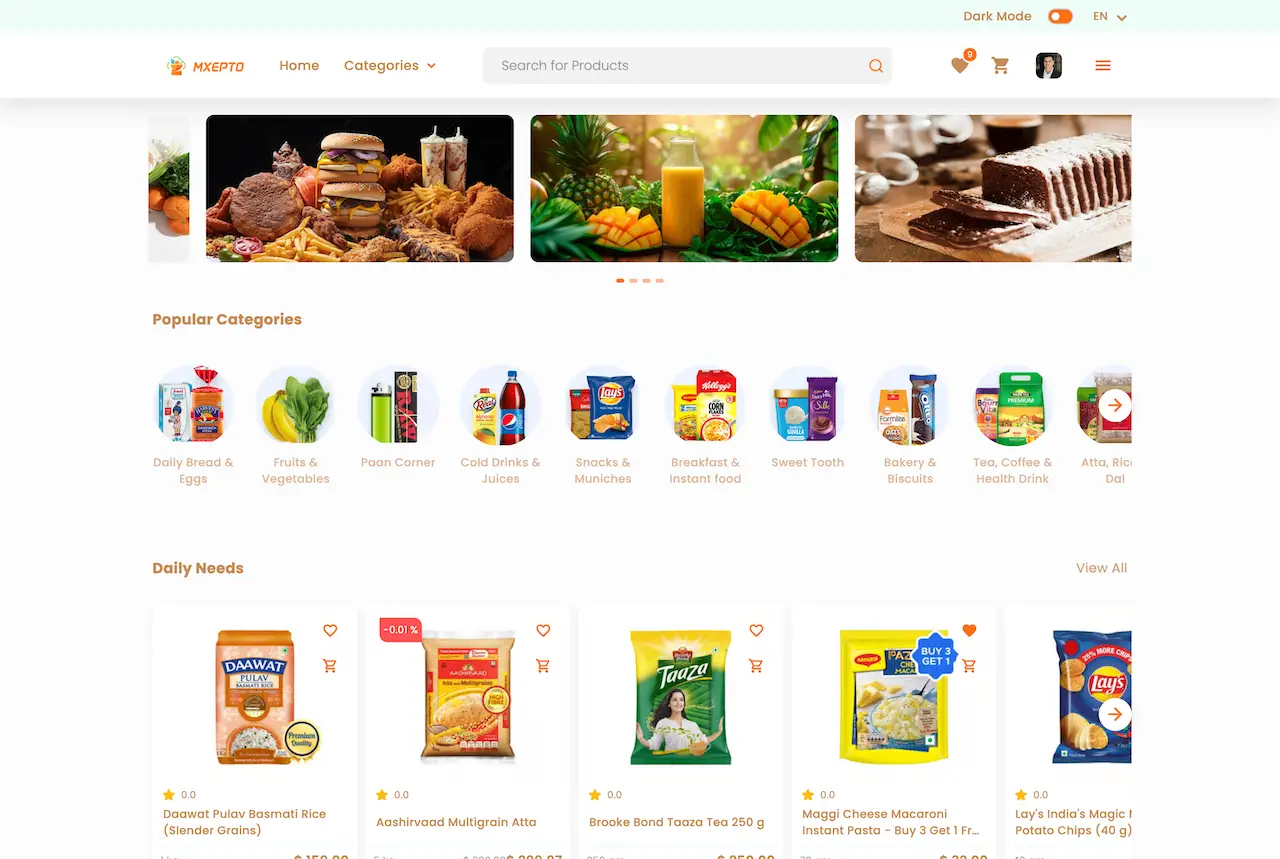
Branch Panel & Browser Storefront
The desk where a branch takes in orders and keeps its shelves recorded, and a storefront for shoppers who would rather sit at a laptop.
- 1Pick the storefront or the branch desk
- 2Request the panel logins from us
- 3Browse branch orders, stock and the catalog
shared on a guided call
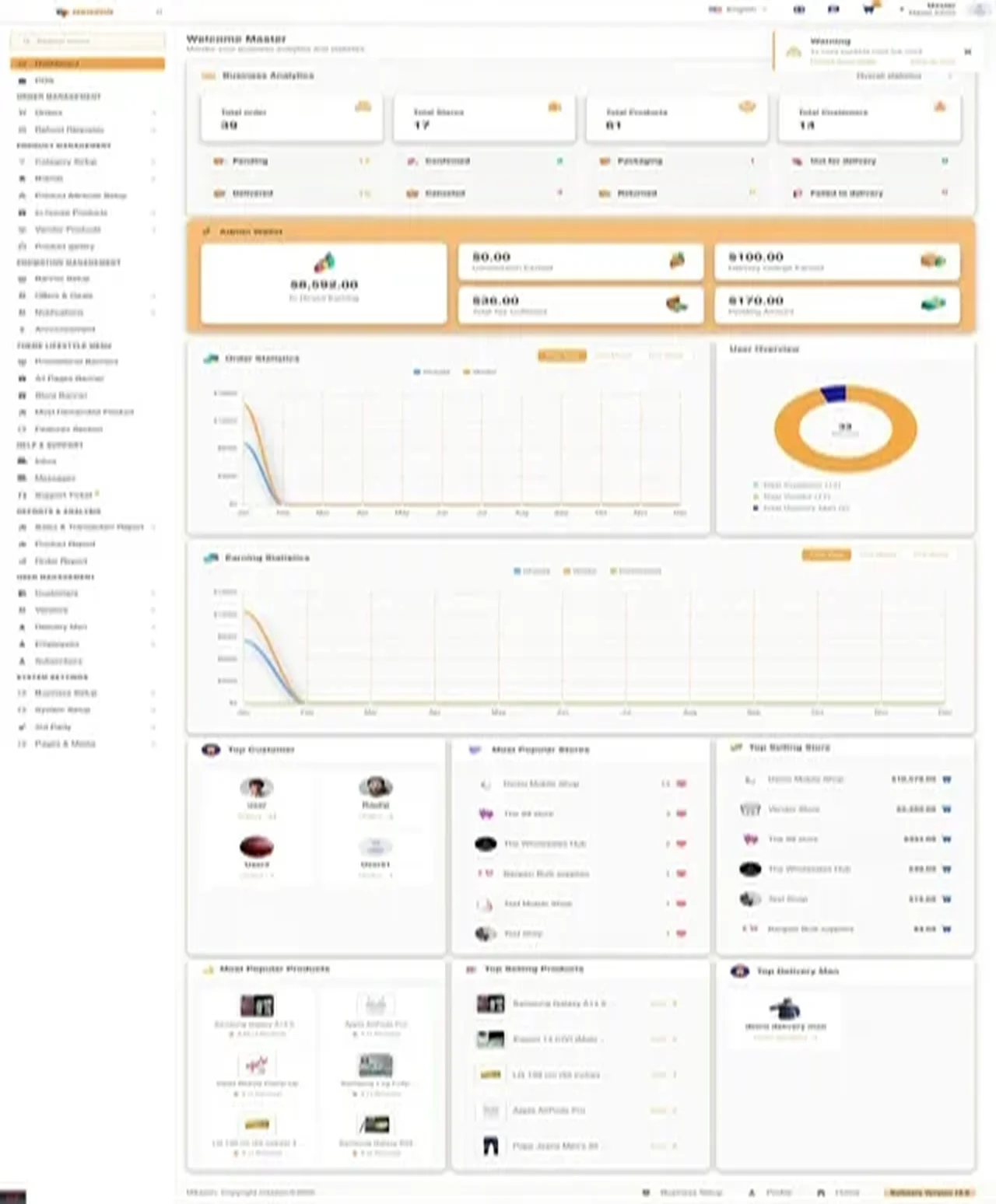
Console for the Operator - Branches, Riders, Charges & Reports
Branches, riders, orders, prices, payments and reports gathered on one dashboard, with every open order listed as it moves.
- 1Ask for an admin demo
- 2We open it beside your own plan
- 3Inspect reorder points, delivery charges and rider records
on request only
See It Run Together
Guided Call for a Quick-Commerce App Like Zepto: Branch Stock, Reorder Points, Rider Desk & Charge Rules
No recorded tour exists for this product, and a live call is more useful anyway. We put the branch desk, the rider app and the console side by side and hold what you see up against your own branches, riders and delivery areas.
Book a guided call.One Screen at a Time
App Flows Inside a Zepto-Style Platform: Customer App, Admin Dashboard and Web Storefront
These are genuine screens from the Miracuves Zepto clone: first the customer app, in the sequence of a first purchase, and then the operator dashboard and the storefront.


The tour starts with a shopper opening the app for the first time and runs through the home aisles, the category rail, featured shelves, the order list, tracking and order details. It ends on the dashboard and the storefront, where the operator sees those same orders.
02Proof
Client Voices
What Operators Say After Building on a Miracuves Base
Two of these clients run grocery and food delivery, and two more run courier and logistics networks. The rest come from other industries. Every quote appears exactly as its author gave it.
“Talokitoko is grocery and food delivery for the African diaspora market in Europe. The rider app, dispatch and the merchant console were already built, so we spent the engagement on our own local payment mix, the vendor onboarding flow and the regions we actually operate in. The platform was live inside a month, which was months faster than our internal estimate.”
“Two order types, one courier fleet. The base handled multi-vertical ordering, so the work was our merchant mix and the grocery-specific substitution and weight rules. Live inside a month.”
“The team was running it on a dispatcher and a Google Sheet, and we needed a real platform quickly, because we were about to onboard a major retail client. Miracuves’s Delivery Genie base gave us the rider app, the dispatch console, and live tracking. We launched in 6 weeks and cleared 4x the previous order volume in the first month.”
“We were juggling spreadsheets, a third-party GPS provider, and a phone. We needed a single operations console. Miracuves’s MXLogistics base covered the trip lifecycle, the driver app, and the customer tracking page. We’ve cut operations admin time by about 40%.”
“Turo is the obvious reference, but the Caribbean specifics, from different insurance norms to different payment rails, meant we needed a real partner, not just a clone. Miracuves’s MXCar base covered the listing, the trip flow, and the host payouts. We launched in 6 working days and are live in three islands.”
“We were running it on phone calls and a paper calendar, and we were losing bookings to bigger OTAs. Miracuves’s GetmyBoat Clone base gave us the calendar, the booking flow, and the payment engine. Online bookings are up roughly 70% in the first six months, and the ops team finally has a live view of the fleet.”
“Every HMS I tried was built for general physicians, with no lesion mapping, no before/after tracking, and no procedure-based billing. Their MXHealth base gave us the patient app, doctor app, EMR and video consult out of the box. Front-desk time on scheduling and follow-ups is down ~70%, and we went fully digital in 9 months, where a fully custom job would have been 18.”
“Building a compliant telehealth stack from scratch in three markets would have been a year-plus effort. Miracuves’s MXHealth base covered the patient and doctor apps, video consult, e-prescription and the pharmacy integrations. We launched in our first market in 9 weeks and rolled out to two more in the following six months.”
What Proof Looks Like
Zepto Clone Case Study: Evidence Available Today and a Way to Check the Rest
The current state of the evidence for this model, and ways to test the product yourself before committing to it.
No client launch of the Zepto Clone has been published by Miracuves, and none will be borrowed from a different product. In its place you get things you can check for yourself and a direct statement about what we refuse to make up.

- A branch that has run out of an item must stop selling it
- Rice and crisps cost different amounts to carry, and the delivery charge ought to say so
- Branch staff, riders and the operator all have to read one and the same order
- Follow a single order through the branch panel and the rider app before spending a cent
- Try the charge rules on your own delivery areas and basket weights
- Use the source and the project codes to answer whatever the demo cannot
- Ready logins for the customer app and the rider app
- A storefront and a branch desk that open in any browser
- A live call that tours the operator console
- A changelog for versions 7.2 to 7.6 listing what shipped
- A single fixed price, with 6 days of build
This product will never carry an invented client, a made-up quote or a result that nobody measured. Once a named launch exists, it takes over this space and links to its own case study.Miracuves · Our position on proof
03The product
Start Here
What the Zepto Clone App Gives a Branch-Run Quick-Commerce Business
Miracuves built its Zepto clone as ready-made quick-commerce grocery software for operators with branches of their own. A shopper orders from the branch that serves the address, every branch watches its own stock, and the operator runs branches, riders and delivery charges from one admin panel.

Stock Is the Product
Quick commerce leans on what hides behind the catalogue: stock counted per branch, a reorder point on every item and one order desk that branch, rider and admin all read.
Source You Can Read
Nothing in the source is encrypted, so your developers can reshape screens and rules as the branch count grows, and nobody charges per seat.
Add-Ons Stay Add-Ons
A shared wishlist, an assistant, recipes and shopping lists are offered as add-ons with their own price, ready to attach when your branches want them.
Web + Android + iOS
What Sits Inside the Zepto Clone Script
Quick grocery order fulfilment is mostly stock-room discipline. A branch must know what it holds and when to restock, a rider should hear about the order as soon as it is packed, and the delivery price has to reflect what is really in the bag. All three come working.

- 01Home screen, search and filters across the branch catalogue
- 02Cart, address, payment, and delivery now or later
- 03Branch panel for orders, stock and reorder points
- 04Rider app with order requests, a route and earnings
- 05Console for branches, riders, charges, payouts and reports
Inside you will find a customer app, a rider app, a web storefront paired with a branch panel, and an admin console, all written so that your own team can read them. The phone apps use Flutter.
Everything Included
Zepto Clone Features - Branch Inventory, Reorder Points, Rider Management & Weight-Based Delivery Charges
Every Zepto clone feature Miracuves lists here traces back to a demo screen, a panel or the changelog. Extra modules are marked as add-ons lower down the page.
Branch Inventory & Reorder Points
The anchor of a branch-run model: each branch counts its own stock and carries a reorder point per item, so shoppers see only what the nearest branch can pack right now.
- Stock counted at each location on its own
- A reorder point attached to every item by the admin
- Branch owners add, edit and manage items in their own panel
- A sold-out item drops off the list by itself, or a branch suggests a substitute
- Item prices kept current from the admin side
- Many branches across many cities on one installation
- Minimum basket size set separately for each location or branch
Branch Panel & Order Desk
The branch learns about an order the second it lands, then accepts it, packs it and sends it onward without leaving the screen.
- A real-time alert for every new order
- Orders are accepted, prepared and dispatched without leaving the screen
- Firebase pushes new-order alerts to branch and admin panels (release 7.5)
- A separate branch login with its own order list
Rider Management & Delivery App
Riders have an app of their own, and you decide whether orders are offered to them or handed over automatically.
- Collection and drop-off details shown in the rider app
- Riders accept or refuse orders, or orders are auto-assigned, as your model dictates
- Google Maps and GPS guide each route
- Earnings totalled by day, week and month, incentives and tips included
- A record per rider plus a Top Delivery Men list in the admin panel
- Order requests arrive in real time
Weight-Based Delivery Charges
What is in the basket decides what the delivery costs. Add a charge per unit of weight or per weight band on top of the branch, area and order rules.
- A surcharge for every unit of weight
- An extra fee once the load reaches a weight band
- Branch-level and postcode or area-level charges set beside them
- A fixed charge applied to each order
Delivery Zones & Serviceable Areas
The admin maps out where each branch delivers and puts a charge on every area.
- Areas you serve are defined as delivery zones
- Every zone carries its own charge
- Coverage widened as new neighborhoods open
- Checkout that skips Google Maps across the whole system if you prefer
Home Screen, Search & Product Pages
A shopper lands on a banner and popular categories, moves down a category rail, searches, filters and opens a product page.
- A banner, popular categories and daily needs up front
- Aisles on a rail, each with sub-categories
- Search plus filters
- Each product shows pictures, details and allergy warnings
Checkout & Payments
Items go into the cart from any list; after that an address, a way to pay and a delivery choice end in a confirmation that repeats the order.
- Address picked on the map or typed by hand
- Cards, UPI and wallets via your gateway, plus cash on delivery
- Delivery now, or scheduled for a time the shopper picks
- A confirmation screen listing every detail of the order
- An image attached to the order when it is placed
- Order status labels such as Pending and Confirmed
Live Order Tracking
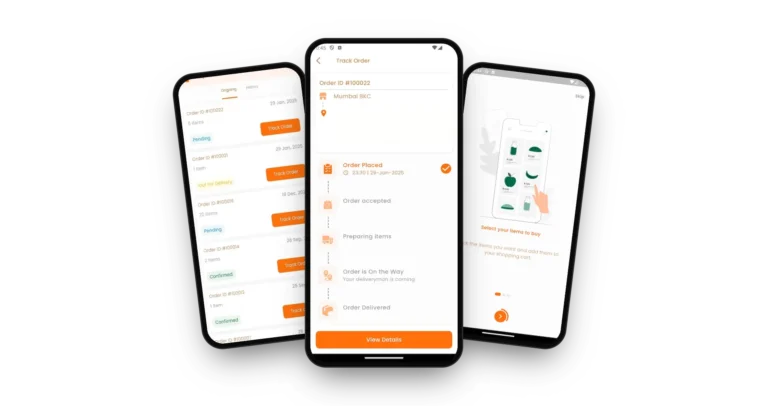
Tracking runs through five stages, from order placed to delivered, and draws the route on a map.
- Five tracking stages from placed to delivered
- The route drawn on a map
- A notification once a rider is assigned
- An order list with separate Ongoing and History tabs
Accounts, OTP Login & Addresses
Registering is quick, and the admin chooses which ways of logging in are allowed.
- Sign-up via a social login or an email address
- One-time-code sign-in, new in release 7.5
- Each login method switched on or off centrally
- reCAPTCHA v3 on public forms
History, Reviews & Rewards
Past orders remain in the app so a regular basket is easy to repeat, and offers and feedback travel both ways.
- Orders split into ongoing and past
- Favorites reordered from earlier purchases
- Ratings and reviews after delivery
- Offers and loyalty deals set up by the operator
Notifications, Chat & Languages
Orders and offers reach a shopper's phone, and support is a tap away inside the app.
- Phone alerts about orders, promotions and offers
- Chat with support inside the app
- Email and a helpline number displayed inside the app offer another route to support
- Several app languages, plus an SMS gateway for text messages
Admin Console & Reporting
A single dashboard steers branches, riders, orders, prices and payments, with the commission method and reports behind them.
- Branches, users, riders and orders managed together
- Commission either deducted automatically or paid by hand
- Every ongoing order on view at once
- Sales and performance reports, with maintenance mode a click away
Know this prior to purchase: The platform is delivered finished and carrying your brand. You are responsible for hosting, a domain, a developer account on each app store, your logo and business details, a payment gateway with completed KYC, and keys for any outside service you switch on. Apple and Google set their own review pace, and it is not counted in our 6-day build time.
Income Lines
Zepto Clone Revenue Models: Weight-Based Delivery Charges, Branch Stock Margin, Commission & Shelf Placement
A branch-run grocer on an app like Zepto has several places to earn, and the Miracuves admin holds each line apart, so adjusting one leaves the rest alone.
Delivery and weight charges plus margin on stock usually carry the most weight. Commission, shelf placement and gateway fees come into play once volume makes them worthwhile.
- 01
Weight-Based Delivery Charges
A heavy bag costs more to carry than a light one. The admin adds a charge per unit of weight or by weight band, so an order of rice and oil pays for the trip it needs.
- 02
Branch & Area Delivery Fees
Each branch, postcode and delivery area can carry its own charge, next to a flat sum on every order, so a far-away drop is priced apart from a near one.
- 03
Store Commission
Wherever a store sells through your platform, the operator keeps a share of the completed order. The admin deducts it automatically, or pays the store by hand if that suits the arrangement.
- 04
Margin on Branch Stock
With branches holding their own stock, the price set on each item is your margin. Reorder points keep that stock within reach so the shelf is not bare at the moment of demand.
- 05
Featured Shelves & Banners
The banner carousel and two shelves on the home screen, featured items and most reviewed items, are spots a brand can pay for, all handled in the admin panel.
- 06
Gateway Fees
A small charge on card and wallet payments shifts the gateway cost from the operator to the order.
| Revenue line | How it is charged | Take rateTypical rate | What caps it |
|---|---|---|---|
| Margin on Branch Stock | What a branch pays for an item against the price shown in the app. | Eternal reports roughly 80% of its quick-commerce order value on the own-inventory model in Q2 FY2026. Swiggy puts Instamart contribution margin at negative 1.8% of order value for Q4 FY2026. | Supplier cost, wastage and stock turnover. Revenue on own inventory counts everything sold, so it cannot be compared with a commission rate. |
| Delivery & Weight Charges | A fee per drop that may vary with branch, area or the weight of the items. | No grocery weight or delivery rate is published. Instacart+ members owe $0 delivery on eligible orders from $10 per retailer; everyone else pays a fee shaped by retailer, window and order total. | What shoppers tolerate at checkout. Instacart gives no fixed sum, so your figure for a zone should begin with the real cost of a trip. |
| Store Commission | A share of the order value, retained before the store is paid. | Marketplace plans on Uber Eats run 20%, 25% and 30%, self-delivery 15%. On DoorDash delivery costs 15%, 25% or 30%, pickup 6%. | The margin a store can afford to give away. Each page names grocery as a merchant type but prints no grocery rate, and Uber Eats says fees may vary by market. |
| Shelves & Banners | A flat fee or an auction bid to appear on the home screen or in a featured shelf. | Advertising and other revenue at Instacart reached $1,065 million in 2025, nearly 2.9% of the $37,224 million of gross transaction value. | Brand budgets and the audience your catalog attracts. For Instacart this is the smaller big line, trailing transaction revenue of about 7.2%. |
| Gateway Fees | A card or wallet fee passed to the order or carried by the operator. | For US card payments Stripe quotes 2.9% plus 30c each as its example. Apple takes 30% of digital goods and services, or 15% under its small-business terms. | The gateway tariff in your country and the mix of cards used. App-store commission covers digital sales and a grocery order is physical, so plan around the card fee. |
How to read this. The own-inventory share comes from Eternal's Q2 FY2026 update and the margin line from Swiggy's Q4 FY2026 shareholder letter. Marketplace plans sit on the Uber Eats and DoorDash merchant pages, and the delivery-fee wording is on an Instacart help page. We worked out the advertising share ourselves from figures in its 2025 annual filing, and the card example comes from a Stripe support page. Use each number as a spreadsheet input only, never as an offer or a forecast; you decide your own fees inside the admin panel.
Zepto Clone Revenue Model, Stage by Stage
Miracuves builds every income line into the Zepto clone, and a branch-run grocer leans on the trip and the shelf before anything else.
Opening Branches
From the first completed order, each branch collects its delivery fee by area or postcode, a weight surcharge whenever a heavy bag goes out, and the price you set on every item it stocks.
Steady Reorders
Reorder points keep popular items within reach, so margin is not lost to an empty tile, and store commission joins wherever partner stores sell through you.
More Cities
As shopper numbers climb, featured shelves and banners become paid placements, and gateway fees shift card costs onto the order.
Every income line is a separate admin setting, adding branches brings no per-seat charge, and Miracuves takes no revenue share.
Steer the Branches Daily
Admin Panel for a Zepto-Like Grocer - Branches, Riders, Orders, Charges & Reports
Miracuves' Zepto clone console follows an order and the business around it: which branch is packing it, which rider has it, what you earned from it and how stock and deliveries look on the dashboard.


What the Console Holds
- 01
Dashboard & Analytics
Tiles count orders, stores, products and customers, every order status gets its own tally, and charts plot orders and earnings for a period you choose.
- 02
Order Status Board
Every order sits in one list under its status: failed to deliver, returned, canceled, delivered, out for delivery, packaging, confirmed or pending.
- 03
Branches, Customers & Riders
Manage shopper accounts, store owners and delivery men, and download the subscribed-customer list when you need it.
- 04
Catalog, Prices & Reorder Points
Build categories and products, keep each price right and set the reorder point that says when a shelf wants refilling.
- 05
Promotions & Banners
Banners, offers, deals and shopper notifications are handled in the sidebar next to the orders.
- 06
Wallet & Payouts
The wallet totals commission and delivery charges earned; commission is taken off automatically or payouts are made manually.
- 07
Delivery Zones & Rider Records
Serviceable areas with a charge per zone, a record for each rider and a Top Delivery Men list that shows who carries the load.
- 08
Settings & Support Desk
Setup menus for the business and the system, login methods, maintenance mode, pages and media, and an inbox with support tickets for customer queries.
Where the Money Goes
How cash travels from the basket total to the store's payout.
- A wallet that totals commission and delivery charges
- Commission taken off automatically
- Stores paid manually when you prefer
- A pending balance shown in the wallet
Controls & Tools
The settings behind the storefront and the daily routine.
- Setup menus for the business and the system
- Central handling of login methods
- Maintenance mode with finer options
- Pages, media and settings for third parties
Need more from the console? More reports, a different payout rhythm, extra languages or a bespoke approval step are priced separately. Tell us what operations is missing and a written scope comes back.
04Package and price
In the Package
What You Receive: Apps, Deployment and the Zepto Clone Script
What Miracuves delivers is a running business, not a box of parts: web storefront, both phone apps, branch and admin panels, the code and the database design beneath them. Ownership moves to you completely, with no per-seat or per-run fee and no license needed to keep it alive.
$ git clone your-quick-commerce-app Complete Source Code
All that is needed to run and modify the platform: web code plus the Flutter code of both apps, none of it encrypted.
- Unencrypted web platform code
- Flutter code of the customer and rider apps
- Free to modify, extend and redeploy
- Delivered into a repository of your own
Database Design & Migrations
The structure that holds branches, products, stock, orders, riders and payments, supplied so the database can be rebuilt from empty.
- Schema plus migrations
- A MySQL data tier
- Tables for branches, products, stock, orders and riders
- Tables for payments, reviews and content
Order Alerts & Push Messages
Branches and admins are alerted the moment an order lands, and shoppers and riders receive push messages.
- Firebase new-order alerts on the branch and admin panels
- Push messages about orders and offers
- Chat with support inside the app
- An SMS gateway hook-up

Web Storefront & Branch Panel
The browser storefront (banners, categories, daily needs) and, beside it, the panel each branch uses for its own orders and stock.
- Storefront with a banner carousel and product cards
- A branch panel behind its own login
- Incoming orders and stock, per branch
- Orders passed from the panel to the rider app
Customer & Rider Apps
Shoppers and riders each get a Flutter app of their own.
- Customer app: home screen, cart, tracking, history
- Rider app: order requests, route, earnings
- Release 7.6 targets Flutter SDK 3.27.1
- We submit them under your developer accounts


Admin Panel
The console for operators: counters for orders, stores, products and customers, a wallet, charts, ranking lists and the menus that steer the network.
- A dashboard with status counts and charts
- A wallet showing commission and delivery charges
- Branch, rider and shopper records, promotions and reports
- Setup for the business, the system and third parties
Access Control & Safeguards
A separate login and permission set for the shopper, the branch, the rider and the admin, together with the safeguards that come with the web platform.
- Distinct roles, each with its own permissions
- Sign-in options governed centrally, OTP included
- reCAPTCHA v3 on every public form
- Card details left to the payment gateway
Launch Handover & Cover
We apply your branding, deploy the platform, pass over the project files, and the three cover periods begin together on launch day.
- Logo, icons and colors changed everywhere
- Deployment on hosting that you control
- Deployment settings and architecture notes passed across
- 60 days guidance, 6 months bug fixes, 12 months updates
Want to look before you buy? Log in to the customer app or the rider app with the sample accounts, or book a guided tour that follows one order, one reorder point, one weight-based charge and one rider hand-off against your own branch plan.
A Single Fixed Fee
What Does It Cost to Launch a Quick-Commerce App Like Zepto?
The Zepto Clone launches at $2,499, paid once. Anything past the base, such as an add-on, another integration or a bespoke flow, is scoped and quoted in writing on its own.
Professional
Ready to LaunchChosen by: Operators with their own branches, regional grocers entering quick commerce, retailers adding a delivery arm
The platform arrives as the demo shows it, dressed in your logo, icons and colors and running on hosting that you control.
Get StartedEnterprise
Bigger Custom BuildsChosen by: Retail groups with many branches, multi-country operators, brands with ERP or POS needs
If the base lacks a flow you need, we build it to your brief, and scope and price are settled before any work starts.
Request a QuoteZepto Clone Development Cost in 2026
Everything on show in the Zepto demo, from shopper and rider apps on Flutter to a web storefront with its branch desk, the admin console and an unencrypted codebase, costs $2,499 paid once and goes live in your brand within six working days.
Budget for these outside the software price
- Hosting and a domain under your control
- A KYC-complete payment gateway and its fees
- Google Maps, Firebase and messaging keys
- Apple App Store and Google Play publisher accounts in your name
- Add-ons such as recipe integration or a virtual assistant
Automatic supplier purchase orders, an hourly delivery fee or an ERP connection get a written scope and are typically ready in 2-8 weeks.
Compare Your Options
Ready-Made Zepto Clone vs Custom Development vs SaaS
Quick commerce runs on branch stock, reorder points and weight-based delivery charges, all of which the Zepto clone from Miracuves already handles. Here the ready-made Zepto Clone is measured against a commissioned build and a subscription grocery SaaS.
| Criteria | MiracuvesReady-Made Zepto Clone | Custom Development | SaaS |
|---|---|---|---|
| Launch time | Six working days of build time | Quoted in writing, 2-8 weeks | Fast setup on the vendor platform |
| Upfront cost | $2,499 as a one-off price | Quoted in writing to scope | Low setup fee, then subscription |
| Source code ownership | Whole codebase, nothing encrypted | Yours, if the contract says so | Stays with the vendor |
| Customization | Weight rules and branches configurable; extras quoted | Anything, priced per change | Limited to the vendor's settings |
| Ongoing fees | No per-seat or per-run charge | Maintenance retainer as agreed | Monthly or usage-based fees |
| Branding & app-store listing | Your brand on both apps | Your brand, your store accounts | Often vendor-branded or shared |
| Best for | Branch-run quick-commerce operators | Unusual workflows with time and budget | Testing demand before owning anything |
Same product, other editions: BigBasket Clone · Blinkit Clone · Grofers Clone · Browse all Grocery Delivery solutions
Go Deeper
Four Guides to Zepto and the Zepto Clone
Four pieces from the Miracuves blog on the script itself, the business behind quick commerce, its revenue and how such an app is marketed.
Put to Work
A Quick-Commerce App Like Zepto in Operation: Dark Stores, Store Chains, Large Orders, Rider Teams & New Cities
Operators on the Miracuves Zepto clone lean on different corners of the same product. A dark-store network starts from branch stock and reorder points, a heavy-order business starts from weight charges, and a rider-heavy team starts from assignment and earnings. Emphasis is a matter of configuration, not of a different build.
Swipe · 6
Each dark store runs from a panel of its own with its own stock count, while the admin watches orders, riders and reorder points across all of them on a single dashboard.

Existing supermarkets take online orders from nearby addresses, each store answering for its own shelf and its own order list.

Sacks of rice, cooking oil, bottled water and crates of drinks cost more to carry. A charge per unit of weight or per weight band lets the delivery price follow the load.

Decide whether orders are offered to riders or assigned automatically, then follow who is carrying what and what each rider has earned.

A reorder point on every item flags the shelf that is getting thin, so purchasing can act before shoppers meet an empty tile.

Add a branch, define its delivery areas and attach a charge to each postcode before the first order arrives.

Zepto Clone Business Model: Three Ways to Run It
A quick-commerce app like Zepto earns on the trip and the shelf, and because each branch keeps its own stock count and charge rules, the same Zepto clone build serves three kinds of grocer.
Dark-Store Operator
Small fulfillment points each count their own stock and get their own orders, with reorder points flagging a thin shelf early so purchasing can act.
Chain Going Quick
A supermarket chain turns its existing stores into branches that fill fast online orders from their own shelves, priced by its own charge rules.
One-City Pilot
A startup tests demand in a single city, then adds branches, delivery areas and postcode charges as the first locations prove out.
Branches, charge rules and branding are what change between them, while the codebase stays one.
Six ways, one product. Each case runs on the same customer app, rider app, branch panels and console. Your branches, your charge rules and your branding are the only things that change, so a single codebase serves every one.
Message the Miracuves TeamMarket Timing
Why Build a Branch-Run Quick-Commerce Business in 2026?
Quick commerce rewards operators who know exactly what each branch holds and what each delivery costs. Under your own brand the platform gives you that visibility, plus the repeat demand and the customer record a shared marketplace would otherwise keep.
01Repeat Orders Reward Good Stock
A shopper who finds the item in the app comes back. Stock counts and reorder points per branch keep the catalogue honest, which is what repeat buying depends on.
02Branches You Run Give You Control
When the shelf, the packing and the rider belong to you, quality and cost are yours to manage. The panel gives each branch what it needs to do that work.
03Heavy Orders Need Their Own Price
A big bag on a short trip is a different job from a small bag on a long one. Weight and area charges let the delivery price follow the work done.
04Riders Are Your Largest Running Cost
Choosing between offering orders and assigning them, and seeing earnings and a Top Delivery Men list, helps you manage the part of the business that costs most per order.
05Your Brand Owns the Customer Relationship
Accounts, order history and addresses sit in your own database, so the customer belongs to you and not to a marketplace that shares the margin.
06Build-or-Buy Settles Itself
Branch stock, a rider app, delivery rules and a console make up most of a quick-commerce stack. Six days of build time later, a white-label copy runs on hosting you control.
Numbers Behind the Platform
Latest Release Line
Ways to Price a Delivery
Surfaces on One Codebase
Days Until Launch
What wears a branch-run grocer down is the plain middle: stock counts, reorder points, rider hand-offs and delivery fees that must add up. Here that part arrives ready.
Industries
Industries Running Zepto-Style Quick Commerce
Any business that sells food and household goods from stores it runs can adopt this platform. Supermarket and regional chains operate many branches behind a single app, corner shops and convenience grocers open an online counter, and greengrocers, bakers, dairies and butchers show product details with allergy warnings. Drinks sellers and bulk suppliers take regular orders and price heavy loads by weight.
one codebaseMXCore
- 01DsDark-Store Grocers
- 02HrHyperlocal Retailers
- 03CsCorner Shops
- 04ScSupermarket Chains
- 05GrGreengrocers
- 06DbDairy & Bakery
- 07BfButchers & Fishmongers
- 08DsDrinks Sellers
- 09HgHousehold Goods
- 10GsGourmet & Specialty
- 11WbWholesale & Bulk
- 12FnFranchise Networks
No matter the food retail format, the Zepto Clone puts your name on each screen a customer opens, with branch stock, rider tools and delivery fees working behind it.
06Inside the engine
Tap by Tap
How the Zepto Clone Works From the First Screen to the Reorder
In the Zepto clone app Miracuves delivers, a shopper sees an order as a handful of taps. Beneath them a chain runs from the branch shelf to the order desk to the rider and the doorstep. The steps below follow that chain through the app screens, and the architecture after them shows what holds it together.
The Shopper Journey, Step by Step
Swipe · 6
1Open the Quick-Commerce App and Sign InA welcome screen asks the shopper to start picking items, then sign-in works with a social account, an email address or a one-time code.
- A welcome line that says Select your items to buy
- Social, email or OTP sign-in
- Address taken from the map or typed
2See Daily Needs on the Home ScreenBanners, popular categories and daily essentials fill the home screen, and a price sits on every product card.
- A banner carousel and popular categories
- Product cards for daily needs
- Controls for search and filters
3Tap an Aisle to ShopA left rail shows the aisles as images, and tapping one lists its products in the main area.
- Aisle pictures on the rail
- Energy bars and chips among the sub-categories
- The admin keeps categories current
4Compare Featured and Top-Reviewed PicksFeatured and most-reviewed items appear side by side, each card with its picture, price and rating.
- A shelf of featured items
- A shelf of the most reviewed items
- Each card shows price and rating
5Check Out and Follow Five Order StagesWhen payment clears, the order moves through five stages from placed to delivered, and the screen keeps its number, delivery address and total in view.
- Five stages from placed to delivered, with preparing and on the way between
- The order number, address and total
- A View Details button
6See the Bill and Order DetailsOpening any order shows its status, payment details, items and quantities, and a cost summary down to the delivery fee.
- Order ID, item count and status
- Payment status and method
- Subtotal, discount, tax and delivery fee in the cost summary
Under the Surface
Zepto-Style Architecture: One Order Record Shared by Four Surfaces
- 01Part 01
A Shared Order Record
All four surfaces work on a single order, and permissions decide what each may see or change, so a branch cannot open the operator console.
- 02Part 02
Branch Gets the Order Live
New orders show up in the branch panel instantly; the branch accepts, packs and hands each one to a rider.
- 03Part 03
Stock Held Per Branch
Inventory and reorder points belong to each branch, which stops one location from selling what only another location holds.
- 04Part 04
Pricing Rules
Each delivery fee is resolved from rules covering the branch, a postcode or area, a flat sum per order and a weight surcharge by unit or by band.
- 05Part 05
Realtime Notifications
Firebase order alerts land on the admin and branch panels, while push messages reach shoppers and riders.
- 06Part 06
Sign-In & Maintenance Controls
The admin picks the allowed login methods, OTP and reCAPTCHA v3 protect the doors, and a richer maintenance mode pauses the platform when needed.
Under the Hood
Technology Stack for an App Like Zepto: PHP, Laravel, MySQL, Flutter & Payment APIs
Miracuves chose the Zepto clone stack so stock counts and orders agree with each other, which is why the web tier and the database matter, and both phone apps have to feel native. We drew this stack from the product pages and from the changelog.
Web & Admin Tier
- A single code base drives storefront, branch desk and admin console
- A Bootstrap layout that adapts to any screen
- PHP 8.1 or newer from release 7.3.12
- Server and front-end caches from release 7.6
Data Storage
- MySQL stores branches, products, stock, orders and riders
- MySQL is named in the product pages
- Schema and migrations ship alongside the code
- A fresh database can be built from them
Phone Apps
- Flutter apps on current dependencies
- One app for shoppers and one for riders
- Release 7.6 builds against Flutter SDK 3.27.1
- Submitted to the stores from accounts you own
Payments & Gateways
- Payments by card, UPI or wallet settle through your gateway account
- Cash on delivery stays available
- The gateway account and its KYC are yours to arrange
- Checkout may skip Google Maps across the whole system
Third-Party Services
- Addresses and rider routes come from Google Maps and GPS
- Twilio is among the listed integrations
- Release 7.4 moved Firebase push to HTTP v1
- SMS and translation APIs complete the list
Repository & Notes
- Source code together with its history
- Mobile projects, signing steps documented
- Deployment settings in writing
- Architecture notes included
According to the product pages, the web and admin tier uses PHP with Bootstrap, while the changelog describes Laravel 10 on PHP 8.1 or newer, with MySQL for data. Flutter drives the phone apps. Maps, Twilio, Firebase, SMS, payment gateways and translation services each run on your own account, with their keys entered when you deploy. Nothing in the stack is unusual, so finding developers is easy.
Room to Grow
Scaling Without a Rewrite: Separate Surfaces, Branch Stock, Caching & Headroom
One shared order record sits under every surface of Miracuves' Zepto clone, which turns adding branches, riders and shoppers into a question of capacity and configuration instead of a fresh build.
One Permission Set per Surface. The shopper app, the rider app, the branch panel and the console are permissioned apart, so any of them can be updated alone.
Stock Where the Goods Sit. Inventory lives with each branch, so one location cannot sell what only another has on its shelves.
Caches Where Shoppers Look First. With release 7.6 the server and the front end cache business settings and home page APIs.
Fees That Can Be Traced. Every delivery fee comes from a named rule, so the total on an order can be followed back to its branch, area or weight rule.
Independent Surfaces
Each of the four surfaces keeps its own permissions, so one can change without disturbing the others.
Branch-Level Stock
Counting happens per branch: each location sells only what its own shelf holds, and the app lists exactly that.
- Inventory per location
- A reorder point on each item
- Handling for sold-out items
- A minimum basket by location
Lighter Page Loads
Business settings and home page APIs are cached at both the server and the front end, and the asset files were slimmed.
- Server-side caching
- Front-end caching
- Slimmer asset files
- Release 7.5 speed fixes
Sign-In & Form Safeguards
Admins choose which ways of signing in are allowed, and public forms are screened by reCAPTCHA v3.
- Sign-in options in one place
- Code-based sign-in
- Bot screening with reCAPTCHA v3
- Maintenance mode with finer options
Gateway Holds the Card Data
The gateway you connect receives the card details; the platform only takes commission off each order.
- Card, UPI, wallet and cash on delivery options
- Your own gateway account behind them
- Automatic commission deduction
- Manual store payouts when you prefer
Documented Handover
Source, schema, deployment configuration and architecture notes are handed across so another team can run the platform without help.
Space to Change and Grow. In time each operator needs something specific to its city or branches. With the full source and a mainstream stack, a new screen, rule or integration counts as routine development, whoever does it.
Beginning small? Launch with whichever branches and postcodes you can serve today and expand on the deployment you already have. Heavier order volume turns capacity into a hosting and configuration choice, and whatever the base lacks is priced separately.
07Security and trust
Security, Out in the Open
Security in a Zepto-Like App: Roles, Sign-In, Card Data and Where It Stops
A grocery app such as the Miracuves Zepto clone stores addresses, order histories and payment references. What counts is who may see which of them, how people sign in, where card data goes and what still has to happen before launch. Below you will find what the platform does and what stays your job.
- 01 · RolesRole Separation
The shopper, the branch, the rider and the admin each see only what their role permits, enforced on the server and not merely hidden on screen.
- Branch Access: Each branch logs in to its own panel and sees only its own orders, which keeps one location out of another's data.
- Order Traceability: Since the admin can look at every branch and order, a missed delivery or a contested charge leads back to a record, not a recollection.
- 02 · LoginLogin Methods
Admins choose the active sign-in methods through central login control; a one-time code can replace a password.
- Maintenance Mode: Release 7.5 added an advanced maintenance mode so operators can pause the platform in finer steps during a change.
- 03 · FormsForm Protection
Public forms are screened by reCAPTCHA v3, which stops bots from flooding them with fake sign-ups.
- 04 · SecretsSecrets Handling
Keys belong in configuration on your own infrastructure and out of the code, and a repository check for anything sensitive is part of the launch plan below.
- Customer List Exports: Subscribed customers can be exported by the admin. Since that file is personal data, handle it under your own privacy policy and the data rules where you operate.
- 05 · CardsCards Go to the Gateway
The card goes straight to your gateway; all the platform keeps is a payment reference, never the card number itself.
- Payout Decisions: Commission is deducted automatically, or you pay stores by hand, which makes every payout an admin choice with a record attached.
- 06 · BackupsBackup and Restore Drills
Backups are scheduled as part of the deployment, and a restore is rehearsed before launch, since an untested backup proves nothing.
- Pre-Launch Checklist: Four jobs come before launch: pen-testing, rotating keys, a restore drill and a look at your own gateway settings. None is assumed done.
The base follows strong controls and leaves a record an auditor can follow. A pen test, a secrets rotation and a restore check land on the pre-launch calendar with you.
Plan Security With Our TeamMarketplace Readiness
Is a White-Label Zepto App Ready for Operators? What the Code Handles, What You Keep
Running a quick-commerce grocer means selling food to households and sending riders to their doors for a grocery delivery service. Miracuves supplies the software for ordering, stock, delivery fees and payments. Everything about the business itself stays with the operator: what is sold, how it is stored and labeled, which taxes apply, how riders are engaged and what local law requires.
Ready, here, describes software that runs in the demo or inside a panel; licenses and approvals stay with your own business, and legal questions go to counsel.
What the Software Covers
Everything the demo and the changelog show: stock and reorder points for inventory management in each branch, a cart with checkout, delivery fees by branch, area, order and weight, rider assignment and earnings, payments through your own gateway, tracking, reviews, four separate logins and an admin panel for payouts and reports.
What Stays With You
Terms of service and a privacy policy, the choice of which branches and stores to open, the way you recruit and pay riders as delivery partners, refund and return rules beyond the settings you configure, and how you react when an order fails.
Food Safety and Labels
Whether an item may be sold at all, how perishables are kept and carried and what a label has to say are questions for you and your branches. A product page can display allergy warnings, but the platform cannot verify that a warning is right.
Where You Operate
Food business licensing, grocery taxes, restricted goods, rider employment and consumer protection vary by country and frequently by state or city. Consult qualified local professionals about every place you serve before the first order.
08Add to the platform
- Stock & reorder points
- Orders & riders
- Charge rules
- Console & payouts
How a module gets added
- 1Choose a module
Pick one for launch day or add it afterwards.
- 2Scope and price in writing
A written quote lands before anyone starts work.
- 3Added to the code you own
The finished module becomes part of your source.
Build On It
Add-Ons You Can Bolt Onto a Zepto-Style App for a Smarter Cart
Everything the demo shows runs end to end already. Four modules can sit on top for operators who want the app to help shoppers more, and each is quoted according to its scope.
Drag to explore · hover to pause
- 01Shopping
Smart Shopping Lists
Suggested lists built from earlier orders and upcoming occasions, so the usual basket is already partly filled when the shopper arrives.
Lists · Basket - 02Shopping
Recipe Integration
Hook up recipe sites or recipes written by users, and every ingredient of a dish lands in the cart at once.
Recipes · Cart
- 03Service
Virtual Assistant
A helper that understands natural language, guides shoppers through the aisles, replies to questions and recommends items.
Guide · Q&A - 04Service
Community Wishlist
Shoppers list the products they wish you carried, and the catalogue team learns what to add next.
Wishlist · Demand
The Delivery Suite
Carrying More Than Groceries? Four Relatives Worth a Look.
The Zepto Clone sits inside a larger on-demand delivery range. Should your riders and branches take on more than a grocery bag, these four are the nearest neighbors.
01Personal shoppers collect orders inside partner stores; inventory stays in sync and one console covers every store.
See This Solution
02Grocery retail linking farms, suppliers and shoppers, with billing for subscriptions and routing for logistics.
See This Solution
03A pharmacy that sells online: shoppers upload prescriptions, several vendors take part and medicine orders can be tracked.
See This Solution
04Local pickup-and-drop jobs where the customer picks a vehicle type and tracks the runner's progress on a live map.
See This Solution09The business case
Market Benchmarks
Grocery Delivery Market Benchmarks - Independent 2025-2026 Data
The revenue models above are ours. The figures below are not. They come from the Instacart (Maplebear) and Walmart annual reports on Form 10-K, Kroger's full-year 2025 results and Swiggy's Q4 FY2026 shareholder letter, reproduced as published. Together they show what grocery delivery looks like at scale in the US and India, so you can test a business case against numbers you can check.
$37.2bn in Instacart Order Value in 2025
Maplebear, the parent of Instacart, reports in its 2025 annual report on Form 10-K that gross transaction value (GTV) increased 11 percent to $37,224 million on 338.8 million orders, up 15 percent. Revenue was $3,742 million, made up of $2,677 million in transaction revenue and $1,065 million in advertising and other revenue. Transaction revenue is about 7.2 percent of GTV.
$16bn+ in Kroger eCommerce Sales in 2025
Kroger reports in its fourth quarter and full-year 2025 results, released 5 March 2026, that it delivered more than $16 billion in eCommerce sales in fiscal 2025, and that adjusted eCommerce sales increased 20 percent in the fourth quarter. Kroger also reports it completed an eCommerce strategic review expected to deliver $400 million of operating profit improvement in 2026.
Instamart GOV Up 68.8% to INR 7,881 Crore
Swiggy's Q4 FY2026 shareholder letter reports that quick commerce gross order value (GOV) grew 68.8 percent year on year to INR 7,881 crore, with average order value up 33 percent to INR 700 and 1,143 dark stores across 129 cities. Contribution margin improved to negative 1.8 percent of GOV, and negative 1.1 percent for March 2026.
eCommerce Added 4.3% to Walmart U.S. Comp Sales
Walmart's annual report on Form 10-K for the fiscal year ended 31 January 2026 states that Walmart U.S. eCommerce sales positively contributed approximately 4.3 percent to comparable sales, against 2.9 percent in fiscal 2025. Walmart attributes the growth primarily to store-fulfilled pickup and delivery, alongside customer and Walmart+ member engagement with omnichannel offerings.
Maplebear Inc. (Instacart), Annual report on Form 10-K for the fiscal year ended December 31, 2025, filed February 2026 - sec.gov
The Kroger Co., Kroger Reports Fourth Quarter and Full-Year 2025 Results and Announces Guidance for 2026, 5 March 2026 - s202.q4cdn.com
Swiggy Limited, Q4 FY2026 Shareholder letter, May 2026 - swiggy.com
Walmart Inc., Annual report on Form 10-K for the fiscal year ended January 31, 2026, filed March 2026 - sec.gov
All figures are the publishers’ own reported results and statements, reproduced as published. The 7.2 percent transaction-revenue ratio is our arithmetic on reported figures ($2,677 million divided by $37,224 million). They describe the market, not the performance of any platform Miracuves builds, and nothing here is a revenue projection for your business.
The Commercial Case
Marketability, Revenue Potential & the Outlook for Branch-Run Quick Commerce
A branch-run grocer on the Zepto clone Miracuves builds earns its keep when stock is on the shelf at the moment someone orders and each delivery pays for itself. The points below make both easier and leave the customer relationship in your hands.
- 01
A Share of Every Order
The operator takes a cut of each completed order, so income rises with branches and baskets instead of with headcount.
- 02
Several Levers, One Console
Each of delivery fees, weight surcharges, item prices, featured shelves and banners is its own admin setting, so moving one leaves the others alone.
- 03
Customers and Branches You Own
Your database holds the accounts, order history and branch records, so what the business builds up remains with you.
- 04
Room to Change Course
The complete source and the schema are yours, so a new host, a new team or a new direction needs nobody's consent.
- Weight-Based Delivery Charges
- Branch & Area Delivery Fees
- Store Commission
- Margin on Branch Stock
- Featured Shelves & Banners
- Gateway Fees
Features matter less here than habit and trust.
- 01Saved addresses, past orders and a usual basket give a household a reason to remain
- 02A branch that has entered its stock and learned the panel will not leave lightly
- 03It starts building on launch day and lives in your own database
- 04Dependable stock on the shelf is the second moat
Across these three cases only the number of live branches changes. Each one points to the lever that leads at that size. They are for opening a planning talk and say nothing about what any operator will earn.
Delivery fees and item margin bring in the first revenue.
A small operator with a few branches in one city, where the delivery fee and each order's margin pay the running costs. This describes scale; it is not a forecast.
Area and weight fees begin to shape the margin.
An operator serving many postcodes and basket sizes, where area and weight rules decide what each drop adds beyond item margin. Read it as scale, not as a forecast.
Across cities, shelves and banners enter the mix.
A group across several cities, where featured shelves, banners and store commission sit on top of the core lines, and admin reports point out what to look at next. It illustrates size and does not predict results.
10Why Miracuves
Why Miracuves
Where Miracuves Fits Against a Script or an Agency, for a Zepto Clone
You can buy a script off the shelf, hire an agency, brief a freelancer, or start from Miracuves' Zepto clone script, a base that others have already built, tested and launched with.
Why Founders Choose Miracuves
- 01
Branch Stock Is Built In
Inventory per location, reorder points and a panel for each branch come with the base, while off-the-shelf shop scripts usually assume a single warehouse.
- 02
Charges That Follow the Weight
Fees are set by branch, postcode, flat sum or weight inside the platform, so a heavy bag sent far costs more than a light bag sent near.
- 03
A Rider App Comes Along
Riders get an app of their own showing where to collect and where to drop, a route and earnings, so no second project has to be bolted on afterwards.
- 04
You Own All the Code
Every line arrives unencrypted together with the schema and deployment notes, so nobody can reprice it or change the terms later.
- 05
A Changelog Worth Reading
Versions 7.2 through 7.6 show what changed, the way a maintained platform should.
- 06
Straight Talk on Readiness
Base features, add-ons and the things you provide are kept apart on this page, namely gateway accounts, hosting and store developer accounts.
How to Choose a Zepto Clone Development Company
A quick-commerce app development company worth hiring shows branch stock and weight charges working before it asks for a contract.
What to look for Miracuves
- Stock counted per branch Inventory per location, with a reorder point beside every price
- Weight-aware charges Fees by branch, postcode, flat sum and weight band
- A rider app in the box Pickup and drop points, a route and earnings per day, week and month
- Full code ownership Readable source handed over with the database design and deployment settings
- A visible changelog Versions 7.2 through 7.6 documented
Walk away from any vendor who
- Runs every branch from one shared stock list
- Charges a bag of rice the same as a bag of crisps
- Has no reorder points to warn of a thin shelf
- Sells the code under a renewable license
Script, Agency or Ready-Made Base: Compared Row by Row
| What to compare | MiracuvesMiracuves Zepto Clone | Packaged Script | Agency Project |
|---|---|---|---|
| Launch time | Six working days is how long our build takes | Unclear, often do-it-yourself | Scoped per project, commonly months |
| Code ownership | Yours, complete and unencrypted | Often restricted or locked | Usually yours |
| Quick-commerce depth | Branch stock, reorder points, tracking and a rider app | A bare catalog and cart | Only as far as your budget extends |
| Branch and rider tools | A branch panel and a rider app | Seldom part of the package | Built to order |
| Checkout and payments | Card, UPI, wallet and cash-on-delivery payments, routed through your gateway | Differs from script to script | Bespoke integration |
| Back office | Dashboard, wallet, payouts and reports | Basic or absent | Built to order at extra cost |
| Security posture | Role-based logins, OTP, reCAPTCHA, gateway-held card data and stated limits | Bare minimum | Depends on the vendor |
| Cost, speed, quality | Fixed fee, rapid, tested base | Cheap yet risky | Expensive and slow |
| After-launch support | 60 days guidance, 6 months bug fixes, 12 months updates | Rarely on offer | Set out in the contract |
Each route copes differently with a busy first month, and the rows above show how.
Message the Miracuves TeamVersion History
Zepto-Style App Changelog From Version 7.2 to 7.6
Newest first. The V1 page gave no dates, and the stray numbers it printed after some versions came without explanation, so they are not repeated here.
| Version | At a glance | Full list |
|---|---|---|
| V7.6 | 5 additions or updates, 1 fixes | Added or updated Caches on the backend and in the front end, starting with business settings and the home page APIs Slimmer asset files for a snappier app Clearer system messages and labels Interface polish across the apps Flutter SDKs 3.27.1 and 3.24.5 supported, plus the newest Android Studio Fixed Smoothness fixes |
| V7.5 | 13 additions or updates, 1 fixes | Added or updated One central place for the admin to manage login methods Sign-in with a one-time code A more capable maintenance mode Option to leave Google Maps out of checkout across the platform reCAPTCHA v3 protecting forms Per-branch delivery charges Postcode- or area-based delivery charges A fixed charge per order An extra delivery charge for weight, per unit or by weight range Firebase alerts for new orders on admin and branch panels Subscribed customers can be exported from the admin panel Flutter SDK 3.24.3 supported Many performance improvements Fixed Minor repairs across admin, web and apps |
| V7.4 | 3 additions or updates, 1 fixes | Added or updated Flutter SDK 3.19.6 supported Flutter packages refreshed, with deprecated ones dropped Push notifications moved from Firebase's legacy FCM APIs to HTTP v1 Fixed Some fixes |
| V7.3.12 | 6 additions or updates | Added or updated Backend and web panel pages reorganized and optimized An SMS gateway integrated for text messaging Option to upload images while placing an order Laravel framework upgraded to version 10 PHP raised to 8.1+ for performance and safety Flutter SDK 3.19.2 supported |
| V7.2 | 2 additions or updates, 1 fixes | Added or updated Plenty of design improvements in the customer app and on the web Flutter SDK 3.16.0 supported Fixed A few small fixes |
Let's talk
Turn your branch-run grocery plan into a running platform.
Schedule a free consultation and walk away with a scope, a timeline and honest replies.
- First reply in under 2 hours
- Free consultation
- No lock-in contracts
- Full source code ownership
11Learn more
Blog & Resources
New on the Blog: Zepto, Its App and the Clone
Recent articles on what the Zepto app is, how a white-label version is secured and how it compares with another delivery model.



About the platform8 questions
01What exactly is the Zepto Clone, and what do I get?
It is quick-commerce grocery software for operators who run their own branches. You receive a customer app and a web storefront for shoppers, a branch panel for each store, a rider app, and an admin panel for branches, charges, payouts and reports, all rebranded for you and delivered with the complete source code.
02Can the branding, features and screens be changed?
Yes. We apply your brand identity, meaning logo, icons and colors, as part of the delivery, and since nothing in the source is encrypted, your developers or ours can reshape flows, screens and integrations afterwards. Whatever lies outside the base, an add-on or a bespoke flow for instance, is scoped and priced in writing before it starts.
03Does a single install cover many cities and branches?
Yes. New cities and extra branches can be added over time. Each branch gets its own panel, orders and stock; meanwhile the admin follows the entire network on one dashboard.
04When will my platform be live?
Count on 6 working days of Miracuves build time for the ready-made Zepto Clone. Store review by Apple and Google comes afterwards and is not part of that count. Custom work is scoped in writing beforehand, and its quote states a timeline.
05What is the price of the Zepto Clone?
The fixed price is $2,499, paid once. It buys the source code, your branding, deployment and the three cover periods: 60 days of platform guidance, 6 months of priority bug fixes and 12 months of product updates. Anything extra, such as add-ons or custom work, is quoted on its own.
06Are there both iOS and Android apps?
Yes. The customer app and the rider app are written in Flutter, so a single codebase yields Android and iOS versions. We submit them from developer accounts that you own, and Apple and Google carry out the review.
07Does the software promise a delivery time?
No. How fast an order reaches a door depends on your branches, riders and delivery areas, not on the software. What the platform provides is stock and an order desk for every branch, hand-off to riders and delivery fees set by branch, area and weight.
08Is it legal to run a quick-commerce grocer modeled on Zepto?
The software is built from our own code, design and content, with nothing taken from the Zepto website or apps, and the word clone only names the category. The rules on what you may sell, on the storage and labeling of food and on licenses and taxes all hinge on where you trade, so seek advice locally. Miracuves gives no legal advice.
Branch stock and orders6 questions
09How does a branch keep track of its stock?
Inventory is counted separately for each branch. A branch owner can add, edit and manage items from the panel, while the admin sets each item's price and reorder point, so every branch sells only from the shelf it really has.
10What is a reorder point, and who sets it?
It is the stock level at which an item needs refilling. In the demo the admin side lets you set it per item beside the price, so a thin shelf is visible before it is empty. Automatic purchase orders to suppliers can be added as scoped custom work.
11What happens to an item that sells out?
That is your choice. The platform can remove a sold-out item from the list automatically, or let the branch offer the shopper an alternative.
12How does a branch find out about a new order?
A real-time alert appears in the branch panel for each order, and Firebase notifications also reach the branch and admin panels. There the branch can accept, prepare and release the order.
13Is a minimum basket value possible?
Yes. Admins can require a minimum order value, set separately by location or branch, so a branch further out can ask for a bigger basket.
14Can shoppers deliver now or choose a later time?
Both. At checkout the shopper picks delivery now, or books it for whenever the household prefers. A fee that rises and falls with the hour is not in the base and would be scoped as custom work.
Riders and delivery charges6 questions
15How are orders passed to riders?
Each new order pings the rider app in real time, showing where to collect and where to drop. Depending on your model, orders are offered to riders or assigned to them automatically.
16Can a rider refuse an order?
That is up to the model you choose. Riders can be allowed to accept or decline, or you can switch to automatic assignment so orders reach them without a choice.
17How do riders see what they have earned?
The rider app totals earnings daily, weekly and monthly, with incentives and tips included. In the admin panel you will find a record per rider and a Top Delivery Men list.
18Does the rider app help with the route?
Yes. Google Maps and GPS propose the route from branch to address. Bring your own Google Maps account; its key is entered when we deploy.
19How do weight-based delivery charges work?
From release 7.5 the admin can add an extra charge per unit of weight or per weight range on top of the other rules. Fees can also be set by branch, by postcode or area, and as a fixed sum per order, so a heavy bag pays for the trip it needs.
20Can delivery zones be set up?
Yes. Serviceable areas are mapped by the admin, each with its own delivery charge, and coverage grows as new neighborhoods open.
Shoppers, money and launch14 questions
21What does a shopper do to place an order?
A shopper signs in, browses or searches, fills the cart, picks an address on the map or types one, pays and confirms; after that a tracking screen follows the order to the door.
22Which payment methods are available?
Cards, UPI, wallets and cash on delivery are listed. Online payments pass through the payment gateway account you hold, and that gateway must have completed KYC before launch.
23Where do shoppers get help?
In-app chat, email and a helpline number shown inside the app are all available. Who answers is up to you, because the support team is yours.
24How are commissions and payouts handled?
An automatic deduction from every order is one option; paying stores by hand is the other. The admin wallet totals commission and delivery charges earned, and your gateway handles the card side.
25What can the admin control?
Branches, users, riders, orders, prices, payments and reports are all managed from one dashboard. Beyond that the admin sets delivery charges, chooses the sign-in methods in use, runs promotions and banners, and can pause the platform in maintenance mode.
26When does a branch-run quick-commerce grocer see its first revenue?
The delivery fee and the margin on the items arrive first, since nothing extra needs selling: the first completed order carries both, along with store commission wherever stores sell through you. Shelf placement and banners come later, once a crowd of shoppers and brands makes a placement worth buying. Subscription plans and ERP or POS integration fees are commercial choices you make, and the build behind them is agreed with us in writing as custom work.
27Why is a branch-run grocer hard to copy?
Features count for less here than habit and trust. A household whose addresses, past orders and usual basket are saved in your app has a reason to stay, and a branch that has loaded its stock and learned your panel is unlikely to walk away. From launch day the platform lets that accumulation begin, and it stays in your own database. Reliable stock on the shelf forms the second moat, since shoppers who find what they want every time have no reason to look elsewhere.
28Will I get the source code?
Yes: the whole codebase with nothing encrypted, covering the web platform, the Flutter apps, the database schema and the deployment settings. You may change, extend and redeploy it with no per-seat fee and no license to keep it running.
29What must I supply before launch?
Hosting and a domain come from you, along with a verified developer account on each app store, brand assets, business details, a KYC-complete payment gateway and keys for any outside service you activate, such as maps or messaging. Miracuves then does the rest within 6 working days: applying your branding, deploying to your hosting and submitting the apps from your accounts.
30Why choose Miracuves for a Zepto clone?
Branch stock, rider tools and weight-based delivery charges arrive working, and the release log covers versions 7.2 through 7.6, the sign of a platform kept current. Miracuves has built software since 2010: 9,000+ projects for 6,000+ clients, and a catalogue of 90+ ready-made solutions. The Zepto Clone is a fixed $2,499, ready in 6 working days, with 60 days of guidance, 6 months of priority bug fixes and 12 months of product updates. First responses arrive within 2 hours, Monday to Saturday, 10:00-19:00 IST, and the price and the 6 days are settled before work begins.
31Is a ready-made Zepto clone better than custom development?
For a branch-run quick-commerce grocer it usually is. Per-branch inventory, reorder points, weight-based delivery charges, the rider app and the operator console already work in the Zepto Clone, at a fixed $2,499, built and deployed in six working days. A custom quick-commerce stack needs those stock and charge rules designed and tested first, under its own written quote. Start ready-made and add modules once orders flow.
32What is the business model of a quick-commerce app like Zepto?
A branch-run grocer earns first on the trip and the shelf. Delivery fees can be set by branch, area and weight band, so a heavy bag pays for its own ride, and the margin on stock you sell from your own branches comes with every order. Store commission, paid shelf placement and gateway fees join in once there is enough volume to justify them.
33What is the step-by-step process to launch my Zepto clone?
First, try the customer app, rider app and branch panel in the demo. Second, list your branches, delivery areas and weight bands, and provide hosting, a domain, developer accounts and a verified gateway. Third, we rebrand both apps and the panels, deploy the platform and configure stock, reorder points and charges. Fourth, apps are submitted from your accounts. Our build time is six working days, with store review afterward.
34How does a grocery delivery app like Zepto work?
A shopper orders from the branch that serves their address, and that branch sees a real-time alert, then accepts, prepares and releases the order. The rider app is pinged with pickup and drop locations, and the shopper follows a tracking screen to the door. Each branch watches its own stock while the admin runs branches, riders and delivery charges from one panel.
Go Deeper on Quick-Commerce Apps Like Zepto
Reading, related platforms and service pages, collected here.
Grocery delivery app development
See the service→Related platformDunzo Clone
Pickup-and-drop jobs followed on a live map, for riders who also carry parcels and errands.
Open the platform→Business model
How a quick-commerce company is organized, and how it earns.
Read on→Related platformInstacart Clone
Personal shoppers fill orders in partner stores; inventory stays in sync across them.
Open the platform→Disclaimer
Miracuves is an independent software development company. We are not affiliated with, connected to, sponsored by, or endorsed by Zepto.
Read our full Legal Notice & Disclaimer →“Zepto Clone” is used descriptively. It is how the software industry refers to building a platform with functionality similar to Zepto, and how clients search for it.
The entire design and codebase is built by our own team. The product contains no code, design, graphics, or content originating from the Zepto website or applications.
Zepto and all other third-party names and marks are the property of their respective owners, referenced here solely to describe the category of software offered.