
Grofers Clone App - White-Label Local Grocery Store Aggregator
Built by Miracuves for neighborhood retail, the Grofers clone is a ready-made, white-label marketplace joining local stores in one app, with readable source you keep for shopper and rider apps, a storefront with store panel and admin console, branded as yours in six working days.
A shopper orders from shops near the address, the shop accepts and readies it without switching screens, a rider carries it to the door, and the operator keeps a share of every completed order. Flutter gives both apps Android and iOS builds through developer accounts you own; a virtual assistant or community wishlist is a separately priced add-on. A campaign aimed at one postcode sits outside the base, quoted in writing and usually built within 2-8 weeks.
Launch in 6 Days with
- Source Code
- Shopper App
- Rider App
- Store Panel
- Web Storefront
- Admin Console
StackFlutter · Bootstrap · Laravel 10 · PHP 8.1+ · MySQL
Store and rider activity
- New order sent to Store 12Orders
- Store 4 marked rice as sold outStock
- Weight surcharge addedCharges
- Rider accepted the dropRiders
- Area charge appliedCharges
- Commission posted to the walletPayouts
- Store 9 updated its stock listStock
- Delivery confirmed at the doorOrders
- New order sent to Store 12Orders
- Store 4 marked rice as sold outStock
- Weight surcharge addedCharges
- Rider accepted the dropRiders
- Area charge appliedCharges
- Commission posted to the walletPayouts
- Store 9 updated its stock listStock
- Delivery confirmed at the doorOrders

- 2Ways to Settle With Storescommission deducted automatically, or a payout made by hand
- 1Panel for Every Partner Shopowners edit quantities themselves, so the operator never relays a stock change
- 0%Revenue Share With Miracuvesthe commission your stores pay is never split with us
- 4Parts of a Delivery Feeshop, area, a fixed amount per order and basket weight
- 6Days to Launchand if the delay is ours, we keep going free
- $2,499Paid Once, Not Rentedsource code yours, no per-seat fee, no monthly rental
Live in six working days, or we keep working free until you launch. Every build carries 60 days guidance, 6 months bug fixes and 12 months updates.Verify every figure
Coverage You Draw Yourself
The admin marks out where delivery is offered, sets a fee per area and widens coverage as new neighborhoods sign up.
Sold-Out Means Off the List
When a shop runs out of an item it leaves the listing automatically, or the shop proposes a replacement for the shopper.
A Reference, Not a Card Number
A card number travels straight to your own gateway account and the platform keeps only a payment reference, with UPI, wallets and cash on delivery beside cards.
01See it working
Try It Yourself
Try the Grofers Clone Hands-On: Shopper App, Rider App, Store Panel & Operator Console
Miracuves lets you explore its Grofers clone app at your own pace. Both phone apps have a Google Play listing and an account you can use, the storefront and the store panel run in any browser, and the operator console is demonstrated live on request.

Grofers Clone Shopper App
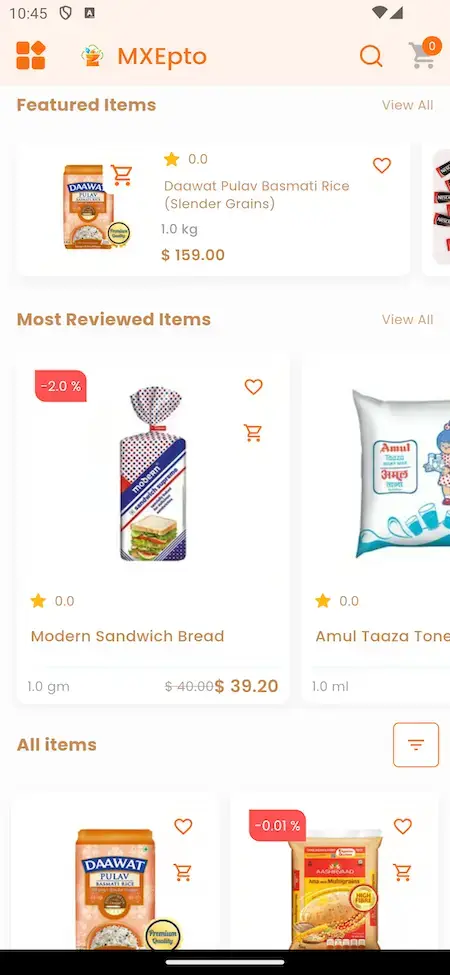
The neighbor's view of the marketplace: category tiles, priced product cards, the cart, address entry, payment, and a status page that tracks every order.
- 1Get it from the Google Play listing
- 2Log in using the shopper account shown below
- 3Visit the home screen, the order list and the detail page of a single order
+91 9876543210 | User_321
The Grofers Clone Rider App
A courier's view of the job: an alert for every new order giving the pickup and the drop-off, a route drawn on the map, and earnings totaled per day, per week and per month.
- 1Install the courier app from the Play Store
- 2Log in as a rider with the account shown below
- 3Check the incoming requests, the map route and the earnings totals
driver@demo.com OR +91 9876543212 | Driver_321
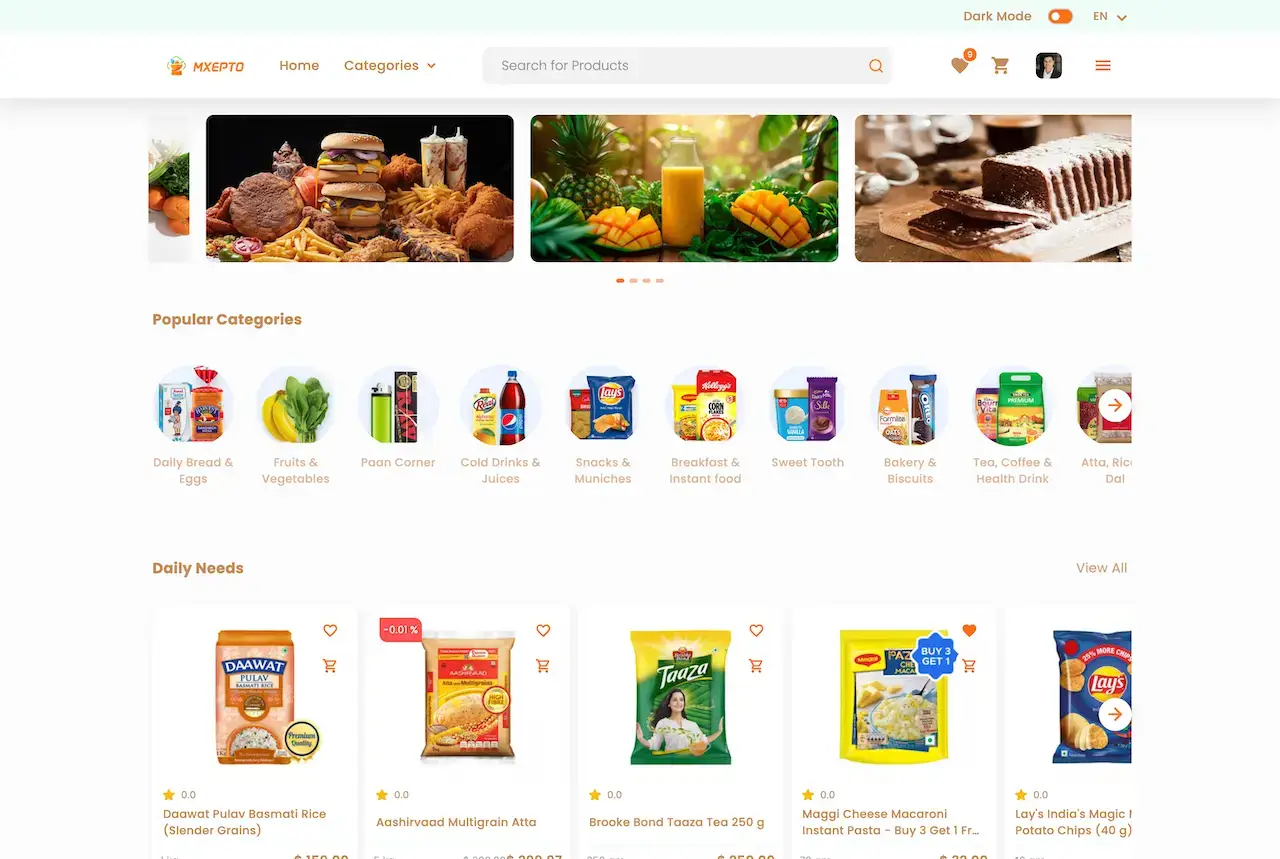
Store Panel & Browser Storefront
Where a partner shop watches orders arrive and keeps its own stock list up to date (the demo labels this login Branch), together with a storefront that suits shoppers working from a laptop.
- 1Open either the storefront or the store panel
- 2Request the panel credentials from us
- 3Look through store orders, stock and the product catalog
handed over during a call
Operator Console: Stores, Riders, Coverage, Commission & Reports
Stores, riders, orders, prices, payments and reports live on a single order management dashboard, where each open order stays on the list as it progresses.
- 1Ask us for an admin walkthrough
- 2We run it next to your own store plan
- 3Inspect areas, delivery management settings, delivery fees, commission and rider records
available on request
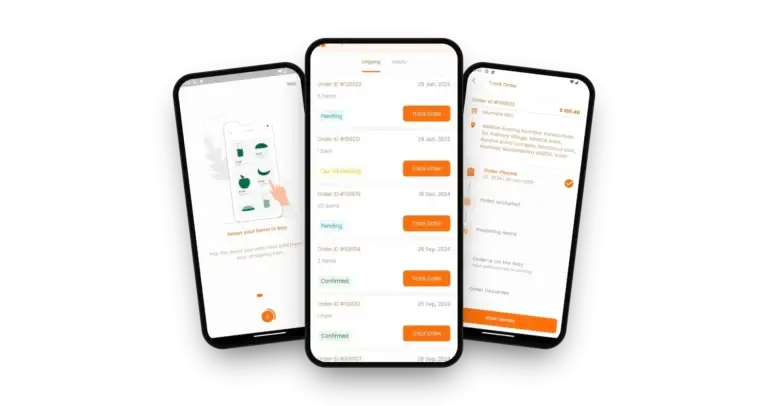
Walk It Through With Us
Guided Call on a Grocery App Like Grofers: Store Panel, Rider App, Coverage Areas & Commission Wallet
No recorded tour of this product exists, and a live session beats a video anyway. We send one shopper order from the app into a store panel, across to a rider and back into the console, then check the same path against your own store list and delivery areas.
Reserve a guided call.See the Product
Screens From a Grofers-Like App: The Shopper App, the Operator Dashboard & the Web Storefront
Every screen here comes from the Miracuves Grofers clone demo itself: the app as a shopper first meets it, then the operator dashboard, then the browser storefront.
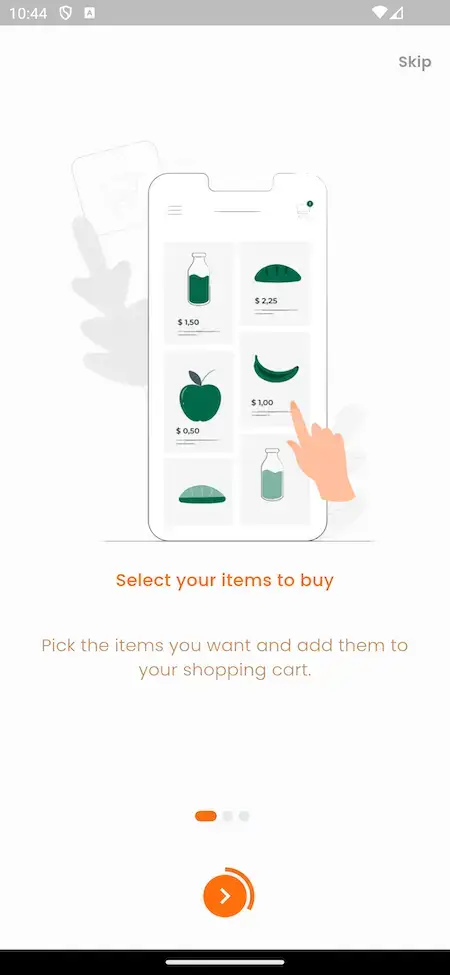


On the mobile app tab you meet the welcome screen first, followed by the slide-out menu, the featured shelves, the order list, the tracking page and one order opened up, with a category page last. The two remaining tabs show what the operator and a browser shopper see.
02Proof
What Clients Say
Operators Who Built on a Miracuves Base, in Their Own Words
Each of these four started with dispatch already built, then Miracuves built its own layer: Talokitoko's payment mix, Speedyven's rider incentives and Makaalu's customer, driver and store trio, while Click2Deliver set its merchant mix.
“Talokitoko is grocery and food delivery for the African diaspora market in Europe. The rider app, dispatch and the merchant console were already built, so we spent the engagement on our own local payment mix, the vendor onboarding flow and the regions we actually operate in. The platform was live inside a month, which was months faster than our internal estimate.”
“Two order types, one courier fleet. The base handled multi-vertical ordering, so the work was our merchant mix and the grocery-specific substitution and weight rules. Live inside a month.”
“Speedyven is a hyperlocal courier network — packages, food, and same-day essentials across a few metros. The dispatch and rider app were the parts where we needed to move fastest, because riders have low tolerance for clunky tools. Miracuves's Delivery Genie base gave us the rider app, the dispatch console, and live tracking. We added our custom surge-pricing engine, our multi-merchant order router, and a custom rider-incentives module. We launched in 7 weeks. Rider activation is high and the platform's been stable through weekend peaks.”
“We needed three apps that agree with each other: customer, driver and store. The shared state model was already built, which is the part people underestimate. Live inside a month with all three in the stores.”
Evidence on Offer
Grofers Clone Case Study: What We Can Show Today and How to Test the Rest
An honest account of the evidence behind this model, plus ways to test the product before committing.
Miracuves has published no client launch for this product and will not borrow one from another base. What you get instead is a set of checks you can run yourself and a straight statement of what we will not invent.

- When a shop runs out of an item, the listing must stop offering it
- Each partner shop has to work from its own orders and its own stock list
- The operator wants one screen that shows stores, riders and earnings
- Follow a single order from the shopper app into a store panel and on to a rider, before you pay for anything
- Test the area and weight fee rules against your own coverage map
- Lean on the source code for any answer the demo leaves open
- Test accounts for both phone apps
- A browser storefront plus a store panel to open
- A live session that walks through the operator console
- A version history, 7.2 to 7.6, of what actually shipped
- One fixed price, built in 6 days
Expect no invented client, no made-up quote and no result nobody measured on this page. The day a named launch exists, it replaces this card and links to its own case study.Miracuves · Our promise on proof
03The product
The Short Version
What a Local-Store Grocery Marketplace Gets From the Grofers Clone App
Miracuves' Grofers clone is ready-made online grocery shopping and delivery app software for running a marketplace of neighborhood stores inside one app. A shopper orders from shops near the delivery address, each shop owner has a personal panel for stock and orders, and the operator tracks stores, riders, delivery areas and commission from the admin console.

Stores Hold Their Own Stock
Shop owners edit their items inside a personal panel, which means the operator is never the middleman for a change in quantity.
Source You Can Read
Every file is delivered in readable form, so developers on your payroll can alter screens and rules as the network grows, with no seat charges.
Add-Ons Stay Add-Ons
Shopping lists, recipes, a virtual assistant and a community wishlist come as separately priced add-ons you can attach at launch or later.
Web + Android + iOS
What You Get Inside the Grofers Clone Script
Whether a store marketplace works depends on partner shops managing themselves. An owner has to notice an order as it arrives, correct the listing without calling anybody, and be paid under a rule that is clear to all. The base covers all three.

- 01A home screen with search and filters over every shop's items
- 02Cart, address, payment and a choice of delivery timing
- 03A store panel for incoming orders and stock
- 04A rider app showing requests, routes and earnings
- 05A console covering stores, riders, fees, commission and reports
Inside the package sit a shopper app, a rider app, a browser storefront with its store panel, and an admin console, all written to be read and extended by your own developers. Both phone apps are built with Flutter.
What You Get
Grofers Clone Features - Self-Managed Store Stock, Commission Payouts, Coverage Areas, Delivery Charges & Rider Tools
Every item Miracuves lists here for the Grofers clone can be traced to a demo screen, a panel or a changelog entry. Anything that costs extra appears later on this page and is marked as an add-on.
Store Panel & Self-Managed Stock
Every partner shop logs in to a panel of its own, adding, editing and managing what it sells, so the listing mirrors the real shelf. A shop can change its own stock without calling you or us.
- Shop owners create, change and manage inventory in their dashboard
- Stock is counted separately for each shop
- The admin attaches a price and a reorder point to each item
- When an item sells out it leaves the list automatically, or the shop proposes a replacement
- One installation can hold shops in many cities
Store Order Desk
An incoming order appears in the store panel immediately; the shop accepts it, gets it ready and passes it on without switching screens.
- A live alert whenever an order comes in
- Accept, prepare and dispatch all happen in one view
- A separate store-panel login for every shop
- Firebase pushes new-order alerts to store and admin panels (release 7.5)
Commission & Store Payouts
The operator takes a share of every completed store order, and chooses between automatic deduction and settling by hand.
- Commission removed from each order on its own
- Manual payouts for the shops you would rather pay yourself
- A wallet in the admin that adds up commission and delivery charges
- A pending balance displayed inside the wallet
- Card processing left to your own payment gateway
Coverage Areas & Serviceable Zones
The admin marks out where delivery is offered and sets a fee per area, then enlarges coverage as new neighborhoods sign up.
- The admin defines which areas are serviceable
- Every area carries a delivery fee of its own
- Fees can follow a postcode or an area (release 7.5)
- Fees can also be configured per branch or store (release 7.5)
- Checkout can drop Google Maps for the entire system
Fee Rules by Shop, Area & Weight
A delivery fee is assembled from several rules: the shop, the area, a fixed amount per order and how heavy the basket is.
- One fixed fee added to every order
- A surcharge calculated for each unit of weight
- An additional fee when the basket falls in a heavier weight band
- Basket minimums that may differ from one location or shop to the next
Rider App & Assignment
Riders use a dedicated app, and the operator picks between offering orders to riders and assigning them automatically.
- Each job lists where to collect and where to deliver
- Depending on your model, riders may accept or decline, or receive orders automatically
- Google Maps and GPS lay out the route
- Daily, weekly and monthly earnings, counting incentives and tips
- In the admin, every rider has a record and there is a Top Delivery Men ranking
- Live delivery requests reach riders as they are created
Home Screen, Search & Product Pages
The shopper starts on a banner and popular categories, scrolls an aisle rail, searches or filters, and then opens a product page.
- Banner, popular categories and daily needs sit at the top
- The aisle rail splits into sub-categories
- A search field with filters
- A product page with images, details and allergy warnings
Checkout & Live Tracking
From the cart the shopper picks an address, pays and chooses a delivery time; a confirmation follows, and tracking runs to the front door.
- Address chosen on the map or entered manually
- Cards, UPI and wallets go through your gateway, and cash on delivery is available too
- Deliver right away, or book a later time
- A picture can be attached when the order is placed
- Tracking passes through five stages, from placed to delivered, shown on a map
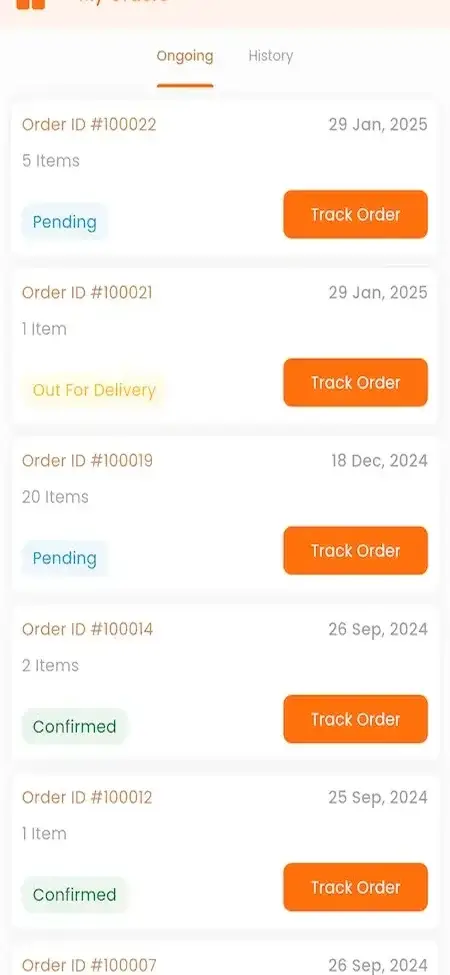
- The order list separates Ongoing from History
Sign-Up, OTP Login & Delivery Address
Creating an account is fast, and the admin controls which login methods stay open.
- Register through a social login or an email address
- Log in with a one-time code, added in release 7.5
- Switch each login method on or off from a single place
- reCAPTCHA v3 guards the public forms
Reorders, Reviews & Rewards
Earlier orders remain in the app for easy repeats, while ratings and offers move in both directions.
- Orders sorted into ongoing and past
- Favorites saved for quick reordering
- The app menu has entries for Favorite, Coupon, Refer & Earn and Wallet
- Shoppers can rate and review after delivery
- The operator can set up offers and loyalty deals
Alerts, Support Chat & Languages
Shoppers get orders and offers on their phones, and help sits inside the app.
- Push alerts on orders, promotions and deals
- Chat with the support team from within the app
- An email address and a helpline number inside the app offer further ways to reach support
- Choice of app languages, with text messages sent through an SMS gateway
Operator Console & Reports
One dashboard runs stores, riders, orders, prices and payments, and produces the reports on top.
- Stores, users, riders and orders handled together
- All ongoing orders visible at a glance
- Reports on sales and performance
- Maintenance mode a click away
- A downloadable list of subscribed customers
Good to know first: What we hand over is finished and wears your branding. What you line up beforehand is hosting with a domain name, one developer account per app store, your logo along with company information, a payment gateway whose KYC is done, and credentials for any additional service you switch on. Apple and Google review apps on their own timetable, which sits outside our 6-day build.
Where Income Comes From
Grofers Clone Revenue Models: Store Commission, Area & Weight Delivery Charges, Featured Shelves and Gateway Fees
A Grofers-style marketplace of neighborhood shops can earn in several ways, and Miracuves gives each income line its own admin setting, so tuning one never upsets the others.
Commission together with delivery and weight fees usually does most of the work. Featured shelves, your own range and gateway fees start to matter once order volume makes them worth the effort.
- 01
Commission From Shops
Each time a partner shop finishes an order, the operator retains a portion. The admin either deducts it automatically or settles with the shop manually.
- 02
Area & Branch Delivery Fees
A delivery fee may be tied to an area, a postcode, a shop or a flat amount per order, which prices a distant drop differently from a nearby one.
- 03
Weight Surcharges
Heavy baskets are costlier to carry. On top of the other delivery rules, a fee is charged per unit of weight or per band of weight.
- 04
Featured Shelves & Banners
The banner on the home screen and the shelves for featured and most reviewed items are slots that shops or brands can pay for, managed in the admin panel.
- 05
Margin on Your Own Range
Should you also stock and sell some items yourself, the difference between your buying price and the price in the app stays with you.
- 06
Gateway Fees
A small surcharge on card and wallet payments can shift the processing cost from the operator onto each order.
| Income line | Charging method | Take rateTypical figure | What limits it |
|---|---|---|---|
| Store Commission | A share of each finished order, kept back before the shop is paid. | Uber Eats lists Marketplace plans of 20%, 25% and 30%, with 15% when the restaurant delivers itself. DoorDash shows 15%, 25% or 30% for delivery and 6% for pickup. | How much a shop can give up and still make a margin. Neither page states a grocery-only rate, and Uber Eats cautions that fees can differ between markets. |
| Area & Weight Delivery Fees | A fee for each drop that can vary with the area, the shop or the basket weight. | No grocery area or weight fee is published. Instacart+ members pay no delivery fee on eligible orders of $10 or more from one retailer; everyone else sees a fee that depends on retailer, time window and order total. | How much shoppers will tolerate at checkout. Instacart names no fixed amount, so build a zone's fee from the true cost of the trip. |
| Featured Shelves & Banners | A set price, or an auction bid, for prime space on the home page, whether the banner or a featured row. | In 2025 Instacart recorded $1,065 million in advertising and other revenue, near 2.9% of its $37,224 million of GTV (our own division; the 10-K gives an advertising investment rate of 2.9%). | How much brands will spend and how large an audience your catalog attracts. At Instacart this is the smaller line, set against transaction revenue of about 7.2% of GTV. |
| Margin on Your Own Range | Earnings on stock you buy and sell yourself, as opposed to listing it for a shop. | Eternal states that around 80% of quick-commerce order value ran on owned inventory in Q2 FY2026. Swiggy reported Instamart contribution margin of negative 1.8% of order value in Q4 FY2026. | Supplier prices, spoilage and how fast stock turns. When stock is owned, revenue records everything sold, which rules out comparing it with a commission rate. |
| Gateway Fees | A payment-processing fee that either rides on the order or is absorbed by the operator. | Stripe's own US example is 2.9% plus 30c for each card payment. Apple keeps 30% of digital goods and services, falling to 15% under its small business terms. | Pricing at your gateway and the cards your shoppers pay with. App-store commissions concern digital sales, while a grocery order is a physical good, so budget for the card fee instead. |
How to read this. Commission ranges come from the merchant pricing pages of Uber Eats and DoorDash, and the delivery wording from an Instacart help page. The advertising share is our own division of numbers printed in the Instacart 2025 annual filing. Own-range margin draws on Eternal's Q2 FY2026 update and Swiggy's Q4 FY2026 shareholder letter, and the card example sits on a Stripe support page. Use each number only as an input to your own spreadsheet. None of them is an offer or a prediction, and you decide every fee on your platform in the admin panel.
Grofers Clone Revenue Model, Stage by Stage
Store commission, area and weight fees, featured shelves and gateway charges all ship in the Grofers clone, used more as partner shops join.
First Partner Shops
Commission comes off each completed shop order automatically, and the area or flat delivery fee on that order arrives with it, so the first sale already earns twice.
Wider Coverage
As new areas open, weight surcharges per unit or per band let a sack of rice or a crate of drinks pay for its own trip across a longer route.
Dense Network
With enough shoppers browsing, featured shelves and the home banner become slots shops and brands buy, and a modest gateway charge passes card costs to the order.
Margin on any range you stock yourself sits beside the shop lines, and Miracuves takes no cut of shop commission, delivery fees or banner sales.
Run the Network From Here
Admin Panel for a Multi-Store Grocery App: Stores, Riders, Orders, Coverage, Commission & Reports
In the Grofers clone, the Miracuves console tracks an order together with the business around it: which shop is packing it, which rider is carrying it, how much you made on it, and how stock and deliveries look overall.


Inside the Console
- 01
Dashboard & Charts
Summary tiles show how many orders, shops, products and customers exist; each order status keeps a count of its own; charts follow orders and earnings across a period you pick.
- 02
Order Status Board
Every order falls into one of these groups: pending, confirmed, being packaged, out for delivery or delivered, plus canceled, returned and failed-to-deliver for the ones that went wrong.
- 03
Shops, Shoppers & Delivery Men
One user area covers shopper accounts, shop owners and delivery men, and it lets you download the list of subscribed customers.
- 04
Catalog, Prices & Reorder Points
Categories and products are kept here, each with a price and the reorder point that marks when stock needs topping up.
- 05
Promotions & Banners
You manage banners, offers, deals and shopper notifications from the sidebar, close to the order screens.
- 06
Wallet & Store Payouts
The wallet adds up commission and delivery charges. Commission is either deducted automatically, or you pay out the shops yourself.
- 07
Coverage Areas & Rider Records
Each serviceable area has its own fee, every rider has a record, and the Top Delivery Men list shows who does the most work.
- 08
Settings & Support Desk
Company and platform setup, login methods, maintenance mode and the media library sit here, next to an inbox of support tickets for shopper questions.
How Money Moves
The path from a basket total to a shop's payout.
- The wallet sums commission and delivery charges
- Commission leaves each order without manual work
- Manual payouts exist for shops you prefer to pay yourself
- The wallet displays a pending balance
Settings & Safeguards
The settings that sit behind the storefront and your day-to-day work.
- Business and system setup menus
- One place for login methods
- A maintenance mode with more granular options
- Media library, content pages and external-service settings
Need the console to do more? Tell us what operations is missing, whether a new report, a different payout rhythm, another language or a custom approval step, and we will reply with a written scope and price.
04Package and cost
What Ships With It
Inside the Grofers Clone Package: Code, Apps & Deployment
Miracuves delivers a working marketplace business, not a box of loose parts: the web storefront, two phone apps, the store and admin panels, plus the code and database design beneath them. You own all of it outright, with no seat fees, no usage fees and no license required to keep it running.
$ git clone your-store-marketplace-app Complete Source Code
Everything required to operate and modify the platform, covering the web layer and the Flutter projects behind both apps, with nothing encrypted. Running costs are invoiced by their own providers: hosting and domain, the gateway fee on each online payment, Google Maps, Firebase, text messages, Twilio and translation if enabled, and the Apple and Google developer programs. The four optional modules are priced separately; every other screen in the demo sits inside the base price.
- Plain, readable web platform code
- Flutter projects for the shopper and rider apps
- Ready for you to alter, expand and redeploy
- Transferred to a repository that belongs to you
Database Design & Migrations
The layout that holds shops, items, stock, orders, riders and payments, supplied so that a new database can be created from nothing.
- The schema along with its migrations
- A MySQL data layer
- Tables for stores, products, stock, orders and riders
- Payment, review and content tables
Order Alerts & Push Messages
Shops and admins hear about an order as soon as it arrives, while shoppers and riders receive push messages.
- Firebase alerts for new orders on store and admin panels
- Phone notifications about orders and deals
- A support chat inside the app
- A connection to an SMS gateway

Web Storefront & Store Panel
A storefront for browsers (banners, categories, daily needs) and, alongside it, the panel every shop uses for its orders and stock.
- A browser storefront led by a banner carousel and product cards
- A store panel that needs its own login
- Incoming orders and stock, shop by shop
- The panel hands each order over to the rider app
Shopper & Rider Apps
Shoppers and riders each have their own Flutter app.
- Shopper app covering home screen, cart, tracking and history
- Rider app covering order requests, route and earnings
- Published from your own developer accounts
- Compatible with Flutter SDK 3.27.1 since release 7.6


Admin Panel
The operator console: tallies of orders, shops, products and customers, a wallet, charts, rankings and the menus that run the network.
- A dashboard showing status tallies and charts
- A wallet that shows commission and delivery charges
- Records for stores, riders and shoppers, plus promotions and reports
- Setup for company, system and external services
Access Control & Safeguards
Shoppers, shops, riders and admins each log in with their own permissions, and the web platform ships with its usual protections.
- Roles that carry separate permissions
- Central control of login options, OTP login with one-time codes included
- reCAPTCHA v3 on public forms
- Card data stays with the payment gateway
Launch Handover & Cover
Your branding goes on, the platform is deployed, the project files come to you, and all three cover periods begin on launch day.
- Logo, icons and colors replaced everywhere
- Deployed on infrastructure you control
- Deployment settings and architecture notes handed across
- 60 days guidance, 6 months bug fixes, 12 months updates
Want a look before you buy? Use the demo accounts to open either phone app, or reserve a guided tour that follows one shop order, one weight-based fee, one commission payout and one rider hand-off, measured against your own plan.
Simple Pricing
What Does a Grocery Marketplace App Like Grofers Cost to Launch?
The Grofers Clone is priced at $2,499, paid a single time. Whatever goes beyond the base, whether an add-on, an extra integration or a bespoke flow, is scoped separately and quoted in writing.
Professional
Ready-Made PackageChosen by: Operators who sign up neighborhood stores, regional grocers adding partner shops, retailers opening a marketplace arm
You get the platform as the demo shows it, wearing your logo, icons and colors and running on infrastructure you control.
Get StartedEnterprise
Large Custom BuildsChosen by: Groups with many partner stores, operators in several countries, brands that need ERP or POS links
A flow missing from the base gets built to your brief, with scope and price fixed before any work begins.
Request a QuoteGrofers Clone Development Cost in 2026
Miracuves sells the Grofers clone for $2,499, a single payment covering the shopper and rider apps built in Flutter, the browser storefront with its store panel, the admin console and readable source code, branded as yours within six working days.
Running costs that their own providers invoice
- Hosting and a domain for the marketplace
- The gateway fee on each online payment
- Google Maps, Firebase, text messages and Twilio
- Translation, if you switch it on
- Apple and Google developer programs
A campaign aimed at one postcode, a shopper coverage checker or any other bespoke flow is quoted in writing and usually built within 2-8 weeks.
Compare Your Options
Ready-Made Grofers Clone vs Custom Development vs SaaS
For a marketplace of neighborhood shops like Grofers, compare buying the finished Miracuves platform, commissioning a new Grofers clone app development build and renting a hosted multi-vendor store.
| Criteria | MiracuvesReady-Made Grofers Clone | Custom Development | SaaS |
|---|---|---|---|
| Launch time | 6 working days of build time | Its own timeline, quoted in writing | Quick signup, limited apps |
| Upfront cost | $2,499, paid once | Depends on the written scope | Ongoing monthly fee |
| Source code ownership | Web layer and both Flutter projects | Negotiated with the agency | Kept by the platform |
| Customization | Shop panels, areas and fees yours to set | Built from requirements | Templates and toggles |
| Ongoing fees | No license, no cut of shop sales | Support billed as used | Plan fee keeps running |
| Branding & app-store listing | Shopper and rider apps in your name | Your name after the build | Often under their brand |
| Best for | Local-store grocery marketplaces | Unusual partner models | One shop testing online |
Same product, other editions: Blinkit Clone · Zepto Clone · BigBasket Clone · Gopuff Clone · Browse all Grocery Delivery solutions
In Practice
A Grofers-Style Marketplace in Practice: Neighborhood Stores, Partner Outlets, Heavy Baskets, Rider Teams & New Areas
Operators who run a Grofers clone from Miracuves press on different corners of one product. A neighborhood marketplace begins with the store panel and commission, a heavy-basket business with weight fees, and a rider-heavy team with assignment and earnings. What differs is configuration, never the build underneath.
Swipe · 6
Corner shops and small grocers log in to personal panels, keep their listings current and take the orders sent their way, while the admin keeps an eye on every shop from a single dashboard.

Outlets belonging to one brand receive orders from addresses nearby, and each answers for its own shelf and order list.

A sack of rice, a tin of cooking oil and a crate of drinks cost more to carry than a bunch of herbs. Fees by unit of weight or by weight band let the price follow the load.

Pick between offering orders to riders and assigning them automatically, then keep track of who carries what and how much each rider has earned.

Deduct commission automatically or pay shops by hand, while the wallet shows what the operator has made from orders and delivery fees.

Mark the serviceable area, give it a fee and sign up shops there before the first order comes in.

Grofers Clone Business Model: Three Ways to Run It
Neighborhood shops sell to households near each delivery address, and the same store panels, admin wallet and fee rules support three ways to run that marketplace.
Pure Marketplace
Corner shops and small grocers sell from their own shelves through your app, and you earn commission plus the delivery fee on every order they complete.
Brand With Partner Outlets
Outlets of one brand take orders from addresses close by, each answering for its own shelf, while the operator settles every payout from one wallet.
Own Range Plus Shops
You stock a range of your own next to the partner shops, keeping the full margin on it while commission flows in from everyone else.
Whichever shape you pick, shopper addresses and order histories stay in a database you own, so every reorder strengthens your brand instead of a bigger marketplace.
Six ways, one product. Every scenario runs on the same shopper app, rider app, store panels and console. Only your shops, your fee rules and your branding vary, which is why a single codebase can serve all of them.
Chat With Our Product TeamThe 2026 Case
Why Build a Neighborhood Store Marketplace in 2026?
A neighborhood marketplace succeeds when shops can look after themselves and delivery covers its own cost. Under your brand this platform delivers both, together with the repeat orders and the customer record a big marketplace would otherwise hold on to.
01Local Stock Brings Shoppers Back
People keep returning to an app whose shelves match what the shops hold. When shop owners update their own items, that stays true without extra staff on your payroll.
02Stores Bring the Range, You Bring the Customers
Each partner shop contributes products you never have to buy. The panel lets every one of them list and manage items, so the catalogue grows without waiting on your team.
03Delivery Has to Pay for Itself
A heavy bag on a long drop is a different job from a light bag next door. Area and weight fees let the price follow the work involved.
04Commission Scales With Orders
Because the operator keeps a share of each completed shop order, income rises along with the order count rather than with headcount.
05Your Brand Owns the Relationship
Shopper accounts, saved addresses and past orders live in a database you own, which keeps every customer relationship with you rather than with a bigger marketplace.
06Buy Months of Work Instead of Building It
Shop panels, rider tools, fee rules and a console together form most of a marketplace stack. A white-label copy runs on your hosting once 6 days of build time have passed.
Platform Facts
Newest Release Line
Ways to Pay a Store
Surfaces, One Codebase
Build Days to Launch
The plain middle is what wears a marketplace down: shop listings, order hand-offs, rider pay and delivery fees that must add up. In this product that part is already built.
Sectors
Shop Types We Serve
Shops of nearly any food or household kind can use this platform. Neighborhood grocers and convenience stores list on one app, supermarkets and outlet groups run many shops under one set of logins, and greengrocers, dairies, bakers and butchers display product details with allergy warnings. Drinks shops and bulk suppliers take regular orders and charge for heavy loads by weight.
one codebaseMXCore
- 01NgNeighborhood Grocers
- 02CsConvenience Stores
- 03SuSupermarkets
- 04GrGreengrocers
- 05DbDairies & Bakeries
- 06BfButchers & Fishmongers
- 07PcPharmacy Counters
- 08PsPet Supply Shops
- 09DsDrinks Shops
- 10HsHousehold Stores
- 11SfSpecialty Food Stores
- 12WbWholesale & Bulk
Whatever shape the shop takes, the Grofers Clone puts your name on every screen a customer opens, with store panels, rider tools and delivery fees working underneath.
06How it runs
Step by Step
How an Order Travels Through the Grofers Clone, From First Tap to Delivery
How the Grofers clone app Miracuves builds works: the shopper sees a short run of taps, while behind them the order runs from a partner shop's shelf through the store panel to a rider and the front door. Follow it across the screens below, then the architecture that holds it together.
The Shopper Journey in Six Steps
Swipe · 6
- 1Launch the App & Log In
The app opens on a welcome page telling the shopper to pick the things they want to buy. After that, login happens by social account, email address or one-time code.
- First page: Select your items to buy
- Three ways in: social account, email or OTP
- Delivery address from the map pin or typed by hand
- 2Browse Deals on the Home Screen
At the top sits a banner, followed by popular categories and a daily-needs shelf; each product card carries its price.
- A banner carousel above the category icons
- Daily-needs product cards with prices
- Entry points for search and filters
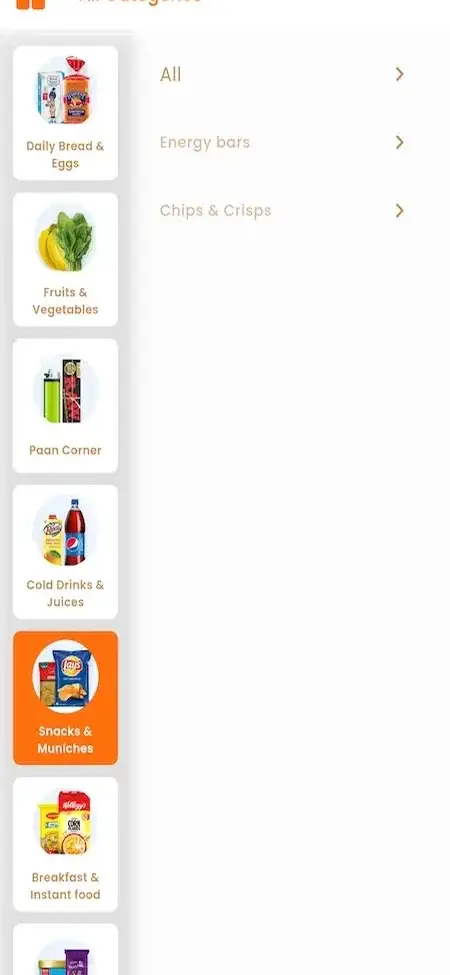
- 3Find Groceries by Aisle
A vertical rail of aisle pictures runs down the left edge. Tapping one fills the rest of the screen with the items filed beneath it.
- Aisle images stacked along the left edge
- Sub-categories listed beside them, for instance Energy bars and Chips & Crisps
- The admin controls which categories exist
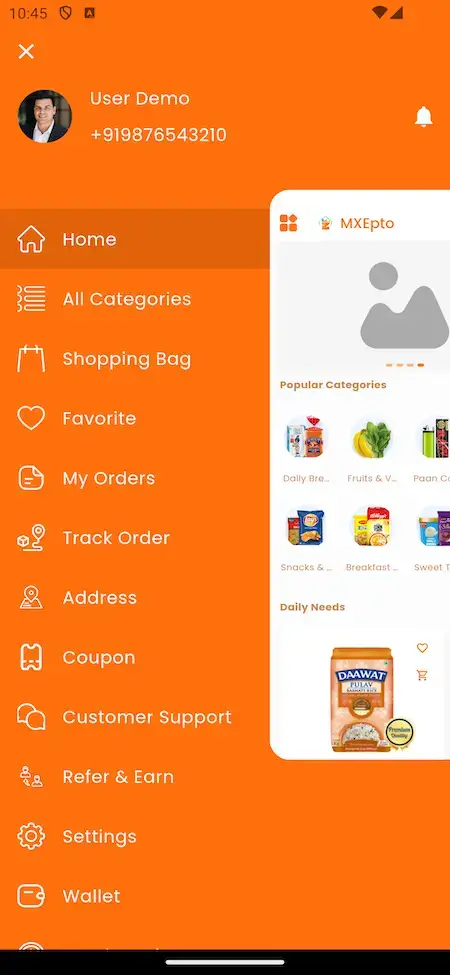
4Open the Slide-Out MenuA menu slides in beside the home screen, with the shopper's name and number on top and a list of destinations below.
- Home, All Categories, Shopping Bag and Favorite
- My Orders, Track Order and Address
- Coupon, Customer Support, Refer & Earn, Settings and Wallet
- 5Track the Grocery Order
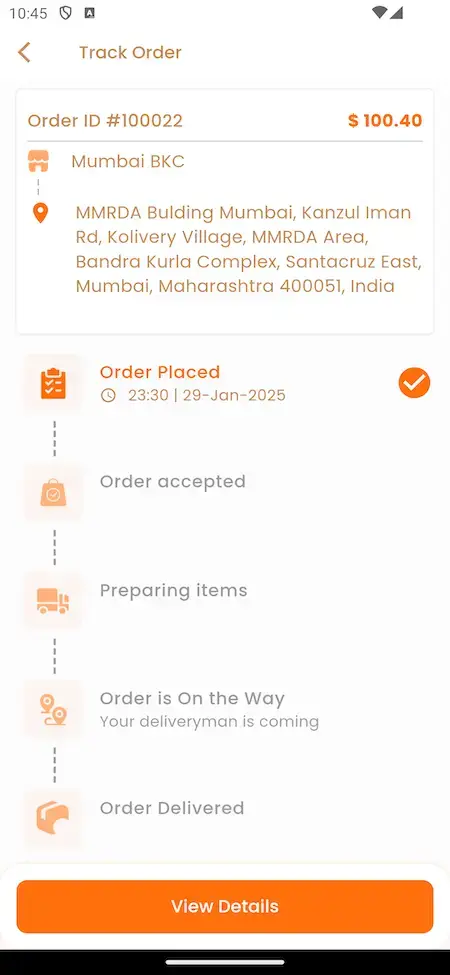
Once the payment clears, a tracker walks the order through five stages from placed to delivered, while the order number, address and total stay visible.
- Five steps: the order is placed, then accepted, prepared, sent and finally delivered
- The order number, the address and the total at the top
- A View Details button at the foot of the screen
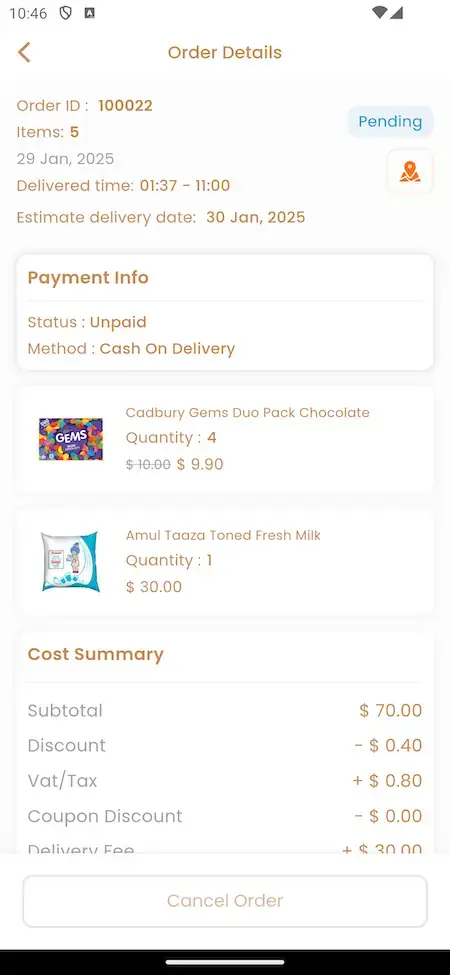
- 6Check the Order Summary
Selecting an order in the list reveals its status, how it is being paid, each item with its quantity, and a cost summary.
- Order ID, item count and a status chip
- Payment status and payment method
- Cost summary lines: subtotal, discount, tax, coupon discount and delivery fee
Beneath the Screens
Platform Architecture: One Shared Order Across Four Surfaces
- 01Part 01
Shared Order Record
The shopper app, rider app, store panel and console all work from the same order, and a user's role decides which buttons appear.
- 02Part 02
Shop Notified Instantly
The moment an order lands, the shop sees it in its panel; accepting, packing and passing it to a rider all start there.
- 03Part 03
Per-Shop Inventory
Each shop owns the stock it lists, so no listing can promise goods that sit on another shop's shelf.
- 04Part 04
Rule-Based Delivery Pricing
A fee is worked out from rules: the shop, a postcode or area, a flat amount per order, and weight counted per unit or per band.
- 05Part 05
Live Notifications
Order alerts reach the admin and shop panels through Firebase, and push messages go out to shoppers and riders.
- 06Part 06
Login & Pause Controls
Admins choose which sign-in methods are on, OTP and reCAPTCHA v3 guard the doors, and a finer maintenance mode can pause everything.
Under the Hood
What Powers an App Like Grofers: A PHP and Laravel Web Tier, MySQL, Flutter Apps & Third-Party APIs
Because orders and stock have to agree, Miracuves puts real weight on the database and web layer of its Grofers clone, and both phone apps feel native. The product pages and the release notes are the sources for the rest of this section.
Web Layer & Console
- Storefront, store panel and console all come from one code base
- Layouts built with Bootstrap and responsive down to phone width
- Release 7.3.12 raised the minimum to PHP 8.1
- Release 7.6 added caching on server and interface
Databases
- Shop, item, stock, order and rider data lives in MySQL
- The product pages mention MySQL as the database
- The database schema and migrations ship alongside the source
- A blank database can be rebuilt from them
Shopper & Rider Apps
- Both apps are Flutter, kept on current dependencies
- One shopper app and one rider app
- Release 7.6 made both apps compatible with Flutter SDK 3.27.1
- Published to the stores from your own accounts
Payment Rails
- Cards, UPI and wallets are cleared by your gateway account
- Cash on delivery remains an option
- Opening the gateway account and completing its KYC falls to you
- Google Maps can be skipped at checkout, system-wide
Outside Services
- Google Maps and GPS provide addresses and rider routes
- Twilio is one of the listed integrations
- Firebase push moved to HTTP v1 in release 7.4
- SMS and translation APIs complete the set
Code Handover
- Full source code with its history
- Mobile projects with the signing steps written down
- Deployment settings put on paper
- Architecture notes included
Reading the product pages, the web and admin layer is PHP with Bootstrap; reading the changelog, it is Laravel 10 on PHP 8.1 or above, with MySQL for data. Both phone apps use Flutter. Every outside service (Google Maps, Twilio, Firebase, SMS, payments, translation) runs under an account you hold, and its keys are entered when we deploy. The stack is mainstream, which makes hiring developers simple.
Room to Grow
Growing Without a Rewrite: Separate Surfaces, Per-Store Stock, Caching & Headroom
Miracuves places a single order record beneath every surface of the Grofers clone, so adding shops, riders and shoppers means more capacity and a few settings, not a new build.
Separate Permissions. Four surfaces carry four permission sets, so each can be upgraded without touching the rest.
Stock Stays Local. Inventory is owned by the shop that holds it, so a listing cannot promise goods held somewhere else.
Cached Where It Counts. From release 7.6 the server and the interface both keep copies of business settings and home page data.
Traceable Fees. Each delivery fee is the product of named rules, so any order total can be followed back to the shop, area or weight setting behind it.
Surfaces That Stay Apart
Every one of the four surfaces has its own permissions, so altering one leaves the others undisturbed.
Shop-by-Shop Stock
Each shop is counted separately and sells only what its own shelf holds; the app lists exactly that much.
- Inventory tracked per shop
- Reorder points attached to items
- Behavior for sold-out items you can set
- Basket minimums by location or shop
Quicker Page Loads
Copies of business settings and home page data are kept on the server and in the interface, and asset files were reduced in size.
- Server-side caching
- Interface-side caching
- Smaller asset files
- Speed fixes shipped in release 7.5
Sign-In & Form Safeguards
Admins decide which sign-in methods stay open, and reCAPTCHA v3 screens the public forms.
- All sign-in options in a single place
- Login by one-time code
- Bot filtering through reCAPTCHA v3
- A maintenance mode with finer steps
Gateway Holds the Card Data
The connected gateway receives card details, while the platform merely takes its commission out of the order.
- Payment by card, UPI, wallet or cash on delivery
- Money settles through your own gateway account
- Commission taken without manual work
- Manual shop payouts if you want them
Written Handover
You are given the source, the schema, the deployment configuration and architecture notes, so a different team can operate the platform alone.
Change Is Routine. Every operator eventually wants something particular to its city or its shops. Because you hold the whole source and the stack is ordinary, a new screen, rule or integration is everyday development for whoever you hire.
Begin Modestly. Open with the shops and areas you can cover right now, then widen on the same deployment. Busier days turn into a hosting and settings question, and what the base does not offer is quoted on its own.
07Safety and trust
Security, Plainly Stated
Security on a Grofers Alternative: Store Access, Sign-In Controls, Card Data & What Stays Your Job
Addresses, order histories and payment references all live in the Grofers clone marketplace Miracuves delivers. Its safety turns on four questions: who may open which record, how people log in, what happens to card data, and which tasks are still open before launch. The answers are below, along with what stays your responsibility.
- 01 · RolesRoles Per Surface
Shoppers, shops, riders and admins each log in on their own and see just the screens their role permits, with a different permission set behind every login.
- Store Isolation: Each shop signs in to its own panel and works with its own orders and stock, so one shop stays out of another's business.
- Order Traceability: The admin sees every shop and order, so a missed delivery or a contested fee leads back to a record and not to somebody's memory.
- 02 · LoginSign-In Methods
Admins choose the sign-in methods that stay active through one central control, and a one-time code can take the place of a password.
- Maintenance Mode: Release 7.5 brought an advanced maintenance mode, which lets operators pause the platform in smaller steps while a change goes in.
- 03 · FormsForm Protection
reCAPTCHA v3 screens the public forms, so bots cannot swamp them with fake registrations.
- 04 · SecretsSecrets Handling
Keys are kept in configuration on your own infrastructure and never written into the code. A repository scan confirming nothing sensitive is committed is scheduled in the launch plan, listed further down.
- Subscriber Exports: Subscribed customers can be exported by an admin. Because the file contains personal data, the privacy policy you publish and the data rules of your market govern how it is used.
- 05 · CardsCards Go to the Gateway
A card number travels straight to your gateway; the platform keeps a payment reference, not the number.
- Payout Decisions: Whether commission is deducted automatically or shops are paid manually is your call, and every payout leaves a trace in the admin.
- 06 · BackupsBackup and Restore Drills
Deployment includes a backup schedule, and a restore gets rehearsed before launch, because a backup nobody has tried restoring proves very little.
- Pre-Launch Checklist: Launch depends on four tasks: a penetration test, new keys, a restore drill and a review of your own gateway configuration. We assume none of them is finished.
We build to the controls security teams look for and keep a record any reviewer can follow. Ahead of launch we schedule three jobs with you: a pen test, a secret rotation and a trial restore. Our build follows ISO 27001, SOC 2 and GDPR controls. Your company then enters the audit with independent audit partners, and you, the operator, are the party named on the attestation (FACT-010 summary).
Plan Security With Our TeamMarketplace Readiness
Marketplace Readiness for Operators: Where the Software Ends and Your Responsibilities Begin
Running a store marketplace means selling food to households via other people's shops and dispatching riders to their doors. Miracuves builds the software for ordering, shop stock, delivery fees, commission and payments. The business around it is the operator's to run: choosing shops, deciding what they sell, storing and labeling goods, handling taxes, taking on riders and meeting whatever local law demands.
Here ready refers only to software you can see running in the demo or inside a panel. Nothing in this section claims a license, a certificate or an authority's approval, and none of it should be read as legal advice.
What the Software Covers
Whatever the demo and the changelog actually show. Each shop has a panel for its stock and orders; shoppers get a cart and checkout; delivery is priced by shop, area, order and basket weight; riders receive jobs and see their earnings; commission is paid out automatically or manually; payments run through your gateway; and there are tracking, reviews, four separate logins and admin reports.
What Stays With You
You write the terms of service and the privacy policy, sign a contract with each partner shop, choose the shops and what they may list, hire and pay the riders, set refund and return rules beyond the platform's settings, and deal with orders that fail.
Food Safety and Labels
Whether a shop is allowed to sell an item, how perishables are kept cold or warm in transit, and what a label must state are decisions for you and your shops. Product pages can carry allergy warnings, but the platform has no means of checking them.
Where You Operate
Food business licensing, grocery taxation, restricted goods, prescription rules for pharmacy items, rider employment and consumer protection all change from one country to the next and often within one. Ask qualified local advisers about each place you serve, ahead of the first order.
08Extend the platform
- Shop panels
- Orders & riders
- Fee rules
- Console & payouts
Adding a module, step by step
- 1Choose a module
Take one at launch or attach it afterward.
- 2Written scope and price
You receive a quote in writing before work begins.
- 3Joins the code you own
Once built, the module is simply part of your codebase.
Build On It
Add-Ons You Can Layer Onto a Grocery Delivery App Like Grofers for a Smarter Shopping Experience
Everything the demo shows already runs from start to finish. Four extra modules are available for operators who want more help for shoppers inside the app, and each is priced according to what it involves.
Drag to explore · hover to pause
- 01Shopping
Smart Shopping Lists
Shopping lists proposed from past orders and upcoming occasions, so a shopper opens the app to a basket that is already partly filled.
Lists · Basket - 02Shopping
Recipe Integration
Link up recipe websites or user-written recipes, so the ingredients of a dish can all go into the cart in one move.
Recipes · Cart
- 03Service
Virtual Assistant
A conversational guide to the catalogue: it answers shopper questions, walks them through products and offers suggestions.
Chat · Help - 04Service
Community Wishlist
Shoppers can say which products they wish the marketplace carried, giving your partner shops a hint about what to stock next.
Wishes · Range
More From Miracuves
Beyond Groceries: Four Related Platforms Worth Opening.
This product sits inside a broader range of on-demand delivery software. When your shops and riders carry more than groceries, these four are its closest relatives.

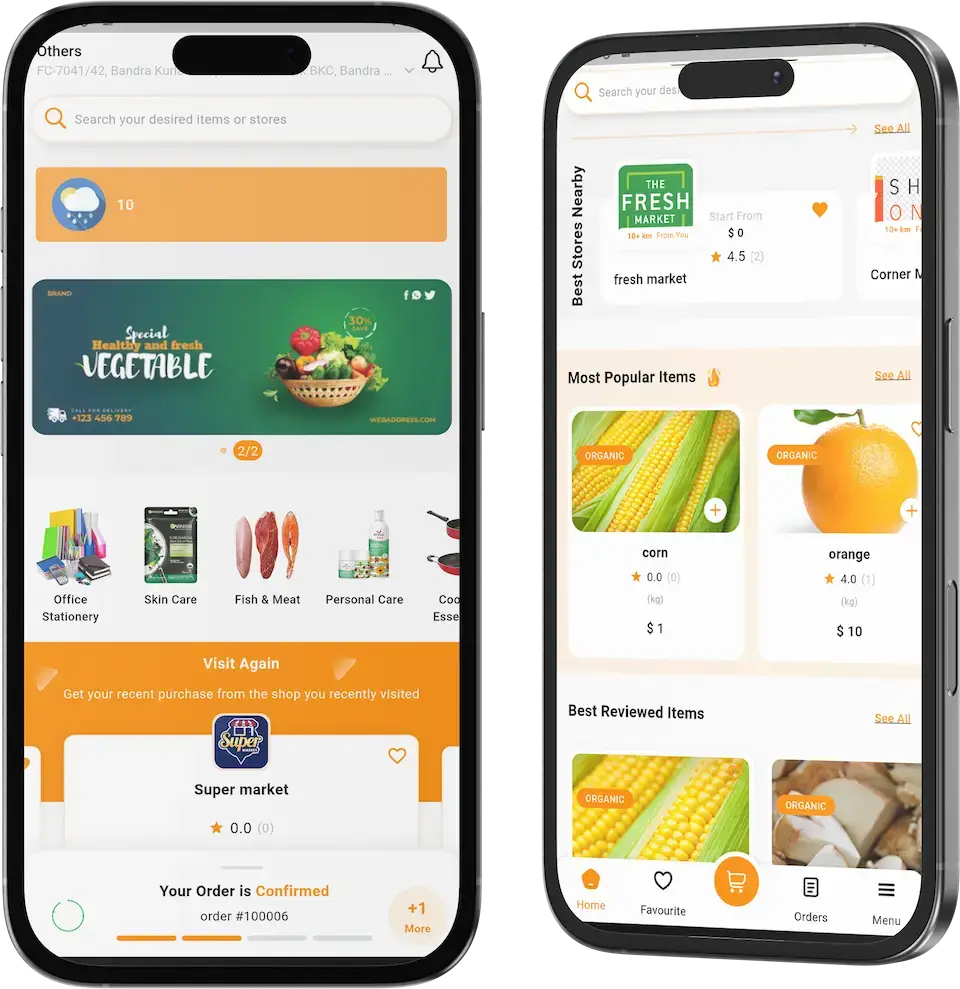
01Shoppers walk into partner stores to collect each order, inventory stays aligned, and one console covers all the participating shops.
See This Solution
02Online grocery that links farms, suppliers and customers, with logistics routing and subscription billing built in.
See This Solution

03An internet pharmacy where customers upload prescriptions, several vendors participate, and each medicine order can be followed.
See This Solution
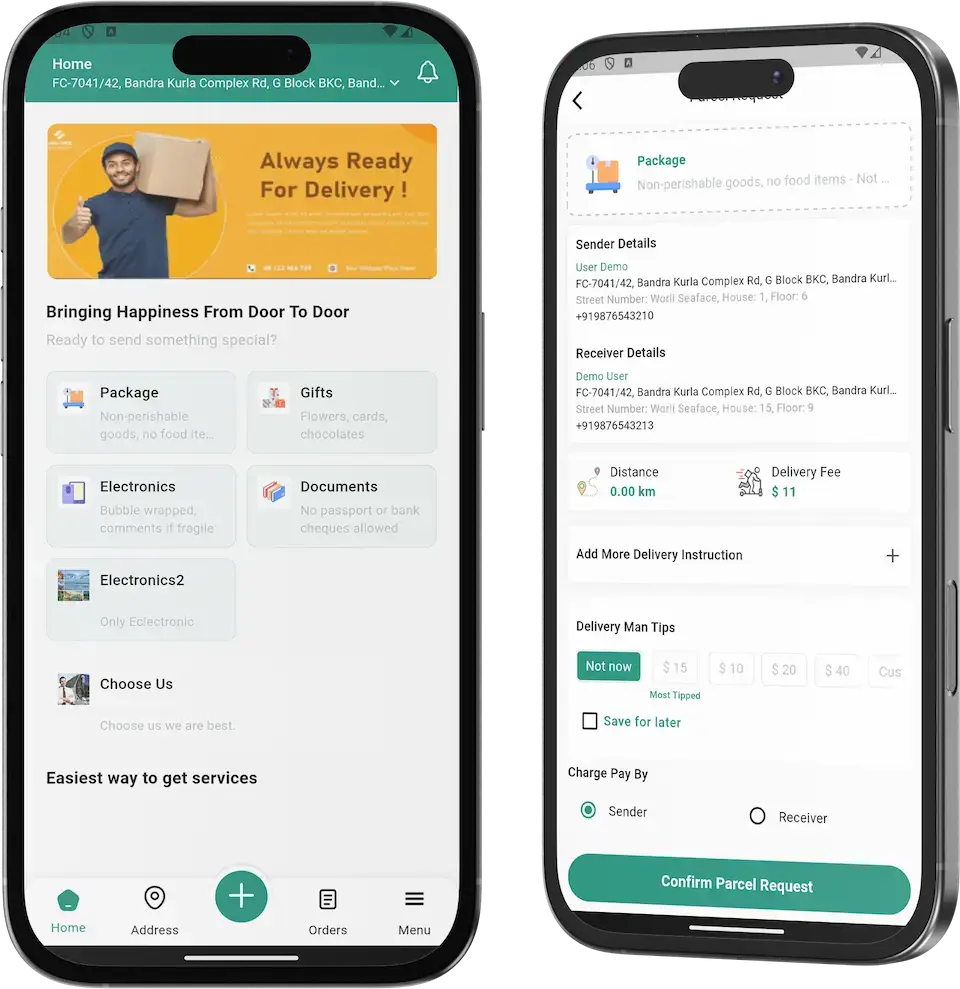
04Errands and parcels inside a city: the customer picks a vehicle and tracks the runner's progress on the map.
See This Solution09Making money
Market Benchmarks
Grocery Delivery Market Benchmarks - Independent 2025-2026 Data
The revenue models above are ours. The figures below are not. They come from the Instacart (Maplebear) and Walmart annual reports on Form 10-K, Kroger's full-year 2025 results and Swiggy's Q4 FY2026 shareholder letter, reproduced as published. Together they show what grocery delivery looks like at scale in the US and India, so you can test a business case against numbers you can check.
$37.2bn in Instacart Order Value in 2025
Maplebear, the parent of Instacart, reports in its 2025 annual report on Form 10-K that gross transaction value (GTV) increased 11 percent to $37,224 million on 338.8 million orders, up 15 percent. Revenue was $3,742 million, made up of $2,677 million in transaction revenue and $1,065 million in advertising and other revenue. Transaction revenue is about 7.2 percent of GTV.
$16bn+ in Kroger eCommerce Sales in 2025
Kroger reports in its fourth quarter and full-year 2025 results, released 5 March 2026, that it delivered more than $16 billion in eCommerce sales in fiscal 2025, and that adjusted eCommerce sales increased 20 percent in the fourth quarter. Kroger also reports it completed an eCommerce strategic review expected to deliver $400 million of operating profit improvement in 2026.
Instamart GOV Up 68.8% to INR 7,881 Crore
Swiggy's Q4 FY2026 shareholder letter reports that quick commerce gross order value (GOV) grew 68.8 percent year on year to INR 7,881 crore, with average order value up 33 percent to INR 700 and 1,143 dark stores across 129 cities. Contribution margin improved to negative 1.8 percent of GOV, and negative 1.1 percent for March 2026.
eCommerce Added 4.3% to Walmart U.S. Comp Sales
Walmart's annual report on Form 10-K for the fiscal year ended 31 January 2026 states that Walmart U.S. eCommerce sales positively contributed approximately 4.3 percent to comparable sales, against 2.9 percent in fiscal 2025. Walmart attributes the growth primarily to store-fulfilled pickup and delivery, alongside customer and Walmart+ member engagement with omnichannel offerings.
Maplebear Inc. (Instacart), Annual report on Form 10-K for the fiscal year ended December 31, 2025, filed February 2026 - sec.gov
The Kroger Co., Kroger Reports Fourth Quarter and Full-Year 2025 Results and Announces Guidance for 2026, 5 March 2026 - s202.q4cdn.com
Swiggy Limited, Q4 FY2026 Shareholder letter, May 2026 - swiggy.com
Walmart Inc., Annual report on Form 10-K for the fiscal year ended January 31, 2026, filed March 2026 - sec.gov
All figures are the publishers’ own reported results and statements, reproduced as published. The 7.2 percent transaction-revenue ratio is our arithmetic on reported figures ($2,677 million divided by $37,224 million). They describe the market, not the performance of any platform Miracuves builds, and nothing here is a revenue projection for your business.
The Commercial Case
Marketability, Revenue Potential & Business Prospects
A local-shop marketplace on the Grofers clone from Miracuves pays its way when partner shelves are accurate and each delivery covers its own cost. The four points below help with both, and the customer relationship stays yours. Shop subscriptions or POS and ERP connection fees are commercial terms you agree with partners, and banners or deals run sitewide from the admin; a campaign aimed at a single postcode is quoted as custom work.
- 01
A Cut of Every Store Order
The operator keeps a share of each completed order, so income tracks the number of shops and baskets rather than staff numbers.
- 02
Several Levers, One Console
Commission, area fees, weight surcharges, featured shelves and banners are each set separately, so changing one does not disturb the rest.
- 03
Stores and Shoppers You Own
The database holding accounts, order history and shop records is yours, so whatever the business accumulates stays with you.
- 04
Freedom to Switch Course
The whole source and the schema are in your hands, so you can move to another host, another team or another direction without asking anyone.
- Commission From Shops
- Area & Branch Delivery Fees
- Weight Surcharges
- Featured Shelves & Banners
- Margin on Your Own Range
- Gateway Fees
Here the network you build counts for more than any single feature.
- 01Shops and shoppers each have a reason to stay
- 02The network starts growing on launch day
- 03All of it sits in your own database
- 04Reliable orders make an earning shop slow to leave
Only the number of live shops varies between these three cases, and each names the lever that leads at that size. They are there to open a planning talk and predict nothing about operator earnings.
Commission and delivery fees bring the first revenue.
A small operator with a few shops in one neighborhood, where commission and the delivery fee pay the running costs. Scale is all it shows; it is no forecast.
Area and weight fees start shaping the margin.
An operator covering numerous postcodes and basket sizes, where the area and weight rules determine what every drop contributes next to commission. Scale is all it shows; it is no forecast.
At this size, featured shelves and banners join the mix.
A marketplace across a whole city, where featured shelves, banners and your own range add to the core lines and the admin reports point to what deserves attention next. Scale is all it shows; it is no forecast.
10Why choose us
The Miracuves Difference
Choosing Between Miracuves, a Script and an Agency for a Grofers Clone
The routes open to you: a Grofers clone script off the shelf, an agency, a freelancer, or the Miracuves base that other operators have already built, tested and launched on. Whichever you pick, complete a test order and open the admin wallet: here commission comes off each finished order automatically, and the wallet shows commission, delivery charges and the amount still owed to shops in one view.
Why Founders Choose Miracuves
- 01
Shop Panels Come Built In
Stock, orders and a panel for every shop are part of the base, whereas generic shop scripts tend to assume one seller.
- 02
Commission Is Already Wired
A wallet, automatic commission deduction and manual payouts sit in the console, so paying shops needs no side project.
- 03
Fees That Follow the Load
The platform prices by shop, postcode, flat amount or weight, so a heavy bag going far costs more than a light one going near.
- 04
A Rider App Included
Riders get their own app with pickup and drop-off points, a route and earnings, and nobody has to commission a second project later.
- 05
The Code Is All Yours
The code comes unencrypted, schema and deployment notes included, so nobody can put a price on it later or alter the terms.
- 06
A Changelog Worth Reading
Versions 7.2 to 7.6 are documented, the way a platform under maintenance should be.
How to Choose a Grofers Clone Development Company
Ask any multi-store grocery app development company to show a corner shop editing its own stock and a rider accepting that order.
What to look for Miracuves
- Self-service shop panels Every partner shop logs in to its own panel to edit stock and take orders
- Commission already wired The admin wallet totals commission, delivery charges and each shop's pending balance
- Fees that follow the load Delivery priced by shop, postcode, flat amount or weight
- Readable code Shopper and rider Flutter projects plus Laravel web code, unencrypted, with MySQL migrations
- Launch speed Six working days of build time before store review
Walk away from any vendor who
- Assumes a single seller behind the catalog
- Makes you relay every stock change for a shop
- Treats store payouts as a side project
- Takes a share of your shops' sales
Three Ways to Build This: Compared Line by Line
| Criteria | MiracuvesMiracuves Grofers Clone | Boxed Script | Custom Agency Work |
|---|---|---|---|
| Time to launch | 6 working days of Miracuves build time | Unclear, often self-service | Scoped per project, typically months |
| Who owns the code | You, completely, with nothing encrypted | Frequently restricted or locked | Normally you |
| Multi-shop capability | Shop panels, per-shop stock, commission and a rider app | A plain catalog and cart | Whatever the budget stretches to |
| Shop and rider tooling | A shop panel and a rider app | Rarely bundled | Made to order |
| Payment handling | Cards, UPI, wallets and cash on delivery, cleared by your gateway | Varies script to script | Custom integration |
| Admin tools | A dashboard, a wallet, payouts and reports | Thin or missing | Made to order, billed extra |
| Security stance | Separate role logins, OTP, reCAPTCHA, card data kept at the gateway, limits spelled out | Bare minimum | Depends on the vendor |
| Price, pace, polish | Fixed fee, fast, proven base | Cheap but risky | Costly and slow |
| Support afterward | 60 days guidance, 6 months bug fixes, 12 months updates | Seldom offered | Whatever the contract says |
How each route holds up during a busy first month is what the lines above are about.
Chat With Our Product TeamVersion History
What Shipped in Versions 7.2 Through 7.6 of the Grocery Marketplace App
Latest first. The release notes carry no dates, so none are shown.
| Release | Summary | Details |
|---|---|---|
| V7.6 | 5 changes, 1 fix | Added or updated Responses are now cached on the server and in the interface, starting with business settings and home screen data Leaner asset files make the app quicker and more responsive System messages and labels are phrased more clearly Refined UI and UX across the app Support covers Flutter 3.27.1, Flutter 3.24.5 and the latest Android Studio Fixed Operation is smoother following a round of fixes |
| V7.5 | 13 changes, 1 fix | Added or updated Active login methods managed centrally by the admin Sign-in through a one-time password Maintenance mode with finer controls Option of leaving Google Maps out of checkout for the whole system reCAPTCHA v3 added for stronger form security Delivery charges configurable branch by branch Area-level and postcode-level delivery pricing A fixed delivery charge per order A per-product weight surcharge, charged by unit or by range Firebase order notifications arriving on admin and branch panels Admin panel export of subscribed customers Supports Flutter SDK 3.24.3 Performance improvements in many places Fixed Assorted small fixes across the admin panel, the web app and the phone apps |
| V7.4 | 3 changes, 1 fix | Added or updated Updated for Flutter SDK 3.19.6 Flutter packages refreshed and deprecated ones dropped Firebase push migrated from the legacy FCM APIs to HTTP v1 Fixed A few fixes |
| V7.3.12 | 6 changes | Added or updated Backend and web panel Blade pages restructured and optimized SMS gateway integrated for text messaging Order placement gained an image upload, aimed at prescription pictures PHP bumped to 8.1+ for speed and safety Laravel moved to version 10 Support for Flutter 3.19.2 |
| V7.2 | 2 changes, 1 fix | Added or updated Numerous visual refinements for the shopper app and the storefront Works with Flutter SDK 3.16.0 Fixed Some small fixes |
Let's talk
Turn your neighborhood-store marketplace plan into a platform people can order from.
Reserve a free consultation; you will leave with a defined scope, a timeline and straight answers.
- First reply in under 2 hours
- Free consultation
- No lock-in contracts
- Full source code ownership
11Keep reading
From the Blog
Latest Reading on Grofers, the App and the Clone
New articles covering why founders choose a clone over a custom build, what the Grofers app is and how an app like it gets built.


The platform at a glance8 questions
01Can you explain what the Grofers Clone is and how it operates?
Think of it as grocery marketplace software that lets one operator bring neighborhood shops into a single app. Shoppers order through the app or the storefront, each shop works from its own panel, riders pick the orders up, and the admin console follows shops, riders, delivery areas, commission and reports. You get it branded as yours, with the full source code.
02Can the Grofers Clone be customized for my brand?
Yes. We put your logo, icons and colors on every screen as part of delivery, and since none of the code is encrypted, our developers or yours can adjust flows, screens and integrations later. Extras outside the base, whether an add-on or a bespoke flow, are quoted in writing before any work starts.
03How much time does it take to launch my platform?
Miracuves needs 6 working days to build the ready-made Grofers Clone. App store review by Apple and Google happens afterward and is not part of those 6 days. Custom work is scoped in writing first, and that quote carries its own timeline.
04What is the cost of purchasing the Grofers Clone?
A single fixed price of $2,499, paid once. It pays for the source code, your branding, deployment and three cover periods: 60 days of platform guidance, 6 months of priority bug fixes and 12 months of product updates. Anything additional is priced on its own, whether an add-on or a custom piece of work.
05Does the solution support multiple cities or locations?
It does. One installation can serve several cities, each holding many shops. The admin watches all of them on a single dashboard, and every shop remains inside its own panel, orders and stock.
06Do I get iOS apps as well as Android?
Both. Flutter is used for the shopper app and the rider app, so one codebase yields Android and iOS builds. You publish through developer accounts that you own, while Apple and Google carry out their own reviews.
07Will the software guarantee how fast orders arrive?
No. Delivery time is decided by your shops, your riders and the areas you cover, not by software. What the platform does provide is an order desk for every shop, jobs passed to riders, and delivery priced from the shop, the area and the basket weight.
08Can I legally run a grocery marketplace modeled on Grofers?
Every line of code, every design and every piece of content here is our own, with nothing borrowed from Grofers websites or apps, and the word clone only labels a category. The goods you may sell, the rules for storing and labeling food, and the licenses and taxes you owe vary with your location, so ask someone local. Miracuves offers no legal advice.
Stores, stock and coverage8 questions
09How does the store receive orders?
An order raises a live alert inside the shop panel, and Firebase notifications also go to the shop and admin panels. The shop then accepts it, gets it ready and sends it on, all from the same screen.
10Can stores manage inventory through the panel?
They can. Shop owners manage items from their own dashboard, where they create and edit listings, which keeps the catalogue in line with the real shelf. The admin catalogue also keeps a price and a reorder point for every item.
11What happens if an item is out of stock?
You pick the behavior: either the item is hidden automatically once it sells out, or the shop is allowed to propose something similar to the shopper.
12How do stores get paid?
There are two routes: the platform takes commission from each order automatically, or you settle with shops yourself. The admin wallet adds up commission and delivery fees, while your payment gateway deals with the card side.
13Is there a minimum order value?
There can be. The admin sets a minimum basket, and it may vary by location or by shop, so a shop further out can ask for a larger order.
14Can the admin set delivery zones?
The admin draws the serviceable areas and gives each one its own delivery fee, then widens coverage as new neighborhoods join. Since release 7.5, fees can also follow a postcode or an area.
15Does a shopper see whether their address is covered?
What the demo and the changelog show is serviceable areas defined by the admin, with fees attached. A shopper-facing coverage checker can be added on top as custom work, scoped and quoted in writing.
16Can I run a promotion for one postcode only?
Banners, offers, deals and shopper notifications are managed in the admin panel. A campaign aimed at a single postcode is available as custom work, quoted in writing before it starts.
Riders and delivery fees6 questions
17How do delivery partners receive orders?
Each new order shows up live in the rider app with its pickup and drop-off details. Whether riders are offered a job or handed one automatically depends on the model you configure.
18Can delivery agents accept or reject orders?
Your chosen model decides. Riders can be given the option to take or refuse a job, or you can switch on automatic assignment, so jobs arrive without a choice.
19How do delivery agents track earnings?
Inside the rider app, earnings are added up per day, per week and per month, counting incentives and tips. The admin panel keeps a record for every rider and ranks them in a Top Delivery Men list.
20Does the app provide navigation support?
It does. Google Maps and GPS suggest a route from the shop to the address. The Google Maps account belongs to you, and its key is entered when we deploy.
21How are delivery fees based on weight set up?
From release 7.5 onward the admin can lay a weight fee over the other rules, charged per unit or per range of weight. Fees can additionally be set by shop, by postcode or area, and as a single fixed amount for each order. The result is that a heavy bag carries the cost of its own trip.
22Can users schedule deliveries for later?
They can, right at checkout, by choosing immediate delivery or a booked time. A fee that moves with the hour falls outside the base and is quoted as custom work.
Shoppers, money and launch16 questions
23How do users place orders on the app?
The shopper logs in, browses or searches, loads the cart, chooses an address on the map or types it, pays and confirms. A tracking page then follows the order until it arrives.
24What payment options are available?
Shoppers can pay with cards, UPI, wallets or cash on delivery. Online payments pass through a gateway account held in your name, and its KYC must be finished before launch.
25How do users contact customer support?
Via in-app chat, by email or on a helpline number displayed inside the app. You decide who staffs those channels, since the support team is your own.
26What controls does the admin have over the platform?
A single dashboard covers shops, users, riders, orders, prices, payments and reports. The admin additionally sets delivery fees, selects which login methods are in use, manages promotions and banners, and can switch the platform into maintenance mode.
27How does the admin handle payments and commissions?
Either commission is deducted from each order automatically, or you pay shops out by hand. Card handling sits with third-party payment integrations, and the wallet shows what the operator has earned.
28Can the admin monitor real-time orders and deliveries?
It can. All active orders appear together, grouped by status, which tells the admin what is pending, being packed, out for delivery or delivered.
29How soon does a local-store grocery marketplace earn its first revenue?
Commission and delivery fees are the earliest income, because the very first completed shop order carries both without anything extra being sold. Featured shelves and banners follow when enough shoppers and shops exist to make a placement worth buying. Subscription packs and POS or ERP connection fees are terms you agree with your partner shops, and Miracuves scopes any supporting build with you as custom work.
30What makes a store marketplace hard for a rival to copy?
Here the network you build counts for more than any single feature. A neighborhood with shops that keep their shelves current and shoppers with saved addresses and a usual basket gives each side a reason to stay. The platform lets that network start growing on launch day and keeps all of it in your own database. Shops that see orders arrive reliably are the second anchor, because a shop earning through your app is slow to leave it.
31Does the source code come with the platform?
Yes, all of it. The code reaches you unencrypted, covering the web layer, both Flutter apps, the layout of the database and the way deployment is configured. Change it, extend it or redeploy it however you like; no seat fees apply and no license is needed to keep it running.
32What must I supply before launch?
Line up hosting and a domain, one verified developer account per app store, brand assets and company information, a payment gateway that has cleared KYC, and credentials for any outside service you switch on, such as maps or messaging. The rest is Miracuves' job and takes 6 working days: we brand the platform, install it on your servers and send the apps to the stores through your accounts.
33What makes Miracuves a good partner for a Grofers clone?
Shop panels, commission handling, rider tools and area-based delivery fees arrive already working, and a changelog running from 7.2 to 7.6 shows the platform is actively maintained. Our company dates back to 2010 and counts 9,000+ projects delivered for 6,000+ clients, with 90+ ready-made solutions on offer. The Grofers Clone costs one fixed $2,499 and takes 6 working days to build. Included are 60 days of guidance, 6 months of priority bug fixes and 12 months of product updates. Expect a first reply within 2 hours, Monday to Saturday, 10:00-19:00 IST.
34Is a ready-made Grofers clone better than custom development?
Usually, because a marketplace of local shops needs a lot working at once: a panel and stock per shop, coverage areas, weight and area delivery charges, commission payouts and a rider app. All of it ships in the ready-made Grofers Clone, built for you within 6 working days. Custom work suits an unusual partner model and is scoped in writing first, with its own timeline.
35What is the business model of an app like Grofers?
An app like Grofers connects neighborhood shops to households that want groceries delivered. Shops keep selling from their own shelves, the operator takes a commission on each completed order and charges delivery by area or basket weight, and featured shelves and banners become sellable once enough shoppers browse. The shopper relationship stays in your database, so repeat orders build your business, not a larger marketplace.
36What is the step-by-step process to launch my Grofers clone?
Download the shopper and rider apps from Google Play and try them with the published logins, then review a shop panel and the console on a call. Send your branding, domain, hosting, developer accounts, gateway and API keys. Our team needs 6 working days to brand and deploy the platform, after which the store reviews by Apple and Google follow.
37Can shoppers track their grocery order in real time with the Grofers clone?
Yes. After checkout a tracking page follows the order until it reaches the front door. Behind it, the shop gets a live alert and accepts and prepares the order, the rider app shows the job with pickup and drop-off details, and the admin sees every active order grouped by status. Everyone works from the same order record, so the shopper sees each step.
38How do I choose a multi-store grocery app development company?
Ask the company to show a corner shop editing its own stock and a rider accepting that same order, because a marketplace works only if partner shops manage themselves. Also complete a test order and open the admin wallet to see how commission comes off. Miracuves lets you do all of this in the Grofers clone demo.
Go Deeper on the Grofers-Like Platform
Reading, sister platforms and service pages, all in one spot.
Grocery delivery app development
Visit the service page→Sister platformInstacart Clone
Shoppers fill orders inside partner stores while stock stays in step across all of them.
View the platform→Business model
How the business behind a grocery delivery app is organized, and how it earns.
Read the guide→GuideWhich Grofers Clone Script Is Best in 2026? Features & Pricing Compared
Read the guide→Disclaimer
Miracuves is an independent software development company. We are not affiliated with, connected to, sponsored by, or endorsed by Grofers.
Read our full Legal Notice & Disclaimer →“Grofers Clone” is used descriptively. It is how the software industry refers to building a platform with functionality similar to Grofers, and how clients search for it.
The entire design and codebase is built by our own team. The product contains no code, design, graphics, or content originating from the Grofers website or applications.
Grofers and all other third-party names and marks are the property of their respective owners, referenced here solely to describe the category of software offered.
















