
Lalamove Clone App - White-Label Intra-City Logistics Platform
Miracuves' ready-made, white-label Lalamove clone for intra-city logistics delivers full source code you own for a customer website and app, a driver app, merchant accounts with wallets and invoices, and an admin panel, branded as your fleet within six working days.
Shops and senders book a bike, car, van or truck to suit the load, dispatch hands the job to a driver, and the run shows on a live map until a code, signature and photo finish it. Route intelligence, AR guidance, load sensors and lockers are extras with their own price. A bespoke approval step for new drivers or a different settlement rhythm is quoted in writing and normally delivered within 2-8 weeks.
Launch in 6 Days with
- Source Code
- Customer App
- Driver App
- Merchant Accounts
- Admin Console
- Android + iOS
StackFlutter · PHP · Bootstrap · MySQL · Google Maps · Firebase
Live activity
- Bulk batch of 24 addresses importedBulk
- Van assigned to a merchant jobDispatch
- Parcel flagged as priorityPriority
- Out for delivery, 11 min awayTracking
- Signature and photo saved to the orderProof
- Wallet balance used to create a parcelWallet
- Merchant invoice marked as paidInvoices
- Label sheet printed for the batchLabels

- 4Vehicle Classesbikes, cars, vans and trucks
- 3Merchant Toolsa wallet, per-merchant invoices and bulk parcel upload
- 0%Revenue Share With Miracuvesnothing taken from job fees or driver commission
- 100%Source Codeunencrypted, with the database schema, yours to change
- 6Days to Launchand if the delay is ours, we keep going free
- $2,499Paid Once, Not Rentedsource code yours, no per-seat fee, no monthly rental
Live in six working days, or we keep working free until you launch. Every build carries 60 days guidance, 6 months bug fixes and 12 months updates.Verify every figure
One Queue for Every Load
A small parcel and a bulky load use the same booking screens and the same dispatch queue, so adding vans or trucks never means a second system.
Merchants Ship in Batches
Addresses import in bulk from Google Maps, labels print together and each merchant gets its own invoice, so the heaviest shippers do not slow the rest.
Card Data Left With Your Provider
Card data goes directly to the payment provider you choose, Razorpay among them per the release log; the platform retains the order and its payment status, never a card number.
01Try it live
Hands-On Demo
Lalamove Clone Live Demo - Sender App, Driver App, Web Panels & Operator Console
Take the Miracuves Lalamove Clone for a test drive. Miracuves gives the Lalamove clone demo separate phone logins for the sender and the driver, plus a browser version, and walks you through the operator console on a call. Make a booking, then follow that same job from the driver and operator views. Merchant accounts, wallets and invoices are also shown live on that call.
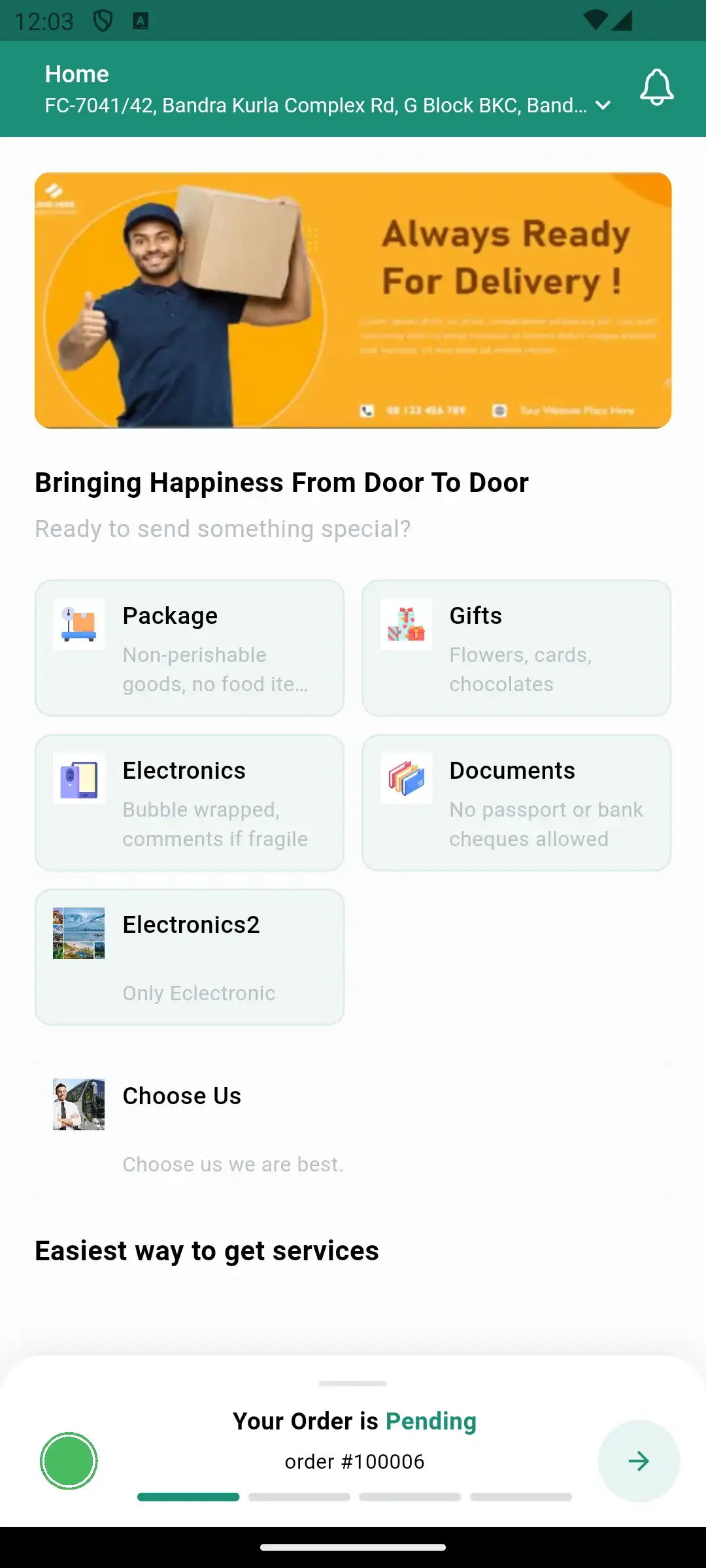

Lalamove Clone Sender App
Seen from the sender's handset: pick the type of load, key in both addresses, read the distance and fee, add a tip for the delivery man, say who settles the bill and submit.
- 1Select Android or iOS on the app portal
- 2Sign in using the sender login shown here
- 3Look at Home, Request, Orders and Tracking
+91 9876543210 | User_321
Lalamove Clone Driver App
Seen from the driver's handset: incoming jobs to take or turn down, turn-by-turn help inside the app, a chat thread with the customer and a signature plus photo to finish at the door.
- 1Select Android or iOS on the app portal
- 2Sign in using the driver login shown here
- 3Look at Requests, Navigation, Chat and Handover
+91 9876543211 | Driver_321
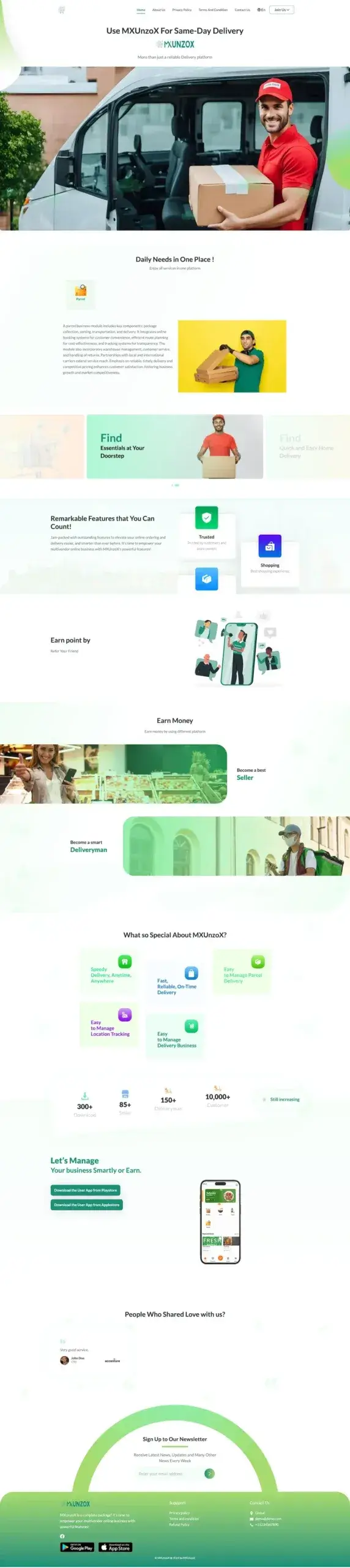
Customer Website & Delivery Web Panel
A site for customers who would rather book from a desk, plus a web panel that delivery staff can use on a bigger screen.
- 1Open the demo address in a new window
- 2Choose between the customer and delivery logins
- 3Look at Booking, Orders and Parcel details
mxunzox.mimeld.com
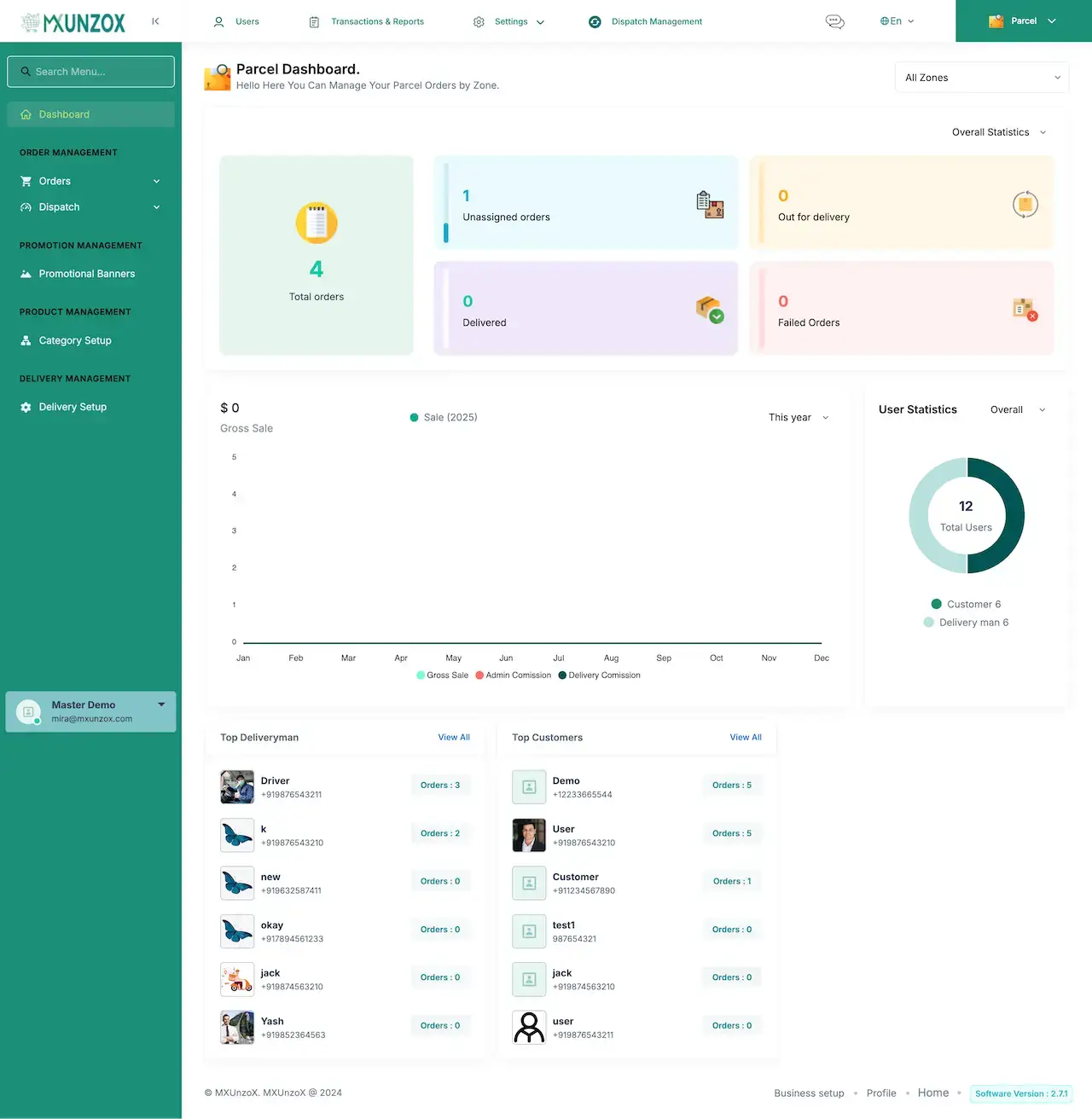
Lalamove Clone Admin Console
The operator's workspace: a parcel dashboard that can be cut by zone, plus orders, dispatch, delivery setup, categories, banners, user lists and transaction reports.
- 1Go to the admin sign-in page
- 2Ask our team for the admin credentials
- 3Look at Dashboard, Orders, Dispatch and Reports
given during a guided call
See It With a Specialist
Walkthrough of a Delivery App Like Lalamove: Booking, Fleet Dispatch, Signed Handover & Merchant Billing
A live call shows how the pieces connect faster than any page can. We run a single load through the demo, from first booking to signed handover, and then map every screen onto your own fleet mix, delivery zones, pricing rules and launch target.
Reserve a live walkthrough.Every Screen Mapped
On-Demand Logistics App Flows - Sender App, Account & Wallet, Operator Dashboard & Website
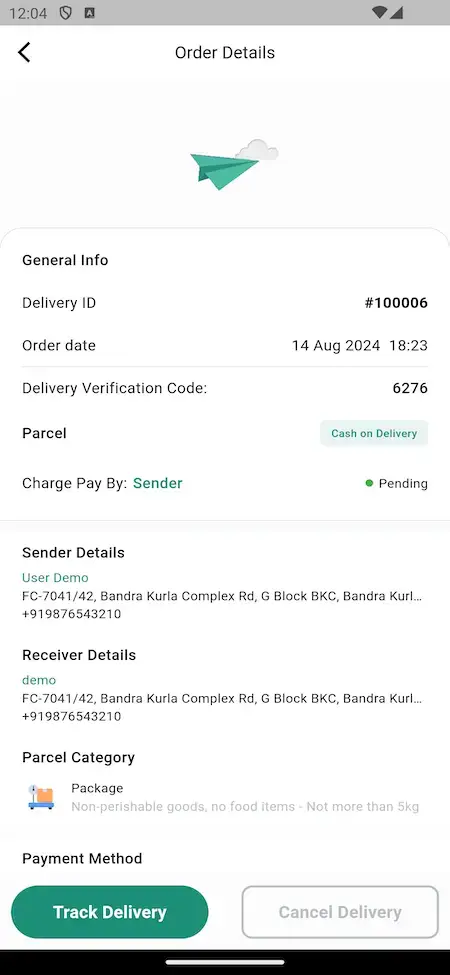
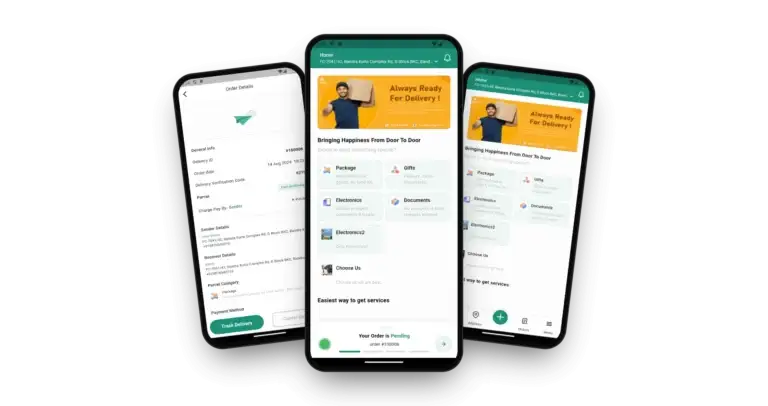
Miracuves captured these screenshots from its Lalamove clone, covering the sender app, account and wallet menu, admin parcel dashboard and public website, lined up the way a load moves from booking to drop-off.
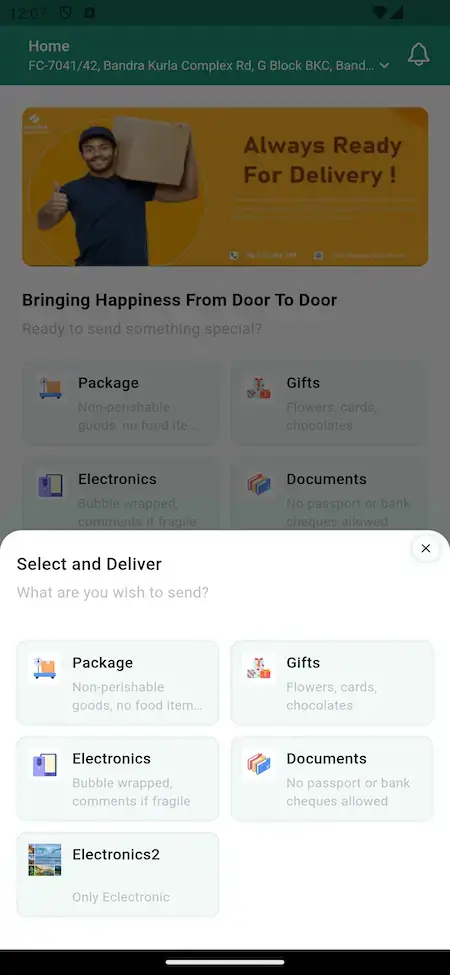
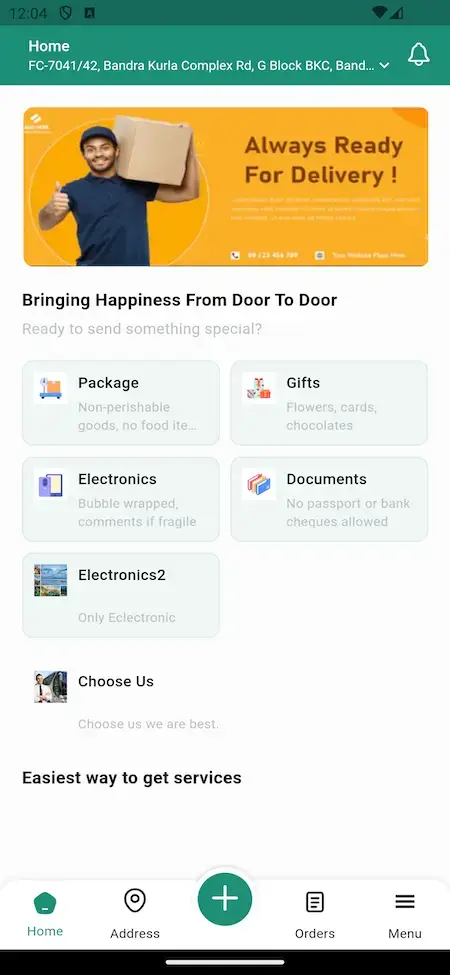


Trace a single load across the app: the home screen, the category sheet, the request form with fee and tip, the pending order, the live tracker and finally the order page that carries the verification code.
02Proof
Client Voices
Lalamove Clone Client Reviews - Fleet and Courier Operators in Their Own Words
These eight cover courier and multi-service work. Miracuves tuned dispatch for cash on delivery for Tariq Arbab, Melvin Morales of Shophy chased a holiday window, and Marsha Williams, Mustafa H., Leeft, Woojek, XtremeJek and David Subervi each commissioned their own variation.
“The team was running it on a dispatcher and a Google Sheet, and we needed a real platform quickly, because we were about to onboard a major retail client. Miracuves’s Delivery Genie base gave us the rider app, the dispatch console, and live tracking. We launched in 6 weeks and cleared 4x the previous order volume in the first month.”
“Speedyven is a hyperlocal courier network — packages, food, and same-day essentials across a few metros. The dispatch and rider app were the parts where we needed to move fastest, because riders have low tolerance for clunky tools. Miracuves's Delivery Genie base gave us the rider app, the dispatch console, and live tracking. We added our custom surge-pricing engine, our multi-merchant order router, and a custom rider-incentives module. We launched in 7 weeks. Rider activation is high and the platform's been stable through weekend peaks.”
“Our ops team was running last-mile on a whiteboard and a WhatsApp group. The rider app, dispatch console and live tracking came out of the box. They tuned dispatch for our COD-heavy model and added customer tracking. Where-is-my-order calls have all but stopped.”
“Customer, driver and merchant apps plus dispatch were ready. We configured our verticals, our payments and our branding. Delivered inside a month and it has scaled since without a rebuild.”
“Multi-city was the requirement from day one, and the dispatch and merchant console handled it natively - which is exactly the part we did not want to build. Rides, food and courier across several cities, live inside a month.”
“Rides, food and courier in one app, for a market nobody was building for properly. The rider and driver apps, dispatch and the merchant console came off a base that had already run at volume. We added local payments and the categories that matter here. Live inside a month.”
“Ride-hailing, food, courier and a marketplace, and we were chasing a holiday window. Their Gojek base had the rider and driver apps, dispatch and the merchant console already. We added local payment partners and our regional marketplace layer, and were taking live orders inside a month.”
“We opened with three verticals rather than phasing them, which was only possible because dispatch and the merchant tooling already existed. Our work was the market and the payment partners. Delivered inside a month.”
What You Can Check
Lalamove Clone Case Study - What Exists Publicly and What You Can Verify Yourself
No named client fleet runs this logistics base in public, so there is nothing to summarize. We can offer a demo and a release log, and below is how to put both to use.
There is no named client running this logistics base for us to show, and we will not stage one. A working demo and a dated release log are what we can put in front of you.

- Place a booking in the sender app with the demo login
- Look at the same order from the admin side during a guided call
- Sign in to the driver app and see the job from the other end
- Read the release log entry by entry, date by date
- Name a client who has not agreed to be named
- Pass off a quote or number from a different product as this one
- Present an add-on as if the base package included it
- Apply your logo, icons and colors to the apps and the web platform
- Configure your city's zones, fares and parcel categories
- Install on your hosting and pass over the whole source
- Base build time: 6 working days
A named client will be featured here once one agrees to be named and a case study has been published.Miracuves · How we treat case studies
03Inside the platform
In Short
What the Lalamove Clone App Means for Businesses, Fleets and Senders
A Lalamove clone is a ready-made on-demand logistics platform: customers and merchants order by setting pickup and drop-off locations within the city, drivers on bikes, cars, vans or trucks pick up the job, and the operator looks after revenue through an admin panel that handles zones, fares, dispatch, promotions and reporting.

Built Around the Job, Not the Form
The booking is the easy part. The value sits in dispatch, delivery codes, proof of delivery, merchant wallets and invoices, and a console that reports zone by zone.
Source You Can Open
The complete code is delivered without encryption, so your own developers can change pricing, flows and screens as the business develops.
Extras Are Labeled as Extras
Four extras, namely smart routing, AR navigation, load sensors and lockers, are sold as add-ons at separate prices and never counted in the base package.
Android, iOS & Web
What Is a Lalamove Clone Script, Exactly?
Capturing the order is the straightforward bit of a logistics product, which is why Miracuves spent the effort on vehicles, dispatch, proof and billing. The effort sits behind it: choosing a vehicle, getting a driver onto the right job, proving who received the goods and billing the shops that ship daily. That plumbing is finished and running.

- 01Pickup and drop booking with a vehicle choice
- 02Fee, tip and payer shown before the request goes out
- 03Live tracking, verification code and proof of delivery
- 04Driver app with jobs, chat and navigation
- 05Merchant wallets, invoices and an admin panel with reports
You get the customer website and app, the driver app and the admin panel, built with Flutter, plus the full source code.
What You Get
Lalamove Clone Features - Vehicle Classes, Dispatch, Merchant Billing, Proof of Delivery & Admin Tools
Each Lalamove clone capability Miracuves names here appears on an app screen, inside the operator console or in a dated log entry; paid extras sit with the add-ons lower on the page.
Vehicle Classes & Booking
The sender chooses the vehicle that suits the load and the distance. Bikes, cars, vans and trucks are all covered, and the choice comes right after the delivery details in the booking flow.
- Pick a bike, car, van or truck for every job
- The vehicle step follows the delivery details
- Motorcycles and bicycles are mentioned in the product FAQ
- Commission can be set per vehicle type, distance or offer
- Those pricing rules are kept under Delivery Setup in the admin panel
Pickup & Drop Booking
Two addresses and a description of the load make a booking. A single request screen gathers both parties, shows the distance and quotes the delivery fee before the sender commits.
- Sender details and receiver details on the same form
- Cards for Package, Gifts, Electronics and Documents
- The distance and the fee appear before confirmation
- Free-text space for any extra instructions to the driver
- Save for later is offered on the request screen
- A Confirm Parcel Request button sends the order off
Dispatch & Driver Management
Dispatch is a separate area of the console. Admins sign up and check drivers, assign jobs and keep an eye on every open order until it is resolved.
- A Dispatch Management entry sits in the top menu
- New drivers are onboarded and verified inside the panel
- Ongoing orders can be watched and problems dealt with live
- Admins see the delivery man being assigned in real time
- Fare Management covers fees, discounts and the pricing structure
- Branch records are stored alongside delivery men
- Orders move from unassigned to assigned through dispatch
Merchant Accounts & Bulk Import
Businesses that send goods daily receive their own accounts with a dashboard, a wallet and a way to load many addresses in one go rather than typing every job.
- Each merchant works from a dashboard of their own
- Addresses can be bulk-imported from Google Maps
- A bulk modal handles parcels in batches
- Wallets can be switched on merchant by merchant
- The merchant payment account carries a bank list
- A parcel logs page keeps a record of each job
Wallets, Invoices & Payments
Wallets and invoices let merchants be billed in batches. Senders still see the fee first and choose who pays, while a gateway handles card payments.
- Wallet systems for both merchants and the admin
- Parcels can be created against a wallet balance
- An invoice is generated for each merchant
- Choosing an invoice in merchant payments sets it to paid
- The invoice total flows into the Excel export
- The mobile app lists payment requests and statements
- Razorpay was added as a gateway in the release log
- Orders can show Cash on Delivery, with a Charge Pay By choice
Delivery Code & Proof of Delivery
Each order is given a verification code. After that the driver app can capture an electronic signature and a photo, so the order ends with a record.
- A Delivery Verification Code appears on every order
- The handover is checked with a one-time code
- The driver app captures an electronic signature at the door
- A photo is uploaded as part of the proof
- The customer is notified when the job is completed
- Proof stays attached to the order afterwards
Live Tracking & Order History
A five-stage tracker sits over a map for every order, and earlier jobs remain in the Orders tab so customers can open them again.
- The tracker runs from Order Placed through to Delivered
- A map is drawn beneath the stages
- A short notice shows until a driver is assigned
- The home screen shows pending orders with a progress bar
- Order details include a Track Delivery button
- The mobile app lists parcels by status
Parcel Priority & Labels
Urgent parcels can be flagged and are shown that way to the driver, while labels can be produced in volume for the packing table.
- A parcel priority system flags urgent jobs
- The delivery man map highlights priority parcels
- Many labels can be printed together from admin and merchant panels
- The label print size has a design setting
- Tracking ids were shortened in the release log
Driver App
The driver side of the product covers onboarding papers, incoming requests, navigation, chat and a list of assigned parcels arranged by route.
- ID proof, vehicle registration and insurance details are collected at sign-up
- Documents are uploaded for verification
- Drivers accept or reject each request on the phone
- GPS and built-in navigation guide the trip
- Messages go to the customer from inside the app
- Assigned parcels appear as a route-wise list
- Location can be switched on from the handset
Zone-Filtered Dashboard
Home for the admin is a dashboard of the day that a zone filter can narrow, showing totals, unassigned jobs, parcels on the road, delivered and failed.
- Counters for total, unassigned, on-the-road, delivered and failed parcels
- A selector for All Zones or a single zone
- A Gross Sale chart separating admin commission from delivery commission
- Statistics for customers and for delivery men
- Rankings of the top delivery man and the top customers
- The zone filter sits above the whole dashboard
Notifications, Ratings & Help
Customers hear about every stage, score the delivery in both directions and raise support tickets that carry a status of their own.
- Notices at order confirmation, driver assignment and completion
- Customer and driver rate each other and leave feedback
- Support requests pass through Pending, Processing, Resolved and Closed
- SMS goes out over Twilio or Nexmo, per the release log
- Customers can report a damaged or lost parcel through support
Theme, Languages & Promotions
The console used to run operations also dresses the product: language options, a theme palette, a front-end template and promotional banners.
- English gains French, Spanish and Chinese
- Country symbols can be shown on prices
- Theme colors for the front end are changed from the admin panel
- A ready front-end website template
- Promotional Banners live under Promotion Management
- Category Setup controls the kinds of parcel on offer
- A language switcher appears in the page header
Good to know before you buy: The platform is handed over finished and rebranded for you. What you supply is hosting and a domain, developer accounts with the app stores, your brand assets and business details, a payment gateway whose KYC is complete, and your own Google Maps and SMS keys. Store reviews by Apple and Google follow their own timetable, separate from our 6-day build time.
How the Money Is Made
Lalamove Clone Revenue Models - Job Fees, Distance Charges, Priority Surcharges & Merchant Billing
Money enters a Miracuves-built logistics platform with every trip, and because each stream is its own admin control, tuning one never disturbs the rest.
Two streams generally matter most: what a job costs by vehicle and distance, and the merchants that send goods in bulk.
- 01
Job Fee by Vehicle Class
A fee is attached to each booking and shown to the sender before confirmation. Because commission can vary by vehicle type, a bike drop and a van run can be priced separately.
- 02
Distance Charges
Fares can grow with distance through Delivery Setup, so a long haul earns more than a short hop without needing a second price list.
- 03
Priority Parcel Surcharges
Parcels flagged as priority appear marked on the driver map, a natural hook for charging more when speed matters.
- 04
Merchant Billing
Shops that ship every day hold a wallet and are invoiced merchant by merchant, so you can bill by cycle rather than collect after each job.
- 05
Operator Commission
On the dashboard, gross sale appears split between the admin share and the delivery share, so your cut and the driver's cut are two separate figures.
- 06
Promotional Banners
Banner placement sits under Promotion Management, and a slot can be sold to a nearby business.
| Revenue line | How the fee is charged | RateUsual take rate | What limits it |
|---|---|---|---|
| Job Fee by Vehicle Class | A single flat sum per booking, displayed to the sender before confirmation, while commission by vehicle class is held in the admin panel. | Uber Direct pricing starts at $6.99 per delivery and varies with distance, speed and region. | The going rate of courier APIs where you operate. Uber says its fee carries 0% commission, so rivals charging a flat fee are easy to find. |
| Distance Charges | An opening amount, then a rate on every kilometer or mile driven. | Uber Direct in Australia charges A$10 plus A$1.10 for each km, while DoorDash charges $9.75 for the first 5 miles and $0.75 per mile after that. | How far a customer is willing to pay. DoorDash stops mileage fees at 15 miles and bills 60% of the first fee if a delivery comes back to its pickup, and Uber adds a wait-time fee after a courier has waited 10 minutes. |
| Priority Parcel Surcharges | An extra charge on parcels flagged as priority, along with any further surcharge written into your fare rules. | UPS reported $282 million more fuel surcharge revenue in 2025, and FedEx links its surcharge to a weekly fuel price. | How much extra customers accept. The filings publish no flat surcharge percentage, so whatever rate you apply is a figure you pick and test. |
| Merchant Billing | Each business receives an invoice covering the parcels it dispatched, and wallet balances and invoice status are monitored. | Revenue per parcel was $13.21 at UPS US Domestic in 2025, about $4.77 at USPS and GBP 3.13 across the UK market. | Whatever a business already pays its carrier. Ofcom puts the UK real-term average at GBP 3.13 for 2024-25, 7.3% lower, whereas revenue per piece in UPS US Domestic climbed 7.1%, so the spread is wide. |
| Operator Commission | The operator keeps a share of every fee, and the gateway deducts card processing from what it settles. | No dated courier commission page was found. Stripe charges 2.9% + 30c on US cards and 1.5% + 20p on UK cards. | How much drivers will put up with before they quit, and the country of your gateway. Store commissions apply to digital goods rather than a courier booking, which makes card fees the figure to model. |
How to read this. Prices for a single job or a single mile are published by DoorDash Drive and Uber Direct, with the Australian rates taken from Uber's regional page. Revenue per parcel and the fuel surcharge come from the Ofcom postal monitoring report, USPS fiscal 2025 results, the FedEx annual report and the UPS annual report; the per-piece USPS number is our own division of two reported totals. Card rates come from Stripe UK pricing and Stripe US pricing, while Apple's program page explains why store commissions cover only digital goods. Each figure is another company's number and is offered purely as a modeling input; it is not a quote, nor a prediction of your platform's earnings.
Lalamove Clone Revenue Model, Stage by Stage
Six revenue streams ship in the Lalamove clone Miracuves builds, and a multi-vehicle fleet earns best by pricing bikes, vans and trucks first, billing its regular shippers next and selling zone-level extras last.
Launch
Start by pricing each vehicle class, because van and truck fares carry the margin and the sender sees each fee before confirming.
Traction
Once shops ship daily, move them onto merchant accounts: each one tops up a wallet, uploads a batch of drop addresses, prints labels for that batch and settles its own invoice.
Scale
With more zones and drivers on the road, distance charges, priority surcharges and banner slots sold to local businesses add up beside the job fee.
Commission per vehicle type lives under Delivery Setup, the dashboard splits your share from the driver's, and no part of either goes to Miracuves.
Run It Day by Day
Admin Panel for a Lalamove-Style App - Orders, Dispatch, Fleet Fares & Merchant Billing
Fleet operators on the Lalamove clone get one Miracuves console for the working day, showing which jobs await a driver, which are moving, which landed, which failed and what each merchant owes.


Sections of the Admin Panel
- 01
Parcel Dashboard
Counters for total, unassigned, on-the-road, delivered and failed parcels share the screen with a yearly gross sale chart and user numbers, and one zone filter reshapes the lot.
- 02
Orders & Dispatch
Every order is listed under Order Management, and jobs are allocated and followed to completion from Dispatch Management in the top menu.
- 03
Delivery Setup & Fares
Fees, discounts and pricing structure are adjusted here, together with commission rules based on vehicle type or distance.
- 04
Parcel Types
Senders pick from the kinds of goods that the admin sets up, which in the demo are Package, Gifts, Electronics and Documents.
- 05
Customers, Drivers & Merchants
The panel counts registered customers and delivery men, ranks the best of each, onboards and verifies new drivers, and holds merchant accounts with their wallets.
- 06
Promotions
Banners and marketing tools sit under Promotion Management, for bringing past customers back.
- 07
Transactions & Reports
The top menu leads to transactions and reports, behind which sit merchant invoices, their paid status and payment requests.
- 08
Settings, Languages & Support
General settings, business setup, a language switcher, theme colors for the public site and support tickets with four statuses.
Money Movement
The money side of the console, running from a paid delivery fee to a settled merchant invoice.
- Transactions and reports sit in the top menu
- Wallet balances next to invoice status
- The sales chart shows admin and delivery commission
- Invoice totals go into the Excel export
Settings & Tools
The controls that sit behind the public site and the daily routine.
- Business setup and profile menus
- Cron job notes inside General Settings
- Header control for changing the language
- The software version printed in the footer
Need more from the console? Additional reports, a different settlement rhythm, extra languages or a bespoke approval step for new drivers are scoped separately. Describe what your dispatch team needs and we will return a written quote.
04Package & pricing
The Full Package
Everything a White-Label Lalamove App Ships With - Code, Apps, Console & Setup
From Miracuves you get a fleet logistics business ready to dispatch: booking site, sender and driver apps, operator console, unencrypted source and the database design, free to run and modify. Third-party charges go to you directly and never through Miracuves, covering servers with backups, card processing, text and push messaging, mapping, the two store memberships, and any vehicle insurance or permits your city asks for.
$ git clone your-logistics-app Full Source Code
Complete source for the web platform and both mobile apps, free of encryption, so your developers can shape it around your business.
- Unencrypted web platform source
- Android and iOS apps as Flutter source
- Free to edit, build on and redeploy
- Transferred into your own repository
Database & Schema
Table design covering parcels, merchants, branches, drivers, invoices and wallets, supplied so the database can be recreated from scratch.
- Database schema bundled with the code
- Data tier listed as MySQL
- Tables for parcels, merchants, branches and delivery men
- Tables for invoices, wallets and payment requests
Alerts & SMS
Status alerts for orders, in-app chat between customer and driver, and the SMS gateways that deliver codes and messages.
- Alerts when an order is confirmed, assigned and completed
- Chat between customer and driver inside the app
- Twilio and Nexmo SMS gateways
- A verification code issued on each order

Customer Website & Web Panels
A responsive website for browser booking, a front-end template whose colors you can change, and web panels for both customers and delivery staff.
- Book and track orders from a browser
- A front-end template with theme colors you control
- A web panel for delivery staff
- Four languages: English, French, Spanish, Chinese
Customer & Driver Apps
A pair of Flutter apps, one aimed at senders and the other at drivers, which handle booking, tracking, navigation, messaging and proof of delivery.
- Sender app with requests, orders and tracking
- Driver app with requests, navigation and chat
- Signature and photo as proof of delivery
- Store release goes through your developer accounts


Admin Panel
An operator workspace that spans the parcel dashboard, orders, dispatch, delivery setup, promotions, users, transactions and reports.
- A dashboard that filters by zone
- Order handling, dispatch and delivery fees
- Parcel categories and promotional banners
- People, payments, reports and settings
Access & Verification Layer
Separate sign-ins for customer, driver and admin, together with the handover checks and driver documents the product ships with.
- Each role gets its own screens
- A verification code at the handover
- Driver documents uploaded for checking
- Your payment gateway keeps the card data
Handover & Support
We rebrand and deploy for you, pass on a notes pack, and start three support windows that overlap from launch day.
- Your own logo, icons and colors applied
- Installation on your hosting
- Deployment settings and notes passed to your team
- Parallel support: two months guidance, six months fixes, a year of updates
Want a look before deciding? Use the demo as a sender or a driver, or request a guided tour in which we trace one load from booking to signed handover and fit each screen to your city and fare plan.
Clear Pricing
How Much Does It Cost to Launch an App Like Lalamove?
At a fixed $2,499 you get the launch-ready white-label Lalamove Clone. Anything outside the base package, from add-ons to extra integrations or custom flows, gets its own written scope and quote.
Professional
Launch-Ready PackageChosen by: Delivery startups, owners of small fleets, retailers building their own delivery arm
You receive the platform as the demo shows it, rebranded with your logo, icons and colors and installed on your own hosting.
Get StartedEnterprise
Tailored Builds for Bigger ScopeChosen by: Multi-city logistics groups, freight businesses, platforms with dispatch rules of their own
Does your plan need flows that the base lacks? We build to your brief and agree scope and price in writing before work begins.
Request a QuoteLalamove Clone Development Cost in 2026
Fleet owners pay $2,499 once for the Lalamove clone in the demo: customer website and app, driver app, merchant wallets and invoices and the operator console, as unencrypted source with its database design and live under your fleet brand in six working days.
Running costs your fleet pays its providers directly
- Servers with backups, plus your domain
- Card fees on a gateway registered to your company, KYC done
- Text, push and mapping usage on keys you own
- The Apple and Google store memberships
- Insurance and city permits for the bikes, vans and trucks you run, plus any optional module
Want new drivers to clear an extra approval step, or merchants paid out on another rhythm? Miracuves scopes it around your fleet, quotes it in writing and usually finishes in 2-8 weeks.
Compare Your Options
Ready-Made Lalamove Clone vs Custom Development vs SaaS
Bike, van and truck dispatch with merchant billing is available three ways, and Miracuves' Lalamove clone is the one you own outright. Here they are, side by side, for a fleet business building apps like Lalamove.
| Criteria | MiracuvesReady-Made Lalamove Clone | Custom Development | SaaS |
|---|---|---|---|
| Launch time | 6 working days to launch, then store review | Quoted in writing, 2-8 weeks | Fast signup, shared tenancy |
| Upfront cost | $2,499, single payment | Scope priced on paper | Subscription from month one |
| Source code ownership | Unencrypted web and app source handed over | Set by the agreement | Vendor keeps it |
| Customization | Vehicle classes, fares and zones adjustable | Built to order, at cost | Options the vendor allows |
| Ongoing fees | No license or per-job fee to us | Upkeep billed monthly | Per-vehicle or per-order fees |
| Branding & app-store listing | Sender and driver apps in your brand | Your brand, longer route | Vendor-branded apps |
| Best for | Fleets moving vans, trucks and merchant loads | Bespoke freight logic | Short pilots |
Same product, other editions: Dunzo Clone · Uber Delivery Clone · White Label Courier App · Browse all Parcel Delivery solutions
Where It Works
Multi-Vehicle Delivery App Use Cases - Merchant Bulk Dispatch, Van Loads, Signed Drops & Zone Rollouts
Miracuves' Lalamove clone gets used differently from one operator to the next. Vehicle choice and fares come first for a van business, wallets and invoices for a merchant network, and driver requests with navigation for a courier pool. Configuration lets you set which one gets the emphasis.
Swipe · 6
Open a merchant account with its own wallet, let the shop import a whole batch of addresses, print the labels and send the lot out, then invoice at the end of the cycle.

Offer larger vehicles for bulky goods: customers pick a van or a truck, and fares are calculated from the vehicle and distance rules you set.

Keep a pool of two-wheeler drivers for short, urgent jobs, who accept a request, navigate in the app and message the sender.

Combine the delivery code, the electronic signature and the photo into a record for goods that people will ask about later.

Charge repeat customers through wallets and merchant invoices, and mark each invoice paid when the money arrives.

Start with one district. A zone filter on the dashboard reveals which parcels are waiting for a driver, and only then do you add the next district.

Lalamove Clone Business Model: Three Ways to Run It
Every Lalamove clone job starts by matching the load to a bike, van or truck, and the same dispatch board, driver app and merchant accounts support three ways of earning from those jobs.
Owned fleet
A small fleet owner dispatches company bikes, vans and trucks from one board and prices every class separately, so each van run and truck haul earns at its own rate.
Driver network
Independent delivery drivers sign up with ID, registration and insurance papers, accept or reject jobs, and earn on the commission rules you set by vehicle type and distance.
Merchant logistics
Retailers and kirana networks hold merchant accounts, load batches of addresses and settle through per-merchant invoices, turning daily shippers into recurring revenue.
Whichever mix you run, bike, van and truck fares stay yours to set, and Miracuves takes no royalty from any delivery.
One platform, six operating styles. All six rely on the same customer site, apps and admin panel. Only your choices differ: the zones you open, the vehicles you allow, the way fares and commission are configured and the look of the brand, which leaves one codebase to maintain.
Speak With Our TeamMarket Timing
Why Launch an On-Demand Logistics App in 2026?
Reliability and a clear record win business and e-commerce deliveries, while an operator dispatching by phone spends hours on calls. With a branded app you own the booking, the proof and a customer list that call centers do not capture.
01Phone Dispatch Stops Scaling Past a Few Drivers
Where jobs come in by call and are chased by message, every added driver multiplies the admin. One screen listing unassigned orders removes much of that burden.
02Businesses Expect to Book Online
A shop that dispatches daily prefers to import its addresses and get one invoice rather than phone in each job. That is the customer a merchant account wins and keeps.
03A Signature and Photo End the Argument
With goods signed for and photographed at the door, a delivery dispute can be resolved from the order record and not from anyone's memory.
04A Wider Vehicle Menu Wins Bigger Jobs
Offering bikes, cars, vans and trucks together lets one app carry a document in the morning and a much bulkier load in the afternoon.
05Cash and Wallets Share One Ledger
Orders log their cash on delivery, wallet-paid parcels and merchant invoices individually, which is easier to reconcile than the notes each driver keeps.
06Buying a Base Beats Writing One
Most of a logistics business is booking, dispatch, driver tooling, a proof-of-delivery step and an admin console. We need 6 working days to put a white-label copy on your hosting.
Platform by the Numbers
Vehicle Classes
Handover Checks
Order Tracker Stages
Days to Launch
Many builds stall on the unglamorous core of logistics: assigning a driver, proving the handover and settling the money afterward. In this platform that core is already done.
Industries
Industries We Serve
Any business that carries goods between two points can use the Lalamove Clone. Last-mile courier delivery services take bookings all day. Small-freight operators run vans and trucks. Online sellers and retail chains add a delivery arm of their own. Furniture and appliance sellers need a signed drop. Neighborhood grocers offer same-day runs. Subscription brands repeat one route every week. Franchise groups give each branch a zone, and platform builders attach logistics to a larger product.
one platformMXUnzoX
- 01LmLast-Mile Logistics
- 02DsDocument Services
- 03SfSmall Freight
- 04EcE-Commerce Fulfillment
- 05RcRetail Chains
- 06FaFurniture & Appliances
- 07PbPlatform Builders
- 08KgKirana & Grocery
- 09SdSubscription Delivery
- 10SlSMB Logistics
- 11FnFranchise Networks
- 12PsPrint & Stationery
Built for any business that moves goods, the Miracuves Lalamove Clone puts your brand on the booking flow, tracker, handover record and admin panel from the first screen.
06Behind the scenes
Start to Finish
How the Lalamove Clone Works - Register, Choose, Book, Pay, Track & Sign Off
A customer needs only a few taps to arrange a delivery in the Lalamove clone app Miracuves ships. Beneath those taps sits a fixed order of events: request, assignment, tracking, handover. We walk through it from the home screen to a signed delivery, then look at the architecture below.
Customer Path - From the Home Screen to a Signed Delivery
Swipe · 6
- 1Register & Book a Delivery
A business or sender opens an account, logs in by email or phone and lands on a home screen showing every load type it can book.
- Registration with personal details
- Sign-in using email or phone number
- Parcel categories shown on the home screen
- 2Choose the Load Category
A pop-up lists the goods categories to pick from, so each delivery job is matched to the correct kind of load from the start.
- Categories: Package, Gifts, Electronics, Documents
- One line of guidance under each
- Managed by the admin
- 3Enter Addresses & Pick a Vehicle
The request form takes pickup and drop-off contacts, shows distance, fee and tip, and records who pays; choosing a bike, van or truck comes straight after.
- Details for the sender and the receiver
- Distance, fee and tip amounts
- Payer chosen under Charge Pay By
- 4Confirm the Booking & Pay
The sender checks the summary, selects a payment method and confirms; the job reads pending until a driver takes it.
- An order summary to review
- Payment method selection
- Pending status with a progress bar
5Follow the Driver on the MapLive status runs from booked and confirmed to delivery in progress, drawn over a map of the route area.
- A progress bar with five stages
- The local map behind it
- A message shown while no driver is assigned
- 6Hand Over, Verify & Rate
At drop-off the driver collects the verification code, the job flips to delivered and the customer can rate the trip.
- The Delivery Verification Code held on the order
- Notification when delivery is complete
- Optional rating and feedback
What Sits Underneath
Architecture of a Lalamove-Like Platform & Dispatch Logic
- 01Stage 01
Role-Based Entry Points
Customers, drivers and admins each log in separately and get different screens, so drivers never get the operator console on their own screen.
- 02Stage 02
Status Lifecycle
Every order moves from Order Placed to Order Confirmed, then Preparing Item, then on to Delivery on the way and finally Delivered, the five labels the tracker draws.
- 03Stage 03
Dispatch & Assignment
A new order is listed as unassigned until dispatch allocates it to a delivery man, whose map highlights any priority parcel.
- 04Stage 04
Pricing & Commission Rules
Admin settings hold the fees, discounts and commission structures, separate from the booking screens where the result appears.
- 05Stage 05
Wallets & Payments
Each order stores its payment, any cash on delivery, and the related merchant wallet and invoice entries, which makes balances and statements easy to audit afterward.
- 06Stage 06
Proof on File
Closing a job takes a code check, a captured signature and a photograph, and all three stay attached to the order as evidence.
Under the Hood
Technologies Powering This Fleet Logistics App - PHP, MySQL, Flutter & Gateways
For this fleet app, Miracuves paired a PHP and Bootstrap web layer with MySQL so every parcel record stays consistent, and built the sender and driver apps in Flutter on Google Maps and Firebase. Here is what this platform runs on, phrased the way the product pages give it.
Web & Admin Layer
- One site for customers, a web panel for delivery staff, and the admin panel
- Responsive pages built on Bootstrap
- A front-end template with adjustable theme colors
- Version 2.7.1 appears in the admin footer
Database Layer
- Holds parcels, merchants, branches and drivers
- The schema ships alongside the source
- A blank database can be rebuilt from it
Mobile Apps
- Full-component Flutter builds on current dependencies
- One app serves customers and a second serves drivers
- Tabs for Home, Address, Orders and Menu
- Release goes through your own developer accounts
Payment Layer
- The release log shows Razorpay arriving as a gateway
- Cash on Delivery with either side as the payer
- Separate wallets for merchants and for the admin
- You open and verify the gateway account yourself
Connected Services
- Google Maps handles address lookup, routing and live map views
- Twilio and Nexmo carry the SMS traffic
- Firebase sits on the list of integrations
- Translation and payment gateway APIs complete it
Code Handover
- The application source arrives with its history
- Signing steps for the mobile projects are written down
- Cron job and deployment setup are documented
- Architecture notes are passed to your engineers
The web and admin side run PHP with Bootstrap over MySQL, and the apps use Flutter. Maps, SMS, push notifications and payment services, meaning Google Maps, Twilio, Firebase and the gateways, plus translation, operate under accounts and keys that you open and provide when we deploy. All of these tools are widely used, so hiring engineers for them is straightforward.
Room to Grow
Built to Scale - Zones, Dispatch Queues, Merchant Batches & Room to Grow
The platform pairs distinct surfaces with a shared core, which turns growth in districts, drivers and parcels into a capacity and configuration task and not a rewrite.
Zones Set the Pace. Because the dashboard filters by zone, you can operate and measure one district before opening another.
A Visible Dispatch Queue. Any order that no driver has taken is flagged as unassigned, so dispatch knows what to chase first.
Merchants Ship in Batches. Importing addresses in bulk, printing labels together and invoicing per merchant stops the heaviest shippers from slowing the rest.
Records That Reconcile. Each job stores its order, wallet, invoice and commission entries, so dashboard figures can be matched against statements.
Zone-Based Growth
Each district is handled as its own zone and an All Zones view shows the overall picture, so you can open and watch them one by one.
Dispatch Queue
Unassigned orders wait on the dashboard until a delivery man picks them up, with priority parcels highlighted on his map.
- A counter for unassigned orders
- Priority flags on parcels
- Assigned parcels in route order
- Real-time view of an assignment under way
Separate Surfaces
Customers, drivers and admins have their own screens and permissions, so any of them can change without disturbing the other two.
- Its own login per role
- Its own screens per role
- An API serving the mobile apps
- Web panels next to the apps
Merchant Batches
Shops with many parcels stay manageable thanks to Google Maps address import, high-volume label printing and invoices per merchant.
- Parcels loaded in bulk
- Labels printed in bulk from admin and merchant panels
- One invoice for each merchant
- Parcel creation paid from wallet funds
Recorded Settlements
Balances in wallets, payment requests, statements and invoice status are recorded against every merchant and order.
- Wallets held by merchants and by admin
- Requests for payment, plus statements
- Paid or unpaid status on each invoice
- Cash on delivery noted on the order
Documented Handover
Source, schema, setup notes and cron job details are passed over, letting a different team operate the platform without help.
Space to Adapt. Sooner or later each logistics market wants something local, perhaps a pricing rule, a vehicle class or a way of settling accounts. The code is complete and the stack is conventional, so any new screen, rule or integration is ordinary development that your engineers or ours can take on.
If launch is near: Open with the district and the drivers you can look after properly, then expand on the same deployment. As volume climbs, extra capacity is a hosting and configuration choice, and work outside the base is scoped and priced on its own.
07Security and trust
Open to Inspection
Logistics App Security - Separate Roles, Delivery Codes, Gateway Payments & Candid Limits
Logistics software holds customer names, phone numbers, delivery addresses and payment references, and its drivers carry other people's goods to strangers. Miracuves rates three things above the rest: who reaches which data, how each drop is evidenced and what gets checked ahead of launch. Below you will find what the product does today and what remains your job.
- 01 · RolesRole Separation
Customers, drivers and admins use different sign-ins and screens, each seeing only what the role needs, so nobody reaches the operator console by accident.
- Disputes & Claims: Each support ticket moves from Pending to Processing, then Resolved or Closed. Paying out for lost or damaged goods is a policy choice for you; the software only logs the case and offers no insurance.
- 02 · HandoverDelivery Codes & Proof
A delivery verification code accompanies each order, and the driver app can add an electronic signature and a photo. A contested handover therefore has an answer in the order record.
- Proof Retention: A handover signature and photo are kept together with the order. How long you retain them, and who is allowed to open them, should be set out in your privacy policy.
- 03 · DriversDriver Documents
Drivers submit ID proof, vehicle registration and insurance details when they sign up, and admins review and approve them inside the panel.
- Driver Verification: Documents uploaded by drivers are stored by the platform. Deciding who is accepted and how often papers are rechecked sits inside your onboarding policy.
- 04 · KeysKey Management
Keys for maps, SMS and payment gateways are meant to sit in server configuration of your own, never inside the repository handed to you. We confirm this together during deployment.
- Pre-Launch Tasks: Work to finish before launch includes key rotation, penetration testing, a restore drill and a check of your payment and SMS settings; none of it is assumed to be done already.
- 05 · CardsCard Data Left With the Gateway
Card data goes directly to your chosen payment provider through payment gateway integration; what the platform retains is an order and its payment status, never a card number.
- Gateway Readiness: Real payments need a gateway account in your name, with KYC completed. The same applies to your SMS and maps keys.
- Commission Settings: Pricing and commission structures live in the admin settings, which keeps a driver's earnings on any job under your control and open to revision.
- 06 · BackupsBackups & Restore
Backups on a schedule are written into the deployment plan, and a trial restore happens before launch, because a backup nobody has tested is just a hope.
What ships is a working product with the safeguards listed above, and everything else is reviewed with you ahead of launch. Recovery drills, fresh secrets and an intrusion test go onto the shared go-live timetable. Our software is built with SOC 2, GDPR and ISO 27001 controls at its base, and the audit is carried out alongside independent audit partners. The certificate is made out to your own company (logistics audit support).
Talk Security Before LaunchOperator Readiness
Running a Lalamove Alternative - What the Platform Ships and What Fleet Owners Handle
Running a logistics service means carrying other people's goods along public roads in vehicles that your recruits drive. Miracuves supplies the booking, dispatch, handover, billing and payment tooling, while questions of who may drive, what may be carried, which insurance applies and what local law demands stay with you as operator.
Ready, as used here, points to dispatch features you can click through in the demo or admin. Courier and transport permits sit with your own business entity; this is not legal advice.
Built Into the Software
Booking with parcel categories, a fee and a vehicle choice; a five-stage tracker; a verification code and proof of delivery; driver papers and requests that can be accepted or rejected; wallets and invoices for merchants; support statuses; and an admin panel for dispatch and reports.
Left to the Operator
Terms of service and privacy policy, the drivers you recruit and the vetting they get, the goods you allow, compensation for loss or damage, and refund and cancellation rules that go beyond the defaults you configure.
Drivers & Vehicles
Licensing of a driver, the roadworthiness and insurance of a vehicle, and the status of drivers as contractors or employees all fall under local law and your own policy. The app gathers ID, registration and insurance papers but passes no judgment on them.
Where You Operate
Banned goods, courier licences, cash handling, tax and personal data are regulated differently in every country and frequently in every city. Have qualified local advisers review each market before you take bookings.
08Extend the platform
- Booking, vehicles & fares
- Dispatch, tracking & proof
- Driver app & merchant billing
- Admin panel & reports
How a module is added
- 1Choose the module
Routing, AR guidance, load sensors or lockers, at launch or later.
- 2Quote first
You get a written scope and a price for each module before work starts.
- 3Delivered as code
A completed module is folded into the code that is already yours.
Go Further
Add-On Modules for Fleet Delivery - Routing Intelligence, AR Guidance, Load Sensors & Lockers
Booking, dispatch, live tracking, proof of delivery and merchant billing in the Miracuves base package all run end to end in the demo today. Four optional modules, described below, are scoped separately for fleets wanting sharper routes or more care for fragile loads, each priced individually once your market is clear.
Drag to explore · hover to pause
- 01Navigation
Smart Route Optimization
An AI-assisted routing layer that weighs traffic, weather and job priority to choose the best path for each trip. It goes beyond the GPS and in-app navigation already in the driver app.
Route · Engine - 02Navigation
Augmented Reality Navigation
An AR layer that paints turn-by-turn guidance over the driver's live camera view, so the last stretch to a loading bay or a gate is easier to find.
AR · Navigation
- 03Load care
Smart Package Monitoring
IoT sensors that watch temperature, humidity and handling on a load, with live alerts to the customer and the driver for goods that must not be shaken or warmed.
Package · Sensors - 04Load care
Automated Delivery Lockers
Locker stations at chosen sites where recipients collect a parcel whenever it suits them, which shortens waits and removes the need for a hand-to-hand exchange.
Lockers · Pickup
The Delivery Suite
Hauling Something Other Than Freight? Four Sister Platforms Are Ready.
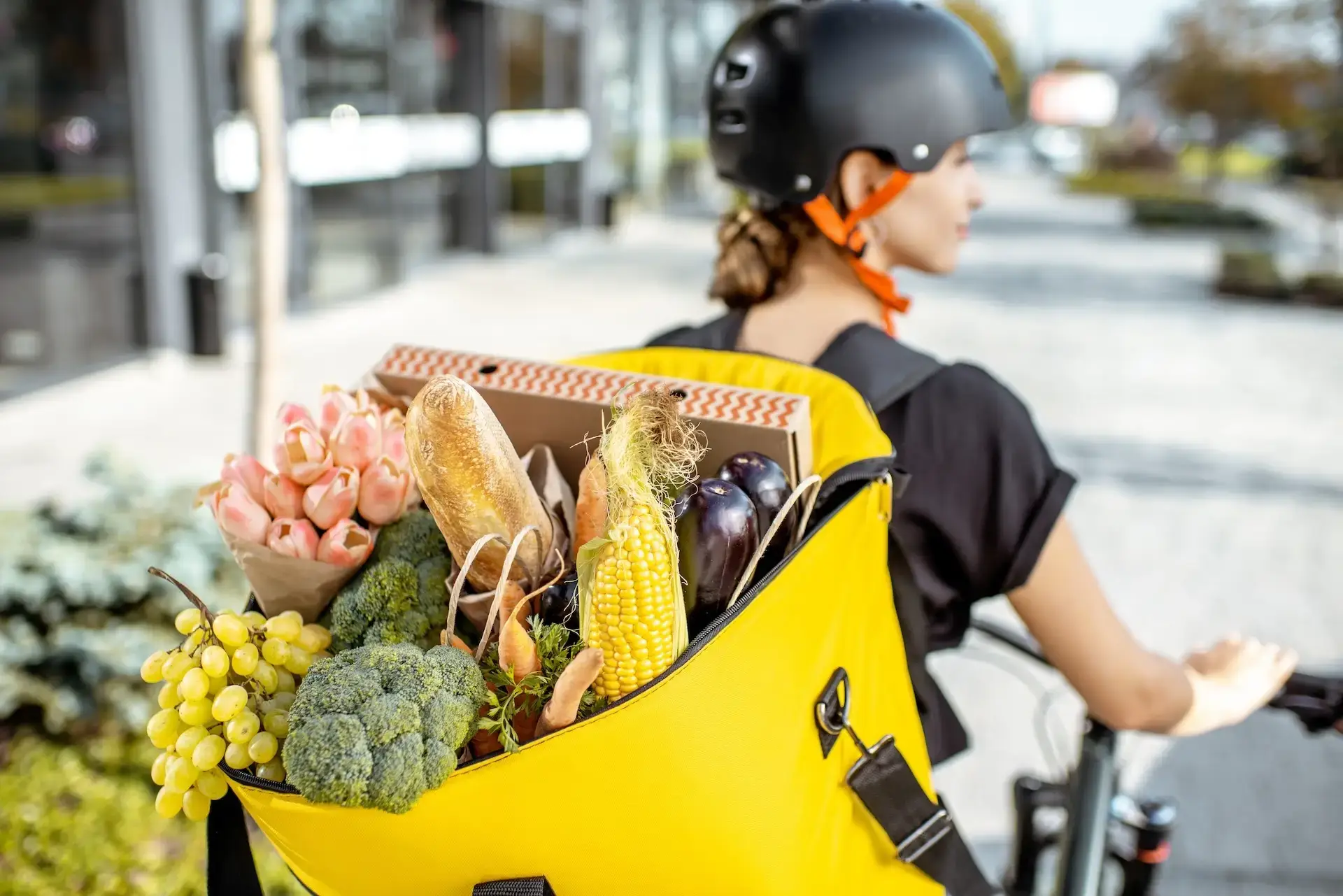
The Lalamove Clone moves loads for businesses and individuals. Whenever your plan also involves carrying meals, groceries or medicines, these four platforms handle those jobs in their own way.

01A food platform with venue listings, menus, an ordering flow and a rider app for each meal leaving a kitchen.
Explore Solution
02A quick-commerce build in which everyday goods from a catalog are picked, packed and delivered within minutes.
Explore Solution

03A grocery marketplace organized around store catalogs, personal shoppers and orders that can be scheduled.
Explore Solution

04A pharmacy platform for ordering and delivering medicines, governed by its own rules on what may be sold.
Explore Solution09Making money
Market Benchmarks
Courier & Parcel Delivery Market Benchmarks - Independent 2025-2026 Data
The revenue models above are ours. The figures below are not. They come from Ofcom, the UPS and FedEx annual reports on Form 10-K and the US Postal Service fiscal 2025 results, reproduced as published. Together they show how large parcel volumes are and what carriers earn per package in the UK and US, so you can test your own delivery pricing against numbers you can check.
4.2bn Parcels Delivered in the UK in 2024-25
Ofcom reports that total measured parcel volumes rose 7.1 percent to 4.2 billion items in 2024-25, and that measured parcel revenues were GBP 13.2 billion, down 0.8 percent in real terms. Real-term average revenue per parcel fell 7.3 percent, from GBP 3.38 to GBP 3.13, so volume grew while the price paid per parcel did not keep pace.
$88.7bn UPS Revenue on 20.8m Packages a Day
UPS reports total revenue of $88.7 billion in 2025 and an average of 20.8 million packages per day, 5.2 billion over the year, in its annual report on Form 10-K. In its US Domestic segment, average revenue per piece rose 7.1 percent to $13.21 while average daily package volume fell 8.6 percent to 17.5 million.
$94.7bn FedEx Revenue in Fiscal 2026
FedEx reports consolidated revenue of $94,720 million for the fiscal year ended 31 May 2026, up 8 percent from $87,926 million in fiscal 2025, in its annual report on Form 10-K. It attributes higher operating income mainly to improved base yields for its package services, and notes its indexed fuel surcharge on Express US Domestic shipments.
$32.6bn Shipping and Packages Revenue at USPS
The US Postal Service reports Shipping and Packages revenue of $32,580 million on 6,837 million pieces in fiscal 2025. Revenue rose $315 million, or 1.0 percent, while volume fell 415 million pieces, or 5.7 percent. Dividing the two reported figures gives about $4.77 of revenue per piece, with USPS Ground Advantage cited as the growth driver.
Ofcom, Post monitoring report: Postal services in the financial year 2024-25, 3 December 2025 - ofcom.org.uk
United Parcel Service, Inc., Annual Report on Form 10-K for the year ended 31 December 2025, filed 17 February 2026 - sec.gov
FedEx Corporation, Annual Report on Form 10-K for the fiscal year ended 31 May 2026, filed 20 July 2026 - sec.gov
United States Postal Service, U.S. Postal Service Reports Fiscal Year 2025 Results, 14 November 2025 - about.usps.com
All figures are the publishers’ own, reproduced as published from a regulator report, annual filings and a results release. The USPS revenue-per-piece figure of about $4.77 is our arithmetic on two reported figures. Carriers define volume and revenue differently and are as each publisher states them. They describe the organizations named, not any platform Miracuves builds, and nothing here is a revenue projection for your business.
Business Value
Earning Model of a Multi-Vehicle Delivery App - Marketability & Prospects
Logistics platforms make money when businesses trust them with goods and drivers trust them with time. What follows aims to make each choice easier and to keep hold of both relationships after they begin.
- 01
Income on Every Trip
Every job earns a fee, of which the operator retains a commission, so revenue follows the volume carried and not the size of an office.
- 02
Several Levers, One Console
Fare rules, priority jobs, merchant billing and promo banners are each toggled on their own from the console. Price each vehicle class first, since van and truck fares carry the margin, then open merchant billing for daily shippers; Miracuves keeps none of the commission you set.
- 03
Customers and Drivers You Own
Customer accounts, drivers, order history and merchant balances stay in a database you control, so the value accumulates for you and not for an aggregator.
- 04
Freedom to Move On
Holding the full source and schema means no one has to approve a later move to a new host, team or direction.
- Job Fee by Vehicle Class
- Distance Charges
- Priority Parcel Surcharges
- Merchant Billing
- Operator Commission
- Promotional Banners
A logistics platform is defended by its supply of drivers and the trust of its customers more than by features.
- 01Drivers who know your zones take time to copy
- 02Merchants with signed handovers have reason to stay
- 03Your record builds from launch day inside your own database
- 04Prompt dispatch and fair pay hold on to drivers
Each of the three cases below changes just one thing, the number of active drivers, and names the lever that matters most at that size. Use them to start a planning discussion; they say nothing certain about any logistics service's earnings.
Early revenue comes from the fee on each job.
A district served by a handful of drivers on local jobs, where each parcel's fee meets the running costs. An illustration of scale and not a forecast.
Job fees plus merchant invoices.
A whole city carved into zones, invoicing shops that dispatch daily, with priority surcharges starting to matter beside the base fee. An illustration of scale and not a forecast.
Many cities, with invoicing and banners both running.
Several cities in one network, with merchant invoices, surcharges and banner slots stacking on top of the fee while the dashboard points to the zones that need drivers next. An illustration of scale and not a forecast.
10Why Miracuves
Why Choose Us
How Miracuves Stacks Up Against Other Lalamove Clone Developers
Fleet founders usually compare four sources: a stock dispatch script, a solo freelancer, an agency, or the proven multi-vehicle base from Miracuves. Ask each candidate to run a van booking in a live demo, show the exclusions in writing and hand over source without encryption; the rows below do that here.
Why Founders Choose Miracuves
- 01
The Driver Side Is Included
Drivers get a dedicated app with requests, navigation and chat, and the admin side can onboard and verify them. Many generic delivery scripts end at the customer screen.
- 02
Proof of Delivery Built In
A verification code travels with each order, and the driver app records a signature and a photo, giving any contested parcel a record to rely on.
- 03
Merchant Billing Included
Merchant accounts, wallets, bulk import, labels and invoices come with the base, and they are the first things business customers ask about.
- 04
Full Source Code Ownership
You receive the whole codebase unencrypted, along with the schema and setup notes, so no one can reprice it or change the terms afterward.
- 05
A Dated Track Record
The log begins with the first release in January 2023 and ends in July 2024, so every change can be read in order.
- 06
Plain Readiness Language
The page keeps base features, add-ons and your own responsibilities apart, among them gateway accounts, hosting and developer accounts with the stores.
How to Choose a Lalamove Clone Development Company
A logistics app development company worth hiring will run a van booking for you live.
What to look for Miracuves
- Multi-vehicle depth Bikes, cars, vans and trucks in one flow, commission by class
- A driver app in the base Jobs, navigation, chat and proof of delivery
- Merchant billing included Wallets, bulk import, labels and per-merchant invoices
- Code you can open The whole codebase unencrypted, with setup notes
- A fixed launch window Six working days, with free work past that if the slip is ours
- Support you can count on 60-day guidance, 6-month fixes and 12-month updates
Walk away from any vendor who
- Treats vans and trucks as an afterthought
- Offers no merchant wallet or invoicing
- Leaves drivers working from phone calls
- Locks the dispatch and driver code behind encryption or an annual license
- Has no dated release log to show
Lalamove Clone Against Generic Scripts and Agencies, Compared
| Criteria | MiracuvesMiracuves Lalamove Clone | Off-the-Shelf Script | Custom Agency Build |
|---|---|---|---|
| Time to Launch | A build that takes six working days | Unknown, or do it yourself | Quoted per project, often several months |
| Source-Code Ownership | Complete, unencrypted | Often partial or locked | Usually yes |
| Logistics Depth | Vehicle classes, tracker, code, proof of delivery and merchant billing | An order form and little else | As deep as the budget allows |
| Driver Tools | A driver app covering jobs, maps and messaging | Seldom included | Developed on request |
| Payments & Wallets | Razorpay, wallets and cash on delivery | Depends on the script | Integrated case by case |
| Admin & Reports | A zone dashboard with dispatch and reports | Basic or absent | Custom-built for an additional fee |
| Security & Compliance | Separate role logins, card data kept at the gateway for user data security, limits stated openly | Bare minimum | Differs from vendor to vendor |
| Cost vs Speed vs Quality | A fixed price, fast delivery, a tested base | Low price, high risk | High price, slow delivery |
| Ongoing Support & Updates | 60 days guidance, 6 months bug fixes, 12 months updates | Rarely on offer | Set by the contract |
Hardly any route to a logistics platform comes through a first busy month untouched. The rows above show where each one gives way.
Speak With Our TeamChangelog
Fleet Delivery Platform Release Log - Dates & Updates
A dated record of changes to the web platform and both apps, newest first. The wording was tidied, and every entry is about this logistics product.
| Release date | Count | Details |
|---|---|---|
| 03 July 2024 | 17 updates | Web platform Repaired wallet problems in the parcel store Repaired an error on the parcel index Repaired 500 errors that appeared when the language was switched Repaired a white-screen error on the parcel logs page Repaired a missing bank name field on the merchant account Removed an unwanted $ sign from the merchant dashboard and the merchant view Repaired errors coming from the Twilio SMS API Repaired a registration bug Made the invoice system run more smoothly Put the invoice total into the Excel export Cut the parcel tracking id down in length Added per-merchant invoice generation Added invoice selection under merchant payments, which marks the invoice as paid Added cron job setup information to General Settings Added a design option for label print size Added parcel creation from a wallet balance Mobile apps Repaired parcel status updates that failed in the delivery apps |
| 28 Oct 2023 | 16 updates | Web platform Repaired an installation problem Repaired the parcel bulk modal Repaired the bank list on the merchant payment account Repaired language switching Brought Google Maps to the Parcel, Branch and Deliveryman screens Made the Google Maps key configurable Introduced a parcel priority system Marked priority parcels on the delivery man map Let admins follow an assigned delivery man live Introduced an admin wallet system Introduced a merchant wallet system Introduced wallet activation merchant by merchant Introduced bulk import from Google Maps addresses Mobile apps Introduced proof of delivery on the customer side, using an electronic signature and a photo upload Introduced a route-ordered display of the parcels allocated to a delivery man Allowed a delivery man to turn location on from the phone |
| 20 Jun 2023 | 16 updates | Web platform Introduced French, Spanish and Chinese Introduced country symbols Introduced printing of several labels together for the admin and merchant panels Introduced status updates for support: Pending, Processing, Resolved, Closed Introduced a front-end template Introduced theme color options for the front end, set in the admin panel Introduced the API integration behind the mobile app Mobile apps Introduced balance details Introduced clearable parcels Introduced parcel details Introduced the merchant account list Introduced the invoice list and invoice details Introduced a list of parcel statuses and a list of parcels by status Introduced analytics for parcels Introduced payment request creation and a payment request list Introduced statements |
| 16 April 2023 | 7 updates | Fixed An alerting problem A problem in the index file A push notification problem Added A system for add-ons Razorpay as a payment gateway Nexmo as an SMS gateway Twilio as an SMS gateway |
| 21 Feb 2023 | 1 update | Fixed Assorted bug fixes |
| 1 Jan 2023 | 1 update | Release The first release |
Let's build together
Let's turn your logistics idea into a platform that dispatches.
Reserve a free consultation and walk away with a firm timeline and straight answers. A rushed sale is never the goal; a client who trusts us is.
- First reply in under 2 hours
- Free consultation call
- No long-term lock-in
- You own all the source code
11Learn more
From the Blog
Lalamove Clone App: Latest Reading & Guides
New reading on how an on-demand logistics app is put together, why founders choose a ready-made base over custom development and what the platform costs.


About the product6 questions
01What exactly is the Lalamove Clone?
It is a finished intra-city logistics platform from Miracuves. Customers and merchants book a pickup and a drop, drivers on bikes, cars, vans or trucks carry out the job, and the operator manages zones, fares and dispatch from the admin panel. The package contains a customer website and app, a driver app and the admin panel, white-labeled for your brand.
02Is it legal to launch an app like Lalamove?
Selling and building software with logistics features is lawful. The Miracuves Lalamove Clone contains no code, design or content taken from Lalamove, and it goes live under your brand with your own terms and commercial rules. Keep the Lalamove name and logo out of your branding, and ask a local adviser about courier licensing, prohibited goods and driver rules in every market you serve. Miracuves does not give legal advice.
03How far can I customize the app to my brand?
Rebranding comes with delivery: we apply your logo, icons and color scheme to the web platform and both apps, then deploy them. With the full unencrypted source in your hands, your engineers or ours can adjust fares, flows, screens and features at any time. Work that goes beyond the base is scoped and priced in writing before it begins.
04Does the Lalamove Clone run on Android and iOS?
Yes, on both. Flutter powers the customer app and the driver app for Android and iOS. The website opens in any browser, and the admin console runs on the web as well. Apps go out through your own developer accounts, and the Apple and Google review time falls outside our 6-day build.
05What does the purchase price cover?
For one fixed price of $2,499 you receive a customer website and app, a driver app, an admin panel and the entire source code, free of encryption. Rebranding, deployment and help with publishing the apps are part of it. Support runs as three overlapping periods: 60 days of platform guidance, 6 months of priority bug fixes and 12 months of updates. Four optional add-ons, covering routing, AR guidance, load sensors and lockers, are quoted on their own.
06Why choose Miracuves to build your Lalamove clone?
We have built ready-made platforms since 2010 and completed 9,000+ projects for 6,000+ clients. This clone comes with a demo you can open right now, a release log with dates from January 2023 to July 2024, the full source and one fixed price, and it goes live in 6 working days. Messages are answered within 2 hours, Monday through Saturday, from 10:00 to 19:00 IST.
Booking, vehicles & proof7 questions
07How does a customer place a delivery order?
Registration and login come first, then the home screen asks what is being sent. The customer fills in both parties, reads the distance and fee, chooses who pays, picks the vehicle and confirms. The order stays pending until a driver accepts, and a tracker follows it from there.
08Which vehicle types can customers choose from?
A vehicle step comes after the delivery details. Bikes, motorcycles, cars, vans and trucks are covered, and the product FAQ also mentions bicycles. Rates can be tied to the vehicle class, the distance or a promotion from the admin panel.
09Can customers follow a delivery live?
They can. A five-stage tracker, drawn over a map, runs from Order Placed to Delivered and states plainly when no driver has been assigned. Once someone takes the job it can be followed, and alerts are sent on confirmation, assignment and completion.
10Which payment methods work?
The product lists credit and debit cards, digital wallets and cash on delivery, and the sender can choose whether sender or receiver settles the bill. A cash-on-delivery order appears in the demo, and the release log lists Razorpay as an added gateway. The gateways you can actually use depend on the accounts you link.
11Is advance scheduling possible?
Booking is designed around requests that go out at once. A Save for later choice appears on the request screen as well. Should you need pickups in fixed time slots, mention it before launch and we will write a scope for it, so nothing is left to assumption.
12What if a parcel arrives damaged or never arrives?
A customer can open a support ticket, and each ticket carries a status: Pending, Processing, Resolved or Closed. Paying out for damaged or lost goods is your decision; the software keeps a record of the case but offers no insurance on the parcel.
13How does proof of delivery work?
A verification code is generated for each order, so goods reach the intended person and the job closes with a check at the door. According to the release log, proof of delivery also supports an electronic signature and a photo, and both are kept on the order.
Drivers & merchants6 questions
14How does someone become a driver?
Drivers register in the delivery app and supply ID proof, vehicle registration and insurance details. An admin then reviews and approves them in the admin panel before any job is taken. How strict that vetting is depends on your own onboarding policy.
15Can drivers pick which jobs to take?
Yes. Every incoming request can be accepted or rejected by the driver. Accepted jobs make up a route-ordered list of assigned parcels, and the app offers navigation and a chat thread with the customer.
16How are drivers paid?
Fare and commission rules set by the operator in the admin panel determine what a driver earns. Balance details, payment requests and statements appear in the apps, and payout frequency and destination account are the operator's call.
17Do customers and drivers rate each other?
Yes. Ratings and feedback flow both ways between customer and driver, letting the operator keep a service-quality record to act on.
18Can businesses ship in bulk through a merchant account?
They can. The release log lists merchant accounts with a dashboard of their own, merchant wallets, parcels created from a wallet balance, bulk import of Google Maps addresses and printing of many labels together. Merchant accounts are shown on a guided call, not through the public demo logins.
19How do merchant wallets and invoices work?
Wallets exist for both merchants and the admin, and invoices are generated merchant by merchant. Selecting an invoice in merchant payments marks it as paid, and invoice totals flow into the Excel export. The mobile app also shows payment requests and statements.
Admin, rollout & ownership15 questions
20What can the admin panel do?
The opening dashboard reports parcels by status (total, unassigned, on the road, delivered, failed) and adds a gross sale chart. Other sections handle order intake and dispatch, delivery fees, categories of parcel, banners and promotions, user and delivery man lists, transaction reports, general settings, languages and support tickets.
21Can one admin panel run several cities or regions?
A zone filter on the parcel dashboard narrows the view, and an All Zones option covers the full operation. Fares and commission rules sit in the admin panel; if every city needs separate pricing, agree that with us before planning the rollout.
22How are driver commission rates set?
You define the commission structure in the admin panel. Rates may vary with vehicle type, delivery distance or a promotion, and on the dashboard the sales chart separates the admin's commission from the delivery commission.
23Can dispatchers watch live deliveries?
Yes. Counters on the dashboard show unassigned orders and parcels on the road, Dispatch Management follows every job, and admins can see a delivery man being assigned as it happens. The delivery man map flags priority parcels.
24Can third-party services such as gateways or analytics tools be connected?
The product already talks to Firebase, Google Maps, Twilio, translation and payment gateway APIs, with Razorpay, Nexmo and Twilio SMS added according to the release log. Any other gateway, analytics or support tool means integration work, which we scope and quote separately, using accounts and keys that belong to you.
25Which things do you need from me prior to launch?
You need hosting and a domain, developer accounts with Apple and Google, your brand assets and a payment gateway account with KYC completed, plus your own Firebase, SMS and Google Maps keys and whatever policies your operation requires. We take care of rebranding and deployment.
26Which security tasks are still open before launch?
The base keeps three logins apart, leaves card details with your payment gateway and stores proof of delivery. Before launch we plan key rotation, an intrusion test, a recovery drill and a pass over your payment and SMS settings, while you decide driver vetting rules and how long data is kept.
27What would the first revenue realistically come from?
A logistics operator usually earns first from the fee on a job, since no other product has to exist: one paid delivery is enough. Merchant billing follows, when shops that dispatch daily have joined and a billing cycle is worth running, and priority surcharges and promotional banners come later, once volume gives them something to attach to. Reselling the white-label deployment or licensing regions to other operators depends on your own commercial arrangements and is agreed separately, not built in.
28How defensible is a multi-vehicle logistics platform?
A logistics platform is defended by its supply of drivers and the trust of its customers more than by features. A bench of dependable drivers who know your zones, and merchants with a history of signed handovers, take time to copy. The platform helps by beginning that record on launch day, keeping it in your own database and attaching a code and a proof to every order. Quick dispatch and fair driver earnings form the second moat, since drivers gravitate to steady work.
29Is a ready-made Lalamove clone better than custom development?
For a multi-vehicle fleet, mostly yes. Vehicle classes, dispatch, signed handover, merchant wallets and invoices already run in the demo, so you can take paid jobs 6 working days after the brief. A logistics platform coded from nothing needs an agreed estimate and about 2-8 weeks before the first van moves, which is why most operators reserve custom spend for local rules.
30How long until my Lalamove clone is live on the App Store and Google Play?
We rebrand, deploy and prepare the sender and driver Flutter apps within 6 working days. Submission then happens through the Apple and Google accounts held by your company, and approval time is decided by each store, not by us. Customers can already book through the responsive website while the listings wait.
31What is the business model of an app like Lalamove?
An app like Lalamove earns a margin on each job, priced by vehicle class, distance and add-ons such as priority. The operator keeps a commission before paying the driver, while merchants who ship daily are billed through wallets and invoices. Promotional banners and peak surcharges add further income, each switched on in the admin panel.
32What is the step-by-step process to launch my Lalamove clone?
First, book a test job in the demo as sender and as driver. Second, send your brand files, zones, vehicle classes, fares and gateway. Third, Miracuves brands the site, the two apps and the console and installs them on your hosting. Fourth, the apps are filed from your store accounts. Our part takes 6 working days; approval sits with the stores.
33Which businesses can use a Lalamove clone?
Any business that carries goods between two points can use it. Last-mile services take bookings all day, small-freight operators run vans and trucks, and online sellers or retail chains add a delivery arm. Furniture and appliance sellers get a signed drop, neighborhood grocers offer same-day runs, and franchise groups can give each branch its own zone.
34What sets a Lalamove-style courier app apart from traditional couriers?
It works on demand inside the city. Customers book a pickup and drop through the app or website, choose a bike, car, van or truck, and follow a five-stage tracker while a driver accepts and completes the job. A verification code, and optionally a signature or photo, closes each delivery, and you set the fares.
Further Reading for Founders Building a Lalamove-Style Fleet App
A sector overview, hands-on build support and blog explainers.
Logistics app development
View the service→GuideDeveloper build guide
Architecture, data model, dispatch logic and deployment for a logistics app, taken step by step.
Open the guide→Business model
How an on-demand logistics business is organized and where the income originates.
Open the guide→GuideWhite-Label Lalamove App Security: Risks, Compliance & Safety in 2026
Read the guide→Disclaimer
Miracuves is an independent software development company. We are not affiliated with, connected to, sponsored by, or endorsed by Lalamove.
Read our full Legal Notice & Disclaimer →“Lalamove Clone” is used descriptively. It is how the software industry refers to building a platform with functionality similar to Lalamove, and how clients search for it.
The entire design and codebase is built by our own team. The product contains no code, design, graphics, or content originating from the Lalamove website or applications.
Lalamove and all other third-party names and marks are the property of their respective owners, referenced here solely to describe the category of software offered.
















