White Label Home Services App - Bookings & Pros Platform You Own
Miracuves' ready-made, white-label home services app is yours outright: Flutter apps for Android and iOS serving customers, provider companies and field crews, plus four web panels, the customer website among them, and unencrypted source, rebranded and running in six working days.
Customers search a category grid, open a service page showing its price and reviews, pick a provider by rating or rebook one they trust, and the booking shows Pending until that provider accepts. The in-app marketplace, service packages, virtual consultations and skill-sharing workshops are modules quoted apart. Trade licenses and insurance stay with you and your providers. A different payout cycle or extra console reports are priced one by one in writing, with delivery typically inside 2-8 weeks.
Launch in 6 Days with
- Source Code
- Customer Website
- 3 Mobile Apps
- Provider Panel
- Serviceman Panel
- Admin Panel
StackFlutter 3.27 · TypeScript · Bootstrap · PHP 8.2 · MySQL
Recent booking activity
- Provider accepted the slotBookings
- OTP matched when the job beganVisits
- Out-of-zone provider blockedZones
- Booking still has no providerBookings
- Job passed to a staff memberTeam
- Wallet top-up arrivedWallet
- Campaign discount usedOffers
- Withdrawal approved for a providerPayouts
- Provider accepted the slotBookings
- OTP matched when the job beganVisits
- Out-of-zone provider blockedZones
- Booking still has no providerBookings
- Job passed to a staff memberTeam
- Wallet top-up arrivedWallet
- Campaign discount usedOffers
- Withdrawal approved for a providerPayouts

- 4Logins, Each Scopedcustomer, provider, serviceman and admin
- 3Alert Channels You SwitchSMS by Twilio, push by Firebase and email
- 0%Revenue Share With Miracuvesno royalty and no license renewal on any booking
- 4Earnings Tilestotal earning, commission earning, fee earning and provider count
- 6Days to Launchand if the delay is ours, we keep going free
- $2,799Paid Once, Not Rentedsource code yours, no per-seat fee, no monthly rental
Live in six working days, or we keep working free until you launch. Every build carries 60 days guidance, 6 months bug fixes and 12 months updates.Verify every figure
No Provider Works Unvetted
A professional uploads ID and supporting documents and waits in an onboarding queue until the admin approves, and the account can still be suspended once live.
Built for Servica on This Base
Servica's multi-service platform went live on this base in six working days; its catalog, provider network, pricing model, gateways and branding were the five parts written for it.
Gateways in Your Business Name
Customers pay through gateway accounts registered to you, several side by side; card details stay with that gateway while the platform keeps a reference, and the wallet also takes refunds and rewards.
01Demo and app screens
Hands-On Trial
Try the Demo: One App for Each Role, Plus Web and Admin Panels
Step into each role in turn. Miracuves gives each role its own app login in this demo, and the final card opens the web panels. Pick a service, set a time, read the booking summary and check the wallet.
Home Service Booking App - Customer Side
This is the start of every job. Browse categories, open a service, enter a time and address, confirm, pay and follow the status.
- 1Start at the app portal and pick a device
- 2Sign in with the customer login on this card
- 3Check out: Categories, Booking, Wallet, Offers
user@demo.com | User_321Service Provider App - Tools for the Business
This is where the business works. Register, get approved, list services, accept bookings, chat with customers and track incoming work.
- 1Open the app portal and pick a device
- 2Sign in with the provider login on this card
- 3Check out: Bookings, Services, Chat, Earnings
provider@demo.com | Provider_321Serviceman App - For Staff on the Road
This is where the job gets done. Mark yourself available, open assigned jobs, read the notes the customer left and follow earnings and tips.
- 1Go to the app portal and select a device
- 2Sign in with the serviceman login on this card
- 3Check out: Jobs, Schedule, Availability, Earnings
serviceman@demo.com | Serviceman_321
Customer Site & Operator Console
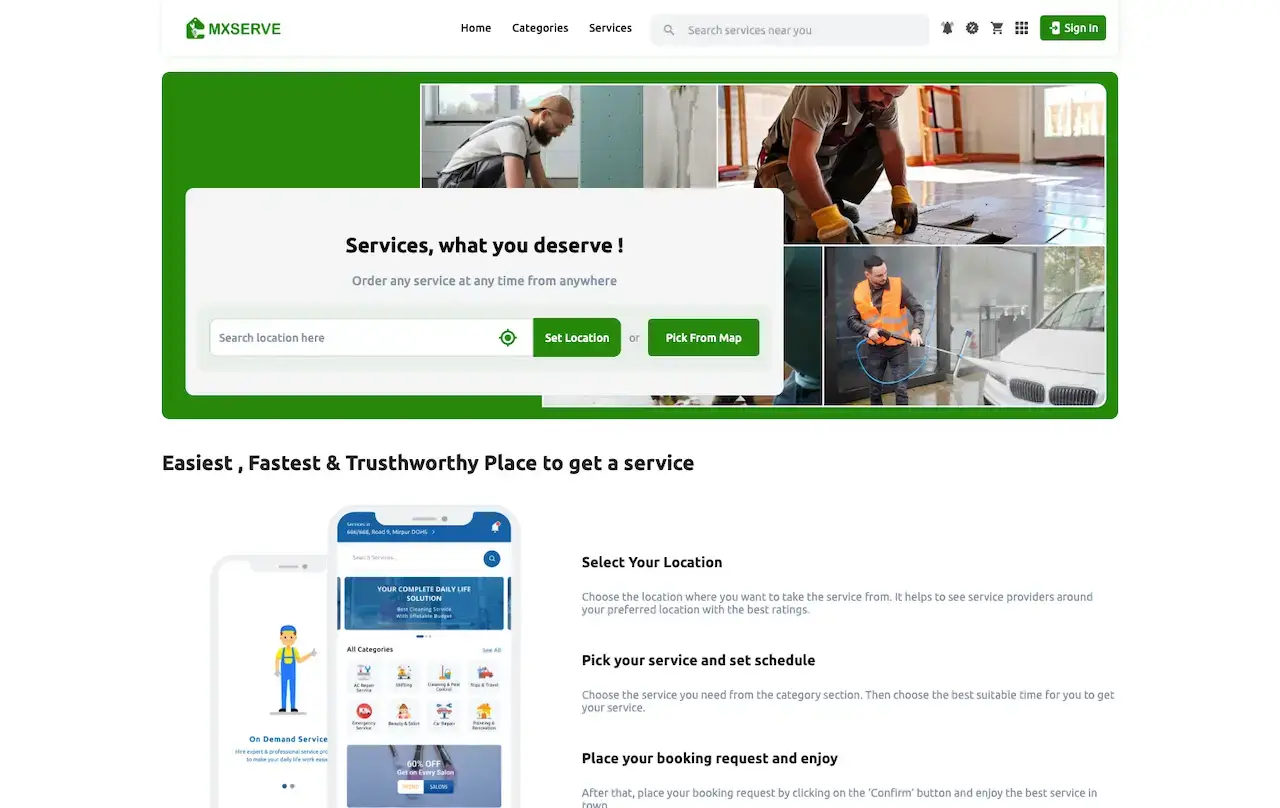
The customer website is responsive, with location search and service categories. Beside it sits the operator console for earnings, bookings, providers, offers and zones.
- 1Open the demo website in its own browser tab first
- 2Scroll through the customer site, then go to the admin login
- 3Check out: Earnings, Providers, Offers, Zones
shared on a guided callWatch It Run
Video Tour: Booking, Provider Work and the Admin Console of the Platform
Watch the short tour first. Then book a call and we will walk the same screens again against your own plan: the services you sell, your zones, your commission rate and the date you want to launch.
Book a guided walkthrough.Screens, Step by Step
Home Service Booking App Screens - From First Launch to the Admin Dashboard & Website
Actual screens, shown as a user meets them: the customer app from launch to wallet, the admin dashboard where earnings and bookings are tracked, and the customer website.
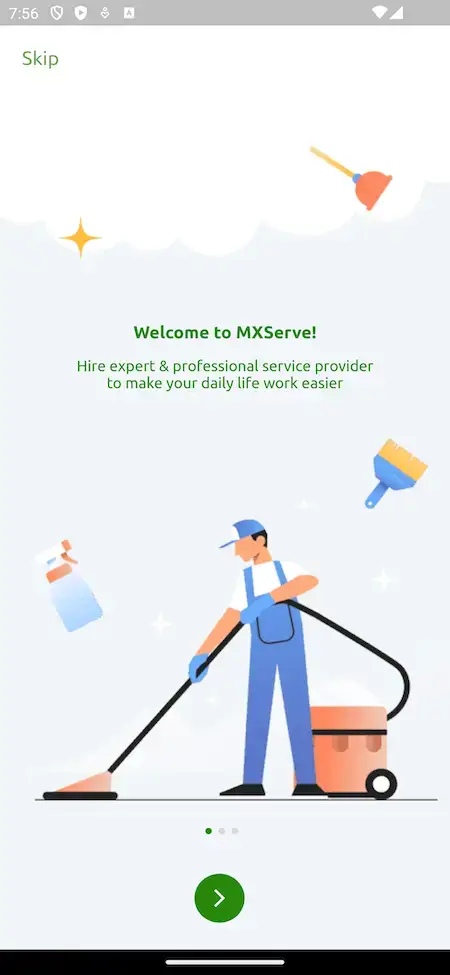
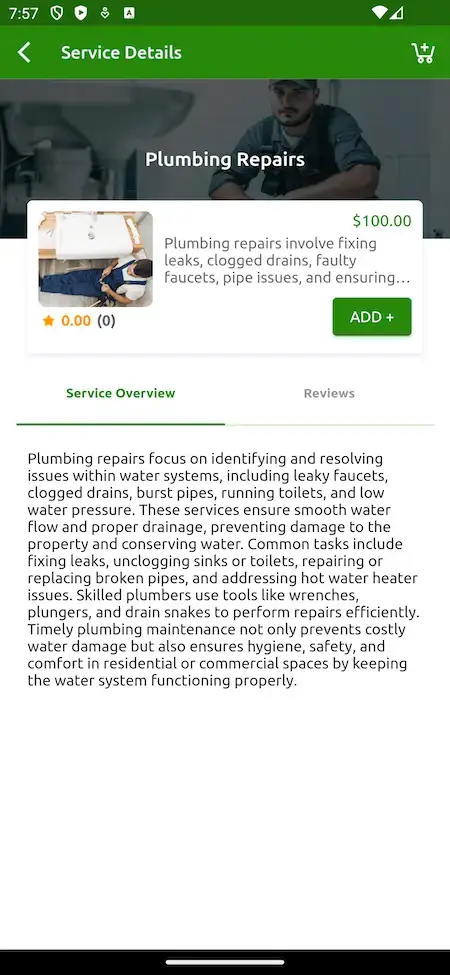
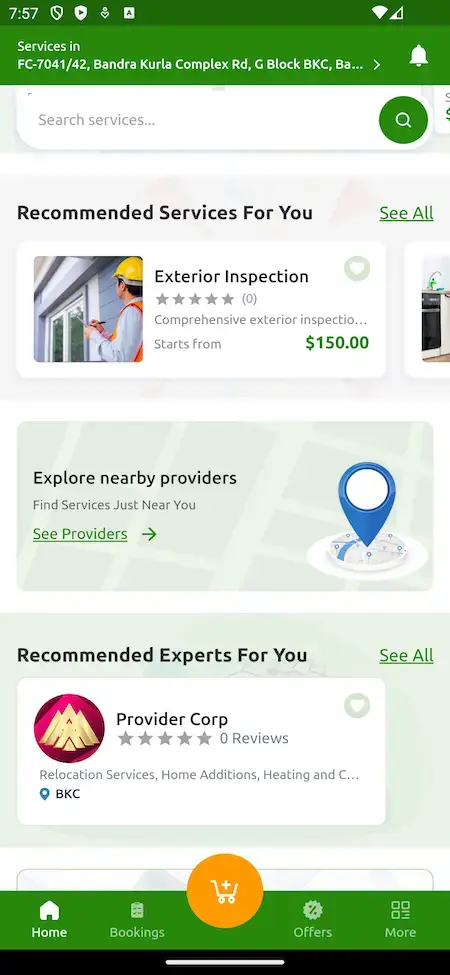
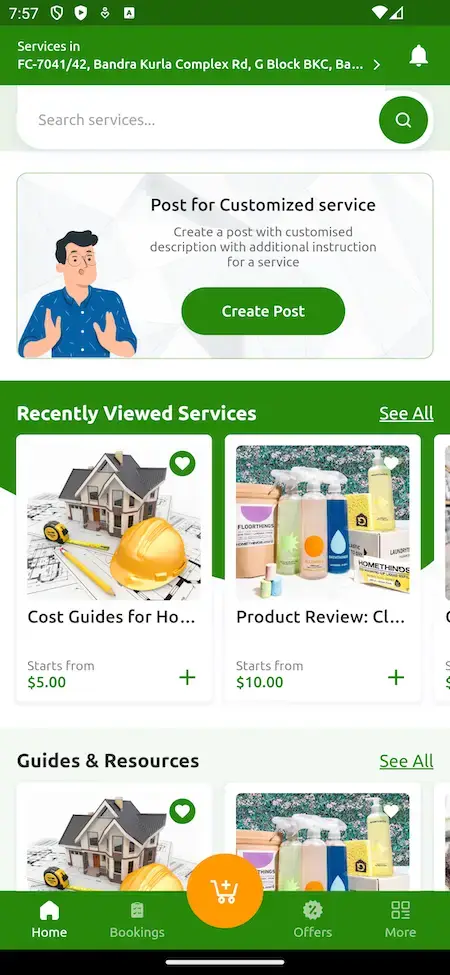
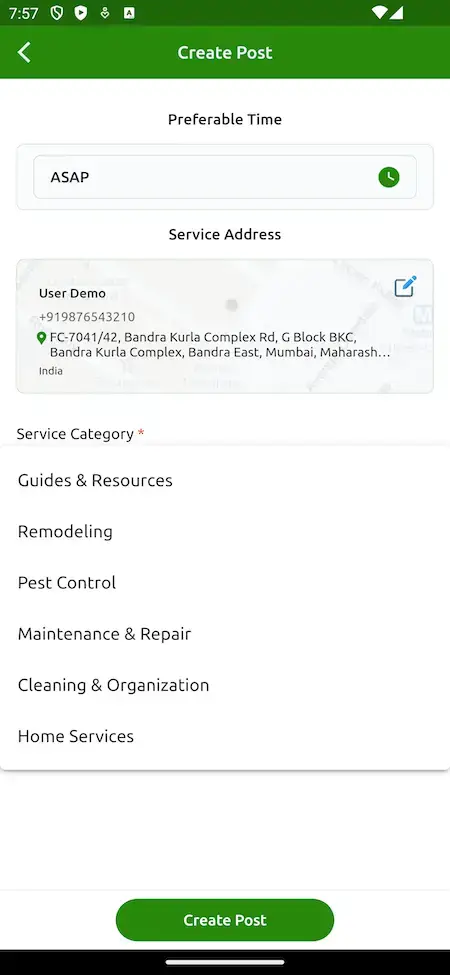
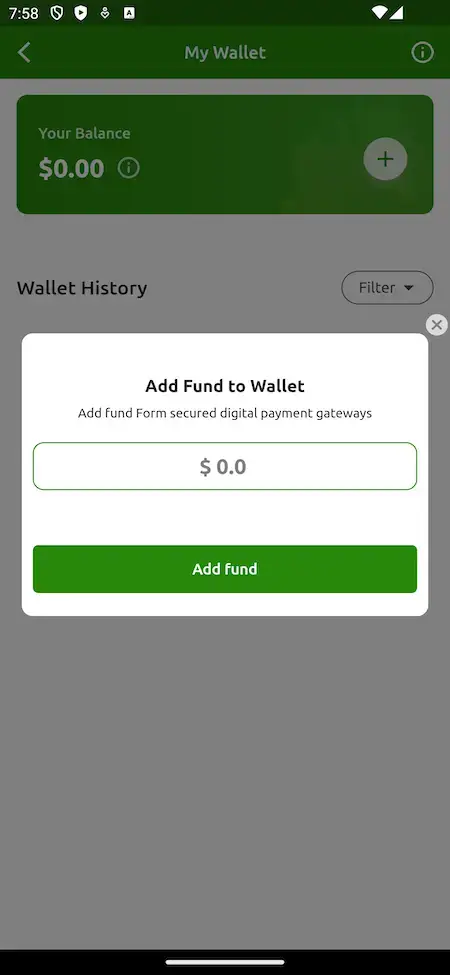
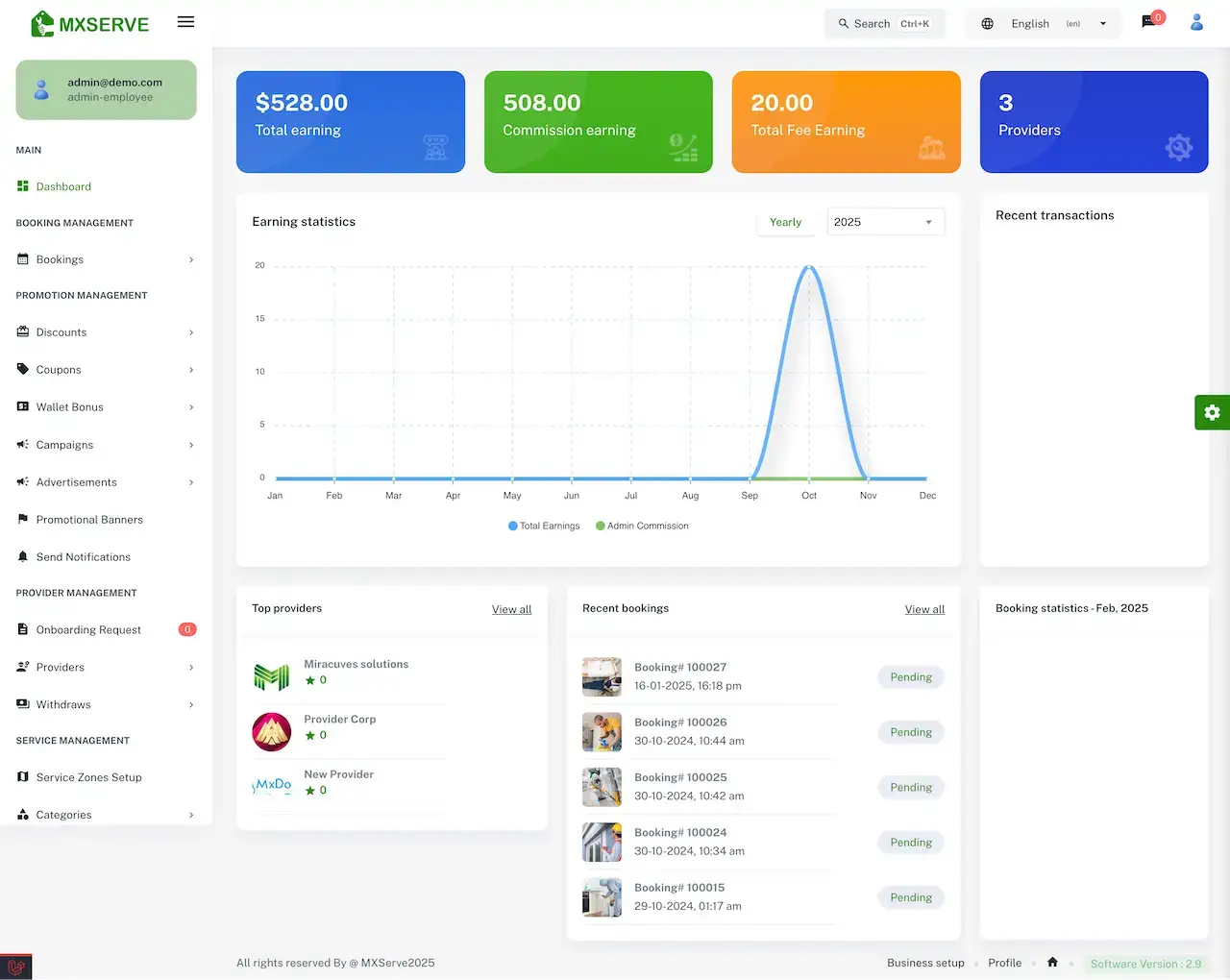


Trace one customer from the welcome screen, across the category grid, into a service page and on to a booking summary and wallet balance. Miracuves then shows the other side in the admin dashboard tab, where an operator watches that booking activity arrive.
02Proof
Client Voices
Client Reviews - Founders Speak in Their Own Words
What clients say about building on Miracuves bases. The first two come from services platforms built on this product family; the rest come from other industries and appear exactly as their authors wrote them.
“We run several service types off one platform. The dispatch and booking core already supported that, so the work was our service definitions and pricing. Delivered under a month.”
“Provider onboarding, quoting, booking and payments came off the shelf. We added our service categories and our vetting rules. Both sides of the marketplace were live inside a month.”
“Every HMS I tried was built for general physicians, with no lesion mapping, no before/after tracking, and no procedure-based billing. Their MXHealth base gave us the patient app, doctor app, EMR and video consult out of the box. Front-desk time on scheduling and follow-ups is down ~70%, and we went fully digital in 9 months, where a fully custom job would have been 18.”
“Turo is the obvious reference, but the Caribbean specifics, from different insurance norms to different payment rails, meant we needed a real partner, not just a clone. Miracuves’s MXCar base covered the listing, the trip flow, and the host payouts. We launched in 6 working days and are live in three islands.”
“The team was running it on a dispatcher and a Google Sheet, and we needed a real platform quickly, because we were about to onboard a major retail client. Miracuves’s Delivery Genie base gave us the rider app, the dispatch console, and live tracking. We launched in 6 weeks and cleared 4x the previous order volume in the first month.”
“We were running it on phone calls and a paper calendar, and we were losing bookings to bigger OTAs. Miracuves’s GetmyBoat Clone base gave us the calendar, the booking flow, and the payment engine. Online bookings are up roughly 70% in the first six months, and the ops team finally has a live view of the fleet.”
“Building a compliant telehealth stack from scratch in three markets would have been a year-plus effort. Miracuves’s MXHealth base covered the patient and doctor apps, video consult, e-prescription and the pharmacy integrations. We launched in our first market in 9 weeks and rolled out to two more in the following six months.”
“We were juggling spreadsheets, a third-party GPS provider, and a phone. We needed a single operations console. Miracuves’s MXLogistics base covered the trip lifecycle, the driver app, and the customer tracking page. We’ve cut operations admin time by about 40%.”
Built on This Base
Home Services Case Study - Servica Multi-Service Platform
A multi-service platform that launched on the same base as this product, summarized from its published case study. That page covers architecture and contract terms and does not give client outcome numbers.
Servica wanted one platform that could host several kinds of service. Miracuves started from the MXServe base behind this page, kept everything that already worked and spent its time on the five parts that made the product Servica's own.

- Several kinds of service had to live on one platform, with no separate build for each
- A stranger visits a private home, so the platform had to lean on vetting, ratings and evidence that the job was done
- Every visit needs a named person with a route and a checklist, which makes dispatch as important as booking
- Go live with a multi-service marketplace on a base already proven in production
- Spend the effort on the parts that make the product theirs: services, providers and pricing
- Hold the source code in their own account
- Four applications and consoles, each with its own permissions and release path
- Five parts written for the client: the catalogue, the provider network, the pricing model, the gateways and the branding
- 20 of the 25 platform modules reused without change
- The client receives the full code inside an account they own
- The ready-made base brought the build down to 6 working days
“We run several service types off one platform. The dispatch and booking core already supported that, so the work was our service definitions and pricing. Delivered under a month.”Servica Team · Founding team, Servica
03The platform
The Basics
White Label Home Services App - What Customers, Pros and Operators Get
A white label home services app is booking software for home visits that you run under your own brand and own outright, with customer, provider and admin tools included. Customers pick a time, providers accept, staff visit, and you track earnings in one admin panel.
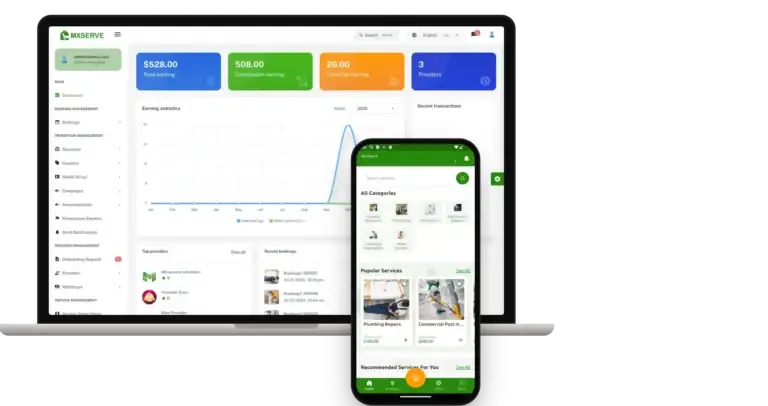
More Than a Booking Form
The value sits around the booking: approval for providers, a wallet, service zones, chat both before and after, offers, and an admin console that records every payout.
Source You Can Read
You receive the whole source unencrypted, so your developers can change any flow or screen as you grow, with no per-seat charge.
Add-Ons Carry a Label
Service bundles, virtual consultations, a skill-sharing space and the in-app shop are paid add-ons, priced separately. Each is labeled as such where it appears, and none is counted in the base build.
iOS, Android & Web
Home Services Marketplace Software, Explained
A home services company lives or dies by the booking. Is the time right for the customer, does the correct person show up, does the money reach the right account? These mechanics already work out of the box. You bring the category list and the prices.

- 01Categories, search and popular services
- 02Every booking carries a time and an address
- 03Choose providers by rating, review and availability
- 04Wallet, coupons and several payment gateways
- 05An admin console for provider approval and service zones
In the box: Flutter apps for customers, providers and servicemen, plus four web surfaces, namely the customer website and the admin, provider and serviceman panels. Every line of source code is handed over.
Full Feature List
White Label Home Services App Features - Slots, OTP, Zones, Teams, Wallet & Admin
Every home service feature Miracuves lists below can be confirmed in the demo, in the admin console or in the release history. Whatever needs an extra module appears later under add-ons.
Service Categories & Search
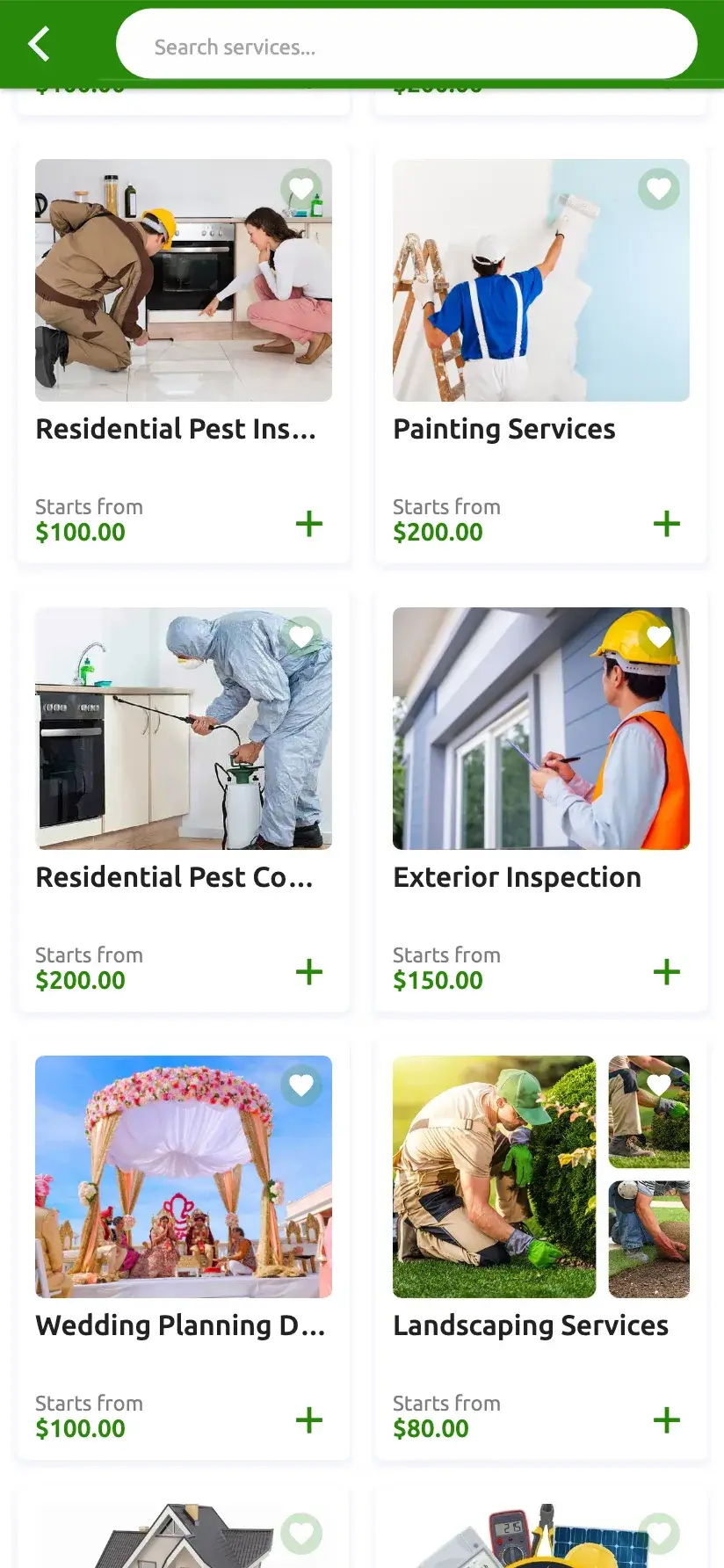
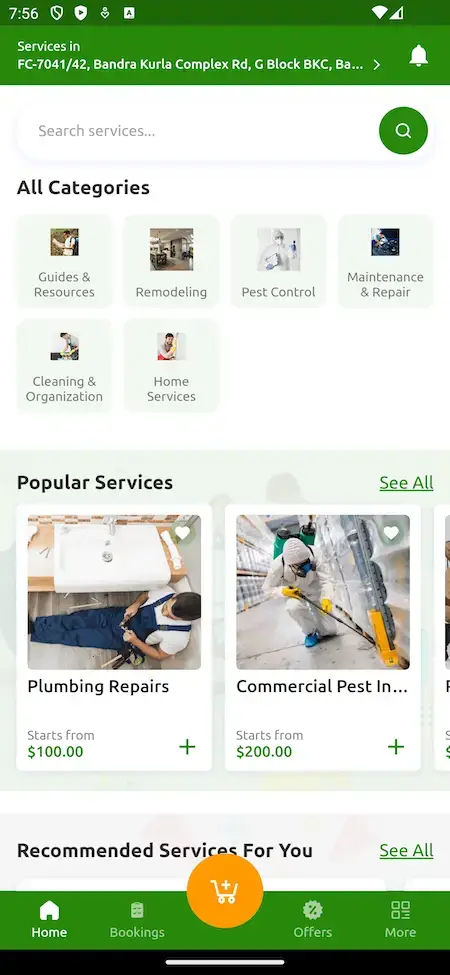
A search bar tops the customer home screen. Under it sit a grid of all categories and rows of popular and recommended services, each priced from a starting amount.
- Categories form a grid at the top of the home screen
- One search box finds services and providers
- Popular services show starting prices
- Recommended and recently viewed services get their own rows
- Guides and resources sit between rows of services
Service Pages & Provider Choice
A service page carries the price, an ADD button, and separate overview and reviews tabs. Customers pick a provider by rating or rebook one they already trust.
- Every service has Overview and Reviews tabs
- Each service shows a price and an ADD button
- Providers can be chosen on rating, review or who is free
- Rebook a provider you prefer
- Provider listings display ratings
- Each category holds its own sub-categories
- Reviews left by past customers show to new ones
Scheduled Service Slots
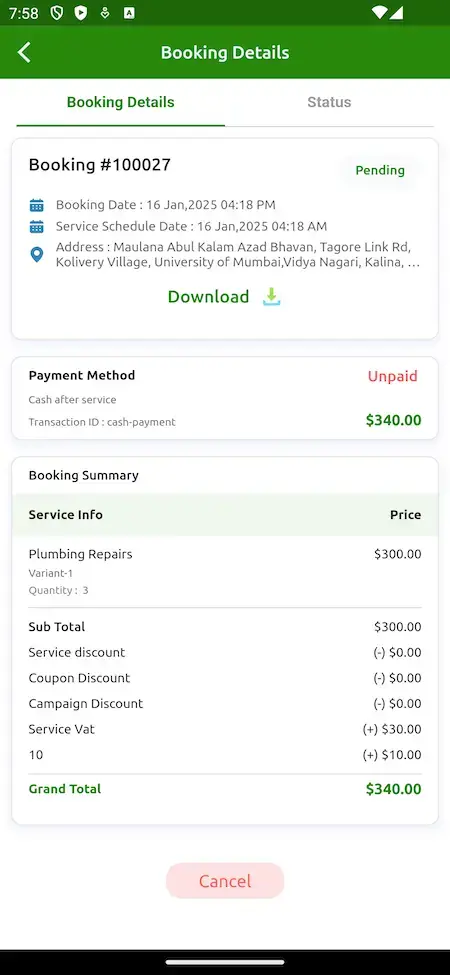
The customer picks a day and hour for the visit, or requests service immediately, and a provider accepts it. The booking page shows the booking number, its status and the scheduled date.
- A preferred-time field that includes ASAP
- The booking page lists the date and the address
- Book immediately or in advance
- A booking shows Pending until a provider accepts it
- Upcoming and past bookings live in the account
- Current bookings appear on the website home page
- Each customer has a booking history
OTP Visit Confirmation
A one-time code is attached to every booking, and customers can read it on the web. Checking the job against that code puts both the start and the end of a visit on record.
- Customers can read the booking OTP on the web
- Twilio SMS delivers the OTP messages
- Photos or videos from start and finish appear on the web
- First added in version 2.7.0
- The same SMS gateway sends booking and review texts
Service Area Control & Radius
You create service zones in the admin panel and set the distance in miles that a provider may cover, so each professional works inside an approved area.
- Zone setup lives in the admin menu
- Provider radius measured in miles
- Nearby Providers as a featured-row option
- The saved location shows at the top of the app
- GPS finds both customers and providers
- Banners can go inside featured sections
- Zones can grow without rebuilding anything
Staff Dispatch & Serviceman App
The provider business accepts the booking and its own staff do the visit. Servicemen work in a separate app that holds assigned jobs, an availability toggle and notes from the customer.
- Switch between available and off duty
- One list holds assigned jobs and scheduled tasks
- Job details appear next to customer notes
- Place phone calls from the app to settle details
- A history of completed, running and canceled jobs
- Earnings, tips and the commission taken off
- The web has a serviceman panel too
Provider Signup & Approval
Professionals register in the provider app or panel and submit documents. The admin approves each one before any of their services go live.
- Registration with ID and supporting documents
- An onboarding queue that shows pending requests
- The admin can suspend accounts afterward
- Bulk-load providers from a CSV file
- Bulk-load services from a CSV file
- Duplicate a service, provider or promo code
- Each business gets its own provider panel
Wallet Payments, Refunds & Gateways
Each customer has an in-app wallet with a balance and a history, topped up through an Add Fund form. Customers may also pay once the service is finished.
- Wallet balance plus a history you can filter
- An Add Fund form adds money to the wallet
- The wallet can also receive refunds and rewards
- Cash after service is one payment option
- Several gateways can run at the same time
- Pay through Flutterwave or Paystack
- The admin sets wallet bonuses
Booking Summary & Charges
The booking summary itemizes every charge up to a grand total. Should a job overrun, the provider adds extra charges when the booking closes.
- Subtotal with service and coupon discounts
- Campaign discount and service VAT on their own lines
- Grand total marked as paid or unpaid
- A Download button in booking details
- Extra charges can be added at booking end
- Released in version 3.0.0
- Each booking displays its payment method
Chat & Message Controls
Customers can write to a provider before booking and keep talking afterward, and the admin chooses which SMS, push and email messages go out.
- Ask a provider questions before booking
- Individual switches for chat before and after booking
- From the website, message providers or the admin in chat
- Call from the app to discuss job details
- Settings for SMS, push and email delivery
- Ready-made email templates you can edit
- One admin page manages chat settings
Commission & Withdrawals
You set the commission and the dashboard totals it separately, while providers follow their earnings and request withdrawals for the admin to approve.
- A dashboard tile for commission earning
- A matching tile for fee earning
- The admin panel controls the commission rates
- Providers submit withdrawal requests
- Top providers and recent transactions
- A chart of yearly earning statistics
- Payout methods that you set up
Promos & Campaigns
Discounts, coupons, wallet bonuses and campaigns are managed from the admin panel, along with advertisements, promotional banners and email templates for reaching customers.
- Separate menus for discounts and coupons
- Campaign and wallet bonus options
- Promotional banners and advertisements
- Send users a notification
- Email marketing is available
- Google and Apple sign-in for customers
- Banners can link elsewhere
Worth knowing first: The platform arrives complete and carrying your branding. Before launch you arrange hosting, a domain, a verified developer account on each app store, brand assets, business details and a payment gateway with KYC completed, plus keys for every outside service. Store review is run by Apple and Google and falls outside our 6-day build.
Day-to-Day Control
Home Services Admin Panel - Bookings, Providers, Offers & Service Zones
Miracuves' console shows your whole day in one view: waiting bookings, applicants, coupon cost, money status and public site content.


What the Console Handles
- 01
Earnings Dashboard
Four headline tiles cover total earning, commission, fees and the number of providers. Under them sit a yearly chart, a ranking of top providers, new bookings and recent transactions.
- 02
Bookings Overview
Every booking sits in one list showing its number and date plus a status like Pending. You can spot immediately which of them are still waiting for a provider.
- 03
Offers & Promotions
Discounts, coupons, the wallet bonus and campaigns share a menu group with advertisements and promotional banners.
- 04
Provider Management
The onboarding queue counts pending requests and sits next to the provider list and withdrawal requests. Documents are checked before anyone goes live.
- 05
Zones & Catalog Setup
Create service zones, categories and services, then fill the catalog faster with CSV import and a duplicate option.
- 06
Accounts & Disputes
Add, delete or suspend customer and provider accounts, adjust commission rates and step in on a dispute when a visit goes wrong.
- 07
Messages & Notifications
Chat settings, SMS, push and email delivery controls, ready-made email templates and a way to send marketing email.
- 08
System & Settings
Panels in right-to-left languages, a media library, business setup, menu search, backups of the database and Amazon S3 storage.
Cash Flow
The ways money flows into and out of the platform, from a customer adding funds to a provider cashing out.
- Dashboard totals for commission and fees earned
- Providers raise withdrawal requests
- You decide what wallet bonuses and coupons cost
- Multiple payment gateways running together
Setup & Utilities
Tools behind the public site that keep the platform running from day to day.
- Business setup and profile
- Search the menu in both panels
- Backups when needed
- Right-to-left language support in panels
Need the console to do more? More reporting, a different payout cycle, additional languages or a custom approval step are each priced individually. Tell us what your operations team requires and we send a written quote.
04Cost and contents
What Ships
What's Included With the White Label Home Services App - Source Code, Apps & Deployment
Miracuves delivers a working platform, not a kit: three apps, four web panels, source code and the database schema behind all of them. Full ownership moves to you, with no seat charges and no license to renew.
> your server, your code Complete Source Code
Every line behind the website, panels and apps arrives unencrypted, so your own team can change whatever the business needs.
- Unencrypted source for the web platform
- Flutter code for both app stores
- You may modify, extend and redeploy it
- Delivered into your own repository
Schema & Documentation
The database layout covering services, bookings, providers, wallets and content, along with the notes a new team needs to run it.
- A schema that recreates the whole database
- MySQL serves as the data tier
- Deployment settings in writing
- Architecture notes included
Messaging & Alerts
Customers and providers can chat. Twilio sends the SMS, Firebase sends push, and editable email templates cover the rest.
- Chat open before and after booking
- Twilio sends OTPs plus booking and review texts
- Push alerts for the apps
- Email templates with preset wording

Web Panels
A responsive website for customers, plus panels for admin, providers and servicemen, each with a separate login and permissions.
- Customer site with location search
- Admin panel for operators
- Provider panel for service businesses
- Serviceman panel for field staff
Three Mobile Apps
Flutter apps for browsing, booking, the wallet, availability and earnings, published through developer accounts you own.
- Customer app: categories, booking, wallet
- Provider app: services, bookings, earnings
- Serviceman app: jobs, schedule, availability
- Publishing help through your developer accounts


Admin Panel
Operator console covering zone setup, provider onboarding, withdrawals, offers, bookings, earning tiles and system options.
- Earning tiles with a provider ranking
- Coupons, campaigns, ads and banners
- Provider onboarding and withdrawals
- Backups, zones and categories
Roles & Access Layer
Each role has a dedicated login and set of permissions, and payments pass through the gateway accounts you connect.
- Separate roles, each with its own permissions
- Each of the four roles logs in separately
- Your own gateway account handles payments
- No API keys kept in the repository
Handover & Support
Our team sets up your branding, deploys the platform and hands over a document pack; all three support periods begin on launch day.
- Your logo, icons and brand colors applied throughout
- Installed on your hosting
- Amazon S3 storage for media files, if you want it
- Guidance for 60 days, bug fixes for 6 months, updates for 12 months
Want to see it first? Sign in to the demo as a serviceman, provider or customer, or request a guided tour where we open a category, then a booking summary, then the wallet, and relate each one to your plan.
Fixed Pricing
How Much Does a White Label Home Services App Cost in 2026?
One fixed price covers the launch-ready platform: $2,799. That takes the guesswork out of home services app development cost. Add-ons, extra integrations and changed flows get scoped first and priced in a written quote.
Professional
Launch-Ready EditionSuited to: Home services startups, at-home beauty and wellness brands, appliance and repair firms
Delivery matches the demo exactly, now with your logo, icon set and colors, on hosting you control.
Get StartedEnterprise
Custom Builds for Bigger NeedsSuited to: Multi-city franchise networks, nationwide service brands, companies with their own dispatch rules
Missing a flow your trade depends on? Our team writes it for you once a fixed scope and price are signed off.
Ask for a QuoteWhite Label Home Services App Development Cost in 2026
Miracuves prices white label home services app development at $2,799, paid once. You receive the demo platform in your logo, icons and colors: three Flutter apps, four web panels, the MySQL schema and unencrypted source, running on servers of your choosing within six working days.
What moves your total sits outside the software invoice
- Your hosting and a domain
- Developer accounts with Apple and Google in your name
- Twilio, Firebase, Google Maps and gateway accounts billed to you
- Terms, a privacy notice and trade license advice for your markets
A different payout cycle, extra console reports or an add-on module is scoped in writing first, with delivery typically between two and eight weeks.
Compare Your Options
Ready-Made White Label Home Services App vs Custom Development vs SaaS
A cleaning, repair or beauty business can buy a finished platform from Miracuves, commission an agency build, or rent a hosted booking tool. Each route is compared below on the points buyers ask about.
| Criteria | MiracuvesReady-Made White Label Home Services App | Custom Development | SaaS |
|---|---|---|---|
| Launch time | A 6-working-day build, then store review | Usually 2-8 weeks once a written quote is agreed | Sign up fast, but bound to their template |
| Upfront cost | $2,799 paid once | A written quote after scoping | A monthly plan, billed for as long as you stay |
| Source code ownership | Unencrypted code, schema and notes, all yours | Set by the agency contract | Not offered; the code stays theirs |
| Customization | Zones, services, prices and flows you control | Anything, priced change by change | Only what their settings expose |
| Ongoing fees | No seat, per-booking or renewal charges | Hosting plus agreed upkeep | Subscription and often per-booking fees |
| Branding & app-store listing | Customer, provider and crew apps in your name | Your name, after delivery | Their logo can show through |
| Best for | Operators who want a home services brand live now | Unusual workflows no base covers | Testing demand before you invest |
Same product, other editions: UrbanClap Clone · Thumbtack Clone · Browse all Professional Services solutions
Ownership
What White Label Means on This Platform
Sellers stretch the phrase white label home services app across very different products, and at Miracuves it means one you own. On this platform the line is clear: your brand on top, your own code underneath.
Your logo, icons and brand colors run through the customer, provider and serviceman apps and every web panel. The apps are published to both stores under developer accounts you own, and the platform runs on hosting and a domain you arrange. Email templates come predefined and stay editable, so customer messages speak in your own words.
The whole source arrives unencrypted: the web platform, the Flutter code for the mobile apps, the database schema, deployment settings and architecture notes. It moves into your own repository on MySQL. There is no seat fee and no license renewal, and payments go through your own gateway account.
White label here is not a hosted tenancy rented month by month. The payment gateway, Twilio SMS, Firebase push, Google Maps, Amazon S3 and both developer accounts stay in your name and run on credentials you provide. You arrange hosting, a domain and gateway KYC, and app review at both stores happens on their timeline, separate from the 6-day build.
Ways to Run It
Use Cases: Cleaning and Repair Bookings, Beauty at Home and City Zones
Each operator stresses a different corner of the home services platform Miracuves ships. Cleaning brands put the booking slot first, beauty brands the provider profile, and repair firms the serviceman app. Configuration settings decide what gets the emphasis.
Swipe · 6
Offer cleaning and organizing with a booking that pins down the day and hour, so the customer knows when the visit comes and the provider knows what was agreed.

Offer grooming and wellness services booked at home, with ratings and reviews visible at the moment of choice and a booking code that confirms the visit.

The repair company sees the booking arrive in its provider panel, then assigns the job to a technician. The technician opens it in the serviceman app along with the address and customer notes.

Begin with one neighborhood, defined by service zones and a provider radius measured in miles, and grow the coverage area when the next district has enough professionals.

Time a campaign or coupon before a busy season, for example air-conditioner servicing ahead of summer or plumbing inspections during the rainy months, and watch bookings come into the console.

Each local team operates its own zone under your name, with separate providers and servicemen, and the admin console shows the entire business together.

White Label Home Services App Business Model: Three Ways to Run It
Three kinds of operator put the one codebase to work: customers book a time, providers accept and staff visit, whatever the trade.
Single-trade brand
A cleaning, beauty or repair founder launches under one name, with the apps, website and panels carrying it from day one and commission earned per completed booking.
Franchise network
A multi-city company gives each local team its own zone under one brand, and the provider radius keeps every operator's professionals inside their area.
Reselling agency
An agency ships the platform to client businesses, each with its own catalog, prices and zones, on source code the agency can modify.
In every model, bookings, wallets and provider records sit in your own MySQL database.
One product, six ways to run it. All of these cases use the same apps and admin panel. What changes is your service list, zones, commission and branding, so only one codebase needs maintaining.
Speak With Our TeamIndustries
Trades a Home Services Marketplace Supports
Any business that dispatches a professional to a customer can run Miracuves' platform as an on-demand home services app of its own. Cleaning brands sell scheduled visits, and beauty brands send stylists to the door. Companies fixing appliances, air conditioners and plumbing send out technicians. Electrical and pest control companies accept bookings by neighborhood. Teams selling office sanitization and facility care offer recurring visits, while city franchise networks give local teams zones under one name.
on one codebaseMXServe
- 01HcHouse Cleaning
- 02GbGrooming & Beauty
- 03WsWellness & Spa
- 04ArHome Appliance Repair
- 05AmAC Maintenance
- 06PlPlumbers
- 07ElElectricians
- 08PtPest Treatment
- 09OsOffice Sanitizing
- 10FcFacility Care
- 11HjHandyman Jobs
- 12FnFranchise Networks
Fit the platform to your local trade, whether a cleaning service, a repair dispatch or a handyman app script. Approval of providers, service zones, a wallet, an admin panel and a booking OTP come with it, and your name leads every screen.
06How it works
Stage by Stage
How the White Label Home Services App Works: Register, Browse, Book, Confirm, Pay and Rate
For the customer, the Miracuves app takes a few taps to hire a pro, yet request, acceptance, visit and payment follow a fixed order beneath. Trace it from the welcome screen to the rated visit, then look at the architecture below.
The Customer Journey, From First Screen to Rating
Swipe · 6
- 1Launch the Home Services App & Sign Up
To register, the customer gives a name and a password plus either a phone number or an email address; Google or Apple sign-in also works. The next screen lists services available at the address on file.
- Sign up with email or phone
- Google or Apple sign-in
- Services shown for the saved address
- 2Explore Cleaning, Repair and Beauty Categories
The home screen centers on a grid of categories, with rows of popular and recommended services below it, taking a customer from a general need to one specific service in a couple of taps.
- The category grid leads the home screen
- Starting prices on popular services
- Rows for recommended and recently viewed items
- 3Pick a Home Service and See Its Price
Every service page shows a price, a short description and a reviews tab; pressing ADD puts the service into the booking.
- The price is visible first
- Overview and Reviews tabs
- ADD places it in the booking
- 4Pick the Visit Time & Address
The customer says when the visit should happen, such as ASAP or a chosen hour, and where, so that a provider can accept the slot.
- A preferred-time field
- Service address can be edited
- Category picked from a list
- 5Review & Confirm the Booking
The booking page holds the number, status, scheduled date, address and an itemized charge breakdown, plus the code that the visit is later checked against.
- Booking number and Pending status
- Visit date and address
- Discounts, VAT and grand total
- 6Pay, Get the Visit & Rate the Pro
Payment comes from the wallet, or from the customer after the service is complete. The visit starts and ends against the booking code, and the completed job receives a rating.
- Wallet balance and Add Fund
- Cash after the job finishes
- A rating and review to finish
How It Is Built
How the Home Services Platform Is Assembled
- 01Part 01
Booking Core
One record tracks each booking, from the chosen time until the job is done, so the booking page can show a status like Pending at any point.
- 02Part 02
Zones & Matching Providers
Service zones and the provider radius determine who may accept a booking, and the nearby rows show the closest providers to the customer first.
- 03Part 03
Staff Dispatch
The booking goes to the provider business, and the servicemen on its team get assigned jobs, availability settings and customer notes in a dedicated app.
- 04Part 04
Visit Confirmation
The booking OTP, together with images or videos taken at the start and the completion of the job and shown on the web, records when every visit began and finished.
- 05Part 05
Wallet & Payouts
Balances, commission cuts and withdrawals are each saved as a transaction, so any dashboard total can be traced back to the wallet.
- 06Part 06
Reviews & Disputes
The admin holds ratings and complaints, and the booking record backs every case that needs a ruling.
Inside the Build
What Runs Behind the Platform: PHP, MySQL, Flutter & Gateways
Miracuves built this booking platform on a sturdy web tier, a steady MySQL database and mobile apps that feel native. The stack listed here is what the product page and release log record.
Web & Panel Layer
- A customer website plus panels for admin, provider and serviceman
- Responsive layouts built on Bootstrap
- The customer web code uses TypeScript
- Right-to-left layouts are available in the panels
Data Layer
- MySQL holds services, bookings, providers and wallets
- MySQL appears on the product page
- Database backups run from the admin panel
- Source and schema are delivered together
Mobile Layer
- Full Flutter apps on current dependencies
- A single codebase powers all three apps
- Flutter takes care of deep links
- Apps ship under developer accounts you hold
Payments & Texts Layer
- Multiple gateways can run at once
- Both Flutterwave and Paystack work
- Twilio sends OTPs, booking texts and review texts
- A payment gateway account of your own, KYC complete
External Services Layer
- Google Maps supports location and zone setup
- Firebase covers push and app services
- Uploaded files are stored on Amazon S3
- APIs connect translation and payment gateways
What Passes to You
- The application source lands in your repository
- Mobile projects come with signing documented
- Deployment settings in writing
- Architecture notes included
Per its product page, the web and admin layers run PHP and Bootstrap over MySQL, and the release notes name PHP 8.2 for the panels, Flutter 3.27 for the apps and TypeScript for the web front end customers use. Twilio, Firebase, Google Maps, translation and payment gateways connect at deployment through your own accounts and keys. It is a mainstream stack, so hiring developers for it is easy.
Room to Scale
Service Area Control, Independent Apps and Growth Without a Rewrite - Spare Room Built In
Every role in the Miracuves build runs as its own application on shared components, so added pros, services and bookings need capacity and settings, not new code.
Roles Release Separately. The customer, provider, serviceman and admin roles carry their own permissions, so one role can get an update without touching the others.
One Record per Booking. The request, the visit and the finish sit in a single lifecycle, so support and finance see the same status when a customer asks where a job stands.
Files Go Off the Server. Amazon S3 can store service images and other uploads, so the web tier stays light while the service list and provider roster grow.
Money You Can Trace. Wallet top-ups, commission deductions and withdrawals are each saved as a transaction, so any dashboard figure can be checked against the wallet that produced it.
Apps by Role
Customers, providers, servicemen and admins each work in a separate app or panel with its own permissions and update path, so updating one leaves the others untouched.
From Request to Finish
One record tracks a booking from the time the customer picks to the moment the job ends, and the status shows at every stage.
- One record for request, visit and finish
- A status on every booking
- Active and recent bookings on the web home page
- Finished bookings stay as history
Zones You Extend
Admins set the service zones and the provider radius, so serving a new district is a settings change and nothing gets rebuilt.
- Service zones configured from the admin menu
- Provider radius set in miles
- Nearby Providers sections
- Banners placed in featured areas
Uploads Kept Off the Server
Images and files can live in your own Amazon S3 account instead of on the web server.
- Your bucket, in your chosen region
- A media library inside the admin panel
- A media library inside the provider panel
- Different slider images for app and web
Payments With a Trail
Each top-up, commission deduction and withdrawal is saved as a transaction, so a disputed booking always has records to check.
- Filterable wallet history
- Dashboard tiles for commission and fee earnings
- Providers request their own withdrawals
- Multiple gateways active at once
The Handover Pack
Code, schema, deploy configuration and architecture write-ups are handed to you, so any capable team could operate the platform without us.
Room to Adapt. Every city and every trade eventually asks for something particular. With the full source on a conventional stack in your hands, an added screen, rule or integration is plain development work, handled by your developers or ours.
Planning your launch? Open in the zones where signing up professionals is easiest, then expand on the single deployment you own. More capacity later is a hosting and configuration matter, and anything beyond the base build gets its own scope and quote.
07Security and safeguards
Open for Review
Home Services Platform Security - Roles, Vetting, Visit Records & Stated Limits
A home services platform handles names, street addresses and payment references. Three controls matter most: who can see what, who is cleared to arrive at a customer's door, and how the go-live checks are scheduled. The platform's coverage is listed below, followed by the tasks that stay with you.
- 01 · RolesRole Separation
Each of the four roles signs in to its own app or panel. A provider cannot open the operator console, and a serviceman cannot open the owner's earnings screen.
- 02 · VettingVetting Providers
A professional uploads documents and cannot take jobs until the admin approves them. The queue for onboarding counts the requests still pending.
- Account Suspension: Approval is not the only check, because the admin can also suspend a customer or provider account after the platform is live.
- 03 · VisitsVisit Evidence
Each booking has an OTP, and the web shows start and completion images or videos, so support has a record to open whenever a customer contests a visit.
- Dispute Handling: If a customer and provider disagree, or a payment looks off, the case lands in the admin panel with the booking record alongside.
- 04 · PaymentsPayments via Your Own Gateway
Payments flow through the gateway accounts you connect, and you can run several together. Your agreement with each gateway, including its KYC, governs the card step.
- Payout Controls: Commission and withdrawal settings belong to the admin, so you decide when payouts go out and what a provider keeps after your cut.
- 05 · DataNotifications & Data
The admin chooses which SMS, push and email messages go out, and the panel can generate a database backup whenever needed.
- Message Settings: The admin controls SMS, push and email, so you decide which messages customers and providers actually receive.
- Backup From the Panel: The admin panel can take a database backup, which gives a restore drill an actual file to start with.
- 06 · LaunchPre-Launch Checklist
Before launch we settle a short list together: a penetration test, rotation of every key, a restore drill and a check of the gateway settings. Nothing on it is assumed finished.
- Named Launch Tasks: Pen testing, key rotation, gateway checks and a restore drill are all scheduled into your deployment.
Each visit leaves a record for support to open when it is contested: a per-booking OTP, plus before and after media on the web. Launch week also holds a restore test, a penetration test and key rotation, scheduled with you.
Plan Your Security ReviewOperator Readiness
What the Platform Ships With and What Stays With You as Operator
Your professionals will be walking into private homes. We build the booking, payment, chat and review tooling. Choosing whom to accept, knowing which license each trade needs and obeying the law in your market stay with you as operator.
Ready, on this page, means you can watch the feature work in the demo or find it in the admin panel. Permits for your service business are held by your own entity, and this section gives no legal advice.
What Your Package Contains
Service categories and pages, bookings with a status and a date, a booking OTP, admin-approved provider onboarding, service zones with a provider radius, ratings, chat, a wallet, coupons, a serviceman app, separate logins for each role, plus an admin panel that handles disputes and payouts.
What Is Your Call as Operator
Drafting your terms and privacy notice, deciding which services and pros to accept and what paperwork to ask of them, any cancellation or refund terms beyond the configured defaults, and resolving disputes.
Trade Licenses & Cover
Electrical work, plumbing, pest control and certain beauty or wellness services call for a license in many places. Insurance cover and liability rest on the provider as well as on you. Documents can be gathered through the platform for the admin to review, yet it cannot decide that a license is valid or pay for a loss, and background checks need a separate connected service.
Local Law
Each country, and often each state, has its own rules covering consumer protection, tax at checkout, data protection and how workers are classified. Check them in every market you enter, using qualified local advisers, before taking bookings.
08Extend the platform
- Categories, services, bookings
- Wallet, chat, ratings
- Provider and staff apps
- Admin console, zones included
How a module gets added
- 1Choose a module
Sell more, bundle, advise or teach, whether at launch or later.
- 2Quoted before building
Every module begins with its own written scope and price.
- 3Handed over as source
It joins the codebase you already own.
Add to It
White Label Home Services App Add-Ons - Skill Sharing, Virtual Consultations, Service Packages & In-App Marketplace
Everything in the demo works today from first screen to last. The four optional modules below sit on top of the base build, with a separate scope and quote shaped around how you operate.
Drag to scroll · hover to pause
- 01Order value
The In-App Marketplace
A store inside the customer app where a person who has just booked a visit can add related products or extra services without leaving.
Store · In-App - 02Order value
Custom Service Packages
A provider can combine several services into a package with its own price, a fit for customers who prefer buying a bundle to booking one visit.
Packages · Bundles
- 03Know-how
Virtual Consultations
A remote step for services that begin with advice: customer and provider talk online before anyone is booked for a visit.
Remote · Advice - 04Know-how
The Skill Sharing Platform
A place for providers to host online workshops or short tutorials, which lets customers learn from the professionals they already book.
Skills · Workshops
More Booking & Services Products
Selling Services Online? Four Related Products Worth a Look
This platform is built for visits to a customer's home. If your plan leans toward pet care, clinics, paid advice or remote freelancing, one of these four may fit better or run next to it.

01Pet owners find sitters and walkers, then book, message and pay in the same place.
Explore Solution

02Customers reserve a session with a verified expert and talk by audio, video or text.
Explore Solution

03Patients browse doctor profiles, choose an open slot and can also consult online.
Explore Solution

04Clients publish projects, and remote professionals bid to win them.
Explore Solution09The revenue case
Where Revenue Comes From
How a White Label Home Services App Earns: Provider Plans, Featured Placement, Fees and Commission
A home services business on Miracuves' platform earns at several points around each booking. The admin panel keeps each line apart, so switching one on or editing it leaves the others alone.
Commission on completed bookings tends to be the biggest line, with paid visibility for providers following behind it.
- 01
Commission per Booking
You keep a share of every completed booking. The admin dashboard totals commission earnings in its own tile, and you set the rates in the admin panel.
- 02
Service Fees
The same dashboard tracks fee earnings beside commission, so a fee added to a booking shows separately from the share you take from the provider.
- 03
Featured Placement
The home screen's featured sections carry banners and a Nearby Providers option, so you can sell a provider prominent placement near customers for a fixed period.
- 04
Ads & Banners
The admin panel's Advertisements and Promotional Banners menus let you sell a slot to outside businesses that do not list as providers.
- 05
Wallet Payments
Customers fund an in-app wallet, and the balance stays on the platform until spent. Plan for the gateway fee that applies to each top-up.
- 06
Provider Membership
A paid provider plan with priority listing and comparable perks can be added. We scope it together, and the demo does not show it as a setting.
| Stream | Billing method | Take rateTypical take rate | What caps it |
|---|---|---|---|
| Commission on Every Booking | A percentage of each finished booking, taken before the provider is paid, at a rate you set in the admin panel. | Taskrabbit puts its client-side Trust & Support fee at a usual 5%-15% of the task price. Urban Company's India consumer services revenue came to roughly 35% of net transaction value in Q2 FY27 (our arithmetic). | What providers will accept compared with other ways of finding work. The Urban Company ratio includes product sales, so read it as an upper marker and not as a pure commission. |
| Wallet Balances | A card processing charge on every top-up, which you either pass on to the customer or absorb. | Stripe lists 2.9% + 30c for US domestic cards, and 2% domestic or 3% international on its India price list. | Your country, the quote from your gateway and the mix of cards. The demo can run several gateways together, so a cheaper route can be chosen per market. |
| Ads & Banners | A slot sold for a set period and billed in advance, monthly or yearly. | Angi booked $214.9 million from advertising in 2025, near 24% of its $904.1 million U.S. revenue (our arithmetic), and publishes no price per slot. | How many local businesses will pay to be seen. Angi says its advertising contracts ran about a year on average. |
| Provider Membership | A repeating fee in return for perks such as priority listing. | Angi took $29.4 million in membership subscriptions in 2025, close to 3% of its $904.1 million U.S. revenue (our arithmetic). | Whether the perks beat paying for leads. Angi pros can choose between full-priced leads, discounted packages and pre-priced offerings. |
How to read this. Taskrabbit's range comes from its pricing blog. The Urban Company ratio is our arithmetic on its Q2 FY27 shareholders' letter, and the two Angi shares are our arithmetic on the U.S. revenue split in its annual report on Form 10-K for 2025. Card pricing is Stripe's: the US rate sits on its support page and the India rates come from its India price list. Taskrabbit gives a range rather than one rate, and none of these marketplaces publishes a per-booking fee that could be quoted as a single figure. Use every number as a modeling input, not as a quote and not as a forecast of what your platform will earn.
White Label Home Services App Revenue Model, Stage by Stage
Miracuves' white label home services app keeps commission, fees, featured placement, advertisements and wallet balances as separate levers in the admin panel, so each stage of the business switches on only the line it needs.
Launch
Begin with commission on completed bookings, set in the admin panel, while the provider queue fills and your first zone shows real demand.
Traction
Layer fees onto bookings and sell featured placement near customers, so busy providers pay for prominence and the dashboard tiles show each line apart.
Scale
Across several zones, sell banner and advertisement slots to outside businesses, and let wallet top-ups keep customers booking inside your own platform.
Payment gateways and app stores keep their own charges, and Miracuves takes no share of any booking.
Market Benchmarks
Benchmarks for Home Services Marketplace Software - Independent 2025-2026 Data
The revenue models above are ours. The figures below are not. They come from the Angi and ServiceTitan annual reports on Form 10-K, Urban Company's Q2 FY27 shareholders' letter and the US Bureau of Labor Statistics, reproduced as published. Together they show how many jobs a home services marketplace routes, what the trades volume behind it looks like, and how deep the supply of skilled workers runs.
20.2 Million Leads Sent to Pros by Angi in 2025
Angi's annual report on Form 10-K shows 15.5 million Service Requests and 20.2 million Leads in 2025, with about 111,000 Average Monthly Active Pros in the fourth quarter. Total revenue was $1,030.5 million, down 13 percent, of which U.S. Lead revenue was $587.1 million, advertising $214.9 million, services $72.4 million and membership subscriptions $29.4 million.
INR 1,432 Cr Quarterly NTV at Urban Company
Urban Company's letter for the quarter ended 30 September 2026 reports Net Transaction Value up 39 percent to INR 1,432 crore and revenue from operations up 41 percent to INR 537 crore, with 10.0 million annual transacting users and 94,845 monthly active service partners. In India consumer services excluding InstaHelp, revenue of INR 336 crore on NTV of INR 963 crore is about 35 percent (our arithmetic on reported figures).
$82.1bn of Trades Work Processed on ServiceTitan
ServiceTitan's annual report on Form 10-K for the fiscal year ended 31 January 2026 states it processed $82.1 billion of gross transaction volume, up from $68.5 billion a year earlier, defined as total dollars invoiced by its customers through the platform. Revenue was $961.0 million, up 24 percent, about 1.2 percent of that volume (our arithmetic on reported figures).
821,000 US Electricians, Jobs Up 9% by 2035
The US Bureau of Labor Statistics reports that electricians held about 821,000 jobs in 2025 and projects employment to grow 9 percent from 2025 to 2035. The median annual wage for electricians was $63,190 in May 2025, against $59,540 for the construction and extraction group, which gives a sense of the skilled labor a home services marketplace recruits from.
Angi Inc., Annual Report on Form 10-K for the year ended 31 December 2025, dated 20 February 2026 - sec.gov
Urban Company Limited, Shareholders' Letter and Report, Q2 FY27, results dated 16 October 2026 - investorrelations.urbancompany.com
ServiceTitan, Inc., Annual Report on Form 10-K for the fiscal year ended 31 January 2026, signed 25 March 2026 - sec.gov
US Bureau of Labor Statistics, Occupational Outlook Handbook: Electricians, last modified 27 August 2026 - bls.gov
All figures are the publishers’ own, reproduced as published from annual filings, a results letter and a government statistics page. Metric definitions differ by company and are as each publisher states them. The Urban Company and ServiceTitan ratios are our arithmetic on reported figures. They describe the companies and occupations named, not any platform Miracuves builds, and nothing here is a revenue projection for your business.
The Timing Case
Why Launch On-Demand Home Services in 2026?
Countless small trades and a few large platforms split home work today, and Miracuves gives you a way into that market under your own name. A booking platform under your brand can attract professionals and customers and keep the commission those large platforms collect now.
01Customers Book Visits, Not Listings
Customers want a time that suits them and a pro who actually arrives. One booking page that lists the time, the status and the provider settles both concerns.
02Trust Decides the Choice
A stranger is coming into someone's home, so customers rely on provider profiles, ratings and reviews to decide whom to hire, and the app shows all three right where that choice is made.
03Skilled Pros Are Already Local
Cleaners, technicians and stylists exist in every city, and most of them live off referrals. Give them a provider app on your own platform and that word of mouth becomes steady bookings.
04Crews Need More Than Phone Calls
A repair firm with several technicians needs assigned jobs, availability and customer notes in one app. The serviceman app delivers that, so no separate dispatch tool is required.
05Your Zones, Your Terms
You draw the service zones and set the provider radius, which lets you open in a single neighborhood and expand as fast as your supply of professionals permits.
06Buying Beats Building From Scratch
Most of a home services marketplace comes down to an admin console, a wallet, three apps, categories and bookings. When our 6-day build wraps up, the branded version is running on hosting you own.
In Numbers
Mobile apps
Web panels
Releases in the log
Days to go live
What makes a home services marketplace difficult is everything between the request and the payout: the agreed hour, the visit itself, the bill and the money moving. That part is already built.
Why It Earns
Handyman App Marketability, Earning Potential & Business Outlook
With a Miracuves platform, income begins once professionals rely on it for work and customers choose to pay through it. The points below ease both choices and keep the relationship in your hands.
- 01
Commission That Scales
You retain a share of every completed booking, so revenue grows with the professionals and bookings on the platform rather than with your own headcount.
- 02
Many Streams, One Console
Advertisements, banners, featured placement, fees and commission are separate levers inside one admin panel, and any of them can be switched on without reworking the others.
- 03
Pros and Customers Stay Yours
Provider accounts, ratings and booking history live in a database you control, so the asset you create stays with you instead of a lead platform.
- 04
Freedom to Switch
Source code and schema are both yours, so moving hosts, changing developers or shifting direction later needs nobody's sign-off.
- Booking commission
- Service Fees
- Featured Placement
- Ads & Banners
- Wallet Balances
- Provider Membership
What protects you is the professional network and the returning customer, not the feature list.
- 01Vetted professionals tend to stay
- 02Booking history and a wallet pull customers back
- 03The value begins accumulating on day one in your database
- 04Provider vetting and fair disputes add a second barrier
The one variable across these cases is the count of onboarded providers, and every one points to the lever that matters first at that scale. Treat them as starting points for planning conversations, never as an earnings prediction.
Commission leads early revenue.
A small-city brand with a few dozen professionals taking bookings, where commission on each completed job covers running costs. These sizes illustrate a scenario and are not forecasts.
Commission, featured spots and banners.
A regional network in which professionals chase one pool of customers, which lets paid visibility rival commission. Read these sizes as illustrations, never forecasts.
Many zones, every revenue line active.
Many cities and franchise zones on one platform, where ads, placement and provider plans run alongside booking commission and admin reporting points to the next priority. These sizes are illustrations, not forecasts.
10Our Difference
Why Miracuves
How Miracuves Compares With Other White Label Home Services App Vendors
Buyers tend to choose between four sources: a freelancer, an agency, a generic off-the-shelf script, or a ready base from a vendor with past deliveries.
Where Miracuves Differs
- 01
Booking Built on the Chosen Time
The customer chooses the day and hour, the provider accepts, and the booking page then shows a status. Directory-style scripts tend to end at a listing.
- 02
Three Roles in the Field
The customer, the provider and the serviceman each get their own app, so the owner running the business and the technician at the door both have somewhere to work.
- 03
Zones Plus Radius
You draw the service zones and decide how far a provider may travel, so customers see relevant professionals and not everyone.
- 04
An OTP for Every Visit
The booking OTP and the web's start and completion media give support evidence to check when a visit is challenged.
- 05
The Full Source Code Is Yours
Files come unencrypted, schema and deployment notes included, so your costs and terms are locked the day you buy.
- 06
A Base With a Track Record
Servica's multi-service platform ran on this same MXServe base with 20 of 25 modules reused, and the case study is published.
How to Choose a White Label Home Services App Development Company
Pick a provider whose demo lets you book, accept and dispatch a visit before you pay.
What to look for Miracuves
- Booking on a chosen time Customer picks day and hour, provider accepts, status follows
- Apps for every role Customer, provider and serviceman apps plus four web panels
- Code you own Unencrypted source, schema and deployment notes
- A base with a record Servica ran on it, reusing 20 of 25 modules
- Support after launch Guidance for two months, bug fixes for half a year, updates for a full year
Walk away from any vendor who
- Rents software by the month while holding the source
- Charges per seat or a yearly license renewal
- Ships a customer app but no provider or field app
- Charges separately for each phone platform
Comparing the Platform With Scripts and Agencies, Side by Side
| Criteria | MiracuvesMiracuves Platform | Handyman App Script | Custom Agency Build |
|---|---|---|---|
| Speed to Launch | We build in 6 days | No set timeline | Typically months of work |
| Who Owns the Code | You, in full and unencrypted | Often restricted | Normally you |
| Scheduled Service Slots | Chosen time, status and schedule date | Just a listing page | Limited by budget |
| Apps in the Field | Provider and serviceman apps and panels | Rarely included | Built on request |
| Payment Features | Wallet, pay after the service and several gateways | Varies by script | Added per project |
| Admin & Offers | Dashboard, coupons, campaigns, banners | Limited or absent | Custom built, for extra cost |
| Safety & Controls | Logins per role, a vetting queue, stated limits | Minimal at best | Varies between vendors |
| Price, Pace and Quality | A fixed price, fast delivery, tested base | Low cost, high risk | Pricey and slow |
| Post-Launch Support | Guidance for 60 days, bug fixes for 6 months, updates for 12 months | Seldom offered | Set by the contract |
Your first month of real provider sign-ups will test each option harder than any demo. The rows above show where the paths split.
Speak With Our TeamChangelog
Home Services App Release History: What Each Version Added
These notes cover the web platform, with the newest release at the top. They carry no dates.
| Version | Changes | What changed |
|---|---|---|
| V3.1.0 | 4 updates and 1 fix | Added or updated Outside file storage on Amazon S3, set up in the admin panel The panels now work with PHP 8.2 The apps support Flutter 3.27 The newest Android Studio is supported Fixed Various fixes and polish across apps, web and panels |
| V3.0.0 | 3 updates | Added or updated Customers get a custom job request option, and providers can add extra charges as a booking ends The customer web gains a right-to-left layout The apps support Flutter 3.24 |
| V2.9.0 | 7 updates and 2 fixes | Added or updated The admin panel can place banners in the featured section One global setting controls chat before and after a booking The web home page lists running and recent bookings Sliders can carry a URL on web, apps and panels The app and the web use separate slider images Landing page content can be switched on or off Compatible with Flutter 3.24 Fixed Various app fixes Various fixes and polish for web and panels |
| V2.8.0 | 8 updates and 3 fixes | Added or updated More sections on the web landing page On the web, customers can chat with providers and with the admin Flutterwave is added, and multiple gateways can run side by side Both the admin and provider panels support right-to-left layouts Nearby Providers can supply the featured sections Provider radius is configurable in miles Twilio SMS covers OTPs, bookings and reviews Notification settings span SMS, push and email Fixed The customer and provider apps get a tidier interface Paystack widened to offer more payment options Miscellaneous bug fixes |
| V2.7.0 | 8 updates and 1 fix | Added or updated Database backups can be taken from the admin panel Providers can be handled through a CSV file Services can be handled through a CSV file A media library arrives in the admin and provider panels Menu search is added to both panels Service and provider search arrives on the web The web displays the booking OTP along with the start and completion media The web codebase is rewritten in TypeScript for type safety Fixed Fixes and minor improvements |
| V2.6.0 | 8 updates and 1 fix | Added or updated Promo codes, providers and services can be duplicated Preset email templates become editable, and email marketing is added Customers can ask a provider questions before booking AdMob ads show up inside both the customer and provider apps Customers can log in with Google or Apple Chat settings are added to the admin panel The provider app and panel get switches for inquiries before and after a booking Flutter deep links take the place of Firebase dynamic links Fixed Fixes and minor improvements |
Let's work together
Let's shape your home services plan into a platform customers can book.
A free call with our team ends with a firm timeline and honest answers; we care more about a long relationship than a quick sale.
- Reply in under 2 hours
- Free consultation
- No lock-in agreements
- Complete source code ownership
11Learn more
Blog & Resources
Reading List for Your Home Services App
Articles on why founders pick a ready-made service marketplace instead of a custom build, how an app of this kind comes together and what market scripts include.



Product basics7 questions
01What is a white label home services app?
A white label home services app is ready-made booking software you operate under your brand name, with customer, provider and serviceman apps and an admin panel for the operator. Customers book a service for a chosen time, providers accept the job, crews carry out the visit, and the admin handles bookings, commission and withdrawals. Miracuves supplies three mobile apps and four web panels carrying your logo and colors, and you choose which services to sell, ranging from cleaning and repair work to at-home beauty.
02Can I customize it for my own business?
Yes, extensively. Every app and panel takes your logo, icons and colors, and you configure service zones, categories, services, prices and commission rates yourself. Larger requests, such as a new flow or another integration, get a written scope and price, and since you own the full code, your developers can keep building on it.
03What technology does it run on, and can it scale?
Flutter runs the mobile apps, and the web side is PHP with Bootstrap on MySQL, with PHP 8.2 added for the panels in the release notes. Uploads can be sent to Amazon S3, and every one of the four roles is a separate application, so growth is a matter of more capacity and more zones instead of a rewrite.
04Is it legal to launch a white label home services app?
The software itself is lawful to build and sell; whether your launch is depends on the rules in each market you serve. The platform uses common marketplace patterns, copies no code, design or content from any named app, and launches under whatever brand, terms and pricing rules you select. Leave other companies' names and logos out of your branding, and check with local counsel how licensing, worker classification and consumer law apply in each trade and market. Miracuves gives no legal advice.
05Does it run on both iPhone and Android?
Yes. Flutter powers all three apps on iOS and Android, and the customer website runs in any browser. We publish under the developer accounts you own, and the stores review the apps after that, outside our 6-day build.
06What is the difference between a white label home services app and a custom build?
A white label home services app is finished software you rebrand and own, while a custom build is written from scratch. The ready-made platform arrives in a 6-day build at one fixed price with the full source code, whereas custom work usually costs more and takes longer.
07Which features are add-ons rather than base?
Four optional modules sit outside the base: virtual consultations, a skill-sharing platform, an in-app marketplace and customizable service packages. Every module gets its own scope and price. The demo, the admin panel and the release notes show what the rest of this page describes.
Customer bookings5 questions
08How does a customer sign up and book a visit?
Customers register with a name, a phone number or email and a password, or with Google or Apple, and then book in a few steps. They browse categories or search, pick a service and a provider, set a time and an address and confirm. The booking page then lists its number, status and charges.
09Can customers choose the time of the visit?
Yes. Customers set a preferred time, such as ASAP or a chosen hour, and the booking stores the schedule date and address, so they can book now or for later once a provider accepts the slot. A fixed grid of hourly slots is available as a custom option, and a guided walkthrough shows the current flow.
10What is the booking OTP for?
It confirms that a visit really started and finished. Every booking has a one-time code visible to the customer on the web, and the job is checked against it, which puts the start and end of the visit on record. The release notes also mention start and completion media on the web and OTP texts through Twilio SMS.
11How do customers pay, and who handles card data?
A customer can settle from an in-app wallet topped up with the Add Fund form, or pay when the job is finished. Several gateways can run together, including Flutterwave and Paystack. Card data is processed by the gateway accounts you connect, which means your gateway contract and its KYC rules apply.
12Can customers follow the progress of a booking?
Yes, through the status on the booking details screen. It shows the address, the schedule date, the payment method, a status like Pending and a summary of charges, along with the booking number, and the customer's account keeps past and upcoming bookings. Live map tracking of the provider can be added as an option for your rollout.
Providers & crews6 questions
13How does a professional join as a provider?
The professional registers through the provider app or panel and uploads papers such as an ID or certificates. Once the admin has approved the request after review, the provider is able to list services and take bookings. The admin can suspend the account later as well.
14How do providers get paid, and how is commission taken?
Providers are paid from a wallet that earnings from finished bookings are credited to. The commission you set comes off, the admin dashboard shows its total on a separate line, and a withdrawal request, once the admin approves it, pays out to a bank account or another method you configured.
15Can a service company send its own crew?
Yes. After the provider accepts a booking, its servicemen use their own app, where assigned jobs are listed, availability can be set to free or off duty, and the customer's notes are displayed. That setup lets a repair or cleaning firm run visits with its own crew.
16How does a serviceman set availability and view jobs?
A worker toggles availability inside the serviceman app, follows scheduled tasks and the jobs assigned to them as these change, and can look back over completed, ongoing and canceled jobs.
17Where do entry instructions and special requests appear?
Anything the customer writes, like directions for getting into the building, shows on the job detail screen. From the app a serviceman can chat or call to clear up a question before starting.
18What happens when a job or payment goes wrong?
The provider can write to support from inside the app, or phone a helpline you supply, to flag a technical fault, a dispute with a customer or a payment mismatch. The escalation arrives in the admin panel, which resolves it from the booking record.
Admin & go-live10 questions
19What can the admin manage: users, providers and zones?
In the admin panel you can add, delete or suspend accounts for customers and providers, define commission rates, set up categories and services along with service zones, approve onboarding requests and step in on disputes. Bulk loading of providers and services works through CSV files.
20Do I get the full source code?
Yes, every part. Website, panel and app code arrive unencrypted together with the database schema, deployment settings and architecture notes. You pay nothing per seat or per run, and the platform keeps working without any renewal.
21How long does it take to launch?
The build takes six days, and App Store and Google Play review time comes on top. Ahead of launch you provide a domain and hosting, verified developer accounts with both stores, a payment gateway that has passed KYC, your branding and company details, and API keys for maps, SMS and push. Both store reviews follow the stores' own calendars, outside those 6 days.
22How much does a white label home services app cost?
You pay $2,799 once, the build takes 6 days, and extras or custom work are quoted separately in writing. The comparison section above sets the ready-made platform against a custom build and a rented booking tool.
23Is this the same platform as the UrbanClap Clone?
Yes. The UrbanClap Clone and Thumbtack Clone pages present this very platform through a famous brand; this page covers the software itself, and whichever page you start from it is delivered white-label under your brand. Servica's multi-service platform reused 20 of 25 modules from this base. Our record: 9,000+ projects, 6,000+ clients served, 90+ ready-made solutions. Support means 60 days of guidance, bug fixes for 6 months and updates for 12 months; the desk is open 10:00-19:00 IST from Monday through Saturday, and the first response lands in under 2 hours.
24How does a home services platform earn its first revenue?
Booking commission tends to come first, because it asks nothing new of anyone and starts with the first paid visit. Featured placement and banners come next, once many pros compete for the same customers. A paid provider plan or an in-app shop can be added as a scoped option on agreed terms.
25What makes a home services platform hard to copy?
The moat is the pro network and the repeat customer, not any one feature. Approved providers with good ratings and full calendars rarely move, and customers with booking history and a wallet balance keep coming back. That value builds from day one and lives in your database, and fair vetting and dispute handling add trust that a rival cannot copy quickly.
26Is a ready-made white label home services app better than custom development?
For most operators it is. Booking, slots, the visit code, provider onboarding, crews, wallet payouts and the admin panel already work in the demo, and the platform is built in 6 days at one fixed price with full source code. A custom build starts empty and costs more. Extra trade-specific work is quoted in writing and merged into the code you own.
27What is the business model of a home services app?
The platform keeps a commission on every completed booking and can add a service fee per booking, both tracked on the admin dashboard. Providers can pay for featured placement, outside businesses can buy ads and banners, and customer wallet top-ups keep money on the platform. A paid provider membership with priority listing can be added as a scoped option. You set every rate in the admin panel.
28What is the step-by-step process to launch my white label home services app?
Start in the demo with the customer, provider and serviceman apps plus the admin panel. Then send your branding, company details, domain, hosting, developer accounts for both stores, a payment gateway with KYC done and API keys for maps, SMS and push. We brand every app and panel, deploy to your servers and prepare the store builds, all within 6 days, while Apple and Google review on their own timeline.
More to Explore on the Home Services Platform
The service behind it, a delivered project on this base, explainer guides and neighboring platforms.
UrbanClap Business Model and Revenue Model: A Gamechanger in the Gig Economy
Read the guide→Talk to an expert →Fixed price, paid once
See pricing→ServiceMarketplace development
See the service→IndustryProfessional and on-demand services
See the industry→Servica
A multi-service platform built on this MXServe base and launched in 6 working days, with 20 of its 25 modules reused as they were and the five custom parts documented.
Read the case study→GuideHow the app works
A walk through a home services app, from the first tap to a finished visit, and the logic underneath.
Read the guide→Disclaimer
Miracuves is an independent software development company. We are not affiliated with, connected to, sponsored by, or endorsed by UrbanClap.
Read our full Legal Notice & Disclaimer →“White label home services app” describes a category of product, not any one company. Brand names appear elsewhere on this site only to describe the kind of platform being built and the terms buyers search for.
The entire design and codebase is built by our own team. The product contains no code, design, graphics, or content originating from the UrbanClap website or applications.
UrbanClap and all other third-party names and marks are the property of their respective owners, referenced here solely to describe the category of software offered.