Hire-a-Helper App · Production Ready

Airtasker Clone App - White-Label Task Posting & Offers Marketplace

Miracuves' ready-made, white-label Airtasker clone runs a post-a-task marketplace under your brand: customer, provider and serviceman apps for Android and iOS, a customer website, admin and provider panels and the full source code as yours, running in six working days.

A customer posts a request under any service you list, with a time, an address and instructions; providers in that zone each send a price and a note, and the customer accepts one offer. The platform holds an online payment until the job closes with the customer's code and photos. A customer budget on posts or public questions on a task are quoted add-ons, scoped and priced in writing before any build, with 2-8 weeks as the usual span.

Launch in 6 Days with

  • Full Source Code
  • Customer App
  • Provider App
  • Serviceman App
  • Admin Panel
  • Android + iOS

StackFlutter · PHP 8.1 · MySQL · Firebase · Google Maps

MXServe console · Service deskIllustrative
Bookings today23
Open task posts7
Providers online41

Service desk activity

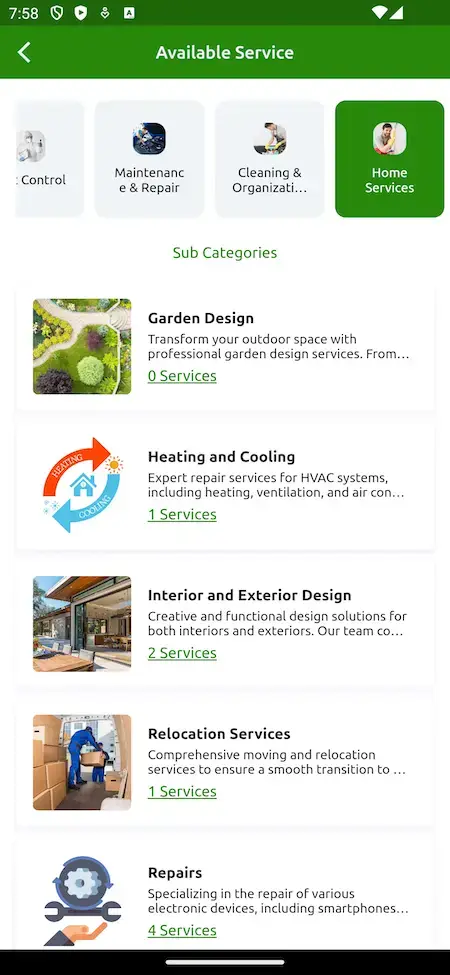
Airtasker clone app Available Service screen with category chips and sub-categories such as garden design, relocation services and repairs.
Offers arrive on a posted taskand the customer accepts one
  • 1Offer per Provider per Taska price with a note, withdrawable until the customer accepts
  • 2Checks Before Payment Movesthe customer's completion code and completion photos
  • 0%Revenue Share With Miracuvesnothing taken from a task, an accepted offer or a provider plan
  • 5Ways the Platform Earnscommission, a booking fee, provider plans, provider ads and banners
  • 6Days to Launchand if the delay is ours, we keep going free
  • $2,799Paid Once, Not Rentedsource code yours, no per-seat fee, no monthly rental

Live in six working days, or we keep working free until you launch. Every build carries 60 days guidance, 6 months bug fixes and 12 months updates.Verify every figure

Open or Sealed Offers, Your Call

One switch decides whether providers see each other's offers on a post, and a post stays open for the number of days you set.

Three App Logins, Version 2.9

Customer, provider and serviceman demo logins sit on this page; the admin panel is shown on a guided call.

Paid in the App, Released on Completion

Stripe, Razorpay, Paystack, Flutterwave or SSLCommerz from your own accounts, plus wallet and cash after service; a canceled paid booking is refunded to the customer's wallet.

Ready to launch a task marketplace where providers send offers?Chat With a Product Expert

Trusted by 6,000+ clients worldwide

Miracuves is listed by Expertise.com as a managed IT service provider.Miracuves is an official member of the Forbes Business Council.Miracuves is a verified agency on DesignRush, listed among top design agencies in India.Miracuves is reviewed on Trustpilot as a software development company.Miracuves is listed by The Manifest among top managed software development companies.Miracuves is listed by DesignRush as a top software development company.Miracuves is recognized by GoodFirms as a top software development company.Miracuves is ranked among the top 1000 companies globally by Clutch.Miracuves is a top managed service provider in the United States on Clutch.

01Try it yourself

Hands-On Demo

Airtasker Clone Demo: Customer, Provider & Serviceman Apps Plus the Web Panels

Miracuves' Airtasker clone demo lets you post a task as the customer, answer it with an offer as the provider and close the booking as the serviceman. The three app logins sit on the cards below, and the customer website and admin login page open from the web card. Post a request, compare offers and follow a booking through to the review.
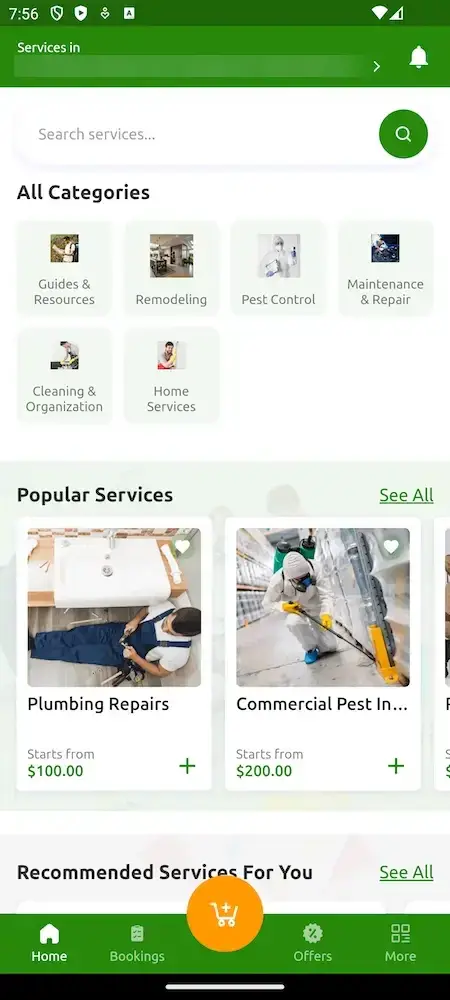
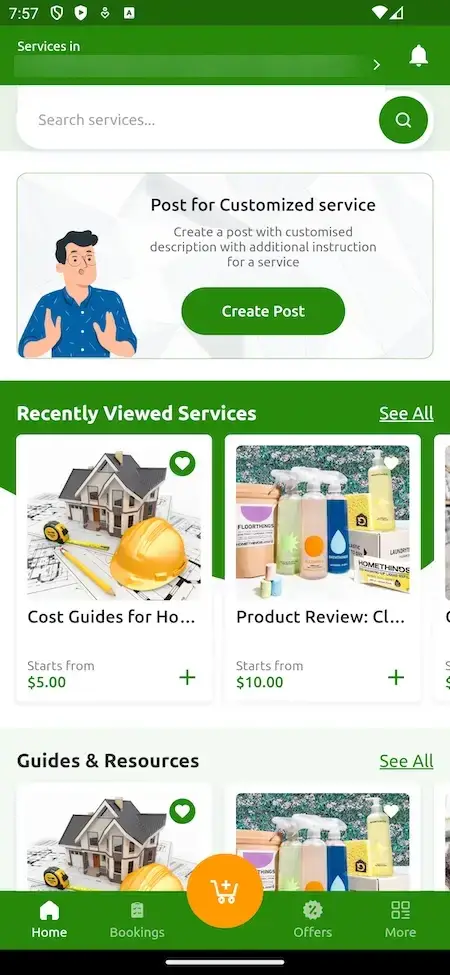
Airtasker Clone customer app home with a search bar, the category grid and popular services listed with starting prices.Airtasker Clone home screen where the Post for Customized Service card and its Create Post button sit above recently viewed services.
Customer app

Airtasker Clone Customer App

On the phone a customer posts a task under a listed service, compares the priced offers that come back, accepts one, pays in the app and rates the provider once the job is done.

  1. 1Visit the app portal and choose your device
  2. 2Use the customer login shown below
  3. 3Explore: Create Post, Offers, Checkout, Reviews
Try:user@demo.com | User_321
Provider app
Provider app

Provider App: Find Tasks, Send Offers

The pro side on a phone: sign up with ID, get approved, see task posts in your zone, send priced offers, run bookings and chat with customers.

  1. 1Pick your device on the app portal
  2. 2Sign in using the provider login below
  3. 3Explore: Task Posts, Offers, Bookings, Team
Try:provider@demo.com | Provider_321
Serviceman app
Serviceman app

Serviceman App: Work and Close Jobs

A team member's phone lists the bookings assigned by the provider, gives map directions to the address and chat with the customer, then takes the completion code and photos.

  1. 1Head to the app portal for your device
  2. 2Enter the serviceman login shown below
  3. 3Explore: Bookings, Status, Photos, Chat
Try:serviceman@demo.com | Serviceman_321
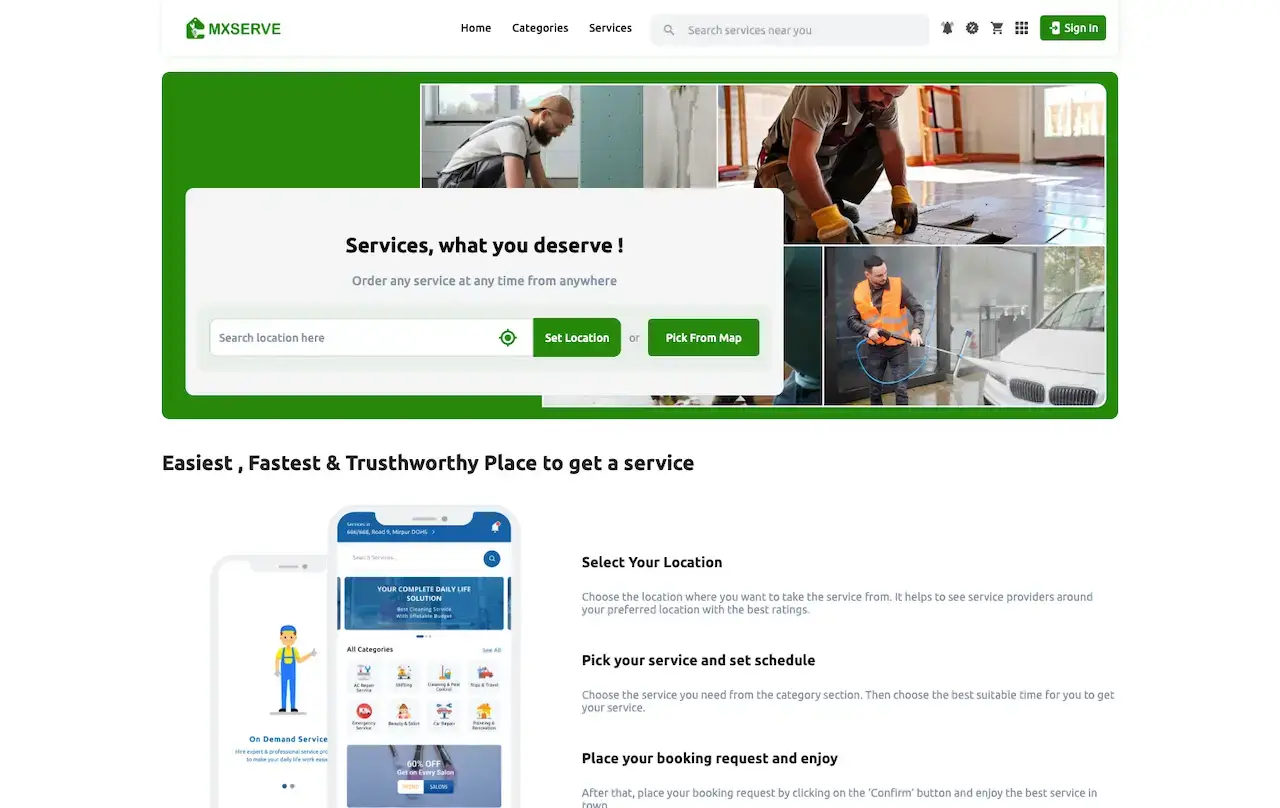
Airtasker Clone customer website home page offering a location search, the service categories and a three-step guide to booking.
Website & admin panel

Customer Website & Admin Console

The customer website runs the same post, offer and booking flow in a browser, and the admin login page leads to the console for providers, bookings, payouts and zones.

  1. 1Load the demo website in a new tab
  2. 2Try the website first, then visit the admin sign-in page
  3. 3Explore: Bookings, Providers, Withdrawals, Zones
Admin login:shared on a guided call

Watch the Tour

Video Tour of an App Like Airtasker: Posting a Task, Offers, Checkout & Admin

Watch a task travel from post to paid booking in the demo build. On a call afterwards, our team maps those screens to your own plan, covering the services you will list, the zones you serve, the commission you charge and the date you want to go live.

Book a guided demo call.

Screen by Screen

Airtasker Clone App Screens: Customer App, Admin Dashboard & the Customer Website

Real screens from the build, in the order a task moves: the customer app from the category grid to the post form, the booking and the wallet, then the dashboard the operator watches and the customer website.
Customer app home screen of the Airtasker Clone: a search bar, the category grid and starting prices on popular services.
Airtasker Clone available services screen, with category chips above sub-categories including relocation, garden design and heating and cooling.
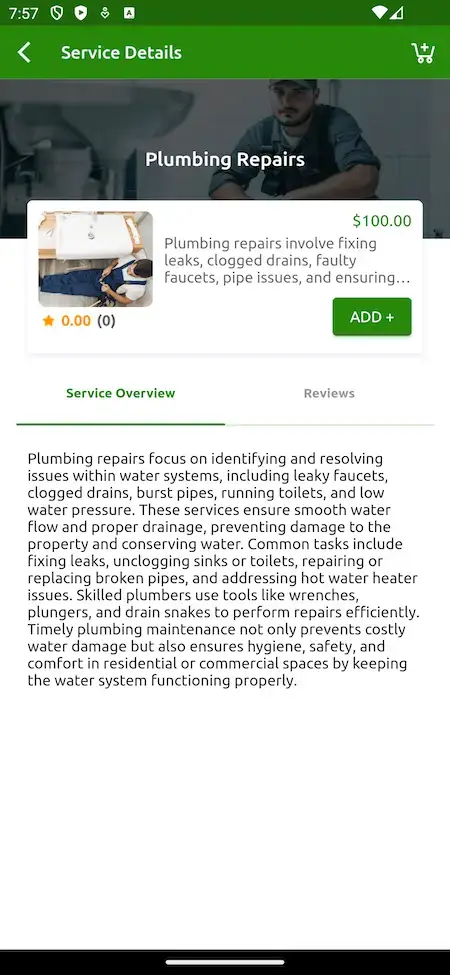
Airtasker Clone service page for plumbing repairs showing its price, an Add button and tabs for the overview and reviews.
Airtasker Clone home screen with the customized service post card and its Create Post button, placed above recently viewed services.
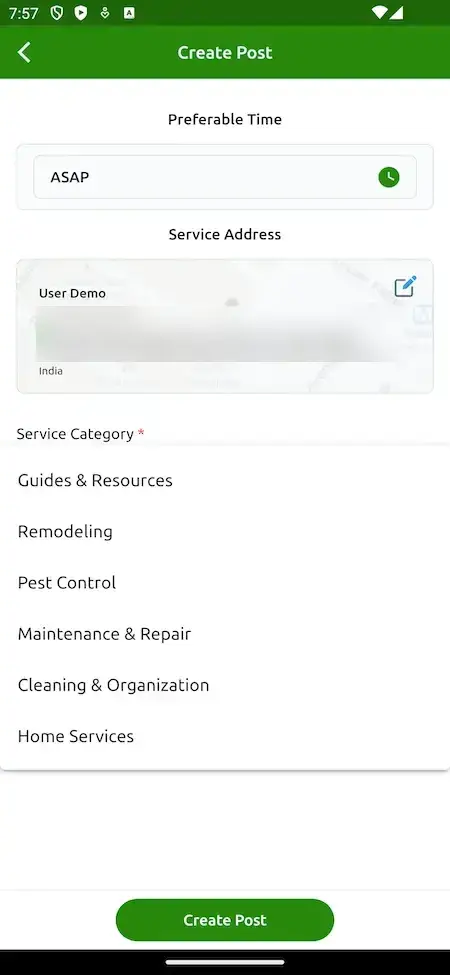
Airtasker Clone Create Post form asking for a preferable time, the service address and a category from a list.
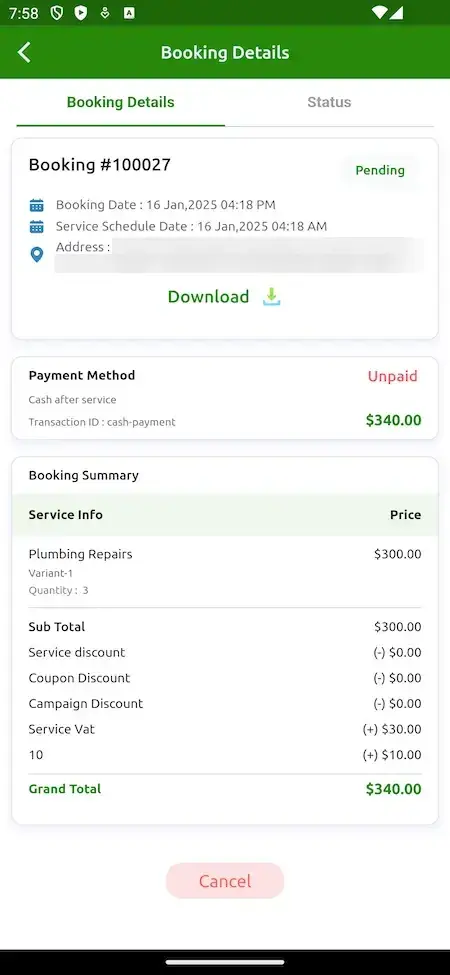
Airtasker Clone booking details: number, current status, scheduled date and address, plus the payment method and summary totals.
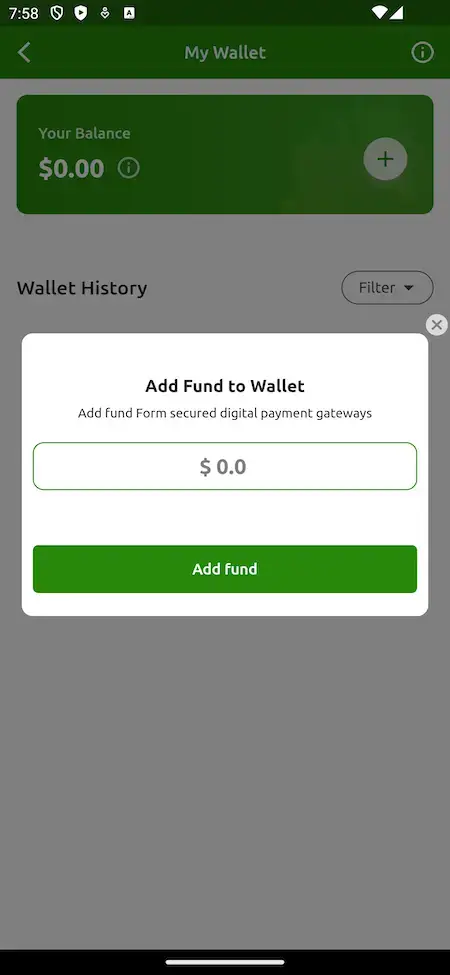
Airtasker Clone wallet showing the balance, a history of wallet entries and the Add Fund form.
7 screens · swipe →
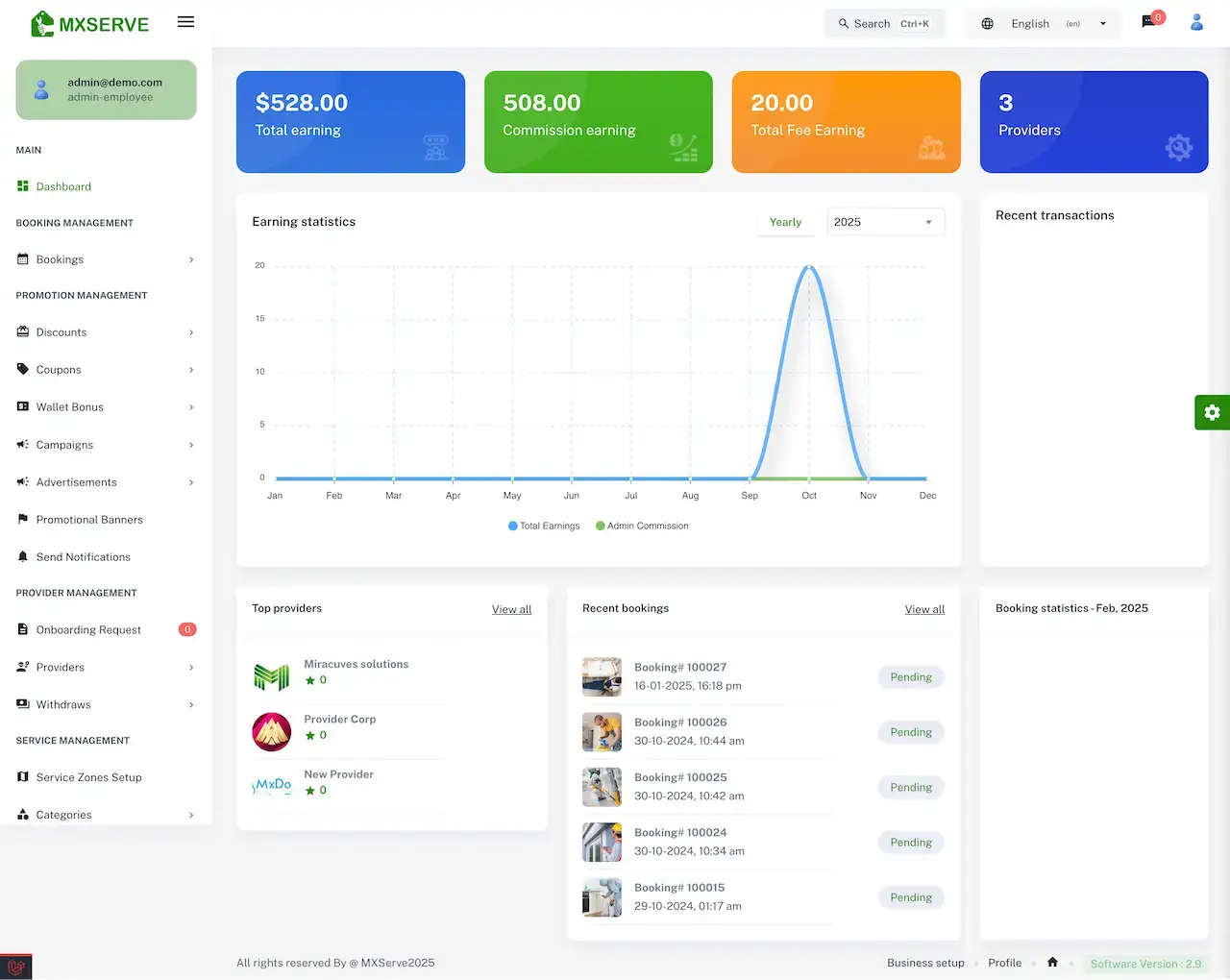
Airtasker Clone admin dashboard showing total, commission and fee earnings, provider counts, an earnings chart, top providers and the latest bookings.
1 screen
Airtasker Clone website home in a browser: location search at the top, the service categories and a short three-step booking guide.
1 screen

Trace one customer from the category grid to a service page or a task post, on to a booking and the wallet, then switch to the dashboard where the operator sees that same activity.

Browse All Solutions

02Proof

Client Voices

Airtasker Clone Client Reviews: What Marketplace Founders Report

What clients say about building on Miracuves bases. The first two come from services marketplaces built on this product family; the rest come from other industries and are shown exactly as their authors gave them.

SSaas Home Services TeamFounding team, Saas Home Services
“Provider onboarding, quoting, booking and payments came off the shelf. We added our service categories and our vetting rules. Both sides of the marketplace were live inside a month.”
SServica TeamFounding team, Servica
“We run several service types off one platform. The dispatch and booking core already supported that, so the work was our service definitions and pricing. Delivered under a month.”
DDr. Vivek RungtaFounder & Chief Dermatologist, Dermacian
“Every HMS I tried was built for general physicians, with no lesion mapping, no before/after tracking, and no procedure-based billing. Their MXHealth base gave us the patient app, doctor app, EMR and video consult out of the box. Front-desk time on scheduling and follow-ups is down ~70%, and we went fully digital in 9 months, where a fully custom job would have been 18.”
AAndre GittensCEO, Ride Corporation
“Turo is the obvious reference, but the Caribbean specifics, from different insurance norms to different payment rails, meant we needed a real partner, not just a clone. Miracuves’s MXCar base covered the listing, the trip flow, and the host payouts. We launched in 6 working days and are live in three islands.”
MMarsha WilliamsFounder, Bmore On Demands LLC
“The team was running it on a dispatcher and a Google Sheet, and we needed a real platform quickly, because we were about to onboard a major retail client. Miracuves’s Delivery Genie base gave us the rider app, the dispatch console, and live tracking. We launched in 6 weeks and cleared 4x the previous order volume in the first month.”
TTiffany DandreaOperations Director, Best Cabo Yacht Rentals
“We were running it on phone calls and a paper calendar, and we were losing bookings to bigger OTAs. Miracuves’s GetmyBoat Clone base gave us the calendar, the booking flow, and the payment engine. Online bookings are up roughly 70% in the first six months, and the ops team finally has a live view of the fleet.”
DDr. Carlos A. PalermoCo-founder & CEO, Doctta Health
“Building a compliant telehealth stack from scratch in three markets would have been a year-plus effort. Miracuves’s MXHealth base covered the patient and doctor apps, video consult, e-prescription and the pharmacy integrations. We launched in our first market in 9 weeks and rolled out to two more in the following six months.”
BBrian LatailleVP Logistics Technology, IBC Tanks Canada
“We were juggling spreadsheets, a third-party GPS provider, and a phone. We needed a single operations console. Miracuves’s MXLogistics base covered the trip lifecycle, the driver app, and the customer tracking page. We’ve cut operations admin time by about 40%.”
Read More Client TestimonialsOperators and founders in their own words

Proof in Production

Airtasker Clone Case Study: A Live Build on the Same Base

How a home services marketplace launched on the Miracuves Thumbtack Clone base. Summarized from the published case study, which states architectural and contractual facts and carries no client outcome figures.

Case Study
Home Services Marketplace

Saas Home Services needed both sides of a home services marketplace. Miracuves started from the Thumbtack Clone base, reused what was already proven and spent the effort on the five decisions that were the client's own.

Saas Home ServicesClient
Home services marketplaceIndustry
Thumbtack CloneBuilt on
6 daysBuild time
20 of 25Blocks reused
4Applications shipped
MXServe admin dashboard with earning, commission and fee tiles, an earnings chart, top providers and recent bookings.
Challenges
  • The price is not known when a job is requested, so a job has to stay open while providers respond
  • Customers let a stranger into their home, so vetting, reviews and proof of completion carry the deal
  • A person with a route and a checklist has to reach the job, which is operations and not only booking
Goal
  • Stand up both sides of a services marketplace without rebuilding mechanics that were already proven
  • Put the effort into the five decisions that belonged to the client
  • Hold the source code, schema and deployment configuration outright
Solution by Miracuves
  • Customer, provider, serviceman and admin applications, each with its own permissions
  • Service catalog, provider network, pricing model, payment gateways and brand theming built for the client
  • 20 of 25 platform blocks reused unchanged
  • Source, schema, deployment configuration and architecture notes handed over
  • Build window of 6 working days on the ready-made base

“Provider onboarding, quoting, booking and payments came off the shelf. We added our service categories and our vetting rules. Both sides of the marketplace were live inside a month.”Saas Home Services Team · Founding team, Saas Home Services

Read the full case studySee the ledger of the 20 reused blocks and the 5 built for the client.

03The platform

Key Facts

What an Airtasker Clone Does for Customers Who Post Tasks and Providers Who Bid

Built by Miracuves, this Airtasker clone lets a customer post a request under any service the operator lists, from a leaking tap to furniture assembly, and collect priced offers from approved providers in that zone. The customer accepts one and pays in the app, the provider or one of their servicemen does the work, and the operator runs commission, fees and payouts from the admin panel.
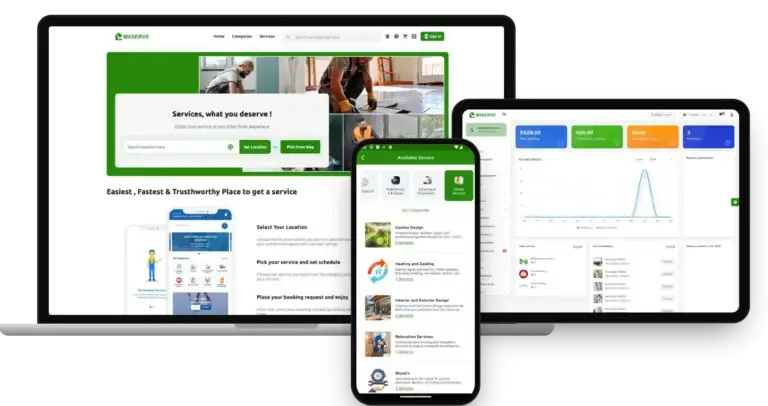
Airtasker Clone across laptop, tablet and phone screens: website home and search, the operator dashboard and the category list

More Than a Listing Site

What makes it work is the flow around each task: task posts, priced offers, approved providers, payment released on completion and an admin panel that tracks every fee.

Source Code You Own

You receive the complete source code without encryption, so your developers can rework screens and flows whenever the business needs it, with no per-seat charge.

Add-Ons Are Named as Add-Ons

Customer budgets on task posts, public questions on a task, an in-app marketplace and service packages are add-ons, quoted on their own and never counted as base features.

Android, iOS & Web

What Does an Airtasker Clone Script Do?

Listing services is the easy part of a task marketplace. The real work is everything after a post: who hears about it, how offers are compared, when the money moves and how a job is proven done. Those steps ship working in this build.

Airtasker Clone operator dashboard with earning tiles for totals, commission and fees, provider numbers, a chart, top providers and recent bookings.
  1. 01Task posts with date, time, address and notes
  2. 02Priced offers with a note from each provider
  3. 03Offer choice by price, rating and review count
  4. 04Payment held as pending until the job is done
  5. 05Admin approval of providers, plus zones and commission

The build holds three apps, for customers, providers and servicemen, each on Android and iOS, plus three web surfaces: the customer website, the admin panel and the provider panel. All three apps run on Flutter, and you get the full source code.

What Comes Built In

Airtasker Clone Features: Task Posts, Offers, Payment on Completion, Chat & Admin

Every feature below comes from the Miracuves Airtasker clone build itself: the apps, the admin panel or the provider panel. Anything that needs extra work is listed on its own as an add-on further down this page.

Feature 01 of 12

Services, Search & Favorites

The home screen opens on a search bar, the category grid and rows of popular services with starting prices, so a customer can book a listed service outright or post a task for offers.

  • Service search with recent searches kept
  • Category grid with sub-categories
  • Popular services with starting prices
  • Recently viewed services on the home screen
  • Favorite providers and services saved
  • Suggest a new service from the app
Feature 02 of 12

Post a Task Request

A customer posts what needs doing under any listed service: a description, the preferred date and time, the address and extra instructions. Each post stays open for as many days as the operator sets.

  • Post card on the customer home screen
  • Description of the work in the customer's own words
  • Preferred date and time for the job
  • Service address with an edit control
  • Extra instructions attached to the post
  • Stays open for admin-set days
Feature 03 of 12

Priced Offers from Pros

Providers who offer that sub-category send one offer each, a price and a note. A provider can withdraw a pending offer or skip a post, and a switch decides whether pros see rival offers.

  • One offer per provider on each post
  • Offered price plus a note on what it covers
  • Withdraw a pending offer, customer notified
  • Skip posts that do not fit
  • Open or sealed bidding, set by a switch
  • Several posts skipped at once on the web
Feature 04 of 12

Zone-Based Task Alerts

The operator draws service zones on a map. When a task goes up, providers offering that sub-category in the same zone get a push alert.

  • Service zones drawn as areas on a map
  • Push alert to matching pros in the zone
  • Alerts follow the sub-categories a pro offers
  • Availability toggle for pros who are busy
  • Google Maps for addresses and zones
  • Nearby providers shown with distance in km
Feature 05 of 12

Compare & Accept Offers

The customer checks each offer against rating and review count, declines or accepts, and checkout books the job at the offered price.

  • Offers listed with price and note
  • Average rating and review count per pro
  • Decline an offer, provider notified
  • Accept leads straight to checkout
  • Provider availability checked at checkout
  • Booking created at the offered price
Feature 06 of 12

Payment Released on Completion

The platform collects online payment and holds it as pending. Once the job is marked complete, commission and fee go to the operator and the rest to the provider's balance.

  • Online payment held as pending at booking
  • Completion code from the customer, by switch
  • Completion photos as proof, by switch
  • Commission and platform fee to the operator
  • Provider share credited to their balance
  • Withdrawals settled by admin
Feature 07 of 12

Private Chat After Booking

Once a job is booked, the customer chats privately with the provider or the assigned serviceman, files included, and can message the support team from the help pages.

  • Private chat opens from booking details
  • Chat with the assigned serviceman as well
  • File attachments inside conversations
  • Support chat with the operator's team
  • Admin can open a chat with any user
  • The same chat on the customer website
Feature 08 of 12

Wallet, Gateways & Refunds

Customers pay online through Stripe, Razorpay, Paystack, Flutterwave or SSLCommerz, in cash after the job, from the wallet, or split across the wallet and another method.

  • Wallet balance with Add Fund top-ups
  • Cash after service, per-pro limit
  • Wallet plus another method in one payment
  • Canceled paid jobs refunded to the wallet
  • Five payment gateways switched on
  • Offline payment methods set by the admin
Feature 09 of 12

Reviews & Replies

After the job the customer leaves a star rating and a review, photos included. Providers reply when the operator allows it, and the rating follows every offer they send.

  • Star rating and review after each job
  • Photos added to a review
  • Provider replies, by admin switch
  • Average rating on each pro profile
  • Review count shown beside each offer
  • Reviews listed in the provider app
Feature 10 of 12

Provider ID & Approval

Providers sign up in the app or on the web with an ID type, number and ID photos, then wait for the admin to approve them. The admin can suspend any account.

  • Self sign-up in the app or on the web
  • ID type, number and photos of the ID
  • Admin approves before a pro goes live
  • Suspend control in the admin panel
  • Commission or subscription plan per pro
  • Services and sub-categories per pro
Feature 11 of 12

Servicemen & Teams

Provider businesses add servicemen who work jobs in their own app, with assigned bookings, status updates, map directions and the completion code and photos that close a job.

  • Servicemen added by the provider business
  • Assigned bookings with status updates
  • Map directions to the job address
  • Completion code entered at the end of a job
  • Completion photos uploaded as proof
  • Add services or quantity to a booking
Feature 12 of 12

Promotions & Loyalty

The admin runs discounts, coupons, campaigns, banners and wallet bonuses, approves paid provider ads, and rewards customers with loyalty points and referral earnings.

  • Discounts, coupons and campaigns
  • Banners and wallet bonus rules
  • Paid provider ads approved by the admin
  • Loyalty points moved to the wallet
  • Referral rewards for new customers
  • Google, Facebook and Apple sign-in

What you bring: Miracuves applies your brand across the finished platform before handover. You supply hosting and a domain, Apple and Google developer accounts, a payment gateway account with KYC complete, a Firebase project, a Google Maps key and SMTP details for email. Apple and Google run store review, so it sits outside the 6 working days of build time.

Speak With Our Team

How the Operator Earns

Airtasker Clone Revenue Models: Commission, Platform Fees, Provider Ads & Subscription Plans

An app like Airtasker earns when a task is booked, paid and closed, and the Miracuves build keeps each revenue line apart, so changing the commission rate never touches the platform fee, the ads or the wallet.

Two lines tend to do the heavy lifting: commission on finished jobs and the flat platform fee added to every booking.

  1. 01

    Commission per Job

    Each completed booking leaves the operator a percentage, set once as a default or separately for each provider in the admin panel. Commission earning has a dashboard tile of its own.

  2. 02

    Flat Platform Fee

    Every booking can carry a flat fee under a label you choose, such as a service charge. It is credited to the operator on top of the commission, whatever the task price turns out to be.

  3. 03

    Provider Advertisements

    Providers submit video or profile promotions for chosen dates from their app or panel. The admin approves each one and marks it as paid, so being seen first becomes a product you can sell.

  4. 04

    Promotional Banners

    A Promotional Banners menu in the admin panel puts offers in front of customers, so banner space can be sold to partner brands as well as to providers.

  5. 05

    Wallet Balances

    Customers add money to an in-app wallet and pay for bookings from it. Money held there sits with the platform until a customer uses it, and every top-up carries a gateway fee to budget for.

  6. 06

    Subscription Plans

    Providers can pay a recurring plan fee instead of commission. Each plan sets its features and limits, can open with a free trial, and every booking made under it carries 0% commission. This ships in the base build.

Published fees from service marketplaces and card networks, set against the revenue lines this build runs: commission, paid placement, provider plans and card fees on top-ups.
Revenue lineHow it is billedTake rateTypical take rateWhat limits the upside
Commission per JobA share of each finished job's value, deducted before payout to the provider, at the rate you choose in the admin panel.Urban Company: about 35% revenue to net transaction value, India consumer services, Q2 FY27 (our arithmetic). Taskrabbit: client Trust & Support fee usually 5%-15%.How much of each job providers will hand over compared with paying per lead. The India ratio beside it also counts product sales, so it reads higher than a pure commission would. Some lead platforms publish no rate at all.
Ads & Banner SpacePlacement sold for a set period and billed up front, by the month or the year.Angi: $214.9 million of advertising revenue in 2025, about 21% of its $1,030.5 million total (our arithmetic). No per-slot price is published.How many businesses will pay for visibility. Angi says its advertising contracts ran for about a year on average.
Provider PlansA recurring plan fee, with 0% commission on the bookings it covers.Angi: $29.4 million of membership subscription revenue in 2025, about 3% of total revenue (our arithmetic).Whether a plan beats paying commission on every job. Providers who book often gain the most from a flat fee, while occasional ones can stay on commission.
Wallet BalancesA card fee on every top-up, either passed to the customer or absorbed by you.Stripe US's published price for a domestic card payment is 2.9% + 30c.The rate depends on the gateway in your country and your card mix. Stripe's India page lists 2% for domestic cards and 3% for international ones, and this build runs Stripe, Razorpay, Paystack, Flutterwave and SSLCommerz together.

How to read this. The Angi shares are our arithmetic on its annual report on Form 10-K for 2025. The Urban Company ratio comes from its Q2 FY27 shareholders' letter, the Taskrabbit range from its pricing blog, the Thumbtack lead-price and preset-job wording from its pro guide, and the card example from Stripe US pricing, with its India page for contrast. Thumbtack and Taskrabbit publish no per-lead dollar price or service-fee percentage, so none is quoted. Treat every figure as a modeling input: this is not a quote, and not a forecast of what your marketplace will earn.

Revenue Model

Airtasker Clone Revenue Model by Growth Stage

Miracuves' Airtasker clone books commission, the platform fee, provider ads and plan fees as separate admin lines, so a task marketplace can switch each one on as offers start flowing in its zones.

Launch

From the first accepted offer, commission and the flat platform fee arrive on every job completed in the app, so early income does not have to wait for a large provider base.

Traction

Once several providers are sending offers on the same posts, paid advertisements and banner space give the busiest ones a way to stand out to customers.

Scale

Across many zones, subscription plans give frequent providers 0% commission bookings for a recurring fee, wallet funds remain with the platform until used, and loyalty points and referral rewards bring customers back.

You set every rate yourself, and Miracuves takes no share of any task your providers complete.

Want the numbers worked out for your own task marketplace?Map My Revenue Lines

Run It Every Day

Airtasker Clone Admin Panel for Task Posts, Offers, Payouts & Zones

Miracuves gives the operator one Airtasker clone admin console for the whole day: new task posts, providers waiting for approval, bookings in progress, coupon costs, money owed and the content on the public site.

Airtasker Clone admin dashboard showing total, commission and fee earning tiles, a provider count, an earning chart, leading providers and the newest bookings.
Home page of the Airtasker Clone customer website: location search, service categories and a booking guide in three steps.

Inside the Console

  • 01

    Earnings Dashboard

    Earning tiles for totals, commission and fees, a provider count, a yearly earning chart, top providers, and the latest bookings and transactions.

  • 02

    Bookings & Task Posts

    Every booking with its number, date and status, from Pending to Completed, plus switches for task posts and the number of days each post stays open.

  • 03

    Promotions

    Coupons, discounts, campaigns and wallet bonuses, together with provider advertisements and promotional banners, in one menu group.

  • 04

    Provider Approval

    Onboarding requests with a pending count, each showing the ID type, number and photos, plus the provider list, suspend control and withdrawal requests.

  • 05

    Zones & Services

    Service zones drawn on the map, categories and sub-categories, and the services customers post their tasks under.

  • 06

    Customers & Wallets

    Customer accounts, wallet balances and loyalty points, plus a default commission rate or a custom one for any provider.

  • 07

    Support Chat & Alerts

    Admin chat with any customer or provider, push and email settings for each booking event, and SMS gateways for login codes.

  • 08

    Business Settings

    Business setup, landing page and policy pages, a media gallery, database backup, Amazon S3 storage and languages with right-to-left support.

Money Flow

Every step money takes, from a customer's wallet top-up to a provider's payout request.

  • Commission and platform fee totals at a glance
  • Payout requests, settled by the admin
  • Who bears coupon costs, admin or provider
  • Five payment gateways side by side

Site & System Tools

What sits behind the public pages and each working day.

  • Business profile and booking rules
  • Landing page and policy page editor
  • Backup and restore
  • Extra languages, including right-to-left

Want the console to handle more? New reports, a different payout schedule, extra languages or another approval step can be scoped separately. Tell us how your operations team works and we will price it in writing.

Talk to an Expert

04Package and pricing

Everything Included

Inside the Airtasker Clone Script: Code, Apps & Launch Help

The Airtasker clone script from Miracuves takes bookings out of the box: three apps for Android and iOS, a customer website, admin and provider panels, plus the source code and database schema, owned outright with no seat, usage or license fees. The costly parts of a task marketplace build, task posts with priced offers, provider ID checks, zone logic, payment held until the job closes and an operator console, all sit inside one fixed payment.

01

Complete Source Code

Every line of the admin, API and app code, unencrypted, so your developers can reshape it around your business.

  • Admin, panels and API source, unencrypted
  • Flutter code for all three Android and iOS apps
  • Customer website source in Flutter web
  • Handed over in a repository you own
02

Database & Handover Notes

The MySQL structure behind task posts, offers, bookings, wallets and reviews, delivered with notes that let a new team run it.

  • 103-table schema, rebuildable from scratch
  • MySQL database layer
  • Deployment settings documented
  • Architecture notes for your developers
03

Chat & Notification Tools

Private chat between customer and provider or serviceman once a job is booked, push through Firebase, email over SMTP and SMS for login codes.

  • Chat after booking, with file sharing
  • SMS login codes through six gateways
  • Push and email alerts by event
  • Support chat with your team
Airtasker Clone website for customers, with a location search, a set of service categories and a three-step guide to booking.
04

Web Surfaces

A responsive customer website plus the admin and provider panels, each with its own login and its own permissions.

  • Customer website built in Flutter web
  • Admin panel for the marketplace owner
  • Provider panel with team management
  • Provider web sign-up with ID upload
05

Three Apps, Each on Android & iOS

Customer, provider and serviceman apps built in Flutter, covering task posts, offers, bookings, wallet and job completion, published under your developer accounts.

  • Customer app: post a task, compare offers, pay
  • Provider app: offers, bookings, crew, withdrawals
  • Serviceman app: jobs, status, code, photos
  • Store publishing support under your own Google and Apple accounts
Airtasker Clone customer app home: a card inviting a customized service post, a Create Post button and recently viewed services below.
Airtasker Clone operator dashboard: earning, commission and fee tiles, providers, a chart of earnings, leading providers and latest bookings.
06

Admin Console

The console where the operator watches earnings, bookings and promotions, approves providers, settles withdrawals, draws zones and edits settings.

  • Earnings dashboard with leading providers
  • Coupons, campaigns, bonuses and provider ads
  • ID-checked onboarding and payout requests
  • Zones, categories, backup and restore
07

Access & Account Security

Each role signs in separately with its own permissions, and card details stay with the payment gateway you connect.

  • Employee roles with section-level access
  • Four sign-ins: customer, provider, serviceman, admin
  • Card data stays with the gateway
  • Providers approved before going live
08

Launch & Aftercare

We rebrand and deploy it for you, hand over the pack, and three support periods start together on launch day.

  • Your logo, icons and colors applied throughout
  • Set up on your own server
  • Optional Amazon S3 for uploaded files
  • 60-day guidance, 6-month bug fixes, 12-month updates

Want to try it first? Open the demo in the customer, provider or serviceman role, or book a guided tour. We can post a task, send an offer, accept it and close the job with you, measured against your own marketplace plan.

Ask Our Team

Clear Pricing

What Does It Cost to Launch a Task Marketplace Like Airtasker?

The white-label Airtasker Clone, ready to launch, costs one fixed $2,799. Anything past the base, from add-ons to extra integrations or custom flows, gets its own written scope and quote.

Most Popular

Professional

Ready-Made Launch Bundle
$2,799paid once
6 working days

Chosen by: Task marketplace startups, local odd-job and handyman platforms, trade businesses with their own crews

You get the platform the demo shows, carrying your logo, icons and colors, deployed to hosting you own.

Get Started

Enterprise

Custom Builds for Bigger Plans
Customquote
Go-live date set by agreed scope

Chosen by: Franchise networks, operators across several countries, companies with their own job routing

Want flows beyond the base, such as counter-offers? We build to your brief and fix the scope and price in writing first.

Ask for a Quote
Development Cost

Airtasker Clone Development Cost in 2026

One payment of $2,799 covers every role in the Airtasker clone demo: customer, provider and serviceman apps for Android and iOS, the customer website, the admin and provider panels, plus the source code and database schema, rebranded and set up on your hosting in six working days.

$2,799 Paid once
6 working days Branded and launched
0% Booking share

Running costs that sit outside our software invoice

  • Hosting and a domain for the website and both web panels
  • Your own Apple and Google developer accounts for publishing the three apps
  • A KYC-verified gateway account, such as Stripe or Razorpay, and its card fees
  • A Google Maps key, a Firebase project for push, SMTP for email and an optional SMS gateway
  • One of four add-ons: in-app marketplace, service packages, task budgets or public task questions

Custom work such as counter-offers, cancellation-fee rules or ID-verified badges is scoped with you in writing and usually takes 2-8 weeks. Franchise networks and operators in several countries move to the Enterprise build.

Weigh the Routes

Ready-Made Airtasker Clone vs Custom Development vs SaaS

A task marketplace like Airtasker runs on posted tasks, priced offers and payment that waits for the finished job, and Miracuves' ready-made clone ships all three from the start. Here are the three ways to get one, compared.

CriteriaMiracuvesReady-Made Airtasker CloneCustom DevelopmentSaaS
Time to launchBranded and live in 6 working daysQuoted in writing, usually 2-8 weeksStart today, within the vendor's limits
Cost up frontOne-time fixed feeSet by the scope you agreeA plan billed monthly or yearly
Who owns the codeAll source code, unencrypted, yoursWhatever the contract hands overStays with the vendor
CustomizationZones, fees, post rules all adjustableMade to your specificationLimited to its settings pages
Running feesMiracuves takes nothing per taskUpkeep priced on its ownFees per booking or per plan
Brand & store listingsThree apps published in your nameYour brand, designed from scratchVendor branding may remain
Best forTask boards and local service crewsFlows no ready base offersTesting demand in one suburb

Who Runs It

Use Cases for an Airtasker Clone App: Odd Jobs, Posted Tasks, Crews & Single-Trade Boards

Miracuves' Airtasker clone app runs six kinds of business from one product, from an odd-jobs board in a single city to an agency launching it for clients. An odd-jobs board leads with the post-and-offer flow, a crew business leads with the provider and serviceman apps, and a single-trade board leads with its category tree. Your settings decide the emphasis.

OddJobsOdd Jobs & Home Repair Board

Open with categories like the demo's relocation, garden design, and heating and cooling, and let customers post a task under any of them to collect offers.

01
Airtasker Clone service list showing category chips and sub-categories including relocation, garden design, and heating and cooling.
PostedTasksPost-a-Task Marketplace

Customers describe the task, pick a preferred date and time, add the address and any instructions, and providers in that zone reply with priced offers.

02
Create Post screen in the Airtasker Clone app, with a preferable time, the service address and categories to choose from.
TradeCrewsTrade Business with Crews

A provider business wins the offer and assigns one of its servicemen, who sees the job, the address and the notes in a separate serviceman app.

03
Airtasker Clone admin view with earning, commission and fee tiles, provider numbers, an earnings chart, top providers and new bookings.
CityZonesZone-by-Zone City Launch

Start with one city by drawing service zones on the map, then add the next zone once enough providers are sending offers there.

04
Airtasker Clone website landing page with a location search box, service categories and a three-step booking guide.
TradeSpecialistSingle-Trade Task Board

Pick one trade, such as plumbing, and shape the categories, service prices and provider ads around it so every post lands with a specialist.

05
Airtasker Clone plumbing repairs detail screen with a price, an Add button and tabs for Service Overview and Reviews.
AgencyResaleAgency or Reseller Launch

Launch a branded task marketplace for each of your clients, all running the same admin tools under a different name.

06
Airtasker Clone customer app home with a search bar, a grid of all categories and popular services listed with starting prices.
Business Model

Airtasker Clone Business Model: Three Ways to Make It Pay

On this Airtasker clone, money moves when a job is marked complete, not when a task is posted, so the same three apps and two web panels can carry three quite different businesses.

Open task board

Independent providers make offers on posted tasks, customers accept the best fit, and each completed job leaves the operator a commission plus the flat platform fee.

Crew-run trade business

A cleaning or repair company signs up as one provider, wins jobs through its offers and sends its own servicemen, so the profit is in the work and the app replaces the phone and the whiteboard.

Subscription network

Providers pay a recurring plan fee instead of commission, every booking under the plan carries 0% commission, and the operator earns from plan fees and ads.

Whichever model you choose, the admin panel controls categories, zones, commission and plan rules, and the unencrypted source code stays yours.

Six businesses, one product. Every case runs on the same three apps for customers, providers and servicemen, plus the admin panel. Only your categories, the providers you invite, your fees and your brand change, so there is a single product to maintain.

Get in Touch

Timing Matters

Why Launch an App Like Airtasker in 2026?

Airtasker's 2026 Annual Report (ASX, 21 October 2026) records 897,568 booked tasks and A$239.8 million in gross marketplace volume for FY26. Miracuves' Airtasker clone gives you the same post-and-offer model under your own name, with the providers, the customers and the fees kept in your marketplace.

01

A Posted Task Beats a Long Search

Customers describe the job once and providers come to them with prices. Airtasker reported an average task price of A$267 for FY26 in its 2026 Annual Report (21 October 2026).

02

Price, Rating and Reviews Side by Side

Each offer arrives with a price, a note and the provider's rating and review count, so the customer chooses with the facts in view and declines the rest.

03

Holding Payment Builds Trust

Airtasker's support page on Airtasker Pay (updated 10 September 2026) says payment is taken once an offer is accepted and released after the task. This build also holds online payments until the job is complete.

04

Two-Sided Fees Are the Norm

Airtasker's support pages (June and October 2026) put the Tasker service fee at 12.5% to 20% of the task price, with a separate connection fee for customers. Your build charges commission plus a flat fee per booking.

05

Growth Is Coming From New Markets

Airtasker's 2026 Annual Report (21 October 2026) shows UK GMV up 47.3% and US GMV up 140.6% in FY26. The post-and-offer model works outside one home market, and your own brand lets you pick the next city.

06

Buying Beats Building From Zero

Task posts, offers, held payments, three apps and an operator console cover most of a task marketplace. Miracuves needs 6 working days to have your branded copy running on your own hosting.

The Build in Numbers

3

Phone Apps

4

App Languages

6

Revenue Lines

6

Days to Go Live

Most of a task marketplace is the quiet middle: how a task is posted, who can offer on it, where the payment waits and when the provider gets paid. That part is already built.

Industries

Industries We Build For

An Airtasker clone app from Miracuves fits any business where a customer describes a job and local providers answer with a price. Handyman marketplaces take posts for small fixes around the house. Cleaning and pest treatment operators reply to each request with their own figure and send their own staff. Removals and delivery services price a move from the address and the date. Furniture assembly, painting and yard work fill weekend calendars. Appliance and tech helpers pick up setup jobs. Tutors offer lessons by subject. Regional operators run one city or one country under their own brand.

  1. 01Handyman Jobs
  2. 02Electrical Fixes
  3. 03Housework
  4. 04Pest Treatment
  5. 05Painting Jobs
  6. 06Furniture Assembly
  7. 07Gardening & Yard Work
  8. 08Removals & Delivery
  9. 09Appliance & Tech Help
  10. 10Business Maintenance
  11. 11Lessons & Tutoring
  12. 12Local Errands

The Miracuves Airtasker Clone is a task marketplace you can aim at any local trade: customers post a job, approved providers send offers, and your brand runs through the apps and the admin panel.

06Inside the platform

Post to Paid

How the Airtasker Clone Works: Post, Get Offers, Accept, Pay, Close & Review

Miracuves built the Airtasker clone around one exchange: a customer posts a job, providers answer with prices, and the chosen offer becomes a paid booking. Below is that path from the first screen to a reviewed task, then the layers that carry it.

Customer Journey: From Signing Up to a Reviewed Task

  1. Airtasker clone app home screen with a search bar, a grid of all categories and a row of popular services with their starting prices.
    1Sign Up and Set Where the Work Is

    Customers join with a phone number or email, or through Google, Facebook or Apple, and what they see follows the zone of their saved address.

    • Phone, email or OTP login
    • Google and Apple login
    • Services matched to the zone
  2. Airtasker clone service list with category chips above sub-categories like relocation, garden design and heating and cooling.
    2Choose Where the Task Belongs

    Every post sits under a listed service, so the customer narrows a broad category to the sub-category and service that fit the job.

    • Category grid on the home screen
    • Sub-categories for each trade
    • Popular and suggested services
  3. Airtasker clone service page for plumbing repairs showing the listed price, an Add button and tabs for the overview and reviews.
    3Read the Service First

    A service page shows its listed price, an overview and past reviews, so a customer can book it outright or post for offers.

    • Listed price for the service
    • Overview and past reviews
    • Book or post
  4. Airtasker clone Create Post screen with a preferred time, the service address and a list of service categories.
    4Post the Task and Collect Offers

    The post carries a description, a preferred date and time, the address and extra notes, and providers in that zone hear about it.

    • Preferred date and time
    • Address you can change
    • Description and extra instructions
  5. Airtasker clone booking screen showing the booking number, status, schedule, address, payment method and a summary of charges.
    5Accept an Offer

    Offers arrive with a price, a note and the provider’s rating and review count; accepting one opens checkout at that price.

    • Price, note and rating per offer
    • Decline the offers you skip
    • Booking at the offered price
  6. Airtasker clone wallet screen showing a balance, past entries and an Add Fund form.
    6Pay in the App, Close on Proof, Review

    Customers pay online, from the wallet or in cash after service; the job closes on the customer’s code and photos, then a review follows.

    • Online, wallet or cash payment
    • Completion code and photos
    • Review with photos afterward
How a Task MovesPostOffersAcceptPayCloseReview

Platform Layers

Architecture & Task Flow of an Airtasker-Like Platform

Plan It With Us
  1. Layer 01

    Separate Apps and Panels per Role

    Customers, providers and servicemen each get their own Android and iOS app, while admin and provider work happens in separate web panels behind their own logins.

  2. Layer 02

    Post to Booking

    A post collects offers until the customer accepts one; that offer becomes a booking that moves through pending, accepted, ongoing and completed.

  3. Layer 03

    Push Alerts

    Firebase push tells providers in the zone about a new post and keeps customers, providers and servicemen informed as a booking changes.

  4. Layer 04

    Provider Profiles & Zones

    Each provider picks sub-categories and works inside drawn zones, which decides whose phone lights up when a task is posted.

  5. Layer 05

    Release & Payouts

    Online payments sit as pending until the job is complete; then commission and fee go to you and the provider’s share to their balance.

  6. Layer 06

    Reviews & Replies

    Customers rate and review each finished job with photos, providers can reply, and ratings travel with every offer sent.

Inside the Build

Airtasker Clone Tech Stack: Flutter Apps, PHP, MySQL & Five Payment Gateways

Miracuves built the Airtasker clone on parts any team can hire for: a PHP admin and API, a MySQL database, and Flutter for the three apps and the customer website. Here is each layer exactly as it ships in the source you receive.

WEB & ADMIN

Admin & Web Tier

PHP 8.1+ Bootstrap Flutter Web
  • Customer website, admin panel and provider panel
  • Bootstrap layouts in both panels
  • Customer website built with Flutter web
  • Right-to-left languages supported
DATABASE

Database

MySQL
  • MySQL holding posts, offers, bookings and wallets
  • 103 tables in the shipped schema
  • Backup, restore and download in the admin
  • Full schema included with the code
MOBILE

Android & iOS Apps for Every Role

Flutter 3.24+ Android iOS
  • Three Flutter projects, one per role
  • Every app on Android and iOS
  • Deep links into the customer app
  • Released under your own store accounts
PAYMENTS & SMS

Payments & OTP

Stripe Razorpay Flutterwave
  • Five gateways live side by side
  • Paystack and SSLCommerz as well
  • Twilio or five more SMS gateways for OTP
  • Merchant accounts and KYC in your name
INTEGRATIONS

Connected Services

Firebase Google Maps Amazon S3
  • Google Maps for addresses and drawn zones
  • Firebase for push alerts and phone OTP
  • Optional Amazon S3 for uploaded files
  • Google auto-translate for new languages
HANDOVER

What You Receive

Source Code Schema Flutter Apps
  • Full source of the admin, API and panels
  • Three Flutter app projects to build
  • Database schema and install files
  • Set up on hosting you control
Notes for tech buyers:

The admin panel, provider panel and API run on PHP 8.1 or newer with Bootstrap and MySQL, and the three apps and the customer website are built in Flutter 3.24 or newer. Google Maps, Firebase, your SMS gateway and your payment gateways run on accounts and keys you own, entered at deployment. Each part is common enough that hiring for it later is simple.

Ask About the Stack

Growth Plan

Scaling an Airtasker Clone: Separate Apps, One Task Record & Space to Expand

Miracuves ships the marketplace as separate apps and panels over one shared back end, so more providers, categories and posts call for server capacity and settings, not new code.

Separate Apps, Separate Updates. The customer, provider and serviceman apps are three Flutter projects, so one can be updated and released without the other two.

One Record From Post to Payout. The post, the accepted offer, the booking and its transactions link together, so support and finance read one status for every job.

Uploads Off the Web Server. Completion photos, review images and service pictures can live in Amazon S3, keeping the web server lean as volume climbs.

Ledgers That Add Up. Each payment, commission, fee, refund and withdrawal is written as a transaction, so any report can be checked line by line against balances.

01

Three Apps, Two Panels

The customer, provider and serviceman apps and the admin and provider panels each sit behind their own login, so a change to one leaves the rest alone.

02
PostOfferBooking

Task Lifecycle

A task keeps one trail from the first post to the completed booking, and the customer sees its status at each step.

  • Post, offer and booking linked
  • Five booking statuses
  • Customers can cancel while a booking is pending
  • Status history kept
03

Logins and Request Limits

Signed-in API calls carry a token, and request throttling sits in front of the booking and payment logic.

  • Token login on the API
  • Request throttling built in
  • Own login for each role
  • Push alerts through Firebase
04
TokensThrottleRoles

Files Kept Separate

Photos and files can go to an Amazon S3 bucket you own instead of the web server’s own disk.

  • Bucket in your own account
  • Media gallery in the admin
  • Local or S3 storage switch
  • Database backup and restore in the admin
05

Every Payment Recorded

Payments, commission, fees, refunds and withdrawals are each written as a transaction, with downloads ready for your accountant.

  • Customer wallet history
  • Commission and platform fee per booking
  • Provider withdrawal requests
  • Refunds to the customer wallet
06

Complete Source Hand-Over

You receive the source of every app and panel plus the database schema, so another team can run and extend the platform.

Space to Change. Each task marketplace soon wants something specific to its city or its categories. With full source code on a common stack, a new screen, a new rule or a new integration is routine development work for your developers or for ours.

Launching a task marketplace? Open with the categories and providers you can sign up first, and grow on that same deployment. More traffic is a hosting and settings choice, and anything outside the base is scoped and priced separately.

Talk Through Growth

07Safety and control

Controls You Can See

Safeguards in an Airtasker Alternative: Approved Providers, Gateway-Handled Payments & Clear Limits

Every Airtasker alternative Miracuves delivers stores identities, addresses and payment references, so what matters most is who sees what, where card data travels and who may take work. Here is what the platform enforces and what you set.

  1. 01 · Roles
    Separate Roles

    Customers, providers, servicemen and admin staff each see only what their role allows, checked on the server, and admin employees get access section by section.

    • ID at Sign-Up: Providers enter an ID type, an ID number and ID photos, and the admin approves them before they go live, with a suspend switch for later.
  2. 02 · Checks
    Admin Approval

    A provider goes live only once the admin approves the onboarding request, and every booking keeps a status history the admin can read.

    • Support Chat: Customers and providers can message your support team from the apps, and the admin can open a chat with any of them, with the booking at hand.
  3. 03 · Transport
    Encrypted Transport

    Every connection runs over TLS on your hosting, and passwords are stored as hashes, never as readable text.

    • Login Codes: One-time codes by SMS or Firebase confirm phone numbers, and reCAPTCHA can be switched on for the web forms.
  4. 04 · Secrets
    Keys in Your Accounts

    Gateway, SMS, map and Firebase keys belong to your own accounts and are entered in the admin settings or server configuration.

    • Launch Checks: Your deployment calendar books a penetration test, fresh keys, a trial restore and a check of each gateway setting, done with your team.
  5. 05 · Cards
    Card Data at the Gateway

    Card numbers are entered on the connected gateway’s side, and the platform keeps only the payment reference it gets back.

    • Payment Release: Online payments wait as pending until the job is marked complete, and provider withdrawals go out after admin settlement.
  6. 06 · Backups
    Backup and Restore

    Each deployment gets a backup schedule, and a test restore runs before launch so the saved copy is proven to work when needed.

    • Admin Backups: The admin panel can back up, restore and download the database, so a restore drill always has a recent copy to use.

The controls above come with the base and are open to review in the source you hold. Penetration testing, new keys and a restore trial go on your launch plan with our team.

Review Security With Us

Launch Readiness

Running a Task Marketplace Like Airtasker: What the Software Does and What Stays With You

A task marketplace sends people into homes and businesses. Miracuves supplies the posting, offer, payment, chat and review software; choosing which providers may join, which licenses a job calls for and what local law requires stays with you as the operator.

Ready here means software that works.

On this page, ready describes features you can watch run in the demo or in the admin panel. It is a statement about software, not a license, certificate or approval from any authority, and none of it is legal advice.

What the Software Does

Service categories and pages, task posts with provider offers, bookings with five statuses, provider ID documents with admin approval, payment held until completion, a wallet, chat after booking, reviews with replies, coupons and separate customer, provider, serviceman and admin logins.

What You Decide

Your terms and privacy policy, which categories and providers you accept, which documents you ask for, how complaints are resolved, and any cancellation or refund rules beyond the switches you set.

Licenses, Checks & Insurance

Electrical, plumbing and pest work often needs a license, and liability cover rests with the provider and with you. The software collects ID documents for the admin to approve, while license checks, background checks and insurance run through your own process or a service you connect.

Your Markets

Worker classification, consumer law, tax shown at checkout and data protection change from country to country and often by state or province. Ask qualified local advisers to look over each market before bookings open.

08Extend the platform

Included coreMXServe
  • Task posts, offers & categories
  • Payments, wallet & chat
  • Three Android & iOS apps
  • Admin tools & promotions

Adding an add-on

  1. 1
    Pick an add-on

    Budgets, public questions, a shop or bundles, at launch or later on.

  2. 2
    Quote agreed first

    Every add-on has a written scope and a fixed price before we begin.

  3. 3
    Delivered as source

    It lands in the codebase you already own.

Ask About an Add-On

Add More

Add-Ons for an Airtasker Clone: Shop, Service Packages, Task Budgets & Public Questions

As Miracuves delivers it, the Airtasker clone runs end to end and every step can be tried in the demo. The four add-ons below sit outside the base; each is scoped and priced in writing first and usually takes 2-8 weeks, since the effort follows how your marketplace operates.

  • Extra revenue

    In-App Product Shop

    A store inside the customer app for products linked to a task, like parts or materials for a booked job, bought in the same place as the service.

    Shop · Products
  • Bundle value

    Bundled Service Packages

    A package builder so a provider can combine several services into one offer with its own price, rather than selling each service alone.

    Bundles · Pricing
  • Pricing

    Customer Task Budgets

    A budget field on each post, so customers state what they expect to pay and providers get a starting figure to price their offers against.

    Posts · Budget
  • Clarity

    Public Questions on a Task

    A public question thread on each post, so providers can ask about the job before an offer is accepted and every answer is seen by all.

    Questions · Posts

The Services & Bookings Family

Planning a Task Marketplace? Four Related Builds Sit Close By.

The Airtasker Clone handles local jobs done in person. If your plan stretches to pet care, paid advice, clinics or remote freelance work, these four fit alongside it.

Rover Clone pet-sitting marketplace banner showing a dog being petted.01
Pick it if: You serve pet ownersRover Clone

A marketplace connecting pet owners with sitters and walkers, with bookings, chat and payments built around every visit.

Explore Solution

Astrotalk Clone banner of a zodiac wheel against a night sky, for paid astrology sessions.02
Pick it if: You sell advice, not visitsAstrotalk Clone

A consultation app where people pay for chat, audio or video sessions with experts you verify first.

Explore Solution

Practo Clone appointment booking banner showing a clinician on a video call.03
Pick it if: Your providers work in clinicsPracto Clone

A clinic platform listing practitioners, open appointment slots and online consultations for people looking for care.

Explore Solution

Upwork Clone banner of a developer at a desk, for a remote freelance marketplace.04
Pick it if: The job happens onlineUpwork Clone

Clients post projects, remote freelancers send proposals and the best fit is hired, all on one marketplace.

Explore Solution
CatalogBrowse 90+ solutions

09The business case

Market Benchmarks

Home Services Marketplace Market Benchmarks - Independent 2025-2026 Data

The revenue models above are ours. The figures below are not. They come from the Angi and ServiceTitan annual reports on Form 10-K, Urban Company's Q2 FY27 shareholders' letter and the US Bureau of Labor Statistics, reproduced as published. Together they show how many jobs a home services marketplace routes, what the trades volume behind it looks like, and how deep the supply of skilled workers runs.

Angi 10-K01

20.2 Million Leads Sent to Pros by Angi in 2025

Angi's annual report on Form 10-K shows 15.5 million Service Requests and 20.2 million Leads in 2025, with about 111,000 Average Monthly Active Pros in the fourth quarter. Total revenue was $1,030.5 million, down 13 percent, of which U.S. Lead revenue was $587.1 million, advertising $214.9 million, services $72.4 million and membership subscriptions $29.4 million.

Urban Company02

INR 1,432 Cr Quarterly NTV at Urban Company

Urban Company's letter for the quarter ended 30 September 2026 reports Net Transaction Value up 39 percent to INR 1,432 crore and revenue from operations up 41 percent to INR 537 crore, with 10.0 million annual transacting users and 94,845 monthly active service partners. In India consumer services excluding InstaHelp, revenue of INR 336 crore on NTV of INR 963 crore is about 35 percent (our arithmetic on reported figures).

ServiceTitan 10-K03

$82.1bn of Trades Work Processed on ServiceTitan

ServiceTitan's annual report on Form 10-K for the fiscal year ended 31 January 2026 states it processed $82.1 billion of gross transaction volume, up from $68.5 billion a year earlier, defined as total dollars invoiced by its customers through the platform. Revenue was $961.0 million, up 24 percent, about 1.2 percent of that volume (our arithmetic on reported figures).

US BLS04

821,000 US Electricians, Jobs Up 9% by 2035

The US Bureau of Labor Statistics reports that electricians held about 821,000 jobs in 2025 and projects employment to grow 9 percent from 2025 to 2035. The median annual wage for electricians was $63,190 in May 2025, against $59,540 for the construction and extraction group, which gives a sense of the skilled labor a home services marketplace recruits from.

Where each figure comes from.

Angi Inc., Annual Report on Form 10-K for the year ended 31 December 2025, dated 20 February 2026 - sec.gov

Urban Company Limited, Shareholders' Letter and Report, Q2 FY27, results dated 16 October 2026 - investorrelations.urbancompany.com

ServiceTitan, Inc., Annual Report on Form 10-K for the fiscal year ended 31 January 2026, signed 25 March 2026 - sec.gov

US Bureau of Labor Statistics, Occupational Outlook Handbook: Electricians, last modified 27 August 2026 - bls.gov

All figures are the publishers’ own, reproduced as published from annual filings, a results letter and a government statistics page. Metric definitions differ by company and are as each publisher states them. The Urban Company and ServiceTitan ratios are our arithmetic on reported figures. They describe the companies and occupations named, not any platform Miracuves builds, and nothing here is a revenue projection for your business.

How It Earns Money

Airtasker Clone Marketability, Revenue Potential & Growth Prospects

Miracuves built the Airtasker Clone around two moments of trust: a customer paying in the app before the work starts, and a provider waiting for that money to be released once the job is marked complete. The levers below earn from those two moments, and the relationship they create stays with you.

  1. 01

    Paid on Every Finished Task

    Commission comes off each booking when it is marked complete, so income rises with the tasks your providers finish, not with the staff you hire.

  2. 02

    Many Levers, One Admin Panel

    Commission, a flat platform fee, provider plans, ads and banners are separate admin settings, so you can switch one on and leave the others untouched.

  3. 03

    Your Providers, Your Data

    Provider profiles, ratings, reviews and every past booking live in your own database, so the network you build keeps its value inside your business.

  4. 04

    Freedom to Move On

    The full source code and schema are yours, so moving hosts, changing teams or taking the product somewhere new needs nobody's sign-off.

Where Revenue Comes From
  • Booking Commission
  • Flat Platform Fee
  • Commission on Cash Jobs
  • Provider Ads & Banners
  • Wallet Add Funds
  • Provider Subscription Plans
Lasting Value

What protects the business over time is a loyal provider base and customers who come back, more than any single feature.

  1. 01Vetted providers with good ratings tend to stay
  2. 02Wallet balances and loyalty points bring customers back
  3. 03That history builds from day one in your database
  4. 04Vetting and proof of completion earn lasting trust
Sample Growth Scenarios

Only the provider count changes between these three cases, and the lever that earns most at each size is named. They help with planning talks and do not predict what any marketplace will make.

One-City Task Marketplace25Approved Providers

Booking commission pays the early bills.

A single-city marketplace where a few dozen providers answer posts and the commission on each finished task keeps the lights on. An example size, not a forecast.

Regional Task Marketplace250Approved Providers

Commission plus provider ads and banners.

In a regional market, many providers chase the same posts, so paid ads and banners begin to earn next to commission. Sized as an example, not a forecast.

Multi-City Network2,500Approved Providers

Many city zones live at once, every category open.

A platform covering many cities, where provider ads, subscription plans and the platform fee add up beside commission and admin reports point you to the next focus. A planning example, not a forecast.

10Why Pick Miracuves

Why Miracuves

How Miracuves Compares With Other Airtasker Clone Developers

An Airtasker-style marketplace can begin as a directory script, a freelancer's project, an agency contract or a ready base like the one Miracuves has already shipped for services clients. Ask each option to show a services marketplace it has delivered, whether customers can post a request and collect priced offers, whether a provider's team gets its own app, and who holds the code after launch.

What Founders Get With Miracuves

  • 01

    Post a Task, Get Offers

    Customers post a request under a listed service with a date, an address and notes, and providers in that zone reply with a price and a short note.

  • 02

    Three Apps, Three Roles

    Customers, providers and servicemen each get an Android and iOS app of their own, where most directory scripts end at a listing page.

  • 03

    Paid When It's Done

    Online payments wait with the platform until the job is marked complete, then the provider's share moves to their balance and your commission is settled.

  • 04

    All the Source Code, Yours

    You receive every app, both web panels and the database schema unencrypted, with deployment notes, so no vendor can change the price or terms later.

  • 05

    Already Proven

    Saas Home Services and Servica both launched on this base, the first reusing 20 of its 25 building blocks, and both case studies are public.

  • 06

    Clear About What You Supply

    Every base feature is named here, each add-on is priced on its own, and the accounts you bring, from payment gateways to hosting and developer accounts, are listed.

Development Company

Choosing an Airtasker Clone Development Company

A task marketplace vendor should demo a request post, priced offers and payment released on completion before you sign anything.

What to check Miracuves

  • Working proof Demo logins for the customer, provider and serviceman apps before you pay
  • Priced offers on posts Providers answer each task post with a price and a note, in the base
  • Live client builds Two services marketplaces on this base, each with a public case study
  • Code you own Unencrypted source for every app and panel, plus the schema
  • Launch window Your branded task marketplace in six working days
  • Cover after go-live Guidance 60 days, priority fixes 6 months, updates 12 months

Think twice about a vendor that

  • Offers fixed listings only, with no task posts or offers
  • Gives a provider's team members no app of their own
  • Pays providers before anyone marks the job complete
  • Sends every post to every provider, ignoring zones
  • Ships locked code that only its own team can edit

Airtasker Clone Compared With Generic Scripts and Agencies, Point by Point

FactorMiracuvesMiracuves Airtasker CloneOff-the-Shelf ScriptCustom Agency Build
Launch Time6 working days of build timeVaries, often DIYMonths, scoped per project
Code OwnershipFull and unencryptedOften locked or partialMostly yes
Task Posts & OffersPosts answered with priced offersFixed listings onlyIf the budget covers it
Provider & Team ToolsProvider app and panel, serviceman appSeldom includedMade to order
Payments & PayoutsPaid in app, released when the job is completeDepends on the scriptIntegrated to order
Admin & Growth ToolsCoupons, campaigns, ads, loyalty and referralBasic or missingExtra cost, made to order
Security & TrustID review, role permissions, card data at the gatewaySparseVaries a lot
Price, Speed and QualityOne fixed price, quick, proven baseCheap, but riskyCostly and slower
Support After Launch60-day guidance, 6-month fixes, 12-month updatesSeldom offeredAs the contract says

Most routes to a task marketplace change shape once real providers start signing up. This is where the options pull apart.

Speak With Our Team

Changelog

Airtasker Clone Release Log: Base Versions & What Each Added

Version history of the MXServe base behind this page, newest first and updated through 2024. The base ships today as version 2.9.

VersionChangesWhat changed
V2.94 features listedAdded
Providers can reply to customer reviews, behind an admin switch
Booking notification settings in the admin panel
SEO settings in the admin panel
Also added
Scheduled jobs for subscription renewal reminders and free-trial end emails
V2.84 additionsAdded
Firebase phone OTP verification setting
reCAPTCHA settings in the admin panel
Maintenance mode with a set duration and a message
Notification choices per event for customers, providers and servicemen
V2.72 features listedAdded
Provider subscription packages, each with its own features and limits
A free trial period for new subscribers
A renewal warning shown before a plan ends
VAT on subscription packages
Providers can switch between commission and a subscription
Bookings made under a subscription carry 0% commission
Storage
Amazon S3 as an option for file storage
V2.63 features listedAdded
Provider advertisements, submitted from the provider app
The same ads submitted from the provider panel
Video promotions for providers
Profile promotions for providers
Start and end dates on each ad
Admin review and approval of every ad
Paid status on ads set by the admin
Favorite providers saved by customers
Favorite services saved by customers
Admin team
Employee accounts for your staff
Roles that grant access section by section
Permissions across 11 admin areas
V2.15 features listedAdded
Guest checkout for customers without an account
An admin switch to turn guest checkout on or off
Partial payment: wallet balance plus another method
Offline payment methods defined by the admin
Bonus rules for wallet top-ups
A flat platform fee on each booking
A label of your choosing for that fee
Settlement
The platform fee goes to the operator when the job is completed
V2.04 features listedAdded
Customers post a request under a listed service
Providers answer a post with a price and a note
Customers accept or decline each offer
An accepted offer becomes a booking at the offered price
A customer wallet for paying bookings
Adding funds to the wallet from the app
Referral earnings when a new customer joins
Rewards
Loyalty points earned on each booking

Build it with us

Let's turn your task marketplace idea into a live platform people pay through.

Take a free consultation and walk away with a realistic launch timeline and straight answers. Earning your trust matters more to us than a quick sale.

  • Answer in 24 hrs
  • No-cost consultation
  • No lock-in terms
  • You own all source code

11Learn more

Blog & Resources

Building a Task Marketplace: Newest Guides & Insights

Guides on the features a service booking app needs, how to test the MXServe base before you commit and how the app is put together.

About the build5 questions

01What does the Airtasker Clone product consist of?

An Airtasker clone is a ready-made task marketplace where customers post what they need and local providers answer with priced offers. The Miracuves Airtasker Clone gives customers an app and a website to post a request or book a listed service, gives providers an app and a web panel to send offers and run bookings, gives their team members a serviceman app, and gives you an admin panel for commission, fees, payouts and promotions. That is three Android and iOS apps plus three web surfaces, all under your brand.

02How customizable is your Airtasker clone solution?

Rebranding comes with delivery: your logo, icons and colors go onto every app and web surface before we deploy them. You also receive the full source code unencrypted, so your developers or ours can reshape the design, categories, zones, payment gateways and app languages for your market. Anything beyond the base gets a written scope and price first and usually lands in 2-8 weeks.

03What technologies do you use for the Airtasker clone, and does it scale?

Flutter 3.24 or later powers all three apps on Android and iOS, while the website for customers is a Flutter web build of the customer app. The admin panel, the provider panel and the API run on PHP 8.1 or later with MySQL, with Firebase for push alerts and Google Maps for locations. Each role has its own app, so you grow by adding zones, categories and providers and sizing your hosting to match.

04Can I launch an app like Airtasker legally?

Building and selling software with these features is generally lawful. The Miracuves Airtasker Clone uses common marketplace patterns, copies nothing of Airtasker's code, design or content, and runs under your own brand, terms and fees. Keep the Airtasker name and logo out of your branding, and ask local counsel to confirm contractor, consumer, tax and licensing rules for the work you list in each market. Miracuves does not give legal advice.

05Is the Airtasker clone app available on both iOS and Android?

Yes. All three apps, for customers, providers and servicemen, are built in Flutter and ship for Android and iOS, and customers can also use the website in any browser. We publish the apps under your own store accounts. App store review belongs to Apple and Google and is not counted in our 6 working days.

Customers & tasks4 questions

06How do I sign up and post a task here?

Customers register with a name, phone or email and a password, sign in with a one-time code, or use Google, Facebook or Apple. They can book a listed service straight from the category grid, or post a request under a service with a description, a preferred date and time, the address and any extra instructions. Posting a task needs a signed-in account.

07Can customers post a task and take offers like on Airtasker?

Yes, this is the core flow. Providers who offer that sub-category in the same zone get a push alert, and each can send one offer with a price and a note, withdraw it or skip the post. The customer compares offers with each provider's rating and review count, declines some and accepts one, and checkout books the job at the offered price. You set how many days a post stays open and whether providers see rival offers. A budget field on posts is a quoted add-on.

08Which payment methods work here, and is my data secure?

Customers pay online through Stripe, Razorpay, Paystack, Flutterwave or SSLCommerz, from their wallet, in cash after service, or split between wallet and another method. Card details are entered at the gateway, not stored by the platform. An online payment stays with the platform until the job is marked complete, and a canceled paid booking is refunded to the wallet. Role permissions and OTP checks protect the accounts.

09How can I track a booked provider and manage my bookings?

Every booking shows its status as it moves from pending to accepted, ongoing and completed, along with the schedule and address, and past and upcoming bookings stay in the account. Customers chat with the provider or assigned serviceman from the booking itself. Updates come through status and chat rather than a live map.

Providers & their teams6 questions

10How do I register as an Airtasker clone provider, and what is required?

Providers sign up in the provider app or on the provider panel, choose an ID type such as passport, driving license or national ID, and add the number and photos of the document. The admin reviews each onboarding request and approves it before the provider goes live, and can suspend an account later. Background, license and insurance checks remain your own process as operator.

11How do providers get their money, and how is commission set?

When a job is marked complete, your commission and the platform fee go to you and the provider's share moves to their balance. Commission is a default rate or a rate per provider, and bookings under a provider subscription plan carry 0% commission. Providers then request a withdrawal within the limits you set, through payout methods you define, and the admin settles each request. On cash jobs, the provider owes you the commission.

12What happens if a provider needs help or hits a problem on a task?

The provider app has a chat channel with your support team, and the admin can open a chat with any customer or provider from the web panel. Each booking keeps its status and record, and the admin can update that status when a job needs stepping in.

13How do providers manage their availability and work schedule?

Providers switch their availability on or off, and while it is off they are left out of new post alerts. Servicemen see the bookings assigned to them, and you choose whether customers can book instantly, schedule ahead, or both.

14How are customer instructions and special requests handled on a task?

Extra instructions a customer adds when posting are part of the request providers read before they offer. Once a job is booked, customer and provider or serviceman chat privately with file attachments, and when you allow edits they can add services or quantity to the booking.

15Can providers see their earnings and task history?

Yes. Providers see bookings sorted by status, their transactions and balance, and every withdrawal request in the app and panel. Servicemen keep a list of the jobs assigned to them and where each one stands.

Operator, launch & revenue12 questions

16How do I manage customers and providers in the Airtasker clone admin panel?

From the admin panel you add, suspend or remove customers and providers, approve onboarding requests, set commission per provider and settle withdrawals. It also covers zones, categories, coupons, campaigns, ads, notification settings, and staff roles with access to each section.

17Do I receive the full source code of the Airtasker Clone?

Yes. You receive the complete source code, unencrypted, for the three apps, the customer website and both web panels, plus the database schema, the deployment setup and architecture notes. Nothing is charged per seat or per run, and no license fee is needed to keep it running.

18What must I provide before the Airtasker clone launches?

You bring hosting and a domain, Apple and Google developer accounts, payment gateway accounts with KYC complete, a Firebase project, a Google Maps key and email settings, plus an SMS gateway or cloud storage if you want them, and your brand files. Our 6 working days of build time begin once these are in place, and store review sits outside them.

19How much does the Airtasker Clone cost, and how soon can it launch?

The Airtasker Clone is a fixed $2,799 and goes live in 6 working days of our build time. Add-ons such as an in-app shop, service packages, customer budgets on task posts and public task questions, and any custom work, are scoped and quoted separately. The development cost page compares this with a custom build.

20What makes Miracuves the right choice for an Airtasker clone?

The post-and-offer flow, payment released on completion, apps for providers and their servicemen, and the admin panel all arrive working, on the same base used for the Saas Home Services marketplace (20 of 25 building blocks reused) and for a second services platform, Servica. Miracuves has built software since 2010, with more than 9,000 projects delivered for over 6,000 clients, and a catalog of 90+ ready-made solutions. Your cover after launch: platform guidance for 60 days, priority bug resolution for 6 months and product updates for 12 months, and first replies land in under 2 hours during our hours (10:00-19:00 IST, Monday to Saturday).

21How does this clone realistically reach first revenue?

Start with what needs no extra product: commission on each completed booking and the flat platform fee, both earned from the very first paid task. Provider ads and banners follow once enough providers chase the same posts to pay for visibility. Subscription plans are already built in, so you can offer providers 0% commission bookings for a fee whenever your terms are ready.

22How defensible is an Airtasker-style task marketplace?

The moat is the provider network and the customer who comes back, not the feature list. Providers who passed approval, earned ratings and built up regular work rarely leave, and customers holding wallet balances and loyalty points have reasons to return. That history starts building on day one and stays in your own database. Careful vetting and jobs that close on proof, with a completion code and photos, add a second layer, since trust is the hardest part of a marketplace to copy.

23Is a ready-made Airtasker clone smarter than a custom marketplace build?

For a task marketplace, usually yes. Task posts with priced offers, payment released on completion, the wallet and three role apps already work, and one fixed price, paid once, buys a launch 6 working days away. A custom build is priced on its scope and takes far longer to reach a first booking. Any flow the base lacks is quoted in writing and usually lands in 2-8 weeks.

24What business model does an app like Airtasker run on?

Airtasker earns on both sides: its help center lists a connection fee paid by customers (updated 13 Oct 2026) and a service fee of 12.5% to 20% of the task price paid by Taskers (updated 28 Jun 2026), and its 2026 Annual Report (21 Oct 2026) puts marketplace revenue at 21.7% of gross marketplace volume for FY26. This build earns through commission, a flat platform fee, provider subscription plans, provider ads and wallet top-ups, each set in the admin panel.

25How do I take my Airtasker clone from demo to launch?

In the demo, post a request and book a service as a customer, then sign in as a provider to send an offer and as a serviceman to work a job. Gather your accounts and settle categories, zones and commission. We put your brand on every surface, set the platform up on servers you rent and file the apps under accounts you own. Our build runs 6 working days; app review by Apple and Google follows on their own schedule.

26How is the Airtasker Clone different from your Thumbtack Clone?

The software is the same: Airtasker Clone and Thumbtack Clone ship from the same MXServe codebase, with the same apps and panels, at the same price. This page leads with the post-and-offer flow, where customers post a task, compare priced offers and pay in the app, with the provider paid when the job is complete. Choose the page that fits how you plan to sell.

27Can I launch an Airtasker-style marketplace in one city first?

Yes. Service zones are drawn on a map in the admin panel, so you can open with one city and the categories you choose, then add zones, providers and services as demand grows. Set your default commission, or a rate per provider, before you widen it.

Disclaimer

Miracuves is an independent software development company. We are not affiliated with, connected to, sponsored by, or endorsed by Airtasker.

Read our full Legal Notice & Disclaimer →
Why this name

“Airtasker Clone” is used descriptively. It is how the software industry refers to building a platform with functionality similar to Airtasker, and how clients search for it.

Who built this

The entire design and codebase is built by our own team. The product contains no code, design, graphics, or content originating from the Airtasker website or applications.

Trademarks

Airtasker and all other third-party names and marks are the property of their respective owners, referenced here solely to describe the category of software offered.