

Key Takeaways
- Live Social Audio Room Architecture should clearly define host, speaker, listener, moderator, and admin permissions before development begins.
- Speaking access should be treated as a backend permission change, not only a visual interface change.
- Hosts need strong room controls for speaker approval, muting, removal, access settings, moderation, and room closure.
- Listeners should enter with limited permissions while still being able to react, follow, gift, report, and request to speak.
- Real-time room state must keep roles, mute status, speaker requests, access rules, and room events synchronized across every participant.
Architecture Signals
- If users can gain mic access without server approval, the permission model is too dependent on the client app.
- If hosts lose control after reconnecting, role restoration and session handling need stronger backend logic.
- If private or paid rooms can be entered without proper verification, access and monetization rules are not connected correctly.
- Large rooms require speaker limits, reliable real-time events, and clear moderator escalation paths before traffic scales.
- A permission matrix should be finalized early so role behavior stays consistent across room creation, speaking, moderation, monetization, and admin workflows.
Real Insights
- Voice room quality depends as much on permission design as it does on audio performance.
- The strongest speaker workflow is listener request → host approval → backend role update → real-time broadcast → microphone permission.
- Public, private, invite-only, VIP, and paid rooms should reuse the same architecture while applying different access rules.
- Monetization works more reliably when gifts, VIP access, paid rooms, and creator earnings are tied directly to role and access logic.
- The strongest foundation is: authenticate user → verify room access → assign role → enforce permissions → synchronize room state → moderate in real time → log activity → manage exceptions through admin controls.
A Social Audio Platform looks simple from the outside. Users enter a live room, listen to a conversation, raise their hand, speak when allowed, react, send gifts, follow creators, or move to another room.
But the real product complexity sits underneath that interface.
EveryLive Social Audio Room Architecture needs a clear architecture for who can create the room, who can speak, who can listen, who can mute, who can invite, who can remove users, and how every permission change is reflected instantly across all devices.
For founders, this is not just a technical detail. Room architecture directly affects user safety, creator experience, moderation quality, retention, monetization, and platform trust. If permissions are weak, a live voice community can quickly become noisy, unsafe, or difficult to operate.
This guide explains how hosts, speakers, listeners, and permissions should work inside a scalable social audio app, and how founders can think about the backend logic before launching a voice-first community product.
What Voice Room Architecture Means in a Social Audio Platform
Voice room architecture is the system that controls how a live audio room is created, joined, managed, moderated, and ended.
It includes:
- Room creation rules
- Host, speaker, listener, moderator, and admin roles
- Speaker request and approval workflows
- Mic access and mute control
- Real-time presence updates
- Room capacity limits
- Private room passwords or invite controls
- Reporting and abuse moderation
- Gift, reaction, and chat permissions
- Room analytics and event logs
In a basic chat app, permissions may only decide who can send a message. In a live audio platform, permissions decide who can control the conversation itself.
That makes role design one of the most important parts of the product foundation.
Why Role Clarity Matters More Than the Room List
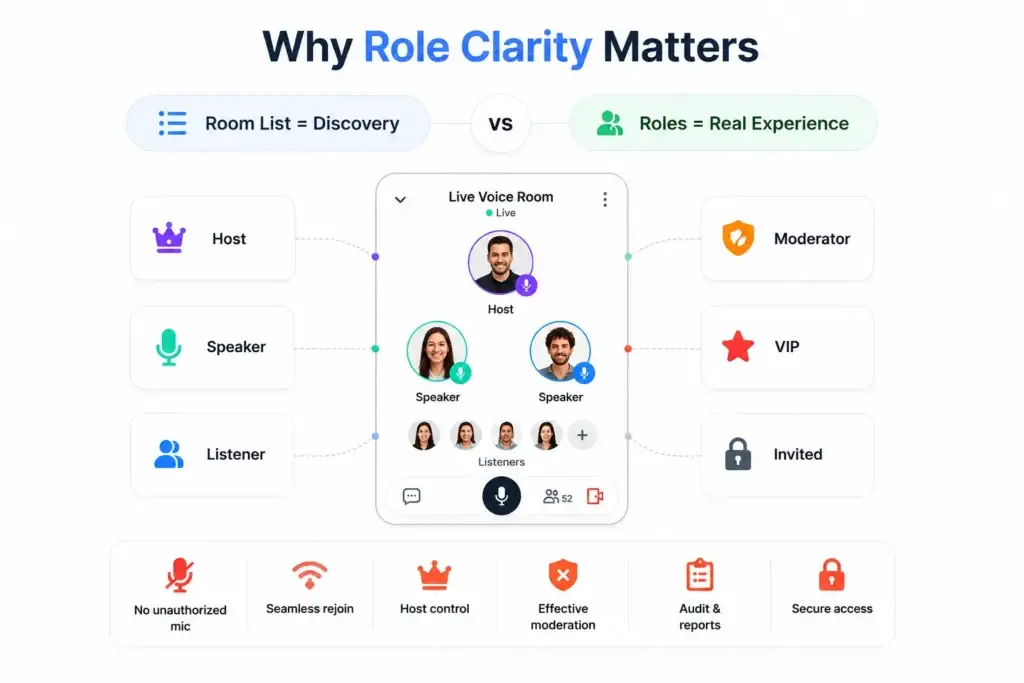
Many founders first imagine the room list: trending rooms, live topics, categories, speakers, and listener counts.
That matters, but the room list is only discovery.
The real experience begins after the user enters the room. The app must immediately know whether that user is a host, speaker, listener, moderator, VIP user, banned user, or invited participant.
Without role clarity, the platform can run into problems such as:
- Listeners turning on microphones without approval
- Speakers being unable to rejoin after network drops
- Hosts losing control during high-traffic rooms
- Moderators lacking enough power to remove abusive users
- Admins being unable to audit what happened inside a reported room
- Paid or private rooms being accessed by unauthorized users
For a founder, this becomes a business risk. A poor permission model can hurt retention, creator trust, and monetization even when the audio quality is good.
Core User Roles Inside a Live Audio Room
A scalable Social Audio Platform usually separates users into clear role groups. Each role should have defined actions, restrictions, and escalation paths.
For founders who want to see how these role-based flows translate into a product-ready feature set, Miracuves’ live social platform feature breakdown explains how voice rooms, hand-raise promotion, presence, gifting, missions, and admin controls work together.
Voice Room Roles and Business Value
| Role | Core Permission | Business Value |
|---|---|---|
| Host | Create, manage, moderate, invite, promote, mute, and end the room. | Gives creators control over the session experience and helps maintain discussion quality. |
| Speaker | Speak after approval, manage personal mic state, and participate in the live discussion. | Turns passive rooms into active conversations without giving everyone full control. |
| Listener | Join, listen, react, follow, gift, chat if enabled, report, and request to speak. | Allows large audiences to participate safely without interrupting the room flow. |
| Moderator | Assist with muting, removing users, handling reports, and managing room safety. | Protects high-volume rooms where the host cannot manage everything alone. |
| Admin | Oversee platform-wide users, rooms, reports, content rules, and activity logs. | Gives the platform operator long-term control over safety, compliance workflows, and community quality. |
Host Architecture: The Control Layer of the Room
The host is not just the person who starts the room. In a live voice community, the host is the primary controller of the room state.
A well-designed host layer should allow the host to:
- Create a live or scheduled audio room
- Set the room title, topic, category, and language
- Choose public, private, invite-only, or paid access
- Approve or reject speaker requests
- Invite listeners to speak
- Mute individual speakers
- Remove speakers from the stage
- Block or report disruptive participants
- Assign co-hosts or moderators where needed
- End the room safely
Room access also needs a clear public-versus-private logic. You can read more about private and public voice room design if your product depends on invite-only communities, password-protected rooms, paid rooms, or creator-led sessions.
The host layer must also handle edge cases. What happens if the host loses connection? Can a co-host continue the room? Does the room close automatically? Can the host rejoin with the same authority?
These details matter because live audio depends on trust. A creator will not continue hosting if they feel the platform cannot protect their session.
Speaker Architecture: Controlled Access to the Microphone
In voice room design, a speaker is usually a listener who has been promoted into an active speaking role.
This transition should never be treated casually. Speaking is a permission change, not just a UI change.
A strong speaker workflow includes:
- Listener taps “raise hand” or “request to speak.”
- The host receives the request.
- The host approves or rejects the request.
- The backend updates the user’s role.
- The real-time event layer broadcasts the change.
- The user interface updates for everyone in the room.
- Mic publishing permission becomes available to the approved speaker.
This flow keeps the conversation structured. It also prevents the room from becoming chaotic when many users want to speak at once.
For larger communities, speaker limits are also important. A room may allow hundreds or thousands of listeners, but only a limited number of active speakers. This protects audio quality, reduces moderation load, and keeps the discussion understandable.
Listener Architecture: Passive Entry With Controlled Participation
Listeners are the largest user group in most live audio rooms.
Their experience should feel lightweight. They should be able to enter quickly, understand who is speaking, see the topic, react, follow participants, send gifts where enabled, and request to speak without friction.
A good listener workflow includes:
- One-tap room joining
- Clear speaker and host visibility
- Live listener count
- Mic-disabled default state
- Raise-hand request option
- Reactions or emojis
- In-room chat if enabled
- Gift or tip actions
- Follow host or speaker options
- Report and block controls
- Smooth exit and rejoin handling
The key point is that listeners should feel involved without being able to disrupt the room.
That balance is what separates a structured social audio experience from a noisy group call.
Permission Matrix for Live Audio Rooms
A permission matrix helps founders and product teams define what every role can and cannot do.
| Action | Host | Speaker | Listener | Moderator | Admin |
|---|---|---|---|---|---|
| Create room | Yes | Optional | Optional | Optional | Yes |
| Join public room | Yes | Yes | Yes | Yes | Yes |
| Speak by default | Yes | Yes | No | Optional | Optional |
| Request to speak | No need | No need | Yes | Optional | Optional |
| Approve speaker request | Yes | No | No | Optional | Yes |
| Mute self | Yes | Yes | Not applicable | Yes | Yes |
| Mute another user | Yes | No | No | Yes | Yes |
| Remove speaker | Yes | No | No | Yes | Yes |
| Remove listener | Yes | No | No | Yes | Yes |
| End room | Yes | No | No | Optional | Yes |
| View reports | Optional | No | No | Yes | Yes |
| Ban user platform-wide | No | No | No | Optional | Yes |
This matrix should be finalized before development begins. If permissions are added randomly later, the backend becomes harder to maintain and the user experience becomes inconsistent.
Real-Time Room State: What Every Device Must Know
In a live audio room, every participant must see the same room state at nearly the same time.
The platform needs to track:
- Who is in the room
- Who is host
- Who is speaker
- Who is listening
- Who is muted
- Who has requested to speak
- Who has been invited to speak
- Who left the room
- Who was removed
- Whether the room is live, scheduled, locked, private, or ended
This room state is usually distributed through a real-time event layer such as WebSocket-based communication. REST APIs may handle structured actions, while the event layer keeps the live interface updated.
For example, when a host promotes a listener to speaker, the platform should not only update one user’s screen. Everyone in the room should see the speaker list change.
That is why room state management is a core backend requirement, not a cosmetic feature.
Backend Modules Needed for Voice Room Permissions
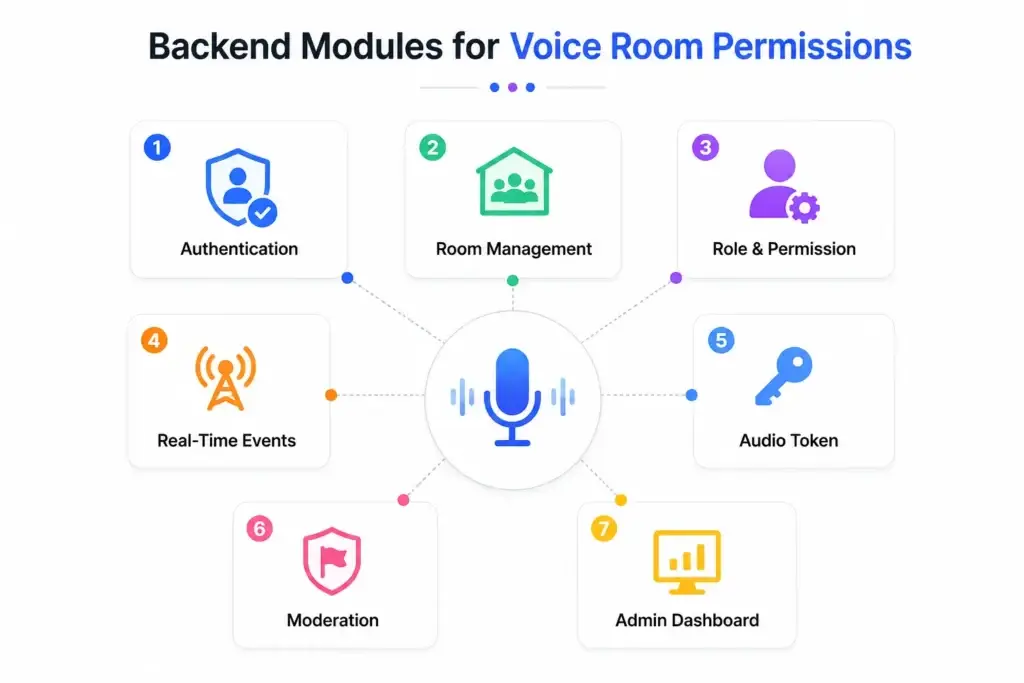
A scalable audio room system normally needs several backend modules working together.
1. Authentication and Session Control
Before users can enter or speak, the platform must verify identity. Authentication helps decide whether the user is active, banned, verified, subscribed, invited, or allowed to join a specific room.
2. Room Management Service
This service manages room creation, scheduling, room status, capacity, access type, topic, category, and room closure.
3. Role and Permission Service
This is the logic layer that decides what each user can do. It should check whether a user can speak, mute, invite, remove, gift, chat, or access a private room.
4. Real-Time Event Service
This service broadcasts live changes such as user joins, user exits, speaker promotions, mute updates, hand-raise requests, gifts, reactions, and room closure.
5. Audio Publishing Token Service
For stronger control, microphone publishing permission should be issued from the server. This reduces the risk of users manipulating the client app to gain unauthorized speaking access.
6. Moderation and Reporting Service
Every live community needs reporting, blocking, muting, user removal, room suspension, and escalation workflows.
7. Admin Dashboard
The admin dashboard helps the platform operator review users, rooms, reports, creator behavior, transaction activity, and platform-level settings.
Miracuves builds live social audio and entertainment platforms with this kind of role-aware product thinking, helping founders avoid weak room logic when planning their launch-ready app foundation.
The final development scope depends on how deep the platform goes into real-time audio, wallet logic, moderation, admin analytics, mobile apps, and deployment requirements. Miracuves explains these cost factors behind live audio room development in more detail.
Founder Decision Signals for Voice Room Design
Speed
If the platform needs to launch quickly, start with proven room workflows instead of designing every live-state rule from zero.
Control
If creators will host large communities, host permissions, moderator controls, and admin oversight must be strong from day one.
Scalability
If rooms may grow fast, the platform needs speaker limits, real-time state sync, and reliable event handling before traffic arrives.
Monetization
If gifts, paid rooms, VIP access, or subscriptions are part of the model, permissions must connect cleanly with wallets and access rules.
How Permissions Affect Monetization
Permissions are not only about safety. They also shape revenue.
A Social Audio Platform can use role-based access to support monetization models such as:
- Paid private rooms
- VIP-only speaker access
- Premium host communities
- Virtual gifts during live conversations
- Paid event rooms
- Creator subscriptions
- Sponsored rooms
- Room boosts for discoverability
- Platform commission on creator earnings
If monetization is a priority, review the live audio monetization model to understand how gifts, coin packages, platform fees, VIP access, avatar commerce, and creator earnings can connect with room permissions.
For example, a paid expert session may allow everyone to listen but only paying members to ask questions. A fan community may allow free listening but require VIP access to join the speaker stage. A creator-led platform may use gifts and tips as the core revenue loop.
In each case, monetization depends on the permission system working correctly.
Security and Moderation Layers Founders Should Not Ignore
Live audio creates real-time risk. Abuse, spam, harassment, impersonation, unauthorized access, and payment misuse can happen quickly if the platform lacks controls.
Important safety layers include:
- Role-based access control
- Server-issued audio permissions
- Encrypted data transfer
- Private room passwords
- User blocking and reporting
- Host and moderator removal controls
- Admin review queues
- Activity logs
- Rate limits for hand raises and chat
- Abuse detection signals
- Payment and gift transaction monitoring where monetization exists
Security should not be treated as a launch add-on. In social audio, community trust is part of the product experience.
Mistakes Founders Should Avoid
Giving Too Much Power to the Client App
Mic access, speaker promotion, private room entry, and moderator actions should be verified by the backend. If the client app controls too much, users may find ways to bypass expected permissions.
Treating All Users as the Same Role
A listener, speaker, host, moderator, and admin should not share the same permission layer. Weak role separation creates moderation problems as the community grows.
Ignoring Reconnection Scenarios
Users will lose network, close the app, switch devices, or rejoin rooms. The platform must restore the correct role and mute state instead of treating every rejoin as a fresh entry.
Building Monetization Before Control
Paid rooms, gifts, subscriptions, and VIP access only work when the platform can reliably decide who has access to what.
Where a Ready-Made Foundation Helps
Building live audio from zero can be slow because the team must handle audio infrastructure, permissions, room state, moderation, wallet logic, notifications, mobile screens, admin controls, and deployment workflows together.
Founders who need implementation support can also evaluate Miracuves as a social audio development partner for live rooms, speaker controls, creator monetization, and admin-led platform operations.
A ready-made foundation can help when the founder already understands the business model and wants to validate the community faster.
For example, Miracuves offers a launch-ready social audio and live entertainment platform that can support founders planning voice rooms, live sessions, role-based participation, gifting, moderation, and admin control. This kind of page should remain the commercial destination, while educational blogs like this one explain the architecture behind the experience.
You can also explore Miracuves’ ready-made live social audio platform guide for a broader startup-focused view, or review social media app development services if your product requires custom workflows beyond the standard room model.
Final Thoughts: Voice Rooms Need Control, Not Just Audio
A successful Social Audio Platform is not only about clear sound. It is about controlled participation.
Hosts need authority. Speakers need structured access. Listeners need safe ways to engage. Moderators need practical tools. Admins need visibility. The backend must keep every role, permission, mute state, and room event consistent in real time.
Once the room architecture is clear, the next decision is launch planning. This go-to-market strategy for a live social audio platform can help founders think through audience building, creator onboarding, and monetization rollout.
For founders, the smartest product decision is to treat voice room architecture as a core business layer. When the room stays organized, creators feel safer, listeners stay longer, and monetization has a stronger foundation.
FAQs
What is voice room architecture in a Social Audio Platform?
Voice room architecture is the backend and product logic that controls how live audio rooms are created, joined, moderated, monetized, and ended. It includes hosts, speakers, listeners, permissions, real-time room state, mic access, moderation tools, and admin controls.
Why are host, speaker, and listener roles important?
These roles keep live conversations structured. Hosts manage the room, speakers participate with approved mic access, and listeners can engage through reactions, chat, gifts, follows, reports, or speaker requests without disrupting the session.
Should listeners be allowed to speak directly?
In most scalable live audio rooms, listeners should not speak by default. A hand-raise or request-to-speak workflow gives the host control and prevents chaotic conversations.
What backend modules are needed for live audio room permissions?
A strong backend should include authentication, room management, role and permission logic, real-time event handling, audio publishing permission, moderation workflows, notifications, analytics, and an admin dashboard.
How do speaker permissions work in live audio rooms?
Speaker permissions usually work through a promotion flow. A listener requests to speak, the host approves the request, the backend updates the role, and the platform enables microphone access for that approved user.
How can a Social Audio Platform make money from voice rooms?
Revenue can come from virtual gifts, paid rooms, VIP speaker access, creator subscriptions, sponsored rooms, private communities, room boosts, and platform commissions on creator earnings.
What should founders check before building a live audio platform?
Founders should check room permission logic, host controls, speaker limits, listener engagement tools, moderation workflows, real-time state sync, wallet or gift logic, admin control, mobile performance, and source-code ownership.
Can Miracuves help launch a voice-first social platform?
Yes. Miracuves helps founders launch ready-made and white-label social audio platforms with branded apps, source code, admin dashboards, room workflows, monetization features, and faster deployment support.
Miracuves is an independent software development company. We are not affiliated with, connected to, sponsored by, or endorsed by any company or product named in this article.
Terms such as “X Clone” are used descriptively. It is how the software industry refers to building a platform with functionality comparable to a known service, and how clients search for it.
The entire design and codebase of our products is built by our own team. Our products contain no code, design, graphics, or content originating from any third-party website or applications.
All third-party names and marks referenced in this article are the property of their respective owners, referenced solely to identify the services discussed.